Concept of Designing an Optimized Pull Model View
Controller Type Content Management Framework
Zamah Sari
Student onDepartment ofElectrical Engineering Brawijaya University
Malang, Indonesia
Moechammad Sarosa
Department of ElectricalEngineering Brawijaya University
Malang, Indonesia
Heru Nurwasito
Department of InformaticsBrawijaya University Malang, Indonesia
ABSTRACT
Based on the concept of “easy to learn and develop for anyone”, we present an integrated framework concept for developing content management system using an optimized pull Model View Controler(MVC) type in web programming. The framework consist of four easy steps to follow: first step is determining web page template intotwo parts, which are static and dynamic part that mostly is the main content part from a web page, then breaking the web application into modular so we can easily maintain and develop it, then slicing the dynamic part into pull MVC type Programming and the last step is optimizing the framework to achieve high speed load framework. This framework contain several parts that will be pulled together to form a complete web page according to user need, first part is view part that contain the user interface design of web page and some commands to call the logic part, logic parts which contain the web programming and commands to call the database queries in model part, model parts which contain the database query programming and language support add on as additional feature. By breaking a web page into parts and creating the web application into modular, this kind of framework can be learned and developed by anyone, even for the one that just learns the web basics programming.
General Terms
Web design, content management, web programming.
Keywords
CMS, MVC, framework, web programming, web optimizing.
1.
INTRODUCTION
Content Management Framework is a system that have reuseable web component facility to develop a content management system like a web application framework. This type of content management is a combination between content management system and web application framework. While a pull MVC type mean that this content management is slicing the web pages template into several parts, and by pulling those parts togetherinto one complete page, this kind of content management will have a high reusable coding part and easier for developer to maintainand develop their codes. This Pull MVC Content Management Framework must have basics facilities that a Content Management System have, desired features on a Content Management Framework [1] certainly includes:
Having two different area which are 1) frontend area, this area is area which we know as public area and 2) backend area, this area is area which administrator only can have access into it and managing the content site, from creating menus, making new content, updating information, deleting old records and other activities.
Efficient and Maintainable Code Handling: framework is consisting several parts, and it is essential that those codes will be loaded only when needed. The mechanisms used in the framework must be capable of handling extra code files added as extensions.
This mean that we will break the codes into modular and the framework mechanism will pull those parts into single page before deliver the whole content to user.
Database Interface: many web applications need to access database to be able to function efficiently. By using database, an application can provide higher level functions to meet common requirements.
Cache: this feature is used in many different contexts for internet processing. And can provide speed and efficient operation that benefit processing load if we can well implement it.
Menus: when making a framework it is not desirable to create static menus in it. So it is highly recommended to make dynamic menus using database on public area but stayusing static menus for administrator area.
Language: when making a backend area framework it is also recommended to make all the menus and command in variables, so when needed we can make it in other languageform, which way the usability of the framework will be higher and can be used across country. While at frontend area we keep all menus inside database, so menu titles can be named as users’ native language.
2.
DETERMINING STATIC AND
DINAMIC PARTS ON WEB PAGE
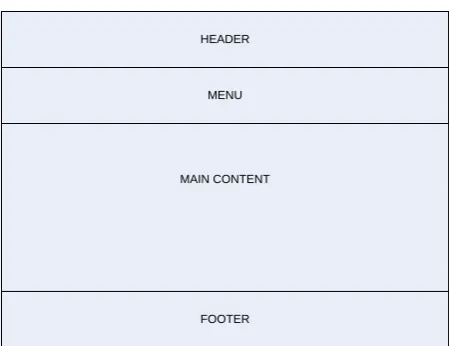
First thing to do when making this pull MCV content management framework is to determine which area is frontend and backend.Then we determine which part of the page are statics or dynamics.
MAIN CONTENT
FOOTER HEADER
MENU
Figure 1.General Webpage layout.
Frontend Area
The frontend area or we know as public access area will have statics and dynamics area like on figure below:
MAIN CONTENT = DYNAMIC
FOOTER = STATIC HEADER = STATIC
MENU = DYNAMIC
Figure 2.Static and dynamic area for frontend framework.
Backend Area
And for backend area will have statics and dynamics area like this figure:
MAIN CONTENT = DYNAMIC
FOOTER = STATIC HEADER = STATIC
[image:2.595.54.279.67.240.2]MENU = STATIC
Figure 3.Static and dynamic area for backend framework.
3.
BREAKING THE APPLICATION
INTO MODULAR
To make the framework as modular and have reusable codes as much as possible, we will first breaking the codes by its type and making directory structure for it.Here is the plan for directory structures:
Caches CSS JavaScript Language Modules Templates
3.1
Cache
This directory will hold cache mechanism to speed up and reduce process load on the server. Also optimizing the codes and content by using several way like 1) using compressed format when delivering content to user, 2) compress, minified and joining CSS and JavaScript files into one, 3) adding expired header on every objects like pictures, videos, sound or any multimedia files, so the client browser can cache them on clientscomputer.
3.2
CSS
AllCSS files needed to make web layout will be placed here. And to optimize the speed of framework when loaded on client computer, we have to place any CSS files link on the top of body and use as less as possible CSS files. Combining CSS files into one big file is a very good idea to optimize it. And use as little as possible CSS codes and trash away any unnecessary codes.
3.3
JavaScript
JavaScript framework like mootools, jQuery, prototype, or maybe our own JavaScript will stay in this directory. When using any third party like jQuery and others, using CDN is a wise decision to make. That way we can save lot of bandwidth and loading speed of our framework will increase more. But if we use our one JavaScript, placing it on the bottom of the page, putting trigger on JavaScript so it will only loaded when needed will be an efficient way.
3.4
Language
In here, we will place all language configurations to make menus and commands inside backend area.
3.5
Modules
Dynamics part necessary to build a complete page before delivering it to frontend area or public area will be placed here.
3.6
Templates
Inside this templates directory we place all statics part like header, menus and header then put them all together and pull the dynamic part needed before delivering it to user.
4.
SLICING THE DINAMIC PART
In this part, the plan is to make one big file for each module, so we can easily maintain the codes depend on which module we will develop. The framework must have a mechanism to pull out needed module before deliver the complete page to user. And then specifically call what kind of task the module need to run, like select, insert, update, delete, validate or other task.
www.domain.com\?module=name_of_module&task=name_o f_task&id=which_record_id_called&other_status=status
Now, let’s break down the URL into pieces, as we can see that there are some variable in that post method, 1) module, 2) task, 3) id and the last post is 4) other status.
4.1
Module
This post variable stand for module we pull inside module directory.So when users click a link, the framework mechanism will call header, menus, module and then footer. After whole parts are pulled together into one complete page, the framework will deliver it to user.
4.2
Task
This variable of post intended to replace any specific form or process file, like file for user input form, file forvalidating form inputs, file for processing inputs into query language and other task. So with this variable task post we can switch case the task.
4.3
Id
This id post variable is record level variable, it is used for update of delete query, or any other query that need record level access.
4.4
Other status
This one for additional status we might need. For example login check status, validating form fields status or any other status needed when developing the framework.
5.
OPTIMIZING WEBPAGES
There are several ways to maximize webpage speed, andspeeding webpage load can attract visitors to come back to our site.
“Your site will be judged in the blink of an eye, so it must become visible very quickly” [2]
Here is some optimization technique suggested for the framework:
5.1
Combine external CSS
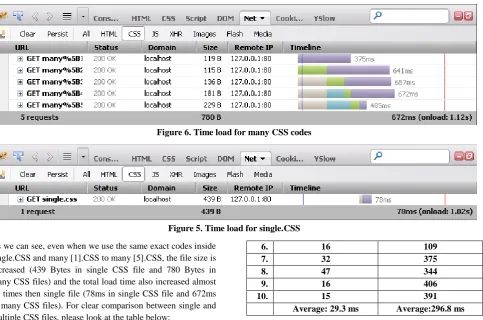
[image:3.595.63.547.334.654.2]Combining many style sheets files into one single file will increase page load. Here is a little research we use to find out that one big CSS file is better than many little file to loads. In this little research we use the same codes inside the single.CSS and split the codes into several file named many [1].CSStomany [5].CSS.
Figure 6. Time load for many CSS codes
Figure 5. Time load for single.CSS
As we can see, even when we use the same exact codes inside single.CSS and many [1].CSS to many [5].CSS, the file size is increased (439 Bytes in single CSS file and 780 Bytes in many CSS files) and the total load time also increased almost 10 times then single file (78ms in single CSS file and 672ms in many CSS files). For clear comparison between single and multiple CSS files, please look at the table below:
Table 1.Comparison loads between Single and Multiple CSS Files
No. Single File (ms) Multiple File (ms)
1. 47 422
2. 46 93
3. 16 375
4. 27 344
5. 31 109
6. 16 109
7. 32 375
8. 47 344
9. 16 406
10. 15 391
Average: 29.3 ms Average:296.8 ms
It is a good idea to have multiple CSS files when we are in development, but in the real production we have to combine all the CSS into one or two file to speed up load time.
5.2
Remove unused CSS codes
code that only be used for home.html, contact.html and other. So the loaded CSS files for each page will be 2 or 3 maximum.
5.3
Minify CSS files
Compacting CSS files can improve the load time and rendering time of pages. So it is wise to keep development version of CSS in readable version, while in production version we have to minify it. Let’s say we have CSS codes like shown below:
body{
Background :FFFFFF; }
#login {
Background : 000000;
}
In minify version we can simply remove unneeded spaces around it, so the codes will looks like this:
body{Background : FFFFFF;} #login{Background : 000000;}
That way we can save lot of storage and speed up our pages. For easily minify CSS, we can use tool like Online YUI Compressor at http://www.refresh-sf.com/yui/.
5.4
Combine external java script
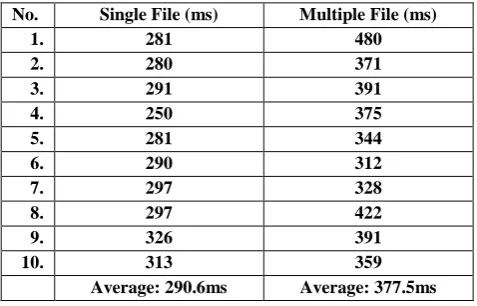
[image:4.595.59.547.220.471.2]Just like in CSS case, combining external java script files into a single file is a very good thing to do and have the same result as shown in figures below.
Figure 6. Time load for many java script codes
[image:4.595.48.287.512.665.2]Figure 5. Time load for singlejs.js
Table 2.Comparison loads between Single and Multiple Java Script Files
No. Single File (ms) Multiple File (ms)
1. 281 480
2. 280 371
3. 291 391
4. 250 375
5. 281 344
6. 290 312
7. 297 328
8. 297 422
9. 326 391
10. 313 359
Average: 290.6ms Average: 377.5ms
5.5
Minify java script
Minify java script files, as we do with CSS files and gain a smaller size files and faster load time for pages. And for easily compacting out java script files we can use Online YUI Compressor at http://www.refresh-sf.com/yui/.
5.6
Choosing the correct images format
Using the wrong image format can increase the total size of page to load, that will slowing the load speed for our website framework. So we have to carefully choose to use which format and for what, as we recommend to use jpeg format as photographic use and gif for simple picture like icon. And when we need to use super quality photographic format we can use png format.
5.7
Optimizing images size
Image size can drastically increase or decrease load time if we not set it right. For example when we need an icon with 64x64 px size, then we have to save the icon file at 64x64 px size, and not saving it at 300x300 px size. Giving the correct size at html codes like shown in the html code below also give a good result in load speed, since the html browser can render the image size even when the image file not yet downloaded. <image src=”image.jpeg” width=”180” height=”120” />
5.8
Giving the right order for CSS and
Java Script links
The last recommendation we can give to speed up load time in this framework concept is giving the right order for the CSS and java script files order. Browsers sometimes wait for a CSSor java script file to be downloaded in parallel link, so it is a good idea to give the master CSS link in the first place then the page CSS file. After all CSS files loaded, then load the java script files with the same order as CSS files.
6.
CONCLUTION
An Optimized Pull Content Management Framework concept can be a starting point to anyone who wants to build their own Content Management System. And several guides to optimize the load time when building the Content Management Framework will be a great help since speed is one of importance aspect to build a successful website with high usability. Since it is only a concept on how to build an ideal Content Management, we will try to implement this concept in a real Content Management Framework to see the impact on the real Content Management System as case study.
7.
REFERENCES
[1] Bramton, Martin, 2010, PHP5 CMS Framework Development, page 16.
[2] King, Andrew B., 2008, Website Optimization, O’reilly, page 118.
[3] Artmov, 2012, How to Optimize Your Website Speed. [4] Tarafdar, Monideepa; Zhang, Jie, Analyzing the
Influence of Web Site Design Parameters on Web Site Usability, Information Resources Management Journal, 2005, 18,4, page 62
[5] Paul van Schaik and Jonathan Ling, The Effect of System Response Time on Visual Search in Web Pages, The Electronic Library Volume 22, Number 3, 2004, page 264-268, Emerald Group Publishing.
[6] Selvidge, P.R., Chaparro, B.S. and Bender, G.T. (2001), “The world-wide wait: effects of delays on user performance”, International Journal of Industrial Ergonomics , Vol. 29, pp. 15-20.
[7] Ryan, G. and Valverde, M. (2003), “Waiting online: a review and research agenda”, Internet Research: Electronic Networking Applications and Policy, Vol. 13 No. 3, pp. 195-205.
[8] Perfetti, C. (2006), “The truth about download time:UIE tips feature article”, User Interface Engineering, accessed at 05 November 2012 and available at: