58 | P a g e
Web-Based Peer and Self-Assessment System Design and Development for Elementary
School Students
Mehmet Emin Kortak*
Abstract
This research aimed at designing and improving the web-based integrated peer and self- assessment. WesPASS (web-based peer-assessment system), developed in this research, allows students to assess their own or their peers’ performance and project assignments and to report about the result of these assessments so that they correct their assignments. This study employed design-based research. The participants included 102 fourth grade primary school students and their 4 teachers from 2 state and 2 private primary schools in Ankara, Kecioren (Turkey) who employed the system and were engaged in a questionnaire survey to assess its quality. The findings were analyzed through quantitative data analysis. The findings revealed that the system can be used by elementary school students for peer and self-assessment system. The participants stated that WesPASS is simple and user-friendly, and it accelerates the assessment process by employing information technology and allows to share opinions.
Key words: peer assessment, self-assessment, web-based assessment
1. Introduction
When examining the evulation methods in new primary education curiculum, we have new emerging alternativies and techniquies available. It is highly recommended to implement these techniques during the evulation process and in the aftermath. Some of these techniques include portfolio assessment, peer and self-evulation. Self and peer assessment are among the tecniques that are highly recommended for evaluation. Furthermore, the importance of applied technologies in the programs is emphasized and recommended for use during the educational process.
Peer and self-assessment techniques ensure that individuals actively participate in the assessment process, they also provide monitoring, reflection, and regulation (McCaslin & Hickey, 2001). Peer and self-assessment enhance students’ socialization (Thomas, Martin & Pleasants, 2011).
The main studies and examples on the web-based, integrated peer and self-assessent system are the following:
59 | P a g e NetPea (Lin et al,. 2001), SPARK (Freeman & Mckenzie, 2002), SWoRD (Cho & Schunn, 2007; Yang et al., 2005), Web-SPA (Sung et al., 2005), Veeheuristic (Tsai et al., 2002), CAP (Davies, 2000), Web-SPA (Sung et al.,2005), OASYS (Bhalerao & Ward,2001), GSS (Kwok &Ma, 1999; Yeh, 2001; Yeh et al., 2008).
However, there is a lack of systems that use web-based assessment and evaluation methods in Turkey and they are not often used in teaching and assessment. This entails that more studies in the country should be conducted in this area and, in addition, such systems should be developed. Thus, the purpose of this study is to design and develop a web-based, integrated peer and self-assessment system.
It is revealed that there are some deficiencies in the systems developed for this subject such as: lack of a suitable design for inter-institutional collaboration, solely addressing specific age groups of the developed systems and generally not addressing younger age groups, for example, primary school children. Additionally, the systems do not have a friendly user inerface accessability. Designed system could not evaluate independent courses at the same time, another shortcoming in the existing systems is that they give only one person the authority to implement the assessment. Designing a system without these shortcomings as mentioned above will be more effective in web-based assessment and evaluation in education.
As a result, this study will seek answers to the following research questions:
1. Is it possible to design a web-based system for peer- and self-assessment as a part of alternative measurement and evualation techniques?
2. Can this system be applied with the aim of making joint evaluation activities between different classes and institutions through a web-based system?
Thus, the purpose of this research is to design and develop a complete web-based self and peer assessment.
2. Literature review
Peer assessment is defined as the act of planning in which individuals’ products about the act of learning are questioned by their peers having a similar status in terms of success, quality, value and level (Topping, 1998, p. 250). As they evaluate the products or performances of their peers, students acquire interpersonal, communication and professional skills as well (Price, O’Donovan and Rust, 2007). With peer assessment, students develop increased trust in their peers, and their skills for critical thinking improve as they evaluate the work of their peers. Peer assessment allows them to secure assessment from a source other than their teachers. Peer assessment helps students develop a stronger sense of unity, teamwork and attachment to the group.
60 | P a g e provides students with more feedback in certain cases. It helps to boost the feedback quantity and quality to compensate for the decline in feedback due to increased classroom size. It ensures that students learn more about assessment and evaluation and this improves their approach to assessment (Race, 2001). The level of learning by students may depend upon the level of their knowledge about assessment criteria or the level of feedback they can get from others. At this point, peer and self-assessment informs learners of their cognitive level. Lifelong success of students relies on whether they can truly assess their strengths and weaknesses (Lew et al., 2010).
Web-based instruction is a method which employs the programs prepared for making use of the resources available on the web in an environment designed to promote and foster learning. Even if they are located in the same place, educators and students can interact and communicate with each other using the facilities provided by the Internet (Callı, Torkul & Taşbaşı, 2003; Karaağaçlı & Erden, 2002; Bay & Tüzün, 2002; Bonham et al., 2000). The greatest benefit of the web is that it makes it possible to restructure learning. In this way, interaction and cooperation between students and tutors can be attained and communication can be boosted (Karaağaçlı and Erden, 2002). Web-based assessment and evaluation methods are the systems which contribute to educational assessment and evaluation methods and which have found increased use in recent years. This method, which came to be used at all levels of education, has emerged with the integration of the Internet with learning and set a new trend (Davies, 2000). Web-based assessment and evaluation does not require simultaneity in terms of time and space and as such facilitates individual learning (Karaağaçlı & Erden, 2002). Web-based assessment and evaluation can be effective in mitigating teachers’ workload, tackling the problems stemming from the size of the classroom, and settling the problems in complying with the classroom procedures and eliminating the delays (Davies, 2000).
Such factors as security, connection, communication and maintenance should be taken into consideration for a successful web-based assessment application. A web algorithm should be developed first before moving on to develop a web-based assessment system. After the algorithm has been designed, the content is transferred to the algorithm. After the student participation is ensured, assessment is made in the web environment with students. Following the completion of assessment, the algorithm is evaluated and the glitches in the algorithm are rectified so that it can be used in education in an efficient manner. The use of a web-based assessment system not only offers online testing opportunities, but also enables teachers to check test results very quickly and to store the data with the help of the Internet (Bonham et al., 2000). In addition, audios, videos and dynamic images can be added to such assessment and evaluation applications (Clariana & Wallace, 2002).
61 | P a g e The web-based self- and peer-assessment is an assessment and evaluation technique which combines the traditional assessment and evaluation techniques (multiple-choice, true-false, fill in the blanks, written and oral examinations, etc.) with complementary assessment and evaluation techniques (structured grid, performance, diagnostic branched tree, etc.) in a web environment, so that feedback is provided to students at will (Karaağaçlı & Erden, 2002).
Bay and Tüzün (2002) designed, developed and completed a sample web-based course. In the two-part study, they concluded that the use of a web-based teaching in education would improve the quality of education. Yeh et al. (2008) studied a web-based peer assessment system and described the theoretical bases, characteristics and process steps of web-based peer assessment. With a broad perspective, they also discussed positive and negative aspects, purposes and target users of certain systems developed in various studies.
Callı et al. (2003) discussed the advantages of the assessment and evaluation made using a system which combines traditional assessment methods with a web-based ones. Aktürk, Şahin and Sünbül (2008) reported the views of prospective computer teachers about web-based teaching. Bay and Tüzün (2002) examined the theory of web-based education. Çepni et al. (2012) studied the views of primary school students and their parents about a web-based performance assessment program. They found that students and their parents have positive attitudes toward the web-based performance assessment program. Bay (2011) examined the relationship between the views of 56 prospective English teachers about peer assessment processes and the teacher, peer and self-assessment results. Yurdabakan (2012) carried out an experimental study on 73 prospective teachers to study the effect of the joint and peer assessment education on the students’ self-assessment scores. In their study, Hamzadayı and Çetinkaya (2011) used an information form structured using qualitative research methods such as document analysis as well as quantitative research methods. Taşpınar and Halat (2009) conducted a study on 283 students attending the 6th grade. They found that performance homework which was recently introduced to the curriculum of the primary school’s 6th grade was applied more frequently than project and portfolio homework and self-assessment was applied more frequently than peer self-assessment and mathematics diaries.
3. WesPASS
The system was written in the PHP programming language and using MySQL as the database back-end. Using this system, teachers may announce assignments to students, while students may send their assignments to their teachers and assess their own and their peers’ assignments; they may correct their assignments; and teachers may grade their assignments.
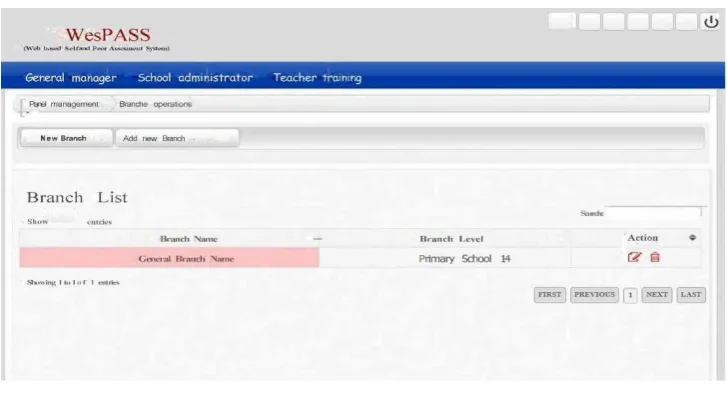
62 | P a g e administrator may add the schools which will be included in the assessment system. The global administrator may add, delete or update as needed all branches available in the system.
People who can organize the use of the assessment system in their schools are added to the system as school administrators. The school administrator is a user appointed by the global administrator for administering the system at the school level. The school administrator is authorized to make general descriptions about the school (short information about the school, the number of classes and students, etc.) and assign the teachers who will use the system and make necessary changes.
When a teacher logs into the system, s/he is greeted by a screen showing the list of students. The teacher is the user who actively uses the system for giving and following up assignments and makes the final decisions. The teacher may add students to the classes using the button “Add new students.” Teachers create various assignments for each lesson and announce these assignments. Using the assignment creation screen, teachers enter various details for assignments and save them and then create the scales according to which those assignments will be assessed. All operations regarding assignments can be performed on this screen. Upon creation, the assignments are sent to the students so that they upload their answers to the system until the specified deadline.
An assignment cannot be published as soon as it is created. The assessment tools for the assignment should also be created before the publication of the assignment. After the assignment is created, the teacher is directed to the assignment list where there is a button for adding assessment tools for the assignment in question. Clicking on this button, the teacher is presented with a form using which question types and questions can be entered. After the assessment scales are created, the button for publishing the assignment becomes active next to the button for adding the assessment tools in the assignment list. When this button is clicked, the assignment status is set to 1 and the assignment starts to be published on the panels of the students who take that course. It should be noted that the answers the students give to the assessment scales are saved. The details were described below in describing the student panels.
Another important section in the system is the one by which teachers send student assignments to other students for assessment. After the students upload their assignments to the system and after the deadline (details are given below), the teacher may distribute the completed assignments to students for assignment, using the assignment details that open up when the assignment name is clicked. In distributing the assignments, the teacher may choose to hide the student names. If this option is selected, a student cannot see the name of the student to whom the assignment to be assessed belongs.
63 | P a g e students who have delivered the assignment.” Clicking on this link, the teacher can see the list of the students who have delivered the assignments and those who have not. The students who have not delivered the assignment are shown in a different color. When the name of a student who has delivered the assignment is clicked, a page is opened showing the assessment scale filled by the student for his/her assignment, the assignment scale filled by another student for the same assignment, and the assessment scale filled by the student for another student’s assignment.
As noted above, the option for distributing the assignments becomes active after the deadline for the assignment. The page showing the assignment details also indicates the status of the assignment (assignments are being prepared; assignments are delivered; assignments are distributed to students for assessment; student feedback was received; student feedback was examined by other students; final grades were issued by the teacher). In the assignment details section, the teacher grades the assignment and writes a short evaluation for the assignment at the end of all stages.
Students are the end users in the system. Students closely monitor if any assignment has been sent to him/her and completes and uploads the assignment, if any, to the system. During the period given, the student assesses his/her own assignment as well as the assignment of one of his/her friends. Upon logging into the system, the student is greeted by a home page which contains links for viewing assignments, announcements positions in a way to catch the student’s attention, alerts for new assignments, the remaining duration for the deadline and similar information. The student assesses his/her own or another student’s assignment using the associated scales and saves it. In this case, the assignment status is changed to “preliminary assessment completed.” After the student’s assignment is assessed by him/herself and by another student, the status is changed to “reassessment stage.” At this stage, clicking on the title of the assignment, the student can see the assignment details page which contains a link to the page showing the assessments made by another student about his/her assignment. The student is expected to read the assessment results and to make changes to his/her assignment if needed and upload it to the system. When the teacher controls the assignments, grades them with a score between 0 and 100 and writes a short evaluation, the status is changed to “Grade given.” After this stage, the student can see the grade and teacher’s evaluation.
To assess the assignments sent to him/her, the student can use the menu for assignments to be assessed and see and download the assignments by other students. Using the section for assessing the active assignment, the student uses the button, “Assess.”
4. Research Method
64 | P a g e research methods are preferred by researchers for designing e-learning environments. Web-based learning environments are usually designed to ensure that students work in a single environment for extended periods. They allow students to re-decide, re-analyze and re-design. The study sample consisted of fourth graders and their teachers. To test the teacher aspect of the system developed, four teachers from two private primary schools and two public primary schools were included in the study. Four primary schools including two private and two public ones were picked up to identify if there is any difference between private and public schools in applying the system and if the differences in the facilities provided by the private and public schools constitute any discrepancy in terms of the use of the system. 102 students from the classes of the selected teachers were included in the working group for the purpose of improving the student aspect of the system. Our interviews with the students in the working group revealed that 6 out of 35 students from the Public School 1, 5 out of 31 students from the Public School 2, and all of 17 students from the Private School 1 and 19 students from the Private School 2 had the Internet connection at home. Through interviews with the officials from the Education Directorates, it was verified whether the private and public schools selected had computer classes and the Internet connection. 41 percent of the students in the working group (f=42) were female and 59 percent - male (f=60). The majority of these students (f=70) were aged 10. The schools which were included in the study are located in Keçiören district of Ankara. Of the teachers, two were males and two females: one male teacher and one female teacher were selected from each school type. The teaching experiences of the teachers were roughly similar as they had been teaching for about 10 years on average.
4.1.Development phase of the system design
The web-based self- and peer-assessment system was initially conceived as web software with which students could assess each other, and the initial intention was to make students in one class assess each other. However, a system design that would allow students from different classes and schools to assess each other would be better. In the light of expert opinions and ongoing literature search, it was decided to use the PHP programming language and the MySQL database.
The system developed under this study has the following basic functions: (i) Providing anonymity. (ii) Ability to arrange joint assessment activities inside the class, among classes, among schools and even among countries. (iii) The flexibility management structure. (iv) Flexible scale structure. (v) With a feedback system. (vi) Accessibility feature. (vii) Support for younger ages. (viii) Ability to make authorizations for teachers, institution administrators, the general administrator, etc. (ix) Multi-peer notifications. (x) Course-agnostic design. (xi) User-friendly interface.
65 | P a g e
Figure 1. Roles of the users in the draft system
There were initially two types of users: teachers and students. However, the system’s infrastructure allows the addition of more users. Additions were made to include institution administrators and the general administrator as users in the system. Students are the end-users in the system. Administrators define the school and teachers in the system.
4.2.Data Collection Tools
In the study, two assessment tools, namely the Teacher Questionnaire Form, which is used to collect teachers’ views and opinions about the system’s functioning as well as their reports about the system’s shortcomings and their suggestions about improvement, and the Student Observation Form, which is used to collect the data which will be needed to ensure that student can use the system more effectively, were used. There were 15 open-ended questions in the Teacher Questionnaire Form. The purpose of these questions was to obtain the views and opinions of teachers about the functioning of the system. In developing the Teacher Questionnaire Form, the questions were prepared taking into consideration the web-based assessment system’s basic functions related to teachers (such as announcing assignments, distributing assignments, assessment) and two faculty members with a doctoral degree who were specialized in the instructional design were consulted about the relevance of these questions. The questions were revised in line with the expert views and the questionnaire form was given its final shape. There were 4 open-ended questions in the Student Questionnaire Form. The form was developed by the researcher for the purpose of obtaining the views of students about the system.
4.3.Validity and Reliability
The field experts who were informed about the aims of the study examined both the assessment tools and the web-based assessment system developed and expressed their suggestions. In line with these suggestions, changes were made to ensure proper data collection. Data were collected from multiple sources and for data
66 | P a g e triangulation, it was ensured that the data collected support each other. In addition to the data collected from the teachers and students for the system developed in the study, the researcher also made observations. The participants were consulted about the categories created after the analysis of the data collected from the participants and they were asked if it was their real intention. Membership control was ensured as well. For reliability, the data collected was evaluated by more than one evaluator. The categories created by the researcher were checked by another evaluator as well.
4.4.Data Collection Process and Analysis
The data was collected in two periods. This was a two-week process comprising the sample applications conducted with the primary school fourth graders. The system was revised in line with the information obtained from the data collected. The data collected were analyzed using qualitative data analysis methods. The questionnaire forms were distributed to the teachers and students. The data obtained from the relevant assessment tools were qualitative data which could be analyzed using such methods as pattern discovery, data coding and synthesizing. The data collected in this study were analyzed with the data coding method and patterns were identified for each question, and categories were created accordingly. The frequencies of the states of these categories were identified and the figures were entered into tables and percentages were interpreted.
5. Findings
Figure 2. General Admin Screen
5.1.Teacher Questionnaire Findings
67 | P a g e When asked: “What are the problems you experience regarding the student operations (adding, listing, editing, etc.)?” - the teachers noted that they faced no problem regarding student operations (adding, listing, editing, etc.) and made some suggestions. These suggestions include: when listing the students, the teacher should be able to list them by their school numbers; when listing in alphabetic order, the names starting with certain Turkish-specific letters (such as ş, ç,) are displayed at the end of the list and this should be fixed.
When asked: “What are your suggestions for a more effective menu for student operations?” - the teachers responded that the student operations menu is sufficient, simple and useful, and it is not complicated.
5.2.Assignment Operations
When asked: “What are the problems you experience in defining new assignments?” - the teachers expressed that they experienced no problem in defining new assignments and made some suggestions. They indicated that the procedure for defining a new assignment can be simplified and all the information can be entered in a single page without opening up new pages, and the teacher-user should be authorized for correcting, deleting, or renewing the assignments.
Concerning the question: “Are the information fields for defining assignments sufficient? If not, what are your suggestions?” - the teachers indicated that the information fields for defining assignments are sufficient, and one teacher noted that the start date and deadline are not functional and should be activated.
For the question: “What are the problems you experience in distributing assignments to students?” - the teachers replied that the assignment distribution is easy and one teacher noted that the outgoing assignments cannot be corrected as the assignments are displayed as Word files.
When asked: “What are your suggestions about the announcement of assignments?” - the teachers expressed no problem about the announcement of assignments. Two teachers noted that the assignments may be totally online and notifications for sending assignments to students and receiving assignments from them may be developed.
Referring to the question “Do you have any other suggestions to make or any problem you experience regarding the assignment operations? If any, please specify,” the teachers noted that assignments are downloaded to different places at different computers and students find it hard to locate the assignments and perform operations on the file.
5.3.Assessment Operations
68 | P a g e Regarding the question: “What are your suggestions for simplifying the assessment scale creation process?” -the teachers indicated that the scale creation process is sufficient. One teacher indicated that the scales understandable for students should be used and the answers to test questions should have such headings as true-false or positive-negative, and the system should give a warning if there is any field left blank when the button for saving the scale is pressed.
When asked “Do you think the assessment types offered in the system are sufficient?” the teachers found the system’s assessment types sufficient.
Referring to the question: “Do you have any other suggestions to make or any problem you experience regarding the assessment operations? If any, please specify,” one teacher noted that teachers may perform the assessment on the system and teacher and student assessments may be compared.
In response to the question: “Do you think the system is user-friendly?” - the teachers indicated that the system is user-friendly. They also noted that it may evolve into a more functional system through development over time.
Regarding the question: “What other features do you think might be added to the system?” - one teacher indicated that the system should have a mechanism for alerting the user if s/he makes a mistake or leaves something blank at every stage.
When asked “Do you think this system will be useful to you in the assessment process?” the teachers replied that the system will be useful to them in the assessment process. One teacher indicated that the system will be useful if the assessment results are sent to them in the form of a report.
In response to the question: “What are your overall suggestions? Please specify” - the teachers indicated that the application is nice and the use of information technologies will speed up the assessment process and ideas can be exchanged using the system. They also noted that they are ready to help if their assistance is needed.
5.4.Student Questionnaire Findings
Students were given an assignment concerning the topic “Let us know our world” from the course “Science and Technology.” The information regarding this assignment was sent to the students via WesPASS and the students were asked to download the assignment information from the system and uphold the assignment file to WesPASS after completing their assignment. After the assignments were uploaded to the system, they were randomly distributed to the students and the students were told to assess the assignments of their peers. Observation forms were filled about the students who completed these stages, and the data in these forms were analyzed. The findings are presented below.
69 | P a g e answered, “Yes, I had some difficulties”; two students (6.45%) answered “No, but the Internet was slow”; and one student (3.23%) answered, “No, but it was slow to a virus.”
The answers the students gave to the question “Did you experience any problem in logging into the system?” are presented in Table 1.
Table 1. The answers to the question: “Did you experience any problem in logging into the system?”
Answers f %
I didn’t experience any problem 26 83.87
The Internet was slow 2 6.45
I had some difficulty 1 3.23
No, but I found it hard to write the text in Microsoft Word 1 3.23
Multiple pages were opened when logged in 1 3.23
Total 31
As seen in Table 1, 26 students (83.87%) answered “No, I didn’t”; two students (6.45%) answered “No, but the Internet was slow”; one student (3.23%) answered “No, but I found it hard to write the text in Microsoft Word”; and one student (3.23%) answered “Multiple pages were opened when logged in”.
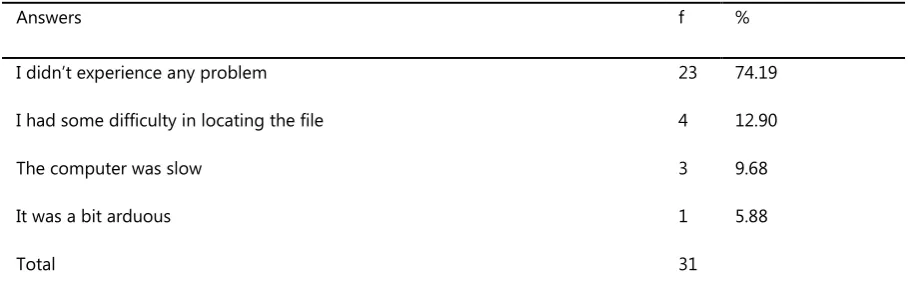
The students gave the following answers to the question: “What are the problems you experienced in uploading the assignment to the system?”
Table 2. The answers to the question: “What are the problems you experienced in uploading the assignment to the system?”
Answers f %
I didn’t experience any problem 23 74.19
I had some difficulty in locating the file 4 12.90
The computer was slow 3 9.68
It was a bit arduous 1 5.88
Total 31
70 | P a g e The students gave the following answers to the question: “What are the problems you experienced in assessing the assignments of your peers?”
Table 3. The answers to the question: “What are the problems you experienced in assessing the assignments of your peers?”
Answers f %
I didn’t experience any problem 25 80.65
I had some difficulty in switching between the assignment and scale pages 1 3.23
The computer was slow 2 6.45
I had some difficulty in saving and got help 1 3.23
I experienced problems in receiving assignments 1 3.23
I needed help in assessing the assignment 1 3.23
Total 31
25 students (80.65%) answered, “I didn’t experience any problem”; one student (3.23%) answered, “I had some difficulty in switching between the assignment and scale pages”; two students (6.45%) answered, “The computer was slow”; one student (3.23%) answered, “I had some difficulty in saving and got help”; one student (3.23%) answered, “I experienced problems in receiving assignments”; and one student (3.23%) answered, “I needed help in assessing the assignment.”
The frequencies and percentages of the answers to the question: “Did you experience any problem in viewing the assignment?” are given in Table 4.
Table 4. The answers to the question “Did you experience any problem in viewing the assignment?”
Answers F %
I didn’t experience any problem 35 100.00
Total 35
All students indicated that they did not have difficulty in viewing the assignment. The teacher observed that all students were able to view the assignment without having any problem. It can be said that the students were successful at this stage.
71 | P a g e Table 5. The answers to the question, “Did you experience any problem in logging into the system?”
Answers f %
I didn’t experience any problem 35 100.00
Total 35
As seen in Table 5, all students responded saying that they did not experience any problem. It can be said that the students were successful in logging into the system.
The students gave the following answers to the question: “What are the problems you experienced in uploading the assignment to the system?” (Table 6).
Table 6. The answers to the question, “What are the problems you experienced in uploading the assignment to the system?”
Answers F %
I had difficulties in doing the assignment and saving the changes; uploading is a lengthy process; it may be shorter.
35 100.00
Total 35
All students answered: “I had difficulties in doing the assignment and saving the changes; uploading is a lengthy process; it may be shorter.” According to the observations of the teacher, it is a tedious process to prepare and upload the assignment. The teacher indicated that the students had difficulties locating the assignment file and uploading it to the system. We can say that the students had problems in uploading assignments to the system. The students gave the following answers to the question: “What are the problems you experienced in assessing the assignments of your peers?” (Table 7).
Table 7. The answers to the question: “What are the problems you experienced in assessing the assignments of your peers?”
Answers F %
I didn’t experience any problem 28 80.00
I got help in assessing the assignment 7 20.00
Total 35
72 | P a g e The frequencies and percentages of the answers to the question, “Did you experience any problem in viewing the assignment?” are given in Table 8.
Table 8. The answers to the question “Did you experience any problem in viewing the assignment?”
Answers f %
I didn’t experience any problem 16 94.12
I downloaded the assignment, but I couldn’t work on it in Microsoft Word 1 5.88
Total 17
16 students (94.12%) answered “I didn’t experience any problem” while one student (5.88%) answered “I downloaded the assignment, but I couldn’t work on it in Microsoft Word.”
The students gave the following answers to the question, “Did you experience any problem in logging into the system?” (Table 9).
Table 9. The answers to the question: “Did you experience any problem in logging into the system?”
Answers f %
I didn’t experience any problem 16 94.12
I couldn’t find the assignment sent to me 1 5.88
Total 17
16 students (94.12%) answered, “I didn’t experience any problem” while one student (5.88%) indicated, “I couldn’t find the assignment sent to me.”
The students gave the following answers to the question, “What are the problems you experienced in uploading the assignment to the system?” (Table 10).
Table 10. The answers to the question: “What are the problems you experienced in uploading the assignment to the system?”
Answers f %
I didn’t experience any problem 10 58.82
73 | P a g e
It was a bit arduous 1 5.88
I opened wrong things and had trouble in uploading 1 5.88
I couldn’t fulfil the assignment because I couldn’t upload it 1 5.88
Somehow it failed to upload 2 11.76
Total 17
10 students (58.82%) answered “I didn’t experience any problem”; two students (11.76%) answered “I had some difficulty in locating the file”; one student (5.88%) answered “It was a bit arduous”; one student (5.88%) answered “I opened wrong things and had trouble in uploading”; one student (5.88%) answered “I couldn’t fulfil the assignment because I couldn’t upload it”; and two students (11.76%) answered “Somehow it failed to upload.”
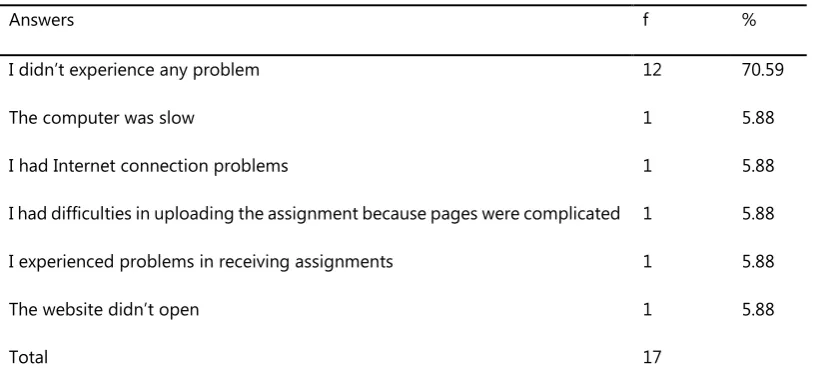
The students gave the following answers to the question, “What are the problems you experienced in assessing the assignments of your peers?” (Table 11).
Table 11. The answers to the question: “What are the problems you experienced in assessing the assignments of your peers?”
Answers f %
I didn’t experience any problem 12 70.59
The computer was slow 1 5.88
I had Internet connection problems 1 5.88
I had difficulties in uploading the assignment because pages were complicated 1 5.88
I experienced problems in receiving assignments 1 5.88
The website didn’t open 1 5.88
Total 17
10 students (70.59%) answered “I didn’t experience any problem”; one student (5.88%) answered “The computer was slow”; one student (5.88%) answered “I had Internet connection problems”; one student (5.88%) answered “I had difficulties in uploading the assignment because pages were complicated”; one student (5.88%) answered “I experienced problems in receiving assignments”; and one student (5.88%) answered “The website didn’t open.”
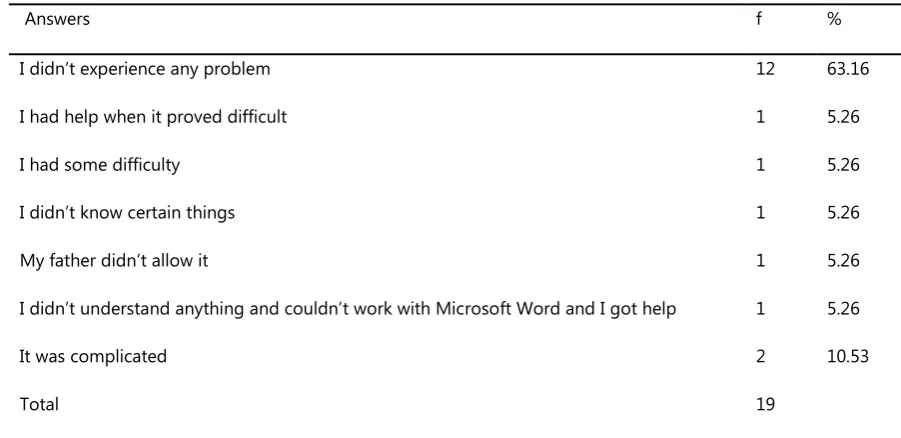
74 | P a g e Table 12. The answers to the question: “Did you experience any problem in viewing the assignment?”
Answers f %
I didn’t experience any problem 12 63.16
I had help when it proved difficult 1 5.26
I had some difficulty 1 5.26
I didn’t know certain things 1 5.26
My father didn’t allow it 1 5.26
I didn’t understand anything and couldn’t work with Microsoft Word and I got help 1 5.26
It was complicated 2 10.53
Total 19
12 students (63.16%) answered “I didn’t experience any problem”; one student (5.26%) answered “I had help when it proved difficult”; one student (5.26%) answered “I had some difficulty”; one student (5.26%) answered “I didn’t know certain things”; one student (5.26%) answered “My father didn’t allow it”; one student (5.26%) answered “I didn’t understand anything and couldn’t work with Microsoft Word and I got help”; and two students (10.53%) answered “It was complicated.”
The students gave the following answers to the question, “Did you experience any problem in logging into the system?” (Table 13).
Table 13. The answers to the question, “Did you experience any problem in logging into the system?”
Answers f %
I didn’t experience any problem 12 63.16
The Internet was slow 3 15.79
It took too long 1 5.26
I had difficulty 3 15.79
Total 19
12 students (63.16%) answered “I didn’t experience any problem”; three students (15.79%) answered “The Internet was slow”; one student (5.26%) answered “It took too long”; and three students (15.79%) answered “I had difficulty.” Three students complained about the slow Internet and one student about the lengthy process.
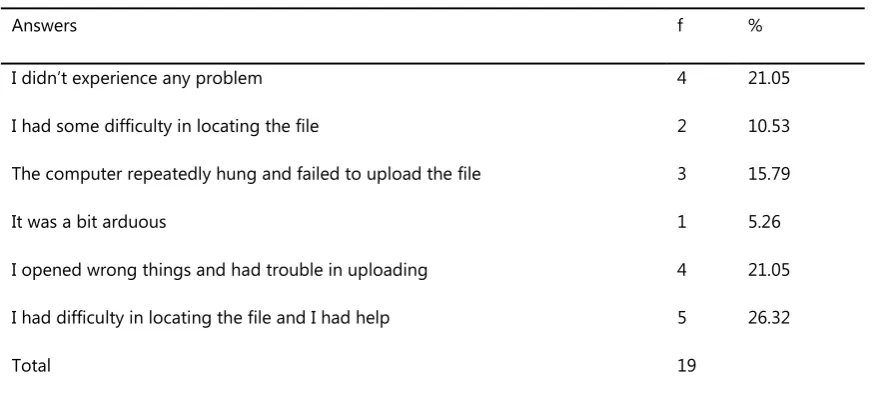
75 | P a g e Table 14. The answers to the question: “What are the problems you experienced in uploading the assignment to the system?”
Answers f %
I didn’t experience any problem 4 21.05
I had some difficulty in locating the file 2 10.53
The computer repeatedly hung and failed to upload the file 3 15.79
It was a bit arduous 1 5.26
I opened wrong things and had trouble in uploading 4 21.05
I had difficulty in locating the file and I had help 5 26.32
Total 19
Four students (21.05%) answered “I didn’t experience any problem”; two students (10.53%) answered “I had some difficulty in locating the file”; three students (15.79%) answered “The computer repeatedly hung and failed to upload the file”; one student (5.26%) answered “It was a bit arduous”; four students (21.05%) answered “I opened wrong things and had trouble in uploading”; and five students (26.32%) answered “I had difficulty in locating the file and I had help.”
The students gave the following answers to the question: “What are the problems you experienced in assessing the assignments of your peers?” (Table 15).
Table 15. The answers to the question: “What are the problems you experienced in assessing the assignments of your peers?”
Answers f %
I didn’t experience any problem 11 57.89
I had some difficulty in switching between the assignment and scale pages 4 21.05
I had difficulties because pages were complicated although they should be
clearer 2 10.53
I had some difficulty in saving and got help 1 5.26
I couldn’t find my peer’s assignment on the system 1 5.26
Total 19
76 | P a g e difficulties because pages were complicated although they should be clearer”; one student (5.25%) answered “I had some difficulty in saving and got help”; and one student (5.25%) answered “I couldn’t find my peer’s assignment on the system.”
Expert opinions for the improvement of the system were as follows: authorization of multiple administrators in the system will make the assessment process more objective in some respects. By allowing assessments among institutions, it will be possible to see how a course or topic is assessed at several institutions. It is recommended that the system should be designed accordingly. Some features may be added to the system to give evaluator support to the students during assessments. The system should be designed in conformity with the accessibility criteria developed by the World Wide Web Consortium (W3C) to ensure better use by the students. If a mechanism that will allow teachers to prepare assignments using the system online is adapted, this will facilitate things for teachers. Teachers should be able to view the assignments they send to their students online.
6. Discussion and conclusions
As already stated, there are some shortcomings in the existing software for peer and self-assessment, which make them not flexible to use for interinstitutional purpose. It is considered that the anonymity as one of the important features should be highly emphasized; it can be effectively implemented on the students from different instructions in the evaluation process (Bostock, 2000). At the same time, there is no such software addressing primary students, besides, web content accessibility, which has been particularly emphasized in the recent years, has not been taken into consideration.
A new system – WesPASS – was designed, which intends to eliminate the abovementioned shortcomings. Through the application of the system followed by a questionnaire for the students and their teachers it is been revealed that with WesPASS, there is no problem with student assignments and works, with teachers identifying new homework, handing out homeworks to the students, information about the fields of the homework such as homework title, description, start date, etc.
77 | P a g e Table 16. Comparison of WesPASS to other systems
SPARK ( Fre em an &M ck en zie , 2 00 2) SWoR D ( Ch o &Sc hu nn , 20 07 ) (Y an g et al ., 20 05) We b-SPA (Su ng et al ., 20 05 ) Ve e H eu rist ic (T sai et al ., 20 02 ) CA P (D avi es, 20 00 ) O A SY S (Bh al era o& Wa rd , 2 00 1) G SS (K wok & M a, 1 99 9) (Y eh , 2 00 1) We sPASS
Confidentiality x x x x x x x x x x
Self-study x x x x x x x x x x
Multi-screen
feedback x x x x x x x x x x
Evaluator support x x x x x x
Multidimensional
consideration x x x x x x x x
Flexible measuring
instruments x x x x x x x x x
Comments x x x x x x x x x x
Teacher transactions x x x x x x x x x
Authority manager
transactions x x
General manager
actions x
Small age group
support x x x
Inter-institutional
cooperation x x
User-friendly
interface x x x x x x
Accessibility x
Course independent
78 | P a g e One of the main differences between WesPASS and other systems is that WesPASS is able to address younger age groups. Only Veeheuristic’s (Tsai et al., 2002) system was found to have this feature among the existing systems. The reports about the existing systems did not mention this feature and the studies conducted with the existing systems were not about younger age groups.
WesPASS has flexible assessment tools. Using this feature, teachers (evaluators) can create scale tools consisting of Likert scale and open-ended questions. Also, the WesPASS system facilitates the preparation of diverse scales for peer and self-assessment. It was found that all existing systems have this feature as well.
Another difference is that the user menu of WesPASS is capable of authorizing multiple administrators. An examination of the existing systems revealed that all the existing systems except OASYS (Bhalerao & Ward, 2001) have the teacher operations menu, but only WesPASS has the institution manager operations and the global administrator operations.
WesPASS differs from the existing systems also in terms of its course-agnostic design. It can be readily used for any course, from social to natural science, a feature which other systems lack. An examination of the existing systems revealed that GSS (Kwok & Ma, 1999), OASYS (Bhalerao & Ward, 2001), SPARK (Freeman & Mckenzie, 2002), and SWoRD (Cho & Schunn, 2007) have this feature, but as the reports did not stress that the remaining systems have it, it was assumed that they were not designed with a focus on that feature.
WesPASS allows inter-institutional cooperation. WesPASS is suitable for defining multiple institutions, schools, etc., and allows joint assessment tasks among these schools. Surveying the previous systems, we found that none of them except Web-SPA (Sung et al., 2005) provides this feature. Thanks to WesPASS’s evaluator support, users may send messages to the administrator asking for the evaluator’s help. All existing systems except SWoRD (Cho & Schunn, 2007), Web-SPA (Sung et al., 2005), OASYS (Bhalero & Ward, 2001), and GSS (Kwok & Ma, 1999) have this feature.
To assess WesPASS in practice, it was piloted in 2 state and 2 primary schools in Ankara, Kecioren (Turkey), after which 102 fourth-grade students and their teachers participated in a questionnaire survey. On the whole the results were very inspiring.
However, the shortcomings defined by the teachers at the end of the practical application were as follows: editing, deletion, activating start and due dates of the assignments, feedback, and uploading assignment in the system. These shortcomings were tackled with.
79 | P a g e Although WesPASS was expected to overcome all deficiencies of existing systems, from the questionnaires it was concluded that certain problems still occurred during the application, such as:
• While logging in, students encountered some difficulties dealing with their individual differences and internet.
• Some of the students had problems such as not being able to find the page where they registered their homework and logging in wrong page.
The results were taken into consideration in order to further improve the system.
It was concluded that the design of web-based and similar systems will make the peer review process enjoyable and will be useful for improving the evaluation skills of the students. Finally, it was observed that the suggested system can be used not only within the given school, but also with the purpose of evaluation among classes and institutions.
References
Aktürk, O., Şahin, İ., Sünbül, A.M.. (2008). Pre-service computer teachers’ views on web-based education. VIII International Educational Technology Conference. Eskişehir-Turkey.
Bay, E. (2011). The opinions of perspective teachers about peer assessment. Gaziantep Üniversitesi, Sosyal Bilimler Dergisi, 19(2), p. 909-925.
Bay, Ö.F., & Tüzün, H. (2002). Yükseköğretim kurumlarında ders içeriğinin web tabanlı olarak aktarılması. Gazi Üniversitesi Politeknik Dergisi, 5(1), p. 13-22.
Bhalerao, A., & Ward, A. (2001). Towards electronically assisted peer assessment: a case study. Alt-J| Association for Learning Technology Journal, 9(1), p. 26-37.
Bonham, S.W., Titus, A., Beichner, R.J. & Martin, L. (2000). Education research using web-based assessment system. Retrieved on 10.07.2014 from the World Wide Web: http://physics.wku.edu/~bonham/Publications/ webPER_ www.pdf.
Bostock, S.J. (2000). Computer Assisted Assessment - experiments in three courses. A workshop at Keele University, May. Stephen_Bostock/docs/caa-ktn.htm
Brown, A.L. (1992). Design experiments: Theoretical and methodological challenges in creating complex interventions in classroom settings. Journal of the Learning Sciences, 2(2), p. 141–178.
80 | P a g e Çepni, S., Bacanak, A., Aydın, M., Ürey, M. & Bakırcı, H., (2012). İlköğretim Öğrencilerinin ve Velilerin Web Tabanlı
Performans Değerlendirme Hakkındaki Görüşleri. Retrieved on 09.08.2017 from the World Wide Web: http://kongre.nigde.edu.tr/xufbmek/dosyalar/tam_metin/pdf/2417-30_05_2012-17_05_21.pdf.
Cho, K. & Schunn, C. D. (2007). Scaffolded writing and rewriting in the discipline: A web-based reciprocal peer assessment system. Computers & Education, 48(3), p. 409-426.
Clariana, R., & Wallace, P. (2002). Paper-based versus computer-based assessment: Key factors associated with the test model effect. British Journal of Educational Technology, 33(5), p. 593-602.
Collins, A. (1992). The changing infrastructure of education research. In Lagemann, E.C. & Shulman, L.C. (Eds.). Issues in education research: In problems and possibilities, p. 289–298. San Francisco: Jossey-Bass Publishers. Davies, P. (2000). Computerized peer assessment. Innovations in Education and Teaching International, 37, p. 346–
355.
Freeman, M., & McKenzie, J. (2002). SPARK, a confidential web–based template for self and peer assessment of student team work: benefits of evaluating across different subjects. British Journal of Educational Technology, 33(5), p. 551-569.
Hamzadayı, E. & Çetinkaya, G. (2011). Yazılı anlatımı düzenlemede akran dönütleri: Dönüt türleri, Öğrenci algıları.
Gaziantep üniversitesi eğitim fakültesi dergisi, 11(1), p. 147-165.
Karaağaçlı, M., & Erden, O. (2002). Web tabanlı öğretme-öğrenme ve değerlendirme süreçlerinde teknoloji eğitimi bilgi koluna göre ilişkin bir uygulama örneği. Gazi
Kwok, R. C. W., & Ma, J. (1999). Use of a group support system for collaborative assessment. Computers & Education, 32(2), p. 109-125.
Lew, M., Alwis W. A. M., & Schmidt, H. G. (2010). Accuracy of Students’ Self- Assessment and Their Beliefs about Its Utility. Assessment and Evaluation in Higher Education, 35, 2, p. 135-156.
Lin, S. S. J., Liu, E. Z. F., & Yuan, S. M. (2001). Web-based peer assessment: feedback for students with various thinking-styles. Journal of Computer Assisted Learning, 17(4), p. 420- 432.
McCaslin, M. & Hickey, D. (2001). Educational psychology, social constructivism, and educational practice: A case of emergent identity. Educational Psychologist, 36, p. 133–140.
Orsmond, P., Merry, S. & Reiling, K. (1996). The importance of marking criteria in the use of peer assessment. Assessment & Evaluation in Higher Education, 21, p. 239–250.
81 | P a g e Price, M., O’Donovan, B. & Rust, C. (2007). Putting a social-constructivist assessment process model into practice:
Building the feedback loop into the assessment process through peer review. Innovations in Education and Teaching International, 44 (2), p. 143-152.
Race, P. (2001). A Briefing on Self, Peer and Group Assessment, York: LTSN Generic Centre.
Sung, Y-T., Chang, K-E., Chiou, S-K., & Hou, H-T. (2005). The design and application of a web-based self- and peer-assessment system. Computer and Education, 45, p. 187-202.
Taşpınar M.& Halat E. (2009). Yeni ilköğretim 6.sınıf matematik programının ölçme değerlendirme kısmının öğrenci görüşleri doğrultusunda incelenmesi. Uludağ üniversitesi eğitim fakültesi dergisi, 2, p. 551-572.
Thomas, G., Martin, D., & Pleasants, K. (2011). Using self-and peer-assessment to enhance students’ future learning in higher education. Journal of University Teaching and Learning Practice, 8(1), p. 1-17.
Topping, K. (1998). Peer assessment between students in colleges and universities. Review of Educational Research, 68 (3), p. 249-276.
Tsai, C. C., Lin, S. S. J., & Yuan, S. M. (2002). Developing science activities through a networked peer assessment system. Computers & Education, 38(1-3), p. 241-252.
Wang, H-H., Wang, T-H., Wang, W-L., &Huang, S-C. (2004). Design and evaluation of a web-based assessment and test analysis system (WAGA). Journal of Computer-Assisted Learning, 20, p. 59-71.
Yang, J.-C., Ko, H. W. & Chung, I. L. (2005). Web-based Interactive Writing Environment: Development and Evaluation. Educational Technology & Society, 8 (2), p. 214-229.
Yeh, S. P., Liu, T. C., Graf, S., & Wang, Y. (2008). Exploring the development of web-based peer assessment system. World Conference on Educational Multimedia, Hypermedia and Telecommunications. Vienna, p. 5088-5093.
Yeh, C. C. (2001). A System to Support Designing and Peer-Assessing Activities of Items for Students. (Doctoral dissertation, NCUIR, 2001). Tokyo, Japan: NCUIR.
Yurdabakan, İ. (2012). The effect of co- and peer assessment training on self-assessment skills of teachers trainees.