DIGITAL SYSTEMS: Course Objectives and Lecture Plan
Aim: At the end of the course the student will be able to analyze, design, and
evaluate digital circuits, of medium complexity, that are based on SSIs, MSIs, and programmable logic devices.
Module 1: Number Systems and Codes (3)
Number systems: Binary, octal, and hexa-decimal number systems, binary arithmetic. Codes: Binary code, excess-3 code, gray code, and error detection and correction codes.
Module 2: Boolean Algebra and Logic Functions (5)
Boolean algebra: Postulates and theorems. Logic functions, minimization of Boolean functions using algebraic, Karnaugh map and Quine – McClausky methods. Realization using logic gates
Module 3: Logic Families (4)
Logic families: Characteristics of logic families. TTL, CMOS, and ECL families.
Module 4: Combinational Functions (8)
Realizing logical expressions using different logic gates and comparing their performance. Hardware aspects logic gates and combinational ICs: delays and hazards. Design of combinational circuits using combinational ICs: Combinational functions: code conversion, decoding, comparison, multiplexing, demultiplexing, addition, and subtraction.
Module 5: Analysis of Sequential Circuits (5)
Structure of sequential circuits: Moore and Melay machines. Flip-flops, excitation tables, conversions, practical clocking aspects concerning flip-flops, timing and triggering considerations. Analysis of sequential circuits: State tables, state diagrams and timing diagrams.
Module 6: Designing with Sequential MSIs (6)
Realization of sequential functions using sequential MSIs: counting, shifting, sequence generation, and sequence detection.
Module 7: PLDs (3)
Programmable Logic Devices: Architecture and characteristics of PLDs,
Module 8: Design of Digital Systems (6)
State diagrams and their features. Design flow: functional partitioning, timing
Lecture Plan
Modules Learning Units Hours
per topic
Total Hours
1. Binary, octal and hexadecimal number
systems, and conversion of number with one radix to another
1.5 1. Number
Systems and Codes
2. Different binary codes 1.5
3
3. Boolean algebra and Boolean operators 1.5 4. Logic Functions 1 5. Minimization of logic functions using
Karnaugh -map 1.5 2. Logic
Functions
6. Quine-McClausky method of minimization of
logic functions
1
5
7. Introduction to Logic families 0.5 8. TTL family 1 9. CMOS family 1.5
3.Logic Families
10. Electrical characteristics of logic families 1
4
11. Introduction to combinational circuits, logic
convention, and realization of simple combinational functions using gates
2
12. Implications of delay and hazard 1 13. Realization of adders and subtractors 2 14. Design of code converters, comparators,
and decoders 2
4. Combinational Circuits
15. Design of multiplexers, demultiplexers, 1
8
16. Introduction to sequential circuits: Moore
and Mealy machines 1
17. Introduction to flip-flops like SR, JK, D & T
with truth tables, logic diagrams, and timing relationships
1
18. Conversion of Flip-Flops, Excitation table 1
5. Analysis of Sequential Circuits
19. State tables, and realization of state stables 2
5
20. Design of shift registers and counters 2 21. Design of counters 2
6. Design with Sequential MSIs
22. Design of sequence generators and
detectors 2
6
23. Introduction to Programmable Devices 1
7. PLDs
24. Architecture of PLDs 2 3 25. State diagrams and their features 2
26. Design flow 1
8. Design of Digital Systems
27. Design of digital systems using PLDs 3
Learning Objectives of the Course
1.
Recall1.1 List different criteria that could be used for optimization of a digital circuit.
1.2 List and describe different problems of digital circuits introduced by the hardware
limitations.
2.
Comprehension2.1 Describe the significance of different criteria for design of digital circuits.
2.2 Describe the significance of different hardware related problems encountered in
digital circuits.
2.3 Draw the timing diagrams for identified signals in a digital circuit.
3.
Application3.1
Determine the output and performance of given combinational and sequentialcircuits.
3.2
Determine the performance of a given digital circuit with regard to an identified optimization criterion.4.
Analysis4.1 Compare the performances of combinational and sequential circuits implemented with SSIs/MSIs and PLDs.
4.2 Determine the function and performance of a given digital circuit.
4.3 Identify the faults in a given circuit and determine the consequences of the same on the circuit performance.
4.4 Draw conclusions on the behavior of a given digital circuit with regard to hazards, asynchronous inputs, and output races.
4.5 Determine the appropriateness of the choice of the ICs used in a given digital circuit.
4.6 Determine the transition sequence of a given state in a state diagram for a given input sequence.
5.
Synthesis5.1 Generate multiple digital solutions to a verbally described problem.
5.2 Modify a given digital circuit to change its performance as per specifications.
6.
Evaluation6.1 Evaluate the performance of a given digital circuit.
6.2 Assess the performance of a given digital circuit with Moore and Melay
configurations.
6.3 Compare the performance of given digital circuits with respect to their speed,
Digital Systems: Motivation
A digital circuit is one that is built with devices with two well-defined states. Such circuits can process information represented in binary form. Systems based on digital circuits touch all aspects our present day lives. The present day home products including electronic games and appliances, communication and office automation products, computers with a wide range of capabilities, and industrial instrumentation and control systems, electro-medical equipment, and defence and aerospace systems are heavily dependent on digital circuits. Many fields that emerged later to digital electronics have peaked and levelled off, but the application of digital concepts appears to be still growing exponentially. This unprecedented growth is powered by the semiconductor technology, which enables the introduction of more and complex integrated circuits. The complexity of an integrated circuit is measured in terms of the number of transistors that can be integrated into a single unit. The number of transistors in a single integrated circuit has been doubling every eighteen months (Moore’ Law) for several decades and reached the figure of almost one billion transistors per chip. This allowed the circuit designers to provide more and more complex functions in a single unit.
The introduction of programmable integrated circuits in the form of microprocessors in 70s completely transformed every facet of electronics. While fixed function integrated circuits and microprocessors coexisted for considerable time, the need to make the equipment smaller and portable lead to replacement of fixed function devices with programmable devices. With the all pervasive presence of the microprocessor and the increasing usage of other programmable circuits like PLDs (Programmable Logic devices), FPGAs (Field Programmable Gate Arrays) and ASICs (Application Specific Integrated Circuits), the very nature of digital systems is continuously changing.
The central role of digital circuits in all our professional and personal lives makes it imperative that every electrical and electronics engineer acquire good knowledge of relevant basic concepts and ability to work with digital circuits.
At present many of the undergraduate programmes offer two to four courses in the area of digital systems, with at least two of them being core courses. The course under consideration constitutes the first course in the area of digital systems. The rate of obsolescence of knowledge, design methods, and design tools is uncomfortably high. Even the first level course in digital electronics is not exempt from this obsolescence.
reliability, speed etc.
Learning Objectives
Module 1: Number Systems and Codes (3)
Number systems: Binary, octal, and hexa-decimal number systems, binary arithmetic. Codes: Binary code, excess-3 code, gray code, error detection and correction codes.
Recall
1. Describe the format of numbers of different radices? 2. What is parity of a given number?
Comprehension
1. Explain how a number with one radix is converted into a number with another radix.
2. Summarize the advantages of using different number systems. 3. Interpret the arithmetic operations of binary numbers.
4. Explain the usefulness of different coding schemes.
5. Explain how errors are detected and/or corrected using different codes.
Application
1. Convert a given number from one system to an equivalent number in another system.
2. Illustrate the construction of a weighted code.
Digital Electronics
Module 1: Number Systems and
Codes - Number Systems
N.J. Rao
Numbers
We use numbers
–
to communicate
–
to perform tasks
–
to quantify
–
to measure
•
Numbers have become symbols of the present era
•
Many consider what is not expressible in terms of
December 2006
N.J. Rao M1L1
3
Number Systems in use
Symbolic number system
•
uses Roman numerals (I = 1, V = 5, X = 10, L = 50,
C = 100, D = 500 and M = 1000)
•
still used in some watches
Weighted position system
•
Decimal system is the most commonly used
Other weighted position systems
•
Advent of electronic devices with two states created a
possibility of working with binary numbers
•
Binary numbers are most extensively used
•
Binary system uses radix 2
•
Octal system uses radix 8
December 2006
N.J. Rao M1L1
5
Weighted Position Number System
•
Value associated with a digit is dependent on its position
•
The value of a number is weighted sum of its digits
2357 = 2 x 10
3
+ 3 x 10
2
+ 5 x 10
1
+ 7 x 10
0
•
Decimal point allows negative and positive powers of 10
526.47 = 5 x 10
2
+2 x 10
1
+ 6 x 10
0
+ 4 x 10
-1
+ 7 x 10
-2
General positional number system
•
Any integer > 2 can serve as the radix
•
Digit position
‘
i
’
has weight r
i
.
•
The general form of a number is
d
p-1
d
p-2
, .... d
1
, d
0
. d
-1
d
-2
.... d
-n
p digits to the left of the point (radix point) and n digits to
December 2006
N.J. Rao M1L1
7
General positional number system (2)
•
The value of the number is
D =
•
Leading and trailing zeros have no values
•
The values d
i
s can take are limited by the radix value
•
A number like (357)
5
is incorrect
1
p
n
i
i
i
Binary Number System
•
Uses 2 as its radix
•
Has only two numerals, 0 and 1
Example:
(N)
2
= (11100110)
2
•
It is an eight digit binary number
December 2006
N.J. Rao M1L1
9
Binary numbers to Decimal Number
(N)
2
= (11100110)
2
Its decimal value is given by,
(N)
2
= 1 x 2
7
+ 1 x 2
6
+ 1 x 2
5
+ 0 x 2
4
+ 0 x 2
3
+ 1 x 2
2
+ 1 x 2
1
+ 0 x 2
0
Binary fractional number to
Decimal number
•
A binary fractional number (N)
2
= 101.101
•
Its decimal value is given by
(N)2 = 1 x 2
2
+ 0 x 2
1
+ 1 x 2
0
+ 1 x 2
-1
+ 0 x 2
-2
+ 1 x 2
-3
= 4 + 0 + 1 + + 0 +
= 5 + 0.5 + 0.125 = (5.625)
10
1
2
1 8
December 2006
N.J. Rao M1L1
11
Some features of Binary Numbers
•
Require very long strings of 1s and 0s
•
Some simplification can be done through grouping
•
3-bit groupings: Octal (radix 8) groups three binary digits
Digits will have one of the eight values 0, 1, 2, 3, 4, 5, 6
and 7
•
4-digit groupings: Hexa-decimal (radix 16)
Conversion of binary numbers
Conversion to an octal number
–
Group the binary digits into groups of three
–
(11011001)
2
= (011) (011) (001) = (331)
8
•
Conversion to an hexa-decimal number
December 2006
N.J. Rao M1L1
13
Changing the radix of numbers
•
Conversion requires, sometimes, arithmetic operations
•
The decimal equivalent value of a number in any radix
D =
Examples
(331)
8
= 3 x 8
2
+ 3 x 8
1
+ 1 x 8
0
= 192 + 24 + 1 = (217)
10
(D9)
16
= 13 x 16
1
+ 9 x 16
0
= 208 + 9 = (217)
10
(33.56)
8
= 3 x 8
1
+ 3 x 8
0
+ 5 x 8
-1
+ 6 x 8
-2
= (27.69875)
10
(E5.A)
16
= 14 x 16
1
+ 5 x 16
0
+ 10 x 16
-1
= (304.625)
10
1
p
n
i
i
i
Conversion of decimal numbers to
numbers with radix r
Represent a number with radix r as
D = ((... ((d
n-1
).r + d
n-2
) r + ....).r + d
1
).r + d
0
To convert a number with radix r to a decimal number
Divide the right hand side by r
Remainder: d
0
Quotient: Q = ((... ((d
n-1
).r + d
n-2
) r + ....).r + d
1
Division of Q by r gives d
1
as the remainder
December 2006
N.J. Rao M1L1
15
Example of Conversion
Quotient
Remainder
156
÷
2
78
0
78
÷
2
39
0
39
÷
2
19
1
19
÷
2
9
1
9
÷
2
4
1
4
÷
2
2
0
2
÷
2
1
0
1
÷
2
0
1
Example of Conversion
Quotient
Remainder
678
÷
8
84
6
84
÷
8
10
4
10
÷
8
1
2
1
÷
8
0
1
(678)
10
= (1246)
8
Quotient
Remainder
678
÷
16
42
6
December 2006
N.J. Rao M1L1
17
Negative Numbers
Sign-Magnitude representation
“
+
”
sign before a number indicates it as a positive
number
“
-
”
sign before a number indicates it as a negative
number
Not very convenient on computers
•
Replace
“
+
”
sign by
“
0
”
and
“
-
”
by
“
1
”
(+1100101)
2
(01100101)
2
(+101.001)
2
(0101.001)
2
(-10010)
2
(110010)
2
Representing signed numbers
•
Diminished Radix Complement (DRC) or
(r-1) - complement
•
Radix Complement (RXC) or r-complement
Binary numbers
•
DRC is known as
“
one
’
s-complement
”
•
RXC is known as
“
two
’
s-complement
”
Decimal numbers
December 2006
N.J. Rao M1L1
19
One
’
s Complement Representation
The most significant bit (MSD) represents the sign
If MSD is a
“
0
”
The number is positive
Remaining (n-1) bits directly indicate the magnitude
If the MSD is
“
1
”
The number is negative
Complement of all the remaining (n-1) bits gives the
Example: One
’
s complement
1111001
(1)(111001)
•
First (sign) bit is 1: The number is negative
•
Ones
’
Complement of 111001
000110
(6)
December 2006
N.J. Rao M1L1
21
Range of n-bit numbers
One
’
s complement numbers:
0111111
+ 63
0000110
-->
+ 6
0000000
-->
+ 0
1111111
-->
+ 0
1111001
-->
-
6
1000000
-->
- 63
•
“
0
”
is represented by 000...0 and 111...1
•
7- bit number covers the range from +63 to -63.
One
’
s complement of a number
Complement all the digits
•
If A is an integer in one
’
s complement form, then
one
’
s complement of A = -A
•
This applies to fractions as well.
A = 0.101 (+0.625)
10
One
’
s complement of A = 1.010, (-0.625)
10
Mixed number
December 2006
N.J. Rao M1L1
23
Two
’
s Complement Representation
If MSD is a
“
0
”
The number is positive
Remaining (n-1) bits directly indicate the magnitude
If the MSD is
“
1
”
The number is negative
Magnitude is obtained by complementing all the
Example: Two
’
s complement
1111010
(1)(111010)
•
First (sign) bit is 1: The number is negative
•
Complement 111010 and add 1
000101 + 1
December 2006
N.J. Rao M1L1
25
Range of n-bit numbers
Two
’
s complement numbers:
0111111
+ 63
0000110
+ 6
0000000
+ 0
1111010
-
6
1000001
- 63
1000000
- 64
•
“
0
”
is represented by 000...0
Two
’
s complement of a number
Complement all the digits and add
‘
1
’
to the LSB
If A is an integer in one
’
s complement form, then
Two
’
s complement of A = -A
This applies to fractions as well
A = 0.101 (+0.625)10
Two
’
s complement of A = 1.011
(-0.625)
10
Mixed number
B = 010011.0101 (+19.3125)
Number Systems
We all use numbers to communicate and perform several tasks in our daily lives. Our present day world is characterized by measurements and numbers associated with everything. In fact, many consider if we cannot express something in terms of numbers is not worth knowing. While this is an extreme view that is difficult to justify, there is no doubt that quantification and measurement, and consequently usage of numbers, are desirable whenever possible. Manipulation of numbers is one of the early skills that the present day child is trained to acquire. The present day technology and the way of life require the usage of several number systems. Usage of decimal numbers starts very early in one’s life. Therefore, when one is confronted with number systems other than decimal, some time during the high-school years, it calls for a fundamental change in one’s framework of thinking.
There have been two types of numbering systems in use through out the world. One type is symbolic in nature. Most important example of this symbolic numbering system is the one based on Roman numerals
I = 1, V = 5, X = 10, L = 50, C = 100, D = 500 and M = 1000 IIMVII - 2007
While this system was in use for several centuries in Europe it is completely superseded by the weighted-position system based on Indian numerals. The Roman number system is still used in some places like watches and release dates of movies. The weighted-positional system based on the use of radix 10 is the most commonly used numbering system in most of the transactions and activities of today’s world. However, the advent of computers and the convenience of using devices that have two well defined states brought the binary system, using the radix 2, into extensive use. The use of binary number system in the field of computers and electronics also lead to the use of octal (based on radix 8) and hex-decimal system (based on radix 16). The usage of binary numbers at various levels has become so essential that it is also necessary to have a good understanding of all the binary arithmetic operations.
Here we explore the weighted-position number systems and conversion from one system to the other.
Weighted-Position Number System
In a weighted-position numbering system using Indian numerals the value associated with a digit is dependent on its position. The value of a number is weighted sum of its digits.
Consider the decimal number 2357. It can be expressed as 2357 = 2 x 10³ + 3 x 10² + 5 x 101 + 7 x 100
Each weight is a power of 10 corresponding to the digit’s position. A decimal point allows negative as well as positive powers of 10 to be used;
526.47 = 5 x 10² +2 x 101 + 6 x 100 + 4 x 10⁻¹ + 7 x 10⁻²
Here, 10 is called the base or radix of the number system. In a general positional number system, the radix may be any integer r > 2, and a digit position i has weight
ri. The general form of a number in such a system is
dp-1 dp-2, .... d1, d0 . d-1d-2 .... d-n
where there are p digits to the left of the point (called radix point) and n digits to the right of the point. The value of the number is the sum of each digit multiplied by the corresponding power of the radix.
D =
∑
− − = 1 p n i i i
r
d
Except for possible leading and trailing zeros, the representation of a number in positional system is unique (00256.230 is the same as 256.23). Obviously the values di’s can take are limited by the radix value. For example a number like
(356)5, where the suffix 5 represents the radix will be incorrect, as there can not be
a digit like 5 or 6 in a weighted position number system with radix 5.
will have only two numerals, namely 0 and 1. Consider the number (N)2 = (11100110)2.
It is an eight digit binary number. The binary digits are also known as bits. Consequently the above number would be referred to as an 8-bit number. Its decimal value is given by
(N)2 = 1 x 27 + 1 x 26 + 1 x 25 + 0 x 24 + 0 x 23 + 1 x 22 + 1 x 21 + 0 x 20
= 128 + 64 + 32 + 0 + 0 + 4 + 2 + 0 = (230)10
Consider a binary fractional number (N)2 = 101.101.
Its decimal value is given by
(N)2 = 1 x 22 + 0 x 21 + 1 x 20 + 1 x 2-1 + 0 x 2-2 + 1 x 2-3
= 4 + 0 + 1 + 12 + 0 + 1 8 = 5 + 0.5 + 0.125 = (5.625)10
From here on we consider any number without its radix specifically mentioned, as a decimal number.
With the radix value of 2, the binary number system requires very long strings of 1s and 0s to represent a given number. Some of the problems associated with handling large strings of binary digits may be eased by grouping them into three digits or four digits. We can use the following groupings.
Octal (radix 8 to group three binary digits)
Hexadecimal (radix 16 to group four binary digits)
In the octal number system the digits will have one of the following eight values 0, 1, 2, 3, 4, 5, 6 and 7.
In the hexadecimal system we have one of the sixteen values 0 through 15. However, the decimal values from 10 to 15 will be represented by alphabet A (=10), B (=11), C (=12), D (=13), E (=14) and F (=15).
Conversion of a binary number to an octal number or a hexadecimal number is very simple, as it requires simple grouping of the binary digits into groups of three or four. Consider the binary number 11011011. It may be converted into octal or hexadecimal numbers as
= (1101) (1001) = (D9)16
Number System Conversions
In general, conversion between numbers with different radices cannot be done by simple substitutions. Such conversions would involve arithmetic operations. Let us work out procedures for converting a number in any radix to radix 10, and vice-versa. The decimal equivalent value of a number in any radix is given by the formula
D =
∑
− − = 1 p n i i i
r
d
where r is the radix of the number and there are p digits to the left of the radix point and n digits to the right. Decimal value of the number is determined by converting each digit of the number to its radix-10 equivalent and expanding the formula using radix-10 arithmetic.
Some examples are:
(331)8 = 3 x 82 + 3 x 81 + 1 x 80 = 192 + 24 + 1 = (217)10
(D9)16 = 13 x 161 + 9 x 160 = 208 + 9 = (217)10
(33.56)8 = 3 x 81 + 3 x 80 + 5 x 8-1 + 6 x 8-2 = (27.69875)10
(E5.A)16 = 14 x 161 + 5 x 160 + 10 x 16-1 = (304.625)10
The conversion formula can be rewritten as
D = ((... ((dn-1).r + dn-2) r + ....).r + d1).r + d0
This forms the basis for converting a decimal number D to a number with radix r. If we divide the right hand side of the above formula by r, the remainder will be d0,
and the quotient will be
Q = ((... ((dn-1).r + dn-2) r + ....).r + d1
Thus, d0 can be computed as the remainder of the long division of D by the radix r.
As the quotient Q has the same form as D, another long division by r will give d1 as
the remainder. This process can continue to produce all the digits of the number with radix r. Consider the following examples.
Quotient Remainder 156
÷
2 78 039
÷
2 19 1 19÷
2 9 1 9÷
2 4 1 4÷
2 2 0 2÷
2 1 0 1÷
2 0 1 (156)10 = (10011100)2Quotient Remainder 678
÷
8 84 684
÷
8 10 4 10÷
8 1 2 1÷
8 0 1 (678)10 = (1246)8Quotient Remainder 678
÷
16 42 6Representation of Negative Numbers
In our traditional arithmetic we use the “+” sign before a number to indicate it as a positive number and a “-” sign to indicate it as a negative number. We usually omit the sign before the number if it is positive. This method of representation of numbers is called “sign-magnitude” representation. But using “+” and “-” signs on a computer is not convenient, and it becomes necessary to have some other convention to represent the signed numbers. We replace “+” sign with “0” and “-” with “1”. These two symbols already exist in the binary system. Consider the following examples:
(+1100101)2 (01100101)2
(+101.001)2 (0101.001)2
(-10010)2 (110010)2
(-110.101)2 (1110.101)2
In the sign-magnitude representation of binary numbers the first digit is always treated separately. Therefore, in working with the signed binary numbers in sign-magnitude form the leading zeros should not be ignored. However, the leading zeros can be ignored after the sign bit is separated. For example,
1000101.11 = - 101.11
While the sign-magnitude representation of signed numbers appears to be natural extension of the traditional arithmetic, the arithmetic operations with signed numbers in this form are not that very convenient, either for implementation on the computer or for hardware implementation. There are two other methods of representing signed numbers.
Diminished Radix Complement (DRC) or (r-1)-complement
Radix Complement (RX) or r-complement When the numbers are in binary form
Diminished Radix Complement will be known as “one’s-complement”
Radix complement will be known as “two’s-complement”.
If this representation is extended to the decimal numbers they will be known as 9’s-complement and 10’s-9’s-complement respectively.
One’s Complement Representation
Let A be an n-bit signed binary number in one’s complement form.
The remaining (n-1) bits represent the magnitude, but not necessarily as a simple weighted number.
Consider the following one’s complement numbers and their decimal equivalents:
0111111 + 63
0000110 --> + 6 0000000 --> + 0 1111111 --> + 0 1111001 --> - 6 1000000 --> - 63
There are two representations of “0”, namely 000...0 and 111...1. From these illustrations we observe
If the most significant bit (MSD) is zero the remaining (n-1) bits directly indicate the magnitude.
If the MSD is 1, the magnitude of the number is obtained by taking the complement of all the remaining (n-1) bits.
For example consider one’s complement representation of -6 as given above.
Leaving the first bit ‘1’ for the sign, the remaining bits 111001 do not directly represent the magnitude of the number -6.
Take the complement of 111001, which becomes 000110 to determine the magnitude.
In the example shown above a 7-bit number can cover the range from +63 to -63. In general an n-bit number has a range from +(2n-1 - 1) to -(2n-1 - 1) with two
representations for zero.
The representation also suggests that if A is an integer in one’s complement form, then one’s complement of A = -A
One’s complement of a number is obtained by merely complementing all the digits.
This relationship can be extended to fractions as well.
For example if A = 0.101 (+0.625)10, then the one’s complement of A is 1.010, which is
one’s complement representation of (-0.625)10. Similarly consider the case of a mixed
This relationship can be used to determine one’s complement representation of negative decimal numbers.
Example 1: What is one’s complement binary representation of decimal number -75?
Decimal number 75 requires 7 bits to represent its magnitude in the binary form. One additional bit is needed to represent the sign. Therefore,
one’s complement representation of 75 = 01001011 one’s complement representation of -75 = 10110100
Two’s Complement Representation
Let A be an n-bit signed binary number in two’s complement form.
The most significant bit represents the sign. If it is a “0”, the number is positive, and if it is “1” the number is negative.
The remaining (n-1) bits represent the magnitude, but not as a simple weighted number.
Consider the following two’s complement numbers and their decimal equivalents: 0111111 + 63
0000110 + 6 0000000 + 0 1111010 - 6 1000001 - 63 1000000 - 64
There is only one representation of “0”, namely 000....0. From these illustrations we observe
If most significant bit (MSD) is zero the remaining (n-1) bits directly indicate the magnitude.
If the MSD is 1, the magnitude of the number is obtained by taking the complement of all the remaining (n-1) bits and adding a 1.
Consider the two’s complement representation of -6.
We assume we are representing it as a 7-bit number.
Leave the sign bit.
In the example shown above a 7-bit number can cover the range from +63 to -64. In general an n-bit number has a range from + (2n-1 - 1) to - (2n-1) with one representation
for zero.
The representation also suggests that if A is an integer in two’s complement form, then Two’s complement of A = -A
Two’s complement of a number is obtained by complementing all the digits and adding ‘1’ to the LSB.
This relationship can be extended to fractions as well.
If A = 0.101 (+0.625)10, then the two’s complement of A is 1.011, which is two’s
complement representation of (-0.625)10.
Similarly consider the case of a mixed number.
A = 010011.0101 (+19.3125)10
Two’s complement of A = 101100.1011 (- 19.3125)10
This relationship can be used to determine two’s complement representation of negative decimal numbers.
Example 2: What is two’s complement binary representation of decimal number -75?
Decimal number 75 requires 7 bits to represent its magnitude in the binary form. One additional bit is needed to represent the sign. Therefore,
M1L1: Number Systems
Multiple Choice Questions
1. Which number system is understood easily by the computer? (a) Binary (b) Decimal (c) Octal (d) Hexadecimal 2. How many symbols are used in the decimal number system?
(a) 2 (b) 8 (c) 10 (d) 16
3. How are number systems generally classified? a. Conditional or non conditional b. Positional or non positional c. Real or imaginary
d. Literal or numerical
4.
What does (10)16 represent in decimal number system?(a) 10 (b) 0A (c) 16 (d) 15
5. How many bits have to be grouped together to convert the binary number to its corresponding octal number?
(a) 2 (b) 3 (c) 4 (d) 5
6.
Which bit represents the sign bit in a signed number system?a. Left most bit b. Right most bit c. Left centre d. Right centre
7.
The ones complement of 1010 is(a) 1100 (b) 0101 (c) 0111 (d) 1011
8.
How many bits are required to cover the numbers from +63 to -63 in one’scomplement representation?
M1L1: Number Systems Problems
1. Perform the following number system conversions: (a) 101101112 = ?10 (b) 567410 = ?2
(c) 100111002 = ?8 (d) 24538 = ?2
(e) 1111000102 = ?16 (f) 6893410 = ?2
(g) 10101.0012 = ?10 (h) 6FAB716 = ?10
(i) 11101.1012 = ?8 (j) 5623816 = ?2
2. Convert the following hexadecimal numbers into binary and octal numbers (a) 78AD (b) DA643 (c) EDC8
(d) 3245 (e) 68912 (f) AF4D
3. Convert the following octal numbers into binary and hexadecimal numbers (a) 7643 (b) 2643 (c) 1034
(d) 3245 (e) 6712 (f) 7512 4. Convert the following numbers into binary:
(a) 123610 (b) 234910 (c) 345.27510
(d) 45678 (e) 45.658 (f) 145.238
(g) ADF516 (h) AD.F316 (i) 12.DA16
5. What is the range of unsigned decimal values that can be represented by 8 bits? 6. What is the range of signed decimal values that can be represented by 8 bits? 7. How many bits are required to represent decimal values ranging from 75 to -75? 8. Represent each of the following values as a 6-bit signed binary number in one’s
complement and two’s complement forms. (a) 28 (b) -21 (c) -5 (d) -13
Digital Electronics
Module 1:Number Systems and
Codes - Codes
N.J. Rao
Need for Coding
Information sent over a noisy channel is likely to be
distorted
Information is coded to facilitate
Efficient transmission
Error detection
December 2006
N.J. Rao M1L2
3
Coding
•
Coding is the process of altering the characteristics of
information to make it more suitable for intended
application
•
Coding schemes depend on
Security requirements
Complexity of the medium of transmission
Levels of error tolerated
Decoding
•
Decoding is the process of reconstructing source
information from the received encoded information
•
Decoding can be more complex than coding if there is no
December 2006
N.J. Rao M1L2
5
Bit combinations
Bit
- a binary digit 0 or 1
Nibble
- a group of four bits
Byte
- a group of eight bits
Word
- a group of sixteen bits;
Binary coding
Assign each item of information a unique combination of 1s
and 0s
n is the number of bits in the code word
x be the number of unique words
If n = 1, then x = 2 (0, 1)
n = 2, then x = 4 (00, 01, 10, 11)
December 2006
N.J. Rao M1L2
7
Number of bits in a code word
x: number of elements to be coded binary coded format
x < 2
j
or j > log
2
x
> 3.32 log
10
x
Example: Coding of alphanumeric
information
•
Alphanumeric information: 26 alphabetic characters + 10
decimals digits = 36 elements
j > 3.32 log
10
36
j > 5.16 bits
•
Number of bits required for coding = 6
•
Only 36 code words are used out of the 64 possible code
December 2006
N.J. Rao M1L2
9
Some codes for consideration
•
Binary coded decimal codes
•
Unit distance codes
Binary coded decimal codes
Simple Scheme
•
Convert decimal number inputs into binary form
•
Manipulate these binary numbers
•
Convert resultant binary numbers back into decimal
numbers
However, it
December 2006
N.J. Rao M1L2
11
Binary coded decimal codes
•
Encode each decimal symbol in a unique string of 0s
and 1s
•
Ten symbols require at least four bits to encode
•
There are sixteen four-bit groups to select ten groups.
•
There can be 30 x 10
10
(
16
C
10
.10!) possible codes
Example of a BCD code
•
Natural Binary Coded Decimal code (NBCD)
•
Consider the number (16.85)
10
(16.85)
10
= (0001 0110 . 1000 0101) NBCD
1 6 8 5
December 2006
N.J. Rao M1L2
13
How do we select a coding scheme?
It should have some desirable properties
•
ease of coding
•
ease in arithmetic operations
•
minimum use of hardware
•
error detection property
Weighted Binary Coding
Decimal number (A)
10
Encoded in the binary form as
‘
a3 a2 a1 a0
’
w3, w2, w1 and w0 are the weights selected for a given
code
(A)
10
= w3a3 + w2a2 + w1a1 +w0a0
The more popularly used codes have these weights as
w3 w2 w1 w0
December 2006
N.J. Rao M1L2
15
Binary codes for decimal numbers
1 1 1 1
1 1 1 1
1 0 0 1
9
1 0 0 0
1 1 1 0
1 0 0 0
8
1 0 0 1
1 1 0 1
0 1 1 1
7
1 0 1 0
1 1 0 0
0 1 1 0
6
1 0 1 1
1 0 1 1
0 1 0 1
5
0 1 0 0
0 1 0 0
0 1 0 0
4
0 1 0 1
0 0 1 1
0 0 1 1
3
0 1 1 0
0 0 1 0
0 0 1 0
2
0 1 1 1
0 0 0 1
0 0 0 1
1
0 0 0 0
0 0 0 0
0 0 0 0
0
Weights
8 4 -2 -1
Weights
2 4 2 1
Weight
Binary coded decimal numbers
•
The unused six combinations are illegal
•
They may be utilised for error detection purposes.
•
Choice of weights in a BCD codes
December 2006
N.J. Rao M1L2
17
Self complementing codes
Logical complement of a coded number is also its
arithmetic complement
Example: 2421 code
Nine
’
s complement of (4)
10
= (5)
10
2421 code of (4)
10
= 0100
Complement 0f 0100 = 1011 = 2421 code for (5)
10
= (9 - 4)
10
.
Other self complementing codes
Excess-3 code (not weighted)
Add 0011 (3) to all the 8421 coded numbers
December 2006
N.J. Rao M1L2
19
Examples of self-complementary codes
Reflective code
•
Imaged about the centre entries with one bit changed
Example
•
9
’
s complement of a reflected BCD code word is formed
December 2006
N.J. Rao M1L2
21
Examples of reflective BCD codes
Unit Distance Codes
Adjacent codes differ only in one bit
• “
Gray code
”
is the most popular example
•
Some of the Gray codes have also the reflective
December 2006
N.J. Rao M1L2
23
3-bit and 4-bit Gray codes
December 2006
N.J. Rao M1L2
25
3-bit simple binary coded shaft encoder
000
111
110
101
100
011
010
001
0
0
1
Shaft encoder disk using 3-bit Gray code
000
100
101
111
011
001
December 2006
N.J. Rao M1L2
27
Constructing Gray Code
•
The bits of Gray code words are numbered from right to
left, from 0 to n-1.
•
Bit i is 0 if bits i and i+1 of the corresponding binary code
word are the same, else bit i is 1
•
When i+1 = n, bit n of the binary code word is considered
to be 0
Example: Consider the decimal number 68.
(68)
10
= (1000100)
2
Convert a Gray coded number to a
straight binary number
•
Scan the Gray code word from left to right
•
All the bits of the binary code are the same as those of
the Gray code until the first 1 is encountered, including
the first 1
•
1
’
s are written until the next 1 is encountered, in which
case a 0 is written.
•
0
’
s are written until the next 1 is encountered, in which
case a 1 is written.
Examples
December 2006
N.J. Rao M1L2
29
Alphanumeric Code (ASCII)
DEL
o
-O
?
/
US
SI
1
1
1
1
~
n
N
>
.
RS
SO
0
1
1
1
}
m
]
M
=
-GS
CR
1
0
1
1
|
l
\
L
<
,
FS
FF
0
0
1
1
{
k
[
K
;
+
ESC
VT
1
1
0
1
z
j
Z
J
:
*
SUB
LF
0
1
0
1
y
i
Y
I
9
)
EM
HT
1
0
0
1
x
h
X
H
8
(
CAN
BS
0
0
0
1
w
g
W
G
7
,
ETB
BEL
1
1
1
0
v
f
V
F
6
&
SYN
ACK
0
1
1
0
u
e
U
E
5
%
NAK
ENQ
1
0
1
0
t
d
T
D
4
$
DC4
EOT
0
0
1
0
s
c
S
C
3
#
DC3
ETX
1
1
0
0
r
b
R
B
2
“
DC2
STX
0
1
0
0
q
a
Q
A
1
!
DC1
SOH
1
0
0
0
p
‘
P
@
0
SP
DLE
NUL
0
0
0
0
111
110
101
100
011
010
001
000
b7 b6 b5
b1
b2
b3
Other alphanumeric codes
•
EBCDIC (Extended Binary Coded Decimal Interchange
Code)
•
12-bit Hollerith code
December 2006
N.J. Rao M1L2
31
Error Detection and Correction
•
Error rate cannot be reduced to zero
•
We need a mechanism of correcting the errors that occur
•
It is not always possible or may prove to be expensive
•
It is necessary to know if an error occurred
•
If an occurrence of error is known, data may be
retransmitted
•
Data integrity is improved by encoding
•
Encoding may be done for error correction or merely for
Encoding for data integrity
•
Add a special code bit to a data word
•
It is called the
‘
Parity Bit
”
December 2006
N.J. Rao M1L2
33
Parity
Odd Parity
•
The number of 1
’
s, including the parity bit, should be odd
Example: S in ASCII code is
(S) = (1010011)
ASCII
S, when coded for odd parity, would be shown as
(S) = (11010011)
ASCII with odd parity
Even Parity
•
The number of 1
’
s, including the parity bit, should be even
Error detection with parity bits
•
If odd number of 1
’
s occur in the received data word
coded for even parity then an error occurred
December 2006
N.J. Rao M1L2
35
Error Correction
•
Parity bit allows us only to detect the presence of one bit
error in a group of bits
•
It does not enable us to exactly locate the bit that
changed
•
Parity bit scheme can be extended to locate the faulty bit
Single error detecting and single error
correcting coding scheme
Row
Parity
bits
Information bits
December 2006
N.J. Rao M1L2
37
Parity-check block codes
Detect and correct more than one-bit errors
These are known as (n, k) codes
•
They have r (= n - k) parity check bits, formed by linear
operations on the k data bits
•
R bits are appended to each block of k bits to generate an
n-bit code word
A (15, 11) code has r = 4 parity-check bits for every 11 data
bits
•
As r increases it should be possible to correct more and
more errors
•
With r = 1 error correction is not possible
•
Long codes with a relatively large number of parity-check
Single-error correcting code
(
7, 3) code
Data bits
Code words
0 0 0
0 0 0 0 0 0 0
0 0 1
0 0 1 1 1 1 1
0 1 0
0 1 0 0 1 1 0
0 1 1
0 1 1 1 0 0 1
1 0 0
1 0 0 1 1 0 0
1 0 1
1 0 1 0 0 1 1
1 1 0
1 1 0 1 0 1 0
1 1 1
1 1 1 0 1 0 1
December 2006
N.J. Rao M1L2
39
Hamming distance
•
Difference in the number of positions between any two
code words
•
For two errors to be correctable, the Hamming distance
d should be at least 5
•
For t errors correctable, d > 2t+1 or t = [(d -1)/2]
Codes with different properties
Codes exit for
•
correcting independently occurring errors
•
correcting burst errors
•
providing relatively error-free synchronization of binary
data
•
etc.
CODES:Introduction
When we wish to send information over long distances unambiguously it becomes necessary to modify (encoding) the information into some form before sending, and convert (decode) at the receiving end to get back the original information. This process of encoding and decoding is necessary because the channel through which the information is sent may distort the transmitted information. Much of the information is sent as numbers. While these numbers are created using simple weighted-positional numbering systems, they need to be encoded before transmission. The modifications to numbers were based on changing the weights, but predominantly on some form of binary encoding. There are several codes in use in the context of present day information technology, and more and more new codes are being generated to meet the new demands.
Coding is the process of altering the characteristics of information to make it more suitable for intended application
By assigning each item of information a unique combination of 1s and 0s we transform some given information into binary coded form. The bit combinations are referred to as “words” or “code words”. In the field of digital systems and computers different bit combinations have different designations.
Bit - a binary digit 0 or 1 Nibble - a group of four bits Byte - a group of eight bits Word - a group of sixteen bits;
a word has two bytes or four nibbles
Sometimes ‘word’ is used to designate a larger group of bits also, for example 32 bit or 64 bit words.
We need and use coding of information for a variety of reasons
to increase efficiency of transmission,
to make it error free,
to enable us to correct it if errors occurred,
for security reasons to limit the accessibility of information
to standardise a universal code that can be used by all
Coding schemes have to be designed to suit the security requirements and the complexity of the medium over which information is transmitted.
Decoding is the process of reconstructing source information from the encoded information. Decoding process can be more complex than coding if we
do not have prior knowledge of coding schemes.
In view of the modern day requirements of efficient, error free and secure information transmission coding theory is an extremely important subject. However, at this stage of learning digital systems we confine ourselves to familiarising with a few commonly used codes and their properties.
We will be mainly concerned with binary codes. In binary coding we use binary digits or bits (0 and 1) to code the elements of an information set. Let n be the number of bits in the code word and x be the number of unique words.
If n = 1, then x = 2 (0, 1)
n = 2, then x = 4 (00, 01, 10, 11) n = 3, then x = 8 (000,001,010 ...111) .
n = j, then x = 2j
From this we can conclude that if we are given elements of information to code into binary coded format,
x < 2j
or j > log2x
> 3.32 log10x
Since bits are not defined as fractional parts, we take j = 6. In other words a minimum six-bit code would be required to code 36 alphanumeric elements of information. However, with a six-bit code only 36 code words are used out of the 64 code words possible.
In this Learning Unit we consider a few commonly used codes including 1. Binary coded decimal codes
Binary Coded Decimal Codes
The main motivation for binary number system is that there are only two elements in the binary set, namely 0 and 1. While it is advantageous to perform all computations on hardware in binary forms, human beings still prefer to work with decimal numbers. Any electronic system should then be able to accept decimal numbers, and make its output available in the decimal form.
One method, therefore, would be to
convert decimal number inputs into binary form
manipulate these binary numbers as per the required functions, and
convert the resultant binary numbers into the decimal form
However, this kind of conversion requires more hardware, and in some cases considerably slows down the system. Faster systems can afford the additional circuitry, but the delays associated with the conversions would not be acceptable. In case of smaller systems, the speed may not be the main criterion, but the additional circuitry may make the system more expensive.
We can solve this problem by encoding decimal numbers as binary strings, and use them for subsequent manipulations.
There are ten different symbols in the decimal number system: 0, 1, 2, . . ., 9. As there are ten symbols we require at least four bits to represent them in the binary form. Such a representation of decimal numbers is called binary coding of decimal
numbers.
As four bits are required to encode one decimal digit, there are sixteen four-bit groups to select ten groups. This would lead to nearly 30 x 1010 (16C
10.10!) possible
In a weighted code the decimal value of a code is the algebraic sum of the weights of 1s appearing in the number. Let (A)10 be a decimal number encoded in the binary
form as a3a2a1a0. Then
(A)10 = w3a3 + w2a2 + w1a1 +w0a0
where w3, w2, w1 and w0 are the weights selected for a given code, and a3,a2,a1and
a0 are either 0s or 1s. The more popularly used codes have the weights as
w3 w2 w1 w0
8 4 2 1 2 4 2 1 8 4 -2 -1
The decimal numbers in these three codes are Decimal
digit Weights 8 4 2 1 Weights 2 4 2 1 Weights 8 4 -2 -1 0 0 0 0 0 0 0 0 0 0 0 0 0 1 0 0 0 1 0 0 0 1 0 1 1 1 2 0 0 1 0 0 0 1 0 0 1 1 0 3 0 0 1 1 0 0 1 1 0 1 0 1 4 0 1 0 0 0 1 0 0 0 1 0 0 5 0 1 0 1 1 0 1 1 1 0 1 1 6 0 1 1 0 1 1 0 0 1 0 1 0 7 0 1 1 1 1 1 0 1 1 0 0 1 8 1 0 0 0 1 1 1 0 1 0 0 0 9 1 0 0 1 1 1 1 1 1 1 1 1
In all the cases only ten combinations are utilized to represent the decimal digits. The remaining six combinations are illegal. However, they may be utilized for error detection purposes.
Consider, for example, the representation of the decimal number 16.85 in Natural Binary Coded Decimal code (NBCD)
(16.85)10 = (0001 0110 . 1000 0101)NBCD
1 6 8 5
There are many possible weights to write a number in BCD code. Some codes have desirable properties, which make them suitable for specific applications. Two such desirable properties are:
2. Reflective codes
When we perform arithmetic operations, it is often required to take the “complement” of a given number. If the logical complement of a coded number is also its arithmetic complement, it will be convenient from hardware point of view. In a self-complementing coded decimal number, (A)10, if the individual bits of a
number are complemented it will result in (9 - A)10. Example: Consider the 2421 code.
The 2421 code of (4)10 is 0100.
Its complement is 1011 which is 2421 code for (5)10 = (9 - 4)10.
Therefore, 2421 code may be considered as a self-complementing code. A necessary condition for a self-complimenting code is that the sum of its weights should be 9. A self-complementing code, which is not weighted, is excess-3 code. It is derived from 8421 code by adding 0011 to all the 8421 coded numbers.
Another self-complementing code is 631-1 weighted code. Three self-complementing codes are
Decimal
Decimal Code-A Code-B 0 0000 0100 1 0001 1010 2 0010 1000 3 0011 1110 4 0100 0000 5 1100 0001 6 1011 1111 7 1010 1001 8 1001 1011 9 1000 0101
Unit Distance Codes
There are many applications in which it is desirable to have a code in which the adjacent codes differ only in one bit. Such codes are called Unit distance Codes. “Gray code” is the most popular example of unit distance code. The 3-bit and 4-bit Gray codes are
Decimal 3-bit Gray 4-bit Gray 0 000 0000 1 001 0001 2 011 0011 3 010 0010 4 110 0110 5 111 0111 6 101 0101 7 100 0100 8 - 1100 9 - 1101
10 - 1111
11 - 1110
12 - 1010
13 - 1011
14 - 1001
15 - 1000
These Gray codes listed here have also the reflective properties. Some additional examples of unit distance codes are
Decimal
Digit UDC-1 UDC-2 UDC-3
surfaces. The position is sensed by the reflected light from a light emitting diode. However, there is choice in arranging the reflective and non-reflective sectors. A 3-bit binary coded disk will be as shown in the figure 1.
FIG.1: 3-bit binary coded shaft encoder
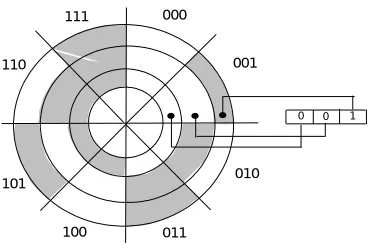
From this figure we see that straight binary code can lead to errors because of mechanical imperfections. When the code is transiting from 001 to 010, a slight misalignment can cause a transient code of 011 to appear. The electronic circuitry associated with the encoder will receive 001 --> 011 -> 010. If the disk is patterned to give Gray code output, the possibilities of wrong transient codes will not arise. This is because the adjacent codes will differ in only one bit. For example the adjacent code for 001 is 011. Even if there is a mechanical imperfection, the transient code will be either 001 or 011. The shaft encoder using 3-bit Gray code is shown in the figure 2.
000 100 101 111 110 010 011 001
0 0 1
FIG. 2: Shaft encoder disk using a 3-bit Gray code
There are two convenient methods to construct Gray code with any number of desired bits. The first method is based on the fact that Gray code is also a reflective code. The following rule may be used to construct Gray code:
A one-bit Gray code had code words, 0 and 1
000 111 110 101 100 011 010 001
The first 2n code words of an (n+1)-bit Gray code equal the code words of an
n-bit Gray code, written in order with a leading 0 appended.
The last 2n code words of a (n+1)-bit Gray code equal the code words of an
n-bit Gray code, written in reverse order with a leading 1 appended.
However, this method requires Gray codes with all bit lengths less than ‘n’ also be generated as a part of generating n-bit Gray code. The second method allows us to derive an n-bit Gray code word directly from the corresponding n-bit binary code word:
The bits of an n-bit binary code or Gray code words are numbered from right to left, from 0 to n-1.
Bit i of a Gray-code word is 0 if bits i and i+1 of the corresponding binary code word are the same, else bit i is 1. When i+1 = n, bit n of the binary code word is considered to be 0.
Example: Consider the decimal number 68.
(68)10 = (1000100)2
Binary code: 1 0 0 0 1 0 0 Gray code : 1 1 0 0 1 1 0
The following rules can be followed to convert a Gray coded number to a straight binary number:
Scan the Gray code word from left to right. All the bits of the binary code are the same as those of the Gray code until the first 1 is encountered, including the first 1.
1’s are written until the next 1 is encountered, in which case a 0 is written.
Alphanumeric Codes
When information to be encoded includes entities other than numerical values, an expanded code is required. For example, alphabetic characters (A, B, ....Z) and special operation symbols like +, -, /, *, (, ) and other special symbols are used in digital systems. Codes that include alphabetic characters are commonly referred to as Alphanumeric Codes. However, we require adequate number of bits to encode all the characters. As there was a need for alphanumeric codes in a wide variety of applications in the early era of computers, like teletype, punched tape and punched cards, there has always been a need for evolving a standard for these codes. Alphanumeric keyboard has become ubiquitous with the popularization of personal computers and notebook computers. These keyboards use ASCII (American Standard Code for Information Interchange) code
b4 b3 b2 b1 b7 b6 b5
Error Detection and Correcting Codes
When data is transmitted in digital form from one place to another through a transmission channel/medium, some data bits may be lost or modified. This loss of data integrity occurs due to a variety of electrical phenomena in the transmission channel. As there are needs to transmit millions of bits per second, the data integrity should be very high. The error rate cannot be reduced to zero. Then we would like to ideally have a mechanism of correcting the errors that occur. If this is not possible or proves to be expensive, we would like to know if an error occurred. If an occurrence of error is known, appropriate action, like retransmitting the data, can be taken. One of the methods of improving data integrity is to encode the data in a suitable manner. This encoding may be done for error correction or merely for error detection.
A simple process of adding a special code bit to a data word can improve its integrity. This extra bit will allow detection of a single error in a given code word in which it is used, and is called the ‘Parity Bit’. This parity bit can be added on an odd or even basis. The odd or even designation of a code word may be determined by actual number of 1’s in the data (including the added parity bit) to which the parity bit is added. For example, the S in ASCII code is
(S) = (1010011)ASCII
S, when coded for odd parity, would be shown as (S) = (11010011)ASCII with odd parity
In this encoded ‘S’ the number of 1’s is five, which is odd. When S is encoded for even parity
(S) = (01010011)ASCIIwith even parity.
In this case the coded word has even number (four) of ones.
Adding a parity bit allows us only to detect the presence of one bit error in a group of bits. But it does not enable us to exactly locate the bit that changed. Therefore, addition of one parity bit may be called an error detecting coding scheme. In a digital system detection of error alone is not sufficient. It has to be corrected as well. Parity bit scheme can be extended to locate