PRACTICAL-
AIM:
Study about Java Agent
1.1 What is JADE?
JADE (Java Agent Development Framework) is a software development framework aimed at developing multi-agent systems and applications confirming to FIPA standards for intelligent agents. It includes two main products: a FIPA-compliant agent platform and a package to develop Java agents. JADE has been fully coded in JAVA.
OR
JADE is a distributed agents platform, which has a container for each host where you are running the agents. Additionally the platform has various debugging tools, mobility of code and content agents, the possibility of parallel execution of the behavior of agents, as well as support for the definition of languages and ontologies. Each platform must have a parent container that has two special agents called AMS and DF.
The DF (Directory Facilitator) provides a directory which announces which agents are available on the platform. This uses Yellow Page Service to carry out its work. This service allows agent to publish descriptions of one or more services they provide in order that other agents can easily discover and exploit them.
Any agent can both, register(publish) services and search for (Discover) services. Registrations, deregistration, modifications and searches can be performed at any time during the lifetime of agent.
The AMS (Agent Management System) controls the platform. Is the only one who can create and destroy other agents, destroy containers and stop the platform.
1.2 Agent Class
The Agent class is a super class which allows the users to create JADE agents. To create an agent one needs to inherit directly from Agent.
This class provides methods to perform the basic tasks of the agents as:
Pass messages by objects ACLMessage, with pattern matching.
Support the life cycle of an agent.
Plan and execute multiple activities at the same time.
The cycle of life of a JADE agent follows the cycle proposed by FIPA. These agents go through different states defined as:
1. Initiated: The agent has been created but has not registered yet the AMS.
2. Active: The agent has been registered and has a name. In this state it can communicate with other agents.
4. Waiting: The agent is blocked waiting for an event.
5. Deleted: The agent has finished and his thread ended his execute and there is not any more in the AMS.
6. Transit: The agent is moving to a new location.
1.3 ACLMessages
Message passing ACL (Agent Communication Language) is the base of communication between agents. Sending messages is done by the method send of the class Agent. In this method you have to pass an object of type 'ACLMessage' that contains the recipient information, language, coding and content of the message. These messages are sent asynchronously, while messages are received they will be stored in a message queue. There are two types of receiving ACL messages, blocking or non-blocking. For this provide methods blockingReceive () and receive () respectively. In both methods you can make filtering messages to be retrieved from the queue by setting different templates. Protocol used for message passing between agents is done by MTP i.e. Message Transfer Protocol.
1.4 JADE GUI
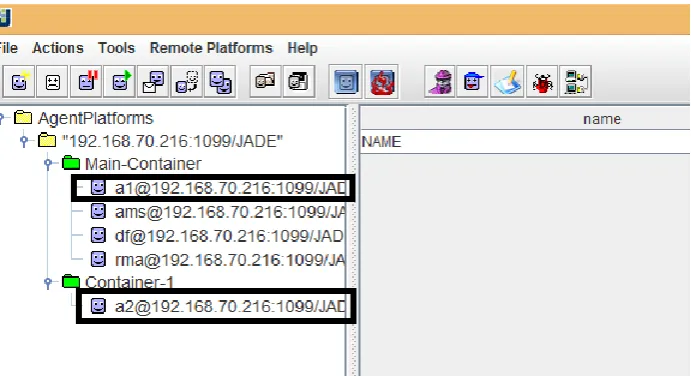
The GUI of JADE is provided by agent called the Remote Monitoring Agent(RMA) and allows a platform administrator to manipulate and monitor the running platform. This can be brought up by using command –gui.
1.5 Implementation of JADE in NetBeans.
Step: 1
Install jdk in your system.
Step: 2
Install NetBeans in your system.
Step: 3
Download the all the JADE content for jade.tilab.com
Step: 4
Downloaded package contains five compressed file. 1. JADE-bin-4.4.0.zip
Step: 5
Extract all files in specific folder.
Step: 6
Go into “JADE-bin-4.4.0jadelib” folder. You will found jade.jar here.
Go into “JADE-src-4.4.0jadelib” folder. You will found commons-codec-1.3.jar here.
Step: 7
Open the NetBeans.
Now, Create the New Projectcreate the new packagecreate the required class The Class must be extend with Agent class of package jade.core.Agent .
Step: 8
Add the above two library file (.jar) in libraries folder of project.
Step: 9
Implement the necessary method of Agent class and add the behavior or agent
Step: 10
Run the project.
1. Need to change run configuration of particular project. For that
Right click on project name.
Go to properties.
Choose Run option from the dialog box.
Set Main class as jade.Boot.
Set argument as per your requirement to start the JADE. Example: Sender.java package jade2; import jade.core.Agent; import jade.core.AID; import jade.core.behaviours.*; //import jade.domain.AMSService; //import jade.domain.FIPAAgentManagement.*; import jade.lang.acl.*; import java.util.Scanner;
public class Sender extends Agent{ protected void setup()
// First set-up answering behaviour // Send messages to "a1" and "a2" Scanner in=new Scanner(System.in); System.out.println("Enter the message"); String msg1=in.next();
ACLMessage msg = new ACLMessage(ACLMessage.INFORM); msg.setContent(msg1);
for (int i = 1; i<=2; i++)
msg.addReceiver( new AID( "a" + i, AID.ISLOCALNAME) );
send(msg);
addBehaviour(new CyclicBehaviour(this) {
public void action() {
ACLMessage msg= receive(); if (msg!=null)
System.out.println( "== Answer" + " <- " + msg.getContent() + " from "
+ msg.getSender().getName() ); block(); } }); } } Receiver.java package jade2; import jade.core.Agent; import jade.core.behaviours.CyclicBehaviour; import jade.lang.acl.ACLMessage;
public class Receiver extends Agent{ protected void setup()
{
addBehaviour(new CyclicBehaviour(this) {
public void action() {
ACLMessage msg = receive(); if (msg!=null) {
System.out.println( " - " +
Figure 2 Sender Side
msg.getContent() );
ACLMessage reply = msg.createReply();
reply.setPerformative( ACLMessage.INFORM ); reply.setContent("blal bla...bla..bla" );
send(reply); }
block(); }
}); }
}
Create first agent of Receiver which act as Server in main container.
Write the below command in argument -gui –agents a1:jade2.Receiver
Create the second agent of sender which act as client in another container.
Write below command in argument -container -agents a2:jade2.Sender