Base Operating System Provisioning and Bringup for a Commercial
Supercomputer
David Daly, Jong Hyuk Choi, Jos´e E. Moreira, and Amos Waterland
IBM T.J. Watson Research Center
Yorktown Heights, NY, 10958, U.S.A.
{
dmdaly, jongchoi, jmoreira, apw
}
@us.ibm.com
Abstract
Commercial Scale-Out is a new research project at IBM Research. Its main goal is to investigate and develop tech-nologies for the use of large scale parallelism in commer-cial applications, eventually leading to a commercommer-cial su-percomputer. The project leverages and explores the fea-tures of IBM’s BladeCenter family of products. A signif-icant challenge in using a large cluster of servers is the installation and provisioning of the base operating system in those servers. Compounding this problem is the issue of maintenance of the software image in each server after its provisioning. This paper describes the system we developed to manage the installation, provisioning, and maintenance process for a cluster of blades, providing a base level of functionality to be used by higher level management tools. The system leverages the management facilitation features of BladeCenter, and exploits the network and storage archi-tecture of the Commercial Scale-Out prototype cluster. It uses a single shared root filesystem image to reduce man-agement complexity, and completely automates the process of bringing a new blade into the cluster upon its insertion into a BladeCenter chassis.
1
Introduction
As individual servers continue to get less expensive, the number of (physical and virtual) servers used in a partic-ular environment has grown. The result is more physical and virtual machines to set up, install and maintain. This is taken to an extreme in IBM Research’s Commercial Scale-Out (CSO) project. The project focuses on efficiently and effectively deploying hundreds of blade servers to be used as a commercial supercomputer.
A na¨ıve approach to provisioning a scale-out system 1-4244-0910-1/07/$20.00 c2007 IEEE.
leads to management cost that is at least linear in the number of servers. The cost can be made much worse than linear if each server has its own configuration. Operating system in-stallation and configuration for a single physical server cur-rently takes hours to complete if done manually. A number of tools exist to simplify this process, either by automating the installation process or by cloning a good install. Never-theless, in standard practice the time to install and configure a server remains at least linear in the number of servers.
Examples of automating the install process include the PXE protocol [3] developed by Intel to remotely install and run computers, Red Hat’s network install process [2], or IBM Director’s Remote Deployment Manager [1]. Simi-larly, a known good image can be cloned, using tools such as Norton Ghost. Both simplify the installation of a blade, but still require the entire image be installed on the local storage. As a result, each server has its own boot image, which has to be patched and updated separately, or rein-stalled. Additionally, the individual images may diverge as users change settings on the servers.
There are also tools for managing the provisioning of nodes in supercomputers, such as the system management tools for Blue Gene [4], the tools packages [12] developed by national labs for large Linux clusters, the OSCAR cluster installer, and the single disk design [8] at Los Alamos.
Although configuring and booting a cluster is not a new problem and has been solved many different ways, none of the above tools met the needs of our cluster topology, hard-ware specifications, network layout, and hypervisor-based approach with a shared read/only root filesystem. We would have preferred to extend an existing solution, but did not find any that were generic enough. However, much of the work we did for this project either is or will be separated into a scheme in which the logical operations, such as a new machine joining the cluster, are abstracted from the specifics of the hardware control mechanisms, such as ini-tializing a specific blade model via the BladeCenter telnet interface.
was to develop “lights out” provisioning of physical servers with assurance that the configuration of all the servers re-mained homogeneous. As such, we developed a completely automated system to provision blades with a stock boot im-age and bring them into the cluster. Combined with the vir-tual server provisioning for the workload specific system images, the physical server provisioning technology devel-oped in the CSO project improves the scalability and RAS of the scale out computing infrastructure.
The rest of this paper is organized as follows. Section 2 gives a quick overview of our CSO cluster configuration. Section 3 describes our solution for provisioning physical machines in that cluster. Section 4 presents some measure-ments of provisioning time and Section 5 discusses future work. Finally, Section 6 presents our conclusions.
2
Commercial Scale-Out
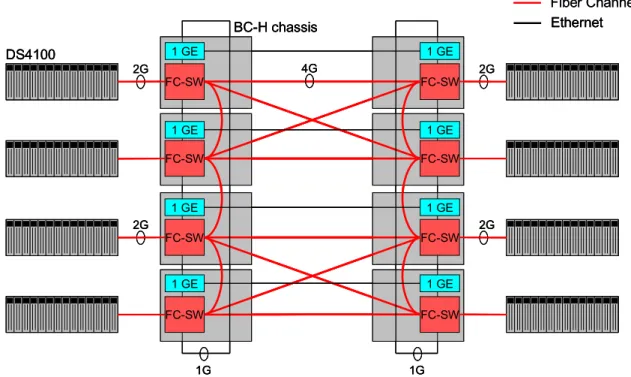
The CSO cluster is our reference implementation of a scale out architecture. It is based on the IBM BladeCen-ter [7] family of products. The basic building block of the cluster is a BladeCenter-H (BC-H) chassis. We couple each BC-H chassis with one DS4100 storage controller with a 2-Gbit/s Fiber Channel. The chassis themselves are inter-connected through two nearest-neighbor networks. One of the networks is a 4-Gbit/s Fiber Channel network and the other is a 1-Gbit/s Ethernet network. The chassis intercon-nections are shown in Figure 1.
The CSO cluster has a modular architecture consisting of eight BladeCenter-H chassis, each containing fourteen JS21 blades for 112 blades in total, and eight DS4100 storage subsystems. Each DS4100 consists of dual redundant RAID controllers and 14 SATA drives of 400GB each.
Work is executed on the Commercial Scale-Out ter by scheduling virtual machines on blades in the clus-ter. An application may require several virtual machines spread across the cluster. A number of tools exist and are being developed to handle the complete life-cycle of vir-tual machines in the cluster, including: creation, destruc-tion, scheduling, migradestruc-tion, fail-over. However, those tools require that a certain software stack exist on the the phys-ical machines. In our CSO cluster, that stack includes the Xen hypervisor [5] plus a supervisory Linux Dom0 virtual machine image. The Dom0 image must support the creation and management of other virtual machines, as well as basic system services.
3
The Provisioning Solution for CSO
In the Commercial Scale Out project, we developed an automated approach to provisioning our physical servers with the necessary software stack. This approach is based
on three design points: (1) make virtualization pervasive on the blades (2) share a single read-only root filesystem across each Dom0 (3) exploit the remote control features of Blade-Center.
This section describes the solution we implemented for provisioning physical blades in the CSO cluster. We dis-cuss the firmware we flash on the blades, and describe the approach we took to provide a single root file system image to all the blades, thus guaranteeing homogeneity. We also discuss how we used features of the BladeCenter manage-ment module to exercise blade control. We then describe the process we follow to boot a blade. We explain how we put all the components together in order to completely au-tomate an installation of a new blade, and we also discuss how we handle error conditions.
For conciseness and brevity we discuss only the pro-cedure for the JS21 Power based blades. However, our tool can detect the architecture of a blade and act appro-priately based on that information. The tool also supports x86 blades using PXE boot instead of netboot.
3.1
Pervasive Virtualization
One of the key elements of our automation strategy is to ensure that each blade has a virtualization stack on it. Because we are provisioning blades that may have just had their shrinkwrap removed, our provisioning process must be able to remove the default hypervisor that ships on the JS21 blades and replace it with the combination of a lightweight firmware called SLOF and the PowerPC port of the Xen hypervisor.
Slimline Open Firmware, or SLOF, is boot firmware for PowerPC machines that implements the IEEE-1275 (Open Firmware) standard. It provides a machine-independent BIOS that is sufficient to allow Xen or Linux to boot and take over a machine.
JS21 blades ship with a dedicated hypervisor that imple-ments a subset of the PAPR standard sufficient to allow AIX to run in supervisor mode. Because we want a full hyper-visor, we need to remove this default firmware and allow Xen to run with the machine in hypervisor mode. Because we need to do this in an automated and reactive fashion, we developed a procedure that netboots a custom Linux kernel on a blade in response to a new blade being inserted or upon detection of a revert from SLOF in the temporary firmware bank to the failsafe hypervisor in the permanent firmware bank. This custom Linux flashes SLOF into the temporary bank, marks the temporary bank as active, and reboots the machine. Upon reboot, SLOF will run and will netboot a Xen image, at which point the machine will be running with a full hypervisor.
Fiber Channel FC-SW FC-SW FC-SW FC-SW 1 GE 1 GE 1 GE 1 GE FC-SW FC-SW FC-SW FC-SW 1 GE 1 GE 1 GE 1 GE 2G DS4100 2G 2G 2G BC-H chassis 4G 1G Ethernet 1G Fiber Channel FC-SW FC-SW FC-SW FC-SW 1 GE 1 GE 1 GE 1 GE FC-SW FC-SW FC-SW FC-SW 1 GE 1 GE 1 GE 1 GE 2G DS4100 2G 2G 2G BC-H chassis 4G 1G Ethernet 1G FC-SW FC-SW FC-SW FC-SW 1 GE 1 GE 1 GE 1 GE FC-SW FC-SW FC-SW FC-SW 1 GE 1 GE 1 GE 1 GE 2G DS4100 2G 2G 2G BC-H chassis 4G 1G Ethernet 1G
Figure 1. CSO Network and Storage Configuration
3.2
Single Root File System Image
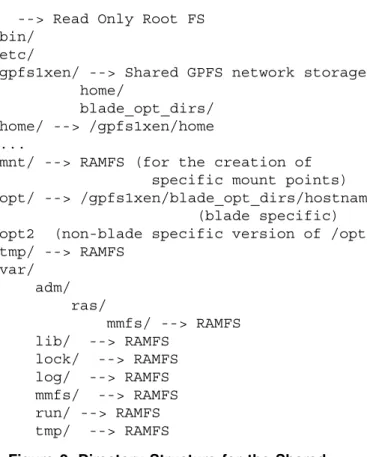
The cluster management tools for the virtual machines require a certain software stack on the physical machines. Other than the tools for managing the virtual machines, we run very little software on the Dom0. The stack in-cludes only a small set of utilities that need to be run on the Dom0, allowing us greater control of the system image. In order to keep all the blades identical, we operate with a single root file system image maintained on a logical disk (LUN), accessible to the blades through a storage area net-work (SAN). All of the blades mount the same LUN as their read-only root device, and use ramfs devices for directories that must be writable for correct operation, as shown in Fig-ure 2. With this design, all the blades tend to behave identi-cally, and when a blade is rebooted it is virtually guaranteed to come up in a known good state. The directory hierarchy is shown in Figure 2.
Note that the SAN obviates many of the scaling problems associated with conventional approaches of shared NFS root filesystems. We can also replicate the LUN as many times as necessary to achieve good scaling as we aproach extreme scale.
However, some data needs to be persistent across re-boots, and we use the GPFS network file system [11], a scalable network filesystem, for this. GPFS uses SAN stor-age and allows all blades in a cluster to directly communi-cate with the logical drives on the SAN. We take advantage of recent modifications to GPFS that enable stateless
oper-ation. At boot time, the blade connects to the primary node of the cluster and determines if it is already in the cluster. If it is not in the cluster, it adds itself. The blade then gets its configuration data from the primary node and starts up the GPFS filesystem.
We use the filesystem for cluster wide data, as well as blade-specific data when needed. For instance, all blades have a unique/optdirectory. This directory exists on the GPFS filesystem, identified by hostname. At boot time, the blade remounts the appropriate directory at/opt. If the appropriate directory does not exist, a golden version is copied. In this way we can also refresh a blade by deleting its blade specific directory and rebooting.
3.3
Blade Control
The BladeCenter chassis comes with a management module (MM) [6] to control the blades. The management module is normally accessed through a web interface, and can be used to detect installed blades, power the blades on or off, and provide a remote console. The management mod-ule also has two other interfaces: the MMcli [10], and the MPcli [9]. The MMcli is a telnet interface to the manage-ment module and the MPcli is a program that can directly communicate with the MM’s service processor, and through it to the service processor on all the blades. We exploit the
/ --> Read Only Root FS bin/
etc/
gpfs1xen/ --> Shared GPFS network storage home/
blade_opt_dirs/ home/ --> /gpfs1xen/home ...
mnt/ --> RAMFS (for the creation of specific mount points) opt/ --> /gpfs1xen/blade_opt_dirs/hostname
(blade specific)
opt2 (non-blade specific version of /opt)
tmp/ --> RAMFS var/ adm/ ras/ mmfs/ --> RAMFS lib/ --> RAMFS lock/ --> RAMFS log/ --> RAMFS mmfs/ --> RAMFS run/ --> RAMFS tmp/ --> RAMFS
Figure 2. Directory Structure for the Shared Read-Only Root FS.
functionality of the MMcli and the MPcli for the following: • Power control: Power on, power off, power cycle a
blade
• Determine the current power state of a blade • Detect the architecture of a blade (PowerPC or x86) • Read and change the boot device order for the blade • Read the MAC addresses of the network adapters
The BladeCenter management module also supports SNMP in addition to the MMcli and MPcli access. Specif-ically, it supports sending SNMP traps on certain events, such as a change in the power state of a blade, or the in-sertion of a blade. The management module can be con-figured to send SNMP traps to any remote servers, and we configured the chassis to send the traps to our management software in order to initiate the provisioning process auto-matically upon blade insertion.
Additionally, we can control other aspects of the blade’s behavior from the network infrastructure, through DHCP and TFTP, as well as directly through SSH access. If a blade is up and operational, we can ssh into the blade and execute commands. We use this to check that a blade is functioning properly, as well as to safely power the blade off.
3.4
DHCP and Boot Image Control
Once a blade has been set to network boot (either net-bootorpxeboot), the blade will interact with the DHCP and TFTP servers to get an image to boot. The blade will send a request to the DHCP server, which will return an IP address for the blade, and a file to download from the TFTP server. The blade will download the file and attempt to run it.The DHCP server is controlled through the
/etc/dhcpd.conffile on the server. The file specifies how to assign IP addresses when requests come in. Two pieces of functionality are particularly useful to us: the ability to identify hosts by MAC address, and the ability to specify a boot file for the host to use. A host entry can be created for a particular host, identified by its MAC address, and assigned a location specific IP address. The host entry can then specify the IP address, the TFTP server, the file to download from the TFTP server, and the hostname the blade should use.
We developed a set of tools to automate inserting and updating host entries in thedhcpd.conffile. The tools parse the existingdhcpd.conffile, update or add the spe-cific information, write it back out, and restart the server.
Thedhcpd.conffile specifies the file that should be used as the boot image for each host. However, we would prefer to avoid rewriting the dhcpd.conf file and restarting the dhcpd server when possible. Therefore, instead of di-rectly storing the boot file name in the dhcpd.conf file, we instead store a host specific filename, and make that a sym-bolic link to the boot image. In this scheme, to change the boot image for a blade we only need to rewrite the symbolic link. The symbolic link is easily changed, and we have de-veloped tools to automatically do that.
Our tools, developed to provide all of the functionality discussed in this section, are implemented as a set of Python scripts. The scripts provide a seamless mechanism for ex-ploiting the functionality and implementing more compli-cated use cases that exploit multiple resources.
3.5
Bring Up – Putting It All Together
In the previous section we described a set of functional-ity we have exposed to control the blades in the BladeCen-ter chassis. We now describe how to combine the use of those tools to completely automate the installation of a new blade, and to very easily reboot and update a large number of blades.When a blade is added to the cluster it needs to be iden-tified and provisioned with the appropriate firmware and booted with Xen and a Linux Dom0. Once a blade has been booted into Xen with access to the same shared storage as other blades, higher-level management software can provi-sion and deploy the worker domains (called DomU’s in Xen
nomenclature) across the cluster. In order to provision and boot the blade we need to:
• Add the blade to the DHCP server • Update the firmware on the blade to SLOF • Boot the blade into Xen
We accomplish each of those tasks using the control tools described in the previous section.
The first step is to add the blade todhcpd.confso that it has a proper IP address, hostname, and boot file name. We use our tools that exploit the MPcli interface to query the BladeCenter MM for the MAC addresses for the blade. Once we have the MAC address of each of the two network adapters on a JS21, the tool creates two new host entries for the blades (one for each subnet) using the MAC address and specifying the IP address, hostname, and boot file for the host, updates/etc/dhcpd.conf, and restarts the dhcpd server.
With the blade having an appropriate host entry in
dhcpd.conf, we next need to update the firmware on the blade to SLOF. We do this bynetbootingthe blade to a Linux image that runs the firmware update program and reboots or powers itself off. The blade has a host entry in dhcpd.conf that specifies a boot file. We create a symbolic link with the name of the boot file. The symbolic link points to the Linux image that updates the firmware. We then use the MPcli tools to make sure the blade is set to netboot as its first boot option, and set it to be the first option if it is not. The tools then power on the blade. When the blade powers up, it will download the firmware update Linux image and run it. When it is done, the blade will power itself off. The tools will detect that the blade has been powered off, and will know that the firmware has been flashed.
The last step in bringing up a new blade, is to boot it into Xen with a Linux Dom0. All that is needed is to update the symbolic link for the blade to point to the Xen boot image, and power on the blade. However, when the blade boots, it will want to join a GPFS cluster and mount host specific directories, even though the host is not part of any cluster, and the host specific directories do not exist. At boot time, the startup scripts check for these conditions and address them. The first time a blade is booted, it will detect that it is not part of the GPFS cluster. It will use ssh to connect to the primary node of the cluster, and add itself to the cluster. The blade will also detect that the blade specific directories do not exist. It will make a copy of golden directories for its own use.
3.6
Error Detection
There are many steps in the provisioning and booting of a new blade. Sometimes an error occurs, and the process
does not go to completion. In a large cluster of servers, the probability of having a blade fail to boot increases and can become significant. Therefore, it is important to detect when an error occurs, and take appropriate action.
When a blade is booted, the management software tries to access the blade using ssh. If, after some period of time, the management software is unable to log into the blade, the blade is considered to have failed. Additionally, if the man-agement software is able to log into the blade, it can perform tests to verify that GPFS and Xen are operating correctly. We have not developed a test for Xen yet, but it should be straightforward to develop. If the management software de-tects a failed boot, it first logs the failure. It then tries to reinstall the blade. It will re-update dhcpd.conf, re-burn the firmware, and reboot into Xen again. The software can be configured to attempt the re-installation multiple times. This process should handle the majority of soft errors in the system. However, sometimes there will be hard errors with a blade. In that case the software logs a critical failure, and will make appropriate notifications for human intervention. Once a blade has successfully booted and started work, our tool does not monitor the blade to detect errors during normal operation, since the application software we are run-ning has its own fault isolation logic. However, once an er-ror has been detected, the higher level management can use our tool to reprovision the blade.
4
Benchmarking
Our server provisioning system dramatically simplifies the installation and management of servers in our cluster. This simplification results in decreased total time to pro-vision a blade, and decreased management time. This can be shown through two of the more common use cases: the re-provisioning of a large set of servers, and the first time installation of a server.
4.1
Re-provisioning a set of servers
In normal use, all the blades in the cluster will be running Xen with a Linux Dom0. However, sometimes the servers will be used to run only Linux, or some other use, possi-bly booting from the local disk. Therefore, it is desirable to quickly and easily switch a large set of servers to the desired Xen with Linux Dom0 environment. Additionally, on occasion the boot image or root filesystem will need to be updated, and we will want to reboot all the servers after making the change to make sure they are running the most current images.
We have automated this scenario to allow the rebooting of large numbers of servers at the same time, and verifying that they are all configured properly. Given a list of servers, our tool will perform all the required steps automatically.
For 45 blade servers installed in 5 BladeCenter chassis, we only required 5 minutes to re-provision all 45 blade servers, with the dominant portion of the time being the time for the kernel to boot. For comparison, it takes 3 minutes to re-provision 1 blade server.
4.2
Automatic
provisioning
of
a
new
server
The other common use case mentioned above, is the ini-tial provisioning of a server. Normally this would require installing the blade, and a number of manual steps to update the firmware and install the hypervisor and stock operating system.
With our tool, the provisioning of a new server is com-pletely automated, requiring no human intervention beyond inserting the new blade server into the chassis. Once the blade is inserted into the chassis, the chassis notifies the pro-visioning software, and the propro-visioning process begins. In our lab, after inserting a new blade into the chassis, 6 min-utes later the blade had been configured and booted in the correct environment, ready to accept work from the higher level management tools.
5
Continuing Work
This work is part of an ongoing project at IBM Research. As such, we are continuing to add features and abilities to the system. There are a number of things that we intend to do in the coming year:
• Currently, the root filesystem is maintained on the SAN for performance reasons. However, we are at-tempting to shrink the root filesystem as much as pos-sible. If we can get it acceptably small, we will run the entire root filesystem from an initial ramfs root mount. • Redirect all logging to the management server. This will allow us to have in depth logging information across reboots of blades, without having persistent storage on the blades.
• Support x86 blades and PPC blades in the same sys-tem. We can detect the architecture of the blade, and determine the proper course of action based on that state.
• Better integrate with higher level management tools. The higher level tools need to know when a blade is available. The blade should automatically announce itself to the higher level tools once it is installed. Also, the higher level management tools need to be able make provisioning and management decisions such as reboot, update, and migration based on such event no-tifications through this work.
• Automatically configure the fiber channel settings for the blade.
These will take us even further towards our goal of “lights out” management and operation.
6
Conclusions
Scale out computing (i.e., clusters of relatively sim-ple machines) is an attractive approach to deploying large amounts of computing power at a low cost. In the Commer-cial Scale Out project, we are investigating technologies to make scale out particularly attractive to commercial com-puting. One of the big challenges in adoption of scale out computing is the difficulty in managing clusters of ever in-creasing size.
For that purpose, we have developed a provisioning in-frastructure that can quickly add servers to an existing clus-ter, as well as restart the operation of those servers already in the cluster. The approach is based on two premises: (1) all servers use the same root file system in their controlling (Dom0) partition and (2) BladeCenter provides a manage-ment module function.
Using the same root file system in all servers guarantees homogeneity, which greatly simplifies management and op-eration. Since the same root is shared by all servers, it is kept read-only. Blade private and modifiable data is stored either in a RAM file system (ramfs) or in a GPFS file sys-tem. We can easily “clean up” a blade an return it to a pris-tine condition with a reboot.
The management module of BladeCenter allows us to perform remote control of the servers. It is easy to detect when a new blade is inserted, and through the management module we can perform the various steps required to provi-sion that blade and bring it to the cluster of active servers.
We have verified that our approach is scalable, as the difference in time between restarting 1 blade and restarting 45 blades is only from 3 minutes to 5 minutes. Also, it only takes 6 minutes to install a new blade.
We will continue this work, implementing more func-tionality until we can achieve a true “lights out” operation and management of a large farm of blades. We believe this is an important step in achieving thorough acceptance of scale out solutions for commercial computing.
References
[1] IBM Director: Extensions: Remote deployment manager. http://www-03.ibm.com/systems/management/director/extensions/rdm.html. [2] Red Hat installation program (Anaconda).
http://fedora.redhat.com/About/Projects/anaconda-installer/.
[3] Preboot Execution Environment (PXE) Specification, 2.1 edition, September 1999.
[4] G. Almasi, L. Bachega, R. Bellofatto, J. Brunheroto, C. Cas-caval, J. Castanos, P. Crumley, C. Erway, J. Gagliano, D. Lieber, P. Mindlin, J. Moreira, R. Sahoo, A. Sanomiya, E. Schenfeld, R. Swetz, M. Bae, G. Laib, K. Ran-ganathan, Y. Aridor, T. Domany, Y. Gal, O. Goldshmidt, and E. Shmueli. System management in the BlueGene/L super-computer. InParallel and Distributed Processing Sympo-sium, 2003, April 8 2003.
[5] P. Barham, B. Dragovic, K. Fraser, S. Hand, T. Harris, A. Ho, R. Neugebar, I. Pratt, and A. Warfield. Xen and the art of virtualization. InACM Symposium on Operating Sys-tems Principles (SOSP), 2003, October 2003.
[6] D. M. Desai, T. M. Bradicich, D. Champion, W. G. Hol-land, and B. M. Kruez. BladeCenter chassis management.
IBM Journal of Research and Development, 49(6):941–961, November 2005.
[7] D. M. Desai, T. M. Bradicich, D. Champion, W. G. Holland, and B. M. Kruez. BladeCenter system overview.IBM Jour-nal of Research and Development, 49(6):809 – 822, Novem-ber 2005.
[8] E. Hendriks and R. Minnich. How to build a fast and reli-able 1024 node cluster with only one disk. The Journal of Supercomputing, pages 171–181, May 2006.
[9] IBM. Management Processor Command Line Interface (MPCLI) version 5.10 - IBM Servers.
[10] IBM. Reference Guide - IBM BladeCenter Management Module Command-Line Interface.
[11] F. Schmuck and R. Haskin. GPFS: A shared-disk file system for large computing clusters. InProc. of the First Conference on File and Storage Technologies (FAST), pages 231–244, Jan. 2002.
[12] A. Wachsmann. A general purpose high performance Linux installation infrastructure. Technical report, SLAC, Novem-ber 2002. SLAC-PUB-9193.