May 2006 Part No: 58473
BMC® Remedy® Action Request System® 7.0
Database Reference
BMC, the BMC logo, all other BMC product or service names, BMC Software, the BMC Software logos, and
all other BMC Software product or service names, are registered trademarks or trademarks of BMC
Software, Inc. All other trademarks belong to their respective companies.
BMC Software, Inc., considers information included in this documentation to be proprietary and
confidential. Your use of this information is subject to the terms and conditions of the applicable end user
license agreement or nondisclosure agreement for the product and the proprietary and restricted rights
notices included in this documentation.
For license information about the OpenSource files used in the licensed program, please read
OpenSourceLicenses.pdf
. This file is in the
\Doc
folder of the distribution CD-ROM and in the
documentation download portion of the product download page.
Restricted Rights Legend
U.S. Government Restricted Rights to Computer Software. UNPUBLISHED -- RIGHTS RESERVED UNDER THE COPYRIGHT LAWS OF THE UNITED STATES. Use, duplication, or disclosure of any data and computer software by the U.S. Government is subject to restrictions, as applicable, set forth in FAR Section 52.227-14, DFARS 252.227-7013, DFARS 252.227-7014, DFARS 252.227-7015, and DFARS 252.227-7025, as amended from time to time. Contractor/Manufacturer is BMC Software, Inc., 2101 CityWest Blvd., Houston, TX 77042-2827, USA. Any contract notices should be sent to this address.
Contacting Us
If you need technical support for this product, contact Customer Support by email at
[email protected]
.
If you have comments or suggestions about this documentation, contact Information Development by
email at
[email protected]
.
Contents
3
Contents
Preface . . . . 7
Audience . . . 7
AR System documents . . . 8
Learn about the AR System Developer Community . . . 10
Why should you participate in the Developer Community? . . . . 10
How do you access the Developer Community? . . . . 10
Chapter 1
Using relational databases with AR System . . . 11
The database structure and AR System . . . 12
The AR System database . . . 12
Using relational databases with AR System . . . 13
Using IBM DB2 Universal Database with AR System . . . . 13
Using Informix with AR System . . . . 16
Using Microsoft SQL Server with AR System . . . . 17
Using Oracle with AR System . . . . 18
Using Sybase with AR System . . . . 18
Database types and data types. . . 20
DB2 data types . . . . 20
Informix data types . . . . 21
Microsoft SQL data types . . . . 22
Oracle data types . . . . 23
The AR System data dictionary . . . 24
Initial table . . . . 27
Tables for forms . . . . 28
Tables for fields. . . . 29
Tables for menus . . . . 29
Tables for filters . . . . 30
Tables for escalations . . . . 30
Tables for active links . . . . 30
Tables for mapping workflow . . . . 31
Tables for containers . . . . 31
Creating tables for forms . . . 32
Main data table . . . . 32
Status history table . . . . 33
Attachment tables. . . . 34
Currency table . . . . 35
Indexing. . . . 36
SQL views . . . 37
Updating tables when AR System forms change . . . 38
Adding fields . . . . 39
Deleting fields . . . . 39
Changing character field lengths . . . . 40
Related information . . . 43
DB2 . . . . 43
Informix . . . . 43
Oracle. . . . 43
Sybase. . . . 43
Microsoft SQL . . . . 43
Unicode database support . . . 44
Unicode compliance versus Unicode database support . . . . 44
Creating a Unicode database . . . . 45
Migrating existing databases to Unicode . . . . 46
Chapter 2
SQL Definitions of the data dictionary tables . . . 49
DB2 Universal . . . 50
Contents
5
Oracle . . . 89
Sybase and Microsoft SQL Server . . . . 106
Appendix A
Database user names, passwords, and dates . . . 129
Changing the AR System database user name and password . . . . 130
Converting AR System dates to database dates . . . . 131
Preface
7
Preface
Important:
The compatibility information listed in the product
documentation is subject to change. See the compatibility matrix at
http://supportweb.remedy.com
for the latest, most complete
information about what is officially supported.
Carefully read the system requirements for your particular operating
system, especially the necessary patch requirements.
Audience
This guide is written for database administrators who are responsible for
overseeing the interaction between the BMC® Remedy® Action Request
System® (AR System
®) and specific databases. This guide is also intended to
provide information for AR System administrators who are responsible for
defining and changing the structure of AR System forms.
This guide assumes knowledge of database administration and familiarity
with the operating system platform you are using. You should be familiar
with BMC Remedy Administrator before you begin.
AR System documents
The following table lists documentation available for AR System products.
Unless otherwise noted, online documentation in Adobe Acrobat (PDF)
format is available on AR System product installation CDs, on the Customer
Support site (
supportweb.remedy.com
), or both.
You can access product Help through each product’s Help menu or by
clicking on Help links.
Title
Description
Audience
Concepts
Overview of AR System architecture and features with
in-depth examples; includes information about other
AR System products as well as a comprehensive glossary
for the entire AR System documentation set.
Everyone
Installing
Procedures for installing AR System.
Administrators
Getting Started
Introduces topics that are usually only learned when first
starting to use the system, including logging in, searching
for objects, and so on.
Everyone
Form and Application Objects
Describes components necessary to build applications in
AR System, including applications, fields, forms, and
views.
Developers
Workflow Objects
Contains all of the workflow information.
Developers
Configuring
Contains information about configuring AR System
servers and clients, localizing, importing and exporting
data, and archiving data.
Administrators
Installing and Administering
BMC Remedy Mid Tier
Contains information about the mid tier, including mid
tier installation and configuration, and web server
configuration.
Administrators
Integrating with Plug-ins and
Third-Party Products
Discusses integrating AR System with external systems
using plug-ins and other products, including LDAP,
OLE, and ARDBC.
Administrators
/Developers
Optimizing and
Troubleshooting
Server administration topics and technical essays related
to monitoring and maintaining AR System for the
purpose of optimizing performance and troubleshooting
problems.
AR System documents
9
Database Reference
Database administration topics and rules related to how
AR System interacts with specific databases; includes an
overview of the data dictionary tables.
Administrators
Administering BMC Remedy
DSO
Server administration and procedures for implementing
a distributed AR System server environment with the
BMC Remedy Distributed Server Option (DSO).
Administrators
Administering BMC Remedy
Flashboards
Flashboards administration and procedures for creating
and modifying flashboards and flashboards components
to display and monitor AR System information.
Administrators
/Programmers
C API Reference
Information about AR System data structures, C API
function calls, and OLE support.
Administrators
/Programmers
C API Quick Reference
Quick reference to C API function calls.
Administrators
/Programmers
Java API
*Information about Java classes, methods, and variables
that integrate with AR System.
Administrators
/Programmers
Administering BMC Remedy
Email Engine
Procedures for installing, configuring, and using the
BMC Remedy Email Engine.
Administrators
Error Messages
List and expanded descriptions of AR System error
messages.
Administrators
/Programmers
Master Index
Combined index of all books.
Everyone
Release Notes
Information about new features list, compatibility lists,
international issues, and open and fixed issues.
Everyone
BMC Remedy User Help
Procedures for using BMC Remedy User.
Everyone
BMC Remedy Import Help
Procedures for using BMC Remedy Import.
Administrators
BMC Remedy Administrator
Help
Procedures for creating and modifying an AR System
application for tracking data and processes.
Administrators
BMC Remedy Alert Help
Procedures for using BMC Remedy Alert.
Everyone
BMC Remedy Mid Tier
Configuration Tool Help
Procedures for configuring the BMC Remedy Mid Tier. Administrators
*.
A JAR file containing the Java API documentation is installed with the AR System server.
Typically, it is stored in
C:\Program Files\AR System\Arserver\Api\doc\ardoc70.jar
on
Windows and
/usr/ar/
<server_name
>/api/doc/ardoc70.jar
on UNIX.
Learn about the AR System Developer Community
If you are interested in learning more about AR System, looking for an
opportunity to collaborate with fellow AR System developers, and searching
for additional resources that can benefit your AR System solution, then this
online global community sponsored by BMC Remedy is for you.
In the Developer Community, you will find collaboration tools, product
information, resource links, user group information, and be able to provide
BMC Remedy with feedback.
The Developer Community offers the following tools and information:
Community message board
Community Downloads
AR System Tips & Tricks
Community recommended resources
Product information
User Experience Design tips
Why should you participate in the Developer Community?
You can benefit from participating in the Developer Community for the
following reasons:
The community is a direct result of AR System developer feedback.
BMC Remedy provides unsupported applications and utilities by way of
Community Downloads, an AR System application.
BMC Remedy posts the latest AR System product information in the
Developer Community to keep you up to date.
It is an opportunity to directly impact product direction through online
and email surveys.
It’s free!
How do you access the Developer Community?
Using relational databases with AR System
11
1
Using relational databases with
AR System
This chapter describes how AR System 7.0 interacts with DB2 Universal,
Informix, Oracle, Sybase, and Microsoft SQL Server database systems.
The following topics are provided:
The database structure and AR System (page 12)
The AR System database (page 12)
Using relational databases with AR System (page 13)
Database types and data types (page 20)
The AR System data dictionary (page 24)
Creating tables for forms (page 32)
SQL views (page 37)
Updating tables when AR System forms change (page 38)
Related information (page 43)
Unicode database support (page 44)
Note:
If you are upgrading from a previous version of AR System, the data
dictionary will be restructured. This chapter describes changes that occur
during installation, and changes that occur as new data is stored in the
database.
The database structure and AR System
In general, AR System hides the underlying database from the user. The
AR System server interacts with the database and provides information to the
user independent of the underlying database. All access through the API
supplied with the product goes through this server and is independent of the
database.
AR System supports read access directly from the tables but does not support
update access to any of the AR System tables directly through SQL. You must
go through the AR System API for update access.
Note:
BMC Remedy reserves the right to change the structure of the
AR System database with any release. If the structure is changed, the
database version number will be updated to indicate a change.
The AR System database
Other than AR System data, AR System and its installation do not interact
with or affect other data in the database. The only exception is data that is
referenced by using the Direct SQL capability within workflow or by using a
view form. See the Workflow Objects guide for more information about this
function.
WARNING:
Because AR System passes SQL commands to the database
without checking the syntax, all commands are submitted to the database.
Make sure all submitted commands achieve the desired result. Your SQL
commands should comply with ANSI SQL standards, so that single quotes
are reserved for strings and double quotes are reserved for use with
database object names only.
When you install AR System over a relational database, an AR System
database is created. By default, this database is named
ARSystem
, and the user
ARAdmin
is defined. You can choose other values during installation. This
document refers to the default values, so if you changed these during
installation, substitute your database and user names for
ARSystem
and
ARAdmin
. The characteristics of the AR System database vary depending on
the type of underlying relational database.
Using relational databases with AR System
13
You can perform any system administrator activity on the database or on any
of the tables it contains. This includes performing regular backups, creating
more tablespaces to be added to the AR System database, and adding more
containers to tablespaces. With a Sybase or Microsoft SQL database, flush the
transaction log (or configure it to autoflush) as part of your regular backup
strategy.
After the AR System database is created, AR System creates a series of tables
that form its data dictionary. See “The AR System data dictionary” on
page 24 for information.
Using relational databases with AR System
Each type of relational database behaves differently in regards to search
qualifications, wildcards, and so forth. The following sections describe these
differences. Inform your users of the requirements for successful searches on
your database type.
For information about different behaviors and requirements for installing
AR System with specific databases, see the Installing guide.
For information about configuration options and parameters associated with
specific databases, see the
ar.conf
or
ar.cfg
file documentation in the
Configuring guide.
Using IBM DB2 Universal Database with AR System
DB2 behaviors that you need to consider are described in the following
sections.
User name and password
When the DB2 database resides on the same machine as the AR System
server,
ARAdmin
user is not used. You can run the AR System server
installer as root or any other user, as long as that user has administrator
privileges for the specific DB2 instance on which you install AR System
database.
When the DB2 database resides on a different machine than the AR System
server, the database user name,
aradmin
, must be created in lowercase
before installing AR System server. The database user name is associated
with the operating system. For overwrite and new installations (but not for
upgrade installations), this operating system account must exist before
installing AR System server.
The password must be
AR#Admin#
. After the
AR System server is installed, you can change the password. See
“Changing the AR System database user name and password” on
page 130.
Because the database user name is associated with the operating system,
you must make password changes in the operating system and set the new
password in the Server Information dialog box in BMC Remedy
Administrator.
Form and field limits
When you create a form, there is a size limit. The total size of all data fields in
a form cannot exceed 16 KB with the installed AR System database. This is
due to a DB2 limitation that creates a database with a tablespace that has a
16KB page size. If you create a form that exceeds 16 KB, then you must create
a tablespace with a large page size before you create such a form.
To create a tablespace with a larger page size for a particular form
1
Stop the AR System server.
2
Create a tablespace with 32 KB page size. (You might want to name the
tablespace something like
TBS32K
.)
3
Start the AR System server.
4
In BMC Remedy Administrator, open the Server Information dialog box.
5
On the Database tab, add the following options to the database configuration
file.
Form:
<form_name>Clause: IN TBS32K
This causes the table for the <form_name> form to be created in the
tablespace of 32 KB.
Using relational databases with AR System
15
You can also specify the clause as follows:
Form:
Clause: IN TBS32K
This causes the table for all the forms to be created in the tablespace of 32 KB.
6
Click OK to save this server information.
7
Create the form.
If this procedure does not work, you might need to change some of the
character fields (these use the
varchar
datatype) to 256 or more bytes, so that
a different datatype (
longvarchar
) is used in the underlying DB2 database.
The
longvarchar
datatype takes up much less space in the main data table
than the
varchar
datatype.
The following limits pertain to the size of attachments and fields:
The character field length is limited to 1 MB.
The attachment size is limited to 1 GB.
You cannot sort character fields greater than 254 bytes.
You cannot store background bitmaps larger than 1 MB.
LIKE predicate
DB2 does not support using a column reference on the right side (or pattern)
of the
LIKE
predicate. Only character-value references are supported. For
example, the following query returns an error message because DB2 does not
support using a field ID on the right of the
LIKE
predicate.
"Demo” LIKE ‘Submitter’
Using Informix with AR System
Informix behaviors that you need to consider are described in the following
sections.
Diary and character field size limit
When specifying query criteria, you cannot use diary fields or character fields
that contain more than 254 characters. The database system does not support
qualifications on these field types. If you specify a qualification for one of
these field types, you will receive an error.
If your site has purchased the Full Text Search (FTS) capability of AR System,
you can perform searches on fields that are enabled and indexed for FTS.
Supported wildcards
The only wildcard characters supported in the
LIKE
comparison are the
percent symbol (
%
) and the underscore (
_
). If you want to search for these
characters, include a backslash (
\
) before the character (for example,
\%
).
There is no support for sets or ranges of values.
This limitation applies only to queries that search for entries in the database.
Wildcards are fully supported in filter, escalation, and active link
qualifications and in pattern specifications for character fields.
Modulo operator
The modulo operator (
%
) is not supported and cannot be used in any
arithmetic operations that search for entries in the database. The modulo
operator is fully supported in filter, escalation, and active link qualifications
and set field values.
Maximum number of database connections
You are limited to the maximum connections configured on your Informix
database. If you are operating in a multiprocess server environment, be aware
that each server process uses a connection.
Using relational databases with AR System
17
Shared libraries
Because the AR System uses shared libraries on all platforms when using
Informix,
ESQL/C
must be installed prior to AR System installation.
Additionally, you must manually specify the path to the
ESQL/C
libraries by
setting the shared library path equal to the paths in the following examples:
HP-UX:
$INFORMIXDIR/lib:$INFORMIXDIR/lib/esql:$SHLIB_PATHSolaris:
$INFORMIXDIR/lib:$INFORMIXDIR/lib/esql:$LD_LIBRARY_PATHAIX:
$INFORMIXDIR/lib:$INFORMIXDIR/lib/esql:$LIBPATHAccessing external databases with Direct SQL
If you are using an Informix database on your AR System server to access an
external Informix database through direct SQL, both databases must have
the same options set. The AR System is installed with log options and
non-ANSI options by default.
Using Microsoft SQL Server with AR System
Microsoft SQL Server behaviors that you need to consider are described in
the following sections.
Diary and Character field qualifications
When you specify search criteria for a field that contains more than 8000
characters or a diary field, you must use the
LIKE
operator. If you use any
other relational operator, you will receive an error.
Case sensitivity in queries
By default, Microsoft SQL Server search criteria is in dictionary order and is
insensitive. You can, however, specify an option that enables
case-sensitive searches. For more information, see your Microsoft SQL Server
documentation.
Using Oracle with AR System
When specifying search criteria, you cannot use diary fields or character
fields that contain more than 4000 characters. The database system does not
support qualifications on these field types. If you specify a qualification for
one of these field types, you will receive an error. An exception to this rule is
if you change the
Oracle-Search-On-Clob
setting option in the
ar.conf
(
ar.cfg
) file. If you set this option to true, you can perform a string search
(without wildcards) on these field types. For more information about the
ar.conf
or
ar.cfg
file, see the Configuring guide.
For searches on database entries, the only wildcard characters supported in
the LIKE comparison are the percent symbol (%) and the underscore (_).
There is no support for sets or ranges of values. Wildcards are fully supported
in filter, escalation, and active link qualifications and in pattern specifications
for character fields.
Using Sybase with AR System
This section describes Sybase behaviors that you need to consider.
Diary and character field qualifications
When you specify query criteria for a field that contains more than 255
characters or a diary field, you must use the
LIKE
operator. If you use any
other relational operator, you will receive an error.
For decimal fields, a NULL value is read from the database as 0.00 and not as
a NULL value. This is due to an incorrect return from the Sybase database
library.
Case-insensitive queries
By default, query criteria is case sensitive. You can, however, specify an
option that allows for case-insensitive queries. For more information, see
your Sybase documentation.
Using relational databases with AR System
19
Issues with AR System joins
The following issues pertain to AR System joins and Sybase databases:
With Sybase databases, you cannot nest outer-joined AR System forms.
When opening an outer join form in modify mode, the database operation
might fail. If it does fail, you will receive AR System error message 552 and
Sybase error message 4426.
Sybase does not support long character or diary fields in an outer join
form.
In the database, long character fields and diary fields are implemented as
text columns.
If you try to query on a diary or long text field contained in the inner table
of an outer join, Sybase error 7114 will cause
arserverd
to crash. (Sybase
Change Request #122344)
Sybase character sets
The following issues pertain to Sybase database character sets:
If your Sybase server is configured to use the ISO-8859-1 character set, you
must include the following line in your
ar.conf
file:
Sybase-Character-Set: iso_1
If you experience character conversion errors, contact Sybase Support for
help matching the Sybase client (
arserverd
process) character set with
your Sybase server character set.
The database removes trailing spaces that you add to names, menu labels,
and field labels in BMC Remedy Administrator.
SQL statement length limit
You cannot submit an SQL statement longer than 5197 characters to a Sybase
database. If you do, the AR System server will return an error citing incorrect
syntax.
Database types and data types
The following sections describe how each database uses data types for its
columns.
DB2 data types
AR System uses seven different DB2 data types for its columns:
int
,
float
,
varchar
,
longvarchar
,
clob
,
decimal
, and
blob
. AR System fields use these
data types as follows:
Note:
Trim, control, table, column, page holder, page, view, and display-only
fields do not require any storage in the data tables, so no column is created
for them.
Field type
Data type
Integer, selection, and timestamp
int
Real
float
Decimal
decimal
Character fields, with a defined maximum that is
255 bytes or fewer
varchar
Character fields, with a defined maximum from
256 bytes up to 32700 bytes
longvarchar
Diary fields and character fields, with no
maximum or a maximum over 32700 bytes
clob
(up to 1 MB)
Database types and data types
21
Informix data types
AR System uses four different Informix data types for its columns:
int
,
float
,
varchar
, and
byte
. AR System fields use these data types as follows:
Note:
Trim, control, table, column, pageholder, page, view, and display-only
fields do not require any storage in the data tables, so no column is created
for them.
Field type
Data type
Integer, selection, and time stamp
int
Real
float
Decimal
char
Character fields, with a defined maximum of 255
bytes or fewer
varchar
Diary fields and character fields, with no
maximum length or a maximum length of more
than 255 bytes
byte
Microsoft SQL data types
AR System uses five different Microsoft SQL data types for its columns:
int
,
float
,
varchar
,
text
, and
image
. AR System fields use these data types as
follows:
Note:
Trim, control, table, column, page holder, page, view, and display-only
fields do not require any storage in the data tables, so no column is created
for them.
Field type
Data type
Integer, selection, and time stamp
int
Real
float
Decimal
char
Character fields, with a defined maximum
length of 8000 bytes or fewer
varchar
Diary fields and character fields, with no
maximum length or a maximum length of more
than 8000 bytes
text
Database types and data types
23
Oracle data types
AR System uses five different Oracle data types for columns:
number (15, 0)
,
float
,
varchar
,
blob
, and
clob
. AR System fields use these data types:
Note:
Trim, control, table, column, page holder, page, view, and display-only
fields do not require any storage in the data tables, so no column is created
for them.
Field type
Data type
Integer, selection, and time
stamp fields
number
(
15
,
0
)
Real fields
float
Decimal
char
Character fields, with a defined
maximum of 4000 bytes or
fewer
varchar
Diary fields and character fields,
with an unlimited length or a
defined maximum length of
more than 4000 bytes
clob
Attachment fields up to 4 GB
blob
For the Oracle RDBMS, the default maximum
attachment size is 2 GB. (This was increased from
1 MB to 2GB.)
You can adjust the maximum attachment size by
updating the
Db-Max-Attach-Size
configuration parameter in your
ar.conf
(
ar.cfg
) file. For more information about the
ar.conf
or
ar.cfg
file, see the Configuring
guide.
The maximum value allowed is limited by your
server operating system and configuration.
Note:
Attachment fields created by a pre-7.0
AR System server will remain as a
long raw
data type. New attachment fields will use the
Oracle
blob
type.
The
AR_SERVER_INFO_ORACLE_CLOB_STORE_INROW
server information setting
controls the Oracle CLOB storage. The default value of this setting is
FALSE
,
which causes new LOBs to be created “out row.” If the setting is
TRUE
, all
CLOBs to be created are “in row.” The corresponding AR configuration
setting is
Oracle-Clob-Storage-In-Row
.
Sybase data types
AR System uses five different Sybase data types for its columns:
int
,
float
,
varchar
,
text
, and
image
. AR System fields use these data types as follows:
Trim, control, table, column, page holder, page, view, and display-only fields
do not require any storage in the data tables, so no column is created for
them.
The AR System data dictionary
The AR System data dictionary is composed of tables that contain the
structural definitions of all the forms, filters, escalations, active links,
character menus, and containers that are entered into the system (see
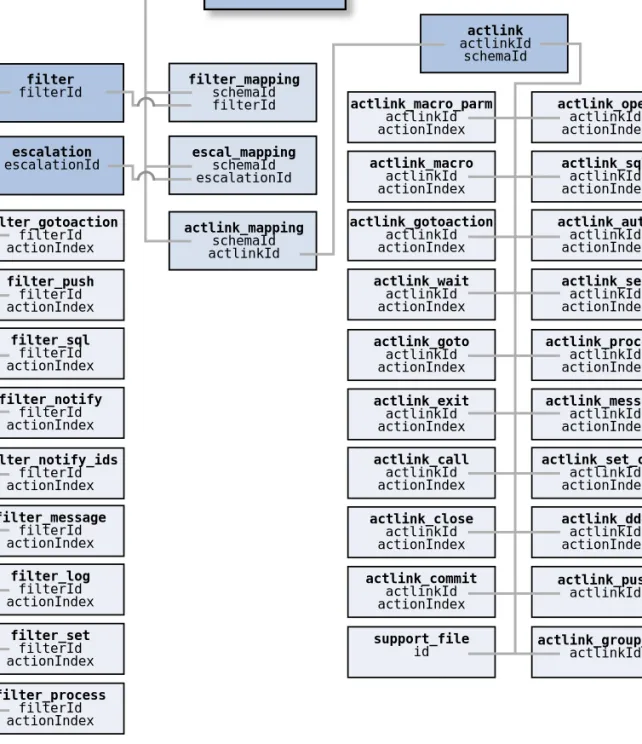
Figure 1-1 on page 25, Figure 1-2 on page 26, and Figure 1-3 on page 27).
Together, these tables contain the complete definition of the structures and
workflow in your implementation of AR System. As you add new structures
or alter existing structures in your system, appropriate updates are made to
these tables to reflect the changes.
Field type
Data type
Integer, selection, and time stamp
fields
int
Real fields
float
Decimal
char
Character fields, with a defined
maximum length of 255 bytes or fewer
varchar
Diary fields and character fields, with
no maximum length or a maximum
length of more than 255 bytes
text
The AR System data dictionary
25
Figure 1-1: AR System Data Dictionary: Forms, Fields, VUIs, and Sample Forms
char_menu_list charMenuId char_menu_query charMenuId char_menu_sql charMenuId char_menu_file charMenuId
control
dbVersion =19
field_permissions schemaId fieldId field_enum_values schemaId fieldId enumId field_attach schemaId fieldId field_diary schemaId fieldId field_enum schemaId fieldId enumId field_dec schemaId fieldId char_menu name charMenuId field_curr schemaId fieldId field_date schemaId fieldId field_table schemaId fieldId field_char schemaId fieldId charMenu field_column schemaId fieldId schema_group_ids schemaId subadmin_group schemaId schema_list_fields schemaId schema_view schemaId schema_join schemaId schema_index schemaId schema_sort schemaId actlink actlinkID filter filterId escalation escalationId See Figure 1-2 arcontainer containerId See Figure 1-3arschema
name
schemaId
nextId
schemaType
field
schemaId
fieldId
vui
schemaId
vuiId
view_mapping schemaId fieldId join_mapping schemaId fieldId field_int schemaId fieldId field_real schemaId fieldId BnC<fId> C1 blob Bn C1 C<fid> CC<fid> CO<fid> Tn C1 C2 C3 ... Hn entryId T0 U0 ... field_dispprop schemaId fieldId vuiIdFigure 1-2: AR SystemData Dictionary: Active Links, Filters, and Escalations
filter_gotoaction filterId actionIndex filter_push filterId actionIndex filter_sql filterId actionIndex filter_notify filterId actionIndex filter_notify_ids filterId actionIndex filter_message filterId actionIndex filter_log filterId actionIndex filter_set filterId actionIndex filter_process filterId actionIndexarschema
name
schemaId
nextId
schemaType
actlink actlinkId schemaId filter_mapping schemaId filterId escal_mapping schemaId escalationId actlink_mapping schemaId actlinkId filter filterId escalation escalationId actlink_macro_parm actlinkId actionIndex actlink_macro actlinkId actionIndex actlink_gotoaction actlinkId actionIndex actlink_wait actlinkId actionIndex actlink_goto actlinkId actionIndex actlink_exit actlinkId actionIndex actlink_call actlinkId actionIndex actlink_close actlinkId actionIndex actlink_commit actlinkId actionIndex actlink_open actlinkId actionIndex actlink_sql actlinkId actionIndex actlink_auto actlinkId actionIndex actlink_set actlinkId actionIndex actlink_process actlinkId actionIndex actlink_message actlinkId actionIndex actlink_set_char actlinkId actionIndex actlink_dde actlinkId actionIndex actlink_push actlinkId support_file id actlink_group_ids actlinkId See Figure 1-1The AR System data dictionary
27
Figure 1-3: AR System Data Dictionary: Container
Initial table
The first table is named
control
, and it contains one row. The columns
contain information about the version of the database,
dbVersion
, and a set
of numbers identifying the next available ID for the various structure items
that can be created.
arcontainer name containerId containerType cntnr_ownr_obj containerId ownerObjType ownerObjID ar_schema schemaId Value Short Value? External Data type? arreference containerId referenceType dataType referenceId referenceObjId arctr_subadmin containerId arref_group_ids containerId referenceId arctr_group_ids containerId field fieldId actlink actlinkId escalation escalationId filter filterId arcontainer containerId arschema schemaId vui vuiId char_menu charMenuId Internal User Defined User Defined Value Long
Tables for forms
A set of tables is used to define the form (known as schema in the database
tables). The
arschema
table contains information about the form definitions.
The four main fields in the
arschema
table are:
schemaId
—The unique internal ID for the form (which does not change,
regardless of changes to the form).
name
—The administrator name for the form.
schemaType
—The type of form (regular, join, view, or vendor).
nextId
—The next available ID for a new entry for that form.
The following set of tables holds information associated with the form
definition:
schema_group_ids
—Defines which groups have access to the form.
subadmin_group
—Defines which groups have subadministrator access
potential for this form.
schema_list_fields
—Defines which fields are returned in response to
the
ARGetListEntry
and
ARGetListEntryWithFields
API calls.
schema_vendor
—Defines how the form is attached to an ARDBC data
source.
schema_view
—Defines how the form is attached to a database table.
schema_join
—Defines how the form is joined, if applicable.
schema_index
—Defines the indexes for the form.
schema_sort
—Defines the default sort order for the form.
schema_archive
—Defines the archive information for the form.
Every form contains at least one view user interface (VUI) that represents the
various layouts and fields that hold the data for the form. The
vui
table
contains information about each VUI in each form. Every VUI is identified
by the combination of the
schemaId
that connects the VUI to a form, and the
vuiId
that identifies that VUI within the form.
The AR System data dictionary
29
Tables for fields
The
field
table contains all of the information (except for the display
information) about each field in each form. Every field is identified by the
combination of the
schemaId
that connects the field to a form and the
fieldId
that identifies the field within the form.
The
vuiId
and
fieldId
are unique within the form, so a single ID identifies
either a VUI or a field. The
field_dispprop
table contains information used
to define how the field is displayed in the form. The
field_permissions
table
contains information about the permissions of various groups to the
individual fields. The following series of additional tables hold information
that is specific to each data type:
field_int
,
field_real
,
field_char
,
field_diary
,
field_dec
,
field_curr
,
field_date
,
field_enum
,
field_attach
,
field_table
,
field_column, field_view
,
field_display
,
and
field_enum_values
(there is no additional data for timestamp, trim, or
control fields).
If a field is located in a join form, there is an additional entry in the
join_mapping
table. This entry contains the definition of how this field is
connected to the field in the base forms that make up the join form.
If a field is located in a view form, there is an additional entry in the
view_mapping
table. This entry contains the definition of how this field is
connected to the field in the base forms that make up the view form.
If a field is located in a vendor form, there is an additional entry in the
vendor_mapping
table. This entry contains the definition of how this field is
connected to the field in the base forms that make up the vendor form.
Tables for menus
The
char_menu
table contains an entry for each menu, and tags each with a
charMenuId
. A set of tables associated with the
char_menu
table (linked by
charMenuId
) provides the details about the various types of character menus:
char_menu_list
char_menu_query
char_menu_file
char_menu_sql
Tables for filters
The
filter
table contains an entry for each filter, and tags each with a
filterId
. Tables associated with the filter table (linked by
filterId
) provide
the details about the various actions defined for each filter:
Tables for escalations
The
escalation
table contains an entry for each escalation, and tags each
with an
escalationId
. Because escalations and filters are so tightly linked,
the information about actions for escalations is stored in the same tables as
the filter actions. The
escalationId
and the
filterId
are unique within the
table, so a single ID identifies either a filter or an escalation.
Tables for active links
The
actlink
table contains an entry for each active link, and tags each with
an
actlinkId
. Tables associated with the
actlink
table (linked by
actlinkId
) provide the details about the various actions that are defined for
each active link:
The
support_file
table stores report definitions. Finally, the table
actlink_group_ids
contains the list of groups that can execute the active
filter_notify
filter_push
filter_notify_ids
filter_sql
filter_message
filter_gotoaction
filter_log
filter_call
filter_set
filter_exit
filter_process
filter_goto
actlink_macro
actlink_goto
actlink_macro_parm
actlink_exit
actlink_set
actlink_call
actlink_process
actlink_close
actlink_message
actlink_commit
actlink_set_char
actlink_open
actlink_dde
actlink_sql
actlink_gotoaction
actlink_push
actlink_wait
actlink_auto
The AR System data dictionary
31
Tables for mapping workflow
A set of mapping tables associates each filter, escalation, or active link with all
its forms, allowing administrators to create shared workflow. The
filter_mapping
table contains the
filterId
and
schemaId
for each entry,
creating a link between each filter and form. The
escal_mapping
table
associates escalations with forms by storing the
escalationId
and
schemaId
for each entry. In a similar way, the
actlink_mapping
table associates active
links with forms by storing the
actlinkId
and
schemaId
for each entry.
Tables for containers
The
arcontainer
table contains an entry for each container, and tags each
with a
containerId
. Containers are used to define guides, applications,
packing lists, workspaces, and web services. The three main fields in the table
are:
containerId
—The unique internal ID for the container.
name
—The administrator name for the container.
containerType
—The type of container.
The following set of tables holds information associated with the container
definition:
arctr_group_ids
—Defines which groups have access to the container.
arctr_subadmin
—Defines which groups have subadministrator access to
the container for containers that are not owned.
arreference
—Defines the references for each container.
arref_group_ids
—Lists the owners for the container.
cntnr_ownr_obj
—Defines group access permissions for external
references.
A list of references defines the components that belong to each container. For
example, a container might reference forms, workflow objects, and other
internal and external objects that make up an application or guide. Each
container can have zero, one, or multiple references. Each reference is
identified by the
containerId
of the container to which it belongs, and by the
referenceId
that identifies the object itself.
All references are described by reference type, data type, reference order
number, label, and description. Internal references store the
referenceObjId
. External references store a short value or long value that
describes the external reference. The
arref_group_ids
table can have zero,
one, or multiple group entries that define group access permissions for each
external reference. Each entry describes a
groupId
permitted to access an
external reference.
For more information about using containers to create guides, see the
Workflow Objects guide. For more information about the data structures used
to define containers, see the C API Reference guide.
Creating tables for forms
The
arschema
table holds information about each form, including form
name, schema ID and next request ID. When a new regular form is created,
three or more of the following tables are created in the database to hold the
information (requests) for that form:
“Main data table” on page 32
“Status history table” on page 33
“Attachment tables” on page 34
“Currency table” on page 35
“Indexing” on page 36
Main data table
Each form has an associated main data table that holds all the information for
that form. The main data table contains a column for each field except
Attachments and Status History. Each main data table or view (for join
forms) is named with a
T
followed by the unique ID (
schemaID
) for the form
(for example,
T3
). You can find the ID by searching the
arschema
table by the
name column and retrieving the
schemaId
value. The ID does not change
regardless of changes made to the form, so the table name remains the same.
In Figure 1-1 on page 25, the main data table is labeled
T
n
.
Creating tables for forms
33
All columns in each table or view are named with a
C
followed by the unique
ID for the field within the form. For example, the Submitter field is
C2
. The
ID for the field does not change, the creator of the field can assign the ID.
Every ID is unique within a form, so there is never an issue with duplicate
names. After an ID has been assigned, it cannot be changed, regardless of any
changes to the field. For information about reserved and core IDs, see the
Form and Application Objects guide.
For join forms, if there is an attachment field on the form, a column is added
to the Main Data view. The contents of this column are a concatenation of
the
C
,
CO
, and
CC
columns of the Attachment Details table. If new attachments
are added to the base form, the view is updated. See “Attachment tables” on
page 34.
Because AR System must retain the IDs of the requests in the underlying
table to form the ID of a join form entry, there are a few extra columns and
some special handling for column
C1
. AR System creates a series of columns
for each regular form that is involved in the join tree. The columns are named
with an
E
followed by a zero-based index (three regular tables would be
named
E0
,
E1
, and
E2
). These columns point to the corresponding entry IDs
(column
C1
) of the regular forms. The
C1
column for the join form is
determined by concatenating the entry IDs of the regular forms (in the
E
columns) separated by vertical bars (
|
).
Status history table
The status history table contains all the information for the Status History
field. Each status history table or view (for join forms) is named with an
H
followed by the unique ID for the form (for example,
H3
). The ID is the same
ID that the main data table or view uses, and the name of each also remains
unchanged. Every main data table has an associated status history table. In
Figure 1-1 on page 25, the status history table is labeled
Hn
.
The most important column in this table is the
entryId
. It provides a
reference to the
C1
column of the main data table. (Column
C1
is always the
RequestID.) This column is followed by a series of one or more column pairs.
There is one pair for each state defined for the Status field. The columns are
named with a prefix followed by the numeric representation for each state.
The prefixes are
U
for the user name and
T
for the time the entry was last
changed to the corresponding state. The numeric value is zero-indexed. For
example, a form with three states for the Status field would yield a table with
seven columns:
entryId
,
U0
,
T0
,
U1
,
T1
,
U2
, and
T2
.
If new status values are added, appropriate columns are added to this table to
reflect the new states. If states are deleted, the columns are left in the table,
enabling the states to be added again in the future. The data for the status
values is stored in the database as an integer that relates to the order of the
choices. If you add values at the beginning or in the middle of existing values,
other values in the list might change.
Unlike in regular forms, for join forms, the Status History field is optional. If
it is present, the Status and Status History fields must be from the same base
table. If there is no Status History field in the form, the Status History table
does not exist. If a Status History field is present, it is defined as an exact
duplicate view of the status history table or view of the base form to which it
is connected. The only difference is the name of the view. For more
information about the Status History field, see the Form and Application
Objects guide.
Note:
View and vendor forms do not have corresponding status history
tables.
Attachment tables
There are two attachment tables: the attachment details table and the
attachment data table.
Attachment details table
The Attachment details table contains information for the properties of
Attachment fields. For every Attachment field in the form, a separate table is
created to store the attachment value.
The Attachment details table is named with a
B
followed by the unique ID for
the form (for example,
B3
). In Figure 1-1 on page 25, the attachment details
table is labeled
B
n
. An attachment details table with one column (
C1
) is
created with every form.
For every attachment field added to any attachment pool on the form, three
new columns are added. Each column is named with
C
,
CO
, or
CC
, followed by
the attachment field ID. For example, the three columns added for one
attachment might be called
C536870920
,
CO536870920
, and
CC536870920
,
where
536870920
is the attachment field ID.
Creating tables for forms
35
The
C
column stores the full path name of the attached file. The
CO
column
stores the original size (in bytes) of the attached file. The
CC
column stores the
compressed size (in bytes) of the attachment file.
Attachment data table
For each attachment field on a form, an attachment data table is created. The
attachment data table is named with a
B
followed by the unique ID for the
form, followed by
C
, followed by the attachment field ID. For example, the
attachment data table might be called
B7C536870920
, where
7
is the
schemaID, and
536870920
is the attachment field ID. In Figure 1-1 on
page 25, the attachment data table is labeled
BnC<fID>
.
The Attachment data table has two columns: one that holds the RequestID
(
entryId
) and one that holds the data from the file. The column holding the
data is named with a
C
followed by the attachment field ID. For example, the
data column might be named
C536870920
, where
536870920
is the
attachment field ID.
Currency table
Where a field in a form typically has one corresponding column in the main
data table, the currency field has several columns and, therefore, a unique
naming convention to distinguish the extra columns. Whereas typical fields
follow the naming convention described in “Main data table” on page 32 (all
columns in each table or view are named with a C followed by the unique ID
for the field within the form), the currency field is named with a C followed
by the unique ID for the currency field and a unique suffix for each additional
currency column stored in the database.
The currency suffixes used to name the additional currency columns are
defined in the following table.
Suffix
Currency Column Represented
V
Decimal value
C
Code associated with decimal value
D
Timestamp or Date established as the
conversion date
<Type of currency being used> (USD,
EUR, JPY, and so on)
Value of specified type of functional
currency
For example, the columns for a currency field might be called
C536870913V
,
C536870913C
,
C536870913D
, or
C536870913USD
.
Indexing
Indexes are automatically maintained for all the tables created by AR System.
Some are defined by AR System, and others are defined by an administrator.
If a table is restructured through AR System, all indexes are recreated for the
new table.
The main data table has an index supported by AR System defined for the
C1
column. This column corresponds to the Request ID field of the form. (In
Microsoft SQL databases, the table is created using a primary key, which
enables database replication.) The index is a unique index and is used
extensively as the main index of the table.
For the main data table, the administrator can create additional indexes for
the form. The indexes are unique only if defined as such. These additional
indexes are not clustered because there can be only one clustered index, and
it is reserved for the main index supported by AR System.
The status history table has an index supported by AR System defined on the
entryId
column. This column also corresponds to the Request ID field of the
form. The index is a unique clustered index and is the main index of the table.
AR System does not create additional indexes for the status history table.
The Attachment Data and the Attachment Details tables each have unique
indexes supported by AR System. For the Attachment Data table, the index
is defined on the
entryId
column, and for the Attachment Details table, the
index is defined on the
C1
column. These columns correspond to the Request
ID field of the form. The administrator cannot create additional indexes.
Indexing a currency field requires special considerations. Because a currency
field is represented by multiple columns in the main data table, multiple
columns are indexed. Standard queries against a currency field could
potentially use any of several different columns, depending on the currency
type specified. To provide comprehensive coverage, indexing a currency field
requires an index for the value column, the type column, and for each
functional currency column. This can produce significant overhead for the
main data table. Therefore, consider indexing a currency field carefully
before doing so.
SQL views
37
Note:
Indexes cannot be created for join forms. The form definition is just a
view and the database does not support indexes for views. Indexes defined
for the underlying tables are available and are used when performing
operations against the join form.
For view forms, you must create indexes within the database. The
AR System cannot create indexes on the view of the external database’s
table.
For vendor forms, the administrator who implemented the ARDBC data
source must define and document a mechanism to establish indexes on
the underlying data. For more information about ARDBC, see the C API
Reference guide.
SQL views
For each table that is built in the system (except for the attachment tables),
an SQL view is automatically created. This view uses the form name as the
view name and the field names (not a display label in one of the views) as the
column names. The names are created by using the following rules:
All alphabetic and numeric characters remain as defined.
All other characters are converted to an underscore (
_
).
If the first character is not alphanumeric, a leading
A
is added to the name.
If the name of a field is blank, a field name with a leading
A
followed by the
fieldId
is used.
If the name is one of the reserved words for the database, the string
_x
is
appended.
The name of the table must be unique among all the table names after the
conversion. If it is not unique, a set of three digits is added to the end of the
name (with the name truncated, if necessary, to fit the maximum length
allowed for an SQL name). First, the digits
001
are tried. If that is unique, the
new name contains
001
at the end. If
001
does not make the name unique,
002
is tried, then
003
, and so on until a unique name is found. Column names
must also be unique, so the same naming convention is used.
The SQL view of the status history table follows the same strategy as the SQL
view of the base table. The name of the table is created by adding
SH_
to the
front of the name of the base table view. The column names are mapped to
the name of the Request ID field and the names of each of the Status values
with
_TIME
and
_USER
appended. So, a form with two states, New and Closed,
would end up with columns in the view named
Entry_Id
,
New_USER
,
New_TIME
,
Closed_USER
, and
Closed_TIME
.
These SQL views are recreated whenever the name for the field is changed or
when a change is made to the form that affects the underlying table (deleting
a field, adding a field, or changing the length of a field).
You can use the view or the base tables to read data from the database. The
SQL views are especially useful when using a third-party report writer,
because the names of the various tables and columns are easier to use than
the internal, numeric representations used in the base tables.
Updating tables when AR System forms change
When you restructure a regular form by adding new fields, deleting old fields,
or changing the length of existing fields, AR System restructures the
underlying database to reflect those changes. This section covers the
following topics:
“Adding fields” on page 39.
“Deleting fields” on page 39.
“Changing character field lengths” on page 40.
Note:
This section does not apply to join forms. Adding or deleting a field
from a join form simply adds or removes the reference to the field in the
underlying form. You cannot change the length of a field, because it is
defined by the underlying form.
For view forms, the database view is recreated when any fields are added or
removed. The database is not recreated if field properties (for example,
length) are changed.
Updating tables when AR System forms change
39
Important:
Consider performance when you restructure your database.
When a table is restructured, the performance impact of the operation is
dependent on the amount of data in the affected table. If the table contains
a large amount of data, the restructuring operation might take a long time,
and it might take a large amount of log and data space within the system.
Accordingly, plan updates to occur during hours when access to data in
the system is not critical.
Adding fields
When you add a new field to a form, a new column is added to the main data
table by using the
ALTER TABLE
command. The structure of the database is
changed to add the new column according to the rules stated in “Creating
tables for forms” on page 32.
The data for the new field for any existing entries is
NULL
even if it is a
required field. You can change these values at any time. When the field is
added, it can be used for all existing or future entries. Use the BMC User
Modify All operation to assign a default value for the field.
Deleting fields
Deleting a field from a form physically removes the field from the database.
The corresponding column and all data that is associated with the field are
removed. The following sections describe how each database deletes fields.
DB2
In a DB2 database, the following syntax is used to build a new table that
contains all the structure and data of the original table except for the deleted
column:
CREATE TABLE <new table, excluding the field being deleted>
INSERT INTO <new table> AS SELECT <all fields, excluding the field being deleted> FROM <old table>
After the new table is created, the original is deleted:
DELETE TABLE <old table>