the Autoweb System
Piero Fraternaliand
Paolo Paolini
Politecnico di Milano, Dipartimento di Elettronica e Informazione Tel: (39-2) 2399-3651; Fax: (39-2) 2399-3411
This paper describes a methodology for the development of WWW applications and a tool vironment specically tailored for the methodology. The methodology and the development en-vironment are based upon models and techniques already used in the Hypermedia, Information Systems, and Software Engineering elds, adapted and blended in an original mix. The founda-tion of the proposal is the conceptual design of WWW applicafounda-tions, using HDM-lite, a notafounda-tion that allows the specication of structure, navigation, and presentation semantics. The conceptual schema is then translated into a "traditional" database schema, that describes both the organiza-tion of the content and the desired navigaorganiza-tion and presentaorganiza-tion features. The WWW pages can therefore be dynamically generated from the database content, following the navigation requests of the user. A CASE environment, called Autoweb System, oers a set of software tools that assist the design and the execution of a WWW application, in all its dierent aspects. Real-life experiences of the use of the methodology and of the Autoweb System in both the industrial and academic context are reported.
Categories and Subject Descriptors: H.5.4 [Information Interfaces and presentation]: Hy-pertext/Hypermedia; D.2.2 [Software Engineering]: Design Tools and techniques
General Terms: Application, Development
Additional Key Words and Phrases: WWW, HTML, Intranet, Design, Modeling
1. INTRODUCTION
It is commonly accepted that the diusion of the Web as an ubiquitous communi-cation medium has fostered a novel type of applicommuni-cations, whose main focus is on capturing the user's attention by providing facilitated access to information and services [Myers et al. 1996]. Applications in such domains as electronic commerce and digital libraries are requested to support a form of computer-human interaction based on the exploratory access to information, rather than on a predened dialogue paradigm (e.g., form-based interaction). As the Web has demonstrated, hypertex-tual navigation and content-based querying are the favorite access mechanisms for non-technical users to browse through vast collections of data. Historically, even prior to the Web advent, this type of interaction has been deeply investigated and
Address: Piazza Leonardo da Vinci, 32, I20133 Milano Italy Email: fraterna/[email protected]
practically experimented in the hypermedia eld, where many applications like CDROMs and information kiosks have been constructed for the general public. However the architecture of a typical hypermedia application is far simpler than that of an average Web application, thanks to the inherently static nature of the information designed for o-line publication. On the Web, information managed by applications changes very rapidly, is stored in many places, and assumes a variety of formats, both structured and unstructured. These issues demand a solid architec-ture, founded on well-established technologies for data management, in particular on database technology.
Moreover, Web applications must be designed for change, not only of their con-tent, but also of requirements and architectures. Thus, their development needs to be organized into a well-dened process, amenable to the benets of software engineering, among which computer-based support to repetitive tasks is prominent.
1.1 State of the practice of Web Development Tools
The present practice of application development for the Web sees an impressive number of products being oered, which boast dramatic benets over the manual development of Web sites. However, a careful review of their features reveals that most solutions concentrate on implementation, paying little attention to the overall process of designing a Web application [Fraternali 1999]:
|Visual HTML Editors and Site Managers (like, e.g., NetObject's Fusion, Macro-media's Dreamweaver and Microsoft's FrontPage98) concentrate on HTML pro-duction and do not support the integration of large masses of data.
|HTML-SQL integrators (like e.g., Microsoft's Active Server Pages (ASP) and Cold Fusion [Forta and al. 1997]) provide a way to scale the dimension of a site by producing HTML pages dynamically from database content, but are implementation-level tools and do not address specication and design activi-ties.
|Web-enabled form editors and database publishing wizards (like e.g., Inprise's IntraBuilder) either port to the Web the traditional client-server, form-based interface style, or merely expose the database structure as a set of Web pages. |Web application generators (like, e.g., Oracle Designer 2000 Web Generator
[Gwyer 1996] and Hyperwave [Hyperwave Information Management 1998]) start from conceptual modeling and produce the Web site automatically, but have limitations in the expressiveness of the concepts available to the designer for stucturing a Web site.
In summary, the approach to Web development taken by most products is either conned to boosting implementation productivity or is an adaptation of develop-ment methodologies originated in other elds (typically, object-oriented program-ming and database design), which do not consider the specicity of the Web as a novel communication medium. For the motivations above, a convergence of no-tations, methodologies and tools from the hypermedia, software engineering, and database areas is required to let Web application development leverage the best of all these three disciplines, i.e., the modeling power of hypermedia, the architec-tural solidity of databases, and the rigorous approach to development of software engineering.
1.2 A Novel Approach to the Development Data-Intensive Web Sites
As in [Atzeni et al. 1997], the focus of this paper is on data-intensive Web sites, which are dened as Web sites either oered to the general public on the Internet, or conceived for internal use by organizations on Intranets, accomunated by the presence of high volumes of data to be published and maintained over time.
The Autoweb Project, presented in this paper, proposes a methodology and a development environment for data-intensive Web sites, which:
|adapts current hypermedia design models to Web development and to the needs of automatic software generation;
|leverages database technology to store not only the content of a Web application, but also a description of its structure, navigation, and presentation, which enables automatic implementation and better evolution;
|denes a software development process for building new Web applications, and for "Web reverse-engineering" existing database applications;
|supports such process by means of suitable tools. The main contributions of Autoweb are:
|HDM-lite, an hypermedia design model tailored to the development of Web ap-plications. HDM-lite descends from the Entity-Relationship Model [Chen 1976] and from HDM [Garzotto et al. 1993], one of the rst hypermedia design models, which has been widely used in the design and implementation of applications on CDROMs and kiosks. With respect to previous hypermedia and Web design models, HDM-lite includes a notation for specifying presentation at a conceptual level, i.e., in a way independent of the delivery language and device, which, cou-pled to primitives for describing structure and navigation, covers all aspects of a Web application and enables automatic implementation.
|Two transformation techniques providing 1) the mapping of HDM-lite concep-tual schemas into an intermediate relational representation; 2) the mapping of such relational structures into the physical pages constituting the application. The former is an evolution of the well-known translation of Entity-Relationship schemas into relational schemas, augmented to treat also navigational and pre-sentation aspects. The latter is an original contribution permitting designers to generate applications written either in HTML or Java from content and meta-information stored in a relational database, in such a way that the conceptual schema is preserved.
|The Autoweb System, a CASE and runtime environment which supports the def-inition of applications with HDM-lite and automatically implements the above mentioned transformations. Dierently form commercial systems, Autoweb cov-ers not only implementation, but all the activities of Web development (most no-tably conceptual design) and leverages a conceptual model (HDM-lite) equipped with primitives for navigation and presentation specication. With respect to related research prototypes [Fernandez et al. 1998a; Atzeni et al. 1998], Autoweb has a higher level of automation and advocates a top-down approach to Web development, where hypermedia design come rst, followed by database design as a support task. Also with top-down site generation, the Autoweb Systems can
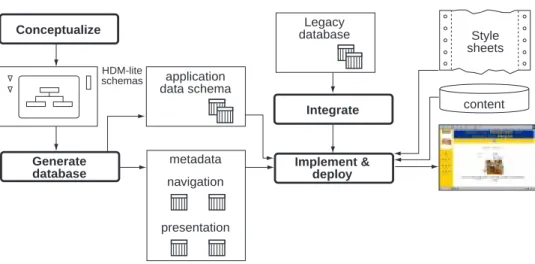
Conceptualize Generate database application data schema metadata navigation presentation Implement & deploy Integrate Legacy database Style sheets HDM-lite schemas content
Fig. 1. Main Steps of Application Development with Autoweb
be used to Web-enable existing legacy databases, as it will be shortly discussed in the last Section.
1.3 Preview of the Autoweb Development Process
The process of developing a WWW application with Autoweb is summarized in Figure 1.
The initial step is the collection of requirements and their formalization as a set of conceptual schemas in HDM-lite. This phase is human-intensive but is supported by a tool of the Autoweb System called Visual HDM, which permits the editing, archiving, and evolution of HDM-lite schemas.
The second phase is the generation of the supporting database; this phase takes as input the HDM-lite conceptual schema and produces as output the relational database that will support the application at run-time. The output database con-sists of two parts, a mini-database containing a representation of the structure, navigation and presentation (called meta-schema database), and an empty database for storing the application content. This phase is totally automated by a tool called VHDM Database Schema Generator.
The last phase is the implementation and deployment of the Web application. The empty database is lled with structured application content, possibly linked to unstructured data (e.g., multimedia les), and the application pages are produced from structured and unstructured content. To drive the production of pages, pre-sentation directives, called style sheets, are used, which contain a description of how to render content in the selected delivery language (e.g., HTML). Implementation is almost totally automated: the application database can be lled via a Web in-terface automatically produced by the Autoweb DataEntry Generator, style sheets are visually edited with the Autoweb Style Sheet Editor, and the application pages are dynamically produced by the Autoweb Page Generator.
1.4 Running Example
Throughout the paper, we use a simplied running example to illustrate the features of HDM-lite and Autoweb.
ACME Furniture Inc. is an aggressive company thriving in the mail order busi-ness. To enlarge its customer base, ACME has decided to put part of its catalog on the Internet. The catalog advertises various types of furniture, e.g., chairs, ta-bles, lamps, and so on, and also contains special combinations of items sold at a discounted price. Individual items are described by an image, a textual descrip-tion, their price, and a set of technical features (dimensions, available colors, ...). Combinations are illustrated by a captivating photograph, advertising text, and the discounted price. Since ACME has a number of stores throughout the world, infor-mation about the store locations is also made available, including the address and contact information, an image of the store, and a map.
Users are expected to visit the ACME home page containing a logo of the company and some advertising stu; from there they can browse the list of special oers, and the item catalog. From the page describing a combination, the individual items forming the combination can be accessed, and conversely, it is possible to navigate from an item to the combinations including it. From the home page, the list of stores can also be reached.
A second category of users is also expected: inventory managers. These must directly access the inventory records of the various items at the dierent stores, either from a store list or from an item list. Their application pages should be textual for network speed and should exclude all customer-oriented advertising.
1.5 Organization of the Paper
The rest of the paper is organized as follows: Section 2 introduces the HDM-lite design notation, describing the concepts used for structure (Section 2.1), navigation (Section 2.2), and presentation (Section 2.3) modelling. At the end of the section, a tour of the ACME customer application (Section 2.4) visually demonstrates the way HDM-lite modeling concepts may be rendered by an implementation. Section 2 discusses the techniques for automatically mapping HDM-lite schemas into Web applications: the conceptual-to-logical mapping is presented in Section 3.1, the logical-to-physical mapping is the subject of Section 3.2. Section 4 presents the tools of the Autoweb System, organized into a Design Environment (Section 4.1) and a Runtime Environment (Section 4.2). Section 5 compares the Autoweb System to the related work in the industry (Section 5.1) and in Academia (Section 5.2). Section 6 reports on a number of projects where Autoweb has been used and discusses the lessons learned from such experiences. Finally, Section 7 draws the conclusions and illustrates the ongoing and future work.
2. DESIGNING WWW APPLICATIONS: THE HDM-LITE MODEL
Designing a WWW application means, as for any other type of application, de-scribing its most relevant features, without committing to implementation details. HDM-lite is a design model conceived as a Web-specic evolution of HDM (Hyper-media Design Model [F.Garzotto et al. 1993]), a general purpose hyper(Hyper-media design model, which has inuenced a number of subsequent proposals, e.g., [Isakowitz et al.
1995; J.Nanard and M.Nanard 1995; Schwabe and Rossi 1995]. According to HDM-lite, a WWW application is described by an hyperschema, which consists of three dierent parts:
|a structure schema describing the structural properties of the basic objects that make up the application;
|a navigation schema specifying the actions available to move from one object to another one (traversal schema) and the access paths to reach the objects of the application (access schema); given a structure schema, there may be several dierent navigation schemas representing dierent ways to access and move across the same information.
|a presentation schema dictating the way application objects are presented to the user. Given a pair (structure schema, navigation schema), there may be several dierent presentation schemas representing dierent ways to graphically render the same application.
2.1 Structure
Structure modeling in HDM-lite uses a variant of the Entity-Relationship model [Chen 1976] to dene the structure of the objects that contitute the information base of the application.
The structure of the application is described by its structure schema, which con-sists of a number of entity-types and a number of link-types. An entity-type describes the features common to a group of application objects, while a link-type describes the features common to a group of connections between application objects.
An hyperbase is an instance of a structure schema: it consists of a number of entities and links. Entities represent instances of entity-types and links represent instances of link-types, that is, actual connections between entities.
An entity-type denition may group a hierarchy of component-types, organized as a tree. The type located at the root of the tree is called root component-type, and is typically used to convey general information about the entity and thus to represent the entity as a whole.
A link-type is a binary connection between entities or components of entities. A link type has a name and cardinality constraints used to restrict the number of connection instances that an entity or component may take.
A specialized link-type, called part-of relationship, connects a component and its (sub)-components; as for normal link-types, explicit cardinality constraints can be stated to impose a minimum and maximum value to the number of sub-components contained in a super-component.
The information content of a component-type consists of a number of slots. A slot is an elementary unit of multimedia information. A slot has a name, and a type, that is a specication of the structure and range of values that the slot can take. Examples of admitted slot types are: text, number, image, video, animation, audio, URL, and HTML. Set- and list-valued attributes are also possible, constructed from the types above, of from records of the types above. The dierence between type URL and HTML is that the former is a pointer to a piece of Web information dened outside the hyperbase, whereas the latter denotes an attribute containing HTML text that is considered part of the entity or component.
component-name
slot3 : list-of type3 slot4 : type4 entity-name entity-name P min=2 max=10 min=1
a) component with slots
d) link e) cardinality constraint b) entity c) part-of E slot1 : type1 E slot2 : type2 L L
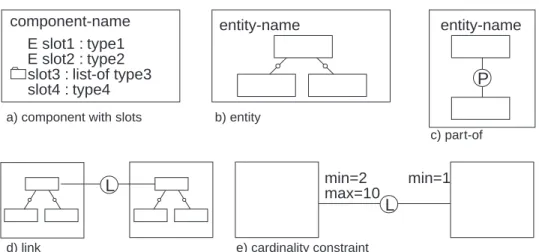
Fig. 2. HDM-lite Graphic Notations for the Structure Schema
A subset of the slots belonging to a component may be selected in order to build the external name of the whole component. The external name can be used as a "representative" of an entire component when needed (for example in a listing of several instances). An entity-type takes its external name from its root com-ponent. Note that the HDM-lite concept of external name is not intended as a means for specifying an integrity constraint or the need of a fast access method, but serves a presentation/communication purpose. Therefore, external name values are not required to uniquely identify a component nor to be minimal, and in this respect dier from the apparently similar notions of key and superkey in relational databases, and of object's external name in object oriented databases.
2.1.1 Notations and Running Example. Designers specify the structure schema of an application using the graphic notation summarized in Figure 2.
Component-types are denoted by rectangles with the component-type's name at the top (Figure 2.a). Slots are listed by their name and type inside component-types. List-valued slots are evidentiated by means of a small folder icon placed before the slot's name. Slots belonging to the external name of a component-type are marked by an uppercase E before their name.
Entity-types are denoted by larger rectangles enclosing a tree of components, with the entity-type's name on top (Figure 2.b).
Part-of relationship are denoted by edges labeled with an uppercase P and a tex-tual label giving the part-of a distinct name (Figure 2.c); they connect components within an entity-type.
Links are denoted by edges labeled with an uppercase L and a distinct name (Figure 2.d). They may connect components belonging either to the same entity or to dierent entities.
Cardinality constraints are textual annotations marking part-of and link edges; their syntax is: MAX=<maxvalue>,MIN=<minvalue>. Such annotations are placed on the side of the edge closer to the component-type for which the constraint holds (Fig-ure 2.e). The semantics is that every instance of the constrained component-type
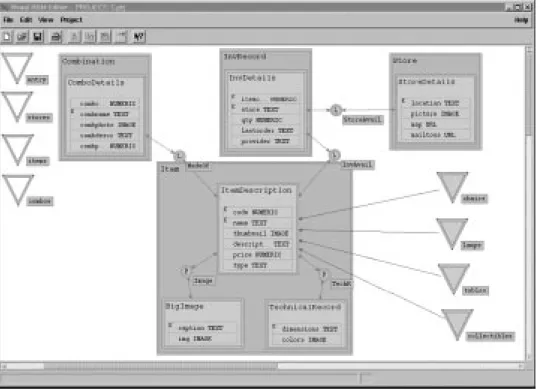
Fig. 3. The Structure Schema of the ACME Application
must participate to at maximum <maxvalue> and at minimum <minvalue> con-nections. Defaults are<minvalue>=0(optional connection) and<maxvalue>=many (unlimited n-ary connection), which can be omitted.
In the structure schema of the ACME application, shown in Figure 3, there are four entity-types: Item, Combination, Store, and InventoryRecord, which are the main concepts appearing in the specications.
All entity-types, but Item, consist of a single component. Entity-type Item de-scribes a complex object characterized by several pieces of information, some of which of multimedia type. Therefore, three component-types are introduced to provide a reasonable partition of an item's content: ItemDescription, BigImage, and TechRecord. In particular, the root-component ItemDescription holds sum-mary information, consisting of a code of type integer, a name of type text, a thumbnailof type image, a description of type text, a price of type integer, and a typeof type text.
Cardinality constraints on the part-of relationships within Item state that there can be 0 or more big images, and exactly one technical record.
The external names are name and code for Item, name for Combination, name and location for Store, and none for InventoryRecord and BigImages.
A link MadeOf connects items to the combination they belong to, and has a 0:N cardinality constraint on the participations of an item and a 2:N cardinality constraint on the connections of a combination. Two links named ItemAvailability and StoreAvailability connect inventory records to items and stores. A store or an
item can have zero or more inventory records and an inventory record is linked to exactly one store or item.
2.1.2 HDM-lite Structure Model and the Entity Relationship Model. There is an obvious parallelism between HDM-lite constructs and ER primitives: components and slots are similar to entities and attributes, and links and part-ofs to relation-ships. However important distinctions exist:
|As customary in hypermedia, objects of the real world are given an internal structure, which permits the designer to distribute their (possibly multimedia) content into dierent information segments; this capability, represented by HDM-lite component trees, facilitates the subsequent specication of the presentation semantics of an object.
|HDM-lite links (including part-ofs) are not only the specication of a semantic connection between objects, but imply also a navigation possibility, which is made explicit in the navigation schema.
|HDM-lite part-of relationships are given the dignity of rst-class modeling con-cepts, to emphasize the distinction between intra- and inter-object relationships. Again, this distinction facilitates the specication of presentation semantics. |In general, the purpose of Entity-Relationship and HDM-lite modeling is
dier-ent: the former describes objects to be stored in a database, the latter models objects to be presented to a reader. As a consequence, the same real world do-main could be described dierently under the two perspectives; for example in WWW modeling (and, more generally, hypermedia modeling) normalization is not a concern and redundancy is not only tolerated, but sometimes necessary to achieve a more self-explaining and readable application.
2.2 Navigation
As in traditional hypertexts, navigation of an HDM-lite application can take two forms: contextual and non contextual.
Contextual navigation species the way in which it possible to move from an object to another related object, whereas non-contextual navigation describes the access structures to be used as entry points to the application as a whole, indepen-dently of any specic object.
In HDM-lite, contextual navigation is specied by means of traversals, non-contextual navigation by means of collections. Toghether, traversals and collections constitute the navigation schema.
Contextual navigation is established by explicitly turning links and part-of rela-tionships of the structure schema into navigation commands, called traversals. For each link and part-of relationship R between an object type A and another object type B, the designer has four choices: 1) enabling the navigation of R in both di-rections, which is achieved by introducing a pair of symmetric traversals (from A to B and from B to A); 2) enabling only the navigation from A to B; 3) enabling only the navigation from B to A; 4) disabling the navigation of R.
Note that, dierently from a link in the traditional hypertext sense, which is a connection between two individual hypertext nodes, an HDM-lite traversal in general connects an object to a set of objects.
Non-contextual navigation is specied by dening the access schema, which con-sists of a number of collections.
A collection [Garzotto et al. 1994] is a set of objects that may be used as a meaningful index to the content of the application. Normally collections range over (a subset of) the instances of a component (e.g., the set of professors in a Faculty's site, the set of XVII Century paintings in a Museum's site). To allow hierarchical indexes, they may also range over other collections (e.g., the collection of all painters of a Museum may be substructured into the collection of XVI Century painters, of XVII Century painters, and so on).
Among the collections dened in the access schema, one is elected as the entry collection and denotes the home page of the application. If the entry collection is not explicitly dened, a default one is assumed, which is the collection containing all the dened collections.
Unlike traversals, which have a precise scope (the object from which they depart and its sub-components) collections are non-contextual and therefore not attached to any specic object; thus, the problem arises of dening the parts of the applica-tion in which each collecapplica-tion can be used to navigate.
HDM-lite solves this issues by introducing a notion of scope also for collections, similar to the scope of a variable in a programming language. A collection can be declared by the designer as having one of the following visibility level:
|Global, the collection is accessible from any part of the application. This is the default visibility, and the typical choice for the entry collection.
|Entity-level, the collection becomes navigable whenever the user accesses a spe-cic entity-type. For example, the collection \Painting Techniques" may be vis-ible only when browsing instances of an entity Painter, and not from instances of Sculptor.
|Component-level, the collection becomes navigable whenever the user accesses any instance of a specic component-type.
|Instance-level: the collection becomes visible whenever the user is accessing spe-cic objects. For example, the collection \XVII Century Milestones" may be visible only when browsing XVII Century painters.
2.2.1 Navigation Semantics. The navigation schema dictates the navigation op-tions that will be available to users at run-time to explore the hyperbase, typically in the form of active links or buttons in the application pages. Navigation implies moving the focus from one page to another one: for a traversal, the focus moves from the page of the currently visualized object to the page of one of the objects related to it; for a collection, the focus moves from a page where the collection is visible to the page representing one of the collection's members. In the sequel, we generically call the objects reached by a traversal and the members of a collection (either component instances or sub-collections) the targets of navigation.
The same navigation command can be executed at run-time in dierent ways: for example, it is possible rst to show an ordered index of the navigation targets, then to choose one and display it, and nally to enable scrolling over other related objects.
In general, the operational semantics of a navigation command is the result of the choices taken for ve dierent orthogonal dimensions:
|Sorting: are the targets of the navigation sorted?
|Filtering: are all the possible targets considered or only a subset?
|Indexing: are the targets presented collectively before access by means of an index?
|Accessing: how many targets are presented at the same time?
|Browsing: when one target is accessed, is it possible to \scroll" through the other ones?
2.2.1.1 Sorting. In HDM-lite, the targets of navigation can be ordered in dierent ways by the designer.
|Each traversal and collection can be sorted accoding to a specic combination of the slots of the navigation targets (e.g.,ASCENDING Surname, orDESCENDING birthdatefor a target of type Person).
|All the instances of a component or of an entity can be given a default order (e.g., ASCENDING title for entity Book), which is used for every traversal and collection not providing a specic sort criterion.
2.2.1.2 Filtering. Filtering is the operation of subsetting the targets of a navi-gation command in order to navigate a smaller number of elements. Filtering is achieved by specifying a lter, i.e., a parametric predicate on the target objects, attached to the traversal or collection.
A lter is a set of pairs (slot, operator), where operator is a comparison operator (e.g., equal, greater, like) applicable to the values of the corresponding slot; when the traversal or collection is navigated at run-time, the attached lter is turned into a form, which is submitted to the user to obtain a set of triples (slot, operator, value). Such triples are conjuncted to make up a predicate which is evaluated on the target elements of the navigation command: only the subset of objects that satisfy the predicate are considered in the subsequent navigation steps. 2.2.1.3 Indexing. Indexing is the splitting of the navigation command in two-steps: rst a list of element denotations is presented, then one entry is selected from the list and the corresponding target element is actually accessed. In an index, component instances are denoted by means of their external name slots, and collections by means of their name. The default naming of components can be overridden, using a custom set of slots in a specic traversal or collection.
When a lter is specied, it is evaluated rst, and indexing is performed after-wards.
2.2.1.4 Accessing. Access is the operation of actually presenting the complete information of targets (the slots of a component instance or the members of a collection). Access may be performed to: 1) a single target (the default), 2) all the targets.
When a lter is specied, access is performed after evaluating it, and therefore the cardinality of the set of objects to which access is applied is determined at run-time by the lter.
2.2.1.5 Browsing. Browsing is the operation of scrolling to another element of the same set of targets. Browsing commands, made available when one target is accessed, are:
Sorting Filtering Indexing Accessing Browsing
Index Yes No Yes One No
Filtered Index Yes Yes Yes One No
Guided Tour Yes No No One Yes
Indexed Guided Tour Yes No Yes One Yes
Filtered Indexed Guided
Tour Yes No Yes One Yes
Showall Yes No No All No
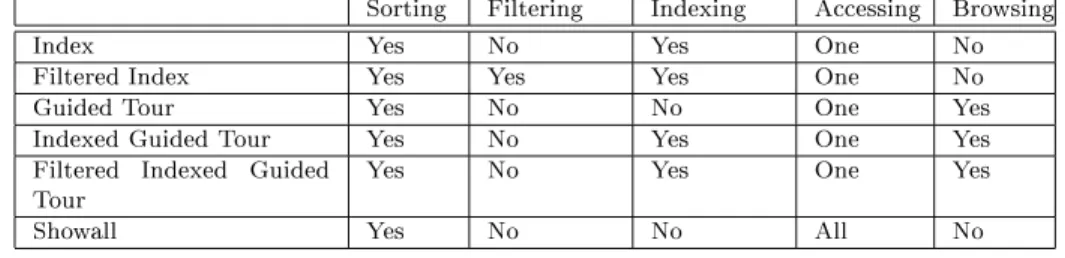
Fig. 4. Summary of the Navigation Modes Supported by HDM-lite
|Next,Previous,First,Last: with the obvious meaning.
|ToIndex, ToFilter: these commands lead back to the index or lter page, if they are dened in the current navigation mode.
2.2.1.6 Navigation Modes. By selecting dierent options for sorting, ltering, indexing accessing, and browsing, dierent navigation semantics could be dened. We call a specic mix of values for the navigation dimensions a navigation mode. Presently, HDM-lite supports a xed set of options, illustrated in Table 4, with mode index as the default. For example, Filtered Indexed Guided Tour is the navigation mode in which rst the targets of navigation are ltered, then an index is presented for selecting one target, and nally scrolling commands are enabled to move to the other targets.
2.2.2 Notations and Running Example. The navigation schema is specied by means of a graphic notation similar to that of the structure schema (see Figure 5). Components are represented as named rectangles. Enabled traversals are denoted by solid arrows between components, whereas disabled traversals are evidentiated as dashed arrows (Figure 5.a).
Collections are represented as named triangles of dierent colors distinguishing the various visibility levels (Figure 5.b). Collections ranging over one or more component types are connected to them by a hairline (Figure 5.c). Collections of collections are represented as trees, with the father node representing the enclosing collection, and the children nodes denoting the enclosed collections (Figure 5.d).
Finally, the navigation mode and the (optional) lter slots are represented as annotations to the arrow of a traversal or to the triangle of a collection (Figure 5.e). To model the navigation requirements of the ACME application, we introduce two distinct navigation schemas, one for generic customers (Figure 6) and one for internal personnel (Figure 7).
In Figure 6 there are six traversals and eight dierent collections:
|Two traversals permit ACME customers to go from a combination to its items and from an item to the combinations in which it is bundled. Both traversals are navigated in the indexed guided tour mode, to let customers scroll other items of the same combination or other combinations for the same item.
|Two traversals enable access from an item's description to its enlarged images and back. Since big images are expected not to be too numerous, they are accessed together in the showall mode.
c1 T1 c2 T2 Global Collection Collection Visible to selected entities components or instances c1 c2 co c2 c1 c3 COMP1 c1 c2 slot1 slot2 Navigation mode: index Filter on : slot1 c1
a) traversals
d) collection of collections e) navigation options b) collections with different visibility
c) collection visible to instances of a component
Fig. 5. HDM-lite Graphic Notations for the Navigation Schema
Fig. 7. The Navigation Schema of the ACME Inventory Manager Application
|Similarly, two traversals enable access from an item's description to its technical record. Since there is only one record per item, the navigation mode need not be specied.
|The Entry collection is the home page of the application. It is a collection of collections and its visibility is set to global to let customers go back to the home page from any point of the application. The navigation mode is index so that the home page will contain a list of all the member collections.
|Stores, Combos: these are global collections, ranging over all stores and combi-nations, respectively. Their navigation mode is set to indexed guided tour. From any point of the application it will be possible to reach either the store or the combination list, and from a store or a combination the \previous" or \next" one can be accessed.
|AllItems: this collection is similar to the previous two but for a fact: a lter-ing clause is specied to select at run-time the objects that will appear in the collection's index. This feature is useful because the number of elements of the collection is large. The ltering condition produces a form permitting the cus-tomer to enter desired values for the code, name, and type elds to focus the search on specic items or item types.
|Lamps, Tables, Chairs, Accessories: these collections range over sets of items and have visibility local to a set of istances. The idea is to let the customer access the list of all lamps only when he is looking at a lamp.
Note that the navigation schema for the customer application will not permit ACME customers to reach objects of type InventoryRecord.
The navigation schema for inventory managers (shown in Figure 7) is less rich: it contains two collections and four traversals. Collections Stores and AllItems are the same as before and the dened traversals permit ACME personnel to go from a store or item to its inventory records and back. In this navigation schema, combinations, which are a concern of the marketing sta, are not accessible.
2.3 Presentation
Presentation is the third part of an HDM-lite hyperschema, and the one in which the specicity of Web application development, with respect to general hypermedia design, is more evident.
The basic unit of presentation is the page type, which is an abstract specication of the layout and content of a set of similar application pages.
Three categories of page types are dened in HDM-lite:
|Component page-types: they describe the common presentation features of the instances of a given component-type; there is one component page-type for each component-type of the structure schema.
|Collection page-types: they specify the presentation of collections; there is one collection page-type for each collection.
|Traversal page-types: they specify the presentation of traversals; there is one such page-type for each traversal of the navigation schema.
Page-types are treated as abstract grids, the cells of which may contain dierent types of presentation elements. A page type is formally described by means of a style sheet, which is a textual specication of the layout of the page-type's grid and of the visual elements contained in its cells.
The presentation elements that the designer can place in a cell are of two kinds: |built-in: these are presentation abstractions predened by HDM-lite related to
the main concepts of the structure and navigation schema;
|black box: these are arbitrary pieces of content that the designer can insert into a style sheet to customize the page; they are written in a implementation-dependent language and not described by HDM-lite.
2.3.1 Built-in Presentation Elements. HDM-lite pre-denes several elements for rendering entities, components, part-of, links, collections, and navigation com-mands. Each built-in element has a set of properties which can be set by the designer.
Component elements are used in style sheets associated to component pages. They are:
|The slot panel: an area dedicated to the presentation of the slot values of a component. Customizable attributes include: the visual properties (e.g., font, size, color, alignment) of slot labels and values, how to handle null values and anonymous slots (i.e., slots with an hidden label), the formatting rules for values of record and list types.
|The component heading panel: an area dedicated to the header information of a component. By setting appropriate properties it is possible to hide the component header, choose the header type (automatic, custom-text, custom-image), and set the value of properties specic to the chosen header type (for example, a prex string to put in front of the automatic header, which is dened as the component's name).
|The outgoing links panel: an area dedicated to the presentation of the outgo-ing links of the component. Customizable attributes let the designer decide if outgoing links are represented by textual or iconic anchors, organize the anchors in columns and rows, establish if the anchors of inactive links (i.e., those links whose target set is empty) should be displayed with a "greyed" style or hidden, and supply an image map to use instead of separate icons.
Entity elements are used in the style sheets of component pages to describe the presentation aspects related to composite entities. They are:
|The part-of panel: an area dedicated to the presentation of the part-of connections of a component due to its embedding into the tree structure of an entity. Dierent presentation options are made available.
|The context panel: an area used in the presentation of a sub-component of an entity, to recall the path of objects containing it.
Collection and traversal elements are used in the denition of style sheets for collection and traversal page types:
|The collection or traversal heading panel: contains header information for a col-lection or a traversal. It can be customized in a way similar to the heading of a component. The default header type displays the collection's or traversal's name. |The index panel: an area supporting the presentation of a list of elements used to represent the content of a collection or the multiple objects reached by navigating a N-ary traversal.
|The show panel: an area for the presentation of multiple objects belonging to a N-ary traversal navigated in the show mode.
|The lter panel: an area containing the ll-in form resulting from a lter. The navigation console panel is a presentation element including commands to navigate through browsable sets of objects (rst, last, previous, next, index, to-lter). It may be inserted into component, collection, and traversal page styles. Navigational commands may be rendered with textual or iconic representations, and several other options can be set.
Utilities are pre-dened elements which embed in the style sheet the reference to arbitrary external applications supporting functions not provided by Autoweb. Utilities are collected in a utility panel, which can be customized in a similar way as the standard navigation console panel. Examples of implemented utilities are automatically generated active maps of the structure schema, forms to update the currently visualized object, glossaries, and a tool to save the N most recently visited objects into a user-dened run-time collection. In order to enable communication between Autoweb and external applications, a simple syntax is dened for passing
parameters (e.g., the external name, OID, or slot values of the currently displayed object) to the external utility.
2.3.2 Notations and Running Example. Style sheets are created using a textual notation whose BNF syntax is presented in [Fraternali and Paolini 1998].
A style sheet is composed of two main sections: the object declaration section and the grid denition section. The former permits the designer to introduce the visual elements that will be used to build the page; the latter denes the layout of the page as a grid of cells where the declared visual elements can be placed.
2.3.2.1 Declaring Visual Objects. Declaration is the process in which a built-in visual element is introduced and its properties are assigned a value. The follow-ing example shows the declaration of a partof panel, which displays only connec-tions between father and children (ShowBrothers=no) and uses a textual repre-sentation. Connections are laid out vertically and inactive links are not shown (ShowInactive=no). The panel declaration includes one HTML-specic attribute, which requires the panel to be inserted into a single HTML cell (OneCell=yes).
[PartOf] ShowBrothers=no Type=text [TextOrIcon] Orientation=vertical ShowInactive=no [Text] TextColor=Green InactiveTextColor=Grey TextFont=Helvetica TextSize=-1 #HTMLspecific OneCell=yes [/Text] [/TextOrIcon] [/PartOf]
2.3.2.2 Building the Page Grid. At the outermost level, a page is dened as a set of adjacent rectangular regions. A region is a portion of the screen which can be scrolled independently. Regions may recursively contain other regions, or tables, which in turn are made of cells. Cells contain the actual visual elements.
Table denition follows the hierarchical model of HTML 3 tables. We are presently extending the style sheet language to support the ISO/ANSI hypermedia standard HyTime [Derose and Durand 1994], which considers multidimensional tables as nite coordinate spaces and allows a more exible cell denition.
2.3.2.3 Running Example. To dierentiate the presentation for customers and ACME personnel, two distinct families of style sheets are introduced.
In the ACME customer application there are three component style sheets (for items, stores, and combinations). The style sheet for items is uniformly applied to all the sub-components of the Item entity-type, in order to retain the same graphic look and feel in all pages referring to an item.
Collection and traversal style sheets are reduced to only four styles: one for the entry collection, and respectively one for each traversal or collection presenting items, stores, and combinations. In this way, lists of objects of a given type (e.g., items) have the same look and feel throughout the application.
Fig. 8. A Page of the ACME Inventory Manager Application
All the customer style sheets (visible in the next Section) have rich black-box inserts, which adornate the page, attract customers' attention, and provide adver-tising messages.
The inventory management application has a single component style sheet, ap-plied to items, stores, and inventory records (shown in Figure 8), and a single collection and traversal style sheet, applied to the four traversals and to the two collections. Both styles are almost completely textual, and do not include any black-box component.
2.4 Navigating the Running Example
To further clarify the meaning of the various HDM-lite constructs introduced in the previous Section, we now tour the ACME Customer Application using a (au-tomatically generated) HTML implementation of the HDM-lite schema introduced in Section 2.1.1, 2.2.2, and 2.3.2.
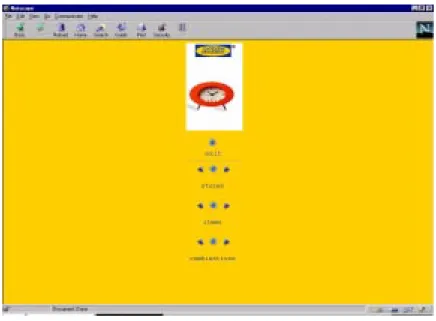
Figure 9 shows the home page of the ACME customer application. The page is the rendition of the entry collection of the navigation schema of Figure 6, according to the style sheet dened for the collection (home.sty).
Fig. 9. Home Page of the ACME Customer Application