Publication date 2013
Original citation Mehigan, T. J. 2013. Automatic detection of learner-style for adaptive eLearning. PhD Thesis, University College Cork.
Type of publication Doctoral thesis
Rights © 2013, Tracey J. Mehigan.
http://creativecommons.org/licenses/by-nc-nd/3.0/
Embargo information No embargo required Item downloaded
from http://hdl.handle.net/10468/1334
Downloaded on 2017-02-12T08:16:36Z
Tracey J. Mehigan, M.Sc.
A thesis submitted to the National University of Ireland, Cork in fulfilment of the requirements for the degree of
Doctor of Philosophy in the Faculty of Science
August 2013
Research Supervisor Dr. Ian Pitt
Research Co-Supervisor Dr. Tracey Connolly
Head of Department Prof. Barry O’Sullivan
Department of Computer Science, National University of Ireland, Cork.
The advent of modern wireless technologies has seen a shift in focus towards the de-sign and development of educational systems for deployment through mobile devices. The use of mobile phones, tablets and Personal Digital Assistants (PDAs) is steadily growing across the educational sector as a whole. Mobile learning (mLearning) sys-tems developed for deployment on such devices hold great significance for the future of education. However, mLearning systems must be built around the particular learner’s needs based on both their motivation to learn and subsequent learning outcomes.
This thesis investigates how biometric technologies, in particular accelerometer and eye-tracking technologies, could effectively be employed within the development of mo-bile learning systems to facilitate the needs of individual learners. The creation of personalised learning environments must enable the achievement of improved learning outcomes for users, particularly at an individual level. Therefore consideration is given to individual learning-style differences within the electronic learning (eLearning) space. The overall area of eLearning is considered and areas such as biometric technology and educational psychology are explored for the development of personalised educational systems.
This thesis explains the basis of the author’s hypotheses and presents the results of several studies carried out throughout the PhD research period. These results show that both accelerometer and eye-tracking technologies can be employed as an Human Computer Interaction (HCI) method in the detection of student learning-styles to fa-cilitate the provision of automatically adapted eLearning spaces.
Finally the author provides recommendations for developers in the creation of adap-tive mobile learning systems through the employment of biometric technology as a user interaction tool within mLearning applications. Further research paths are identified and a roadmap for future of research in this area is defined.
Faithless is he that says farewell when the road darkens.
(J.R.R. Tolkien, The Fellowship of the Ring).
At times during the PhD process I felt like saying farewell to the process and moving on with my life however, the support of a number of people helped me to stick with it and reach my goal. I would like to acknowledge and thank them for everything they have done in support of this work.
I would like to thank my supervisor Dr. Ian Pitt, without whom the PhD would never have been completed; his support, guidance and patience throughout were second to none.
I would also like to thank Dr. Tracey Connolly, my research co-supervisor for all of her support, time and effort, particularly in relation to the pedagogical aspects of this PhD.
I would like to thank and acknowledge the support which I received from the Irish Research Council for Science, Engineering and Technology (IRCSET) in conjunction with the Digital Hub. In particular, I would like to thank Mr. Michael Hallissy from the Digital Hub, for his support, interest and faith in my work.
I would like to thank my colleagues from the IDEAS (Interaction-Design, E-learning and Speech) research group in the Dept. of Computer Science, who patiently listened to many presentations based on this thesis and provided valuable feedback. I would like in particular to thank Mary Barry for access to the eye-tracker and Aidan Kehoe for the set-up of such. Thank you all for the many chats over coffee.
I would like to thank my colleagues in lab 2.08 for the company and entertainment, both on good days and bad days.
studies. Thank you also everyone in the Computer Science administration office for all their support and help with a variety of issues.
I would like to thank all of those whom I collaborated with on research articles. I would also like to thank anyone that I haven’t mentioned specifically, in particular anyone whom I met in any capacity during my journey.
Last, but by no means least, I would like to thank my family, in particular my parents, without them this work would not have been possible, their everlasting support, encouragement and belief in me goes way beyond the call of duty.
William & Nina Mehigan.
No portion of the work referred to in this thesis has been submitted in support of an application for another degree or qualification of this or any other university or other institu-tion of learning.
Signed:
Abstract ii
Acknowledgements iii
Declaration vi
I Introduction xviii
1 Introduction 1
1.1 Mobile Devices for eLearning . . . 1
1.1.1 eLearning vs. mLearning . . . 2
1.1.2 The Popularity of Mobile Phones . . . 3
1.1.3 Adaptive Systems for eLearning Environments . . . 4
1.1.4 Research Questions. . . 4
1.1.5 Contribution to the Field . . . 5
1.2 Thesis Outline . . . 6
II Background & Review 9 2 The Evolution of eLearning 10 2.1 eLearning . . . 11
2.1.1 CAI and Programmed Instruction . . . 11
2.1.2 Computers in Education . . . 13
2.2 Technological Advances . . . 14
2.2.1 The Microcomputer . . . 14
2.2.2 GUIs, Graphical Icons and the Mouse . . . 14
2.2.3 The Supercomputer . . . 16
2.2.4 The Internet . . . 16
2.3 Learning through Internet Technologies . . . 16
2.4.2 Tutoring Systems. . . 19
2.4.3 Project-Orientated Education . . . 20
2.5 The Emergence of Handheld Technologies . . . 20
2.5.1 The First Notions of Mobile Learning . . . 20
2.5.2 The Development of Mobile Technologies for Learning . . . 21
2.6 Traditional v.s. Technology-based Learning Environments . . . 22
2.7 Conclusion . . . 23
3 Learning-Styles 25 3.1 Learning-Styles Defined . . . 25
3.2 Learning-Style and Personality Models Commonly used in Adaptive Sys-tems . . . 26
3.2.1 Personality Models . . . 27
3.2.2 Learning-Style Models . . . 29
3.2.3 Other Theories of Learning and Intelligence . . . 33
3.3 The Felder-Silverman Learning-Style Model (FSLSM) . . . 33
3.3.1 FSLSM Dimensions . . . 34
3.3.2 The Felder-Solomon ILS Questionnaire (FSILS). . . 38
3.3.3 Validity and Reliability of FSILS . . . 39
3.3.4 Gender and the FSLSM . . . 42
3.3.5 Relationships and Parallels between FSLSM and other Learning and Personality Models . . . 44
3.3.6 The Distribution of Learning-Styles Across the FSLSM . . . 50
3.4 Critique of Learning-Styles . . . 52
3.5 Conclusion . . . 59
III Modeling Mobile Learning 60 4 Modeling Mobile Learning 61 4.1 Distinguishing mLearning from eLearning . . . 61
4.2 Categorising Mobile Learning Systems . . . 64
4.2.1 The Mobile LMS . . . 64
4.2.2 Situated Learning . . . 65
4.2.3 Learner-Centred Systems . . . 66
4.2.4 Mobile Intelligent Tutoring Systems . . . 66
4.2.5 Collaborative Learning. . . 67
4.4.1 Systems where the Learner-Style model is Defined by the Teacher 73
4.4.2 Systems Developed for use with Specific Learner-Style Models. . 73
4.4.3 Systems based on the FSLSM . . . 74
4.4.4 Automatic Detection of Learning-styles for eLearning Systems . 75 4.4.5 Adaptivity in Mobile Learning . . . 76
4.4.6 Moving toward Intelligent Adaptation in mLearning . . . 78
4.5 Privacy and Ethics in Adaptive Learning Systems. . . 78
4.6 The Future of mLearning . . . 81
4.7 Constructive Contributions . . . 82
4.7.1 MAPLE - Facilitating Intelligent Learning Systems . . . 83
4.8 Conclusion . . . 85
IV Biometric Devices - User Studies 86 5 Detecting Learning-Styles Through Accelerometer Devices 87 5.1 Accelerometers . . . 87
5.2 Background . . . 88
5.3 Detecting Global / Sequential Learners through Accelerometer Technology 89 5.3.1 Study Outline. . . 89
5.3.2 Nintendo WiiMote . . . 90
5.3.3 User Interface . . . 90
5.3.4 Data Acquisition File . . . 92
5.3.5 Participant Selection . . . 93
5.3.6 Methodology . . . 94
5.3.7 Evaluation . . . 95
5.3.8 Study Conclusion. . . 95
5.4 Detecting Visual / Verbal Learners through Accelerometer Technology . 96 5.4.1 Study Outline. . . 96
5.4.2 Logitech Air Mouse . . . 97
5.4.3 User Interface . . . 97
5.4.4 Participant Selection . . . 98
5.4.5 Methodology . . . 100
5.4.6 Data Acquisition File . . . 100
5.4.7 Evaluation & Conclusions . . . 101
5.4.8 Correlation . . . 101
5.6 Conclusion . . . 109
6 Detecting Learning-Styles Through Eye-Tracking Technology 111 6.1 Eye-Tracking . . . 111
6.2 Background . . . 112
6.3 Detecting Global / Sequential Learners through Eye-Tracking Technology113 6.3.1 Study Outline. . . 114
6.3.2 Tobii Eye-Tracking System . . . 114
6.3.3 User Interface . . . 115
6.3.4 Participant Selection . . . 115
6.3.5 Methodology . . . 117
6.3.6 Evaluation and Conclusions . . . 117
6.3.7 Study Conclusion. . . 122
6.4 Detecting Visual / Verbal Learners through Eye-Tracking Technology . 122 6.4.1 Study Outline. . . 123
6.4.2 User Interface . . . 123
6.4.3 Participant Selection . . . 124
6.4.4 Methodology . . . 126
6.4.5 Evaluation & Conclusions . . . 126
6.4.6 Study Conclusion. . . 131
6.5 Eye-Tracking for Mobile Devices . . . 131
6.5.1 Extending the Prototype to include Eye-Tracking. . . 133
6.6 Conclusion . . . 135
V Conclusions and Future Work 136 7 Thesis Conclusions 137 7.1 Contribution and Results . . . 138
7.2 Consideration for Future Work . . . 140
Bibliography 143
VI Appendices 163
B.2 Visual/Verbal Accelerometer Study Results A . . . 171
B.3 Visual/Verbal Accelerometer Study Results B . . . 172
C Eye-Tracking User Studies 174 C.1 Global/Sequential Eye-Tracking Study Results A . . . 174
C.2 Global/Sequential Eye-Tracking Study Results B . . . 174
C.3 Visual/Verbal Eye-Tracking Study Results A . . . 175
C.4 Visual/Verbal Eye-Tracking Study Results B . . . 176
D Privacy and Ethics 177 D.1 Privacy and Ethics in conducting research in relation to this Thesis. . . 177
E Source Code 179 E.1 Source Code - Prototype . . . 179
E.2 Source Code - Visual and Verbal Accelerometer User Study . . . 201
E.3 Source Code - Global and Sequential Accelerometer User Study . . . . 217
F List of Publications 257 F.1 Journal Articles. . . 257
F.2 Conference Papers . . . 257
F.3 Book Chapters . . . 258
F.4 Posters. . . 259
2.1 Comparison between Traditional and New Learning Environments (adapted from the International Society for Technology in Education (ISTE) NETS Project 1998)[116] . . . 23
3.1 Learning-Style Preference Diversity between Genders in Engineering (Fowler et al. 2001) [83] . . . 44
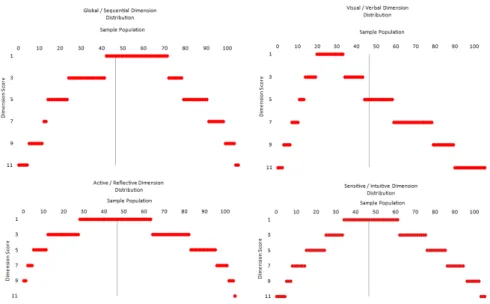
3.2 Learning-Style Preference Distribution from Sample Population Data Gathered in Preparation of Thesis . . . 54
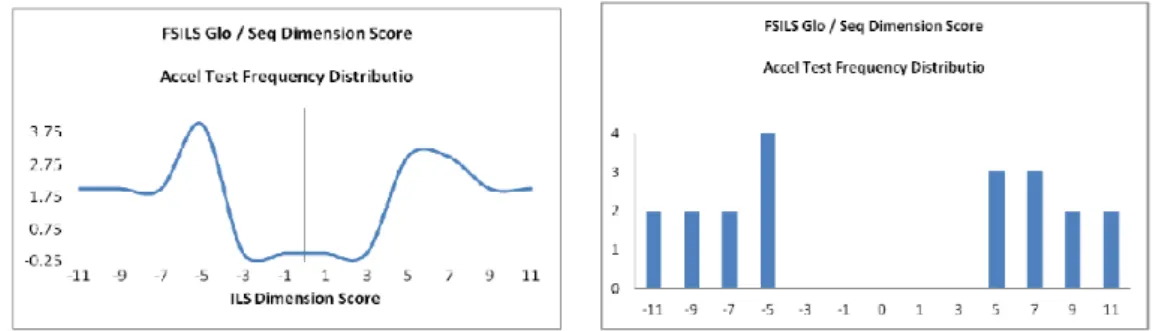
5.1 Global / Sequential Accelerometer Study Participant Frequency Distri-bution . . . 94
5.2 Visual / Verbal Accelerometer Study Participant Frequency Distribution 99
6.1 Global / Sequential ET Study Participant Frequency Distribution . . . 117
1.1 Mobile Learning Life Cycle . . . 2
3.1 Felder Silverman Learning-Style Model (Adapted from Felder and Sil-verman 1988) . . . 34
3.2 Individual FSILS Questionnaire Results (Felder and Solomon [78]) . . . 38
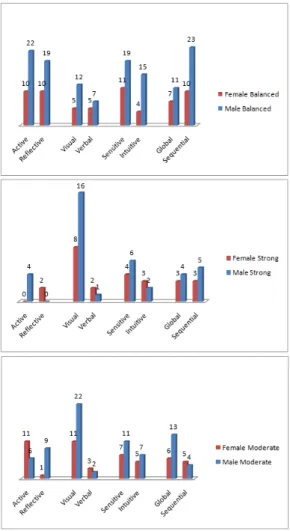
3.3 Gender Differences between Male and Female Students across FSLSM Dimensions Including Balanced, Strong and Moderate . . . 43
3.4 Cross-Comparisons between Learning, Personality and Other Theories . 46 3.5 Gardner’s Multiple Intelligences . . . 49
3.6 Strengths of Preference (Adapted from Grafet al. 2007) . . . 50
3.7 Literature Reported Learning-Style Preferences (Adapted from Felder and Spurlin 2005). . . 51
3.8 Strengths of Preference (Adapted from Felder and Spurlin 2005 [79]) . . 52
3.9 Distribution Patterns Overall Sample Population for Combined Studies 53 3.10 Acceptable Evidence for the Learning-Style Hypothesis (Adapted from Pashleret al. 2009) [185] . . . 55
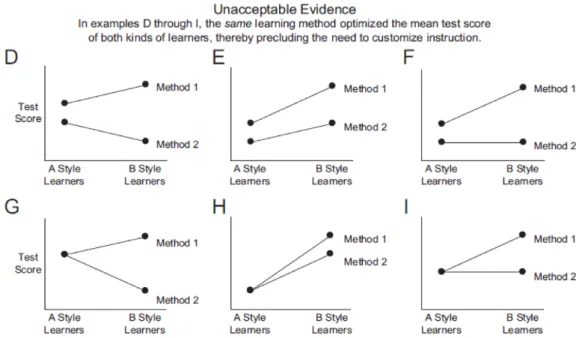
3.11 Unacceptable Evidence for the Learning-Style Hypothesis (Adapted from Pashleret al. 2009) [185] . . . 56
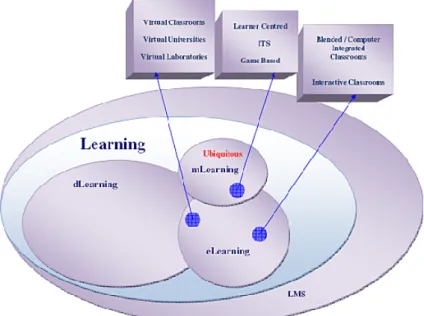
4.1 Positioning mLearning in relation to eLearning and dLearning. . . 62
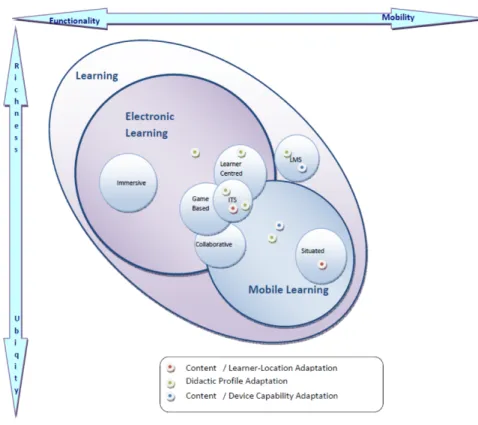
4.2 The Current State of mLearning . . . 72
4.3 PARA Model adapted from Mason 1986 [153] . . . 79
4.4 mLearning in the Future . . . 82
4.5 MAPLE Content Management Model [168] . . . 83
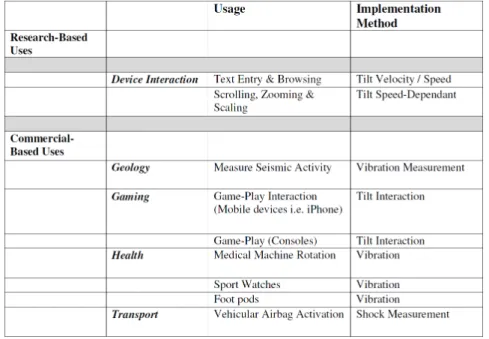
5.1 Research/Commercial-based Accelerometer Use and Method of Use Im-plementation. . . 88
5.2 Nintendo WiiMote [13] . . . 90
5.3 Global / Sequential Accelerometer User Study Learner Screen . . . 91
5.4 Nintendo WiiMote / PC Interaction Schematic Diagram . . . 91
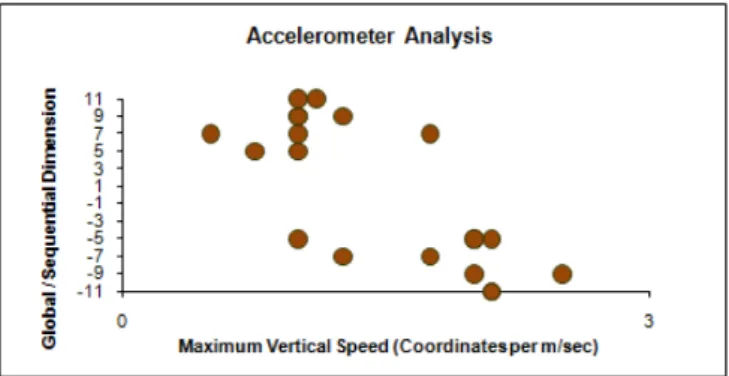
5.7 Global / Sequential Accelerometer User Study Dimension Score vs.
Cor-relation Coefficient Max Vertical Speed (coordinates per msec) . . . 95
5.8 Logitech Air Mouse [12] . . . 97
5.9 Visual / Verbal Accelerometer User Study User Learner Screen . . . 97
5.10 Logitech Air Mouse/PC Interaction Schematic Diagram . . . 98
5.11 Visual / Verbal Accelerometer User Study Frequency Distribution a) Line Graph, b) Bar Graph . . . 99
5.12 Visual / Verbal Accelerometer User Study Data Acquisition Screen . . . 101
5.13 Visual / Verbal Accelerometer User Study Correlation -FSILS Dimension Score vs Total Time on Images . . . 102
5.14 Visual / Verbal Accelerometer User Study Correlation -FSILS Dimension Score vs Total Time on Text . . . 102
5.15 MAPLE-based Learning Application - Splash Screens, a) Welcome Screen, b) End Screen. . . 104
5.16 MAPLE-based Learning Application - Learner Assessment Screen. . . . 105
5.17 MAPLE-based Learning Application Visual / Verbal Template Screens - (a) Visual, (b) Verbal. . . 106
5.18 MAPLE-based Learning Application Global/Sequential Template Screens - (a) Sequential, (b) Global. . . 106
5.19 MAPLE-based Learning Application - User Test Screen. . . 107
5.20 MAPLE-based Learning Application Console Log Visual/Verbal Learners.108 5.21 MAPLE-based Learning Application Sample Template Screens, a) Glob-al/Verbal, b) Sequential/Verbal. . . 108
5.22 MAPLE-based Learning Application Sample Template Screens, a) Se-quential/Visual, b) Global/Visual. . . 109
6.1 Tobii Eye-Tracker T60 [9] . . . 114
6.2 Global / Sequential ET Study Learner Screen . . . 115
6.3 Global / Sequential ET Study Frequency Distribution, a) Line Graph, b) Bar Graph) . . . 116
6.4 Global / Sequential ET Study Learner Screen Areas of Interest (AOI) . 118 6.5 Global / Sequential ET Study a) Sequential Learner Gaze Map, b) Global Learner Gaze Map . . . 119
6.6 Eye-Tracking Result Componant Details . . . 120
6.7 Global / Sequential ET Study a) Sequential Learner Heat Map, b) Global Learner Heat Map . . . 121
6.9 Visual / Verbal ET Study Learner Screen . . . 124
6.10 Visual / Verbal ET Study Frequency Distribution, a) Line Graph, b) Bar Graph. . . 125
6.11 Visual / Verbal ET Study Learner Screen Areas of Interest (AOI) . . . 127
6.12 Visual / Verbal ET Study AOI Fixation Plot a) Verbal Learners, b) Visual Learners . . . 128
6.13 Visual / Verbal ET Study Sample Learner Gaze Paths a) Visual Learner, b) Verbal Learner . . . 128
6.14 Visual / Verbal ET Study Sample Learner Heat Maps a) Visual Learner, b) Verbal Learner . . . 130
6.15 Total Fixation Duration per msec, a) AOI 1 vs. Visual / Verbal Dimen-sion Score, b) AOI 2 vs. Visual / Verbal DimenDimen-sion Score . . . 131
6.16 Eye-Tracking on Mobile Devices a) FaceLab [4], b) Tobii [9] . . . 132
6.17 MAPLE-based Prototype - Sample Eye-Tracking Interaction on Learner Assessment Screen. . . 133
AI Artificial Intelligence
AOI Area of Interest
CAI Computer Aided Instruction
CBT Computer Based Training
CBI Computer Based Instruction
CTM Cognitive Traits Model
dLearning Distance Learning
eLearning Electronic Learning
ET Eye-Tracking
FD/FI Field Dependant / Field Independent
FFM Five Factor Model
FSILS Felder Solomon Index of Learner Style
FSLSM Felder Silverman Learner Style Model
GBT Game Based Learning
GUI Graphical User Interface
HCI Human Computer Interaction
HBD Hermann Brain Dominance
HMLSM Honey and Mumford Learning Style Model
HTML Hyper Text Mark-up Language
IBT Internet Based Training
IDE Integrated Development Environment
IQ Intelligence Quotient
LCMS Learning Content Management System
LMS Learning Management system
LSDA Learning and Skills Development Agency
LSI Learning Style Inventory
LSQ Learning Style Questionnaire
MAPLE Mobile Adaptive Personalised Learning Environment
MBTI Myer-Briggs Type Indicator
MI Multiple Intelligences
MMS Multimedia Messaging Service
MLMS Mobile Learning Management System
mLearning Mobile Learning
OS Operating System
PC Personal Computer
PDA Personal Digital Assistant
SAT Standard Assessment Tests
SMS Short Messaging Service
VARK Visual Auditory Reading/Writing Kinaesthetic framework
WAP Wireless Application Protocol
WBT Web Based Training
WiFi Wireless Fidelity
WLAN Wireless Local Area Network
WMC Working Memory Capacity
3G Third Generation
Introduction
1.1
Mobile Devices for eLearning
“The most profound technologies are those that disappear. They weave themselves into the fabric of everyday life until they are indistinguishable from it” (Weiser 1991) [241].
This has very much been the case with the modern mobile phone, as is highlighted through a high global penetration rate (Comreg 2011) [48]. The uptake of mobile telephony could enable mLearning systems to be successfully employed for education in the school classroom, the university and the corporate office. Every imaginable subject could be covered with potentially every student included. This potential of ubiquitous education can be further enhanced through the development of adaptive and personalised mLearning systems for the achievement of increased motivation and improved learning outcomes for students.
The advent of modern wireless technologies has seen a shift in research and practice towards the design and development of educational systems for deployment through such mobile devices. This use of mobile phones and PDAs is steadily growing across the educational sector. Emerging learning systems hold great significance for the future of education.
There are many advantages provided by mobile devices for learning. These ad-vantages are created through the relationship that exists between the device and its owner. “This relationship is one-to-one, always on, always there, location aware and personalized” (Motiwalla & Qin 2007) [177]. There is potential to extend the relation-ship, through wireless connection, to one-to-many and many-to-many, for collaborative learning purposes and inclusion with classmates in ubiquitous environments. This po-tential is increased by the importance of the mobile phone to teenage identity and the
Figure 1.1: Mobile Learning Life Cycle
development of social friendship networks (Eldridge & Grinter 2001) [67].
While the use of these devices is steadily growing across the educational sector as a whole, the implementation level of mLearning systems remains in its infancy. Figure 1.1 highlights the cycle position of mLearning in relation to that of eLearning. The life-cycle is used to determine the current stage in a technology’s development. mLearning is currently at the infancy stage. As research, development and implementation continues, mLearning will move to the growth stage and will become more integrated into the educational field. As with any emerging and diverse field, there will always be gaps and overlaps evident in the diffusion of systems.
A wide diversity still exists within both mLearning research and practice, mainly between the types of systems that have been developed and deployed to date. Such diversity is evident in the diffusion that is currently taking place between different types of learning categories used in mLearning research projects. This diversity is reflected from situated learning right through to intelligent systems. Simultaneously, a fusion of systems is also occurring. This fusion is represented by the overlap of learning system categories. For example, there exists a potential move away from immersive, game-based learning, represented in traditional eLearning simulation systems, toward the advancement of situated mLearning environments (Dede 2009) [58].
Other issues also exist, for example, the diversity in devices employed and the lack of consideration given towards device compatibility and usability. In such a personalised learning environment, there is also a lack of consideration given to the needs of the individual learner in respect of improved learning outcomes and motivation as they interact with systems.
1.1.1 eLearning vs. mLearning
eLearning or electronic learning is a broad term,“covering a wide set of applications and processes, such as Web-based learning, computer-based learning, virtual classrooms, and
digital collaboration. It includes the delivery of content via Internet, intranet/extranet (LAN/WAN), audio and videotape, satellite broadcast, interactive TV, CD-ROM, and more” (Karrer 2007) [128].
eLearning can also be defined as“education via the Internet, network, or standalone computer. E-learning is essentially the network-enabled transfer of skills and knowledge. E-learning refers to using electronic applications and processes to learn. e-learning ap-plications and processes include Web-based learning, computer-based learning, virtual classrooms and digital collaboration. Content is delivered via the Internet, intranet/ex-tranet, audio or video tape, satellite TV, and CD-ROM” (Ellis 2004) [69]. Although eLearning can be either synchronous or asynchronous as indicated by the latter defi-nition, in most cases eLearning occurs through asynchronous communication, in that simultaneous participation by students is not required.
mLearning differs from eLearning. The term mLearning refers to the employment of wireless, portable, handheld devices, for teaching and learning practices and purposes. Within mLearning, educational support, services and specific learning applications are delivered through many different categories of mobile device. mLearning can be syn-chronous or asynsyn-chronous in nature. School-based learning has always been mobile in nature. In the early 1800s the association of chalk and slate facilitated the abil-ity to ‘move’ material, thus giving learning a mobilabil-ity factor. This increased with the widespread production of printed textbooks. This natural mobility is enhanced through school field trips and outings which also require the student to move beyond a fixed classroom location. The mobile device offers a means to put learning back into its own sphere of mobility, providing ubiquitous learning in the classroom, the museum and on fieldtrips.
1.1.2 The Popularity of Mobile Phones
There are many devices available for use in mLearning systems including tablets, lap-tops and ultrabooks. Many existing mLearning systems rely on the use of traditional PDAs for application deployment, but with a drop of 43.5% in world shipments of tradi-tional PDAs (not including Apple’s iPod Touch) from 2006 through 2007 (Hruska 2007) [115], mLearning could see an increase in mobile phone usage. This is especially the case with the continued technological advancement of devices such as Apple’s iPhone, and the capabilities such advancement brings to the device.
In the majority of Western European countries the mobile phone penetration rate is above 100%, greatly exceeding the early uptake of the internet. Europe has seen an
overall penetration rate of 125% on average (Comreg 2011) [48]. In the United States 61.5 million people owned smart-phones in the last quarter of 2010. Emerging economies including China, Indonesia and Africa have seen a continuation in the growth of their mobile market (Mansfield 2010) [151]. As the technology associated with mobile phones improves, and we see increased capabilities of mobile phones and wireless technologies, the sales of PDAs fall. It was estimated that worldwide sales of touch-screen mobile phones would hit 200 million by the end of 2011 (Hruska 2007) [115] however, this figure has to be revised upwards as 2009 alone saw 75 million touch screen handsets sold (James 2010) [120]. These statistics show an immense potential for the future growth of mLearning, especially through the use of mobile phones.
1.1.3 Adaptive Systems for eLearning Environments
Research in eLearning has moved toward the inclusion of adaptive features to enable more personalised and successful learning outcomes for students. The aim of adaptive systems is the adjustment of the learning process to suit an individual learner. This can be achieved by taking account of an individual’s personal learning-style. Learning-style represents the student’s fit within the specific scales of learning-style and / or personal-ity models. Within this research there is a heavy reliance on the use of questionnaires to model the learner. In recent years efforts have been made to avoid the use of ques-tionnaires through automatic user modelling based on user interaction behaviour with a system (Graf 2008) [94] and Baysian networks (Garcia 2005) [85] and feed-forward neural networks (Villevarde et al. 2006) [236].
Work by Spadaet al. (2008) [218] investigated the possibility of determining an indi-vidual’s learning-style directly from their interaction with a web-based learning system. This research found a high degree of correlation between the way in which an individ-ual uses a mouse and their learning-style (as determined using questionnaires). Spada
et al. were able to detect scores on the Global/Sequential dimension of the Felder-Silverman Learning Style Model (FSLSM) [77] with a high level of confidence based on measurements of mouse acceleration. Their research presents a new approach to predict Global/Sequential learning-styles that makes use of mouse movement patterns in a website. Whilst Spada’s research approach offers great potential for eLearning, it cannot be employed on systems which do not use a mouse, such as mobile devices.
1.1.4 Research Questions
Based on the current state of mLearning and the limits to which adaptive features have been represented in mLearning environments, the focus of this thesis is the potential to provide a non-intrusive solution for the provision of intelligent and adaptive systems
for mLearning environments. This is based on the extension of Spada’s work for use in mLearning applications and environments. As Spada’s work focuses on the use of mouse movement patterns, this research uses behaviour-based biometric technology for the purpose, including accelerometer and eye-tracking devices. These devices can be used either individually or combined.
Based on this, the research in this thesis asks the following questions: • To what extent will mlearning play a part in eLearning in the future? • To what extent are adaptive features represented in mLearning?
• Is it possible to detect learning-style through user interaction patterns in mLearn-ing environments?
• Can biometric technologies, such as accelerometers and eye-trackers, be used to detect learning-style in mLearning environments?
1.1.5 Contribution to the Field
Building on work presented at EdMedia 2009 [160], EdTech 2009 [161], Irish HCI 2009 and 2011 [159] [165] and ICME 2011Meh11 and work published in Mobile Learning; Pilot Projects and Initiatives, Guy (2010) [163], IJGBL (2012) [167] and Tools for Mobile Multimedia Programming and Development, Tjondronegoro (2013) [168], this thesis discusses a number of contributions made within the field of adaptive learning systems for mobile environments.
A theoretical model has been designed to distinguish between eLearning and mLearn-ing and to evaluate the current and future placement of mLearnmLearn-ing systems in relation to eLearning systems.
Behaviour-based biometric technologies, particularly accelerometer devices and eye-tracking technology have been used as the basis of a number of studies to explore their potential use in relation to:
• The automatic detection of Global/Sequential and Visual/Verbal learners (as described in the FSLSM) based on interaction with systems through accelerometer devices.
• The automatic detection of Global/Sequential and Visual/Verbal learners (as described in the FSLSM) based on interaction with systems through eye-tracking technology.
A content management model called MAPLE (Mobile Adaptive Personalised Learn-ing Environment) has been designed for use with any mLearnLearn-ing platform to facilitate the detection of user learning-styles (based on dimensions of the FSLSM) from user interaction for the automatic provision of adapted content display to suit the learning-style needs of the user.
The accelerometer device, now standard in high-end mobile devices such as the iPhone, has been employed in the development and implementation of a prototype mLearning application using the MAPLE model. The mLearning application intelli-gently detects Visual/Verbal learners (as outlined in the FSLSM) through the appli-cation user’s accelerometer interaction with the system and adapts displayed content presented to the user based on the application’s assessment of its user’s learning-style on both the Visual/Verbal and Global/Sequential dimensions of the FSLSM.
1.2
Thesis Outline
This thesis is structured as follows:
Part II - Background
Chapter 2 - Evolution of eLearning. Chapter two looks at the evolution of eLearning to date. The emergence of handheld and wearable technologies for learning is also examined.
Chapter 3 - Learning-Styles. Chapter three introduces the learning-style and personality models currently used within the field of eLearning for the development of adaptive learning systems. The chapter focuses on the FSLSM, discussing the model dimensions in detail. The relationships between the FSLSM and other such models are highlighted. The Felder-Solomon Index of Learning Styles (FSILS) is outlined and its validity as a measurement instrument for student placement on the FSLSM dimensions is examined according to the literature, with a focus on the distribution of learners across the dimensions. A critique of the FSLSM is also provided.
Part III - Modeling Mobile Learning
Chapter 4 -Modeling Mobile Learning. Chapter four builds on work published in Mobile Learning; Pilot Projects and Initiatives (Guy 2010) [167]. This chapter out-lines the differences between eLearning and mLearning. Current mobile phone statistics are examined. This chapter puts forward a model that highlights current mLearning
systems, for example, Learner Centred Systems, ITS (Intelligent Tutoring Systems), Situated Learning Systems and Collaborative Systems (See section 4.2 Categorising Mobile Learning Systems). The use of game-based and immersive learning elements from traditional eLearning within situated mLearning environments is considered. A definition and examination of the future placement of mLearning in relation to eLearn-ing is a requirement before it is possible to move mLearneLearn-ing towards its growth stage. The chapter also looks at the level of adaptivity within both eLearning and mLearning, with a focus on how adaptive systems can be improved for future mLearning systems based on user learning-style. The MAPLE content management model is outlined.
Part IV - Biometric Devices - User Studies
Chapter 5 - Detecting Learning-Style through Accelerometer Technology. Chapter five builds on work presented at EdMedia 2009 [160], EDULearn 2009 [161] and work published in Mobile Learning; Pilot Projects and Initiatives (Guy 2010) [167]. This chapter introduces accelerometer technology, now a standard feature in modern mobile devices. The term accelerometer is defined. Two studies conducted to assess the potential use of accelerometer technology for the detection of user learning-styles are outlined and results presented.
A prototype application was developed based-on the MAPLE model (outlined in chapter 4) as an example adaptive mLearning system. The system assesses the user’s learning-style on the Global / Sequential and the Visual / Verbal dimension of the FSLSM and subsequently provides the user with appropriate learning content based on this measurement. The application makes use of the mobile device’s built in accelerom-eter sensor to facilitate the main user interaction function.
Chapter 6 - Detecting Learning-Style through Eye-Tracking Technology. Chapter six builds on work presented at Irish HCI 2009 [159], ICME 2011 [162], iGBL 2012 [164] and work published in Mobile Learning; Pilot Projects and Initiatives (Guy 2010) [167]. This chapter introduces eye-tracking technology, outlining its use within eLearning to date. The term eye-tracking is defined. Two studies conducted to assess the potential use of eye-tracking technology for the detection of user learning-styles are outlined and results presented. The potential use of eye-tracking technology with mobile devices and the extension of the MAPLE-based prototype to include eye-tracking -based data for mLearning is considered.
Chapter 7 - Conclusion and Future Work. Chapter seven presents an overview of the research, listing the contributions to the field highlighted in this thesis. An overview of the privacy and ethical issues relevant to this work is highlighted. Conclu-sions are drawn and an outline of future work related to this work is also provided.
The Evolution of eLearning
“It is self evident that the history of technology in education extends back to the clay tablets, slate drawing boards, and handmade paper of pre-Gutenberg education” (Garri-son & Ander(Garri-son 2003) [89].
Bush, generally known as ‘the grandfather of hypertext’ [104], wrote an article in 1945 for the July edition of the Atlantic Monthly, describing a theoretical hypertext MEMory EXtender called Memex. This is significant for eLearning in that it recognises that the human mind selects by association rather than in the manner of structured indexing systems applied in most libraries. Memex foreshadowed a mechanised private file and library system where an individual could store books and documents, creating links both within them and between them. Through Memex, Bush anticipated the use of system types such as windows, speech recognition, online encyclopaedias and the internet (Haas 2007) [104].
The history of the modern computer is relatively brief. With a period of approxi-mately 60 years, computers have facilitated a change in the philosophy of education across the globe toward the provision of education for all. The last forty years have seen the most progress, with the greatest developments in the field emerging in the last decade of the 2nd millennium.
This chapter examines the development of eLearning to date, from the introduction of Computer Aided Instruction (CAI) through to mLearning. The chapter highlights technological advances that have facilitated the development of the field, including the development of the Microcomputer, Supercomputer, Graphical User Interface (GUI) and the Mouse. The development of the Internet and its use for learning purposes is discussed. The emergence of handheld and wearable technologies for learning is also outlined.
2.1
eLearning
Whilst there is still no generally accepted definition of eLearning, there are many def-initions under debate. This is also the case surrounding the definition of eLearning theories. In 2003, Nichols [181] argued that the field of eLearning has advanced as a group of applications without developing a strong theoretical background of its own, suggesting that the bulk of literature on the field is practice-based. eLearning relies heavily on the theories that developed alongside traditional learning (Nichols 2003) [181]. This is partly due to the development of Computer Aided Instruction (CAI) in the early years of the 1960s, when both psychologists and educators saw an opportunity for computers to act as a supplement to teaching as an existing field. This prompted a continuum for the lack of specific theory development as the field of eLearning advanced.
2.1.1 CAI and Programmed Instruction
The first suggestion for instructional technology comes from Pressey, who, in 1920, offered the first learning machine allowing drill and practice education and multiple choice questions (Deutsch 2007) [60]. His work was followed by Lazerte, who developed a cylindrical type problem tester, offering students problems to answer, checking that their answers were correct and in the right order (Kantowski 1977) [126].
The work of Skinner on Operant Conditioning in the 1950s established learning task performance analysis through small, easily attainable learned repertoires of behaviour (Frase 1975) [84]. The very first teaching system of this type was programmed and designed by Anderson, Brainard & Rath, to teach binary arithmetic, setting the initial focus on mathematics. As with all early systems the program was hindered by lack of computer memory (Rath 1967; Buck & Hucka 1995) [197] [33].
The publication by Wiley, of a book entitled“Programmed Learning and Computer-Based Instruction” by Coulson (1962) [51], initiated the first real efforts at actually using the computer to teach (Rath 1967; Coulson 1962; Buck & Hunka 1995) [197] [51] [33]. Focusing on CAI for mathematics and reading, Suppes & Atkinson provided the student with an opportunity to take an active role in the learning process and employ ‘drill and practice’ to master tasks.
It was not until the mid 1980s that people began to realise that it was not necessary to be able to write computer programs to make effective use of a computer. This led to the introduction of courses in computer application literacy. The computer was now a productivity tool and an aid to problem solving; there was a shift in focus towards Computer Integrated Instruction.
An Early Adaptive Learning System
SAKI (Self-Adaptive Keyboard Instructor), the first commercial adaptive teaching sys-tem, was introduced by Pask & McKinnon-Wood in the 1950s. The system was de-signed to teach people how to increase their speed and accuracy in typing alphabetic and numeric symbols using a 12-key keyboard. The difficulty of the tasks issued was contingent on the student’s performance level. SAKI was the first system to mimic the relationship between the human teacher and the student through conversation theory (Pask 1982)[187].
Conversation Theory
Conversation theory was developed by Gordon Pask and originates from his work in cybernetics. Conversation theory attempts to explain learning in both living organisms and machines. The fundamentals behind the theory are that learning occurs through conversations which can be conducted at different levels as follows:
• Natural language (general discussion)
• Object languages (discussing the subject matter) • Metalanguages (discussions about learning)
Conversations (interactions) lead to the “construction of knowledge” and serve to make knowledge explicit.
In order to facilitate learning, Pask argued that subject matter should be represented in the form of entailment structures which show what is to be learned. Entailment struc-tures exist at a variety of different levels depending upon the extent of relationships.
The critical method of learning according to conversation theory is “teachback” in which one person teaches another what they have learned. Pask identified two different types of learning strategies: serialists, who progress through an entailment structure in a sequential fashion, and holists, who look for higher order relations (Pask 1975) [186].
Conversation theory applies to the learning of any subject matter and is an important element in the development of mobile learning (Sharples 2005; Hague 2007; Glanville 2008) [105] [91] [212].
2.1.2 Computers in Education
In the 1940s, the Harvard MARK 1 and the University of Pennsylvania’s ENIAC were the main operational computers put into use for educational purposes (Molnar 1997; Myers 1985) [174] [178]. The size and financial cost of the machines limited their potential for possible applications.
In the 1960s there was an increased investment in computers for schools, particularly in the United States (US). The US National Science Foundation (NSF) supported the set up and development of 30 regional computing networks spanning over 300 higher education institutions and post-primary schools (Molnar 1997) [174].
The role of computers in education was transformed by Kemeny & Kurtz at Dart-mouth College of Computation (Downes 2005) [62]. The production of a time-share system, using the GE-235 and Datanet-30 computers, enabled many undergraduate students to interact with a computer through remote consoles. This placed comput-ers into education on a larger scale then seen before. The system was also used for research purposes by General Electric Advanced Systems Lab (General Electric 1965; Molnar 1997) [174] [68]. Dartmouth off-campus terminals were also placed in local post-primary schools (DTSS 2008) [246].
The University of Alberta set up an educational research services division resulting in the installation of the IBM 1500 system on campus. The system was used to run medical courses in cardiac training for students until the 1980s (Kay 1993) [130].
By 1975 the use of computers in classroom teaching had increased from 1% to 23% of US classrooms. Due to this increase, 55% of students in US-based classrooms had access to a computer. By 1985 the US provided access to one computer for every sixty children in schools across the country (Papert 1980; Molnar 1975) [184] [174]. This was facilitated by the advent of a low-cost microcomputer which enabled the break away from expensive systems and time share. The 1990s witnessed a rapid rise in investment in the advocacy of technology in schools. This was seen in particular with many countries across the globe issuing their first national educational technology plans and standards containing specific goals to increase access to technology in schools. Countries as diverse as Italy, Mexico, Japan and Canada engaged in remarkably similar programs to provide computers and internet connections to schools. In Britan, over£1 Billion was spent on the National Grid for Learning and associated schools technology initiatives. Ireland invested IR£107.92 million in its 2001 plan (Leiet al. 2007) [145]. The rate of computer use in Irish post-primary schools doubled from 24% to 47%
between 2003 and 2006. In 2009 the Irish Government committed a e150 million investment in computers for schools. Currently, computers are openly available and inexpensive; however there is still a lack of access particularly in the formal school setting where there remains more than one child per computer (Donnolly 2009) [61].
2.2
Technological Advances
There have been a number of technological advances since the inception of the computer. These have led to developments in the field of eLearning and improvements in the provision of eLearning systems.
2.2.1 The Microcomputer
In the 1970s the Altair and the Mark 8 came into production. The Apple I, developed by Jobs & Wozniac, was the most significant break-through in personal computing due to the built-in computer terminal circuitry which was distinctive. The IBM PC (which was introduced in 1981) also took on a command-line approach. Following this, Apple introduced their Macintosh model in 1984 (Leiet al. 2007) [145].
The introduction of the microcomputer was the first step in making computers openly accessible for educational purposes.
2.2.2 GUIs, Graphical Icons and the Mouse
The advent of the GUI and the mouse had great implications for the development of eLearning through the provision of easier access and user-friendly systems.
The Mouse
Engelbart, a pioneer in Human Computer Interaction (HCI) is credited with the devel-opment of the mouse commercially debuted by Xerox in their 8010 Star model (Myers 1985) [178] and later Apple’s Lisa 1 model, in conjunction with a prototype for their GUI (Myers 1985) [178]. The initial introduction of these systems was unsuccessful due to their financial cost, it would not be seen again commercially until the introduction of the Apple Macintosh. The mouse was developed in cooperation with English from Stanford Research Institute (SRI). The mouse received a patent in 1970 (Bellis 1997; Myers 1985) [26] [178].
The GUI & Graphical Icons
A GUI uses graphical icons and a pointing device to control a computer. Sketchpad, the first Graphical User Interface (GUI) was developed by Sutherland, at Massachusetts Institute of Technology (MIT) in 1963 (Sutherland 2001) [224]. This system, as with other early Cathode-Ray-Tube (CRT) systems, used a light-pen device for pointing.
In 1973, Xerox PARC developed the non-commercial Alto personal computer. The Alto had a bitmapped screen and demonstrated a graphical user interface (GUI). It was used at PARC XEROX offices, and at several universities for many years. It influenced the design of personal computers during the late 1970s and early 1980s, including both the Apple Lisa and Macintosh. The Alto project led to the commercial release of the Xerox Star 8010 Document Processor in 1981. Its pointing device (mouse) couldn’t move diagonally, it didn’t have overlapping windows and its operating system required keyboard commands. The Star 8010 was unsuccessful commercially.
A learning research group was set up at Xerox PARC. The group, led by Kay, who would advance the use of GUIs to include Graphical Icons, resulting in a computer for teaching and learning called KiddiKomputer. It was envisaged that the system would be used in four main projects looking at the development of thinking skills, modeling through simulations, interface skills and iconic programming.
Apple’s Lisa model launched with a prototype GUI (Myers 1985) [178] but failed commercially. The Macintosh, released in 1984, was the first commercially successful product to use a multi-panel window GUI. File directories looked like file folders. A set of desk accessories including a calculator, notepad, and alarm clock (that the user could place around the screen as desired) were included. The user could delete files and folders by dragging them to a trash-can icon on the screen.
In the mid 1980s, the introduction of the Microsoft Windows User Interface software provided an even more user friendly approach to software than Apple’s Machintosh (Myers 1985) [178]. The advances in micro-computer technology or personal computers (PC), and their reduced cost, now established the computer as a necessity for schools and universities. Ownership of a computer was now a requirement for freshmen entering universities in the US (Molnar 1997) [174]. The advent of personal computing was a major factor in the formation of eLearning.
Apple’s Macintosh included the use of a GUI, icons and mouse device and was an early portable computing (Leiet al. 2007) [145].
2.2.3 The Supercomputer
The introduction of the supercomputer was key for the ability to provide access to information and knowledge throughout the world. In the 1980s, the NSF in the US es-tablished interconnected supercomputer centres. This was achieved through the merger of these powerful computers with high bandwidth communication networks, through distributed technologies. A US national Network (NSFNET) was established in 1985 in the US making large systems available to all universities. The “infosphere” was es-tablished, facilitating the dissemination of knowledge through the interaction of people, technologies, and information (Molnar, 1997) [174].
2.2.4 The Internet
The 1960s saw the beginnings of the Internet when the US Department of Defence com-missioned the development of Arpanet. A four node network was established between University of California, Los Angeles (UCLA), SRI, University of Utah and University of California, Santa Barbra (UCSB) (Zakon 1993) [248]. In 1989 Berners-Lee of CERN in Switzerland, circulated a proposal for an in-house online document-sharing system which he described as a “web of notes with links”. His proposal was approved by his superiors; the system would later emerge as the World Wide Web.
It was the introduction of graphical web browsers such as Mosaic and Netscape Navigator that allowed for the development of fast information access and inexpensive communication. There was an explosion in usage of the internet by the general public, with usage figures standing at 14 million globally at the end of 1995, with all users accessing information, news and conducting research. Uptake of the internet surpassed 10% of US households in 1995. The introduction of internet software tools such as Authorware, Multimedia Toolbook, Director, and IconAuthor began in 1996. ”There was a new frontier in learning” (Zhang & Nunamaker 2003) [250].
2.3
Learning through Internet Technologies
Reflecting its connections with the internet, eLearning was initially called “Internet-Based Training” (IBT) and later “Web-“Internet-Based Training” (WBT).
Online university courses were seen as the way forward. Universities took hold of the opportunity. New York University (NYU), for example established online courses such as NYU Online.
In the 1990s there was a surge in the establishment of popular online learning com-panies such as click2Learn.com, which would become leaders in enterprise productivity solutions. There was a surge in expectations and discovery in the late 1990s. This heightened interest, particularly by remote and adult learners, led to the development of eLearning (Green & Gilbert 1995) [96]. There was a high level of investment in re-search and the development of systems leading to the provision of thousands of courses online from universities worldwide (Alexander 2001) [18]. The number of adults seeking higher education exploded, with the percentage of older students in college programs rising sharply to 59% by 1999 from 32% a generation earlier (Gunasekaranet al. 2002) [101]. Many corporations adopted eLearning systems to facilitate their staff training programs in particular, DELL, CISCO and Hewlett Packard used such IBT systems in their staff training (Zhang & Nunamaker 2003) [250].
2.3.1 eLearning 2.0
“Ideas are constantly evolving, as technology, pedagogy, and student needs change”
(Karrer 2007) [128]. Elearning is an approach to learning that has evolved alongside the advent of web 2.0 and the increased capability of small handheld devices such as mobile phones and tablets.
eLearning 2.0 is used to refer to a new way of thinking about eLearning. There is an emphasis on social learning, where the learning content is socially constructed rather than accessed. There has been a shift from traditional didactic learning towards a more learner-centred model that emphasises a more active learner role. The way that learning is seen has also changed, allowing for user- and socially-generated content. The way in which people view and use the internet has also changed. ‘Digital Natives’, people who were born during or after the introduction of digital technology, use technology (including the internet) in a different way than their ‘Digital Immigrant’ counterparts. Digital Natives have interacted with digital technology from an early age and therefore have a greater understanding of its concepts. Digital Immigrants are people who were born before the existence of digital technology and adopted it to some extent later in life (Prensky 2001) [193]. Therefore it is not only the technology that has changed but the user has changed also.
Downes (2005) [62] stated that“the Web was shifting from being a medium, in which information was transmitted and consumed, into being a platform, in which content was created, shared, remixed, repurposed, and passed along. And what people were doing with the Web was not merely reading books, listening to the radio or watching TV, but having a conversation, with a vocabulary consisting not just of words but of
images, video, multimedia and whatever they could get their hands on. And this became, and looked like, and behaved like, a network”.
People started to Blog (a contraction of the term Web log) through the use of content creation tools such as Blogger and Wordpress. RSS (Really Simple Syndication) was to follow, leading to the development of networked blog readers and website followers. Wikipedia was born from the use of the collaborative writing tool wiki. Audacity, a free audio recording tool, when combined with RSS saw the beginning of user generated Podcasting.
All of these social developments have moved education away from the classroom, with students discussing classroom topics for reviews with global online peers (Downes 2004) [63]. Online learning has become a platform and is no longer a content consumption tool but an online authoring tool. The content is generated by students and is conversational in nature. ELearning content has become syndicated, aggregated and disseminated by students themselves (Downes 2005) [62].
2.4
Games, Tutors and Projects
2.4.1 The Advent of Game-Based Learning
In the 1970s, Piery conducted research into the effectiveness of 22 simulations based training games. Piery found that student interest in instructional games was higher than their interest in traditional and conventional instruction (Garris et al. 2002) [88]. Between 1978 and 1983, educators began to look beyond replication of existing educational practices, producing simplistic colourful programs to engage and challenge the student in the classroom. Programs like Gertrude’s Puzzles and Muppets on Parade were created to provide problem-solving learning experiences for students, facilitating the development of thinking skills (Johnson 2003) [123].
Educational games have started to enter mainstream education (Williamson et al.
2005) [243]. There is a scenario emerging where the learner plays an active part in the design of the game and its processes. Papert (1980) [184] stated“The most important learning skills that I see children getting from games are those that support the empow-ering sense of taking charge of their own learning”. Simulation and immersive learning environments employing augmented reality and Artificial Intelligence (AI), have been seen in the development of training systems for the US Military (Prensky 2001) [193].
Many empirical studies have been carried out to examine the effects of game based instruction programs. Work in 1993 by Whitehall & McDonald and in 1996 by Ricci
et al. found that instruction employing game features led to improved learning (Garris
et al. 2002) [88]. Ryland, a classroom teacher at the Chew Magna primary school in the UK has taken the initiative to employ games in his classroom schedule with very positive results. The UK average attainment of level four literacy levels for boys aged 9 through 11 years was 75% in 2004. At Chew Magna primary school, the number attaining level four went up from 76.5% in 2000 to 93% in 2004. The British Educational Communications and Technology Agency (BECTA) award winning method has seen Ryland’s students excel in creative thinking. The students have seen improved Standard Assessment Tests (SAT) scores.
Teachers have used commercial off the shelf (COTS) titles such as Sim City, MYST and Age of Empires to encourage learning. Other titles, which are specifically educa-tional, have also been used. The FutureLab-funded project Savannah, an ecological system using Global Positioning Systems (GPS), has also been used in the classroom (Gee 2003; Krotoski 2005) [90] [140].
2.4.2 Tutoring Systems
Tutor systems began to emerge as early as the 1960s. A portable or mobile tutor device called the ‘Auto Tutor’ was developed for nursing students to present a series of information frames and questions, which were branched to other frames depending on the button pressed by the learner. The intrinsic system was developed by Crowder. The system offered an alternative to the type of systems proposed by Skinner (Seedor 1963) [208]. The Empirical Tutor had the ability to“use film sequences, slide projectors, tape recorders or even real apparatus, which the student may use to help him to decide how to answer the question in the frame” (Sim 1963) [214].
A new focus on the development of intelligent tutors emerged in the 1970s in an effort to overcome the issues encountered with earlier learning systems. A Computer-Based Instruction (CBI) system named SOPHisticated Instructional Environment (SOPHIE) was designed by Brown [32] to enable students to both debug and articulate their own ideas and reasoning strategies.
Other CAI tutors were also developed in this period for algebra, geometry and the teaching of programming languages. Carnegie Mellon University were active in the use of this type of system to improve student grade levels (Molnar 1997) [174].
In more recent times, mobile intelligent tutoring systems have emerged (Bull et al.
a variety of subjects including, for example, geometry. These systems will be discussed in more detail in chapter 4.
2.4.3 Project-Orientated Education
The idea of project-oriented education began in the 1980s with the development of a National Geographic KidsNet in the US. The network was an effort to bring inquiry based education to elementary school children. The system allowed for experiments through data gathering on topics of social, geographic and scientific interest such as acid rain. Electronic mail was used to allow students to communicate with each other and with practicing scientists in a collaborative manner. ‘Tinker’s network led to a number of instances where the children’s tests provided valuable information on the failure to meet standards, particularly related to air pollution and school drinking water (Molnar 1997) [174]. Another project of Tinker’s in the early 1990s, the ‘Global Laboratory Network’, saw 11-18 year old students measuring environmental factors such as air temperature and bird population through the use of low-cost devices to provide a ‘snapshot’ of the planet in a major seasonal event. This type of project saw the teacher in a new role as a consultant, a global ‘classroom’ was created and a new social infrastructure was established for education (Molnar 1997) [174].
2.5
The Emergence of Handheld Technologies
2.5.1 The First Notions of Mobile Learning
Aldiss (1963) [17], in a science fiction article, envisaged the concept of mLearning alongside the development of personal computing in the 1970s. Aldiss states that in the 1960s “computers had been invented, and they were getting smaller, but it wasn’t until the great developments in micro technology in the seventies that portable computers were made” (Vavoulaet al. 2007) [235].
Kay (1972) [129], interested in tracking what students would do with the computers outside school, developed the DynaBook, a book-sized computer that would run dy-namic simulations for learning. Kay (1972) stated that “it is now within the reach of current technology to give all the Beths and their Dads a DynaBook to use anytime, anywhere as they may wish”. Kay highlights the potential for communicative devices and acknowledges the belief, drawing on the work of Dewey, Piaget & Papert, that children learn by doing (Kay 1972) [129]. These systems were the first initiative in mLearning through portable devices.
2.5.2 The Development of Mobile Technologies for Learning
The most significant advancements in the area of mLearning rely on technology. The development of handheld and wearable technology is currently playing an important role in the extension of eLearning toward ubiquity. mLearning “defines new relationships and behaviours among learners, information, personal computing devices, and the world at large” (Wagner 2005) [239].
In 1978 the Japanese company NTT launched the first commercial mobile phone. The development of the mobile device would not, however, play a role in education until the advent of 2.5G and later 3G technology in the late 1990s and early 2000s. In many cases, mLearning systems such as the LMS relied on mobile internet connections through Wireless Application Protocol (WAP) applications. The very first mobile phone that facilitated wireless internet connections and email was the Nokia ‘Communicator’ which was preceded by the first commercial mobile internet service launched by NTT DoCoMo in Japan under the iMode service a few years earlier.
Nokia embedded the black and white snake game, the first ever mobile game, into its 6110 model in the late 1990s. Although the game was not specific to learning, it contributed to a revolution in the gaming world. Games have evolved alongside the improvements to device capabilities. In the first years of the 21st century coloured screens entered the mobile world. The Apple iPhone has a 24-bit colour display (up to 16,777,216 colours). Memory size also played a part in the advancement in game development. Memory can be extended by gigabytes through the use of Micro-Secure Disk (M-SD) technology. Development technologies have also improved.
The introduction of GPRS, WiFi, Bluetooth and 3GP technology has further en-hanced the development of mLearning systems. Advancements in networking technol-ogy have been equally important to mobile gaming. Nokia’s snake game actually had a multiplayer addition which employed the use of an infrared interface. While mLearning has focused on the provision of varying learning systems such as the LMS and Intel-ligent Tutors, game-based learning has been most widely used in the area of situated learning, particularly museum guides. This type of game has placed an emphasis on the idea of collaborative learning which has been extended into the classroom, facilitated by the conversational and ubiquitous aspects of the mobile device.
The 1990s saw a surge in research by universities across Europe into the use of mLearning for students. The Palm Corporation under their Palm Education Pioneers Project offered grants for corporations and universities, to test and create mLearning
content specific to their PalmOS Platform (Pryer 2001) [195]. These grants were fol-lowed by the European Commission funding provided to many mLearning projects, in particular the MOBI learn project and the Leaonardo Da Vinci Projects (Leonardo da Vinci Project 2008; Attewellet al. 2005) [5] [20]. mLearning companies emerged with a focus on authoring and publishing, delivery and tracking and content development. Conferences and trade fairs emerged specific to mLearning and handheld education.
Mobile technology is advancing at a strong pace. Mobile phone capabilities are predicted to equal that of current PCs. According to Google’s head of online sales who foresees that by 2014, “desktops will give way to mobiles as the primary screen from which people will consume information and entertainment ...In Japan, most research is currently done on smart-phones, not PCs” (Kennedy, 2010) [132].
This combined with their connectivity potential offered through technologies such as IrDA (Infra-red Data Association), Bluetooth 4.0 and the emergence of 4G technology included in the handset, offers benefits for collaborative and ubiquitous learning through varying types of systems.
There is also the economic factor as these devices are inexpensive in terms of techno-logical equipment and their penetration rate into society is high. Europe has seen an average penetration rate of 125% overall. Mobile phones are currently the most widely spread and available electronic device in the world (Comreg 2011) [48].
High-end mobile devices (including the iPhone / iPad and Android devices) now have more capacity, larger screens, greater resolution and 4G (Fourth Generation) technology. The mobile device is becoming a major player in the field. The introduction of Apple’s iPad has facilitated the provision of digital textbooks by many publishers (Robyn 2011) [202]. The iPad is currently being used in the classroom in schools across Europe and the US (Sudo, 2011) [222].
2.6
Traditional v.s. Technology-based Learning
Environ-ments
The emergence of new technology-based learning has empowered the student. eLearn-ing, facilitated through new technologies, allows for learning that is student-centred. There is a reduced focus on teacher-centred instruction as seen in traditional learn-ing environments. Information exchange between students through multimedia-based technologies is evident, particularly through social networking and collaborative envi-ronments. Activity and inquiry-based learning can now be achieved. This leads to
enhanced critical-thinking skills for informed decision-making. Further comparisons between traditional and new learning environments are given in Table 2.1.
Table 2.1: Comparison between Traditional and New Learning Environments (adapted from the International Society for Technology in Education (ISTE) NETS Project 1998)[116]
Traditional Learning Environments New Learning Environments
Teacher-centric Instruction Student-centred learning Single-sense instruction Multi-sensory stimulation Single-path progression Multi-path progression Single media Multimedia
Isolated work Collaborative work Information delivery Information exchange
Passive learning Active, exploratory, inquiry-based learning Factual, knowledge-based Critical thinking, informed decision-making Reactive response Proactive, planned action
Isolated, articficial context Authentic, real world context
Today, students of almost any age, prefer to access subject information on the Inter-net, where it is more abundant, more accessible and more up-to-date, Lei et al. 2008 [145]. “A laptop computer holds the answer to many of today’s challenges. Such a portable tool is something a student could not only work with, but also feel empowered by. With laptop computers, students can access thousands of textbooks electronically and collaborate with any number of other students” (Jacobson 2005) [119]. “Laptop computers have been a dominant device for most large one-to-one computing projects”, however, these are not the only viable device (Lei et al. 2008) [145]. Indeed, laptop devices in many cases can be restrictive in their portability. Mobile phones and tablet PCs can also be used. Such low-cost devices increasingly popular devices can facili-tate many functions for learning activities. This combined with their higher level of portability makes them a good choice for mLearning.
2.7
Conclusion
The advent and rapid growth of elearning has lowered barriers to education. Since its advent in the early 1950s the computer has played a role in the advancement of edu-cational practice and methods. They have provided access to education to those who previously were outside the loop. The dissemination of rich educational information and knowledge has been simplified, enabling education to reach everyone, anytime, any-where in a variety of favourable and engaging formats. ELearning, whilst still closely
associated with the internet, has engaged new technologies whilst at the same time en-hancing its internet capabilities. The current methods applied to eLearning provide a social conversational aspect to learning that can only lead to increased benefits and effi-ciencies for learners. These methods can be further enhanced as the computer becomes smaller and more powerful. This growth continues with the movement toward ubiq-uitous and mLearning which is evident through the emergence of iPad within schools projects across the globe.
This chapter has examined the development of eLearning to date. Technological advancements have been considered alongside their influence on eLearning systems. The emergence of handheld and wearable technologies for learning has also been considered.
Chapter 3 will look at learning-style and personality models which are popular in the development of eLearning systems with a particular focus on the FSLSM. The FSILS, the main measurement instrument associated with the FSLSM will be examined in relation to its reliability and validity. The relationships and parallels that exist between the FSLSM and other learning-style, personality models and theories, will be examined. A critique of learning-style models will also be provided.
Learning-Styles
This chapter introduces the different learning-style and personality models currently used within the field of eLearning for the development of personalised learning systems. The chapter focuses on the FSLSM explaining the model dimensions in detail. The relationship between the FSLSM and other such models are highlighted. The FSILS is explained and its validity as an instrument for measuring student placement on the FSLSM dimensions is examined according to the literature. Particular focus is placed on the distribution of learners across the dimensions of the model. The effects of gender on the FSLSM are considered. A critique of the FSLSM is provided.
3.1
Learning-Styles Defined
Learning-styles reflect the way that a student characteristically and collectively ac-quires, retrieves and retains information. A learning-style is the approach a student takes to achieve a learning-outcome. “Students preferentially take in and process infor-mation in different ways: by seeing and hearing, reflecting and acting, reasoning logi-cally and intuitively, analysing and visualising, steadily and in fits and starts” (Felder 1988) [77]. Learning-style is defined by the traits and characteristics of an individual learner. While this is the case at the individual level, there are within the wider pop-ulation groups of students who share similar characteristics and traits in relation to their approach to learning. A student’s learning-style is a division of the larger concept of personality. Learning-styles have been defined as follows;
“Distinctive and observable behaviours that provide clues about the mediation abilities of individuals and how their minds relate to the world and, therefore, how they learn”
“An individual’s characteristics and preferred way of gathering, organising and think-ing about information” (Fleming, 2001) [82],
“The ways in which individuals begin to concentrate on, process, internalise, and retain new and difficult information” (Dunn & Dunn, 1974) [65],
“A range of constructs from instructional preferences to cognitive style” (Sadler-Smith 2001) [205],
“The characteristic strengths and preferences in the ways individuals take in and process information” (Felder & Silverman 1988) [77].
3.2
Learning-Style and Personality Models Commonly used
in Adaptive Systems
A wide spectrum of both learning-style and personality models have been employed to date for the development of learning systems. In many cases, these systems leave the choice of the learning-style model to the teacher. Such systems include the AHA! System (De Bra and Calvi, 1998; Stash, Cristea, and de Bra, 2006) [57] [220], and the IDEAL system (Shang, Shi, and Chen, 2001) [210]. The Myer Briggs Type Indicator (MBTI) was used by Bachari et al. (2003) [21] in their LearnFit system, an extension to the Moodle LMS. Examples from these systems will be given in chapter 4 (section
Adaptive Systems in eLearning).
Other systems relate to specific learning-style models, including the iWeaver System (Wolf 2003) [245] which employs the Dunn & Dunn model (1974) [65] and the INSPIRE syste

![Figure 4.5: MAPLE Content Management Model [168]](https://thumb-us.123doks.com/thumbv2/123dok_us/619554.2574291/102.892.230.724.314.751/figure-maple-content-management-model.webp)