503
15
SQL Server Service Broker
S
Q L S E RV E R S E RV I C E B R O K E R (S S B) is a new part of the database engine that is used to build reliable, asynchronous, message-based dis-tributed database applications. Service Broker allows these applications to concentrate their development efforts on the issues of the problem domain in which they are going to be used. The system-level details of implement-ing a messagimplement-ing application are delegated to Service Broker itself and can be managed independently by personnel who know the system issues.Messaging Applications
Messaging applications are nothing new. Almost all large scalable enter-prise applications use some sort of messaging infrastructure. Messaging applications take a different approach to providing a service than applica-tion based on funcapplica-tions. When you need a service from a message-based application, you send it a message and go on about your business. If you care, the service will some time later return to you a message concerning the status or completion of your request. Some of the compelling reasons for message-based applications are the following.
• Deferred processing—It may not be possible, or necessary, to perform all the work associated with a particular task at one time. For example, a stock trade to sell 100 shares cannot be completely processed when it is initially entered into a trading system; the
person who enters the trade and the one who completes the process-ing of the trade by actually sellprocess-ing or buyprocess-ing the stock are different people separated in time. Service Broker can manage the trade from the time it is initially entered until it is completed at some later time so that an application can concentrate on implementing each phase of the processing of a trade. Service Broker is completely capable of managing deferred processing over indefinite spans of time, even months or years, and across database restarts.
• Distributed processing—The work associated with a task must be completed in a timely manner. However, it is often quite difficult to predict in advance how many tasks there will be and how many resources it will take to complete them. Distributed systems allow processing resources to be applied where there are needed and be incrementally expanded without changing the applications that make use of them. Service Broker allows system administrators to manage the resources in a distributed system so that the application can be developed as though all the resources it needs were always available to it.
These features are compelling because they allow an application to con-centrate on its problem domain and leave tedious and difficult to implement system details to Service Broker. A number of details of system implemen-tation for a messaging application will be unrelated to its problem domain and hard to properly implement. Improper implementation of these de-tails results in an unreliable application. These dede-tails fall into three major areas.
• Message order—It is much easier to write a messaging application that receives messages in the order in which they were sent to it. In practice, messages cannot be depended on to arrive in the order in which they were sent, and may not arrive at all. Service Broker will ensure that messages are received, and received in the order in which they were sent.
• Message correlation—Messaging applications often require replies to the messages they send. The replies for these messages may be quite delayed in time and rarely arrive in the same order in which the mes-sages that caused them were sent. Finding the message that caused the reply to be sent is called correlation. Service Broker can be used to manage the correlation of replies with the messages that caused them.
• Multithreading—A messaging application will often run on multiple threads in order to more effectively make use of system resources or more easily manage independent items of work. Resources—for example, queues and other states—are shared among all the threads in the application and, if not properly managed, will lead to two threads mutually corrupting the shared resource. This is sometimes called the “synchronizer problem” and is very difficult to prevent. Service Broker can be used to manage shared resources so that a messaging application can be written as though the synchronizer problem did not exist, but still take advantage of running on multiple threads.
SQL Server Service Broker Overview
The SQL Server Service Broker is a technology for building message-based, asynchronous, loosely coupled database applications. Service Broker makes it possible for applications to send and receive ordered, reliable, asyn-chronous messages. It is built into the SQL Server engine, and applications are developed using extensions to T-SQL. This allows an enterprise to leverage its existing database and/or CLR skills to build message-based applications.
Service Broker manages services that receive, process, and send mes-sages. Multiple services may share an instance of SQL Server, use different instances of SQL Server, or do a combination of both.
Messages are sent to a service. When a message arrives at the service, it is put into a queue associated with the service. Once a message arrives in a queue, it may be processed by a program, called a service program. Any program that has access to the queue can do that processing. However, a standard way of processing these messages is to assign a stored procedure to a queue. When this is done, Service Broker will invoke that stored proce-dure when a message arrives in the queue.
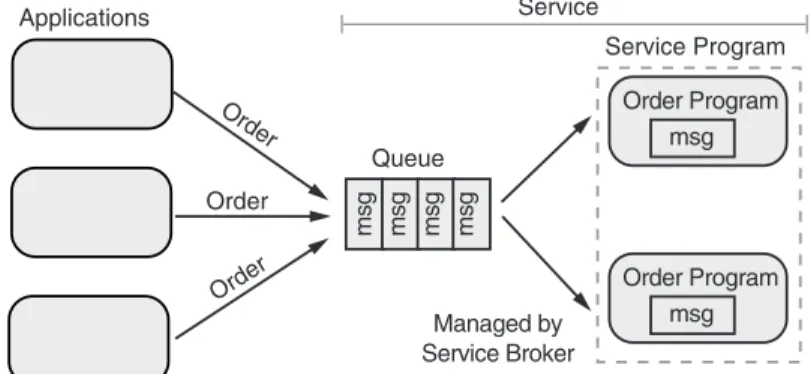
The service may be configured to use a limited number of instances of the stored procedure so that more than one message at a time may be processed. If the service is very busy, a number of messages may build up in the queue, but eventually they are processed. Figure 15-1 shows a simple message-based system that illustrates how Service Broker invokes instances of a stored procedure so the stored procedure can process mes-sages as they arrive in a queue.
The system in Figure 15-1 receives orders from applications and processes them. It only requires that the service program be implemented
by someone who is familiar with the problem space of processing orders; everything else is configuration that can be done after the service program is written and even unit tested. The service in this example is configured to use the order service program to process the messages that arrive in its queue. The applications only need to be able to make a connection to SQL Server to be able to submit orders into the service. If there are messages in the queue, Service Broker will eventually invoke an instance of the service program. In this simple message-based system, the order service program would read the message from the queue and process it.
However, the service program is not required to process any messages in the queue at the time it is invoked; it can choose to do otherwise. In other words, Service Broker will invoke a service program when messages are available for processing, but it is up to the service program to decide whether or not to process messages in the queue.
Of course, the system illustrated in Figure 15-1 could have easily been implemented by having the applications directly call the service program itself, but this example is meant to show the basics of message processing as it is done by Service Broker. It is worth noting, however, that even this simple example limits the number of messages that will be simultaneously processed, which is a key problem in system design. Without Service Bro-ker, this would require the implementer of the order stored procedure to have knowledge beyond the problem space of processing orders, to pre-vent an unexpected rush of orders from swamping the system by trying to make it process too many messages at once.
Queues are one of the two main features of Service Broker. They allow processing of messages to be deferred. A message stays in a queue until re-sources are available to process it. Rere-sources may be unavailable because of
Applications Order Order Order Queue Service Service Program Order Program msg msg msg msg msg Order Program msg Managed by Service Broker
the limited number of instances of a service program to process them. Most importantly, queues may be reconfigured while an application is running. In almost all applications, there are some tasks that must be done im-mediately and others that can be deferred. For example, during peak load, one queue for a service processing deferrable messages might have the invocation of its service process turned off by the system administrator. And another that must process messages immediately might have the number of instances of its service process increased by the system adminis-trator. This diverts resources to services that must process their messages immediately. When the peak passes, the system administrator can recon-figure again to allow deferred messages to again be processed. This ability to reconfigure Service Broker at runtime greatly aids in maintaining the scalability and performance of a system. Figure 15-2 shows a Service Bro-ker application that has been configured for peak load.
In software, constructing a queue is very easy; in fact, the .NET Frame-work includes the System.Collections.Queue class to do this for you. However, the queue that can be made from this class is transient; it is meant to be used only as long as the program that created it is running.
You can’t build a messaging system using the simple queues provided
by System.Collections.Queueand similar classes, because they just are
not reliable enough. Under the covers, in Service Broker a queue is imple-mented in a table, and messages can be removed or added to a queue using a transaction. This gives the queue in Service Broker the same features we expect of anything else that operates on data in a database—it is atomic, consistent, isolated, and durable. Basically, it is reliable.
In fact, not only does Service Broker use SQL Server to implement queues, it uses SQL Server to store and implement all aspects of a messaging
SQL SERVER SERVICE BROKER OVERVIEW 507
Queue
Deferrable Service Immediate Service Service Program Service Program msg msg msg msg Queue msg msg Messages accumulate in queue Invoking of service program
disabled Instances of service program increased
application. This, then, is the second main feature of Service Broker: It pro-vides a complete framework based on SQL Server for implementing reliable messaging applications.
It is hard to overemphasize the importance of this feature—without Service Broker or some similar framework, probably 80% of the code writ-ten for a messaging application would be for infrastructure, not the prob-lem space of the application. The resulting framework would, of course, not be SQL Server and would require a completely different set of skills and utilities than those needed to maintain SQL Server. A Service Broker application is just a collection of SQL Server objects that can be maintained using the same skills and tools used to maintain anything else in SQL Server.
A note on terminology: Terms that refer to typeand instanceare often overloaded and depend on context, which is often not clear, to distinguish between which overload is being used. The term “message” might some-times refer to the definition of the format of a message and at other some-times refer to an actual message. Anytime the term “message” is used in this chapter, it is referring to an actual message that complies with a message type definition; that is, it is an instance of some message type. The term “message type” will always be used to refer to a definition of a message format. This distinction is necessary because Service Broker not only man-ages messman-ages, it also manman-ages message types.
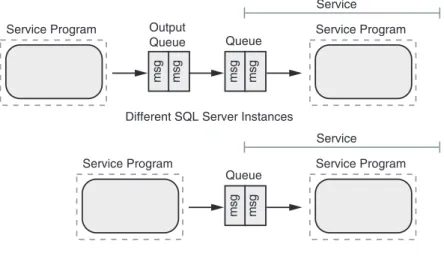
A service uses Service Broker to send a message to another service. Ser-vice Broker does this by putting the message into an output queue and then sending it, possibly at a later time, to the queue for the other service. A number of messages may build up in the output queue, waiting to be sent, but they will eventually be sent and sent in the order in which they were put into the queue.
The advantage of this extra layer of queuing is that the service sending the message never waits for anything. But the extra layer also introduces extra overhead. Service Broker will skip the output queue when both ser-vices are on the same instance of SQL Server. In this case, it will put the message directly into the queue from which the receiving service gets its messages. Figure 15-3 shows how Service Broker efficiently sends a mes-sage from one service to another.
So far we have seen a very general picture of how Service Broker is used to make messaging applications. Service Broker is a framework and extensions to T-SQL that are used to create and use the components used to build a message-based application. We have already used some of these
components: messages, queues, and services. Concise definitions of the components used in a Service Broker application follow.
• Service program—A service program is used to process messages. A service program may be a stored procedure written in T-SQL or a CLR-compliant language. A service program may also be a program written in any language that has access to SQL Server. As part of the processing of a message, the service program may send messages to other services.
• Queue—A queue is a component that has a name and can hold messages in the order in which they were received while the mes-sages await processing. A queue may have a particular service program associated with it, but it is not required to.
• Message type—A message type is a definition of the format of a message. It is stored in SQL Server and has a name. One service communicates with another service by sending an instance of a message type. A service can only send a message for which a message type has been defined.
• Contract—A contract is a set of names of message types. It is stored in SQL Server and itself has a name. The contract defines nothing about the order in which the message types must occur, but each message type must be marked as being sent by an INITIATOR, a
TARGET, or ANY, which determines how it may be used.
SQL SERVER SERVICE BROKER OVERVIEW 509
Service Program Output Queue msg msg Service Program Service Queue msg msg
Service Program Service Program Service
Queue
msg msg
Same SQL Server Instance Different SQL Server Instances
• Service—A service is a specification that is stored in SQL Sever and has a name. It must specify a queue that will be used to hold mes-sages sent to it. Optionally, it may also list a set of contracts that specify the types of message that may be sent to it.
• Conversation—A conversation is a component that is used to corre-late and order messages a service receives. It is created using the
BEGIN DIALOG CONVERSATIONT-SQL command and is the principal
component an application uses to make use of Service Broker. Any program that has access to SQL Server, including a service program, can create a conversation.
Services communicate with each other using a conversation. When a ser-vice wants to communicate with another serser-vice, it creates a conversation.
The conversation includes a service contract, which will be used during the conversation. A conversation is between two services that are named in the BEGIN DIALOG CONVERSATIONcommand, using the message types defined in the contract associated with the conversation.
These are some other Service Broker components used by conversations. • Conversation group—A conversation group is created by Service
Broker and assigned a unique identifier. A conversation group represents a user-defined set of conversations.
• Routes—Routes are used when conversations are created between different instances of SQL Server. They serve as a level of indirection so that the actual instance of SQL Server being used can be changed without changing any of the service programs when a target is moved.
• Remote service bindings—The remote service bindings associate a remote service with the user in the local database. They are used to handle authorization for the remote service and encryption of the messages exchanged with the remote service.
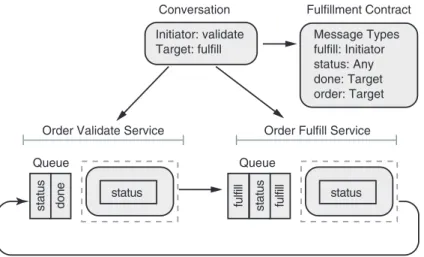
A trivial Service Broker application that makes use of some of these components is shown in Figure 15-4.
In this trivial Service Broker application, there is a validate service and a fulfill service. The validate service is used to validate an order. If the order is valid, the validate service sends the order to the fulfill service to have it shipped.
The fulfillment contract specifies four types of messages: fulfill, status, order, and done. The fulfill message may only be sent by the initiator. The validate service is the initiator because the dialog specifies it as the initia-tor. The order and done messages may only be sent by the target. The fulfill service is the target because it was specified as a target in the dialog.
The status message may be sent by either the validate or the fulfill ser-vice. In this trivial application, the status message would be sent whenever something of significance occurs in the processing of an order, to let the other service know about it. This relieves the other service of having to poll for status.
As shown in the trivial Service Broker application, the fulfill service is currently processing a message. When it is completed, it will send a done message to the validate service. It has a number of other messages in its queue waiting for processing.
The contract ensures that only messages specified can be sent only in the direction specified. An attempt by either service to send the wrong message will result in an error for that service. When the validate service receives a done message, it will use the correlation capabilities of Service Broker to figure out which fulfill message has been processed by the fulfill service.
This example shows the “big picture” of how Service Broker works and glosses over all the details. Conversations are central to understand-ing Service Broker. Let’s take a closer look at the many facets of conversa-tions now. We will not be looking at the details of the APIs yet; that comes
SQL SERVER SERVICE BROKER OVERVIEW 511
Order Validate Service Order Fulfill Service
Queue status done Conversation Initiator: validate Target: fulfill Fulfillment Contract Message Types fulfill: Initiator status: Any done: Target order: Target status Queue status fulfill fulfill status
later. Here we just want to present a model of how Service Broker uses conversations.
A conversation is created using BEGIN DIALOG CONVERSATION. It must list a FROMservice and a TOservice by name; a conversation always takes place between two services. The FROM service is, in effect, the reply-to address the TOservice will use when it needs to reply to a message. Mes-sages for the FROMservice will go into the queue specified by the FROM ser-vice, and similarly for the TOservice.
A conversation must also specify the contract from the set of contracts listed as being supported by the TOservice. This limits the message types used in the conversation to those listed in the contract. It further limits the FROMservice, in this conversation, to receiving in its queue only those mes-sage types marked as being sent by an INITIATORor ANY. And likewise it limits the TO service to receiving in its queue only those message types marked as being sent by a TARGETor ANY.
Although you can think of “sending a message to a service,” there is no way to do this directly. In fact, probably the biggest hurdle in understand-ing Service Broker is in understandunderstand-ing how it manages conversations. Messages are not sent to a service, they are sent ONa particular conversa-tion. This is how messages are correlated and ordered; obviously, all mes-sages sent ONthe same conversation are correlated.
A service program reads a message from a queue by using the T-SQL command RECEIVE. A queue physically is a table, and in effect this selects a row from the table and then deletes it. The message includes a conversation handle, which identifies the conversation on which the message was sent.
If the service program needs to send a reply to that message, it sends the reply message on the conversation handle that was in the message it read out of the queue. This way, the service program does not need to spec-ify the specific service as the recipient of the message. Sending messages on a conversation handle rather than to a specific service greatly simplifies creating distributed applications.
Hopefully, by this point you will be thinking, “OK, I can easily reply to any message I receive; how does the first message that starts things going get into the queue?” When a program, which could be a stored procedure or any program that has access to SQL Server, creates a conversation using
BEGIN DIALOG CONVERSATION, it gets back a conversation handle. It can
then send a message on that conversation handle, and the message will be sent to the queue of the TOservice. From there what happens depends on the service program that reads that message out of that queue.
It is easy to see how sending messages on a conversation instead of to a service allows Service Broker to guarantee message order and correlation. However, in real-life messaging applications this is not enough. Only a triv-ial messaging application could depend on a single conversation between two services. A typical business process would involve many services, which means there would be many conversations. All these conversations must be coordinated for two reasons. One is to guarantee the processing order of messages across a group of conversations. The other is to allow state to be maintained for a group of conversations and used by any service program that processes messages from that group of conversations.
Service Broker calls a group of related conversations a conversation group. Every conversation belongs to a single conversation group, and every con-versation group has a concon-versation group ID. Every message contains both a conversation handle and the conversation group ID of the conversation group to which the conversation belongs. An application decides if a conver-sation should be part of a new converconver-sation group or added to an existing one when it creates the conversation using BEGIN DIALOG CONVERSATION.
In order to make the new conversation part of a particular conversation group, the application needs either a conversation handle or a conversa-tion group ID to pass into BEGIN DIALOG CONVERSATION. If a conversation handle is passed in, the new conversation will be added to the con-versation group of that concon-versation.
If a conversation group ID is passed in, it will be added to that conver-sation group. You might get this converconver-sation group ID from a message you are processing, or you might just create a new conversation group with no conversations in it. You can do this by using the NEWID()function and passing the UNIQUEIDENTIFIER that it returns into BEGIN DIALOG
CONVERSATION. This allows you to have the conversation group ID before
you do BEGIN DIALOG CONVERSATION. Later when we look at shared state, you will see that this technique lets you set up shared state before any con-versation begins.
If neither a conversation handle nor a conversation group ID is passed into BEGIN DIALOG CONVERSATION, a new conversation group is created for that conversation.
A conversation group has a lock associated with it. This lock is used to guarantee message order and manage state across all conversations in the conversation group.
The conversation group can be locked in two ways. Whenever a mes-sage is read from or sent to a queue, the conversation group associated
with the message will be locked. Messages are read from a queue using the
RECEIVEcommand and sent to a queue using the SENDcommand.
The second way to lock a conversation group is to use the GET
CONVERSATION GROUPcommand. The GET CONVERSATION GROUPcommand is
issued for a particular queue. The command locks the conversation group associated with the first message in the queue from a conversation group that is not locked. Note the logic here: The GET CONVERSATION GROUP command will skip over messages from conversation groups that are locked until it finds one from a conversation group that is not locked.
The lock associated with a conversation group has a lifetime. It remains locked until the transaction under which it was locked completes. In typ-ical usage, a transaction will have been started before RECEIVE or GET
CONVERSATION GROUP is called.
When a conversation group is locked, all threads except for the one that locked the conversation group are blocked when they try to use
RECEIVE to get a message that is from the locked conversation group.
ARECEIVEthat attempts to get a message from a different conversation
group that is not locked will not be blocked.
The RECEIVEcommand can be selective about which messages is will
read from a queue. It can choose to receive all messages in a queue, only the messages associated with a particular conversation group, or the mes-sages for a particular dialog.
In typical usage, a transaction is started, GET CONVERSATION GROUPis used, and then RECEIVEis used, followed by either a COMMIT TRANSACTION or a ROLLBACK TRANSACTION. If a ROLLBACK TRANSACTIONis used, all mes-sages that were read from the queue are placed back into it, and all the messages that were sent are removed from the queues that received them. Until the transaction is committed, of course, nothing that was sent is vis-ible to the outside world.
Though it is not required, RECEIVE is typically used after a GET
CONVERSATION GROUPcommand. Using GET CONVERSATION GROUPfirst will
find a message from an unlocked conversation group, lock the conver-sation group, and then return the converconver-sation group ID. The RECEIVEcan then be used to get messages only for the conversation group that GET
CONVERSATION GROUP locked, and thus is guaranteed not to block. If
RECEIVEis used to indiscriminately read messages from a queue, it may
become blocked if one of the messages it is trying to read from the queue is from a locked conversation group. Locking on a RECEIVEcommand can lead to decreased scalability and performance.
This may seem to be a bit of a complicated way to manage a transac-tion. Since in fact the queue is implemented as a table with messages in it, why not just start a transaction, select out a row—that is, a message—and then delete that row, all under the transaction? Functionally, this would work but would be extremely inefficient. The problem is that the queue in most cases will be holding messages that come from many different con-versation groups. Locking the entire queue, which is what a SELECT,
DELETE under a transaction would be doing, prevents the queue from
being read or written by anyone else. This means that all processing of messages in the queue would be stopped, not just the processing of mes-sages for a single instance. In addition, it would prevent all new mesmes-sages from being added to the queue. RECEIVEin effect does the SELECT and
DELETEunder a transaction in a more efficient way.
Both RECEIVEand GET CONVERSATION GROUPare each specially designed so that, in effect, you can wrap message processing for a single conversa-tion group in a transacconversa-tion without affecting the processing of messages in other conversation groups.
So, putting conversation group locks all together, in typical usage a service program would first do a BEGIN TRANSACTION, then a GET
CONVERSATION GROUP, then a RECEIVE. It would obtain a message that
came from some conversation group. It could then process the message, knowing that no other service process could be processing another mes-sage from the same conversation group until it either does a COMMIT
TRANSACTIONor ROLLBACK TRANSACTION, but still allow messages in other
conversation groups to be freely processed.
To see why being able to lock a conversation group is important, let’s look at an example of what might happen if we couldn’t lock a conversa-tion group. We will look at a simple service that inserts a work order into a database. A work order usually has a header that includes the location where the work is to be done and some line items that indicate the tasks to be completed. In the database there is a table for headers and another for line items that uses referential integrity to link back to the header table. This service is like the one shown in Figure 15-1 at the beginning of this chapter in that it is designed to process many messages at once.
An application starts sending messages to the queue for the work order service. First it sends a message that contains the work order header, fol-lowed by a number of messages containing line items for the work order. The header is put into the queue first, and processing is started on it first. However, as soon as processing starts on the header, another instance of
the service process starts working on one of the line items. As luck would have it, the instance of the service process working on the line item finishes first and tries to insert the line item into the line item table, which fails because it violates referential integrity.
It turns out in the end, the work order would be properly inserted into the database because queues are transactional, and when the insert failed, the message would be put back into the queue and processed again later after the header had been inserted, but at the cost of a lot of overhead.
Now let’s look at what happens with conversation group locks. The messages for the header and all the line items are in conversations that are in the same conversation group. The application always puts the message with the header into a queue first, followed by a message for each line item. One of the instances of the service process uses GET CONVERSATION
GROUP, which, as it happens, locks the conversation group for a work order.
It then uses RECEIVEto get all the messages in the queue associated with the conversation group it has just locked. This could include the header and a number of line items. It processes these in order by making INSERTs into the appropriate tables and then returns.
It may be that a second instance of the service process, running at the same time, also does a GET CONVERSATION GROUP.It may also lock a con-versation group for a work order, but it will not be the same work order as the first instance locked. It will proceed to process this second work order in the same way the first instance is processing the first work order.
After the first instance of the conversation group finishes, it releases the lock on the conversation group. Then yet another instance of the service process does a GET CONVERSATION GROUP. It may end up locking the con-versation group associated with the first work order and process subse-quent line items that were put into queue after the first instance of the service processed completed.
There are many variations on this theme. For example, the service process might issue a second RECEIVEafter it is done processing the first set of messages but before it completes the transaction, to see if any more messages have arrived for the conversation group it has locked.
There are two important things to note about this example. One is that every possible instance of a service process is running at the same time, each working on a different work order and doing so without ever block-ing the others. The second is that a queue can continue receivblock-ing more messages for a conversation group even while that conversation group is locked. Neither of these things would be possible if a service process used
from a queue. Conversation groups and their locks are crucial to the effi-cient operation of Service Broker.
Another important use of a conversation group is to have a way to maintain state across the conversations in a conversation group. There is always state to be maintained in a messaging application. A trivial example of this is a messaging application that is used to process a purchase order and has to keep track of the purchase order number. It can do this in three ways. One is to keep track of the purchase order number in memory, like a local variable. The second is to put the purchase order number in every message. And the last is to put the purchase order number in a table in SQL Server. Of course, if the state involved was a just purchase order number, almost any solution would work, but in real applications there is a lot more state than that.
The first option is not scalable and is very hard to manage. The more service programs there are, the more memory required to hold onto their purchase order numbers. This means that the memory requirements would be growing at a rate greater than the number of purchase orders being processed.
The second solution is reasonably easy to manage and does use SQL Server for storage, but it also is not scalable. The problem is that the stor-age required for purchase order numbers goes up as the number of mes-sages increases. This in effect multiplies the amount of storage required in SQL Server by the number of messages involved, not just the number of purchase orders involved.
Both of the first two solutions also suffer from the problem of data being duplicated in many places. Of course, in practice this would be an unreliable way to maintain state.
What you really want to do is to put all the state for a conversation group into some tables in SQL Server. That way, there is only one copy of the state and just one place to maintain it. For this to work, however, you will need two things. Both are easy to get. First of all you need something to key the state you will be storing in SQL Server. The conversation group ID is unique and is a UNIQUEIDENTIFIER, so it is ideal to use for a key.
The second thing you need is a lock, and you have that too. As long as your service program is accessing a queue under a transaction, you can be sure other service programs are not touching the shared state. In fact, this is another use of the GET CONVERSATION GROUPcommand. Using RECEIVE locks the conversation group, but it also reads the queue. Sometimes you need to access or manipulate the state you are sharing within a conversa-tion group before you read the queue. GET CONVERSATION GROUPgets the
conversation group associated with the next message in the queue and returns the conversation group ID, but it does not read the queue. In either case, you can then use the conversation group ID to look up the state and then decide whether or not the queue should be read.
Service Broker Application Guidelines
It is important to keep in mind what Service Broker does best when you are using it to develop an application. Service Broker works best when an application has a number of independent tasks to perform. If your applica-tion cannot be broken into a set of independent tasks, it is not a candidate for implementation with Service Broker.
The work order example in the previous section illustrates this. Service Broker can be configured to distribute the independent tasks over all the resources available when the load is light, and when the load is heavy, it can be configured to focus the resources on the critical tasks and defer oth-ers until the load lightens.
So the first thing you must do to use Service Broker is to break your application into independent tasks. Once you have done this, you must categorize each task as being critical or deferrable.
Critical means the task must be completed almost immediately when the application is invoked. One of the critical tasks might be to set up state so the overall progress of the application can be tracked.
A deferrable task is one that, of course, does not have to be completed immediately. In the work order example, you might decide that getting the header into the database right away is critical so that users would have some picture of where work was going to be done. However, the actual work order line items might be deferred because they would not be needed until work crews were assigned, which is done overnight.
If your application doesn’t have any deferrable tasks, it is probably not a candidate for implementation in Service Broker.
Next you will have to define your services. There is no hard-and-fast rule for this, but you might start with a service, and its associated queue and stored procedure, for each kind of task in your application. Once your services are defined, you can implement the stored procedures, which in turn will create the conversations needed.
You will probably have one task that starts things off. Again, there is no hard-and-fast rule, but this should be a critical task that creates a conversation group and allocates the state that will be needed to track the progress of the application.
Service Broker Example
The sections that preceded this presented a conceptual overview of Service Broker and how it is used. What follows is an example of an application that uses Service Broker. It models a stock brokerage house, which offers to buy and sell stock to the public, and a stock trading house, which executes the actual trades on a stock exchange. A simple example designed to illus-trate the use of Service Broker DDL and DML extensions in SQL Server 2005 follows.
Message Type
It is of vital importance that the sender and the receiver in a messag-ing application understand what messages will be sent. In Service Broker the description of the messages is defined in a message typeobject. The
message typeobject defines the name of the message and the type of data
the message contains. For each database that participates in a conversa-tion, an identical message typeis created.
Listing 15-1 shows the syntax for creating a message type. Listing 15-1: Syntax for Creating a Message Type
CREATE MESSAGE TYPE message_type_name [ AUTHORIZATION owner_name ]
[ VALIDATION = { NONE | EMPTY | WELL_FORMED_XML |
VALID_XML WITH SCHEMA COLLECTION schema_collection_name } ]
The arguments and their definitions are as follows.
• message_type_name—The name of the message to create. It
can be any valid SQL string. By convention, it has the form of
//hostname/pathname/name. An example for a message type
that deals with order entries could be //www.develop.com/
orders/orderentry. Using this name in SQL Server would
require square brackets around it—for example, [//www.
develop.com/orders/orderentry]. Although using a
URL format is not required, it’s generally easier to ensure uniqueness if you use a URL.
• AUTHORIZATION owner_name—Defines which user or role
owns themessage type.
• VALIDATION—What kind of XML validation should be
performed on received messages.
• NONE—The message isn’t validated at all. This is done for non-XML messages or XML messages coming from a trusted source.
• WELL_FORMED_XML—The message is parsed to ensure the XML data
is well formed.
• EMPTY—The message body is empty.
• VALID_XML WITH SCHEMA COLLECTION schema_collection_name—
Specifies the XML schema collection to validate the message against. The schema collection must be registered in SQL Server before it can be used in the creation of the message type. (Chapter 8 covers how to register a schema collection in SQL server.) If WITH schema_
collection_nameis not used, the message will not be validated;
however, the XML will still have to be well formed.
A broker must request that a brokerage make a trade, and that broker-age must acknowledge that request. Two messbroker-ages will be required to do this:
• The message that is sent from the broker/trader to the brokerage containing the original order
• The acknowledgment message from the brokerage to the broker/trader
Listing 15-2 shows the two message types created in order to accom-plish the order entry. Both use XML encoding, which means that any a message with valid XML will be processed.
Listing 15-2: Example of Creating a Message Type with XML Encoding
— first the message for the trade entry CREATE MESSAGE TYPE
[//www.develop.com/DMBrokerage/TradeEntry] VALIDATION = WELL_FORMED_XML
— then the acknowledgment message CREATE MESSAGE TYPE
[//www.develop.com/DMBrokerage/TradeAck] VALIDATION = WELL_FORMED_XML
In Listing 15-2 the various endpoints that receive the messages with the
TradeEntry and TradeAck message type don’t care about the XML as
be an ideal situation for an enterprise application. In an enterprise ap-plication, you may want to make sure that the endpoints always get valid messages. For that purpose, the message type can be created indicating that the message should be validated against an XML schema. This is shown in Listing 15-3. The code listing shows both the code to register the schemas and how to refer to the schemas from the creation of the
message type.
Listing 15-3: Example of Creating Message Types Whose Messages Will Be Validated
against XML Schemas
—create the schema collection for the tradeEntry message CREATE XML SCHEMA COLLECTION TradeEntrySchema AS
N’<?xml version=”1.0” ?> <xsd:schema xmlns:xsd=”http://www.w3.org/2001/XMLSchema” targetNamespace= “http://www.develop.com/DMBrokerage/schemas/tradeEntry”> <xsd:complexType name=”tradeEntry”> <xsd:sequence>
<xsd:element name=”RICCODE” type=”xsd:string”/> <xsd:element name=”CustomerID” type=”xsd:int”/> <xsd:element name=”OrderID” type=”xsd:int”/> <xsd:element name=”Date” type=”xsd:date”/> <xsd:element name=”BuySell” type=”xsd:date”/> <xsd:element name=”Volume” type=”xsd:int”/> <xsd:element name=”Price” type=”xsd:decimal”/> </xsd:sequence>
</xsd:complexType> </xsd:schema>’
—create the message type based on the schema CREATE MESSAGE TYPE
[//www.develop.com/DMBrokerage/TradeEntry]
VALIDATION = VALID_XML WITH SCHEMA COLLECTION TradeEntrySchema
—create the schema collection for the tradeAck message CREATE XML SCHEMA COLLECTION
N’<?xml version=”1.0” ?> ”http://www.w3.org/2001/XMLSchema” targetNamespace= “http://www.develop.com/DMBrokerage/schemas/tradeAck”> <xsd:complexType name=”tradeAck”> <xsd:sequence>
<xsd:element name=”OrderID” type=”xsd:int”/> <xsd:element name=”AckId” type=”xsd:int”/> </xsd:sequence>
</xsd:complexType> </xsd:schema>’
— create the message type for the trade ack — based on the schema collection
CREATE MESSAGE TYPE
[//www.develop.com/DMBrokerage/TradeAck]
VALIDATION = VALID_XML WITH SCHEMA COLLECTION TradeAckSchema
These message types need to be created in both the broker/trader database and the brokerage database. In a real-world application, there would be most likely be more message typesto accomplish more tasks.
Apart from the message type the developer defines, there are some pre-defined message types in Service Broker. These three are the most common.
• http://schemas.microsoft.com/SQL/ServiceBroker/
DialogTimer—A dialog can have an explicit timer assigned.
This message is received when the timer expires.
• http://schemas.microsoft.com/SQL/ServiceBroker/Error—
Service Broker creates error messages based on this message type to report errors to the application. This message type can also be used by the application to report errors or violation of business rules.
• http://schemas.microsoft.com/SQL/ServiceBroker/
EndDialog—When a dialog ends, the broker sends the EndDialog
message to the remote endpoint.
These message types are implicitly part of every contract, so any target can receive instances of them.
Changing Message Types
Amessage typecan be altered or dropped using the normal T-SQL DDL
syntax ALTERand DROP. The syntax to change a message type is shown in Listing 15-4.
Listing 15-4: Syntax to Alter a Message Type
ALTER MESSAGE TYPE message_type_name
[ VALIDATION = { NONE | EMPTY | WELL_FORMED_XML |
VALID_XML WITH SCHEMA COLLECTION schema_collection_name } ]
The ALTER syntax allows us to change the VALIDATION and/or the
AUTHORIZATION. To drop a message type, you use this syntax: DROP MESSAGE
TYPE message_type_name [ ,...n ]. Notice that the syntax permits
message type is that to be dropped, it cannot be referenced from a
contract. If that is the case, an error is raised saying that the message type
cannot be dropped because it is referenced by one or more contracts. Now that we have mentioned contracts, it is time to see what a contract is and how it is created.
Contracts
Service Broker services need to know what messages to expect, the outline of the messages, and what messages they can send. As we saw earlier, a
message typedefines the message, and we use a contractto define what
messages each service (endpoint) can send and receive. Contracts are cre-ated and persisted in each database that participates in a conversation.
As we will cover later, the endpoints can be defined to be either the ini-tiator or the target of a conversation. Subsequently, message typescan be defined by the contractto be sent either by the initiator, the target, or both. Listing 15-5 shows the syntax to create a contract.
Listing 15-5: Syntax for Creating a Contract
CREATE CONTRACT contract_name [ AUTHORIZATION owner_name ] ( message_type_name
SENT BY { INITIATOR | TARGET | ANY } [ ,...n] )
The arguments and their definitions are as follows.
• contract_name—The name of the contract to create. It can be any
valid SQL string. As with a message type name, you would enter it in the form of //hostname/pathname/name.
• message_type_name—The message type(or message types) that
this contract uses.
• SENT BY—Defines which endpoint can send the defined message
type. The possible arguments are INITIATOR, TARGET, or ANY.
• INITIATOR—The initiator of the conversation can send the
definedmessage type.
• TARGET—The target of the conversation can send the defined
message type.
• ANY—The specified message type can be sent by either the
INITIATORor the TARGET.
• AUTHORIZATION owner_name—Defines which user or role owns the contract. If this isn’t specified, the contract is owned by the user who created the contract.
For the stock trading application, we need to create contracts in both the broker/trader database and the brokerage database. The TradeEntry message type initiates in the broker/trader database, and the TradeAck message type initiates in the brokerage database. The code in Listing 15-6 shows how to create the contract in the broker/trader database.
Listing 15-6: Create a Contract
—create the contract against the message types CREATE CONTRACT [//www.develop.com/DMBrokerage/EnterTrade] ( [//www.develop.com/DMBrokerage/TradeEntry] SENT BY INITIATOR, [//www.develop.com/DMBrokerage/TradeAck] SENT BY TARGET )
When a contract is created, at least one message type needs to be marked as sent by the INITIATOR.
Contracts, like message types, can be dropped. The syntax to drop a contract is this: DROP CONTRACT contract_name [ ,...n ]. Notice that sev-eral contracts can be dropped through one DROPstatement.
At this stage, according to the outline of how to design a Service Broker application, we should create the outline of the service program. We would like to wait with that and instead create the queues the application uses.
Queues
The queue is used to store the messages the endpoints send. When the ser-vice at one end sends a message to the serser-vice at the other end, the message is placed in a queue at the receiving end. Later, when the application receives the message and commits the transaction, the broker deletes the messages from the queue. The service broker manages the queues and pre-sents a database table-like view of the queues.
Listing 15-7: Syntax to Create a Queue
CREATE QUEUE queue_name
[ WITH [ STATUS = { ON | OFF } ] [ RETENTION = { ON | OFF } , ] [ ACTIVATION (
[ STATUS = { ON | OFF } , ]
PROCEDURE_NAME = stored_procedure_name , MAX_QUEUE_READERS = max_readers , EXECUTE AS { SELF | ‘user_name’ }) ] ]
There are quite a few options when you are creating a queue, and a short explanation of the various arguments follows. The queue is the only Service Broker object that can be named with a three-part name.
• queue_name—Is the name of the queue that is created. This must
be a SQL Server identifier. Because the queue is never referred to outside the database it is created in, the URL-like syntax used for other Service Broker names isn’t necessary for queue names.
• STATUS—Decides whether the queue is created in a disabled state
or not. The choices are ON(active) and OFF(disabled). When a queue is disabled, it cannot receive messages, nor can messages be removed from the queue. If this clause isn’t specified, the queue is created in the ONstate.
• RETENTION—Specifies the retention setting for the service. If
RETENTION = ON, all messages sent or received on conversations
using this service are retained in the queue until the conversations have ended successfully. The RETENTIONargument is useful if you do compensating transactions. With RETENTION = ON, you can do a compensation transaction if something goes wrong during the conversation (remember that the conversation can have a very long lifespan), since the messages are kept in the queue until the conversation ends.
• ACTIVATION—Specifies information about the stored procedure
that will be activated to handle messages that arrive on this queue.
IfSTATUSis set to OFF, the queue does not activate the stored
proce-dure; the default is ON. We cover different aspects of activation of the service programs later in this chapter.
• PROCEDURE_NAME—Is the stored procedure to execute. This
proce-dure is also the service program for the application. The proceproce-dure has to be in the same database as the queue or be fully qualified.
• MAX_QUEUE_READERS—When a message arrives on the queue, the procedure will be activated. As more messages build up in the queue, more instances of the procedure will be activated, up to
MAX_QUEUE_READERS.
• EXECUTE_AS—Specifies what SQL Server login the activated
proce-dure runs under. If this optional clause is set to SELF, the procedure runs under the user who created the queue.
In the stock trading application example, we need one queue in the brokerage database to handle the order entry messages coming from the broker/trader database. We also need a queue in the broker/trader database to handle the acknowledgment messages from the brokerage data-base. In a real-world application, we would probably have more queues to handle different messages. Feel free to create as many queues as you deem necessary for your application.
The code to create the queues for the stock trading application is shown in Listing 15-8. Notice that if you want to automatically activate a stored procedure (the service program) when a message arrives on the queue, you need to supply the PROCEDURE_NAMEclause with the name of a valid procedure. The easiest approach is to create a procedure that is just an empty shell, as in the following code snippet, and catalog it in SQL Server.
—create in the broker/trader database CREATE PROCEDURE tradeAckProc
AS
RETURN 0 GO
—create in the DMBrokerage database CREATE PROCEDURE tradeEntryProc AS
RETURN 0
Listing 15-8: Creation of Queues
—create the queue in the broker/trader database —this queue handles the acknowledgments from —the brokerage
USE Trader1 GO
CREATE QUEUE tradeAckQueue WITH STATUS = ON,
PROCEDURE_NAME = tradeAckProc, MAX_QUEUE_READERS = 5,
EXECUTE AS SELF)
—creation of the queue in DMBrokerage
—this queue handles the new orders coming from —the broker
USE DMBrokerage GO
CREATE QUEUE tradeEntryQueue WITH STATUS = ON,
ACTIVATION (
PROCEDURE_NAME = tradeEntryProc, MAX_QUEUE_READERS = 5,
EXECUTE AS SELF)
The queues created in Listing 15-8 act as receive queues for replies and error messages.
When you create a queue, you create an object of the type Service
Queue. This object maps to a SQL Server internal table with the same name
as the queue. To view what queues exists in a database, you can do a
SELECTagainst the sys.service_queuescatalog view. You can view the
content of a queue through a simple SELECT statement: SELECT * FROM
queue_name. Issuing a SELECTagainst one of the created queues in Listing
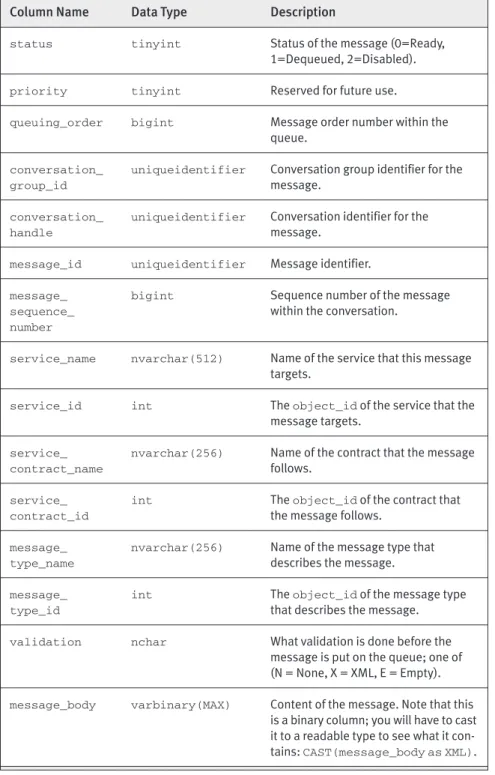
15-8 results in an empty resultset, but at least you can see the columns. Table 15-1 shows the content of a queue.
In the process of developing a Service Broker application, we now have the “basic plumbing,” which consists of the following:
• Message types • Contracts • Queues
These may exist in different databases on different servers. We now need to create the information about where the messages are sent. This is handled by the services. Table 15-1 shows some columns that hold infor-mation about services, and in the following section we cover how to create services.
Column Name Data Type Description
status tinyint Status of the message (0=Ready,
1=Dequeued, 2=Disabled).
priority tinyint Reserved for future use.
queuing_order bigint Message order number within the queue.
conversation_ uniqueidentifier Conversation group identifier for the
group_id message.
conversation_ uniqueidentifier Conversation identifier for the
handle message.
message_id uniqueidentifier Message identifier.
message_ bigint Sequence number of the message
sequence_ within the conversation.
number
service_name nvarchar(512) Name of the service that this message targets.
service_id int The object_idof the service that the
message targets.
service_ nvarchar(256) Name of the contract that the message
contract_name follows.
service_ int The object_idof the contract that
contract_id the message follows.
message_ nvarchar(256) Name of the message type that
type_name describes the message.
message_ int The object_idof the message type
type_id that describes the message.
validation nchar What validation is done before the
message is put on the queue; one of (N = None, X = XML, E = Empty). message_body varbinary(MAX) Content of the message. Note that this
is a binary column; you will have to cast it to a readable type to see what it con-tains: CAST(message_body as XML). Table 15-1: Columns in a Queue
Services
A service is an endpoint for specific functionality in the Service Broker application. Based on the service name, Service Broker routes messages between databases and puts the messages on the queue for that particular service and message type. The specific functionality that the service is an endpoint for is defined by the contract. By specifying the contract, the ser-vice indicates it serves as a target for that particular functionality.
Having said this, we can see that a service: • Defines which queue to receive messages on. • Defines what contracts to support.
Therefore, when a service is created, we need to map it to an existing queue and, optionally, to one or more contracts. The syntax to create a ser-vice is shown in Listing 15-9.
Listing 15-9: Syntax for Creating a Service
CREATE SERVICE service_name [ AUTHORIZATION owner_name ] ON QUEUE queue_name
[ ( contract_name [ ,...n ] ) ]
The arguments for CREATE SERVICEare as follows.
• service_name—Is the name of the service to create.
• queue_name—Specifies the queue that receives messages for
the service.
• contract_name—Specifies a contract that this service exposes.
Notice that when a contract is specified, it does not mean that the particular contract is exclusive to the service. Other services can also use the same contracts, and the service can send messages on contracts that are not specified here.
• owner_name—Sets the owner of the service to the name of a
database user or role.
The syntax specifies both a queue name and a contract name. By defin-ing those arguments, we make sure that any message(s) based on the defined contract(s) are delivered to that particular queue.
In the stock trading application, we now have two message types, one contract, and one queue in each participating database. Listing 15-10 shows the code to tie this together. The code creates a service in each database that maps to a queue and a contract.
Listing 15-10: Code to Create Services
—create the service in the trader db USE Trader1
GO
CREATE SERVICE enterTrade ON QUEUE tradeAckQueue
([//www.develop.com/DMBrokerage/EnterTrade])
—create a service in the brokerage db USE DMBrokerage GO CREATE SERVICE [//www.develop.com/DMBrokerage/TradeEntryService] ON QUEUE tradeEntryQueue ([//www.develop.com/DMBrokerage/EnterTrade])
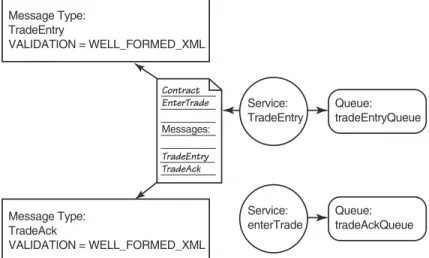
Figure 15-5 illustrates the interaction between services, messages, and queues.
When you look at Figure 15-5, you can see how messages are sent be-tween the services and queues. In the following section, we’ll look at how to initiate the message exchange.
Message Type: TradeEntry VALIDATION = WELL_FORMED_XML Message Type: TradeAck VALIDATION = WELL_FORMED_XML Contract EnterTrade TradeEntry TradeAck Messages: Service: TradeEntry Service: enterTrade Queue: tradeEntryQueue Queue: tradeAckQueue
Dialogs
Service Broker applications communicate through conversations.A conversa-tion involves endpoints communicating with each other. Theoretically, the conversation can be one-to-one, one-to-many, or even many-to-many. How-ever, at this time Service Broker only supports one-to-one conversation. This type of conversation is called a dialog.A dialog is communication between exactly two endpoints. It is a logical connection between service programs, which run on service brokers. The dialog ensures that any messages associ-ated with a dialog are delivered exactly once and in the order in which they were sent throughout the lifetime of the dialog. This is an extremely impor-tant point because the lifetime of the dialog can span several transactions. Other messaging applications guarantee in-order delivery within a trans-action but not spanning multiple transtrans-actions.
The dialog ensures in-order delivery by sequence numbering of the messages. The sending endpoint assigns a sequence number to the mes-sage. This sequence number is used by the receiving endpoint to order the messages correctly. If a message is received out of order, Service Broker holds on to the message until the missing messages have arrived. At that time, the out-of-order message is put on the queue.
In a messaging application, it may be of importance to correlate mes-sages from endpoints if there are multiple dialogs. In other words, you want to tell which received messages correspond to which sent messages. The dialog handles correlation automatically for you. The correlation of messages is handled by a unique identifier of the conversation: the
conversation_handle.
Another important part of dialogs is the message acknowledgment. Dialogs incorporate automatic message acknowledgment for all messages with a sequence number. When a message is sent, the sending broker keeps the message on the transmission queue until an acknowledgment has been received from the remote broker.
Before an application starts sending messages, it needs to establish a conversation. It creates a dialog. At this time it needs to indicate what end-points are involved and what contract to use. Therefore, the syntax to start communication is shown in Listing 15-11.
Listing 15-11: Syntax to Begin Communication
BEGIN DIALOG [ CONVERSATION ] dialog_handle_identifier FROM SERVICE service_name
TO SERVICE ‘service_name’ [ , instance_identifier ] ON CONTRACT contract_name
[ WITH
[ { RELATED_CONVERSATION = conversation_handle
| RELATED_CONVERSATION_GROUP = conversation_group_id } ] [ [ , ] LIFETIME = dialog_lifetime ]
[ [ , ] ENCRYPTION = { ON | OFF } ] ]
The arguments for BEGIN DIALOG CONVERSATIONare as follows.
• dialog_handle_identifier—When a dialog is created, the
system assigns it a unique dialog handle. This is the variable to store that handle in.
• FROM SERVICE service_name—Specifies the service that is
initiating the dialog. This is the service that will receive response and error messages from the target.
• TO SERVICE ‘service_name’—Specifies the target service with
which to initiate the dialog.
• instance_identifier—Specifies the database that hosts the
target service.
• ON CONTRACT contract_name—Specifies the contract that defines
messages used in this conversation.
• RELATED_CONVERSATION = conversation_handle—This dialog
can be associated with the conversation group of an existing dialog through the conversation_handlevariable.
• RELATED_CONVERSATION_GROUP = conversation_group_id—
When starting a new conversation, Service Broker also creates a new conversation group (we cover conversation groups later). This argument allows us to associate the dialog with an existing conver-sation group instead of creating a new converconver-sation group.
• LIFETIME = dialog_lifetime—Specifies the lifetime in seconds
for the dialog. If this is not specified, the dialog remains open until it is explicitly closed.
• ENCRYPTION—Specifies whether messages sent and received on this
dialog must be encrypted. The default for ENCRYPTIONis ON. Having
ENCRYPTIONset to OFFdoes not necessarily mean that messages
won’t be encrypted. That depends on the existence of certificates, which are covered later in this chapter.
It is worth noting a couple of things about the TO SERVICEargument. The service name variable must be a string. The variable must be quoted and match the name of the remote service, including case.
You should also notice that the RELATED_CONVERSATIONand RELATED_
CONVERSATION_GROUP clauses do the same thing. They link the dialog
created to an existing conversation group. You would use the RELATED_
CONVERSATION_GROUP if you created your own UNIQUEIDENTIFIER for
the conversation group ID. By using RELATED_CONVERSATION, you link the dialog to the conversation group ID of the specified conversation_
handle.
We can also define what instance to target. This is important because we can have deployed the service to several databases in the same in-stance of SQL Server, or to databases in other inin-stances/remote servers.
The instance_identifierspecifies which database we want to target. The
instance_identifieris the service_broker_guidfor the database. You
retrieve the UNIQUEIDENTIFIERthrough the following syntax.
SELECT service_broker_guid FROM sys.databases
WHERE database_id = db_id(‘<db_name>’)
An interesting question is, what happens if we have deployed the service to several databases and we have not specified an instance_identifier? In this case, Service Broker picks randomly which service to target.
Let’s now go back to the stock trading application and look at the syn-tax shown in Listing 15-12 to create a conversation between our services. Listing 15-12: Start a Conversation in the Stock Trading Application
—declare a variable for the conversation handle DECLARE @dh uniqueidentifier;
—this starts the dialog from the —broker/trader database
—and we get a dialog/conversation handle automatically BEGIN DIALOG CONVERSATION @dh
FROM SERVICE enterTrade TO SERVICE
‘//www.develop.com/DMBrokerage/TradeEntryService’ ON CONTRACT
[//www.develop.com/DMBrokerage/EnterTrade];
The code in Listing 15-12 is run from the broker/trader database and causes an entry in the conversation endpoints table to be made. This can be investigated by calling SELECT * FROM sys.conversation_endpoints. At this stage, nothing has happened in the brokerage database yet. Noth-ing will happen until we send a message. This can be verified by runnNoth-ing
SELECT far_broker_instance FROM sys.conversation_endpointsin
the broker/trader database. far_broker_instance is a column that holds the ID for the remote server. The SELECT returns NULL; in other words, Service Broker has not yet decided which endpoint to talk to. The decision about the endpoint happens when the first message is sent for this particular dialog.
The code in Listing 15-12 does not explicitly set a lifetime for the dialog; the dialog is alive until it has been closed explicitly. The syntax to close a dialog follows.
END CONVERSATION conversation_handle
[ [WITH ERROR = failure_code DESCRIPTION = failure_text] |[WITH CLEANUP]
]
The conversation_handle variable is obtained through the BEGIN
DIALOG CONVERSATIONcall. You may want to end the dialog if there is an
error during the dialog lifetime. To do this, call END CONVERSATIONwith an error number and an error description. When you end a conversation, a message will appear on the receiving service queue of the type EndDialog. The message type will be Error if you have ended the conversation through the WITH ERRORoption.
You saw in the syntax for BEGIN DIALOG CONVERSATION(Listing 15-11) that you can set an explicit lifetime on the DIALOG. When you set the life-time for the dialog and the life-timeout happens, the dialog ends and an error message is put on the target queue and the initiator queue. At this stage, you cannot use that particular dialog again. In other words, if you set life-times, the initiating service should know the expected lifetime of the dia-log and be fairly certain that the diadia-log actually ends before the timeout.
However, sometimes the initiating service does not know the expected lifetime, or the initiator just wants to know that something takes longer than expected but does not want to end the dialog. The initiator wants to be notified when an expected timeout has been exceeded, but the dialog should not end. In this scenario, you can use a CONVERSATION TIMER. The
CONVERSATION TIMERallows you to start a timer on a particular
conversa-tion handle. When the timer expires, you get a Timeoutmessage on the local queue for that dialog, but the dialog does not end. When the timeout message arrives, the service will be activated to handle the timeout appro-priately. The syntax for starting the timer follows.
BEGIN CONVERSATION TIMER (conversation_handle) TIMEOUT = timeout
The conversation_handle variable is the unique identifier for the conversation, and the TIMEOUTis set in milliseconds.
In this section about dialogs, we have seen how we (and Service Bro-ker) keep track of the various conversations through the conversation_
handleidentifier. The question is then how to keep track of several related
conversations with different identifiers that belong to the same service. Enter the conversation group.
Conversation Group
You use the conversation group to group related conversations together. Imagine that when an order is entered in our application, we need to do more things than just notify the brokerage. We may have to check the client’s credit, check against some authority that the client actually is al-lowed to trade, and so on. In this scenario, we would probably start several different dialogs. These dialogs would get different conversation handles, and it might be hard for us to keep track of the different conversations. For-tunately, Service Broker comes to help. When we start a new dialog, it creates a new conversation group identifier automatically. The identifier is a GUID (SQL server data type UNIQUEIDENTIFIER). The identifier is appended to the messages we receive. You can create the identifier your-self (in T-SQL you use NEWID()). Subsequently, when you do BEGIN DIALOG
CONVERSATION, you relate the dialog to the identifier using the syntax in
Listing 15-11. Relating the dialog to a conversation group identifier is the solution if you want to use an existing identifier for your dialog or associ-ate your dialog with the conversation group of an existing dialog.
To obtain the identifier within a conversation, you do a SELECTagainst
the conversation_group_idcolumn in the message queue. The identifier
can also be retrieved by the GET CONVERSATION GROUP call. Calling GET
CONVERSATION GROUP gets the conversation group identifier for the next
message to be retrieved. As we will see later, the conversation group iden-tifier is useful if we want to keep state information. In addition, it puts a lock on the instance. See the SQL Server Books Online for the full syntax
for GET CONVERSATION GROUP.
The biggest benefit of the conversation group is that of locking the dialogs. You may ask why it is important to lock dialogs. We have already stated that Service Broker guarantees the in-order delivery of messages. That is true, but the issue is that a queue can have multiple readers (this is discussed more in the Activation section later in the chapter). In other words, we have multithreaded queue readers.