G510 Hardware User Manual
Version:V1.1.2
Date:2015.08.24
Copyright
Copyright ©2015 Fibocom Wireless Inc . All rights reserved.
Without the prior written permission of the copyright holder, any company or individual is prohibited to excerpt, copy any part of or the entire document, or transmit the document in any form.
Attention
The document is subject to update from time to time owing to the product version upgrade or other reasons. Unless otherwise specified, the document only serves as the user guide. All the statements, information and suggestions contained in the document do not constitute any explicit or implicit guarantee.
Trademark
The trademark is registered and owned by Fibocom Wireless Inc.
Versions
Version
Date
Remarks
V1.0.0 2013-02-04 The initial revision V1.0.1 2013-04-03 Update the LPG, UART V1.0.2 2013-04-26 Update some parameters
V1.0.3 2013-05-09 Update chapter3.7, add UART2 and HOST UART
V1.0.4 2013-06-03
Delete 2 channel ADC (not supported) Update Application Interface Specification V1.0.5 2013-06-17 Update Figure3-8, Figure3-9 and Figure5-2 V1.0.6 2013-07-31 Update the name of the document
V1.0.7 2013-08-12 Add section 3.6.3 V1.0.8 2013-11-26 Add G510-A20-00
V1.0.9 2014-08-19 Update the description of SIM_DATA
V1.1.1 2015-04-26 Update the description of copyright and attention.
V1.1.2 2015-08-24 Update the logo .
Applicability Table
No.
Type
Note
1 G510 G510-A20-00;G510 Q50-00
Contents
1 Introduction...6 1.1 Scope...6 1.2 Audience...6 1.3 Applicable Documents...6 1.4 Standards...6 2 Overview...7 2.1 Description...7 2.2 Specifications...83 Hardware Interface Description...9
3.1 Block Diagram...9
3.2 Operating Modes...10
3.3 Power Supply...11
3.3.1 Power Supply Design...12
3.3.2 Power Consumption...13
3.4 Power On/Off Operation...15
3.4.1 Turning on the Module...16
3.4.2 Turning off the Module...17
3.5 Sleep Mode...18
3.5.1 Activating Sleep Mode...18
3.5.2 Serial Interface during Sleep Mode...19
3.5.3 Terminating Sleep Mode...19
3.6 Real Time Clock...21
3.6.1 RTC Description...22
3.6.2 RTC Application...22
3.6.3 RTC Consumption...22
3.7 UART...22
3.7.2 UART2...24 3.7.3 HOST UART...24 3.7.4 Ring Indicate...24 3.7.5 DCD Indicate...25 3.8 SIM Interface...26 3.8.1 SIM Connection...26
3.8.2 SIM Design Guidelines...27
3.9 Audio Interface...27
3.9.1 1stAudio Channel: Microphone...28
3.9.2 1stAudio Channel: Receiver...28
3.9.3 2ndAudio Channel: Microphone...28
3.9.4 2ndAudio Channel: Speaker...28
3.9.5 Audio Design...29
3.10 Controls and Indicators Interface...29
3.10.1 VDD Reference Regulator...30
3.10.2 EMERG_RST...30
3.10.3 LPG...31
3.10.4 WAKE_UP...32
4 Electrical and Environmental Features...33
4.1 Absolute Maximum Ratings...33
4.2 Environmental Specifications...33
4.3 Application Interface Specifications...33
4.4 Pin Definitions...37 5 Mechanical Design...38 5.1 Mechanical Specifications...38 5.2 Recommended PCB Layout...39 6 Ordering Information...40 Appendix: Glossary...41
1 Introduction
1.1 Scope
This document describes the hardware application interfaces that are provided when FIBOCOM G510 GPRS module is used.
This document helps you to understand the interface specifications, electrical features and related product information of the G510 module.
1.2 Aim
This manual is intended for all members of the integration team who are responsible for integrating the G510 module into the host OEM device, including representatives from hardware, software and RF engineering disciplines.
1.3 Applicable Documents
《G510 Hardware Design Application Note》 《G5-Family AT Commands User Manual 》 《G510 SMT Application Note》
1.4 Standards
ETSI ETS 300 916 (GSM 07.07 version 5.9.1 Release 1996); ETSI TS 100 585 (GSM 07.05 version 7.0.1 Release 1998); ETSI ETS 300 901 (GSM 03.40 version 5.8.1 Release 1996); ETSI TS 100 900 (GSM 03.38 version 7.2.0 Release 1998); ETSI EN 300 607-1 (GSM 11.10-1 version 8.1.1 Release 1999); ETSI TS 100 907 (GSM 02.30 version 6.1.0 Release 1997); ETSI TS 100 549 (GSM 03.90 version 7.0.0 Release 1998); ETSI TS 101 267 (GSM 11.14 version 6.3.0 Release 1997); ETSI TS 100 977 (GSM 11.11 version 6.3.0 Release 1997); ETSI EN 300 908 (GSM 05.02 version 8.5.1 Release 1999); ETSI TS 101 356 (3GPP TS 07.60 version 7.2.0 Release 1998).
2 Overview
This chapter gives a general description of the G510 module.
2.1 Description
The G510 GPRS Module supports GSM Quad Band 850/900/1800/1900 MHz., GPRS supports class 10. G510 can operate on any GSM/GPRS network to provide data communications. The G510 is similar to a condensed cellular phone core, which can be integrated into any system or product that needs to transfer voice or data information over a cellular network. Thus, it significantly enhances the system's capabilities, transforming it from a standalone, isolated product to a powerful high-performance system with global communications capabilities.
The built around a cost effective 32-bit XCPU RISC core running at up to 312MHz with 4k of Instruction cache and 4k of Data cache, RDA8851BL offers plenty of processing power for multimedia applications. A high performance proprietary 16/32-bit digital signal processing engine can further improve overall performance and user experience when performing complex multimedia tasks.
The G510 is designed as a perfect GSM/GPRS communications solution with all the controls, interfaces and features to support a broad range of applications:
Low cost
Mini size
More settings and control signals
Low power consumption
All these features and interfaces are easily controlled and configured using a versatile AT command interface that provides full control over the G510 operation. The G510 control and indication interface extends its capabilities beyond GSM communications. This includes a regulated output voltage for supplying external circuits. With these interfaces, the G510 can operate and control external applications and receive feedback from external environment and circuits.
The G510 interface design, using a single 42 pin SMT, through which all application interfaces are managed, facilitates fast and easy integration. It significantly shortens the development process, and minimizes the product's time to market.
The G510 is extremely compact in size with a slim mechanical design, which makes it space saving on the application board and easily fitted into any board design.
The advanced power supply management significantly reduces power consumption to a necessary minimum and prolongs battery life.
2.2 Specifications
Product Features
Operating Bands G510-Q50-00: Quad Band 850/900/1800/1900 MHz; G510-A20-00: Dual Band 900/1800MHz
Operating Voltage 3.3 – 4.5 V (4.0V is recommended)
Tx power
2 W, 850/900 MHz 1 W, 1800/1900 MHz Rx Sensitivity (Typical Value) 850/900MHz: -109dBm
1800/1900MHz: -108dBm Dimensions 20.2mm x 22.2mm x 2.5 mm Weight <2.5g Mounting LCC Environmental Operating Temperature -40°C to +85°C Storage Temperature -40°C to +85°C Interfaces
SIM Card External SIM connectivity 1.8V / 3.0 V
Serial Ports 3 UART ports: UART1, UART2 and HOST UART Baud Rate Range: from 2400 bps to 460800 bps Data Features
GPRS Multi-slot class 10 (4Rx / 2 Tx / 5 Sum) Coding scheme CS1-CS4
Class B
GSM 07.10 multiplexing protocol
SMS MO/MT Text and PDU modes
3 Hardware Interface Description
The following section describes in details the hardware requirements for properly interfacing and operating the G510 module.
3.1 Block Diagram
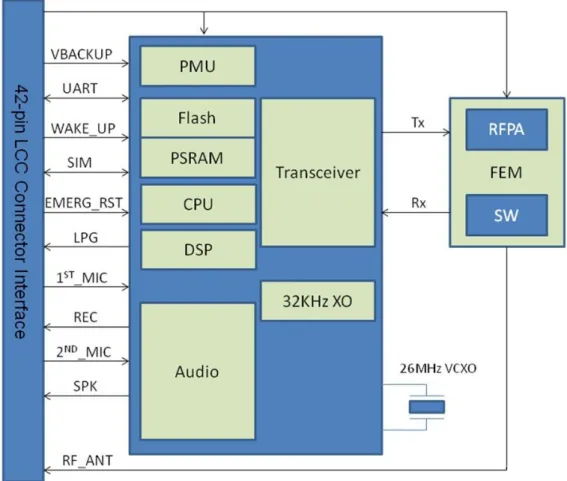
Figure 3-1 shows the block diagram of the module. The module contains the following parts: Digital block, analog block and GSM transceiver block.
Figure 3- 1G510 Block Diagram
Digital Baseband Block
Integrated Flash on chip
Integrated PSRAM on chip
Serial communications interfaces
SIM card port
Analog Block
Power management inside
PLL generates 624MHz from 26MHz
Analog audio interface management GSM Transceiver Block
G510 Q50-00 supports GSM850/900/1800/1900 bands
RF receiver, which includes LNAs, Mixers, PLL, I/Q outputs and buffers
Signal processing IC for transmit and receive GSM data processing
RF FEM control , which includes RFPA and antenna switch
3.2 Operating Modes
The module has many operating modes and different modes has different status. The operating modes as listed below:
Operating Modes Description Features
Not Powered VBAT & VBACKUP supply is disconnected.
The module is off.
Any signals connected to the interface connector must be set low or tri-state. Power off Mode Valid VBAT supply but not power on.
After reset module, VBCAKUP output and VDD is off.
The module MCU/BB/RF is Off. The PMU is operating in RTC mode. Any signals connected to the interface connector must be set low or tri-state. RTC Mode Power off mode
VBAT supply is disconnected. But valid VBACKUP supply
The module MCU/BB/RF is Off. The PMU is operating in RTC mode. Any signals connected to the interface connector must be set low or tri-state. Idle Mode Power on is succeeded and VDD
output.
The module is fully active, registered to the GSM/GPRS network and ready to
UART1_CTS and UART1_DSR signals are enabled (low).
communicate.
This is the default power-on mode. Sleep Mode The module is in low power mode. The application interfaces are disabled,
but, module continues to monitor the GSM network.
Call or GPRS data LPG signal is toggling. A GSM voice or data call is in progress. When the call terminates, G510 returns to the last operating state (Idle or Sleep).
3.3 Power Supply
The module power supply must be a single external DC voltage source of 3.3V to 4.5V. The power supply must be able to sustain the voltage level during a GSM transmit burst current serge, which may reach 2.0A. The module interface connector has 2 pins for the main power supply, as described in the table. All these contacts must be used for proper operation.
The following table shows the definitions of the pins on the power supply interfaces: Pin No. Signal Name Description
9 VBAT DC power supply. VBAT = 3.3 V to 4.5 V 4.0V is recommended 10 1 GND Ground 2 4 5 7 8 32 42
3.3.1 Power Management
Special care must be taken when designing the power supply of the module. The single external DC power source indirectly supplies all the digital and analog interfaces, but also directly supplies the RF power amplifier (PA). Therefore, any degradation in the power supply performance, due to losses, noises or transients, will directly affect the module performance.
The burst-mode operation of the GSM transmission and reception draws instantaneous current surges from the power supply, which causes temporary voltage drops of the power supply level. The transmission bursts consume the most instantaneous current, and therefore cause the largest voltage drop. If the voltage drops are not minimized, the frequent voltage fluctuations may degrade the module performance. It is recommended that the voltage drops during a transmit burst will not exceed 300mV, measured on the module interface connector. In any case, the module supply input must not drop below the minimum operating level during a transmit burst. Dropping below the minimum operating level may result in a low voltage detection, which will initiate an automatic power-off.
To minimize the losses and transients on the power supply lines, please follow these guidelines:
Use a 1000 uF, or greater, low ESR capacitor on the module supply inputs. The capacitor should be located as near to the module interface connector as possible.
Use low impedance power source, cabling and board routing.
Use cabling and routing as short as possible.
Filter the module supply lines using filtering capacitors, as described in the table.
Recommended Capacitor Usage Description
1000 uF GSM Transmit current
serge
Minimizes power supply losses during transmit bursts. Use maximum possible value.
10 nF, 100 nF Digital switching noise Filters digital logic noises from clocks. 8.2 pF, 10 pF 1800/1900 MHz GSM
bands
Filters transmission EMI.
33 pF, 39 pF 850/900 MHz GSM bands
3.3.2 Power Consumption
The table specifies typical module current consumption ratings in various operating modes. The current ratings refer to the overall module current consumption over the VBAT supply.
Measurements were taken under the following conditions:
VBAT= 4.0 V
Operating temperature 25°C
Registered to a GSM/GPRS network
The actual current ratings may vary from the listed values due to changes in the module's operating and environment conditions. This includes temperature, power supply level and application interface settings.
Parameter Description Conditions Min Typ Max Unit
I off Power off mode 120 µA
I idle Idle mode GSM only,
DRX=2, Cell power= -85dBm GSM900 22 mA
I sleep Low power mode GSM900
DRX=2 5 9 1.8 1.3 1.0 mA
I gsm-avg Average current GSM voice 1 TX slot 1 Rx slot GSM850 PCL=5 10 15 19 GSM900 225.0 mA 115.3 82.5 72.8
PCL=5 10 15 19 DCS1800 PCL=0 5 10 15 PCS1900 PCL=0 5 10 15 239.1 121.5 83.5 73.8 154.0 94.5 75.2 70.2 176.3 100.5 75.5 70.3 I gsm-max Average current
GSM voice 1 TX slot 1 Rx slot GSM850 PCL=5 10 15 19 GSM900 PCL=5 10 15 19 DCS1800 PCL=0 1506.1 581.3 270.1 185.0 1629.4 629.5 284.5 195.1 873.8 mA
5 10 15 PCS1900 PCL=0 5 10 15 361.2 195.0 145.0 1078.0 433.0 223.0 158.3 I gprs-avg Average current GPRS
Class 10 2 TX slot 2 Rx slot GSM850 PCL=5 19 GSM900 PCL=5 19 DCS1800 PCL=0 15 PCS1900 PCL=0 15 376.2 84.5 403.7 86.7 245.2 78.8 283.2 79.4 mA
3.4 Power On/Off
The module power on and off is the two primary phases, which are related at the interface connector by the hardware signals POWER_ON, VDD.
The POWER_ON signal is main control .The VDD level indicates whether module is powered on or off. When this signal is disabling (0V), module is powered-off. When it is output (2.85V), module is
The following table shows definitions of the pins for Power on/off.
Pin No. Signal Name Description
14 POWER_ON Power on and off module
Low level activated
13 VDD Illustrating module start up
LDO power output 0V : module is power off LDO power output 2.85V : module is start up
3.4.1 Turning on the Module
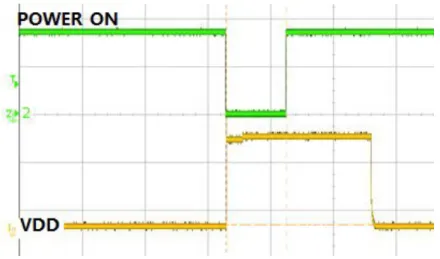
When the module is powered off, the PMU operates at low power mode, with only the RTC timer active. The module will power on again when the POWER_ON signal is falling edge. Asserting the POWER_ON signal low for a minimum of 800 milliseconds will turn module on.
The following figure shows power on succeeded.
Figure 3- 2 Power on succeed
The following figure illustrates the module power on is failed when asserting the POWER_ON signal low for a minimum of 600 milliseconds.
Figure 3- 3 Failed to power on
3.4.2 Turning off the Module
There are two ways to Turn OFF the G510: Asserting the POWER_ON signal to low state for at least 3 Seconds then the module will Power Down automatically. Or alternatively the module can be Power OFF using AT Command, please refer to <G5-Family AT Commands User Manual>.
1. POWER_ON Signal
The POWER_ON signal is set high using an internal pull up resistor when power is applied to module. When the POWER_ON signal is falling edge and keeping low for a minimum of 3 seconds will turn
module off.
This will initiate a normal power-off process, which includes disabling of all applications interfaces (UART, SIM card, etc.) and logout the network connection.
2. AT command
+MRST
The AT+MRST command initiates a G510 power off operation, which powers off directly.
+CFUN
The AT+CFUN=0 command initiates a G510 power off operation, which De-Registration first, and then powers off .
3.5 Sleep Mode
The module incorporates an optional low power mode, called Sleep Mode, in which it operates in minimum functionality, and therefore draws significantly less current.
During Sleep Mode the module network connection is not lost. The module will be waked up cycled and monitored the GSM network constantly for any incoming calls or data. During Sleep mode, all of the G510 interface signals are inactive and are kept in their previous state, prior to activating low power mode.
To save power, all the G510 internal clocks and circuits are shut down, and therefore serial communications is limited.
G510 will not enter Sleep mode in any case when there is data present on the serial interface or incoming from the GSM network or an internal system task is running. Only when processing of any external or internal system task has completed, G510 will enter Sleep mode according to the ATS24 command settings.
3.5.1 Activating Sleep Mode
By default, the module is in standby mode and the default value of ATS24 is 0. In this mode, the interfaces and the functions are active. Through sending the AT command ”ATS24”to activate the sleep mode.
The length of sleep time and awaking time are up to the parameters “</value>” of the command “ats24 = [<value>]” . For example, the module will get into sleep mode after 2s while sending this AT command “ats24=2”. And the settings will not be saved if the module power off.
Figure 3- 5 ats24=2, set module to sleep Mode after 2s
Note:In sleep mode, AVDD voltage switches to low power consumption mode, subsequent sleep status can be referenced by this pin. AVDD is the internal signal of the module.
3.5.2 Serial Interface during Sleep Mode
The module wakes up periodically from Sleep mode to page the GSM network for any incoming calls or data. After this short paging is completed, module returns to sleep mode. In the Sleep Mode, the UART is limited.
3.5.3 Terminating Sleep Mode
Terminating the Sleep mode, or wake-up, is defined as the transition of the module operating state from Sleep mode to Idle mode. There are several ways to wake-up module from Sleep mode as described below.
During Sleep mode the G510 internal clocks and circuits are disabled, in order to minimize power consumption. When terminating the Sleep mode, and switching to Idle mode, nG510 requires a minimal delay time to reactivate and stabilize its internal circuits before it can respond to application data. This delay is typically of 5 ms. The delay guarantees that data on the serial interface is not lost or
misinterpreted.
3.5.3.1 Temporary Termination of Low Power Mode
Temporary termination of Sleep mode occurs when module switches from Sleep mode to Idle mode for a defined period, and then returns automatically to Sleep mode.
others are initiated by the system.
Incoming Network Data
During Sleep mode, module continues monitoring the GSM network for any incoming data, message or voice calls. When module receives an indication from the network that an incoming voice call, message or data is available, it automatically wakes up from Sleep mode to alert the application. When module wakes up to Idle mode all its interfaces are enabled.
Depending on the type of network indication and the application settings, module may operate in several methods, which are configurable by AT commands, to alert the application of the incoming data:
a) Send data to the application over the serial interface.
b) Enable the serial interface's Ring Indicator (UART1_RING) signal. c) LPG status indicator
Control WAKE_UP level by external circuit
WAKE_UP connects to a GPIO on CPU; the external circuit can wake up module by controlling this GPIO. Please refer to chapter 3.10.4 for details.
UART1_DTR
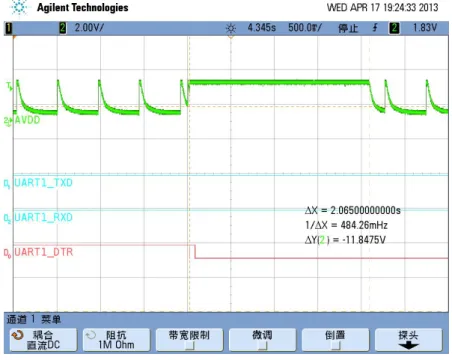
Pull UART1_DTR to VDD externally, the same methods as WAKE_UP. Set the module to sleep mode by AT commands, the duration is determined by <value> in command ats24= [<value>].
Send AT command: ats24=2, set the module to sleep mode after 2s (If there is no data interaction in UART).
Pull down DTR to wake up the module, as shown in the following figure:
Figure 3- 7 Pull down DTR, module wakes up 2s
3.5.3.2 Permanent Termination of Sleep Mode
The module Sleep mode is enabled and disabled by the ATS24 command. Before the command, G510 must be temporarily awaked.
ATS24: ATS24 = 0 disables Sleep mode. The value of ATS24 (>0) will be saved but the mode will not be save by restarting G510.
3.6 Real Time Clock
The main function of Real Time Clock (RTC) is keeping time. The RTC subsystem is embedded in the PMU and operates in the entire module operating modes (Off, Idle, Sleep), as long as power is supplied above the minimum operating level.
If the main power is not available, the backup battery or capacitor can be supplied to RTC by the connector RTC pin.
When the main power was not supply, the backup battery or capacitor can be supplied to RTC by interface connector RTC pin.
When the main power supply and VBCKUP is disconnected from module, the timer will reset and the current time and date will be lost.When G510 power on again, please reconfigure the time and date.
3.6.1 RTC Description
The following table shows the definitions of the pins for RTC:
Pin No. Signal Name Description
6 VBACKUP Real time clock power
3.6.2 RTC Application
Here are the methods to set the time and date of the module:
Automatically retrieved from the GSM network. In case module is operated in a GSM network that supports automatic time zone updating, it will update the RTC with the local time and date upon connection to the network. The RTC will continue to keep the time from that point.
Using the AT+CCLK command. Setting the time and date manually by this AT commands overrides the automatic network update. Once the time and date are manually updated, the RTC timer will keep the time and date synchronized regardless of the module operating state.
VBACKUP (pin6) input voltage range: 2.0V~3.3V. If the VBACKUP voltage is lower than 2.0V, the current time and date will be lost.
3.6.3 RTC Consumption
The following table shows the consumption of the module when the power is supplied by RTC only.
VBACKUP Voltage Consumption Value
VBACKUP=2.0V 190uA
VBACKUP=3.3V 260uA
3.7 UART
The module has 3 UART ports.
UART1 is a completely independent 8 wire serial bus interface. This is the main UART. UART2 is a 2 wire serial bus interface, it only supports a few AT commands.
HOST UART is a debug UART, which is used for downloading, calibrating, trace and so on, it doesn’t support any AT command.
3.7.1 UART1
The module UART1 is the main UART. It is a standard 8 wire serial bus interface. This UART is used for all the communications with module - AT commands interface, GPRS data programming and software upgrade.
The module is defined as a DCE device, and the user application is defined as the DTE device. These definitions apply for the UART signals naming conventions, and the direction of data flow, as described in the figure.
Pin No. Signal Name Description Notes
19 UART1_TXD Module Transmitted Data G510 Transmitted Data 18 UART1_RXD Module Received Data G510 Received Data
21 UART1_CTS Module Clear To Send G510 Switch To Received Mode 20 UART1_RTS Request To Send G510 Notice DTE Requested To Send 15 UART1_DTR Data Terminal Ready DTE Was Ready
16 UART1_DSR Module Data Set Ready G510 Was Ready
22 UART1_RING Module Ring indicator G510 Notice DTE Remote Call 17 UART1_DCD Data Carrier Detect G510 Notice DTE that Data Carrier
Was Online Recommended connection:
Application MCU Direction Module
TXD Pin 18 UART1_RXD RXD Pin 19 UART1_TXD RI Pin 22 UART1_RING DSR Pin 16 UART1_DSR RTS Pin 21 UART1_CTS DTR Pin 15 UART1_DTR CTS Pin 20 UART1_RTS
DCD Pin 17 UART1_DCD All flow control handshakes are supported: hardware or none.
The UART1 default port configuration is 8 data bits, 1 stop bit and no parity, with none flow control and auto baud rate detect enabled.
3.7.2 UART2
UART2 supports a few AT commands, please refer to AT Command User Manual for details.
Pin No. Signal Name Description Feature
40 UART2_TXD Module Transmitted Data G510 Transmitted Data 39 UART2_RXD Module Received Data G510 Received Data
Application MCU Direction Module
TXD Pin 39 UART2_RXD
RXD Pin 40 UART2_TXD
3.7.3 HOST UART
HOST UART is a debug UART, which is used for downloading, calibrating, trace and so on; it doesn’t support any AT command. This interface is only used when debugging, users only need to connect to the test point.
Application MCU Direction Module
TXD Pin 11 HST_RXD
RXD Pin 12 HST_TXD
3.7.4 Ring Indicate
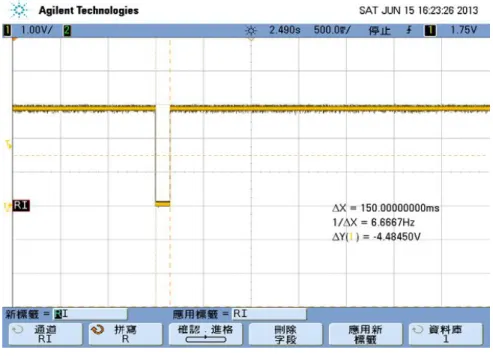
The UART1_RING signal serves to indicate incoming calls and other types of URCs (Unsolicited Result Code). It can also be used to send pulses to the host application, for example to wake up the application from power saving state. The following figure illustrates the module gets a message.
Figure 3- 8 The Module gets a message
The following figure shows the UART1_RING signal status when there is an incoming call.
Figure 3- 9 An incoming call
3.7.5 DCD Indicate
The UART1_DCD signal serves to indicate GPRS data mode. The detail definition refers to AT&C command.
3.8 SIM Interface
The SIM interface follows the GSM 11.11 and GSM 11.12 standards, which are based on the ISO/IEC 7816 standard. These standards define the electrical, signaling and protocol specifications of a GSM SIM card.
The module does not incorporate an on-board SIM card tray for SIM placement. The SIM must be located on the user application board, external to the G510. The module SIM interface includes all the necessary signals, which are routed to the interface connector, for a direct and complete connection to an external SIM.
The module supports 1.8V or 2.85V SIM card automatic. While the module turn on by POWER_ON. At first SIM_VCC output 1.8V voltage for external SIM card communication. If it is not successful SIM_VCC output 2.85V voltage and communicated SIM card again.
Note:If SIM_VCC is supplied, remove SIM card is prohibited. In case, it would cause damage to SIM card and G510.
Pin No. Signal Name Description
24 SIM_CLK Serial 3.25 MHz clock
26 VSIM 2.85V Supply to the SIM
23 SIM_DATA Serial input and output data
25 SIM_RST Active low SIM reset signal
27 SIM_CD SIM card hot-plug
3.8.1 SIM Connection
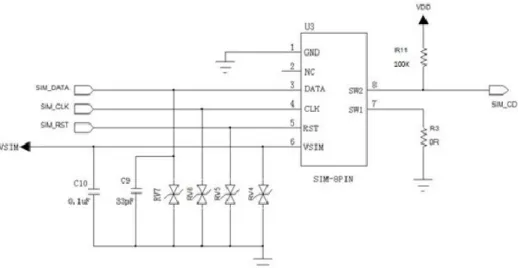
The following figure illustrates a typical SIM interface connection to G510. This connection type is implemented on the module Developer Board, using an MOLEX SIM tray, PN 912283001 & 912360001. To ensure the stability of SIM card , SIM_CD shall be pulled up whether it is used or not . SIM_DATA signal has been pulled up to SIM_VCC inside of the modules ,but no need to pull up outside of the modules .
Figure 3- 10 SIM card reference design
3.8.2 SIM Design Guidelines
The SIM interface and signals design is extremely important for proper operation of module and the SIM card. There are several design guidelines that must be followed to achieve a robust and stable design that meets the required standards and regulations.
The SIM should be located, and its signals should be routed, away from any possible EMI sources, such as the RF antenna and digital switching signals.
The SIM interface signals length should not exceed 100 mm between the module interface connector and the SIM tray. This is to meet with EMC regulations and improve signal integrity.
To avoid crosstalk between the SIM clock and data signals (SIM_CLK and SIM_DATA), it is recommended to rout them separately on the application board, and preferably isolated by a surrounding ground plane.
The SIM card signals should be protected from ESD using very low capacitance protective elements (zener diodes, etc.). The recommended part no of ESD isAVR-M1005C270MAAB (TDK) We also recommended the ESD component should layout with SIM hold closely.
3.9 Audio Interface
The module audio interface supports two channel audio devices and operating modes. The audio interface's operating modes, active devices, amplification levels and speech processing algorithms are fully controlled by the host application, through advanced programming options and a versatile AT commands set.
Pin No. Signal Name Description
31 AU_MIC_P 1st Audio channel
Balanced microphone input
30 AU_MIC_N
29 AU_AUXMIC_P 2nd Audio channel
Balanced microphone input
28 AU_AUXMIC_N
35 SPEAKER_P 2nd Audio channel
Output is balanced and can directly operate a hand free speaker
36 SPEAKER_N
33 AU_RCV_P 1st Audio channel
Output is balanced and can directly operate a head set
34 AU_RCV_N
3.9.1 1
stAudio Channel: Microphone
This channel is the module power-up default active audio channel.
The microphone input includes all the necessary circuitry to support a direct connection to an external microphone device. It incorporates an internal bias voltage which can be adjusted by AT command. The impedance is higher than 5M Ω.
3.9.2 1
stAudio Channel: Receiver
This channel is the module power-up default active output for voice calls and DTMF tones. It is designed as a differential output with 16Ω impedance.
3.9.3 2
ndAudio Channel: Microphone
This channel can be switched by AT Command.
The microphone input includes all the necessary circuitry to support a direct connection to an external microphone device. It incorporates an internal bias voltage which can be adjusted by AT command. The impedance is higher than 5M Ω.
3.9.4 2
ndAudio Channel: Speaker
This channel can be switched by AT Command. It is designed as a differential output and can be drove an 8Ω speaker directly.
3.9.5 Audio Design
The audio quality delivered by module is highly affected by the application audio design, particularly when using the analog audio interface. Therefore, special care must be taken when designing the module audio interface. Improper design and implementation of the audio interface will result in poor audio quality. Poor audio quality is a result of electrical interference, or noises, from circuits surrounding the audio interface. There are several possible sources for the audio noise:
Transients and losses on the power supply
EMI from antenna radiations
Digital logic switching noise
Most of the audio noise originates from the GSM transmit burst current surges (217 Hz TDMA buzz), which appear on the main power supply lines and antenna, but also indirectly penetrate the internal application's supplies and signals. The noises are transferred into the module 's audio circuits through the microphone input signals and then are amplified by the module 's internal audio amplifiers.
To minimize the audio noise and improve the audio performance the microphone and speaker signals must be designed with sufficient protection from surrounding noises.
The following guidelines should be followed to achieve best audio performance: 1. Keep the audio circuits away from the antenna.
2. Use RF filtering capacitors on the audio signals.
3. The audio signals should not be routed adjacent to digital signals. 4. Isolate the audio signals by a surrounding ground plane or shields.
3.10 Controls and Indicators Interface
The module incorporates several interface signals for controlling and monitoring the module's operation. The following paragraph describes these signals and their operation.
Pin No. Signal Name Description
13 VDD LDO power output Illustrating module start up
38 LPG Module work status indicator
41 WAKE_UP Wake up the module
3.10.1VDD Reference Regulator
The module incorporates a regulated voltage output VDD. The regulator provides a 2.8V output for use by the customer application. This regulator can source up to 200mA of current to power any external digital circuits. When the module started up by power on signal, The VDD is output. So it can be Illustrating module start up.
Note:The VDD regulator is powered from the G510's main power supply, and therefore any current sourced through this regulator originates from the G510 VBAT supply. The overall VBAT current
consumed by G510 is directly affected by the VDD operation. The G510 current consumption raises with respect to the current sourced through VDD.
Parameter Conditions Min Typ Max Unit
Vout Iout=30mA 2.6 2.8 3.0 V
Imax The MAX Current - - 200 mA
3.10.2EMERG_RST
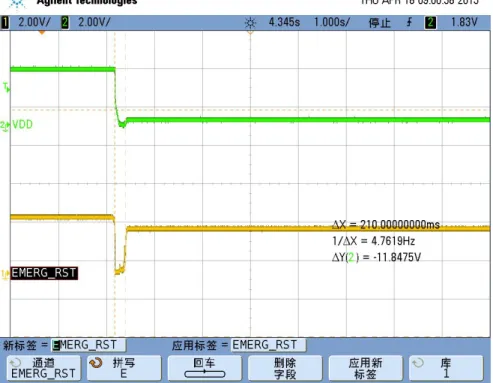
EMERG_RST means Emergency Reset, the system will powered off when pin is low. Note:only used for emergency.
3.10.3LPG
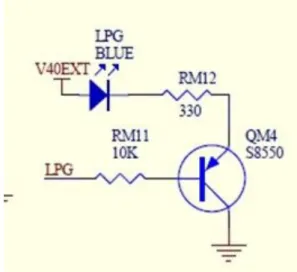
As an alternative to generating the synchronization signal, the control pin can be used to drive a status LED on application platform. The timing of LPG, it can be indicated the module status straight.
Referenced circuits:
Figure 3- 12 LPG reference design
States of the LED vs PIN: LED Off = HIGH. LED On = LOW.
LED state Operating status of the module
Permanently off The module is in one of the following modes: • Power off mode
• SLEEP mode
600 ms off / 600 ms on The module is in one of the following status: • NO SIM card
• SIM PIN
• Register network (T<15S) • Register network failure (always)
3 s off / 75 ms on The module is in one of the following status: • IDLE mode
75 ms off / 75 ms on The module is in one of the following status: • One or more GPRS contexts activated.
Permanently on The module is in one of the following status: • Voice call
3.10.4WAKE_UP
This pin is used for waking up the module which is in sleep mode, edge trigger. The command ats24= [value], for example, send a commandats24=2, the module would be in sleep mode after 2s, supposing that you wake up the module by WAKE_UP pin temporarily, if the module doesn’t receive any command or data in 2s, the module would be in sleep mode as well.
The following figure shows the recommended circuit:
Figure 3- 13 Recommended circuit for WAKE_UP
4 Electrical and Environmental Features
4.1 Absolute Maximum Ratings
The table gives the maximum electrical characteristics of the module interface signals.
Note:Using the G510 module beyond these conditions may result in permanent damage to the module.
Parameter Conditions Min Max Unit
BATT Supply -0.2 4.5 V
Digital Input Signals module powered on VDD Domain
-0.2 3.3 V
Analog Input Signals (Audio interfaces)
module powered on -0.2 2.75 V
4.2 Environmental Specifications
The table gives the environmental operating conditions of the G510 module.
Note:Using the G510 module beyond these conditions may result in permanent damage to the module.
Parameter Conditions Min Max Unit
Operating Temperature -40 85 °C Storage Temperature -40 85 °C ESD (Contact) Antenna connector ± 8 KV (Air) Antenna connector ± 15
4.3 Application Interface Specifications
The table summarizes the DC electrical specifications of the application interface connector signals. Note:Interface signals that are not used by the customer application must be left unconnected. The
module incorporates the necessary internal circuitry to keep unconnected signal in their default state. Do not connect any components to, or apply any voltage on, signals that are not used by the application.
G51 0 Pin#
G510 Signal
Name Description I/O
Reset
level Idle level Level Character
Power
9 VBAT DC power supply I 3.3V ~ 4.5V
10 1 GND Ground 2 4 5 7 8 32 42
6 VBACKUP Real time clock power I/O 2.8V 2.8V Input voltage: 2.0V~3.3V
Output voltage: 2.5V~3.3V
Control & Status
38 LPG Work mode indicator O VOLMAX=0.3V
VOHMIN=VDD-0.35V
13 VDD LDO power output
Illustrating start up
O 2.8V 2.8V
37 EMERG_RST Emergency Power Off I PU H
14 POWER_ON Turn on module Low level activated
I PU H 2.5V~3.3V
VIHMIN=0.7*VDD
UART (Modem DCE)
18 UART1_RXD Received Data I L VOLMAX=0.3V
VOHMIN=VDD-0.35V VILMAX=0.2*VDD VIHMIN=0.7*VDD
19 UART1_TXD Transmitted Data O H
22 UART1_RING Ring indicator O H
16 UART1_DSR Data Set Ready O L
20 UART1_RTS Request To Send O L
15 UART1_DTR Data Terminal Ready I L
21 UART1_CTS Clear To Send I L
17 UART1_DCD Data Carrier Detect O L
40 UART2_TXD Transmitted Data O H
39 UART2_RXD Received Data I L
Trace
12 HST_TXD Transmitted Data O H
11 HST_RXD Received Data I H
SIM Interface
26 VSIM SIM power O 0.3V 1.8V or
2.85V
24 SIM_CLK SIM clock O T 3.25MHz VOLMAX=0.3V
VOHMIN=VSIM-0.35V VILMAX=0.2*VSIM VIHMIN=0.7*VSIM
23 SIM_DATA SIM data I/O
25 SIM_RST SIM reset O T L
27 SIM_CD SIM card hot-plug I
Audio
31 AU_MIC_P 1st Audio channel (default)
Balanced input
I
29 AU_AUXMIC_P 2nd Audio channel Balanced input
I
28 AU_AUXMIC_N I
35 SPEAKER_P 2nd Audio channel Balanced output
O
36 SPEAKER_N O
33 AU_RCV_P 1st Audio channel (default)
Balanced output
O
34 AU_RCV_N O
Others
3 RF_ANT RF antenna port
4.4 Pin Definitions
5 Mechanical Design
5.1 Mechanical Specifications
The following figure shows the mechanical specifications of the module in details:
Top view Side view Bottom view
5.2 Recommended PCB Layout
The following figure shows recommended PCB layout:
Figure 5- 2 Recommended PCB layout
6 Ordering Information
Product Name: G510S
Ordering Name: G510S-XXX-YY
XXX: Technical feature, ex: Q50=Quad Band YY: Detail feature, ex: 00=Normal
Appendix: Glossary
Name Description
AFC Automatic Frequency Control
ETS European Telecommunication Standard ESD Electronic Static Discharge
EMC Electromagnetic Compatibility EMI Electro Magnetic Interference FEM Front end module
GPRS General Packet Radio Service
GSM Global Standard for Mobile Communications LNA Low Noise Amplifier
PCB Printed Circuit Board PCL Power Control Level PLL Phase-Locked Loop PMU Power manager unit RTC Real Time Clock
RFPA Radio frequency power amplifier SIM Subscriber Identification Module SMS Short Message Service
SMD Surface Mounted Devices
UART Universal Asynchronous Receiver Transmitter, asynchronous serial port VSWR Voltage Standing Wave Ratio