ISSN(Online): 2319-8753 ISSN (Print): 2347-6710
I
nternational
J
ournal of
I
nnovative
R
esearch in
S
cience,
E
ngineering and
T
echnology
(A High Impact Factor, Monthly, Peer Reviewed Journal) Visit: www.ijirset.com
Vol. 6, Issue 10, October 2017
Detection of Finger Motion using Flex Sensor
for Assisting Speech Impaired
Heena Joshi1, Shweta Bhati2, Komal Sharma3, Vandana Matai4
Assistant Professor, Department of Electronics and Communication Engineering, Jodhpur Institute of Engineering and
Technology, Jodhpur, Rajasthan, India1,2.3,4
ABSTRACT:This paper is mainly focused on aiding the speech impaired and paralysed patients. Our work helps in improving the communication with the deaf and dumb using flex sensor technology. A system is developed that can translate different signs including Indian sign language to corresponding text. About 9 billion people in the world come into this category which is quite large number to be ignored. Flex sensors placed on hand gloves pick up gestures and translate that to text data with the help of Analog to Digital convertor and microcontrollers. The main aim of the system is to develop a cheap glove that disabled people can use for communication. When the gesture of an alphabet is made respective alphabet is shown in the LCD. Sign language is prevalent amongst the deaf, dumb or blind individuals. With the conventional sign language not acknowledged to the signers, it affects their interpersonal relationships in the society in an adverse manner. A sophisticated method is required as deaf-dumb people use sign language for their communication which is difficult to understand by the normal people.
KEYWORDS: Sensor, Gesture, LCD
I.INTRODUCTION
Sign language is a way by which the gestures made by the user are used for communication. Human gestures are an efficient and powerful way of interaction. These are sometimes used to express ourselves. This project focuses on developing a help for disabled people using this gesture recognition technique. In this system, the gestures are converted into text messages for communication. The basic idea is using gloves using Flex Sensors for the disabled people. The five flex sensors are normally attached to the glove. When a flex sensor is bent there is a change in resistance, which is recorded by the ADC of the microcontroller.
Sign language is a language through which communicationhappens without the means of acoustic sounds. It relies on sign patterns like orientation and movements of the arm that aids in communication between individuals. A gesture in a sign language can be defined as a movement of part of the body, mainly hand or the head, to express an idea or meaning. Facial expressions also count toward the gesture, at the same time. A sign language usually provides signs for whole words or letters. A sign language editing apparatus includes a glove-type sensor that converts movement of fingers in the sign language into an electrical signal to produce time series data of sign language words.
ISSN(Online): 2319-8753 ISSN (Print): 2347-6710
I
nternational
J
ournal of
I
nnovative
R
esearch in
S
cience,
E
ngineering and
T
echnology
(A High Impact Factor, Monthly, Peer Reviewed Journal) Visit: www.ijirset.com
Vol. 6, Issue 10, October 2017
II. OVERVIEW OF RESEARCH
Although data gloves are available in the market but they are used for gaming and other virtual reality applications and there is no such complete system available in the market for the translation of Sign Language gestures into speech. However, research is being done to develop some portable, efficient and highly accurate system for the translation of standard sign language gestures through a hand glove. There are two main approaches to gesture recognition: a machine vision based approach which consists of taking the input through a single/set of cameras or a haptic based approach which consists of using a sensory device to take in physical values for processing.
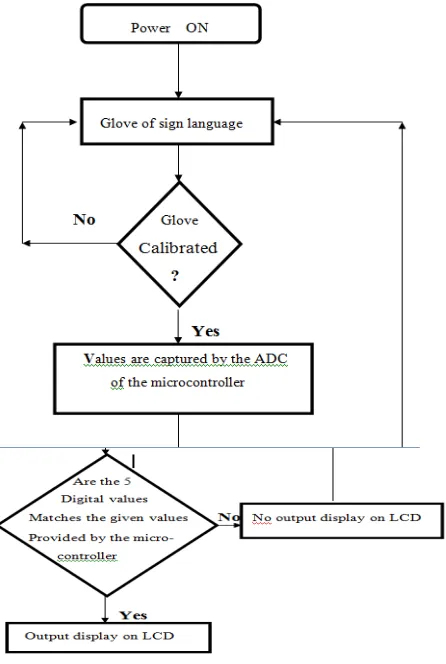
Knowledge about sign language is required about deaf and dumb people for communicating with each other. Here, we made Indian Sign Language’s alphabets using one hand. For making this, Flex sensor glove is used. Using this alphabet, We made sentence forming for example, “I WANT TEA”, “WELCOME”. To display this message, the output shown in LCD. In this system, five flex sensor were used and voltage required for each flex sensor is +5V. When power is ON, each flex sensor receives +5v supply. When user makes any movement , then signals coming from all the five flex sensor are amplified using an amplification circuitry and then is given to microcontroller which is having an in-built analog to digital converter. If the motion matches the database then the output will be displayed on the LCD. If there is no letter that matches the current state of hand, output will not be shown on LCD. The following flow chart depicts the functioning of our project.
ISSN(Online): 2319-8753 ISSN (Print): 2347-6710
I
nternational
J
ournal of
I
nnovative
R
esearch in
S
cience,
E
ngineering and
T
echnology
(A High Impact Factor, Monthly, Peer Reviewed Journal) Visit: www.ijirset.com
Vol. 6, Issue 10, October 2017
III. EXPERIMENTAL CONTENT AND SYSTEM FUNCTIONALITY
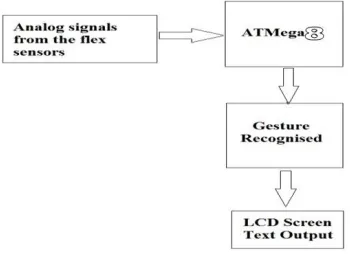
We have smart phones full of apps that help us streamline everyday tasks, watches that count our steps and monitor our heart rates and even eyewear that can connect us to internet. Four flex sensors are used and voltage required for eachflexsensoris+5V.When power is ON, Each flex sensor get+5Vsupply. When user made gesture of a letter, the four signals coming from each flex sensor goes in microcontroller which are then converted from analog signals to digital values. Then display the output in the LCD. If there is no statement that matches current state of the hand, there is no output shown in the LCD. The output can be shown on an Android device via Bluetooth Module HC-05. The Android device must have Bluetooth Terminal app installed. The flowchart of this system is shown below.
Fig. 2 Block Diagram of System Functionality
Arduino Details, Wireless (Bluetooth) Link and Android Application with programming:
HC-05 (Bluetooth to Serial Port Module) was used because of its ease of availability and its low cost. Service Discovery Protocol (SDP) was used to allow devices to discover what services each other support, and what parameters to use to connect them. Each service was identified by a universally unique identifier. The default setting of serial port of HC05 was: baud 38400 and our serial communication was happening at a baud rate of 9600, thus baud rate of Bluetooth module was needed to be matched. To change it, a command was entered through the AT mode on the module. The module was set as Master mode.
Transmitting Data from Circuit to Smartphone via Bluetooth Module:
For sketching and uploading the code, we used Arduino IDE Software. It is an Open-Source software and with the help of this, it was easy to write code and upload it to AVR AtMega8 microcontroller. It runs on Windows, Mac OS X and Linux. The environment is written in Java and based on Processing and other open-source software. This software is developed by Arduino Company to support its various boards as well as AVR microcontrollers.A program for Arduino may be written in any programming language for a compiler that produces binary machine code for the target processor. Atmel provides a development environment for their microcontrollers.
ISSN(Online): 2319-8753 ISSN (Print): 2347-6710
I
nternational
J
ournal of
I
nnovative
R
esearch in
S
cience,
E
ngineering and
T
echnology
(A High Impact Factor, Monthly, Peer Reviewed Journal) Visit: www.ijirset.com
Vol. 6, Issue 10, October 2017
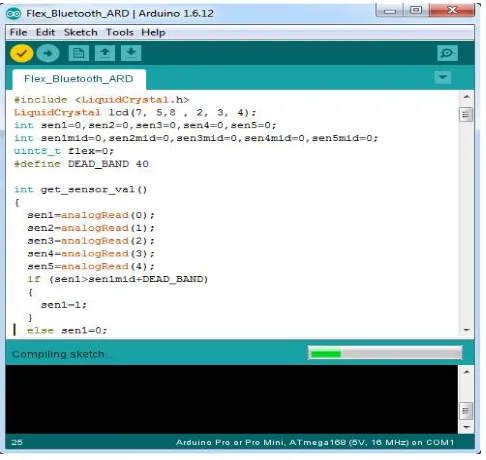
Fig. 3 library designing in Arduino
Before uploading the sketch, we need to select the correct items from the Tools > Board and Tools > Port menus. The boards are described below. On the Mac, the serial port is probably something like /dev/tty.usbmodem241 (for an Uno or Mega2560 or Leonardo) or /dev/tty.usbserial-1B1 (for a Duemilanove or earlier USB board), or /dev/tty.USA19QW1b1P1.1 (for a serial board connected with a Keyspan USB-to-Serial adapter). On Windows, it's probably COM1 or COM2 (for a serial board) or COM4, COM5, COM7, or higher (for a USB board) - to find out, we look for USB serial device in the ports section of the Windows Device Manager. On Linux, it should be /dev/ttyACMx , /dev/ttyUSBx or similar.
ISSN(Online): 2319-8753 ISSN (Print): 2347-6710
I
nternational
J
ournal of
I
nnovative
R
esearch in
S
cience,
E
ngineering and
T
echnology
(A High Impact Factor, Monthly, Peer Reviewed Journal) Visit: www.ijirset.com
Vol. 6, Issue 10, October 2017
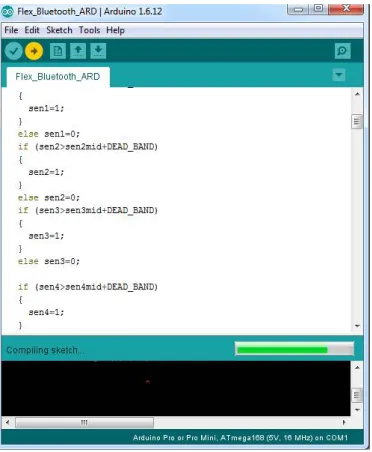
Once we've selected the correct serial port and board, press the upload button in the toolbar or select the Upload item from the Sketch menu. Current Arduino boards will reset automatically and begin the upload. With older boards (pre-Diecimila) that lack auto-reset, you'll need to press the reset button on the board just before starting the upload. On most boards, you'll see the RX and TX LEDs blink as the sketch is uploaded. The Arduino Software (IDE) will display a message when the upload is complete, or show an error.
Fig. 5Program designing in Arduino Realization for Design:
MATERIAL SPECIFICATIO
N
QUANTITY COST (IN
Rs.)
FLEX SENSOR 2.2 inch ultra thin 5 2500
ATMEGA 8 Low power Atmel
AVR 8 bit MC
1 150
LCD SCREEN 16x2 alphanumeric
display
1 300
PCB BOARD Glass epoxy 1 100
RESISTORS 10K,4.7K ohm 5 50
ISSN(Online): 2319-8753 ISSN (Print): 2347-6710
I
nternational
J
ournal of
I
nnovative
R
esearch in
S
cience,
E
ngineering and
T
echnology
(A High Impact Factor, Monthly, Peer Reviewed Journal) Visit: www.ijirset.com
Vol. 6, Issue 10, October 2017
WIRES required
CAPACITORS 100 micro farad,
25V
2 20
GLOVE 1 300
PUSH BUTTON 6x6mm 1 10
BLUETOOTH
MODULE
HC-05 1 340
ANDROID
SMARTPHONE
1 2000
USB AVR
PROGRAMMING
CABLE
1 350
7805 IC VR7805-5 1 40
TOTAL 16410
ISSN(Online): 2319-8753 ISSN (Print): 2347-6710
I
nternational
J
ournal of
I
nnovative
R
esearch in
S
cience,
E
ngineering and
T
echnology
(A High Impact Factor, Monthly, Peer Reviewed Journal) Visit: www.ijirset.com
Vol. 6, Issue 10, October 2017
Fig: Experimental Setup connected to the Bluetooth terminal
VI. SIMULATION RESULTS
The averaging we do at each interval helps to account for any noise or glitches that the flex sensors are sometimes prone to. The accuracy of the glove is also somewhat limited by the size of the person’s hands. The accuracy of each flex sensor is limited beyond a certain point. Smaller hands will result in a larger degree of bend. As a result, the difference between slightly different signs with a lot of flex might be too small for users with small hands. The device uses a low voltage environment, and extremely low frequency communication. The sensors are well attached, and there are no sharp edges. As a result, we don’t see any large safety issues associated with the glove. Furthermore, since all communication is done via cables, our device does not interfere with other designs. The glove can be used by anyone who fits into it, they would only have to train on it and generate new datasets if they wish for a higher prediction accuracy than the standard or to incorporate new signs.
VII. CONCLUSION
This paper gives a brief about the project that is useful for speech impaired and paralysed patient. This workwasabletomeet ourexpectationsquite well. This project was meant to be a prototype to check the feasibility of recognizing sign languages using sensor gloves. The completion of this prototype suggests that sensor gloves can be used for partial sign language recognition. More sensors can be employed to recognize full sign language.
REFERENCES
[1] Charlotte Baker Shenk & Dennis Cokely,American Sign Language, A teacher’s resource text on Grammar and Culture, Clerc Books Gallaudet University Press, Washington D.C., 1981.
[2] Jamal Haydar, Bayan Dalal, Shahed Hussainy, Lina El Khansa, Walid Fahs Faculty of Engineering, Islamic University of Lebanon Khaldeh, Lebanon submiteed report on “ASL Fingerspelling Translator Glove”.
[3] Tirthankar Dasgupta, Sambit Shukla, Sandeep Kumar, Synny Diwakar, Anupam Basu submitted report on “A Multilingual Multimedia Indian Sign Language Dictionary Tool”.
[4] Sourangsu Bandopadhyay, “Sign language glove with voice synthesizer” Department of Electronics & Communication Engineering, RCC-Institute of Information Technology, West Bengal University of Technology,June-2012.
[5]Sign language recognition using sensor gloves Mehdi,S.A. FAST-Nat. Univ. of Comput. & Emerging Sci., Lahore, Pakistan Khan Y.N.