579
A Comprehensive Analysis Of The Data Storage
And Filesystem Of Android Mobile Device For
Forensic Examination
V BalajiChandrasekhar M, Dr.G.Srinivas, Dr.T.Srinivasa Rao
Abstract: Mobile forensics is the digital forensics part that is progressively developing in today's digital era. Android mobile forensics manages to extract, recover, and analyze data on an Android device via many devices. Nevertheless, it is predominant to understand the platform and other fundamentals before starting of forensic examination. Within mobile devices, Smartphones are incredibly considerable. Enhanced computing power and data processing of these devices allow a range of activities to be undertaken. Mobile devices also hold a variety of user data and are a source of sensitive personal information. The data on a device is often more valuable than the device itself. It is incredibly predominant for a forensic examiner to take an informal conclusion where to search for data and contrivances that can be utilized to obtain the information. In this research paper, We are proposing a clear description for What, Where, and in what way the data saved in Android mobile devices, and We also describe Android filesystem properties and structure with experimental results. It would be helpful for the forensic investigator to obtain the information from the mobile phone during the forensic analysis of the mobile phone.
Keywords: Smart Phones; Mobile Devices; Forensic Analysis; File System; Operating System
—————————— ——————————
1. INTRODUCTION
2017 has been a milestone year for the mobile industry, with the global population of mobile services exceeding 5 billion and developing markets accounting for 3.7 billion. Most people in worldwide had a free membership in the exact sense of the word towards the end of 2017. With a 2025 perspective, the mobile sector will reach new key milestones–unique subscribers, internet users, and 4G/5 G connections [1]. Mobile forensics is the part of digital forensics, manages to extract, recuperating and analyzing the data under forensic conditions from the mobile device. Simply put, it handles with obtaining the saved data on the devices which comprise application files, Browsing history and so on. Because of the improved portability of smartphones and their safety features, people store important information on their data on smartphones, whereas criminals can use smartphones for various tasks. In other words, e-mail fraud, text messages harassment, drug trafficking, child pornography, etcetera [2].The forensic analysis aims to obtain the necessary information from the mobile device. It is, therefore, essential to know what data is stored on the device, where it is hoard, how it is stored, and the characteristics of the file systems on which the information is stored to perform successful forensic analysis.
2. Setting up an Android forensic framework
It is essential to have a traditional forensic environment configuration before to begin any forensic investigation. The forensic analyst required to be in total control of the workstation of all times.2.1 Android Forensic Setup
Start with a new and forensically sterile computer. A forensically sterile computer does not enter unwanted data and is free of viruses and other malware that prevents the potential of cross-communication. Install and perform the following tasks:
2.1.1 Android SDK
2.1.2 Installing mobile device drivers and Accessing the mobile device
2.1.3 Rooting and ADB
2.1.1 Android SDK
Download and install Android SDK [3]. The Android Software Development Kit supports developers in the construction, testing, and debugging of Android applications. The SDK support for attaching the device and obtaining the data on the device.
2.1.2 Installing mobile device drivers and Accessing the mobile device
Only if the necessary device drivers installed on your computer can a mobile device interact. The machine may not be capable to identify and operate with the connected equipment without the appropriate drivers. Since the manufacturers can change and customize Android, no single standard driver works for all Android devices. Every manufacturer has its drivers and distributes them together with the telephone. It is, therefore, essential to identify the system driver to be mounted. Indeed, some forensic Android kits come with generic drivers or a range of most used drivers. You can't work with all Android phone models. Some Windows operating systems are able to autodetect and install the drivers once the device is plugged in but, more often than not, Windows fails. The device drivers for each manufacturer can be found on their respective websites. After installing the necessary device drivers, connect the Android device to the computer, directly utilizing the USB cable in order to access it. Turn on USB storage option required to be selected.
___________________________
V BalajiChandrasekhar M, Dr.G.Srinivas, Dr.T.Srinivasa Rao
V BalajiChandrasekhar M(Corresponding Author), Associate Professor, Aditya Institute of Technology and Management (AITAM), Email: [email protected]
Phone number:+918008877446
Dr.G.Srinivas, Associate Professor, GIT, GITAM UNIVERSITY, Email: [email protected], Phone number: +919963199200
580 2.1.3 Rooting and ADB
Android Debug Bridge plays a vital role in Android forensics. The < sdk path>/platform-tools are available. In accordance to achieve a result with ADB, the USB-debugging required to be corroborate. Root has an entry to all commands and files. It is also mentioned as the root account, root user, and the super user. Rooting an Android mobile device is completely about obtaining this root permission on the device to execute tasks that are not usually granted on the device.
Procedure for rooting Samsung Galaxy S Duos 2 GT-S7582 [2]
Enable USB Debugging on in the mobile device. Download and install iRoot [4] application into the
computer.
Connect the mobile device to the computer and begin iRoot in the computer and begin the root button.
After rooting completed, the mobile device is rebooted.
3. RESEARCH METHOD
In the forensic examination of the Smartphone, understanding the data storage of the mobile device and file system plays a vital role. The following are describe about the partition, datastorage and file system of the mobile device.
3.1 Android parting layout and file hierarchy 3.2 Application data storage on the mobiledevice 3.3 The Android file system
3.1 Android parting layout and file hierarchy
Partitions are logical storage units rendered within the permanent storage memory of the device.Partitioning allows you to logically divide the accessible area into segments that can be obtained separately of each other. The rising Android partitions are: boot loader, boot, recovery, user data, system, cache, radio Boot loader: It stores the boot loader program of the phone. When the mobile device boots, it is essential to set low-level hardware. Therefore, the kernel and other bootmodes can be booted. Boot: This section has the data and files required for booting the mobile device. The kernel and the RAM disk are open. Therefore, the mobile device can not begin its processes without this partition. Recovery: Recovery separation permit the system to boot from tasks such as mobile updates and other operations into the recovery console. Then n, a minimum Android boot image is saved. Userdata: The vast client data isstored here, and the bulk of our forensic proof is there. It also stores all program data and regular communications. System: Essential non-kernel andRAM disk components are available. The photo of the Android system includes the Android code, libraries, application binaries, and preinstalled applications. The computer can not boot into normal mode without this partition. Cache: It is used to save frequently accessed data and many other files such as recovery logs and update packages downloaded from the mobile network. Radio: In this section, mobile telephony phones have a baseband picture saved that corresponds to a broad variety of telephony operations.
Identifying partition layout
The separation file beneath /proc gives us particulars concerning all the partitions accessible on the device. The Figure1 shows the inside of the partitions file. It shows the block names.
Figure 1: partitions file in Android
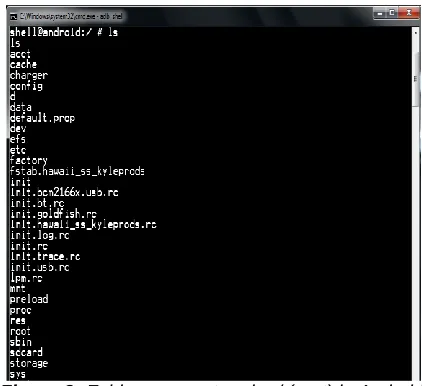
3.2 Application datastorage on the mobile device The investigator needs to understand the underlying file hierarchy to conduct forensic analyses on any mobile device. A forensic analyst can investigate how Android arranges its data in files and folders at specific locations. The Android directory ladder is a customized edition of the hierarchy in Linux. Figure2 shows the authority of the data on a mobile Android device.
Figure 2: Folders present under / (root) in Android
The directories present in the file hierarchy of an Android mobile device are:
acct: It is the mount point for the client accounting unit Acct.
581 affect personal data, nor erases live data directly from it.
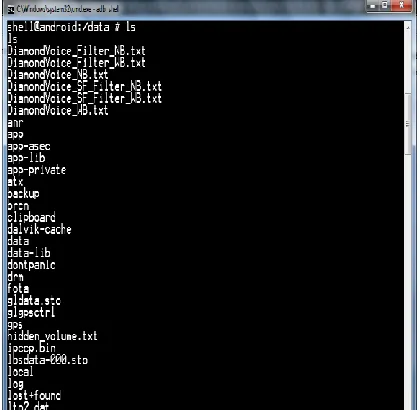
The other directory called lost+found in this file. This directory locks the recovered files in the occurrence of abuse of the filesystem, without unmounting the protected virtual card and so on. The cache may hold forensic information. data: It contains the data for each request. This directory stores the mainstream of user-related data, such as addresses, SMS, dialed numbers, etc. It is essential from a legal perspective because it contains valuable data. The folders are available in this partition shown in Figure 3.
Figure 3: Contents of data partition of an Android device
dalvik-cache: It holds various logs that might be helpful throughout investigation, depending on the concealed needs. data: The partition /data/information includes specific data of all applications, user-related data stored in this folder. This directory contains essential data that will be useful for forensic analysis. dev: It holds noteworthy files of the device. It is the mount point for the filesystem tempfs. This file system describe the device accessible to the applications. mnt: It perform as a mount point for each of the file systems, internal and secure digital cards. The Figure4 shows the mount points available in it.
Figure 4: mount points
proc: It is a mounting point for the procfs folder system, which allows the kernel data structures. Most programs use
/proc as the source of their information. It contains files that have essential process information. Figure5 displays the meminfo file in Android under the proc tab.
Figure 5: meminfo file under proc folder in Android
misc: This folder contains information on various settings. These settings mostly define the ON / OFF state. Hardware settings information, USB settings, etc. can be accessed from this folder. sdcard: It holds the data on the device's secure digital card. The storage can be removable or non-removable. Any smartphone application with authorization from WRITE EXTERNAL STORAGE can generate files or directories in it. There were also some usual directories in mobile devices, such as Android secure, Android, DCIM, media, etc. The contents of /sdcard shown in Figure6.
Figure 6: Contents of the sdcard partition of an Android device
582 Figure 7: Contents of the system partition of an Android
device
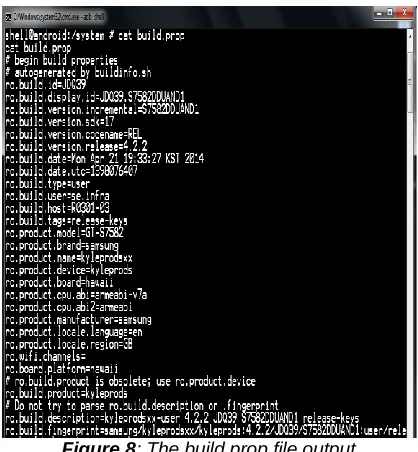
build.prop: It holds about the build properties and settings of the mobile device. For a forensic investigator, It furnish the brief details of the device model, manufacturer, Android version, and so on. The Figure8 exhibits the build properties.
Figure 8: The build.prop file output
app: It holds system applications and preinstalled applications. It is mounted as read only to avert any modification. The Figure9 exhibits numerous system associated applications that are existed in this directory. Accompanying with the APK files, Observe that .odex files in Figure9. The applications come into view in packages, by .apk addendum. These APKs holds .odex files whose job is to accumulate space. The .odex files are groups of definite piece of an application that are optimized prior to booting.
Figure 9: System apps present under the /system/app partition
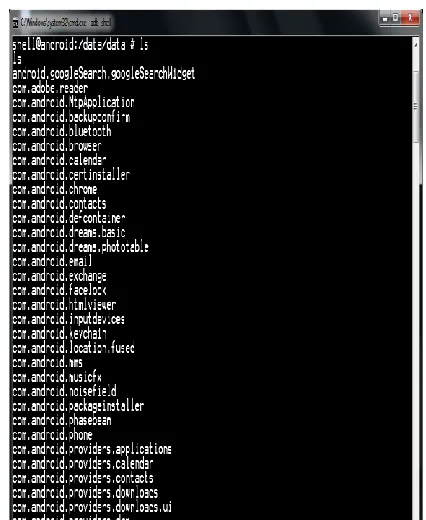
Application data frequently holds an important information that belongs to the forensic examination. The data available on a mobile Android device is: SMS, MMS, chat messages, etc. The private information of each software program will be stored in the /data/data subdirectory automatically, following the name of the package. In these fields, data related to applications can be saved: shared preferences, internalstorage, externalstorage, SQLite server. Shared preferences: It provides a framework to save primary data types pairs in the .xml style. It is typically collected in the /data / data/<package name>/shared prefs path of the application. The Figure 10 exhibits Android e-mail applications shared preferences file content.
Figure 10: Android e-mail app's shared preferences file content
583 Figure 11: Contents of the /data/data directory in Android
The databases directory holds important data that aid in forensic examination. The Figure12 exhibits data in this directory is saved in SQLite files.
Figure 12: data in this directory is saved in SQLite files
External storage: Documents can also be housed in external storage by applications. Within storage may be a removable screen. information can be utilize on different devices on a secure digital card by detaching and include it into whichever other device. Safe virtual cards formatted with a FAT32, increasingly use different file systems. SQLite database: It holds important data for forensic examination. The applications typically save SQLite files in data / data/<ApplicationPackageName>/databases.
3.3 The Android file system
The understanding of the filesystem is an essential task for forensic examination and encourages knowledge about how the data preserved and retrieved. During the forensic investigation, the perception of features and structure of a file system is useful. The file system refers to how data from a partition is being saved, arranged, and retrieved. A simple installation can rely on a partition divided into several partitions, a dissimilar filesystem used for each separation.
Each file system describes its specific rules to control the partition files. Each file system provides a distinct speed for file retrieval, security, size, and so on, depending on these rules. Android used mount points, as well. The mounting means are connecting the existing open file system to an external file system. The file systems mounted on a directory, and the files in this file system are now the directory content. This folder referred to as mount level — everything grouped into a single root directory hierarchy. each filesystem has another kernel module to enroll in the virtual filesystem operations. VFS allows different programs to accept separate file systems typically. The Android kernel comes with a range of large file systems ranging from the Journal File System to the Amiga file system. The kernel grip every background work when a file system is mounted. The Android kernel file system assistance decided by examining the file system content available in the proc directory. The contents of the files are shown in Figure 13.
Figure 13: contents of the files.
File systems in Android partitioned into three main areas: flash memory file systems, media-based file systems, and pseudo file systems. Flash memory file systems: Flash memory is a continuously operated non-volatile memory class that can be removed and reprogrammed in blocks called storage units. Extended File Allocation Table, Flash Friendly File System, Journal Flash FileSystem version 2, and Yet Another Flash Fil System version 2, are the standard flash memory file systems for Android mobile phones. Media-based filesystems: Android devices usually bear the following media-based file systems: EXT2/EXT3/EXT4, FAT, Virtual File Allocation Table. Pseudo file systems: Pseudo-file systems considered logical file groups. In an Android device, the essential pseudo file systems are the control group, and so on.
4. CONCLUSION
584 for the forensic investigator during forensic investigation of
the mobile device.
5. REFERENCES
5.1. Journal Article
[1] The Mobile Economy 2018
https://www.gsma.com/mobileeconomy/w p-content/uploads/2018/05/The-Mobile-Economy-2018.pdf
[2] V BalajiChandrasekhar M, Dr. T.Srininivasa Rao, et al., ―AN
IMPROVISED METHODOLOGY TO
UNBAR ANDROID MOBILE PHONE
FOR FORENSIC EXAMINATION,‖
International Journal of Electrical and Computer Engineering., Vol 8, No 4, 2018. DOI: 10.11591/ijece.v8i4.pp2239-2246
[3] Android Studio
http://developer.android.com/sdk/index.ht ml.
[4] iRoot Software, androidmtk.com Web site. Retrieved September 27, 2017, from https://androidmtk.com/download-iroot-application-all-versions.
[5] Banuri, H., Alam, M., Khan, S., Manzoor, J., Ali, B., Khan, Y., Yaseen, M., Tahir, M., Ali, T., Alam, Q., Zhang, X. (2012). An Android runtime security policy enforcement framework. Personal and Ubiquitous Computing, 16(6), 631-641.
[6] Baryamureeba, V., & Tushabe, F. (2004). The enhanced digital investigation process model. Proceedings of the Fourth Digital Forensic Research Workshop (pp. 1-9). Citeseer: DFRW.
[7] Becher, M., Freiling, F. C., Hoffmann, J., Holz, T., Uellenbeck, S., & Wolf, C. (2011). Mobile Security Catching Up? Revealing the Nuts and Bolts of theSecurity of Mobile Devices. Proceedings of the 2011 IEEE Symposium on Security and Privacy (SP) (pp.96-111). CA: IEEE.
[8] Benjamin Tomhave (2015), Information SecurityTechnologies. Future Information Technology, Application, and Service, 435-446.
[9] Casey, E. (2011). Foundations of digital forensic, Digital evidence and computer crime: Forensic science, computers, and the internet (3rd ed.). (pp. 1-34). MA: Academic.
[10] Casey, E., & Turnbull, B. (2011). Digital evidence on mobile devices. Eoghan Casey, Digital Evidence and Computer Crime. Third Edition. Forensic Science, Computers, and the Internet, Academic Pres.
[11] Det A. Murphy (2016). Developing Process for Mobile Device Forensics. International Conference on Cyber Security, 88-97.
[12] Cynthia (2016). Mobile Device Forensics. International Conference on Cyber Security, 56-65
[13] Firdous Kausar (2014). New Research Directions in the Area of Smart Phine Forensic Analysis. International Journal of Computer Networks & Communications, 6(4), 99-106.
[14] Hankins Achi, R., Uehara, T., & Jigang, L. (2009). A Comparative Study of Forensic Science and Computer Forensics. Proceedings of the Third IEEE International Conference on Secure Software Integration and Reliability Improvement, 2009. SSIRI 2009 (pp. 230-239). Shanghai: IEEE.
[15] Heriyanto, A.P. Procedures and tools for acquisition and analysis of volatile memory on Android smartphones. Australian Digital Forensics Conference, 2015.
[16] Jansen, W., & Ayers, R. (2006). Forensic software tools for cell phone subscriber identity modules. Proceedings of the International Conference on Digital Forensics, Security, and Law (ADFSL) (pp. 101-113). Pennsylvania: CiteSeer.
[17] Joe Sylve, Andrew Case & Lodovico Marziale (2013). Acquisition and analysis of volatile memory from android devices. Digital Investigation, 8, 175-184.
[18] Konstantia Barmpatsalou, Dimitrios Damopoulos & Georgios Kambourakis (2013). A critical review of 7 years of Mobile Device Forensics. Digital Investigation, 10, 323-349
[19] Kyle D. Lutes, Richard P. Mislan (2016). Challenges in Mobile Phone Forensics. Computer & Information Technology,Purdue University.