Available Online at www.ijpret.com 376
INTERNATIONAL JOURNAL OF PURE AND
APPLIED RESEARCH IN ENGINEERING AND
TECHNOLOGY
A PATH FOR HORIZING YOUR INNOVATIVE WORK
DETECTING AN UNAUTHORIZED ACCESS POINT IN WIRELESS NETWORK
SIDDHARTH V. SASANE¹, VIVEK KSHIRSAGAR², SHIVAJI P. PATIL³
1. M.E. (C.S.E) Govt. college of Engg. Aurangabad, India. Email:[email protected] 2. Head C. S. E. Dept., Govt. college of engg., Aurangabad, India.
3. Assistant Professor Sanjiwani college of engg., Kopargaon, India.
Accepted Date: 05/03/2015; Published Date: 01/05/2015
\
Abstract: Now a day’s day by day use of wireless network has been larger, there is high
necessity that our wireless network will become secure. An unsecured AP on your trusted LAN is an unlocked backdoor into your network. Guests inside your building and war drivers outside your facility can use unauthorized APs to steal bandwidth, send objectionable content, retrieve confidential data, attack company assets, or use your network to attack others. We provide here one an unauthorized access point (RAP=rogue access point) detection system. Our system does not require specialized hardware. The identification of unauthorized access point (RAP) is done by classification algorithm ID3. Our system provides a cost effective security enhancement to Wi-Fi networks by incorporating free but mature software tools.
Keywords: SSID, MAC and CHANNEL
Corresponding Author: MR. SIDDHARTH V. SASANE
Access Online On:
www.ijpret.com
How to Cite This Article:
Available Online at www.ijpret.com 377
INTRODUCTION
In computer networking, a wireless access point (WAP) is a device that allows wireless devices to connect to a wired network using Wi-Fi, Bluetooth or related standards. The WAP usually connects to a router (via a wired network), and can relay data between the wireless devices (such as computers or printers) and wired devices on the network.
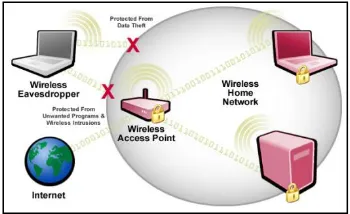
Figure 1.1 Wireless Securities
1.1 Wireless Security
It is the prevention of unauthorized access or damage to computers using wireless networks as shown in Fig 1.1. Wireless networks are very common, both for organizations and individuals. Many laptop computers have wireless cards pre-installed. The ability to enter a network while mobile has great benefits. However, wireless networking has many security issues. Crackers have found wireless networks relatively easy to break into, and even use wireless technology to crack into wired networks. As a result, it's very important that enterprises define effective wireless security policies that guard against unauthorized access to important resources. Wireless Intrusion Prevention Systems (WIPS) or Wireless Intrusion Detection Systems (WIDS) are commonly used to enforce wireless security policies.
One of the most challenging security concerns for network administrators is the presence of rogue wireless access points. A rogue access point (RAP) is a wireless access point that has either been installed on a secure company network without explicit authorization from a local network management or has been created to allow a cracker to conduct a man-in-the-middle attack.
Available Online at www.ijpret.com 378 existence ever since WLANs have become popular in commercial applications. There have been reports of data theft, identity theft by using these RAPs. Increasing use of wireless technologies by defense establishments along with above mentioned reasons have compelled researchers all over the world to find a solution for this problem. WLANs face the same security challenges as their wired counterparts, and more.
Need For RAP Detection in IEEE 802.11
Within a properly secured WLAN, RAPs are more damaging than rogue users. Unauthorized users trying to access a WLAN likely will not be successful at reaching valuable corporate resources if effective authentication mechanisms are in place. Major issues arise, however, when an employee or hacker plugs in a RAP. The RAP helps an attacker in gaining access to sensitive information of an organization [1].
Employees have relatively free access to a company's facilities, which makes it possible for them to inadvertently (or mischievously) install a RAP. An employee, for example, installs his personal access point without permission of network administrator in order to support wireless printing or access to the network from a conference room. Software programmers working on wireless applications may connect an access point to the corporate network for testing purposes.
In order to avoid this situation, it is necessary to implement security policies that mandate conformance with effective security controls and coordination with the network administrator before installing access points. This can only be effective, nonetheless, if clearly inform employees of the policies. After performing several security audits, it has been found that employees often install RAP without knowing the company security policies or the consequences of violating the guidelines. A hacker can install a RAP to provide an open, non-secure interface to a corporate network. In order to do this, the hacker must directly connect the access point to an active network port within the facility. This requires the hacker to pass through physical security; however, that's easy to do in most companies. Therefore there is an urgent need of developing technology which will address this problem of RAPs.
II. Existing System
Available Online at www.ijpret.com 379 most significant deficiencies was the lack of scalabilityAmong the wireless-side solutions, [3-4] are the leading industry vendors in RAP detection. Both rely on network-wide deployment of sensors that gather physical-layer and link-layer information such as signal strength, RF measurements, AP control messages, media access control (MAC) addresses, etc., to help detect and locate RAPs in a distributed agent-server architecture. Although widely deployed across many enterprise WLANs, this sensor based sniffing method is expensive. For instance, Air Magnet’s Laptop Analyzer [4] costs $3000.
In [2], we analyze the inter-ACK time in Ethernet and WLAN and demonstrate that it can be used to differentiate these two connection types. However, the analysis does not include 802.11g, since it was not widely deployed at that time solution. The solution proposed in [05]
Differentiates wired and wireless traffic by using mean and deviation of the round-trip-times (RTTs). This technique also required traffic conditioning to eliminate noise. However, the use of statistics such as mean and deviation is not optimal since these parameters differ with varying types, speeds and congestion levels of networks. Second, their approach involves traffic conditioning and can be considered pseudo-active
III. PRPOSED SYSTEM
We propose an efficient rogue AP protection system termed as RAP for commodity Wi-Fi networks. In RAP, novel techniques are introduced to detect rouge APs and to improve network resilience.
Algorithm
Steps for RAPD are as follows,
1. Polling: The very first step in Rap system is capturing of packets. There are various ways for capturing data, such as interrupt, polling etc. From above mentioned methods interrupt is efficient method, but APs do not support for capture interrupt. So we are using the method Polling.
2. Multithreading: For polling we have used very famous technique present in java i.e. Multithreading. In the class 'Wireless Panel' which is belonging to package 'rssi tools', we used multithreading. In method run () we are polling AP for packets.
Available Online at www.ijpret.com 380 LAN packets, RS232 packets, Modem packets etc. and wireless includes WLAN i.e. Wi-Fi packets, Bluetooth packets, PAN packets etc. Capturing of packets is done in 'Execute Process ()' present in the same class 'Wireless Panel'.
4. Analyzing: All captured packets are analyzed. Analysis is done for checking validity of packets. This is done by checking headers of packets.
5. Identifying: identifying is done by classification algorithm ID3
Very simply, ID3 builds a decision tree from a fixed set of examples. The resulting tree is used to classify future samples. The example has several attributes and belongs to a class (like yes or no). The leaf nodes of the decision tree contain the class name whereas a non-leaf node is a decision node. The decision node is an attribute test with each branch (to another decision tree) being a possible value of the attribute. ID3 uses information gain to help it decide which attribute goes into a decision node. The advantage of learning a decision tree is that a program, rather than a knowledge engineer, elicits knowledge from an expert.
IV. Performance Evaluation
4.1 Experimental Setup RAP is a system developed for detecting RAPs in the wireless network. To test this system we need some experimental setup.
Requirements are as follows:
i) Wireless Access Points - min 3.
ii) Wi-Fi enabled computer, desktop or laptop.
All above mentioned components are placed in non-equidistant fashion. The APs mentioned above are needed to be configured. Configuration includes renaming SSIDs, setting channel number, and enabling security.
One AP means one network. Each network is having its own identity. The network is identified by its name. To wireless network name is given by SSID. Channel number includes operating frequency in 20 or 40 MHz band. If AP operates on a, b, or g standard then the frequency band is 20 MHz and if it operates on n standard then it is 40 MHz.
Available Online at www.ijpret.com 381 AP can support various types of security types as open (no security), WEP (wired equivalent privacy), PSK (Pre Shared Key), WPA (Wireless Protected Access), etc. To avoid unauthorized access in the network security should be enabled.
4.2 Test Case Analysis
In this section we will analyze the RAP system by using ID3 algorithm.
If S is a collection of 16 examples with 7 ALLOW and 9 DISCARD examples then
Entropy(S) = -
- log2 = 0.99
Notice entropy is 0 if all members of S belong to the same class (the data is perfectly classified). The range of entropy is 0("perfectly classified") to 1("totally random").
Gain(S, A) is information gain of example set S on attribute A is defined as
Gain(S, A) = Entropy(S) - Entropy (Sv))
Where:
∑ is each value v of all possible values of attribute A
Sv = subset of S for which attribute A has value v
|Sv| = number of elements in Sv
|S| = number of elements in S.
Suppose S is a set of 16 examples in which one of the attributes is MAC. The values of MAC can be REGISTERED or UNREGISTERD. The classification of these 16 examples are 7 ALLOW and 9 DISCARD. For attribute MAC, suppose there are 8 occurrences of MAC = REGISTERED and 8 occurrences of MAC = UNREGISTERED. For MAC = UNREGISTERED, 1 of the examples are ALLOW and 7 are DISCARD. For MAC = REGISTERED, 6 are ALLOW and Rare DISCARD. Therefore
Gain(S, MAC) = Entropy(S) -
Entropy (SUNREGISTERED) - Entropy (SREGISTERED)
= 0.99 – 0.5 0.375 – 0.5 ×0.311
= 0.657
Available Online at www.ijpret.com 382 The target classification is "packet should be" ALLOWED or DISCARDED.
The ACCESSPOINT attributes are MAC, SSID, RSSID, and CHANNEL Number. They can have the following values:
MAC= {UNREGISTERED, REGISTERED}
SSID = {HIDDEN, BROADCAST}
SECURITY = {WEAK, STRONG}
CHANNEL Number = {UNKNOWN, KNOWN}
We need to find which attribute will be the root node in our decision tree. The gain is calculated for all four attributes:
Gain(S, MAC) = 0.657
Gain(S, SSID) = 0.538
Gain(S, SECURITY) = 0.538
Gain(S, CHANNEL) = 0.485
MAC attribute has the highest gain, therefore it is used as the decision attribute in the root node.
Since MAC has two possible values, the root node has two branches (REGISTERED, UNREGISTERED). The next question is "what attribute should be tested at the REGISTERED branch node?" Since we’ve used MAC at the root, we only decide on the remaining three attributes: SSID, RSSID, and CHANNEL.
SREGISTERED = {P1, P2, P3, P4, P5, P6, P7, P8} = 8 examples from table 4.1 with
Available Online at www.ijpret.com 383 Gain(SREGISTERED, SSID) = 0.75
Gain(SREGISTERED, RSSID) = 0.75
Gain(SREGISTERED, CHANNEL) = 0.689
SSID & RSSID have the highest gain; therefore, SSID is used as the decision node. This process goes on until all data is classified perfectly or we run out of attributes. Finally we will get the decision tree as shown in Fig 4.1.
4.3 Result Analysis
The following figures are showing the results of the system. The system is subject to capture the packets from AP. Packet collector form system captures the packets form AP. Collected packets are sent to Preemption engine and Detection engine. Further the packets are analyzed by Probing functions.
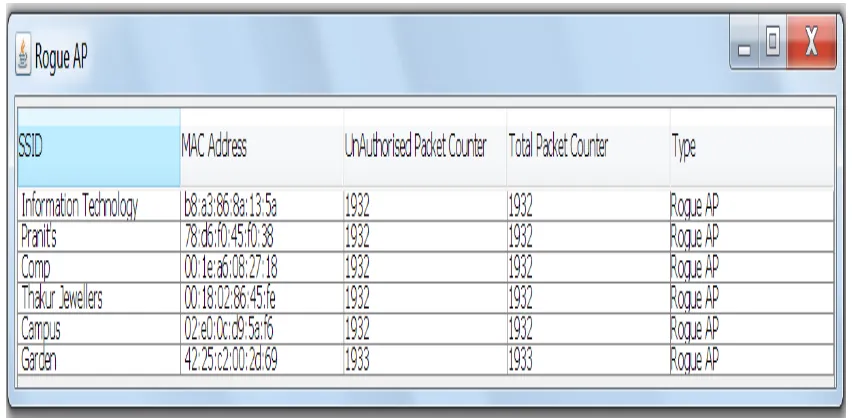
Here the system is kept for various situations and scenarios. The parameters such as MAC Address, SSID, Security and Channel number are registered in system Database of each access point together. We were having in all 6 Aps of which MAC Address is not registered initially. So all Aps are treated as Rogue Aps. The above Fig 4.2 shows the same.
Available Online at www.ijpret.com 384 The access point name i.e. SSID Information Technology, Pranit’s, Comp, Thakur Jewellers, Campus and Garden are present in the environment, having MAC Addresses as,b8:a3:86:8a:13:5a,78:d6:f0:45:f0:38, 00:1e:a6:08:27:18, 00:18:02:86:45:fe,02:e0:0c:d9:5a:f6, 42:25:c2:00:2d:69 respectively.
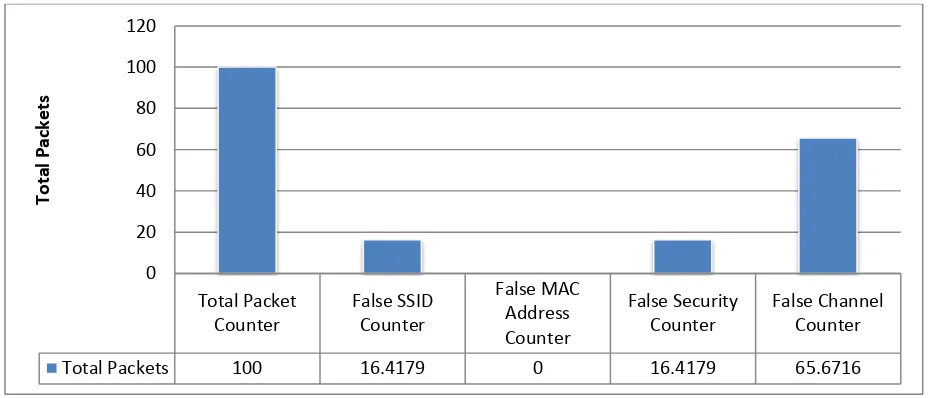
One by one we have gone through registering the required parameters as os fingerprints to the system and getting the following comparison factors. The graphs show various results in percentage manner.
First bar shows the total number of packets received by packet collector (i.e. 100%). Second bar onwards show all the false counters as, False SSID Counter, False MAC Address Counter, False Security Counter and Flase Channel Counter. The False MAC Address Counter is always 0. The bars other than this are responsible for showing the registered parameters of Rogue APs.
Figure 4.3 Equal SSID and Security registered. Total Packet
Counter
False SSID Counter
False MAC Address Counter
False Security Counter
False Channel Counter
Total Packets 100 16.4179 0 16.4179 65.6716
0 20 40 60 80 100 120
To
tal
Pack
e
Available Online at www.ijpret.com 385
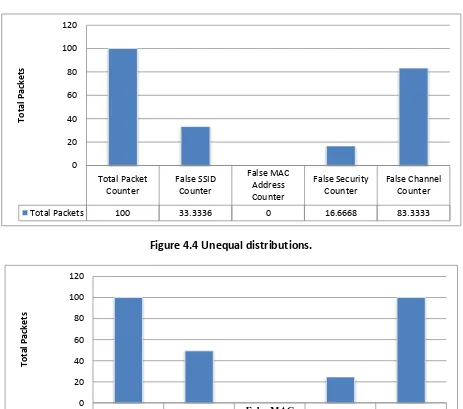
Figure 4.4 Unequal distributions.
Figure 4.5 all channels registered
Case I - Equal SSID and Security registered:- Fig. 4.3 shows that SSID and Security are equally registered, while, more number of channel are registered belonging to Rogue AP. From total received packets of Rogue AP 16.41791% SSID and Security are equally registered while 65.67164% Channels are registered.
Total Packet Counter False SSID Counter False MAC Address Counter False Security Counter False Channel Counter
Total Packets 100 33.3336 0 16.6668 83.3333
0 20 40 60 80 100 120 To tal Pack e ts Total Packet Counter False SSID Counter False MAC Address Counter False Security Counter False Channel Counter
Total Packets 100 49.3507 0 24.6753 100
Available Online at www.ijpret.com 386 Case II - Unequal distribution:-Fig. 4.4 shows the unequal registration of all the parameters. Here again the channel counter is high. From total received packets of Rogue AP 33.333336% SSID, 16.666668% Security and 83.33333% Channels are registered.
Case III- All channels registered:-Fig 4.5 shows all channels are registered in system. The total packets received all channel are registered, so the Total Counter bar and False Channel Counter bar are equal. Here 49.35065% SSID, 24.675325% Security and 100% Channel are Registered.
CONCLUSION
• System detects Rouge Access Points not only on the basis of MAC address but also on
various extra parameters.
• Due to these extra parameters Spoofing is avoided.
• According to graphs SSID is 49.35% and Security type is 24.87% detected as false accepted.
REFERENCE:
1. Liran Ma, "RAP: Protecting Commodity Wi-Fi Networks from Rogue Access Points", ACM New
York, NY, USA pp - 42-52, 2007.
2. W. Wei, S. Jaiswal, J. Kurose, and D. Towsley. Identifying 802.11 traffic from passive
measurements using iteraItive Bayesian.
3. Airdefense White Paper: 'Solutions for Detecting and Eliminating Rogue Wireless Networks',
Available Online:
4. http://www.airdefense.net/whitepapers/index.php.
5. Air magnet White Paper: 'Best Practices for Securing your Wireless LAN', Available Online:
6. http://www.airmagnet.com/products/whitepaper.
7. Guangzhi Qu, Michael M. Nefcy, Rochester, Michigan," RAPiD: An Indirect Rogue Access
Points Detection System",978-1-4244-9328-9/10/$26.00 ©2010 IEEE.
8. Songrit Srilasak, Kitti Wongthavarawat and Anan Phonphoem," Integrated Wireless Rogue
Access Point Detection and Counterattack System", 978-0-7695-3126-7/08 $25.00 © 2008 IEEE.
9. Prabhaker Mateti, "Hacking Techniques in Wireless Networks", in The Handbook of
Information Security, pp 991 - 1001, ISBN: 0-471-64833-7, John Wiley, December 2005. http://www.netstumbler.com https://1.as.dl.wireshark.org/win64/Wireshark-win64-1.10.5.exe
10.Raheem Beyah, Shantanu Kangude, George Yu, Brian Strickland and John Copeland. "Rouge