HEWLETT
iP
PACKARDHP 2000/Access BASIC
PART NO. 22687·90001
UP 2000
I
Access
BASIC
Reference Manual
HEWLETT
WN
PACKARDHEWLETT·PACKARD COMPANY
LIST OF EFFECTIVE PAGES
Pages Effective Date
Title ... Sep 1975 ii to xi ... Sep 1975 1-0 to 1-11 ... Sep 1975 2-1 to 2-26 ... Sep 1975 3-1 to 3-17 ... Sep 1975 4-1 to 4-11 ... Sep 1975 5-1 to 5-17 ... Sep 1975 6-1 to 6-9 ... Sep 1975 7-1 to 7-4 ... Sep 1975 8-1 to 8-7 ... Sep 1975 9-1 to 9-17 ... Sep 1975 10-1 to 10-29 ... Sep 1975 11-1 to 11-92 ... Sep 1975 A-I to A-4 ... Sep 1975 B-1 ... Sep 1975 C-l to C-7 ... Sep 1975 D-l to D-3 ... Sep 1975 E-l to E-2 ... Sep 1975 F-l to F-I0 ... Sep 1975
NOTICE
The information contained in this document is subject to change without notice.
perfor-ACKNOWLEDGEMENT
PREFACE
This publication is the user's reference manual for the HP 2000 Access System. It provides information for logging on and developing and executing BASIC language programs. Included are instructions for using the system's Remote Job Entry facility. Other manuals which may provide useful information when using this manual are:
• Learning Timeshare BASIC (22687-90009) - An introduction to the BASIC language and a tutorial explanation of statements and commands.
• HP 2000 Access Operator's Manual (22687-90005) - A guide to operating the 2000 Access System on a daily basis including administrative procedures.
• Pocket Guides (22687-90003, 22687-90007) - Summaries of system capabilities for user's and the system ope~ator.
• TSPI2000-HASP User's Manual (20240-90002) - A guide to using the Telecommunica-tions Supervisory applicaTelecommunica-tions Package (TSP) with the Remote Job Entry facility.
• TSPI2000-HASP Application Manager's Manual (20240-90001) - A manger's guide to administering the Telecommunications Supervisory applications Package (TSP).
This manual is organized into eleven sections, six appendices, and an index.
• Section I - Introducing 2000/Access BASIC. This section is a description of the system, its capabilities, and how to use it.
• Section II - Introduction to BASIC Programming. This section describes key elements of programming in BASIC on the 2000 Access System.
• Section III - Programming With Arrays. This section describes statements and techniques for using arrays in programs.
• Section IV - Programming With Strings. This section describes statements and techniques for using strings in programs.
Preface
• Section IX - Using the Remote Job Entry Facility. This section describes the Remote Job Entry capability of the 2000 Access System and provides instructions for its use.
• Section X - Commands. This section provides the syntax and definition of all the user commands available.
• Section XI - BASIC Language Reference. This section provides a definition of the BASIC language. A rigorous definition of the terminology precedes the syntax and definition of the BASIC statements. Experienced programmers can use this section as a detailed reference for the BASIC language as implemented on the 2000 Access system. Less experienced programmers should first read the introductory sections of the manual, and if you are a beginning programmer, Learning Timeshare BASIC is recommended. • Appendix A - Using the ASCII Character Set. This appendix provides a description of
the ASCII character set and its use in BASIC language statements.
• Appendix B - How to Prepare A Paper Tape Off-Line. This appendix describes the preparation of paper tapes for input to the system.
• Appendix C - Error Messages. This appendix lists the error messages that you could receive when using the system.
• Appendix D - Terminal Interface. This appendix provides some of the operating charac-teristics of terminals used with the system.
• Appendix E - Additional Library Features. This appendix describes some of the special functions available through the system operator.
• Appendix F - Formal Syntax for 2000lAccess BASIC. This appendix presents the BASIC language syntax in Backus Naur form (BNF).
The text in this manual is primarily for reference and has been written as a definition rather than an explanation of the BASIC language. Experienced programmers can use the detailed reference material given in Sections X and XI to look up the syntax of commands and statements. Less experienced programmers should read the entire manual.
CONTENTS
Section I Page
INTRODUCING 2000/ACCESS BASIC IF Statement ... 2-8
What is 200 Access ... 1-1 PRINT Statement ... 2-8 BASIC Language ... 1-1 Printing Expressions ... 2-9 Operating System Software ... 1-1 Printing Literal Strings ... 2-10 System Hardware ... ; 1-1 Print Functions ... 2-10 System Resources ... 1-3 READ/DATAIRESTORE Statements ... 2-11 Input/Output Devices ... 1-3 FOR and NEXT Statements ... 2-13 File Supervisor. . . .. . ... 1-3 INPUT Statement ... 2-14 Security ... 1-3 ENTER Statement ... 2-15 Remote Job Entry (RJE) ... 1-3 REM Statement ... 2-15 Terminal Time ... 1-3 GOSUB and RETURN Statements ... 2-16 What Does the System Do? ... 1-3 DEF Statement ... 2-17 How Do You Use the System? ... 1-5 Commands ... 2-17 Account and Library System ... 1-5 Programming and Utility Commands ... 2-18 System Master Account ... 1-5 NAME Command ... 2-18 Group Master Accounts ... 1-5 RENUMBER Command ... 2-18 Individual Accounts ... 1-6 DELETE Command ... 2-19 Operating the Equipment ... 1-6 SCRATCH Command ... 2-19 Connecting to the System ... 1-6 Modifying the Account Library ... 2-19 LINEILOCAL Switch ... 1-6 SAVE Command ... 2-19 DUPLEXIHALF DUPLES Switch ... 1-6 CSA VE Command ... 2-20 Terminal Speed ... 1-6 PURGE Command ... 2-20 Logging On and Off the System ... 1-6 Loading the Work Space ... 2-21 HELLO Command ... 1-6 GET Command ... 2-21 Terminal Type ... 1-8 APPEND Command ... 2-21 Errors During Logging On ... 1-8 TAPE Command ... 2-22 Prompt and Special Characters ... 1-9 KEY Command ... 2-22 ECHO Command ... 1-10 Executing and Reproducing Programs ... 2-22 TIME Command ... 1-10 RUN Command ... 2-23
MESSAGE Command ... 1-10 EXECUTE Command ... 2-23
BYE Command ... , ... 1-10 LIST Command ... 2-23 You and the System Operator ... 1-10 PUNCH Command ... 2-24 Status Commands ... 2-25 LENGTH Command ... 2-25 CATALOG, GROUP, and LIBRARY Commands 2-25
Section II Page
INTRODUCTION TO BASIC PROGRAMMING
Your Work Space ... 2-1 Section III Page
Your Library ... 2-1 PROGRAMMING WITH ARRAYS
Numbers, Logical Values, and What Are Arrays? ... 3-1
CONTENTS (continued)
Section IV Page
PROGRAMMING WITH STRINGS
What Are Strings? ... 4-1 String Character Set ... 4-1 Numeric Equivalents of Characters
(An Alternate Form) ... 4-2 Upper and Lower Case Letters ... 4-2 How Do You Reference Strings? ... 4-3 Naming Strings ... 4-3 Dimensioning Strings ... 4-3 Substrings ... 4-4 How Do You Use Strings? ... 4-4 Placing Values in Strings ... 4-5 Simple Assignment ... 4-5 String Data ... 4-5 Setting Strings Equal to String
Valued Functions ... 4-6 Using Strings In Relational Operations ... 4-6 String Statements and Functions ... 4-6 String Valued Statements and Functions ... 4-6 Numeric Valued Statement and Functions .... 4-8 Outputting Strings ... 4-10
Section V Page
FILES
BASIC Formatted Files ... 5-1 Creating and Purging a BASIC Formatted File .. 5-2 Opening and Closing a BASIC Formatted File ... 5-4 Multiple Access ... 5-12 ReadIWrite Restrictions ... 5-14 ASCII Files ... 5-15 Characteristics of ASCII Files ... 5-15 Creating and Purging ASCII Files ... 5-16 Opening ASCII Files ... 5-17 Printing to an ASCII File ... 5-17 Reading from an ASCII File ... 5-18
Section VI
FORMATTED OUTPUT
Page
What is Formatted Output? ... 6-1
Section VII Page
SYSTEM FACILITIES
Linking Programs ... 7-1 Passing Parameters ... 7-2 Executing Program Commands ... 7-3
Section VIII Page
SECURITY AND THE LIBRARY HIERARCHY User Idcode Organization ... 8-1
Private Library - Private User ... 8-3 Group Library - Group Master ... 8-3 System Library - System Master ... 8-4 Account Accessing Capabilities ... 8-5 User Imposed Restrictions for Programs ... 8-6 User Imposed Restrictions for Files ... 8-7
Section IX Page
REMOTE JOB ENTRY FACILITY
What Is Remote Job Entry? ... 9-1 What Host Systems Can You
Communicate With? ... 9-1 Multileaving RJE Workstation
(MRJEIWS) ... 9-3 USER 200 Terminal ... 9-3 How Does RJE Work? ... 9-4 How Do You Use Remote Job Entry? ... 9-8 Sending Jobs Through the Card Reader ... 9-9 Retrieving Output On the Line Printer ... 9-9 Sending Jobs and Retrieving Output from
Your Terminal ... 9-11 Communicating With a Host System from
Your Terminal ... 9-15 How to Get Your Output ... 9-16
Section X COMMANDS
CONTENTS (continued)
Section XI Page
Group Library ... 10-4 BASIC LANGUAGE REFERENCE
Half Duplex ... 10-4 Introduction ... 11-1 Idcode ... 10-5 BASIC Language Terms ... , ... 11-1 Job Function Designator ... 10-5 Array .. ' ... 11-1 Library ... 10-5 Array Element ... 11-2 Library Name ... 10-5 Array Name ... , 11-2 Non-Sharable Device ... 10-5 Character ... 11-3 *OUT = FILE NAME* ... 10-6 Constant ... 11-3 Program Name ... 10-6 Destination String ... 11-3 Program Reference ... 10-6 File Name ... 11-5 Record ... 10-6 File Number ... 11-5 Record Length ... 10-7 Function Refgerence ... 11-5 Specific Device Designator ... 10-7 Literal String ... 11-6 Statement Number ... 10-7 Logical Length ... 11-6 System Library ... 10-7 Logical Size ... 11-7 Work Space ... 10-7 New Dimensions ... 11-7 Command Descriptions ... , ... 10-8 Number ... 11-7 APPEND Command ... 10-9 Numeric Constant ... 11-8 BYE Command ... 10-9 Numeric Expression ... 11-8
CATALOG, GROUP, and LIBRARY Numeric Simple Variable ... 11-11
CONTENTS (continued)
DATA Statement ... 11-30 SIN Function ... 11-84 DEF Statement ... 11-31 SPA Function ... " ... 11-85 DIM Statement ... 11-32 SQR Function ... 11-85 END Statement ... 11-32 STOP Statement ... 11-85 ENTER Statement ... 11-33 SYSTEM Statement ... 11-86 EXP Function ... " ... 11-34 TAB Function ... " ... 11-87 FILES Statement ... " ... 11-34 TAN Function ... 11-87 FOR and NEXT Statements ... 11-36 TIM Function ... 11-88 GOSUB and RETURN Statements ... 11-38 TRN Function ... 11-88 GO TO Statements ... 11-40 TYP Function ... 11-89 IF ... THEN Statement ... 11-41 UNLOCK Statement ... 11-90 IF END Statement ... 11-42 UPDATE Statement ... 11-91 IMAGE Statement ... " ... 11-42 UPS$ Function ... " ... 11-92 INPUT Statement ... 11-43 ZER Function ... " ... 11-92 INT Function ... 11-44
INV Function ... , .11-44 ITM Function ... " ... 11-45 LEN Function ... " ... 11-45 LET Statement ... 11-46
LIN Function ... 11-47 Appendix A Page
LINPUT Statement ... 11-48 USING THE ASCII CHARACTER SET ... A-I LINPUT # Statement ... 11-48
LOCK Statement ... 11-49
LOG Function ... 11-50 Appendix B Page
MAT Addition and Subtraction Statements .... 11-50 HOW TO PREPARE A PAPER TAPE
MAT Assignment Statement ... 11-51 OFF ·LINE ... B-1 MAT ... CON Statement ... 11-51
MAT ... IDN Statement ... 11-51
MAT INPUT Statements ... 11-52 Appendix C Page
Appendix D Page TERMINAL INTERFACE ... D-l IBM Communications 2741 Communications
Terminal Interface ... D-2
Appendix E Page
ADDITIONAL LIBRARY FEATURES ... E-l Bestow ... E-l
Figure Page
Typical HP 2000 Access System ... 1-0 System Block Diagram ... , ... 1-2 Example of Program Access and Execution ... 1-4 Sample Account Structure ... 1-5 PRINT USING Statement Structure .... , ... 6-3 ID Code/Group Account Structure ... 8-2
Table Page
Remote Terminal Connection Procedures ... 1-7 Selected System Operator Commands ... , ... 1-11 RJE Compatible Host Systems ... 9-3 IBM HASP Workstation Host Functions ... 9-3 Job Function Designators ... 9-4 Summary of 360 HASP Remote Commands ... 9-6
CONTENTS (continued)
Copy ... , ... E-l Load ... , ... ' ... E-2 Restore ... E-2 Dump ... E-2
Appendix F Page
FORMAL SYNTAX FOR 2000/ACCESS BASIC. F-l
ILLUSTRATIONS
Elements of the 2000 Access Remote Job
Entry Facility ... 9-2 Typical RJE Configuration for an IBM
Host System ... 9-5 Example of an RJE Job Deck ... 9-9 Example of Forms Assignment Used to
Route Output ... 9-10
TABLES
Summary of CDC EXPORT/IMPORT
INTRODUCING 2000/ACCESS BASIC
Ir
B:iW,
WHAT IS 2000 ACCESS?
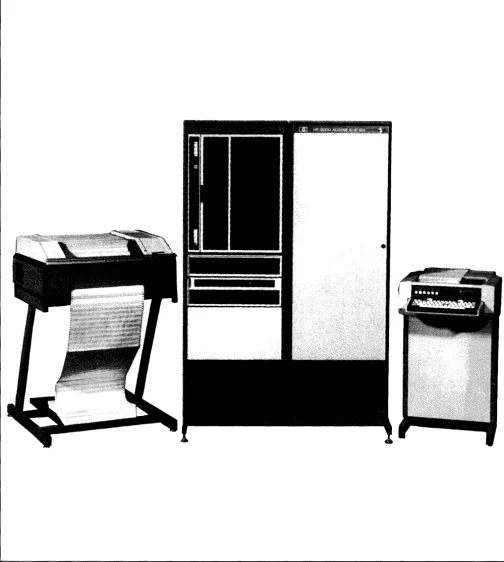
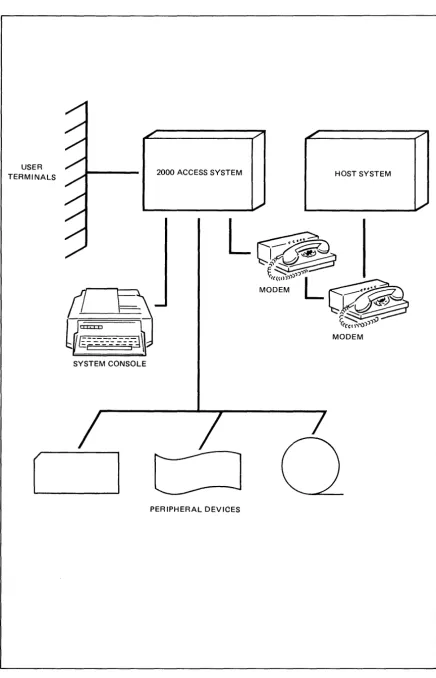
2000 Access is a terminal-oriented computer system using a powerful version of the BASIC language. Up to 32 users may access the system simultaneously through hardwired terminals or over ordinary telephone lines using modems. The system may also use a variety ofperipher-als such as card readers, paper tape punches, magnetic tape drives, paper tape readers and line printers. A typical system is shown in figure 1-1.
In addition to system users there is a system manager and a system operator. The system manager is responsible for establishing the initial system configuration and setting operating policies. The system operator is responsible for daily system operation and the granting of system resources such as storage space and terminal time. In the remainder of this manual there will be additional references to the system manager and system operator functions. Detailed descriptions of their duties are contained in 2000 Access System Operator's Manual (22687 -90005).
The remainder of this section describes briefly major system components, capabilities, and how to use the system. This manual assumes that you have programming experience in a language similar to BASIC and are familiar with the type of terminal used on your system.
The system is made up of three major components, the BASIC language, the operating system software, and the system hardware. The components allow you to make use of a variety of system resources.
BASIC LANGUAGE
Hewlett-Packard 2000/Access BASIC contains additional programming features beyond those in most versions of the BASIC language. These features, in the form of an extended set of statements, give you powerful tools for applications concerned with on-line data management and computation.
OPERATING SYSTEM SOFTWARE
The operating system software controls the overall system operation, supervises file activities, controls all input/output operations, and provides utility functions. System operation is discus-sed in detail in the HP 2000 Access System Operator's Manual (22687-90005).
SYSTEM HARDWARE
Introducing 20001 Access Basic
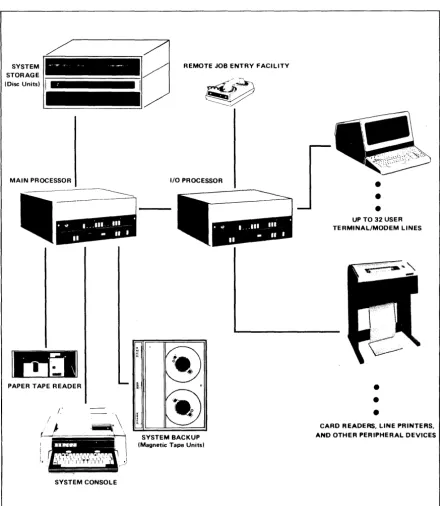
typical system is shown in figure 1-2. Information on individual system hardware units is contained in the installation, maintenance, and operator manuals for the specific device.
REMOTE JOB ENTRY FACILITY SYSTEM
STORAGE
(Disc Units)
lliiiiiiiiiiiiiiiiilil
MAIN PROCESSOR
----.
PAPER TAPE READER
SYSTEM CONSOLE
I/O PROCESSOR
Ii
11
SYSTEM BACKUP
(Magnetic Tape Units)
•
•
•
UP TO 32 USER TERMINAL/MODEM LINES
•
•
•
[image:16.618.48.489.138.644.2]Introducing 2000/ Access Basic
SYSTEM RESOURCES
The system resources consist of input/output devices, file supervision, terminal time, security, and remote job entry capabilities. These resources are available either directly through your terminal or on request from the system operator. The system operator accesses the system through the system console and performs privileged operations affecting system resources.
INPUT/OUTPUT DEVICES. Your terminal is the best example of a system input/output device. In addition to your terminal, a variety of input/output units are available for use as Hnon-sharable devices". These devices are peripherals such as line printers and magnetic tape drives. They are non-sharable in the sense that once you begin using a device it remains under your control and may not be used by others. The device is released by program or command termination. They may also be assigned for exclusive use from time to time by the system operator to a specific user. Once assigned to you, a line printer, for example, may not be used by other users. Devices are deassigned by the system operator and may be immediately reassigned to another user.
FILE SUPERVISION. The system controls access to files. You are given a limit to the amount offile space you may use at the time your account is opened by the system operator. Up to 65,535 records of file storage can be allocated to anyone user account. This amount may be less depending on your system's configuration and operational policies. The amount of file space can be increased or decreased at any time by the system operator. This allows you to begin programming with a relatively small file space and increase it later as your storage needs grow.
SECURITY. When your account is opened by the system operator you will be assigned an account number and a security code (password). This password is used to limit the access to your account. Several people may share an account; or accounts may be assigned one to a user. Additional information on user accounts is contained in the description of the system account structure. Each program and file on the system may be assigned one of four levels of security.
REMOTE JOB ENTRY (RJE). The system may be used to provide a remote work station for a larger computer system concurrent with normal system operation. The RJE facilities are available directly through peripheral devices or from your program. You can then enter jobs, programs, or data in any language (FORTRAN, ALGOL, COBOL, etc.) available on the second system. A complete discussion of the RJE capabilities of the system and operating procedures is contained in Section IX of this manual.
TERMINAL TIME. When your account is opened by the system operator you are given a limit to the amount of terminal time you may use. Time up to a maximum of 65,535 minutes can be given. The system logs all terminal time used against the appropriate account. The time accrued may be reset to 0 by the system operator.
WHAT DOES THE SYSTEM DO?
Introducing 2000/ Access Basic
The BASIC language used on the system consists of statements for writing programs and commands for controlling both program execution and input/output operations. This manual assumes that you are familiar with a language similar to BASIC and that you know how to use the terminals available on your system.
[image:18.615.43.481.260.720.2]The sample program in figure 1-3 illustrates some of the statements and commands available on the system for program access and execution. Program statements are numbered, com-mands are not. Special terminal keys are circled, and system responses are shaded.
Figure 1-3 illustrates logging on from a terminal, creating a data file, accessing, listing, and running a program. (The program is assumed to have been previously written and stored in your account library.) The program outputs a message, inputs string data, and stores the data on the file. A simple test for a H/" is made to terminate the program. A description of key program statements is provided.
OPERATION/STATEMENT
(return) (linefeed)
HELLO-B105,PASWRD (return)
.. : : : ':: :: ::
: .:
:" .
DESCRIPTION
System log in procedure
User enters account number and password
Message varies with system
Create empty file FIL1 with 10 records Get PROG1 from your library
List program
Remark (not executed)
Dimension a string
Specify file to be used
Output prompt messages
Accept input data
Test for exit and branch to END
Write data sequentially to file
Branch to statement 50 End of program
Introducing 20001 Access Basic
HOW DO YOU USE THE SYSTEM?
The 2000 Access system is designed to be extremely easy to use. It requires no complicated job control language; program entry is free field; and there is no separate compile operation. Using the system consists of obtaining an account number and password from the system operator, logging on, entering or retrieving a program, and running the program. In addition you can send messages to the computer operator requesting a number of auxiliary operations.
ACCOUNT AND LIBRARY SYSTEM
The accounts used on the system are made up of three types, system, group, and user. Each type of account has slightly different capabilities and performs a different function in the typical system. Each account has its own library for storage of programs and files. The following paragraphs discuss briefly each of the account types and their capabilities.
SYSTEM MASTER ACCOUNT. The system master account is numbered AOOO and is used only by the system master or system operator. This account is used to hold the system library containing programs and files that can normally be accessed by all system users. A listing of the accessible contents of the system library can be obtained using the LIBRARY command.
The AOOO account possesses additional capabilities. The AOOO user has the ability to execute some system operator commands such as DIRECTORY, DUMP, and REPORT. A complete discussion of system master capabilities is given in the HP 2000 Access System Operator's Manual (22687-90005).
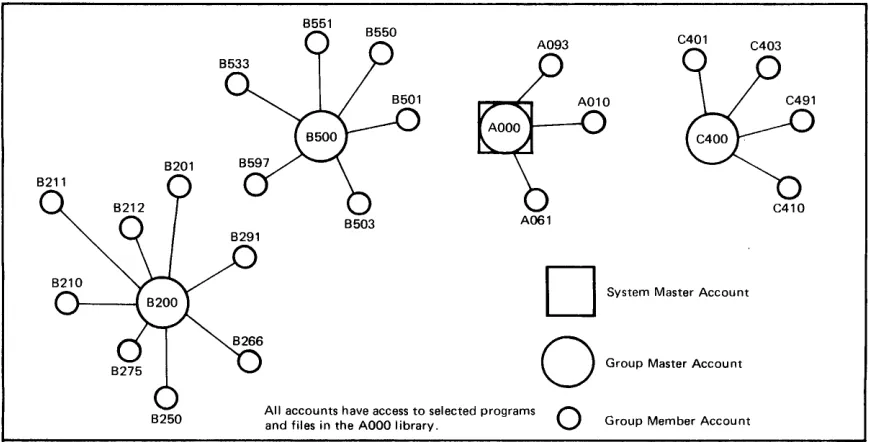
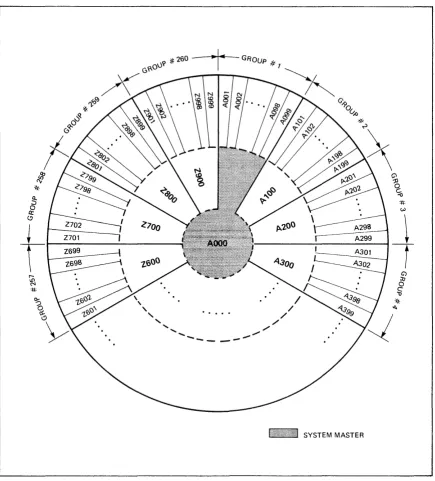
GROUP MASTER ACCOUNTS. The group master or group librarian account has an account number made up of a letter and a digit followed by two zeros. For example, AOOO (System Master), Z900, JI00, and K700 are all group master accounts. The group account contains programs and files which may be accessed by any account within the group. For example, CI00 is a group master account and all accounts from CI00 through C199 are members of the group. Figure 1-4 shows the account structure in a small system.
Group library programs and files can be accessed by members of the group in a similar manner to system library entries.
8201
8250
A093
8503 A061
o
GwupM",,,
A,,,ou",All accounts have access to selected programs
0
and files in the AOOO library. Group Member Account Figure 1-4. Sample Account Structure
[image:19.612.129.564.504.725.2]Introducing 2000/ Access Basic
INDIVIDUAL ACCOUNTS. The individual account has access to its own files and prog-rams, its group library, and the system library. Note that the system library is the library belonging to account AOOO and that each group library is the library belonging to the group master account. The individual account owner has control over his own library through the various commands and statements used to store, delete, or retrieve programs and files. In addition the owner may change the level of security for programs and files in his library.
OPERATING THE EQUIPMENT
You can use any of several terminal types with the system. The terminal used must generate characters using ASCII code. (An exception is the IBM 2741 terminal.) It is not necessary that the terminal be capable of generating the entire ASCII character set. If your terminal does not use the entire set, you may not be able to use the full capabilities of the system. For example, you can use all 128 ASCII characters but some terminals do not print the lower case alphabet. This is important in such applications as text editing and report generation, but is not necessary for some data processing or analytical applications.
CONNECTING TO THE SYSTEM. To log onto the system, connection must be established between your terminal and the system. The way that this connection is made varies depending on the type of terminal used. If your terminal is wired directly to the system (hardwired) all that is required is to set the terminal mode to ON-LINE and the power switch to ON. If your terminal is remote from the system it must use a modem or Data Set to link your terminal to the system. Table 1-1 contains procedures for using most remote terminals.
LINE/LOCAL SWITCH. Nearly all terminals will have a LINE/LOCAL or REMOTE/ LOCAL switch. This switch should always be set to the LINE or REMOTE position.,
DUPLEXIHALF DUPLEX SWITCH. Some terminals have a FULL DUPLEXIHALF DUP-LEX or ECHO/NO ECHO switch or jumper strapping. This should usually be set to the FULL DUPLEX or NO ECHO position. If this setting is improperly made, either the terminal will not print the characters that you type or the characters will be duplicated.
TERMINAL SPEED. Terminals and modems vary in the speed with which they send and receive characters. The system will automatically detect the speed of your terminal and adjust its transmission speed accordingly. The system will accept terminal speeds of 10, 15, 30, 60, 120, and 240 characters per second (14.8 for the IBM 2741). When using a modem with a remote terminal you must use the same speed setting for both the terminal and the modem.
LOGGING ON AND OFF THE SYSTEM
Introducing 2000/ Access Basic
Table 1-1. Remote Terminal Connection Procedures
ACOUSTIC COUPLER MODEM AND TELEPHONE:
COUPLER/MODEM
1. Set terminal mode to ON-LI NE and power swich to ON. 2. Set coupler power switch to ON.
3. If coupler has a duplex switch, set to FULL or FULL UP 4. If coupler has a line switch, set to ON-LINE.
5. Remove telephone handset and dial the computer telephone number. 6. When the computer responds with a high pitched tone, place
the handset into the coupler receptacle (the correct handset position should be marked on the coupler).
7. Type (return) (Iinefeed) and log on.
DATA SET
TERMINAL
DATASET TERMINAL
1. Set terminal mode to ON-LINE and power switch to ON. 2. Press the TAL K button on the Data Set.
3. Remove the handset and dial the computer telephone number. 4. When the computer responds with a high pitched tone, press the
DATA button on the Data Set; replace the handset in its cradle. 5. Type (return) (Iinefeed) and log on.
Note: When connection is via telephone lines, the user must log on
[image:21.617.138.570.126.656.2]Introducing 2000/ Access Basic
H200 is the account number, JOHN is the account password, and 1 is the terminal type. Note that a comma is used to separate parameters. An account number is assigned to you by the system operator. It consists of a single letter followed by a three-digit number. Your password is linked to your account at the time your account is created by the system operator and can be modified at any time. The password can be from one to six characters. The password may be kept confidential by using non-printing control characters. Control characters are entered by holding the Control key (control )or
@) )
down and then pressing the associated character. Control A is shown as AC, control Z as zc, etc. For example, on a terminal the password SEcCcRcEcT would appear as ST. Note that certain characters (XC, HC, JC, MC, and Null) are not allowed as part of a password.TERMINAL TYPE. The terminal type parameter tells the system what type of terminal you have. This information is used to modify the transmission of data to suit your terminal's requirements. Failure to specify the correct parameter may result in the loss of characters at your terminal or at the system. A list of commonly used terminals and their terminal type parameter is as follows:
o
HP 2600A, HP 2640A, HP 2749B, or IBM 2741 1 Execuport 300 or Texas Instruments Silent 7002 ASR-37
3 TermiNet 300, TermiNet 1200, or HP 2762A/B
4 Memorex 1240
Ifno value is given for the terminal parameter the system assigns 0 as the default value. If you are unsure of the parameter value for your terminal, consult your system operator.
ERRORS DURING LOGGING ON. If you make a mistake when logging on, the system
responds with an appropriate error message. For example, if you forget to type the hyphen while entering the HELLO command:
HELLOH200,JOHN,1
the system responds with the message:
ILLEGAL FORMAT
Re-enter the command in the correct form.
If the wrong password is entered:
Introducing 2000/ Access Basic
Spelling mistakes, format errors and incorrect parameters can be corrected while the line is being entered if the error is noticed before return is pressed. The control-H character (HC) can be used to correct a few characters just typed, or the control-X character (XC) can be used to cancel the entire line and start over.
Suppose the command HELLO is misspelled during entry. The control-H (HC) will delete the last character. Depending on the type of terminal you are using, the HC character may cause an underscore (_) or backarrow ( +- ) to be printed. You can retype the character and finish the line. When you press (return) , the line is entered correctly.
HELO_LO-H200,JOHN,1
If several characters have been typed after the error, the HC character must be typed for each character to be deleted. In the following example, four characters are deleted:
HELO-H2 ____ LO-H200,JOHN, 1
Another method is to use Xc to cancel the entire line. If you type XC before you press return, the system responds with a backslash ("") at the end of the line and then produces a return and linefeed. The correct command can be entered on the new line:
HELO-'
HELLO-H200,JOHN,1
All commands including HELLO can be abbreviated to the first three characters.
PROMPT AND SPECIAL CHARACTERS. The system uses prompting and special characters to signal to the user that certain input is expected or that a specific action is completed.
Character
?
??
???
\
_ or
+-STOP
Meaning
User input is expected during execution of an INPUT state-ment.
Further input is expected during execution of an INPUT statement.
A BASIC command was mistyped; re-enter it correctly.
Issued in response to the control character XC. Indicates that the line being typed just prior to entry of XC has been de-leted.
Issued in response to the control character Hc. Indicates that the character typed just prior to entry of Hc has been de-leted.
Introducing 20001 Access Basic
ECHO COMMAND. The ECHO command can be used to adjust the data transmission to your terminal. If your terminal automatically prints characters that it sends, you can type:
ECHO-OFF(
return)
to prevent the system from sending out duplicate characters. You can enter
ECHO·ON
(return)
to cause the system to return data it receives to your terminal. This command is normally only used when your terminal does not have a DUPLEXIHALF DUPLEX switch.
TIME COMMAND. The TIME command can be used to find ou t how much terminal time has been charged to your account.
TIME{
return)
C100 ON PORT #05 FOR 00025 MIN. 00125 MIN USED OF 65000 PERMITTED.
MESSAGE COMMAND. The MESSAGE command allows you to enter a line of text at your terminal and have it sent to the system operator. An example of this would be:
MES·PLEASE ASSIGN A CARD READER TO C901 (
return)
This message will appear on the system console along with a number identifying your port.
BYE COMMAND. When you have completed a session at your terminal, log off the system using the BYE command. For example:
BYE
(return)
The system will respond by printing the total number of minu tes that you were logged on.
0014 MINUTES OF TERMINAL TIME
You may also log on at the same terminal using the same or another account. This will result in the first account being logged off.
Introducing 2000/ Access Basic
You can request the system operator to assign additional capabilities to your account. You may then give files in your account the capability of allowing multiple write access. In addition, both your programs and files may be selectively made available to users in other accounts.
COMMAND
ANNOUNCE
ASSIGN
BESTOW
BREAK
CHANGEID
COpy
KILLID
NEWID
PHONES
PURGE
RESET
Table 1-2. Selected System Operator Commands
THE SYSTEM OPERATOR USES THE COMMAND TO:
Send a one-line message to one or all ports.
Assign a non-sharable device to one user, to all users, or the RJE facility, or logically remove the device from the system.
Transfer programs and/or files from one user's library to that of another user.
Allows a user to use the break key capability of his port after it has been programmatically disabled.
Modify the capabilities of an existing account.
Reproduce a copy of a program or file from one user's library in that of another user's library.
Remove a specified account from the system.
Enter a new account on the system.
Reset the time permitted users for logging on.
Remove all programs and files from the system library that have not been accessed since a given date.
[image:25.615.133.563.155.564.2]INTRODUCTION TO BASIC
ilBi!.ili
PROGRAMMING
I
II
I
This section provides an overview of programming on the 2000 Access System. It discusses programs, the user work space and library, and selected commands. Specialized topics such as arrays, strings, files, formatted output, and system security features are discussed as separate topics in other sections. The material presented in this section serves as the basis for the explanations in the following sections. Complete descriptions of each of the commands and statements discussed in this section are contained in Section X and Section IX respectively.
YOUR WORK SPACE
Each terminal logged on the system is given a work space. This work space is initially empty and will be used to store programs and data during program preparation and execution. Each work space is approximately 10,000 words long.
Since programs are entered one statement at a time, the statements in the work space do not always make up a complete program. The contents of the work space, however, are referred to as the current program whether or not they actually represent an executable program.
You can control your workspace in a variety of ways. You can change, display, save, delete, or give a name to whatever is held in the work space. Entering program statements and working with the contents of the work space are discussed in the following paragraphs.
YOUR LIBRARY
Each account has a private library. This library is used to store your programs and data files. The size of the library is set by the system operator. You can make programs and files in your library accessable to other accounts and in addition can access your group and system lib-raries. (A detailed discussion of libraries and library access is contained in Section VIII.) The remainder of this section will describe your ability to access and modify entries in your own library.
NUMBERS, LOGICAL VALUES, AND EXPRESSIONS
Numbers, logical values and expressions are used in the majority of data processing tasks. The following paragraphs explain how these are defined and used on the 2000 Access system.
Introduction to Basic Programming.
NUMBERS
Although some real numbers can be represented exactly by the system, others exceed its capacity. The 2000 Access system accepts and uses numbers with magnitudes of -1038
to -10-38
, 0, and 10-38 to 1038• The precision of each number is six or seven decimal digits (23 binary bits). Numbers used or produced by BASIC programs which exceed these limits are converted to the nearest representable number. Numbers that exceed the system's precision are rounded to the nearest six or seven digits. Numbers whose magnitude is less than 10-38
are replaced with zero. Overly large numbers are replaced with the maximum magnitude repre-sentable on the system. Magnitude violations produce a warning message at your terminal.
LOGICAL VALUES
The system uses two logical values, ((1" for true and ((0" for false. When tested, any non-zero value (positive or negative) will be interpreted as true. Refer to the discussion of logical operators under Expressions.
EXPRESSIONS
Expressions and in particular numeric expressions are fundamental elements of the BASIC language. Numeric expressions used in BASIC use forms very similar to those used in normal algebraic expressions. This allows you to program most arithmetic operations directly, without changing their form. Even complex calculations can be programmed in a concise manner. Since logical expressions are an extension of arithmetic operations, logical operators can be included in numeric expressions.
An expression is a combination of operators and operands which can be evaluated to a number or logical value. Evaluation consists of applying each of the operators in turn to its associated operands (each of which is associated with a number or a logical value). The number or logical value produced by the last operator becomes the value for the entire expression. For example, the expression 10 - 4
+
2 is evaluated by subtracting 4 from 10 (using the operator (( -") to produce 6, and then adding 2 (using the operator (( +") to produce the value of the expression 8.Introduction to Basic Programming
exponent. The exponent can be signed. For example, .000000005 can be entered as .5E-8, 50E -10, etc. In all cases the value of the constant is the closest approximation that can be represented on the system.
Examples:
-25 +0.0
3.1416 1E-38
o
98.6E+3-0.25 7.7E-07
VARIABLES. A variable is a name used to reference a value. Unlike a constant the value associated with a variable can be changed during program execution. The new value can be obtained by evaluating an expression, reading program or file data or requesting direct input from a user. Initially the values of all variables are undefined. The program must assign a value to a variable before requesting it in any operation. An error message will be printed and the program terminated if the program attempts to use an undefined variable. Variables can be of two types, simple or subscripted.
Simple Variables. Simple variables consist of a single letter (A through Z), optionally followed by a single digit (0 through 9). Simple variables are not listed in DIM statements.
Examples:
A9
x
C2 ZOSubscripted Variables. It is often convenient to refer to related data together as a set of values. A single letter (A through Z) can be used to refer to a set of values. The same letter can be used to reference both a simple and a subscripted variable. The system identifies the subscripted variable by its following parentheses. Note that you cannot use the same letter for both a one and a two dimensional array. These sets can be arranged as one or two dimensional arrays. Section III contains a detailed discussion of arrays and array operations.
Each individual value in the array can be referred to by a subscripted variable. For one dimensional arrays a subscripted variable is the array name followed by a single integer or expression in parentheses. When an expression is used it is evaluated and rounded to an integer. This integer is used to refer to a specific element in the array. Subscripts can contain subscripted variables.
Examples:
A(3), B(X), R(Z**2 +5), T(T(6))
In two dimensional arrays individual elements are referred to with two subscripts. The first subscript refers to the row and the second the column position of the element within the array.
Examples:
Introduction to Basic Programming
FUNCTIONS. There are two types of functions available on the system, predefined and user
defined. The names ABS, ATN, BRK, COS, EXP, INT, LOG, RND, SGN, SIN, SQR, TAN, and TIM identify predefined functions. Predefined functions are automatically recognized by the system and are available to any program. Refer to Section XI for a detailed discussion of their use. Up to 26 user defined functions can be defined for use in a program. These functions are referenced by the letters FNA through FNZ. For each user defined function used in a program you must have a DEF statement defining the function.
A function uses one or more values (parameters), performs a specified calculation, and pro-duces a single value as a result. A reference to a function consists of the function name followed by a list of one or more expressions (arguments) enclosed in parentheses. When more than one expression is used they are separated by commas. These expressions are evaluated and passed as parameters to the named expression. The result returned by the function is the value of the function. The number of arguments in a function reference must be the same as the number of parameters defined for the function. A function can be used as an argument of another function.
Examples:
FNB(R+ T) ABS(N) FNC(OO-FNO(OO))
SQR(X*X+ y*y) FNZ(ABS(FNZ(Z3))/X)
OPERATORS. An operator performs a mathematical or logical operation on one or two
values, resulting in a single value. Binary operators appear between the two operands whose values they combine. In the expression A + B -C the operands of (+' are A and B but the operands of(-' are A+B and C. Unary operators precede their single operand. For example the expression SQR( -C) negates the value of variable C before taking the square root. TheFe are three types of operators used on the 2000/Access BASIC system: arithmetic, relational, and logical.
Arithmetic Operators. All of the usual arithmetic operations are available in BASIC. The
symbols U+" and U_" are used both as unary and binary operators. The context of their appearance determines which operation is intended. Unlike algebraic notation, implied mul-tiplication does not exist in BASIC. Thus A x B must be written as A*B rather than just AB. The operation of raising a number to a power also requires an explicit operator. Thus AB is written as either A**B or A tB (the two forms are interchangeable). Two special operators, MIN and MAX, return the minimum or maximum respectively of their two operands. The table below lists the two unary and seven binary arithmetic operators recognized by BASIC.
Introduction to Basic Programming
Relational Operators. Relational operators are normally used to make decisions concerning the flow of control in a program (refer to the IF statement) but are also valid expression operators. They compare the values of two operands to see if they bear the relationship to each other signified by the operator. If the relationship is true, the result value is !true'; if not, the result value is !false'. In most programs it is convenient to think of relational operators as producing logical values as their result. However, remember that the value !true' is actually the number 1 and !false' is actually the number O. The table below lists the six binary relational operators.
Operator Relation Tested Example
Equality A=B
< > or # Inequality A<>B
< Less than A<B
> Greater than A>B
<= Less than or equal A<=B >= Greater than or equal A>=B
Logical Operators. Logical operators are useful in testing multiple relations or performing Boolean operations on !true' and !false' values. Like the relational operators, the result of a logical operator is !true' or !false' (lor 0), depending upon the values of its operands. Remember that an operand is considered to be !false' ifits value is 0 or !true' if its value is not O. The table below describes the action of the logical operators.
Operator Result Example
NOT !true' if operand is !false'; NOTA
!false' if operand is !true'
AND !true' if both operands are !true'; AANDB !false' if either operand is !false'
OR !true' if either operand is !true'; AORB !false' if both operands are !false'
EVALUATING EXPRESSIONS. An expression is evaluated by replacing each variable with it's value, evaluating any function references, and performing the operations indicated by the operators. The order in which operations are performed is determined by the order presented below.
(first)
**
t
Unary Unary
+
NOT*
/+
MIN MAX
< <= >= > <> # AND
OR
Introduction to Basic Programming
The first operator applied within an expression is the one highest in the above table. Other operators follow in turn according to their relative priority. When two or more operators of the same level appear, they are applied in left-to-right order. If this order of evaluation is not the one desired, parentheses can be used to override it. Any part of the expression enclosed in parentheses (which must itself be a legal expression) is evaluated completely as an operand of the surrounding expression. Parentheses can be nested to any desired degree to force an intended order of evaluation. The following pairs of expressions are identical in their evalua-tion.
A+B*C**D MAX E/D-F
A < -B*C OR NOT D AND E>F
AlBIC AND D*E*F AND G**H**I
(A+(B*(C**D))) MAX ((E/D)-F)
(A«( -B)*C)) OR ((NOT D) AND (E>F)) (((A/B)/C) AND ((D*E)*F)) AND ((G**H)**I)
The general form of an expression is an alternation of operands and binary operators, where each operand can be preceded by a single unary operator. The only restriction to this rule is that the binary operator ** (or
t)
cannot have a unary operator following it. The same effect could be accomplished by enclosing the desired unary operator and its operand within parentheses. For example, A**( -B).Examples:
-AO/3.2 B**N+B**(N+1) 3.1416*R**2 (C MAX 100)+0
A =0 (CO*C1)' (00/01) SQR(ABS(RS))
T1 ANO T2 OR (NOT T1 OR NOT T2) FNM(K(I)-K(J))/ABS(I-J)
PROGRAMMING
The 2000 Access system is designed for interactive use at a keyboard terminal. Statements, commands, and data for executing programs are entered without strict format rules. Except where noted the system ignores blanks. This means that you can use blanks to make state-ments or input easy to read or leave them out entirely. Each command and statement is tested for errors in syntax, obvious logical mistakes, and violations of system security. Errors or violations are rejected and a message is returned to you to aid in isolating and correcting the problem.
state-Introduction to Basic Programming
correction consists of retyping a correct statement on a new line. If you detect an error in a statement before you have typed (return) you can use the control-H (HC) or control-X (XC) characters to alter or cancel the line as described in Section I. Statements already entered can be replaced by entering a new statement with the same statement number. Entering only a statement number followed by (return) deletes the numbered statement from the work space.
ASSIGNMENT Statement
The assignment statement (also called the LET statement) assigns the value of an expression to one or more variables. As the examples show, LET is an optional part of the assignment statement which can be used for consistency or clarity. When a subscripted variable is to be assigned a value, its subscript is evaluated first and then the expression. Thus A(I) = I ==
(T+R)/S is equivalent to I = A(I) = (T+R)/S. There is potential confusion between the use of
H=" as an assignment operator and its use as a relational operator. The rule is that, proceeding from left to right in the statement, an H =" is an assignment operator unless it violates the
format of the assignment operator in which case it and any following are relational operators. Consult Section XI if a more rigorous explanation is needed.
Examples:
LET A = 1+5 A = 1+5
A(1) = A(2) = A(3) = 0 LET C1
=
C2 = A+B=T-R Q = FNC(CO) MAX FNC(C1)GO TO Statement
The GO TO statement alters the normal control flow of a program by specifying which statement is to be executed next. The statement number selected must be a valid statement in the program. While statements of the form 10 GO TO 10 are legal, once executed they cause the program to loop endlessly. The GO TO statement can specify a single unconditional destination or it can contain an expression selecting one of a list of statement numbers. The statement numbers are numbered sequentially, beginning with 1, in left to right order. The value of the expression is rounded to an integer and control is transferred to the statement number in the corresponding position. If the integer is less than 1 or greater than the number of statement numbers in the list, then the GO TO is ignored and control passes to the next statement in the program.
Examples:
GO TO 100
Introduction to Basic Programming
END and STOP Statements
The last statement of a program must be an END statement. When an END statement is reached, the program's execution is terminated and control returns to the user. If other places within the program are logical points of completion, they can either transfer control to the END statement with a GO TO statement or execute a STOP statement, which is identical in effect to an END statement. The STOP statement is preferred in these cases because it provides a visual reminder of the program logic.
Examples:
200 STOP 1000 END 9999 END
IF Statement
The IF statement provides a means of testing for a specific condition and transferring control to another statement if the condition is (true'. The expression following the word IF is evaluated and if (true' (or non-zero) then control passes to the statement number following the word THEN. This statement number must be a valid statement existing in the program. The IF statement is a powerful tool for choosing alternative logic paths, controlling program loops by specifying a completion condition, or making any simple or complex decision needed to accomplish a program's purpose.
Examples:
10 LET I = 1 20 A(I) = 1*1 30 LET I = 1+1 40 IF 1<=10 THEN 20 50 END
This program computes the squares of the numbers 1 to 10, stores them into the array A, and terminates.
20 IF A<B AND C<D THEN 200
30 IF NOT T1 THEN 45
PRINT Statement
Introduction to Basic Programming
A comma serves another purpose besides separating print list items.·Each line on the terminal is divided into four consecutive fields of 15 character positions and a final field of 12 character positions (72 character positions per line). When a comma follows an item which did not completely fill the last of the one or more fields its value occupies, blanks are added to complete that field. Thus the value of an item following a comma always begins at the start of a field. If
the previously completed field was the last one in the current line, the next item's value will be printed on a new line. Since most values occupy less than fifteen character positions, the usual effect is a table of five columns per line.
If a comma or semicolon follows the last item in the print list, the print list of the next PRINT statement executed will be printed as a continuation of the current line. Otherwise, the current line is completed and the next PRINT statement will begin printing values on the next line. A PRINT statement with no item list either completes the previous line, ifit ended with a comma or semicolon, or skips the current line. This is frequently used to produce a blank line.
PRINTING EXPRESSIONS. If a print list item is an expression, its value is displayed as a number. The first character of a number is either a minus sign (-) if the number is negative or a space (implied plus sign) if it is positive. Integral values less than 32768 in magnitude are displayed as integers. For other values the first six decimal digits are printed with a decimal point in the appropriate position. If the magnitude of the number is less than .09999995 (and cannot be displayed exactly with six digits including the zeros following the decimal point) or exceeds 999999.5, six digits of precision are printed as a number greater than 1 but less than 10, followed by an exponent. This notation is interpreted as explained under CONSTANTS. The exponent always appears as a two-digit signed integer following the letter E. For example, 12345600 is printed as 1.23456E+07 with a preceding blank as the implicit plus sign of the number.
Each number, when printed, is followed by at least one blank. Additional blanks are appended if necessary to make the total number of characters (beginning with the sign) either 6, 9, 12, or 15. Thus even when expressions are separated by semicolons, at least one blank will always appear between the end of one number and the sign character of the next. Leading zeros are never printed and trailing zeros following a decimal point are printed as blanks unless the number form includes an exponent (in this case all six digits of precision appear). Refer to Section XI for a detailed explanation of how numbers are printed.
Examples:
10 PRINT 4.0 J -.02500000 ; -.02500001 ; 999999.4
4 -.025 -2.50000E-02 999999.
10 PRINT 1;-10; 100';-11010£'; 10£00;-100f00~!
20 PRINT 1" - 10" 1010" - 1000" 100e0" - 110010100
1 - 1 10
1
- 1100101010.
1 010 - 1 000 - 10
100e'0 - 10e'000.
Introduction to Basic Programming
PRINTING LITERAL STRINGS. It is often desirable to print textual information along with numbers. This facility can be used to identify values, produce table headings, and otherwise clarify the results of a program. BASIC provides another type of print list item, called a literal string, for this purpose. A literal string is simply a sequence of characters enclosed by double quote marks C~). Blank characters in quotes are not ignored, but are part of the literal string. The minimum number of characters in a literal string can be as few as zero. The practical maximum is 72 (refer to Section XI for exceptions to this rule). Note that a double quote mark itself cannot appear in a literal string. Section IV describes a more general form of literal string which can contain double quote marks and other special characters.
A literal string is displayed without the delimiting quote marks. Since no leading or trailing blanks are added, the number of character positions occupied by a literal string is simply the number of characters in the string. As a result, if a semicolon separates consecutive literal strings in a print list, the second string will immediately follow the first without any addi-tional intervening blanks. If a comma follows a literal string then the last of the fields it occupies will be filled with blanks. Although two expressions in a print list must always be separated by a comma or semicolon, a literal string need not be separated from either the preceding or following print item. If the punctuation is omitted, BASIC assumes an implied semicolon. If during execution of a PRINT statement a literal string will not fit into the current line, then it begins in the next line.
Example:
1 0 LET A
=-1
20 LET B0 =
030
LET
B 1=
140
PRINT "A="A"B0 AND Bl ARE"B0JBl
50 END
A =-1
B0 AND Bl ARE 0
Introduction to Basic Programming
The TAB function provides horizontal tabulation. The 72 character positions in a line are numbered from 0 to 71. This function generates enough spaces (blank characters) to fill the current line up to the character position specified by its argument. If the current line is already at or past that position, no action is taken. If the argument exceeds 71 then the current line is simply completed and the next print item will begin on the next line. The SPA function generates the number of spaces indicated by the value of its argument. If the number of spaces specified is greater than 71 or will not fit on the current line, then the current line is simply completed. If the value of its argument is positive, the LIN function completes the indicated number of lines. For example, LIN(3) completes the current line (which could be empty) and then skips two more lines. If the value of its argument is negative, LIN advances the indicated number of lines but preserves the current character position. For example, LIN( -1) tabulates one line vertically (printing continues at the current horizontal position but on the next line).
Example:
10 PRINT "ABC"';LIN(-I);"DEF"';LIN(2);"GHI";SPA{3)';"JKL" 20 PRINT TAB{S);"MNO"
30 END
ABC DEF GHI JKL
MNO
READ/DATA/RESTORE Statements
It is sometimes desireable to set a large number of variables to different constant values. This cannot be done with assignment statements unless you write one statement for each constant. However, the READ, DATA, and RESTORE statements provide a simple means to accomplish this and other similar programming tasks. DATA statements contain a list of constants. All the constants in the collection of DATA statements comprise a data list. The list starts with the DATA statement having the lowest statement number and continues with successively higher numbered DATA statements. DATA statements can appear anywhere in the program and do not need to be consecutive. DATA statements are not executable. If control is passed to one of them, the next executable statement is executed with no other effect.
Introduction to Basic Programming
Note that the ease of modifying a program can be utilized to advantage. Once a general program has been written to perform a desired task, it can be supplied with different data for each execution by entering new DATA statements with the same statement numbers used. before.
Example:
10 I = S = 0.0 20 READ T
30 IF T=999999 THEN 70 40 I = 1+1
50 S = S+ T 60 GO TO 20
70 PRINT" AVERAGE IS"S/I 80 IF I> =3 THEN 1 00 90 STOP
100 RESTORE 110 READ A,B,C
120 PRINT "AVERAGE OF FIRST THREE IS";(A+B+C)/3 500 DATA 5.5, 3.46, 52
510 DATA 77.3, .89 600 DATA 999999 999 END
Introduction to Basic Programming
FOR and NEXT Statements
Frequently, programs need to perform the same set of operations several times, where the data used in each iteration has a computable relationship to the previous iteration. Although a combination of the IF and GO TO statements usually solve this problem, the resulting program is often difficult to understand. The two statements FOR and NEXT allow repetition of a group of statements in a clearly understandable fashion. The FOR statement precedes a group of statements to be repeated and specifies the number of iterations desired. The NEXT statement directly follows the group of statements, acting as an implicit GO TO to the first statement in the group after each iteration. You can use FOR/NEXT pairs within other FOR/NEXT pairs to produce loops within loops. No loop, however, can be partially contained within another. Also, the loop control variables of nested loops should not be the same as the control variables of outer loops.
When a FOR statement is executed, the variable preceding the assignment operator, called the control variable (it cannot be a subscripted variable), is assigned the result of evaluating the expression which follows. At this time the limit value (given by the expression following TO) and step value (given by the expression following STEP, or assumed 1 if not indicated) are also evaluated. The statements following the FOR statement, and preceding the closest NEXT statement referencing the same control variable, are then executed none or more times according to the steps below.
1. If the value of the control variable exceeds the limit value (or is less when the step value is negative), control passes to the statement following the associated NEXT statement. Otherwise proceed to step 2.
2. Control passes to the statement following the FOR statement.
3. When control reaches the NEXT statement, the step value is added to the control variable's value.
4. Repeat from step 1.
A FOR/NEXT loop terminates normally when the value of the control variable exceeds that of the limit value. Programs often terminate loops by transferring control out of them with an IF statement, GO TO statement, etc. This causes no difficulty and the program can later reuse the loop by transferring control to the FOR statement. However, it is very bad practice to transfer control into a loop (to any statement following the FOR statement, up to and including the NEXT statement). When control reaches the NEXT statement unpredictable results can occur.
Example:
100 FOR I :::: 1 TO 5
200 FOR J
=
I TO 1 STEP -1 300 PRINT J;400 NEXT J 500 PRINT 600 NEXT 1 700 END
1
2 1
3 2 1
4 3 2 1
Introduction to Basic Programming
INPUT Statement
The INPUT statement allows you to input data to an executing program from your terminal. An INPUT statement contains a list of variables (simple or subscripted) which are to receive new values. When the program executes an INPUT statement it prints a question mark (?) at the terminal to signify readiness for the data and then waits for a response. The response is one or more constants (in the same form described under CONSTANTS) separated by commas. The constants are assigned to the variables in the input list in left to right order. Subscripts are not evaluated until the variable containing them is to receive a value (thus INPUT A(I),I will not in general produce the same results as INPUT I,A(I) even if you reverse the order of constants in the response). If an insufficient number of constants is typed, the program responds with a double question mark (??) to tell you that more data is required for that INPUT statement. If a constant is not legal, a message informs you that you should reenter part of the list, beginning with the correct version of the erroneous constant. If too many constants are contained in the response, you are notified and the extra ones discarded. Rather than respond to a program waiting for input, you can terminate its execution by pressing the break key.
Example:
10 PRIN T "WHAT ARE YOUR NUMBERS"; 20 IN PUT A~ B
30 PRINT "THEIR SUM IS";A+B 40 END
RUN
WHAT ARE YOUR NUMEERS?5~7 THEIR SUM IS 12
DONE
Introduction to Basic Programming
ENTER Statement
The ENTER statement provides the program with more control over the input operation. The statement can limit the amount of time allowed to respond with data, provide the program with the actual time taken to respond, indicate whether the data was acceptable, and return the port number of the user's terminal. The port number can be obtained separately, without involving the user at all, or together with a single data value. Data can also be requested without asking for the port number. If a number sign (#) follows the keyword ENTER, then the variable it precedes is assigned the user port number (an integer in the range 0 to 31). Otherwise (or following the port return variable) the first expression is evaluated and rounded to an integer (which must be in the range 1 to 255) specifying the number of seconds permitted the user to respond. No prompt is printed, the program must notify the user that input is expected by a message in a preceding PRINT statement. The variable following the expression is set to the approximate time, in seconds, that the user took to respond. If the constant was not legal, the time is negated. If the allotted time has elapsed, the value -256 is returned; the values -257 and -258 indicate a transmission problem occurred and the user should be asked to respond again. The last variable in the list is assigned the single value which the user is expected to enter. Unlike the INPUT statement, ENTER does not respond to the (return) (which completes the user's answer) with a (fine feed) .
Examples:
10 ENTER #P 20 ENTER 255,R,A 30 ENTER #P,T1,R,A(I)
REM Statement
BASIC is designed to simplify the translation of computational tasks into computer programs. It is not always equally simple to deduce the task performed by examination of a program's text. External documentation can help, but it is still important to insert explanatory com-ments at key points of the program itself. The REM statement allows the user to include remark lines as part of the program. The form of the statement is merely REM followed by any text. All characters appearing after the REM are considered to be a part of the remark. Blank characters are not ignored and special characters such as quote marks are permitted. A REM statement can appear anywhere in the program and does not affect its execution in any way. If
control is passed to a REM statement, it continues to the following statement with no other effect.
Examples:
10 REM THIS IS AN EXAMPLE
20 REM ANY CHARACTERS, SUCH AS " OR