Volume 2, Issue 6, 2015
26 Available online at www.ijiere.com
International Journal of Innovative and Emerging
Research in Engineering
e-ISSN: 2394 – 3343 p-ISSN: 2394 – 5494
Comparison of Digital Forensic tools used in DFAI system
Dhwaniket Ramesh Kamble
a, Nilakshi Jain
b, Swati Deshpande
ca Faculty of Information Technology, University of Mumbai, Mumbai, India, [email protected] bFaculty of Information Technology, University of Mumbai, Mumbai, India, [email protected]
cFaculty of Information Technology, University of Mumbai, Mumbai, India, [email protected]
ABSTRACT:
As Technology is growing fast, the use of computers is also growing with rapid speed. In today's world the use of Digital Forensics have also become essential. Digital Forensics is a step-by-step process of scientific methods and techniques to investigate crime obtained from digital evidences. For investigating the digital evidences there are many Digital Forensic tools which are used to investigate digital crimes by identifying the digital evidences. The system Digital Forensic tool integrated with Artificial Intelligence (DFAI) is used for monitoring the packets from network and detect the attacks. This paper shows the use of different Digital Forensic tools that are utilized in DFAI system. The study results in the comparison of Digital Forensic tools used in DFAI system on the basis of basic features and some conditional requirements and specify how good these tools can be in Digital Forensic investigation.
Keywords: History Viewer, USBDeview, iSafe, Recuva, IP Finder, Traffic Investigator, IP Locator.
I. INTRODUCTION
Digital Forensics is defined as the use of scientifically derived and proven methods toward the preservation, validation, identification, analysis, interpretation, documentation and presentation of digital evidence derived from digital sources for the purpose of facilitating or furthering the reconstruction of events found to be criminal, or helping to anticipate unauthorized actions shown to be disruptive to planned operations[1][2].
The Digital Forensic tool integrated with Artificial Intelligence (DFAI) is the tool that help out in shielding a company from network intrusion by expanding the options to manage the risk from threats and vulnerabilities. The system Digital Forensic Tool integrated with Artificial Intelligence is used for network application to detect the threat over the network. The system is used to train and test the packets which specifies the packets identified is a normal packet or it is an attack and then generates the report. The system traces the network activity and detects the attack. The system includes a USB detection server and displays the clients IP address if a USB is connected to the clients system. The use different Digital Forensic tools is used monitor the system and the network as well. In today's world the use of Digital Forensic tools has hit up to a high mark as crime using computers has grown[2]. There are many Digital Forensic tools implemented till now. Using a Digital Forensic tools makes the investigation process more easier and understandable and it reduces the complexity of investigation that can occur.
II. DIGITAL FORENSIC TOOLS USED IN DFAI SYSTEM
The system Digital Forensic Tool integrated with Artificial Intelligence uses seven tools to investigate the system as well as the network. The seven digital forensic tools are listed below as follows:
A. History Viewer
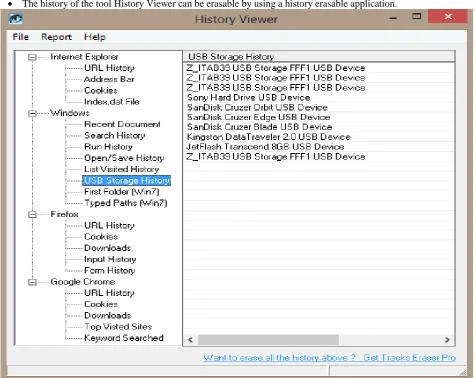
The History Viewer digital forensic tool analyse the data of Internet Explorer, Google Chrome, Firefox and Windows system. The digital forensic tool monitors the details of URL visited, keyword searched, cookies, download, top visited sites and Input history of the browsers[3]. The tool History Viewer analyses Windows system which gives the detailed information of systems USB storage, Files and folder accessed and the history of recent documents visited. The reports are generated for both the browser history and Windows system history.
The Advantages of History Viewer are as follows:
The History Viewer views all the history in order that has done on the computer and is a dominant and capable tool that helps easily.
The History Viewer tool that has a better user interface to view the history.
The History Viewer not only gives the history of browsers such as Internet Explorer, Google Chrome, Firefox but also gives information detailed information of systems USB storage, Files and folder accessed and the history of recent documents.
Volume 2, Issue 6, 2015
27 The History Viewer is only compatible with Windows versions.
The History Viewer views the detailed history of only browsers like Internet Explorer, Google Chrome and Firefox. The history of the tool History Viewer can be erasable by using a history erasable application.
Figure 1. History Viewer Interface
B. USBDeview
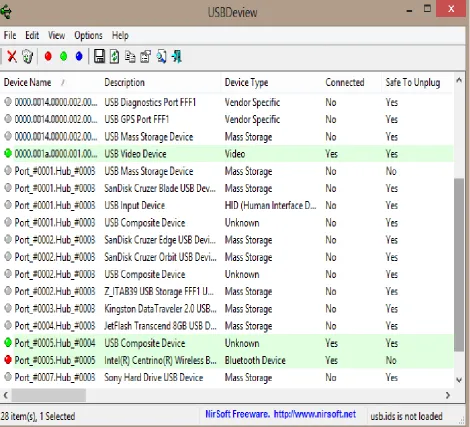
The USBDeview digital forensic tool detects and lists all the USB devices that are connected to the systems and reports are generated on the basis of device type, serial number, date created, last plug/unplug date etc[4]. USBDeview also allows you to uninstall USB devices formerly used, cut off USB devices that are presently connected to our computer, as well as to disable and enable USB devices. The USBDeview can be used on a remote computer, as long as we login to that computer with admin user.
The following is Icon Legend of USBDeview:
Table 1. Icon Legend of USBDeview[4]
The device is not connected.
The device is connected. It's safe to physically unplug the device without disconnecting it.
The device is connected. You must disconnect the device from USBDeview or from Windows "Safely Remove Hardware" option before you physically unplug it.
The device is disabled.
The Advantages of USBDeview as follows:
The main advantage of USBDeview is that we can determine Corrupted USB devices information like USB flash drives so after we know the corrupted flash drive information, we can repair it by updating its firmware .
USBDeview is user-friendly and is simple to use. The Disadvantages of USBDeview as follows:
Volume 2, Issue 6, 2015
28 How to overcome the Disadvantages:
We cannot disable or enable USB devices on 32-bit system, so for that we must download the 32-bit version of USBDeview.
In order to bypass bad driver problem, we should turn off the 'Retrieve USB Power/Version Information' option: USBDeview.exe /Retrieve USBPower 0.
Figure 2. USBDeview Interface
C. iSafe
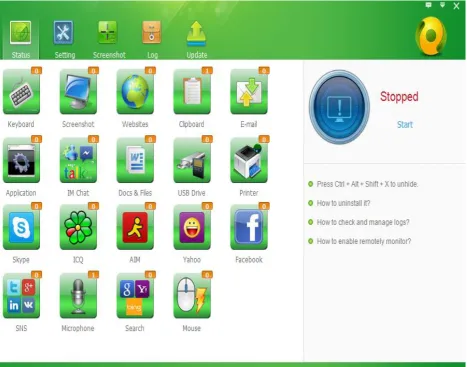
iSafe is a network and system monitoring digital forensic tool[5] which records keystroke, captures the screenshots of the system, shows which application is running on the system, records mouse click events, analyses the network and gives us the details of the websites visited.
The Advantages of iSafe are as follows:
iSafe monitors most actions, including websites visited, print jobs, attached drives, microphones and file sharing[6].
iSafe has tools for blocking activities, and it supplies secure AES 1,024-bit encrypted log files. iSafe monitoring software is simple to install and use, even for those with no IT experience. It tracks nearly all types of activities and provides content-based blocking[6].
The Disadvantages of iSafe are as follows:
Volume 2, Issue 6, 2015
29
Figure 3. iSafe Interface
D. Recuva
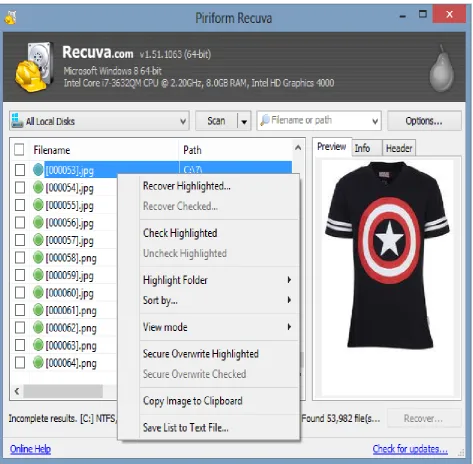
Recuva is an important file recovery software used to back up deleted file data information accidentally done by the user from their Windows PC, recycle bin or from an MP3 player[7]. It has an integrated working software which recovers all our data, files, photos, media contents at just a blink of a click. All we need to do is to download the free limited period version to check how things work. Not only it supports our PC, but supportability extension to memory cards, USB flash drives and our iPods are also covered in the software use.
The Advantages of Recuva are as follows:
Recuva restores all the important write ups we had written in our word document previously in last 5 hours of time. The software is tremendously useful to recover word file write ups especially when it's not being saved. Recuva's portability has gain a lot of appreciation in recent past for its ease of use without even installing the
software. The exercise is to a certain extent effortless and somewhat at the need of an emergency on other devices rather than our own device, we can use it with ease without installing on the other device.
It stores the information of the email before we can in point of fact delete it. It is based on that foundation of information which was saved prior to deletion of the file, which recovers our data. When we use Recuva to restore back the email, it recovers it in form of .ZIP file format.
The Disadvantages of Recuva are as follows:
Recuva's main disadvantage is that it has no filters. Recuva will not recover files deleted with Ccleaner. Scans for about 6 hours a 80Gb Partition (C:).
Recuva doesn't cover many formats and for some reason can't search portable media. From time to time it does random crashes (Not giving any reason of some kind). Recuva doesn't manage to find some of the pictures.
How to overcome the Disadvantages:
Volume 2, Issue 6, 2015
30 Habitual records backup is an essential plus point to have when trying to recover after a data loss event, but they
do not prevent user errors or system failures.
Figure 4. Recuva Interface
E. IP Finder
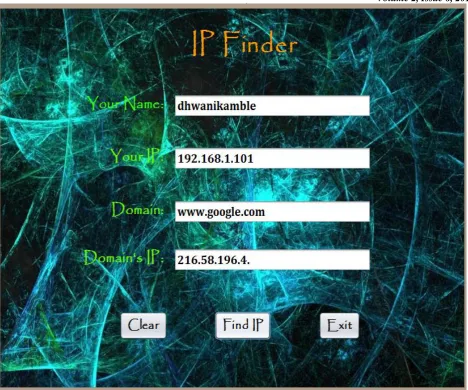
IP Finder is a digital forensic tool which is used to find the IP address of any URL typed. This tool is used to investigate the IP address over the network. This tool is a simple program that gives us our IP address for any website that may needed. The Admin has to enter the domain name in the domain name text field and then click on find IP. This tool uses the network to determine the IP address of that particular domain.
The Advantages of IP Finder are as follows:
IP Finder digital forensic tool is easy to handle and understand.
IP Finder digital forensic tool can be used even for those with no IT experience. This tool generates the result of IP address very fast.
The Disadvantages of IP Finder are as follows:
There is no additional option to investigate the IP address obtained.
Volume 2, Issue 6, 2015
31
Figure 5. IP Finder Interface
F. Traffic Investigator
The Traffic Investigator is the tool that captures all incoming packets passing through the network. The Traffic Investigator digital forensic tool investigates each packets passing through the network and identifies if attack is made on the system. If the Attack has been identified it displays the IP address of the attackers packet. Basically the tool Traffic Investigator can detect only two types of attacks i.e. SYN Flood attack and UDP Flooding attack. The tool Traffic Investigator displays which type of packet it is, it displays the source IP address and also displays the destination IP address.
The Advantages of Traffic Investigator are as follows:
Traffic Investigator digital forensic tool is easy to use interface
Traffic Investigator digital forensic tool investigates the incoming packets as well as identifies the attackers packet .
The Traffic Investigator tool is platform independent and is flexible. Traffic Investigator tool also identifies the origin of attack.
Easy to add knowledge of new types of attacks. The Disadvantages of Traffic Investigator are as follows:
When the tool Traffic Investigator captures the packets and identifies an attack it does not have enough bandwidth to communicate in the network and makes the system run slow and eventually hang.
Volume 2, Issue 6, 2015
32
Figure 6. Traffic Investigator Interface
G. IP Locator
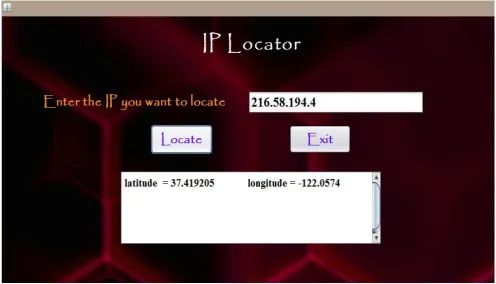
The IP Locator is used to locate the main router of the entered IP address. The location is determined using the network and then displayed to the Admin. The Location of the entered IP address is displayed in the form of latitude and longitude.
The Advantages of IP Locator are as follows:
IP Locator is simple and easy to use, and it is user friendly. The Disadvantages of IP Locator are as follows:
Volume 2, Issue 6, 2015
33
Figure 7. IP Locator Interface
III. RESULTS AND DISCUSSIONS
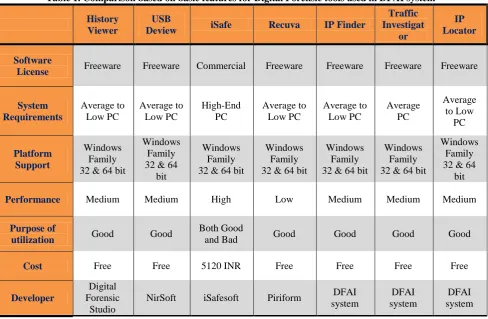
The Digital Forensic tools such as History Viewer, USBDeview, iSafe, Recuva, IP Finder, Traffic Investigator and IP Locator are mapped with various basic features as shown in Table 1.
Table 1. Comparison based on basic features for Digital Forensic tools used in DFAI system
History Viewer
USB
Deview iSafe Recuva IP Finder
Traffic Investigat or IP Locator Software
License Freeware Freeware Commercial Freeware Freeware Freeware Freeware
System Requirements Average to Low PC Average to Low PC High-End PC Average to Low PC Average to Low PC Average PC Average to Low PC Platform Support Windows Family 32 & 64 bit
Windows Family 32 & 64
bit
Windows Family 32 & 64 bit
Windows Family 32 & 64 bit
Windows Family 32 & 64 bit
Windows Family 32 & 64 bit
Windows Family 32 & 64
bit
Performance Medium Medium High Low Medium Medium Medium
Purpose of
utilization Good Good
Both Good
and Bad Good Good Good Good
Cost Free Free 5120 INR Free Free Free Free
Developer
Digital Forensic
Studio
NirSoft iSafesoft Piriform DFAI system
DFAI system
DFAI system
Based on the Digital Forensic tools such as History Viewer, USBDeview, iSafe, Recuva, IP Finder, Traffic Investigator and IP Locator various conditional requirements are defined and mapped to it, specifying whether these Digital Forensic tools satisfies the conditions or not. The comparison based on conditional requirements for Digital Forensic tools used in DFAI system is shown in Table 2.
Table 2. Comparison based on conditional requirements for Digital Forensic tools used in DFAI system
History Viewer
USB
Deview iSafe Recuva IP Finder
Traffic Investigator
IP Locator
Does the tool support digital
source evidence?
Does the tool support timestamp and
date?
×
×
×
×
×
Does the tool monitors online
Volume 2, Issue 6, 2015
34 Does the tool
supports data
recovery?
×
×
×
×
×
×
Does the tool support Windows
registry monitoring?
×
×
×
×
Does the tool support File
integrity checking?
×
×
×
×
×
×
Does the tool generates
reports
Does the tool support Detection of attack feature?
×
×
×
×
×
×
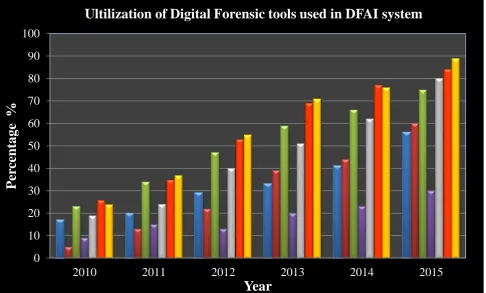
Figure 8. Utilization of Digital Forensic tools used in DFAI system from last 5 years
0
10
20
30
40
50
60
70
80
90
100
2010
2011
2012
2013
2014
2015
P
er
centa
g
e
%
Year
Volume 2, Issue 6, 2015
35
History Viewer USBDeview iSafe Recuva IP Finder Traffic Investigator IP Locator
As computer crimes is budding rapidly, the tools used to fight such crimes is developing and growing faster. The Utilization of Digital Forensic tools used in DFAI system from last 5 years is shown in Figure 8. The figure shows how the use of Digital Forensic tools is increasing.
IV.CONCLUSIONS
Taking into consideration the increase in the rate of crimes using computers, we have studied the various Digital Forensic tools which plays an crucial role in finding the digital evidences from digital sources, based on comparison of basic feature and conditional requirements to Digital Forensic investigation, we can see that each tool is better to utilize in some or the other area of investigation process. We conclude that the Digital Forensic tools used in DFAI system is good to use in Digital Forensic investigation which monitors the network and system as well, and in future will prove better tools in finding the vital Digital evidence.
ACKNOWLEDGEMENT
I would like to sincerely thank Assistant Prof. Nilakshi Jain and Assistant Prof. Swati Deshpande for their advice and guidance at the start of this article. Their guidance has also been essential during some steps of this article and their quick invaluable insights have always been very helpful. Their hard working and passion for research also has set an example that I would like to follow. I really appreciate their interest and enthusiasm during this article. Finally I thank the Editor in chief, the Associate Editor and anonymous Referees for their comments.
REFERENCES
[1] Ravneet Kaur, Amandeep Kaur, "Digital Forensics". International Journal of Computer Applications, Volume 50 – No.5, India, 2012.
[2] K. K. Sindhu, Dr. B. B. Meshram, " Digital Forensic Investigation Tools and Procedures". International Journal of Computer Network and Information Security,4, 39-48, 2012.
[3] History Viewer. [Online]. Available: http://www.historyviewer.net/. [Accessed: June. 02, 2015].
[4] USBDeview. [Online]. Available: http://www.nirsoft.net/utils/usb_devices_view.html. [Accessed: May. 30, 2015]. [5] Preeti Tuli, Priyanka Sahu, "System Monitoring and Security Using Keylogger". International Journal of Computer
Science and Mobile Computing, Vol. 2, Issue. 3,pp. 106-111, Chhattisgarh, 2013.
[6] iSafe. [Online]. Available: http://employee-monitoring-software-review.toptenreviews.com/isafe-review.html. [Accessed: May. 27, 2015].