A Framework for Using Cost-Benefit Analysis in
Making the Case for Software Upgrade
Azad Ali
Eberly College of Business – Indiana University of Pennsylvania,
Indiana, PA, USA
Abstract
This paper proposes using an economical model in making the case for software upgrade at or-ganizations in general and at educational institutions in particular. Cost-benefit Analysis (CBA) is a model widely used in economics by various organizations to select among alternatives and to justify making certain investments. Spending money or investing in software upgrade costs may need to be justified in some cases. In these cases, it would be helpful to use a framework such as the CBA to justify and make the case for investing in software upgrade. The paper intends to help with determining the feasibility (or lack of it) of paying for software upgrade by introducing this framework.
The main contribution of this paper lie in the introduction of a framework that can be used by academic institutions when tackling a decision or contemplating the purchase of software up-grades. Such a framework can then be systematically applied to justify and make the case for or against purchasing software upgrade. A secondary contribution for the paper is to suggest meth-ods for converting factors influencing software upgrades into monetary values so to be able to plug values in the proposed framework. To achieve both objectives, the paper articulates the fac-tors that stand for and against the purchase of technology upgrade. It then suggests ways convert these factors into monetary values. The final contribution of the paper is the introduction of the framework that is developed along the CBA model so it can be used when discussing investing in software upgrade.
Keywords: Cost/benefit analysis and Software upgrade, Justifying software upgrade, budget software upgrade, software upgrade and economy.
Introduction
In an environment of continuous change, organizations are faced with the challenge of deciding when to invest in information technology upgrades. While investing frequently is costly and at times risky, waiting too long can lead to lost competitiveness. Further, in-vesting at a given time can preclude a firm from taking advantage of better technologies in the future (Mukherji et al, 2006, p. 1684).
Software upgrades are numerous and at times they are costly. Not a day passes by without hearing about the release of a new version of software of some type or another. These releases are most likely accompanied by numerous promises for Material published as part of this publication, either on-line or
in print, is copyrighted by the Informing Science Institute. Permission to make digital or paper copy of part or all of these works for personal or classroom use is granted without fee provided that the copies are not made or distributed for profit or commercial advantage AND that copies 1) bear this notice in full and 2) give the full citation on the first page. It is per-missible to abstract these works so long as credit is given. To copy in all other cases or to republish or to post on a server or to redistribute to lists requires specific permission and payment of a fee. Contact [email protected] to request redistribution permission.
better performance of the new version of the software over the older version and the new oppor-tunities that the new release offers. While some of these promises are true and may be beneficial, but the frequency of releasing the upgrades may make paying for these expenses difficult to jus-tify. Moreover, the advantages from these new versions are hard to recognize which add to the difficulty of justifying investing in software upgrade (Goldsborough, 2003, . Goldsborough, 2009, Ngwenyama et. al 2007)
The benefits generated from Information Technology (IT) investments are often hard to recog-nize. Davis, Dehning and Stratopoulas (2002) noted “There is a belief that the payoffs from in-vestments in information technology (IT) are difficult to recognize, and therefore a sustained competitive advantage from an IT-enabled strategy is difficult to distinguish from a temporary competitive advantage” (p. 705). For the reason of this difficulty, IT managers may have to put extra efforts to justify or explain the feasibility of investing in new IT upgrades.
Economists and financial analysts often use different models in order to make the case for the feasibility of certain investments or when selecting among alternative investment options. They use measures such as Return on Investment (ROI), Net present value (NP) or Internal Rate of Re-turn (IRR) to show the feasibility (or lack of it) of certain projects or when comparing among al-ternative projects. However, analysts in the information technology (IT) field contend that such models may not be directly applicable to IT expenses (Bhatt et al, 2010, Dehning, 2002, Davis & Stratopoulos, 2003).. In other words, the return from IT expenses is not easy to measure which make it more difficult to use ROI or similar models for IT expenses.
This paper suggests using a model to make the case to invest in software upgrade. It provides a framework for using the Cost-Benefit Analysis (or CBA) model for making the case for investing in such upgrade. The paper creates a framework to make it possible for IT managers to use the CBA model to identify the costs associated with software upgrade along with their returned bene-fits. The framework intends to help with determining the feasibility (or lack of it) of paying for software upgrade. Although the model may be used all by IT managers in general, but the empha-sis of this paper is on using the model at academic institutions in general and colleges and univer-sities in particular.
Study Plan
This paper aims at creating a framework where it makes it possible to use Cost-Benefit Analysis model in making the case to invest in software upgrade. The paper introduces the factors of soft-ware upgrade where they are applicable for inclusion in the CBA model. To achieve creating the framework, the paper is going to proceed in the following order:
- It starts by explaining about the economic model of “Cost-Benefit Analysis” to shed light on their application and the advantages that can be gained from their introduction. It also discusses the limitations that make it difficult to use and suggests ways to minimize these limitations.
- It discusses the costs investing with acquiring or paying for software upgrade. Some of these costs are direct purchasing costs, while others are indirect that may result from in-troducing the software upgrade. The focus of this section will be the costs that will occur at academic institutions in general and college and universities in particular.
- It elaborates on the benefits that result from introducing software upgrade. Some of these benefits come directly from introducing the upgrades. Other benefits are not direct and may result as a cost saving measures from introducing the software upgrade. Similar to the costs, the discussion of benefits will focus on the benefits that software upgrade brings to colleges and universities in particular.
- Based on the discussions indicated in the two steps mentioned earlier, a framework or a table is going to be introduced and will list all relevant costs and benefits that may be ex-pected from introducing a new version of software to the organization.
Although the term “framework” is used loosely here to detonate systemized approach to using the CBA for studying costs of software upgrade. But in regards to this paper, the framework is meant a skeleton that lists the costs and benefits of software upgrade that enables it to be systematically used for justifying paying for software upgrade.
About Cost-Benefit Analysis
The basic premise of CBA is that when considering investing in a project, the assumption is that there is cost (s) associated with the project and there is also potential benefit (s) expected from the project. The CBA notes that by listing, by studying and by analyzing these costs and benefits be-fore making the investment decision would be helpful in many ways. In the least, this kind of study and analysis provide an overall picture regarding the project and it may lead to a better de-cision making regarding their investment in the project.
To this extent, different definitions and approaches are followed regarding the use of the CBA and their application. CBA has been defined and explained from various perspectives. Levin and McEwan (2001) explained it from the perspective of comparing between alternatives and pro-vided the following definition:
Cost-Benefit (CB) analysis refers to the evaluation of alternatives according to their costs and benefits when each is measured in monetary terms. Since each al-ternative is measured in terms of its monetary costs monetary values of its bene-fits, each alternative can be examined on its own merits to see if it is worthwhile. In selecting from among several alternatives, one would choose that particular one that had the highest benefit-cost ratio (or, conversely, the lowest ratio of costs to benefits) (p. 14).
Adler and Posner (2006) tackled it from the perspective of one project and whether to take on the project or not and introduced the following definition:
In simple terms, CBA is a device for converting the utility losses and gains from a project or regulations into dollar values and aggregating. To each person af-fected by the project (whether good or ill), one can calculate a “compensation variation,” the amount that would make her as well off as she should be in the status quo – based on her actual preferences. If the sum of compensation varia-tions is positive, the project is approved; otherwise, it is rejected. (p. 13).
In terms of advantages and limitations of using this model, advocate of using the CBA note the benefits of their use in the planning phase of the project and suggest that it potentially brings the following advantages:
- It works as a persuasion tool; it helps in persuading managers, investors and stockholders for the viability of the investment (Mishan, 2007).
- It works as a planning tool, it helps to identify the resources needed for the project or al-ternatives under consideration (Kingma, 2001).
- It works to create ideas for future subsequent projects that result for similar investment (Emile, 2011).
At the same time, using the CBA has limitations as well. The most common limitation is that in most cases, the CBA compares costs and returns in terms of monetary values (Levin and McE-wan, 2001, Brent, 2011). In other words, in order to be able to use the CBA for evaluating an
in-vestment in projects, the costs and benefits need to be converted to monetary values (dollar or something similar). Then all the costs and benefits are totaled and aggregated, the difference be-tween the costs and benefits is what determines if these is expected benefit (a net gain) or a cost (net loss) from the project(s). If alternatives are discussed in the applications of the CBA, then it can rank each alternative in terms of their expected net gain or expected net loss. So the key for using the CBA is first to quantify the costs and benefits and second assign monetary value to each anticipate cost or benefit.
The return from IT expenses or investments are often difficult to quantify or to assign a monetary value to them. For example, what will be the return value of the purchasing X number of com-puters for data entry clerk. Answers to these questions are not calculated easily. But all analyses of other expenses and investments are dependent on quantities being expressed in terms of the expected benefits. By not quantifying the expected gains from technology upgrade, this may put the proposals at a disadvantage.
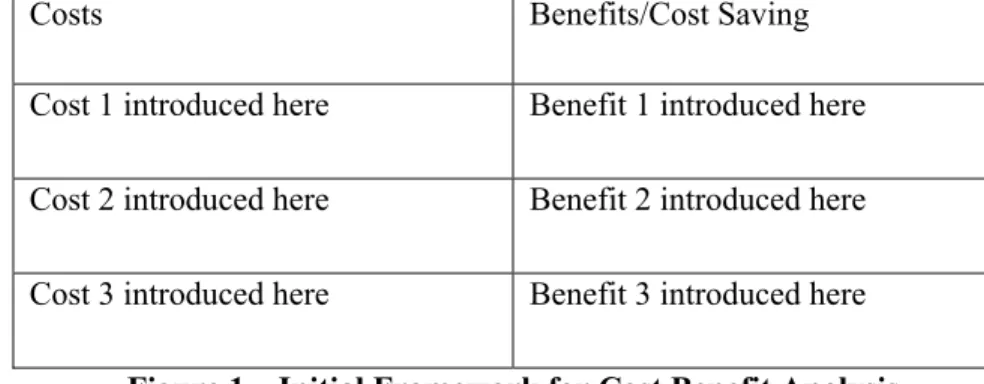
The author of this paper is cognizant of these limitations, thus will attempt to provide general de-scription and some suggestions for quantifying each of the associated costs and returned benefits. But the general approach that will be followed in this paper is to start by listing a skeleton table to start an empty framework. Then each item will be added to the framework as the discussion pro-ceeds in regard to the costs and benefits associated with investing in software upgrade. Within the discussion, the paper will provide suggestions for quantifying or calculating each of the costs and benefits being discussed. Figure 1 below shows the table and how each item is going to be added to the table.
Costs Benefits/Cost Saving
Cost 1 introduced here Benefit 1 introduced here Cost 2 introduced here Benefit 2 introduced here Cost 3 introduced here Benefit 3 introduced here
Figure 1 – Initial Framework for Cost Benefit Analysis
Software Upgrades - Costs
It is often thought that the cost of software updates is limited to the purchasing cost or just paying for licenses or similar fees. However, the cost of software upgrade often extend beyond this, it may cover a wider range of expenses, some of which are directly calculated while others are combined with other costs. Notess (2008) for example, reported that introducing new software upgrade brings many challenges that included the additional cost that the organization is required to pay for, the challenge of learning/relearning the new version of the software, and additional administrative procedures associated with introducing the new software. Stocker and Dugan (2003) explained that the beginning phases of introducing new software are often accompanied by problems that minimize the working of the organization, thus incurring more cost as a result of the upgrade. The remainder of this section elaborates on the different costs that are associated with introducing software upgrade to some organizations.
Purchase Cost
The initial cost of purchasing or paying for software upgrade is probably easier to quantify and their exact figures may be directly calculated. These figures can come from licenses written, con-tracts signed, purchase orders issued or any similar documents that may be used to purchase or pay for software upgrade (Parsons, 2010). But the purchase cost may go beyond this direct pur-chase calculation. It may include such costs as installations, troubleshooting, security, patches and any additional costs. In other words, at the time of planning the cost of the purchase, additional support cost may need to be taken into consideration in order to plan ahead and to avoid waste on software upgrade.
Reports of the waste cost on software purchases are numerous and it may work against future jus-tification for software upgrade. Hopkins and Kessler (2002) reported that U.S. Companies threw away $130 billion in the past two years on unneeded software and other technology. The same study found out that of 25 years of tech spending worldwide, companies waste as much as 20% of the of the $2.7 billion spent annually on technological upgrades. A 2004 Standish Group study reports that 71% of these IT projects did not meet top management’s expectations (The Standish Group, 2004).
Academic departments may have numerous software installations. A particular software when purchased in a given college or university may need to be installed multiple times. Thus the cost of software is often not limited to one license or a few licenses; instead it has to be purchased to cover the labs and the faculty/staff that use it (Arteaga and Lucas, 2005). Additional administra-tive cost may need to be taken into consideration as well.
In terms of quantifying these expenses, different approaches may be applied. The purchasing cost can be calculated based on actual purchase documents. Any additional cost can be added similar way. In regards to the cost of support, most often colleges and universities have technical support department. Brotherson (2000) suggested different approach for estimating the cost of support. The approach charges each other departments according to the type of support provided. For ex-ample, desktop support is charged differently than security support and different than installations support. Each is charged separately according to a table provided for this purpose. A similar ap-proach may need to be followed in terms of estimating the cost of support when contemplating software upgrade.
Cost of Learning New Software
New versions of software bring different changes over the older versions. They may have differ-ent interface, they may also follow differdiffer-ent approach to complete similar tasks. In short, software upgrade may bring different new items that are needed to be learned (or relearned). This learning process takes time. During the time of learning (or re-learning), individuals may experience a slowdown in their work. All of this is termed as “learning curve” and it has initial cost associated with it. Rastogi (2009) explained about learning curve in the following:
If some activity or work operation is done repeatedly, the time required for its completion declines gradually. The rate of decline is regular. It represents the re-sult of experience or learning or progress. The graphical relationship between the time per unit (activity/Operation/Product) and the cumulative quantity, repre-sented along X, Y and Z axes respectively, is termed experience or learning or progress curve. Learning curves for production show that as the quantity of units manufactured doubles, the number of direct labor hours required for producing one unit decreases at a uniform rate. The curves vary by product and sector but all of them show the effect of accumulating experience on cost reduction. (p. 45)
In production and manufacturing environments, learning curve has to be dealt with in times of production schedules, time entries and adjustment to working hours. In academic environment and in terms of instruction, the learning curve may have to be dealt with it differently. It is dealt with in terms of preparation time, lessons planned, textbooks used, evaluation adopted and differ-ent methods used in the classroom.
There are various approaches to deal with the learning curve in order to minimize the time for this learning for the purpose of learning (or re-learning) about software upgrade. This can be dealt with through formal training, informal training of will be left for self-training (or self-learning). The cost of each approach can be calculated separately. Formal training is followed by attending official training classes or sessions and their cost can be calculated based on what is paid. Infor-mal training can be provided by either having a support individual which may be paid for leading the organization to learn about the software. This cost can be estimated or allocated based on past experiences or based on some other comparative studies. The self-training or self-learning is where the individual learn about the new software on his/her own. During the learning curve, he/she may experience slowdown in other activities that is assigned to them. This slowdown is considered a cost to the organization and may need to be accounted for. Estimating the time that it takes for the learning curve may be one method that deals with quantifying such cost of the learn-ing curve.
Additional Software/Hardware Cost
In some instances, the introduction of new software requires purchasing new and more advanced hardware. In other cases, the new software may not require the organization to purchase new hardware. The decision of new hardware is dependent on the minimum requirements of the new software. If the existing hardware meets the minimum requirements of the new software, this will be less of an issue. On the other hand, even if the current hardware meets the minimum require-ments, in some cases the new software may slow down or affect performance of the existing hardware.
In terms of compatibility with software, most of the new software is compatible with the older version (termed backward compatibility). In other words, documents saved under older version will work in the same way under the new version of the software. However, the new version of the software may affect other installed software and it may create conflicts with other existing software. This in turn creates additional cost in terms of time spent to locate and fix the incom-patibility resulted from introducing the new software.
The issue of incompatibility with existing hardware/software is crucial to different departments at colleges and universities. One particular issue is that at colleges and universities is that faculty teach at computer labs that are specific for teaching but there also general public labs that are available to the students. The teaching labs may often be limited to one department but the gen-eral public labs are open to students enrolled in all departments. Given the different departments involved in any given lab, this may create multitude of software installations and may cause con-flicts among the installed software (Ali 2011).
The incompatibility among software may not be experienced immediately after the installations of the software as there may be delayed effect that may appear as a result of certain condition or certain requirement that may cause the software to malfunction. Thus, the result of this incom-patibility may take an extended period to show up.
The cost of additional requirements of hardware and software may be calculated based on the minimum requirements of the new software. Software vendors often release specifications for the minimum requirements for the software in order to function. They also release requirements for
optimal performance. The choice of performance of software can be calculated in both ways, it can by comparing the existing software/hardware with what is required.
In terms of support, fixes, patches and incompatibility, this may have to be estimated as well. Past experience may help in estimating the time required for solving the incompatibility issues and making the new software works at ultimate capacity. So this can be calculated and presented as well.
Software Upgrades - Benefits
Upgrades are a part of computing life. Few programs from a decade ago run well on modern computers and new features are offered as an enticement to upgrade. The IT economy revolves around the frequent-update. Is your computer slowing down? Buy a new one. Is your monitor too bulky? Move to a flat screen. Do you need to do your taxes? Shell out a new program every year. In general, software updates come out every few years, promising new features that are designed to make the program easier to use – and to get consumers to buy the upgrades. …..For the new technophile, upgrades can be exciting for their potential new fea-tures, and the challenge of learning new tools is incentive to upgrade (Notess, 2008, P. 42).
Software vendors frequently provide new versions of their software and send them to the market. These new releases often hold promises of better features, improved functionality and enhanced appearance (Goldsborough, 2009; Paine, 2000; Irani, et. al, 1997). These kind of promises put pressure on different organizations to upgrade their software. Such upgrades are becoming in-creasingly necessarily to the survival of many IT organizations.
Goldsborough (2003) noted that adopting additional software can bring the following advantages to the organization: New features, enhanced speed, improvement of the competitive advantage of the organization and increase productivity. Paine (2000) acknowledged the challenges associated with software upgrade but noted that such upgrades have the potentials of improving business operations expenses and data throughput.
Most studies acknowledge that there are benefits associated with upgrading software to newer versions, but the details of these benefits remained unclear. The remainder of this section details some of the potential benefits that can be brought to the organization from upgrading software. It also suggests ways to quantify these benefits so to present them in the framework that will be pre-sented at a later section. The benefits can be calculated either in form of direct benefits that are brought to the organization or they can come in forms of cost reduction.
New Features
Software upgrades always bring new features (Albright, 2008; Goldsborough, 2003; Goldsbor-ough, 2009; Hicks & Nettles, 2006). These may include simple changes to existing features or add new features that extend the use of the software to other areas. For example, word processing software may include new features that allow for a wider range of image and media editing. This may allow the use of the same word processing software to other areas like image editing, bro-chure and media preparation.
In most cases, academic institutions are supposed to be training students for the job market. Al-though there are various theories on the purpose and goal of academia, but the preparedness for the job market is a prime and common goal among most. The new features of software upgrades bring opportunities to the marketplace, as some of these new features create opportunities for those who were trained on them.
There is a general notion that when a major software company (like Microsoft, Adobe, Oracle or others) releases a new version of the software, that the market moves toward the new version. Thus, more companies are going to switch to the new version and they will be in need to hire new people who are trained on the new version of the software. This creates what is termed as “scar-city of talents” or a vacuum in the supply of graduates who are trained on the new version of the software. For example, when Microsoft updated their Visual Studio version 6 (VS6) to Visual Studio .NET (VS .NET), this created a scarcity of talents and demand for people who are trained on the .NET platform (Ali and Wood, 2004). In this case, the programs that moved first from VS 6 to VS .NET, were able to fill this gap and their students were able to find jobs in this new plat-form.
The benefits of the new features provided by the new software can be calculated in different ways. It can be computed based on the jobs that it potentially provides for their students. It can also be calculated in terms additional opportunities that the new features provide for the students. The new features my help in reducing cost in some cases. For example, it may take a software version a longer time for editing video and may needed additional equipment. If the newer of the software is able to complete the same task without the equipment, purchasing of the new software will help in reducing the cost of the new equipment.
Enhanced Speed
Speed of the software often gets faster with new versions. This can always be considered as a benefit in terms of functionality and performance. In other words, giving all other conditions equal, a person with a higher speed of the software is able to complete the same task in less time. This in turn leads to enhanced productivity; improved performance and reduced frustration over delays at work (Mehra & Seidman, 2006; Paine, 2000).
Speed of processing in terms of software introduction is crucial to teaching in academic institu-tion and their work. Speed of the technology is considered essential when taking into considera-tion the number of students, faculty, staff and administrators working on the technology at the same time. Enhancing the speed of one piece of software on one computer may benefit multiple faculty, multiple students, and different departments. The same computer in one lab may be used by different faculty and is accessed by different students. This in turn creates a chained benefit to all involved.
The enhanced speed may lead to reduction of cost. By having a faster software, faculty may have to spend less time working on the software, they may be able to free their time and spend more time on advising, publishing or other administrative activities. By doing so, the department may be able to reduce these costs. The benefit (or cost reduction) of the new software can be estimated based on the number of hours (minutes, days) that can be saved from introducing the new soft-ware with the higher speed. Although calculating speed of completing tasks may be complicated by other factors, but reduction of software processing speed helps decrease the overall time re-quired to complete tasks and thus provide benefit to the organization.
Competitive Advantage
The definition of competitive advantage as it is used here means performing business activities better than the competition. Superiority established by a com-paring a company’s performance to major competitors in the same industry. Thus competitive advantage is synonymous with the superior performance. Differ-ences in how companies perform strategic activities or differDiffer-ences in which stra-tegic activities they choose to perform are the basic of competitive advantage (Davis, Dehning and Stratopolus,2002, P. 706).
There are different factors that contribute to the competitiveness of an organization. Among these include productivity, planning, financial position and others. Among these also is technology. Yes technology contributes to competitive advantage of the organization (Rastogi, 2009, Zhang and Lado, 2001).
Davis, Dehning and Stratopoulos (2003) suggested that technology enhances competitive advan-tage of the organizations in three ways: By reducing the overall cost of operations, by enhancing the process at which tasks are completed and by introducing new opportunities for operations. Thus, it is considered that an organization with more superior technology to have more competi-tive advantage over others with less superior technology given everything else equal (Scherer, 1999, Bhatt et. al, 2010).
In regards to academic institutions, there are different factors that contribute to competitive ad-vantage. One of them is superior technology. Given the same analogy that was mentioned earlier, a college with more recent technology has more competitive advantage than another with less recent technology. An academic program with superior technology is able to fulfill the latest de-mand of the better than others with older technology.
Having said that, the issue is how to quantify and measure competitive advantage. In financial institutions, there are various reports that indicate the position of the organization in the market-place. At academic institutions, the competitive advantage may be measured in terms of students accepted, program offered, accreditation gained. The best contribution that new technology brings to the department is through admitting more students into their programs. Thus the program may be able to estimate the number of new students that will be brought to the program as a result of introducing the new software.
The Framework for Cost Benefit Analysis
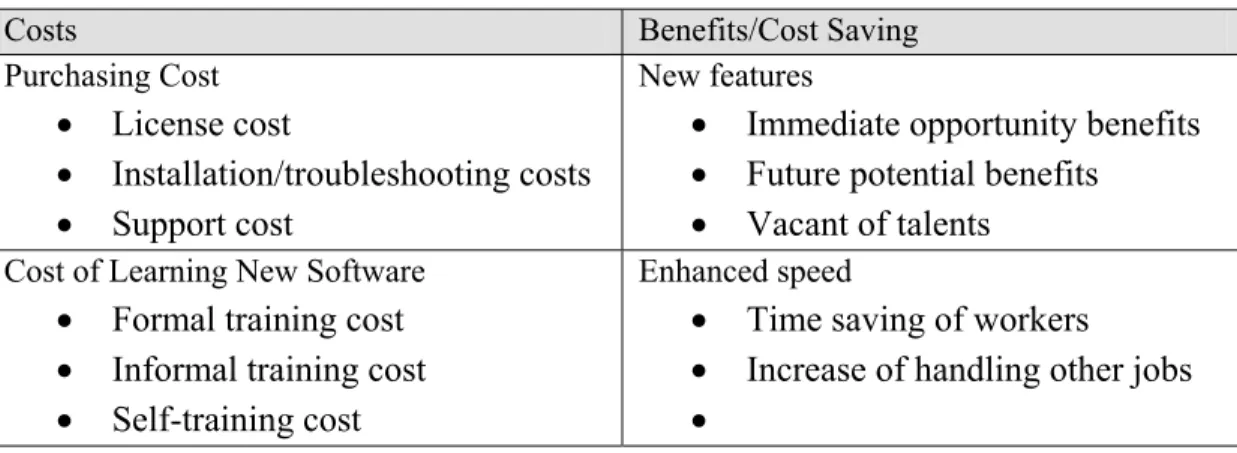
After completing the discussion of the different costs associated with introducing software up-grade and then the various benefits they potential bring, it is time to introduce the framework that this study intended to develop. Table 1 below shows the framework for making the case for soft-ware upgrade. In the first column, the associated costs are listed along with a bullet point for each sub item. Then, the second column shows the benefits gained from software upgrade, these are grouped under three categories and each has sub categories. It is useful to say that the benefits can be seen in terms of actual benefits or it can be seen from actual cost reduction.
Table 1- A Framework for Cost Benefit Analysis and Software Upgrade
Costs Benefits/Cost Saving
Purchasing Cost
License cost
Installation/troubleshooting costs
Support cost
New features
Immediate opportunity benefits
Future potential benefits
Vacant of talents
Cost of Learning New Software
Formal training cost
Informal training cost
Self-training cost
Enhanced speed
Time saving of workers
Increase of handling other jobs
Costs Benefits/Cost Saving Additional hardware/software cost
Additional required hardware
Additional required software
Reaching optimal performance
Competitive advantage
Reduce operational costs
Enhancing process
Introducing new opportunities
References
Adler, M., & Posner, E. A. (2006). New foundations of cost-benefit analysis. Cambridge, MA: Harvard University Press.
Albright, B. (2008). Ready to upgrade? Behavioral Healthcare, 28(10) 28-29.
Ali, A. (2011). Software upgrade justification – Making a case. Proceedings of the Informing Science and Information Technology Education Conference, Novi Sad, Serbia, 22-31.
Ali, A., Wood, D. (2004). Transition from teaching VB6 to VB .NET. Issues in Information Systems, 5(1), 1-7.
Arteaga, C., & Lucas, T. (2005). So many labs, so little time. Proceedings of the 33rd annual ACM-SIGUCCS conference on User services. 192-196. Retrieved April 20, 2009 from ACM Digital Library
http://www.acm.org/dl
Bhatt, G., Emdad, A., Roberts, N., & Grover, V. (2010). Building and leveraging information in dynamic environments: The role of IT infrastructure flexibility as enabler of organizational responsiveness and competitive advantage. Information & Management, 47,(7-8), 341-349.
Brotherson, D. (2000). There is no such thing as free support. Proceedings of the 28th annual ACM
SIGUCCS Conference on User Services: Building the Future, 29-32. Retrieved December 5, 2011
from ACM digital library http://www.acm.org/dl
Brent, R. J. (2011). An implicit price of a DALY for use in a cost-benefit analysis of ARVs. Applied Eco-nomics, 43(10-12), 1413-1421.
Davis, L., Dehning, B., & Stratopoulos, T. (2003). Does the market recognize IT-enabled competitive ad-vantage? Information & Management, 40(7), 705-716.
Dehning, B., Richardson, V., J., & Stratopoulos, T. (2005). Information technology investments and firm value. Information & Management, 42(7), 989-1008.
Dehning, D, & Stratopoulos, T. (2002). DuPont analysis of an IT-enabled competitive advantage. Interna-tional Journal of Accounting Information Systems, 3(3), 165-176.
Emile, Q. (2011). Cost-benefit analysis and transport programming. Fiscal Studies, 32(1), 145-175.
Goldsborough, R. (2003). Computer savvy. Community College Week, 15(18), 19-22.
Goldsborough, R (2009, Nov 16). Windows 7 can wait until it's time to buy a new computer. Community
College Week, 22(7), 12, 2/3p. Retrieved from Academic Search Complete through EBSCOHost,
11/21/2010.
Hicks, M., & Nettles, S. (2006). Dynamic software updating. ACM Transactions on Programming Lan-guages and Systems, 27(6), 1049–1096.
Hopkins, J., & Kessler, M. (2002, May 20). Companies squander billions on tech. USA Today. Retrieved from EBSCOHost 11/18/2010.
Irani, Z., Ezingeard, N., & Grieve, R. J. (1997). Integrating the costs of a manufacturing IT/IS infrastruc-ture into the investment decision-making process. Technovation, 17(11/12), 695-706.
Kingma, B. (2001). The economics of information: A guide to economic and cost-benefit analysis for in-formation professionals. Englewood, CO: Libraries Unlimited, Inc.
Levin, H. M., & McEwan, P. J. (2001). Cost effectiveness analysis: Methods and application. Thousand Oaks, CA: Sage Publications.
Mehra, A., & Seidmann, A. (2006). The economics of software upgrades throughout the product life cycle.
Proceedings of 39th Hawaii International Conference on Systems Sciences. Retrieved from IEEE
11/18/2010.
Mishan, E. J., & Quah, E. (2007). Cost benefit analysis. Chicago, IL: Psychology Press.
Mukherji, N. A., Rajagopalan, B. B., & Tanniru, M. (2006). A decision support model for optimal timing of investments in information technology upgrades. Decision Support Systems, 42(3), 1684 –1696. Ngwenyama, O., Guergachi, A., & McLaren, T. (2007). Using the learning curve to maximize IT
produc-tivity: A decision analysis model for timing software upgrades. International Journal of Production Economics, 105, 524-535. Retrieved 11/18/2010 from ScienceDirect http://www.sciencedirect.com. Notess, G. R.(2008). The downside of upgrades. Online (Weston, Conn.) v. 32 no. 6 (November/December
2008) p. 42-4. Retrieved from Wilson Web 11/06/2010.
Paine, M. (2000). Making software upgrades a first-class experience: Issues, opportunities and speed bumps to consider for a smooth ride. Health Management Technology, 21(4), 22-23.
Parsons, J. (2010). Creative license. American Printer, 127(8), 12-13. Retrieved from EBSCOHost 11/29/2010.
Rastogi, P. N., (2009). Management of technology and innovation: Competing through technological
excel-lence. Los Angeles, CA: Sage Publishing.
Scherer, F. M. (1999). New perspectives on economic growth and technological innovation. Washington DC: Brooking Institute Press.
Stocker, E., & Dugan, J. B. (2003). When does it pay to make software more reliable? Proceedings of the 14th International Symposium on Software Reliability Engineering. 321-333. Retrieved November 11,
2010 from IEEE Computer Society.
The Standish Group (2010). Trends in IT value. Retrieved from
http://www.standishgroup.com/sample_research/index.php/trends_itValue.pdf
Wulf, V., & Jarke, M. (2004). The economics of end-user development. Communications of the ACM, 47(5), 41-42.
Zhang, M. J., & Lado, A. A., (2001). Information systems and competitive advantage: A competency-based view. Technovation, 21(3), 147-156.
Biography
Azad Ali, D.Sc., Associate Professor of Technology Support and Training at Eberly College of Business – Indiana University of Pennsylvania has more than 20 years of combined experience in the area of information systems. He holds a bachelor degree in Business Administration from the University of Baghdad, an M.B. A. from Indiana University of Pennsylvania, an M.P.A. from the University of Pittsburgh, and a Doctorate of Science in Communications and Information Systems form Robert Morris University.