Volume 4, No. 6, May 2013 (Special Issue)
International Journal of Advanced Research in Computer Science
REVIEW ARTICAL
Available Online at www.ijarcs.info
Virtual Machine and Network-Performance,Study,Advantages And Virtualisation Option
Miss. Snehal R.Dive
*1, Mr. Amit D.Ingale and Mr.M.R.Shahade
B.E I.T(Final Year)*1,2, Assistant Professor3 Jawaharlal Darda Institute of Engineering and Technology
Yavatmal (MS) INDIA
[email protected]*, [email protected]
Abstract: The interest in virtualization has been growing rapidly in the IT industry because of inherent benefits like better resource utilization and ease of system manageability. The experimentation and use of virtualization as well as the simultaneous deployment of virtual software are increasingly getting popular and in use by educational institutions for research and teaching. This paper stresses on the potential advantages associated with virtualization and the use of virtual machines for scenarios, which cannot be easily implemented and/or studied in a traditional academic network environment, but need to be explored and experimented by students to meet the raising needs and knowledge-base demanded by the IT industry. In this context, we discuss various aspects of virtualization – starting from the working principle of virtual machines, installation procedure for a virtual guest operating system on a physical host operating system, virtualization options and a performance study measuring the throughput obtained on a network of virtual machines and physical host machines
Keywords: Network Virtualisation, Performance Measurement, VMware ,Virtual machine.
I. INTRODUCTION
The concept of virtual machines was first developed by IBM in the 1960s to provide concurrent, interactive access to a mainframe computer. Each virtual machine is a replica of the underlying physical machine and users are given the illusion of running directly on the physical machine. Virtual machines also provide benefits like isolation, resource sharing, and the ability to run multiple flavors and configurations of operating systems with different set of software technology and configuration. Virtualization tools are the main subject of this study therefore; it is important to make a brief description of the available ones in the market. In this study, we have just focused on the VMware products [1] i.e. VMware Workstation and VMware Vcenter Converter. These are open source tools that are run under open source operating systems (OS), with the exception of VMware Server (currently free, but not open source), because of its widespread capabilities running both Windows and Linux platforms as compared to Microsoft Virtual PC or any other virtualization tool, which are only limited to their own software categories. It is important to remark that the similarity level between the virtual and real environment virtualization technique [2]. Although the industry uses diverse terms to describe these techniques, they are usually known as emulation, complete virtualization, para virtualization, and operating system (OS)-level virtualization. Some of the widely used are the following virtualization tools:
a. VNUML (Virtual Network User Mode Linux) [3] is an open-source general purpose virtualization tool – enables multiple virtual Linux systems (known as guests) to be run as applications within a normal Linux system (known as the host). As each guest is just a normal application running as a process in user space,
this approach provides the user with a way of running multiple virtual Linux machines on a single piece of hardware, offering excellent security and safety without affecting the host environment's configuration or stability. b. VMware Server [1], as we mentioned previously, is a free
virtualization product for Windows and Linux operating systems that implements full virtualization. It allows a physical computer to host some virtual machines, with different guest operating systems.
c. Virtual Box [4] is a x86 virtualization software to deploy virtual machines, destined to desktop computers and enterprise servers, which also implement full virtualization. It allows executing an OS without modification.
d. Qemu [5] is an open source generic emulator that reaches an acceptable emulation speed using dynamic translation. It executes virtual machines under Linux or Windows. It has several very useful commands to manage virtual machines.
II. LITERATURE REVIEW
A. How virtual machines work:
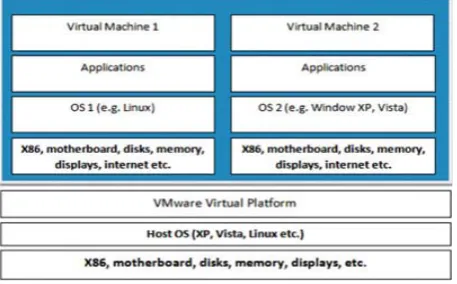
VMware (http://www.vmware.com/) is a virtual-machine platform that makes it possible to run an unmodified operating system as a user-level application. The OS running within VMware can be rebooted, crashed, modified, and reinstalled without affecting the integrity of other applications running on the computer. A virtual-machine monitor is an additional layer of software between the hardware and the operating system that virtualizes all of the hardware resources of the machine. It essentially creates a virtual hardware execution environment called a “virtual machine” (VM). Multiple VMs can be used at the same time, and each VM provides isolation from the real hardware and other activities of the underlying system (Figure 1). Because, it provides the illusion of standard PC (Personal Computer) hardware within a VM, VMware can be used to run multiple unmodified PC operating systems simultaneously on the same machine by running each operating system in its own VM. An OS running as a user-level application on top of VMware is called a “guest OS.” The native OS originally running on the real hardware is called the “host OS.” VMware is low-level enough to make a guest OS appear to be receiving hardware interrupts (such as timer interrupts) and behave as if it were the only OS on the machine. At the same time, it provides isolation so that a failure in or misbehaving of a guest OS does not affect other guest OSs or the underlying system. For instance, a guest OS crashing will not crash the underlying system. As opposed to a software simulator, much of the code running in a VM executes directly on the hardware without interpretation. Operating systems currently supported as guest operating systems under VMware include Windows 95/98/2000/NT, FreeBSD, Solaris, Novell Netware, DOS, and Linux, all of which run unmodified. Theoretically, any OS that can run on an x86 architecture can run as a guest OS, since it will see a complete virtualized PC environment. For host For host operating systems, VMware currently runs and is supported on Windows Vista, XP, 2000/NT and Linux.
Figure 1: Two Virtual Machines Hosted on One Host Operating System
There are number of VMware appliances (guest OS)
available at the wSSebsite: http://www.vmware.com/appliances. Some of them are free
and some of them are trial versions. Software appliances are developed by Independent Software Vendors (ISVs) and provided for software applications to be installed and pre-configured. A software appliance generally includes a customized and optimized operating system and the software application packaged within it. A virtual appliance is defined as a minimal virtual machine image that contains the software appliance designed to run in a virtualized environment. But, we can also build customized appliances or packages for teaching, software experimentation as well as performance and network analysis.
III. PERFORMANCE OF VIRTUAL NETWORKS
Virtualization does provide an excellent flexibility and portability, but can also introduce degradation in network performance, especially in high performance throughput and low latency devices. This section analyzes the overhead associated with VMware-based virtual networks. The results from our experiments can be used as benchmarks and as reference for comparison testing. 3.1. Experimental Setup:The experimental layout of the machines is shown in Figure 2. All the tests have been developed on the following host and guest operating systems
Figure.2 Experimental Layout of the Physical Host Machines and Virtual Machines
a. Host Machine Configuration – Host Machine 1 (HM1): Operating System – Microsoft Windows Vista Home Premium. System Manufacturer – Hewlett-Packard Notebook PC, System Type – x64-based PC, Processor, Intel(R) Dual Core(TM); CPU – P7350 @ 2.00GHz, 2000 MHz, 2 Cores, 2 Logical Processors; Installed Physical Memory 6 GB; Connected to Ethernet via wireless router. b. Virtual Machine on HM1 (VM1): Same hardware devices
as HM1; Allocated memory is 1GB, allocated hard disk is 127 GB; Networked using VMware workstation Bridge configuration, which is directly connected to the local network with its own IP address. On this virtual machine, we installed Windows Server 2003 Service Pack 3.
c. Host Machine Configuration – Host Machine 2 (HM2): Operating System – Microsoft Windows XP Professional; System Manufacturer – ProStar Notebook PC; x32-based PC, Processor Intel Pentium 4, 3.2 GHz Processor; Installed Physical Memory (RAM) – 3 GB; Connected to Ethernet via wireless router.
GB; Networked using VMware workstation Bridge configuration, which is directly connected to the local network with its own IP address. The HM2 machine has been cloned to a virtual machine using VMware Vcenter Converter software.
B. Netperf Software:
The above experimental setup was used to determine the maximum throughput of the virtualmachine network in client.
Environment using the Netperf tool [8]. Netperf makes measurements at the transport layer of the OSI model. Its primary focus is to measure the throughput and client/server interface performance using either Transmission Control Protocol (TCP) or User Datagram Protocol (UDP). Since Netperf is a client-server application, it has two executables - Netperf and Netserver. Netserver must be executed in order for Netperf to connect and retrieve the appropriate results. Netperf runs on the client and Netserver runs on the server. When Netperf is invoked on the client system, a control connection to the remote (Netserver) gets established. This connection is used to pass test configuration information and test results to and from the remote system. Once the control configuration is established and the configuration information has been passed, another connection is initiated for retrieving the measurements according to the control configuration.
a. Netperf Usage: The usage for Netperf server and client
is as follows: Netperf Server Usage netserver [options] -h to display the help or usage of the server -p port number to specify the port for the server default port is 12865
b. Netperf Client Usage: The Netperf client
command-line options are divided into two categories: (a) Global and (b) Test-specific command-line options. Both category commands can be provided with single command line separated with double dash netperf [global options] -- [test-specific options]
C. Bulk Virtual Machine Traffic Measurement:
This section describes the Netperf test that determines the performance of bulk data transfers. This type of network traffic is common in many network transactions, from File Transfer Protocols (FTPs) to accessing data on shared network drives. In the following tests only the VM1 machine network performance will be tested for the fact that this virtual machine has Windows Server 2003 installed. The Netperf client program will be executed from HM2 and VM2 i.e. HM2 to VM1 and VM2 to VM1.
TCP_Stream: This test sends bulk TCP data packets to the Netserver host, and determines the throughput that occurs during the data transfer. Netperf command netperf -H [IP running Server] -l 60 netperf --H [IP running Server] -- -m 2048 whereas -l option is used to set the test duration for 60 and 10 seconds (the default is 10 seconds). In this experiment, the Netperf server automatically sets the message size to the size of the socket send buffer on the local system. The average throughput (Table 1) from the physical host to virtual host is 21.73 Mbps as compared to
physical host to physical host machine 22.39 Mbps, ignoring the send message size from less than 1KB to 2KB message. This is not very significant difference in the throughput, which means that the virtual machine can perform same as the physical machine. Although the experiment is conducted with a very small local network, it shows that running a virtual machine on a physical machine does not drastically affect the host or virtual machine network performance.
TCP_RR: This experiment tests the performance of multiple TCP request and response packets within single TCP connection. This simulates the procedure that many database programs use – establishing a single TCP connection and transfer transferring database transactions across the network on the connection. The following Netperf client command is used: netperf -t TCP_RR -H [Server Address] -l 60 netperf -t TCP_RR -H [Server Address] -l 60 -- -r 32, 1034 In TCP Test Response Request, -r option sets the size of the request or response message or both. -r 32, 1024 sets the size of the request message to 32 bytes, and the response message size to 1024 bytes. The average transaction rate shows that (Table 2) 604 transactions were processed per second with message size for both the request and response packets was set to 1 byte in default test. Then to get some realistic situation, we set the request message to 32 bytes, and the response message size to 1024 bytes. Even with the larger message size, the transaction rate did not drop dramatically from host physical machine to virtual machine.
IV. USE OF VIRTUAL NETWORKS IN ACADEMIC
ENVIRONMENT
others may be available in trial versions) and install. Students can further install any required programming language compiler, software development kit on a virtual machine without affecting their personal machine (i.e. the host). After downloading and installing the virtual machine they can connect their virtual machine to their home based router either using VM player Bridge adapter, which will probably be the best option for the fact that the virtual machine will have its own IP address similar to the host machine.
The other option is to use NAT (Network Address Translation) adapter to connect to the router indirectly via the host machine. After all, a virtual machine breakdown will neither affect the physical host machines nor the network. A virtual machine is the best candidate for courses related to Network Security. In order for students to run vulnerability related programs against the machines, they would have to first have a machine on which they can create such security risks and then create their programs or run commercially available programs to detect and/or study different types of attacks on a machine. Most of the network security related projects are best suited for Linux- based virtual machines. Again, the university level account will not be the best option for such projects due to the fact that students will need more privileges on their account for administration purposes as well as to create different privilege levels for the account as per the needs of the experiments.
The advantage of running such exercises on a virtual network is that none of the damaging or questionable traffic can get generated on any of the production network, and all of the project could be run not just from the lab but from a properly configured remote location. VMware machines allow for the creation of simple files or group of files that can be distributed with the entire configuration necessary to demonstrate topics in a way that does not negatively impact the device or the network the device is running on. Virtual machines could be widely adopted in academics (for example, in many courses), because the main objective of virtualization is to reduce the cost, and keep the host system unmodified and make the host portable and manageable as much possible. Students will have an accessible environment to work on their projects both from on campus and remotely. A very feasible and cost-effective solution is possible that closely resembles real-life environment, easily adaptable to the changing needs of the courses without the overhead of IT resources and cost. Several options can be considered to provide such facility to students. Below, we explore the use of virtual machines for some of the commonly studied problems in computer and network security related courses.
A. Stack-based Buffer Overflows:
Buffer overflow attacks have been around for quite some time and they will still be a problem to be explored in the near future. On many C implementations, it is possible to corrupt the execution stack by writing past the end of an array declared ‘auto’ in a routine [9]. Most Linux machines do provide kernel-based stack overflow protection e.g.
kernels randomize stack addresses to make it difficult to predict locations of shell code. Linux-based scripts can be used to turn the stack protection on or off and such scripts must run under root privileges which is again not possible with university provided account; neither will be the best interest for university to run such experimentations.
B. Ping Tracing through Firewalls:
This project will demonstrate how a firewall filters incoming traffic. For this project, the guest VM will need two pieces of software: a packet capture tool and a SSH client. SSH Secure Shell [10] or PuTTY [11] is a freely available client that will work well, and Wireshark [12] similarly available for packet capturing. This captures traffic both on the external interface of the firewall, and the interface of the guest VM (connected to the internal interface of the firewall).
C. Port Scanning and Advanced Probes:
A useful Linux distribution with plenty of security-related tools is Knoppix-STD [13]. This Linux live-CD can be used in standard computer labs by booting to the CD, but any commands run will impact the network directly. Instead, a virtual network can be quickly setup to probe specific virtual machines and identify weaknesses in their configuration.
D. Network Intrusion Detection:
Students can use a Network Intrusion Detection System (NIDS) to detect attacks through the network. The popular tool of for detection is Snort, an open source signature-based NIDS [16]. Students can download non-subscription based rules set from the http://www.snort.org website. Snort will also require root privileges in order to copy the rule sets to “/etc/snort” folder.
V. VIRTUALIZATION OPTIONS IN ACADEMIC
ENVIRONMENT
We evaluate the following different options for setting up a lab (network) of virtual machines in an academic campus environment.
A. VMware Workstation:
B. Microsoft Virtual PC:
Microsoft Virtual PC [18] can be an option, but this virtual machine can only support Microsoft OS and does not support open source or other vendor operating systems, for example Linux, Mac OS etc. Virtual PC may be attractive to those schools with a Microsoft software licensing agreement, as it is designed to work with Windows servers, but it has significant limitations, especially for network use.
VI. CONCLUSION AND FUTURE WORK
This paper contributes to the literature on Virtual Machines and Virtualization in the following aspects: (i) We provide a tutorial-like step-by-step procedure to install a guest operating system on VM workstation, a commonly used virtual machine environment, which is running on a Windows host operating system; (ii) We describe a small experiment that has been conducted to compare the performance of a network of virtual machines and the performance of a network of physical machines and measured the network throughput obtained for bulk traffic scenarios such as file transfers; (iii) We extensively evaluate the use of virtual machines in an academic environment and discuss the various virtualization options that are currently available; and (iv) We discuss the potential advantages associated with using virtual machines for security-related projects and experiments in a campus setting. In this direction, we provide a sample list of projects on network security, which may not be feasible enough to be conducted in a physical network of personal computers; but could be conducted only using virtual machines.
VII. CONCLUSIONS
Virtualization can create real world business environment as closely as possible in an academic setting, so that students can interact with technologies just as they would in a work setting. In educational institutions, it is not always possible to provide such laboratory which can provide software as well configuration to each discipline of the institutions; the reality in most institutions is to have shared laboratories, used by different students and disciplines. This problem can be alleviated by the use of virtual machines, allowing each student to build his/her own network experiment, using the appropriate topology, and thus not disturbing the other activities running in the lab [20]. Student(s) who would like to understand for example network protocols or security issues can freely download
already pre-built virtual appliances and install the required software to work on their specific projects. The performance study conducted in this paper, although on small scale, shows that there would be no significant performance overhead on a virtual network of host machines and virtual machines. In conclusion, virtualization is a new growing trend in the IT industry. Businesses as well as educational communities can equally be benefited from it despite the overhead involved in setting up a virtual network.
VIII. REFERENCES
[1]. http://www.vmware.com
[2]. W. M. Fuertes, J. E. Lopez de Vergara, “A Quantitative Comparison of Virtual Network Envrionments based on Performance Measurements,” Proceedings of the 14th HP Software University Association Workshop, Munich, Germany, July 2007.
[3]. http://www.dit.upm.es/vnumlwiki/index.php
[4]. http://www.virtualbox.org/
[5]. http://wiki.qemu.org/Main_Page
[6]. http://www.xen.org/
[7]. http://www.vmware.com/files/pdf/VMware_paravirtualization. pdf
[8]. http://www.netperf.org/netperf/
[9]. http://www.linuxsecurity.com/docs/SecurityAdminGuide/Secur ityAdminGuide-13.html
[10]. http://www.openssh.com/
[11]. http://www.putty.org/
[12]. http://www.wireshark.org/
[13]. http://s-t-d.org/tools.html
[14]. http://www.nmap.org/
[15]. http://www.nessus.org/nessus/
[16]. http://www.snort.org/
[17]. http://ettercap.sourceforge.net/
[18]. http://www.microsoft.com/windows/virtual-pc/