DocuDrama
Leonie Schäfer Uta Pankoke-Babatz Wolfgang Prinz Fraunhofer Institute FIT Schloss Birlinghoven D-53754 Sankt Augustin Germany
Ava Fatah gen. Schieck
VR Centre for the Built Environment The Bartlett, University College London 1-19 Torrington Place,
London W1CE 6BT, UK
Amanda Oldroyd BT Exact,
Adastral Park, Ipswich,
Suffolk IP5 3RE, UK
ABSTRACT
This paper presents an approach combining concepts of virtual storytelling with cooperative processes. We will describe why storytelling is relevant in cooperation support applications. We will outline how storytelling concepts provide a new quality for groupware applications. Different prototypes illustrate a combination of a groupware application with various storytelling components in a Theatre of Work.
Keywords
Storytelling, collaborative work, virtual environments, awareness, groupware, CSCW, project workflow
INTRODUCTION
“What happened in the meeting yesterday”, “What is the status of this work processes”, “What happened while I was away on the business trip”. These are questions frequently asked in our day-to-day office work. All these questions relate to cooperative work processes and inquire about past and ongoing shared activities. The answers to these questions are stories - told by colleagues or assistants. These stories describe facts, but they also include a lot of social and political ingredients. Depending on our knowledge of the storyteller we can condense the story down to the real facts or we can identify the message transferred between the lines by the way the story is told. Often we ask more than one person about what happened, either to receive different views or to get a broader view and understanding.
Current groupware technology is far from providing similar support. What we get when we return to our desktop are numerous emails and, if we are lucky, some event notifications (BSCW daily activity report) [1] that report about accesses to our shared information spaces. However, since the systems do not know when we were absent the reports are not assembled over time, but delivered but on a day-to-day basis.
notified immediately but not reflecting our current working context and situation. We all know the unwanted ring of our mobile phone or the immediate notification of emails or other event watchdogs. Would a good assistant behave in such a way or would he collect, summarize, and condense important events to a summary or story and report it in the appropriate situation?
Based on these consideration, this paper discusses the opportunities virtual storytelling concepts provide for the development of a new quality of groupware. First we identify the basic requirements of combining groupware with storytelling. Then we present an initial solution for storytelling about cooperative activities in a Theatre of Work.
The combination of groupware with virtual storytelling concepts raises a set of requirements that are outlined in this section. We do not aim to address the whole set of groupware applications and concepts with our considerations, but concentrate on an area that is of particular relevance for storytelling, i.e. awareness. The provision of awareness on cooperative activities is of vital importance for successful distributed cooperation [2, 3] Most approaches providing activity awareness in groupware systems focus on an event-based indication of actions at the users’ desktop either synchronously by immediate visual or acoustic notifications [4] or asynchronously by activity reports However, in our everyday life, awareness on the cooperative activities we are part of is presented either by stories we are told by other people or by our own observation of the activities that surround us. The first aspect requires the assistance by other people, the second is limited to the observation of local activities only. Thus we believe that an awareness approach based on the construction and presentation of stories permits a new way of supporting distributed cooperative processes. Furthermore compiled stories may help to overcome the particular risks in privacy protection and the risks of information overload [5] in asynchronous and long term awareness support. However story generation from recorded events, although it is a very intuitive means, is very difficult to achieve. It has to acknowledge specifics of the presentation medium used, of the work situation that is to be captured with awareness data and the special interests of the user listening to the story.
In this paper we will present three different storytelling tools which compile stories from event data recorded in a given event notification infrastructure.
Background
Stories are based on activities performed by people. Thus we need to be able to capture and recognise relevant activities. This requires that groupware applications are able to report about user activities either by the means of an activity log or by signalling activities to an external service. Since cooperative activities are often spread among a number of different service it is reasonable to consider a central service that provides functionalities to receive, store and process activity information in the form of activity events submitted by different applications. This service should be open in different ways. First, it should provide easy means for the submission of events, not requiring a large overhead by the client application. Secondly it should be open to the integration of new client applications, i.e. not require a large configuration overhead on the server side for this purpose.
Stories are told on request or when important things happen. Thus we need a mechanism that enables users to ask for stories on request or to register interest in stories about the cooperative process. This again requires mechanisms to specify the sets of events that will be used for the construction of a story.
algorithms that allow the collection or transformation of repeated or consecutive events to a higher semantic level.
Stories only make sense when the context is known. Users work in different cooperative contexts. Therefore we need mechanisms that collect and combine events raised by user actions into the respective context. This requires a model to describe the properties of a context and the mapping of events into a context based in their specific attributes.
Pure chronological event listings are not stories, i.e. we need a model that allows us to compile contextualised events into meaningful episodes and stories. For textual stories this is very difficult to achieve. Instead, visual means are looked at in this paper as a means for storytelling which is easy to grasp. For example, a story may be compiled into a picture in which a user may navigate to points of interests. More dynamically, symbolic actions performed by avatars may present stories of cooperative activities in the virtual environment of a Theatre of Work.
In the remainder of this paper we briefly introduce the event notification infrastructure, which records the events the story constructions are based on. After a brief overview on related work, three different modes of storytelling are introduced. Finally, some early user experiences are outlined.
DocuDrama as part of the Theatre of Work
TOWER, the Theatre of Work Enabling Relationships[6], aims at creating a shared environment to enhance team coherence and social presence in virtual teams. Its ambition is to convey a feeling of awareness and to support collaboration between team members. The TOWER world is a collaborative virtual environment, which offers a stage for social encounters and demonstrates the work process in co-located teams. Telling stories of cooperative work forms an important part of TOWER.
The architecture of the Theatre of Work consists of six major components. The system is based on shared workspaces[1] and ambient interfaces. Activities recognized by sensors are processed as events by an event notification infrastructure[7]. The information structure and corresponding activity is visualized in three-dimensional multi-user environment[8]. Rules on space syntax define the dynamic architecture[9, 10]. Avatars and their movements represent the users’ activities through symbolic actions[11]. DocuDrama, the storytelling component in TOWER, transforms sequences of event notifications and history information into a narrative of the past cooperative activities[12]. Figure 1 gives an overview on the TOWER architecture.
Internet-based Event & Notification
Infrastructure Symbolic acting module 3D multi-user environment
Theatre of Work
Docu Drama Work Environment Activity sensors Ambient interfaces Space module
DocuDrama
The creation of stories in DocuDrama is based on the recording of cooperative activities in a teams shared environment. The recording of events results in history files, which contain the event information as abstract data sets. The challenges for DocuDrama in generating narratives of project histories are threefold:
• The first challenge is to sort and select meaningful events, to collect and combine this data and finally, to derive a meaning from the sequences of events.
• The second challenge is to find a meaningful way of presenting this event data to the user. To this end we provide for three alternative focuses for event presentation: the focus may be put on the interaction with folders and documents, present something more abstract like the story of a project, or present the interaction between team members.
• The third challenge is to present the project’s history and progress of work in an entertaining way which captures the users’ attention and conveys complex information fast and effectively.
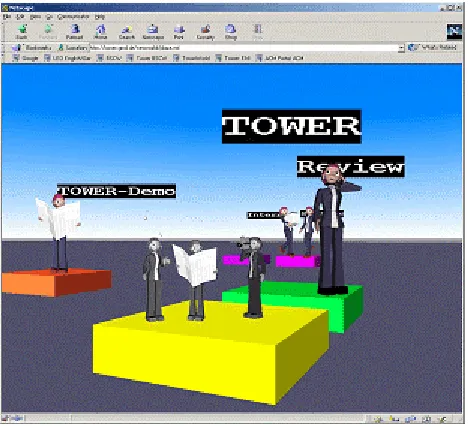
In the first DocuDrama approach, we experimented with a version that provided a chronological replay of events in the TOWER virtual environment. The user could choose a timeframe and area of interest, as well as a user or a group of users as actors. The replay took place in the TOWER multi-user environment. Avatars, faded in grey and reduced in size, performed symbolic actions on the historical data, in parallel to the current TOWER world activities (Fig.2). The replay happened in fast-forward motion to give the user a quick overview of past activities in the chosen time period [12]. Although this approach looked appealing in the first place, practical usage disclosed that it does not convey the information needed by the user. The chronological event sequence had to be enhanced with an exiting storyline to attract and hold the user’s attention.
Evaluation of the first prototype revealed different views on DocuDrama and therefore also a different set of requirements for a replay of history events. On this bases on this experience, three different approaches to DocuDrama were designed, which are detailed in the following sections:
• The first approach describes a folder-centred DocuDrama, which concentrates on activities on folders and their documents.
• The project-centred approach arranges events according to a project’s workflow.
• The communication-oriented approach focuses on interaction between the members of the virtual team.
Related Work
The approaches in DocuDrama focus on the recording and replaying of events in a collaborative virtual environment. Related work, as discussed in the following, investigates certain features of DocuDrama, but no approach is known as yet which uses a combination of research areas similar to that of DocuDrama.
André et. al.[13] have implemented several systems using presentation teams to convey information in the style of a virtual show to be observed by the user. The main idea is to communicate information by means of simulated dialogues, e.g. in a sales scenario or as a soccer commentary. While André et. al. focus on believable dialogues presented by characters with specific personality traits, DocuDrama aims at presenting a summary of work activities with avatars by means of non-verbal communication.
Temporal Links[14] introduces the idea of a flexible mechanism for replaying past or recent recordings of virtual environments within other virtual environments. Temporal Links is concerned with time, spatial, and presentational relationships between the environment and the recording. Where Temporal Links concentrates on replaying the past and its implications with the current environment, DocuDrama is concerned with selection and grouping of history events and their replay depending on the user’s situation.
Terminal Time[15] presents a system which constructs ideologically-biased documentary histories in response to audio-feedback. In Terminal Time, historical events are chosen from a knowledge base and connected together to form a historical narrative biased by audience vote and depending on an ideological goal tree. While Terminal Time generates a fictive story influenced by and played out for a group of people, DocuDrama centres on the generation of personalised narratives based on real events.
Brooks investigates in Agent Stories[16, 17] a model for the computational generation of narratives. This model splits the task into three subtasks: defining an abstract narrative structure, collecting material, and defining a navigational strategy. While Brooks offers a story design and presentation environment for non-linear, multiple-point-of-view cinematic stories, DocuDrama focuses on the automated generation of narratives by selection and grouping of technically recorded events.
The following sections will look in more detail at the different approaches on DocuDrama, describe the concepts and implementations behind, and will have a look at the targeted user groups and first evaluation results.
DocuDrama Timetunnel
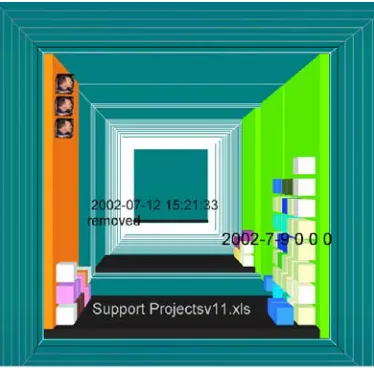
The DocuDrama Timetunnel (Fig.3) tells the history of folders and documents in a project’s life cycle. It visualizes interaction on folders and documents, shows interdependencies and coherence between activities. The aim of the DocuDrama Timetunnel is to provide an abstract view on project activity and to offer functionality to manage project data. It provides team-members with a generative tool to visualize projects events history in various configurations. Moving through the tunnel the user can embark on a virtual journey through the project’s lifetime, in which the tunnel symbolizes the time axis of the project.
The user selects a time period of project’s lifetime for visualization, in our example, the complete lifetime of a project. In that case, the entry of the tunnel represents the start of the selected time period. The closer the user gets to the end of the tunnel, the closer he gets to the end of the project’s lifetime. The time tunnel consists of different slices (Fig.3). Each slice represents a step in the lifetime of the project. Depending on the selected time period for the DocuDrama replay, a slice might represent a year, a month, a day or even only an hour. In our example, a time slice represents one day in the project’s lifetime.
Fig. 3.: The Timetunnel
Small boxes placed on the wall of a time-slice denote interaction with the project’s folders and documents. Each box represents a document. The position of the box inside the time-slice indicates the form of interaction with the document. For example, boxes piled up on the right side of the time-slice might represent documents which have been opened for writing, boxes on the ceiling show documents which have been opened for reading. The user can retrieve the document’s name and the date of the action by clicking on a box. The colouring of the walls supports the meaning of the position.
The Timetunnel prototype consists of three different components, the WorldDatabase, the WorldMapper and a WorldInterface. Fig. 4 shows the relationship and interaction between the different Timetunnel components.
Fig.4. Timetunnel components
WorldDatabase stores the data sets of the event history , as well as a context description of documents in the collaborative shared workspace. The WorldMapper realises the matching between the history events context and the geometrical data, which results in a VRML landscape.
Fig.5. TOWER Interface with Timetunnel, BSCW and TowerWorld
The WorldInterface offers the user the possibility to interact with Timetunnel. It consists of a set of HTML forms which enable customization of the VRML interface with associated Perl- and CGI-Scripts. Fig. 5 shows the Timetunnel integrated with a BSCW shared workspace and the TowerWorld. Fig. 6 offers a view on the TowerWorld landscape and at the same time features the Timetunnel in the upper left corner of the browser window. The combined presentation of the shared workspace, TowerWorld and the time tunnel offers the possibility for the user to follow project activity at the same time from different perspectives. While TowerWorld gives a view on the current state of the workspace and BSCW offers direct interaction with the documents, the DocuDrama Timetunnel aims to enliven the project’s history with a journey through the time.
DocuDrama Project
DocuDrama Project, the project-centred DocuDrama, is a prototype developed to represent overviews of historic events during a project’s lifetime. Team-members use a client based configuration tool to select projects of interest, and to review these in a graphical interface featuring both visual and textual summaries. These summaries can be expanded into fully animated replays. The DocuDrama Project contains a tool which enables team-members to learn more about each other’s activity, how that activity relates to the work of the team, and subsequently how it affects the overall development of one or more projects.
This approach investigated the potential of annotating the virtual environment (overlaying information) to convey additional meaning to a sequence of events. Methods for selecting time-periods, and moving from a summary view into a dynamic replay are explored. The software does not attempt to generate causal relationships between a series of events or interpret the data into an assumed linear narrative. The focus of this approach is to investigate how we can promote a non-linear, self-directed exploration of events, from which a narrative may emerge for the user.
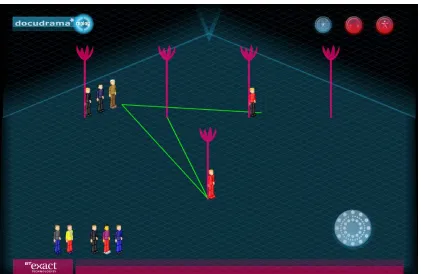
In the final Docudrama Project prototype, history replays take place in an axonometric environment, a pseudo 3D space in which team-members and projects are represented by 2D interactive icons. The avatars have a range of animations which symbolically represent the activities of each user. This use of symbolic acting facilitates the automatic generation of animated replays, pulled from time-based queries from the Event Notification Infrastructure. Replays can be on an individual or group basis and symbolic acting can be enabled or disabled to change the pace of the replay.
Annotation is also implemented as a means to summarise the events. Linear paths trace the movement of each team-member from one project to another over a given time-period, providing an overview of the work-flow of each individual in the team. Additional textual summaries are available in the form of information passports attached to each user and project.
There are a combination of replay tools available from within a single interface, which give the user different methods for investigating the history of one or more of these projects. The aim is to lead each team-member to a better understanding of the process of team-working as whole, by placing events in context and providing multiple access points to the data available.
The final prototype is realised in Macromedia Flash MX. Most of the code is written in Action Script, with some active server pages for parts of the system. Events from the ENI [6] can be stored and read from a local XML file on the client machine, or retrieved in real-time from a server. Using a simple configuration interface, the user can select the option to replay projects and events from groupware, in this case BSCW, or from a corporate intranet (Win2000). In each case, the paths to the projects or folders to be reviewed can to be entered and saved.
logged onto the system to view events as they happen, and chat with each other in real-time (implemented in JAVA). Users may then log in to ‘DocudramaReplay’ to review the history of the same projects. World layout remains consistent as both environments are built from a single configuration file.
The DocudramaReplay user interface is composed of the following main components, Project Summary (Fig.7), Project Replay (Fig.8), Avatar Passport (Fig.9), Project Passport (Fig.10) and Replay Clock. These are described in the following section.
Following the selection of DocudramaReplay from the logon splash screen, the user is presented with an overview scene containing project and avatar icons arranged on a grid. The scene takes the last weeks’ activity as a basis for the initial overview. The number of projects displayed relates to the number monitored within the location specified in the configuration file. These are held in an array and are spaced evenly along the grid of the environment. The avatars are placed in their last known context, and a uniquely coloured path traces the location of each action for each avatar.
Fig. 7. Project Summary view
Through this use of annotation in the environment it is possible to surmise which projects were active, where most of the activity took place, and who was active in which particular projects. No other relationships are indicated. In some cases there will be avatars representing members of the team that are not located next to a project icon – these remain at the bottom of the screen. In this case they have no recorded activities relevant to the projects displayed.
Fig.8. Individual Replay
Further details summarising the avatars’ actions can be selected from the passport option from the same roll-over menu. This includes a list of files and folders actually worked on.
Each project icon also has an associated project passport. This identifies the folder names in which activity has taken place, and the percentage of overall activity in each.
Fig.10. Project passport
The replay clock is always visible and is used to select a new time period for review. It can be opened out to select replay start and end time in months, days and hours. The replay clock displays a progress bar during each replay. This shows the user how far through the events the replay has reached, and at what date the events are occurring.
The features of this interface provide a means to visually summarise and review what would ordinarily be a list of events. In its current status, there is enough information to gain a snapshot of team activity from the overview scenes, which can then lead to animated replays, textual summaries and statistical information displays. Time-based queries provide a starting point for exploration of the scene elements, from which a user can begin to form a picture, or loose narrative, of project and team development.
DocuDrama Conversation
DocuDrama Conversation centres its stories around the social relationships among people where any two people acting on the same document in a given time period are understood to be establishing a social relationship[21]. Avatars and the play-out of Symbolic Actions are given the focus of attention. The story in DocuDrama Conversation is generated based on the events recorded from the actions of team members. A typical scene in project life, for example, might be that someone creates a document, uploads it in the team’s workspace and sends an email to inform the team members about it. Other team members will subsequently read it. DocuDrama Conversation will compile these events into a scene, avatars will play out the events and are placed on the representation of the document they are acting on.
conversation. Symbolic actions are movements of avatars which symbolise the respective actions, such as read and write operations.
DocuDrama is based on the recording of the history of events and activities generated by a project team in the Tower collaborative work environment. Avatars that enact the events as they occurred in the shared workspace visualize the replay of the team’s interactions with documents. DocuDrama Conversation focuses on interaction between people on documents, thus it refines on the idea of the history replay. It rearranges the order of events avoiding a pure chronological order. This approach enables the user to focus on cooperative activities which have taken place on a certain document. It conveys the impression of cooperation although the actions of the respective actors were temporally fragmented. Thus it acknowledges particularities of asynchronous collaboration. To take the example of a team member uploading a document in the team’s workspace and emailing the project team about its existence and location; at a later point in time, other team members will open the document and read, change or annotate it. DocuDrama Conversation allocates all these activities by different team members at a shared location into a single scene. The replay of all events in this scene is performed in chronological order of occurrence. However, parallel activities on other documents, respectively on other locations, will be shown in later scenes. Thus the scenes are thematically arranged and not interrupted by parallel activities on other topics.
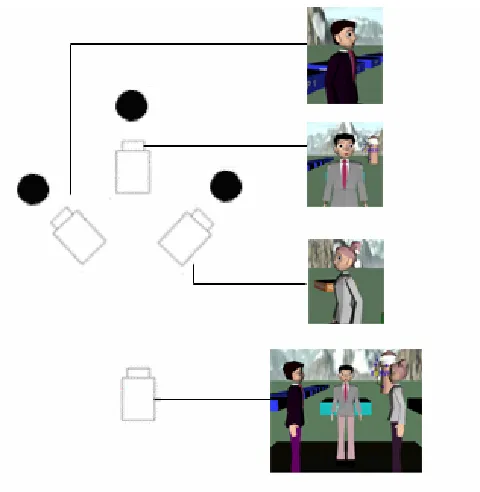
In DocuDrama Conversation, avatars, their Symbolic Actions and their position in relation to each other are the means for telling the story of an ongoing conversation. To enrich the story and to keep the user attracted, special attention has been given to camera navigation and positioning. At the beginning of a scene the camera approaches the centre of an activity, the box of current document, and then it remains in an overview position. The avatars appear one after the other and perform their Symbolic Actions. The camera chooses randomly between a variety of close-up views on the avatars. Fig.11 shows an example of possible camera positions and views in DocuDrama Conversation.
The position of the avatars is defined dynamically. In scenes with only two or three avatars they are grouped facing each other. If there is a large number of actors involved, the avatars are grouped in circles on top of the document boxes. Fig.12 shows an arrangement of avatars in circles.
Fig. 12. Avatars positioned in circles
To start DocuDrama, users define a timeframe which, by default, includes all past events. The user chooses a timeframe of the past, a day or a week, and defines subjects, authors or activities, which are relevant to him.
Fig. 13. DocuDrama User Interface
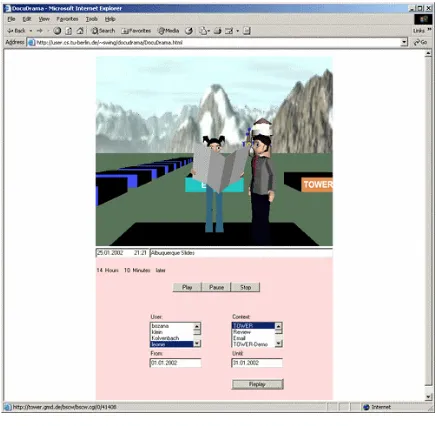
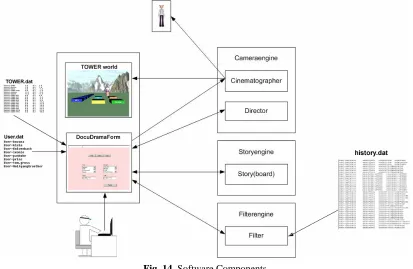
DocuDrama Conversation consists of four system components: a user interface to define a personal interest profile, a filter module to select events from the history log file, a story engine and a camera engine. Fig.14 gives an overview on the software components in DocuDrama Conversation.
Fig. 14. Software Components
The user interface in DocuDrama Conversation comprises DocuDramaForm, a Java Applet for selection of timeframe and events, and TowerWorld, a VRML window for the display of the replay. The Filter engine selects events of the history data-file for replay. The user’s selection on timeframe and context defines the filter configuration.
The Story engine compiles events to individual scenes. Events showing similar activities, e.g. a repeated reading of a single document, are reduced by the Story engine to one single reading action. Event sequences that allow conclusions on the behaviour of actors are grouped to a new event.
The Camera engine generates the three-dimensional part of DocuDrama Conversation. It consists of two modules, the Director and the Cinematographer. The Director specifies the location and direction of the actors and decides on position and movement of the camera (Fig.11). The Cinematographer displays the story based on the director’s specification and directs the camera.
Results and Future Work
The TOWER project and the different DocuDrama approaches have been tested and evaluated in cooperation with the TOWER application partners, an international consulting company in the construction sector, and a smaller company, which operates as an internet service provider. Both companies have several branch offices and operate in virtual teams across several countries. Feedback about the different DocuDrama approaches was gathered from interviews, reviews and presentations. The following section presents the evaluation results of the different DocuDramas, gives an idea of their deployment in project work and describes future work.
discloses the levels of activities, the busiest actors and the most used documents at a single glance, thus visualising the whole story in a single picture. The feedback from user groups indicated that the DocuDrama Timetunnel represents a useful tool for task control in case of shared document production. The Timetunnel could prove to be especially useful in relation to deadlines. It enables the user to monitor the activities and delays in a task.
Future research and development will concentrate not only on the handling and visualisation of large numbers of events but also large numbers of actors and large sets of relevant documents in the Timetunnel. The hitherto complex symbolic representation will be refined and enhanced with automatic focusing on areas of interesting activity, which will simplify interaction with the Timetunnel and its content. The future Timetunnel will be useful to monitor the course of a task in relation to overall milestones and project deadlines. In particular it will offer functionality to manage and organize folders.
The project-centred animated story lines of DocuDrama Project outlining the dynamics of project progress can considerably ease project management and monitoring. At demonstrations users confirmed this assumption. In discussions with the users it became evident that the summary view has a great deal of potential for overall project history awareness. It is possible at a glance to see not only what has happened, but also what has not. In terms of annotation, it is a temptating to assume that one action has caused another, or that paths which ‘meet’ at the same location indicate a collaboration. In reality, the data currently presented is very slim, and needs the context and knowledge of the user to make ‘meaning’ from the sequences.
With further integration into project management systems, the future interface could be positioned as a project explorer which brings to life abstract data sets and text reports. Enhancing the environment with animated project icons which respond to deadline and deliverable tracking resources, and providing more information about meetings and roles would give more context to team-activity within a project. The interface could then be useful as a learning tool to understand how projects have developed and provide a means to project that learning into future plans.
Compiling stories about collaboration processes in asynchronous work was the major aim of DocuDrama Conversation. In experiments with users we tried to compare the pure textual story line as given in the BSCW Activity Report with the animated and document centred story presentation in DocuDrama Conversation. Users were presented the same set of events by both means. They were asked what they understood about the past process as recorded in the events. With DocuDrama Conversation the users were encouraged to try out different priority settings and grouping criteria for the respective events. The questions asked centred around the most useful grouping of events, the most favourable time period and camera positioning throughout the story.
Conclusion
In this paper, we discussed three different approaches on DocuDrama, a storytelling tool for the generation of narratives on collaborative activities. The resulting prototypes cover a diverse range of application areas, from giving a picture of data management, to animating project workflow and social interaction of team members. Although all the prototypes may be used to display the same stream of events, each tool uses different story lines and thus they produce different stories. Each story addresses different user interests and discloses different facts. This shows the high potential of storytelling on collaborative activities. There is a wealth of information which can be deduced from a simple set of recorded history data. Furthermore, our research gave evidence that there is no unique, simple and one-for-all solution on storytelling in a shared work context. Instead, a particular story must fit with the personal preferences of a user as well as with the user’s particular work situation. The most adequate solution depends on the point of view of the user and might change if the user changes context. Our research also showed that there is no simple way of telling a story which includes all perspectives of document and project context, and of social interaction and collaboration between people.
In all our approaches, the preparation of the event data into meaningful episodes turned out to be a major issue. The compilation of a media specific and attractive story line is a major challenge. In the case of animated stories in 3D-worlds these interfaces are related to areas like camera navigation and drama in the Film and Theatre World. Finally, also aspects of social sciences have to be considered with special attention to issues of privacy protection and monitoring versus needs for awareness support. The TOWER project and especially DocuDrama have raised several interesting questions on these topics and started off spontaneous discussions. Storytelling and awareness, the dynamic generation of narratives and storytelling in work and business contexts proves to be a very promising field of work for future research in collaborative work and CSCW.
Acknowledgements
We thank the members of the TOWER project team who provided helpful ideas and support during preparation of this document. The TOWER project has been partly funded through the IST program IST-10846.
References
1. W. Appelt. WWW Based Collaboration with the BSCW System. in SOFSEM. 1999. Milovy, Czech Republic: Springer.
2. P. Dourish, et al. Awareness and Coordination in Shared Workspaces. in CSCW'92 - Sharing Perspectives. 1992. Toronto, Canada: ACM Press.
3. C. Heath, et al. Collaborative Activity and Technological Design: Task Coordination in London Underground Control Rooms. in E-CSCW '91. 1991: Kluwer.
4. M. Sohlenkamp, et al. POLIAwac - Design und Evaluation des POLITeam Awareness-Client. in D-CSCW 98 - Groupware und organisatorische Innovation. 1998.
5. S. Hudson, et al. Techniques for Addressing Fundamental Privacy and Disruption Tradeoffs in Awareness Support Systems. in Conference on Computer-Supported Cooperative Work - CSCW'96. 1996. Boston, MA, USA: ACM, N.Y.
6. W. Prinz, et al., Presenting activity information in an inhabited information space, in Inhabited Information Spaces, E. Churchill and D. Snowdon, Editors. 2003.
7. W. Prinz. NESSIE: An Awareness Environment for Cooperative Settings. in Sixth European Conference on Computer Supported Cooperative Work (ECSCW '99). 1999. Kopenhagen: Kluwer Academic Publishers. 8. blaxxun, (website visited June 2003), http://www.blaxxun.com/
9. A.Penn, et al., The Space of Innovation: Interaction and Communication in the Work Environment. Environment and Planning B-Planning & Design, 1999. 26: p. 193-218.
10. N. G.Vinson. Design guidelines for landmarks to support navigation in virtual environments. in CHI 99. 1999. Pittsburgh, PA USA: ACM Press.
12. L. Schäfer, et al. Virtual Storytelling of Collaborative Activities in a Theatre of Work. in International Conference ICVS 2001: Virtual Storytelling. 2001. Avignon, France: Springer.
13. E. André, et al. Presenting Through Performing: On the Use of Multiple Lifelike Characters in Knowledge-Based Presentation Systems. in International Conference on Intelligent User Interfaces (IUI 2000). 2000: ACM Press. 14. C. Greenhalgh, et al. Temporal Links: Recording and Replaying Virtual Environments. in 8th ACM international
conference on Multimedia (MM 2000). 2000: ACM Press.
15. M. Mateas, et al. Generation of Ideologically-Biased Historical Documentaries. in AAAI 2000. 2000. Austin, Texas, USA.
16. K.M. Brooks. Do Story Agents Use Rocking Chairs. in Fourth ACM international conference on Multimedia. 1996. Boston, United States.
17. K.M. Brooks, Metalinear Cinematic Narrative: Theory, Process, and Tool, MIT, Ph.D. Thesis 18. M. Argyle, Bodily Communication. 2nd ed. London: Routledge,1990.
19. J.V. Mascelli, The Five C's of Cinematography: Silman-James Press,1998. 20. A. McGrath, The Forum. SIGGROUP Bulletin, 1998. 9(3): p. 21 - 25.