have users identify a target by mimicking its specific motion, and use the correlation between the system’s output with the user’s
input to determine the selection. The resulting interaction has compelling properties, as users are guided by motion feedback, and only
need to copy a presented motion. Motion correlation has been explored in earlier work but only recently begun to feature in holistic interface designs. We provide a first comprehensive review of the principle, and present an analysis of five previously published works,
in which motion correlation underpinned the design of novel gaze and gesture interfaces for diverse application contexts. We derive
guidelines for motion correlation algorithms, motion feedback, choice of modalities, overall design of motion correlation interfaces, and identify opportunities and challenges identified for future research and design.
Additional Key Words and Phrases: Motion correlation, Interaction techniques, Gaze interaction, Gesture interfaces, Eye tracking,
Motion tracking, Natural user interfaces
ACM Reference format:
Eduardo Velloso, Marcus Carter, Joshua Newn, Augusto Esteves, Christopher Clarke, and Hans Gellersen. 2017. Motion Correlation:
Selecting Objects by Matching their Movement.ACM Trans. Comput.-Hum. Interact.24, 3, Article 22 (April 2017), 34 pages. https://doi.org/10.1145/3064937
1 INTRODUCTION
Object Selectionis a canonical task in user interfaces [16]. Commonly, a set of objects is presented to the user in a static arrangement, such as icons on a screen. Selection then requires a targeting motion by the user to indicate the object and to confirm its selection, for instance pointing and clicking with the mouse. In this article, we consider the design of interfaces that employ motion very differently for selection: presenting available options each with a distinct motion that users can simply copy, for example by producing a corresponding hand, eye, or body movement. We call
This work is supported by the Victorian State Government and Microsoft through their contributions to the Microsoft Research Centre for Social Natural User Interfaces (SocialNUI), and by Google through a Faculty Research Award.
Author’s addresses: E. Velloso, M. Carter, J. Newn, School of Computing and Information Systems, The University of Melbourne, emails: {ed-uardo.velloso, marcus.carter, joshua.newn}@unimelb.edu.au; A. Esteves, Institute for Informatics and Digital Innovation, Edinburgh Napier Uni-versity, email: [email protected]; C. Clarke, H. Gellersen, School of Computing and Communications, Lancaster UniUni-versity, emails: {c.clarke1, h.gellersen}@lancaster.ac.uk.
© 2017 Association for Computing Machinery. Manuscript submitted to ACM
the principle behind such interfacesmotion correlation—if each available object displays a different motion, following an object’s trajectory disambiguates the selection.
Motion correlation draws on natural human abilities. When a bird flying past draws our attention, our eyes lock onto it and perform a movement that corresponds to the bird’s, and if we pointed the bird in flight out to another observer, our hands would describe a similar motion too. When a personal trainer demonstrates an exercise, we are able to copy and reproduce their movements. These abilities have become reflected in user interfaces that display motion as a prompt for users to copy and match for a variety of purposes. Examples include mimicry as a game mechanic [17], prompting of gesture sequences for authentication [48], and interactive movement guidance in sports and therapy [40, 59].
Interactive objects such as icons and buttons are usually at the same position on the screen, and when objects do move, the movement is often user-initiated (e.g. dragging a window) or not selectable (e.g. video playback). However, objects can be put in motion to distinguish them by their movement [68], or to augment them with moving parts [14]. Motion and animation of objects can also be inherent elements of an interface, for example in video games, molecular simulations, air traffic control systems, interactive video, surveillance systems, and video annotation systems [21, 24, 25, 30].
Williamson and Murray-Smith were the first to describe excitation of displayed objects as a strategy for selection by making corresponding motions with an input device [68]. Their work inspired Fekete et al. to explore motion correlation as selection technique in conventional graphical user interfaces [14]. These works represent milestones in establishing the motion correlation principle. However, it is only in recent work that this concept has been applied as part of holistic interface designs. In our combined work, we have used motion correlation with gaze and gesture as modalities, in interfaces designed for public displays, smart watches, interactive TVs, and smart homes [6, 8, 13, 61, 63].
Our aim in this article is to promote motion correlation as a fundamental principle for interaction. We advance theoretical and practical understanding of the principle through the following contributions:
• Analysis of the background and context of motion correlation: how the principle is defined among other selection
mechanisms, how human abilities are leveraged for motion correlation, insights from pioneering works on the topic, and the wider context of related work on motion matching.
• Review of five projects in which we have designed, built, and studied input techniques based on motion correlation:
Pursuits,Orbits,AmbiGaze,PathSync, andTracematch; in each case, analysing the rationale for using motion correlation, the specific ways in which the principle was applied, and the insights gained.
• Synthesis of design knowledge built across our prior work into general guidelines for motion correlation interface
design, including algorithm design, the design of motion feedback, the choice of input and output modalities, and the broader choices of putting everything together in cohesive interfaces.
• Identification and discussion of opportunities and challenges toward future work on motion correlation interfaces.
2 MOTION CORRELATION: DEFINITION, BACKGROUND AND RELATED WORK
The interaction principle we discuss in this article is defined by three properties:
(1) Objects available for interaction are represented by a motion displayed to the user;
(2) Users express their intent to interact with an object through movement at the interface that corresponds with the object’s motion;
(3) Correlation of the system’s output and the user’s input determines the selection of objects for interaction.
isspatial—when the coordinates provided by the input device coincide with the location of an object, the system understands that the user wants to select that object.
Movements of the pointing device are echoed on the screen by movements of the pointer (or cursor) and other visual changes. Pointing techniques map the input coordinate space to the coordinate space of the screen. When these two coordinate spaces coincide, the technique is referred to asdirect[28]. Examples include touch screens, stylus-sensing surfaces, and isomorphic virtual reality environments. When these spaces are separate, the techniques areindirect(e.g. mice, trackballs, joysticks) [28].
The second type of matching identified by Fekete et al. issemantic. In this case, what connects input actions to actions on the interface is the meaning behind them. Examples include typing a written command on a console, pressing a key on the keyboard, or clapping to turn the lights off.
In contrast to these strategies, motion correlation determines the target that users want to select by matching the target’s motion with the user’s input. Applied in a conventional setup of screen and pointing device, therelative movement of the device would be matched to therelativemovement of the targets on the screen. In this case, the matching is neither spatial (it does not require any absolute mapping between the input and output coordinate systems) nor semantic (the same movement shape can encode different commands depending on the target it is synchronised with).
As we will detail below, we have used motion correlation with gaze and gestures as input modalities. The gaze interface literature has previously largely focused on spatial matching of gaze direction for selection of what users look at when they dwell on a target [31] but also considered gaze gestures where eye movement patterns are semantically matched [11]. The two matching principles are also prevalent across gesture interfaces, where gestures are either matched for pointer control or interpreted as commands.
2.2 Temporal, Spatial and Spatiotemporal Motion Correlation
Motion is a change in position of an object over time. When considering how well one motion is matched by another, one can consider the spatial aspects (path, shape), temporal aspects (dynamics, rhythm) or a combination of the two. This lets us define a taxonomy for motion correlation interfaces with three principal categories – spatial, temporal, and spatiotemporal. The work we review in this article falls into the third category as the interfaces we have designed involve motion in space that is followed or mimicked by users in real-time. The advantage of considering both time and space in the matching is that the same motion shape can be “reused” for multiple objects with temporal variation, and vice versa. However the other two categories are of interest too, and we briefly review them here.
In the spatial category, the correspondence of two motions is determined solely by spatial aspects, for example the similarity of two shapes while ignoring how the shapes evolved as time series. One can imagine interfaces that guide users in producing symbolic gestures where shape compliance is important while users might purposely be given flexibility in producing the shape. However, we consider this a less compelling variant of motion correlation, as we are interested in the closer coupling between input and output, where input becomes an act of synchronising with a displayed motion.
The temporal case, in contrast, is of fundamental interest as a user’s input and a system’s output have an inherent temporal dimension. Even a simple discrete input such as pressing a button involves motion, where the timing may be meaningful in relation to the system’s changing output. Switch scanning is a standard accessibility technique that illustrates this form of motion correlation: the interface displays the available inputs on a grid with an indicator moving from item to item, and the user aligns their activation of a switch with the indicator’s movement [55]. Rhythmic menus are a similar technique [43]: when a user opens a menu, the system highlights each item in succession at a constant rate, presenting a steady rhythm to which the user aligns their input action (a mouse click at the right time, as opposed to the right position). The motions involved in temporal matching can be of more complex structure, for example tapping the rhythm of a song [4] or reproducing rhythmic patterns displayed to the user [18].
2.3 Human Motion Perception and Motor Behaviour
Nature is abundant with all kinds of movement, and the evolution of the ability to track moving targets was crucial for the survival of our species. From detecting an approaching predator in the peripheral vision to tracking a running prey when hunting, movement perception is a fundamental ability that we develop from early childhood.
Research has shown that even one-week old infants are able to follow a moving target with the eyes [5]. This type of eye movement is known assmooth pursuit. These movements are characteristically smooth and closely match the movement of the target. This makes them substantially different from the other common types of eye movements, namelyfixationsandsaccades. An important characteristic of this movement is the ability to select and track a single object, even in the presence of multiple stimuli [1]. In practice, when tracking a moving object, ocular pursuit movements involve a combination of smooth pursuits and catch-up saccades that realign the target in the fovea (the area of the retina with highest visual acuity). When following periodic movements—such as the ones explored in the remainder of the paper—the frequency of movement will dictate the distribution of movement types. Whereas at low frequencies (<0.4Hz), the movement is almost entirely smooth, increasingly more saccades happen at higher frequencies [1].
Though our eyes are naturally drawn by the appearance of a moving target, maintaining the pursuit movement that tracks it requires attention. If the person is paying attention to a specific target, the presence of distractors has little influence on the pursuit, unless they are also being attended to and their retinal motion conflicts with that of the target being pursued [33]. Therefore, selective attention is crucial to be able to accurately follow a target whilst ignoring other stimuli [1].
Motion perception is related to the motor system beyond the control of our eye movements. There is evidence of mirror neurons and motor resonance behaviours, where the same neurons are activated when observing and when executing action [37, 50]. When infants develop the ability to reach for moving objects, they aim ahead of the object rather than at its current position, suggesting a fundamental capacity to coordinate behaviours with external events [66]. While it is more difficult for humans to intercept a target when it is moving [24], it has been observed that we naturally align our hand movement to the phase and frequency of moving stimuli [2, 23].
is selected by continuous action cancelling the effects of its disturbance (image source: [67, 68]) .
Humans are particularly good at rhythm perception, and corresponding periodic movement. Rhythmic processes are pervasive in nature, for instance our breathing and walking [19]. From early childhood we are used to tapping our feet and clapping our hands in synchrony with music. Human movements are naturally cyclic and harmonic [20], and our ability to move in synchrony with external motion has an analogy in coupled oscillators widely observed in biological systems [56]. Interestingly, coupling with external movement is also observed in social environments, where people subconsciously mimic the behaviour of others (known as the chameleon effect [7]), with evidence reported for a hand and face imitation circuit in the brain [38].
2.4 Active Selection: Motion Correlation inspired by Perceptual Control Theory
Motion correlation for selection in the user interface was first described by Williamson and Murray-Smith [68]. Their original publication presented a twofold motivation–a theoretical argument for treating selection as a continuous interaction with a dynamic system, and a practical argument for a method that avoided the need for a pointer (in light of new types of devices for which pointing can be impractical, e.g. wearables).
Inspired by perceptual control theory [36], they demonstrated a new form of interaction in which pseudo-random disturbances were introduced into the display of objects. The user’s movement of an input device applied the same control to all objects, and selection was achieved by stabilising the intended objects. For this, the user varied their action so to cancel the effects of the object’s disturbance, resulting in a correlation between the input and the disturbance. In this design, each object can be viewed as an agent that makes changes to its own state and looks for correlations in the users action. Williamson later described this concept asactive selection, where selection is performed by testing behaviour in a closed loop [67].
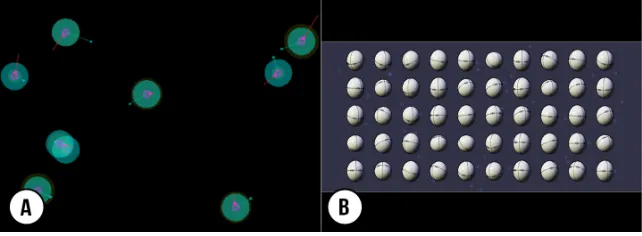
Figure 1 shows two concept demonstrators for active selection. The first one is a Brownian motion interface where each object moved on pseudo-random trajectories and speeds (see Figure 1-A). Objects contain circles where the radius represents the selection probability as feedback to the user. The second demonstrator,Eggheads, shows multiple faces looking at pseudo-random directions. Moving the mouse controls the orientation of all faces, and to select a given head the user must move the mouse so that it faces forward (see Figure 1-B). Active selection was further illustrated with a Brownian motion interface for text entry [67], shown in Figure 2.
[image:5.612.127.448.96.214.2]Fig. 2. Active selection for text entry: (A) Objects representing different letters move pseudo-randomly, with feedback on current position (yellow) predicted path (pink), and correlation with the user’s input (blue line and dot); (B) As the user’s input begins to stabilise the motion of any of the objects, the system provides feedback on its confidence in the selection (white circles); (C) Such ambiguities are resolved through continuous input until a single object is selected (image source: [67]).
This early work demonstrates the essence of motion correlation: that motion is used to couple input and output, in a continuous interaction between user and system. The specific approach in this work is to inject random motion to upset objects out of a state in which they are indistinguishable, and to define selection as a negative feedback loop toward regaining equilibrium. This contrasts our own use of motion correlation, where the principal idea is to present motion to which users couple in synchrony. However, there are key lessons that hold across the different perspectives: the mixed initiative of system and user in the interaction, the information conveyed with even very small movements, and the gradual resolution of ambiguity through continuous motion.
2.5 Motion Pointing: Motion Correlation for Selection in Graphical User Interfaces
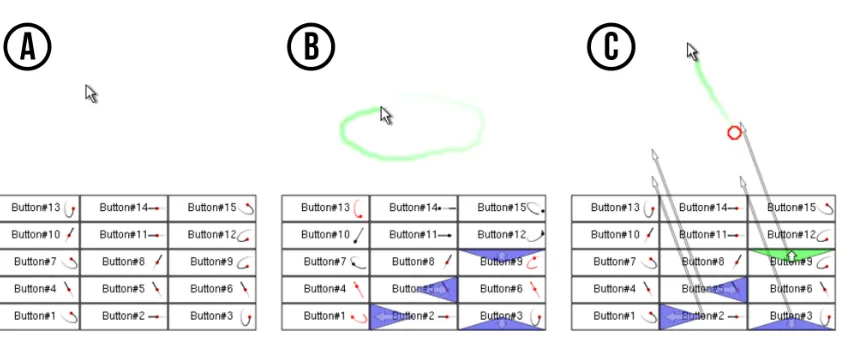
Williamson and Murray-Smith’s work inspired Fekete et al. to explore motion correlation as a selection principle in the context of conventional graphical user interfaces [14]. Rather than using pseudo-random movement, their idea was to associate objects with oscillatory movement, to draw on user’s natural ability for harmonic motion with their hands. In their design of themotion-pointingtechnique, the graphical objects of interest retain their static presence in the interface but are augmented with a moving dot describing a small elliptical movement.
Figure 3 illustrates motion-pointing. In this example, buttons presented to the user are extended with a small red dot moving next to it, each describing a different movement. To select a button, the user matches the movement of its target with the mouse. As they found that the correlation between the elliptical motions and user input was not sufficiently accurate to reliably distinguish between multiple different shaped and phased ellipses, the system highlights four candidate buttons with a triangular shape marking the top, bottom, left or right edges. The user confirms the selection by dragging the mouse towards the corresponding direction. In this combination, the technique is called Move-and-Stroke.
The authors evaluated how well users could match the movement of the targets with the mouse. They observed three distinct phases in the movement matching. First, users spend 1-1.5 seconds trying to synchronise the mouse with the object. Second, they manage to synchronise and remain coupled for 1-2 seconds. After that, due to fatigue or lack of feedback, the coupling starts to deteriorate and the user must try to re-synchronise the movement.
The work on motion-pointing, although studied in a more abstract case of an interface, offers key insights of relevance to design of interfaces using movement. It demonstrates the utility of harmonic motion for input, and the use and
Fig. 3. Fekete et al.’s move-and-stroke technique: (A) Buttons are shown with motion icons indicating the movement required for selection; (B) When the user performs a movement, the top four matches are highlighted with a blue are facing up, down, left or right; (C) The user completes selection with a stroke in one of the shown directions. (image source: [14])
systematic variation of periodic motion as stimulus. However, it also highlights the challenge of designing motion to be sufficiently distinct for detection by correlation of input and output.
2.6 Related Work
Active selection and motion-pointing introduced motion correlation for selecting objects by their movememt. In related work, motion matching has been used for interaction across devices.Smart-Its Friendsis a technique for pairing devices by shaking them together [29]. Because both devices were subjected to the same motion, they can use motion correlation to determine their connection. Hinckley discussedsynchronous gesturesmore generally as “patterns of activity spanning a distributed system that take on a new meaning when they occur together in time" [26], for instance pen strokes performed across displays to connect them [27]. A range of techniques have followed where motion and other inputs are correlated for cross-device interaction, for example with mobile phones on interactive surfaces [52].
The correlation of movement has been used to determine user and device relationships, for example whether two devices are being carried by the same person [39]. An interesting case is matching of user movement (tracked with a depth camera) with the motion of their devices (tracked with built-in accelerometers) for disambiguation of multi-user input on shared displays, as it demonstrates motion correlation across different sensing modalities [15, 51]. Motion can also serve as a secret that devices share for pairing.Shake Well Before Useis an extension of the Smart-Its Friends concept with an authentication protocol that has devices agree on a key based on correlation of the motion they independently measure [44, 45]. These works have in common that they demonstrate motion correlation of different input signals, contrasting our focus on matching of input and output.
Some prior work, also in the context of device authentication, is related to presenting motion to the user for reproduction. Many pairing techniques are based on one device presenting a secret that the user has to input on the other. Patel et al. presented a variant where the user’s phone prompts a terminal to display a gesture, which the user has to reproduce with their phone in hand to authenticate it for pairing [48]. Other authentication schemes have been based on rhythm matching, for example using rhythmic input as password [69]. TheHarmonyprotocol is an interesting
variant, proposing that a device targeted for pairing responds with multimedia feedback that the user can verify to be in harmony with their own device [34].
Also worthy of note is related work on the coupling of input and output by periodic motion. InResonant Bits, the coupling is explored in terms of resonance and how a system’s continuous feedback can guide the user’s rhythmic input [3]. InCycloStar, continuous closed loop motion is used to support panning and zooming in touch interfaces in a clutch-free manner [41]. We have employed cyclic motion in similar ways in the design of gaze and mid-air gesture interfaces [8, 12].
3 FIVE APPLICATIONS OF MOTION CORRELATION AS INPUT
In this section, we review five of the present authors’ recent works in which motion correlation was applied in the design of gaze and gesture interfaces:Pursuits[49, 63, 65],Orbits[12, 13],PathSync[6],AmbiGaze[61] andTraceMatch[8]. None of these works were designed to study motion correlation in the first place, but demonstrate the principle at work in giving rise to novel, practical and compelling interaction designs. We revisit the five works in chronological order, showing how our initial focus on gaze later expanded to gestures and human movement in general, and reviewing how motion correlation supports interaction with devices in public display, wearable, multi-user, and multi-device contexts. In each case, we analyse what specifically motivated our use of motion correlation, how the principle was applied, and what new insights we gain in retrospect.
3.1 Pursuits
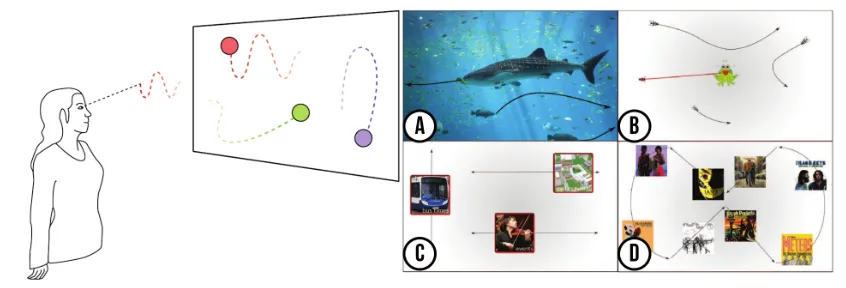
Pursuitsis a technique that leverages the smooth pursuit movements that our eyes make when following a moving target. To select a target, all the user has to do is to follow it with their eyes. As shown in Figure 4, the movement of the eyes is matched against the motion of potential targets, in order to determine the selection.
Our original motivation forPursuitswas to enable gaze input in a spontaneous manner, such that users could just walk up to a display and have the system immediately respond to their gaze [63, 65]. Prior to our work, gaze-based selection techniques had been based onfixations, the small hovering movements our eyes make when we look at a static target [31]. However, fixations are only effective for selection if the user’s gaze is first calibrated to the display’s coordinates. Our novel insight was that we can sidestep calibration, by using moving targets instead of static ones, and motion correlation instead of conventional gaze pointing.
3.1.1 Implementation & Evaluation.ThePursuitstechnique was implemented with an algorithm that computes the Pearson’s correlation coefficient between the coordinates of the uncalibrated gaze point and a target object over a given time window, and selects the object if its coefficient is above a given threshold. The algorithm was evaluated with real user data to provide insight into its discriminatory power: indicating ‘how different’ the motion of displayed objects has to be (in direction, phase or speed) in order to warrant robust selection. The evaluation also examined the design trade-offs of longer windows for increased certainty of a match versus faster response, and higher thresholds for avoidance of unintended activation versus sensitivity of the technique. See Vidal et al. for the details [65].
We explored the use ofPursuitsin a number of applications. In a first application, we designed a public information displays with content slowly drifting across the screen (see Figures 4-C,D). Each object moves in a different direction, providing an intuitive example where we can easily understand how users’ eye movements will instantly reveal which object they are following. However, the user can completely abstract from the different movements; as a moving object
Fig. 4. ThePursuitstechnique for gaze interaction: objects of interest move on the display; to select an object the user simply follows its motion with her gaze: (A) an authentication display that unlocks when users follow different fish in the right order; (B) a game in which users follow the fast movement of flies to have them caught by a frog; (C) a gaze-aware campus information display; (D) a music player where clips are triggered by following one of the album covers drifting over the screen.
draws their interest, it automatically elicits a smooth pursuit response from their eyes. The system infers to which object they attend and provides additional information on the detected topic of interest.
Our second example, shown in Figure 4-B, is a game where the user helps a frog catch flies that are buzzing around the screen—when they follow one of the flies with their eyes, the frog will snap it up with its tongue. The game mechanic is simple and engaging, and players can easily take turns in front of the display, as the system does not require any adaptation to different users [64]. The game shows thatPursuitsis effective with higher speeds and randomised trajectories of moving targets, and it highlights that the selection is target size independent, as targets are matched by their motion. This is significant for gaze input, as eye tracking has inherent accuracy limitations which makes it difficult to acquire smaller targets by gaze pointing.
The final example is an interface design for authentication (see Figure 4-A). The display shows different species of fish swimming across the display, and to log-in users must follow a certain sequence of fish in the right order. What makes motion correlation work robustly for such a task is that the pursuit movement of following an identified object (i.e., a specific fish) is fundamentally different from the saccadic movement of the eyes when we scan the screen for information (e.g., looking from fish to fish to identify the next in the sequence).
3.1.2 Pursuit calibration.With the pursuit technique, the absolute position of the gaze coordinate provided by an eye tracker does not matter. Because of the scaling performed in the correlation calculation, an object can be selected even when the eye-tracker is ‘off target’. However, once the algorithm determines that the user has been following an object, these data can be used as input for calibration of the eye tracker’s output. Based on this insight, we took the pursuits work a step further, and developed thePursuit Calibrationtechnique [49].
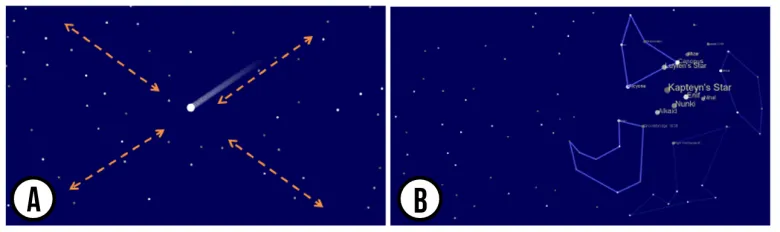
Figure 5 shows one of the application examples we developed to illustrate pursuit calibration. The application consisted of a constellation explorer. When users approach the screen, they see asteroids flying in space (see Figure 5-A). The movement of the asteroids naturally draws their attention and leads to a ‘pursuit reflex’. This enables the system to collect data points for computation of a homography, mapping the eye tracker’s output to the screen’s coordinates. After calibration, the system is then able to respond to where users fixate, by displaying more detail (see Figure 5-B).
Fig. 5. Application of thePursuit Calibrationtechnique for exploration of stellar constellations: (A) Initially, a few asteroids are shown to attract gaze-following for calibration the system; (B) After calibration, the system seamlessly enables exploration of fixed constellations by gaze.
The fundamental insight underlying pursuit calibration is that users are only to able produce smooth pursuit eye movement when there is a moving target they can follow. When we present a target with unique movement and observe the corresponding eye movement, we can robustly infer that the target is being attended. We previously highlighted and evaluated the advantages of pursuit calibration over conventional gaze calibration—it can be seamlessly embedded within applications, it is tolerant to user disruption, and it can be achieved without the user being aware of the calibration process. However, it is also interesting what the work demonstrates as input technique, specifically how movement is used to overcome the uncertainty of pointing.
3.1.3 Key insights for the design of motion correlation interfaces.
• Leveraging properties of eye movements: The eyes produce a distinctive smooth movement when they
follow a moving target. This allows us to detect attention to a moving object simply by correlating natural gaze behaviour with presented motion, for object selection as well as eye-tracker calibration.
• Implicit Interaction: In earlier work, users had to actively reproduce presented motion, whereas with gaze we
can leverage the reflexive nature of human visual attention to movement. The resulting experience is one in which the interaction dissolves with users’ natural behaviour.
• Unaware Input: Humans have limited self-awareness of the agency of their eyes. Beyond implicit interaction,
interfaces can be designed to engage users without active awareness of providing input, as demonstrated for calibration.
3.2 Orbits
Orbitsis a technique that brings smooth pursuit-based selection to smart watches. As these devices offer increasingly more functionality, finding suitable ways to interact with them becomes a more difficult problem due to their small size. The first wrist watches replaced pocket watches thanks to how they made it easy to read the time, even when the wearer’s hands were busy [22]. Analogously, the motivation for this work was to enable hands-free input on smart watches.
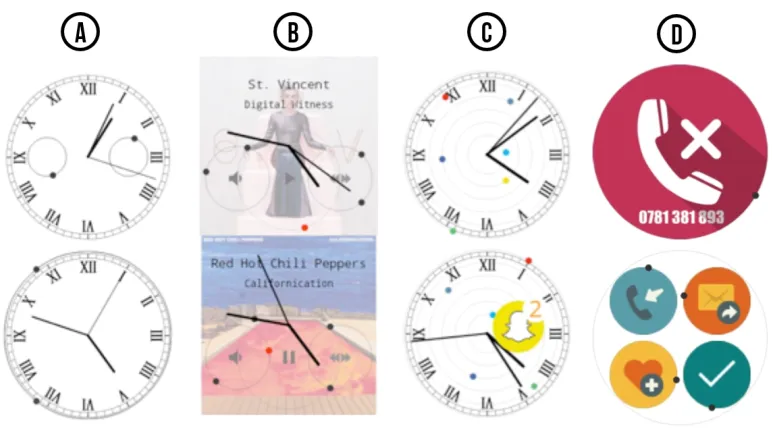
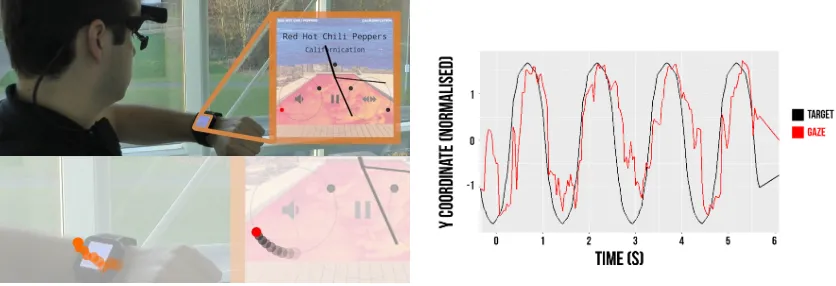
Fig. 6. The design ofOrbitsfor gaze input on smart watches. (A) Two watch face designs: smaller orbits that each have a single target (top), and a larger orbit with two targets moving in different phase (bottom). (B)-(D): Application-specific designs for a music player (A), notifications (C), and missed call handling (D).
limited screen real estate. Each target performs a distinct function and is activated when the system detects a high correlation between the motion of the target and the movement of the user’s eyes. Therefore, all the user has to do to issue a command, is to follow the corresponding target with their eyes.
3.2.1 Design and evaluation of orbiting controls.Orbits are conceived as explicit controls that are triggered by gaze pursuit of the moving target orbiting the widget. The selection mechanism was based on the original Pursuits algorithm but the smart watch context raised new questions. Given the limited screen real estate, we needed to understand the spatial extent of motion required to invoke a pursuit response, attention to competing motion on a small display, and how other information could still be accessed without unintended pursuit input. In an initial study we recorded eye movement in interaction with varying number, sizes and speeds of orbits, as well as gaze data on non-pursuit tasks, such as checking the time, reading text, and watching video. This showed that the pursuit algorithm can be optimised for detection of orbits as small as 0.6◦visual angle, while avoiding false positives. We then evaluated user performance with orbits, and observed that even with an increasing number of orbits, users were able to select targets with high accuracy (e.g., 84% when 8 orbits simultaneously displayed motion). This was an important result for us as it showed that users are able to attend a displayed motion selectively, even in the presence of multiple distractors within the same small display space.
Fig. 7. Left: A user controls the music playback withOrbits, turning up the volume by gaze pursuit of the associated target on the watch interface. Right: Example time series of target motion and gaze pursuit.
decreased when they follow the other one. Figure 7 shows the interface in use, and a sample of an orbit’s motion with corresponding gaze. The user’s gaze is tracked with a portable eye tracker, but gaze coordinates are streamed directly to the smart watch application, without any mapping to the tracker’s scene view because this mapping is not required. As a result, Shimizu et al. later demonstrated how the technique also works with EOG glasses, which have severe limitations in estimating absolute gaze points because of data drift, but are great at measuring relative eye movements at high frequencies [54].
The Notifications Face Plate consists of a notification panel in which six targets move on nested orbits behind the hands of the watch (Fig. 6-C). Each target corresponds to a different application and has a matching colour scheme (e.g. blue for Facebook, yellow for Snapchat). The radius of the trajectory represents the number of unaddressed notifications, increasing as more arrive. The application with the most recent notification moves in the opposite direction to the rest to make it more noticeable. When users follow a target, the little coloured dot becomes a small icon with the application logo. If the user keeps following the logo, the app is invoked. This prototype highlights how orbits of different radii can be selected robustly even though they circle each other at different speeds. It also illustrates that extra quantitative (i.e. number of notifications) and temporal (e.g. most recent) information can be encoded into the movement.
The Missed Call Menu supports discreet call handling (Fig.6-D). When the user misses a call, an icon with the contact number appears with an orbiting target. When the user follows this target, four options appear with their corresponding targets: call back, text back, save contact, and dismiss the notification. This example shows how motion-based techniques can support conventional styles of menu-based interaction, where orbits appear like buttons that can be ‘pressed’ by following the orbiting target.
3.2.3 Key insights for the design of motion correlation interfaces.
• Small Displays: In a pointing paradigm, the larger the target, the easier it is to select it. With motion correlation,
the size of the target itself does not matter, as long as its movement covers enough of a distance to produce a meaningful eye movement in terms of visual angle.
• Target Density: Our prototypes show that users can still make accurate selections when many targets move in
a dense arrangements, even with overlapping and crossing trajectories. However, it is important to keep in mind
• Decoupling of Input and Output. The use of a head-worn camera to track the eye was a pragmatic choice in
this project—for a smartwatch interface it might be preferable to have tracking built into the watch. However, it highlights an interesting separation between input and output. Eye tracker and smart watch operate with different coordinate systems without any need for registration and translation, as the relationship of input and output is established solely by motion correlation.
• Encoding Extra Information in the Movement: The movement itself can be used to encode additional details
about the command it triggers. The target speed, the radius of the trajectory, and the direction of movement can all encode meaning that can be instantly understood by users.
3.3 AmbiGaze
TheAmbiGazeproject investigated how gaze input based on motion correlation can scale to control of different devices in a smart environment [61]. We considered two principal challenges: how motion can be used for dynamic association of gaze with different devices while avoiding continuous motion in the environment; and how different devices (including ones without screens) can present motion to the user for input based on the pursuit technique. Figure 8 illustrate the interaction design. To initiate the control of a device, users direct their attention to it. The device responds by displaying control options as moving targets, which the user selects via the pursuit selection technique.
3.3.1 System Architecture.AmbiGaze relies on an architecture in which each device sends the normalized coordinate of each of their targets to a central server. User input is also captured and sent to the server. Due to the limited tracking range of current remote eye trackers we used a wearable eye tracker. To mitigate the issue of having controls with similar movement patterns in a distributed context, we incorporated an attention-awareness component inspired by Vertegaal et al.’s work on attentive user interfaces [62]. This component estimates which device the user is facing, reducing the number of targets it attempts to correlate with the user’s gaze. We implemented attention-awareness using infra-red beacons attached to each of our ambient devices. Each beacon emits a unique light pattern that is picked up by the wearable eye tracker’s scene camera (modified with an IR filter). This not only minimizes selection errors (as there are fewer controls to select from), but also manages when a device should display moving stimulus.
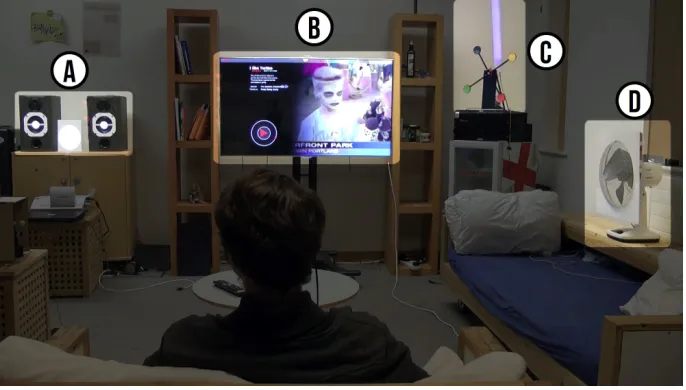
3.3.2 Design Space Exploration. We devised a taxonomy for the different ways in which motion can be embedded into a smart environment. This is defined by the way in which motion is generated (virtual x mechanical), and where it is displayed (internal or external to the device). The taxonomy is illustrated with four devices we integrated in the AmbiGazeenvironment, as shown in Figure 9.
[image:13.612.83.494.95.165.2]Fig. 9. InAmbiGaze, devices display motion by virtual or mechanical means, either generated by the device itself (internally) or by other devices (externally). This is illustrated with four devices integrated in a smart environment: (A) Speaker system; (B) TV interface; (C) Windmill lamp; (D) Fan.
Virtual + Internal:The device renders its own animated graphics. Our example prototype is an interface for a
video-on-demand (VoD) service on a large TV screen. Users select which video to watch next, or obtain additional information about a video, by following the motion of targets orbiting different graphical controls such as a play button (Figure 9-B).
Virtual + External:Inspired byIllumiroom[32], an external device projects a graphical overlay with moving
controls over the interactive device—this is particularly useful when the device does not have a display. Our example is a Music Player in which graphic controls are projected onto a pair of speakers (Figure 9-A).
Mechanical + Internal:The device generates physical movement. Our example is a multi-color lamp that generates
moving controls using an electric windmill (see Figure 9-C). Each paddle of the windmill is represented by a different color, and following any of the paddles triggers the corresponding color in the lamp.
Mechanical + External:An external device uses a laser pointer mounted onto a robotic arm to generate motion
around the target device—this is particularly useful when the device does not have any actuator. Our example is a digitally controlled fan. We mounted a white acrylic sheet around the fan as surface for projection of a laser’s red dot. The robotic arm traces a square around the fan, which the user can follow to switch the fan on or off (see Figure 9-D). The same laser pointer could be used for different ambient devices in the environment, simply by following the user attention to different devices.
3.3.3 Key Insights for the design of motion correlation interfaces.
• Movement beyond screens:This project demonstrated that the movement required for enabling correlation
interfaces can be generated by means other than screens. As long as the object exhibiting the movement can estimate the relative coordinates of its moving parts, they can be used as targets.
• Multi-step interaction:When used in excess, moving targets can be distracting.AmbiGazedemonstrates how
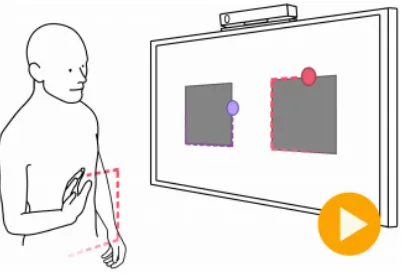
Fig. 10. InPathSync, to select an object, users match the movement of the target around it with their hands in mid-air
• Distributed Interaction Processing:This project demonstrates distributed management of the interaction
process. Each device only broadcasts the relative position of its targets, which are correlated to users’ gaze data by a central server. This allows the system to scale to multiple users and devices.
3.4 PathSync
The three projects above demonstrate how moving targets eliciting smooth pursuits can create suitable eyes-only interaction techniques.PathSyncextends this principle to mid-air gestures (see Figure 10) [6]. Whereas when engaging in a smooth pursuit the eyes naturally lock onto a moving object, we were not sure whether users would be able to do this as easily with their hands in mid-air. Other mid-air gestural interaction techniques work either by mapping the position of the hand to a cursor on the screen or by offering the user a library of gestures of different shapes that they can use to issue commands. InPathSync, rather than using the shape of the gesture to disambiguate the command being issued, we use the timing of the gesture.
3.4.1 Implementation & Evaluation. We investigatedPathSyncfrom three angles. First, we tested the feasibility of the technique in an abstract task in which we asked participants to simply follow the moving target on the screen. We varied the shape (circle, square, diamond, rounded square, and a randomly generated squiggle), speed, and position of the trajectory on the screen. All participants were required to do was to move their hand in synchrony with the movement of the target, and no feedback was given as we recorded them with a Microsoft Kinect sensor. Based on the data collected in this study we made improvements to the originalPursuitsalgorithm, which we discuss later in this paper. The results also led us to choose square trajectories as they yielded the highest average correlation, suggesting that users find it easier to match that shape.
Our second evaluation measuredPathSync’s performance in comparison to the baseline technique used in the XBox console. In our study, participants completed a tutorial for both techniques and were asked to select a specific option among others in a Windows Metro-style interface. The tutorial was designed to match the procedure and style of the interactive tutorial that ships with the Kinect SDK. We found no significant differences in performance between the two techniques, suggesting thatPathSyncperforms similarly to the state-of-the-art, despite using a fundamentally different interaction principle.
Fig. 11. Social NUIz: A multi-user quiz game in which players select their answer with PathSync. Left: ‘Attract’ screen. Right: After each round, players are displayed by their silhouette with their score on their chest and a crown if they got the right answer in this round.
Our third and final evaluation concerned how the technique performs in an ecologically valid situation. We deployed a multi-user quiz application calledSocial NUIzon two on-campus public displays, each equipped with Microsoft Kinect sensor (see Figure 11).Social NUIzis a multiple-choice quiz game on General Knowledge and University trivia playable by up to six people—the number of bodies that the Kinect can simultaneously track [9]. In each round, players discretely select an answer usingPathSyncfrom up to four possible answers displayed within a time limit. The remaining time is skipped if all players have made a selection, and those who have selected the right answer is crowned and receives an increment in their score.
To introduce the technique to a new audience, we also developed an ‘attract’ mode that presented users with a question that had two possible answers. When users were detected, their silhouette was displayed on the background, emphasising that they were being tracked by the Kinect. In subsequent rounds, instead of a silhouette, users were depicted by a coloured vertical bar. We modified the visualisation because a silhouette would make it easier for other players to infer which answer a given player was selecting. From a large sample of over a thousand interactions, we were able to validatePathSyncas a suitable technique for multi-user interaction with public displays.
3.4.2 Key Insights for the design of motion correlation interfaces.
• Making Gestures Visible:A major problem in gestural interfaces is communicating to the user which gestures
are available in the interface. By asking users to follow a moving target,PathSyncmakes all of its available commands clearly visible on the interface.
• Multi-User Interaction:Even though body-based interfaces made possible by sensors like the Microsoft Kinect
generally afford more social user experiences, cursor-based interaction techniques are awkward to be used by many users simultaneously. InSocial NUIzwe demonstrated how users can step in and out of the interaction, selecting options on the interface without the need for a cursor and without revealing to other players which option they chose.
• Corners work as Sync Points:In our evaluation we found that users could more easily match the movement
along shapes that had corners, such as the square and the diamond. These points acted as salient opportunities for synchronising the movement of the hand with the movement of the target.
scene, the user is able to close a pop-up screen on the TV by mimicking the widget’s motion with his hand even though he is holding a drink.
Fig. 13. TraceMatch processing pipeline. (A) Features detected from FAST and previous optical flow iteration. (B) Candidate features (green) and non-candidate features (red). (C) Features below the Pearson product-moment correlation coefficient threshold (red), features above the threshold (green), and the first feature to be matched is shown with its trajectory and the fitted circle from RANSAC (blue).
3.5 TraceMatch
[image:17.612.84.502.276.382.2]The previous projects demonstrated how the same principle of motion correlation can be used with two different modalities, namely gaze and mid-air hand gestures. However, it is easy to imagine how the technique could work with other human movement modalities, such as head [35] or feet movements [58]. With this in mind, we developed TraceMatch, a computer vision technique that searches for matching movements in a video feed, effectively enabling interaction based on motion correlation regardless of the modality being used. This was also motivated by the idea of supporting ‘lazy’ input that requires minimal effort for mundane tasks, such as controlling the lighting or the TV when lounging on a couch. In situations like this, the user might lean on one hand and hold a cup with the other, but they should still be able to provide input—for example, with a head gesture or the hand even though it is holding the cup (Fig. 12). Therefore, we designed the motion tracking and matching without any assumption about users’ postures or the body parts they might use for input.
which are then fed into an optical flow component (see Figure 13-A). We then compare the trajectories of each moving feature point (see Figure 13-B) to the movement of the target on the screen, triggering a selection when the correlation coefficient crosses a given threshold. In this work, we focused only on circular trajectories, so we configured the correlation algorithm to fit the tracking data into a circle using RANSAC, ensuring that no spurious high correlations would be triggered by similar trajectories with different shapes (e.g. elliptical) (see Figure 13-C).
We evaluated the system in regards to its sensitivity and robustness to false positives in a user study. For this purpose, we built an application for smart TVs that shows a widget overlaid on the program that the user can match to see further information about the content on the screen (See Figure 12). The study showed that users differ considerably in performance, preference and spontaneous choice of body movements for input. For example, some found motion matching with head movement difficult, whereas others found it least demanding in terms of effort.
3.5.2 Key Insights for the design of motion correlation interfaces.
• Abstracting from body modality:TraceMatchsearches for any kind of movement in the view of the camera.
This means that users can not only interact using whichever body part they wish, but also interact whilst holding other objects.
• Lazy Input:In our tests, we found that even small body movements if performed in synchrony with the
movement on the screen would trigger selections. This allows for a type of lazy input that is rare in body-based interaction.
• Posture-agnostic:As long as users perform a movement that matches that in the screen, they can stand, sit, or
lie down to interact with the device. By only searching for movement, our algorithm goes around the challenges of segmenting specific body parts, especially in a cluttered environment.
4 DESIGN GUIDELINES
The above sections have introduced the motion correlation principle, and discussed our experience of designing a novel interfaces in which the principle has been applied in different ways. We now distill the knowledge built across these works into a set of guidelines to support the design of future interfaces that employ selection by motion correlation. We take a bottom-up approach, starting from considerations about algorithm parameters, moving on to the choices about widget design, and concluding with broader choices about putting them together into a cohesive interface. Our aim is to give the reader a sense of the practical decisions that must be taken when designing such systems.
4.1 Algorithm Design
The basic principle in correlation-based interfaces is that it is possible to estimate which target the user wishes to select by how closely the motion of an input modality matches the element of that target. Therefore, quantifying motion similarity is an important aspect of this process. In this subsection, we describe the different decisions in configuring a Pearson’s correlation comparison algorithm, evolved through a series of works described previously [6, 12, 13, 61, 63–65]. We also provide the complete pseudo-code of the algorithms used inPursuits[65] andOrbits[12] (see Algorithm 1) and its extension used inPathSync[6] (see Algorithm 2).
if∃ci|ci>τthen
Selectedt←Outk|ck =max(ci) else
Selectedt←N one end
end end
depends on how large this window is. Whereas small windows lead to more responsive triggers, it can also lead to more spurious activations. On the other hand, whereas increasing the window size may decrease the number of false positives, it will also lead to more lag between performing the gesture and triggering a selection. A large window size also tends to yield lower correlation coefficients as it averages a larger amount of data. When choosing a window size it is important to take into account the sampling rate of the input device. For example, whereas a window size of 30 samples might represent a whole second of data in a 30Hz sensor (e.g. an RGB webcam), it can represent only a tenth of a second in a high-speed 300Hz sensor (e.g. Tobii TX300 eye tracker). Typical window sizes evaluated in previous works range from 100ms [65] to 1.3s [12].
4.1.2 Comparison Function.Thecomparison functionis the metric that quantifies how closely the two motions match. Fekete et al. compared three metrics: Euclidean distance (see Equation 1), normalised Euclidean distance (see Equation 2), and the sum of the coordinates’ correlation coefficients (see Equation 3), calculated over the delta vectors of the input device and the target. These authors eventually chose the normalised Euclidean distance in their prototype implementation.
fEuclidean(In,Out)=
W Õ t=0
∆xtI n ∆t −
∆xtOut ∆t
!2
+ ∆ytI n
∆t − ∆ytOut
∆t !2 1 2 (1)
fN ormEuc(In,Out)= W Õ t=0
∆xtI n ∆t||In|| −
∆xOutt ∆t||Out||
!2
+ ∆yI nt
∆t||In|| − ∆yOutt ∆t||Out||
!2 1 2 (2)
fSumCor(In,Out)= W Õ t=0
∆xtI n ∆t ×
∆xOutt ∆t
!2
+ ∆yI nt
∆t × ∆yOutt
∆t !2 1 2 (3)
ALGORITHM 2:PathSync Algorithm
Input:A sequence ofT2D positions of the input deviceP(I n)= xI n
t ,ytI n at timet; a sequence ofT2D positions
P(Outi)=nxOutt i,ytOutiofor each of theImoving targetsOution the screen at timet; a lower correlation threshold τloand a higher thresholdτhi ∈]0,1[; a window sizeN<T; a highlighting window sizeh.
Output:AT×ImatrixStates, where each cellStatest,i ∈ {Deactivated,Activated}represents the state of targetOuti
at timet. t= 0;Selected={ };
fort ∈0..Tdo if(t <N)then
∀i|Statest,i=Deactivated;
else
foreach targetOutido RotationMatr ix←
"√ 2 2 − √ 2 2 √ 2 2 √ 2 2 # × ® v1x v®2x
® v1y v®2y
wherev®1,v®2 are the eigenvectors of the matrix withnxOuti
t ,yOutt i
o as columns. .. . ...
uOuti
t vtOuti
.. . ... ← .. . ...
xOuti
t ytOuti
.. . ...
×RotationMatr ix .. . ... uI n
t vtI n
.. . ... ← .. . ... xI n
t ytI n
.. . ...
×RotationMatr ix
ci←min(cor(utI n,utOuti),cor(vtI n,vOutt i));
wherecor(a,b)=E[(a−σa¯)(b−b¯)] aσb ; ifci <τlothen
Statest,i←Deactivated end
ifc>τhithen
Statest,i←Activated else
Statest,i←Statest−1,i
end end end end
Vidal et al. used a formula based on Pearson’s correlation, but instead of adding the correlation coefficients along each axis as above, they discarded the largest one (see Equation 4 and Algorithm 1). This was the same algorithm employed inOrbits.
fMinCor =min(cor(xtI n,xtOuti),cor(yI nt ,ytOuti))
wherecor(a,b)=E[(a−a¯)(b−b¯)]
σaσb
(4)
extremes of a circle or edges of a square). To address this problem, inPathSync, we extended this algorithm by rotating the shape before calculating the correlation (see Algorithm 2 and Figure 14) [6].
When choosing a function, it is important to consider the possible values that it can output. An advantage of functions based on Pearson’s correlation is that the values always lie between -1 and 1. This also helps derive meaning from these values: if the value in both axes is close to 1, they are moving in tandem; if the value along one of the axes is close to -1, the target is moving in the opposite direction on that axis. Fekete et al.’s Euclidean distance, for example, is not bounded, so further consideration is needed to calibrate the threshold and understand the meaning of the values.
4.1.3 Correlation Threshold.Once the correlation function is applied over the window, it will output a value that represents the degree to which the motion of the input device matches the motion of that particular target. To determine whether the user was indeed following the target in that window, it is necessary to set athresholdto separate the two cases. The correlation threshold will determine the sensitivity of the recognition, subject to a trade-off between true-and false-positive rates: a low threshold will be more lenient with poorly matched motion, but more susceptible to false positives, whereas a high threshold will be more robust, but will require more precision from the user in the motion matching.
This value can be empirically determined based on the system’s requirements. For example, Figure 15 shows how the true- and false-positive recognition rates behave as we manipulate the correlation threshold, where each curve represents a different window size in the data we collected in the design ofOrbits[12]. We chose a point in the plot closer to the left size, penalising our true-positive rate in return for more robustness to false-positives.
[image:21.612.140.430.98.186.2]Fig. 15. ROC curve showing the relationship between false- and true-positive rates inOrbitsfor different window sizes as we manipulated the correlation threshold.
Fig. 16. InPathSync, we use two correlation thresholds. After crossing the upper threshold (B), the target is highlighted and remains so until either it is activated after a certain amount of time (D) or it crosses the lower threshold (E).
another stimuli. However, it is not required for the eyes because a smooth pursuit can not be reproduced without the resepective external stimuli.
4.1.4 Disambiguation.The architecture of the system impacts how the algorithm will be able to determine which target is being selected inambiguoussituations. In principle, the algorithm should work in a distributed fashion—each moving target could monitor the input device and check when the two motions match, triggering when appropriate. However, by design or by coincidence, it might happen that the motions of two distinct targets are similar within a given window. In a distributed architecture, this would cause both targets to trigger. This can be solved with a central server that checks not only whether the correlation coefficient crossed the threshold, but also which target yields the highest, and only trigger the action associated with that target.
[image:22.612.177.474.360.464.2]4.2.1 Random x Determined.This decision determines whether the motion parameters are generated stochastically through a probability distribution or pre-determined by the interface designer. For example, Williamson et al.’sBrownian MotionandEggheadsprototypes [67] are randomly generated, whereas our own work uses pre-determined shapes, such as circles inOrbits[12] and squares inPathSync[6].
Random motion tend to be highly distinct, as the always changing parameters will likely generate substantially different trajectories. Random generation also tends to create interesting and organic motion patterns that might better suit certain interface metaphors (e.g. swimming fish or flocks of birds). However, they can also be somewhat unpredictable, making them more difficult for users to follow. This can be minimised by displaying the subsequent positions and by randomizing parameters of higher-order, which makes the motion smoother. Another challenge for this type of motion is that they lack a point of reference for the user to find the specific target they wish to trigger, as the position of the targets on the screen is unpredictable.
Pre-determined motions have the advantage of being predictable and more easily recognisable. They also allow for closed loops, which lead to periodic gestures. However, they can also lead to similar motions that are difficult to distinguish. Below, we discuss the other parameters that can be manipulated in periodic motions in a closed loop that help the system to tell different targets apart.
4.2.2 Trajectory Shape and Size.The literature presents examples of prototypes and studies with motion correlation trajectories of a wide range of shapes: straight lines [49, 65], ellipses [14], circles [8, 12, 61], squares [6], triangles [6], etc. The trajectory parameters often influence the difficulty of the movement and the robustness of the recognition. For example, inPathSync, we compared the correlation yielded when participants tried to follow trajectories of 5 different shapes with their hands (see Figure 17): a circle, a square, a diamond, a rounded square, and a randomly generated closed shape (squiggle). As expected, the squiggle was the hardest shape to follow, followed by the circle and the rounded square. The easiest shapes to follow were the square and diamond. We believe that the reason behind it is that the corners of these shapes give users a “checkpoint” to synchronise with the target motion. This principle is also used in juggling, where novices are often instructed to “look at the highest point" and to “throw the next ball when the previous one reaches the top" [2]. However, the particular difficulties created by the trajectory shapes will strongly depend on the input device.
Fig. 17. Trajectory shapes compared inPathSync[6]: (A) Circle, (B) Square, (C) Diamond, (D) Rounded Square, (E) Squiggle.
however, we did find that how we displayed the trajectory on the screen influenced how users performed the gestures. For example, we found some correlation between the position where the target was displayed on the screen and the position of the gesture in relation to the user.
In comparison to hand-based techniques, an eye-based technique will more strongly suffer from the effects of the trajectory size. Together with the distance to the display, the trajectory size will determine the visual angle of the eye movement, i.e. how much the eye will move when following the target. If the trajectory is too small, the visual angle range may get too close to the accuracy limitations of the sensor, and the signal recorded by the input device will be more susceptible to noise.
It is important to note that the trajectory size is not a good parameter to disambiguate between two targets. This happens because the correlation calculation normalises the ranges of motion. As a consequence, if the only parameter distinguishing two motions is how large the motion is, further modifications of the algorithms will be necessary. However, the shape can help disambiguate the selection, though if there is no phase difference between two targets (see below), both will still yield high correlations, even if their shape is different.
4.2.3 Phase.From our experience, the difference inphaseis the best way to distinguish different targets. Varying targets’ phase lets different actions available in the interface to be represented by targets moving along a path of the same shape, but slightly offset from one another. This opens the opportunity for the designs of consistent interfaces (e.g. the Window Metro menu we implemented inPathSyncand the circular menus inOrbits). Other characteristics of the interface and of the capabilities of the users in matching the motion will impact how many offset targets can be placed along trajectories of the same shape, but simulations can help inform this decision before testing it with users. For example, we simulated a 60Hz input device following a target on a circular trajectory with different noise levels (representing different abilities of following the target smoothly) with the result shown in Figure 18. We computed the correlation using Algorithm 1 in windows of 30 frames, adding an angular offset as shown in the horizontal axis. The plot lets us discover the boundaries of the potential number of targets for a given threshold and algorithm. In the example, assuming users can match the motion perfectly, if we choose a threshold of 0.8, we see that offsets of 10 degrees on either side would still yield a correlation coefficient above the threshold. This would limit the number of targets to 360/(10+10)=18. It is interesting to note that when the correlation is smaller than -90 or larger than 90 degrees, the computed coefficient is -1. This is due to the fact that, in these cases, the motion in one of the axes will be in the opposite direction, yielding a correlation coefficient of -1, and because we discard the largest one, the final computation always results in -1.
Fig. 18. Simulated correlations between a target moving in a circular trajectory varying the angular offset between the target and the input device for different input noise levels.
Fig. 19. Alternating high (B) and low (A) correlations with targets in opposite directions.
illustrated in Figure 19, where two targets move around a square in opposite directions. The trail behind the target represents the data in a window over which the correlation is being computed at two instants in time A and B. At time A, the targets move in opposite directions, yielding a correlation of -1 that easily allows us to distinguish them. However, at time B, their motion is indistinguishable until they reach the corner of the square. In this case, increasing the window size to ensure that the corners are being captured or only computing the correlation along the horizontal edges are possible solutions.
4.2.5 Speed.Speed is another motion property that can assist the algorithm in distinguishing targets. However, there are cases where the speed alone does not provide sufficient information. For example, if the frequencies of two given targets are different, they will synchronise at some point—after all, even a broken clock is right twice a day. In
[image:25.612.154.417.331.476.2]these cases, the size of the window must be large enough the capture sufficient data to allow for them to fall out of synchrony.
4.3 Interface Design
Once the algorithm and the motion of the targets are defined, it is time to integrate them into a cohesive system interface. In this subsection, we focus on aesthetic aspects of motion correlation interfaces and how they affect the interaction.
4.3.1 Input Devices and Modalities.Motion correlation is a generic selection approach that can be used with a variety of input devices and modalities. In this context, Hinckley and Wigdor offer a practical lens to inform this choice [28], which classifies input devices in terms of property sensed, states sensed, number of dimensions, and acquisition time.
Property sensed:Because motion correlation does not require an absolute mapping between the input and output coordinate systens, it offers flexibility for the property sensed by the input device. Whereas the technique works with an established mapping (e.g., Fekete et al. implemented it with a conventional mouse), it also works with only relative motion sensing (e.g., an uncalibrated eye tracker, or an optical flow sensor as used for TraceMatch).
States sensed:Conventional pointing devices often require some means of confirming the selection, such as a mouse click or a touch event. In motion correlation, confirmation is commonly achieved simply by following the motion for a given amount of time. However, being able to sense additional states can be helpful in making the technique more robust to false activation, as the system can be configured to look for matching motion only when certain conditions are met. For example, inPathSync, we only correlated the position of users’ hands when they were raised.
Number of Dimensions:Because the trajectories we explored in our projects were two-dimensional, suitable input devices for them should sense at least two degrees-of-freedom. Devices that sense more than two can still be used with the appropriate conversion (e.g. the Kinect senses 3D positional data, which can be projected onto the 2D coordinate system of the screen). However, the same principle could be used with different degrees of freedom. For example, an LED strip could offer a 1D animation that could be matched with devices that sense only one dimension, be it positional (e.g. a slider or knob) or not (e.g. pressure, audio, etc.)
Acquisition Time:This generally represents the time it takes to move the user’s hand to the input device [28]. Because motion correlation can be used with different modalities this will strongly depend on the choice of body part to be used—for example, in eye-based interaction, the acquisition time is essentially zero as the eyes are always being tracked. Therefore, this strict definition might take other meanings depending on the modality. For example, inPathSync, it could refer to the time it takes to raise the hand before engaging in the motion matching per se. In addition to this time, it is important to consider that especially in interfaces that use periodical movements performed with the hands (e.g. targets orbiting around a circular trajectory), users will spend some time waiting until the moving target is at a salient point where they can synchronise the motion.
raising the question of where and how to display feedback for best effect. InOrbits, we explored two loci for the feedback: on the target and at the centre of the orbit. OurNotification Face Plateprototype is an example of feedback on the target—when users follow one of the dots, it turns into the icon of the corresponding app. The advantage of this design is that users do not have to shift their attention away from the target, which is crucial for eye-based interfaces, but also important for other modalities. There are cases, however, where it might be more suitable for the feedback locus to be away from the target. In ourMusic Playerprototype, multiple targets controlled the same parameter. For example, two targets orbiting a speaker icon increased and decreased the volume. In this case, the functionality of each target was communicated by the direction of the motion (clockwise to increase and anti-clockwise to decrease) and the feedback was provided both aurally (through the changes in volume) and visually (through the number of lines around the speaker icon).
4.3.4 Discrete x Continuous Control.While motion correlation interfaces were originally conceived for discrete interaction (i.e. selection), they can also be used for the control of continuous parameters. One way of implementing it is to update the value of such parameters as long as the algorithm determines that the user is following it, as demonstrated in several of our prototypes for volume control. However, it is important to consider the possibility of overshooting the target because of the windowed correlation calculation—after the user stops following the target, it will take some time until the new data fills up the window buffer enough for the correlation to drop under the threshold.
4.3.5 Interface Metaphor.A final aspect of the interface design that we would like to discuss regards the overall aesthetic structure of the interface. The pointing selection principle lends itself well to static interfaces structured around traditional layout principles, such as grids. These layouts can still work with motion correlation interfaces, as we see in howPathSyncwas implemented for the Windows metro interface [6]. However, the dynamic nature of motion correlation interfaces, inspires a different way of thinking about the layout design and its corresponding metaphors. Nature-inspired metaphors implemented in existing prototypes include swimming fish [65], shooting stars [49], and flying insects [65].
5 DISCUSSION
Above, we have shared our understanding and experience of how motion correlation interfaces work, and offered practical guidelines. Here, we take a critical look at the principle by identifying opportunities and challenges for future design and research.
![Fig. 2. Active selection for text entry: (A) Objects representing different letters move pseudo-randomly, with feedback on currentposition (yellow) predicted path (pink), and correlation with the user’s input (blue line and dot); (B) As the user’s input begins tostabilise the motion of any of the objects, the system provides feedback on its confidence in the selection (white circles); (C) Suchambiguities are resolved through continuous input until a single object is selected (image source: [67]).](https://thumb-us.123doks.com/thumbv2/123dok_us/9404734.441687/6.612.114.540.93.201/representing-different-currentposition-correlation-tostabilise-confidence-suchambiguities-continuous.webp)