TraceMatch: a Computer Vision Technique for User Input by
Tracing of Animated Controls
Christopher Clarke
1, Alessio Bellino
2, Augusto Esteves
3, Eduardo Velloso
4, Hans Gellersen
1 1School of Computing and Communications, Lancaster University
2
Department of Computer Science, Systems and Communication, University of Milan - Bicocca
3Institute for Informatics and Digital Innovation, Edinburgh Napier University
4
Microsoft Research Centre for Social NUI, The University of Melbourne
[email protected], [email protected], [email protected], [email protected],
[email protected]
ABSTRACT
Recent works have explored the concept of movement cor-relation interfaces, in which moving objects can be selected by matching the movement of the input device to that of the desired object. Previous techniques relied on a single modality (e.g. gaze or mid-air gestures) and specific hardware to issue commands.TraceMatchis a computer vision technique that enables input by movement correlation while abstracting from any particular input modality. The technique relies only on a conventional webcam to enable users to produce matching gestures with any given body parts, even whilst holding ob-jects. We describe an implementation of the technique for acquisition of orbiting targets, evaluate algorithm performance for different target sizes and frequencies, and demonstrate use of the technique for remote control of graphical as well as physical objects with different body parts.
ACM Classification Keywords
H.5.m. Information Interfaces and Presentation (e.g. HCI): Miscellaneous
Author Keywords
User input; Input Techniques; Remote control; Motion matching; Path mimicry; Gesture input; Vision-based interfaces; Ubiquitous computing; Computer vision
INTRODUCTION
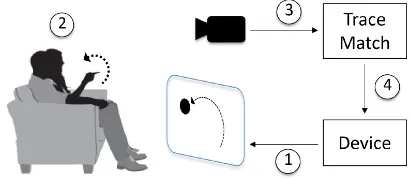
[image:1.612.336.542.255.344.2]TraceMatch is a new input technique designed for users to be able to perform simple selection tasks with minimal effort, with only a camera as an input device, but without specifying which body part to use (see Fig. 1). The technique leverages previous work onmovement correlation interfaces, where a target device presents a control as a moving object, which
Figure 1. TraceMatch is a generic sensing technique for input by tracing: (1) A device displays a control as moving target; (2) The user selects the control by following the displayed motion with any part of their body; (3) A webcam serves as generic input device; (4) TraceMatch analyses the scene video for matching motion and triggers input accordingly.
the user can select by simply following its motion. As pre-vious works have shown, it is intuitive for users to trace a displayed motion, with their hands [3], eyes [20], or a pointing device [22, 6]. Prior work has also demonstrated the versa-tility of the approach as the motion used for matching can take different shapes [3, 6], and be displayed in different ways including animated content [20, 14], widgets with moving elements [5], and tangible objects with moving parts [19].
Previous input tracing systems have relied on dedicated hard-ware for tracking of gestures [3], eye gaze [20, 5], and move-ment produced with mouse [6] or trackpad [22]. The use of dedicated input devices constrains deployment of the tech-nique and limits the ways in which users can trace a displayed motion. TraceMatch, in contrast, is vision-based and depends only on a general-purpose camera for input, while providing users with flexibility in how they can produce a body move-ment that matches the movemove-ment of an animated control.
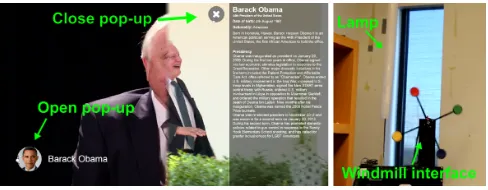
with-Figure 2. Two example applications of TraceMatch. Left: A Smart TV interface where users can open and close pop-ups by tracing the motion of animated widgets (Orbits). Right: A lamp with a physical ‘windmill’ interface where users can switch the colour of the light by tracing the movement of one the windmill’s arms.
out having to put the cup down. Hence, we do not assume any specific posture of the user, or preference for producing gestures, but capture the entire video scene and analyse it for occurrence ofanymotion that matches a displayed control.
TraceMatch analyses a scene in two stages. The first stage is ‘generous’ and considers any motion in the scene as potential input. We do not segment the user, hands or other body parts but track movement of any feature. For example, the user can hold an object while they perform a hand gesture, or perform the gesture with an object. The second stage matches the ob-served motion against the movement of any control displayed, using a combination of path correlation and model-fitting. To avoid the Midas touch, a control should exhibit movement that is unlikely to be inadvertently matched, by the user or other activity in their environment. We use circular motion for this purpose, as a movement that a user can easily produce with different parts of their body but that we would not expect to be produced accidentally. Prior work has also provided inspiring designs of controls displaying circular motion [5, 19].
In this paper, we present the system implementation of Trace-Match, and an evaluation of the system’s sensitivity for detect-ing input for different target sizes and speeds while avoiddetect-ing unintended activation. The evaluation is based on a data col-lection with users, where they followed the motion of orbiting targets in a variety of ways (with their head, dominant hand, non-dominant hand, and while holding a pen or a cup), demon-strating the flexibility afforded by the technique.
RELATED WORK
This work builds upon previous movement matching selec-tion techniques. The principle behind such techniques has been referred to by several names including rhythmic path mimicry [3], periodical motion coincidence [6], and feedback-based active selection [21], but is essentially the same across them: each selectable target on the interface presents a distinct movement and the user selects the desired target by matching (e.g.PathSync[3]) or counteracting (e.g.Eggheads[21]) the corresponding movement. Advantages of this principle in-clude multiple users having the ability to interact with a shared display without a cursor [22, 3], enabling interaction with feed-back modalities not suited for pointing [22, 19], no need to split the user’s attention between the target and the cursor [6], the possibility of fitting many targets in a small space due to target size independence [20, 5], and the high discoverability of the available gestures as they are continuously displayed [6,
3]. TraceMatch implements the principle for matching of cir-cular movement, but the technique is extendable to other forms of movement.
Movement correlation has been explored in a wide variety of contexts and modalities. Early work demonstrated the concept with mouse-operated graphical user interfaces [6, 22, 21]. Pur-suitsemployed it to enable calibration-free gaze interaction with public screens [20].Orbitsshowed that the concept can be used to distinguish which of several moving targets a user is looking at on the small screen of a smart watch [5].AmbiGaze showed how even physical movements can elicit the eye move-ments necessary to control ambient devices [19]. PathSync implemented the concept for mid-air gestures, enabling multi-user touchless and cursor-less interaction with public screens [3]. TraceMatch generalizes these previous systems by ab-stracting the interaction technique from the input modality. As long as the movement is large enough to be captured by the RGB camera, it can be used for input, be it a hand, arm, head, or even leg movement.
Gestural interaction techniques usually fall into one of two cat-egories: cursor-based pointing or discrete gesture sets [3]. In cursor-based pointing, the position of the user’s hand (or other body part) controls the position of an on-screen cursor. From then on, the interaction is similar to a desktop mouse, though another modality is often necessary for the confirmation of the selection once the cursor hovers the target. In discrete gesture libraries, the system continuously waits until a move-ment it recognises is performed by the user. A pre-defined set of gestures has to be trained beforehand.TraceMatch ex-tendsPathSync, which introduced body-based path mimicry as an alternative to these. Rather than relying solely on the spatialmatching of a gesture, it also relies on thetemporal coincidence, so the same gesture shape can represent multi-ple commands, depending on which point of the gesture it is synchronised with.
The concept of matching two similar signals as a selection mechanism has also been explored for authentication and cross-device interaction. Techniques have been demonstrated where users perform a displayed gesture with their phone in hand to pair it with a display [13], shake two mobile de-vices together to pair them securely [12], use their phones for direct touch input on interactive surfaces [17], or employ syn-chronous gestures to define continuous screen space across de-vices [8]. In contrast to these, TraceMatch provides a generic gestural input method.
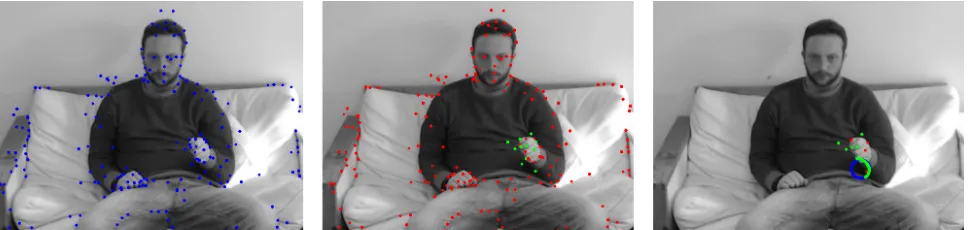
[image:2.612.54.298.61.156.2]Figure 3. The stages of TraceMatch for matching the motion of a rotary target with a hand movement. Left: Features detected from FAST and previous optical flow iteration. Centre: Candidate features (green) and non-candidate features (red). Right: Features below the Pearson product-moment correlation coefficient threshold (red), features above the threshold (green), and the first feature to be matched is shown with its trajectory and the fitted circle from RANSAC (blue).
TRACEMATCH DETECTION OF MATCHING MOTION
TraceMatch takes a video of the scene as input and subjects it to an image processing pipeline that results in identification of features associated with movement. These form ‘candidates’ for further analysis, in which their motion is matched against the movement of a target control (see Figure 3).
Image Processing
We first convert the images captured by the camera to gray scale for feature and optical flow processing and smooth them by applying a 5×5 Gaussian kernel to reduce image noise. After preprocessing, we use the FAST corner feature detector to find points of interest in the scene [16], specifically those relating to users. These are fed into an optical flow algorithm which aims to find the same feature in the following frame. FAST is not immune to high levels of noise and is also depen-dent on a threshold, which can be set to balance number of features detected in a scene versus processing time. We use a threshold of 20 for the difference between intensity of the central pixel and pixels of a circle around the centre.
For each feature point we must track its position over a window of frames,W, and keep a history of its previous positions. We use the iterative pyramidal implementation [2] of the Lucas-Kanade optical flow method [11] to track features across image frames using a maximum of 3 pyramid levels and optical flow window size of 51×51. The Lucas-Kanade tracker is used to find a feature in all subsequent frames until it is not found, either because the feature is no longer in the scene or due to an error. We also continue to apply the FAST feature detector to every frame, in case an object we want to track enters the scene. To remove duplicates, we discard a feature if it falls within a 20×20pxarea of another feature.
After optical flow processing we may have hundreds of fea-tures for a scene. Only feafea-tures that have been tracked for at leastWframes with a minimum average displacement of 0.5px calculated over the frames, are retained for motion-matching.
Motion Matching
The first step of the motion matching process is to assess the similarity between the candidate features and each orbiting target using the Pearson product-moment correlation coeffi-cient (PCC). The PCC is calculated using the trajectories of
the feature and rotary control over a window of sizeW for the xaxis,corrx, andyaxis,corry, separately.
Related work relied solely on PCC for motion matching [3, 5, 20], however the PCC is calculated independently for each axis which means that the circular motion of a control can be matched by elliptical and, in the extreme, up-and-down or side-to-side movement. Ifcorrxandcorryare greater than a minimum threshold,thcorr, the feature’s trajectory is fitted to a circle using a simple version of Random Sampling Consensus (RANSAC) to further refine the matching.
The centre of a circle can be found using only three points which are chosen randomly from the feature’s trajectory (i.e. from theW points tracked within a window). The radius of the circle,r, is the average Euclidean distance of the three points to the centre of the circle. The Euclidean distance to the centre of the circle is calculated for each point in the window to assess if the feature’s trajectory is circular. A data point is classed as an inlier if:
(1−thin)r<di<(1+thin)r (1)
wherediis the Euclidean distance from the data point to the centre of the circle, andthinis the inlier threshold which should satisfy 0<thin<1.
If at least 98% of the points on the feature’s trajectory are classed as inliers, the trajectory is classed as circular. If there are insufficient inliers another three points are randomly se-lected and another circle is fitted. This continues until suf-ficient inliers are found or 20 iterations have elapsed. For features with a circular trajectory the arc length of the trajec-tory,aF, is compared with the arc length of the rotary control’s trajectory, aRC. The motions of the feature and the rotary control are matched ifaF falls in the rangeaRC±0.1.
EVALUATION
Participants & Apparatus
Five participants (3M/2F) aged between 23 and 32 years (mean=26.6) were selected to take part in the study. Four participants were right-handed, one was was left-handed, and none of the users had previous experience with the system. The study setup was designed to represent a living room sce-nario, with a 55" Smart TV and a couch placed 2.23m from the TV (based on a TV size to viewing distance calculator). An unmodified, off-the-shelf Logitech C920 web camera was mounted on the top of the TV. The Logitech C920 is capable of capturing 1080p (1920×1080) at 30fps, however we took a 640 x 480 region of interest in the centre of the image to control that only movement related to the simulated applica-tion setting was captured. As the data collecapplica-tion took place in a busy lab, a white screen was placed behind the couch to occlude the experiment.
Target Following
In order to assess the sensitivity of the system, users were tasked with following an orbiting widget displayed in the centre of the TV screen with five different body parts: head, dominant hand, non-dominant hand, with a pen in hand, and with a cup half filled with water in the hand. The pen and cup were chosen as common objects that a user might hold in an everyday situation. We use two blocks of testing to form a balanced Latin Square in order to minimize carrying over effects among conditions. In order to evaluate the system we varied the direction, size and frequency of the orbiting widgets. In total there were 24 different orbiting widgets presented to the user for each movement condition:
• Frequency (f)The frequency of the orbiting widget, i.e. 0.50Hz is half a revolution per second. [0.25, 0.50, 1.00Hz] • Radius (r)The radius of the motion of the orbiting target.
[25, 50, 100, 450px]
• Direction (D)The direction of the orbiting target. [clock-wise, anti-clockwise]
Participants were presented with all variations of orbiting wid-gets in a random order. They were instructed to use whichever motion felt natural for a given movement condition, i.e. the way in which they held the cup or pen, and that it was not necessary to mimic the size of the rotary widget. For each vari-ation the user is presented with a single widget at the centre of the screen, showing the orbit as a circle and the target as a ‘dot’ moving around the circle. Before the widget appeared, a 3 second countdown is shown to allow the user to rest. The widget is then presented for 7 seconds whilst the user attempts to mimic its motion with the selected movement condition. This is then repeated for all widget variations and movement conditions. A true positive is recorded when the participant successfully mimics the motion (frequency, direction, and phase) of the orbiting target, and a false negative otherwise. These were then used to measure the sensitivity of the system.
TV Watching/Internet Browsing
In between the widget acquisition blocks participants were tasked with watching TV or browsing the internet for ten min-utes, to record cases where the widget should not be activated. Participants were free to choose either activity, and in addition
also casually engaged in conversation with the researcher to elicit further physical movement. This resulted in fifty min-utes of recordings in which the participants were not explicitly trying to trace a control. This data set was used to assess the system’s robustness to false positives (FP): when the partic-ipant inadvertently produces a movement that would match an orbiting target. When the recordings were processed, 16 orbiting targets (8 clockwise, 8 anti-clockwise) were simulated with their phases spaced equally by π
4 radians to detect any accidental matching.
Parameter Optimization
The recordings were then processed using a number of differ-ent parameters in order to find the optimum system parameters to minimize false positives whilst maximizing the system’s sensitivity. The window size,W, was fixed according to the desired arc length. The system parameters were varied as follows:
• PCC threshold (thcorr) The threshold of the minimum
value for the horizontal PCC,corrx, and vertical PCC,corry. The lower the value the more features are passed to the circle fitting stage of the system. [0.86, 0.89, 0.92, 0.95, 0.98] • Inlier threshold (thin) The threshold which determines
whether a data point is classed as an inlier or an outlier. The lower the value the closer the motion must be to a circle for it to be counted as a match. [0.05, 0.10, 0.15, 0.20] • Arc length (a)The arc length of the rotary widget that must
be matched, i.e. 0.5 indicates the user must follow the rotary widget for half a rotation. [0.5, 0.75, 1.0]
RESULTS
Two parameters sets were chosen for each frequency based on their sensitivity and false positives (see Table 1).Strict param-eters correspond to those that exhibited the highest sensitivity when aggregating all sizes, users, and movement conditions of the respective frequency whilst having zero false positives. Relaxedparameters are those with the highest sensitivity when aggregating all sizes, users, and movement conditions of the relevant frequency that produced less than 10 false positives over the 50 minute recording of background activity.
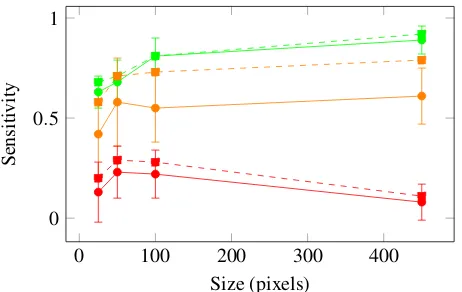
Figure 4 shows sensitivity results for different target sizes and frequencies. We observed the highest sensitivity for rotary widgets with a frequency of 0.25Hz (i.e. slow rotation of a target completing a circle in 4 seconds), and low sensitivity for ‘fast’ targets with a frequency of 1.00Hz. Widgets with a
Freq. (Hz) Type thcorr thin a W FP
0.25 Strict 0.95 0.20 0.5 60 0 Relax 0.92 0.15 0.5 60 6
0.50 Strict 0.95 0.20 0.75 45 0 Relax 0.86 0.05 0.5 30 6
1.00 Strict 0.86 0.10 0.75 23 0 Relax 0.86 0.15 0.75 23 4
0 100 200 300 400 0
0.5 1
Size (pixels)
Sensiti
[image:5.612.63.294.60.206.2]vity
Figure 4. Sensitivity plotted against size for frequencies of 0.25Hz (green), 0.50Hz (orange), and 1.00Hz (red) for aggregated movement conditions and users. Strict parameter sets are shown with solid lines, relaxed parameters sets are shown with dashed lines. Standard devia-tion across users for strict parameter sets are shown with error bars.
frequency of 0.50Hz show a greater standard deviation across users, and for this frequency we also observed that relaxation of parameters resulted in a more significant increase in sensitiv-ity. Note we found a striking difference in optimal parameters for strict versus relaxed conditions specifically for the 0.50Hz case. We also observed that both frequencies of 0.25Hz and 0.50Hz yield the same strict parameters aside from arc length.
Size effects were not as pronounced as differences in fre-quency. For widgets exhibiting slower movement (0.25Hz) sensitivity increased with size. This effect did not show as clearly for larger frequencies. As the size increases it may be easier to discriminate the position of the target, but at a given frequency it also implies a higher velocity of the target. The former can explain the performance increase with size for ‘slow’ targets (0.25Hz), and the latter the performance decrease we observed for ‘fast’ targets (1.00Hz).
Table 2 gives insight into performance observed for different users and movement conditions. We observed that for any user there was at least one condition for which we observed high sensitivity (0.88 or better with strict parameters, 0.94 or better with relaxed parameters). Note the differences observed, for instance between users 001 (performing well with all condi-tions except head movement) and 005 (highest performance with head movement). For every condition we also observed at least one user achieving high sensitivity (0.94 or better with strict parameters, and 1.00 with relaxed parameters). Interest-ingly, we observed the highest sensitivity across all users for movement with the cup in hand, and the worst with the pen in hand – this surprised us as we thought of a cup as a distractor, and a pen as natural for tracing. However, a cup provides more distinctive features for tracking than a pen.
DISCUSSION
Our study of TraceMatch demonstrates that the method is ef-fective in matching a user’s motion with different sizes of an or-biting target using an unmodified webcam. We observed high sensitivity for different movement conditions, highlighting the system’s ability to abstract the motion matching technique from the input modality. This gives the users flexibility to em-ploy the input modality of their choice and enables seamless
Movement Condition
User Params Head DH NH Pen Cup
001 Strict 0.19 1.00 0.94 1.00 1.00 Relax 0.19 1.00 1.00 1.00 1.00
002 Strict 0.56 0.94 0.81 0.63 0.94 Relax 0.56 0.94 0.88 0.69 1.00
003 Strict 1.00 0.81 0.81 0.56 0.88 Relax 1.00 0.81 0.75 0.63 0.94
004 Strict 0.88 1.00 0.44 0.44 1.00 Relax 0.81 1.00 0.44 0.44 1.00
005 Strict 0.88 0.50 0.69 0.50 0.69 Relax 0.94 0.56 0.69 0.50 0.75
All Strict 0.70 0.83 0.73 0.63 0.89 Relax 0.70 0.87 0.75 0.65 0.94
Table 2. Sensitivity for different movement conditions when following a rotary widget with a frequency of 0.25Hz for aggregated sizes.
interaction during other activities where the user, for instance, may be holding an object. Our evaluation was focussed on the performance of the vision-based sensing system and provides insight on parameter choices for the design of interactive ap-plications. The results indicate that movement conditions can affect tracking performance but also show individual differ-ences prompting further investigation of user preference and ability in motion following with different parts of their body.
We have built two demonstrators that illustrate the use of Trace-Match as a remote control in the home (Fig. 2), showing that the technique can work as input to display devices as well as to screenless objects. The technique has wider application poten-tial, for example for spontaneous interaction (e.g., with public displays) because of its high discoverability, and for multi-user contexts as it can readily handle input produced by different users present in a scene. The described implementation of TraceMatch currently uses circular motion but the technique is extendable to other shapes. Optical flow processing and movement correlation are generic, and only the final stage of model fitting would require adaptation.
In our study, we limited tracing to a single visible target for data collection, but the applications we built demonstrate se-lection from among a number of targets, prompting further work on how the technique scales. As our study was designed to facilitate parameter exploration, users did not have any feed-back on how well their movement matched a target. We would expect that feedback will positively affect input performance.
CONCLUSION
REFERENCES
1. Michael Beigl. 1999. Point & Click—Interaction in Smart Environments. InProc. of Int. Symp. on Handheld and Ubiquitous Computing (HUC ’99). Springer, 311–313. DOI:http://dx.doi.org/10.1007/3-540-48157-5_31
2. Jean-Yves Bouguet. 2000. Pyramidal implementation of the Lucas Kanade feature tracker.Intel Corporation, Microprocessor Research Labs(2000).
3. Marcus Carter, Eduardo Velloso, John Downs, Abigail Sellen, Kenton O’Hara, and Frank Vetere. 2016. PathSync: Multi-User Gestural Interaction with Touchless Rhythmic Path Mimicry. InProc. of SIGCHI Conf. on Human Factors in Comp. Systems (CHI ’16). ACM.DOI:http://dx.doi.org/10.1145/2858036.2858284
4. Katie Derthick, James Scott, Nicolas Villar, and Christian Winkler. 2013. Exploring Smartphone-based Web User Interfaces for Appliances. InProc. of MobileHCI ’13. ACM, 227–236.DOI:
http://dx.doi.org/10.1145/2493190.2493239
5. Augusto Esteves, Eduardo Velloso, Andreas Bulling, and Hans Gellersen. 2015. Orbits: Gaze Interaction for Smart Watches using Smooth Pursuit Eye Movements. InProc. of 28th ACM Symp. on User Interf. Softw. & Techn. (UIST 2015).DOI:http://dx.doi.org/10.1145/2807442.2807499
6. Jean-Daniel Fekete, Niklas Elmqvist, and Yves Guiard. 2009. Motion-pointing: Target Selection Using Elliptical Motions. InProc. of the SIGCHI Conf. on Human Factors in Comp. Systems (CHI ’09). ACM, 289–298. DOI:http://dx.doi.org/10.1145/1518701.1518748
7. Jan Hess, Guy Küstermann, and Volkmar Pipek. 2008. Premote: A User Customizable Remote Control. InCHI ’08 Ext. Abstr. on Human Factors in Comp. Sys.3279–84.
DOI:http://dx.doi.org/10.1145/1358628.1358844
8. Ken Hinckley. 2003. Synchronous Gestures for Multiple Persons and Computers. InProc. of the 16th ACM Symp. on User Interf. Softw. & Techn. (UIST ’03). 149–158. DOI:http://dx.doi.org/10.1145/964696.964713
9. Tiiu Koskela and Kaisa Väänänen-Vainio-Mattila. 2004. Evolution towards smart home environments: empirical evaluation of three user interfaces.Personal and Ubiquitous Computing8, 3-4 (2004), 234–240.DOI:
http://dx.doi.org/10.1007/s00779-004-0283-x
10. Logitech. 2010. Logitech Study Shows Multiple Remote Controls Hindering Entertainment Experiences Around the Globe. Press Release. (Nov 2010).http:
//www.logitech.com/en-us/press/press-releases/7748
11. Bruce D. Lucas and Takeo Kanade. 1981. An Iterative Image Registration Technique with an Application to Stereo Vision. InProc. of the 7th Int. Joint Conference on Artificial Intelligence (IJCAI’81). 674–679.
http://dl.acm.org/citation.cfm?id=1623264.1623280
12. Rene Mayrhofer and Hans Gellersen. 2009. Shake well before use: Intuitive and secure pairing of mobile devices. IEEE Transactions on Mobile Computing8, 6 (2009), 792–806.DOI:http://dx.doi.org/10.1109/TMC.2009.51
13. Shwetak N. Patel, Jeffrey S. Pierce, and Gregory D. Abowd. 2004. A Gesture-based Authentication Scheme for Untrusted Public Terminals. InProc. of ACM Symp. on User Interf. Softw. & Techn. (UIST ’04). 157–160. DOI:http://dx.doi.org/10.1145/1029632.1029658
14. Ken Pfeuffer, Mélodie Vidal, Jayson Turner, Andreas Bulling, and Hans Gellersen. 2013. Pursuit Calibration: Making Gaze Calibration Less Tedious and More Flexible. InProc. of the 26th ACM Symp. on User Interface Software and Technology (UIST ’13). 261–270. DOI:http://dx.doi.org/10.1145/2501988.2501998
15. Christof Roduner, Marc Langheinrich, Christian Floerkemeier, and Beat Schwarzentrub. 2007. Operating Appliances with Mobile Phones—Strengths and Limits of a Universal Interaction Device. InProc. of Int. Conf. on Pervasive Computing (Pervasive ’07). Springer, 198–215. DOI:http://dx.doi.org/10.1007/978-3-540-72037-9_12
16. Edward Rosten and Tom Drummond. 2006. Machine learning for high-speed corner detection. InEuropean Conference on Computer Vision, Vol. 1. 430–443.DOI:
http://dx.doi.org/10.1007/11744023_34
17. Dominik Schmidt, Fadi Chehimi, Enrico Rukzio, and Hans Gellersen. 2010. PhoneTouch: A Technique for Direct Phone Interaction on Surfaces. InProc. of ACM Symp. on User Interf. Softw. & Techn. (UIST ’10). 13–16. DOI:http://dx.doi.org/10.1145/1866029.1866034
18. Dominik Schmidt, David Molyneaux, and Xiang Cao. 2012. PICOntrol: Using a Handheld Projector for Direct Control of Physical Devices Through Visible Light. In Proc. of UIST ’12. ACM, 379–388.DOI:
http://dx.doi.org/10.1145/2380116.2380166
19. Eduardo Velloso, Markus Wirth, Christian Weichel, Augusto Esteves, and Hans Gellersen. 2016. AmbiGaze: Direct Control of Ambient Devices by Gaze. InProc. of the Designing Interactive Systems Conf. (DIS ’16). ACM, 4.DOI:http://dx.doi.org/10.1145/2901790.2901867
20. Mélodie Vidal, Andreas Bulling, and Hans Gellersen. 2013. Pursuits: Spontaneous Interaction with Displays Based on Smooth Pursuit Eye Movement and Moving Targets. InProc. of UbiComp ’13. ACM, 439–448.DOI:
http://dx.doi.org/10.1145/2493432.2493477
21. John Williamson. 2006.Continuous uncertain interaction. Ph.D. Dissertation. University of Glasgow.
22. John Williamson and Roderick Murray-Smith. 2004. Pointing Without a Pointer. InCHI ’04 Ext. Abstracts on Human Factors in Comp. Systems. ACM, 1407–1410. DOI:http://dx.doi.org/10.1145/985921.986076
23. Andrew Wilson and Steven Shafer. 2003. XWand: UI for Intelligent Spaces. InProc. of the SIGCHI Conf. on Human Factors in Comp. Systems (CHI ’03). ACM, 545–552.DOI:http://dx.doi.org/10.1145/642611.642706