©IJRASET: All Rights are Reserved
561
Generating Fault Tolerance Mechanism in Cloud
Computing System using EDP - PART 2
B. Anand Kumar1, K. Madhukar2, V. Malliah3, Vinay Babu 4
1
Research Scholar, Department of Computer Science, Rayalaseema University, Kurnool.
2
Department of Physics, Osmania University, Hyderabad.
3
Research Scholar, Department of Computer Science, Nagarjuna University, Guntur.
4
Director (IT), Stanley College of Engineering and technology, Hyderabad.
Abstract: With the high usage of cloud computing, fault tolerance is a major concern. Some of the errors due to faults make the service and server unavailability. The fault tolerance technique ensures that to enable a system to tolerate software faults remaining in the system after they got developed. In this paper the authors proposing a novel algorithm as Part 2 of EDP (Error Detection Program). The implementation of Part 2 resolves majority of the errors in faults, when reboot or update is required. It will collect all the errors from Part 1 module and resolve them by using task re-submission method in reactive fault tolerance. All the jobs will be send to each task, one by one until they resolved automatically. If errors still exist, they will be sent to configuration management tools to resolve manually.
Keywords: Cloud computing, fault tolerance, Error Detection Program, RPM DB errors, yum, Kernel.
I. INTRODUCTION
A. Introduction
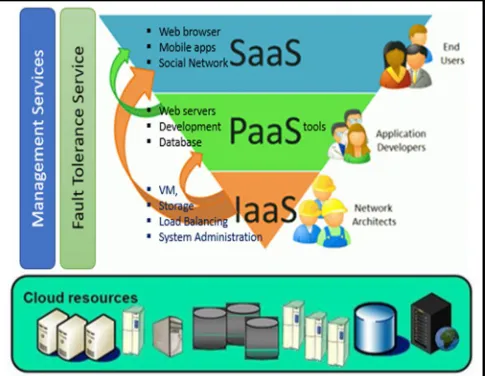
Cloud computing is a highly challenging and complex with four inter dependent layers. The base layer or lower level layer contains infrastructure, such as network devices L2, L3, physical blade servers, storage servers, connecting devices and communication media. The next level layer is virtualization and system management tools layer, which is placed on the top of the base, layer and it is connected to the Infrastructures as a Service layer (IaaS). All the cloud infrastructure resources will be placed at different datacenters at different geographic locations. The virtualization layer helps to extract maximum usage of all the cloud resources dynamically. The next level layer, which is the Platform as a Service (PaaS) layer, contains middleware tools such as SAP, Apache Tomcat and UI development tools etc. The PaaS layer helps the end user to develop of their applications with a set of user level permission from the IaaS layer. The next level layer is Software as a Service (SaaS) layer, which is also known as user level application layer. Few examples of Application layer are social networking sites etc.,
[image:1.612.178.422.535.723.2]Failures at various layers will have impact on all services. If any one of the PaaS or SaaS layer fails, then it will have impact on software services, those are installed in the servers, but if there are lower level or IaaS layer issues, then it will have impact on all layers on the above this layer. Following figure 1 shows the various layers of the cloud computing system.
©IJRASET: All Rights are Reserved
562
1) Cloud Deployment Models: As per NIST, the cloud computing architecture there are four different deployed models and they are as follows:
a) Private Cloud: Also known as internal cloud. A private cloud is securely located behind the firewall and only authorized users can access. It is designed for single client, it maintained by internal IT team or third-party. The organization in question retains complete control over its data and avoids the security risks and compliance issues associated with public clouds. However, private clouds offer none of the economies of public or shared cloud services as all associated costs are borne by the client. Private cloud provides full control in security, customized application, and performance measured issues. Private clod is good for where business critical, high secure and performance is required. [13]
b) Public Cloud: In public cloud, over Internet shared resources and services are delivered to the end-users. In public cloud, capital and operating system shared between user’s multiple users and charges. Service provider’s charges apply for hourly and monthly basics. Public cloud is best for small and startup companies; because it reduces IT expenders in hardware, software, networking and IT experts and it provide immediate access to the server. Public cloud has less scope in control in security; customized application, performance measure, and end-users don’t have any control on physical, virtual servers and infrastructure. [13]
c) Hybrid Cloud: Hybrid cloud is a combination of both public and private cloud. Typically, all non-critical activities are performed public cloud and critical activities are performed in private cloud. Hybrid cloud infrastructure gives businesses security where it is needed alongside the opportunity to generate cost efficiencies, thereby offering maximum benefit from cloud infrastructure. It can be maintained in house or service provider. End-user has freedom to customize resources as per requirement. Hybrid cloud is good for business where you have critical and non-critical data maintained. [13]
[image:2.612.189.439.385.514.2]d) Community Cloud: In a community cloud, services are shared with in originations, where similar data processing and privacy maintained. Information is available within community distributed among them securely. Community cloud loud can be hosted and maintained by one of the community member or third-party service provider. Costs are shared across the group, so those involved get some of the benefits of a private cloud at a lower price. [13]
Figure 2 Cloud deployment models [15]
II. LITERATURESURVEY
Sheheryar Malik, Fabrice Huet proposed a fault tolerance mechanism in cloud, which schema is highly fault tolerant. The mechanism advantage is forward recovery and it is dynamic reliability configuration. For this experiment three different virtual
nodes used in parallel and this mechanism implemented in Diverse Software. Then they incorporated schema to concept of Fault
tolerance, based on VM algorithm reliability. Proposed schema is providing highest reliability in results and it does not suffer from domino effect as check pointing is made at the end, when all the nodes have produced the result. [1]
B. Arunkumar, M. Kesavamoorthi proposed an algorithm EIPR for multiple task replication in cloud computing and they also implemented SBA (Speed Block algorithm) algorithm process using backup and recovery. Concluded, combination of SBA and EIRP algorithm implemented in cloud environment, SBA provided better results compared cloud computing. EIRP implemented concept of replication to increase chance of the task of resources allocation. Simulation results say that EIRP increase resource utilization and reduce total execution process time [2].
©IJRASET: All Rights are Reserved
563
Jasbir Kaur, Supriya Kinger through their work focused on survey of FT and different types of techniques and how they implemented before and after when fault occurs. These finding reveals that many fault techniques are available but still need cheaper technique is required to tolerate faults [4]. Torki Altameem a Replication-Based and Fault Tolerant Allocation Algorithm for Cloud Computing proposed algorithm, which is based on adaptive FT, and to determine adaptively the number of replicas according to the fault rate of cloud VM’s. The algorithm implemented using a simulator to refine the results. They concluded, the performance of algorithm proposed is evaluated under different conditions using different matrices as throughput and turnaround time [5]. Recently Mridula Dhingra, Neha Gupta worked on Comparative analysis of fault tolerance models and their challenges in cloud computing and discussed about many fault tolerance techniques by comparing with other models. After the analysis authors strongly recommended for the need of a new algorithm, which improve the reliability of cloud nodes of using Fault tolerance techniques through the proper resource allocation of a job implementation of the concept of adaptive reliability by identification and correction of failure nodes. It could reduce failure of nodes (those are failed due to time constraint) by implementing load-balancing techniques. It may enhance the processing speed of nodes to improve the reliability [6].
Mohammed B, Kiran M, Awan IU worked on Optimizing Fault Tolerance in Real-Time Cloud Computing IaaS Environment. They proposed a mechanism to optimize fault based on quality of each VM and if performance is not good than it could be replaced. After simulation, when pass rate is increased the numbers of failures are decreased by using forward-backward recovery, using diverse software tools. These authors proposed IVFS uses pass rate using of the computing virtual node fault manager using the checkpoint/replay technique by applying the reward renewal process theorem proposed algorithm pass and fail rate analysis obtained from experimental results as well as the performance comparison with existing approaches. The authors concluded that the proposed schema provides a better performance compared with existing schemas [7].
III. FAULTTOLUENEINCLOUDCOMPUTING
A. Real Time Faults in Cloud Computing
In cloud computing, a failure represent unexpected behavior of the functionality of severs or host and can’t fulfill the end user requirement. When the cloud system entered in to unknown or invalid state, it signals the occurrence of failure, which is happened only when a fault is occurred. A fault, error and failure could be happened as per following chain [8,9].
Fault -> Error -> failure->………failure.
Fault tolerance and their mechanisms have ability to perform their own functionality even though failure has occurred. A failure could be happening but need to develop a fault tolerance mechanism to enable the system to continuously work.
1) Types of faults in Cloud Computing: Various types of faults can be identified in real-time, physical, virtual servers and network devices.
a) Physical hardware faults
b) Software bugs or Errors in Design
c) Network Errors or Faults
d) Unknow Errors or Faults
2) Failure Behavior of Physical Servers in Real Time Environment: Typically, in real-time environment, there will be ‘N’ number of physical servers in a data center. And these physical servers contain multiple processors, high memory modules, large-scale storage devices, network devices, storage controllers, and other devices. After analyzing more than 50,000 servers in different datacenters, it is mandatory to resolve some critical issues immediately, if not it may lead to server down and service unavailability [10]. Following are some of key observation made while studying real-time servers.
a) In Datacenters, most of the servers don’t have any issues, but 20% of the servers will raise issues. And 10% of servers always
have hardware replacement issues.
b) In case of any unexpected and abnormal weather conditions, power outage will make the entire physical server down.
c) Hard disks and memory and power supply are most common hardware fails in physical servers.
d) Hard disks issues could be related to storage, raid controllers and battery.
e) Upgraded version of BIOS of Old servers may not be compatible and will create certain issue.
f) While performing updates on Operating system (patching), there will certain issues like incompatibility, duplicate, dependency
packages, yum repository and RPM DB error.
g) File System errors can be occurred due to following reasons If server is not rebooted for a long time If any changes have been
done in LVM. Time for running FSCK at startup, may depend on the file system size.
©IJRASET: All Rights are Reserved
564
3) Real Time Behaviour of Virtual Server in the presence of failure: In cloud computing, most of the servers are virtual, and they are not real servers. Depending up on physical server, resources of physical server are shared to the virtual servers. IBM, Amazon, and Microsoft maintain more than 1 to 1.2 lacks cloud servers throughout the world. Failure behavior of the server can be analyzed based on fault tree and Marko chain models [11,12]. As per the end user component, failure represents application instance running on same VM under server components failure. The co-relation between individual components failures and boundaries on each failure. An application failure occurs when there is is a failure or error with any hardware resources.
a) As per the analysis of failures, almost 10% VMs (Virtual machines) will have problems in each datacenter. All, the VMs share
resources from physical host. Hence if physical host is down, it could lead to P1 issue.
b) In real time, VMs share storage and they run on shared storage servers. If any storage server is failed than all the VM will go
down.
c) 5% of the VMs are suffered with network issues. In Hybrid and public clouds, VMs can’t be accessible to cloud users when
internet is down.
d) If any Physical host fails due to some hardware issues, it will have huge impact on virtual machines. In the implementation of
standard virtualization, almost 50% VMs running in a cluster will move to another server.
e) 70% of the physical servers and VM are down due to the bad weather condensations and power outage. As the hardware
resources are shared to all VMS on a host, it may lead to performance issues which are another biggest issue in the Virtual technology.
f) It shows that 10% of the VMs will be unavailable due to shared storage. Figure 3 shows real time network storage connections.
g) Resource allocation for each VM in a cluster is another big challenge in cloud computing.
Figure3: A real time storage connections from storage server to VM’s. [16]
4) Behaviour of Network Failure in Real Time: Generally, network failures have more impact on physical and virtual servers. Among all the network devices, TORS (top-of-rack switches) are more reliable and load balancers are least reliable. Load balancers are least reliable due to the miss configuration and software bugs.
a) In any network there will be minimum network packet loss of 0.98%. When we ping from a server to another server, the
acknowledgements will loss 2 packets.
b) Load balancer’s link fail is the highest rate of fault, where patch card is connected to patch panel and patch panel is connected
to server, and sometimes patch card also cloud be problem.
c) In the real storage network, most of the servers are configured with network storage, and application or database will go down
completely when network packet loss or down due to power outage etc., Or if any packet loss due to network configuration, network redundancy will impact the complete network and makes the apps down.
©IJRASET: All Rights are Reserved
565
IV. PROPOSEDMETHOD
A. Proposed Model – EDP (Error Detection Program) - PART 2.
Cloud computing involves dynamic changes in resources allocation of various servers, as per the user demands, time to time. This dynamic resource allocations, some times, might lead to server reboot, this intern will affect server unavailability and leads to SLA. The mission critical servers need to be available 24/7 in the cloud environment. The motivation behind the EDP is making the server available 24/7, even during their rebooting or updating. The EDP (Error Detection Program) uses less resources of the server and it can easily incorporate into any cloud environment. The Part 1 and Part 2 modules of the EDP program are designed and implemented in bash shell and python programming languages. Part 1 of EDP program will execute at all service level commands in kernel, and it identifies most of the errors from different services and log files. After execution, data will be collected and then mapped to notepad or excel file later stored in a database server. Part 1 uses software rejuvenation method in proactive fault tolerance to collect all the details. Part 2 program will be executed at all service level commands, once secure connection established to the data centre and servers. It will resolve majority of the errors in faults, when reboot or update is required. It will collect all the errors from Part 1 and resolve them by using task re-submission method in reactive fault tolerance method. All the jobs will be send to each task, one by one until they resolved automatically. If errors are still exist, they will be sent to configuration management tools to resolve manually.
V. IMPLEMENTATION
Implementation of Part 1 has been communicated through our earlier paper [14]. This paper communicates the implementation of Part 2. The Part 2 of the EDP can be implemented on any Linux flavour, but some of the flavours have restrictions. The Part 2 can be implemented before and after reboot or before updating the operating system. Python program must be installed on server to executive Part 2, which should have XLRD module. The XLRD module helps Python program to import data from an excel sheet and compare errors before and after rebooting of the server. The Part 2 program must be executed after the Part 1 program, because Part 2 used the results generated by the Part 1. The Part 2 of the programme will note be executed either, if there are not errors in the excel sheet or no file found, it just terminates. Once program execution starts, it checks for server and data centre details from assets inventory (as discussed in Part 1[14]). The Python modules XLRD and PIP are imported from Python program and errors will be verified from Part 1 results file. If any errors were found, depending on errors type based on that different service level commands are passed, until the errors were resolved. This method is known as task resubmission. The Part 2 is executed on individual servers, where the Part 1 program is available. Where as the Part 1 programme can be executed from any servers (up to a max of 100), which is referred as network level execution. The Part 2 program execution is divided in to several tasks, each task is combination of several service level commands, and will perform several sub tasks to resolve errors. The execution of service level commands are divided into in each task are discussed below:
1) Task 1: Server will gather the required information, such as server manufacturer, server type and VMware tools status. If server is virtual then checks for service status of VMware tools, if they are not running, then service will be started by passing several sub task job commands and move to task 2
2) Task 2: Will checks for server date & time and NTP server status. The date & time is verified before and after server reboot. If NTP service not running, then the service will be started, by passing several sub task job commands and then moves to task 3. 3) Task 3
a) It check for server up and running status, if server is up and running for more than 30 days, this will raise an error which will
stored in file and displayed on screen.
b) It checks for file system information by passing df -h command, if command execution takes more than 180 seconds, ctrl+c
keyboard control will passed to end the command session. The df -h service command may not be executed where there are NFS service issue.
c) A special command ("sudo cat /etc/fstab | grep nfs | awk '{print $2}' ") will check whether NFS file systems are mounted or not.
If NFS file system is displayed, then it checks the status of NFS and related services. If services are not running, they will start one by one by passing service commands.
d) Again df -h command will be executed. If it still showing an error, then it will be sent to configuration management tool for
resolving them manually and then passed to next task 4.
©IJRASET: All Rights are Reserved
566
5) Task 5: Checks for server update status. To executive this task, XLRD and PIP modules are required in Python program. Task 5 will check for server update first, if any error were found, it checks for Part 1 results for more information. Part 1 results will be imported using XLRD module, and it checks YUM REPOLIST column and server IP address from the file. If there are any duplicates, conflict or DB problems are found, it executes several service level commands to resolve them. To complete this process, which might take more than one hour, depending on number of errors found. After this task, all errors will be resolved automatically, and server will have processed for reboot. After reboot, YUM REPOLIST will checked, if any errors still exists, the process will be repeated until they resolved by task resubmission method. If still there are any unresolved errors found with above process, then those errors will be sent to configuration management tools for resolving manually.
6) Task6: It will take input results from part 1 and compares file system and date time, before and after reboot. If any changes are found in file system and date time after reboot, task 2 will be implemented. To implement task 6, we need test3.py program on same folder, where the other programs are located. A sample script of Part 2 is show in below.
A. Sample Script import commands import modules
#######hostname and vmware tools status########### hostName = commands.getoutput(---command---) print hostName
if hostName == ... print(...)
... print(...)
if vmw_status == "...: ...
exit()
elif vmw_status == ... print(...)
...
if ....== ...: exit()
else:
print(...) ………
# Reading an excel file using Python import module
# Give the location of the file loc = (....)
# To open Workbook wb = ....("...") ....
if(...)=="....task 1, task 2, task3....taskn...: for ...:
... repoError = (...) print(...)
...
for z in ...: if(...task1): print(....)
©IJRASET: All Rights are Reserved
567
... else: ... if(task2): taskn....") else: ……..
B. EDP Program Execution (PART1 and PART2) 1) Steep1: Connect your VPN and enter cloud network.
2) Steep2: To executive the program, task1_bash.sh, test1.py, test2.py, test3.py and server.txt (server IP address) files are in same folder.
3) Steep3: Install python and modules PIP and XLRD
Download Curl and get-pip.py file from internet source location and then use bellow command to install curl and pip module. [root@chefs /]# yum install curl
[root@chefs /]# python get-pip.py Load XLRD module using pip. [root@chefs /]# pip install xlrd Installing collected packages: xlrd Successfully installed xlrd-1.1.0
You are using pip version 9.0.3, however version 18.1 is available.
You should consider upgrading via the 'pip install --upgrade pip' command. [root@chefs /]#
4) Steep3: ./task1_bash.sh server.txt command will start first task and generates name_date.xls results file on same location. 5) Steep4: ./test2.py >> Output.txt command will start task2 and results will stored in out.txt file
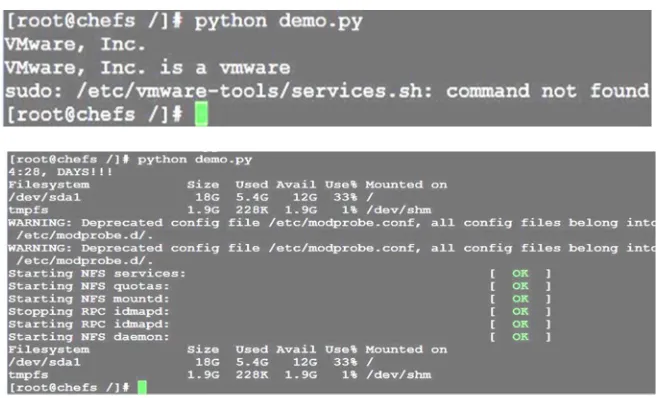
[image:7.612.145.473.407.606.2]6) Steep5: From output file, still if any unresolved errors were found they will be sent to configuration management tool.
Fig 5 EDP module 2 test experimental results
VI. CONCLUSION
©IJRASET: All Rights are Reserved
568
REFERENCES
[1] Sheheryar Malik, Fabrice Huet. Adaptive Fault Tolerance in Real Time Cloud Computing. 2011 IEEE World Congress on Services, Jul 2011, Washington DC, United States. IEEE, pp.280-287, 2011, 2011 IEEE World Congress on Services (SERVICES 2011).
[2] B. Arunkumar, M. Kesavamoorthi" Task Scheduling and Seedblock Based Fault Tolerance in Cloud" IJAER ISSN 0973-4562 Volume 11, Number 6 (2016) pp 4428-4432
[3] Mehdi Effatparvar Sama , Seyedeh Solmaz Madani, “ Evaluation of Fault Tolerance in Cloud Computing using Colored Petri Nets”, (IJACSA) International Journal of Advanced Computer Science and Applications, Vol. 7, No. 7, 2016.
[4] Jasbir Kaur, Supriya Kinger, “ Analysis of Different Techniques Used For Fault Tolerance (IJCSIT) International Journal of Computer Science and Information Technologies, Vol. 5 (3) , 2014, 4086-4090.
[5] Mridula Dhingra, Neha Gupta “Comparative analysis of fault tolerance models and their challenges in cloud computing” International Journal of Engineering & Technology, 6 (2) (2017) 36-40.
[6] Torki Altameem, " A Replication-Based and Fault Tolerant Allocation Algorithm for Cloud Computing" ( IJCSET), Dec 2014 | Vol 4, Issue 12,395-399 [7] Mohammed B, Kiran M, Awan IU et al (2017) "Optimising Fault Tolerance in Real-Time Cloud Computing IaaS Environment". In: Proceedings of the IEEE
4th International Conference on Future Internet of Things and Cloud (FiCloud) 22-24 Aug 2016. Vienna, Austria. [8] B. Selic, Fault tolerance techniques for distributed systems http://www.ibm.com/developerworks/rational/library/114.html
[9] A. Heddaya, A. Helal, “Reliability, Availability, Dependability and Performability: A User-Centered View”, Boston, MA, USA, Tech. Rep., 1997 [10] K. Vishwanath, N. Nagappan, “Characterizing Cloud Computing Hardware Reliability”, in Proc. of SoCC’10, Indianapolis, IN, USA, 2010, pp. 193—204 [11] R. Jhawar, V. Piuri, “Fault Tolerance Management in IaaS Clouds”, in Proc. of ESTEL’12, Rome, Italy, 2012 (to appear)
[12] W.E. Smith, K.S. Trivedi, L.A. Tomek, J. Ackaret, “Availability Analysis of Blade Server Systems”, IBM Systems Journal, vol. 47, no. 4, pp. 621—640, 2008 [13] https://www.telappliant.com/blog/cloud-service-types-and-deployment-models/
[14] B. Anand Kumar1, A.Vinayababu2, V. Malliah3, K. Madhukar4 "Generating Fault Tolerance Mechanism in Cloud Computing System using EDP” IJRASET ISSN: 2321-9653; IC Value: 45.98; SJ Impact Factor:6.887 Volume 6 Issue XII, Dec 2018
[15] https://krishnahosting.wordpress.com/2011/09/22/cloud-deployment-models
![Figure 2 Cloud deployment models [15]](https://thumb-us.123doks.com/thumbv2/123dok_us/1250992.651968/2.612.189.439.385.514/figure-cloud-deployment-models.webp)