A Comparative Study of Software Firewall on Windows and Linux
Platform
Gouri Shankar Prajapati,Nilay Khare
,Department of Computer Science and Engineering MANIT, Bhopal
[email protected]
Department of Computer Science and Engineering MANIT, Bhopal
[email protected]
ABSTRACT
Nowadays, the communication through World Wide Web (WWW) is growing rapidly. All the gadgets, computer and handheld devices are connected via wire or wireless media and communicated to each others. Thus, network security is the essential requirement of an organization or individuals. Organizations are protecting their communication from unauthorized access by introducing network firewalls. A Firewall is an application program which runs on any platform such as windows, Linux, Solaris, Macintosh etc and protected the networks or systems via implementing policies and rules. In this paper, the performance of firewall is measured and compared on Windows and Linux platform individual. To evaluate the performance, a private network has been setup in which three machines are connected via a switch; one Windows machine running windows firewall, one Linux machine running Linux firewall (IPTable) and one more machine that acting as a client. On both the platforms, the performance is measured in two situations: first when network is traffic free and second network with traffic. When network is traffic free then both the platforms reflect the common normal processing behavior in context of time and packet received per second; and when packets are pumped at a very high speed in the network then the processing time and packet received per second increases exponentially in both the platforms.
Indexing terms/Keywords
Firewall, Protocol, Network, Internet, IPtables, Performance
Council for Innovative Research
Peer Review Research Publishing System
Journal:
INTERNATIONAL JOURNAL OF COMPUTERS & TECHNOLOGY
Vol.14, No.8
INTRODUCTION
Due to the rapid growth of computer and WWW, nowadays people are connected to the social networks by sharing huge amounts of information and it makes their life easier, faster and enjoyable. The Internet is comprised trusted and untrusted information and these information may be flooded on WWW. The trusted information do not harm the network or indivisual machines but untrusted information, like viruses, Trojan, junk mails etc., can definitely affect the network or indivisual machines. Thus, there is a need to setup a firewall that protect from untrusted information [1]. A firewall is a networking device which is setup between the private network of an organization and the public network. It is designed to filter all the incoming and outgoing packets according to firewall rules. The firewall can be hardware or software which protectes personal PC, network devices etc. In all the cases, the firewall assures communications to and from devices [2]. Internet Protocol (IP) packets are accepted or rejected based on information contained in the packet header. The major fields of IP packets are source address, destination address, Protocol like Transmission Control Protocol (TCP), User Datagram Protocol (UDP), source port number and destination port number [3]. The performance of network majorly depends on efficiency of the firewall. For each network, packet which are incoming to or outgoing from the network an action has to be taken on the bases of rule matched whether to accept it or reject it [4]. An example of rule set of firewall is shown in table 1.
Table 1. Firewall rule list[5]
There are two types of firewall: packet level firewall and application level gateway aws shown in figure 1. Packet level firewall is also known as packet filtered firewall that runs upto network layer and it examines the packet based on the source IP,destination IP address and protocol. Based on the protocols, it is classified into two categories stateless and statefull. Stateless filters do not maintain any information about devices or active connections [6]. It operates with the network protocol that does not use the concept of session such as UDP and ICMP. It requires less memory since it does not store any information about the active connection. Instead in stateful maintains information about devices, active connections and the current state of a connection’s lifetime (including session initiation, handshaking, data transfer and completion connection).
Rule
no. Source IP Source Port Destination IP Destination Port
Protocol Action 1 192.168.33.20 * 202.10.38.120 * * allow 2 192.168.1.* * 179.12.34.15 * TCP deny 3 192.168.1.* 80 162.16.134.39 23 TCP Allow 4 192.168.33.81 25 * * UDP Allow Application Layer Transport Layer Nertwork Layer
Data Link Layer
Physical Layer
Firewall
Public Network Private Network
Accept or Reject the packet on the basis of IP addresses Rule : Source 192.168.1.21
Destination ANY Action ACCEPT
Accept or Reject the packet on the basis of Port Rule : SPort ANY DPort 23 Action REJECT
Accept or Reject the packet on the basis of content /data.
Application layer gateway operates at the application Layer and it intercepts all the packets sent to or from an application, while blocking all other packets that are not application-related. It also checks for application-based attacks and ensures integrity of the content flow between any TCP/IP devices.
In this paper, the firewall performance is assessed and compared on different platforms (Windows and Linux). For that, a private network has been established in which three machines are connected via a switch; one Windows machine running windows firewall, one Linux machine running Linux firewall (IPTable) and one more machine that acting as a client. The rest of the paper is organized as follows: background related to firewall is presented in section 2. Section 3 discusses the firewall performance measurement on Windows and Linux platform. Finally, section 4 concludes the work.
BACKGROUND
In this section, background related to firewall and network protocol is discussed.
Network Protocol
Set of rules that govern the communication between two parties called protocol. In network, protocols are defined on several layers. For example, Internet protocol (IP) runs at Network layer, TCP protocol runs at transport layer etc. IP is an unreliable and connectionless datagram protocol that provides best-effort delivery of service. The term best-effort means that IP provides no error control or flow control. IP assumes the unreliability of the under- lying layers and does its best to get a transmission through to its destination, but with no guarantees.
Transmission Control Protocol (TCP) is a process-to-process (port-to-port) protocol. TCP is a connection oriented protocol that creates a virtual connection between two TCPs to send or receive the data[7]. In addition, TCP uses flow and error control mechanisms at the transport level. It guarantees delivery of data and also guarantees that packets will be delivered in the same order in which they were sent[8].
Network tools
Wireshark is a networking tool that is used to analyze the network packet. It captures all the packets that are Flodden in the network and shows the data of the packet. It acts as a watchdog which only captures the data in passive mode and does not modify the data of actual packet.
Nmap is a free and open source Network Mapper tool that is used for network exploration and security auditing. It uses dumy IP packets to determine what hosts are available on the network, what services those hosts are offering, what operating systems they are running and what type of firewalls are in use. It works on any platform in both console and graphical mode.
PERFORMANCE MEASUREMENT OF FIREWALLS
To measure the performance of firewall, firstly a private network has been established in which three machine are connected via a switch. The performance of firewall is analyzed using tools wireshark and nmap on different platforms.
Network setup
There are three systems are connected in private network named as system A, System B and System C with ip address 192.168.33.20, 192.168.33.81 and 192.168.33.82 respectively as shown in figure 2. System A is running on windows platform and uses nmap to sends TCP packets at very high speed destined for the machine thar is running the firewall. It acts as a client machine. While System B and System C acts as server machine that operates on different platforms. System B is running on Windows platform and uses Windows firewall, packet capturing tool wireshark and Windows system performance monitor tool. System C is running Linux platform, utilizes Linux firewall (IPtables) and packet capturing tool wireshark System B and System C are running firewall which inspect every incoming and outgoing packet on the basis of the rules stored in a rule data base and corresponding action takes place.
Windows firewall
Windows Firewall is a stateful firewall that inspects and filters all packets for IP version 4 (IPv4) and IP version 6 (IPv6) traffic. For measuring the performance of windows firewall, first rules are created for inbound and outbound connections and then performance is measured by enablining and diseabling the firewall rule.
Rule creation
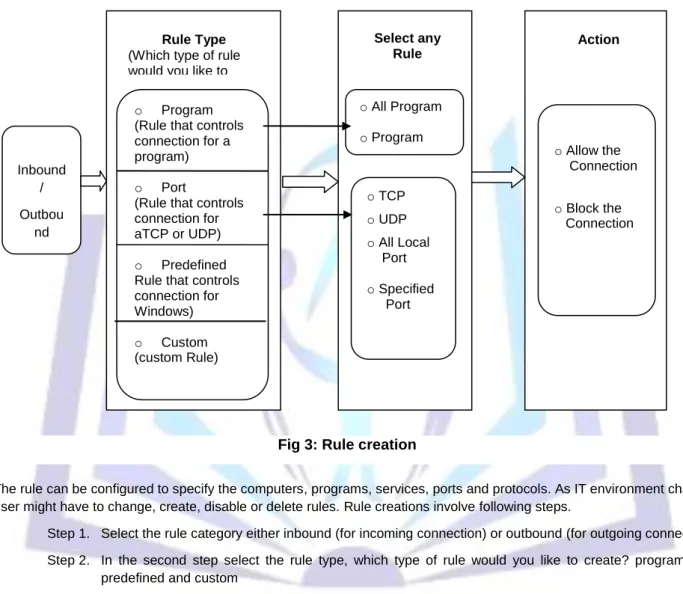
In firewall, firewall rules are to created to allow this computer to send traffic to or receive traffic from. Firewall rules can be created to take one of two actions for all connections that match the rule's criteria: allow the connection or block the connection. Rules can be created for either inbound traffic or outbound traffic. Figure 3 summarises the rule creation.
The rule can be configured to specify the computers, programs, services, ports and protocols. As IT environment changes, user might have to change, create, disable or delete rules. Rule creations involve following steps.
Step 1. Select the rule category either inbound (for incoming connection) or outbound (for outgoing connection) Step 2. In the second step select the rule type, which type of rule would you like to create? program, port,
predefined and custom
Step 3. Select any one rule. For eg. Rule for port has selected, now specified the port number (80,25,20,21) and the protocol (TCP,UDP).
Step 4. Select the action which can be performed if rule matched whether block the connection or allow the connection.
o Program (Rule that controls connection for a program)
o Port
(Rule that controls connection for aTCP or UDP)
o Predefined Rule that controls connection for Windows)
o Custom (custom Rule)
Rule Type
(Which type of rule would you like to create) o All Program o Program Path o TCP o UDP o All Local Port o Specified Port Select any Rule o Allow the Connection o Block the Connection Action Inbound / Outbou nd
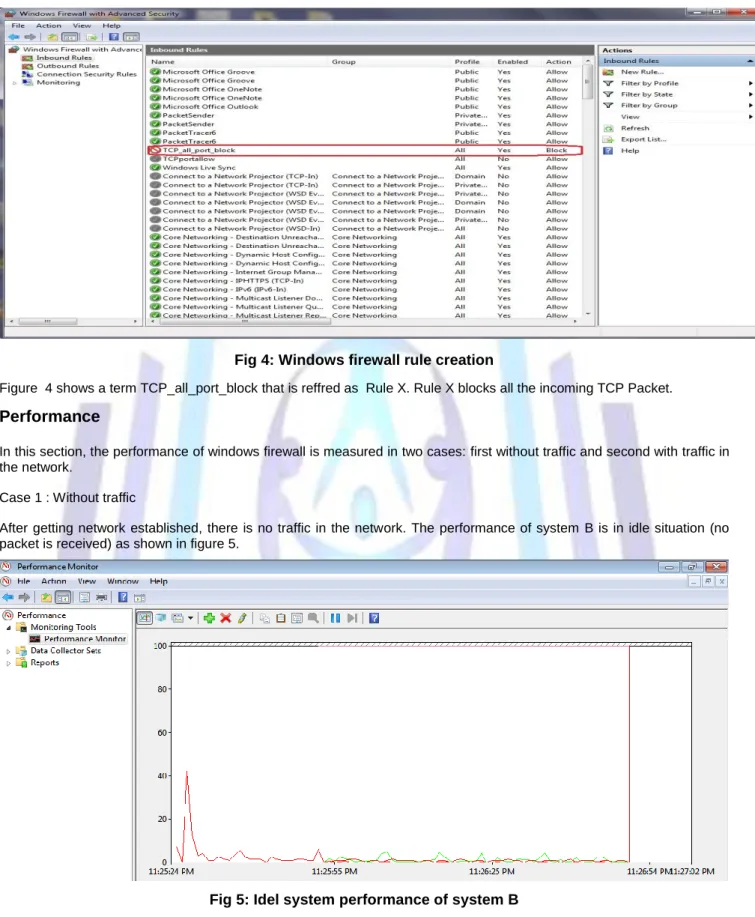
Fig 4: Windows firewall rule creation
Figure 4 shows a term TCP_all_port_block that is reffred as Rule X. Rule X blocks all the incoming TCP Packet.
Performance
In this section, the performance of windows firewall is measured in two cases: first without traffic and second with traffic in the network.
Case 1 : Without traffic
After getting network established, there is no traffic in the network. The performance of system B is in idle situation (no packet is received) as shown in figure 5.
Fig 5: Idel system performance of system B
In the figure 5, red, green and blue line shows the processing time, packets per second and packet received per second respectively. Since, there is no packet is received by system B, its normal processing activity and packet per second are reflected in figure 5 by red and green lines. Blue is collapsed with time axis.
Case 2: With traffic
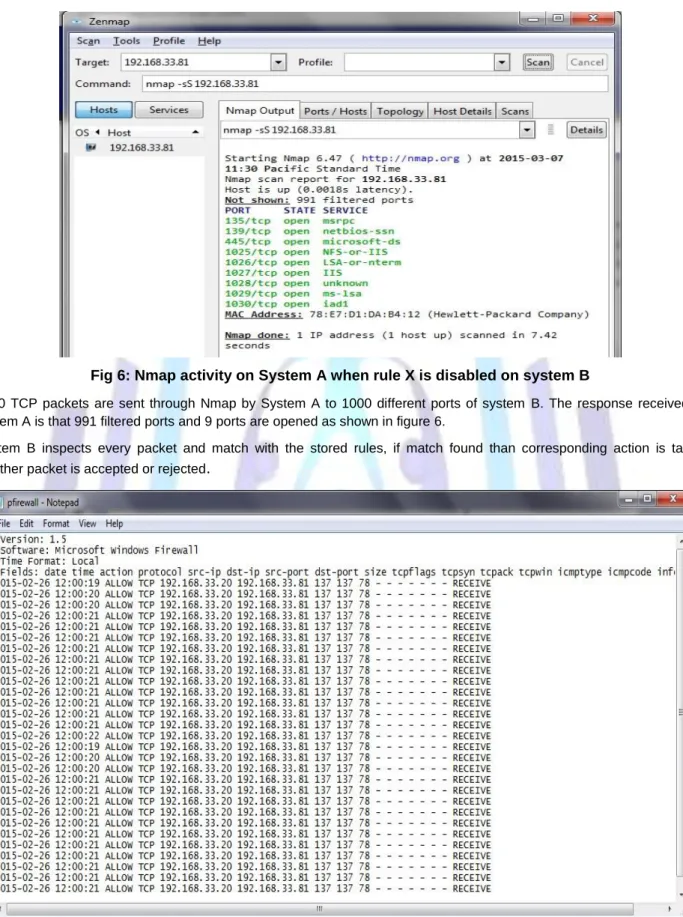
After pumping packets by system A to destined System B, the load over system B is increased. Figure 6 shows the activity of Nmap which is running on System A when rule X is disabled on system B.
Fig 6: Nmap activity on System A when rule X is disabled on system B
1000 TCP packets are sent through Nmap by System A to 1000 different ports of system B. The response received at system A is that 991 filtered ports and 9 ports are opened as shown in figure 6.
System B inspects every packet and match with the stored rules, if match found than corresponding action is taken whether packet is accepted or rejected
.
Fig 7: Log record maintained by system B when rule X is disabled
Figure 7 shows the log file maintained by system B while firewall rule X is disabled. Since, rule X is disabled firewall is showing default ALLOW action against all TCP packet sent by system A.
Fig 8: Nmap activity on System A when rule X is enabled on system B
1000 TCP packets are sent through Nmap by System A to 1000 different ports of system B. Since the rule X is enabled, all the TCP packets are rejected. The response received at system A is that all 1000 ports are filtered.
Fig 9: Log record maintained by system B when rule X is enabled
Figure 9 shows the log file maintained by system B while firewall rule X is enabled. Since, rule X is enabled firewall is showing default DROP action against all TCP packet sent by system A.
The same system performance has been received when rule X is enabled and disabled on system B. The performance measured on system B with traffic generated through Nmap is shown in figure 10.
Fig 10 : System performance of system B with traffic
Since, system A is sending 1000 TCP packets to 1000 different ports of system B, the processing activity and packet received per second are increased exponentially as shown in figure 10 by red and blue lines respectively.
Linux firewall
Iptables is an application program that permits a system administrator to configure or manage the iptables provided by the Linux kernel firewall. It is used to setup, maintain and inspect the tables of IP chains. It is a consol based firewall service program that uses policy chains to accept or reject the network traffic. When any connection is tried to establish from any network to private network either inbound or outbound, iptables check for a rule in its stored rule base. If there is a match found then corresponding action take place, otherwise default action is applied. Iptables uses three different chains: input, forward and output.
Input – This chain is used to control the all incoming connections from the public network. For example, if a user
attempts to TELNET or SSH into your PC/server, iptables will attempt to match the IP address and port to a rule in the input chain.
Forward – This chain is used for incoming connections that are not actually being delivered locally same as router that forwards the packets to its outgoing links.
Output – This chain is used to control all the outgoing connections from private network to public network. If user tries to access facebook.com, iptables will check its output chain to see what the rules are stored regarding to http before making a decision to allow or deny the connection.
There are three types of connection-specific Responses in Iptables
Accept – Allow the connection.
Drop – Drop the connection, act like it never happened. This is best when user does not want the source to
realize his/her system exists.
Reject – Do not allow the connection, but send back an error to the originator. This is best if user does not want a particular source to connect to his/her system, but user wants them to know that his/her firewall blocked them. For measuring the performance of Linux firewall, first rules are created for inbound and outbound connections and then performance is measured by enablining and diseabling the firewall.
Rule creation
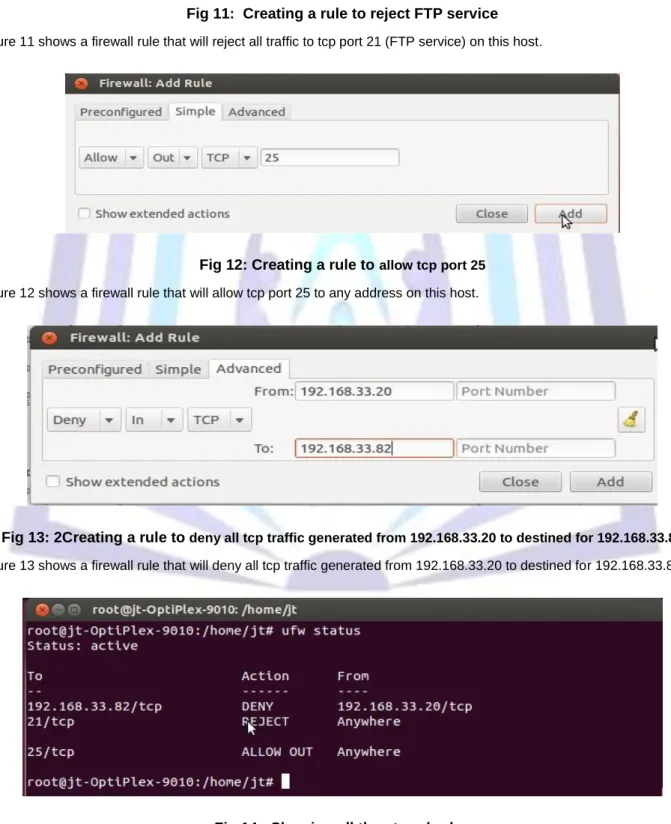
Gufw is a graphical uncomplicated firewall that provides user-friendly frontend to IPTables. It is used to manage the rules and policies of IPTables in easier way.Gufw allows the administarator to create preconfigured, simple and advanced rules
Fig 11: Creating a rule to reject FTP service Figure 11 shows a firewall rule that will reject all traffic to tcp port 21 (FTP service) on this host.
Fig 12: Creating a rule to allow tcp port 25
Figure 12 shows a firewall rule that will allow tcp port 25 to any address on this host.
Fig 13: 2Creating a rule to deny all tcp traffic generated from 192.168.33.20 to destined for 192.168.33.82
Figure 13 shows a firewall rule that will deny all tcp traffic generated from 192.168.33.20 to destined for 192.168.33.82.
Fig 14: Showing all the stored rules Figure 14 shows ufw status that contains all the created rules.
Performance
The performance of Linux firewall is measured in same way as windows firewall performance has been measured: first without traffic and second with traffic in the network.
Case 1: Without traffic
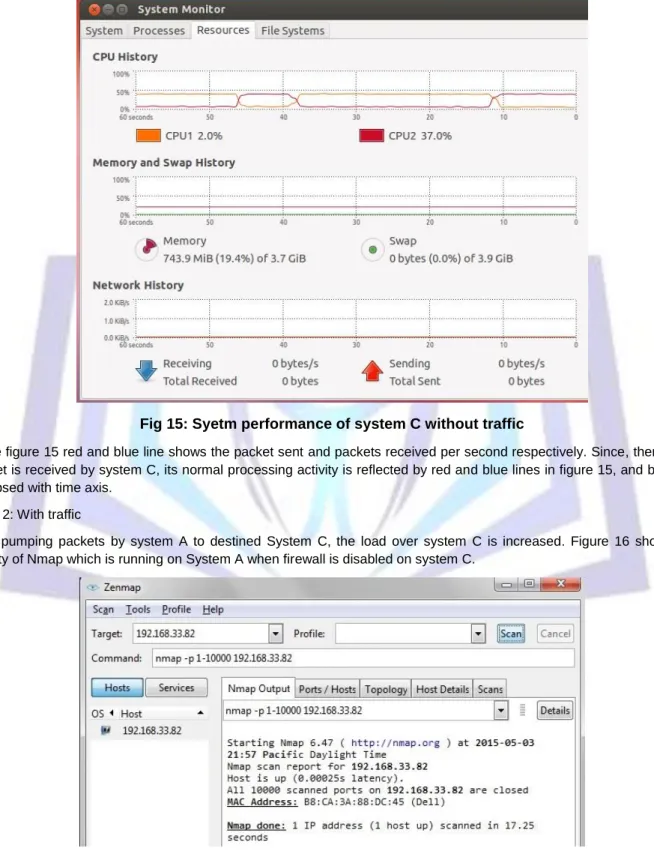
After getting network established, there is no traffic in the network. The performance of system C is in idle situation (no packet is received) as shown in figure 15.
Fig 15: Syetm performance of system C without traffic
In the figure 15 red and blue line shows the packet sent and packets received per second respectively. Since, there is no packet is received by system C, its normal processing activity is reflected by red and blue lines in figure 15, and both are collapsed with time axis.
Case 2: With traffic
After pumping packets by system A to destined System C, the load over system C is increased. Figure 16 shows the activity of Nmap which is running on System A when firewall is disabled on system C.
10000 TCP packets are sent through Nmap by System A to 10000 different ports of system C. The response received at system A is that all the ports are closed because firewall is disabled as shown in figure 16.
Figure 17 shows the activity of Nmap which is running on System A when firewall is enabled on system C.
Fig 17: Nmap activity on System A when firewall is enabled on system C
10000 TCP packets are sent through Nmap by System A to 10000 different ports of system C. The response received at system A is that all the ports are filtered because firewall is enabled as shown in figure 17.
The performance measured on system C with traffic generated through Nmap is shown in figure 18.
Fig 18: Syetm performance of system C with traffic
Since, system A is sending 10000 TCP packets to 10000 different ports of system C. The packet received per second are increased exponentially as shown in figure 18 by blue line.
CONCLUSION AND DISCUSSION
In this paper, the performance of software firewalls are measured on different platform (Windows and Linux) into two situations: traffic free network and network with traffic. When network is traffic free then Linux and Windows both systems reflecting the normal processing time and packet received per second activity. But when packets are injected at a very high speed in the network via nmap then the processing time and packet received per second increases exponentially. Software firewalls are applications program that run on the system CPU. These can drag down system performance under stressful network conditions, such as a denial of service attack, because the host system CPU is executing the filtering rules.
The maximum time of CPU devoted in executing the filtering rule, searching and matching the rule from rule base. Sometimes, CPU may fail to process the packets due to heavy load. To handle this, a dedicated hardware Firewall is required. Dedicated hardware firewalls are designed to manage a large network which are often expensive and meant to be located between a private network and the Internet or indivisual machines.
REFERENCES
[1] Bao Zhong, Liang Huaqing. 2012
.
Design of A New Firewall Based on NetfilterInternational Conference on Computer Science and Electronics Engineering.[2] Gouri Shankar Prajapati and Nilay Khare. 2012. Article: A Framework of an Internet Firewall for IPv6 using FPGA. International Journal of Computer Applications 50(21):22-24. Published by Foundation of Computer Science, New York, USA.
[3] Ayman Kayssi, Louis Harik, Rony Ferzli, Mohammad Fawaz 2000. Fpga-Based Internet Protocol Firewall Chip 0-7803-6542-9/00 IEEE.
[4] Tihomir Katić Predrag Pale. 2007. Optimization of Firewall Rules, Proceedings of the ITI 2007 29th Int. Conf. on
Information Technology Interfaces, June 25-28, Cavtat, Croatia.
[5] Ehab Al-Shaer,Hazem Hamed, Rouf Boutaba,Masum Hasan 2005. Conflict Classification and Analysis of Distributed Firewall Policies,IEEE Journal on selected areas in communications, Vol 23 No 10 october.
[6] Arief Wicaksana, Arif Sasongko 2011. Fast and Reconfigurable Packet Classification Engine in FPGA Based Classification,international conference on Electrical Engineering and Informatics 17-19 july, Bandung,Indonesia.
[7] Darrell Laturnas, Ron Bolton.2005. Dynamic Silicon Firewall, CCECE/CCGEI , IEEE Electrical and Computer Engineering.
[8] Saeed Ezzati, Hamid Reaza Naji,Amir Chegini,Payam HabibbiMehr 2010. A new method of hardware firewall implementation on SOC Internet Technology and Secured Transactions (ICITST), 978-0-9564263-6-9.
Authors’ biography with Photo
Gouri Shankar Prajapati is currently Asst. Professor, in VNS Faculty of Engineering, Bhopal (India). He obtained his Bachelor of Engineering from Shri Govindram Seksaria Institute of Technology and Science, Indore University Rajeev Gandhi Technical University Bhopal (India). He received his Masters Degree in Computer Science and Engineering from Maulana Azad National Institute of Technology (MANIT) (India). At present, he is pursuing Ph.D. from MANIT Bhopal (India).
Dr. Nilay Khare obtained his B.E. from GEC Jabalpur, M.Tech from IIT Delhi and Ph.D. Degrees in Computer Science and Engineering. He is currently an Associate professor & Head of Computer Science and Engineering at NIT Bhopal, India. His research interests are in Wireless Networks , Theoretical computer science and High Performance Computing.He has published more than 50 research papers.
![Table 1. Firewall rule list[5]](https://thumb-us.123doks.com/thumbv2/123dok_us/10216723.2925514/2.892.85.810.373.1113/table-firewall-rule-list.webp)