Learning from Project History:
A Case Study for Software Development
Davor ˇ
Cubrani´c
1Gail C. Murphy
1Janice Singer
2Kellogg S. Booth
11Department of Computer Science University of British Columbia 201-2366 Main Mall, Vancouver BC
Canada V6T 1Z4
{
cubranic, murphy, ksbooth
}@cs.ubc.ca
2Institute for Information Technology National Research Centre Canada
M-50 Montreal Road, Ottawa ON Canada K1A 0R6
[email protected]
ABSTRACT
The lack of lightweight communication channels and other tech-nical and sociological difficulties make it hard for new members of a non-collocated software development team to learn effectively from their more experienced colleagues while they are coming up-to-speed on a project. To address this situation, we have developed a tool, named Hipikat, that provides developers with efficient and effective access to the group memory for a software development project that is implicitly formed by all of the artifacts produced dur-ing the development. This project memory is built automatically with little or no change to existing work practices. We report an exploratory case study evaluating whether software developers who are new to a project can benefit from the artifacts that Hipikat rec-ommends from the project memory. To assess the appropriateness of the recommendations, we investigated when and how developers queried the project memory, how they evaluated the recommended artifacts, and the process by which they utilized the artifacts. We found that newcomers did use the recommendations and their fi-nal solutions exploited the recommended artifacts, although most of the Hipikat queries came in the early stages of a change task. We describe the case study, present qualitative observations, and suggest implications of using project memory as a learning aid for project newcomers.
Categories and Subject Descriptors
H.5.3 [Information interfaces and presentation]: Group and Or-ganization Interfaces — Computer-supported cooperative work, Evaluation/methodology; K.6.3 [Management of computing and
information systems]: Software Management—Software
develop-ment, Software maintenance; D.2.6 [Software Engineering]: Pro-gramming Environments; D.2.9 [Software Engineering]: Man-agement—Programming teams, Productivity; H.3.3 [Information
storage and retrieval]: Information search and retrieval
Permission to make digital or hard copies of all or part of this work for personal or classroom use is granted without fee provided that copies are
not made or distributed for profit or commercial advantage and that copies bear this notice and the full citation on the first page. To copy otherwise, to republish, to post on servers or to redistribute to lists, requires prior specific
permission and/or a fee.
CSCW’04, November 6–10, 2004, Chicago, Illinois, USA. Copyright 2004 ACM 1-58113-810-5/04/0011 ...$5.00.
General Terms
Experimentation, Human Factors, Documentation
Keywords
Software development teams, project memory, software artifacts, recommender system, user studies
1.
INTRODUCTION
New members of teams in a variety of fields must come up-to-speed on a large amount of information before becoming produc-tive. Often, this knowledge is gained through mentoring: an ex-perienced colleague works closely with the newcomers, looking over their shoulders, giving guidance, and imparting the oral tra-dition of the team and the project as the newcomers work on their first assigned tasks [4]. Software engineering is one such field. A software developer new to a software project usually begins with small, relatively self-contained change tasks. Working on the tasks and interacting with a mentor and other colleagues, the developer learns not only the structure of the software, but also coding stan-dards, common programming patterns, tools, and work practices in general [12].
Most of the time, the new team member works independently, turning to the mentor for help when stuck. These interactions are typically informal and lightweight, such as a quick question asked over the cubicle divider or at the water cooler. Often, the advice obtained is a pointer to an example (a section of code, for instance) showing how to deal with a particular problem. Studying from ex-amples and abstracting them for application in a new context is a common way of learning in programming that has been observed extensively in both new [9] and experienced [6] programmers.
Mentoring is more difficult in virtual teams, where members of the team are not collocated, because workers are less likely to help their non-collocated colleagues [5]. For example, open-source projects typically accept source code contributions from anyone on the Internet. With such a low barrier to participation, the ratio of newcomers to experienced team members is usually very high, making it even more difficult for newcomers to obtain useful ad-vice.
Fortunately, the situation is not hopeless. A lot of information that a newcomer needs is available in the archives of the project’s mailing lists, the source code versioning system, and the system used to record and track work on problem reports and newly re-quested features. We believe that the collection of artifacts across these repositories implicitly forms a project memory for a software development.
However, this information is not easily accessible because of its sheer volume, the lack of tools to search the information effectively, and the difficulty of making connections between logically related items in disparate repositories. We have built a tool called Hipikat1 that provides developers efficient and effective access to this mem-ory [2]. Hipikat is intended to assist newcomers by recommend-ing items from the project memory—source code, problem reports, newsgroup articles, etc.—that are relevant to his or her current task, in effect making it easier for them to “learn from the past” even when a mentor is not available. This project memory is built auto-matically and with little or no change to the existing work practices. We believe that this low barrier to adoption is crucial for Hipikat to be accepted in the real world, since it has been repeatedly found that CSCW systems that require significant changes to work prac-tice or that require users to constantly externalize and map their knowledge are doomed to failure [3].
This paper describes our exploratory investigation of three ques-tions regarding the group memory built by Hipikat. We wanted to know whether and how software developers new to a project can “learn from the past” using the information captured by Hipikat. Specifically, our focus is on the following three issues:
1. Can newcomer software developers use information from the group memory about past modifications completed on the project to help them in a current modification task? We would like to see if Hipikat can serve in the role of an experienced colleague who “remembers” the project’s history and pro-vides relevant examples to help the newcomer get started or to fill in background information.
2. When will newcomer developers who are working on a mod-ification task query Hipikat? We are interested in the kinds of questions they ask and the answers they expect.
3. How will newcomers evaluate Hipikat’s recommendations and how will they utilize the recommendations in their tasks? We are interested in whether the way Hipikat’s recommenda-tions are presented is adequate and whether there are ways in which this could be improved to better support developers in their change tasks.
We begin with an overview of related work. We then briefly de-scribe our approach to the Hipikat tool, after which we present an exploratory study into the questions we outlined above. We con-clude with a discussion of the study and future research directions
2.
RELATED WORK
A group memory for software development teams was proposed by Terveen et al. [13] Their system, Design Assistant, guided the developer through a sequence of design decisions and produced a recommendation on code structure and usage of APIs. However, unlike Hipikat, Design Assistant relied on human experts for build-ing and maintainbuild-ing the group memory. It also required changes to the development process to be effective, something we expressly wanted to avoid.
Berlin et al. [1] presented a system that built a group memory from messages that had been sent to an electronic mailing list. These messages were categorized automatically, using pre-configu-red keyword patterns, or explicitly by users. Hipikat similarly mon-itors activity in online public forums to collect developer commu-nication into a group memory, but goes beyond Berlin et al.’s ap-proach by correlating information from multiple sources (e.g., the
1Hipikat means “eyes wide open” in the West African language
Wolof.
discussion about a bug and the code implementing the solution). Berlin et al. used a taxonomy of categories to organize the collec-tion; Hipikat recommends relevant items on case-by-case basis.
Initial steps towards integrating information sources with little extra overhead required from users were made by Lougher and Rodden [7], whose system allowed maintenance engineers to make annotations on the code. The annotations supported asynchronous communication about the maintenance changes, while at the same time capturing the discussions and decisions that were made and associating them with the source code. The drawback of this ap-proach is that it requires the developer to look at the exact spot in the source code to see the annotation, which may not be useful for a relative newcomer trying to grasp tens of thousands of lines of source in a multi-megabyte artifact corpus.
In this regard, Hipikat is more similar to the Remembrance Agent [10], which mines such information sources as user’s email folders and text notes to present documents relevant to the one currently being edited. Similarly, Expertise Recommender [8], uses the au-thor information recorded in a program’s change history to gener-ate recommendations of people who might have some expertise on a given problem. However, both of these systems work more like recommenders/search engines within a single collection, whereas Hipikat helps integrate multiple information sources. As an exam-ple of the usefulness of integrating information, we have found that problem reports stored in the issue tracking database often con-tain more information than is recorded as part of a check-in for the associated source code that fixes the problem. Automatically correlating this information can provide the developer more useful information within a single search.
Rosson and Carroll have studied how software developers can learn from examples when they attempt to reuse code with which they are not familiar [11]. They found that programmers spent less time analyzing the classes they were reusing than how those classes were used in the provided examples. That is, the programmers fo-cused on the reuse of uses, and tended to simply copy the example code with as little modification to it as was necessary to get it work-ing in the new context.
Based on their observations, Rosson and Carroll built a tool to support that kind of reuse, the Reuse View Matcher (RVM). One drawback is that RVM’s library of examples has to be created by hand, something that would require significant effort in a larger system. Furthermore, the library was organized as one example per class. This approach may not be scalable to showing examples of how to reuse combinations of classes, because the number of ex-amples could in that case grow exponentially. Hipikat, on the other hand, does not require any additional work to create the library of examples: previous tasks that are selected as “examples” are al-ready present in the group memory as a collection of file revisions that were checked into the source control system (e.g., CVS2) and as the associated problem reports that they fix.
3.
HIPIKAT
Our approach has two parts. First, we form a project memory from the artifacts and communications created during a software development project’s history. Second, we recommend to the de-veloper artifacts selected from this memory that may be relevant to the task being performed.
3.1
Forming the group memory
There are four types of artifacts represented in a project’s group memory: change tasks (i.e., problem reports and feature request
de-2
scriptions recorded in an issue tracking system such as Bugzilla3),
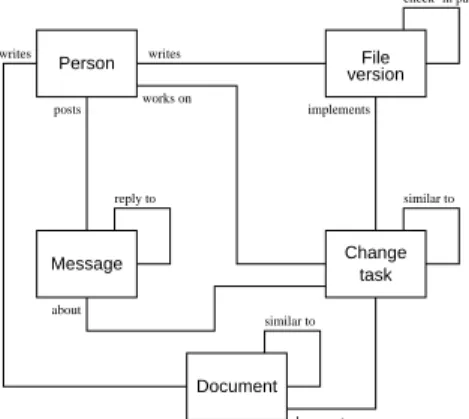
source file versions (e.g., checked into a source repository such as CVS), messages posted on developer forums (e.g., newsgroups and mailing lists), and other project documents (e.g., design documents posted on the project’s web site). Figure 1 shows the schema of these artifacts in the group memory together with the relationships we establish between them. The figure also shows a fifth entity, person, which represents the author of an artifact.
File version Change task Message Document posts about writes works on implements documents writes reply to similar to similar to check−in package Person
Figure 1: Artifacts represented in the Hipikat project memory and links between them.
Relationships (links) between the artifacts are established either from existing information about artifacts that is available from the project management tools or are inferred by Hipikat. For example, the creator of a file version checked into the repository is always known from the configuration management tool, as is the author of a newsgroup posting. Hipikat infers links by combining informa-tion contained within the project artifacts and the meta-informainforma-tion about the artifacts from different information sources. For instance, some links between feature requests and file revisions can be in-ferred when there is a project convention to include in the check-in comment associated with a revision a reference to the issue-tracking system entry that describes the feature request. Other links between entries in the issue-tracking system and file versions can be inferred based on meta-information, such as when particular project artifacts were created or modified; for example, it is likely that the author of a bug fix has checked in a source code revision close to the time that the problem report was closed in the issue-tracking system. The details of our algorithms for link inference and artifact relevance, as well as other implementation issues, were described in an earlier paper [2].
3.2
Making recommendations
In the second component of our approach, selecting and present-ing recommendations to a developer, the relationship links are used to select relevant artifacts in response to a query. As described be-low in Section 3.3, those queries are initiated by the user selecting an artifact in the integrated development environment (IDE) and choosing the “Query Hipikat” option from a menu. The artifact that is the “subject” of the query is, in this way, implicit from the context where the query was made. The server receives the artifact ID as part of the query, finds the artifact in the group memory, and follows the links to other artifacts to create the recommendation lists.
For example, once a developer using Hipikat has started working on a feature modification task, the developer may be interested in
3
www.mozilla.org/projects/bugzilla
other tasks that have been completed previously within the same subsystem, or tasks that have a similar description. These artifacts will be selected for recommendation by followingsimilar-to
links (see Figure 1) and returned to the user to inspect.
Once the developer has identified a change task that appears to be similar, querying on it will lead to source revisions that imple-mented the task of interest (via theimplementslink). These revisions could help a developer identify code that may have to be modified or understood for the task at hand. The completed similar tasks may also have related discussions about which design options were examined, and which decisions were made that might impact the task at hand. Hipikat is able to take advantage of the structure of the group memory—the different artifact types and relationships between them—when it is making recommendations. This is not possible if the developer is using a general search engine, such as Google, to search for documents in the same set of project archives.
3.3
Implementation
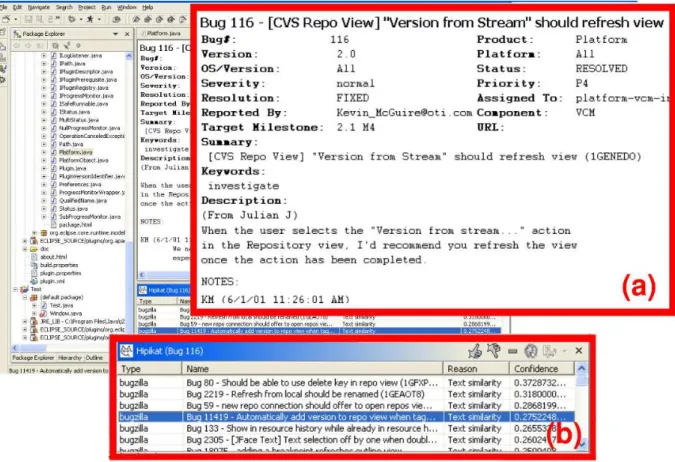
Figure 2 shows a screenshot of Hipikat running as a plugin within the Eclipse development environment.4 Interaction with Hipikat is kept as simple and unobtrusive as possible: a user makes a query by selecting an artifact and choosing “query Hipikat” from the con-text menu. The selection can be made from most views in the IDE, such as a list of files in the workspace, a Java editor, or a bug report viewer (Figure 2a). Additionally, the user can make a search by typing search terms into a dialog.
A query is sent to the server along with the context (artifact) in which it was made, and returned results are displayed in a Hipikat view (Figure 2b). The recommendations are grouped by artifact type and by selection criteria. Each recommendation includes a brief summary of the criterion that was used for its selection and a relative confidence level for how well it matches the query. The confidence level can be numeric, such as for text similarity, or de-scriptive, such as “high – bug ID in checkin log” for a revision implementing a fix for a reported bug. Any recommendation can be opened for viewing, either within Eclipse or through an external viewer (e.g., a Web browser), depending on the artifact type.
A user can reorganize a presented list of recommendations, delete unwanted recommendations, or mark some of them as particularly relevant to the query, which moves them to the top of the list. (We plan to use this information in the future to add collaborative filter-ing capabilities.) Any recommendation can be used as the startfilter-ing point for another Hipikat query, making it possible to easily tra-verse the links in the group memory.
4.
HIPIKAT STUDY
In this section we describe our exploratory investigation of the three questions we posed regarding the group memory built by Hipikat: (1) whether newcomers can use information from the group memory about past modifications completed on the project to help them in current modification tasks; (2) when and from which ar-tifacts newcomer developers working on a software change task query Hipikat; and (3) how these developers evaluate Hipikat’s rec-ommendations and how they then proceed in their tasks.
An important factor influencing the design of our study was the need to have realistic participants working on realistic tasks. Firstly, we were interested in studying newcomers, not novices: our par-ticipants needed to have adequate programming experience in the programming language of the system under study, but they had to have no knowledge of the development the system. We also required participants to have had experience developing large or
4
Figure 2: A screenshot of Hipikat being used within Eclipse IDE during the change task case study. Zoomed-in rectangles show a change task, problem report 116 (a), and list of related artifacts (b)
medium-sized software systems, and to be familiar with issues in-volved in working on such systems, as well as tools commonly used to manage projects of such size (e.g., configuration manage-ment or issue tracking systems). This made the pool of potential participants much smaller, as we could not use easily recruitable computer science undergraduates with only a basic knowledge of a programming language and insufficient experience working on large software projects.
Secondly, we wanted to study our participants as they worked on tasks that were complex enough to challenge them and require serious effort to understand the problem and come up with a solu-tion. Specifically, we looked for tasks that would require a cou-ple of hours to solve; otherwise there would not be much need for advanced software engineering tools, such as Hipikat. We also wanted tasks that were appropriate as an assignment for a project newcomer in a real project. In practical terms, this meant that we considered mostly requests for new features, in particular those that had a visual or UI component to them because it made it easier for the participants to understand the task and test their solutions. Fi-nally, the tasks had to allow for exploration and variation in the learning and problem-solving process of individual participants, but at the same time we wanted to be able to compare the solutions with each other and evaluate them for “correctness” and quality.
Given the questions asked in this research and the complexity of the tasks analyzed, we realized that a case study was the appropri-ate methodology for this stage of the research, using multiple cases to try to capture individual working styles. Because we wanted to look in detail at how developers accessed Hipikat and used its
rec-ommendations while working on modifications to a new software system, we ruled out a controlled experiment. Instead, we chose a largely qualitative analysis that would allow us to look for patterns across our cases and handle large individual differences among the participants in their programming and exploration styles.
Because we wanted to be able to compare the solutions with each other, all participants worked on the same set of tasks. We also wanted to compare the newcomers’ end product with that of ex-perienced developers who worked on the project, so we recruited several members from a development team and asked them to work on the same tasks and serve as our baseline for comparison. This design allowed us to study Hipikat under conditions similar to those faced by newcomers to many large open-source systems, to test the system on real tasks, and to compare the results of the newcomers with experienced team members.
4.1
Design
We chose as our target system Eclipse, an open-source software project initiated and actively supported by IBM. Eclipse is an ex-tensible integrated development environment that is written in Java and contains around a million lines of code. As is common for an open-source project, the development of Eclipse is conducted in a very transparent manner, with the full history of changes to the code, developer discussions, and problem reports publicly avail-able. We selected as change tasks to study two previously com-pleted enhancement requests drawn from the Eclipse issue track-ing database. By choostrack-ing enhancements to an earlier version of Eclipse, we were able to devise a set of correctness criteria based
on the solutions adopted by the Eclipse team. We could then check the participants’ solutions against the correctness criteria, as de-scribed in Section 4.4. We created a copy of the Eclipse project artifacts as they existed at the time when the enhancement requests were made, and formed an instance of the Hipikat group memory on this copy.
The Eclipse team uses the Eclipse IDE itself for all development, so that was the natural choice of the development environment for the study (that is, all participants used the Eclipse IDE to make changes to its source code). All the information sources used by the project—the web-based documentation, issue-tracking system, source code repository, newsgroups, and mailing lists, as well as standard search engines used by the Eclipse project—were avail-able to each participant, with the same applications to access them that they would normally use (e.g., Internet Explorer for the web pages). Additionally, the newcomers had access to Hipikat, which is itself written as an Eclipse IDE plugin, and thus seamlessly inte-grated into the development environment.
Each participant worked on two change tasks, which we describe below in more detail. One task was easier than the other. The order in which the participants worked on the tasks was randomized to control for learning effects.
Easy task.
This modification request5 described a need, when hovering over a breakpoint in an editor for Java source code,6 todisplay the breakpoint’s properties, such as the associated line num-ber, in a pop-up window. The request asked for a few basic proper-ties, such as the breakpoint’s line number. A subsequent comment in the request’s discussion suggested also displaying whether the breakpoint stops the execution of the entire VM or just the current thread. The participants were told the latter was an optional prop-erty that they could implement if they so choose. (See Figure 3 for a screenshot illustrating the implemented popup in use.)
Figure 3: Breakpoint hover as implemented in Eclipse 2.1.
Difficult task.
The second modification request7 involved the interaction of a developer with the UI during versioning opera-tions on a group of files. A file can be in one of the three states: new, versioned, or ignored. The request explained that operations in the versioning context menu were incorrectly greyed-out (made unavailable for selection) when a mix of versioned and new files was selected. A related problem noted in the request was that com-mitting a new file to the repository requires two steps: marking it as a versioned file and then committing. The request asked for a more intelligent handling of this case, similar to the way it is done through the “synchronization view”, where new files can be auto-matically versioned when they are committed.5Request 6660 in the Eclipse problem report database 6
A breakpoint is a debugging facility that suspends the execution of the program at a certain location in the code, enabling the developer to investigate the program’s internal state.
7
Request 20982 in the Eclipse problem report database
Characterization of the two tasks.
The categories “easy” and “hard” are relative. Even the easy task was not trivial. The ob-vious way to go about solving it—looking for the mouse hover han-dler and working backwards—would lead the developer through some rather complicated code, having to understand multiple sub-systems of Eclipse without really making progress on the task itself. A significant difference between the two tasks was how much help the Hipikat recommendations provided towards the task: Hipikat provided at least one recommendation that makes it substantially easier to solve the “easy” task.Scope of change: The two tasks differed not only in the amount
of code needed to implement a solution, but also in the extent to which the solution needed to interact with the rest of the system.
Easy: The scope of change to the system’s source code was fairly
isolated; it was located in only a couple of files and interacted with only a single other entity in the system outside those files.
Hard: Here too only a few files needed to be changed, but the code
in those files interacts with a number of different subsystems: file management, versioning, and user interface.
Relevant Hipikat recommendations: Participants relied on how
high a recommendation was ranked in the query response. For each task, we ensured that at least one of the recommendations provided by Hipikat in response to a query on the starting point—the task’s problem report—was relevant. Determining that a recommendation was relevant depended upon how “obviously” similar its descrip-tion (summary for a problem report or a CVS checkin comment) was to the current task, and how easy it was to evaluate the code in file revisions related to a suggested problem report for potential usefulness.
Easy: The top recommendation returned by Hipikat for the easy
task was a previous enhancement request that was similar in description. The implementation code linked to this request was fairly straightforward to understand and coincided almost exactly with the code that had to be changed for this task.
Hard: Hipikat recommendations had to be examined in more
de-tail to accomplish the hard task. The most useful recom-mendation (corresponding to the change that implemented the committing of new files in the “synchronization view”) was not at the very top of the list as in the easy task, so participants had to look at a number of recommendations before deciding which to investigate in detail to help them in the hard task. Evaluating the various recommendations was more involved than in the easy task, because they were linked to implemen-tation code that was more complex and spanned multiple files.
Learning from recommendations: Applying knowledge learned
from the relevant Hipikat recommendation to solving the actual task depended on how difficult it was to understand the recom-mended code and how the code interacted with the rest of the sys-tem. Also important was how close the location of the recom-mended code was to that of the task’s solution and how hard it would be to “transplant” the code to the new location.
Easy: The recommended code was easy to understand. Once the
desired text for the hover message was put into a particular container object (the “marker”), the container handled the dis-play of the pop-up window, relieving the developer of all GUI considerations. Just as importantly, the recommended code was in the same file as the task’s solution and used many of the same data structures.
Hard: The related change reported by Hipikat was in a slightly
dif-ferent subsystem (the “synchronize view”). Although it could be used as a general approach for most of the solution, only small sections of the code could be reused directly because the data structures on which it operated were different.
4.2
Participants
Twelve paid volunteers participated in the study. Eight were new to developing Eclipse, although some had used it as their Java de-velopment environment for 1 to 12 months and so had experience as users. All of the newcomer participants expressed their experience in Java programming as at least “comfortable,” and had experience working on large projects, including software management prac-tices such as source code versioning and issue-tracking. Seven of the eight were graduate students and one was in the final term of his undergraduate degree.
The four expert participants were all cooperative work students in at least their second term at the IBM lab that is the leading con-tributor to the Eclipse project. Consequently, all of them had at least eight months of experience developing and extending Eclipse, although their expertise was in different parts of the system than the selected enhancement requests touched. Therefore, the experts were familiar with the system’s architecture and the accepted ways of doing things, but they still had to engage in information gather-ing to understand unfamiliar code.
4.3
Procedures
Because of the time required of each participant, the study was divided into two sessions, training and programming, that took place within three days, depending on the participant’s schedule.
Training session.
Each of the eight newcomers underwent four hours of hands-on Eclipse training. The participants individually worked through three online tutorials that included frequent hands-on exercises applying the covered material. The participants worked on their own, but one of the authors was present in the room to an-swer any questions.The first training session covered the use of Eclipse to write Java programs in general. The tutorial took an hour and was based on the material in the User’s Guide that is part of Eclipse’s online help. Although four of the eight participants had previous experience us-ing Eclipse (to work on their class assignments, for example), we required that all go through the tutorial to ensure the same basic knowledge of the environment’s capabilities for writing, running, and debugging Java programs.
The next two hours covered programming and extending Eclipse itself. This material was based on the online Programmer’s Guide that comes with the Eclipse distribution. It is reasonable to assume that “real-world” Eclipse newcomers would have gone through these online guides, because the guides were the only introduction to Eclipse available until third-party books were published in the Sum-mer of 2003.
The last hour of the instruction covered Hipikat, from its design and features to a walk-through of a sample session using Hipikat to work on an Eclipse problem report. This part ended with an open-ended exercise where the participants were asked to complete a bug fix using Hipikat to give them some experience using the tool in a less structured format.
The four experts did not go through any training because they all had significant experience with Eclipse and did not have Hipikat available during the programming session.
Programming session.
The programming session was divided into two parts, one for each change task. Each part started off by assigning one of the change tasks to the participant, who would then read and understand the request. Once the requested feature was understood, the participant would start working on the change plan. The participants were free to use any available Eclipse tools to understand the code and to plan their change, but we requested that they complete the plan and describe it to the experimenter be-fore proceeding with implementing the change. The format of the plan was left to each participant, and the level of required detail left flexible, perhaps only including the broad outline of the ap-proach and the files that will need to change. The use of Hipikat was explicitly encouraged in the instructions to the newcomers. If a participant did not come up with a plan by the end of the first hour, we conducted a progress interview to see what the participant had been working on.8Once the change plan was completed, we conducted a semi-structured interview in which we asked both about the details of the plan and the process used to come up with it, including tools used and information accessed. Following the plan interview, the par-ticipant went on to implement the change, at the end of which we conducted another semi-structured interview where the participant showed us the details and described the process of implementation. During this interview we asked critical incident-type open-ended questions about the most difficult part of solving the task and how the participant went about solving it. We also asked the partici-pants about available tools and information that were useful or not useful, as well as those that would have been useful had they been available. The maximum time to plan and implement the change was fixed at two and a half hours.
We used screen capture software (Camtasia by TechSmith) to record the participants’ actions while working on the change plan and its implementation. We also instrumented Hipikat to record the queries into a file, although this information could have been obtained from the screen recordings.
4.4
Analysis
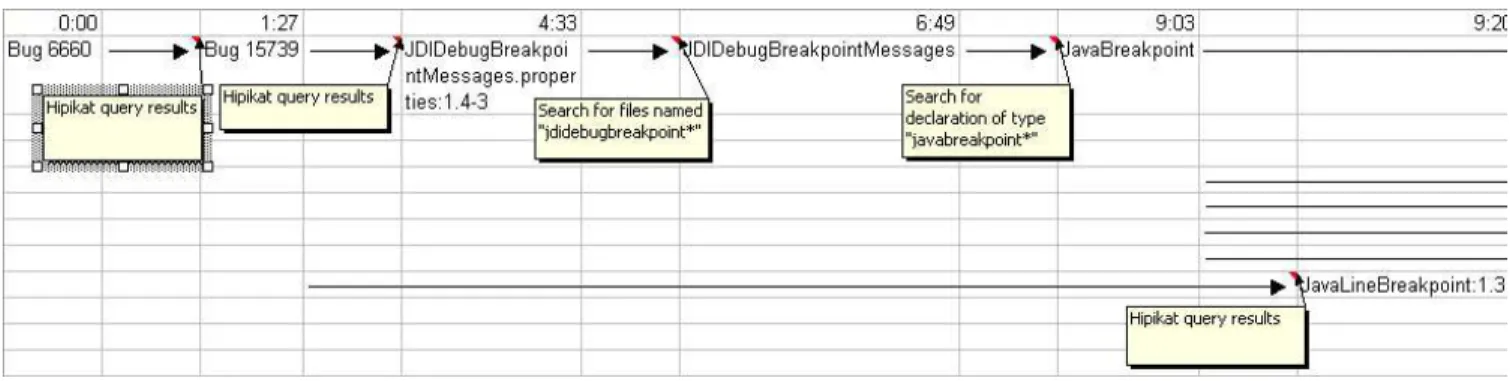
All recordings we made were first transcribed: interview tapes to text and screen recordings to maps of each participant’s explo-ration. The maps were made by marking when each artifact (bug report, source file, revision, web page) was viewed for the first time and the way in which it was reached. When two artifacts were log-ically related as part of the same “exploration path” (for example, seeing the use of an identifier in one file, and jumping to its def-inition in another file), we connected them with a directed edge, forming a directed tree of such paths (see Figure 4 for an example). We collected all code modifications that the participants made while they worked on each task. These were checked for correct-ness against a set of criteria that we had identified.9 These criteria are sufficiently abstract to cover the required functionality of added features, but still allow variation within the actual implementations. We also included special cases that are not always covered explic-itly in the feature request description, but would result in bugs un-der certain circumstances. Lastly, we required that the added code be readable and maintainable, as well as that it follow the Eclipse team’s coding practices.
8
Participants who got stuck during the planning stage were given a small hint if they were entirely off the solution’s track. This is comparable to a brief advice they may have got on an Eclipse news-group, for example.
9
The correctness criteria used in the study can be found
on-line at www.cs.ubc.ca/labs/spl/project/hipikat/
Figure 4: A portion of a newcomer’s exploration map.
We manually evaluated participants’ solutions based on the cri-teria. When a criterion was missing from the solution, we checked for it in a participant’s written change plan, and in the comments the participant made during the change plan interview. We were in-terested in the change plans in addition to the solutions because we wanted to account for all the information participants discovered, even if the solution was partly incomplete because of our arbitrary time limit for work on the task.
4.5
Results
In this section we present the results of our analysis. We first focus on the participants’ performance in each of the two tasks. We describe the patterns in their solutions and compare the newcomers with the experts. Next, we look at their process: how the newcom-ers accessed Hipikat, and how they evaluated and used Hipikat’s recommendations in their work.
We present our analysis of performance for the easy task first, but note that the order in which the tasks were done did not seem to make any difference in the performance across participants.
Easy task solutions.
All of the participants implemented the basic requirements of this task: displaying a pop-up window with the breakpoint properties on mouse hover. The experts solved the task much faster, while most newcomers took all of or close to the full time available. However the whole picture is more com-plex. All but one of the newcomers found the right files for the change quickly (using Hipikat’s recommendation), but then took much longer than the experts to understand the intricacies of the code.Although all solutions presented the pop-up with breakpoint prop-erties as requested, many participants did not handle the special cases properly (i.e., updating the hover when the breakpoint’s prop-erties were changed), which introduced bugs into their solution. Surprisingly, this was even more the case among the experts, where only one of the four participants (25%) correctly updated the infor-mation in the pop-up after the breakpoint’s properties were changed by the user. Of the newcomers, three participants (38%) handled this correctly, and two more (for a total of 63%) handled it cor-rectly within the scope of basic range of properties that they chose to implement (that is, the line number, condition, and hit count).
The faulty solutions focused on a particular class, JavaLineBreak-point, and missed consideration of that class’s superclass JavaBreak-point, which was responsible for updating some of the breakpoint properties. The faulty solutions thus missed some method inher-itance interactions, so that the hover text was not updated when properties were changed through the JavaBreakpoint superclass. An examination of the plans created by the expert participants who
failed to handle these updates shows that all of them talked exclu-sively about the concrete subclass. In a way this is not surprising because that is where the bulk of the change was located, and it was probably so deceptively simple that they did not investigate all of its implications.
The relatively high correctness of the newcomers’ solutions can-not be explained entirely by the longer amount of time that they took to finish the task. They were not taking much longer to come up with their change plans, yet even there both classes were reg-ularly mentioned. We believe that the newcomers did so well be-cause both classes were included in the Hipikat recommendation from which they were starting, and so they were used to thinking about the two classes as a single unit, which was reflected in their plans and implementations. This is a good example of a valuable bit of information that was never explicitly written down anywhere in the project artifacts, and yet was implicit in the links between the artifacts and became obvious to the newcomers during their ex-ploration of the memory. Without viewing Hipikat’s suggestion, it was not at all obvious that both classes would need to be updated. Indeed, half of the expert participants overlooked it, causing bugs in their solutions.
Another example showing that the newcomers can learn good practices implicitly recorded in past solutions was the way they re-alized that they should “externalize” all text messages in their code so that the application can easily be internationalized by chang-ing a few properties files that came with it, rather than the source code. This approach was not something that was explicitly covered in the tutorials, but became obvious in Hipikat’s recommendation, which showed that whenever some changes involved adding text messages, those messages were being externalized in the proper-ties file. Three of the eight newcomers externalized their strings, and two more noted the practice and said that they would probably do the same in their code before releasing it as a finished product.
Difficult task solutions.
The participants were less successful with solving this task, and the newcomer group did worse than the expert group on the correctness criteria. Three of the four experts (75%) solved the basic requirements of the task: detecting new un-committed files, displaying the message dialog to the user, mark-ing them as versioned when directed by the user, and proceedmark-ing to commit to the repository. The unsuccessful expert was com-pletely on the wrong track with her planned solution and did not implement any of these steps. In the newcomer group, three of the eight participants (38%) managed to implement all of the basic re-quirements. Two more newcomers were able to detect the new files and to display the required message dialog to the user, but then did not implement marking those files as versioned. Of the last three newcomers, one participant’s solution was almost correct but for aruntime error, one still had syntax errors in the code when the time ran out, and the last one did not get beyond correctly identifying the methods where his solution should go. In that respect, all of the newcomers got farther than the unsuccessful expert, since even their incomplete solutions were on the right track.
The participants had more difficulty with the special cases in this task. For example, none of their solutions looked within directories that were being committed to check whether they contained any new files. The newcomers should arguably have been aware of this special case. Detecting these files during the commit operation was discussed and accepted as desired in an earlier problem report when the corresponding feature was being added in the “Synchro-nize view”. This problem report was recommended to them by Hipikat—ranked highly in the recommendation list for its similar-ity to the assigned task—and they even used it as the basis of their solutions. However, it was easy to overlook this point, buried as it was in the middle of a lengthy discussion within the problem report. Furthermore, because the code in Hipikat’s recommendation was in a different subsystem, in which it was assumed that the con-tents of the directories were already available, the newcomers over-looked that this was something they would have to do themselves if they were to reuse it in their subsystem. This raises an interest-ing question of the kind of expectations that the newcomers had for Hipikat’s suggestions, something which we consider in more detail later in our discussion (Section 5).
The expert participants did not look at problem reports other than the one describing the assigned study task, and so they never saw the above-mentioned discussion. Still, they used Eclipse daily in their work, so it was a little surprising that they forgot about the be-haviour in the “Synchronize view” (particularly because that view was specifically mentioned in the assigned task description) and did not parallel its functionality in their solutions.
Instead, during interviews some experts said that they did not consider the directory special case at all; those who did consider it ended up concluding that the commit operation should not work that way. This conclusion diverges from the project consensus on the behaviour of the commit operation. If the requested feature had really been implemented this way in Eclipse, users of the system would have probably been confused with inconsistent outcomes of the commit operation depending on the point in the user interface at which it was invoked.
Accessing Hipikat.
We used the exploration maps to try to find patterns in how and when Hipikat was queried and which recom-mended artifacts were accessed. Not surprisingly, Hipikat was ac-cessed less during the easy task than during the hard task. An av-erage of 3.4 and 6.1 queries were made, respectively.10 In eachcase, one of the queries—usually the very first one, except as noted below—was on the problem report that describes the assigned task, so in the easy task in particular it did not take very long for the participants to find the information that they wanted from Hipikat. Further to that point, almost all queries were made within the first hour, especially when a participant was successful in formulating a solution plan. Once a participant knew the file(s) to be changed and had determined a general plan of how to do implement the change, he or she did not make any more Hipikat queries. That is, Hipikat was apparently used as a tool to help get an initial understanding of the assigned task.
10
These two figures refer to unique queries made in each task. Oc-casionally, participants queried on the same artifact more than once during the course of a task. Because those repeat queries were used as an alternate query “history” mechanism, we did not count them when calculating the averages.
This is particularly obvious in the easy task, where four of the eight newcomers needed only two queries. Their first query, on the problem report assigned in the task, led to a very similar problem report which was at the top of Hipikat’s recommendations and was marked fixed. Querying on that report led to the file revisions im-plementing its features, which pointed out the classes involved in the change and highlighted the code that was added. At that point, the participants would switch to viewing the source code of these classes and to using other Eclipse tools to understand how that code interacts with other parts of the system. Other participants who successfully solved the easy task also found that same top recom-mendation and eventually used it in their solutions. However, they made one or more other queries, probably to get a better feel for the code before plunging in to understand it more fully.
The participants queried Hipikat predominantly in the two-step sequence just described: find an interesting-looking problem re-port, then check to see if it has any associated file revisions that look like they could be relevant to the task, either as an example of the API usage or as a potential source of code to reuse. (This is not surprising because it was the main interaction technique shown to participants in their Hipikat tutorial.) Artifacts other than prob-lem reports and file revisions were hardly ever considered, except in two situations. At the very beginning of the task, participants looked for explanations of some of the terms in the task description (e.g., “hover”, “suspend VM”), not only in problem reports but also in the suggested web pages (that is, in online design documents and reference manuals). Second, when participants felt that the recom-mended problem reports were not giving sufficient information (or were suggesting file revisions containing code that was either ir-relevant to the task or too hard to understand), they tried looking at recommended news articles for possible clues. This was only a temporary change of tactic, because the newsgroups in the Eclipse project are not used to discuss development issues. Therefore, news articles were not helpful in the assigned tasks, so participants who looked at them soon returned to their initial search strategy.
Evaluating and using recommendations.
Based on the query and access patterns described above, it appears that the par-ticipants’ exploration was focused on solving the assigned task, rather than gaining deeper understanding of the code. Furthermore, their exploration appears to be defined by a sequence of sub-goals. The following quote from one newcomer on the easy task illustrates this goal-driven behaviour:So, my first goal is to find out how the hover behaviour is implemented. . . . the second thing was to find out where the line number, where I can get the line number at that stage, so I can add it in. (S2)
The most important thing was to find code relevant to the current sub-goal. Of course, finding the right piece of code in a system containing hundreds of thousands of lines can be like searching for a needle in the proverbial haystack. Even using more sophisticated search strategies—like starting from a recognizable entry point and tracing backwards through call and inheritance graphs—could be likened to using a length of thread to find an exit from a labyrinth. We observed two of our experts struggle with the easy task using just such a strategy. They eventually succeeded in their search be-cause of their experience, but a newcomer who failed to solve the same task, using much the same strategy, got hopelessly bogged down trying to trace her way out of the intricacies of the code.
The alternative, which we saw among the newcomers, was to use Hipikat and its recommendations to find code that could be reused
in the task’s solution and/or the probable location of where the solu-tion should be implemented. However, using the recommendasolu-tions poses its own challenges. First, a potentially useful recommenda-tion has to be recognized. Then the recommended piece of code has to be understood in terms of what it does and how it fits into the larger system. Finally, that code has to be adapted to its new purpose, which may involve moving it to a different place in the system’s architecture. We explore the first two points in the re-mainder of this section, and leave the third for the discussion (Sec-tion 5), when we explore some of its more general implica(Sec-tions for learning from group memories.
Recognizing useful recommendations.
We found that the crucial first condition to recognize a useful recommendation was whether the description of a problem report looked “interesting.” That is, it had to be similar enough to the current task to make it likely that the associated code could be reused, or at least that the participant could learn from it information relevant to the task. In the case of such a problem report, the participants would then, via another Hipikat query, move to investigate the associated file revisions.Not surprisingly, participants searched for similar reports by go-ing down the list of recommendations returned in response to the query on the task’s problem report. Given the effort needed to un-derstand the code of more complex recommendations, we observed reluctance to investigate too many recommendations down the list. If anything, we noted that participants tended to stop their explo-ration as soon as they had a starting point from which to look at source code.
The hard task provides an excellent illustration of this behaviour. There, the initial Hipikat recommendation list contained two re-lated problem reports near the top of the list. Both of them pointed to the same set of files, although the revisions associated with the one lower in the list actually highlighted code that could be di-rectly reused to implement two of the task’s basic requirements. In contrast, the higher-ranked recommendation was only useful in pointing to the right classes, but its implementation was more com-plicated and in the end not as useful for the assigned task. And yet, only two of the eight newcomers ever looked at the code imple-menting the fix for the lower-ranked, but in reality more relevant, problem report. Instead, the higher-ranked recommendation was “close enough.” Its description was similar enough to the assigned task, and its implementation involved code that looked promising enough, so participants were reluctant to spend any more effort looking for something better. In the end, this course of action was successful, although it almost certainly took longer. Given the un-certainty whether something better existed, it was not an unreason-able course to take.
Understanding recommendations.
In some cases, for in-stance in the top recommendation in the easy task, the code in recommended revisions was easy to understand just by seeing the modified lines highlighted by Hipikat. At this point, the participant would switch from the Hipikat view to working with the source code directly in order to understand it more fully, and especially how this code interacted with the rest of the system.In other cases, and in particular in the hard task, this could re-quire significant effort. For instance, some highly-rated recommen-dations in the hard task included up to nine files that were imple-menting the fix for a problem. Understanding just how changes in those nine files were related to each other, what exactly they do, and which of them were relevant to the actual task was a serious chal-lenge. The way Hipikat presented the recommendations involving
file revisions was not sufficiently helpful in such cases. We will discuss the problem in more detail in Section 5, including poten-tial avenues for alleviating it. A common “shortcut” used in such situations was to consider the names of the files included in those revisions as an indication of their potential relevance, and to switch to viewing source code even if the revision’s changes were not quite understood. The participants preferred to build their understanding of such a file from scratch by reading it in an editor, at the risk of following a false lead and having to return to searching.
5.
DISCUSSION
In our study, the examples of previous changes provided by Hipi-kat were helpful to newcomers working on the two change tasks. The recommendations were used as pointers to snippets of code that could be reused in the new tasks and as indicators of starting points from which to explore and understand the system. Without such help, it is hard for a newcomer to a project to even know where to begin:
before I actually saw the results Hipikat [unclear], I wondered how I would trace where the hover behaviour was coming from, and—and really I had no idea how that stuff is implemented. . . . I mean, I can’t, I don’t know even if I would have gotten to it. I might have done some search on breakpoints, maybe that would have gotten to [unclear]. . . . No I guess the breakpoint it doesn’t actually implement IMarker. I’m not sure. Certainly wouldn’t have been as easy.
Moreover, the study also made it apparent that the provided rec-ommendations were not used to gain wider understanding of the code, or of the design rationale behind it. For instance, although the problem reports recommended by Hipikat included developer discussions, such as design decisions and implementation trade-offs, it seems that the reports were read mostly to evaluate their closeness to the task at hand. Otherwise, the participants arguably should have noticed that the problem report used as a basis for most solutions in the hard task contained a discussion of what to do with new files in subdirectories during a versioning operation in the “Synchronize view.” However, none of the participants consid-ered checking for this condition.
One possible reason for this oversight is that the study partic-ipants were focusing on implementing some basic functionality first, given the study’s time limits, and leaving the improvements for later. Arguably, this is true in general: programmers and pro-fessionals are always under time pressure and driven to fix just the immediate problem. The question is whether project histories will tend to be used mostly as a source of “shallowly understood” ex-amples, as we saw in the hard task, with the same consequences— taking a quick fix without deeper analysis. This is a concern that deserves further study, but with users who have a real and long-term involvement in the project, because those users will have a stronger incentive to gain deeper understanding of the recommen-dations provided by a project history recommender, such as Hipi-kat.
On the other hand, it is possible that it was precisely Hipikat which allowed the study participants to solve the tasks without gaining a deeper understanding of the system, by making it easy to “lift” the code from recommendations. Rosson and Carroll [11] have observed this approach by developers. Developers naturally engage in an as needed comprehension strategy because it is the only strategy that is feasible given limited information and time constraints. Since Hipikat makes a wider range of information
available, we expect that at times when more thorough compre-hension is necessary, it would be a feasible action to take.
We should also note that the way the discussion was organized within the problem report—with little structure and no highlighting of the important parts and conclusions—made it too difficult to fol-low by someone who is just trying to get the overall picture. This is precisely the kind of situation that design intent systems attempt to address, but these systems are impractical to apply to the hundreds of problem reports that a large project, such as Eclipse, handles each week. It is possible that a more appropriate compromise can be found between the formal notations proposed by most design in-tent systems, and the simple chronological sequence of comments used in most issue tracking systems today.
Understanding recommendation context.
At least some participants who used Hipikat stated in interviews that they had as-sumed that the code they were using as a template in their hard task solutions would automatically handle the subdirectory special case that was already described. They had misunderstood the context of the recommended code and how it translates to the new con-text in which they were developing. In the original concon-text, the subdirectories were already handled by the caller—something that was not true in the new context. Although reuse of uses has al-ready been studied by Rosson and Carroll [11], understanding the usage context during reuse of Hipikat’s recommendations poses ad-ditional problems to the developer. Developers studied by Rosson and Carroll reached the code they were reusing by exploring the source on their own, building a mental model of the context as they went. Developers in our study using Hipikat had to build their men-tal model from the recommendation outward. This exploration was fairly “breadth-first”, and so it is possible that it was not sufficiently “deep” to establish the right usage context.We believe that some form of visualization could make it eas-ier to understand the provided example in the context of the larger system, which may help alleviate this problem. Otherwise, Hipikat users are faced with the situation in which, as one of the study par-ticipants described it, “everything is in drawers and you open one drawer at a time and look inside.” (S8)
Impact of extended use of Hipikat.
While one of our starting principles was to require little or no change to the development pro-cess in order to use Hipikat, it would be interesting to see how ex-tended use of Hipikat would affect developers. For example, would developers voluntarily adopt practices that would help Hipikat be more useful, such as summarizing and highlighting important parts of discussions in order to make them more understandeable if they were recommended by Hipikat to a newcomer in the future?An intriguing question is whether developers would be willing to accept being asked to do more in order to make Hipikat more effec-tive, if they came to recognize the tool’s usefulness. At that point, a feedback mechanism on the relevancy of Hipikat recommendations might be introduced into the development process. These recom-mendations could be evaluated together with the new code during code review, similarly to a process proposed by Terveen et al. [13].
6.
SUMMARY
Thanks to electronic communication mechanisms, groups today can work with members distributed over various locations and mul-tiple time zones. It can be difficult for newcomers to join such groups because it is hard to obtain effective mentoring. In this pa-per, we investigated how an implicit group memory from the digi-tal archives of an open source software project could be utilized to
facilitate development. Using Hipikat we can form such a group memory, and we can recommend appropriate parts of the memory to newcomers working on enhancement tasks. A case study showed that newcomers can use the information presented by Hipikat to achieve results comparable in quality and correctness to those of more experienced members of the team. We found difficulties for newcomers in understanding recommended artifacts in the context of the past system, and in taking the knowledge forward and apply-ing it to the current context. It would be interestapply-ing to know if the problem of too-shallow understandings is an inherent outcome of learning from the past or if systems such as Hipikat can be designed to encourage deep understanding.
7.
ACKNOWLEDGEMENTS
This work was supported by NSERC and IBM as part of the Consortium for Software Engineering Research in Canada. The New Media Innovation Centre (Vancouver) provided observation facilities for the study. We would like to thank the anonymous re-viewers for their comments and the study participants for their time and effort.
8.
REFERENCES
[1] L. M. Berlin, R. Jeffries, V. L. O’Day, A. Paepcke, and C. .Wharton. Where did you put it? Issues in the design and use of a group memory. In Proc. of CHI 1993, pp. 23–30, 1993.
[2] D. ˇCubrani´c and G. C. Murphy. Hipikat: Recommending pertinent software development artifacts. In Proc. of ICSE 2003, pp. 61–65, 2003.
[3] J. Grudin. Groupware and social dynamics: eight challenges for developers. Comm. of the ACM, 37(1):92–105, Jan. 1994. [4] C. A. Hansman, editor. Critical perspectives on mentoring:
Trends and issues. ERIC, Ohio State University, 2002. [5] J. D. Herbsleb, A. Mockus, T. A. Finholt, and R. E. Grinter.
An empirical study of global software development: Distance and speed. In Proc. of ICSE 2001, pp. 81–90, 2001. [6] B. M. Lange and T. G. Moher. Some strategies of reuse in an object-oriented programming environment. In Proc. of CHI 1989, pp. 69–73, 1989.
[7] R. Lougher and T. Rodden. Supporting long term collaboration in software maintenance. In Conference on Organizational Computing Systems, pp. 228–238, 1993. [8] D. W. McDonald and M. S. Ackerman. Expertise
Recommender: A flexible recommendation system and architecture. In Proc. of CSCW 2000, pp. 231–240, 2000. [9] P. Pirolli and J. Anderson. The role of learning from
examples in the acquisition of recursive programming skills. Canadian Journal of Psychology, 35:240–272, 1985. [10] B. J. Rhodes and T. Starner. Remembrance agent. In The
Proc. of PAAM 1996, pp. 487–495, 1996.
[11] M. B. Rosson and J. M. Carroll. The reuse of uses in Smalltalk programming. ACM Transactions on Computer-Human Interaction, 3(3):219–253, 1996. [12] S. E. Sim and R. C. Holt. The ramp-up problem in software
projects: A case study of how software immigrants naturalize. In Proc. of ICSE 1998, pp. 361–370, 1998. [13] L. G. Terveen, P. G. Selfridge, and M. D. Long. From
“folklore” to “living design memory”. In Proc. of CHI 1993, pp. 15–22, 1993.