
Development of Reading Tutorial a Supplementary Learning Software
for Day Care Center
Ma. Eliza D. Mapanoo
University of Perpetual Help System – Laguna, College of Computer Studies
ABSTRACT
Reading tutorial aims to teach kids the letters of alphabet and its correct sounds, teach kids on how to read certain words and identify the image associated with it and provides teachers a supplementary tool in teaching a preschoolers to read. This study was evaluated by ten (10) schoolers teachers, twenty-five (25) pre-schoolers kids ranging from four (4) to six (6) years old, and ten (10) parents. The overall mean score is 4.47 which is equivalent to very good rating. Usability got the highest mean score which is 4.62. This attests that the system is usable in the day care center; it is easily understood by the pre-schoolers. Its user-friendliness allows pupil to learn faster. Portability follows next; it got a mean score of 4.57 and a descriptive meaning of Excellent. This proves that the program can be easily installed in any desktop computer and can be transferred from one computer to another computer easily. Efficiency falls on third ranking, this shows that the requirements given by the day care center are met and used in the system. The system Maintainability got a score of 4.46. This shows that the program flow is easy to understand. Changes in content can be easily done and errors are minimal. Functionality landed on fifth place with a score of 4.36. The evaluator wanted to include database which will store and compare scores of students who uses the system. Reliability got the lowest ranking with an interpretation of Very Good. The user wanted to have more games facility.
Keywords: Reading Tutorial, Supplementary Reference, Pre-Schooler.
1. INTRODUCTION
Reading tutorial aims to (1) teach kids the letters of alphabet and its correct sounds, (2) teach kids on how to read certain words and identify the image associated with it and (3) provides teachers a supplementary tool in teaching a pre-schoolers to read.
Reading Tutor is a learning system that helps teach kids how to read words and identify the images associated
with it. The program mainly focuses on two aspects lessons and games. The interactive program interface let users to enjoy lessons while having fun. Lessons include the alphabet, vowels and consonants. Reading games are included in the system. A visual score is presented to the user to gauge how good end – user is at in particular lessons. Interactive lessons can be used by students new to reading, or others that needs to refresh their previous lessons.
2. RELATED LITERATURE
Early childhood educators dig up solution on how pre-schoolers can learn how to read. Access to different websites with reading tutorial became a companion and part of their daily routine. The drastic change of technology and its globalization has largely changed the teaching environment over the academe ground.
Xu (2016) stated that traditional basic literacy of reading, writing and algorithm could no longer cope with the demands in information societies that the information technology ability has become the fourth basic literacy for modern citizens. First line teacher’s educators required for adequate information literacy to integrate information technology as part of teaching environment. In addition to Xu(2016), Moses (2015) says that early childhood educators need to access a research based practices and materials to help all children to read. The awareness of educators in using technology and creating alternative ways in teaching children to learn is a big factor in the academe.
With the emergence of the new technologies, twenty first century learning involves the application of new media in educational environments. DST (Digital Story telling) shows its capabilities in teaching pre-schoolers how to read. The findings in the study of Kocaman-Karoglu (2015) indicate that DST improved pre-schoolers conceptual understanding of the content more than traditional storytelling.
295 International Journal of Computer Science and Software Engineering (IJCSSE), Volume 6, Issue 12, December 2017
M. E. D. Mapanoo
kindergartners in an urban public school system. The CAI programs provided exercises in phonological awareness and basic phonics skills.
Bolukbos (2011) identifies different techniques and effects of cooperative learning techniques on the reading skills of the student who learn Turkish as a second language. Involvement of communication and information technologies, its globalizations bridges the gap of studying new language.
Tadjic (2015) pointed out that physical setting plays an important role in the lives of a pre-schoolers. The classroom organization enhances and supports the pre-schoolers capability to perform activities, initiate and finish tasks, creates the possibility of his own determined choices and responsibilities, permits to connects and interrelate with educators and other participants easily and helps improve his cognitive skills.
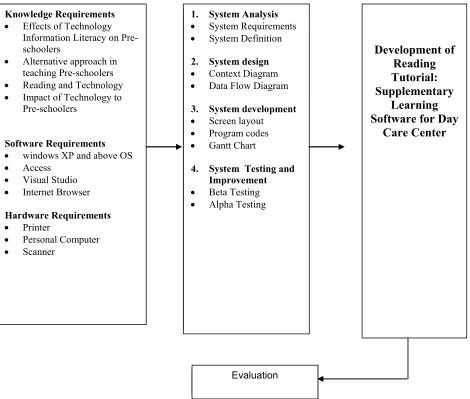
Fig. 1.1. Conceptual Model of the Study
Wardle (2012) believes that technology should be one of the tool that an educators needs to integrate technology as a tool and another kind of material to teach specific skills and concepts. He pointed out that technology in the classroom is intended to expand, enrich, implement, individualize, differentiate, and extend the overall curriculum. However, educators should be cautions on (1) whatever criteria are used to evaluate educational materials such as books, workbooks, and lessons and (2) extremely sensitive to evidence of violence, sex, racism, religious intolerance. Preschool children should be introduced to computers one at a time, and every child should have ample opportunity for hands-on experiences. The computer centre should be one of many equally important learning centre.
Knowledge Requirements Effects of Technology
Information Literacy on Pre-schoolers
Alternative approach in teaching Pre-schoolers Reading and Technology Impact of Technology to
Pre-schoolers
Software Requirements windows XP and above OS Access
Visual Studio Internet Browser
Hardware Requirements Printer
Personal Computer Scanner
1. System Analysis System Requirements System Definition
2. System design Context Diagram Data Flow Diagram
3. System development Screen layout Program codes Gantt Chart
4. System Testing and Improvement Beta Testing Alpha Testing
Development of
Reading
Tutorial:
Supplementary
Learning
Software for Day
Care Center
In addition to that Reinen (2013) shows in her blog that kids nowadays are hooked up to technology. Integrating technology reinforces key technical skills of children. In order to get the little ones short them learning span, technology is the key answer. Difficulties in learning should be avoided in the apps and website to make them stick to it.
On the basis of the foregoing concepts, theories and findings of related literature, studies presented and insights taken, a conceptual model is developed as shown in figure 1.1: Input Process Output
The conceptual model of the system is composed of three (3) blocks, namely the input, process and output. Input is made of knowledge requirements such as effects of technology information literacy on pre-schoolers, alternative approaches in teaching pre-schoolers, reading and technology and the impact of technology to pre-schoolers. The software requirements of the system supports windows xp and above operating system, access for dbms, visual studio for external interfaces, Photoshop for designing. Hardware requirements consist of printer, personal computer and scanner.
The process block includes system analysis, design and system implementation. The system analysis is composed of system requirements and definitions. System design includes context diagram and data flow diagram. The system development comprises the screen-layout and program codes. And lastly, the system implementation which covers the installation of working system and preparation of the user’s manual. An evaluation will be conducted after the completion of the project.
The final output is development of reading tutorial: supplementary learning software for day care center that aims to have supplementary tool teaching pre-schoolers to read.
3. METHODOLOGY
Project Design
Development of Reading Tutorial, alternative learning software for Day Care Center aims to help educators in teaching pre-schoolers to read.
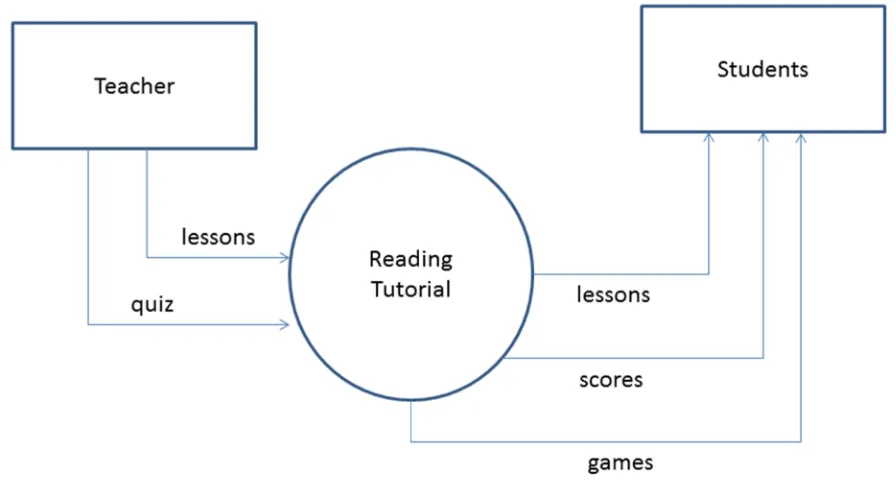
Fig. 2. Reading Tutorial Context Diagram
Figure 2.0 shows the context diagram of Reading Tutorial, supplementary learning system for day care center. The teacher / educator have the capability of uploading the lessons and quizzes. Students can pick lessons and play games after a series of lessons. Scores are automatically recorded to the database and reported to teacher.
Statistical Tool
297 International Journal of Computer Science and Software Engineering (IJCSSE), Volume 6, Issue 12, December 2017
M. E. D. Mapanoo
i.
Table 1
Numerical Rating
Numerical Scale Interpretation
5 Excellent
4 Very Good
3 Good
2 Fair
1 Poor
Table1 shows the numerical rating used in the questionnaire in order to determine the usefulness of the system. It is rated with five (5) having an excellent rating and one (1) as its lowest rating.
ii.
Table 2
Likert Scale
Numerical Scale Descriptive Meaning
4.51 – 5.00 Excellent 3.51 – 4.50 Very Good
2.51 – 3.50 Good
1.51 – 2.50 Fair 1.00 – 1.50 Poor
The evaluated results were interpreted based on the mean that scores that gathered from ten (10) pre-schoolers teachers, twenty five (25) pre-schoolers kids ranging from four (4) to six (6) years old, ten (10) parents.
4. RESULT AND DISCUSSION
The evaluation was conducted through the use of survey instrument. Refer to Appendix A for the sample evaluation instrument.
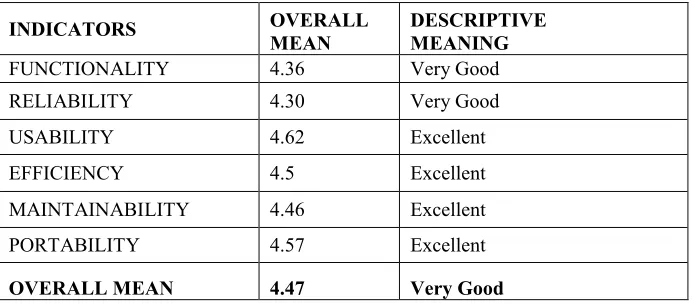
Table 3.0: Summary of Software Evaluation Overall Mean Scores
INDICATORS OVERALL
MEAN
DESCRIPTIVE MEANING
FUNCTIONALITY 4.36 Very Good
RELIABILITY 4.30 Very Good
USABILITY 4.62 Excellent
EFFICIENCY 4.5 Excellent
MAINTAINABILITY 4.46 Excellent
PORTABILITY 4.57 Excellent
OVERALL MEAN 4.47 Very Good
The overall mean score is 4.47 which is equivalent to very good rating. Usability got the highest mean score which is 4.62. This attests that the system is usable in the day care center, it is easily understood by the pre-schoolers. Its user-friendliness allows pupil to learn faster.
Portability follows next; it got a mean score of 4.57 and
a descriptive meaning of Excellent. This proves that the program can be easily installed in any desktop computer and can be transferred from one computer to another computer easily.Efficiency
falls on third ranking, this shows that the requirements given by the day care center are met and used in the system.The system Maintainability got a score of 4.46. This shows that the program flow is easy to understand. Changes in content can be easily done and errors are minimal.
Functionality landed on fifth place with a score of 4.36.
The evaluator wanted to include database which will store and compare scores of students who uses the system.Table 4: The Software Evaluation Overall Mean Scores
Software Quality
Attributes Statements 5 4 3 2 1
Overall Mean
Descriptive
Meaning Mean
FUNCTIONALITY
Suitability
Does the program suit the
needs of the students? 5 40
4.1111 11
Very Good 4.36 Accurateness
Are the contents/lessons
correct and accurate? 5 40
4.1111 11
Security
Does the program have a safety
feature? 38 7
4.8444 44
RELIABILITY
Maturity
The program does not need to be developed more for
improvements? 38 7
4.8444 44
Very Good 4.30
Fault to
Tolerance
Does the program exhibit
errors during operation? 5 28 12
3.8444 44
Recoverability
Does the program still work pproperly even after an "error"
has occurred? 9 36 4.2
USABILITY
Understandibility
Are the intructions for the use of the program easy to
understand? 34 11
4.7555 56
Excellent 4.62 Learnability
Is the use of the program easy
to learn? 5 40
4.1111 11
Operability
Is the proram easy to operate
and user-friendly? 27 18 4.6
Attractiveness
Did you find the design of the
program interface likeable? 45 5
EFFICIENCY
Time Behavior
Does the program make use off
time efficiently? 45 4
Excellent 4.5 Resource
Utilization
Did the program made use of
resources properly? 45 5
MAINTAINABILITY
Analyzability
Does the program flow easy to
analyze/understand? 39 6
4.8666 67
Excellent 4.46 Changeability
Can the contents of the
program be changed? 40 5
4.8888 89
Testability
Can the program be tested repeatedly without any
problems? 5 38
3.9333 33
Stability
Is the program stable and does
not exhibit errors? 7 38
4.1555 56
299 International Journal of Computer Science and Software Engineering (IJCSSE), Volume 6, Issue 12, December 2017
M. E. D. Mapanoo
Adaptability
Can the program be used on
various kinds of devices? 8 37
4.1777 78
Excellent 4.57 Installability
Is the program easy to install
on a system? 5 40
4.1111 11
Conformance
Does the program follow the standard requirements given by
the client? 45 5
Replaceability
Can the program be easily placed in another "location"
without any trouble? 45 5
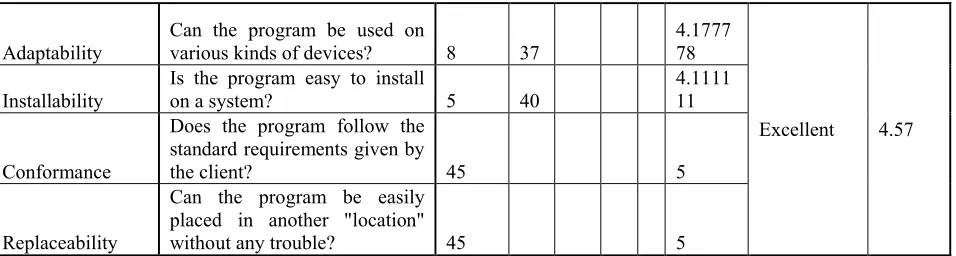
Table 2 shows the result of software evaluation. The Software was evaluated by ten (10) preschoolers teachers, twenty-five (25) pre-schoolers kids ranging from four (4) to six (6) years old, ten (10) parents. The table shows that the system is usable and timely for preschoolers. It is working based on the requirements and resources given by the day care center.
In reliability, the table shows that program can handle error during its operational period. Program was progressively given to the Day care center, finds its maturity in handling requirements and resources needed to be included in the system.
Usability exhibits the highest points since it is easy to learn. Its eye catching interfaces catches attention which makes pre-schoolers thinks that learning is more fun using the technology.
Teacher, Administrator and Parents thinks it is one way or one of those supplementary materials that should be given to the students.
The program is easy to maintain and also a portable one. It can be installed to any desktop pc.
5. SUMMARY OF FINDINGS
1. Functionality. It is rated very good since the program suit the needs of the students. Its contents are accurate and correct.
2. Reliability. It is rated very good. Conformance to the requirements are all seen in the system
3. Usability. It is rated excellent, its user-friendliness and easy to deal with makes good appeal to the user.
4. Efficiency. It is rated excellence since the resources stated by the end – users are all included in the system
5. Maintainability. It is rated excellent, the algorithm employed in the program are easy to understand
6. Portability. It is rated excellent. The end – user finds the software to be easy of installed and use.
6. SUMMARY OF FINDINGS
In consideration of the objectives of the study and the results of the evaluation, the following conclusions were drawn:
1. That the design system meets the need of providing supplementary tool in reading for pre-schoolers. Contents are based on the requirements and resources given by the School Administrators. 2. That the system was tested and improved based
on the suggestions given by the end – users. 3. That the system was rated very good based on the
results of evaluation conducted.
7. RECOMMENDATION
The following are recommended for further enhancement of the developed system:
1. Provide a way to add additional contents and quizzes inside the system
301 International Journal of Computer Science and Software Engineering (IJCSSE), Volume 6, Issue 12, December 2017
REFERENCES
[1] Xu, Anxin, Chen, Guisong (2016): “A Study on the
Effects of Teachers’ Information Literacy on
Information Technology Integrated Instruction and Teaching Effectiveness.”, EURASIA Journal of Mathematics, Science and Technology Education, v12 n2 p335-346, Feb 2016.
[2] Moses, Annie M.;Golos, Debbie B.; Bennet, Colleen
M.: “ An alternative approach to early literacy: the effects of ASL in Educational Media on Literacy Skills Acquisition for Hearing Children”, Early Childhood Education Journal, v43 n6 p485 – 494, Nov. 2015
[3] Kocaman- Karoglu, Aslihan (2015): “Telling Stories
Digitally: An Experiment with Preschool Children”, Educational Media International, v52 n4 p340-352, 2015
[4] Macaruso, Paul; Rodman, Alyson (2011): “Efficacy of
Computer Assisted Instruction for the Development of Early Literacy Skills in Young Children”, Reading Psychology, v32 n2 p 172-196, 2011
[5] Bolukbos, Dr. Fatma; Feskin, Funda; Polat,
Mustafa(2011): “The effectiveness of Cooperative Learning on the Reading Comprehension Skills in Turkish as a Foreign Language”, Turkish Online
Journal of Educational Technology, V10 Issue 4, pages 330 – 335
[6] Tadjic, Mirko; Martinec, Miroslav; Farago, Amalija
(2015); “The Impact of Physical Settings on Pre-Schoolers Classroom Organization”, V1, Issue 1
[7] Wardle, Francis (2012); “The Role of Technology in
Preschool Programs”, Today’s Catholic Teacher, http://www.catholicteacher.com/blog/archives/59-The-Role-of-Technology-in-Preschool-Programs.html
[8] Reinen, Bevin Kateri (2013): “ECE Technology: 10
Trending Tools for Teachers”, Early Childhood Teacher,
http://www.earlychildhoodteacher.org/blog/ece-technology-10-trending-tools-for-teachers/
[9] Epstein, Dr. Anne S. (2013): “Using Technology
![The JET Project. Information [Research and Development] 125/76](data:image/gif;base64,R0lGODlhAQABAIAAAP///wAAACH5BAEAAAAALAAAAAABAAEAAAICRAEAOw==)