Junos Pulse Access Control
Service
Virtual Appliances for Junos Pulse Access Control
Service
Release
Published: 2011-01-27 Part Number: , Revision 1
Juniper Networks, Inc. 1194 North Mathilda Avenue Sunnyvale, California 94089 USA
408-745-2000 www.juniper.net
This product includes the Envoy SNMP Engine, developed by Epilogue Technology, an Integrated Systems Company. Copyright © 1986-1997, Epilogue Technology Corporation. All rights reserved. This program and its documentation were developed at private expense, and no part of them is in the public domain.
This product includes memory allocation software developed by Mark Moraes, copyright © 1988, 1989, 1993, University of Toronto. This product includes FreeBSD software developed by the University of California, Berkeley, and its contributors. All of the documentation and software included in the 4.4BSD and 4.4BSD-Lite Releases is copyrighted by the Regents of the University of California. Copyright © 1979, 1980, 1983, 1986, 1988, 1989, 1991, 1992, 1993, 1994. The Regents of the University of California. All rights reserved.
GateD software copyright © 1995, the Regents of the University. All rights reserved. Gate Daemon was originated and developed through release 3.0 by Cornell University and its collaborators. Gated is based on Kirton’s EGP, UC Berkeley’s routing daemon (routed), and DCN’s HELLO routing protocol. Development of Gated has been supported in part by the National Science Foundation. Portions of the GateD software copyright © 1988, Regents of the University of California. All rights reserved. Portions of the GateD software copyright © 1991, D. L. S. Associates.
This product includes software developed by Maker Communications, Inc., copyright © 1996, 1997, Maker Communications, Inc. Juniper Networks, Junos, Steel-Belted Radius, NetScreen, and ScreenOS are registered trademarks of Juniper Networks, Inc. in the United States and other countries. The Juniper Networks Logo, the Junos logo, and JunosE are trademarks of Juniper Networks, Inc. All other trademarks, service marks, registered trademarks, or registered service marks are the property of their respective owners.
Juniper Networks assumes no responsibility for any inaccuracies in this document. Juniper Networks reserves the right to change, modify, transfer, or otherwise revise this publication without notice.
Products made or sold by Juniper Networks or components thereof might be covered by one or more of the following patents that are owned by or licensed to Juniper Networks: U.S. Patent Nos. 5,473,599, 5,905,725, 5,909,440, 6,192,051, 6,333,650, 6,359,479, 6,406,312, 6,429,706, 6,459,579, 6,493,347, 6,538,518, 6,538,899, 6,552,918, 6,567,902, 6,578,186, and 6,590,785.
Unified Access Control UAC Virtual Server Guide
Revision History
August 2010—Original Issue
The information in this document is current as of the date listed in the revision history.
Copyright © 2011, Juniper Networks, Inc. ii
END USER LICENSE AGREEMENT
READ THIS END USER LICENSE AGREEMENT (“AGREEMENT”) BEFORE DOWNLOADING, INSTALLING, OR USING THE SOFTWARE. BY DOWNLOADING, INSTALLING, OR USING THE SOFTWARE OR OTHERWISE EXPRESSING YOUR AGREEMENT TO THE TERMS CONTAINED HEREIN, YOU (AS CUSTOMER OR IF YOU ARE NOT THE CUSTOMER, AS A REPRESENTATIVE/AGENT AUTHORIZED TO BIND THE CUSTOMER) CONSENT TO BE BOUND BY THIS AGREEMENT. IF YOU DO NOT OR CANNOT AGREE TO THE TERMS CONTAINED HEREIN, THEN (A) DO NOT DOWNLOAD, INSTALL, OR USE THE SOFTWARE, AND (B) YOU MAY CONTACT JUNIPER NETWORKS REGARDING LICENSE TERMS.
1. The Parties.The parties to this Agreement are (i) Juniper Networks, Inc. (if the Customer’s principal office is located in the Americas) or Juniper Networks (Cayman) Limited (if the Customer’s principal office is located outside the Americas) (such applicable entity being referred to herein as “Juniper”), and (ii) the person or organization that originally purchased from Juniper or an authorized Juniper reseller the applicable license(s) for use of the Software (“Customer”) (collectively, the “Parties”).
2. The Software.In this Agreement, “Software” means the program modules and features of the Juniper or Juniper-supplied software, for which Customer has paid the applicable license or support fees to Juniper or an authorized Juniper reseller, or which was embedded by Juniper in equipment which Customer purchased from Juniper or an authorized Juniper reseller. “Software” also includes updates, upgrades and new releases of such software. “Embedded Software” means Software which Juniper has embedded in or loaded onto the Juniper equipment and any updates, upgrades, additions or replacements which are subsequently embedded in or loaded onto the equipment. 3. License Grant.Subject to payment of the applicable fees and the limitations and restrictions set forth herein, Juniper grants to Customer a non-exclusive and non-transferable license, without right to sublicense, to use the Software, in executable form only, subject to the following use restrictions:
a. Customer shall use Embedded Software solely as embedded in, and for execution on, Juniper equipment originally purchased by Customer from Juniper or an authorized Juniper reseller.
b. Customer shall use the Software on a single hardware chassis having a single processing unit, or as many chassis or processing units for which Customer has paid the applicable license fees; provided, however, with respect to the Steel-Belted Radius or Odyssey Access Client software only, Customer shall use such Software on a single computer containing a single physical random access memory space and containing any number of processors. Use of the Steel-Belted Radius or IMS AAA software on multiple computers or virtual machines (e.g., Solaris zones) requires multiple licenses, regardless of whether such computers or virtualizations are physically contained on a single chassis.
c. Product purchase documents, paper or electronic user documentation, and/or the particular licenses purchased by Customer may specify limits to Customer’s use of the Software. Such limits may restrict use to a maximum number of seats, registered endpoints, concurrent users, sessions, calls, connections, subscribers, clusters, nodes, realms, devices, links, ports or transactions, or require the purchase of separate licenses to use particular features, functionalities, services, applications, operations, or capabilities, or provide throughput, performance, configuration, bandwidth, interface, processing, temporal, or geographical limits. In addition, such limits may restrict the use of the Software to managing certain kinds of networks or require the Software to be used only in conjunction with other specific Software. Customer’s use of the Software shall be subject to all such limitations and purchase of all applicable licenses.
d. For any trial copy of the Software, Customer’s right to use the Software expires 30 days after download, installation or use of the Software. Customer may operate the Software after the 30-day trial period only if Customer pays for a license to do so. Customer may not extend or create an additional trial period by re-installing the Software after the 30-day trial period.
e. The Global Enterprise Edition of the Steel-Belted Radius software may be used by Customer only to manage access to Customer’s enterprise network. Specifically, service provider customers are expressly prohibited from using the Global Enterprise Edition of the Steel-Belted Radius software to support any commercial network access services.
The foregoing license is not transferable or assignable by Customer. No license is granted herein to any user who did not originally purchase the applicable license(s) for the Software from Juniper or an authorized Juniper reseller.
4. Use Prohibitions.Notwithstanding the foregoing, the license provided herein does not permit the Customer to, and Customer agrees not to and shall not: (a) modify, unbundle, reverse engineer, or create derivative works based on the Software; (b) make unauthorized copies of the Software (except as necessary for backup purposes); (c) rent, sell, transfer, or grant any rights in and to any copy of the Software, in any form, to any third party; (d) remove any proprietary notices, labels, or marks on or in any copy of the Software or any product in which the Software is embedded; (e) distribute any copy of the Software to any third party, including as may be embedded in Juniper equipment sold in the secondhand market; (f) use any ‘locked’ or key-restricted feature, function, service, application, operation, or capability without first purchasing the applicable license(s) and obtaining a valid key from Juniper, even if such feature, function, service, application, operation, or capability is enabled without a key; (g) distribute any key for the Software provided by Juniper to any third party; (h) use the
iii Copyright © 2011, Juniper Networks, Inc.
Software in any manner that extends or is broader than the uses purchased by Customer from Juniper or an authorized Juniper reseller; (i) use Embedded Software on non-Juniper equipment; (j) use Embedded Software (or make it available for use) on Juniper equipment that the Customer did not originally purchase from Juniper or an authorized Juniper reseller; (k) disclose the results of testing or benchmarking of the Software to any third party without the prior written consent of Juniper; or (l) use the Software in any manner other than as expressly provided herein.
5. Audit.Customer shall maintain accurate records as necessary to verify compliance with this Agreement. Upon request by Juniper, Customer shall furnish such records to Juniper and certify its compliance with this Agreement.
6. Confidentiality.The Parties agree that aspects of the Software and associated documentation are the confidential property of Juniper. As such, Customer shall exercise all reasonable commercial efforts to maintain the Software and associated documentation in confidence, which at a minimum includes restricting access to the Software to Customer employees and contractors having a need to use the Software for Customer’s internal business purposes.
7. Ownership.Juniper and Juniper’s licensors, respectively, retain ownership of all right, title, and interest (including copyright) in and to the Software, associated documentation, and all copies of the Software. Nothing in this Agreement constitutes a transfer or conveyance of any right, title, or interest in the Software or associated documentation, or a sale of the Software, associated documentation, or copies of the Software.
8. Warranty, Limitation of Liability, Disclaimer of Warranty.The warranty applicable to the Software shall be as set forth in the warranty statement that accompanies the Software (the “Warranty Statement”). Nothing in this Agreement shall give rise to any obligation to support the Software. Support services may be purchased separately. Any such support shall be governed by a separate, written support services agreement. TO THE MAXIMUM EXTENT PERMITTED BY LAW, JUNIPER SHALL NOT BE LIABLE FOR ANY LOST PROFITS, LOSS OF DATA, OR COSTS OR PROCUREMENT OF SUBSTITUTE GOODS OR SERVICES, OR FOR ANY SPECIAL, INDIRECT, OR CONSEQUENTIAL DAMAGES ARISING OUT OF THIS AGREEMENT, THE SOFTWARE, OR ANY JUNIPER OR JUNIPER-SUPPLIED SOFTWARE. IN NO EVENT SHALL JUNIPER BE LIABLE FOR DAMAGES ARISING FROM UNAUTHORIZED OR IMPROPER USE OF ANY JUNIPER OR JUNIPER-SUPPLIED SOFTWARE. EXCEPT AS EXPRESSLY PROVIDED IN THE WARRANTY STATEMENT TO THE EXTENT PERMITTED BY LAW, JUNIPER DISCLAIMS ANY AND ALL WARRANTIES IN AND TO THE SOFTWARE (WHETHER EXPRESS, IMPLIED, STATUTORY, OR OTHERWISE), INCLUDING ANY IMPLIED WARRANTY OF MERCHANTABILITY, FITNESS FOR A PARTICULAR PURPOSE, OR NONINFRINGEMENT. IN NO EVENT DOES JUNIPER WARRANT THAT THE SOFTWARE, OR ANY EQUIPMENT OR NETWORK RUNNING THE SOFTWARE, WILL OPERATE WITHOUT ERROR OR INTERRUPTION, OR WILL BE FREE OF VULNERABILITY TO INTRUSION OR ATTACK. In no event shall Juniper’s or its suppliers’ or licensors’ liability to Customer, whether in contract, tort (including negligence), breach of warranty, or otherwise, exceed the price paid by Customer for the Software that gave rise to the claim, or if the Software is embedded in another Juniper product, the price paid by Customer for such other product. Customer acknowledges and agrees that Juniper has set its prices and entered into this Agreement in reliance upon the disclaimers of warranty and the limitations of liability set forth herein, that the same reflect an allocation of risk between the Parties (including the risk that a contract remedy may fail of its essential purpose and cause consequential loss), and that the same form an essential basis of the bargain between the Parties.
9. Termination.Any breach of this Agreement or failure by Customer to pay any applicable fees due shall result in automatic termination of the license granted herein. Upon such termination, Customer shall destroy or return to Juniper all copies of the Software and related documentation in Customer’s possession or control.
10. Taxes.All license fees payable under this agreement are exclusive of tax. Customer shall be responsible for paying Taxes arising from the purchase of the license, or importation or use of the Software. If applicable, valid exemption documentation for each taxing jurisdiction shall be provided to Juniper prior to invoicing, and Customer shall promptly notify Juniper if their exemption is revoked or modified. All payments made by Customer shall be net of any applicable withholding tax. Customer will provide reasonable assistance to Juniper in connection with such withholding taxes by promptly: providing Juniper with valid tax receipts and other required documentation showing Customer’s payment of any withholding taxes; completing appropriate applications that would reduce the amount of withholding tax to be paid; and notifying and assisting Juniper in any audit or tax proceeding related to transactions hereunder. Customer shall comply with all applicable tax laws and regulations, and Customer will promptly pay or reimburse Juniper for all costs and damages related to any liability incurred by Juniper as a result of Customer’s non-compliance or delay with its responsibilities herein. Customer’s obligations under this Section shall survive termination or expiration of this Agreement.
11. Export.Customer agrees to comply with all applicable export laws and restrictions and regulations of any United States and any applicable foreign agency or authority, and not to export or re-export the Software or any direct product thereof in violation of any such restrictions, laws or regulations, or without all necessary approvals. Customer shall be liable for any such violations. The version of the Software supplied to Customer may contain encryption or other capabilities restricting Customer’s ability to export the Software without an export license.
Copyright © 2011, Juniper Networks, Inc. iv
12. Commercial Computer Software.The Software is “commercial computer software” and is provided with restricted rights. Use, duplication, or disclosure by the United States government is subject to restrictions set forth in this Agreement and as provided in DFARS 227.7201 through 227.7202-4, FAR 12.212, FAR 27.405(b)(2), FAR 52.227-19, or FAR 52.227-14(ALT III) as applicable.
13. Interface Information.To the extent required by applicable law, and at Customer's written request, Juniper shall provide Customer with the interface information needed to achieve interoperability between the Software and another independently created program, on payment of applicable fee, if any. Customer shall observe strict obligations of confidentiality with respect to such information and shall use such information in compliance with any applicable terms and conditions upon which Juniper makes such information available.
14. Third Party Software.Any licensor of Juniper whose software is embedded in the Software and any supplier of Juniper whose products or technology are embedded in (or services are accessed by) the Software shall be a third party beneficiary with respect to this Agreement, and such licensor or vendor shall have the right to enforce this Agreement in its own name as if it were Juniper. In addition, certain third party software may be provided with the Software and is subject to the accompanying license(s), if any, of its respective owner(s). To the extent portions of the Software are distributed under and subject to open source licenses obligating Juniper to make the source code for such portions publicly available (such as the GNU General Public License (“GPL”) or the GNU Library General Public License (“LGPL”)), Juniper will make such source code portions (including Juniper modifications, as appropriate) available upon request for a period of up to three years from the date of distribution. Such request can be made in writing to Juniper Networks, Inc., 1194 N. Mathilda Ave., Sunnyvale, CA 94089, ATTN: General Counsel. You may obtain a copy of the GPL at
http://www.gnu.org/licenses/gpl.html
, and a copy of the LGPL athttp://www.gnu.org/licenses/lgpl.html
.15. Miscellaneous.This Agreement shall be governed by the laws of the State of California without reference to its conflicts of laws principles. The provisions of the U.N. Convention for the International Sale of Goods shall not apply to this Agreement. For any disputes arising under this Agreement, the Parties hereby consent to the personal and exclusive jurisdiction of, and venue in, the state and federal courts within Santa Clara County, California. This Agreement constitutes the entire and sole agreement between Juniper and the Customer with respect to the Software, and supersedes all prior and contemporaneous agreements relating to the Software, whether oral or written (including any inconsistent terms contained in a purchase order), except that the terms of a separate written agreement executed by an authorized Juniper representative and Customer shall govern to the extent such terms are inconsistent or conflict with terms contained herein. No modification to this Agreement nor any waiver of any rights hereunder shall be effective unless expressly assented to in writing by the party to be charged. If any portion of this Agreement is held invalid, the Parties agree that such invalidity shall not affect the validity of the remainder of this Agreement. This Agreement and associated documentation has been written in the English language, and the Parties agree that the English version will govern. (For Canada: Les parties aux présentés confirment leur volonté que cette convention de même que tous les documents y compris tout avis qui s'y rattaché, soient redigés en langue anglaise. (Translation: The parties confirm that this Agreement and all related documentation is and will be in the English language)).
v Copyright © 2011, Juniper Networks, Inc.
Copyright © 2011, Juniper Networks, Inc. vi
Abbreviated Table of Contents
About this Guide . . . xiii
Part 1
The UAC Virtual Server
Chapter 1
Virtual Appliances . . . 3
Part 2
Index
Index . . . 13
vii Copyright © 2011, Juniper Networks, Inc.
Copyright © 2011, Juniper Networks, Inc. viii
Table of Contents
About this Guide . . . xiii
Related Documentation . . . xiii
Document Conventions . . . xiv
Requesting Technical Support . . . xiv
Self-Help Online Tools and Resources . . . xv
Opening a Case with JTAC . . . xv
Part 1
The UAC Virtual Server
Chapter 1
Virtual Appliances . . . 3
About Virtual Appliances . . . 3
Virtual Appliance Editions . . . 3
Hardware and Software Requirements . . . 3
Supported Features . . . 4
Package Information . . . 4
Task Summary: Setting Up and Configuring a Virtual Appliance . . . 6
Importing the Virtual Appliance . . . 7
Configuring the Initial Network Settings . . . 8
Part 2
Index
Index . . . 13
ix Copyright © 2011, Juniper Networks, Inc.
Copyright © 2011, Juniper Networks, Inc. x
List of Tables
About this Guide . . . xiii
Table 1: IC Series Publications . . . xiii
Table 2: Notice Icons . . . xiv
Part 1
The UAC Virtual Server
Chapter 1
Virtual Appliances . . . 3
Table 3: create-va.exp Parameters . . . 7
Table 4: Parameters for the init-network-config.exp . . . 9
xi Copyright © 2011, Juniper Networks, Inc.
Copyright © 2011, Juniper Networks, Inc. xii
About this Guide
•
Related Documentation on page xiii
•
Document Conventions on page xiv
•
Requesting Technical Support on page xiv
Related Documentation
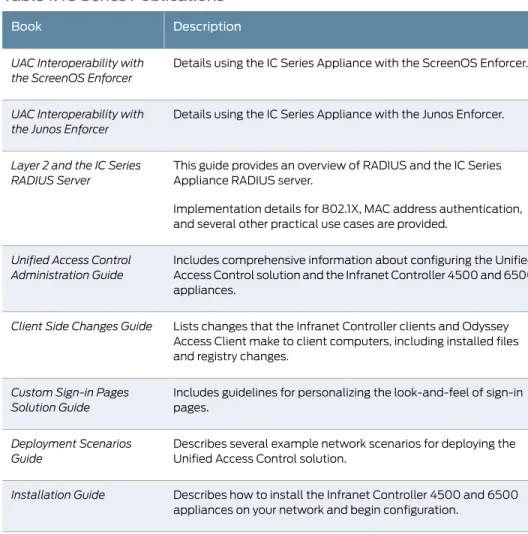
Table 1 on page xiii describes documentation for the IC Series Appliance.
All documentation is available at http://www.juniper.net/techpubs/software/uac/
Table 1: IC Series Publications
Description
Book
Details using the IC Series Appliance with the ScreenOS Enforcer.
UAC Interoperability with the ScreenOS Enforcer
Details using the IC Series Appliance with the Junos Enforcer.
UAC Interoperability with the Junos Enforcer
This guide provides an overview of RADIUS and the IC Series Appliance RADIUS server.
Implementation details for 802.1X, MAC address authentication, and several other practical use cases are provided.
Layer 2 and the IC Series RADIUS Server
Includes comprehensive information about configuring the Unified Access Control solution and the Infranet Controller 4500 and 6500 appliances.
Unified Access Control Administration Guide
Lists changes that the Infranet Controller clients and Odyssey Access Client make to client computers, including installed files and registry changes.
Client Side Changes Guide
Includes guidelines for personalizing the look-and-feel of sign-in pages.
Custom Sign-in Pages Solution Guide
Describes several example network scenarios for deploying the Unified Access Control solution.
Deployment Scenarios Guide
Describes how to install the Infranet Controller 4500 and 6500 appliances on your network and begin configuration.
Installation Guide
xiii Copyright © 2011, Juniper Networks, Inc.
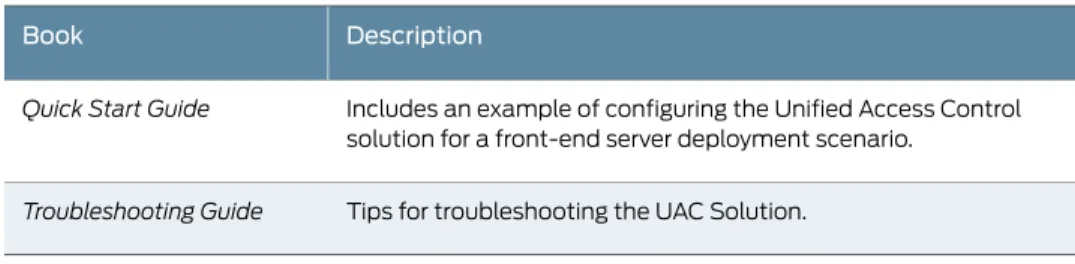
Table 1: IC Series Publications
(continued)
Description
Book
Includes an example of configuring the Unified Access Control solution for a front-end server deployment scenario.
Quick Start Guide
Tips for troubleshooting the UAC Solution.
Troubleshooting Guide
Document Conventions
Table 2 on page xiv defines notice icons used in this guide.
Table 2: Notice Icons
Description
Meaning
Icon
Indicates important features or instructions. Informational note
Indicates a situation that might result in loss of data or hardware damage. Caution
Alerts you to the risk of personal injury or death. Warning
Alerts you to the risk of personal injury from a laser. Laser warning
Requesting Technical Support
Technical product support is available through the Juniper Networks Technical Assistance
Center (JTAC). If you are a customer with an active J-Care or JNASC support contract,
or are covered under warranty, and need post-sales technical support, you can access
our tools and resources online or open a case with JTAC.
•
JTAC policies—For a complete understanding of our JTAC procedures and policies,
review the JTAC User Guide located at
http://www.juniper.net/us/en/local/pdf/resource-guides/7100059-en.pdf
.
•
Product warranties—For product warranty information, visit
http://www.juniper.net/support/warranty/
.
•
JTAC hours of operation—The JTAC centers have resources available 24 hours a day,
7 days a week, 365 days a year.
Copyright © 2011, Juniper Networks, Inc. xiv
Self-Help Online Tools and Resources
For quick and easy problem resolution, Juniper Networks has designed an online
self-service portal called the Customer Support Center (CSC) that provides you with the
following features:
•
Find CSC offerings:
http://www.juniper.net/customers/support/
•Search for known bugs:
http://www2.juniper.net/kb/
•
Find product documentation:
http://www.juniper.net/techpubs/
•
Find solutions and answer questions using our Knowledge Base:
http://kb.juniper.net/
•Download the latest versions of software and review release notes:
http://www.juniper.net/customers/csc/software/
•
Search technical bulletins for relevant hardware and software notifications:
https://www.juniper.net/alerts/
•
Join and participate in the Juniper Networks Community Forum:
http://www.juniper.net/company/communities/
•
Open a case online in the CSC Case Management tool:
http://www.juniper.net/cm/
To verify service entitlement by product serial number, use our Serial Number Entitlement
(SNE) Tool:
https://tools.juniper.net/SerialNumberEntitlementSearch/
Opening a Case with JTAC
You can open a case with JTAC on the Web or by telephone.
•
Use the Case Management tool in the CSC at
http://www.juniper.net/cm/
.
•
Call 1-888-314-JTAC (1-888-314-5822 toll-free in the USA, Canada, and Mexico).
For international or direct-dial options in countries without toll-free numbers, see
http://www.juniper.net/support/requesting-support.html
.
xv Copyright © 2011, Juniper Networks, Inc.
Copyright © 2011, Juniper Networks, Inc. xvi
PART 1
The UAC Virtual Server
•Virtual Appliances on page 3
1 Copyright © 2011, Juniper Networks, Inc.
Copyright © 2011, Juniper Networks, Inc. 2
CHAPTER 1
Virtual Appliances
•
About Virtual Appliances on page 3
•
Task Summary: Setting Up and Configuring a Virtual Appliance on page 6
•
Importing the Virtual Appliance on page 7
•
Configuring the Initial Network Settings on page 8
About Virtual Appliances
Running Unified Access Control (UAC) software in a VMware virtual machine as a virtual
appliance provides service providers with robust scalability and isolation. The ESX server
software from VMware supports several virtual machines on a high-end multiprocessor
platform. Deploying a dedicated virtual appliance for each customer guarantees complete
isolation between systems.
Virtual Appliance Editions
Two types of virtual appliances are available:
•
Demonstration and Training Edition (DTE)
•
Service Provider Edition (SPE)
For this release, only the DTE is available.
The DTE is intended for demonstration, initial evaluation, and training purposes. DTE is
not a supported product, and Juniper Networks Technical Support does not assist you
with any questions or problems. For more information about the DTE, contact your Juniper
Networks sales team or reseller for more information.
The SPE is intended for service providers who need to provision a remote access solution
for a large number of customers.
Hardware and Software Requirements
The Juniper Networks virtual appliance was tested with the following products:
•
BladeCenter HS blade server
•
vSphere 4.0
3 Copyright © 2011, Juniper Networks, Inc.
Any blade product that is compliant with these products is suitable for use with virtual
appliances.
Supported Features
All of the features of the IC Series platform are available with the exception of clustering
and user record synchronization.
Virtual appliances can be only license clients. All virtual appliance licenses are subscription
based.
NOTE:
The License summary page displays a number under the Installed
column on a virtual appliance SPE edition even though you can not install
licenses on a virtual appliance. This number is the “implicit count” available
on all devices that do not have installed licenses.
Package Information
The SPE downloadable zip file contains the following files:
•
README-SPE.txt—A quick start guide for the SPE virtual appliance.
•
README-scripts.txt—Up-to-date information on the contents of the zip file and how
to run the scripts.
•
VA-SPE-release-buildnumber-SERIAL-disk1.vmdk—A virtual disk file that contains the
software. The SERIAL version assumes using a serial port to set up the initial network
configuration.
•
VA-SPE-release-buildnumber-SERIAL.ovf—An Open Virtualization Format (OVF)
specification that defines the virtual appliance and contains a reference to the disk
image.
•
VA-SPE-release-buildnumber-VT-disk1.vmdk—A virtual disk file that contains the
software. The VT version assumes using a virtual terminal to set up the initial network
configuration.
•
VA-SPE-release-buildnumber-VT.ovf—An OVF specification that defines the virtual
appliance and contains a reference to the disk image.
•
init-network-config.exp—Script for configuring the initial network settings.
•
create-va.exp—Script for importing the OVF file into the ESX server and configure the
initial network settings (the create-va.exp script is a superset of the
init-network-config.exp script.)
•
setupva.conf—Example configuration file for the create-va.exp and
init-network-config.exp scripts.
The DTE downloadable zip contains the following files:
•
README-DTE.txt—A quick start guide for the SPE virtual appliance.
Copyright © 2011, Juniper Networks, Inc. 4
•
VA-DTE-release-buildnumber-VT-disk1.vmdk—a virtual disk file that contains the
software. The VT version assumes using a virtual terminal to set up the initial network
configuration.
•
VA-DTE-release-buildnumber-VT.ovf—An OVF specification that defines the virtual
appliance and contains a reference to the disk image.
The virtual appliance is delivered in OVF and is preconfigured with the following
specifications:
•
20G Virtual SCSI disk
•
One Virtual CPU
•
512MB memory
•
Three virtual network interfaces
•
Roughly 400 MB in size
You can change this configuration by editing the OVF prior to importing it or by editing
the virtual machine properties once it is created.
NOTE:
When you customize the configuration, do not reduce the disk size.
The OVF specification defines three logical networks:
•
InternalNetwork
•
ExternalNetwork
•
ManagementNetwork
When you import the OVF file, you must map these networks to the appropriate virtual
networks on the ESX server. The OVF file does not include a virtual serial port
configuration.
If you use the SERIAL OVF image, you must update the virtual machine specification with
the desired virtual serial port configuration before you power up the virtual appliance for
the first time.
When you first power on the virtual appliance for the first time, it expands the software
package and performs the installation. We recommend you export a copy of the fully
installed SPE virtual appliance and use that to instantiate additional SPE virtual
appliances.
After you configure the virtual appliance, you can use the following methods to manage
the UAC portion of the virtual appliance:
•
Juniper Networks Device Management Interface (DMI)
•
The IC Series device admin console
5 Copyright © 2011, Juniper Networks, Inc.
Related
Documentation
Task Summary: Setting Up and Configuring a Virtual Appliance on page 6
•
•
Importing the Virtual Appliance on page 7
•
Configuring the Initial Network Settings on page 8
Task Summary: Setting Up and Configuring a Virtual Appliance
To set up and configure a virtual appliance:
1.
Import the virtual appliance into the ESX server.
2.
Configure the initial network settings.
The remainder of this topic describes the process using the provided create-va.exp and
init-network-config.exp scripts. You perform these steps after you you configure a serial
console or a virtual terminal to the ESX server. If you have your own custom scripts to
perform these tasks, or if you prefer to do the initial network configuration manually, you
are not required to use Juniper scripts.
After you configure your virtual appliance, use VMware’s tools to manage the device,
such as starting and stopping the virtual appliance.
Using the Juniper Networks Scripts
The init-network-config.exp and create-va.exp scripts accept input from command-line
arguments or from a configuration file.
NOTE:
These scripts can be run only when you use the serial console.
On the command line, parameters are passed in the following format:
- - paramname paramvalue
The configuration file uses the following format:
paramname: paramvalue
You can specify only one parameter per line in the configuration file. Lines starting with
the pound sign (#) are treated as comments.
Note the following when using these scripts:
•
If a parameter is defined both on the command line and in the configuration file, the
command line value is used.
•
If parameters are not supplied on the command line, the script uses the values defined
in the configuration script.
•
If you do not specify a configuration file in the command line, setupva.conf is used as
the default configuration file.
•
The scripts do not perform parameter validation.
Copyright © 2011, Juniper Networks, Inc. 6
•
The scripts do not process errors returned by the terminal service. Therefore, you must
ensure that no other users or applications are using the terminal server or serial port.
•
You must verify that the serial console of the virtual appliance you are configuring in
the ESX server is mapped to the physical serial port, and that no other virtual appliances
are using the serial port. The create-va.exp script does not perform this verification.
•
You can have as many simultaneously active serial consoles as there are serial ports
on the virtual appliance platform.
•
The create-va.exp script is a superset of init-network-config.exp. If you use create-va.exp
to import the OVF, it also performs the initial network configuration; you do not need
to run init-network-config.exp.
Related
Documentation
About Virtual Appliances on page 3
•
•
Importing the Virtual Appliance on page 7
•
Configuring the Initial Network Settings on page 8
Importing the Virtual Appliance
Use the create-va.exp script to import the virtual appliance OVF into the ESX server. This
script logs in to the ESX server, imports the OVF source file, registers the virtual appliance
and then starts the virtual appliance.
NOTE:
ovftool 1.0 must be installed in the ESX and the OVF and VMDK files
must be copied to the ESX server before running create-va.exp.
The create-va.exp command syntax is:
./create-va.exp [-
-parameter value]
NOTE:
When you type the string “- -” do not put a space between the hyphens.
The space shown here is for demonstration purposes only.
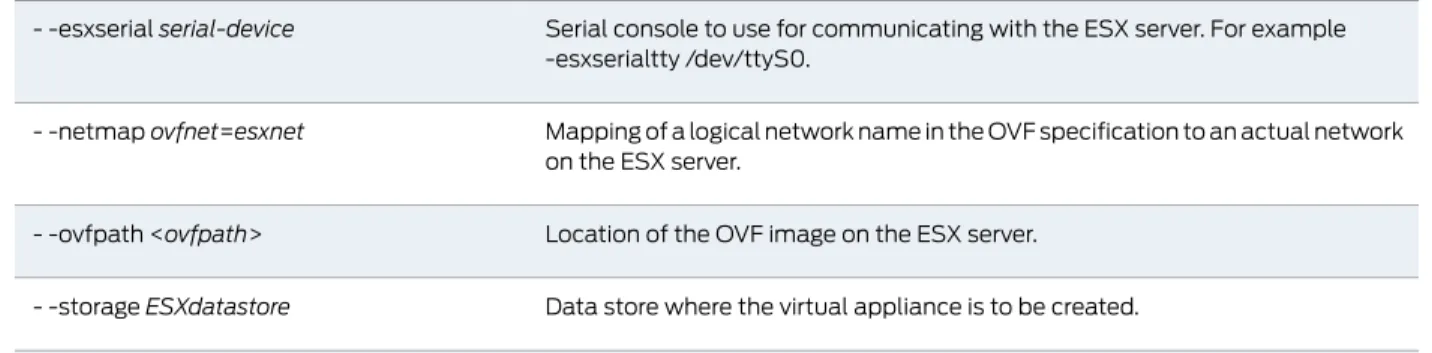
Table 3: create-va.exp Parameters
ESX Server-Related Parameters
ESX administrator username. The script uses this username to log in to the ESX server. This user must have super user privileges.
- -exadminESXusername
DNS name or the IP address of the ESX server where the virtual appliance is to be instantiated.
- -esxhostESXhost
Administrator password to log in to the ESX server. - -esxpasswdESXpassword
Parameters that Locate Resources on the The ESX Server
7 Copyright © 2011, Juniper Networks, Inc.
Table 3: create-va.exp Parameters
(continued)
Serial console to use for communicating with the ESX server. For example -esxserialtty /dev/ttyS0.
- -esxserialserial-device
Mapping of a logical network name in the OVF specification to an actual network on the ESX server.
- -netmapovfnet=esxnet
Location of the OVF image on the ESX server. - -ovfpath <ovfpath>
Data store where the virtual appliance is to be created. - -storageESXdatastore
Parameters that specify Virtual Appliance Properties
Switches the console from serial to terminal service after configuring the virtual appliance. The default is yes, (switch to terminal service).
- -switchconsoleyes/no
Name of the virtual appliance to create. - -vanamename
The following example lists all parameters and values on the command line:
<./createva.exp esxhost as23.juniper.net esxadmin admin esxpassword passwd
--esxovfpath /root/ovfs/IVE-70-VA.ovf - -esxserial /dev/ttyS0 - -file vadata.conf>
The following example, vadata.conf is the configuration file and is passed to the
create-va.exp script on the command line:
./create-va.exp - -file vadata.conf
Related
Documentation
About Virtual Appliances on page 3
•
•
Task Summary: Setting Up and Configuring a Virtual Appliance on page 6
•
Configuring the Initial Network Settings on page 8
Configuring the Initial Network Settings
After the virtual appliance starts on the ESX server, use the init-network-config.exp script
to define the administrator login and to configure the initial network settings for the virtual
appliance.
NOTE:
If you use create-va.exp to import the OVF, the script also performs
the initial network configuration. You do not need to run
init-network-config.exp.
The init-network-config.exp script interacts with the IC Series device through the serial
console, which is connected either to a terminal server, or directly to any UNIX or Linux
system.
The init-network-config.exp command syntax is:
Copyright © 2011, Juniper Networks, Inc. 8
./init-network-config.exp [- -parameter value]
NOTE:
When you type the string “- -” do not put a space between the hyphens.
The space shown here is for demonstration purposes only.
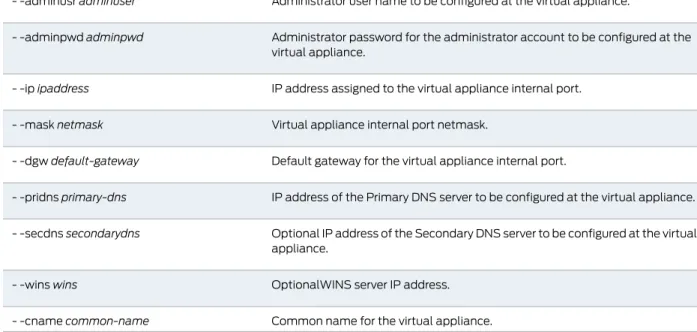
Table 4: Parameters for the init-network-config.exp
Parameters for Configuration File
Configuration file. If this parameter is not present, setupva.conf is used. Specifying a configuration file is optional.
- -filefilename
Parameters for Serial Console Access
Serial device to open in order to access the virtual appliance serial console. This parameter is valid only when ctype is set to “serial”.
- -cportserial-port-device
Serial console connection. Valid values are “terminal server” or “serial”. You must place the value in double-quotation marks. For example, - -ctype “serial”. Use “terminal server” if the virtual appliance serial console is accessed through a Telnet connection to a terminal server. Use "serial" if the virtual appliance serial console is accessed by directly opening a serial device on the system that is running the script.
- -ctypeconnecttype
Terminal service IP address. This parameter is valid only when ctype is set to “terminal server”.
- -tsipterminal-server-ip
Telnet port at the terminal server used to access the virtual appliance serial console.
- -tsportterminal-server-port
Parameters for Virtual Appliance Initial Configuration
Administrator user name to be configured at the virtual appliance. - -adminusradminuser
Administrator password for the administrator account to be configured at the virtual appliance.
- -adminpwdadminpwd
IP address assigned to the virtual appliance internal port. - -ipipaddress
Virtual appliance internal port netmask. - -masknetmask
Default gateway for the virtual appliance internal port. - -dgwdefault-gateway
IP address of the Primary DNS server to be configured at the virtual appliance. - -pridnsprimary-dns
Optional IP address of the Secondary DNS server to be configured at the virtual appliance.
- -secdnssecondarydns
OptionalWINS server IP address. - -winswins
Common name for the virtual appliance. - -cnamecommon-name
9 Copyright © 2011, Juniper Networks, Inc.
Table 4: Parameters for the init-network-config.exp
(continued)
Domain name to be configured at the virtual appliance. - -domaindomain
Organization name to be configured at the virtual appliance. - -orgnameorganization-name
Randomtext used for generating a self signed certificate at the virtual appliance. - -rtxtrandom-text
After the initial network configuration is complete and a machine ID is generated, you
must complete the rest of the configuration, which includes, but is not limited to, the
following (you can also use DMI to perform these tasks):
•
Installing device certifcates.
•
Configuring which licenses to lease from the license server. Note that virtual appliances
are pre-configured with two concurrent user licenses.
•
Configuring the time zone and NTP.
•
Configuring internal and external ports.
•
Advanced network configurations such as virtual ports and VLANs.
•
Configuring the authentication server, syslog server, and additional options.
The following example lists all parameters and values on the command line:
./init-network-config.exp - -ip 100.10.11.11 - -mask 255.255.255.0 - -dgw 100.10.11.1 - -pridns
100.50.10.1 - -secdns 100.20.10.1 - -domain company.com - -wins 111.11.1.11 - -cname
aaa.company.com - -orgname "Company Inc" - -rtxt "Somerandomtext123" - -adminusr
admin - -adminpwd a9827fwe - -ctype "terminal server" - -tsip ts.comp.com - -tsport
9999
The following example shows vadata.conf is the configuration file and is passed to
init-network-config.exp on the command line.
./init-network-config.exp - -file vadata.conf
The following example shows all configuration parameters defined in vadata.conf. Since
IP address is defined on the command line, that value is used regardless of whether it is
defined in vadata.conf.
./init-network-config.exp - -file vadata.conf - -ip 100.10.11.12
Related
Documentation
•
About Virtual Appliances on page 3
•
Task Summary: Setting Up and Configuring a Virtual Appliance on page 6
•
Importing the Virtual Appliance on page 7
Copyright © 2011, Juniper Networks, Inc. 10
PART 2
Index
•
Index on page 13
11 Copyright © 2011, Juniper Networks, Inc.
Copyright © 2011, Juniper Networks, Inc. 12
Index
C
customer support...xiv
contacting JTAC...xiv
D
demonstration and training edition (DTE)...3
E
editions, virtual appliance...3
ESX server parameters...7
H
hardware requirements...3
N
network settings, configuring...8
S
scripts...6
service provider edition (SPE)...3
software requirements...3
support, technical
See
technical support
T
technical support
contacting JTAC...xiv
U
unsupported features...4
V
virtual appliance editions...3
virtual appliance, configuring...6
virtual appliance, importing...7
VMWare...3
Z
zip file contents, DTE...4
zip file contents, SPE...4
13 Copyright © 2011, Juniper Networks, Inc.
Copyright © 2011, Juniper Networks, Inc. 14