requirements for the degree of Master of Science in Public Health in the Department of Environmental Sciences and Engineering,
School of Public Health. ͣ
I further agree that extensive copying of this report is allowable only for scholarly purposes, consistent with "fair use" as prescribed in the U.S. Copyright Law. Any other reproduction for any purpose or by any means shall not be allowed without my
written permission.
Chapel Hill, 1985 Approved by:
Harvey E. Jeffries, Ph.D.
Richard Kamens, MsPH
ALBERTO GONCALVES MACHADO. An IBM PC Data Base Design for Sao
Paulo Air Pollution Network (under the direction of Harvey
Jeffries) .
A data base system for the Sao Paulo Air Pollution
Network data was designed and implemented using an IBM TM
Personal Computer. The data base was intended to be an image of
the data produced by the network , keeping reliability in a small
space due to diskette storage capacity. The whole system was
TMimplemented in Turbo Pascal -^^ using utility programs to support
the data base. A magnetic tape containing a dump of the network
data was used as a source of testing material for the data base.
Three main programs were written that are used to convert
Sao Paulo Network data files to the PC data base. These includeTM
real number conversions from the network host (PHILIPS PW 800 )
to IBM PC, validating, invalidating, changing values, and
selecting pieces from data base to feed external software
packages. The programs work in an interactive mode with the
operator and reports are made for further follow-up. The program
Page LIST OF TABLES iv ACKNOWLEDGMENTS V 1. INTRODUCTION 1 2 DATA GENERATION DESCRIPTION 3
2.1 Network Introduction 3
2.2 Data Processing Network Operation 3
2.3 Magnetic Tape Dump Data Presentation 4
3 DATA BASE DESCRIPTION ^ 8
3.1 Data Base Design 8
3.2 Data Base Implementation 14
4 SOFTWARE DEVELOPED 17
4.1.13 CHKMONST 26 4.1.14 NEXTHRS 26 4.1.15 DAYYEAR 27 4.1.16 NUMHOURS 27 4.1.17 PASSWORD 28 4.1.18 READDTTI 29 4.1.19 READSNMC 29 4.1.20 DTACCESS 30
4.1.21 HRSREQ 31
4.1.22 R800IBM 32
4.2 Description of Functions 33
4.2. 1 PRTHEX 334.3 Description of Programs 33
4.3.1 CNVSPNMT 34 4.3.2 SPNDTSEL 38 4.3.3 SPNDTINV 45 5 PROGRAM USER GUIDES 49 5.1 CNVSPNMT 49 5.2 SPNDTSEL 51 5.3 SPNDTINV 54 6 CONCLUSIONS 57
6.1 Major Findings of the Research 57
6.2 Further Research 58 REFERENCES 60 APPENDICES 61A. 1. Network Organization 61
A. 2. Monitor Characteristics 62A. 4. CNVSPNMT Program Listing 64
LIST OF TABLES
I would like to thank Dr. Harvey E. Jeffries for his support and guidance in my studies and during the preparation of this report. I am also grateful to Prof. Richard Kamens for his interest in my studies and positive criticism during the preparation of this report. I would like to thank Dr. James E. Watson Jr. for his aid in this report.
I also would like to thank the people from room 120 of the Rosenau Hall for their support and cooperation, specially Dr. Ken Sexton, Thomas Morris, Greg Yates, and Marybeth Holleraan.
Financial support for this study was from CETESB - Sao Paulo, Brazil and thanks and appreciation are extended.
INTRODUCTION
The Great Metropolitan Area Of Sao Paulo, Brazil, has a
population of around 12 million people. There are about 40,000
industries in the same area. One of the consequences of an
unplanned growth is the problem of air pollution. This is
especially true in this case due to topography and predominant
wind directions.
The State Company for the Environmental Protection,
CETESB, has a Computerized Air Pollution Network with fixed
stations located in most critical areas, as well as in developing
and residential sites. This network has been operating since
1981. It supplies information in real time base for the control
staff for directing field actions in the most polluting
industries, especially in the winter, when atmospheric
temperature inversions are frequent. Other uses for the enormous
variety of data produced are mathematical models, special studies
focusing on micro regions, and trend follow-ups to verify the
efficiency of the control policies.
Although CETESB has a network data bank and issues monthly
summary reports based on the information collected, the
extraction of selected data is still complex and more flexibility
is desired. One option to solve this problem is to use a micro
computer to work out the task of producing reports using software
implement, on a small scale, a data base system for the Sao Paulo
Air Pollution Network using an IBM TM personal Computer. The data
base was intended to be an image of the data produced by the
network. At the same time, the system has to be reliable while
using a small space due to diskette storage capacity. The utility
programs which support the data base were written in TURBO
TM
PASCAL . A magnetic tape containing a dump of the network data
was used as source testing material for the data base.
Three main programs were developed that are responsible
for converting Sao Paulo Network data files to the data base.
These include real number conversions from the network master
TMcomputer (PHILIPS PW 800
ͣ
^'') to IBM under Turbo Pascal format,
validating, invalidating, changing values, and selecting pieces
from the data base to feed external software packages. The
programs work in an interactive mode with the operator, and
detailed reports are made for further follow-up of the procedures
involved. The program user guides are also described in this
DATA GENERATION DESCRIPTION
2.1. Network Introduction
The Air Pollution Monitoring Network that produced the
data used in this research has twenty-seven remote stations
located in both the most critical areas and in developing and
residential sites. The network has been operating since 1981. The
reliability of the data was exhaustively tested during the
installation phase of the network. Every monitor was approved
after it had passed a five stimuli test within 10 % range. The
State Company has trained personnel dedicated to operating and
maintaining the whole system.
The network is situated in the area called the Great Sao
Paulo region, which has an average South Latitude of 23°36 00
(minimum 23°27 30 , maximum 23°53 31 ) and West Longitude of
46°30 00 (minimum 46°22 57 , maximum 46°46 30 ). The
configuration, including station name and number, site
classification, monitor number, and parameters measured, may be
found in Appendix Al. The determination methods for the monitors
used in the network, as well as the hardware channel to which
they are connected, the measuring units, and scale ranges, are
included in Appendix A2.
2.2. Data Processing Network Operation
Twenty-five of the twenty-seven stations are connected by
containing the last minute information about the remote monitors,
including station status. From this minute information the master
computer reduces the data to an hour base and stores them on
disk. Every 24 hours the system makes an automatic calibration in
two points (zero & span) in all the monitors of S02, NOX, HC, and
CO (+ zero every 4 hours) . The 03 monitors are calibrated
internally every measuring cycle (90 sec). At the end of each
day, the master computer reduces the hour data to a daily base.
The other two stations are not connected by telephone, and the
information generated is transferred to the master computer by
paper tape punch.
Each station has its own microprocessor. This unit is
responsible for control and measurement of the automatic monitors
that are connected. In case of a communication failure this unit
keeps the last 48 hours of data in memory , The master computer
is a model PW 856 and the remote microprocessors are model PW
9000 manufactured by PHILIPS. All are dedicated to the network.
2.3. Magnetic Tape Data Presentation
The data contained on the magnetic tapes are dumps from
the hourly results generated by the network master computer. They
are in a station sequence and monitor sequence number in blocks
of 200 words, in which each block is data for 24 hours. In this
way, the first 200-word block containing the 24 hour results for
the first monitor of station # 1 for that particular date appears
after an EOF (End of File Marker), In sequence, after an EOR (End
days are separated by EOFs.
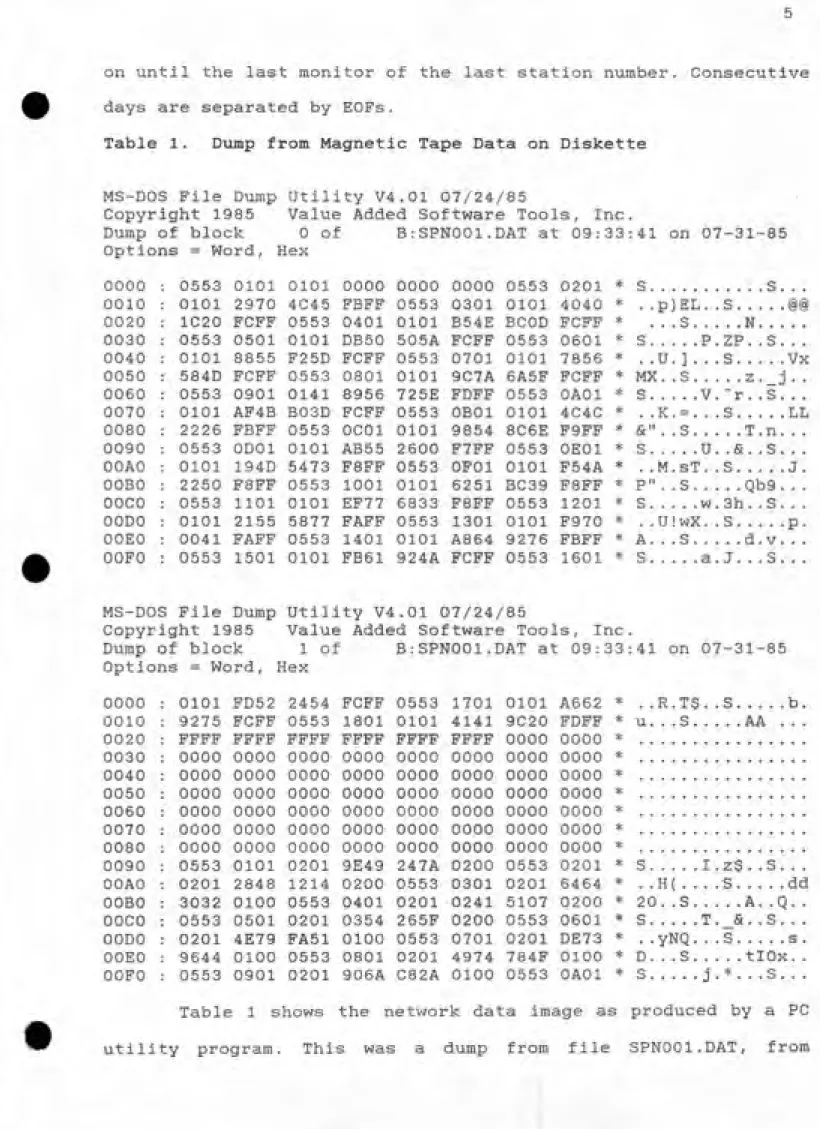
Table 1. Dump from Magnetic Tape Data on Diskette
MS-DOS File Dump Utility V4.01 07/24/85
Copyright 1985 Value Added Software Tools, Inc.
Dump of block 0 of B:SPN001.DAT at 09:33:41 on 07-31-85
Options = Word, Hex
0201 * S. . ...S. . . 4040 * . .p)EL. .S...i§ FCFF * ...S...N... 0601 * S...P.ZP. .S. . .
7856 * . .U. ] . , ,S...Vx FCFF * MX. .S...z._3. . OAOl * S...V.-r. .S. . . 4C4C * . .K. = . . .S...LL F9FF * &". .3...T.n. . . OEOl * S...U. .&. .S. . . F54A * . .M.sT. .S...J.
F8FF * P". .3...Qb9. . .
1201 * S...w.3h. .S. . . F970 * . .U!wX. .S...p. FBFF * A. ..3...d.v... 1601 * S...a. J. . .S. . .
0000 0553 0101 0101 0000 0000 0000 0553 0010 0101 2970 4C45 FBFF 0553 0301 0101 0020 1C20 FCFF 0553 0401 0101 B54E BCOD
0030 0553 0501 0101 DB50 505A FCFF 0553 0040 0101 8855 F25D FCFF 0553 0701 0101 0050 584D FCFF 0553 0801 0101 9C7A 6A5F 0060 0553 0901 0141 8956 725E FDFF 0553
0070 0101 AF4B B03D FCFF 0553 OBOl 0101 0080 2226 FBFF 0553 OCOl 0101 9854 8C6E 0090 0553 ODOl 0101 AB55 2600 F7FF 0553 OOAO 0101 194D 5473 F8FF 0553 OFOl 0101
OOBO 2250 F8FF 0553 1001 0101 6251 BC39
OOCO 0553 1101 0101 EF77 6833 F8FF 0553
OODO 0101 2155 5877 FAFF 0553 1301 0101
OOEO 0041 FAFF 0553 1401 0101 A864 9276 OOFO 0553 1501 0101 FB61 924A FCFF 0553
MS-DOS File Dump Utility V4.01 07/24/85
Copyright 1985 Value Added Software Tools, Inc.
Dump of block 1 of B:SPN001.DAT at 09:33:41 on 07-31-85
Options = Word, Hex
0000 0101 FD52 2454 FCFF 0553 1701 0101 A662 *
0010 9275 FCFF 0553 1801 0101 4141 9C20 FDFF *
0020 FFFF FFFF FFFF FFFF FFFF FFFF 0000 0000 *
0030 0000 0000 0000 0000 0000 0000 0000 0000 * 0040 0000 0000 0000 0000 0000 0000 0000 0000 *
0050 0000 0000 0000 0000 0000 0000 0000 0000 *
0060 0000 0000 0000 0000 0000 0000 0000 0000 *
0070 0000 0000 0000 0000 0000 0000 0000 0000 *
0080 0000 0000 0000 0000 0000 0000 0000 0000 *
0090 0553 0101 0201 9E49 247A 0200 0553 0201 *
OOAO 0201 2848 1214 0200 0553 0301 0201 6464 *
OOBO 3032 0100 0553 0401 0201 0241 5107 0200 * OOCO 0553 0501 0201 0354 265F 0200 0553 0601 *
OODO 0201 4E79 FA51 0100 0553 0701 0201 DE73 *
OOEO 9644 0100 0553 0801 0201 4974 784F 0100 *
OOFO 0553 0901 0201 906A C82A 0100 0553 OAOl *
u
R.T$
. .S
H(
20. .S
yNQ
. .S
S...b
AA
&,
tlOx
, .S.
dd
Table 1 shows the network data image as produced by a PC
(until address $8E).
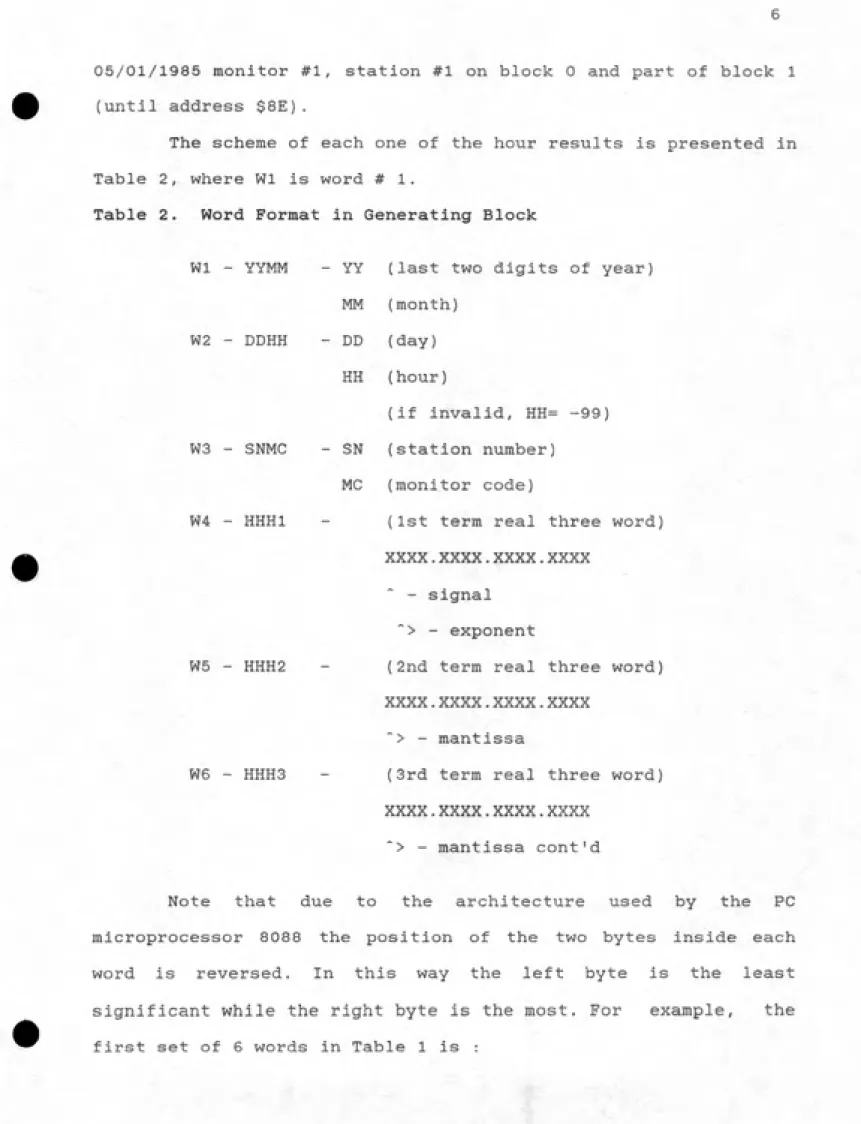
The scheme of each one of the hour results is presented in
Table 2, where Wl is word #1.
Table 2. Word Format in Generating Block
Wl - YYMM - YY (last two digits of year)
MM (month)
W2 - DDHH - DD (day)
HH (hour)
(if invalid, HH= -99) W3 - SNMC - SN (station number)
MC (monitor code)
W4 - HHHl - (1st term real three word) xxxx.xxxx.xxxx.xxxx
- signal "> - exponent
W5 - HHH2 - (2nd term real three word) xxxx.xxxx.xxxx.xxxx
*> - mantissa
W6 - HHH3 - (3rd term real three word) XXXX.XXXX.XXXX.XXXX
* : "> - mantissa cont'd
Note that due to the architecture used by the PC
microprocessor 8088 the position of the two bytes inside each
word is reversed. In this way the left byte is the least
significant while the right byte is the most. For example, the
Where : year = 53 in hexadecimal or 83 in decimal base,
month = 05 in both bases, (May) day = 01 in both bases.
hour = 01 in both bases, first hour of the day.
station = 01 in both bases.
monitor = 01 in both bases, S02 (see Appendix Al).
real Wl = 0000 real W2 = 0000 real W3 = 0000
In the example above, the real value for that date and
time is zero, due to the one-hour calibration time. This value is
invalidated by the master computer.
In fact, only the first 144 words (24 * 6) contain data,
while the rest were used for blocking purposes by the network
master computer. The program list that generated the mag tape
DATA BASE DESCRIPTION
3.1. Data Base Design
The first step was to choose a computer language that was
capable of handling data files and had easy access to the level
of bytes or even bits. The capability of making sophisticated
output reports was not needed because this step would be handled
by commercial software packages. Turbo Pascal was selected
because it is a fast, efficient and inexpensive compiler for the
IBM PC. The next task was to learn this language.
The information supplied by the network had to be
preserved. On the other hand, a smaller amount of storage was
needed because of limits on storing this data base on magnetic
media 5 l/4ii diskette. The chosen method was to build up random
access files, in which the access to each individual hour could
be made by calculating the relative address from the beginning of
the block. For example, to reach the 10'^^ hour of a 24 hour
monitor block, the access would be made at 10 * 'length of each
hour'.
Another obvious way to decrease the output file length was
to eliminate the unusable space occupied by zeros at the end of
each monitor block. This space was allocated at the master
computer side for compatibility with the blocking being used by
the network.
When random access is used, there might be another way to
storage space for validation. One IBM PC word has 16 bits and the
first word was used for the first 16 hours while the second holdsthis information for the remaining 8 hours. The 9*^^, 10^^, and
11 bits of the second word are used for three extra values
allowed in this implementation. The last 5 bits are not being
used.
The header was stored in the first 5 words of each monitor
block. Thus, the first word contains the year and month in
decimal form shifted by a factor of 100 in a decimal base. The
second word contains day and the integer 25 (decimal) and the
third word contains station number and the monitor code in the
same manner as the first word. The last two words hold the
validity information. A bit set to zero was used when the
corresponding hour is invalid and set to one when it is valid.
The following example illustrates the header.
Year = 83, month = 05, day = 02, station = 1, monitor = 5, hours 1,2,3,4,8,9,15,16,and 23 are valid.
W 1: (83 * 100) + 05 = 8305 in decimal or 2071 hexadecimal W 2: (02 * 100) + 25 = 225 on decimal or OOEl hexadecimal W 3: (01 * 100) + 05 = 105 in decimal or 0069 hexadecimal
W 4: 01 02 03 04 - XX XX XX 08 - 09 XX XX XX - XX XX 15 16 bits 1111 0001 1000 0011
F 1 8 3
= F183.
W 5: XX XX XX XX - XX XX 23 XX - XX XX XX XX - XX XX XX XX bits 0000 0010 0000 0000
= 0200
Complete header : 2071 00C9 0069 F183 0200.
The monitors in the data base are sequenced according to
the network version on that date. If, for instance, a monitor
block is missing on the generation data for any reason, a null
block is inserted containing the header with date, station,
monitor, and all invalid hours. This guarantees a logical
sequence for the data base, easing the access of the supporting
programs.
After the header, the individual real values for the 24
hour results are stored in a sequence as random access data.
There are three extra positions actually being used for storing
the daily average, minimum and maximum values. These results are
calculated when the data base is created from the mag tape.
The storage of floating point real numbers in the network
master computer uses 3 words for each value. The first and second
words contain the mantissa in inverse base 2 binary form, with
the leftmost bit holding its signal. The exponent is stored in
the third word with the signal in the first left bit. On Turbo
Pascal, the real number storage is different, although it uses 3
words (6 bytes). The exponent is stored in the first byte of the
first word and the mantissa in the next five bytes with the least
significant byte first. The exponent uses binary format with an
offset of $80 (hexadecimal 80) while the mantissa is always
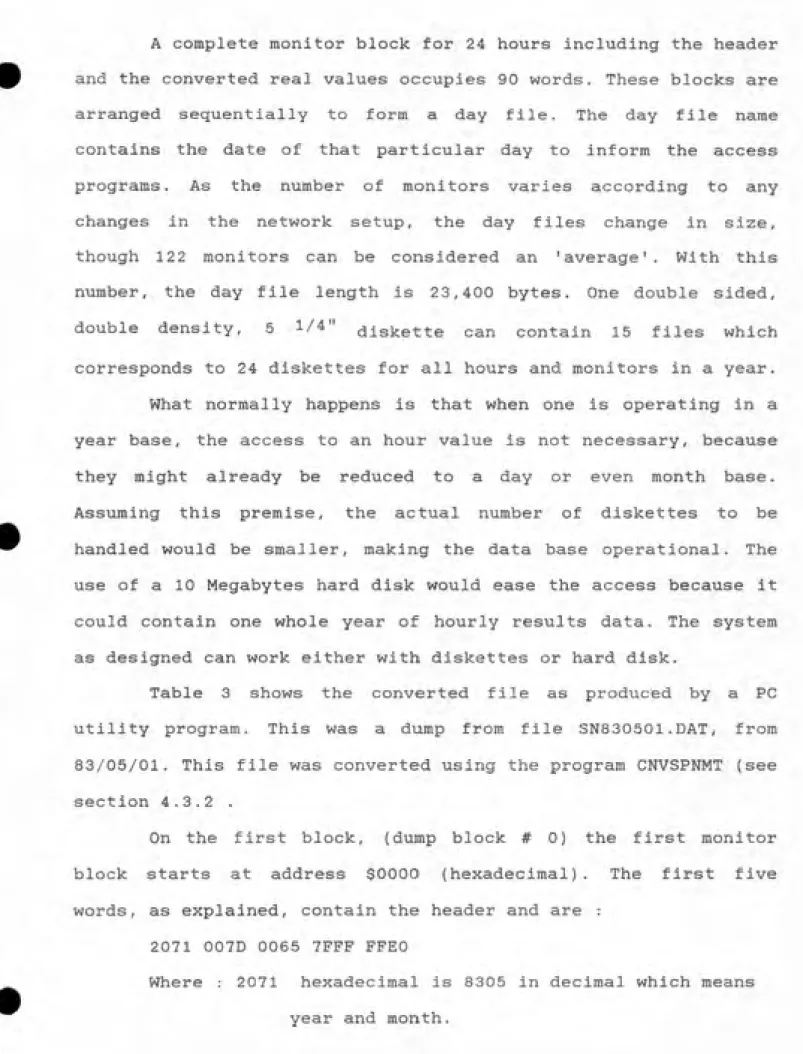
A complete monitor block for 24 hours including the header
and the converted real values occupies 90 words. These blocks are
arranged sequentially to form a day file. The day file name
contains the date of that particular day to inform the access
programs. As the number of monitors varies according to any
changes in the network setup, the day files change in size,
though 122 monitors can be considered an 'average'. With this
number, the day file length is 23,400 bytes. One double sided,
double density, 5 1/4" diskette can contain 15 files which
corresponds to 24 diskettes for all hours and monitors in a year.
What normally happens is that when one is operating in a
year base, the access to an hour value is not necessary, because
they might already be reduced to a day or even month base.
Assuming this premise, the actual number of diskettes to be
handled would be smaller, making the data base operational. The
use of a 10 Megabytes hard disk would ease the access because it
could contain one whole year of hourly results data. The system
as designed can work either with diskettes or hard disk.
Table 3 shows the converted file as produced by a PC
utility program. This was a dump from file SN830501.DAT, from
83/05/01. This file was converted using the program CNVSPNMT (see
section 4.3.2 .
On the first block, (dump block # 0) the first monitor
block starts at address $0000 (hexadecimal). The first five
words, as explained, contain the header and are :
2071 007D 0065 7FFF FFEO
Where : 2071 hexadecimal is 8305 in decimal which means
007D hexadecimal is 0125 in decimal which means
day and the controller number 25.
0065 hexadecimal ) is 0101 in decimal which means station and monitor code (302).
7FFF hexadecimal indicating that hours 2 through
16 are valid.
FFEO hexadecimal indicating that hours 17 through
24, daily average, minimum, and maximum are valid.
After the header, comes twenty-seven real numbers in Turbo
Pascal format (three words each). The remaining four words to
complete the ninety word length are not used. They are spares.
The second block starts at address $00B4 of the first dump
k: a
0
w 0
i-h
•^ o o
m 0
Hi
4 o !-ͣ• W tQ
(D
CO
IT| hij rfi Kr) 5» o O 03 m o ro rf^ f^ *> o o tr •ii Ol Kj •Ij •ii o o n *>. til > to •»! to M o to tr ^ •
fi] Ol O) »ij O a o 00 tij o > O "fl 03 00 o II cr r+ M- Ol CO •ad !(>ͣ O O 03 (O hd o (O •!! > C3 O O II cr rt
H--J CJi ͨ>! ͨ~) lO to ͨ4 > w o a o 00 ifi Ol oo M M to to 00 !»!' O O to Ol -J *. 03 -4 > Ol -J -J i-j M
a >n CO 03 if^ M 03 ͨ-4 O O N3 o N3 00 o mA S 0 M (1) o o to 00 O O CO O > iP' O O •fl > 03 M S 0 M (D O
o o <o 0 n to :!
ro C51 fad Oi l-» o (O l-» O o w o Ol M*n 03 •i ?r 03 a CJl *^ O i-» O o *>ͣ •^ m M O "-J to •il 00 O •i ?r 00 a 3 O) O) ͨ!) W M o ͨtI CO o o ffl o ͨJ 01 •fl iO & en 0 CJl •^ M CO O O OI •ad td Ol O 03 O ifl > O p- cn 0 •d
O) > Kj to > ͨJ Oi 00 o o a 03 o> (D 00 o B CO 00 s> CO Kj O *ͨ >-J>M'<10l'ad-J(0'-] »
B CD > t33 W 0> O *«ͣ N3 O O 03 ͣͨ. ͣad 01 l-» *!ͣ •d o M M O03OOO^d>><l^dOO03O •d I-h
w ffi 4
Kj hj he) N3 o OT *~J O o o o 1(5. CJI O t-» >-» (D < G o 00 O •ad to O "Tl to CO fxl O M O 03 O) O (C < G 0 -J lT| M 03 O *>. O o o o o O) Ol O 00 o !« l-» fl) r+ o to to hd O O "^ Ol>•I]o•^Ol^oo >< o 0) rt- B
> ͨJ N3 ifi. ͨJ IP>. > -J O O O !>ͣ lad 03 to 03 h-i M- 00 to O 03 -J O ͨ>] CO i^. Kj *»ͣ Ol ͨ>! to Ol 0> M
H-^^0-J^^CdO>0000•^ͣ 00 MCO > 0 c: M to w *>ͣ to l-» o a CO CO 00 O M O •fl to en 0 e M O
I-h fD I-" I-h fO (-ͣ• 0
>T] M oi *fl > CO O o o o oo •t] hd o ͣ31 rt to<7) oto O O *=" if^ O ͨ-I to o Cd CO ii] "-J rt 3 (3) to •-* •'j O ͨ-] O 00 o o o o hd Kj ^ ^ >•< OI •~J o 00 O O M OJ O CO 03 O W I-' "ad "ad >k3 <
•~] M OI "-J o o •-J o o o o 03 00 ;o a 33 0- M 03 00 CO --a O 03 hd .J Hj OI •-J C3 03 ͨJ tad p. (5 O iTl 03 W 03 o 03 00 o o o O CO o 00 o 03 0. < *>. oCO CO c> 0<I01>'-401D3*>-0>0»*J w o. < 4
(P Ji. • • to lO- rt
^ l-» O £> N3 o 01 M hd N3 O o Ol *>ͣ o -J w 0, . o •4 03 M O o o O 03 CO •ad if^ •'l •^ *»• •ad C/3 0- • n>
ͣ
-J >-> O 00 o o Ol -J bj o O O (O it>. o d s o to •ad M O O D to O CO CO •ad O Ol •*! O •ad 2! o D. N3 O ͨJ O) (O ͨ-a a •ad -J Kj o 03 0) to 00 ~4 00 CO M to 03 •fi' en Ol O CX3 ͨJ o o ͨJ 1^ CO "^ CO td 03 cn M
-J>0-3>0000l-'0 rfi. 03 00 l-» -J 03 0 03 l-» o O Ol O lO Ct o *>ͣ 00 *^ 03 O 'J O CO 0 •*1
o I-h O o Hi O M>
oio'^i-'»Tjacno>ooiD Ol hd iO <1 Ol rt >-J o to to hd hd O O > Ol O td M •II 03 O O cn rt "-J M
toON3>'flW'iJOOOO 03 CO *^a > o 2 "-- o M 03 lad trj O M 00 M O (J1 00 lad 03 O O o 2 \ (D
CO fj *>. > Kj o CJ ͨJ tr] hj O ͣ*»ͣ u 00 *- ^ M (U to 03 M o 00 •!] O -~JI *>.iTl'~J>tO-JM030 M (U to •
O O O N3 03 ii^ w o ^ a o N3 CO M rfi. > •
*i f^ to •fl 01 !-• •!] O 03 00 to 00 ͨ-J 03 C3 CO O O • i-s *>.
a m \ C3 w \
O O O fad 03 01 o > N3 O O o *^ •-J o o > 03 > CJl •ij 01 •t] O 01 CO •ad 01 M O 03 lO •ad O > 00
O »i) »fl ^rl Ol ^ o N3 lO O O Ol •ad 00 •^ o *-3 1-3 Ol CO 03 '^ *> •ad O 03 Oi^ad01>OODJ'adO H 1-3 Ol -J O 03 f-l O Ol >-j *»ͣ Kl o» O a 03 >-J m 30 o •1^ to 03 Ol M O > •fl -J o CO i~j cd I-' -J o 0 a to ca tj3 m *>ͣ o it^ C3 -i O > CO CO IP- ...^
0) 0 03 to l-» •ad O O t-* > 03 O to to 03 o o o 0) O
r+ M rt M
M O hg C3 i-» o OI I-' "ij o o ''d m -J o Z3 CO l-» O > *>ͣ O O <! •fl Cd O) O t3 CO lad l-» O CO N3 Ol •fl GO '^ o -J (O »3j fij o M O) o o x> o « to O CO 03 O O ifi •ii a "^ O a C3 fsd 03 o O ^
03 CjJ -J N3 O •<1 a W ͨ^ (xl O 00 D •ad 03 30 to M 03 •ad O 03 O > -J tS3 O ͨ>J M M K] !< O to
O 03 O 03 *> C3 03 M O tad O CO •ad oI-' V3
o
I-H
i3
M l-> CO 03 to O CT) o 03 m 03 03 CO O '-J O
O
M
3
***** * * * * * * * * * * * llii. n * * * * * * * * * * ****** 1^ O
— 1 ><!---ͣ . ^ • . , ffi/- Ol . . ffi •
* •Xl N O O — • i-i. --^ iQ cn
• • o • • - •
oo • * 3: •
w Ol G •i ͣ ͣ M • ͣ *^— ͣ * ͣ ͣ Ol
?r • ^ + • —
H . o • A -^ t-"— . 2 1 . — • ^
21 t-h • 1 ͣ • --V, .
s 0 G • • M . • f'^ ͣ»,..« o
a N-s-* — 03 (-"^ ® • — . . o
=1* 3 + • iQ ^-v^* 03 X f >— • ?0 tt) 3
2 • • =t* • CLV . ͨad G • . * ͣ ͣ ͣ • • /
— ͣ X-^ • ^-^ . • o • ^^ ͨJ • N S
<^. . — o
ͣ
• <o ͣ • -J • . • . 00 ^IQ .—. .
> o • to + . . .- . 00
- . _(Q . — •
ͣ
—£! • . O
t I •
f •X! I-h . — .
X a 00— Kj 1
o • • • - •
t-t) •
P- a • Siͣ^ M • • . 3 . f PS • ® M
. w fg . ,-, • • --- ͣ v.^ . 03 . a o> • • *-*-. ffi ͣ X • v^- • • O)
Pfl. . . . • 0 •
JO ͣa 1 . --^ ͣ • . 0) ͣ 1
--- • 03 --^ ͣ H —
a —«Q . •
(R 00 w •
1 . • .r-^ • cok; • • — 00
0 • . —. . • • X Ol tr D- K ^ ' I-h . . . + . cn
• 03— + '' ^-^ • . — . • . . ͣ
— % ͣ >5 . . —2
ͣ s • • • • •
•0 • a rt ͣ • 0 . . 1 . .
3.2 Data Base Implementation
The first step for implementing the designed data base was
to read the magnetic tape files. This was necessary because the
conversion program expected an input file as image of the mag
tape dump on a diskette. One alternative would be to read it on
the VAX/VMS computer from the School of Public Health. Another
would be to use the IBM mainframe from the Computational Center
of the University of North Carolina (UNCCC).
At first, PRECIS utility package at UNCCC was used. The
output of this run did not show any correspondence with the real
data on the tape.
Next, a normal read on the VAX was tried even though ANSI
tapes cannot be properly read. The results were, as expected,
none. .
Then, the COPY utility program with PARM=HEXLIST was tried
at UNCCC producing an enormous file (147K on diskette) and having
EBCDIC conversion attached with all printing spaces included.
This made the transfer to the data base become difficult, and
this option was abandoned.
In the next step, the same COPY utility was used at UNCCC
but with PARM=NOLIST having tried the key TRTCH=E (translate
character) in either INPUT or OUTPUT of the DCB. No results at
The last and final solution was to use a modified FORTRAN
program from the AIRSTAFF group, which accesses the tape drive in
a direct channel of the VAX, The results were excellent and
a true image from the mag tape, was stored temporarily at the VAX
and downloaded to an IBM PC disk. These files were used to testthe supporting programs of the data base.
Three main programs were written in Turbo Pascal. They
were used in the implementation of the data base and also for
selecting desired data sets to be supplied to external
subroutines or printing programs. A brief description of those
will be given below. Detailed descriptions may be found in
chapter 4.3 .
CNVSPNMT - This program is intended to convert an input
file stored on diskette, as an image of the SPN Mag Tape written
on P800 Philips machine, to a file format shorter in length and
in a strict sequential form, which will then be handled by the
system designed access programs. The output sequential file will
be stored in a day base containing all monitors of the network in
a crescent sequence of station and monitor code in a hour base.
Any missing block on the original Mag Tape will be inserted with
invalid status. This program also has all network setup versions
which are used to process the various operations. Date sequence,
station sequence, monitor sequence, real value within minimum and
maximum limits checks are performed. The daily average minimum
and maximum results are also calculated and appended to the data
base. All messages, alarms and options are stored on disc as
ASCII file for printing, if desired.SPNDTINV - This program is intended to access the data
base and execute invalidations and value changes. The user has a
certain number of invalidation blocks and all the information is
or in sequence. The starting and ending points for each
invalidation can be dates or start date and number of hours. A maximum of 750 invalidations can be executed on each invalidation
block. A report of the real accessed data is stored on disk for
printing, if desired. .
SPNDTSEL - This program is intended to access the data
base and select any data set transferring either ASCII or real
value files to the user. A certain number of selection blocks are
available and the user may specify station, monitor, start and
final dates, or start date and number of hours, data set
averages, minimum data sets, maximum data sets, and output
column. Any invalidation block can be accessed directly or in
sequence. Due to large data handling, dynamic allocation buffers
were used. The user can choose either ASCII or real value types
as the output file .For all the programs described above, a security password
CHAPTER 4
SOFTWARE DEVELOPED
The array structure was extensively used through all the
programs developed for supporting and implementing the data base.
In this way, the accesses to the data blocks, as well as to the
differents buffers for input and output (I/O) transfers, were
made by the use of pointers, which are integers calculated to
inform the programs of the relative displacement of a specified
word or byte. Turbo Pascal handles this array structure with
pointers very well, allowing the written code to be efficient.
A complete listing, of the programs that were developed
are included in Appendix A.
4.1 Description of Procedures
A procedure is a block within a program which executes
certain tasks. In Turbo Pascal, procedures are used like
subroutines, that can be "called" almost anywhere and execute a
defined operation. After completing a procedure the pointer
returns to the main body of the program. It is possible to build
chains of procedures in which there are procedures within
procedures.
Described below, in the sequence that they appear in the
programs, are the various procedures needed by the programs of
this research. It is assumed that the reader has basic knowledge
4.1. 1 lOCHECK
Call : lOCHECK (lADDR, lOVAL, IPRT)
Where : lADDR = Integer, indicates the caller.
lOVAL = Integer, on return informs I/O error
code from DOS system.
IPRT = Boolean, if TRUE message is printed
if FALSE only the program is informed
This procedure was a version modified (Borland, pg: 19-3;
19-4, 1984) in which the option for printing and the originated
address of the point where the I/O failed was introduced but the
original structure of the program was preserved.
Basically, the procedure checks the result of a register
through the defined function in Turbo, lOresult. If it is zero,
indicating that the I/O was successful, nothing is done and
return to the program is made. If, on the other hand, the result
is different than zero, the procedure compares the result with
the I/O error codes already defined, and prints a message on line
24. It then returns to the program as soon as the operator
presses any key. Lines 24 and 25 are cleared and the cursor
returns to its last position on the screen.
4.1. 2 REALINTG
Call : REALINTG (RIN,lOUTA,lOUTB,lOUTC)
Where : RIN = Real, input number.
This procedure is used most frequently for I/O operations
when the buffers are integers and some real numbers have to be
transferred together with variable positions.
It converts an input real number to three output integers.
As stated earlier it is stored in three words. It uses the
global variable RCNV as the transfer point defining the
assignment of the local variables (lOUTA, lOUTB, lOUTC) to the
memory location of RCNV segment and offset addresses. .
4.1. 3 INTGREAL
Call : INTGREAL (UNA,IINB,INNC,ROUT)
Where : UNA : Integer, input word #1.
IINB : Integer, input word # 2. UNO : Integer, input word # 3. ROUT : Real, output number.
This procedure is used in the same I/O operations as its
precursor (REALINTG).
It converts 3 input integers to an output real value. It
works in the opposite direction of REALINTG, using the same
method of assignments to absolute memory locations (segment and
offset).
4.1. 4 GETTIME
Call : GETTIME (DOSYY,DOSMM,DOSDD,DOSHH,DOSMI,DOSSS)
Where : DOSYY = Integer, Year.
DOSMM = Integer, Month.
DOSDD = Integer, Day.
DOSMI = Integer, Minute. DOSSS = Integer, Second.
This procedure is used basically for system timing on
reports or screen displays.
It gets a time from the operational system DOS, using a
Turbo Pascal procedure MSDOS through the IBM PC registers. DOS
supplies years as four nibbles and they are subtracted from 1900
to convert it to the format compatible with the data base. The
month, day, hour, minute, and second are transferred to the
caller without alteration. No format is imposed in this
operation.
4.1. 5 STRFORMT
Call : (ICODE5,INTl,INT2,INT3,STRl_2,STR12_5,STR123_8)
Where : IC0DE5 = Integer, = 1 format AA-BB-CC.
2 format AA:BB:CC. 3 format AABBCC. 4 format AA-BB. 5 format AA:BB. 6 format AABB. 7 format AA.
INTl = Integer, input A.
INT2 = Integer, input B.
INT3 = Integer, input C.
STR1_2 = String 2, 2 characters output.
STR12_4 = String 5, 5 characters output.1
This procedure is used for formatting screen outputs,
generated reports, and filenames where dates are present.
It formats 3 input integers (A, B, C), according to input
codes (format above) keeping leading zeros, to 3 output buffers
(STR1_2, STR12_5, STR123_8) with 2, 5, and 8 characters length.
It uses functions of DELETE and INSERT according to the format
requested to guarantee the insertion of zeros when each
individual input is less than 10.
4.1. 6 PRTTIME
Call : PRTTIME {IC0DE3,AUXBUF)
Where : IC0DE3 = Integer, = 1 standard format.
AUXBUF = String 80, output buffer. Calls : GETTIME, STRFORMT.
-It prints a system date & time header. -It calls GETTIME to
obtain the DOS system time, formats all parameters using
STRFORMT, and fills the output buffer to the caller.
This procedure is used by reports and screen outputs.
4.1. 7 PRTDOC
Call : PRTDOC (IC0DE2,YY,MM,DD,HH,ISTATN,IMONCD,RVLOLD,RVLNEW,
PRTBUF)Where : IC0DE2 : Integer
= 0 Reset clear and select output file name.
= 1 Value invalidated message as below
" STN: __ MON: __ DATE: YY:MM:DD:HH VALUE INVALIDATED"
= -1 Value validated message as below
= 2 Changed value message as below
" STN: __ MON: __ DATE: YY:MM:DD:HH CHANGED VALUE FROM:_
For monitor code <> 7, then X.XXX+XX TO: X.XXX+XX
For monitor code = 7, then S:XX %:XX TO S:XX %:XX
=3 Print buffer received from user on PRTBUF =10 Store 200 x 80 buffer on disk.
: YY : Integer, year. : MM : Integer, month. : DD : Integer, day. : HH : Integer, hour.
: ISTATN : Integer, station number.
: IMONCD : Integer, monitor code.
: RVLOLD : Real, old value. : RVLNEW : Real, new value.
: PRTBUF : String 80, buffer received to be stored.
Calls : lOCHECK, PRTTIME, REALINTG, STRFORM.
This procedure prints a set of messages received or built
to a set of 200 lines file (Max 99 files) and stores them on
disk. It was designed to avoid excessive I/O during a program
run, which would happen if every message had to be written to a
disk file. The file name is set by user according to an index in
*
YY at call with IC0DE2 = 0. The file names selected will be
appended with the index 00 through 99 indicating the file
sequence. In this way, the procedure receives a series of
messages and waits until the 200 lines by 80 characters buffer is
full, then makes an I/O and stores it to a disk. If there are
more messages, the buffer is cleaned, the file name index is
program, at a call with IC0DE2 = 10, any amount of messages are
stored on disk for completion.
4.1. 8 SPNSTDTA
Call : SPNSTDTA (ICODE,INTGl,INTG2,OUTINT,RYYMMDD,STRNG4,FBOOL)
Where : ICODE : Integer.
= 1 Given Date + Station, get monitor defini¬ tion in bit setting as system sequence. = 2 Given monitor code, get monitor channel. = 3 Given monitor channel, get monitor code. = 4 Given monitor code, get monitor name. = 5 Given Station + Monitor code + Date, get
monitor sequence in the system. If monitor is
not defined, IMONSQ = -1.
= 15 as above, without NOX counting
= 6 Given Station + Monitor code + Date, get monitor sequence in the station. If monitor
is not defined, IMONSQ = -1.
= 16 as above, without NOX counting
= 7 Given monitor code, get monitor range. If
INTG2 = 1 return minimum, else maximum.
= 8 Given monitor code, get monitor decimal point position.
=9 Given monitor code, if involved in calibra¬ tion FBOOL = TRUE.
= 10 Given monitor code, get monitor unit name =11 Given index sequence, get monitor code.
hours.
= 13 Given monitor code, get minimum moving
average hours for valid value.
INTGl : Integer, input #1.
INTG2 : Integer, input # 2.
OUTINT : Integer, output value.
RYYMMDD : Real with the format YY * 10000 + MM * 100 +
DD for Date information.
STRNG4 : String 4, name output.
FBOOL : Boolean, TRUE if operation successful.
Calls : Internal Procedure CHKRANGE for finding the correct
network version according to the date entered.
This procedure gives Sao Paulo Network specific setup
information to users. It contains all network versions to present
and all checks are made based on it. The monitor definition is
stored as bit settings in a word, according to relative
positioning of that monitor in a sequence of monitor codes. The
channel refers to the hardware channel information for software
access. The moving average hours are defined for calculations for
comparison with the limits foreseen on Brazilian regulations and
that are equal to the current US EPA standards. The minimum
number of hours adopted in the system is 75 % of all averages. If
this condition is satisfied, the calculated value is valid. If
not it is invalid, no matter how many averages are in the data
set. In any request FBOOL informs if the operation was
successful.
Call : CHKHR (INHR,FHROK)
Where : INHR : Integer, input hour.
: FHROK : Boolean, TRUE if hour range is OK,
This procedure checks an input integer to be within the
acceptable hour limits, 1 and 24. If it is FHROK = TRUE.
4.1.10 CHKMON
Call : CHKMON {INMON,FMONOK)
Where : INMON : Integer, input monitor code.
: FMONOK : Boolean, TRUE if monitor code exists.
This procedure checks if an input integer exists as
monitor code according to the possible values.
4.1.11 CHKSTN
Call : CHKSTN (ISTN,FSTNOK)
Where : ISTN : Integer, station number.
: FSTNOK : Boolean, TRUE if station number is valid.
This procedure checks if an input station number is in
range. If it is, FSTNOK = TRUE,
4.1.12 CHKTIME
Call : CHKTIME (lYYMM,IDDHH,FDTOK,YY,MM,DD,HH)
Where : lYYMM : Integer, having YY * 100 + DD.
: IDDHH : Integer, having DD * 100 + HH, : FDTOK : Boolean, TRUE if date is OK. : YY : Integer, year decoded.
: HH : Integer, hour decoded.
This procedure determines whether the composed year-month
and day-hour integers are within the acceptable ranges for year,
month, day, and hour. This composed date structure is used on the
data base. If all are acceptable, FDTOK = TRUE and the decoding
is done.
4.1.13 CHKMONST
Call : CHKMONST {ISTATN,IMONCD,STYY,STMM,STDD,FMCSTO)
Where Integer, station number
Integer, monitor code. Integer, year 00 - 99. Integer, month.
Integer, day.
Boolean, TRUE if monitor is defined at that date.
SPNSTDTA.
This procedure determines whether a monitor was defined at
a given time according to network configuration. If OK, FMCSTO =
TRUE.
Calls
ISTATN IMONCD STYY STMM STDD FMCSTO
4.1.14 NEXTHRS
Call : NEXTHRS (STYY,STMM,STDD,STHH,NHR,ENYY,ENMM,ENDD,ENHH)
Where STYY
STMM
STDD STHH NHR
ENYY ENMM ENDD ENHH
Integer, final year 00 - 99 Integer, final month.
Integer, final day. Integer, final hour.
This procedure calculates a final time (Y,M,D,H) after a
number of hours have elapsed from an input time (Y,M,D,H). It
takes into consideration year, month, and day changes as well as
leap years.
4.1.15 DAYYEAR
Call Where
DAYYEAR (DYY,DMM,DDD,ICODEl,IREFYY,NUMDAYS) DYY : Integer, year.
DMM : Integer, month. DDD : Integer, day. ICODEl : Integer,
=0 Calculate number of days in the year.
=1 Calculate number of days between IREFYY
and the date specified. : IREFYY : Integer, reference year.
: NUMDAYS : Integer, output number of days.
This procedure calculates the number of days in the year
or relative to any given year. It takes into account leap years.
4.1.16 NUMHOURS
Call : NUMHOURS (D1YY,D1MM,DIDD,DIHH,D2YY,D2MM,D2DD,D2HH,DFHRS,
FNHR) .
Where : DIYY : Integer, start year.
DIDD : Integer, start day. DIHH : Integer, start hour.
D2YY : Integer, final year 00 - 99.
D2MM : Integer, final month. D2DD : Integer, final day. D2HH : Integer, final hour.
DFHRS ; Integer, output difference of hours.
FNHR : Boolean, TRUE if datel and date2 are OK.
Calls : CHKTIME, DAYYEAR.This procedure calculates the number of hours between 2
given dates (datel and date2). If datel is after date2, the
number of hours is negative. It uses the procedure CHKTIME for
verifying both dates and DAYYEAR for calculating each date number
of days relative to year 1980 (the data base runs after 1981).
Leap years are taken into consideration.
4.1.17 PASSWORD
Call : PASSWORD Calls : lOCHECK.
This procedure handles password access control to the data
base. It is at the very first instruction on each of the
supporting programs and protects the environment from an
anauthorized user. There is a master password which takes control
of the procedure and allows password reviews and changes. There
are foreseen 10 different passwords that can only access the
programs. The password changes are not allowed. If more than 3
times 3 wrong passwords are tried, the procedure halts the COM file, and destroys it on disk.
4.1.18 READDTTI
Call : READDTTI (CODE,YY,MM,DD,HH,STPINP) Where : CODE : Integer,
=1 Amended 'START' to the text message = 2 Amended 'FINAL' to the text message YY : Integer, year.
MM : Integer, month. DD : Integer, day.
HH : Integer, hour.
STPINP : Boolean, TRUE if program has to be stopped.
Calls : lOCHECK, CHKTIME. ' ͣ
This procedure prompts and reads the date and time from the operator and checks them. If one is lower than zero, it informs the calling program to stop input sending STPINP flag = TRUE. The operator enters date as real number (YYMMDDHH) and the procedures decodes them and checks the date and time validity. If they are invalid, an informative message is printed, and a new
prompt is made within the procedure. CODE informs if START or
FINAL have to be amended to the prompt text message.
4.1.19 READSNMC
Call : READSNMC (ISTATN,IMONCD,STYY,STMM,STDD,STPINP) Where : ISTATN : Integer, station number.
: STYY : Integer, year. : STMM : Integer, month. : STDD : Integer, day.
: STPINP : Boolean, TRUE if program has to be stopped.
Calls : lOCHECK, CHKSTN, CHKMON, CHKMONST,
This procedure prompts and reads the station number and monitor code from the operator and checks them. If one is lower than zero, it informs the calling program to stop input by sending STPINP flag = TRUE. A monitor name monitor code table is printed. The check made comprises a verification if on that date entered before, for example using READDTTI, the monitor being input was defined in the network. If not, informative messages are printed and a new prompt is made.
4.1.20 DTACCESS
Call : DTACCESS (ISTATN,IMONCD,YY,MM,DD,HH,NHRS,lOCD,RVLAR)
Where ISTATN
IMONCD
YY
MM
DD
HH
NHRS
lOCD
Integer, station number. Integer, monitor code. Integer, year.
Integer, month. Integer, day. Integer, hour.
Integer, number of hours. Integer, I/O code,
= -2 Invalidate data.
= -1 Change data base real from real array.
= 2 Validate data.
: RVLAR : Transfer real array (750 reals max.)
Calls : lOCHECK, STRFORMT, SPNSTDTA, PRTDOC, INTGREAL, REALINTG, NEXTHRS.
This procedure accesses, invalidates, validates, gets, and
changes data at the Sao Paulo Network data base environment. It
also sends messages to PRTDOC and the operator to guide him on
diskette changes. The procedure assembles the start file name
access (first day) using the information received in
(YY,MM,DD,HH). Then, it determines whether that file name is on
the undefault drive. If it is, access is started. If not,
operator request for insertion of that diskette is made. After
access is made, the requested I/O operation invoked by lOCD is
performed. The real array RVLAR works as transfer buffer between
procedure and calling program and vise versa. If NHRS added to
start time overpass day change, the procedure takes care of the
needed calculations for controlling the forward accesses. The
procedure expects a non interruptive data sequence in the
environment and invalidated data is transferred as real -1.0,
which is understandable by the callers. The invalidation and
validation requests are made by accessing the validity words # 4
and # 5 at the beginning of the monitor block and changing the
bit setting from off to on or vise versa respectively.
4.1.21 HRSREQ
Call : HRSREQ (IC0DE6,HRSl,HRS2)
Where : IC0DE6 : Integer, = 1 standard mode.
: HRS2 : Integer, output hour 17 to 24.
Calls : roCHECK.
This procedure prompts the operator and reads hour
selection entered supplying them to the calling program. The
following text is shown as the prompt:
" H : 000000000111111111122222" R : 123456789012345678901234" " ENTER + ON HOURS WANTED : " :
-After the third line of the prompt, the operator can
select the hours by signaling with ' + ' at the hour column. The
procedure uses standard Turbo Pascal procedures LPOS, DELETE, and
INSERT to 'read' each bit, thus assembling the output words HRSl
and HRS2, 1 to 16 and 17 to 24 hours respectively, to be sent to
the caller.
4.1.22 R800IBM
RBOOIBM (R800A,R800B,R800C,RIBMA,RIBMB,RIBMC)
: Integer, first of three P 800 real input.
: Integer, second of three P 800 real input.
: Integer, third of three P 800 real input.
: Integer, first word IBM format real output.
: Integer, second word IBM format real output.
: Integer, third word IBM format real output.
This procedure converts a 3 word real number in a P 800
format to IBM PC under turbo support. What it does is check the
bits setting in the 3 input words, according to mantissa and
exponent positions taking care with their signals, and assembles
a real number representing that configuration. In sequence, this
Call : R800IWhere : R800A
R800B
R800C
real number is separated in three words by the procedure REALINTG
and the output is fed.
4.2 Description of Functions
Functions are blocks within a program which executes
certain tasks and the value calculated or manipulated is returned
as variable at the point the function name is encountered.
4,2.1 Function PRTHEX Call : PRTHEX (INTl)
Where : INTl : Integer, input number.
Return: STRING4 : String 4, output hexadecimal representation
of INTl.
This function returns a 4 character string based on an
hexadecimcil representation of an input integer (INTl). It uses
hexadecimcil masks and checks bit by bit of the input number for
assemblincr the output buffer. Although the Turbo Pascal stores on
disk the least significant byte first, the function reverts it
and the most significant byte is shown first.
4.3 Desci'iption of Programs
This section describes the supporting programs CNVSPNMT,
SPNDTSEL, and SPNDTINV used in the data base. It is assumed that
the reader already has the information about each of the
procedures and functions given in sections 4.1 and 4.2 . Further
comments about these programs may be found on CHAPTER 5, PROGRAM
USER GUIDES. The program listings are included in the Appendix A.
The size of each individual program in Turbo Pascal is
programs, this space was not enough. For a more efficient
handling of the individual procedures needed by each individual
program, it was created the file GENPROCl. This file is a series
of procedures grouped together and having a common declaration
session. It contains REALINTG, INTGREAL, GETTIME, STRFORMT, PRTTIME, PRTDOC, SPNSTDTA, CHKHR, CHKSTN, CHKTIME, CHKMONST, READDTTI, READSNMC, NEXTHRS, DTACCESS, DAYYEAR, and NUMHOURS.GENPROCl should be included in all programs that access this data
base. .Due to a different memory requirements, and also the fact
that CNVSPNMT creates the data base, it has its own procedures
declared and GENPROCl is not used.
4.3.1 CNVSPNMT
This program is intended to convert an input file stored
on diskette, as an image of the SPN Mag Tape written on the P800
Philips machine, to a file format shorter in length and in a
strict sequential form which will then be handled by the system
designed access programs.
After the program is loaded in memory and starts running,
it checks the operator's password for data base access privilege.
Further details about PASSWORD may be found on section 4,1.17.
If the operator is authorized, the program initializes
PRTDOC by giving the name of the file that will be generated,
prints a header which contains program name, copyrighted author,
DOS system date and time, and prompts the operator :
This file name is from the magtape image which is expected
to be on diskette. After a valid file name has been entered,
including the disk drive if not default, the program checks if it exists. If not, a warning message is printed and the operator has
another chance for entering.
Ne5:t, is prompted the message : " WAS READING PROCESS ABORTED ? (Y/N) : "
If for any reason the reading process was aborted at the last time, the operation can continue at the point it stopped, in this case the answer should be 'Y'.
" INPUT BLOCK YEAR :___ MONTH :___ DAY :___ "
Here it expects the date of the file when the abort occurred. After checking if this file exists it proceeds, otherwise the prompt is remade.
" INPUT START SEQUENCE : "
This asks for the point the abort occurred. If the number entered is within the possible range (greater than 0 and lower than 123) the program continues, if not, the same prompt is made
again.
In continuation, the program reads the input file in blocks of the monitor block size to identify its date. If it finds an EOF, the following message is printed on the screen and also sent to PRTDOC. :
" FIRST BLOCK ERROR - FOUND EOF"
OUTBLKMONMAX * OUTBLKSEQMAX = 124 * 90 = 22,320 bytes
The; number 124 was chosen due to the number of actual
monitors in the network. 90 is the block length of each monitor block (see; section 3.1).
The;n, the program clears the output buffer according to
the network definition for that particular date, read from the
input file, stores the monitor header, and clears the remaining locations with zeros. The validity words # 5 and # 6 are zeroed indicating that all data is invalid. In sequence, it positions the input file pointer at the first record (INBUFF) or at the sequence entered. At this point the program is ready to start reading the monitor blocks.
Among all monitors of the network, the only case that the number trejatment has to be different is wind direction. In this
particular case, it is needed the wind direction sector and the
correspondent permanency. The sector ranges from 1 to 16, 22.5°
wide each, and the permanency varies from 1 to 100 % . These two numbers are then treated as 2 integers. The first, sector, is stored in the first word and the permanency is stored in the
second word of the three normally used for real numbers. The
whole datci base takes care of this distinction.
Thetre are two main loops in this program. One, uses the variable MONSQ (monitor sequence) and the other inner loop uses INBLKHR (hour sequence). MONSQ is used to perform a sequence of readings from the input file, which are 24 hour monitor blocks, and supplies them to the INBLKHR. The last loop executes decoding of each hour within that monitor block, sending them to the
The program description continues by the MONSQ loop. If at any reading it detects EOF, it considers that the input file finished and exits storing the output file. If not, INBLKHR takes action and scanning from 1 to 24, checks date, station, station sequence, monitor, and monitor sequence in the system. If any is wrong it discards that hour block keeping it invalid. An informative message containing the identification and reason for the block discarded is sent to PRTDOC.
The real value in P 800 format is sent to R800IBM procedure for converting it to IBM under Turbo Pascal format. The converted value is stored in the output buffer at its location determined by the pointers.
The; program also checks some point related to the overall validity within each station. If monitor is wind velocity,
monitor code 17, and the hour value is less than 0.3 m/s, which
means the wind is so calm that the wind direction sensor can give
erratic values, wind direction monitor code 7, is invalidated.
This invalidation occurs only at the correspondent bit in the
validity vfords, the real value remains the same.
If everything is correct, the program verifies the validity of the value at the generating side and transfers it to the output buffer still in memory.
sector. The daily average, minimum and maximum are stored in the
25th, 26th, and 27th words of the monitor block, respectively.
The wind direction parameters are stored in the 25th word. These
calculations are made automatically in the network, but were not
present in the dumps to diminish data length.
After the last monitor in that particular date is
processed, the program reads an EOF and goes to final process.
Then, PRTDOC exit call (code 10) is made. When return is made to CNVSPNMT, indicating the message buffer is properly stored on disk, the following two messages are printed on screen :
" LAST INPUT FILE PROCESSED NAME : " + filename
" READ OTHER FILE ? (Y/N) : "
The first message informs the operator the last file read. Sometimes the screen can be full of run time messages and the last file name does not appear. The second is for continuation purposes. In the last case, as PRTDOC does not know that the process is; continuing, the next generated file will overwrite the last CNVEXE00.DOC (file generated by PRTDOC which contains the messages from the actual run). To avoid this, there is a internal
routine tnat renames the last CNVEXE00.DOC to CNVEXE99.DOC and
all subsequent CNVEXE to suffix 98, 97, etc.
4.3.2 SPNDTSEL
This program accesses the data base, selects any data set, and output:s an ASCII or real value file.
checking his password. Further details about PASSWORD may be found on ejection 4.1.17.
If the operator is authorized, the program initializes PRTDOC by giving the DOC filename SELREQ, and prints a header
which contains program name, copyrighted author, DOS system date and time, and the MENU. The MENU is where the operator can choose
the type of operation to be performed and is as follows : "SELECT FUNCTION TO PERFORM"
"ENTER SELECTION PARAMETERS 01"
"EXECUTE SELECTION ON DATA 02" "EXIT TO DOS , 03" "ENTER CODE : "
The; first, Code 1, is for entering the information needed for the program to select the data. All information is stored on
disk to ease possible future retries of selecting the same data pieces. The operator is responsible for maintaining and storing the DOC files needed for future accesses or follow ups of the operations performed. The supporting programs at each start, open new DOC files and any wanted previous information is permanently lost. >
Supposing the operator has chosen the first option (CODE = 1) the next prompt is :
"DOES ENTEIR SELECTION CONTINUE ? (Y/N) : "
If the operator wants to edit a previous selection, the
answer is 'Y', if is starting a new section, the answer is 'N'.
In the case of 'Y' it is prompted :
This case is for editing an specific selection block and the reply should be 'Y' . In this chain, the next step is the
prompt :
"ENTER BLOCK NUMBER TO GO TO : "
Then, the operator enters the number of the block desired. The program checks if that block number exists and if so the
selection restarts at that block level. If the reply is 'N', this
means the operator wants to add new selections to those already made, the program jumps to the last block plus 1 block number.
"DOES ENTER SELECTION CONTINUE ? (Y/N) : " If the answer is 'N', this means that the array which generates the DOC file is
erased, sequence pointer is set to 1, and the selection process starts at the very first block.
The; program prints a selection block header identifying
the actual block being edited : " SELECTION BLOCK # : __"
" ENTER SELECTION PARAMETERS (IF # < 0, STOP ENTER"
The; parameters to be entered are checked and if one is negative, the program knows that the operator wants to stop enter and proceeds. This option has to be used only when the user wants
to interrupt an already started selection. In most of the cases, the normal procedure at the end of selection, will be used for
exiting to option MENU.
The selection of start and final dates, station number and monitor codes, are individual for each block in a session. The
contains the information for each row, and all columns have to have the same selection options.
The first selection within a block, is date and time. The
format used, as described on READDTTI (4.1.18), is YYMMDDHH. This means, yeair (0 to 99), month, day, and hour of the piece of data start point. These parameters have to be entered without space or any character among them, because they will be interpreted as a real number.
The next selection is the station number and monitor code. A separated prompt for each one is made. For the station number, a verifica.tion if the entered number is within the accepted range
(greater than 0 and lower than 28) is performed. For the monitor code, a ta.ble is printed before the prompt, the correspondence of monitor desired and monitor code number is facilitated. When the monitor code is entered, the program checks if on that date and on that station the monitor code number just entered was defined by the network version table. If it was not, an error message is
printed and another chance is given.
Now the selection within a defined data base is performed. " SELECTING DATA WITHIN A DATA BASE"
"24 HOURS; RESULTS ONLY ? (Y/N) : "
Supposing the operator wants specific selection. A prompt made by the procedure HRSREQ prints a line where the desired
hours can be marked with a '+'. See HRSREQ in section 4.1.21. " SPECIAL AVERAGES AT 24 HOURS WANTED ? (Y/N) : "
This prompt is like the last one, but with the option where a special average can be taken from the specified hours. The average is taken considering the valid hour values, divided by the number of invalid hours in the set. If the daily average
is desired, what is the default, the 24 hours are selected and a
new daily average is calculated. The daily average calculated at the time the data base was converted is not taken into consideration because some invalidation or even change could have happened (in this case the validity bit indicates invalid).
Next step in the selection process for this block is
minima and maxima. The way these two work is the same so only one is explained. The selection of minima is like the specific hours,
with HRSREQ prompt. If the minimum of the 24 hours is desired,
the default, the requests are for all hours. If a minimum among a specific set of hours continuous or not is desired, only those hours should be entered. It is not possible in the way the program was implemented to have selected more than one minimum on
a day.
In sequence the final date option is selected. " SELECT MODE : # OF HOURS [1] OR FINAL DATE [2]" " ENTER MODE : "
start date is calculated by the procedure NUMHOURS. Maximum number of hours for each selection is limited by arrays lengths
and equals 750. This means one month of data. If an overlimit happens, a.n error message is printed and other chance is given.
The last item to select is the output column of this
block.
" FILE OUTPUT BLOCK POSITION SELECTION"
" ENTER BLOCK COLUMN POSITION (1..5) : "
The program then checks if that position is not yet occupied by another block within the same section. If it is, an
error message is printed and another chance is given. The maximum number of blocks is limited to 5 due to a design characteristic to have maximum output file length of 80 characters.
Th6' last, prompts if the just entered block is valid, invalid, 'goto', or resume.
"IS THIS E.LOCK VALID (V), INVALID (I), GOTO (G), OR RESUME (R) ?" Thei operator has a chance of editing any other block already entered, including the first that has the options. If resume is chosen, the selection process is interrupted and control is transferred to the MENU. If invalid is the case, the
selection restarts at the same block number.
After the selection of the last block is made, the program
stores the selection buffer on disk, and PRTDOC receives a series of buffers; containing the selections for all blocks. In the case
4400 the hours requested are : 01,09,10,11,12,13,16,17,19, and 23 hours. The file generated can be printed by the operator as normal ASCII file using any DOS function like PRINT, TYPE, or
COPY (to printer).
Wh<;n this part is finished, the command returns to MENU. If the operator decides to execute the selection, CODE 2 must be entered.
The execution of the selection starts by reading the file recently stored and decoding each individual block contains. The program then sends the information needed to DTACCESS (see section 4.1.20) and waits for its completion. DTACCESS executes the operation requested and finishes the selection. It fills the transfer buffer RVLAR and exits.
The blocks received from DTACCESS are stored for assembling the output ASCII file in the array RTMPARR {temporary store). This array was implemented totally as dynamic memory because the space allowed by Turbo Pascal was not enough for the entire allocation. Dynamic allocation works like a normal memory with the only difference that pointers are used to access each word.
The assembling of the output file happens in a line base due to memory limitations. In this case, each line is assembled and an I/O is made to write it on disk, building up the output
file. For the user, this makes no difference because it receives
a file that contains many lines as needed by the selection
requested,
The first column of the output file contains the
YYMMDDHHSTMCOP
Where : YY year, MM month, DD day,
HH hour,
ST station number,
MC monitor code number,
OP option = 1 hour results 2 average results
3 minimum result 4 maximum result
Note that the hours that were used to generate the average, minimum, and maximum are not shown. The operator is responsible to control and supply these informations for the external software package, if they are needed.
After the execution ends, control is transferred to MENU and a new selection can begin. Exit to DOS through CODE = 3 is another option.
4.3.3 SPNDTINV
This program is intended to access the data base and
execute validations, invalidations, and value changes.
This program uses the same way of selecting the data to be
accessed in order to invalidate, validate, and change as the program SPNDTSEL does (see 4.3.2). The description given here will present only the differences between them.
After loading into memory, SPNDTINV has the password