Yihua Zhang. Design and Implementation of a Database-Driven Online Survey System for the Organization for Economic Co-operation and Development (OECD) Survey by the National Database on Environmental Management Systems (NDEMS) Project. A Master’s paper for the M.S. in I.S. degree. May, 2002. 81 pages. Advisor: Stephanie W. Haas
National Database on Environmental Management Systems (NDEMS) is a research project, which collects facilities’ environmental management systems (EMS) data nationwide. This year the research team at The University of North Carolina at Chapel Hill (UNC-CH) has incorporated a new set of survey instruments -- the Organization of Economic Co-operation and Development Survey (OECD Survey) -- into their research. The new survey focuses on new trends in environmental research and the participating research teams are from several countries around the world. The research team at UNC-CH is responsible for the OECD survey data collection in the United States. This project, the OECD Online Survey System involved the design of a database to store OECD survey data, as well as a set of online interfaces and scripts designed and implemented to facilitate data entry from the web interfaces to the back-end database, and an administrative module designed to allow the NDEMS research teams to manage the user account for each facility and the data they submitted. This paper describes the design, development, and user testing of the OECD Online Survey System.
Headings:
Online survey--Design
Database--Management--Systems Information system--Design Interface design
DESIGN AND IMPLEMENTATION OF A DATABASE-DRIVEN ONLINE SURVEY SYSTEM
FOR
THE ORGANIZATION FOR ECONOMIC CO-OPERATION AND DEVELOPMENT (OECD) SURVEY BY THE NATIONAL DATABASE ON
ENVIRONMENTAL MANAGEMENT SYSTEMS (NDEMS) PROJECT
by Yihua Zhang
A Master's paper submitted to the faculty of the School of Information and Library Science of the University of North Carolina at Chapel Hill
in partial fulfillment of the requirements for the degree of Master of Science in
Information Science.
Chapel Hill, North Carolina May, 2002
Approved by:
I
Table of Contents
I. Introduction
...…1II. Project
Background
...…2Project Description...…2
System Scope ...…5
System Goal ...…5
III. The Users of the System
...…7Current User Groups ...…7
Expected Changes in User Groups ...…8
Characteristics of Target Audiences ...9
Three Major Types of System Users ...11
IV. System
Description
...13User Case Scenarios/Tasks ...13
System Features and Functionality ...17
Risk Assessment and Management...26
Business Requirements and Rules ...26
Technology Decision / Justifications………28
V. System
Description
……….……....29Database Design………...…29
Interface Design Prototype……….…..…32
II
VI. System
Design
Decisions and Technology Challenges
….………...36VII. Internal Review and Usability Test
……….……..….41VIII. Future Implementations
……….…..……..44Appendices
Appendix A: Entity Relationship Diagram of Tables Representing OECD Survey Questionnaires………..47Appendix B: Entity Relationship Diagram of Tables Representing Administrative Module of OECD Online Survey System………...48
Appendix C: Interface Prototype……….49
Appendix D: The Consent Letter………60
Appendix E: The Usability Test Questionnaire………...62
Appendix F: The Survey Questionnaire………..65
List of Tables
Table 1: Three major types of system users……….11Table 2: System feature and functionalities……….17
Table 3: Risk assessment……….……….26
List of Figures
Figure 1: The distribution of types of organizations of people who have downloaded The current databases……….………81
I. Introduction
2
project submit their environmental management system data directly from the web interface to the back-end database from the Internet, it will also have an administrative module designed to allow the NDEMS research teams to manage the user account for each facility and the data they submitted. This paper describes the design, development, and user testing of the OECD Online Survey System.
II. Project Background
Project Description
3
team sends out hard copy of protocols or emails them as attachments to the contact person. Then the facility contact person will fill in the protocol and send back the hard copy by standard mail. This usually takes several weeks. All data submitted is in paper form and stored in file cabinets. The research group at UNC-Chapel Hill is responsible for entering the data the facilities submitted into several MS ACCESS databases, as well as ensuring data quality, maintaining the integrity of the database, and producing periodic reports based on the data submitted to NDEMS.
Periodically, the research group releases the MS ACCESS databases to the public to allow researchers and organizations that share the same interests to pursue their own independent research. In all cases, unless the facility approves public disclosure of its identity, the research group seeks to ensure the confidentiality of facility-specific data in NDEMS.
4
own region. The data they collect will be shared among all research groups and the public.
By participating in the OECD project, the NDEMS research team hopes to combine the experience they gained from the previous NDEMS project into this new study and to explore new aspects in environmental research. They also hope to be able to do comparative analysis between the data to be collected from the OECD surveys and the data collected from the earlier NDEMS protocols
It is important that the team develop a new process to collect data since the scope of their project has significantly expanded. In this new survey, hundreds of facilities are expected to participate. The increase from the approximately 50 participating facilities of the original NDEMS survey means it is no longer possible to manually collect and enter data. They must design and implement a new automatic system to streamline their data collection process. Web-based database systems are today’s trend and have proven to be efficient in many similar projects.
5
System Goal
Based on the author’s understanding of the current process the NDEMS project adopted to perform large-scale industrial survey, the possible improvements of the current process, and the future requirements of the new OECD survey, the NDEMS research team has agreed on a set of goals for the design of the OECD online survey system. These goals are:
1. To design and implement a relational database for storing and managing the data to be collected from the OECD survey and to act as back-end database for data submission and access.
2. To design and implement a set of database-driven web interfaces to the survey instrument for survey users from participating facilities to submit and edit data. 3. To design and implement a set of database-driven web interfaces as the
administrative module for the research staff at UNC-CH to manage the data collected and different types of user accounts.
4. To perform usability tests for the prototype and collect user feedback for future modifications.
5. The public interface will also enable the research teams from other regions and the general public to share the data collected while keeping the confidentiality of the participating facilities and firms.
System Scope
6
participate in this project and outside members of the public. The project will consist of a MS ACCESS database based on the survey protocol which will house the information gathered from the facilities, a set of online interfaces that can be accessed by both research teams at UNC and facility contact persons to enter, delete and update information, and administrator interfaces for the researchers at UNC to maintain the database, control data entry, data quality and manage user accounts. By designing and implementing this database-driven online survey system, the researchers will be able to automate the data entry process and thus will be able to expand the size of this research by recruiting more facilities to participate. Instead of releasing the entire database to the public, the researchers can share the data through the Internet. This is a more secure process and has more central control.
The research group will consider the prototype developed by this project as a pilot project. Because the OECD project is at its beginning stage, it is understood that the project design has not been finalized yet and is subject to changes at any time before a final version of the research design is agreed upon. The OECD project involves a wide range of users from difference research groups in different countries; the decision making-process can be time-consuming. In particular, decisions regarding public access to the collected data are still being discussed; therefore, the public interface to the database has not been implemented. The scope of this pilot project includes requirements gathering from only the research team at UNC-CH, who is responsible for the data collection in the United States.
7
test is designed for this purpose, and the users’ feedback will be used to make design decisions for redesign and future implementations.
III. The User of the System
Current User Groups
Based on their relationship to the project, the target audiences of the online survey system can be divided into internal and external audiences.
From a research perspective, internal researchers are NDEMS research team including the UNC-CH staff, members of the Multi-State Working Group (MSWG) and Environmental Protection Agency (EPA) researchers. External researchers are outsiders such as researchers and stakeholders around the world who are interested in the EMS study. These include individual researchers from non-government organizations, government, business, academic research institutes and other organizations.
From the project perspective, the target audiences can be divided into participants and non-participants. Participants are the UNC-CH and EPA staffs who administer this project, the state managers from the MSWG who manage participating facilities in each state and report to the UNC-CH staff, and facility personnel who participate in the research process of this project. Non-participants are the external users described above.
8
0 20 40 60 80 100 120 140 160
Number of downloads
Academic Business Gover nment NGO Other Resear chInstitution Type of organizations
NDEMS Dow nloads as of 04/03/2002 (N=405)
United States(N=296) Abroad(N=109)
Figure 1: The distribution of the types of organization of people who have downloaded the
current databases. (The types of organizations from left to right are: 1. Academic 2. Business 3.
Governments 4. Non-Government Organizations 5. Others 6. Research Institutes)
Expected Changes in User Groups
9
audience remains the same. Details on how to share the data collected with the public have not yet been clearly defined by the OECD project.
Characteristics of Target Audiences Psychological characteristics
• Attitudes:
The target audiences of this web site are researchers who have a major interest in environment management systems. They should be quite familiar with the Internet and are willing to use the Internet as a medium for their research.
They usually have little difficulty getting access to a computer connected with the Internet. In their working environments, it is usually very convenient for them to access a computer network connected with the Internet or require technical support
• Motivation:
The motivations of the users to browse the web site and use the database provided for download through this web site are mainly for research, business, and policy-making.
10
from the related sites. They should also be able to find this site from any major search engines
Knowledge and experience
• Level of education:
Most users of the website are highly educated researchers. Most of them have advanced degrees. Most of their degrees are related to Environmental disciplines, such as Chemical Environmental Policy and Environmental Engineering.
• Reading level/language:
Although the users may come from around the world, we assume they use English as either their primary or secondary language. Most users have a relatively higher reading level in English, especially of scientific literature.
• Typing skill:
Users are assumed to have fair to good typing skills, sufficient for data entry and searching.
• Level of computer literacy:
Users have basic computing skills such as word processing and browsing the Internet.
11
Users make extensive use of the Internet. Most of them have experience viewing similar websites regarding Environmental Management Systems (EMS) on the Internet. So, we can assume they have previous experience with similar tasks.
Three Major Types of System Users
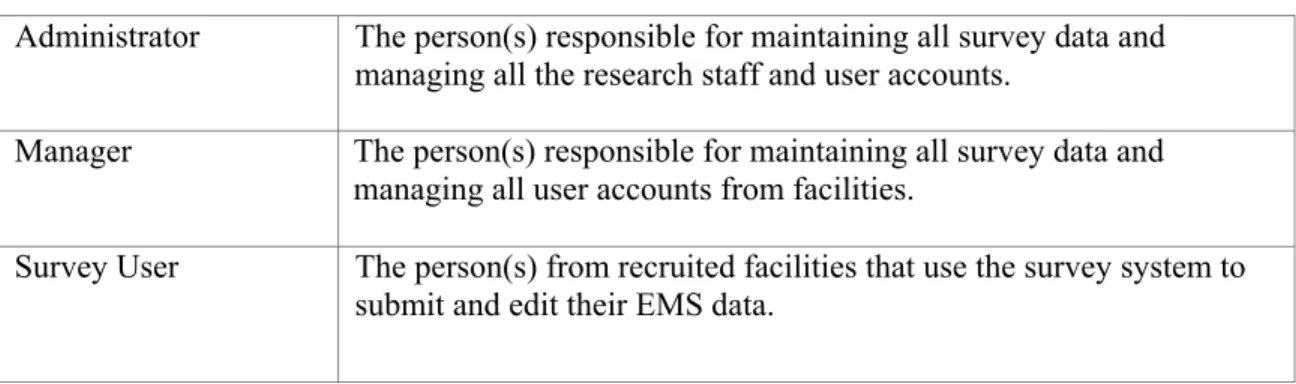
The following table (Table 1) describes three types of users who will be included into the design of the online survey system
Table 1: Three Major Types of System Users
Administrator The person(s) responsible for maintaining all survey data and managing all the research staff and user accounts.
Manager The person(s) responsible for maintaining all survey data and managing all user accounts from facilities.
12
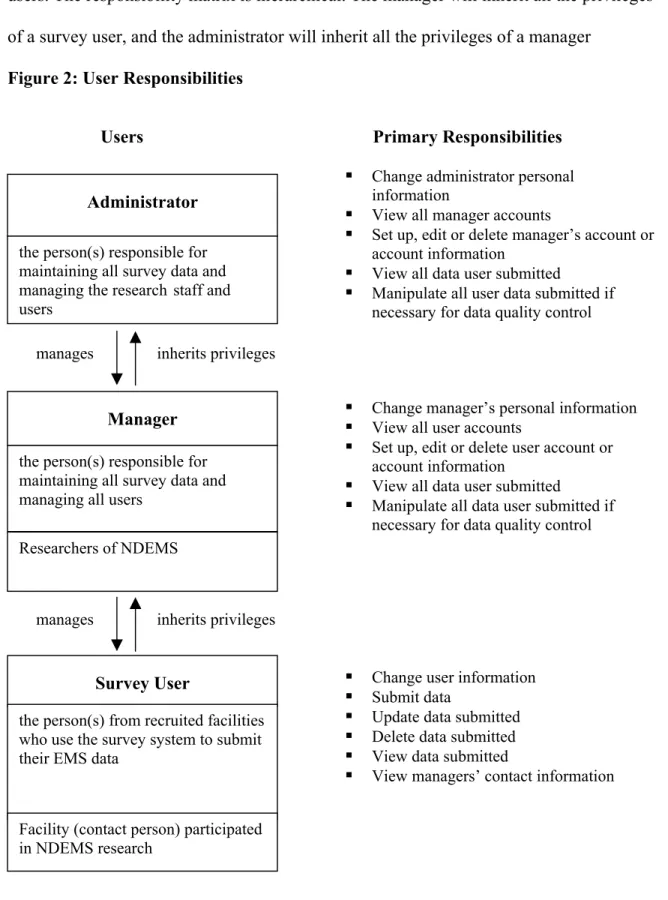
The following figure (Figure 2) describes the responsibility of each type of the users. The responsibility matrix is hierarchical. The manager will inherit all the privileges of a survey user, and the administrator will inherit all the privileges of a manager
Figure 2: User Responsibilities
Users Primary Responsibilities
Change administrator personal information
View all manager accounts
Set up, edit or delete manager’s account or account information
View all data user submitted
Manipulate all user data submitted if necessary for data quality control the person(s) responsible for
maintaining all survey data and managing the research staff and users
Administrator
manages inherits privileges
Change manager’s personal information View all user accounts
Set up, edit or delete user account or account information
View all data user submitted
Manipulate all data user submitted if necessary for data quality control Researchers of NDEMS
the person(s) responsible for maintaining all survey data and managing all users
Manager
manages inherits privileges
Change user information Submit data
Update data submitted Delete data submitted View data submitted
View managers’ contact information
Facility (contact person) participated in NDEMS research
the person(s) from recruited facilities who use the survey system to submit their EMS data
13
IV System Description
User Case Scenarios/Tasks
The user case scenarios/ tasks is a summary of the tasks each type of user account needs to perform. This serves as a guideline in designing the features and functionality of the online survey system.
Administrator
Case 1: Change administrator information
Administrator may change his/her email address if necessary. Because the administrator’s email
address may be used by people submitting problems with the online survey system,
administrators may need to update their personal information as it changes.
Case 2: View all manager accounts information
The administrator will be able to view a list of all manager accounts in the online survey system.
This list may be used to perform the administrator’s function of editing managers’ account
information.
Case 3: Set up or delete manager account or edit manager account information
The administrator may be asked to add one or more than one managers to the online survey
system. The administrator may be asked to set up new manager account names and passwords.
Although the managers can edit their personal information themselves, the administrator may also
14
Case 4: View all data submitted
The administrator will be able to see a list of all survey users and access all data submitted by
each user through online interfaces.
Case 5: Data quality control
The administrator may be asked to do quality assurance and quality control (QA/QC) for data
submitted by all users. The administrator may edit data not qualified to meet the QA/QC standard
defined by the research team. This is to ensure data quality and data integrity.
Case 6: Perform manager responsibilities
In the absence of a manager, the administrator may be asked to perform some of the manager’s
responsibilities, such as setting up a new online survey system user account or viewing all the
data submitted to perform data quality control.
Managers
Case 1: Change manager information
After the administrator sets up manager accounts, the managers can change all of their personal information such as their email address and manager password. Managers will not be able to change their username.
Case 2: View all user account information
The manager will be able to view a list of all user accounts in the online survey system. This list
15
Case 3: Set up, edit or delete user accounts
The manager may be asked to add one or more than one users to the online survey system. The
manager may be asked to set up new user account names and passwords. Although the users can
edit their personal information themselves, the manager may also be asked to edit the user’s
personal information for them.
Case 4: View all data all users submitted
The manager will be able to see a list of all users and access all data submitted by each user
through online interfaces.
Case 5: Data quality control
The manager may be asked to do quality assurance and quality control (QA/QC) for data
submitted by all users. The manager may edit data not qualified to meet the QA/QC standard
defined by the research team. This is to ensure data quality and data integrity.
Online Survey System Users Case 1: Change user information
The user, usually the contact person from a facility participating in the study, may change. If the
contact person changes, the new person may obtain the previous username and password from the
old person and log in to update the name and address and all other contact information. The new
person may also change the old password to a new one he or she prefers. The new person will
16
All users will be able to access all sections of surveys in the online survey systems. The user will
first need to log in with their user name and password. Each user will only see the contents
submitted by him/herself or another representative of his/her facility in every section.
Case 2: Submit data
Users may submit their EMS data through the online survey system on each round of data
collection period.
Case 3: View submitted data
Users will also be able to view all data they have submitted in each survey section. They will only
be able to see the data they submitted.
Case 4: Update submitted data
Users may want to update the data they have already submitted when they have new data on their
EMS available. In this case, they may log in and update the data they have submitted.
Case 5: Delete submitted data
If a user finds out the data he or she submitted is incomplete (or incorrect), the user can decide to
delete part of the data or even all data that was submitted and begin the data entry process once
again.
Case 6: View managers’ contact information
User may obtain the administrator or manager’s personal information in case he or she needs any
further assistance on completing the online survey. User may view personal information such as
name and email address, but user will not be able to view account information such as account
System Features and Functionality
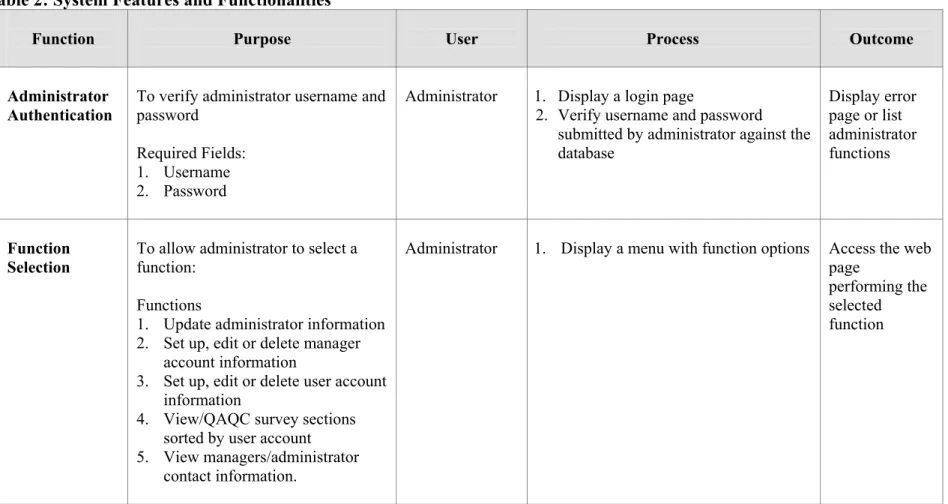
The following table (Table 2) outlines the processes and actions specified in the detail design of the features and functionality of the online survey system.
Table 2: System Features and Functionalities
Function Purpose User Process Outcome
Administrator Authentication
To verify administrator username and password
Required Fields: 1. Username 2. Password
Administrator 1. Display a login page
2. Verify username and password submitted by administrator against the database
Display error page or list administrator functions
Function Selection
To allow administrator to select a function:
Functions
1. Update administrator information 2. Set up, edit or delete manager
account information
3. Set up, edit or delete user account information
4. View/QAQC survey sections sorted by user account
5. View managers/administrator contact information.
Administrator 1. Display a menu with function options Access the web page
performing the selected function
Function Purpose User Process Outcome
Update
Administrator Information
Allow authenticated user to edit administrator information Required Fields:
1. administrator name 2. administrator email 3. administrator username 4. administrator password
Administrator 1. Display page with a form for administrator to enter information. The form will have the
administrator’s current information as the default value.
2. Validate that all fields have been entered
3. Update administrator information into database
Display an error page or success page
Add Manager Account
Allow authenticated user to add a manager account
Required Fields:
1. manager name
2. manager email
3. manager username
4. manager password
Administrator 1. Display page with a form for user to enter manager information
2. Validate that all fields have been entered
3. Enter new manager information into database
Display an error page or success page
Edit Manager Account
Information
Allow authenticated user to edit a manager account information
Required Fields:
1. manager name
2. manager email
3. manager username
4. manager password
Administrator 1. Display a page listing all manager accounts
2. Display page with a form with the selected manager’s current information as the default value. 3. Update the information and validate
that all fields have been entered 4. Update manager information into
database
Display an error page or success page
Function Purpose User Process Outcome
Delete Manager Account
Allow authenticated user to delete a manager account
Administrator 1. Display a page listing all manager accounts
2. Delete the selected manager account from the list
3. Display a confirmation page 4. Delete selected manager from the
database
Display an error page or success page
Manager Authentication
To verify user password
Required Fields: 1. Username 2. Password
Administrator, Manager
1. Display a login page
2. Validate that all required fields have been entered
3. Verify manager password against the database
Display error page or enter manager function selection page
Function Selection
To allow user to select a function:
Functions
1. Update manager information 2. Set up, delete facility
3. Set up, edit or delete user account information
4. View/QAQC survey sections sorted by facility
Administrator, Manager
1. Display a menu with function options Access the web page
performing the selected function
Function Purpose User Process Outcome
Update Manager Information
Allow authenticated user to edit manager information
Required Fields:
1. manager name
2. manager email 3. manager address
4. manager password
Administrator, Manager
1. Display page with a form for manager to enter information. The form will have the manager’s current information as the default value. 2. Validate that all fields have been
entered
3. Update manager information into database
Display an error page or success page
Set Up New Facility
Allow authenticated user to create facility
Required Fields: 1. facility name
Administrator, Manager
1. Display page with a form for user to enter facility information
2. Validate that all fields have been entered
3. Enter new facility information into database
Display an error page or success page
Delete New Facility
Allow authenticated user to delete facility
Administrator, Manager
1. Display a page listing all facilities 2. Delete the selected facility from the
list
3. Display a confirmation page 4. Delete selected facility from the
database
Display an error page or success page
Function Purpose User Process Outcome
Set Up User Account
Allow authenticated user to add a user
Required Fields: 1. user name 2. user email 3. user username 4. user password
Administrator, Manager
1. Display page with a form for user to enter new user account information 2. Validate that all fields have been
entered
3. Enter new user account information into database
Display an error page or success page
Edit User Account Information
Allow authenticated user to edit a user information
Required Fields: 1. user name 2. user email 3. user address 4. username 5. user password
Administrator, Manager
1. Display a page listing all user accounts
2. Display page with a form for user to enter user information. The form will have the user’s current information as the default value.
3. Validate that all fields have been entered
4. Update user information into database
Display an error page or success page
Delete User Account
Allow authenticated user to delete a user account
Administrator, Manager
1. Display a page listing all user accounts
2. Delete selected user account from the list
3. Display a confirmation page 4. Delete selected manager from the
database
Display an error page or success page
Function Purpose User Process Outcome
View
Administrators Information
Allow authenticated user to view administrators’ information
Administrator, Manager
1. Display a page with a list of all administrators names with link to it 2. Display a page with the information
of the selected administrator.
Display the page with selected administrator’s information or display an error page
View /QAQC Survey Data
Allow manager to select a survey section to work with
Administrator,
Manager 1. Display a page with a list of all facilities
2. Select a facility
3. Display a page with a list of all survey sections of the selected user account with links
4. Select a survey section
5. Display a page of the selected survey section with the selected user’s data as the default value
Function Purpose User Process Outcome
User
Authentication
To verify user password
Required Fields: 1. Username 2. Password Administrator, Manager, Survey User
1. Display a login page
2. Validate that all required fields have been entered
3. Verify user password against the database
Display error page or enter the survey pages
Function Selection
To allow user to select a function:
Functions
1. Update user information 2. Enter survey sections
3. View managers/administrator contact information.
Administrator, Manager, Survey User
1. Display a menu with function options Access the web page performing the selected function Update User Information
Allow authenticated user to edit a user information
Required Fields: 1. user name 2. user email 3. user address
4. user comments
5. user password
Administrator, Manager, Survey User
1. Display page with a form for user to enter user information. The form will have the user’s current information as the default value.
2. Validate that all fields have been entered
3. Update user information into database
Display an error page or success page
Function Purpose User Process Outcome
Survey Selection
Allow user to select a survey section to work with
Administrator, Manager, Survey User
1. Display a page with a list of all survey sections names with links
Display survey section selected by user View Submitted Data
To view questions of the survey section selected and view the data previously submitted.
Administrator, Manager, Survey User
1. Display a page or pages which shows the survey sections already
completed by this survey user 2. If the survey has been filled out,
display the page with the previously submitted data as the default value. 3. If the survey hasn’t been filled out
yet, display the page or pages of blank survey questions.
Display page or pages of the selected survey section
Submit data To allow user to submit new data to selected survey section
Required Fields:
1. Questions of the selected survey section
Administrator, Manager, Survey User
1. Display a page/pages with a form/forms of the selected survey section
2. Validate that all required fields have been entered (The date field will be automatically generated)
3. Submit data to database
Display error page or success page
Function Purpose User Process Outcome
Update
Submitted Data
To allow user to update or delete data previously submitted to a survey section
Required Fields:
1. Questions of the selected survey section that need to be updated or deleted
Administrator, Manager, Survey User
1. Display a page/pages with a
form/forms of the completed survey section
2. Validate that all required fields have been entered (The date field will be automatically generated)
3. Submit data updated to database
Display error page or success page
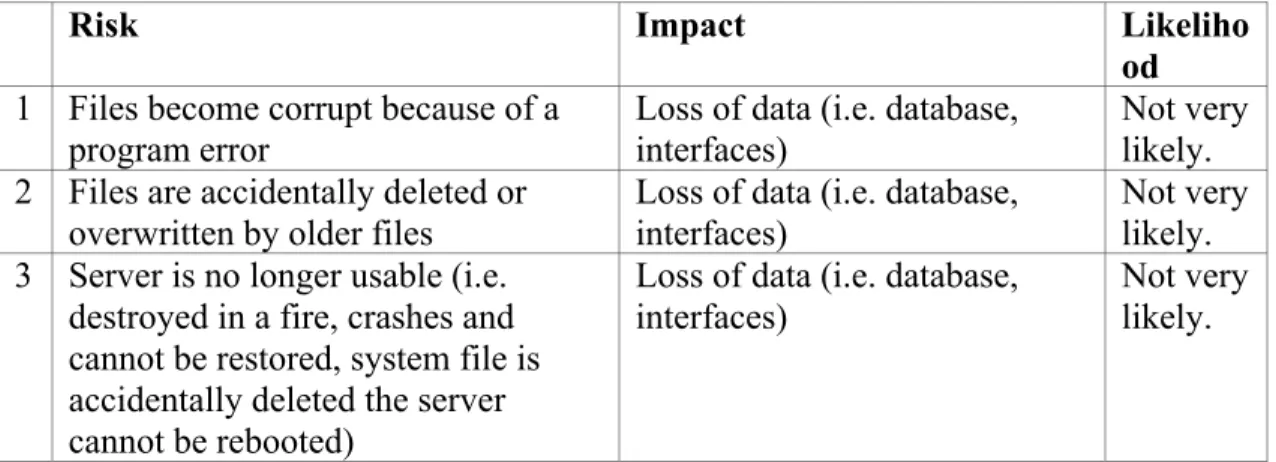
Risk Impact Likeliho od 1 Files become corrupt because of a
program error
Loss of data (i.e. database, interfaces)
Not very likely. 2 Files are accidentally deleted or
overwritten by older files Loss of data (i.e. database, interfaces) Not very likely. 3 Server is no longer usable (i.e.
destroyed in a fire, crashes and cannot be restored, system file is accidentally deleted the server cannot be rebooted)
Loss of data (i.e. database, interfaces)
Not very likely.
Risk Management Risk Assessment
In order to prevent any unexpected risk from happening, I have taken the following
prevention strategy. In order to prevent data losses, all files including the interface file, database
file and the scripts will be stored at three difference locations. The Master file will be stored on
my home directory on the server. Copies of these files will be stored on another server and zip
disk.
Table 3: Risk Assessment
The following table (Table 3) describes risks that might occur in the design and implementation of this project, the impact of such occurrences, were they to happen and likelihood of those risks actually happening.
After all background information of this project was gathered, several internal meetings were held within the UNC-CH research team to determine detailed
Business Requirements and Rules Risk Assessment and Management
27
requirements for the design of the database and online survey system prototype. These requirements are:
• Managers (i.e. research staff) must be able to monitor surveys belong to all user accounts.
• The online survey system must be able to handle surveys of certain size and scope and should
be able to be extended when necessary.
• The administrator must be able to access all files (database and web files) associated with the
online survey system.
• The users must be able to add, update and delete data only belong to themselves.
• The users may be able to access a controlled set of data through the online survey system
based on the needs of the project.
• Password protection for the online survey system is required for all types of users including
the administrator, manager and the user.
• Users’ passwords cannot access managers’ administrative interface; managers’ passwords
cannot access administrators’ administrative interface.
• All online survey system interfaces must contain an email address that users can email in case
they experience technical problems.
• Administrative changes (i.e., adding managers/users, changing manager/user passwords) can
only be made through the administrator and manager interfaces.
• Only administrators can change a manager’s username; only manager can change a user’s
username. Managers and users cannot change the username themselves.
• Administrators and managers must have their own username and password to access
28
Technology Decision / Justifications
The relational database management system (RDBMS) used to create the NDEMS online survey system was Microsoft Access 2000. This was requested by the research staff for the following reasons:
• The research staff is familiar with MS ACCESS database.
• The data from previous years was all stored in MS ACCESS database. • It is better to store the new survey data in MS ACCESS for cross comparative
analysis in the future.
• The data collected from this survey will be released to public at sometime; MS ACCESS is portable, which may simplify the release of data.
• MS ACCESS is easy to convert to other Relational Database Management Systems, such as Oracle Database, since they have built-in applications for converting an MS ACCESS database. For example, Oracle uses Migration Bench to convert MS ACCESS databases.
The research staff also expressed the necessity to upgrade this database to a larger scale database such as Oracle at the completion stage of the project. I will talk about this in Section VIII.
The middleware used to connect the database with the web is Active Server Page: • ASP can work with any Windows environment with IIS;
• the server that the survey system will be housed support ASP;
29
The language used to implement the online interface is HTML. Instead of
programming a graphic user interface, HTML was chosen for its efficiency: HTML pages are easy to implement and maintain and can be accessed anywhere from the Internet.
The language used to do client side data validation is Java Script. Java Script is the most common language used for data validation on the client side interface. Java Script will be used for tasks such as asking users to fill out required fields as well as to enter appropriate data types.
V. System Design Description
Database Design
The data to be modeled consists of both the survey sections and the information related to the survey questionnaire. Information related to the questionnaire includes the metadata describing the questionnaire, such as the survey user information, the manager information and the administrator information.
There will be 10 tables in this database. Tables representing information related to the OECD survey are: Admin table, Manager table, User table, Password table. Tables representing information in the OECD survey are: GMS table, EMS table, Policy table, Facility table, FacilityID table and Firm table. Appendix A shows the
30
Tables representing the OECD survey
The GMS table represents the management and innovation systems and tools section of the OECD survey. This section contains questions related to the facility’s management systems and tools. These are questions regarding the existing environmental management policies, the kinds of general management policies and practices they have adopted, and the motivations for them to adopt the existing system.
The EMS table represents the environmental measures, innovation and performance section of the OECD survey. In this section, the aim is to provide an overall picture of how each facility has sought to address the environmental impacts of its production activities.
The Policy table represents the public environmental policy section. In this section, facilities are asked about the nature of public environmental policy, and how it impacts upon them.
The Facility table represents the facility characteristics section. This section helps researchers to obtain information about the general characteristics of the facility. In addition to the Facility table,
The FacilityID table contains data associating facility ID with facility name. It has two fields, the FacilityID and the Facility Name.
31
The Facility table is the central table of all tables representing the survey sections. FacilityID is the primary key in the Facility table, and also serves as the foreign key in all other survey section tables. The field facilityID is generated in the FacilityID table. The FacilityID table contains both the facilityID (auto number) and the FacilityName. This is to ensure the confidentiality of the facility’s identity. The information to relate a facility’s ID and its name is kept in one central table, and only the administrator account and the manager account have the privilege to view this information. I will talk more about this in Section VI.
Additional tables related to the survey
In addition to the six tables created for the survey itself, four tables were created for the management module. They are the User table, the Admin table, the Manager table and the Password table. The Password table contains account names and passwords for the administrator, manager and user accounts. The Admin table contains the personal information of the administrators; the Manager table contains the personal information of the managers; the User table contains the personal information of the users. Instead of putting the account name and password for each type of user into the related table, I chose to put all account names and passwords into one central table – the Password table. This is because of security concerns. Having this confidential information kept in one central location is a better method than distributing it in many tables.
32
Interface Design Prototype
The OECD online survey system consists of web interfaces and scripts. Each function presented in Table 2 is implemented by a web interface and a set of scripts linked with the interface to perform the function.
The survey instrument contains several different types of questions, each of which required individual treatment.
Please refer to Appendix C for sample screenshots of the prototype of the web interfaces. The appendix includes the entry page, the user login page, the survey user menu, the manager menu, the administrator menu, the survey index page, as well as the web interfaces for survey section I, representing some types of questions mentioned in the following section.
Survey Question Prototype Design
Below are some typical types of questions and question formats found in the OECD survey instruments. Please refer to Appendix F for the detailed OECD survey instrument.
For questions with a large number of options requiring a single choice, such as Question1, I chose to use a radio button to implement each selection. Radio buttons allow survey users to select only one button within each radio button group. This enforces the single choice requirement.
Question1: Please indicate the sector of industry (ISIC codes in parentheses) in which you would place your main production activity. (Please click only one box.)
_Manufacture of food products and beverages (15) _Manufacture of tobacco products (16)
33
_Manufacture of wearing apparel, dressing and dyeing of fur (18)
_Tanning/dressing of leather; manufacture of luggage, handbags, footwear (19)
_Manufacture of wood and products of wood and cork, except furniture (20) _Manufacture of paper and paper products (21)
_Publishing, printing and reproduction of recorded media (22)
Some questions, such as Question 2, require the user to specify an answer if no presented options are applicable. For these questions, all options including ”other” are presented in the form interface, along with the “please specify” memo field. The memo field is not a required field and has a placeholder to act as input if there is no user input.
Question 2:How would you, in general, classify your main production activity? (Please click only one box.)
_Production of primary products _Production of intermediate products _Production of final products _Other:
Please specify: __________________________
For questions requesting a number response such as Question 3, the data type is implemented as text data type. This is due to a concern for future migration to other database management systems. Since some data types in MS ACCESS may not be supported or may be defined differently in other RDBMS. The text data type is easier to convert.
Question 3: Please specify the number of people who are presently employed by your firm/facility (expressed in terms of full-time employee equivalents) in the main production activity________________________
For Yes / No / Don’t know questions like Question 4, a list or check box is used depending on the layout of the specific page and the complexity of the question.
Question 4: Do you export any of your output? Yes No Don’t Know
If yes, approximately what proportion of your output is for export?
34
_10%-25% _25%-50% _> 50%
For questions such as Question 5, a drop-down list is used to store a list of all countries in order to use page space more efficiently. The drop down list will increase data quality by preventing users from entering a misspelled country name.
Question 5: Which country is your firm's head office located in (list country according to the survey requirements)?
For questions with skip patterns such as Question 6, the value of the answer to the initial deciding question is stored in a variable. An “if” statement then redirects the user to the next page according to this value. If the user answers “yes” to question 6.1, I redirect him/her to the page containing question 6.2 and 6.3; if he/she answers “no” to question 6.1, I redirect him/her to the page containing 6.4, skipping question 6.2 and 6.3.
Question 6:
6.1 Does your firm/facility have a person or persons with explicit overall responsibility for environmental concerns?
_Yes _No _Don’t Know
If no, please proceed to question 6.4.
6.2 If yes what is their position in the firm/facility? (Please click only one box.)
_Senior management
_Production/operations _Finance/accounting ….
6.4 Does your firm/facility have an environmental, health and safety department (or equivalent)?
_Yes _No
35
Questions with a large number of sub-questions requiring a single choice on a scale, such as Question 7, were also implemented using radio button groups. Descriptions of what each number represents in the scale are provided at the top of each question, so the user can always refer to it.
When updating this type of question, I replaced each radio button group with a text field. Descriptions of the meaning of the number coding are also provided at the top of each question, user can update their data by input a new number in the text field referring to the descriptions above. This is to reduce the redundancy by preventing user from going through the radio button groups again. The user has already answered this question once, so replacing the radio button with text box can help them to update their data more efficiently. This is to reduce the complexity of the ASP code as well to facilitate future revision of the survey interface.
Question 7: Please assess the importance of the following driving forces when considering/deciding to invest in a process or product innovation with significant
environmental impacts, from 1 (unimportant) to 5 (very important)? (Please click one box per row.)
1 2 3 4 5
Regulatory authorities ❑ ❑ ❑ ❑ ❑
Industry/trade associations ❑ ❑ ❑ ❑ ❑
Suppliers ❑ ❑ ❑ ❑ ❑
Buyers from downstream firms or retail distributors ❑ ❑ ❑ ❑ ❑
Household consumers ❑ ❑ ❑ ❑ ❑
Shareholders ❑ ❑ ❑ ❑ ❑
Employees or labor unions ❑ ❑ ❑ ❑ ❑
Banks or insurance firms ❑ ❑ ❑ ❑ ❑
Investment fund managers ❑ ❑ ❑ ❑ ❑
Environmental organizations ❑ ❑ ❑ ❑ ❑
36
VI. System
Design
Decision
and Technology Challenges
Confidentiality Issues
It is very important to protect the participating facilities’ and firms’ privacy and confidentiality. This is agreed upon before facilities sign the agreement to participate in the study. In the previous surveys conducted by the NDEMS project, substitute codes were used as identifiers for each facility. The file associating the codes with the facility names was kept in a file cabinet and also on the server where only research staff had access. In the new OECD study, it is agreed that the same method, creating substitute codes, will be used to encrypt facility identity information.
The following method was used to further ensure the confidentiality of the facility identity in the online survey system.
Data is stored at a central location to ensure confidentiality. For example, instead of storing both facility ID and facility name in the Facility Table, these two fields are stored in a separate table named FacilityID. This will reduce the risk of releasing facility identity information when querying the database or viewing other information about facilities through the public interface. Only users who have the administrator and manager privileges will be able to access this facilityID table though the database or management module interfaces.
37
Administrator, Manager and User tables all use “userID” as primary key. The Password table uses foreign key “userID” as part of its compound primary key. By the “userID”, the administrators’, managers’ and users’ personal information can be linked to account names and passwords.
Log-in interfaces and scripts have been designed and implemented to protect the system. They provide each type of user access to their own menu. The user account only has basic data submission and editing privileges, while managers and administrators have their own administrative interfaces. Each type of users can log in their menu and perform limited privilege.
Server-side scripts are written to do error checking on duplicate input. When a duplicate input on a primary key or index field is identified by the ASP script, the system will prompt the user to enter a new record, which is unique. It is vital to keep some fields unique in order to ensure the correct retrieval of facility data. More details on error checking are provided below.
Administrative Module
38
edit their personal information. The manager account will be able to access and edit all survey user account information, including the account name password. The manager will also be able to access all data a survey user submitted through the online interface. The administrator has the highest privilege and is able to access and edit any information through the online interface. This design is implemented by coding using ASP and SQL statements to query the necessary information. In the future, new types of user accounts can be added if necessary, and new privileges can be coded to the existing types of user accounts. One of the advantages of an online database system is its flexibility of access. By proper coding, the system can be accesses anywhere on the Internet and user privileges can be easily assigned, without compromising security and confidentiality Instead of letting survey users create their own accounts, I chose to give manager the privilege to create accounts for survey users. This ensures that each survey user is associated with the right facility. (One facility can have more than one user.) This also prevents survey users from reaching information about other participating facilities.
Cardinality
39
table. When a survey user associated with this facility is submitting new data, the survey user actually has his or her data inserted into the database by running updating SQL statements.
Data Referential Integrity
Referential integrity is ensured both in the MS ACCESS database and by the ASP code connecting the web interface and the database.
The MS ACCESS database management system supports referential integrity. Other database management systems, such as MySQL, do not support this feature. Relational Database Management Systems have various referential integrity rules. Due to the fact that this database will be migrated to other database management systems, it is very important to build integrity constraints into the ASP code connecting the back-end database and the web interfaces, so that referential integrity will be maintained in all versions.
The first step to enforce integrity was to add JAVA Scripts validation to the data entry forms to enforce the data entry of the required fields. If a user forgets to enter a fields required in the database, a warning message box will be prompted to call for the user’s correction.
40
The online system uses the same method to delete a record. In addition to implementing cascading delete in the database itself, it is coded in the ASP code as well. If a facility is to be deleted, the related records of this facility in all other tables using facilityID as foreign key will be deleted. In the SQL statement, the records in other tables will be deleted prior to the deleting of the record in the primary table.
Data Validation
JAVA scripts are used to validate data entered from web interfaces. For example, if text is entered into a numeric field, a warning message will be produced to draw the user’s attention to correct his or her mistake.
Each form is designed to minimize occurrences of user data entry error to the greatest possible extent. Radio buttons are used for questions with many options that only allow single choice. Drop-down lists are used for data that has controlled vocabulary. The controlled vocabulary lists will improve the query’s reliability when retrieving data from the database.
Error Checking
41
tables, the user log-in script relies on it to retrieve the userID. The userID is the key information to retrieve a user’s whole set of individual data. If the user account name is duplicated, the log-in scripts will associate the wrong information with the wrong user account, causing incorrect input or revealing facility confidential information among participating facilities. If it turns out that the account name is already taken in the database, the script redirects the user back to update the account name and password again, until the user has submitted a unique record.
VII. Internal Review and Usability Test
A usability test is designed to get feedback on an information system from users by asking them to perform a set of tasks. The usability test of the prototype OECD Online Survey System was conducted as an internal test and was reviewed by internal users. The Internal users were volunteers from the NDEMS Project research staff from UNC-CH. This test evaluated the overall design and usability of the OECD Online Survey Systems. It also served as an educational opportunity to demonstrate to the research staff the basic functions of the online survey system. Please refer to Appendix D for the consent letter and Appendix E for the questionnaire used in the usability test.
42
set of user accounts and passwords to access the system. After the introduction, they were given 10 tasks to perform in the online survey system. These tasks included:
• As a manager, create a new facility
• As a manager, create a new user account and for survey users from a facility • As a manager, edit survey user profile just created above
• As a survey user, submit environmental data (dummy data) through the online survey system
• As a survey user, update the data you submitted through the online survey system • As a manger, view a list of all user account
• As a manager, delete user accounts
• Submit manager information (dummy data) through the online survey system to a manager profile
• As a manager, edit the manager profile information just submitted • As a manager, delete a facility
Once they completed the tasks, the participants were asked to answer a set of questions regarding their performance in the system and a set of open interview questions regarding the design and usability of the system according to their experience with the online survey system in the test. The questions are shown in Appendix E.
43
The participants gave positive feedback on the design of the interface. They thought that the questionnaire was presented in an efficient way. But they also thought that some of the labeling of the interface needs to be revised, For example, in the update survey data function page, at the bottom of each survey page, it was suggested that the “update” bottom should be labeled as “next” to indicate that clicking it would bring you to the next page of the same survey section.
The participants showed great interest in the administrative module. For the Menu (the function selection interface), instead of using links, they suggested using buttons to represent each function on the menu. They thought a button would seem more click-able than a link. They also suggested grouping different functions in the administrator and manager menu interface. Because the administrator and manager have a large amount of functions on their menu, these functions should be presented in a more organized way. For example, the create/edit/delete user functions in the layout of the manager menu should be combined into one group.
One important suggestion from the participants was to redesign some of the privileges of the administrator and managers. They thought that the “view data” privilege and “QA/QC” data privilege should be separated. To preserve the original data survey user submitted, an administrator or a manager should not be able to easily manipulate any data survey users submitted. It is very important to keep the viewing function separate from the QA/QC function to reduce the risk of mistakenly manipulate survey user data.
44
VIII. Future Implementation
This project is considered a pilot project for a future full implementation of the OECD project. Some design decisions were not covered within the scope of this project, but will be discussed in this section as future implementations.
When the decisions about how to integrate the NDEMS and OECD project are finalized by the research team, the system will develop into one that involves hundreds of users. The MS ACCESS database we currently use in this pilot phase might not be able to handle the amount of user transactions. Therefore, I recommend a larger scaled database that can support more powerful online transactions such as SQL database or Oracle database. MS ACCESS database was chosen for this pilot project with this idea in mind.
There are many conversion applications designed to convert MS ACCESS databases into larger databases, such as SQL Server or Oracle.
As mentioned above in Section II, because of the agreement to share data between each region (country), the public interface should also enable the research teams of other regions and the general public to share the data collected, while maintaining the
confidentiality of the participating facilities and firms. In addition to the three types of accounts already designed, an additional account type with only viewing privileges for all facility data submitted may be created to meet this requirement.
45
whole database, therefore, a web interface to share the data on the web site is vital. What kind of queries should the research team use to retrieve the data? Should the web site offer the visitors searching functions on the data or should the website only present static information by previously defined (canned) queries? These are all important issues need to be designed and implemented as the next step.
This project is a pilot project, where the design of the online survey system was based on a draft survey provided by the research team. The survey is subject to changes. I will not consider the changes in my pilot project, those will be designed and implemented in the future full implementation of this project. Below are some examples of the changes possible to some type of questions. This prototype survey instrument represents only the basic types of possible questions. There may be future evolution of questions based on this set, such as more complicated skip pattern questions and more complicated cross-tab questions.
Question 1 represents a more advanced skip pattern that might be used in the future survey instrument. If users were to choose different answer for the first question, they will be brought to different place for the second question. Question 2 requires each item to be assigned a different rating. This will require an implementation of a drop-down list, which will eliminate an option after it is selected.
Question1: did this innovation directly increase or decrease total unit sales?
_Increase sales _Decrease sales
_No effect [GO TO Q2] _Don’t Know [GO TO Q2]
Would you estimate the percentage increase or decrease in sales? _Less than 5%
46
_Do not know
Question 2: Which of the following environmental policy instruments do you feel have significantly affected your firm/facility's production activities? Please rate them. (Multiple responses possible and should allow different ratings for each choice.)
Input bans ❑
Technology-based standards ❑
Performance-based standards ❑
Product standards ❑
Input taxes (including energy) ❑
Emission or effluent taxes or charges ❑
Deposit-refund systems ❑
Appendix B: Entity Relationship Diagram of Tables Representing Administrative Module of OECD Online Survey System
Manager User Password
title fname lname
comment
email responsibility
type password
username userID
fname lname
mgrID
username username
has has
has address
Admin
fname lname email adminID
username
Appendix C: Interface Prototypes
Entry Page
User Login Page
User Menu
Manager Menu
Administrator Menu
Survey Index Page
Web Interfaces for Question Prototypes
Web Interfaces for Question Prototypes
Web Interfaces for Question Prototypes
Web Interfaces for Question Prototypes
Web Interfaces for Question Prototypes
60
Appendix D: Usability Test for National Database on Environmental Management System (NDEMS) Online Survey System Consent Letter
Purpose of this Usability Test
This is a usability test to get feedback from internal users by performing a set of tasks in the NDEMS Online Survey System. Internal Users will be NDEMS project
research staff from the department of public policy, UNC-Chapel Hill. This test will evaluate the overall design and usability of the National Database on Environmental Management Systems (NDEMS) Online Survey Systems. The usability test is being conducted by Yihua Zhang, a student in the School of Information and Library Science, as a part of Master’s project in conjunction with Dr. Stephanie W. Haas. What Will Happen During the Usability Test:
As a participant, you will be provided access to a prototype of the NDEMS Online Survey System. First of all, you will be provided with a brief description of the functions of the system and a set of user account and password to access the system. After this you will be given several tasks to be performed in the online survey systems. These tasks may include:
• Submitting environmental data (dummy data) through the online survey system
• Updating the data you submitted through the online survey system • Creating user account and password for yourself
• Submitting user information (dummy data) through the online survey system • Updating user information you have just submitted
Once you have completed those tasks, you will be asked to answer a series of
questions regarding your experience with the online survey systems. Finally, you will be asked to give comments and suggestions to future implementation of the system. The entire study should take less than 30 minutes.
Your Privacy is Important:
We will make every effort to protect your privacy. Any information obtained in the study will be recorded using a participant number, not your name. Since we will be making efforts to protect your privacy, we ask you to agree that we may use any information we get from this usability test in any way we think is best for publication or research.
If you have any questions regarding this study, please contact me (Yihua Zhang [email protected]) or my advisor, Dr. Stephanie W. Haas (962-8360,
Risks and Discomforts
61
Your Rights
• You decide on your own whether or not you want to be in this study. • You will not be treated any differently if you decide not to be in the study. • If you decide to be in the study, you will have the right to stop being in the
study at any time.
Institutional Review Board Approval
The Academic Affairs Institutional Review Board (AA-IRB) of the University of North Carolina at Chapel Hill has approved this study. If you have any concerns about your rights in this study, you may contact the Chair of the AA-IRB:
Barbara Davis Goldman, Chair UNC-CH
Chapel Hill, NC 27599 (919)-962-7761
Your signing and returning this form will be taken as indication of your consent to participate in this study.
I have had the chance to ask any questions I have about this study, and they have been answered for me.
I have read the information in this consent form, and I agree to be in the study. There are two copies of this form. I will keep one copy and return the other to the investigator.
____________________________ ________________________________ (Signature of Participant) (DATE)
__________________________ __________________________
*(Signature of Witness) (DATE)
62
Appendix E: Usability Test Questionnaire
Background Information:
This is a usability test to get feedback from users by performing a set of tasks in the OECD Online Survey System, as well as to educate internal users on how to use the online survey system. OECD Online Survey System is a set of online interfaces designed to let the companies participating in the OECD research project to submit their environmental management system data directly from the Internet to the back-end database connected by the interfaces, it will also allow the OECD research teams to manage the user account for each company and the data they submitted. OECD Online Survey System has three types of users, the administrator, the manager and the user. Among the three, the manager role covers all the typical functions of the three users.
As a manager of the OECD Online System, you will be able to perform the following functions:
o Change manager’s personal information1, 2 o View all user accounts
o Set up, delete facility
o Set up, edit or delete user account or account information o View all data user submitted
o QA/QC all data user submitted
You will be provided with the account name and the password of a manager and log into the system to perform a set of manager roles and also some user role.
Evaluation Tasks and Evaluation Questionnaire
URL: http://kiwi.ils.unc.edu/projects/Zhanyi/ User name: username is your first name Password: password
Example: Username: Pete Password: password
Please perform the following tasks and answer the questions after each task.
1. Please perform the following task and answer if you were able to perform the following tasks?
Task 1: Change manager information Yes No
Log in as a manager, to correct your own information, such as email address, etc.
63
As a manager, add one new user to the online survey system. Try adding another user account with the same username
Task 4: View chosen user account information Yes No
As a manager, choose to view the user account information you’d like to know several user information already entered through manager menu
Task 5: Edit user accounts Yes No
As a manager, edit user accounts you have chosen from the online survey system including the user name, password, or the chosen user’s personal information.
Task 6: Submit data to online survey Section1 using the user account just created Yes No
Log out the manager menu, Log in as user, with the user account you just created, perform the user duty to fill in one of the survey of the online survey system
Task 7: View/Update survey data (Section1) submitted Yes No
Remain in the user menu, with the user account you just created, perform the user duty to update the survey data of the online survey system you just submitted
Task 8: View all data other users submitted Yes No
Log out the user menu and log in as a manager, choose from a user list to view the data a particular user submitted (For example, the user account you just created)
Task 9: Delete the user account just created Yes No
Remain in the manager menu, as a manager, delete the user account just created or choose to delete one of the user accounts from the online survey system
Task 10: Delete a facility Yes No
As a manager, delete one chosen facility (You can try to delete the facility you just created)
2. For those tasks you answered “no”, please provide reasons and suggestions.
3. Are navigation path of the system apparent? (Is it easy to identify which section you are and is it easy to find “exit” or “entrance” to other page?)