International Journal of Emerging Technology and Advanced Engineering
Website: www.ijetae.com (ISSN 2250-2459, ISO 9001:2008 Certified Journal, Volume 4, Issue 12, December 2014)
513
A Review on Knowledge-Based Authentication Mechanism
Using Secure Persuasive Cued Click-Points
Naresh D. Kale
1, Prof. V. A. Chakkarwar
2 1PG Scholar, 2Professor, Department of CSE Government college of Engineering, Aurangabad, India
Abstract-- General the authentication technique is based on the text password or the biometric authentication technique. Some time the text based password which contain the alpha numerical character and the special character is difficult to remember. The text password is also easy to crack. For overcoming all the above defects we develop a new method.
In this paper we discuss a new authentication technology based on graphical password which uses images for the representation of the password and to protect the user from unauthorized attacks. This method is developing for the authentication purpose. The main purpose of developing this method is to reduce the guessing attack, the dictionary attack and the brute force attack can be successfully abolished in this method. This graphical password method is developing on secure persuasive cued click-point. This method is really useful to provide the higher security.
Keywords-- Browse the image, Click Based Graphical Password, Cued Click Points, IP Tracking, Pass Point, and shuffling.
I. INTRODUCTION
This paper introduces and presents the results of a systemic study of the Persuasive Cued Click-Points graphical password scheme, including usability and security valuations, and implementation considerations. The main usability goal of the knowledge-based authentication systems is to support the users in selecting the more secure passwords, thus increasing security by expanding the effective password space. They use the persuasion to influence user choice in click-based graphical passwords, the users encourage selecting more random, and hence it would be really difficult to guess the click-points.
Authentication is a really important process in day to day life to prevent the unknown user in the computer based authentication technology. In general the authentication technique use the text based password. If the text based password contains number of special character and alphanumeric characters then it really difficult to remember the password and if it does not contain the number of special character and alphanumeric characters then it is really easy to guess. So for overcoming the above defect we can propose a new method of secure persuasive cued click-point.
This method can provides a comprehensive and integrated evaluation of the persuasive cued click-point (PCCP) which can cover both the issues of security as well as the usability. The secure persuasive cued click-point (SPCCP) method provides more security than PCCP and CCP.
A. Background:
Text based passwords authentication technique/methods are the most popular user authentication techniques/method but it have the security as well as the usability problems, some time the persuasive cued click-point authentication techniques are also crack by the attacker. Alternatives used biometric systems are also having their own drawbacks [9], [10]. Another alternative for the authentication process is the Graphical password using more security features which is focused in this paper.
B. Scope of the System
Users always create memorable passwords which are really easy for attackers to guess, but strong system assigned passwords are really difficult for users to remember easily. To start with we focus on the most common computer authentication method that uses a text based passwords. Despite the vulnerabilities, it is the natural tendency of the users that they will always prefer to go for short passwords to remember that easily and they don’t have the awareness about how attackers tend to attacks on their passwords. Unfortunately, these passwords are broken or crack down by the attacker by several simple means or methods such as Eaves dropping, masquerading and other rude means say dictionary attacks, shoulder surfing attacks, brute force attack, social engineering attacks etc.
II. CLICK-BASED GRAPHICAL PASSWORDS
International Journal of Emerging Technology and Advanced Engineering
Website: www.ijetae.com (ISSN 2250-2459, ISO 9001:2008 Certified Journal, Volume 4, Issue 12, December 2014)
514 As with persuasive cued click-point (PCCP), a password consists of click points on images. During the creation of the password, there is a small view port area that is randomly positioned on the image. Users must select a click-point within that view port. If they are unable or unwilling to select a point in the current view porting, they may press the Shuffle button to randomly reposition the view port. The view port can guides the users to select more random passwords that are less likely to add the different hotspots. Therefore this works encouraging users to select more random, and difficult passwords to guess to any attacker.
A. Pass-points
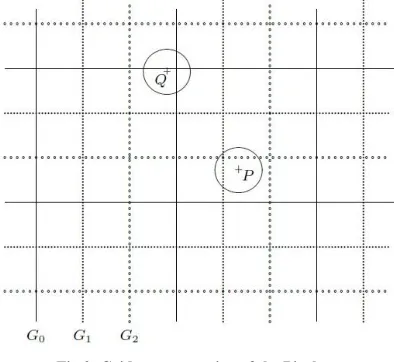
[image:2.612.349.546.141.322.2]In the PassPoints graphical password scheme a password consists of a sequence of click points (4 or 5 click points) that can be selected from the image. The image is displayed on the screen by the system. The image can be any image which having the main role of the image to select the pass-points and remember the click pass-points. For password creation user can select the view point or any pixel in the image as a click-points and when the user need to login then the user need to enter the same series of clicks in correct sequence in which sequence he already entered during the registration. A system always defined the tolerance square between the clicks during registration and login time clicks. Any pixel in the image is a candidate for a click point to login; the user has to click again closely to the chosen points, in the chosen sequence again during the next login.
[image:2.612.53.283.484.642.2]Fig 1: Representation of Pass-Points (in Red color)
Fig 2: Grid representation of the Pixels
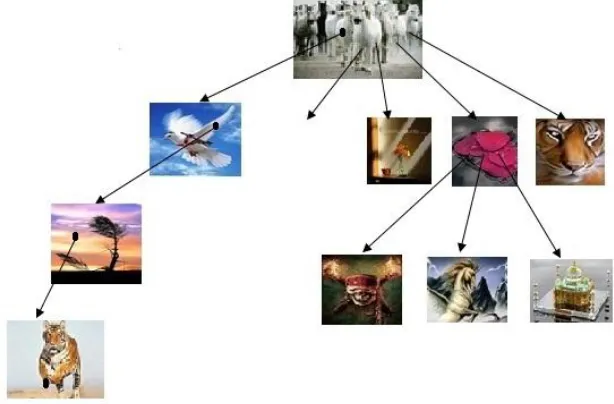
B. Cued Click Points
International Journal of Emerging Technology and Advanced Engineering
Website: www.ijetae.com (ISSN 2250-2459, ISO 9001:2008 Certified Journal, Volume 4, Issue 12, December 2014)
[image:3.612.148.455.146.348.2]515
Fig 3: A User goes through all Images to form a CCP Password
III. PERSUASIVE CUED CLICK POINTS
For creating Persuasive Cued Click Points persuasive feature is added in to the CCP. PCCP i.e. Persuasive Cued Click Point encourages users to select less probable passwords. For password generation PCCP uses required the viewport & the shuffle. When the users making a secrete word, the images are a little monochromic except for a viewport for to avoid known hotspots the viewport is positioned casually. The most useful benefit of PCCP is hackers have to improve their presumptions. Users have to choose a clickable area within the highlighted viewport and cannot click outside of the viewport unless they press the shuffle button to randomly reposition the viewport. At the time of password creation users may shuffle as often as it required but it leads in to the slowdown of the password generation process. During the password generation process only the shuffle and the viewport buttons are displayed. After the secrete word generation process (graphical password generation), graphical images are presented to users casually without the shuffle and viewport button. Then user has to choose exact clickable area on particular image. Now a day’s PCCP is a best technology but has security problems. Using this method HOTSPOT problem is reduced.
IV. PROPOSED SYSTEM
In this system we are going to design a complete authentication system which is used to resist the all unauthorized attacks from any source. In the previous system user can set a password using the given images, but in this proposed system when the user creates the graphical password it can able to upload/browse the different images from his own collection. After browsing the images are stored in the database after that the intended user who is creating a password for login purpose able to set the pattern of click points on the uploaded images.
A. Secure Persuasive Cued Click Points
1) Marking the Pass points
International Journal of Emerging Technology and Advanced Engineering
Website: www.ijetae.com (ISSN 2250-2459, ISO 9001:2008 Certified Journal, Volume 4, Issue 12, December 2014)
516 If there were only one quantization grid then a selected click point could be close to a grid line and very small variations in the user's clicking could lead to a click in a square grid, thus leading to the wrong password. On the other hand, one can prove that with the three arrangements of the grids every point in a two-dimensional image is at distance at least r from the grid lines of at least one of the three grids; we say that the point is \safe" in that grid. The simultaneous use of multiple grids makes the click points robust" against the inevitable small uncertainties in the clicking; hence, this form of discretization is called robust quantization", or robust discretization". Click positions are mapped into grid squares. A sequence of click points is represented by a sequence of grids together with a sequence of grid squares. For secure storage of passwords by the system, a cryptographic hash function is applied to the sequence of grid squares.
2) Algorithm: Step 1: Start
Step 2: User need to create a login password.
- For logging there is a method of selecting the
image.
a) User can upload/browse the images
which he needs to use during the password creation.
OR
b) User can select the image from the list of images which are previously stored. c) During creation of password user can
able to shuffle the sequence of the images.
Step 3: User creates the Graphical password using the above steps, and Go To login page
Step 4: Enter the username and the password.
Step 5: IF the username and Password both are correct then access is granted.
Step 6: Else it marks as unauthorized access and the unauthorized attack counts==1,
Step 7: If the unauthorized attack counts<= 3 then GoTo step-4
Step 8: Else (unauthorized attack count > 3 in a same day) trace the IP address.
Step 9: And block the entire request coming from that IP address for logging for a day.
Step 10: Stop.
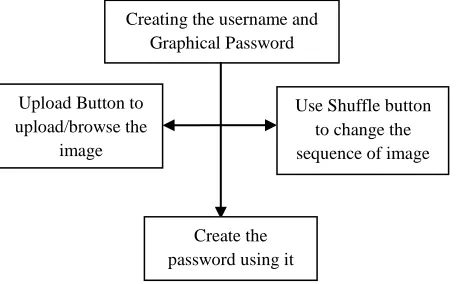
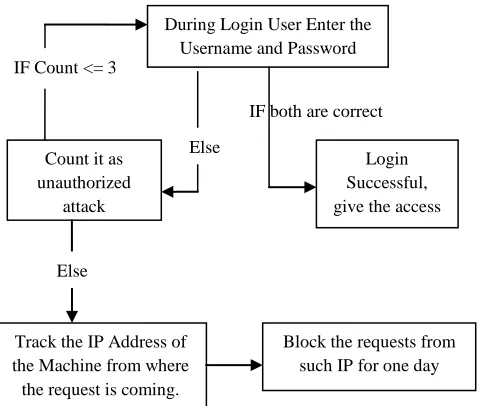
As stated in the above algorithm and below flowcharts the user can create the login first. For creation of login he having two methods he can upload/browse the image from his own collection to set the graphical password. The second way is the user can shuffle all of the images which are previously stored in the database or recently uploaded, because of this the user attacker can get confused and unable to find the appropriate/correct patter of the clicks.
After doing these entire things still the attacker is trying to crack the system/password, then there is a further enhancement in this paper. In this enhancement schema when the user enters the username and password if both the fields are correct then the access is granted to the user otherwise it will count it as a unauthorized attacks, if attacker try to logging with the incorrect username and password again the count get increases., if the unauthorized attack count is less than or equal to three then it will just show a message of incorrect username or password and go back to the login screen. When number of unauthorized attack increases and goes to greater than three then the IP (Internet Protocol) address of the system is trace out from where the request is coming for login and all the request for login on such portal from the same IP address is blocked for a day. Because of this method attacker is unable to do the attack again and if genuine user try to login from his machine then he can able to do so.
[image:4.612.318.548.493.635.2]q
Fig 4: Flowchart for selecting image and creating the username and graphical password.
Creating the username and Graphical Password
Upload Button to upload/browse the
image
Use Shuffle button to change the sequence of image
International Journal of Emerging Technology and Advanced Engineering
Website: www.ijetae.com (ISSN 2250-2459, ISO 9001:2008 Certified Journal, Volume 4, Issue 12, December 2014)
[image:5.612.35.274.147.350.2]517
Fig 4: Flowchart to evaluate the working of proposed system.
V. CONCLUSION
We present an integrated evaluation of the secure Persuasive Cued Click-Points graphical password scheme having the usability and security evaluations, and implementation considerations. In the proposed method we try to improve the security. An important usability goal for knowledge-based authentication systems is to support users in selecting high security passwords, in the sense of being from an expanded effective security space. We use persuasion to influence user choice in click-based graphical passwords, encouraging to the users to select more secure, random passwords. Which are also helpful in stopping the attackers.
REFERENCES
[1] Sonia Chiasson, Elizabeth Stobert, Alain Forget, Robert Biddle, and Paul C. van Oorschot, Persuasive Cued Click-Points: Design, Implementation, and Evaluation of a Knowledge-Based
Authentication Mechanism. IEEE TRANSACTIONS ON
DEPENDABLE AND SECURE COMPUTING, VOL. 9, NO. 2, MARCH / APRIL 2012
[2] Nelson, D.L., Reed, U.S., and Walling, J.R. Pictorial uperiority Effect. Journal of Experimental Psychology: Human Learning and Memory 2(5), 523-528, 1976.
[3] Monrose, F. and Reiter, M. Graphical Passwords.
[4] Wiedenbeck, S., Birget, J.C., Brodskiy, A., and Memon, N. Authentication Using Graphical Passwords: Effects of Tolerance and Image Choice. Symp. on Usable Privacy and Security (SOUPS) 2005.
[5] A.Abuthaheer, N.S.Jeya Karthikka, T.M.Thiyagu , Cued Click Points Graphical Images and Text Password along with Pixel based OTP Authentication ,International Journal of Computer Applications (0975 – 8887)
[6] Wiedenbeck, S., Waters, J., Birget, J.C., Brodskiy, A., and Memon, N. PassPoints: Design and longitudinal evaluation of a graphical password system. Int. Journal of Human- Computer Studies 63, 102-127, 2005.
[7] Dirik, A.E., Memon, N., and Birget, J.C. Modeling user choice in the PassPoints graphical password scheme. Symp. on Usable Privacy and Security (SOUPS) 2007.
[8] B. Burstein, L. Bank, and L. Jarvik. Sex differences in cognitive functioning: Evidence, determinants, implications. Human Development, 23:289–313, 1980.
[9] Jayprakash JP, Defenses Against Large Scale Online Password Guessing Attacks By Using Persuasive Click Points, http://ipinfotech.blogspot.com/2012/08/defenses-against-large-scale-online.html.
[10] S. Chiasson, R. Biddle, and P. van Oorschot, “A Second Look at the Usability of Click-Based Graphical Passwords,” Proc. ACM Symp. Usable Privacy and Security (SOUPS), July 2007.
[11] A. Dirik, N. Menon, and J. Birget, “Modeling User Choice in the Passpoints Graphical Password Scheme,” Proc. Third ACM Symp. Usable Privacy and Security (SOUPS), July 2007.
[12] M. Weir, S. Aggarwal, M. Collins, and H. Stern, “Testing Metrics for Password Creation Policies by Attacking Large Sets of Revealed Passwords,” Proc. ACM Conf. Computer and Comm. Security (CCS), 2010.
[13] S. Chiasson, J. Srinivasan, R. Biddle, and P.C. van Oorschot, “Centered Discretization with Application to Graphical Passwords,” Proc. USENIX Workshop Usability, Psychology, and Security (UPSEC), Apr. 2008.
During Login User Enter the Username and Password
Count it as unauthorized
attack
Login Successful, give the access IF both are correct
Else IF Count <= 3
Track the IP Address of the Machine from where the request is coming.