Software to support student team project
working: evaluating a prototype
Whatley, JE
Title Software to support student team project working: evaluating a prototype
Authors Whatley, JE
Type Conference or Workshop Item
URL This version is available at: http://usir.salford.ac.uk/id/eprint/11486/
Published Date 2010
USIR is a digital collection of the research output of the University of Salford. Where copyright permits, full text material held in the repository is made freely available online and can be read, downloaded and copied for noncommercial private study or research purposes. Please check the manuscript for any further copyright restrictions.
Software to support student team project working: evaluating
a prototype
Janice Whatley
Salford Business School, University of Salford, Manchester, M5 4WT.
Abstract
In this paper a prototype software system to help students to get started on their team project work is evaluated. Using a case study approach, and several cycles of the prototype, it was tested on student undertaking team projects in the information systems discipline. Students experience several difficulties that often prevent them from achieving the best outcomes from their projects, and acquiring the desired team working and IT skills. This system was designed to supplement the existing support tools of groupware or virtual learning environments, by providing support for the maintenance roles of team working. Findings from the study showed that the students did find the system useful, and they envisaged that it would be useful for students working mainly online. The students provided suggestions for ways in which the system could be improved, and its functions enhanced. It is proposed that the system would provide an add-on for existing tools for supporting teams.
1. Introduction
One of the outcomes from an undergraduate education is accomplishment at a variety of skill areas, including IT skills and team working skills (Dacre-Pool and Sewell 2007). The expectations of employers for graduate skills is changing, and they are looking for “employable” graduates, who will be an investment for the long term benefit of the organisation (Hordyk 2007). The traditional IT and team working skills gained through face to face working are changing to globally aware skills, said to be essential for the changing working environment.
Team projects are a suitable learning activity for developing team working skills and IT skills in students. When students are working on campus, they are able to
communicate regularly on a face to face basis, and complete their projects. However, even though studying at a university, the expectations of many students have changed, and with their other commitments, they now choose to complete more of the work for their studies at home or some other location. At the other extreme are students who are studying completely online and do not have the luxury of being able to meet up with peers for elements of collaborative working. Learning technology plays a part in supporting all of these types of students, by providing virtual learning environments, together with facilities for email, discussion, video conferencing and document sharing to help them with their learning and team working. There is a need for research into the best tools for helping student learning and for helping to acquire IT and team working skills.
the system are evaluated. The purpose of the research was also to find out more about how the student teams used the output from the prototype system to help the team to get stated on their projects, and establish whether the system had any impact upon the maintenance roles of team project working.
2. Literature
This section presents a review of the literature related to organisational team working skills, using team projects as a learning activity to promote these skills and the types of support used for supporting student teams.
Collaboration between employees is an integral part of the working environment, and has become the predominant pattern for organisational structures. Yen et al. (1999) suggest that collaborating engages collective wisdom and knowledge. This powerful paradigm has resulted in the word “team” being hijacked as a “buzzword” for modern organisational structuring, e.g. the use of “team building” in whole departments, to motivate employees and encourage conformance to a corporate identity (Ezzamel and Willmott 2001). This has become more widespread, because it appears to give
autonomy to the workforce, but at the same time it gives control to management, particularly through the technology used in the working environment (Sewell 1998). The definition of a team in this research is a small group of between 3 and 15
individuals working together to achieve a common set of goals, with shared objectives, and each team member considering how best to contribute, and often imprinting their personal identity in the social setting of the team. An idealised definition is as follows:
“A team is a collection of individuals who are interdependent in their tasks, who share responsibility for outcomes, who see themselves as and are seen by others as an intact social entity embedded in one or more larger social
systems, and who manage their relationship across organisational boundaries” (Cohen 1997, as cited in Powell et al. 2006).
In organisations, teams of individuals with specialist skills work together to produce outcomes, that would not be possible from individuals working alone, see for example team working in the medical domain (Opie 2000), or in software development (He et al. 2007). Jewels and Albon (2007) refer to the taxonomy of team achievements, which range from “Working groups”, where interaction is predominately to exchange information, to “High performance teams”, where team members are highly
committed to each others’ needs and aspirations. So there is a continuum from group working to true team working, and student teams may be observed to be working at any of these levels as they progress through their team projects.
Most of the literature agrees on a division of team processes into task and maintenance roles (Beranek ae al. 2005), and the interdependence of these roles (Belbin 2000), and the literature suggests that having a common purpose and equitable division of tasks play a part in successfully achieving the task roles of a team project. The maintenance roles are affected by individuals’ expectations of behaviour, how members adapt to the social situation of their work, methods of communication and how conflict within the team is managed.
added later) (Tuckman 1965). It is the ways in which team members pass through these stages that determines the degree of success for a team project. At the forming stage of a project, there is emphasis on developing positive “group dynamics”, through trust building and developing team cohesion, to help the team through the storming stage (Golembiewski and McConkie 1975). The need for good
communication, to deal with norms and expectations is emphasised (Hartley 1997).
In the context of the information systems or computing disciplines in higher
education, team working encompasses various practical skills, such as programming, design, analysis and project management, as well as softer skills such as people management, negotiation, listening and communication. Collaborating with peers is an important form of learning, ranging from discussion of a topic to problem-based learning, many of which occur in team projects. The team project is an opportunity to learn from mistakes, and develop collective and individual skills. Literature talks about team working skills, but does not specify what sorts of skills, or how they can be acquired (Edwards 2005).
Providing the opportunity to gain experience of team working, and practice these skills is the primary purpose of student team project working. Hyland and Johnson (1998) argue that these latter skills are context specific and so cannot be taught as generalised or transferable skills, and agree that opportunities or experiences are the best way to help learners to acquire abilities to act in an acceptable and effective manner towards others in a range of circumstances.
Students working in teams have conflicting needs from the three intertwined areas of team, individual and task. On the one hand they want to work as a team, to achieve the goals of their team project, but their primary goal is to ensure that their individual progress and grades are optimum, and this is the cause of many of the difficulties of student team working cited in the literature. Undergraduate team projects are very complex, and many students have reported difficulties in team working, resulting in negative experiences of the learning activity, e.g. (Chiasson and Dexter 2001). Kaldis et al. (2007) categorise the main problems as inadequate communication and
inconsistencies, those associated with a lack of a clear structure and the resulting inequality of contribution and personality clashes.
Various tools using technology are available to help with aspects of team working, such as project management, file sharing and communication and groupware (Attaran and Attaran 2002). Co-located students are being encouraged to use these tools for their projects, in preparation for using the technology at work. However, the literature suggests that they are more useful for supporting the task roles of a project than helping students come to a shared understanding of each other, resulting from the maintenance roles; thus they do not necessarily help with many of the team working difficulties, and may even exacerbate them (Ford and Morice 2003). Experience of using online team working support tools may benefit co-located students as well as online students, as preparation for the global workplace (Hurst and Thomas 2004).
et al. 1991). These typically involve combining computer mediated communication tools in various configurations, with client-server database networks, within a
standardised interface (Khoshafian and Buckiewicz 1995); (Corbitt and Martz 2003). Groupware may include asynchronous communication tools, such as email and file exchange, but also synchronous tools, such as video conferencing or telephony.
Groupware and knowledge management systems support CSCW activities (Computer Supported Co-operative Working). But groupware was designed to help “goal
directed group work” (Jessup and Valacich 1993), with the main emphasis on enriching meetings on team projects. Corbitt and Martz (2003) go on to say that task processes are supported by such technology, but they question whether the more social aspects are similarly supported, e.g. developing trust and openness. Other evaluation studies on groupware products suggest a limited capability of these
systems to support the collaborative activities, necessary for team working processes, such as discussing preferences, e.g. (Stewart 1998); (Attaran and Attaran 2002); (Salo and Kakola 2005).
It has been observed that providing a variety of communication means, for team members to choose from according to purpose, helps to generate a sense of
community within online teams, and perhaps also for co-located teams (Chapman et al. 2005). Laurillard (1993) suggests that many technologies, such as audio, video and computer conferencing, only support discussion between students rather than true collaboration, and further suggests that CSCW (Computer Supported Collaborative Working) is better at supporting descriptions, providing feedback and reflection.
Virtual Learning Environments (VLEs) have a range of definitions, from web sites that include simple static pages of course material etc., to more elaborate offerings, including multimedia, 3D images etc. However, the most accepted definition refers to commercial learning support environments, such as Blackboard and WebCT. The design of VLEs comes from groupware products, providing learners with access to databases, file exchange, calendaring, as well as education specific functions such as submission of assignments and grading. Research into computer supported
collaborative learning (CSCL), is concerned with investigating learning through collaboration, supported by technology. Meier et al. (2007) suggest that researchers in CSCL should be asking about the aspects of collaboration processes that promote successful collaboration, and how these aspects can be observed to add to knowledge of collaborative learning. The metaphor of the classroom, currently used as a
representation of the tools within virtual learning environments, may not provide an adequate simulation of team working within the working environment. Hugo Fuks (2000) describes a groupware based support environment called AulaNet, intended to give a more realistic simulation of using groupware for learners, as it is based on a business metaphor rather than a classroom metaphor.
In the context of co-located team project working, different communication media will have their application, depending on the circumstances and the purpose of the communication (Detienne 2006). Some communication tools may be more
2006).
This research is concerned with establishing whether software support designed to help students to get started on their team projects, helps with the maintenance roles associated with successful team working, and so promotes the acquisition of team working skills. A prototype of a software tool to support student team project working was developed, which included the functions of suggesting an allocation of project tasks to suitably qualified team members, and providing a list of agreed ground rules for the team to consider as they start their project work.
The next section describes the methods used for this research, and how the trial of the prototype system was carried out.
3. Methods used for this research and prototype trial
This research was aimed at examining the ways in which students in a team used a new software support tool, and the impact it had upon the process of their team projects, in supporting the maintenance roles of team working. The research takes the form of an exploratory case study (Bonoma 1985), using the trial of a prototype system as the case to be studied. An interpretive research approach was taken, because we were interested in exploring the potential of this technology for helping support the learning of individuals in teams, rather than simply a positivist approach of establishing the success of the intervention of this case.
A prototype system was developed to help students to get started on their team
Figure 1 – Screen shot of team member selection page for generic team skills.
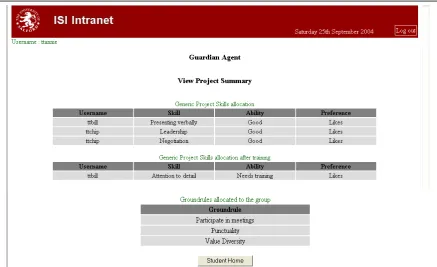
The output from the system could be arranged by task area or by team member, as in the example given in Figure 2, where one team member has input a preference and ability in both leadership and negotiation skills, and another team member has input a preference and ability in presenting verbally, but only a preference for attention to detail, so the system has suggested some training in this for that team member. A short list of only three ground rules has been output in this instance, as the only suggested rules that more than half of the team members indicated were important. The system took on three different appearances over several annual cycles of the prototyping, between 2002 and 2008, and each successive version was amended according to feedback from the previous trial with students, and incremental addition of functions. These screen shots represent the final version.
[image:7.595.88.526.494.761.2]
This prototype student team support tool was used with undergraduate students, working on multi-year team projects in a co-located setting. The students were taking one of several business information systems programmes of study, and teams were allocated to include students from first, second and final years of study, totalling between 10 and 15 students in each team. The projects undertaken were provided by outside organisations, which could include web design, database development or feasibility studies. Because of the variety of these projects the teams had a good deal of autonomy to organise the work as they felt was appropriate. All of the teams were asked, through their team leaders, to participate in the trials, by using the system at the beginning of their projects to allocate tasks to individual members of their team, a process that took about four weeks. In all about a quarter of the project teams used the system, team leaders opted in or out of the trials on behalf of their team members. As the system was designed for use at the beginning of the student team projects, the trials could only be conducted at the start of each academic year when the student teams started working on their projects, hence the long time frame for collecting data for this research.
After each trial of the prototype, students were asked for feedback on the system through answers to a questionnaire, an interview the researcher conducted with team leaders, and two focus groups, each of which had contribution from about 8 students. The questionnaire was designed by the researcher with the team project module tutor, and was given to each member of all of the teams that participated in the study. The questionnaire contained a combination of closed questions to ascertain the usefulness of the system to the individual, to their team and to online teams, together with open questions for respondents to identify changes, additions and other functions for the system. Quantitative analysis of this data was simply to gauge the extent of agreement with the usefulness of the system. Comments from the open questions were analysed in a qualitative manner, along with the interview responses and focus group
comments.
Qualitative analysis of the data was through sorting the comments according to whether they were related to possible modifications to the system, or were related to themes identified from the literature on student team working, such as developing skills, ground rules, expectations, project management, culture and team cohesion. These themes were based around how the output from the system was used to help the teams to get started on their projects, and the impact this output had on establishing team-working processes. In addition the findings were enriched by some quantitative results, which gave an indication of the extent of the impact of the software tool on their team working activities.
Over the four-year period of the trials about 30 teams used the prototype system, representing about a quarter of all of the teams. The response rate for the
questionnaires was about 35%, but interviews were conducted with team leaders from all of the teams that had used the system.
4. Results from using the prototype system
Responses from the questionnaires enabled us to evaluate the level of acceptance by the students of the software tool. Analysing the data from all four years of the prototype use, 50% of those students who responded said that the system was useful to them. When asked if they thought the system would be useful to online student teams, 71% agreed that they thought it would be useful.
Interpretive research demands that the reasons for responses are identified, and the comments from students obtained through open ended questions on the questionnaire, the focus groups and in the interviews with team leaders, were analysed to gain richer insight into the students’ use of the system.
4.1. Allocation of tasks
Although the students were divided over whether the system was useful to them, the team leaders were overwhelmingly in favour of using the system. Typical comments on the usefulness of the task allocation function from team leaders (TL) were:
“Yes, showed clearly the technical and other types of people.” TL, 2003 “…build a knowledge base of the skills existing and required and matched to the specification of the project” TL, 2004
“It made them think about the skills, choosing them” TL, 2004
However, there were comments from a few team leaders that this form of automation was not necessary, e.g:
“In my project it was cut and dried what needed to be done, useful if
programming software, but as a research project, there is really no need for automation.” TL, 2004
The output from the system was used in different ways by some teams, which had not been anticipated at the design stage, and these could be signposted as possible actions in a future system:
“See all gradings for everyone. So if low mark can put with more confident person” TL, 2005
“Task allocation affected by motivation, allocate tasks using a risk analysis approach – don’t allocate key tasks to high risk people” FG, 2002
“Problem that it is what each individual team member thinks they are good at, not what their aptitude is” FG, 2002
4.2. Ground rules
Few student teams had in the past considered setting ground rules for the team at the start of their projects. But this system encouraged good practice, which was
recognised by some teams, as shown by these comments:
“Good to air the ground rules, no one was shy to talk about it” TL, 2004 “…getting people's opinions, success factors of the project” TL, 2004 “…by looking at the ground rules, the team had a better understanding of team working, and I based the contract on them…” TL, 2008
“Good to highlight to team at start, made them think about expectations” FG, 2004
“This [team spirit] is an important factor, [ground rules] help to understand how they work together and adapt to situations” TL, 2004
“Much team work is undocumented rules” FG, 2002
This last comment suggests that a lot more is going on in teams than can be formalised, and that this sort of system can be instrumental in guiding the student teams towards good practice.
4.3. Acceptance of the system
Most of the teams in this trial accepted the system, and readily incorporated the system and its output into their team working, but the culture of team working within the school was deep set, and comparisons were made with previous practice:
“Hard to get away from method used previously. Let’s do what we normally do” FG, 2004
The teams in this study were working on campus, but many students accessed the system from home, so their comments would be a good indicator of whether the system would be useful for teams working mainly online:
“Yes it would be good online, where it would be very difficult to decide on the skills that each member had” TL, 2004
“We meet together to sort the next task, face-to-face [communication] is important, if online we would need some kind of structure, communication plan, e-mail, would be more useful” TL, 2004
“Even more difficult in virtual teams, to abide by ground rules, e.g. trust, culture develops in time.” FG, 2004
4.4. Possible development for the system
Examining the comments made by the students provided possible reasons for the system’s limitations in these trials:
“It needs to be communicated to all team members at the beginning, to introduce the tool.” TL, 2008
“Down to purpose, and explaining the purpose – if people understand that it is there to help them” FG, 2002
“Used earlier it may have speeded up the project, because the first tasks allocated would have been based on their preferences, and see how they got on with them.” TL, 2008
“…but people get on with their own work rather than look at project as a whole.” FG, 2004
The research did provide several suggestions for future developments of the system, which would make it more useful in this particular case, and which might make it useful for other cases as well:
“How to handle problems, what has happened in the past.” TL, 2003 “Deadlines to tick off. Agent would keep a record of deadlines” FG, 2004 “..keeping up with tasks, assign tasks to members, monitoring of completion, for documentation” TL, 2003
The system could provide the following features:
“More information on skills, e.g. report writing” TL, 2005
“Feedback on carrying out documentation, what is expected, roles, responsibilities” TL, 2003
“Look at how people have done on past modules (skills assessment) and undertake some form of ‘measure’” FG, 2002
“Online team shared workspaces, linked with project management for deadlines, update from home, and freely available.” TL, 2005
“Agent could act as the decision maker, skills assessment, which types of people would work well together” FG, 2002
The comments in this section provided a snapshot of what many of the students, and in particular the team leaders, thought of the prototype system. In the next section the results will be discussed in the light of some of the literature on student team working, to determine the extent to which the system can help to develop team working and IT skills.
5. Discussion of the findings
Data from the surveys and focus groups provided informative feedback on the system as it was used in this case. Ways in which the system was used in practice differed from that which was anticipated, but demonstrated that there is a need for help to get the teams started on their team projects.
Feedback from the students that used the system suggests that this sort of software would be useful to help the teams to get to know each other’s capabilities and
The ground rules function, although not used by all of the teams, was regarded as a useful prompt for discussion. Again this means of communication of ground rules preferences is a feature not provided by existing groupware or student support systems, but recognised by Hartley (1997) among others as essential for team cohesion.
Some students suggested that the system would be more useful for teams working online, as an additional support to replace some of the face to face meetings. The students in this case suggested several ways in which the system could be made more useful, such as introducing the system to the teams before they get started, and providing signposts to possible actions and uses of the output from the system. In addition they suggested enhancements, which although specific to this case, would provide additional support for team working to students in other disciplines.
6. Conclusions
This paper describes the evaluation of the usefulness of a software system developed to support students working on team projects. Using a case study approach, and through a series of prototypes of the system, the feedback from the students who tried the system showed that such a system was useful to them in getting started on their team project work. The ways in which the teams chose to use the output from the system was sometimes different to that envisaged by the designer, but highlighted a need for some form of support for team project work, particularly where student teams are dispersed, and this system did help to promote openness and trust.
The final prototype embraces two functions, and by considering the suggestions put forward by the students in this trial, a system that provides additional support and enhances the provision of existing groupware or VLEs is proposed.
References
Aiken, M., Lui Sheng, O. and Vogel, D. (1991), "Integrating expert systems with group decision support systems", ACM Transactions on Information Systems 9(1): 75-96.
Attaran, M. and Attaran, S. (2002), "Collaborative computing technology: the hot new managing tool",
Team Performance Management 8(1/2): 13-20.
Belbin, R. M. (2000), Beyond the Team, Oxford, Butterworth-Heinemann.
Beranek, G., Zuser, W. and Grechenig, T. (2005), Functional Group Roles in Software Engineering Teams, HSSE, St Louis, Missouri, USA, May 16th 2005, ACM.
Bonoma, T. (1985), "Case research in marketing: opportunities, problems and a process", Journal of Marketing Research 22(2): 199-208.
Chapman, C., Ramondt, L. and Smiley, G. (2005), "Strong community, deep learning: exploring the link", Innovations in Education and Teaching International 42(3): 217-230.
Chiasson, M. and Dexter, A. (2001), "System development conflict during the use of an information systems prototyping method of action research: implications for practice and research",
Information Technology and People 14(1): 91-108.
Corbitt, G. and Martz, B. (2003), "Groupware case studies: trust, commitment and the free expression of ideas", Team Performance Management 9(1/2): 16-22.
Dacre-Pool, L. and Sewell, P. (2007), "The key to employability: developing a practical model of graduate employability", Education and Training 49(4): 277-289.
Dalsgaard, C. (2006), "Social software: E-learning beyond learning management systems", European Journal of Open, Distance and E-Learning.
Detienne, F. (2006), "Collaborative design: Managing task interdependencies and multiple perspectives", Interacting with Computers 18: 1-20.
Edwards, G. (2005), CONNECTING PDP TO EMPLOYER NEEDS AND THE WORLD OF WORK,
September 2007.
Ezzamel, M. and Willmott, H. (2001), "Accounting for teamwork: a critical study of group-based systems of organizational control", Administrative Science Quarterly 43: 358-396.
Ford, M. and Morice, J. (2003), Using micro management techniques to overcome problems in group assignments, InSITE, Informing Science and IT Education, Pori, Finland, June 24-27 2003. Fuks, H. (2000), "Groupware technologies for education in AulaNet", Computer Applications in
Engineering Education 8(3-4): 170-177.
Golembiewski, R. T. and Mcconkie, M. (1975), "The centrality of interpersonal trust in group processes", In-Theories of Group Processes, Cooper, C. L., Wiley.
Hartley, P. (1997), Group communication, London, Routledge.
He, J., Butler, B. and King, W. (2007), "Team cognition: development and evolution in software project teams", Journal of Managment Information Systems 24(2): 261-292.
Hordyk, V. (2007), "A convergence of perspectives: enhancing students' employability", In-Education in a Changing Environment:Conference Book, O'Docherty, E., Salford, UK, Informing Science, Vol-4.
Hurst, D. and Thomas, J. (2004), "Developing team skills and accomplishing team projects online",
Theory and practice of online learning.
Hyland, T. and Johnson, S. (1998), "Of cabbages and key skills: exploding the mythology of core transferable skills in post-school education", Journal of Further and Higher Education 22(2): 163-172.
Jessup, L. M. and Valacich, J. (1993), Group Support Systems: New Perspectives, New York, Macmillan Publishing Company.
Jewels, T. and Albon, R., (2007), "Supporting Arguments for Including the Teaching of Team Competency Principles in Higher Education", International Journal of Information and Communication Technology Education 3(1): 58-69.
Kaldis, E., Koukoravas, K. and Tjortjis, C. (2007), "Reengineering academic teams toward a network organizational structure", Decision Sciences Journal of Innovative Education 5(2): 245-256. Khoshafian, S. and Buckiewicz, M. (1995), Introduction to groupware, workflow and workgroup
computing, Toronto, John Wiley.
Laurillard, D. (1993), Rethinking university teaching, London, Routledge.
Opie, A. (2000), Thinking teams/ thinking clients: knowledge-based teamwork, New York, Columbia University Press.
Powell, A., Galvin, J. and Piccoli, G. (2006), "Antecedents to team member commitment from near and far: a comparison between collocated and virtual teams", Information Technology & People
19(4): 299-322.
Salo, A. and Kakola, T. (2005), "Groupware support for requirements management in new product development", Journal of Organizational Computing and Electronic Commerce 15(4): 253-284.
Sewell, G. (1998), "The discipline of teams: the control of team-based industrial work through electronic and peer surveillance", Administrative Science Quarterly 43: 397-428.
Stewart, J. R., E & Bederson, B & Druin, A (1998), "When two hands are better than one: enhancing collaboration using single display groupware", ACM SIGCHI.
Tuckman, B. W. (1965), "Developmental sequence in small groups", Psychological Bulletin 63: 384-399.