Smart Card with Android Terminal for Access
Control
Rashmi Hegde#1, Dr. T H Sreenivas#2
PG Student, Department of IS&E, The National Institute of Engineering, Mysore, India
Professor, Department of IS&E, The National Institute of Engineering, Mysore, India
ABSTRACT: Access control is the selective restriction of access to a resource. Access control seeks to prevent activity that could lead to breach of security. It is necessary to update access control systems with ever changing security requirements. Smart card technology is well suited for access control because of its optimized results through cryptography, encryption, and computing power. It is affordable, secure and gives 2nd factor authentication.The world is now attracted towards android which can be proved just by looking at its market share. Android to run access control apps can give users more flexibility and user experience for running all the interoperable applications built on smart cards.
KEYWORDS: Access Control, Smart Cards, Android, Cryptography, Security. I. INTRODUCTION
In the fields of access control is the selective restriction of access to a place or other resource.The act of accessing may mean consuming, entering, or using. Permission to access a resource is called authorization. When a credential is presented to a reader, the reader sends the credential’s information, usually a number, to a control panel, a highly reliable processor. The control panel compares the credential's number to an access control list, grants or denies the presented request, and sends a transaction log to a database. When access is denied based on the access control list, the door remains locked. If there is a match between the credential and the access control list, the control panel operates a relay that in turn unlocks the door. The control panel also ignores a door open signal to prevent an alarm. Often the reader provides feedback, such as a flashing red LED for an access denied and a flashing green LED for an access granted. There are three types (factors) of authenticating information:
Something the user knows, e.g. a password, pass-phrase or PIN.
Something the user has, such as smart card or a key fob.
Something the user is, such as fingerprint, verified by biometric measurement [1].
In today's complex and constantly changing business world, different levels of access control are required in different areas for different business purposes [2]. To insure that the ever-changing security requirements of a facility are met, a periodic review of a site’s access control system and its associated policies is a necessity.Access control seeks to prevent activity that could lead to breach of security. It is very much necessary to update access control mechanisms often with ever-changing security requirements. It is the fact that the contactless smart card technology is well-suited for access control applications because it is optimized to provide highly-secure results by using cryptography, encryption and the internal computing power of the smart chip.
Figure 1: Relative Security Levels of Commonly Used Card Technologies (lowest to highest)[3]
Magnetic stripe (magstripe) has the lowest security with its technical details being well documented by ISO standards. This technology typically uses little or no security protections. Additionally, off the- shelf devices are widely available to encode magstripe cards. Although there are some techniques that can make magstripe more secure, widespread adoption of these techniques in the access control industry have not occurred due to the convenience, security, and increased memory available in contactless smart cards.
125 kHz proximity (Prox) card technology and the use of the Card Serial Number (CSN) of a contactless smart card are better than magnetic stripe but are not as secure as contactless smart cards. Prox card devices that can copy and emulate (mimic) Prox cards have been demonstrated. Similarly, because there is no secure authentication of the CSN and the knowledge of the CSN workings are published as part of the ISO standards, CSN emulation is also easily accomplished.
Contactless smart cards, when properly implemented and deployed, offer the highest level of security and interoperability. These cards use mutual authentication and employ cryptographic protection mechanisms with secret keys. They may also employ special construction and electrical methods to protect against external attacks [3].
II. RELATED WORK
III.MORE ON ACCESS CONTROL
Access to accounts can be enforced through many types of controls. Some of the access control models are:
1. Attribute-based Access Control (ABAC) : An access control paradigm whereby access rights are granted to users through the use of policies which evaluate attributes (user attributes, resource attributes and environment conditions).
2. Discretionary Access Control (DAC) : In DAC, the data owner determines who can access specific resources. For example, a system administrator may create a hierarchy of files to be accessed based on certain permissions.
3. History-Based Access Control (HBAC) : Access is granted or declined based on the real-time evaluation of a history of activities of the inquiring party, e.g. behavior, time between requests, content of requests.For example, the access to a certain service or data source can be granted or declined on the personal behavior, e.g. the request interval exceeds one query per second.
4. Identity-Based Access Control (IBAC) : Using this network administrators can more effectively manage activity and access based on individual needs.
5. Mandatory Access Control (MAC) : In MAC, users do not have much freedom to determine who has access to their files. For example, security clearance of users and classification of data (as confidential, secret or top secret) are used as security labels to define the level of trust.
6. Organization-Based Access control (OrBAC) : OrBAC model allows the policy designer to define a security policy independently of the implementation
7. Role-Based Access Control (RBAC) : RBAC allows access based on the job title. RBAC largely eliminates discretion when providing access to objects. For example, a human resources specialist should not have permissions to create network accounts; this should be a role reserved for network administrators.
8. Rule-Based Access Control (RAC) : RAC method is largely context based. Example of this would be only allowing students to use the labs during a certain time of day.
9. Responsibility Based Access control : Information is accessed based on the responsibilities assigned to an actor or a business role.
Access control readers may be classified by the functions they are able to perform:
Basic (non-intelligent) readers: simply read card number or PIN, and forward it to a control panel. In case of biometric identification, such readers output the ID number of a user. Typically, Wiegand protocol is used for transmitting data to the control panel, but other options such as RS-232, RS-485 and Clock/Data are not uncommon. This is the most popular type of access control readers. Examples of such readers are RF Tiny by RFLOGICS, ProxPoint by HID, and P300 by Farpointe Data.
Intelligent readers: have all inputs and outputs necessary to control door hardware; they also have memory and processing power necessary to make access decisions independently. Like semi-intelligent readers, they are connected to a control panel via an RS-485 bus. The control panel sends configuration updates, and retrieves events from the readers. Examples of such readers could be InfoProx IPO200 by CEM Systems, and AP-500 by Apollo. There is also a new generation of intelligent readers referred to as "IP readers". Systems with IP readers usually do not have traditional control panels, and readers communicate directly to a PC that acts as a host. Examples of such readers are Foxtech FX-50UX, FX-632 Fingerprint Reader/Controller Access Control System PowerNet IP Reader byIsonas Security Systems,ID 11 by Solus (has a built in webservice to make it user friendly), Edge ER40 reader by HID Global, LogLock and UNiLOCK by ASPiSYS Ltd, BioEntry Plus reader by Suprema Inc., and 4G V-Station by Bioscrypt Inc.
Some readers may have additional features such as an LCD and function buttons for data collection purposes (i.e. clock-in/clock-out events for attendance reports), camera/speaker/microphone for intercom, and smart card read/write support.Access control readers may also be classified by their type of identification technology.
In computer security, general access control includes authorization, authentication, access approval, and audit. A more narrow definition of access control would cover only access approval, whereby the system makes a decision to grant or reject an access request from an already authenticated subject, based on what the subject is authorized to access. Authentication and access control are often combined into a single operation, so that access is approved based on successful authentication, or based on an anonymous access token. Authentication methods and tokens include passwords, biometric scans, physical keys, electronic keys and devices, hidden paths, social barriers, and monitoring by humans and automated systems.
In any access-control model, the entities that can perform actions on the system are called subjects, and the entities representing resources to which access may need to be controlled are called objects (see also Access Control Matrix). Subjects and objects should both be considered as software entities, rather than as human users: any human users can only have an effect on the system via the software entities that they control.
Although some systems equate subjects with user IDs, so that all processes started by a user by default have the same authority, this level of control is not fine-grained enough to satisfy the principle of least privilege, and arguably is responsible for the prevalence of malware in such systems.
IV. SMART CARDS FOR ACCESS CONTROL
A smart card is a credit card-sized piece of plastic, with a small microchip embedded on the face of oneside. The microchip is actually a very small computer – complete with an operating system, applicationsoftware, permanent storage, and I/O communication facilities. Smart cards have been around sincethe mid-1980’s, but to date have been far more prevalent in Europe than in the United States.
Figure 2 : A Smart Card and close-up of the Embedded Chip[4]
These cards and their cryptographic keys are nearly always protected by a PIN or password, which thecard owner must enter in order to use his card. This prevents someone other than the owner frommaking use of a lost or stolen card. Most cards also have some means of “locking” the card after acertain number of incorrect PINs are entered (generally between 3 and 10), to thwart PIN-guessingattacks. In addition, most cards have some means of unblocking a card once it has been locked, byentering a special unblocking PIN code. Usually these cards will permanently disable the card if toomany incorrect unblocking codes have been entered.
PKI-enabled smart cards can be used for an ever-widening variety of applications, such as:
Network Login. Microsoft’s smart card login capability comes standard with all versions ofWindows from Windows 2000 and above.
Remote Access. Smart cards could be used for employee authentication when establishing a VPNconnection to the client over the Internet.
Wireless Networking Authentication. Wireless access points and authentication providers could be configured such that access to the client wireless networks would require a smart card – adramatic improvement over traditional wireless authentication methods.
Secure Email. Lotus Notes includes smart card capabilities via PKCS#11 starting with version6.02. This would allow users to sign and encrypt email with their smart card.
PGP. PGP has included PKCS#11 functionality in corporate versions of the software since version7.0.
SSL. Smart cards and their digital certificates could be used to authenticate users and securecommunications to both internal and external websites.
Contactless smart card technology is well-suited for access control applications. It provides higher levels of security than traditional access control technologies and the platform from which additional applications can be implemented on the same credential. There are products available on the market today that provide an affordable migration path to smart card technology while protecting customer investments in existing infrastructures.Whether you are installing a new or expanding an existing system, or undertaking a major upgrade, there are several considerations for using contactless smart cards instead of proximity or other access control card technologies.
Benefits of Contactless Smart Cards for Access Control are
Contactless smart cards achieve a higher security level of the credential and the overall access control system.
Contactless physical access control credentials can carry secure IT applications such as secure logon to networks, digital signature, and encryption.
Contactless smart cards provide more storage and the secure reading and writing of data.
The capability to add other applications to the card is one of the most important advantages of contactless smart cards over proximity technology.
Organizations considering biometrics for either physical access or IT security applications can use contactless smart cards as a secure carrier of the biometric template.
Future-proofing - the desire to embark on a path offering greater expandability in the years to come.
Contactless smart card technology is affordable[5].
V. ANDROID
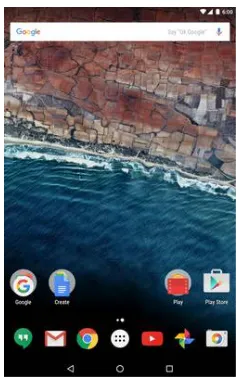
Android is a mobile operating system (OS) currently developed by Google, based on the Linux kernel and designed primarily for touchscreen mobile devices such as smartphones and tablets. Android's user interface is mainly based on direct manipulation, using touch gestures that loosely correspond to real-world actions, such as swiping, tapping and pinching, to manipulate on-screen objects, along with a virtual keyboard for text input. Android has the largest installed base of all operating systems of any kind. Android has been the best-selling OS on tablets since 2013, and on smartphones it is dominant by any metric. Figure 4 shows the android architecture with different layers and figure 5 shows the look of the android OS on a smart phone. Figure 6 shows the increase in market sharefor android in recent years.
Figure 5 :Android_6.0.1_Home_Screen_Nexus_7 [1]
Figure 6 :Market share of android v/s other mobile OS
VI.PROPOSED WORK
VII. RESULTS AND OBSERVATIONS
When this concept was tested, the feedback that came from users was good. It was more user friendly and speedy process. Most of the users showed keen interest in moving towards smart cards as it can be used with their hand held device that they can carry anywhere anytime. This can also bring new market share to android developers.
VIII.CONCLUSION
Contactless smart card technology is well-suited for access control applications. It provides higher levels of security than traditional access control technologies and the platform from which additional applications can be implemented on the same credential. There are products available on the market today that provide an affordable migration path to smart card technology while protecting customer investments in existing infrastructures. The usability and flexibility of access control can be improved by having android access control apps that gives the user secured reading and writing of data and also a smooth user experience. The user need not worry about searching the terminals every time for checking the wallet balance and last used data. The user will have a handheld device to carry and work with it whenever necessary.
ACKNOWLEDGMENT
We are greatly thankful to our family and friends for the continuous support that has provided a healthy environment to drive us to do this project. We also thank the Principal and the Management of NIE for extending support to this work.
REFERENCES
[1] www.wikipedia.org
[2] White paper, HP ProCurve Networking Access Control Security Solution. [3] White paper from HID, Best Practices in Access Control.
[4] Deploying Smart Cards in Your Enterprise, www.css-security.com.
[5] Smart Cards for Access Control,Advantages and Technology Choices, www.hidcorp.com.
BIOGRAPHY
Rashmi Hegde was born in Mysore,India (1993). She obtained B.E. in 2014. She is presently a student of M.Tech at National Institute of Engineering, Mysore inComputer Network Engineering. Her research interests are in the field of Ad Hoc networks, android, network security