Stratagy
®
ES
Messaging Voice Processing
Sales Bulletin
726+,%$
Announcing Stratagy ES Release 2
Including the MVP Application Suite
We are proud to announce our second major release of software for the Stratagy Enterprise Server (ES). In Release 1, we offered the Stratagy ES as the platform for the Interactive Voice Response (IVR) Application Suite. With Release 2, we add to that functionality the introduction of our newest Application Suite— Messaging Voice Processing or MVP.
Now your customer can add voice mail and Automated Attendant functions to your existing Stratagy ES IVR system, or purchase the Stratagy ES with just MVP for a feature rich Microsoft
®
Windows NT®
based voice processing system.
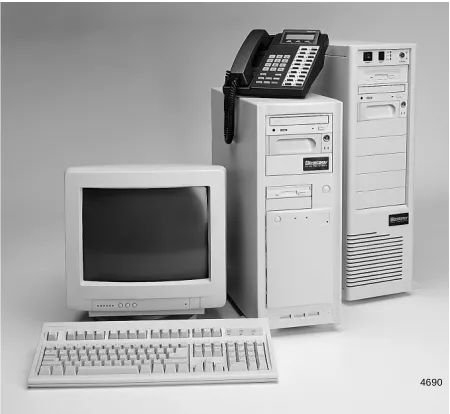
The Stratagy ES is a powerful hardware/software platform that runs on the Windows NT 4.0 operating system. The Stratagy ES comes in two hardware configurations (see Figure 1) – Model A is a large tower cabinet equipped with a passive backplane architecture, a Central Processing Unit (CPU) located on a Peripheral Component Interconnect (PCI)-based Single Board Computer (SBC), eight Industry Standard Architecture (ISA) slots, and four PCI slots. Model B is a mid-size tower unit equipped with a motherboard with five dedicated ISA slots, one dedicated PCI slot, and one ISA/PCI shared slot.
The ISA slots accept Dialogic
®
voice and/or resource boards. Some PCI slots are used for other peripheral devices, i.e., Network Interface Card (NIC).The Stratagy 24 Plus equipped with Release 3.1 software can also be upgraded to a Stratagy ES. All models use the same software, perform identical functions, and are factory loaded with either Microsoft Windows NT Server or Workstation.
The Stratagy ES provides the flexibility and versatility to accommodate a family of product applications called Application Suites and Feature Groups.
Application Suites—Interactive Voice Response (IVR) and Messaging Voice Processing (MVP)—can function independently, in conjunction with each other, and with a combination of Feature Groups. A Feature Group is a separate selection of features that provides specific capabilities such as Unified Messaging (UM), Fax Server, Text-To-Speech (TTS)/Email, and Automatic Speech Recognition (ASR) Automated Attendant.
With the initial release of MVP, the Fax Server Feature Group is available as an option. The UM, TTS/Email, and ASR AA Feature Groups are scheduled for release in the second quarter of 2000.
Figure 1 Stratagy Enterprise Servers
4690 SBVP-0001
Hardware Description SBVP-0001
Hardware Description
Stratagy ES’s architecture facilitates integration of additional hardware requirements. The internal components vary depending on configuration. All external connectors and wiring are customer supplied.
A basic Stratagy ES supports from 4~48 voice ports. As an option up to 48 additional voice ports can be added (49~96). Stratagy ES does not come with pre-installed voice boards. Voice boards are ordered with the system and boxed separately.
A basic Stratagy ES with just MVP has a capacity of approximately 200 hours of voice storage. Available voice and/or data application storage is dependent upon hard drive size, installed software to support some Feature Groups (e.g., Fax Server, ASR AA) and customer applications.
Both Model A & B platforms utilize ISA and PCI bus expansion slots for required equipment. The hard drive of every Stratagy ES is enclosed in a removable hard drive bay for easy access and maintenance.
Important! The key lock for the hard disk drive must be in the locked position before the hard drive is operational.
♦ Model A: The CPU is located on a PCI-based SBC including the disk controller, two serial ports, and one parallel port.
Future upgrade options for this platform will include CPUs with higher processing speeds. Upgrades will be accomplished by removing the current SBC and replacing it with the new higher speed SBC instead of replacing the entire platform.
♦ Model B: The CPU is located on the motherboard. This CPU cannot be upgraded.
Base System Components
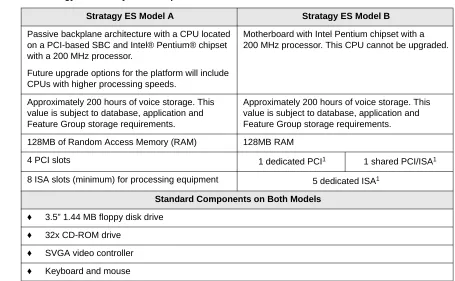
The Stratagy ES’s base components are shown in Table 1.
Table 1 Stratagy ES Base System Components
Stratagy ES Model A Stratagy ES Model B
Passive backplane architecture with a CPU located on a PCI-based SBC and Intel® Pentium® chipset with a 200 MHz processor.
Future upgrade options for the platform will include CPUs with higher processing speeds.
Motherboard with Intel Pentium chipset with a 200 MHz processor. This CPU cannot be upgraded.
Approximately 200 hours of voice storage. This value is subject to database, application and Feature Group storage requirements.
Approximately 200 hours of voice storage. This value is subject to database, application and Feature Group storage requirements.
128MB of Random Access Memory (RAM) 128MB RAM
4 PCI slots 1 dedicated PCI1 1 shared PCI/ISA1
8 ISA slots (minimum) for processing equipment 5 dedicated ISA1
Standard Components on Both Models
♦ 3.5” 1.44 MB floppy disk drive
♦ 32x CD-ROM drive
♦ SVGA video controller
SBVP-0001 Hardware Description
Optional Processing Equipment
Processing equipment is ordered with the system and boxed separately. The following equipment is optional and can be included in the initial configuration or added as an upgrade.
High-resolution color monitor
Voice Interface Boards:
♦ ProLine/2V
™
(2 ports) – Part No. SG-DL-P2♦ Dialog/4
™
(4 ports) – Part No. SG-DL-P4♦ SCbus Connection Boards:
♦ D/160SC-LS
™
(16 ports) – Part No. SG-DL-P16♦ D/41ESC
™
(4 ports) – Part No. SES-DL-P4-SC♦ D/240SC-T1
™
(24 digital T1 ports) – Part No. SES-DL-P24-T1♦ D/480SC-2T1
™
(48 digital T1 ports) – Part No. SES-DL-P48-2T1Note To avoid conflict issues with SCbus features (fax, TTS, ASR), Toshiba strongly discourages the mixing of SCbus compatible and non-SCbus compatible voice interface boards.
Resource Boards:
♦ GammaLink
®
GammaFax board for fax applications – Part Nos. SES-GFAX-SP6SC (6 channels), SES-SGAX-SP12SC (12 channels).♦ Dialogic Antares
™
board for TTS or ASR capabilities – Part No. SES-ANT-2000/50Note The D41ESC or D160SC-LS must be installed if you install a GammaFax or Antares board.
Additional System Resource Components:
♦ 8GB TR-4 Travan
™
tape drive (included for IVR systems) – Part Nos. SES-TAPE-DR-8GB, SES-TAPE-KIT-8GB♦ Serial port boards
♦ ONEAC
™
Model ON400A-SN (or equivalent), 400VAC, 1/2 hour UPS with Power Conditioner and Ground Bar with serial cable. Required for all Stratagy ES systems.Note A Toshiba Stratagy ES-approved Uninterruptible Power Supply (UPS) is required on all
Stratagy ES systems. Any damage to an installed Stratagy ES that could have been prevented by the use of a UPS may negate the system’s warranty.
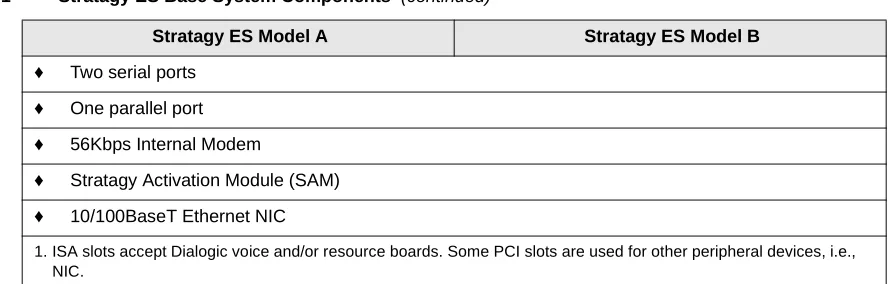
♦ Two serial ports
♦ One parallel port
♦ 56Kbps Internal Modem
♦ Stratagy Activation Module (SAM)
♦ 10/100BaseT Ethernet NIC
1. ISA slots accept Dialogic voice and/or resource boards. Some PCI slots are used for other peripheral devices, i.e., NIC.
Table 1 Stratagy ES Base System Components (continued)
Stratagy ES Software Platform Configurations SBVP-0001
Stratagy 24 Plus
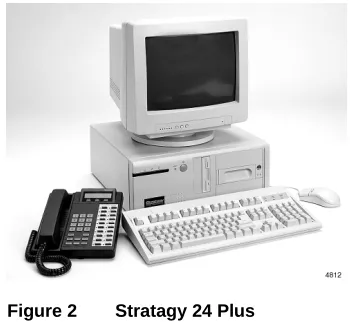
The Stratagy 24 Plus (Figure 2) can be upgraded to a Stratagy ES using a Stratagy 24 Plus to Stratagy ES Upgrade Kit (WKS or SES-SG24+UP-SVR). See the Stratagy R3 General Description for a general description and specifications for the Stratagy 24 Plus.
Stratagy ES Software Platform Configurations
The Stratagy ES can be ordered factory loaded with either Microsoft Windows NT Server 4.0 or Windows NT Workstation 4.0.
Because Windows NT Workstation is limited to a maximum of 10 network client licenses, the Stratagy ES with Windows NT Workstation is recommended for:
♦ Installations requiring increased voice port capacities above the DOS-based Stratagy systems
♦ Advanced voice processing applications requiring the power of Windows NT but not requiring multiple network client connections
The Stratagy ES running Windows NT Server is recommended for installations requiring communication with a number of client PCs on a network. For example, in UM multiple client PCs must have network access to the Stratagy ES to receive voice and fax messages on the PC desktop.
Important! Toshiba does not furnish Windows NT software for a Workstation to Server upgrade. Therefore, a customer’s requirement for future client-based features should be closely scrutinized before ordering a Stratagy ES with Windows NT Workstation.
Basic Features
This section presents an overview of some of the basic features available on all Stratagy ES configurations, regardless of the Application Suite.
See the Stratagy ES General Description for detail descriptions of the Stratagy ES MVP features.
User Agents
The Stratagy ES is a system capable of numerous applications. Most applications are performed by software objects that hold properties and privileges for various functions. These objects are called User Agents. Similar to the User ID concept in the DOS-based Stratagy systems, a User Agent can be used to define a Class of Service, a system distribution list, an IVR application, a user mailbox, an AMIS Gateway or Proxy mailbox, and the Direct Send Voice or Fax function. It is the properties of the User Agent that determines it’s identity.
SBVP-0001 Stratagy ES Administration Software
Multiple System Languages
The Stratagy ES can be configured with any number of different audio prompt files and communicate in different languages on different ports simultaneously. American English comes as a standard prompt option.
Multi-tasking and/or Multi-threading on a Per-port Basis
IVR and MVP applications can be performed simultaneously, such as playing a voice file while the system is performing a database access and providing other call processing options to the telephone/fax user.
Year 2000 Compliance
Stratagy ES is year 2000 compliant. Features that operate based on the time of day (e.g., future delivery messages, message waiting notification, auto schedules) are not adversely affected by the new millennium.
Stratagy ES Administration Software
The Stratagy ES Administration software program is preloaded on every system and is composed of the administrative and configuration menus for the system. Operating software, voice prompts, and database access utilities are all stored on the Stratagy ES’s hard drive.
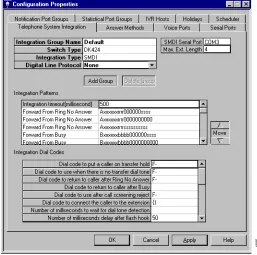
The Stratagy ES Administration program uses a Graphical User Interface (GUI) and is composed of the Configuration Properties Menu and other administrative menus for the system.
The Configuration Properties Menu (Figure 3) consists of 10 screens—Telephone System Integration, Answer Methods, Voice Ports, Serial Ports, Notification Port Groups, Statistical Port Groups, IVR Hosts, Holidays, Scheduler, and System Parameters. These screens serve as the basis for configuring and programming the Stratagy ES basic operating procedures.
Figure 3 Configuration Properties Menu
48
Application Suites SBVP-0001
Administration software can also be installed on a separate Windows
®
98/95 or Windows NT computer for remote administration over a network. Remote Access Service (RAS) capability enables administration via a modem connection.Stratagy ES Administration enables an Installer or System Administrator to:
♦ Enable and disable configuration and mailbox features
♦ Define and configure features
♦ View status of voice ports
♦ Define and generate system reports
♦ Define telephone system integration
♦ Program user mailboxes
Refer to the Stratagy Enterprise Server (ES) Installation and Maintenance Manual for more details on administrative menus.
Configuration Wizard
The Configuration Wizard guides the Administrator through the Stratagy ES basic operation setup. It includes:
♦ Configure the System Database – specifies telephone systems, sets up voice lines and answering methods for Automated Attendant and designates holidays.
♦ Configure User Agents Database – creates Class of Service (COS) and user mailboxes.
The set of screens are user-friendly and display automatically on the initial log in to the Stratagy ES Admin software. If the user chooses to bypass the screens at log in, he/she can always access the Configuration Wizard through the Configuration Menu.
Application Suites
The Stratagy ES has two Application Suites: Interactive Voice Response (IVR) and Messaging Voice Processing (MVP). Application Suites provide a foundation layer for features and functionality for specific market solutions.
Interoperable Application Suites
The Stratagy ES can smoothly switch a caller from MVP to IVR and back, as programmed within the Application Suites.
Interactive Voice Response (IVR)
The Interactive Voice Response (IVR) application can relay specific computer database information to callers over the telephone based on an individual’s unique input from the touchtone dial pad. Database information can reside on the IVR system’s hard drive or in an external database. The Fax Server, ASR AA, Host Interface and Text-To-Speech (TTS)/Email Feature Groups are options.
A Stratagy ES IVR application script is customized so that callers can get the information they need anytime that data is available. Information received from the database, can be spoken back to the caller in a number of different ways: date, time, dollars and cents, numbers or predetermined phrases.
SBVP-0001 Feature Groups
Messaging Voice Processing (MVP)
The Messaging Voice Processing (MVP) Application Suite provides Voice Messaging, Automated Attendant and Telephone Answering as standard features with Fax Server, ASR AA, UM and TTS/Email as options.
See the Stratagy ES General Description for more details.
Note The ASR Auto Attendant, UM and TTS/Email Feature Groups for MVP are not currently available and are scheduled for release in the second quarter of 2000.
Voice Messaging
Stratagy ES voice messaging features enable users to create, send, receive and save voice messages. Users can access their messages from any touchtone telephone and perform many voice messaging functions (e.g., play, edit, delete, or forward messages). The Stratagy ES users can also use many of the same functions for an optional fax messaging application.
Automated Attendant
Stratagy ES’s Automated Attendant application can be set up to solve various answering requirements.
♦ Answer company lines
♦ Available all of the time
♦ Call routing
♦ Provides callers with information
Telephone Answering
Stratagy ES offers comprehensive message taking capabilities by providing telephone answering when an individual is busy or unavailable.
Up to seven greetings per mailbox can be recorded and scheduled to play at various times of the day. This ensures coverage 24-hours-a-day, 7-days-a-week.
Feature Groups
Feature Groups are software components within Application Suites that can perform discretely or in conjunction with other Feature Groups. For example, some Fax Server features work in conjunction with Unified Messaging.
The following table shows the Feature Groups and designates whether the feature is applicable to both Application Suites or only one.
Feature Group IVR MVP
Fax Server ✕ ✕
ASR ✕ ✕1
TTS ✕ ✕2
UM N/A ✕
Host Interfaces ✕ N/A
✕ = Available N/A = not applicable
Feature Groups SBVP-0001
Fax Server
The Stratagy ES provides a comprehensive set of fax capabilities to use either from the phone or from the user’s PC. The Stratagy ES uses Dialogic’s SCbus™ architecture to provide the most efficient means for fax applications. Some of the available functions are:
♦ Send a fax message
♦ Fax Messaging – immediate retrieval
♦ Fax Messaging – send/retrieve
♦ Fax on Demand/Fax Back
♦ Client Fax Printer Driver available with the UM Feature Group
♦ UM used in conjunction with the Fax Server will provide a Fax Viewer that enables the fax to be read from the user’s PC.
The Fax Server requires a D/41ESC or D/160SC-LS voice board and a GammaFax board.
Automatic Speech Recognition (
ASR)/Automated Attendant
In the second quarter of 2000, the MVP Application Suite will implement ASR to offer a Feature Group, labeled ASR AA, a speech enabled automated attendant capability.
ASR is the term for converting human speech to text. It is used in applications where the information collected from the caller is difficult to enter using a touchtone phone, or where the customer wants to create a more natural, user friendly image with automation. This is particularly effective for collecting alphanumeric part numbers or names and addresses. ASR capabilities are delivered in two possible configurations, host-based or Antares
™
-based.When the ASR option is host-based, the resident processor within the Stratagy ES provides the processing power for ASR. The host-based configuration can provide up to eight channels of speech recognition. This option functions with only a D/41ESC voice board.
When the ASR option is Antares-based, the Antares board has Digital Signal Processors (DSPs) that perform all processor functions for the ASR application. The Antares-based configuration can provide nine or more channels of speech recognition. This option requires the presence of a D/41ESC or D/160SC-LS voice board and an Antares board.
Though the host-based configuration is less costly in terms of hardware than the Antares-based solution, considerations must include processor resource requirements for other Stratagy ES applications.
The ASR AA Feature Group supports up to 250 names in its directory, and includes a User Login/Quick Message feature.
Whether purchasing ASR in the host-based or Antares-based configuration, the ASR AA Feature Group comes with two channels of ASR resources.
Important! Ports that are configured for ASR AA can only accept inbound voice mail integration using Simplified Message Desk Interface (SMDI). Dual Tone Multi-frequency (DTMF) in-band integration is not supported on these ports. If DTMF integration is necessary, additional ports not configured for ASR Auto Attendant are required.
Unified Messaging (UM)
The UM Feature Group, available in the second quarter of 2000, enables Stratagy ES to integrate with e-mail servers to insert voice and fax messages into an e-mail client in-box. Stratagy ES provides two UM solutions, Microsoft Outlook
®
integration and Internet Protocol (IP) messaging.SBVP-0001 pcANYWHERE
Text-To-Speech (TTS)/Email
TTS is the term for converting text to computer-generated speech output. It is used in applications where the customer either does not want to use the disk space or does not have the required disk space to record every necessary variable in a database.
TTS/Email available in the second quarter of 2000 for MVP will enable e-mail messages to be read back to users via the Telephone User Interface (TUI). In addition to MVP, the Stratagy ES must also be equipped with the UM Feature Group.
Enabling Feature Groups
Feature Groups are enabled on the Stratagy ES by:
♦ Loading Feature Group software
♦ Enabling the SAM
It is not necessary for the Feature Group software to be loaded prior to enabling the feature in the SAM.
Feature Group Software
The software for all released Stratagy ES Feature Groups can be found on the Stratagy ES System Software CD-ROM that is shipped with each Stratagy ES system. Following the instructions found in the
Stratagy ES Installation and Maintenance Manual, technicians can upload the necessary software. Even though the software may be loaded on the system, the specific Feature Group is not operational until the SAM has been enabled for the feature.
Stratagy Activation Module (SAM)
To enable a feature in the Stratagy ES, the SAM must receive new information settings allowing the feature to operate. These settings are procured by first running a query program on the target Stratagy ES that will issue a coded packet that is unique to that specific system. This coded packet is then relayed back to Toshiba TSD along with the target system’s remote telephone number and an order for the desired feature. Toshiba personnel then call into the system and update the SAM with new data, unlocking the feature for use.
Note To provide the most efficient means for remote access, the pcANYWHERE software that comes with each system should be loaded.
pcANYWHERE
Remote maintenance can be performed using the Symantec
®
pcANYWHERE™
software. This software provides remote system support by Toshiba Authorized Dealer Technicians or Toshiba Technical Support Engineers. Windows NT RAS is also available for remote connectivity through a network.Documentation
New Stratagy ES Release 2 documents available on FYI and the Stratagy CD-ROM Library:
♦ Stratagy ES General Description
♦ Stratagy ES User Guide/Quick Reference Guide
♦ Stratagy ES Installation and Maintenance Manual
Training SBVP-0001
Stratagy Advisor (CD-ROM)
An end-user tutorial called Stratagy Advisor is available on CD-ROM and is packaged with every
Stratagy ES shipped. The tutorial can be used as a learning tool for the new user or as a refresher course for the Stratagy user who wants to learn more about the system.
The Stratagy Advisor program covers general topics—play messages, send messages, etc.—that are applicable to all models of Stratagy systems. Though it does not reflect most of the advanced features of the Stratagy ES system, Stratagy Advisor is very informative for the average user.
Training
Prior to ordering a Stratagy ES, an Authorized Toshiba Dealer must have a Stratagy ES certified technician on staff. There are two methods available for Stratagy ES certification, details of which can be found on TSD’s FYI website. From the FYI Home screen, click Training, Training News, then Stratagy ES Sales and Support Conditions. If there are any additional questions concerning this training policy, please contact your Regional Sales Manager.
Stratagy ES eBrochure
New with the Stratagy ES Release 2, is the introduction of the Stratagy ES eBrochure on CD-ROM. The eBrochure is a computer-based complement to the new four page Stratagy ES printed brochure.
The eBrochure contains information on the MVP and IVR Application Suites and the Feature Groups. The eBrochure provides audio supplemented mini-demonstrations illustrating some of the capabilities of the Stratagy ES. It also contains an electronic copy of the new Stratagy ES General Description, providing more detailed descriptions of Stratagy ES’s many capabilities.