ASP.NET for Developers
Michael Amundsen
201 West 103rd St., Indianapolis, Indiana, 46290 USA
CHAPTER
4
Understanding Visual
Basic.NET Syntax and Structure
IN THIS CHAPTER
• The New Look of Visual Basic 4
• Getting Started with VB 5
• Statements and Lines 5
• Comments 6
• Operators 6
• Using Procedures 9
• Using Variables and Parameters 9
• Using Branching and Looping Structures 18
All the examples in this book are written in Visual Basic.NET. Why, you ask, have we decided to use Visual Basic exclusively since the .NET platform supports a plethora of languages? Why not pepper the text with examples in C#, Jscript, and maybe even Eiffel? We decided to concentrate our efforts on only one language to simplify things and to keep the book to a rea-sonable length. While it’s certainly nice to be able to develop ASP.NET applications using a number of different languages, let’s face it: Most programmers prefer to program in a single language. But why have we decided to use Visual Basic? After all, isn’t C# now Microsoft’s
preferredlanguage? Quite the contrary: Visual Basic is now on equal footing to C++ and the new C#. In addition to this fact, we have chosen to use Visual Basic.NET in this book for sev-eral reasons. Visual Basic is the most popular programming language in the world. It’s also by the far the most common language that existing ASP developers have used to create “classic” ASP pages. Finally, it’s the language that the authors of this book cut our teeth on—the language that we personally prefer to use.
More than likely, you fall into one of three categories of Visual Basic (VB) developers: 1. You have little or no experience developing applications with Visual Basic or the
VBScript scripting language.
2. You have considerable experience developing ASP applications using VBScript but little or no experience with VB proper.
3. You have considerable experience using the Visual Basic language (and perhaps VBScript as well).
This chapter attempts to introduce the Visual Basic.NET language to you regardless of which of these three groups you fall into. For VB novices, this chapter will bring you up to speed in a hurry. For VBScripters, this chapter will help you make the jump from VBScript to Visual Basic. And finally, for the savvy VB developer, this chapter will help you scope out the changes made to your trusty old language.
This chapter and the other chapters in this book discuss and use the Visual Basic.NET language, but not the Visual Basic.NET product that’s part of Visual Studio.NET. You do not have to own Visual Studio.NET to use the examples in this book.
N
OTEThe New Look of Visual Basic
venerable Visual Basic language that many of us have grown to love. Visual Basic has matured into a full-featured, object-oriented language. But unlike previous releases of Visual Basic, this version of VB was rebuilt from the ground up. Literally.
In moving to VB.NET, Microsoft has ditched a number of older, arcane features like GoSub and default properties, and totally reworked features such as arrays and data types. Other native features like the MsgBox function and the Cxxx convert functions have been demoted. These demoted features are still in VB.NET but Microsoft is recommending that you move to using the .NET System classes instead. Of course, depending on your experience and base of existing legacy VB applications, some of the changes may cause considerable pain. More than likely, however, you will soon grow to appreciate the redesigned VB language.
What does the new Visual Basic.NET language mean to the average ASP developer who has written thousands of lines of VBScript code but who has had little exposure to VB proper? If you find yourself in this category of developer, you may experience a short period of bewilder-ment, as you get accustomed to the wealth of new features offered by VB.NET, features that VBScript never offered. But soon enough, you will start to forget the limited VBScript lan-guage and grow to appreciate and even love the much more nimble and full-featured VB.NET.
4
U
NDERST
ANDING
V
ISUAL
B
ASIC
.NET
S
YNT
AX
AND
S
TRUCTURE
See Appendix A for more information on upgrading to VB.NET from VB 6.0 or VBScript.
N
OTEGetting Started with VB
Compared to many programming languages, Visual Basic.NET is a fairly easy language to learn. Unlike the C family of languages, VB.NET prefers to use the English language rather than cryptic symbols like &&,||, and %. Unlike prior versions of the VB language, however, VB.NET is a full-featured object-oriented language that can hold its own when compared to C++, C#, or Java.
The remainder of this chapter consists of a walkthrough of the essential elements of the VB.NET language.
Statements and Lines
For example, the following VB.NET statement spans two lines: Function CreateFullName(LastName As String , _
FirstName As String)
Comments
You can add comments to your code using the apostrophe (‘) character. Everything to the right of an apostrophe is ignored by the VB.NET compiler:
x = y + 5 ‘Add 5 to the value of y
VB.NET does not support multiline comments like some other languages.
N
OTEOperators
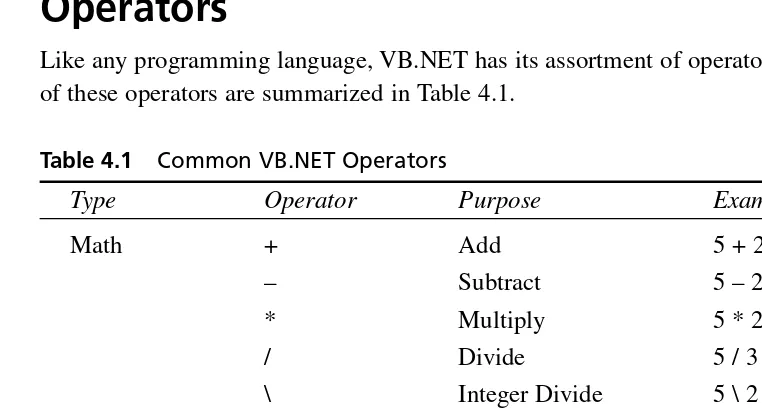
Like any programming language, VB.NET has its assortment of operators. The most common of these operators are summarized in Table 4.1.
Table 4.1 Common VB.NET Operators
Type Operator Purpose Example
Math + Add 5 + 2 = 7
– Subtract 5 – 2 = 3
* Multiply 5 * 2 = 10
/ Divide 5 / 3 = 2.5
\ Integer Divide 5 \ 2 = 2
^ Exponentiation 5^2 = 25
Mod Remainder after 5 mod 2 = integer division 1
String + Concatenate “one” + “two” = “onetwo”
& Concatenate “one” & “two” = “onetwo” Assignment = Assigns the value x = 5 + 3
Type Operator Purpose Example
+= Adds the value x += y of a variable
by an expression and assigns the result to the variable*
-= Subtracts the x -= y value of a
variable by an expression and assigns the result to the variable
*= Multiplies the x *= y value of a
variable by an expression and assigns the result to the variable*
/= Divides the x /= y value of a
variable by an expression and assigns the result to the variable*
\= Integer divides x \= y the value of a
variable by an expression and assigns the result to the variable
&= Concatenates the x &= y value of a variable
by an expression and assigns the result to the variable*
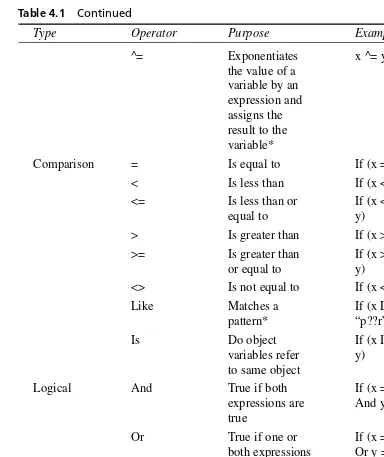
Table 4.1 Continued
Type Operator Purpose Example
^= Exponentiates x ^= y
the value of a variable by an expression and assigns the result to the variable*
Comparison = Is equal to If (x = y)
< Is less than If (x < y) <= Is less than or If (x <=
equal to y)
> Is greater than If (x > y) >= Is greater than If (x >=
or equal to y)
<> Is not equal to If (x <> y)
Like Matches a If (x Like
pattern* “p??r”)
Is Do object If (x Is
variables refer y) to same object
Logical And True if both If (x = 3
expressions are And y = 4) true
Or True if one or If (x = 3 both expressions Or y = 4) are true
Not True if the If Not (x
expression is = 5) False
Xor True if one If (x = 3
expression is Xor y = 4) true, but not
both*
* This operator was introduced in VB.NET.
Using Procedures
The basic unit of executable code in VB.NET, as in most programming languages, is the
procedure. VB supports two basic types of procedures: the subroutine (or sub) and the function.
Subroutines
You declare a subroutine with the Sub statement. For example
Sub HelloWorld()
Response.Write(“Hello World”) End Sub
You call a sub using either of the following statements:
HelloWorld() Call HelloWorld()
4
U
NDERST
ANDING
V
ISUAL
B
ASIC
.NET
S
YNT
AX
AND
S
TRUCTURE
Unlike prior versions of VB, VB.NET requires parentheses around argument lists whether or not you use the Call keyword.
N
OTEFunctions
Functions in VB.NET are similar in functionality to subroutines with one difference: Functions can return a value to the calling program. You create a function with the Function statement. For example, the following function returns “Hello World” to the calling code:
Function SayHello() Return “Hello World” End Function
Prior versions of VB used a different syntax for returning a value from a function.
N
OTEUsing Variables and Parameters
To declare a variable from within a subroutine or function, you use the Dimstatement. For example
Function DoSomething() Dim Counter As Integer End Function
A variable declared using Dimis local to the procedure in which it is declared.
To declare a variable that’s global to the entire page, you declare the variable outside of any subroutine or function using the Privatestatement. For backward compatibility,Dimalso works in this context, but it’s best to use Privateinstead.
The Public, Friend, and Protectedstatements are discussed later in the chapter when we introduce classes.
N
OTENew for VB.NET, you can both declare a variable and set its initial value in one statement. For example
Dim Age As Integer = 23
Private Company As String = “Microsoft”
VB.NET supports the data types shown in Table 4.2.
TABLE4.2 Visual Basic.NET Data Types
Visual Basic .NET Runtime Storage Range of Values
Data Type Data Type Size
Boolean System.Boolean 4 bytes True or False Byte System.Byte 1 byte 0 to 255 (unsigned) Char System.Char 2 bytes 1 Unicode “” character Date System.DateTime 8 bytes January 1, 0001
Visual Basic .NET Runtime Storage Range of Values Data Type Data Type Size
Decimal System. 12 bytes +/-0.0
Decimal 79,228,162,514,264,337, 593,543,950,335 with no decimal point;+/-7.922816251426433 7593543950335 with 28 places to the right of the decimal; smallest non-zero number is +/-0.000000000 0000000000000000001 Double System. 8 bytes -1.797693134862310.0 (double- Double E308 to -4.940656
precision 45841247E-324 for
floating- negative values;
point) 4.94065645841247E
-324 to 1.7976931 3486232E308 for positive values Integer System.Int32 4 bytes -2,147,483,648 to
2,147,483,647
Long (long System.Int64 8 bytes -9,223,372,036,854,775,80
integer) 8 to 9,223,372,036,854,775,
807
Object System.Object 4 bytes Any data type Depends on usage.
Short System.Int16 2 bytes -32,768 to 32,7670 Single System.Single 4 bytes -3.402823E38 to 0.0
(single- -1.401298E-45 for
precision negative values;
floating- 1.401298E-45 to
point) 3.402823E38 for
positive values String System.String 10 bytes + 0 to approximately “” (2 * string 2 billion Unicode
length) characters
4
U
NDERST
ANDING
V
ISUAL
B
ASIC
.NET
S
YNT
AX
AND
S
You may have noticed that there is no entry for Variantin Table 4.2. That’s because VB.NET no longer supports the Variantdata type. However, you can use the generic Objecttype any place you would have used Variantin prior versions of VB. (In VB.NET, Variant is a synonym for Object.)
Unlike prior versions of VB, if you use a declare statement as shown in the following example, all three variables will be declared as integers:
Dim x, y, z As Integer
In prior versions of VB,xand ywould be declared as variant variables and only zwould be declared as an Integer.
Constants
You can use the Conststatement to declare a constant. Like a variable, a constant holds a value; however, a constant’s value is set at design time and may not change. You can include the Privateor Publickeyword within the Conststatement to alter the scooping of the con-stant declaration. Here are a few examples:
Const Pi As Double = 3.14159
Private Const CmPerInch As Double = 2.54
Public Const BookTitle As String = “ASP for Developers”
In addition to user-defined constants, VB.NET and the .NET Framework define a number of intrinsic constants. For example, you can use the intrinsic constant CrLfanytime you wish to add a carriage return and line feed to a string:
MsgString = “An error has occurred in the program.” & _ CrLf & “Click on OK to continue or CANCEL to abort.”
Most of the old intrinsic constants have changed names in VB.NET. For example, in VB 6.0 and VBScript, you would use vbCrLfinstead of CrLf.
N
OTEImplicit and Explicit Variable Declarations
Function Multiply(number1, number2) Return number1 * numbr2
End Function
The Multiplyfunction will always return 0 because we misspelled one of the parameters. This happens because VB.NET implicitly declares numbr2and initializes it to 0 because it is used in a numeric context. You can avoid this type of hard-to-find bug by using Option Explicitor
Option Strict. In this example, if you had used either of these options, VB.NET would generate a compile-time error when the page was compiled.
Option Explicit Versus Option Strict
VB has always had the Option Explicitdeclaration, which forces you to declare all your variables, but VB.NET also introduces Option Strict, which goes one step further. In addi-tion to forcing you to declare all your variables,Option Strictrestricts the types of implicit conversions that the language allows. When you use Option Strict, VB won’t allow conver-sions where data loss would occur. Option Strictalso disallows implicit conversions between numeric and string data types.
To specify Option Explicit, you can use the following page directive at the top of the ASP page:
<%@ Page Explicit=”True” %>
To specify Option Strict, you can use the following page directive at the top of the ASP page:
<%@ Page Strict=”True” %>
Arrays
You create arrays in VB.NET using the Dim,Public, or Privatestatements. You use paren-theses to specify that you wish to declare an array rather than a scalar variable. For example, the following statement creates an array of strings:
Dim Names() As String
Before using an array, you must specify the total number of elements in the array with the
ReDimstatement:
Dim Names() As String ReDim Names(2)
Names(0) = “Mike” Names(1) = “Paul”
4
U
NDERST
ANDING
V
ISUAL
B
ASIC
.NET
S
YNT
AX
AND
S
All arrays have a lower bound of zero. The number you place between the parentheses of the ReDimstatement designates the total number of elements the array will hold. Thus, a value of 2 as shown in this example tells VB that the array will hold two string elements, numbered 0 and 1.
In prior versions of VB, the number you placed between the parentheses of the ReDim
statement designated the index number of the highest element, not the total num-ber of elements.
N
OTEMultidimensional Arrays
The Namesarray in the previous example is a one-dimensional array. You can create arrays of multiple dimensions by using commas when you declare the array. For example, the following statements create a two-dimensional array of strings named Customerand a three-dimensional array of double-precision numbers named Cube:
Private Customer( , ) As String Private Cube ( , , ) As Double
You would use the following code to specify that the Cubearray would hold 27 elements (3 x 3 x 3 = 27):
ReDim Cube(3,3,3)
The following code sets the value of several elements in the Cubearray: Cube(0,0,0) = 23.4
Cube(0,0,1) = 14.6 Cube(2,1,0) = - 13.7 Cube(2,2,2) = 4899.231
In addition to using ReDim, when declaring an array you can specify the initial size of the array. For example:
Dim Names(2) As String
Declaring the initial dimensions of an array this way, however, does not restrict you from later resizing the array using ReDim.
ReDim
and
ReDimPreserve
Using ReDimerases any existing values of the array. However, you can use the Preserve
keyword to preserve the values. For example, the following code redimensions the Colors
array without using the Preservekeyword:
Dim i As Integer Dim Colors(3) As String Colors(0) = “Red” Colors(1) = “Green” Colors(2) = “Blue” ReDim Colors(5) Colors(3) = “White” Colors(4) = “Black”
For i = 0 To UBound(Colors)
Response.Write(“<br>” & i & “=” & Colors(i)) Next
This produces the following output:
0= 1= 2= 3=White 4=Black
4
U
NDERST
ANDING
V
ISUAL
B
ASIC
.NET
S
YNT
AX
AND
S
TRUCTURE
The For Nextloop will be introduced later in this chapter.
N
OTEChanging the ReDimstatement to the following ReDim Preserve Colors(5)
changes the output to 0=Red
1=Green 2=Blue 3=White 4=Black
Checking an Array’s Upper Bound
You can use the UBoundfunction to determine the upper boundary of an array. UBoundreturns the largest available subscript for the array (notthe number of elements). For example, in the following code
Dim intI, intJ As Integer Private Square (10 ,5) As Double
intI = UBound(Square, 1) intJ = UBound(Square, 2)
intI= 9 and intJ= 4.
Passing Parameters
You use parameters to pass information to or from a procedure without having to use global variables. For example, the Dividefunction has two parameters:
Function Divide(Numerator As Double, Denominator As Double) As Double Return Numerator / Denominator
End Function
The Numeratorand Denominatorvariables in this example have been declared with the Double data type.
To declare the data type of the return value of a function, you add As datatypeto the Functionstatement after the closing parentheses. The return value of the Divide function was set to Double. The following function has a return value data type of String:
Function SayHello() As String Return “Hello World” End Function
When you call a procedure, you pass an argument for each parameter. You can specify the list of arguments for a VB procedure in one of two ways: by position or by name. For example Response.Write(Divide(10,2))
Response.Write(“<BR>”)
Response.Write(Divide(Denominator:=10, Numerator:=20))
The above would produce the following output: 5
2
By Value Versus By Reference
Unlike prior versions of VB, by default, VB.NET passes arguments to subroutines and func-tions by value, which is a change from earlier versions of VB. This means that VB sends a copy of each argument’s value to the procedure. It also means that parameters, by default, can only be used for input.
You can override this default behavior by using the ByRefkeyword. When you use ByRef, VB.NET sends a pointer, or reference, to each parameter to the procedure rather than a copy of the parameter’s value. Thus, you can use ByRefparameters to pass information back to the code that called the procedure.
Optional Parameters
VB.NET supports optional parameters. To create an optional parameter you insert the
Optionalkeyword before the parameter name and you supply the parameter’s default value after the data type, like this:
Optional parameter_name As data_type = default_value
The following function takes a string and makes it into an HTML heading of a level specified by the Levelparameter. If Levelis not specified, it is assumed to be 1:
Function CreateHead(Msg As String, Optional Level As Integer = 1) As String Dim ReturnMsg As String
Dim HLevel As String
If Level >= 1 And Level <=6 Then HLevel = Level.ToString()
ReturnMsg = “<H” & HLevel & “>” & Msg & “</H” & HLevel & “>” Else
ReturnMsg = “<P>” & Msg & “</P>” End If
Return ReturnMsg End Function
4
U
NDERST
ANDING
V
ISUAL
B
ASIC
.NET
S
YNT
AX
AND
S
TRUCTURE
The Ifstatement will be discussed later in the chapter. In addition, the ToString
method, which you can use to convert a number into a string, will be discussed in Chapter 5, “Working with Numbers, Strings, Dates, and Arrays in Visual Basic.NET.”
The HelloWorld.aspxpage calls CreateHeadtwice from the Page_Loadsubroutine: <script language=”VB” runat=”server”>
‘ ...
Sub Page_Load(Src as Object, E as EventArgs)
If Not Page.IsPostBack Then
DisplayMsg.Text = CreateHead(“Hello World!”, 3) DisplayMsg.Text &= CreateHead(“Hello Universe!”) End If
End Sub ‘ ... </script>
<asp:label id=”DisplayMsg” runat=”server” />
The first time the code calls CreateHeadwith the phrase “Hello World” and Levelis equal to 3. The second time the code calls CreateHeadwith the phrase “Hello Universe” and Levelis not specified, which is interpreted to mean a heading level of 1. This produces a page like the one shown in Figure 4.1.
FIGURE4.1
This sample page illustrates the use of optional parameters.
Every parameter to the right of an optional parameter must also be optional.
Using Branching and Looping Structures
Branching in VB.NET
You can branch in your code using the If...Then...Elsestatement or the Select Case
statement.
The
If...Then...ElseStatement
You use the If...Then...Elsestatement (or simply the Ifstatement) to conditionally execute a piece of code based on the value of some expression. The simplest form of the Ifstatement contains an Ifclause without any Elseclause. Such a statement was used in an earlier example (from HelloWorld.aspx):
If Not Page.IsPostBack Then
DisplayMsg.Text = CreateHead(“Hello World!”, 3) DisplayMsg.Text &= CreateHead(“Hello Universe!”) End If
In this example, the two assignment statements are executed only when Page.IsPostBackis
False. Otherwise, no statements are executed.
4
U
NDERST
ANDING
V
ISUAL
B
ASIC
.NET
S
YNT
AX
AND
S
TRUCTURE
The Pageobject and the IsPostBack property are discussed in Chapter 7, “Introducing ASP.NET Web Forms.”
N
OTEThis example, also shown earlier in the chapter, includes an Elseclause. Any statements in the Elseblock are executed when the Ifexpression is False:
If Level >= 1 And Level <=6 Then HLevel = Level.ToString()
ReturnMsg = “<H” & HLevel & “>” & Msg & “</H” & HLevel & “>” Else
ReturnMsg = “<P>” & Msg & “</P>” End If
An Ifstatement may also contain one or more Else Ifclauses that allow you to test addi-tional scenarios as shown in this example:
If DateTime.Today <= #12/31/2000# Then RegPrice = 895
ElseIf DateTime.Today <= #01/31/2001# Then RegPrice = 995
Else
RegPrice = 1195 End If
The
Select...CaseStatement
You can also use the Select...Casestatement for branching in VB.NET. The Select...Case statement is useful when you wish to check the value of an expression against a list of possible values and execute a different set of code for each value.
This example checks the value of the integer variable PayMethodagainst a list of possible values. The Select...Casestatement sets the value of two string variables to various values depending on the value of PayMethod.
Select Case PayMethod Case 1
PayMethText = “Visa”
SubmitText = “Complete Order and Bill My Credit Card” Case 2
PayMethText = “Mastercard”
SubmitText = “Complete Order and Bill My Credit Card” Case 3
PayMethText = “American Express”
SubmitText = “Complete Order and Bill My Credit Card” Case 4
PayMethText = “Company PO” SubmitText = “Complete Order” Case 5
PayMethText = “Check”
SubmitText = “Complete Order” Case Else
PayMethText = “Error”
SubmitText = “Illegal Payment Method: please correct.” End Select
Notice the Case Elseclause, which is executed if none of the other cases is true.
Looping in VB.NET
You can loop using the Do...Loopstatement, the While...End Whilestatement, the For...Nextstatement, or the For...Eachstatement.
The Do...Loop Statement
For example, the following code from titles.aspxfills a dropdownlist control with records from the titles table of the pubs sample SQL Server database. We have used a Doloop to move through each of the records returned by the query and added them to the dropdownlist’s
ListItemcollection. (See Chapter 10, “Designing Advanced User Interfaces with Web For List Controls and Custom Web Controls,” for more on Web Form list controls and Chapter 15, “Accessing SQL Server Data with the SQL Managed Provider,” for more on using ADO.NET with the SQL Managed Provider.)
Sub FillList()
Dim ConnectString As String = _
“server=localhost;uid=sa;pwd=;database=pubs” Dim SQL As String
Dim PubsCnx As SQLConnection Dim TitlesQry As SQLCommand Dim TitlesRdr As SQLDataReader Dim TitleItem As ListItem
PubsCnx = New SQLConnection(ConnectString) PubsCnx.Open()
SQL = “SELECT title, title_id FROM titles ORDER BY title” TitlesQry = New SQLCommand(SQL, PubsCnx)
TitlesQry.Execute(TitlesRdr)
Do While TitlesRdr.Read()
TitleItem = New ListItem(TitlesRdr(“title”), TitlesRdr(“title_id”)) TitleList.Items.Add(TitleItem)
Loop End Sub
The Do...Loopstatement from the FillListsubroutine uses the SQLDataReader’s Read
method to retrieve the next record returned by the query. Readadvances the current record pointer and returns Trueif it was able to successfully retrieve a record or Falseif there are no more records to retrieve.
This Do...Loopstatement could have been rewritten by reversing the logic of the condition:
Do Until Not TitlesRdr.Read()
TitleItem = New ListItem(TitlesRdr(“title”), TitlesRdr(“title_id”)) TitleList.Items.Add(TitleItem)
Loop
The VB.NET Do...Loopstatement also supports testing the condition at the bottom of the loop. For example, the following loop squares itself until the result exceeds 100:
Dim x As Integer = 2 Do
x = x*x Loop Until x > 100
You can use the Exit Dostatement to terminate a Doloop early. For example, the following code (from DotSearch.aspx) searches for the position of the first period in a string, exiting the Doloop when a period is found:
Dim Phrase As String = “My mother is very, very smart. My father is too.” Dim Length As Integer = Len(Phrase)
Dim i As Integer = 1
Do While i<=Length
If Phrase.Chars(i) = “.” Then Exit Do
End if i += 1 Loop
‘ Add one to i because the first character ‘ in a string is character 0 in VB.
Label1.Text = “The first period in ‘“ & Phrase & _ “‘ was found at character “ & i + 1 & “.”
This example was provided for demonstration purposes only. You should use the .NET Framework String.IndexOfmethod to search for strings within other strings.
N
OTEThe
While...End WhileStatement
The While...End Whilestatement (or simply the Whileloop) is very similar to the Do...Loop statement. You can use it to execute a set of statements repeatedly, while some condition is true. For example
While i<=Length
If Mid(Phrase, i, 1) = “.” Then Exit While
End if i += 1 End While
As shown in this example, you can use the Exit Whilestatement to terminate a While loop early.
The While...Exit Whilestatement replaces the old While...Wendstatement of earlier versions of VB.
The
For...NextStatement
You can use the For...Nextstatement (or simply the Forloop) to repeatedly execute a block of statements a specified number of times. While similar in concept to the Doand Whileloops, the Forloop differs in that it automatically increments a counter variable for you.
The Forloop is especially useful for iterating through the items in an array. For example, the following code iterates through all of the elements in the Colorsarray and displays them on the page:
For i = 0 To UBound(Colors)
Response.Write(“<br />” & i & “=” & Colors(i)) Next
The
For...EachStatement
The For...Eachstatement is a special kind of For...Nextloop that is useful for iterating through members of a collection. A collection is an ordered set of items, usually objects, that you can refer to and manipulate as a unit. For example, when working with ADO.NET, you can work with the Errorscollection of Errorobjects.
4
U
NDERST
ANDING
V
ISUAL
B
ASIC
.NET
S
YNT
AX
AND
S
TRUCTURE
You can use the Collectionobject in VB.NET to create your own collections.
N
OTEFor example, the following function (from titles2.aspx) returns an HTML table containing a row for each record in the titles table of the SQL Server Pubs database. The DataSet’s Table object contains a collection of rows and each row contains a collection of columns. The DisplayTitlesfunction employs two nested For...Eachloops to iterate through the TitlesSetdataset. (Datasets and ADO.NET are explained in more detail in Chapter 15 and Chapter 16, “Accessing Non-SQL Server Data with the OLE DB Managed Provider.”) Function DisplayTitles()
Dim ConnectString As String = _
“server=localhost;uid=sa;pwd=;database=pubs” Dim SQL As String
Dim PubsCnx As SQLConnection Dim TitlesQry As SQLDataSetCommand Dim TitlesSet As DataSet
Dim TitleItem As ListItem Dim row As DataRow
PubsCnx = New SQLConnection(ConnectString) PubsCnx.Open()
SQL = “SELECT title, title_id, type, price FROM titles ORDER BY title” TitlesQry = New SQLDataSetCommand(SQL, PubsCnx)
TitlesSet = New DataSet
TitlesQry.FillDataSet(TitlesSet, “titles”)
Msg &= “<TABLE border=””1””>”
For Each row In TitlesSet.Tables(“titles”).Rows Msg &= “<TR>”
For Each col In TitlesSet.Tables(“titles”).Columns
Msg &= “<TD>” & FixNull(row(col), “ ”) & “</TD>” Next
Msg &= “</TR>” Next
Msg &= “</TABLE>” Return Msg
End Function
The titles2.aspxpage is shown in Figure 4.2.
FIGURE4.2
Creating Objects
Prior versions of VB lacked many object-oriented programming (OOP) features that other languages such as C++, Java, and FoxPro have had for years. Fortunately, VB.NET includes strong support for OOP.
OOP Primer
Class, subclass, inheritance, constructor, polymorphism: Object-oriented programming uses lots of fancy new terms that undoubtedly confuse the non-OOP programmer. In this section, you’ll find a 10-minute primer of OOP terminology.
Objects and Classes
Objectsare things that you want to represent in your code. Another way to think of an object is as a grouping of properties, methods, and events that are logically tied together. You work with an object by manipulating its properties and methods and reacting to its events.
A classis a template or schema for creating an object. At design time you create the class that serves as the template for creating objects at runtime. An object is thus an instance of a class. And that’s one of the neat things about using classes: You can have as many instances of a class as you want, and VB automatically keeps each object’s data independent of each other object’s data. Another neat thing about classes is that they encapsulate the implementation of the object into a neat package. Encapsulationallows you to separate the implementation of the class (the code inside of the class that makes it work) from its interface (the public properties, methods, and events of the class).
Inheritance and Polymorphism
One of the big additions to VB.NET is its support for inheritance. Inheritance allows you to create classes that are descendants of another class. When a class inherits from another class, the original class is termed the base class(also sometimes referred to as the superclass or parent class) and the class that inherits from the base class is called the derived class(also sometimes referred to as the subclass or child class).
VB.NET supports the overridingof a base class’s methods with alternate implementations.
Polymorphismis the ability of different classes to support the properties and methods with the same name but with different implementations. VB.NET’s support for overriding allows your classes to support polymorphism.
Creating a Class
You use the Classstatement in VB.NET to create a class. Public variables of the class become properties of the class and public subroutines or functions of the class become methods.
4
U
NDERST
ANDING
V
ISUAL
B
ASIC
.NET
S
YNT
AX
AND
S
Let’s illustrate with an example: Say that your Web site supports an ASP.NET conference called “ASP.NET—The Conference.” To simplify the registration process, you decide to create a Registerclass. The Registerclass will have two properties that describe the attendee, CustomerFirstNameand CustomerLastName, and two methods,Executeand Cancel: Class Register
Public CustomerFirstName As String Public CustomerLastName As String
Public Function Execute() As String
Return “<BR /><font color=””green””>Register.Execute</font>” End Function
Public Function Cancel() As String
Return “<BR /><font color=””red””>Register.Cancel</font>” End Function
End Class
To create an object from a class, you use the Newoperator just like when creating VB and .NET Framework objects. The following code declares Regas a member of the Registerclass and instantiates Reg:
Dim Reg As Register
Reg = New Register
The above can be simplified as follows: Dim Reg As Register = New Register
The following code sets two properties of the Regobject: Reg.CustomerFirstName = “Bill”
Reg.CustomerLastName = “Gates”
The following code invokes the Executemethod of Regsetting the Textproperty of a label control to its return value:
Label1.Text = Reg.Execute()
Using Property Procedures
There are actually two ways to create properties of classes in VB.NET. You’ve already seen one way to create properties: create public variables of the class module. A second way to cre-ate properties is to use the Propertystatement. Using a Propertystatement to create proper-ties offers several advantages over using public variables. Using a Propertystatement lets you
• Create read-only and write-only properties
• Run code when a property value is read or written
The Propertystatement must follow a certain format. For read/write properties, it should look like this:
Property property_name As data_type
Get
property_name = some_value
End Get Set
some_variable = Value End Set
End Property
The Valuekeyword within a Setblock retrieves the value to which the consumer of the class has set the property.
Read-only properties must include the ReadOnlykeyword and have no Setblock:
ReadOnly Property property_name As data_type
Get
property_name = some_value
End Get End Property
Write-only properties must include the WriteOnlykeyword and have no Getblock:
WriteOnly Property property_name As data_type
Set
some_variable = Value End Set
End Property
The following class (from Register2.aspx) uses Propertystatements to create four proper-ties. The CustomerFirstNameand CustomerLastNameproperties are read/write. CustomerName
is read-only and CreditCardNumberis write-only:
Class Register
Private CustFname As String Private CustLName As String
4
U
NDERST
ANDING
V
ISUAL
B
ASIC
.NET
S
YNT
AX
AND
S
Private FullName As String Private CreditCard As String
Public Property CustomerFirstName As String Get
CustomerFirstName = CustFName End Get
Set
CustFName = Value
FullName = CustFName & “ “ & CustLName End Set
End Property
Public Property CustomerLastName As String Get
CustomerLastName = CustLName End Get
Set
CustLName = Value
FullName = CustFName & “ “ & CustLName End Set
End Property
Public ReadOnly Property CustomerName As String Get
CustomerName = FullName End Get
End Property
Public WriteOnly Property CreditCardNumber As String Set
CreditCard = Value End Set
End Property
Public Function Execute() As String
Return “<BR /><font color=””green””>Register.Execute</font>” End Function
Public Function Cancel() As String
Return “<BR /><font color=””red””>Register.Cancel</font>” End Function
You’ll get a compile error if you try to write to a read-only property or read a write-only prop-erty. The Register2a.aspxpage illustrates what happens when trying to read a write-only property (see Figure 4.3).
4
U
NDERST
ANDING
V
ISUAL
B
ASIC
.NET
S
YNT
AX
AND
S
TRUCTURE
The methods in these demonstration examples do nothing but return some text.
N
OTEFIGURE4.3
Attempting to read a write-only property causes a compilation error.
In prior versions of VB you used Propertyprocedures instead of the Property state-ment to create properties.
N
OTEInheritance
Let’s say that you decide to branch out and now run a conference on XML in addition to ASP.NET, but the registration process for XML is different enough that you’ll need to make some changes to the process. To handle the new show, you create two subclasses of Register: ASPRegisterand XMLRegister. For XMLRegisteryou add an additional property,
UserGroupAffiliation, because the XML conference will give special discounts to qualified user group members. Without inheritance you’d have to either change the base class or copy and paste code from class to class. Inheritance, however, allows you to start with the existing Registerclass and extend it with additional properties and methods. But there’s no need to re-create the properties and methods that XMLRegisterhas in common with the base class. In the following code from Register3.aspx, the ASPRegisterand XMLRegisterclasses are derived from the Registerbase class:
Class Register
Public CustomerFirstName As String Public CustomerLastName As String Public CreditCardNumber As String Public CreditCardExpires As String
Public Function Execute() As String
Return “<BR /><font color=””green””>Register.Execute</font>” End Function
Public Function Cancel() As String
Return “<BR /><font color=””red””>Register.Cancel</font>” End Function
End Class
Class ASPRegister Inherits Register End Class
Class XMLRegister Inherits Register
Public UserGroupAffiliation As String End Class
The following code from Register3.aspxinstantiates both ASPRegisterand XMLRegister objects:
Sub Page_Load(Src as Object, E as EventArgs) Dim ASPReg As ASPRegister
Dim XMLReg As XMLRegister
.CustomerFirstName = “Bill” .CustomerLastName = “Gates” .CreditCardNumber = “55555555555” .CreditCardExpires = “01/02” Label1.Text = .Execute() End With
XMLReg = New XMLRegister With XMLReg
.CustomerFirstName = “Steve” .CustomerLastName = “Balmer” .CreditCardNumber = “55555555556” .CreditCardExpires = “05/03”
.UserGroupAffiliation = “Microsoft Windows 2000 UG” Label2.Text = .Execute()
End With
ASPReg = Nothing XMLReg = Nothing End Sub
When you’re done using an object, you should explicitly destroy it by setting it to the VB.NET keyword of Nothing.
Accessibility of Inherited Properties and Methods
When creating classes you use the Publickeyword to create publicly exposed properties and methods of the object. If you don’t want a class method or property to be public, however, you have a few other choices:Private,Protected,Friend, or Protected Friend.
Use the Privatekeyword to make a property or method private to the class. Private properties and methods can be accessed anywhere inside of the class, but they can’t be accessed by derived classes or other classes on the page or assembly (assemblies are discussed in Chapter 6, “Using Assemblies in Visual Basic.NET”).
You use the Protectedkeyword to create a property or method that is accessible from any code inside the class and from code inside of any derived classes.
Use the Friendkeyword to create a property or method that is accessible from any code— including derived classes—in the current page or assembly. Friend properties and methods are not accessible from derived classes that live in other assemblies.
Finally, you can use the Protected Friendkeyword to create a property or method that’s available from any code in the current page or assembly andfrom any derived classes, no matter where they reside.
4
U
NDERST
ANDING
V
ISUAL
B
ASIC
.NET
S
YNT
AX
AND
S
Overriding Methods
If you wish to override a method of the base class, you use the Overrideskeyword. Let’s say you add a third conference on Linux, but this conference is different from the other two because registration is free. So you create a third subclass,LinuxRegister, but this time you wish to change the Execute method so you override the Executemethod from the base class (Register) and replace the implementation of Executewith a new implementation that is custom tailored for the Linuxshow.
Here’s the code from Register4.aspxthat overrides the Register.Executemethod: Class LinuxRegister
Inherits Register
Overrides Public Function Execute() As String
Return “<BR /><font color=””blue””>Register.Execute</font>” End Function
End Class
This code won’t work, however, unless the Executemethod is marked as an overridable method back in the base class. To do that, add the Overridablekeyword to the declaration of the method in the base class. Here’s the Registerclass from Register4.aspx:
Class Register
Public CustomerFirstName As String Public CustomerLastName As String Public CreditCardNumber As String Public CreditCardExpires As String
Overridable Public Function Execute() As String
Return “<BR /><font color=””green””>Register.Execute</font>” End Function
Overridable Public Function Cancel() As String
Return “<BR /><font color=””red””>Register.Cancel</font>” End Function
End Class
Notice that we have marked the Executeand Cancelfunctions as Overridable. Methods in VB.NET, by default, are notoverridable (you can also explicitly include the NotOverridable keyword when you define the method but it’s not necessary).
Class LinuxRegister Inherits Register
Overrides Public Function Execute() As String MyBase.Execute()
End Function End Class
Constructors and Destructors
VB.NET lets you create subroutines that are executed when an object is instantiated or destroyed.
A class constructoris called when an object is instantiated. To create a constructor, you add a subroutine named Newto the class definition (you can place it anywhere in the class definition). The class constructor subroutine will be called when an object is instantiated before any other code in the class is executed. Class constructors may have parameters; these types of construc-tors are called parameterized construcconstruc-tors. Parameterized constructorsallow you to pass para-meters to a class when the object is instantiated.
A class destructoris called when an object is destroyed. To create a destructor, you create a subroutine in the class definition named Destruct(you can place it anywhere in the class defi-nition). Unlike the Class_Terminatemethod of VB 6.0 that was always executed immediately when the object was destroyed, you cannot be sure exactly when your class destructor code will execute by the .NET Framework garbage collector. The only thing you can be sure of is that it will occur sometime afteryou release all references to the object.
The Registerclass from Register5.aspxcontains a parameterized class constructor that you can use to optionally set the customer name when instantiating the class:
Sub New(Optional LastName As String = “”, Optional FirstName As String = “”) CustLName = LastName
CustFName = FirstName
FullName = CustFName & “ “ & CustLName End Sub
Here’s code from the two derived classes that also contain class constructors:
Class ASPRegister Inherits Register
Sub New(Optional LastName As String = “”, Optional FirstName As String = “”)
MyBase.New(LastName, FirstName) End Sub
End Class
4
U
NDERST
ANDING
V
ISUAL
B
ASIC
.NET
S
YNT
AX
AND
S
Class XMLRegister Inherits Register
Public UserGroupAffiliation As String
Sub New(Optional LastName As String = “”, Optional FirstName As String = “”)
MyBase.New(LastName, FirstName) UserGroupAffiliation = “none” End Sub
End Class
Notice the use of the MyBase.New. Derived classes need to explicitly call the MyBase.New
constructor or the base class constructor code will not run.
Here’s the code from Register5.aspxthat instantiates the ASPRegisterand XMLRegister
objects, passing along the optional customer name information to the objects’ constructors:
ASPReg = New ASPRegister(“Gates”, “Bill”) XMLReg = New XMLRegister(“Balmer”, “Steve”)
Summary
This chapter introduced the Visual Basic.NET language and discussed its core features, includ-ing operators, procedures, variables, parameters, data types, constants, and branchinclud-ing and loop-ing statements. The chapter also introduced object-oriented programmloop-ing (OOP) concepts and VB.NET OOP features, including classes, properties, methods, inheritance, and overriding.