Field
Developed
Program
Prog~am Description/ Operations Manual
SB21-062l-0
3270 Format Macro For Output Data Streams
Progr~ Number: 5798-AKL This manual describes the
capabilities of. the system and the programs. Discussion of design assumptions and potential modification areas are included. Record' and file layouts are
OFFERING .. PERIOD SERVICES
.
,During' ~'specified number of months immediately following
ini tial availabili ty of each licensed program, designated. as the Offering Period, the customer may submit documentation to a designated IBM location when he enqounters a problem which his diagnosis indicates is caused by a licensed program
error. During this period only, IBM through the program
author{s) will, without additional charge, respond to ~n
error in the current unaltered release of, the licensed program by is~uing known error correction information to the customer reporting the problem and/or issuing corrected or notice of
availability of corrected code. However, IBM does not
guarantee service results or represent or warrant that all
errors will be corrected. Any onsite Programming services or
assistance will be provided at a charge.
WARRANTY
EACH LICENSED PROGRAM IS DISTRIBUTED ON AN 'AS IS' BASIS
WITHOUT WARRANT~ 'OF ANY KIND EITHER EXPRESS OR IMPLIED.
Requests ,for copies of IBM publications should be made to your IBM Representative or to the IEM Brcmch Office serving yoU); locality.
Address comments concerning the contents of this publication
to IBM Corporation, Midwest Region EdUcation Center, l.IBM Plaza, 20th Floor, Chicago, Illinois 60611.
©
Copyr-ight International Business Machines Corporation 1972•
(
(
TABLE OF CONTENTS
Introduction
System Overview
Program Description
Installation Instructions
Operations Instructions - Using the Screen Design Layout Form
Screen Name
Write or Erase Write
Write Control Character for Printer or Screen Operation
Defining Fields
Operations Instructions - Coding the FORMAT Macro
Configuration Operands (Local & Remote)
Framing Operands (Remote Only) ,
Write and Erase Write Command Operand (Remote) Table of Suboperands for the Write Control
Character
Write and Erase Write Command Operand (Local)
Basic Operand (Local & Remote)
Table of Attribute Characters
Erase Unprotected to Address Operand (Local
& Remote)
Repeat to Address Operand (Local & Remote)
Insert Cursor Operand (Local & Remote)
Programmed Tab Operand (Local & Remote)
New Line and End of Medium Operands (Local
& Remote) ,
System Capabilities & Limitations
Information in Appendix A thru E - Discussion
Appendix A - Screen Design Layout Forms
Appendix B - Sample Screen Design Layout Forms
Appendix C - FORMAT Macro Instruction Format Summary
Appendix D - Sample FORMAT Macro Instruction
Expansions
Page
1
1
5
6
6
6 6
7 7
7
9 10 10
11 12
14
16
21
23
25
26
27
27
27
30
31
34
Page
Appendix E '!" FORMAT Maorp lnetr.uctlon MNOTE
Me,l3sages 47
Appendix F - MNOTES for SBA Sequencee - D~scue~ion 52
Appendix
G - MNOTES
in eonjunotion with lll~gal'W:t'E;1pOperatiQns ~
D1
scusslQn53
Appendix H - Including Labels in a FORMAT Output
Data Stream 56
Appendix I - Using the
CHECKING-NO
Operand57
(
•
(
Introduction
-This Program Description/Operations Manual provides Screen Designers, Systems Programmers and Assembler Language Applica-tions Programmers with the information they need to use the 3270 FORMAT Macro for Output Data Streams in their Teleprocess-ing System. All readers should have a specific knowledge of the operation of the 3270 and in particular, the formatting of out-put Write and Write Erase data streams to the Local and Remote 3270 Printer and Screen devices. An excellent educational
offering that gives the student this knowledge is course G3687, 3270 Operation and Design, taught at most IBM Education Centers •
The Systems Programmerts main concern is with the require-ments necessary to include the FORMAT Macro support in his
system. This information is found in the 'Installation Instruc-tions' section.
The Screen Designer is responsible for laying out on a Screen Design Layout Form all of the necessary information for a Write or Write Erase output data stream. To assist the designer, Screen Design Layout Forms for both the 480 and 1920 size 3270
screens are provided in Appendix A. The use of these forms is
found in the section 'Operations Instructions - USing the Screen Design Layout Form'.
The Application Programmer is responsible for writing the FORMAT Macro in his Assembler Language program by coding a
series of FORMAT operands using the Screen Design Layout Form as a guide. The Macro Generator will check coding of the FORMAT Macro ope,rands and will provide an output data stream acceptable for transmission to the 3270. The Screen Designer and Applica-tion Programmer work together in removing unacceptable or
labort' macro MNOTES created by the Macro Generator. Appendix
E contains a list of MNOTES in numerica~ order. Information on
coding the FORMAT Macro is contained in the section 'Operations Instructions - Coding the FORMAT Macrol.
Appendix Band D contain sample FORMAT Macro Screen Layouts and expansions. Appendix C contains a quick summary of the FORMAT Macro Operands.
System Overview
In converting the operands to an output data stream, numerous checking and utility functions are performed such as computing, checking and translating Set Buffer Addresses from Rowand Col-umn co-ordinates as well as computation, checking and transla-tion of Attribute Characters and Write Control Characters. The following functions/advantages are included in the FORMAT Macro:
+ Convert high level operands coded in sequence from a screen
design layout form into acceptable command and order
se-quences. .
T Allows the Programmer to specify absolute decimal addresses
for Set Buffer Address, Repeat to Address, etc., sequences, or to use the easy to code Rowand Column notation, with checking, conversion and traoslation provided for all addresses by FORMAT.
+ Computes the Write Control Character utilizing high level
character notation, combining multiple functions into a
single Write Control Character with checking and translation provided by FORMAT.
+ Checks for coded inconsistencies in the Write Control
Char-acter. The following inconSistencies are checked:
+ That Restore Keyboard is not specified for a printer
device.
+ That two printer commands such as honor NL and EM and
honor 40 character line are not incorporated into the same Write Control Character.
+ That Reset Modified Data Tags is not used with an
Erase Write, warning.
+ Computes, checks and translates the attribute character
from a high level character string allowing default values for the attributes. The following inconsist-encies are checked:
+ That Selector Pen Detect and Invisible are not both
coded.
+ That High IntenSity and Invisible are not both codedo
+ That Protected or Numeric are not coded when Autoskip
is.
+ Examines Selector Pen Detectable fields as specified by
the Programmer for adherence to the following conven-tions:
-2-(
(
+ A valid first character, i.e., null, blank, GT (greater
than) or ?
+ A minimum of one detectable character beyond the first
character.
+ Warning when appropriate on minimum size of the
detec-table field.
+ Warning when Programmer may be assuming an erase write
and has not so specified.
+ Warning when a field extends beyond the end of a Row
and into the following Row.
+ Warns the Programmer on inconsistent use of the Modified
Data Tag in conjunction with Selector Pen Detect fields.
+ Warns the Programmer when three nulls or blanks are not
included at the end of the Selector Pen data field.
+ Sequence checks the order of coded operands for
inconsis-tencies in:
+ Invalid Buffer Address specifications.
+ Out of sequence Buffer Address specifications both
ex-plicit and imex-plicit. This capability may be supressed by the user.
+ Checks for screen wrap operations that overlay previously
coded fields regardless of starting location on screen. This capability may be supressed by the user.
+ Checks for missing or incorrectly specified operands.
+ Checks configuration specifications against coded
operands, for example:
+ Using STX, ESC or ETX sequences for a Local device.
+ Using Erase Unprotected to Address or Programmed Tab
together with Erase Write.
+ Checks Repeat to Address, Erase Unprotected to Address,
Programmed Tab, Insert Cursor and other character se-quences for:
+ Missing, inconsistent or incorrectly specified
informa-tion.
+ Screen Wrap operations that over~ali> on p'rev;io'!isl~ coded
fields. This capability may be supressed by the user.
, " 1
+ Provides the Programmer with flexib.ili ty 'in coding the Macro
operands so that he may:
+ Default to next buffer location addresses for Set Buffer
Address Sequences' (implicit specification), explicitly use Set Suffer Addresses sequences or eliminate Set Buffer Address sequences.
+ Allow the use of field length decimal numbers in
con-junction with specifying data fields or allow the Macro to compute field lengths from the supplied data, the former method providing for a more rigid control over Macro field checking.
.
... Incorporate Start of Text, End of Text, New Line and
end of Medium characters in the data stream. .
+ Incorporate or eliminate Start Field orders in output
data streams.
+ Utilize the Insert Cursor Order anywhere in the output
data stream.
+ Allow the Macro Operands to be coded in any sequence or
require the Programmer to code the operands in ascending sequence by buffer address.
+ Provides the Programmer with 61 numbered MNOTEt s to inform
him of errors or warnings.
+ MNOTES are numbered and pinpoint the operand and
sub-operand number causing the MNOTE.
+ MNOTES occur after code generation allowing the
Program-mer to inspect the fault-r generated code in most cases.'
+ Some mnotes issue warnings only and document possible
problems, for example:
+ Blanks or nulls missing at the end of a Selector Pen
data field.
+ Selector Pen fields extending from one Row into the
next Row.
+ Use of a New Line in output data streams to a screen
device.
+ Using a Programmed Tab or Erase Unprotected to AddresB
operation following an erase write.
-4-C"'"
I ,i•
(
(
+ Other unnumbered MNOTES document useful information
for the Programmer, for example:
+ SBA sequence (start buffer address) addresses are
MNOTed when not used at the beginning of a defini-tion or order to allow the Brogramrner to see where the current buffer address is by refering to his program listing.
+ Beginning and ending addresses for a screen.
+ Number of operands processed.
+ Whether or not wrap occurred.
+ The total size of the screen definition in core.
The applications Programmer using the FORMAT Macro should first familiarize himself with the section entitled "Using
the Screen Design Layout Formfl. The examples and
illustra-tions in this Guide assume that a Screen Design Layout Form is the starting pOint for the Programmerrs job and the con-ventions set up in the section, "Using the Screen Design Lay-out Form", should be understood by the Programmer before gOing on.
Program Description
FORMAT is an Assembler Macro which when included in an OS or DOS Assembler program or made available to any Assembler thru a Macro Library, allows the Programmer to create output data streams. Fourteen different types of high level operands coded in sequence for each output data stream are checked by the Macro Generator and result in a series of define constant
statements together with documentary statements. The
result-ing data stream can be written to a Local or Remote 3270 Dis-play Screen or Printer.
In converting the operands to an output data stream, num-erous checking and utility functions are performed such as com-puting, checking and translating Set Buffer Addresses from Row and Column co-ordinates as well as computation, checking and
translation of Attribute Characters and Write Control Ch~rac
ters.
FORMAT works with any level of DOS or OS Assembler and can be included with the Assembler program or made available
to the Assembler thru a Macro Library. The data streams can
Installation Instructions
FORMAT is distributed in 80 column cards with the first card a MAr-RO card and the last card a MEND card. It is thus ready for immediate use in any OS or DOS Assembler program merely by including the macro at the start of the user's source cards. Optionally, FORMAT may be placed in the OS Macro Library or the DOS Source Statement Library by the Systems Programmer.
The FORMAT'Macro consists of about 1526 cards. Each card has a sequence number beginning with #1, the MACRO card. The
sequence number is in columns 77-80. Comments are included in FORMAT to document its method of operation. These comments together with the Systems Guide for FORMAT allow the user to make modifications or understand its method of operation.
OPERATIONS INSTRUCTIONS - USING THE SCREEN DESIGN LAYOUT FORM
Any Screen Design Layout Form can be used with FORMAT such as those used in Appendix A or the IBM,3270 Layout Form,
GX27-2951.
Screen Name
The screen name should be 1 to 8 characters, the first character must be alphabetic. In order to identify the
in-formation returned and to assist the Programmer as well during~/
error recovery operations, the screen designer might consider placing the screen name or a unique screen number on the screen at a pre-defined field location marked Protected, Invisible
(non display/non print) with the Modified Data Tag set on. Each input data stream would then be uniquely identified. Placing this identification in the upper left hand field of the screen would allow early detection of the screen type in a scan of the input data stream where the identification is also to be used as a transaction code by the Programmer. One must be careful to avoid a "Lopked Buffer" if the Copy Com-mand is to be used.
Write or Erase Write
The designer should be aware that if he does not specify erase write, the buffer is not cleared to nulls and the Buffer
,Address and Cursor Locations are not set to O. As a
con-sequence, data character entry can begin, in the absence of a SBA sequence, at the buffer address containing the cursor or
the current buffer addresso The FORMAT Macro requires that
the Programmer specify a SBA starting seguence when a write command is used instead of an erase write. For the most part, write commands will be used to send data to a previously
for-
-6-.. ~ ... "
(
(
matted screen, i.e., one in wpich attribute characters have al-ready been stored in the buffer. For this reason, the FORMAT Macro will MNOTE Erase Unprotected to Address and Pro rammed Tab Orders w en speci ied with an erase write.
Write Control Character for Printer or Screen Operation
Certain items such as honor NL and EM codes, 40,
64
and 80character lines and other operations should be checked. Note that these items are mutually exclusive and will cause a Macro Abort if incorrectly specified.
Defining Fields
The Designer should now, as shown in Figure 1, enter the fields and attribute characters for fields that comprise his screen. Figure 1 assumes that an initial format is to be sent to the screen with an erase write command and that all fields will be preceded with attribute characters. For data involving a write operation, there would probably be few attribute charac-ters sent, if any, and the placing of data within an existing
field would be more common. The placing of data within
exist-ing fields can be done by a) SBA sequences followed by data, b) Erase Unprotected to Address sequences, c) Repeat to Address sequences followed or not by data and d) Programmed tab
sequences followed or not by data.
OPERATIONS INSTRUCTIONS - CODING THE FORMAT MACRO
Each output data stream that you will code with the FORMAT Macro will consist of a single FORMAT statement appropriately labeled. Following the FORMAT statement will appear one or more operands. Each operand must be enclosed in parenthesis. Thus, the general appearance of the macro statement will be:
NAME FORMAT ( ), ( ), ( ), Etc.
All operands must be separated by commas with ll9 intervening blanks. The NAME which is required may be any valid label in
your program. It will be used in an EQU
*
statement to identifythe beginning of your output data stream.
Within each operand there may be suboperands. For example:
SCREEN FORMAT (WCC,EW,RR), (PH,RICI,'NAME ' ), (HN,42), Etc.
WCC, EW and RR are the 1st, second and third suboperands
respectively of operand 1, (WCC,EW,RR). PH, RlCl and 'NAME'
be a pure decimal number, 42, or can be letters and numbers mixed and not enclosed in quotes, PH, RICI, etc. Regardless
of how specified, each suboperand is still separated by commas
"-and no intervenin blanks are allowed between subo er"-ands. The
number 0 commas plus one wi in any given operand equals the
number of suboperands within an operand. Later, reference will be made to the effect that four suboperands are implied. All
this means is that ther~ are three commas within the operand.
You may have 100, 200 or 240 operands in any output data
stream depending on the level of
DOS
or OS Assembler you areusing. (See the section, System Capabilities and Limitations.)
There are 14 different types of operands and the discussion
that follows gives the rules for coding them. An operand may
be split at any point on a source statement card in your pro-gram merely by coding a non blank character in column 72 and continuing the operand in column 16 of the next card. If you do not desire to split an operand, you may finish the operand on one card with. a right parenthesis, code a comma and a non blank character in column 72 and start the next operand in
column 16 of the following card. In this way, one operand per
card could be coded. The only rule to watch out for is that an operand may not exceed 127 or 255 characters depending on
the level of
DOS
oraS
Assembler you are usinS. This figureincludes beginning and ending parenthesis, quotes and the
com-mas used to separate the operands. Later in this Guide, it
will be shown how to overcome the limitation of 127 characters in a suboperand if this is encountered. A higher level version of the Assembler can also be used in which case each of the
200 or 240 operands may be up to 255 characters in total length. (See the section, System Capabilities and Limitations.)
The sequence in which you code the operands depends on your
screen design layout. A certain few of the 14 operand types
must come first (unless coded in a previous FORMAT Macro in which case they can be omitted), then the rest can be coded in any order so long as ascending order is maintained from order to order in a wrap fashion in your output data stream. Alternatively, you may code the CHECKING=NO operand as out-lined in Appendix I and can then code the operands in any se-quence.
Within an operand, the sequence of suboperands is always
very important. If you omit a suboperand you must never omit
the commas that separate the suboperands. In the previous example, if you omitted the first suboperand of the second
operand you must code (,RICI, 'NAME'). If you were to omit both
the first and second suboperands you would code (" 'NAME'). If, however, you do not use a third operand you merely code
(PH,RICl) or (,RICl), i.e., you do not need a comma to indicate suboperands missing from the right hand end.
omit the third suboperand you must not omit the 4th. Rules of this sort must be followed.
If, within a suboperand that begins and ends in single quote marks ., the data you desire to use is an apostrophe (single
quote) or an ampersand, &, then you must code two apostrophes
in a row or two ampersands in a row within the single quotes. For example, a suboperand consisting of ABC' would be coded as 'ABC t t l .
Format uses
Configuration Operands (Local and Remote)
( The FORMAT Macro needs to know the buffer size, type of
con-
(-figuration and device type in order to adequately check other
operands and warn you of errors or abo~t the macro expansion
if necessary. If the configuration operands are not coded as
the first operands the FORMAT Macro will assume that the device is a Local Screen utilizing a 480 character buffer. The Macro assumes that the first three configuration operands are:
NAME FORMAT (DEVICE=SCREEN),(BUFFER=480), (TYPE=LOCAL)
Since there are no commas, each of the three configuration operands contain a single suboperand. If you have a 480 char-acter local screen you could omit all three unless you wanted to document the use of the macro. On the other hand, if your output data stream were for a 1920 character remote printer, you would be required to code:
NAME FORMAT (DEVICE=PRINTER),(BUFFER=1920),(TYPE=REMOTE)
since in all three areas you differ from the default values of screen, 480 character buffer and local configuration.
In summary then, there are six configuration operands which
mayor may not have to be used. If the
X
are used, thexmust cf'always come as the first operands. From one to three configura-~l.f
tlon operands may be used for any one screen. Subsequent screens need not use the operands if all three items remain the same.
Example: A Programmer starts an output data stream to a
480
cha.:racter screen at a remote location and does not qestre to document the Macro. For his first FORMAT Macro usage, he codes:
SCREEN FORMAT (TYPE=REMOTE),
The default values for a
480
character buffer and a screendevice are automatically in effect. For the next FORMAT Macro
usage in the same program, he can omit (TYPE=REMOTE). Only if
he changes One of the three items need he code a configuration
operand again in a subsequent FORMAT Macro in the same program.
Framing Operands (Remote Only), Optional
If you are working with a remote device you may want to frame your output data stream by coding the (STX) operand and the (ETX) operand.
To use the framing operands merely insert the (STX) follow-ing the configuration operands and put the (ETX) operand as the last operand in the Macro.
Example: A Programmer knows that his output data stream will
be sent as a single block transmission ending in
ETX. He codes his macro as follows:
SCREEN FORMAT (TYPE=REMOTE), (STX), ( ), ( ) " , (ETX)
I or more Configuration Operands
The configuration operand (TYPE=REMOTE) is required when using the (STX) or (ETX) operands.
Write & Erase Write Command Operand (Remote)
(
( ESC, 1 or more suboperands separated by commas ) to
represent bits to be set and translated by FORMAT in the Write Control Character. See Table of Suboperands for the Write Control Char-acter.
Table of Suboperands for the Write Control Character
One or more' suboperands may be coded beginning with the third suboperand of a write or erase write command operand for a remote or local device.
Suboperand Codes Meaning Comment
MDT Reset Modified Data Tags Should not be used with erase
write.
RR Restore Keyboard Should not be used when sent
to printer.
SP Start Printer
80 Print 80 Character Line If used, avoid also using
64, 40 and NL.
64 Print 64 Character Line If used, avoid also using
80, 40 and NL.
40 Print 40 Character Line If used, avoid also using
80, 64 and NL.
NL Honor NL & EM Codes If used, avoid also using
80, 64 and 40.
A Sound Audible Alarm
The first suboperand, ESC, must always be coded. The second
suboperand·must either be an
E
or 'E'W'. The third suboperand isalso required. The third and subsequent suboperands must be valid suboperand codes taken from the table of suboperands for the write control character. The location of the write and erase write command operand should immediately follow the fram-ing operand, if used, in the followfram-ing fashion:
SCREEN FORMAT (TYPE=REMOTE) J (STX), (ESC,EW,RR,A), ( ), ( ),' (ETX)
k
,k
~
~ ~
1 or more Framing
I
Erase Write or OtherConfiguration Operand Write Command Operands
Operands Optional Operand
Required Required·
operands and will assume a write is being done if no write.or erase write command operand is given. FORMAT will also check that two printer techniques have not both been coded, i.e.,
that only one suboperand from 80,
64,
40 and NL is used.Example: A Programmer desires to issue a write command that
restores the keyboard but does not reset modified data tags. He codes:
SCREEN FORMAT (TYPE=REMOTE),(STX),(ESC,W,RR),( ),
The generated code would be:
1977+ SCREEN 1978+
1979+ 1980+ 1981 1982+
EQU DC DC DC
DC
*
X'02' STX X'27' ESC
X 'Fl t WRITE
*, WRITE CONTROL CHARACTER IS HEX 02
ALl(194) ADDRESS, ATTRIBUTE OR WCC
The Write Control Character will always be documented in a HEX value as shown in statement 1981. Following the statement
will be listed the translated value for the WCC. The
trans-lated value, statement 1982, will be in the form of a single byte address constant and will be labelled ADDRESS, ATTRIBUTE
OR WCC. This is because the translation routine in FORMAT is
common to translating addresses, attributes andwr1te control characters. Backward reference to statement 1981 serves to pinpoint 1982 as a write control character in this example.
Example: A Programmer desires to issue an erase write command
to a remote printer that will start the printer and print an 80 character line. He codes:
SCREEN FORMAT (TYPE=REMOTE),(DEVICE=PRINTER), (STX), (ESC,EW,SP,80) •
The generated code would be:
1977+SCREEN 1978+
1979+ 1980+ 1981 1982+
EQU DC DC DC
DC
*
X'02' STX X'27' ESC
X'F5' ERASE WRITE
*,WRITE CONTROL CHARACTER IS HEX 38 ALl(248) ADDRESS, ATTRIBUTE OR WCC
Write and Erase Write Command Operand (local)
(
(
(
( WCC, 1 or more suboperands separated by commas )
to represent bits to be set and translated by FORMAT in the Write Control Character.
See Table of Suboperands for the Write Control
Character in the section entitled "Write &
Erase Write Command Operand (remote)".
The first suboperand, WCC, must alwa s be coded. The
sec-ond suboperan e e er an or an • T e third su
-operand is reguired. The third suboperand and subsequent
sub-operands must be valid suboperand codes taken from the Table of Suboperands for the Write Control Character. The location of the write and erase write command operand should immediately follow the configuration operands, if used, in the following fashion:
S.CREEN FORMAT
)
,
1 or more /Erase Write or
\
OtherConfiguration Write Command Operands
Operands Operand
Required
Although FORMAT will not terminate if the write or erase write command operand is omitted, FORMAT does make use or the fact that an erase is beini done in its checking or sub-sequent operands and will assume a write is being done ir no write or erase write command operand is given. FORMAT will also check that two printer techniques have not both been coded, i.e., that only one suboperand from 80, 64, 40 and NL is used.
Example: A Programmer desires to issue a write command that
restores the keyboard but does not reset modified data tags. He codes:
SCREEN FORMAT (WCC,W,RR), (.),
The generated code would be:
1 980+SCREEN 1981
1982+
EQU
DC
*
*,WRITE CONTROL CHARACTER IS HEX 02 AL1(194) ADDRESS, ATTRIBUTE OR WCC
The Write Control Character will always be documented in a HEX value as shown in statement 1981. Following the stl::i.'tement
will be listed the translated value for the WCC. The
trans-lated value, statement 1982, will also be in the form of a single byte address constant and will be labeled ADDRESS,
ATTRIBUTE OR WCC. This is because the translation routine in
FORMAT is common to translating addresses, attributes and
write control characters. Backward reference to statement 1981
Example: A Programmer desires to issue an erase write command to a local printer that will start the printer and ' print an 80 character line. He codes:
SCREEN FORMAT (DEVICE:;:PRINTER),(WCC,EW ,sP, 80), ( ),
The generated code would be:
*' 1980tSCREEN
1981 1982+
EQU
DC
*,WRITE CONTROL CHARACTER IS HEX 38 ALl(248) ADDRESS, ATTRIBUTE OR WCC
Basic Operand (Local & Remote)
The basic' operand is the most flexible and most often used operand in any output data stream. With the basic operand, the Programmer can:
Set up a start field sequence with or without a preceding Set Buffer Address order E;ind with or without data
follow-ing the start field order.
Write data into the output data stream (without a preceding start field order) with or without a preceding Set Buffer Address order.
The flexibility is also indicated by the numerous entries in Appendix C, FORMAT Macro Instruction Format Summary, under
the Basic Operand. The format of the operand is as follows:
Suboperand #1,' Attribute
Character Suboperand'
( X,
Omitted,
Attribute Sequence, (See Table of
Attribute Characters)
Suboperand #4, Field Length Suboperand
Suboperand #2, Set Buffer Address Suboperand
Row & Column Sequence, Decimal Number 0-1919, X,
Omitted,
[Length of Field
-~
)in Decimal Number, Not Used
-
.Suboperand #3 Data
Suboperand
~
ata
in SinglJ'
Q,uotes, .
Omitted,
In coding a basic operand, you must always code two or more
suboperands, i.e., a minimum of one comma is mandator1_. If
you omit the second suboperand and only decide to use the first suboperand, you must still code the second suboperand as an X.
\-~'.~/
..
(
(
Prior to examining each of the suboperands, it is well to keep in mind the most common usage of the basic operand.
Required:
Solution:
Set up a SBA order at .Row 3, Column 15 and place an attribute character for high intensity, protected data in that location. Fill the field with the
data, 'NAME'. Translate the attribute character
and convert and translate the SBA order address.
Code the basic operand as (PH,R3C15, 'NAME')
The first suboperand sets up a protected, high intensity attribute character following the SBA sequence specified by
the second operand. Data, 'NAME', follows in the output data
stream. The se~uence in which one codes the basic operands
and intermixes -hem with HA, Repeat to Address operands, EUA, Erase Un rotected to Address operands and PT, Programmed Tab
operands mus e in ascending order eginning wit a u er
address or defaulting to the fIrst location in the buffer and
continuing in a wrap fashion up to
but
not beyond the startingpoint. If you do not desire to code the FORMAT Operands in ascending sequence, you should code the CHECKING=NO operand as outlined in Appendix I. For example, I may choose to start my output data stream at the 4th row, column 1 of a 480
charac-ter buffer, code successively higher and higher basic, .RA and EUA opeaands and wrap to the first row of the screen, ending
with a basic operand defining a field on the third row. The
FORMAT macro has its own internal current buffer address which is incremented just as the hardware CBA is incremented when data is written into the buffer. FORMAT keeps track of where you start your coding and if you wrap and come back and begin to exceed your starting address, Macro abort occurs with an
appropriate mnote message. In order to use FORMAT then, you
must code operands in ascending sequence from your starting operand location. You may wrap but must not exceed this
start-ing address. The only exception is the Insert Cursor operand
which can be coded to be placed in sequence or out of sequence if desired. If you specify CHECKING=NO as outlined in Appendix I, you can code all of the operands in any sequence.
At the end of a successful expansion, FORMAT prints out the starting 3270 buffer address and ending 3270 buffer address. Note that this is quite different from the number of core posi-tions used as the later includes control characters, addresses, orders, etc. FORMAT will also print out the total number of operands processed and whether or not wrap, as defined above,
occurred. If you are using a write command instead of an erase
sec-ond suboperand of the basic operand is required. The same holds true if you were to start with a RA, EUA or 10 Operand.
The first suboperand is used to set up an attribute charac-ter and will generate a start field order followed by a checked and translated attribute character. If the suboperand is coded X, no start field order will be generated. If omitted, a
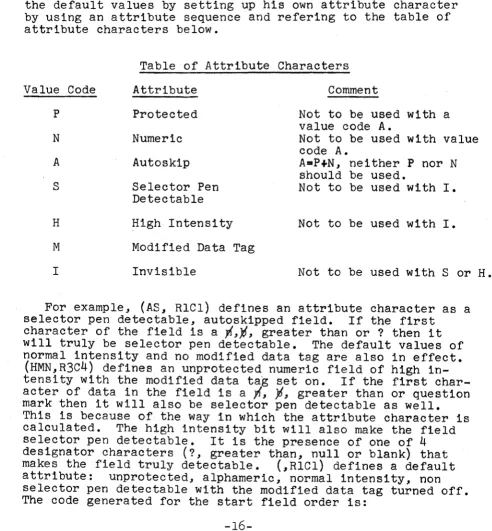
de-fault attribute character defined as unprotected, alphameric, normal intensity, non selector pen detectable with the modified data tag turned off will be generated. These are all of the default values for tne attribute character. The user may alter the default values by setting up his own attribute character by using an attribute sequence and refering to the table of attribute characters below.
Value Code
P
N
A
S
H
M
I
Table of Attribute Characters
Attribute
Protected
Numeric
Autoskip
Selector Pen Detectable
High Intensity
Modified Data
Invisible
Tag
Comment
Not to be used with a value code A.
Not to be used with value code A.
A.P+N, neither P nor N should be used.
Not to be used with I.
Not to be used with I.
Not to be used with S or H.
For example, (AS, RlCl) defines an attribute character as a selector pen detectable, autoskipped field. If the first
character of the field is a ~,~, greater than or ? then it
will truly be selector pen detectable. The default values of normal intensity and no modified data tag are also in effect.
(HMN,R3C4) defines an unprotected numeric field of high in-tenSity with the modified data tag set on. If the first
char-acter of data in the field is a -,{, ~, greater than or question
. mark then it will also be selector pen detectable as well. This is because o·f the way in which the attribute character is calculated. The high intensity bit will also make the field selector pen detectable. It is the presence of one of 4
deSignator characters (?, greater than, null
Or
blank) thatmakes the field truly detectable. (,RICl) defines a default
attribute: unprotected, alphameric, normal intensity, non selector pen detectable with the modified data tag turned off. The code generated for the start field order is:
-16-f \
[image:20.613.58.550.192.723.2](
(
For a
2180+ 2181 2182+
For a
1910+ 1911 1912+
first
first
suboperand coded N (numeric):
DC X'lD' SF
DC
*,ATTRIBUTE CHARACTER IS HEX 10 ALl(80) ADDRESS, ATTRIBUTE OR WCC
suboperand coded NS (numeric, detectable):
DC
DC
X'lD' SF
*,ATTRIBUTE CHARACTER IS HEX 14 AL1(212) ADDRESS, ATTRIBUTE OR WCC
As with the write control character, the calculated bit configuration of the untranslated attribute character is given
in hexidecimal form. The translated value is also given in
both its decimal and hexidecimal equivalent at the left hand side of the listing. The table of attribute characters lists various invalid combinations that cause Macro Abort conditions. Note that Autoskip, A, implies P and N and that P and A, Nand A, and P and N, are invalid.
The second suboperand, (RICl), defines an SBA sequence which
will precede the start field sequence. If the start field
se-quence has been omitted then the SBA sese-quence only will be
gen-erated, for example (X, RIC3). The SBA sequence can be omitted
by coding an X or by a " (comma, comma) sequence. Whenever
coding the basic operand, at least two suboperands must be used. A start field sequence with no preceding SBA sequence would
be coded (IP,X) and would generate only a start field order followed by an attribute character defining an invisible,
pro-tected, alphanumeric field. If you use three or more
sub-operands you may use either X or " to omit the second
sub-operand. You cannot code (IP,,) because the third suboperand or data operand, if implied, as it is in this case due to the presence of two commas, must never be omitted unless a valid 4th suboperand is coded which it isn't. Both (IP" 'DATAl) and
(IP,X, 'DATAl) would achieve the effect of omitting the SBA suboperand when three suboperands are used.
In coding the second suboperand, you may use Rowand Column notation or decimal notation. 480 character buffers have 12 lines (rows) with 40 positions per line (columns). Valid
specifications are rows 1 to 12 and columnsl-40.Any other rows or columns are invalid. 1920 character buffers have 24 lines
(rows) with 80 positions per .line (columns). Valid specifica-tions are rows 1-24 and columns 1-80. Alternately, a decimal number of 0 thru 479 or 0 thru 1919 may be specified. The vertical column on the lefthand side of the Screen Design Lay-out Form is designed to assist one in using decimal numbers. All digits must be numeric and the decimal number must be within the correct buffer size range as specified in the buffer
con-figuration operanq or q~fpulted to, i.e., 480. A basic operand
1440+ 1441 1442+ 1443+ 1444+ 1445 1446+ 1447+
DC
DC DC DC
DC DC
X'll' SBA
*,SBA BUFFER ADDRESS IS 274 DECIMAL ALl(196) ADDRESS, ATTRIBUTE OR WCC ALl(210) ADDRESS, ATTRIBUTE OR WCC X'lD' SF
*,ATTRIBUTE CHARACTER IS HEX 08 ALl(200) ADDRESS, ATTRIBUTE OR WCC CL,9 t ?.?6TYPE1515'6 t
1
r
The SBA address order precedes the start field order. Two
address bytes follow the SBA order. (The HEX representations
of the A type Addresses appear at the left hand margin.)
If the Programmer had coded (SH,274,I?iTYPEiiil ), the
re-sults would have been identical. If the current buffer address is set at the desired location by a previous operand, the SBA sequence is not required. For example, the prior operand may specify a repeat to address to location 274 or an erase
un-protected to address to location 274 or insert d~ta iqto
locationj273._~JTpe
Programmer could code(SH"I?~TYPE~~~I)
or(SH,X, f?~TYPE~~~f) and the following would result:
1440 1441 + 1442 1443+ 1444+
DC
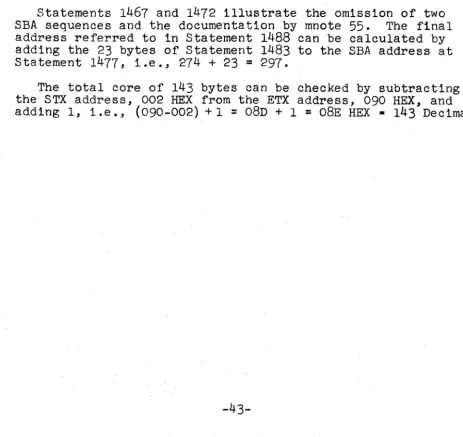
DC DC
*,MNOTE 55, SBA SEQUENCE AT 274, OMITTED X r ID f SF
*,ATTRIBUTE CHARACTER IS HEX 08 ALl(200) ADDRESS, ATTRIBUTE OR WCC C19 r ?-tJTYPE'\S't?6 f
MNOTE 55 is generated to document the omitted SBA sequence. When data is read back from this field, it will be necessary
to know the address plus one of the attribute character. If the Programmer had been working with Rowand Column notation or had omitted the SBA sequence, he could use FORMAT MNOTE 55 in
the later case, as input to routines that examine input data streams for incoming SBA sequences. With Rowand Column nota-tion, he merely has to examine his listing to locate the proper decimal value in the two byte address constant. One Assembly documents the address which can be utilized in the next Assembly of the program.
The Programmer can code (,,'DATA') in which case he will generate:
1440 1441+ l442t 14431-1444+
DC
DC DC
*,MNOTE 55, SBA SEQUENCE AT 274, OMITTED X'lDt SF
*,ATTRIBUTE CHARACTER IS HEX 00 A1l(64) ADDRESS, ATTRIBUTE OR WCC
C14 tDATAf
(
Also possible at this pOint would be (X" 'DATAl) or (X,X,'DATAt) in which case FORMAT would generate:
1440
1441+ DC
*,MNOTE 55, SBA SEQUENCE AT 274, OMITTED CL4'DATAI
NOw, both the SBA and start field orders have been omitted.
At this point, read ApPENDIX F, MNOTES for SBA Sequences -Discussion.
The third suboperand of the baSic operand is used to place data in the write output data stream. The data is enclosed in
single quotation marks. The single quote marks are mandatory.
If data within single quotes is omitted in the third suboperand and a fourth suboperand is implied then the 4th suboperand must
be present and must contain a valid decimal number. (SH,RICl,,)
is illegal, so is (SH,RICl,). If the attribute code specifies
selector pen detectable then the third suboperand must be present.
The data in quotes is placed into the output data stream. The length of the data within the quote marks will always be used to define the character constant. If the data is so long that the entire operand exceeds 127 or 255 characters including parenthesis, quotes and commas, then the data can be truncated
and split into two pieces. Assume that you must split the
first 10 characters of the alphabet and place the entire 10
characters starting at location 2. You would code: (X,2, 'ABCDEI),
(X" 'FGHIJJ) •
The generated code would be:
1440+ DC
1441
1442+ DC
1443+ DC
1444 + DC
1445
1446 + DC
X r II' SBA
*,SBA BUFFER ADDRESS IS 2 DECIMAL ALl(64) ADDRESS, ATTRIBUTE ORWCC ALl(194) ADDRESS, ATTRIBUTE OR WCC AL5 r ABCDE I
*,MNOTE 55"SBA SEQUENCE AT
7,
OMITTEDCL5'FGHIJ'
Although only ten characters were split, the method may be applied any number of times to larger character strings.
If you have specified selector pen detect in the attribute character then you must code a third operand in single quotes and the data within the quotes must conform to the following conventions:
If the first character of the data is not a ?, >, null or
blank you will abort with Mnote 26.
If the selector pen data field extends from one row into the next, you will be warned with Mnote 51.
If;> has been specified as the first data character and no modified data tag has been set, you will be warned with Mnote 52.
If a null, blank or ? has been specified in the first data
character together with the modified data tag in the attribute character, 'you will be warned with Mnote 53.
If the length of the data between the quotes is only one character, you will abort with Mnote 27.
If the data between quotes is not at least five characters
you will be warned with Mnote 28. (This assumes a
desig-nator character, a single displayable character and three nulls or blanks will be the most common form of minimum data. )
The fourth suboperand is optional except when the third sub-operand is omitted and a 4th subsub-operand has been implied by use
of three commas. It is used to tell FORMAT the total length of
the field when the third suboperand has data in it which is less than the total field length. For example, assume that only the first five characters of a field are to be placed into the field, the rest to contain nulls. For more precise
check-ing by FORMAT you may code (PH,R3C4,INAMESI,10). You could just
as easily have coded (PH, R3C4, 'NAMES i) • In the first case, .~ /
FORMAT will increase the buffer location by 10 whereas in the later case, FORMAT will increase the buffer location by 5. Suppose now that you make a mistake and code (I,R3C12,'JOHNf) as the next operand. FORMAT will catch this error in the first
case but not in the second. The next operand should be
(I,R3C15,tJOHN').
When you use the 4th operand to tell FORMAT that the data of the third operand does not fill up the entire field, the 4th
operand must contain all decim~l numbers. For a selector pen
detectable field with the 4th operand specified, FORMAT will assume that the remaining positions of the field are to be set to nulls and will warn you with Mnote 29 if you have not
specified an erase write.
Format will also protect you in one other way in conjunction
with using the 4th operand. Consider the following sequence:
1433 T90
1434+T90 1435 1436+ 1437 1438+
FORMAT
EQU
DC
DC
(WCC"EW~RR), (X" 'DATA J), (,,, 12',10), (N,,!3')
*
*,WRITE CONTROL CHARACTER IS HEX 02
ALl(194) ADDRESS .. ATTRIBUTE OR
wcd
*,MNOTE 55, SBA SEQUENCE AT 0" OMITTED
(
(
1439 *IMNOTE 551 SBA SEQ,UENCE AT 41 OMITTED
1440+ DC X'ID' SF
1441 *IATTRIBUTE CHARACTER IS HEX 00
1442+ DC ALl(64) ADDRESS, ATTRIBUTE OR WCC
1443+ DC CLl ' 2'
1444+ DC X Ill' SBA
1445 *,SBA BUFFER ADDRESS IS 15 DECIMAL
1446+ DC ALl~64~ ADDRESS, ATTRIBUTE OR WCC
1447+ DC ALI 79 ADDRESS, ATTRIBUTE OR WCC
1448+ DC X' ID t SF
1449 *,ATTRIBUTE CHARACTER IS HEX 10
1450+ DC ALl(80) ADDRESS, ATTRIBUTE OR WCC
1451 + DC CLl'3'
1452 *,STARTING ADDRESS 4, ENDING ADDRESS 16
1453 *,4 OPERANDS PROCESSED
1454 *,TOTAL CORE FOR FORMAT T90 WAS 14 BYTES
Because an erase write was specified, FORMAT will allow omission of the SBA sequence in the 2nd operand. The default attribute character and omission of the third operand is also
OK. Note, however, that the Programmer wishes to omit the SBA
order for the 4th operand. If FORMAT allowed this, the start
field order would come immediately after the CLl'2' statement. Under these circumstances, FORMAT will not allow omission of
the SBA order sequence for the 4th operand and supplies it of its own accord as it has done following the CLl'2'. He cannot omit the SBA order sequence for the 4th operand by coding an X.
Finally, it must be said that (",10) and (X",lO) are allowed where no data is to be written into a field with or without an attribute character, but the field length checking capability is desired. At this point it is well to review APPENDIX G -MNOTES in conjunction with Illegal Wrap Opera-tions - Discussion.
Erase Unprotected to Address Operand (Local & Remote)
The Erase Unprotected to Address Operand is used to place an EUA order in the output data stream with or without a preceding
SBA order sequence. It ean also be used to erase all unprotected
data in an entire buffer. The format of the operand is as fol-lows:
Suboperand #1, Identifier
( EUA,
Suboperand #2 Set Buffer Address Suboperand
Row & Column Sequence,
Decimal Number 0-1919, X,
Omitted,
Suboperand #3,
Erase Unprotected to Address
Address Suboperand
~
ow
& Column Se-J
quence, )
In coding an EUA operand you must always code three s.ub-operands. The second suboperand only can be omitted, i.e., the first and third suboperands are required. The purpose of the EUA operand is to set up an EUA order in the output data stream and the operand must be coded in its correct ascending screen location sequence intermixed with basic operands, RA, Repeat to Address operands and other operands in a.n increasing fashio.n allowing wrap, as described in
APPENDIX G and in the discussion of the basic operand. (If
CHECKING=NO is specified as per Appendix I, this later re-quirement is not necessary.) To illustrate its usage assume the following:
Required: Set the buffer address to Row 1, Column three and erase all unprotected data from that location up to but not including location 285.
Solution: Code the EUA operand as (EUA,RIC3,285)
The first suboperand identifies the operand as an EUA operand. The second operand sets up the SBA sequence prior to the EUA order and the third operand sets up the EUA
address as required by the order. The generated code would look like:
2056+ 2057 2058+ 2059+ 2060+ 2061 2062+ 2063+
DC
DC DC DC
DC DC
X' 11' SBA
*,SBA BUFFER ADDRESS IS 2 DECIMAL ALl(64) ADDRESS, ATTRIBUTE OR WCC ALl(194) ADDRESS, ATTRIBUTE OR WCC
X t 12' EUA
*,EUA BUFFER ADDRESS IS 285 DECIMAL ALl(196) ADDRESS, ATTRIBUTE OR WCC ALl(93) ADDRESS, ATTRIBUTE OR WCC
The second suboperand defines an SBA order which, if not
omitted thru the use of " or X, will precede the EUA order.
If omitted as in the following example, MNOTE 55, will be given to pinpoint the value of the omitted SBA sequence. If you
coded (N,RIC2, 'DATAl), (EUA"R2C2), the generated code would be:
2929 + DC' X'II' SBA
2930 *,SBA BUFFER ADDRESS IS 1 DECIMAL
2931 + DC AL1~64) ADDRESS, ATTRIBUTE OR WCC
2932 + DC ALI 193) ADDRESS, ATTRIBUTE OR WCC
2933 + DC X'ID' SF
2934 *,ATTRIBUTE CHARACTER IS HEX 10
2935 + DC ALl(80) ADDRESS, ATTRIBUTE OR WCC
2936 + DC CL4 'DATA ,
2937 *,MNOTE 55, SBA SEQUENCE AT 6, OMITTED
2938 + DC X '12 t EUA
2939 *,EUA BUFFER ADDRESS IS 41 DECIMAL
2940 + DC ALl~64) ADDRESS, ATTRIBUTE OR WCC
2941 + DC ALI 233) ADDRESS, ATTRIBUTE OR WCC
-22-('
I·
(
(
The third suboperand which cannot be omitted is used to set up the EUA buffer address and can be specified as a decimal number or with row and column notation. The discussions of APPENDIX F and APPENDIX G apply to both the second and third suboperands of an EUA operand.
If an EUA is specified in an erase write output data stream, a warning is issued. If the programmer desires to erase all unprotected data by coding an EUA address equal to the current
buffer location, FORMAT will not consider this a wrap_ Any
way of bringing the current buffer address to equal the EUA address is legitimate.
Repeat to Address Operand (Local & Remote)
The repeat to address operand is used to place a RA order into the output data stream, with or without a preceding SBA sequence, together with the repeat to address character and optionally, followed by additional data. It may also be used to propagate a single character into all locations of an en-tire buffer. The format of the operand is as follows:
Suboperand #1,
Identifier Suboperand #2, Set Buffer
Address Suboperand
Suboperand #3, Repeat to Address Address
Suboperand
( RA,
IROW
& Column Sequence,Decimal Number 0-1919, X,
~ow
& Columnsequenc~
Decimal Number O-191~
Omitted,
Suboperand #4, Repeat to Address Character
Single Data Character in Single Quotes, Single Data
Characterwithou Quotes,
Suboperand #5 Data
Suboperand
ata in SinglJ ,uotes,
ot Used
Suboperand #6 Field Length Suboperand
ILength of Field Decimal Number, Not Used
)
In coding a RA operand you must always code four or more
sub-operands. If you code less than four suboperands, FORMAT will
abort the Macro expansion with Mnote 30. The second suboperand
can be omitted but the 1st, 3rd and 4th are required. The pur-pose of the RA operand is to set up a RA order in the output data stream and the operand must be coded in its correct ascend-ing screen location sequence intermixed with basic operands, EUA operands and other operands as described in the discussion
per Appendix I, this later requirement is not necessary.) To illustrate the usage of the RA operand assume that the follow-ing is required.
Required: A large autoskip field on the first 80 character
row of a Model 2 screen is to contain the first 10 letters of the alphabet, 54 asterisks, the next 10 letters of the alphabet and 6 nulls, all in high intensity.
Solution: (AH,R24C80, 'ABCDEFGHIJI) ,~A" RIC65, *, 'KLMNOPQRST' ,16)
The first operand sets an attribute character in the last position in the buffer and writes 10 characters 1n the first ten locations of row 1. The expansion of the RA operand would be:
2139 2140+ 2141 2142+ 2143+ 2144+ 2145+
DC
DC DC DC DC
*~MNOTE 55, SBA SEQUENCE AT 10, OMITTED X'3C' RA
*,RA BUFFER ADDRESS IS 64 DECIMAL ALl(64) ADDRESS, ATTRIBUTE OR WCC ALl(127) ADDRESS, ATTRIBUTE OR WCC CLll*'
CLIO'KLMNOPQRST'
The second suboperand in the RA operand defines an SBA se-quence which if not omitted through the usage of " or X, will precede the RA sequence. If the output data stream in the example was not positioned as it was with the first operand that wrote data into row 1, columns 1 thru 10, then the RA
operand could have been coded (RA,RICll,RlC65,*, 'KLMNOPQRST',16). If omitted, as in the example, MNOTE 55 will pinpoint the
omitted value.
The third suboperand which cannot be omitted, is used to set up the RA buffer address and can be specified as a decimal num-ber or using row and column notation. The discussions in
APPENDIX F and G apply to both, the second and third suboperands
of a RA operand. .
The fourth suboperand cannot be omitted and it specifies the single character to be propagated into all buffer locations up to but not including the third suboperand buffer address
value. It must be in quotes if 1 t is a blank or a c.omma. If
a character of the alphabet, a number or a special character, you may omit the framing quotes.
Suboperand #5, which is optional, allows you to follow the Single propagated data character with data. The data, if specified, must be in single quotes. This data will be writ-ten into the buffer starting in the address specified by sub-operand #3 which is the 'Stop' address for the Repeat to
Address Order. You may specify suboperand #5 by itself or you
-24-,~
I,V
(
may specify both suboperand #5 and #6. You may not omit sub-operand #5 and code subsub-operand #6 by itself. Coding subsub-operand #6, if used, tells FORMAT that the data field that follows the Repeat to Address sequence, extends beyond the data specified
in suboperand #5. The decimal value specified in suboperand #6
includes the data length in suboperand #5 plus any remaining
nulls to finish out the length of the field. In the example,
there are 16 positions ~nding the first row but only the first 10
of these have data written into them. Suboperand #6 is used for more precise checking purposes as with suboperand #4 in the basic operand.
FORMAT will not abort the Macro generation if a Repeat to Address order for a length greater than 480 characters is
specified and is followed by more data in the output data stream. Such a condition may cause overrun at the 3270 and should be
avoided.
Insert Cursor Operand (Local & Remote)
The insert cursor operand is used to place an insert cursor order into the output data stream, with or without a preceding SBA sequence. By coding the insert cursor operand with an X in the 3rd suboperand, FORMAT will allow you to place the IC
operand anywhere in the sequence of operands. FORMAT will not
alter the value of its own CBA when the third suboperand is
specified with an X. Coding of the insert cursor operand under
all circumstances does not cause FORMAT to increase the CBA. The format for the insert cursor operand is:
Suboperand #1, Identifier
( IC,
Suboperand #2, Set Buffer Address Suboperand
~w
& Columnsequenc~,
Decimal Number 0-1919,Not Used .
Suboperand
#3,
Out of Sequence Specification Suboperand
~t use~
)If you desire to insert the cursor order as the very next con-stant in the output data stream, without any need to set the buffer address, you need only code (IC). If you wish to pre-cede the IC order with an SBA order sequence you should code
(IC,RIC3) or (IC,285). You must put the operand in its proper ascending sequence of operands if you use the two later methods.
(If CHECKING=NO is specified as per Appendix I, this later
re-quirement is not necessary.) I'f you do not desire to code the
IC operand ,in its sequential ascending operand order you should
code (IC,
285,X)
or (IC,R1C3,X). FORMAT will now omit allchecking for .sequence. This will occur even thOUgh CHECKING= YES was coded or defaulted to as outlined in Appendix I. If
operand. After coding the IC operand with an X in the third
operand you mu~tpick up where you left off in the ascending
sequence of operands. For example, (IC,55) will generate:
1750+ 1751 1752+ 1753+ 1754+ DC DC DC DC
XIII' SBA
*,SBA BUFFER ADDRESS IS 55 DECIMAL ALl(64) ADDRESS, ATTRIBUTE OR WCC ALl(247) ADDRESS, ATTRIBUTE OR WCC X'13' IC
To illustrate coding the IC operand with an X in the third sub-operand location, consider the following sequence of sub-operands:
(AH,R8c5,'DATA2'),(IC,R7C3,X),(N,R8c15,'xt)
The generated code will be:
2492+ 2493 2494+ 2495+ 2496+ 2497 2498+ 2499+ 2500+ 2501 2502+ 2503+ 2504+ 2505+ 2506 2507+ 2508+ 2509+ 2510 2511 + 2512+ DC DC DC DC DC DC DC DC DC DC DC DC DC DC DC DC
X f 11' SBA
*,SBA BUFFER ADDRESS IS 564 DECIMAL AL1(200) ADDRESS, ATTRIBUTE OR WCC ALl(244) ADDRESS, ATTRIBUTE OR WCC X f ID' SF
*,ATTRIBUTE CHARACTER IS HEX 38 ALl(248) ADDRESS, ATTRIBUTE OR WCC CL5'DATA2'
X'II' SBA
*,SBA BUFFER ADDRESS IS 482 DECIMAL ALl(199) ADDRESS, ATTRIBUTE OR WCC . ALI (226) ADDRESS, ATTRIBUTE OR WCC
X'13' IC X J 11 t SBA
*,SBA BUFFER ADDRESS is 574 DECIMAL ALl(200) ADDRESS, ATTRIBUTE OR WCC ALl(126) ADDRESS, ATTRIBUTE OR WCC .
X' lD I SF
*,ATTRIBUTE CHARACTER IS HEX 10 ALl(80) ADDRESS, ATTRIBUTE OR WCC CLI 'X'
The third operand (N,R8c15,'X') picks up where the first operand left off and no problems arise due to the second operand being out of sequence with respect to the first and third operands.
Programmed Tab Operand (Local & Remote)
A PT operand is used to put the PT order in the output data stream followed by data or by itself. The format for the PT
operand is as follows: (PT) or
Suboperand #1,
Identifier Suboperand #2, Expected Tab
Address . Suboperand
-26-Suboperand #3 Data Suboperand
(-
\~~w
&Column sequencJ
\£~ta
1n S1ngJ )
Decimal Number
0-191~
Quotes:J
( PT,
The second suboperand if not omitted by coding an X is used
internally by FORMAT. It contains the expected address of the
first character of the data in quotes in the 3rd suboperand. That is to say, it is tpe address of the first character
loca-tion in the next highest sequential unprotected field that will
be found in a ~or~ard scan. The expansion for a PT operand
(PT,R5C8,'DATA.oTO.oTABBED'), follows.
1434+
1435+ DC DC X'05' PT CL17'DATAiTOiTABBED'
The second suboperand if used must be in ascending sequence of addresses and can therefore cause any of the messages as
described in APPENDIX G. (If CHECKING=NO is specified as per
Appendix I, this later requirement is not necessary.) FORMAT
will not warn the Programmer when the PT operation causes true
wrap from the bottom row to the top row. The only warnings
will be as discussed in APPENDIX G. If the Programmer merely
desires to clear the end of a field to nulls and not follow
the PT order with data, he should code (PT). Note that two (PT) 's
in a row may require an intervening null.
New Line and End of Medium Operands (Local & Remote)
By coding a (NL) or (EM) operand, the Programmer may format output to a printer (must be used for a dedicated Model 3
printer).
System Capabilities & Limitations
100 to 240 operands with 127 or 255 characters per operand for each use of the Macro depending on whether a high level of the Assembler is used or not as per the following table:
Assembler
DOS Assembler D DOS Assembler F OS Assembler F OS Assembler H*
*
IBM Product ProgramMaximum Number of Operands
100 200 200 240
Maximum Number of Characters Per Operand
127 255 255 255
Information in Appendix A thru E - Discussion
Appendix A contains the Screen Design Layout Forms for the
Appendix Bcontains sample SQreen Design Layout forms, in
par-t1cular, F1gures I & 2, d1scussed 1n th~ sect10n "Using the
Screen Des1gn Layout Form". In add1t1on, a test screen, F1gure ('1 .. ".
3, 1s g1ven to 11lustrate the way 1n which FORMAT w1ll Mnote 'l-'"
errors. All three screens, F1gures 1 thru
3,
have been 'codedand subm1tted to FORMAT and the resultant macro expansions are l1sted 1n Append1x D.
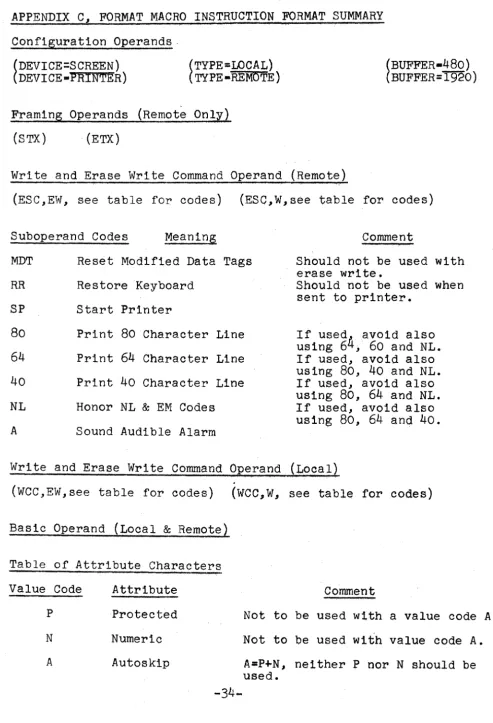
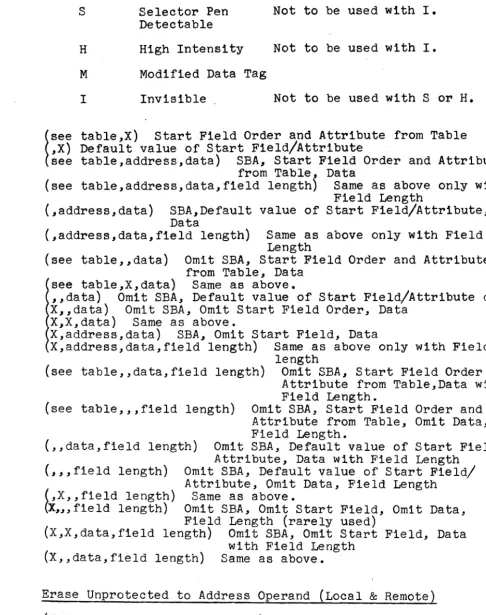
Append1x C conta1ns a 1ist1ng of all of the FORMAT Macro Instruct10n Operands 1n all of the various poss1ble
comb1na-t10ns 1n the form of a Macro Instruction Summary. It can be
used as a qu1ck cross check as to poss1ble methods of coding each of the 14 d1fferenttypes of FORMAT operands.
Appendix D conta1ns FORMAT Macro Instruction listings for the
three screens of F1gures 1, 2 and 3 shown 1n Appendix B. The
d1scuss1on of F1guresl and 2 1s conta1ned 1n the section "U~1ng
the Screen Des1gn Layout Form". Coding of the FORMAT Macro
Operands 1s d1scussed 1n the section "Cod1ng the FORMAT Macro".
Append1x E conta1ns a 11st1ng of all of the MNOTES referred to 1n the sect10n "Cod1ng the FORMAT Macro". The MNOTES are num-bered and appear 1n numer1cal order for easy reference, Where 1nformat1on 1s suppl1ed by the FORMAT Macro at the t1me the MNOTE 1s produced 1n the output 11sting, Append1x E subst1tutes
three underl1nes, , to 1nd1catethat the value w111 be put
1nto the MNOTE by ~MAT.
-28-I f\) \0 I ~ ~ ,~
Screen Name SCREEN DESIGN LAYOUT FORM - 480 CHARACTER SCREEN
RI R2 R3 R4 R5 R6 R7 R8 R9 RIO RII Rl2
- - ~ Columns - -
-! I
I j 2 3
i
4 5 6 7 8 9 10 11 12 13I i i I I
0 ' I I I I I I I
40
I
i,
I
I I ;
i ! I !
80