Technology (IJRASET)
Development of Virtual Infrastructure in
Academic
Premises for Better Utilization of
Computing Resources
Namita Agrawal1, Praveen Chouksey2, S.R.Tandan3
1
M.Tech. Scholar, Department of Computer Science and Engineering
2,3
Assistant Professor, Department of Computer Science and Engineering
Abstract— In this paper, we have proposed virtual infrastructure model to utilize the computing resources available in
academic premises. One of the key challenges of academic computing resources is utilization of available resources in effective way. The proposed model work well to utilize the computing resource efficiently.
Keywords— Academic Virtual Infrastructure, Virtual Environment, Virtualization Technologies.
I. INTRODUCTION
Increasing technological advancement has given a lot of benefits to the users in such way that they can buy huge computing resources (e.g., hardware and software) and other application tool. In 1990s to beginning of 20th century cost of hardware resources were very high, but the utilization of that resource is not good. Today utilization of computing resources is not good. Especially in case of Academic Environment, where computing resources utilization is minimum. The utilization of computing resources excellent in R & D (Research and Development) based organizations, Software Development Organization and other Real Time Application environment where resource utilization is very high. Almost every academic institute is having highly and well configured, well assembled PCs. Normally the institution machines turn on (active mode) 4-5 hours per day. These machines are used to perform only normal operation and consume less storage space. Another big issue of academic system is to setup separate lab for each semester students.
CPU utilization is very important, maximum utilization means increasing the throughput of the system, CPU utilization rate of CPU usage can be monitored in task manage, which is very less only 3 to 10% of CPU usage in academic computing resources. Most of the time CPU is in idle state (inactive state) – no useful task performed by the users. Current research says that maximum CPU utilization is essential.
Keeping CPU idle for long hours is just waste of computing resources as well as its overhead of academic budget in many ways. The solution of such problem is to setup virtualization technology to utilize those resources and also to support better computing as well as green computing, waste of more computing recourses increase pollution in environment.
A. What is virtualization?
In computing, virtualization refers to the act of creating a virtual (rather than actual) version of something, including virtual computer hardware platforms, operating systems, storage devices, and computer network resources.
Virtualization began in the 1960s, as a method of logically dividing the system resources provided by mainframe computers between different applications. Since then, the meaning of the term has broadened [1].
Virtualization technology is possibly the single most important issue in IT and has started a top to bottom overhaul of the computing industry. The growing awareness of the advantages provided by virtualization technology is brought about by economic factors of scarce resources, government regulation, and more competition.
Technology (IJRASET)
computer hardware that allows a single machine to act as if it where many machines [2].
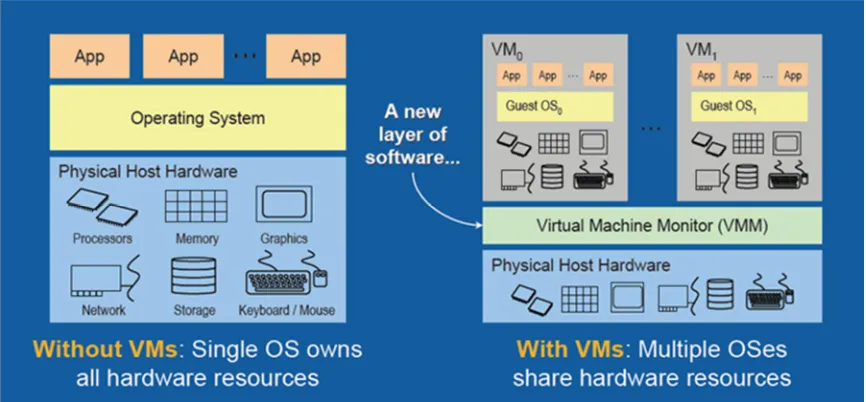
1) Without VMs: A single OS owns all hardware resources
2) With VMs: Multiple OSes, each running its own virtual machine, share hardware resources
[image:3.612.91.524.143.344.2]3) Virtualization enables multiple operating systems to run on the same physical platform.
Figure 1 - Non Virtual Machine and VM Configurations
B. Virtual Machine Monitor (VMM)
The VMM is the control system at the core of virtualization. It acts as the control and translation system between the VMs and the hardware.
The VMM challenge is the efficient controlling of physical platform resources; this includes memory translation and I/O mapping. Until recently the VMM used software methods of Binary Translation and Para virtualization to achieve this. With the complex, time consuming operations involved to create and run them, virtual machines, until now, showed significant performance reductions compared to dedicated physical machine
C. Advantages of Using Virtualization
Today’s IT intensive enterprise must always be on the lookout for the latest technologies that allow businesses to run with fewer resources while providing the infrastructure to meet today and future customer needs. Virtualization utilizing Intel Virtualization Technology is the cutting edge of enterprise information technology. Intel is closely working with VMware, XENSource, Jaluna, Parallels, tenAsys, VirtualIron, RedHat, Novell and other VMM developers.
TABLE 1
VIRTUALIZATION TECHNOLOGY BENEFITS Software-only Virtualization
Solution
Virtualization with Intel® VT End-user Benefits
Para virtualization is required with certain Operating Systems
No para virtualization required Lower support and maintenance cost. No para
[image:3.612.47.564.576.698.2]Technology (IJRASET)
Large memory overhead required
CPU virtualization assistance reduces the need for memory overhead
Lower TCO and lower platform, energy, cooling, maintenance and inventory costs
De-privileging OS limits number of Operating Systems
supported
OSs can often run on their intended layer avoiding the need to de-privilege
Increased functionality: mixed and varied OS
Only possible through complex VMMs that add latency and
cost
Assists the VMMs with silicon based functionality
Resulting on lower cost, more powerful virtualization solutions
D. Server Consolidation
It is not unusual to achieve 10:1 virtual to physical machine consolidation. This means that ten server applications can be run on a single machine that had required as many physical computers to provide the unique operating system and technical specification environments in order to operate. Server utilization is optimized and legacy software can maintain old OS configurations while new applications are running in VMs with updated platforms.
Although a server supporting many VMs will probably have more memory, CPUs, and other hardware it will use little or no more power and occupy the same physical space reducing utilities costs and real estate expenditures.
E. Testing and development
Use of a VM enables rapid deployment by isolating the application in a known and controlled environment. Unknown factors such as mixed libraries caused by numerous installs can be eliminated. Severe crashes that required hours of reinstallation now take moments by simply copying a virtual image.
F. Dynamic Load Balancing and Disaster Recovery
As server workloads vary, virtualization provides the ability for virtual machines that are over utilizing the resources of a server to be moved to underutilized servers. This dynamic load balancing creates efficient utilization of server resources.
Disaster recovery is a critical component for IT, as system crashes can create huge economic losses. Virtualization technology enables a virtual image on a machine to be instantly re-imaged on another server if a machine failure occurs.
G. Virtual Desktops
Multinational flexibility provides seamless transitions between different operating systems on a single machine reducing desktop footprint and hardware expenditure.
H. Improved System Reliability and Security
Virtualization of systems helps prevent system crashes due to memory corruption caused by software like device drivers. VT-d for Directed I/O Architecture provides methods to better control system devices by defining the architecture for DMA and interrupt remapping to ensure improved isolation of I/O resources for greater reliability, security, and availability.
II. RELATEDWORK
Technology (IJRASET)
disparate infrastructure solutions. The Vblock infrastructure package provides:
1)Improved time to market for business application workloads.
2)End –to-end management to improve IT responsiveness.
3)Lower security and compliance risks.
4)Backup, recovery, and disaster recovery solutions designed for a highly virtualized environment
ESG research shows that expanding the use of server utilization is a top priority. Therefore, IT operations must be ready to accommodate the growth and scale of business production workloads while maintaining performance and reliability. IT will need visibility into the infrastructure in order to ensure the proper placement of workloads, to efficiently troubleshoot, and to proactively respond to performance issue, How can IT leverage these new solutions to further drive efficiently, streamline operational process, and improve service to application owners?[3].
III. PROPOSEDMETHODOLOGY
PROCESS OF CREATING VIRTUAL INFRASTRUCTURE IN ACADEMIC PREMISES
A. Setup well configured machines as PER minimum requirement (Instead of having more machines).
B. Installed host operating system.
C. Install VMware server in host operating environment as a application interface.
D. Now setup up as many as possible different operating environment as per requirement.
E. Each of the guest operating environment behave as independent module for the users
F. Now machine is setup using VMware Virtualization Tool.
G. Start using many applications in every individual machine, without bother hardware.
H. Now students can utilize the resources by running multiple application programs as per their requirement in single machine instead of having different –different machines.
I. Reduces machine switching time in different OS installed in one machine.
IV. SIMULATIONOFPROPOSEDMETHODOLOGY
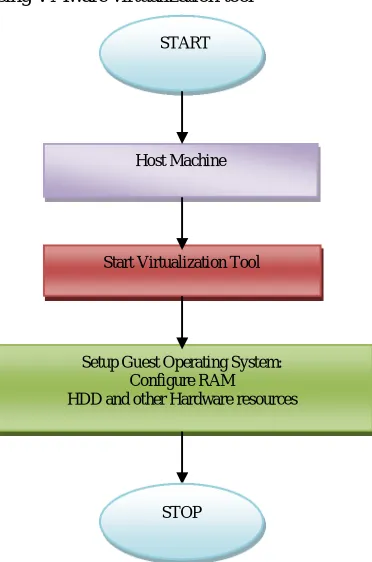
[image:5.612.202.388.420.701.2]The simulation has been performed using VMware virtualization tool
Figure 2: Flow chart of setting up Virtualization tool
The proposed work has been simulated in VMware virtual environment to utilize the computing resources. Additional software START
Host Machine
Start Virtualization Tool
Setup Guest Operating System: Configure RAM HDD and other Hardware resources
Technology (IJRASET)
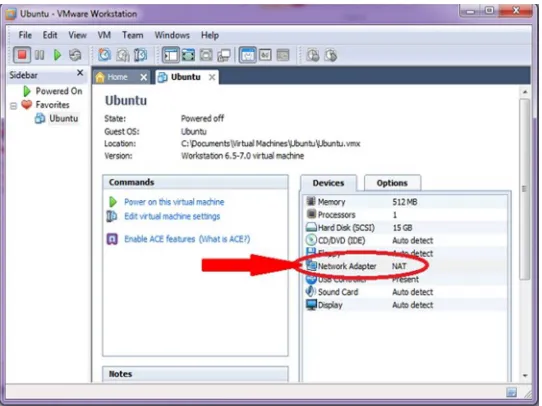
[image:6.612.164.435.98.301.2]requirement for creating virtual disk, we have used ALCOL 120 and ISO image of guest OS
Figure 4: Running multiple OS in single PCs for CPU utilization and resource sharing
V. CONCLUSIONS
The proposed technique of resource utilization using virtualization concept is unique and effective for academic institution where resource utilization is big challenge. Our proposed methodology and simulated view is helpful to implement it in real scenario. Academic Institution are equipped with well configured computing devices these resources can be utilized effectively using virtualization.
VI. ACKNOWLEDGMENT
Technology (IJRASET)
REFERENCES
[1] Graziano, Charles. "A performance analysis of Xen and KVM hypervisors for hosting the Xen Worlds Project". Retrieved 2013-01-29. [2] Intel Technology Journal: Special issue on virtualization technology, Volume 10, Issue 03
[3] Mark Bowler “Innovative, Integarte, and Accelerate Virtualization with Vblock infrastructure packages” May 2010, Enterprise Strategy Group.
[4] Al Gillen Gary Chen Jed Scaramella Lenovo and VMware Partner to Enable the Last Mile in Your Virtualization Journey Sponsored by: Lenovo and VMware January 2015.
[5] Wes Felter, Alexandre Ferreira, Ram Rajamony, Juan Rubio An Updated Performance Comparison of Virtual Machines and Linux Containers IBM Research, Austin, TX fwmf, apferrei, rajamony.
[6] Avanade Perspective Corporate headquarters: 2211 Elliott Avenue Suite 200 Seattle, Washington 98121 [7] VMware® and Microsoft® Hyper-V® Sales Sheet | Virtualization HEADQUARTERS Austin, Texas, USA
[8] Evangelia Kalyvianaki “Resource provisioning for virtualized server applications” Technical Report University of Cambridge November 2009
[9] Christine, Leja, CCP, Chair Richard C. Barnier Charles L. Brown, CCP Paul F. Dittmann Paul Koziel Mark Welle J.T. Westermeier “Virtualization and Its Benefits” AITP – Research and Strategy Advisory Group, JD, CCP