Automatic Android-based Wireless Mesh Networks
Paul Wong, Vijay Varikota, Duong Nguyen and Ahmed Abukmail School of Science and Computer Engineering
University of Houston - Clear Lake, Houston, Tx 77058, USA
Email: [email protected], [email protected], [email protected], [email protected]
Keywords:Android, wireless mesh networks, Wi-Fi Direct, relay
Received:August 14, 2014
Android devices are portable, equipped with powerful processors, and can act as both mesh routers and clients through Wi-Fi Direct, making them a suitable platform from which to deploy a wireless mesh network. To allow Android devices to automatically establish and participate in a wireless mesh network, we circumvent two key problems of the Android’s Wi-Fi APIs: lack of direct support for ad-hoc networking / many-to-one Wi-Fi Direct connections, and Wi-Fi Direct WPS authentication limiting applications to ones which require intermittent user interaction.
Povzetek: Opisana je metoda za izboljševanje vkljuˇcevanja naprav Android v omrežja.
1
Introduction
Devices running Android[1], such as smartphones and tablets, are ubiquitous, power efficient, and inexpensive. In addition, most Android devices come with a suite of sen-sors which, in a network, may be used to collect physical data simultaneously in different locations; this gives a wire-less mesh network containing Android devices the potential to be immediately useful in a variety of applications, such as in a wireless sensor network [2, 3]. Android devices acting as soft access points can extend the coverage of the network while simultaneously functioning in other capaci-ties (such as that of a sensor node), reducing the amount of infrastructure required for deployment of the network over a given area.
While being comparable in size to many microntroller-based boards, the open source and popularity of Android devices have produced an enormous number of applica-tions and algorithm implementaapplica-tions. Android devices are capable of executing complex algorithms directly on board, giving the Android mesh network facility for distributed computing.
This paper demonstrates how wireless mesh networks can be constructed by Android devices automatically with Wi-Fi Direct [4] using a technique that establishes connec-tions without requiring user interaction. By allowing these devices to connect to each other automatically, we make their use practical in a number of different applications in which they would not otherwise be, namely, ones which require them to be permanently or semi-permanently in-stalled - as network infrastructure or as part of a larger sta-tionary sensor network, for example. Used Android de-vices are easy to obtain and inexpensive; they will only be-come more so in the future, making them potentially cost efficient alternatives to more traditional types of infrastruc-ture.
In section 2, we review the concept of a wireless mesh network, acknowledge existing, similar approaches, and discuss Wi-Fi Direct on Android. In Section 3, we dis-cuss the existing network implementations for Android. Sections 4, 5, and 6 outline our implementation in detail, describing both methodology and architecture. Section 7 shows the structure of the software, and section 8 discusses our testing and results.
2
Background
2.1
About Wireless Mesh Networks
Wireless Mesh Networks are dynamic, self-organizing net-works made up of devices which are either mesh clients or mesh routers. Wireless Mesh Networks are similar to ad-hoc wireless networks in structure, but differ in that for a Wireless Mesh Network, there is still a central gateway through which most network traffic will ultimately pass[5]. Wireless Mesh Networks are an efficient and cost-effective way of providing wireless network infrastructure, because of the ease and low cost of installation[5].
2.2
About Android
The key strengths of the Android platform in the context of automatically constructing Wireless Mesh Networks are:
– Android is open. The source code for the operating system is freely available, and, as a mobile platform, applications may be developed and distributed for it without any significant limitation[6].
– Android devices have a host of built-in sensors. Cam-eras, GPS, accelerometers, microphones, compasses, barometers, EM field, RGB light sensors, and gy-ros are all commonly available and programmer-accessible through the Android API.
– Android devices are able to communicate over 2.5-4G networks, Wi-Fi a/b/g/n, and BluetoothR.
– Android devices are power efficient, small, and portable.
– Android devices are typically run by powerful, multi-core ARM processors, giving them the ability to per-form complex tasks and computations on board.
– The market for Android devices is directly consumer driven. Development of new hardware is rapid; mod-els of perfectly serviceable devices are succeeded al-most yearly, causing the prices of the older models to drop along with the demand for them, making them a prime inexpensive target for building wireless mesh networks.
– Android applications can be configured to start auto-matically after device boot-up.
2.3
Wi-Fi Direct on Android
Since Android 4.0, Wi-Fi Direct has been available on Android devices through the API’s Wi-Fi P2P framework. A major problem with the implementation is that, if used in any of the ways shown in the documentation or sam-ple code[7], many-to-one connections will not work; as of Android 4.4, attempting to connect to any third device will cause the existing connection to drop. We describe the method we have used to bypass this issue in section 4.2.1.
3
Existing mesh/ad-hoc network
implementations for Android
3.1
A multilayer application for multi-hop
messaging on Android devices
Ryan Berti, Abinand Kishore, and Jay Huang of the Uni-versity of Southern California developed software for the Android which can send data through a daisy-chain of phones linked through transient Wi-Fi Direct connections. Connections between devices are one to one, and each phone in the network acts as both a relay and a client. The application computes routes through the devices, and packs the route data in every message so that each relaying device knows where to send the data towards[8].
3.2
The serval project
The Serval Project aims to be a backup telecommunications system that can function outside a normal cellular network.
The Serval Project’s software can use Android’s Wi-Fi in ad-hoc mode to establish its network, however, using An-droid’s ad-hoc mode presently requires root permissions on the device (root permissions can only be acquired on a de-vice by hacking it, which usually voids the warranty and may be illegal if the device is a contract phone). If root permissions are not available on a device, a wireless access point is needed for the device to communicate using the software[9].
3.3
Open garden
Open Garden is proprietary software for the Android, Win-dows, and Mac OS X that allows users to create and take part in wireless mesh networks to access the Internet. It does not require root access on a phone and can use Wi-Fi Direct or BluetoothR to establish connections[10].
4
Establishing Android Wi-Fi Direct
connections automatically
4.1
Motivation for connection automation
Android devices such as smartphones, are designed to be user-driven devices. That is, the Android stack, which sits on top of Linux, is geared towards facilitating communica-tion, productivity, and entertainment applications in which user interaction is central. It is in this user-centric context that Android’s Wi-Fi Direct framework was created.
The primary connection methods of the framework, and, indeed, theonlydocumented methods for establishing peer-to-peer connectivity between Android devices are all user driven; they must have a user’s input and confirmation in order to proceed with connection and authentication. While suitable for the application areas for which Android was primarily designed, the requirement of having periodic user interaction to drive connection processes limits the ways the devices can be used. Permanent installation of these devices, for example, would be impractical if a user or ad-ministrator had to periodically press a button on an authen-tication dialog to keep a network running.
By allowing Android devices to connect to each other automatically and without any interaction, we eliminate this requirement of user supervision and make the devices practical in applications where they may be difficult to ac-cess and/or frequent and periodic user oversight cannot or should not be guaranteed.
4.2
Implementation
If necessary to enlarge coverage, multiple routers may exist in the network. If two routers are outside of each oth-ers’ ranges, a client that is within the range of both can act as a relay to ferry information from one router to the other. To accomplish this, the client acting as a relay temporarily disconnects from its original mesh router to broadcast and receive data to and from the other mesh router[5].
Unlike some implementations, ours does not need root access on any device. It can also run automatically and establish connections without user intervention, and works on any device running Android 4.0 or later. It is also lightweight enough to be used for communications infrastructure.
The two main obstacles overcome by our implementa-tion are:
1. As mentioned previously in section 2.3, as of Android 4.4 (API 19), the Wi-Fi Direct interface on Android
may notbe used directly to connect more than two devices at a time.
2. When two devices try to connect to each other using Wi-Fi Direct, manual, user-interactive authentica-tion is required. A WPS confirmation dialog box will pop up on the screen during a connection attempt and must be answered by a user in order for the connection to be accepted. A device that has already connected once may be “remembered,” which means that if it attempts to connect again no authentication dialog will be presented. However, remembered devices areforgottenafter reboots.
4.2.1 Soft access point solution
Though the Android Wi-Fi Direct implementation does not work properly for many-to-one connections (see sec-tion 2.3) itdoes, however, allow for the creation of a soft access point (AP) that one or more devices can connect to simultaneously if they know its SSID and preshared key.
Since neither the SSID or preshared key of the access point can be set by the framework (both are automatically and randomly generated), they must somehow be given to the devices which are to connect to the soft access point.
The way we have accomplished this is by packing the SSID and preshared key into a network service discovery broadcast, which can be sent wirelessly from the soft ac-cess point to other devices in range using the Android Wi-Fi Direct framework. The SSID and the preshared key are both encrypted with a separate key that all the devices know beforehand (an encryption key, unlike an access point preshared key, can be set programmatically).
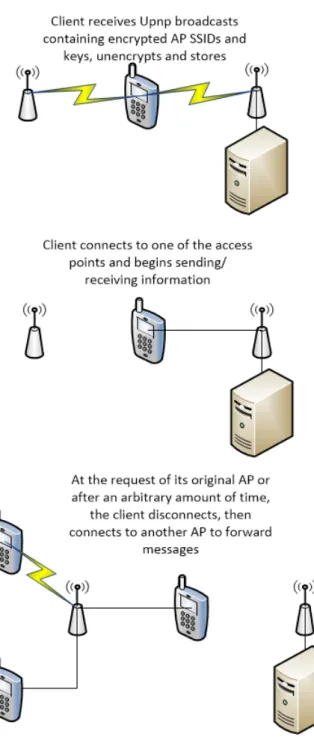
All devices within range of one of these soft access points (AP) will receive this network service discovery broadcast containing the AP’s SSID and PSK (see figure 1). If a client device is within range of more than one soft access point, it will receive the AP information for all of
them, and if it is to act as a relay, it can take turns connect-ing to each AP.
Using this method, multiple clients can connect to a sin-gle device over Wi-Fi simultaneously (see figure 2); a sec-ond and very important benefit to this method is that the authentication process can be completely automated.
4.2.2 Security
Soft access points created by Android’s Wi-Fi Di-rect framework are WPA2 compliant, which means that all communications between the access point and authenti-cated clients are encrypted using AES-CCMP or TKIP[11]. The wireless AP password is encrypted in-side the network service discovery broad-cast with the javax.crypto.Cipher class using “AES/GCM/PKCS5PADDING”, which is the AES algorithm in Galois/Counter mode with the cleartext padded into 8 byte blocks. The key used for encryption is stored on each device beforehand to enable them to create and join the p2p network without periodic user intervention.
The reason why the preshared key of the soft access point is not just directly stored beforehand is because it is randomly generated and subject to change each time the soft AP is created, at the discretion of the framework and not the programmer; there is no way to change or mod-ify it. If the preshared key was stored beforehand, then users would have to reconfigure all the devices whenever an Android device running a soft access point decided to change its preshared key. In other words, we cannot effec-tively “preshare” the preshared key because it changes at the whim of Android OS.
By broadcasting the AP’s most recent preshared key each time it is created, we ensure that clients can always connect to it without having to be manually reconfigured. By encrypting the key before broadcasting it, we ensure that only the clients who we want to be able to connect to the network will be able to; we can store the encryption key used to encrypt the AP keys on the devices beforehand, without having to worry about it changing.
4.3
Mesh router procedure
1. Create a soft AP using Wi-Fi Direct. This is per-formed by making a group using the createGroup
method of theWifiP2pManagerclass. The newly created access point:
(a) creates its SSID from its device name and a ran-dom string of letters.
(b) is secured using WPA2-PSK; its passphrase is randomly generated and cannot currently be changed or set by the programmer.
afterwards[12].
2. Wait for the soft AP to finish starting up.
The Android device will send a WIFI_P2P_-CONNECTION_CHANGED_ACTION intent when the AP is up. Associate a BroadcastReceiver
with this intent to catch it. This BroadcastReceiver will be called by the operating system:
(a) whenever a change in the Wi-Fi Direct connec-tion is detected.
(b) after createGroup finishes creating the access point.
Receipt of this intent will act as a signal to pro-ceed to the next step.
3. Pack the SSID, passphrase, MAC, and connectivity status into a string.
4. Encrypt the string. Use an encoding for this string that will not lose information when cast into Unicode, such as ISO-8859-1[13].
Figure 1: A client device picking up an AP broadcast and connecting.
5. Create a WifiP2pDnsSdServiceInfo object
and put the encrypted string into it. This can be done from inside theBroadcastReceiver.
6. Begin broadcasting the service informationby call-ing WifiP2pManager’saddLocalServicemethod.
7. Start a netsock serveron a separate thread and begin listening for clients attempting to connect. In our im-plementation, each connected client is given its own new thread for the sake of simplicity.
Router Pseudocode:
CreateAP()
en_ssid←Encrypt(GetMySSID())
en_psk←Encrypt(GetMyPSK())
MakeNSDBroadcast(en_ssid,en_psk)
server_socket←OpenServerSocket()
whileprogram_is_running
client_socket←BlockingAccept()
StartNewClientIOThread(client_socket)
4.4
Client procedure
1. Make a callback object to receive network ser-vice discovery (NSD) broadcasts by creating a
DnsSdServiceResponseListener. This will be called any time a Upnp broadcast is received. The
DnsSdServiceResponseListenermust:
(a) Receive the broadcast data as a String
(b) Unencrypt the received broadcast string
(c) Parse out the SSID and passphrase from the un-encrypted string
(d) Store the parsed out information in an instance of a Class designed to hold it
(e) Push that instance with the data into a list.
2. Start listening for network service discovery broadcasts by calling WifiP2pManager’s setDnsS-dResponseListeners, addServiceRequest, and disco-verServices methods to register, associate, then start the UpnpService discovery service with the
DnsSdServiceResponseListener.
3. Begin a timer that will stop the NSD listening some time after the receipt of the first broadcast. This gives the network service discovery broadcast receiver time to pick up other broadcasts, if there are any.
Figure 2: Server broadcasting AP info and allowing multi-ple clients to connect simultaneously.
5. Connect to the “best” APusing WifiManager.
6. Once the device has connected to the mesh router over Wi-Fi, connect to the router’s netsock server
and begin exchanging information.
Client Pseudocode:
x←0
whilelistening_for_NSD_broadcasts ifreceived_new_broadcast
AP[x].SSID←Decrypt(Broadcast.SSID)
AP[x].P SK←Decrypt(Broadcast.PSK)
x←x+ 1
maxaps←x i←1
t←arbitrary time interval
server_ip_address←“192.168.49.1”
whileprogram_is_running ConnectToAP(AP[i])
csocket←ConnectSock(server_ip_address)
PerformIO(csocket)
wait(t)
DisconnectFromAP()
ifi≤maxaps i←i+ 1
elsei←0
4.5
The relay procedure
Clients which are to act as relays between access points re-member all the access points they heard from during the initial broadcast listening period. For now, they connect to all the access points in range in a round robin fashion, switching from one access point to the next after an arbi-trary amount of time (see figure 3); our future work will ex-plore more sophisticated routing schemes, such as demand and event-based relaying.
1. After connecting to the first access point in its list and receiving data, the relay client will disconnect from the AP.
2. After disconnecting, the relay client will connect to the next AP in its list.
3. While connected to this AP, the relay client will broad-cast any information it knows that it needs to forward. The mesh router will have timestamped all messages it has queued as outgoing, and will check these times-tamps against the last time this client disconnected. Messages which are more recent than this time will be sent to the client.
4. After all data is transmitted, upon instruction from its access point, or after an arbitrary amount of time, the client relay will disconnect from this access point device and connect to the next one (which is the first access point in its list if it has reached the end of the list).
5
Broadcasting a message
1. The message to be sent is prefixed with a universally unique identifier (UUID) used to identify it, and the MAC address of its origin. The UUID is randomly generated when the message is created and is im-mutable.
Figure 3: Relay procedure.
3. If the message is new, process the information, ap-pend the device’s MAC to the header, then send the message out.
5.1
Message structure
The message may contain either data or commands, and may be, as described in the previous sections, broadcast to all devices or sent to a specific device only.
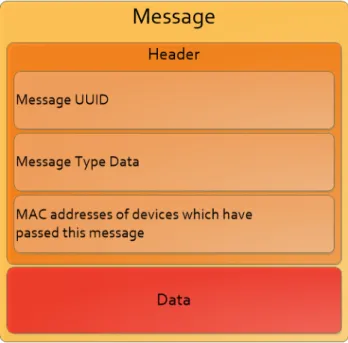
The parts of the message are (see figure 4):
1. Header:
(a) UUID:Uniquely identifies a message. Useful in determining whether or not a message has been received before.
(b) Message Type Data: Indicates whether the message contains one of the following:
– data intended for a single recipient
– data intended for all devices on the network
– a command intended for a single recipient
– a command intended for all devices on the network
(c) MAC address list: Used to construct route data and to determine the directions the message is to be passed in (Note: the first two characters of a MAC address may change for the same device and same network interface, and should be ignored.)
2. Data: The payload of the message. May be anything from a command to raw binary data.
5.2
Sending a message intended for a single
recipient
If the network is to send messages meant for particular de-vices, the steps for broadcasting a message may be used to construct a graph of the network. After step 5, you would check to see if the recipient of the message can connect to any devices other than the mesh router to which it is already connected. If it cannot, the message has reached a “leaf” node, and sends the data back up to the source of the mes-sage. The header will contain, in order, the MAC addresses of each mesh router and mesh client which the message has passed over on its way to the leaf.
Figure 4: Internal structure of a message.
6
Starting the software on device
boot
An application can be configured to start after the Android OS has completed booting. Permission for
android.permission.RECEIVE_BOOT_COMPLETED
must be requested in the application’s manifest file, and a receiver for the
android.intent.action.BOOT_COMPLETED
intent must be declared. The OS will start the application after it is completed booting, then send the specified receiver this intent, after which the receiver can start up the main activity.
Also, the lock screen can be disabled manually in the Security section of the device’s settings; by default, it will be shown as soon as the device powers on.
7
The structure of the software
Our software can be installed on any Wi-Fi capable device running Android 4.0 or later, and can be divided into three main parts (See figure 5):
1. The main activity, which provides a console for on-device logging and debugging, as well as basic UI functionality
2. The network service, which either runs the mesh router service or the mesh client service
3. TheBOOT_COMPLETEDbroadcast receiver, which is registered with the system from the application mani-fest, and the starting point of the program if started by the system
Figure 5: The overall architecture of the software.
7.1
Main activity / boot receiver
The first time the program is run on a device, the main ac-tivity will ask whether the device is to be a mesh client or a mesh router via a dialog box. This only needs to be done once, as the choice will be saved to file and remembered the next time the program starts.
The program can be manually set to either router or client mode at any time from an action bar menu.
After being configured for the first time, the program will run automatically on device boot through its Boot Receiver, which is called by the operating system.
7.2
Network service
The network service started by the main activity is either the mesh router service or the mesh client service, both of which inherit from a common “network service” superclass and present an identical I/O interface, which can be used to query the service if it can talk to any other device, as well as send and listen for messages.
The services themselves are divided into two modules:
1. the Wi-Fi Direct and Wi-Fi module, which is respon-sible fora) advertising and listening for network ser-vice discovery broadcasts containing access point in-formation, andb) establishing and maintaining Wi-Fi connections.
7.3
Attaching other components
Our software provides network communications, and may be either used as part of other software, or potentially run on its own and used through Android’s IPC mechanisms. Messages may arrive asynchronously depending on a de-vice’s location in the mesh network; this must be taken into account by the code to use this service.
8
Testing and results
Our build environment was Eclipse with the Android De-veloper Tools plugin running on both Windows and Linux. The devices we deployed our software on included a pair of twin Samsung Galaxy Nexuses, the Motorola Moto, and the Nexus 7, which used Android versions 4.3, 4.4.2, and 4.4.3, respectively. All of the phones were running either OEM versions of Android, or locked, contract-phone ver-sions of it. The software is written entirely in Java using the Google Android APIs and does not require any of the devices to be rooted.
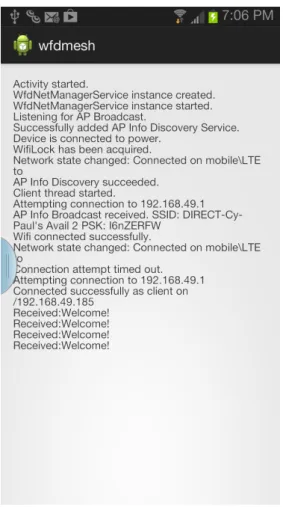
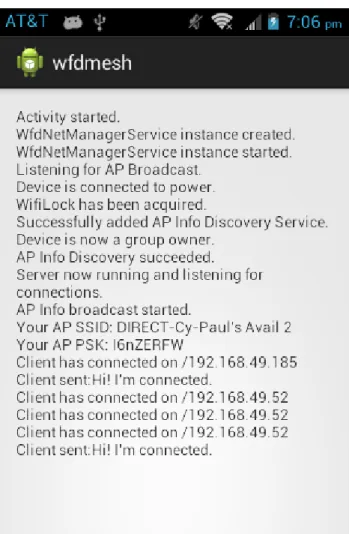
During testing, we were able to establish the network on up to four devices, with one acting as a soft AP tethered to the Internet, another acting as a soft AP with no direct Inter-net connection, a client acting as a relay between the two, and a client persistently connected to the same soft AP. We were also able to configure the devices so that three of them acted as soft APs, while the last worked as a relay between all of them. In both configurations, the phones were able to construct the network automatically after being turned on. One of the challenges we have experienced is making a device’s NSD broadcasts continuously visible to other de-vices. Sometimes, this required us to power-cycle the wi-fi radio, clear the phone’s program cache, or restart the device several times.
With a clear, unobstructed line of sight, the wireless ra-dios on the Android devices we tested were capable of maintaining a direct connection to a device-created soft ac-cess point at distances up to 32 to 35 meters. We found that obstructions such as walls, doors, etc.significantlyreduced the operable range.
9
Conclusion
In this article, we discussed and demonstrated how the An-droid’s Wi-Fi Direct API can be used to automatically es-tablish connections to other Wi-Fi Direct devices. By us-ing network service discovery broadcasts over Wi-Fi Di-rect, we are able to transmit a soft AP’s preshared key to other devices, then connect these devices to the AP using their regular Wi-Fi facilities without ever requiring a user to perform manual WPS authentication on any of them.
Also, we have shown that, once freed from the require-ment of manual user authentication, it becomes practical for Android devices to automatically construct and partic-ipate in a wireless mesh network, acting as mesh routers,
mesh clients, and relays.
10
Acknowledgements
We thank Dr. Robert Ryan and Mary Pagnutti from In-novative Imaging and Research for their advice, guidance, and feedback on this paper. The material in this paper is based on work supported by NASA STTR Phase 2 contract No. NNX13CS14C.
References
[1] Google, “Android,” Jan. 2014. [Online]. Available: http://www.android.com/
[2] W.-J. Yi, W. Jia, and J. Saniie, “Mobile Sensor Data Collector using Android Smartphone,” Circuits and Systems (MWSCAS), 2012 IEEE 55th International Midwest Symposium on, no. 55, pp. 956–959, 2012.
[3] P. P. Jayaraman, A. Zaslavsky, and J. Delsing, “Sen-sor Data Collection Using Heterogeneous Mobile De-vices,”Pervasive Services, IEEE International Con-ference on, pp. 161–164, 2007.
[4] “Wi-fi direct,” Jan. 2014. [Online]. Available: http://www.wi-fi.org/discover-wi-fi/wi-fi-direct
[5] Wireless Mesh Networks: Architectures and Proto-cols. Springer, 2007.
[6] R. Meier,Professional Android 4 Application Devel-opment. Wrox, 2012.
[7] Google, “Wifip2pmanager,” Jan. 2014. [Online]. Available: http://developer.android.com/guide/topics/ connectivity/wifip2p.html
[8] K. Huang, Berti, “A multilayer application for multi-hop messaging on android devices,” Oct. 2013. [Online]. Available: http://anrg.usc.edu/ee579_2012/ Group02/Design.html
[9] “Serval mesh documentation,” Oct. 2013. [Online]. Available: http://developer.servalproject.org/
[10] “Opengarden.com,” Oct. 2013. [Online]. Available: https://opengarden.com/
[11] “IEEE 802.11i-2004: Part 11: Wireless lan medium access control (mac) and physical layer (phy) specifi-cations,” Jul. 2004.
[12] D. Camps-Mur, A. Garcia-Saavedra, and P. Serrano, “Device-to-Device Communications with WiFi Di-rect: Overview and Experimentation,”IEEE Wireless Communications, vol. 20, no. 3, pp. 96–104, 2013.