API Integration Guide
INTEGRATION GUIDE
VERSION 2.2
2 | API Integration Guide V e r s i o n 2 . 2
Table of Contents
1. Overview ...5
1.1 Test Merchant Account v/s Live Merchant Account...5
1.2 Target Audience...5
1.3 Assistance ...6
1.4 Technical Architecture ...6
1.5 Documentation Feedback ...6
2 Getting started...7
2.1 Web Service URLs ...8
2.2 Definitions ...8
3 Validate Secret Key ...9
3.1 Request ...9
3.2 Response ... 10
3.3 Response Codes ... 10
4 Create Pay Page ... 11
4.1 Request ... 11 4.2 Response ... 15 4.3 Response Codes ... 15 5 Verify Payment ... 19 5.1 Request ... 19 5.2 Response ... 20 5.3 Response Codes ... 20 5.4 Example ... 21 6 Transactions Reports ... 22 6.1 Request ... 22 6.2 Response ... 23 6.3 Error Codes ... 23
7 REST API Call Behavior ... 24
8 Response & Codes ... 25
8.1 Response Codes ... 25
9 Test Credit Card Numbers ... 26
10 Example ... 27
3 | API Integration Guide V e r s i o n 2 . 2
Revision History
Version Description of Change Date
1.0 - New Document 21/11/2013
1.1 - Added Architecture Diagram & return_url in create PayPage 24/11/2013
1.2 - Added Definitions of Terms 25/11/2013
1.3 - Added Test Cards 27/11/2013
1.4 - Added Error Code 0006 for invalid country 07/01/2014
1.5 - Added MDD (Merchant Defined Data) structure in the calls 29/01/2014
1.6 - Updated Response Code 22/06/2014
1.7 - Removed All Staging Links - Removed Service Calls section - Removed Prepare Transaction API
26/07/2014
1.8
- Added API Key in subsequent API calls to authenticate requests - Added discount and Currency Fields
- Added Reference Number added create PayPage - Transaction Logs API removed
- Inventory API removed
- Complete Transaction API removed. - Added Examples for each call
- Added full Example for API
- Change of Format of Documentation
- Added Test Account v/s Live Account description - Added support email address
- Added updated technical Architecture Diagram - Added msg_lang to create PayPage to set language - Removed User Roles
27/08/2014
1.9
- Added constraint of 9 characters for Postcode
- Changed “description” in paypage to “products_per_title” - Added a note in create PayPage example.
- Improved Section Numbering
24/09/2014
2.0
- Changed all API Calls from paytabs.co to paytabs.com - Changed example to include spaces between || separators - Added note to include spaces between || separators
- Added comments to the example code and note for test cards - Unused Response Code 1 and 3 removed from document. - Added Comment for successful transaction response code - Corrected merchant_password variable in example code - Changed description variable to product_per_title in example - Supported Platforms included
- Code Syntax Highlighted
4 | API Integration Guide V e r s i o n 2 . 2 2.1
Version Upgrade
- Authentication/validation using secret key instead of password. - Removed authentication API Call.
- API Call URLs changed.
- Combined error/success codes into response codes. - Added new response codes.
- Added New API Call for transaction reports - Added Documentation Feedback email address - Changes in Sample Code
- Added section “Troubleshoot your Installation” - Changed the format of Documentation
- Added "site_url" in create paypage API.
- Added “cc_phone_number” : country code in create paypage API - Removed variables ChannelofOperations, & ProductCategory, - Removed variables ProductName, & ShippingMethod
- Removed variable DeliveryType, CustomerId
- Added cms_with_version parameter in create paypage API - Sample Codes updated.
- Removed Validate API Key. - Removed Security Tip
- Added Other Charges in Create PayPage API - Verify payment modified to return more values
07/07/2015
2.2
- Updated Response codes of Verify Payment - Updated Complete Response codes Tables
- Added Illustrations of how the variables will appear on Invoice and Paypage
- Added FAQ section
5 | API Integration Guide V e r s i o n 2 . 2
1.
Overview
At PayTabs, we are committed to providing the most secure, reliable and user-friendly payment processing solutions. By partnering with us for your payment processing needs, you can be confident that payment transactions will be processed quickly and efficiently, and your customers’ information will be safe.
You’ll enjoy our easy set-up using our Plugins and easy integration with our APIs. Our two-level fraud protection system protects transaction data throughout the payment process. With PayTabs as your payment processor, you’ll benefit from the fastest, most secure, and cost-effective payment processing in the industry.
PayTabs API is a RESTful resource. In order to integrate with PayTabs API, you will need the credentials of your PayTabs Merchant Account. If you do not have a merchant account,
you can sign up for one here.
It's important to note that the PayTabs APIs are constantly evolving, and updates are usually done every quarter, if required. PayTabs will intimate any major API change, so it’s important that you check your merchant dashboard notification or e-mail, frequently to be updated.
1.1 Test Merchant Account v/s Live Merchant Account
PayTabs does not offer an explicit Sandbox / Testing environment. But using a demo account, you can freely test all the functionalities and integrate our API and Plugin without any hassle. In order to move to LIVE PRODUCTION environment, you will need to activate your LIVE MERCHANT ACCOUNT by clicking on GO LIVE through your PayTabs Merchant Account. PayTabs requires some personal information, documents and other details related to your business to validate your business. Once your Merchant Account is activated, you will have been moved to the LIVE PRODUCTION environment.
1.2 Target Audience
This document is intended for developers who want to write applications that interact with PayTabs.com.
This document assumes that you understand general networking and programming ideas. Even though code examples are built using PHP, any programming language of your choice can be used to interact with this API.
6 | API Integration Guide V e r s i o n 2 . 2 1.3 Assistance
If you require assistance, please check out our Frequently Asked Questions or chat live with
our support staff or email us at [email protected].
1.4 Technical Architecture
1.5 Documentation Feedback
Help us improve the PayTabs API Integration Guide, by sending your feedback to [email protected].
7 | API Integration Guide V e r s i o n 2 . 2
2
Getting started
Here is a listing of all the APIs provided by PayTabs. S. No. API FUNCTION API CALL
1 Validate Secret Key https://www.paytabs.com/apiv2/validate_secret_key 2 Create PayPage https://www.paytabs.com/apiv2/create_pay_page 3 Verify Payment https://www.paytabs.com/apiv2/verify_payment 4 Transaction Reports https://www.paytabs.com/apiv2/transaction_reports
8 | API Integration Guide V e r s i o n 2 . 2 2.1 Web Service URLs
PayTabs does not offer an explicit Sandbox / Testing environment. But using a demo account, you can freely test all the functionalities and integrate our API and Plugin without any hassle. In order to move to LIVE PRODUCTION environment, you will need to activate your LIVE MERCHANT ACCOUNT
Production Environment : https://www.paytabs.com
2.2 Definitions
The following are some of the terms that are used in this document and their respective definitions.
TERM DEFINITION
Merchant PayTabs customer who will use the PayTabs system in their
shops/counters.
Secret Key Secret key available on the merchant dashboard, under the
menu: E-commerce Plugins and API.
Customers The customer that the merchant will charge. They are also called
cardholders.
Banks The banks to which PayTabs will interact.
Payment processor The 3rd party payment gateway that PayTabs is using to capture
payments
Masked number The first 6 and last 4 numbers of the card number with*(asterisk
in the middle)
Issuer Bank The bank which has issued the credit card being used.
9 | API Integration Guide V e r s i o n 2 . 2
3
Validate Secret Key
A new authentication model has been introduced in our API. It depends on a unique Secret Key generated only once for each merchant and will be used in all the web services
provided by PayTabs. This method uses the merchant_email and secret_key to validate your credentials.
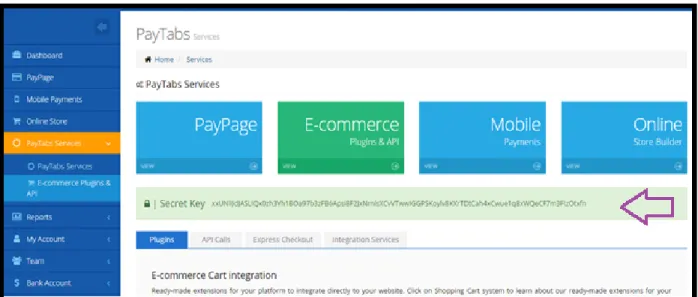
You can find the secret key on your Merchant’s Dashboard >> PayTabs Services >>
ecommerce Plugins and API.
Fig: To find your secret key, go to PayTabs Services >> E-commerce Plugins and API.
PATH https://www.paytabs.com/apiv2/validate_secret_key
REQUEST METHOD POST
PRODUCTION LIVE
3.1 Request
Element Description Format
merchant_email Required
The merchant’s valid email address used at the time of sign up.
String
> 4 characters E.g.: [email protected]
secret_key Required
SECRET Key generated by merchant dashboard
String E.g.:
10 | API Integration Guide V e r s i o n 2 . 2 3.2 Response
Element Description Format
result Validation of secret Key:
valid / invalid String E.g.: valid / invalid
response_code The response code of the API call. String
4 characters
E.g.: 4000, 4001, 4002
3.3 Response Codes
Response Code Description
4000 Valid Secret Key
4001 missing secret_key or merchant_email parameter
11 | API Integration Guide V e r s i o n 2 . 2
4
Create Pay Page
This method will accept all the parameters required to create a PayPage and then return the response as well as the link where the customer can enter the credit card information and make the payment.
PATH https://www.paytabs.com/apiv2/create_pay_page
REQUEST METHOD POST
PRODUCTION LIVE
4.1 Request
Element Description Format
merchant_email Required
Merchant email id used to login into PayTabs Merchant
Dashboard.
String
E.g.: [email protected]
secret_key Required
SECRET Key generated by merchant dashboard
String
E.g.: Mao8sdhasfyahosdap9sd
site_url Required
The URL of your site from which you will configure the API.
String E.g.:
http://www.yourwebsite.com/
return_url Required
The URL to which the customer will be returned to.
String E.g.:
http://yourwebsite.com/pa yment_completed.php
title Required
Description or title of the
transaction done by the customer
String
32 characters E.g.: Order # 3321
cc_first_name Required
First Name of the Customer String 32 characters
E.g.: John
cc_last_name Required
Last Name of the Customer String 32 characters
12 | API Integration Guide V e r s i o n 2 . 2
cc_phone_number Required
Country code for Phone Number of the Customer
String
32 characters E.g.: 00973
phone_number Required
Phone Number of the Customer String 32 characters
E.g.: 3312345678
email Required
Email of the customer String 32 characters
E.g.: [email protected]
products_per_title Required
Product title of the product. If multiple products then add “||” separator
String
256 characters
E.g.: IPhone || Samsung S5 || Samsung S4
unit_price Required
Unit price of the product. If multiple products then add “||” separator.
String
256 characters
E.g.: 21.09 || 22.12 || 12.01
quantity Required
Quantity of products. If multiple products then add “||” separator.
String
256 characters E.g.: 1 || 2 || 3
other_charges Optional
Additional charges. e.g.: shipping charges, taxes, VAT, etc.
Decimal
Up to 3 Decimal places E.g.: 123.399
amount Required
Amount of the products and other charges, it should be equal to: amount = (sum of all
products’ (unit_price * quantity)) + other_charges
This field will be displayed in the invoice as the sub total field
Decimal
Up to 3 Decimal places E.g.: 123.399
discount Optional
Discount of the transaction The Total amount of the invoice will be= amount - discount
Decimal
Up to 3 Decimal places E.g.: 123.399
currency Required
Currency of the amount stated. 3 character ISO currency code
String E.g.: BHD
13 | API Integration Guide V e r s i o n 2 . 2
reference_no Optional
Invoice reference number String 11 characters
E.g.: Abc-5566
ip_customer Required
The client IP with which the order is placed.
String
16 characters
E.g.: 123.123.12.2
ip_merchant Required
Server IP where the order is coming from
String
16 characters E.g.: 11.11.22.22
billing_address Required
Complete Address of the
customer. Multiple address lines will be merged into one single line.
String
64 characters
E.g.: Flat 11 Building 222 Block 333 Road 444 Manama Bahrain
state *** Required
Billing State (part of the address) entered by the customer String 32 characters E.g.: Manama city Required
Name of the billing city selected by customer
String
32 characters E.g.: Manama
postal_code Required
Billing Postal code provided by the customer
String
Up to 9 characters E.g.: 12345
country Required
Country of the customer String 3 character ISO country code
E.g.: BHR
address_shipping** Required
Shipping address of the customer String 64 characters
14 | API Integration Guide V e r s i o n 2 . 2
*** When the country is selected as USA or CANADA, the state field should contain a
String of 2 characters containing the ISO state code otherwise the payments may be rejected. For other countries, the state can be a string of up to 32 characters.
** If shipping details is not required from customer or the same as the billing details, you
can post the same billing details fields in shipping details fields.
city_shipping Required
Shipping City of the customer String 32 characters
E.g.: Manama
state_shipping *** Required
Shipping State of the customer
String
32 characters E.g.: Manama postal_code_shipping Required
Shipping postal code of the customer
String
Up to 9 characters E.g.: 403129
country_shipping Required
Shipping country of the customer String 3 character ISO country code
E.g.: BHR
msg_lang Optional
Language of the PayPage to be created. Invalid or blank entries will default to English.
String
E.g.: English / Arabic
cms_with_version Required
CMS / Language that you are using with its version. This will help us to troubleshoot issues, if any.
String
E.g.: Magento 0.1.9
*** When the country is selected as USA or CANADA, the state field should contain a
String of 2 characters containing the ISO state code otherwise the payments may be rejected. For other countries, the state can be a string of up to 32 characters.
To ensure that you get multiple line items in your PayPage, please make sure to add a space before and after two continuous pipeline separators. E.g. IPhone || Samsung S5 || Samsung S4
15 | API Integration Guide V e r s i o n 2 . 2 4.2 Response
Element Description Format
result The string representation for result
about the supplied data String E.g.: Pay Page is created. User
must go to the page to complete the payment.
response_code The response code of the processor,
if the parameters are accepted.
String 4 characters E.g.: 4002
p_id PayPage ID String
E.g.: 123
payment_url The URL for the payment String
E.g.:
http://www.paytabs.com/pay/p age/345
4.3 Response Codes Code Description
0404 You don't have permissions to create an Invoice
4001 Variable not found
4002 Invalid Credentials.
4007 'currency' code used is invalid. Only 3 character ISO currency codes are
valid.
4013 Your 'amount' post variable should be between 0.27 and 5000.00 USD
4014 Products titles, Prices, quantity are not matching
4094 Your total amount is not matching with the sum of unit price amounts
16 | API Integration Guide V e r s i o n 2 . 2 Example: <?php $pt->create_pay_page(array( "merchant¬_email" => "[email protected]", "secret_key" => "211145sds3aqmkol21314", "site_url" => "https://www.yourwebsite.com", "return_url" => "https://www.yourwebsite.com/return", "title" => "JohnDoe And Co.",
"cc_first_name" => "John", "cc_last_name" => "Doe", "cc_phone_number" => "00973",
"phone_number" => "123123123456",
"email" => "[email protected]",
"product_per_title" => "MobilePhone || Charger || Camera", "unit_price" => "12.123 || 21.345 || 35.678 ", "quantity" => "2 || 3 || 1", "other_charges" => "12.123", "amount" => "136.082", "discount" => "10.123", "currency" => "BHD", "reference_no" => "ABC-123", "ip_customer" =>"1.1.1.0", "ip_merchant" =>"1.1.1.0",
"billing_address" => "Flat 3021 Manama Bahrain", "city" => "Manama",
"state" => "Manama", "postal_code" => "12345", "country" => "BHR",
"address_shipping" => "Flat 3021 Manama Bahrain", "state_shipping" => "Manama",
"city_shipping" => "Manama", "postal_code_shipping" => "1234", "country_shipping" => "BHR",
"msg_lang” => "English",
"cms_with_version" => "WordPress4.0-WooCommerce2.3.9" )); ?>
17 | API Integration Guide V e r s i o n 2 . 2 Note: $pt represents your own class name and IS NOT any class library provided by PayTabs. It is used here just to illustrate the example.
The following figures illustrate how the variables will show up in the invoice and the paypage:
19 | API Integration Guide V e r s i o n 2 . 2
5
Verify Payment
This method verifies the result of the payment. When you create a PayPage, you will
receive p_id in the response. When the customer completes a payment and is referred back to your website, there is a payment_reference that is sent with a POST method. The
payment_reference is used to verify the status of the payment whether it is a successful transaction or a failed transaction. Additionally, you can compare the payment_reference and the p_id, in order to match the payment with its respective PayPage.
PATH https://www.paytabs.com/apiv2/verify_payment
REQUEST METHOD POST
PRODUCTION LIVE
5.1 Request
Element Description Format
merchant_email Required
Merchant email that you use to sign up and/or login into PayTabs Merchant Dashboard
String
Up to128 characters E.g.: [email protected]
secret_key Required
SECRET Key generated by merchant dashboard String Up to128 characters E.g.: Mao8sdhasfyahosdap9sd payment_reference Required
This is a payment reference that is sent with a POST method when the customer is returned from payment page.
String
Up to 64 characters E.g.: t2938yh202tu0
20 | API Integration Guide V e r s i o n 2 . 2 5.2 Response
Element Description Format
result The string representation for result,
whether transaction has succeeded or failed and the reason why your transaction failed.
String
E.g.: Payment is completed.
response_code The response code / error code of
the API call.
Complete list of response codes can be found in Merchant Dashboard > Help > Reason Codes
String
Up to 4characters
E.g.: 4002
pt_invoice_id The invoice/paypage ID of the
transaction. String Up to 12characters
E.g.: 90094
amount The transaction amount. Decimal
Up to 3 Decimal places E.g.: 123.399
currency The currency of the transaction
amount.
String
3 character ISO country code
E.g.: BHR
transaction_id The ID of the latest transaction that
occurred for this invoice String Up to 12characters
E.g.: 90094
5.3 Response Codes Error Code Description
4001 Missing parameters
4002 Invalid Credentials
0404 You don’t have permissions
4091 There are no transactions available.
100 Payment is completed.
21 | API Integration Guide V e r s i o n 2 . 2 feasibility of processing this transaction.
**
The Complete list of response codes can be found in Merchant Dashboard > Help > Reason Codes
5.4 Example <?php
function verify_payment($merchant_email, $secret_key, $payment_refer-ence)
{
$values['merchant_email'] = $merchant_email;
$values['secret_key'] = $secret_key;
$values['payment_reference'] = $payment_reference; return json_decode(mypostdatafunction( "https://www.pay-tabs.com/apiv2/verify_payment", $values));
} ?>
22 | API Integration Guide V e r s i o n 2 . 2
6
Transactions Reports
This API call will post all transactions that have taken place within the specified time interval to a URL.
Before calling this API, you will need to set the listener URL for the reports. Login to your merchant dashboard and edit your profile. In the ‘IPN Listener for Transactions Reports’ Enter the URL where you would like PayTabs to post your transactions and click on Save. Once you call the transaction_reports API, all the transactions will be posted to the listener URL and the response will be contain the number of transactions that will be posted.
PATH https://www.paytabs.com/apiv2/transaction_reports
REQUEST METHOD POST
PRODUCTION LIVE
6.1 Request
Element Description Format
merchant_email Required
Merchant email id String E.g.: [email protected]
secret_key Required
Secret Key is generated from merchant Dashboard.
String E.g.:
Mao8sdhasfyahosdap9sd
startdate Required
Start Date Format should be dd-mm-yy.
String
E.g.: 13-01-2015
enddate Required
End Date Format should be dd-mm-yy.
String
23 | API Integration Guide V e r s i o n 2 . 2 6.2 Response
Element Description Format
Response_code Response code of the API call String
E.g.: 4001, 4090,4091
transaction_count Total number of transactions. String
E.g.: 23
6.3 Error Codes Error Code Description
4001 Missing parameters
4002 Invalid Credentials
4090 Data Found
24 | API Integration Guide V e r s i o n 2 . 2
7
REST API Call Behavior
Once the API Call for creating pay page is called and the customer is redirected to the pay page, after completing the payment, it will be redirected to return_url. While returning back to that URL, it will send a POST request to that page explained as below:
Element Description Format
payment_reference Required
This is a payment reference that is sent with a POST call when the customer is returned from payment page.
String
Up to 64 characters E.g.: t2938yh202tu0
Now you have three key values to see the status of the payment:
1. merchant_email: Merchant email from which you are trying to login into paytabs system
2. secret_key : SECRET Key generated by merchant dashboard
3. payment_reference: that is sent as a POST request when customer is redirected back to the merchant website. These two parameters can provide you details about the payment if sent to verify_payment. Payment can be verified and the order status can be set accordingly in shopping carts.
25 | API Integration Guide V e r s i o n 2 . 2
8
Response & Codes
The following table describes all the response code and error codes which may appear when working with the API.
8.1 Response Codes Code Description 100 Payment is completed. 4000 Authentication Successfully 4001 Missing Parameters 4002 Invalid Credentials 4004 Invalid Transaction ID
4006 Your time interval should be less than 60 days.
4007 'currency' code used is invalid. Only 3 character ISO currency codes are valid. 4008 Your SITE URL is not matching with your profile URL
4009 Error on merchant data not found
4010 Data found
4011 No data found
4012 PayPage created successfully
4013 Your 'amount' post variable should be between 0.27 and 5000.00 USD
4014 Products titles, Prices, quantity are not matching
4094 Your total amount is not matching with the sum of unit price amounts per quantity 4404 You don’t have permission for this action. Your account status is “Status”
4090 Zero transactions
4091 Transactions found
26 | API Integration Guide V e r s i o n 2 . 2
9
Test Credit Card Numbers
To test your payment process, you can typically use any valid credit card number or you can use the ones listed below.
Please do not use test cards in a live environment. This will cause your transactions to be rejected.
Card Number Description CVV Expiry Date
4111111111111111 Without authentication
window 1234 01/2018
4000000000000002 With authentication window 1234 01/2018
4000000000000127 Card enrollment option
during purchase process 1234 01/2018
5200000000000007 With authentication window 1234 01/2018
5200000000000114 Without authentication
window 1234 01/2018
5200000000000122 Card enrollment option
27 | API Integration Guide V e r s i o n 2 . 2
10
Example
// Function to Create PayPage
function my_function_to_create_paypage ($values) {
$values['merchant_email'] = "[email protected]”
$values['secret_key'] = "xxUNlIJdJASLIQx0zh3Yh1BOa9";
$values['site_url'] = "http://www.mysite.com ";
$values['return_url'] = "http://www.mysite.com/paycomplete";
$values['title'] = "Order No 1223";
$values['cc_first_name'] = "John";
$values['cc_last_name'] = "Doe";
$values['cc_phone_number'] = "00971";
$values['phone_number'] = "39882135";
$values['email'] = "customer@domain.com";
$values['products_per_title'] = "Mobile || Charger || Camera";
$values['unit_price'] = "21.199 || 22.100 || 12.300";
$values['quantity'] = "1 || 2 || 1 ";
$values['other_charges'] = "12.1";
$values['amount'] = "234.699";
$values['discount'] = "34.699";
$values['reference_no'] = "ABC-5542";
$values['currency'] = "BHD"; $values['ip_customer'] = "1.1.1.0"; $values['ip_merchant'] = "127.168.1.0";
$values['billing_address'] = "Flat 3021 Manama Bahrain"; $values['state'] = "Manama";
$values['city'] = "Manama"; $values['postal_code'] = "12345"; $values['country'] = "BHR";
$values['address_shipping'] = "Flat 3021 Manama Bahrain"; $values['state_shipping'] = "Manama";
$values['city_shipping'] = "Manama"; $values['postal_code_shipping']= "12345"; $values['country_shipping'] = "BHR"; $values['msg_lang'] = "English";
28 | API Integration Guide V e r s i o n 2 . 2 return json_decode($this->my_function_to_post_data(PAYPAGE_URL,
$values)); }
// Create your own function to post the data to PayTabs. function my_function_to_post_data($url, $fields) {
// Send Data to PayTabs
// Here you need to write a function to send the data prepared // in the previous function to PayTabs via cURL or any other // method.
} } ?>
29 | API Integration Guide V e r s i o n 2 . 2
11
Frequently Asked Questions
Q1. How can I use the API? Where are the library files?
You do not require any library files for API Integration. You will find all the information
required for API Integration within the API Documentation.
Q2. I keep getting this error “Invalid Credentials”. How do I fix this?
You need to make sure that the merchant email or secret key don’t have any spaces.
Q3. I don’t need shipping for my products. Can I remove shipping address?
If shipping details is not required from customer or the same as the billing details, you can post the same billing details fields in shipping details fields.
Q4. I keep getting this error “Site URL does not match”. How do I fix this?
The API V 2.0 requires that the requesting website be exactly the same as the website/URL associated with your PayTabs Merchant Account. The merchant can see this SITE URL on his dashboard, under “My Profile”.
For Demo Users:
You can edit your site URL by clicking going to “My Profile” and clicking on edit, enter your correct site URL and click on Save.
For Live Merchants:
You can use the website that you have submitted in the Go-Live application. If you need to
edit/change the site URL, you can send a request to [email protected]
Q5. Where can I see the complete listing of all Payment Response Codes?
To view all the reason codes related to transactions, login to your merchant dashboard, go to “Help” >> “Reason Codes”.
30 | API Integration Guide V e r s i o n 2 . 2 API Integration Guide – Version 2.2