Microsoft
®Dynamics
®AX 2012
New, Changed, and Deprecated Features for
Microsoft Dynamics AX 2012
Date: July 28, 2011
Disclaimer: This document provides a summary of the product-wide features that will be implemented in Microsoft Dynamics AX 2012. Familiarity with Microsoft Dynamics AX or other business management software is assumed. The information in this document is subject to change without notice.
This document is provided for informational purposes only and Microsoft makes no warranties, either express or implied, in this document. Information in this document, including URL and other Internet Web site references, is subject to change without notice. The entire risk of the use or the results from the use of this document remains with the user. Unless otherwise noted, the
companies, organizations, products, domain names, e-mail addresses, logos, people, places, and events depicted in examples herein are fictitious. No association with any real company, organization, product, domain name, e-mail address, logo, person, place, or event is intended or should be inferred. Complying with all applicable copyright laws is the responsibility of the user. Without limiting the rights under copyright, no part of this document may be reproduced, stored in or introduced into a retrieval system, or transmitted in any form or by any means (electronic, mechanical, photocopying, recording, or otherwise), or for any purpose, without the express written permission of Microsoft Corporation.
Microsoft may have patents, patent applications, trademarks, copyrights, or other intellectual property rights covering subject matter in this document. Except as expressly provided in any written license agreement from Microsoft, the furnishing of this document does not give you any license to these patents, trademarks, copyrights, or other intellectual property.
Copyright © 2011 Microsoft. All rights reserved.
Microsoft, Microsoft Dynamics, the Microsoft Dynamics logo, Microsoft BizTalk Server, Microsoft Excel, Microsoft .NET Framework, Microsoft Outlook, Microsoft SharePoint Foundation 2010, Microsoft SharePoint Server 2010, Microsoft SQL Server Analysis Services, Microsoft SQL Server Reporting Services, Microsoft Visual Studio, and Microsoft Word are trademarks of the Microsoft group of companies.
All other trademarks are property of their respective owners.
Microsoft Dynamics is a line of integrated, adaptable business management solutions that enables you and your people to make business decisions with greater confidence. Microsoft Dynamics works like and with familiar Microsoft software, automating and streamlining financial, customer relationship, and supply chain processes in a way that helps you drive business success.
U.S. and Canada Toll-Free 1-888-477-7989 Worldwide +1-701-281-6500
Table of contents
Table of contents ... 3
Introduction ... 6
Abstract ... 6 Document structure ... 6 Feedback ... 6 More information ... 6Product-wide features ... 7
Database changes: Table relations ... 8
Database changes: Table inheritance ...10
Database changes: Inactive tables remain ...12
Commerce Services for Microsoft Dynamics ERP ...13
Sites Services for Microsoft Dynamics ERP ...14
Payment Services for Microsoft Dynamics ERP ...15
User interface changes ...16
Upgrade ...19
Services and Application Integration Framework (AIF) ...22
Enterprise Portal and Role Centers ...27
Role-based security ...31 Data security ...33 Organization model ...35 Analysis cubes ...37 Country/Region Context ...41 Reporting ...42 Financial dimensions ...46
Budgeting and budget control ...50
Ledger and subledger lines and distributions ...57
Taxes ...61 Time zones ...64 Address book ...67 Products ...70 Employees ...73 Policy Framework ...76 Help server ...78
Microsoft Dynamics AX 2012 glossary ...82
Deprecated features ... 84
Microsoft Business Solutions Perimeter Network Configuration Wizard ...85
Reporting Tools and Microsoft Dynamics AX Enterprise Portal Tools ...86
Unsupported platforms ...87
Oracle database support ...90
Setup parameters ...91
Microsoft Dynamics AX domains...92
Client-side batch framework ...94
Security keys and related APIs ...95
Duplicate company feature ...96
RunBase ...97
Add Service Reference in the MorphX AOT ...98
AIF endpoints ...99
BizTalk Adapter for Microsoft Dynamics AX ... 100
Data Crawler ... 101
DynamicsAXGeneralLedgerClass Members... 102
.chm Help files ... 103
X++ Reporting Framework ... 104
Microsoft Dynamics AX 2009 reports ... 105
Application Hierarchy Tree (AHT) ... 109
Code Explorer ... 110
Print from AOT and Editor ... 111
X++ editor ... 112
AOD files replaced by SQL Server repository ... 113
Split layer functionality in the AOT ... 114
Team Server ... 115
Visual SourceSafe ... 116
Reporting Project ... 117
The X++ Workflow API ... 118
SQL Server Report Builder integration with Microsoft Dynamics AX report models ... 119
Payment services using Authorize.Net ... 120
Ledger budget ... 121
Financial dimensions and LedgerTable ... 123
EPBookkeeperRoleCenter ... 124
ExchangeRates ... 125
LedgerTrans table ... 126
LedgerPeriod ... 127
Country/region configuration keys ... 128
EU sales list transfer (Belgium) ... 129
Date-effective records ... 130
Delete personal information (employee and applicant) ... 131
Human Resources tab in Enterprise Portal ... 132
Benefits ... 133
Employees of the Work Center type ... 134
Visio Export for reporting relationships, locations, and organizational structure views ... 135
Telemarketing ... 136
TAPI integration ... 137
Management Statistics ... 138
CRM document handling ... 139
Transaction log ... 140
Purchase order subscription ... 141
Blanket orders ... 142
BOM item type BOM ... 143
Edit dimensions form ... 146
Product builder ... 147
Product group for Procurement ... 148
Compare request for quote replies form ... 149
Purchase requisition clean up ... 150
Purchase requisition parameters ... 151
Approval and spending limits ... 152
Task groups ... 153
Multisite activation wizard ... 154
Appendix: Non-product-wide feature descriptions ... 155
Introduction
This document provides a summary of new and changed features that are planned to be implemented in Microsoft Dynamics® AX 2012. It also provides deprecated feature notices for features that are planned to be removed in Microsoft Dynamics AX 2012 or future versions. Familiarity with Microsoft Dynamics AX or other business management software is assumed.
Abstract
Microsoft DynamicsAX 2012 introduces many new features and technologies that were not available in previous versions. Additionally, changes introduced in Microsoft Dynamics AX 2012 update a number of existing features and technologies significantly to help increase system security, user productivity, and reduce administrative overhead. This document describes new and changed features for Microsoft Dynamics AX 2012. It also includes deprecated feature notices for features that are planned to be removed in Microsoft Dynamics AX 2012 or future versions.
Document structure
The document includes the following sections:
Introduction
The introduction provides an overview of the document.
Product-wide features
Topics in the product-wide features section describe application changes that have a broad impact across Microsoft Dynamics AX 2012. These topics compare, contrast, and explain the differences in the behavior in Microsoft Dynamics AX 2009 and Microsoft Dynamics AX 2012
Deprecated features
Topics in the deprecated features section provide details about the features that have been removed from the application in this version, or that are planned for removal in subsequent versions.
Appendix
The appendix provides summary information, in tabular format, about feature changes that do not have a product-wide effect.
Feedback
Send comments about the content of this document to the Microsoft Dynamics AX Content Publishing Team: [email protected]
More information
For more information about Microsoft Dynamics AX 2012, see:
TechNet Library for System administrators
AX Developer Center on MSDN
TechNet Library for Application Users
Product-wide features
Product-wide features are features that, although they may be focused in a particular feature area, have an overall effect on Microsoft Dynamics AX 2012. A product-wide feature may be an existing feature that has been reworked substantially since Microsoft Dynamics AX 2009, or it may be a new feature or set of features that has been added to the existing functionality in Microsoft Dynamics AX. In some cases, a product-wide feature replaces an existing set of features.
Database changes: Table relations
In Microsoft Dynamics AX 2009, table relations could be defined through extended data types (EDTs). In Microsoft Dynamics AX 2012, table relations are defined under the Relations node for each table in the Application Object Tree (AOT). Each relation has properties that can be set in the Properties window.
Overview
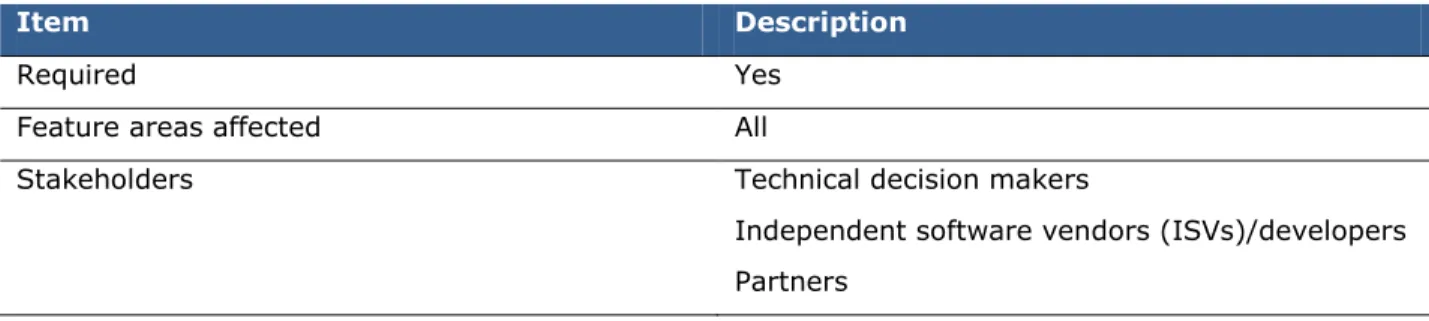
Item Description
Required Yes
Feature areas affected All
Stakeholders Technical decision makers
Independent software vendors (ISVs)/developers Partners
New functionality
The new format enables rich metadata to be stored about each table relation. The metadata can be leveraged throughout the application for increased functionality. For example:
In Microsoft Dynamics AX 2012, the system stores the cardinality of each relationship. Tools that generate database entity relationship diagrams in Microsoft® Visio® 2010 can read the cardinality data to draw the diagram correctly.
The new UnitOfWork class simplifies transaction management for table relations that are defined under the Relations node for a table. However, the UnitOfWork class cannot leverage relations that are defined through EDTs.
Special considerations
In Microsoft Dynamics AX 2012, table relations can no longer be created through EDTs. Legacy custom table relations that were defined through EDTs continue to work in Microsoft
Dynamics AX 2012.
Comparison with Dynamics AX 2009
AOT table relations
What can you do? Microsoft
Dynamics AX 2009
Microsoft
Dynamics AX 2012
Why is this important?
Define a table relation
by using the AOT. Table relations were defined only through EDTs. This was a problem if multiple relations were needed between tables, or if relations involved composite keys.
EDT table relations are recognized, but relations are now defined under the Relations node for an individual table.
Relationship metadata can be stored, which facilitates other system features and future growth.
Automatically migrate table relations to the AOT.
Not available A tool is provided to convert legacy table relations from EDT nodes to table nodes in the AOT.
This automation saves the developer time and reduces the likelihood of errors.
More information
Database changes: Table inheritance
Object-oriented programming languages, such as C# and C++, support inheritance relationships between classes. A derived class inherits fields and methods from its base class. Microsoft Dynamics AX 2012 supports similar inheritance between tables in the Application Object Tree (AOT).
Overview
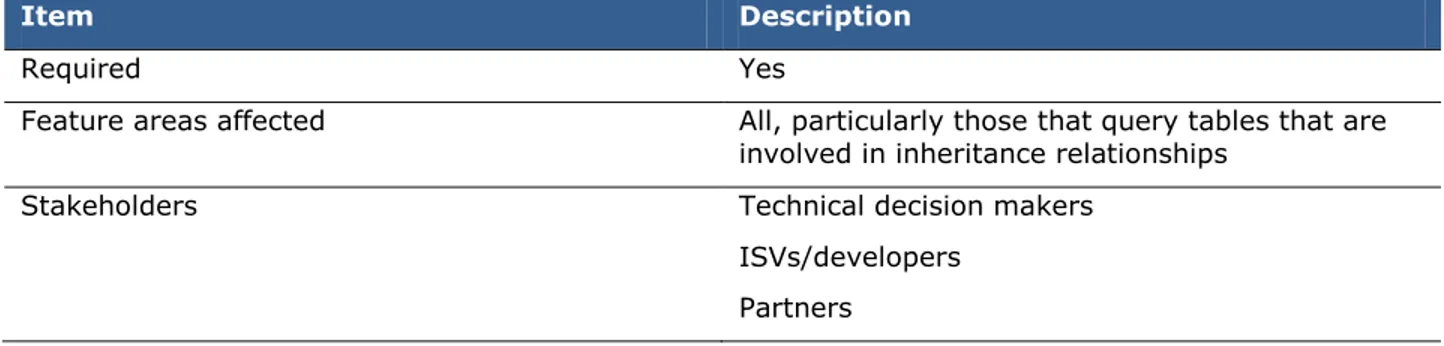
Item Description
Required Yes
Feature areas affected All, particularly those that query tables that are involved in inheritance relationships
Stakeholders Technical decision makers
ISVs/developers Partners
New functionality
Table inheritance facilitates customized extensions better than traditional foreign key relationships do. Table inheritance provides a rich type of metadata that describes the relationships between tables. Tools can use this metadata to provide better functionality.
Special considerations
The following are some of the base tables that are involved in inheritance relationships: AgreementHeader AgreementLine BankLC BankLCLine CaseDetailBase CatProductReference DirPartyTable EcoResProduct HRPDefaultLimit IntercompanyActionPolicy VendRequest
Because of inheritance relationships between tables, some fields in Microsoft Dynamics AX 2009 have been moved to different tables in Microsoft Dynamics AX 2012. Some legacy custom queries may need to be updated. This requires the same amount of pre-upgrade work as any table schema change. In some cases, the size of an X++ SQL Select statement can decrease, and the statement can become simpler.
Comparison with Dynamics AX 2009
The application data framework has changed since Microsoft Dynamics AX 2009. Microsoft Dynamics AX 2012 includes changes to the following:
AOT design time aspects
What can you do? Microsoft
Dynamics AX 2009
Microsoft
Dynamics AX 2012
Why is this important?
Capture rich metadata about the relationships between tables. Foreign key relationships were supported. Inheritance relationships between tables could be managed only by custom code. Inheritance relationships between tables can be captured and described by setting properties on the tables.
Developers can more fully express the relationships between certain entities.
Query development aspects
What can you do? Microsoft
Dynamics AX 2009
Microsoft
Dynamics AX 2012
Why is this important?
Access fields from various tables with simpler code.
A query could leverage a foreign key
relationship to get fields from a parent table by joining.
A query can leverage an inheritance relationship to get fields from a parent table without joining.
X++ SQL code and AOT queries take less developer time to create and maintain.
Database changes: Inactive tables remain
Sometimes, deactivating a configuration key it affects a table in Microsoft Dynamics AX. In Microsoft Dynamics AX 2009 and earlier versions, the associated table was removed from the underlying
Microsoft® SQL Server® database. Subsequently, when queries were run on that table, messages were displayed.
In Microsoft Dynamics AX 2012, the associated tables are not removed from the database. Instead, the tables are deactivated in the system, which means that they are treated as empty tables. However, the deactivated tables and their data are still fully available in the underlying database.
Overview
Item Description
Required Yes
Feature areas affected All, particularly operations that issue SQL queries from outside of Microsoft Dynamics AX
Stakeholders Technical decision makers
ISVs/developers Partners
New functionality
Tables that are deactivated by a configuration key now remain available to external SQL queries, which can be a practical benefit, depending on the ongoing data changes that must be made to the tables.
Special considerations
System administrators who deactivate a configuration key must inform users who issue external SQL queries that the data in the deactivated tables will no longer be updated, and that the data in those tables will become outdated. After a configuration key has been deactivated, messages are no longer displayed for external SQL queries.
Comparison with Dynamics AX 2009
The effects of deactivated configuration keys on tables have changed since Microsoft Dynamics AX 2009. Microsoft Dynamics AX 2012 includes changes to the following:
SQL queries on inactive tables
SQL server queries on inactive tables
What can you do? Microsoft
Dynamics AX 2009 Microsoft Dynamics AX 2012 Why is this important?
Run queries on inactive tables within Microsoft Dynamics AX.
Queries failed, and messages were displayed.
Queries on inactive tables continue to function, but data in the inactive tables is ignored.
Queries on the SQL tables still function.
Run external queries on tables from Microsoft Dynamics AX.
Queries failed, and messages were displayed.
Queries on inactive tables continue to function, but data from the inactive tables will be outdated.
Queries on the SQL server database still function.
Commerce Services for Microsoft Dynamics ERP
Commerce Services for Microsoft Dynamics® ERP provides integration between Microsoft Dynamics AX 2012 and an organization’s online sales channels. It provides an integrated process for releasing products to online stores or online marketplaces and routing online sales orders back in to the existing Microsoft Dynamics AX fulfillment process. Additionally, companies can use Commerce Services to integrate their existing online sales channel to Microsoft Dynamics AX 2012.
Overview
Item Description
Required Optional. You may or may not use these features, depending on how you run your business.
Feature areas affected Sales and marketing
Product information management
Stakeholders Business decision makers
Technical decision makers Implementation team members ISVs/developers
Partners
New functionality
Improvements have been made to further integrate Commerce Services with Microsoft Dynamics AX 2012. Previously, Commerce Services was installed only as part of Retail Headquarters in Microsoft Dynamics AX 2009 for Retail.
Comparison with Dynamics AX 2009
Changes to Microsoft Dynamics AX 2012 support the following: Commerce Services integration
Commerce services integration
What can you do? Microsoft
Dynamics AX 2009 Microsoft Dynamics AX 2012 Why is this important?
Use Commerce Services for Microsoft Dynamics ERP to integrate Microsoft Dynamics AX with your online sales channels.
Commerce Services was only available within the Retail Headquarters application for Microsoft Dynamics AX 2009 for Retail.
Provides integrated process for releasing products to online stores and routing online sales orders into the fulfillment process.
Provides tighter integration between online stores and the Microsoft Dynamics AX fulfillment process.
Sites Services for Microsoft Dynamics ERP
Sites Services for Microsoft Dynamics® ERP extends Microsoft Dynamics AX 2012 business processes and workflows on the web. It is an important part of Microsoft Dynamics ERP Software plus Services strategy. It empowers business users to collaborate with their customers and vendors with no or minimal IT investment and it enables partners to build advanced software plus services solutions.
Overview
Item Description
Required Optional. You may or may not use these features, depending on how you run your business.
Feature areas affected Home
Accounts payable Accounts receivable Human resources
Procurement and sourcing Product information management Sales and marketing
Service management Organization administration
Stakeholders Business decision makers
Technical decision makers Implementation team members ISVs/developers
Partners
New functionality
Sites Services for Microsoft Dynamics ERP delivers an extensible metadata-driven bidirectional secure data platform connecting Dynamics AX 2012 and Microsoft cloud services. It also leverages the Sites Services metadata-driven presentation platform to ship four out-of-box sites solutions for focused industry verticals.
Comparison with Dynamics AX 2009
Microsoft Dynamics AX 2012 has changes that support:
Site Services for Microsoft Dynamics ERP integrationSites Services integration
What can you do? Microsoft
Dynamics AX 2009 Microsoft Dynamics AX 2012 Why is this important?
Use the Site Services data platform to connect Microsoft Dynamics AX 2012 to Microsoft cloud services.
Provides a secure data platform and four out-of-the-box sites solutions for specific industry verticals.
Provides users the ability to connect Microsoft Dynamics AX to Microsoft cloud services.
Payment Services for Microsoft Dynamics ERP
Payment Services for Microsoft Dynamics® ERP is a Payment Card Industry (PCI) certified Level 1 Payment Gateway. It is an important part of Microsoft Dynamics ERP Software plus Services strategy. It enables accepting payment cards in Microsoft Dynamics AX 2012—and in your store—by using Microsoft cloud services.
Overview
Item Description
Required Optional. You may or may not use these features, depending on how you run your business.
Feature areas affected Accounts receivable
Stakeholders Business decision makers
Technical decision makers Implementation team members ISVs/developers
Partners
New functionality
Microsoft Dynamics AX 2012 has out-of-box support for payment card authorization, settlement, void, and refunds; address verification; and business card Level 2 and 3 processing through Payment Services.
Comparison with Dynamics AX 2009
Microsoft Dynamics AX 2012 has changes that support: Payment Services integration
Payment services integration
What can you do? Microsoft
Dynamics AX 2009
Microsoft
Dynamics AX 2012
Why is this important?
Use Payment Services to accept credit card payments.
Supports credit card authorization and settlement.
Supports additional features, such as refunds, address verification, Level 2 and 3 processing, and online orders payment
settlement.
These features can reduce payment processing expenses, increase profit margin, and help to positively impact a customer’s bottom line.
User interface changes
The user interface consists of features and commands that a user can use to interact with the software, especially to enter and view data and personalize forms. The user interface has changed considerably since Microsoft Dynamics AX 2009.
Overview
Item Description
Required Yes
Feature areas affected All
Stakeholders Business decision makers
Technical decision makers ISVs/developers
Partners
New functionality
The user interface for Microsoft Dynamics AX 2012 is cleaner, more consistent, and easily tailored to specific tasks and forms. You can view important information on one central list page, and related information is displayed on FastTabs and in FactBoxes, even if the related information is not displayed in the current form. It is easier to sort and personalize displayed data.
Comparison with Dynamics AX 2009
The user interface has changed considerably since Microsoft Dynamics AX 2009. Microsoft Dynamics AX 2012 includes changes to the following:
Navigation List pages
Filter functionality
Progressive disclosure forms Forms
Search
Navigation
What can you do? Microsoft
Dynamics AX 2009
Microsoft
Dynamics AX 2012
Why is this important?
Navigate intuitively. The navigation structure was divided into modules.
The navigation structure is divided into different modules that have a more consistent design.
It is easier to access the necessary forms and complete tasks.
List pages
What can you do? Microsoft
Dynamics AX 2009
Microsoft
Dynamics AX 2012
Why is this important?
Use the improved Action
Pane. The Action Pane was almost exclusively navigation-based.
The Action Pane now has action buttons that the user can use to create and modify data without leaving the list page.
Users can quickly find and modify data.
View additional information about a selected record on a list page, without leaving the list page.
Limited information about the selected record was displayed in the preview pane.
Information about the selected record is displayed both in FactBoxes and in the preview pane.
Users can view additional important information about a record without opening the master record form. View messages in a
dedicated area. Messages appeared in the InfoLog form or in separate dialog boxes.
All messages related to the list page, such as error, warning, and system status
messages, are displayed in a dedicated area.
Users can view and act on important messages without leaving the form.
Automatically refresh
form information. Data had to be refreshed manually, and forms did not always display the latest information.
Data is refreshed
automatically. The information on list pages is always current.
View related information
in a FactBox. Users had to leave the list page or form to view important related information about the selected record.
Users do not have to open another form to view any related information that is not displayed on the current list page.
Related information is displayed quickly.
Filter functionality
What can you do? Microsoft
Dynamics AX 2009 Microsoft Dynamics AX 2012 Why is this important?
Sort and filter on any column that is displayed.
Users could not sort or filter all of the columns displayed on the list pages.
Users can sort and filter on any column that is displayed, or filter across all columns that are displayed.
It is easier to sort data.
Filter data by using
common language. The Advanced filter window was complex and difficult to use.
Filtering control uses plain language and structure to simplify filtering requests.
It is easier to sort data.
Filter across all
columns. To filter data, users had to identify the column where data was located.
Data is filtered, regardless of the column it is located in.
It is faster and easier to find data.
Forms
What can you do? Microsoft
Dynamics AX 2009 Microsoft Dynamics AX 2012 Why is this important? View detailed information on FastTabs.
All information was visible at all times, which cluttered the workspace.
Users can view or condense important information in the same form.
The workspace is simplified, and related information is grouped. Take advantage of the
improved menu appearance.
Some menus were not easily readable, or they lacked common actions.
Menus are consistent and easy to scan. Menu commands are grouped according to usage.
Menu commands for data entry are simplified. Switch between the
header view and line view in complex forms.
Header information was displayed at the top of the form, and line information was displayed at the bottom of the form.
Complex forms have a header view, where you can view or modify the header-specific fields, and a lines view, where you can view the list of lines and information about the selected line.
Forms with header and line information are easier to understand and use.
View related information
in a FactBox. Users had to open additional forms to view related information about the selected record.
Related information that is not displayed in the current form can be accessed quickly, without opening another form.
Related information is displayed quickly.
Search
What can you do? Microsoft
Dynamics AX 2009 Microsoft Dynamics AX 2012 Why is this important?
Use enhanced search
capabilities. Search did not include metadata and documents attached to records.
Search includes data, metadata, and documents attached to records. Therefore, users can search the data by using common nouns, such as “customer” or “cash flow report,” or they can search for specific data, such as a customer name, product ID, or telephone number.
Search is easier and more efficient.
Use the improved
search box. The search box was located on a form that was difficult to locate. Users could not refine their queries.
The search box is a prominent element of the user interface. Users have several options to help them refine their queries.
Users can locate the search box quickly and refine their queries, which improves search efficiency.
Upgrade
Microsoft Dynamics AX has several features to help customers and partners prepare for upgrades to the next version of Microsoft Dynamics AX. These features are designed to shorten the upgrade test cycle and reduce the overall cost of upgrading.
Overview
Item Description
Required Yes
Feature areas affected All
Stakeholders Business decision makers
Technical decision makers Implementation team members ISVs/developers
Partners
New functionality
Several tools have been provided to ease the process of upgrading to Microsoft Dynamics AX 2012. The Upgrade advisor tool examines Microsoft Dynamics AX for issues that can prevent you from upgrading, or that can prevent Microsoft Dynamics AX applications from working properly after an upgrade. After issues are identified, they can be debugged by using improved upgrade script
implementation tools. After the upgrade, data validation processes provide detailed testing information to reduce the number of test runs needed before Microsoft Dynamics AX is fully implemented.
Comparison with Dynamics AX 2009
The upgrade process has changed considerably since Microsoft Dynamics AX 2009. Microsoft Dynamics AX 2012 includes changes to the following:
Upgrade advisor Upgrade framework
Upgrade advisor
What can you do? Microsoft
Dynamics AX 2009
Microsoft
Dynamics AX 2012
Why is this important?
Identify upgrade issues
before upgrading. Installed components from earlier versions of Microsoft Dynamics AX are analyzed for issues that may cause the upgrade process to fail.
The upgrade
compatibility of files and processes is checked before users upgrade to Microsoft Dynamics AX 2012.
Run the Upgrade
Advisor Analysis Wizard. Users are guided through the analysis process.
Upgrade issues are identified.
View a list of upgrade
issues. A report is generated that displays the results of the upgrade analysis and that tracks upgrade issues and their
resolution. This report is useful both before and after an upgrade.
Upgrade issues are displayed before problems arise.
Fix identified upgrade
issues. Upgrade issues within the upgrade documentation are searched for.
Users can quickly fix issues after they have been identified.
Upgrade framework
What can you do? Microsoft
Dynamics AX 2009 Microsoft Dynamics AX 2012 Why is this important?
Implement upgrade scripts by using method attributes.
Users had to provide long lines of code to specify the order and dependency of upgrade script operation.
X++ attributes and predefined upgrade scripts are used.
The coding of upgrade scripts is simplified, and bugs are reduced.
Analyze dependencies between upgrade scripts.
Users had to create tools by using upgrade scripts. This required extensive analysis and iteration for data entry, and it was
time-consuming and prone to errors.
Automated tools are created to analyze upgrade scripts. Upgrade script dependency is optimized. Use a wizard to implement upgrade scripts. Users had to understand the definition and use of various application programming interfaces (APIs) to implement upgrade scripts.
All scripts related to a particular table are displayed. Developers can use a wizard or template to
automatically add an upgrade script for a table.
Upgrade script development is intuitive.
Use method attributes to debug and fix problems.
Parameters and the type of script were separated from the script body, making it difficult to debug and understand the logic of
An attribute-based model that clarifies script logic is used.
It is easier to debug and fix problems.
Post-upgrade data validation
What can you do? Microsoft
Dynamics AX 2009
Microsoft
Dynamics AX 2012
Why is this important?
Validate data for correctness after an upgrade.
No test scripts were provided. Users had to rely on their own set of testing for validation.
Test case tools are provided to do post-upgrade data validation.
Post-upgrade data validation process is standardized. Organize and filter test
cases. Not a standard feature. Test cases can be organized and filtered based on modules, configuration keys, and feature categories.
Better coverage and direction for testing data are provided.
View and annotate test
case status. Not a standard feature. Test case statuses can be annotated for priority or for completion progress, such as: Not started In-progress Failed Passed
Users can monitor the progress of upgrade validation.
More information
For more information about upgrade, see:
Implementation Planning Guide
Upgrade Guide
Code Upgrade Overview white paper
Services and Application Integration Framework (AIF)
In Microsoft Dynamics AX 2012, services provide a first-class programming model for integration and enable the Microsoft Dynamics AX application to expose its functionality by means of Windows Communication Foundation-based services.
Application Integration Framework (AIF), built on top of services, supports the processing of incoming and outgoing messages, such as message transforms and value look-ups. Together, services and AIF provide the programming model, tools, and infrastructure support for message-based integration of application functionality and data with Microsoft Dynamics AX.
Overview
Item Description
Required Conditionally required. If you are using this feature in a previous version, significant changes have been made to it, and you must review this topic.
Feature areas affected All
Stakeholders Technical decision makers
Implementation team members ISVs/developers
Partners
New functionality
Microsoft Dynamics AX 2012 introduces integration ports for streamlined configuration of services and provides significant improvements in the areas of the programming model, deployment, and
administration.
Special considerations
The following are the skills and expertise needed to fully take advantage of services and AIF: Internet Information Services (IIS) administration, if IIS-based Web services are deployed The Microsoft .NET Framework, especially Windows Communication Foundation (WCF) Integration concepts, such as enterprise application integration (EAI), business-to-business
(B2B), and synchronous and asynchronous transports
Microsoft .NET Framework 4.0 and ASP.NET, if you deploy IIS-based Web services Microsoft Message Queuing (MSMQ), if used
Some of the Microsoft Dynamics AX components, such as Enterprise Portal for Microsoft Dynamics AX and Workflow, consume Microsoft Dynamics AX services. Some functionality, such as importing catalogs and sending documents electronically, consumes Microsoft Dynamics AX services. You can install Web services on IIS. However, this is an optional step. By default, the Application Object Server (AOS) is the services host for the Microsoft Dynamics AX services.
Comparison with Dynamics AX 2009
Services have changed considerably since Microsoft Dynamics AX 2009. Microsoft Dynamics AX 2012 includes changes to the following:
Simplified administration and configuration Services and Application Integration Framework Deployment
Security and privacy Services troubleshooting Web services
Microsoft Excel integration Import and export data
Simplified administration and configuration
What can you do? Microsoft
Dynamics AX 2009
Microsoft
Dynamics AX 2012
Why is this important?
Import and export data
in non-XML formats. Not supported Developers can create custom transformations to import non-XML data and transform it into a format that can be consumed by AIF document services. Developers can use XSLT to transform XML files or a .NET binary to transform non-XML files to the Microsoft Dynamics AX format.
Importing data from external systems is simplified.
Use integration ports to
administer services. AIF endpoints and related configuration forms were used to administer services.
Integration ports are used to administer services and AIF through service groups.
The administration of services and AIF is simplified.
The concept of integration ports subsumes endpoints and related forms. Use integration port
functionality to restrict service calls to a specific port.
Configuration was
company specific. The integration port for a specific legal entity can be restricted, but a unique integration for each organization is not needed.
Service configuration is simplified.
Optionally configure
Services and Application Integration Framework (AIF)
What can you do? Microsoft
Dynamics AX 2009
Microsoft
Dynamics AX 2012
Why is this important?
Use system services to retrieve system information.
Not supported The metadata service retrieves metadata for application objects, such as labels, menus, tables, and services. You can use the query service to query for data without using the document service or creating a custom service.
You can query the Microsoft Dynamics AX system and return datasets and metadata.
Use the Windows Communication Foundation (WCF) adapter.
WCF support was
limited. WCF support is expanded. MSMQ and BizTalk adapters have been deprecated, because equivalent functionality is provided by native WCF
functionality.
You can use standard adapters to interface with the database.
Add Simple Object Access Protocol (SOAP) headers when calling a service.
SOAP header support
was limited. SOAP headers have been extended to support additional important headers.
It is easier to pass data into a service.
Interface with the
database more easily. Some database features were not supported. Additional database features are supported, including:
Organization model Table inheritance Tables with effective
dates
Surrogate foreign key expansion
It is easier to integrate the database with document services and query services.
Group related services. Grouping related services was not supported.
You can use service grouping in the AOT to group related services.
It is easier to use and deploy services for specific integration scenarios, such as orders to cash or procure to pay. Use X++ container
types and strongly typed X++collections.
Not supported The new programming model enables
developers to use X++ container types and strongly typed X++ collections through data contracts.
Developer productivity is improved.
Use the business
operations framework. The business operations framework was supported through RunBase classes, where the user interface, contracts, and
operations were defined in the same class.
The framework supports the separation of the user interface, contracts, and operations. The framework enables business operations to run synchronously or
Developers have more flexibility and control.
provides various methods for invoking business operations.
Deployment
What can you do? Microsoft
Dynamics AX 2009 Microsoft Dynamics AX 2012 Why is this important? Host WCF services on
AOS. Web services had to be deployed on IIS. Hosted services on AOS are available to users and applications on the Intranet.
Deployment of services is simplified.
Deploy services on IIS. The IIS server processed the service request.
The IIS server routes all service requests to AOS, where they are processed.
Processing on IIS servers is reduced, and efficiency is increased. Use a single Web
Service Definition Language (WSDL) for all document services, including custom services.
A separate WSDL was created for each service.
A single WSDL is created for all document services.
It is easier to deploy services, and developers can reuse the data types among all services within the WSDL.
Manage multiple sites and web farms by using the IIS Web
Deployment tool.
Not supported The IIS Web
Deployment tool is used to manage multiple sites.
It is easier to manage multiple sites.
Take advantage of the scalability and
availability of services.
Network Load Balancing (NLB) was provided only for IIS servers.
NLB is provided for IIS servers and AOS instances.
An NLB cluster must be created for services hosted on AOS to create a load-balanced
environment for services.
You can create NLB clusters for services hosted on AOS.
Security/privacy
What can you do? Microsoft
Dynamics AX 2009 Microsoft Dynamics AX 2012 Why is this important?
Define service security by using WCF
configuration tools.
Only one service could
be deployed at a time. WCF is used to manage security for services. More than one service can be deployed.
Security management for services is simplified.
Services troubleshooting
What can you do? Microsoft
Dynamics AX 2009 Microsoft Dynamics AX 2012 Why is this important? Troubleshoot services and AIF at the integration port level.
Troubleshooting was done at the service operational level.
Troubleshooting is done at the integration port level and can include multiple service operations instead of a single service operation. When large files are imported, error handling provides flexible options, such as continue, halt, and rollback.
Troubleshooting services is simplified.
Import and export data
What can you do? Microsoft
Dynamics AX 2009 Microsoft Dynamics AX 2012 Why is this important?
Process bulk import and
export of data. Not supported A framework is provided for bulk import and export of data.
It is easier to bulk import and export data.
More information
More detailed information about Services can be found in the white papers titled Services in Microsoft
Enterprise Portal and Role Centers
Microsoft Dynamics AX provides a set of web sites that give you access to data and that you can use to participate in business processes by using web-based forms. These sites are collectively called Enterprise Portal for Microsoft Dynamics AX.
Enterprise Portal can be configured to display role-specific home pages called Role Centers. A Role Centers provides an overview of information that pertains to a user’s job function in the business or organization, including transaction data, alerts, links, common tasks associated with the user’s role in the company, and reports generated by Microsoft SQL Server® Reporting Services (SSRS) or Microsoft SQL Server® Analysis Services (SSAS). Microsoft Dynamics AX includes more than two dozen
predefined Role Centers, which users can access from Enterprise Portal or the Microsoft Dynamics AX client.
Overview
Item Description
Required Optional. You may or may not use this feature, depending on how you run your business.
Feature areas affected All
Stakeholders Business decision makers
Technical decision makers Implementation team members ISVs/developers
Partners
New functionality
Enterprise Portal and Role Centers enable you to configure system settings and home pages based on business needs, user roles, and job functions. Enterprise Portal is easier to install, manage, and operate, and the enhanced search capabilities makes searching for data easier and more intuitive. A smoother user interface improves the user experience overall by providing better Action Panes, more configuration options, and more efficient data searches.
Special considerations
Enterprise Portal requires Internet Information Services (IIS), a feature of Windows Server, and either Microsoft SharePoint® Server 2010 (recommended) or Microsoft SharePoint Foundation 2010 (a free download). The new search framework for Microsoft Dynamics AX uses SharePoint Enterprise Search, which is included with SharePoint Server. Enterprise Search is not included with SharePoint
Foundation. If you intend to use the free version of SharePoint, and you intend to deploy Search, use SharePoint Search Server Express 2010 (also a free download) instead of SharePoint Foundation. Developers must note that Enterprise Portal no longer supports development in the X++ Web framework. Development of Enterprise Portal pages requires ASP.NET and the .NET Framework.
Comparison with Dynamics AX 2009
This feature has changed considerably since Microsoft Dynamics AX 2009. Microsoft Dynamics AX 2012 includes changes to the following:
Foundation improvements Treasurer Role Center Enterprise Search
User interface changes
Foundation improvements
What can you do? Microsoft
Dynamics AX 2009 Microsoft Dynamics AX 2012 Why is this important?
Use enhanced initial
setup and installation. After installing Enterprise Portal, administrators had to manually compile X++ classes on the web server. The installation no longer requires manually compiling X++ classes. The installation experience is more efficient.
Use more options for deploying changes to a web server.
Administrators had to manually deploy changes by clicking various objects in the Application Object Tree (AOT). Also,
administrators could not deploy changes from the AOT on a 32-bit client to a 64-bit Windows server.
Administrators can deploy changes to a web server by using the AxUpdatePortal utility or the Microsoft Dynamics AX client.
Administrators can also deploy changes from a remote client machine to the web server.
The administration experience is more efficient.
Use more options for
domain authentication. Enterprise Portal had limited authentication options. Domain account management was time-consuming.
Enterprise Portal includes support for multiple domain authentication protocols, including Active Directory® directory services, Active Directory Federation Services, or pluggable authentication, such as forms-based
authentication. This new authentication model is called flexible authentication. The administration experience is more efficient. Perform remote
administration. Not available Administrators can manage remote Enterprise Portal deployments from the Microsoft Dynamics AX client.
The administration experience is more efficient.
Use enhanced support
for themes. Customizing the look and feel of an Enterprise Portal site to match a business’s or organization’s parent site was a manual, time-consuming process.
Enterprise Portal can automatically adopt the look and feel of a business’s or organization’s parent site if the parent site uses a theme in the SharePoint Theme Gallery. New themes can be applied with .thmx files from the SharePoint Theme Gallery.
The administration and customization
experience is more efficient.
Treasurer Role Center
What can you do? Microsoft
Dynamics AX 2009 Microsoft Dynamics AX 2012 Why is this important? View important information in one location. An overview is provided of relevant information, such as a work list, a frequently used list, and key performance indicator (KPI) information.
The most important information can be viewed at a glance.
View information relevant to treasurer tasks.
The same KPIs are displayed to the treasurer as to the controller, CFO, accountant, and accounting manager, but the reports are tailored to the treasurer’s role. Information is customized to the treasurer’s role.
Enterprise Search
What can you do? Microsoft
Dynamics AX 2009
Microsoft
Dynamics AX 2012
Why is this important?
Deploy Search from
Setup. Search had to be installed and configured from multiple forms in the client.
The Search server is centralized, and Setup verifies that the SharePoint Technology prerequisites are available on the server.
Centralized deployment by using Setup makes the deployment and configuration process more efficient. Use enhanced search
capabilities. Search did not include metadata and documents attached to records.
Search includes data, metadata, and documents attached to records.
Users can search Microsoft Dynamics AX data by using common nouns, such as “customer” or “cash flow report,” or they can search for specific data, such as a customer name, product ID, or telephone number. Use the improved
search box. The search box was located on a form that was difficult to locate, and search queries could not be refined.
The search box is prominently displayed, and there are several options to refine search queries.
Searches are more efficient and easier to use.
User interface changes
What can you do? Microsoft
Dynamics AX 2009
Microsoft
Dynamics AX 2012
Why is this important?
Locate data quickly on list pages by using various types of filters.
Filtering capabilities were limited, and advanced filtering was complex and difficult to use.
A new quick filter, an improved advanced filter with common language capabilities, and a custom filter are included.
Data can be found and modified quickly.
Complete common actions on list pages faster with an Action Pane.
Toolbars were primarily
navigation-based. Action Panes are divided into button groups with action buttons that can be used to perform common tasks on a selected record, such as creating new sales orders.
Data can be found and modified quickly, and common tasks can be completed quickly.
Configure Action Panes. Menu options for actions were accessed from a toolbar, which did not support images.
Administrators can use the new ribbon control to create Action Panes for Enterprise Portal task and list pages.
Data can be found and modified quickly, and common tasks can be completed quickly. Preview important and
related information on list pages.
Users had to leave a list page or form to view important or related information about a selected record.
Users can use FactBoxes, Cues Web parts, and preview panes to quickly access related information without opening another form.
Data can be found and previewed quickly.
Manipulate data in
hierarchical grids. Grid views could not be manipulated. Users can move tasks by using a drag-and-drop operation. They can also indent or negative indent tasks, and select multiple rows at one time in grid views.
Control of data in grids is improved.
Search data in
hierarchical grids. Grid views could not be manipulated. Column-based quick searches, quick filtering (operator = “contains”), and advanced filtering (multiple operators) are supported.
Control of data in grids is improved.
Stay on the current task page while completing actions.
When a user clicked an action on a task page, a new Enterprise Portal page opened. The user had to click the Back button to return to the task page.
Modal dialog boxes open separate forms when a user clicks an action on a task page. After users have finished entering data and close the form, they are returned to the original task page, and the data is updated.
Because of navigation changes, users can complete tasks without undue confusion.
Role-based security
In previous versions of Microsoft Dynamics AX, management of application security was a complex and time-consuming process. Administrators had to determine which tables and fields were needed for a task, and then grant permissions to the user for those tables and fields. In Microsoft Dynamics AX 2012, administrators manage security by defining roles and then assigning users to those roles. Security management is made more intuitive, it is role-based, and it is less time-consuming.
Overview
Item Description
Required Yes
Feature areas affected All
Stakeholders Technical decision makers
Implementation team members ISVs/developers
Partners
New functionality
Instead of granting access to specific tables, fields, and menus, administrators can now grant access according to roles and duties. The administrator defines the roles used in the organization and assigns user to those roles.
Special considerations
If you are using a previous version of Microsoft Dynamics AX, your existing security setup cannot be directly upgraded to role-based security. You must evaluate your current user groups and determine the best way to implement them in Microsoft Dynamics AX 2012.
To effectively use role-based security, you must plan and set up the roles that are needed for your business. Work with the managers who oversee the different groups in the business to determine the appropriate permission levels for roles. For example, work with a manager in the Finance department to determine permission levels for Finance roles.
Comparison with Dynamics AX 2009
This feature has changed considerably since Microsoft Dynamics AX 2009. Microsoft Dynamics AX 2012 includes changes to the following:
Role-based security
What can you do? Microsoft
Dynamics AX 2009
Microsoft
Dynamics AX 2012
Why is this important?
Define user groups. No default user groups
were provided. Default roles have been defined and are available out of the box.
Security management has been simplified. Set user group
permissions. Administrators had to determine which tables, fields, and menu items were required to complete tasks, and assign those items to user groups.
Default duties and privileges contain the tables, fields, and menu items required to complete tasks. Administrators assign duties and privileges to roles.
Security management has been simplified.
Reuse permissions
across companies. User groups were defined in each company, for each functional role.
After a role is defined, it can be used across multiple companies and organizations.
Security management has been simplified.
Filter columns that a
user has access to. Administrators determined which fields to restrict.
Only the appropriate columns are included in default duties and privileges.
Security management has been simplified, and security is improved. Define permission levels
(read only, create, update, and delete).
Security keys were used to define permission levels for user groups.
Separate default privileges are defined for each permission level.
Security management has been simplified.
Enforce regulatory and
procedural compliance. There were no built-in features to help prevent fraud and ensure compliance.
Administrators can set up rules for segregating duties to ensure that a user does not gain access to conflicting duties.
Security is improved.
Audit and report on
security settings. Auditing was a manual task for administrators. Audit trails and reports to evaluate security setup are built into the application.
Security management has been simplified, and security is improved.
Data security
Data security in Microsoft Dynamics AX 2012 ensures that users have access only to the data that they need to do their jobs. In previous versions, data security authorization was performed primarily on the client; however, in Microsoft Dynamics AX 2012, more of the authorization is performed on the server. The server sends the client only the information that the user has been granted access to, resulting in increased data security.
Overview
Item Description
Required Yes
Feature areas affected All
Stakeholders Business decision makers
Technical decision makers ISVs/developers
Partners
New functionality
There are additional, more flexible options for restricting access to data in Microsoft Dynamics AX 2012.
Comparison with Dynamics AX 2009
Security authorization has changed considerably since Microsoft Dynamics AX 2009. Microsoft Dynamics AX 2012 includes changes to the following:
Extensible data security framework Server enforcement of security
Extensible data security framework
What can you do? Microsoft
Dynamics AX 2009 Microsoft Dynamics AX 2012 Why is this important?
Use improved data
security filters. Filters could not be based on fields contained in a separate table from the data being filtered.
A user can create data security policies based on data that is
contained in a different table.
Security controls are improved.
Use data security based
on effective date. Not available Administrators can specify whether users have access to past, present, or future records, with different levels of access.
Security controls are improved.
Server enforcement of security
What can you do? Microsoft
Dynamics AX 2009
Microsoft
Dynamics AX 2012
Why is this important?
Prevent users from accessing unauthorized data.
All information was sent from the server to the client, and the client hid unauthorized fields from the user.
The server filters information, and only information that the administrator grants the user access to is sent to the client and to the user.
Security controls are improved.
Consistently enforce security for all client types.
The Table Permissions Framework (TPF) was used to deny access to tables. All data was sent to the client, and specific fields in client forms were hidden based on permissions. Tables not protected by TPF were freely accessible by code.
TPF permissions can be applied at the field level. More authorization is performed on the server, which helps ensure that permissions are consistently enforced, regardless of the type of client.
Security controls are improved.
More information
More detailed information about Extensible Data Security (XDS) can be found in the white paper titled
Organization model
Microsoft Dynamics AX 2012 introduces new organizational modeling capabilities, which helps to make your organizational structure easier to manage. Microsoft Dynamics AX 2012 supports more complex business hierarchies and greater customization of details to better reflect your business structure. Sharing data between organizations is also easier and more secure.
Overview
Item Description
Required Yes
Feature areas affected All
Stakeholders Business decision makers
Technical decision makers Implementation team members ISVs/developers
Partners
New functionality
More detailed hierarchy models can be created to better reflect your business structure and processes. You can also more easily share data between organizations, including reference information, master data, and transactions. Previous versions of Microsoft Dynamics AX had limited capabilities for hierarchies and business modeling and did not share data between organizations, except in certain cross-company and virtual company scenarios.
Special considerations
Before setting up the organizational structure, you should plan a hierarchy of organizations that represents your business processes.
The organization model supports data sharing that you may have previously implemented by using virtual companies. If you are currently using virtual companies, we recommend that you evaluate whether the organization model meets your needs. Virtual companies are still necessary in some situations.
Note: Microsoft Dynamics AX 2012 changes the manner in which hierarchies are created for all operational units, including departments. You must re-create the hierarchies for departments after upgrade.
Comparison with Dynamics AX 2009
The organization model has changed considerably since Microsoft Dynamics AX 2009. Microsoft Dynamics AX 2012 includes changes to the following:
Hierarchy models
What can you do? Microsoft
Dynamics AX 2009
Microsoft
Dynamics AX 2012
Why is this important?
Create models for various types of organizations.
Each organization in the business was created as a “company,” regardless of the type or hierarchy of the organization.
You can create legal entities and several types of operational organizations.
You can create more accurate business models.
Create organization
hierarchies. Hierarchical relationships between companies could not be represented.
The organization hierarchy designer can reflect the hierarchical nature of your business.
You can create more accurate business models.
Create multiple operating unit hierarchies.
Not supported You can build
specialized hierarchies to report on various perspectives of the business.
Reporting can be more complex and accurate.
Share data between
organizations. Users were required to create virtual companies to share data.
Many tables are shared by all organizations, so users can access data in those tables, regardless of the company or organization context.
It is easier to access and share data.
Create data security based on the
organization hierarchy.
Tasks could be performed only in the context of a company, and company
information could only be accessed when users were logged on to that company.
Users can view or modify data in different organizational
structures, depending on the business process they are working in, rather than the company they are logged on to.
It is easier to set up security roles and access.
Analysis cubes
An analysis cube is a set of related measures and dimensions that is used to analyze data. Developers can create reports and key performance indicators (KPIs) that are based on the analysis cube data. Users can use the reports and KPIs in the client or from a Role Center to analyze the data that is modeled in the analysis cube and to identify statuses and trends based on this analysis.
Overview
Item Description
Required Optional. You may or may not use this feature, depending on how you run your business. Feature areas affected Business intelligence
Role Centers
Stakeholders Business decision makers
Technical decision makers Implementation team members ISVs/developers
Partners
New functionality
In previous versions of Microsoft Dynamics AX, analysis cubes required the user to have full license keys and access to all data; otherwise, the configuration keys had to be modified through a lengthy and difficult process. In Microsoft Dynamics AX 2012, analysis cube settings are easier to modify to suit business needs and security levels. It is easier to create or update SQL Server Analysis Services (SSAS) projects by using the Analysis Services Project Wizard. It is also easier to model data by using views in perspectives.
Special considerations
Default cubes are available in Microsoft Dynamics AX 2012. You can customize the default cubes or create new custom analysis cubes by using the provided tools.
Comparison with Dynamics AX 2009
This feature has changed considerably since Microsoft Dynamics AX 2009. Microsoft Dynamics AX 2012 includes changes to the following:
Analysis Services Project Wizard Setup Wizard
Workflow performance cube and reports EMS cube and Role Center
Supply chain management cubes and dimensions OLAP modeling improvements
Analysis Services Project Wizard
What can you do? Microsoft
Dynamics AX 2009
Microsoft
Dynamics AX 2012
Why is this important?
Deploy and configure
cubes. Default analysis cubes required full license and configuration keys.
The SQL Server Analysis Services Project Wizard updates projects after configuration keys are modified.
Analysis cube deployment and Role Center implementation are flexible and simplified. Create or modify SQL
Server Analysis Services projects.
The Business intelligence project generation options form was used to create or modify SQL Server Analysis Services projects.
You can use the Analysis Services Project Wizard to do the following: Create a new SQL Server Analysis Services project. Deploy an existing SQL Server Analysis Services project. Update an existing SQL Server Analysis Services project. It is easier to maintain analysis cubes.
Setup Wizard
What can you do? Microsoft
Dynamics AX 2009 Microsoft Dynamics AX 2012 Why is this important? Install business intelligence components.
Analytics were installed without prerequisite verifications.
Installation of
prerequisite software is verified, and the user is prompted to select default SQL Server Reporting Services and SQL Server Analysis Services.
The installation and configuration processes are simplified.