Domain System Software Release Notes
© Copyright Hewlett-Packard Company 1989. All Rights Reserved. Reproduction, adaptation, or transla-tion without prior written pennission is prohibited, except as allowed under the copyright laws. Printed in USA.
First Printing: November 1989
UNIX is a registered trademark of AT&T in the USA and other countries.
WHILE THE INFORMATION IN THIS PUBLICATION IS BELIEVED TO BE ACCURATE, HEWLETT-PACKARD MAKES NO WARRANTY OF ANY KIND WITH REGARD TO THIS MATERIAL, INCLUDING, BUT NOT UMITED TO, THE I~LIED WARRANTIES OF MERCHAN-TABILITY AND FITNESS FOR A PARTICULAR PURPOSE. Hewlett-Packard shall not be liable for errors contained herein or for incidental or consequential damages in connection with the furnishing, per-fonnance or use of this material. Infonnation in this publication is subjet to change without notice. RESTRICTED RIGHTS LEGEND. Use, duplication or disclosure by the Govenunent is subject to restric-tions as set forth is subdivision (b) (3) (ii) of the Rights in Technical Data and Computer Software clause at DFARS 52.227-7013. Hewlett-Packard Company, 3000 Hanover Street, Palo Alto, CA 94304
Preface
This document describes standard Domain operating system (Domain/OS) software for Software Release 10.2 (SRI0.2). It includes an overview of new and changed functional-ity, software installation infonnation, documentation references, and a list of known errors and limitations.
The nonnal software installation process places a version of these release notes in each node's /install/doc/apollo directory. Release notes for optional Domain software pro-ducts are installed in a similar manner. If you are familiar with Apollo SR9-based sys-tems and this is your first time using an SR10-based system, read Making the Transition to SRIO Operating System Releases (01 1435-A02) to understand the differences between SR9-based and SRI0-based operating systems. We also have included an online docu-ment titled System Software Changes at SRIO and SRIO.I to help you determine the functions added at those releases. You can . find both documents online in the /install/doc/apollo directory. Note that the document System Software Changes at SRIO and SRI 0.1 is not necessary for your installation or for detennining your need for SRI0.2. The document is only intended as a reference, so that you can read about func-tionality changes at previous releases.
How to Print the Release Notes
You may print the online copy of this document.
If your installation uses the SysV Ip print daemon, use an Ip command similar to the fol-lowing:
lp -dprinter _name pathname
where pathname is the pathname of the release notes, usually /install/doc/apoll%s.v.l0.2_notes (note that there are 01.'0 underscores before notes). If your installation uses the Domain print system, use the following Aegis /com/prf com-mand:
prf pathname -pr printer _name -npag
If your installation uses the BSD Ipd print daemon, use an Ipr command similar to the following:
Ipr -Pprinter _ nan-Ie pathname
-CONTENTS
1. New Features at SR10.2 • • • • • • • • • • 1-1 1.1 An Overview of this Release • • • • • • • 1-1 1.2 Layered Products Available with SR10.2 • • • • • • • 1-1 1.3 Compatibility Infonnation • • • • • • • • • • 1-2 1.3.1 Registry Server Incompatibility. • • • • • • • 1-3 1.3.2 Compiler Incompatibility • • • • • • 1-3 1.3.3 C Compiler Install Incompatiblity • • • 1-4 1.3.4 /usr/include/apollo/pfm.h • • • • • • • • 1-4 1.3.S POSIX • • • • • • • • • . • • • l-S
1.3.6 File Changes • • . • • • • • • l-S
1.3.7 pad_$dm_cmd Change . • • • • • • • l-S
1.3.8 New /usr/bin/yacc . • • • • • • . • • • • • • l-S 1.3.9 Aegis Print Manager Incompatibility • • • • 1-6 1.4 Hardware Support . • • . • • . • . • • • 1-6 1.4.1 Support for the Series 2S00 Workstation • • • 1-6 1.4.2 Support for the Desktop Visualization Systems • • • • • 1-6 1.4.3 Hardware Previously Supported in PSKs • • • 1-6 1.4.4 Support for SCSI Devices. • • • • • • • 1-7 l.4.S Support for New Physical Networks.. • • • • • 1-7 1.S New and Changed Operating System Features • • • • • • 1-7 1.S.1 POSIX Compatibility . • • • • • • • • 1-7 1.S.2 Domain/X11 Included in Base Operating System. • • • • 1-7
1.S.3 New Audit Subsystem. • . • • • • 1-8
1.S.4 New Commands • • • • • • • • 1-8
1.S.S Enhancement to BSD makewhatis • . • 1-8
1.S.6 New option to /etc/edns • • • . . • • • 1-9
1.S.7 Enhancement to the tctl Command • • • 1-9
1.S.8 Error Library • • • • • • • • • • • 1-9
1.S.9 Security Fix for sendmail • . • . • . • • 1-10 1.S.10 Enhancement to Domain/OS Sockets . • • • . • 1-10 1.S .11 New Sector Striping Mode for invol Command • • • • • 1-10 1.S.12 Paging File Size . . • • . . • • . • • • 1-10 1.S .13 Involing a SCSI Storage Module. . . • • • 1-11 1.S.14 Changes to the Release Image . . . . • . . . . • 1-11 1.S .1S Change to netman. . • . . • • • 1':'11 1.S .16 Addition to lcnode • . • . . • • • • • 1-11 1.S .17 Changes to the Loader. . • • . • . • • 1-12 1.S .18 Changes in Available Kernel Space . • • . • • • 1-12 1.S.19 Malloc • • • • • • • • . • • • • 1-13 1.6 Network Enhancements • • . . . . • • • • • . 1-13 1.6.1 Changes to the Network Computing Kernel 1-13 1.6.1.1 New glbd Option • • . • • • • • • 1-13 1.6.1.2 New glb_obj.txt Configuration File • • • • 1-13
1.6.2
1.6.3 1.6.4
1.6.5 1.6.6
Changes to the Registry at SRI0.2 • • • . •
1.6.2.1 Establishing Override Policy . . . . • • • . 1.6.2.2 New or Changed Registry Commands
Source Routing Service on IEEE 802.5 Token Ring Networks • • • . . • • .
TCP /IP Enhancements. • . . . . . 1.6.4.1 Perfonnance Gain • • • . . 1.6.4.2 Address Resolution Protocol (ARP)
Aging . • . • • • • . . • . • • • 1.6.4.3 TCPjIP Support for IEEE 802.5 Networks
1.6.4.4 Security Enhancements to Domain/OS Sockets • • . • . . . . • . 1.6.4.5 New /etc/rc.local Startup File . • 1.6.4.6 Enhancements to the /etc/ifconfig
Command • • • . . • . • • •
1.6.4.7 Extensions to the trpt Utility • . • . 1.6.4.8 Changes to the Name Server • • . 1.6.4.9 The gated Routing Daemon Available in
/domain_examples. . • . • • .
1.6.4.10 Extensions to ioctl Routines . • • .
1.6.4.11 Miscellaneous Enhancements . . • . • . • 1.6.4.12 File-Typing Enhancements for ftp
ETHERNET Perfonnance Enhancements .
UUCP Modification • • • • • . • • . • • . 1.7 Enhancements to the DM and Graphics Environments
1.7.1 Pads/Windows Increased 1.7.2 New DM Commands • . • 1. 7.3 New DM Behavior. • • • 1.7.4 Change for 4-Plane Nodes
1.7.5 Changes to Startup Files . • • . 1.7.6 New pad_$set_erase • • .
1.7.7 Using /usr/apollo/bin/kbm . • • • . • . 1.7.8 System Color Map File Changes .
1.7.9 lcm (load_color_map) Enhancement 1.7.10 New Option for cdm Command 1. 7.11 16-Bit Characters . • .
1. 7.12 Full Latin -1 Support . • . . • . . . . 1.7.13 Domain/Xl1 X Window System
1.7.13.1 A Double Set of Links
1.7.13.2 Software on the Release Tape. • • •
1.7.13.3 Links and Installation Hints . . . • • . . 1.8 Other System Software Enhancements • . • • • .
1.8.1 Floating-Point Performance Enhancements . • • . • • 1.8.1.1 FPP Service Routines . . • • . . ' 1.8.1.2 Floating-point I/O • . . . • . • .
1.8.2 C++ Support . . • • • • • . • • • 1.8.3 Domain/DDE • • • . • • • • • • • • •
1.8.3.1 Overload Resolution • • • • • •
1.8.3.2 Compiling Programs for Debugging • • • • • 1.8.4 New Version of yacc • . • . . • • • • • • 1.9 Diagnostic Enhancements • . • • • • • • • • • • 1.9.1 The Diagnostic EXecutive (DEX) • • • • 1.9.2 GRTEST (Graphics Test) Revision 6.12 • • •
1.9.3 System Acceptance EXerciser (SAX) . • • • • • • 1.9.4 Other Diagnostic Changes • • • • • • • 2. Installing SRI0.2 . . • • •
2.1 Note About the Hardware Acceptance Test • • • • •
2.2 Special Install Notes for Beta Sites • • . . • • • • • • 2.2.1 Contents of /install/doc/apollo Directory
2.2.2 Possible Warning Messages 2.3 Updating From SRI0.1 to SRIO.2
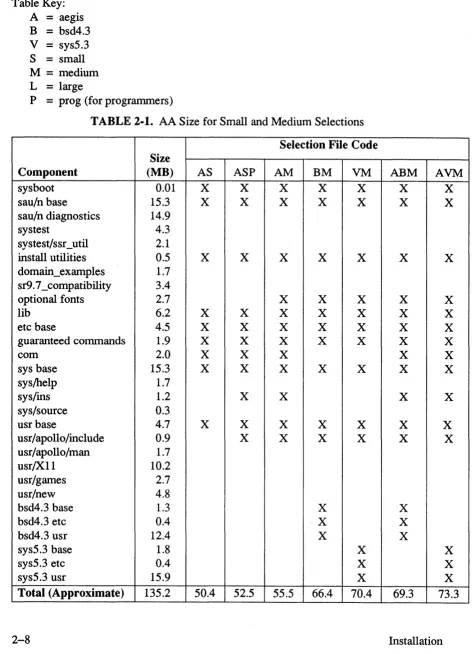
2.4 Canned Selection Files and Configurations 2.4.1 Selection Component Descriptions 2.4.2 Selection Component Tables • .
2.4.3 Software Loaded into the Authorized Area
2.4.3.1 Small Aegis (aa.aegis_small) • . • • • • • • 2.4.3.2 Small Aegis for Programmers
(aa.aegis_small_prog) • . • 2.4.3.3 Medium Aegis (aa.aegis_medium)
2.4.3.4 Large Aegis (aa.aegis_Iarge) • • • • • • 2.4.3.5 Medium BSD (aa.bsd4.3_medium) and Medium SysV
(aa.sys5.3_medium) • . • • • • • • • 2.4.3.6 Large BSD (aa.bsd4.3_1arge) and Large SysV
(aa.sys5.3_large) • • . • • • • 2.4.3.7 Combination Medium Selection Files • • • 2.4.3.8 Combination Large Selection Files • • • 2.5 Known Bugs and Limitations in minst • . • • • • • •
2.5.1 SAUs and Install Targets . • • • • • • • • 2.5.2 Update vs. New Install. . . • . • . • • • • • 2.5.3 New Template File for ACLs. • . •
2.5.4 Bugs Fixed in the Current Version ofminst 2.6 New Query for Domain/Ada • • . • . •
2.6.1 Installing Domain/Ada V3.0 after SRI0.2
2.6.2 Compiling the Installed Files • • . . • • • 2.7 Sendmail Configuration Files • • • • . •
2.8 Installation Tools for Solution Suppliers. • •
2.9 Media Types . • • . • • • • • • • • • • • • • • 3. Documentation • • . • • • • • • • • • • •
3.2 New or Revised Documents at SRI0.2 . . • • 3-1 3.3 Accessing Help Files • . . . • • • • • • • • 3-3 3.4 Knowledge Broker . • . • • • • • • • • • 3-4 3.5 Domain/Xll Documentation . . • • • • • • • 3-4 3.6 Correction to Domain C Language Reference Manual • • • 3-5 3.7 Correction to Aegis Command Reference Manual • • • • • 3-6 3.8 Changes to TCP/IP Documentation • • • • • • • • • 3-6 3.8.1 Changes to Using TCP/IP Network Applications • 3-6 3.8.2 Changes to Man Pages and Help Files • • • • • • 3-7 3.9 Changes to Managing System Software Books • . • • • • 3-7 3.9.1 Corrections to SRI0.1 Release Notes . • • • • • 3-10 3.9.2 Change to Managing Domain/OS and Domain Routing in an
Internet • • . • • • • • • • • • • • • 3-11 4. Bugs, Limitations, and APRs • • • • • •
4.1 Bugs/Limitations Existing in SRI0.2 . • • . • • • 4.1.1 Bugs in Domain/OS . . . • • • 4.1.2 Problems with Earlier Versions of SRI0.2 • • •
4.1.3 Install Bug • • • . • • • • • •
4.1.4 Important Note About C and SRI0.2 • . • • • • 4.1.5 Series 2500 SIO Problem . . . . • . • 4.1.6 Problem with Socket Support • . • • • • • 4.1.7 Language and Tools Bugs • . • • •
4.1.8 Ethernet Problem • • • •
4.1.9 Bugs in the Display Manager . . . • 4.1.10 Bugs in GPR . . . . . • • 4.1.11 Using gmf_$copy_plane, gmf_$copy_subplane, and
gmf_$restore_plane . • • • • • 4.1.12 Network Bugs . • . • . . .
4.1.13 COM-ECMB Bug . • • • • • •
4.1.14 Incorrect Font File Problem • • • . . • 4.1.15 Limitation on Non-Flow Control Applications 4.1.16 Limitations for BSD Commands • . • • 4.1.17 Limitation for rwvol Command •
4.1.18 Mnemonic Debugger Limitation 4.1.19 Bugs in Mail
4.1.20 No logo on DN560/DN660 4.1.21 OSR Limitation . . . •
4.1.22 ROY Server Limitation • • • 4.1.23 Bugs in Domain/DDE . • . • • . 4.1.24 Unsupported Open Dialogue Example • • • • 4.1.25 TCP/IP Bugs and Limitations • • . 4.1.26 Bugs in Aegis Printing Services • • • • 4.1.27 Bug in UUCP • . . • • • • 4.1.28 Bug in the Knowledge Broker • • • • 4.1.29 Domain/CommonLISP Limitation . • • •
4.2
4.1.30 Limitation in /com/ulkob Command . . . . • . . . 4.1.31 etc/mkdsk Command is not Documented . . .
4.1.32 Limitation in /etc/mkdev Command.. . • . • . 4.-1.33 Restriction for /etc/mkcon Command . . . • . 4.1.34 Domain/X11 Known Bugs and Limitations
4.1.34.1 Domain/X11 Limitations
4.1.34.2 Domain/X11 Notes . . • . . • •
4.1.34.3 Domain/X11 Bugs . . • . • . • . • • . Bugs Fixed in SR10.2 . . . .
4.2.1 Display Manager • . . . • . . . . . 4.2.2 BSD and SysV Commands and Utilities
4.2.3 BSD Commands and Utilities • • . . . . 4.2.4 Domain/DDE . . . . • . • . . 4.2.5 Language and Tools . . . .
4.2.6 GPRLID . . . • . . • . . . • . 4.2.7 Domain/OS . . • . . • . . . .
4.2.8 TCP/IP . • . . . . • . • . . • . 4.2.9 Domain XII . . . .
4.2.10 Diagnostics
4.3 Changes to the mkapr Tool 4.3.1 Problem with mkapr 4.4 Fixed APRs . . . . . 4.5 Open APRs . . . . . A. New GPR Calls . . . . .
A.1 New GPR Online Examples . . . .
A.2 GPR Calls and Data Types . . . . . . . . . .
A~2.1 Concepts. . . . . . . . A.2.1.1 New Event Types . . . . . . . A.2.1.2 Pixel, Projection, and Video Formats . . . A.2.1.3 Display Resources . . . . A.2.1.4 16-Bit Fonts and Characters . . . . A.2.1.5 Nondestructive Cursors . . . . A.2.1.6 Pixel Mode Direct Memory Access
A.2.2 Data Types . . . .
List of Tables
TABLE 2-1. AA Size for Small and Medium Selections . TABLE 2-2. AA Size for Large Selections .
Chapter 1: New Features at SR10.2
1.1 An Overview of this Release
Software Release 10.2 is a release of Domain system software that provides new func-tionality, performance enhancements, support for new products, and bug fixes for previ-ous releases.
This chapter contains an overview of the new hardware and software, compatibility information, and new functionality. Major changes made to standard Domain system software since SR10.1 include the following:
• Support for new hardware • Domain/X11 X Window support • POSIX compatibility
• TCP lIP enhancements • Network enhancements • Improved graphics support • New diagnostics
For the benefit of customers who may be new to the SR10-based software releases, we have included two online documents for your reference. System Software Changes at SRIO and SRIO.I describes functionality that was added at SR10 and SRIO.I. Making the Transition to SRIO Operating System Releases (011435-A02) includes information that will help you make the transition from SR9-based releases to SRIO.2. You can find both documents online in the /install/doc/apollo directory. Note that the document System Software Changes at SRIO and SRIO.I is not necessary for your installation, or for deter-mining your need for SR10.2. The document is only intended as a reference, so that you can read about functionality changes at previous releases.
1.2 Layered Products Available with SRI0.2
In the list that follows, we indicate the layered products available with SRIO.2 and their latest version number. Layered products have their own release documents online in the
/instalIldoc/apollo directory for your reference.
The table is not intended to help you determine which layered products are available for purchase. For specific information about purchasing layered products, contact your local Apollo sales representative.
Product
Donnain/~ccess Donnain/ ~da Donnain/C Donnain/C++ Donnain/Core FIN Pascal DTEK4014 Donnain/I>ialogue Open Dialogue D3M DSEE DPAK DPCC DPCE DPCI DPSS/Mail GPIO NIDL NFS(R) LSLOCK Donnain 5080 OnnniBack pmGS pmGS_RT GSR 2DGMR 2DGMR_RT 3DGMR 3DGMR_RT SC~T SN~3270 SN~3770 SPE Transcript LU6.2 Donnain X.25 GKS GKS_RT Knowledge Broker Technet TML
1.3 Compatibility Information
Software Release 10.2
Version
3.0 3.0
6.7.nn and 6.7.nnpx 1.2.1
9.5
10.7.nn and 10.7.nnpx 8.7.nn and 8.7.nnpx 2.1 2.02 1.01 6.0 3.3.2 4.1 3.1 3.1 4.0 2.3 10.2 1.5.1 2.1 1.1 3.3.1 1.1 1.1 1.1 2.6 2.2.1 2.2.1 2.7 2.7 2.0 2.3 1.4 2.1 2.1 1.2 2.3 1.0 1.0 1.0 1.1 1.0
The following subsections describe changes in SRIO.2 that can result in incompatiblities with pre-SRI0.2 releases.
Software Release 10.2
1.3.1 Registry Server Incompatibility
The SR10.2 registry server includes new functionality that is exploited by the SR10.2 clients and the portable Passwd Etc product (see Subsection 1.6.2 of these notes). This section describes only an incompatibility issue.
The SR10.2 registry server is incompatible with the SR10.1 registry server, (rgyd) due to a data loss bug that existed in the SRI0.1 version.
If any of the registry servers are running the SRI0.2 registry server, all other servers (master and replicas) must also be running the SRI0.2 rgyd. Failure to keep the master site and a replica site running the same revision of the code will cause the master to defer updates to that replica. As soon as the master site and replica site are again running com-patible versions of the server code, all deferred updates will be propagated to the replica. You can copy the SRI0.2 rgyd onto earlier systems without updating the operating sys-tem; the SRI0.2 server can run on nodes running SRI0 and SRI0.1.
We reconunend that all sites update their registry sites to the SRI0.2 rgyd as soon as pos-sible, even if the registry site nodes are not updated to run the SRI0.2 OS.
NOTE: Updating a registry site to the SRI0.2 server code will not modify the registry database. All registry infonnation will be preserved.
1.3.2 Compiler Incompatibility
Compiler versions that run on SRI0 (see version numbers below) generate incorrect COFF object code when run under SRI0.2.
Note that programs compiled with these older compilers will still run on 10.2 nodes. The binaries do not change, so you will not need to recompile.
You can find out if you have an earlier version compiler by using the -version compiler option. For example, type:
$ ftn -version
The incompatible compilers have the following version numbers: Domain FORTRAN 10.00
Domain Pascal 8.09
Domain/C 6.00
NOTE: The compilers that are compatible with SRI0.2 are: Domain FORTRAN 10.6 or later
Domain Pascal Domain/C
8.6 or later 6.6 or later
If you do not have the later version compilers, please contact your Apollo sales represen-tative.
Software Release 10.2
1.3.3 C Compiler Install Incompatiblity
The m68k C compiler (Version 6.6) installs a version of /Iib/sysIib.881 that is not com-patible with the /Iib/sysIib.881 for SRI0.2.
If you install SRI0.2 to your node and then install the C compiler, you may receive an
undefined global error because of the incompatible library. Note that this is not a problem with compiler versions later than 6.6, or with the Series 10000 compilers (Ver-sion 6.5).
If this is a new SRI0.2 install, or if you have involed the disk, the workaround is as fol-lows:
1. Install SRI0.2.
2. Install the C compiler (6.6) using a separate config file.
3. Copy <llauthorized area>/install/ri.apollo.os.v.l0.2/Iib/sysIib.881 to //target/lib/syslib.881
4. Reboot the node.
If you are updating from SRIO or SRI0.1 to SRIO.2, deselect the C compiler from the config file. If the compiler is the same config file as the OS, deselect CC from that config file.
1. config -s <llauthorized area> -c <configJtlename> CONFIG > deselect cc
CONFIG > update OS full CON FIG > config OS full CONFIG > exit
2. Install the software using the changed config file. 3. Reboot the node.
If you need to reinstall the C compiler, use a separate config file by creating a new one. Copy the file as indicated above each time you install the C compiler, then reboot the node.
1.3.4 lusr/includel apollo/pfm.h
/usr/include/apollo/pfm.h has changed and lnay result in type lnismatches when the include file is recompiled. Note, however, that executables remain fully compatible.
Software Release 10.2
1.3.5 POSIX
We made the following changes to the operating system to be compatible with POSIX. They may result in incompatibilities with previous releases:
More than two slashes at the beginning of a pathname will be compressed to a single slash. (One or two slashes at the beginning of a patbname will not be changed.) The operating system validates process groups in a different way:
• The process group of a process that has been executed cannot be set. • The process group of a session leader cannot be changed.
• The process group ID of a process may be set to its pid.
• The process group ID of a process may be set to the process group ID of another pro-cess in the same session.
• Tty process group IDs may only be set to an existing process group in the same ses-sion. (They may also be set to the process id of a process in the same sesses-sion.)
1.3.6 File Changes
The following files have been changed to include bug fixes at SR10.2, and may result in an incompatibility:
/sys/ins/fontn.ins. pas /sys/ins/fontn.ins.c
/usr/apollo/include/fontn.h
1.3.7 pad _ $dm _ cmd Change
The pad_$dm_cmdO call can now return with a new completion status, defined as
pad_$insuff_rights in the pad_$ insert files. The pad_$insuff_rights completion status is new at SR10.2; previous versions of the pad_$dm_cmdO call would never return with this status. Associated with the new pad _ $insuff _rights completion status is the follow-ing standard error message:
insufficient rights to perform DM command (display manager/Pad manage~ The pad _ $dm _ cmd can be executed by a process whose user ID is either root or
locksmith or is equal to the user ID of the person logged into the Display Manager.
1.3.8 New /usr/bin/yacc
The /usr/bin/yacc C compiler code has been updated at SRI0.2. If you use the bsd4.3 version, you must use matching versions of /usr/bin/yacc and /usr/Jib/yaccpar. The new files and the old and new limits are described in Subsection 1.8.4.
Software Release 10.2
1.3.9 Aegis Print Manager Incompatibility
When installing the SRI0.2 Aegis print services (/sys/hardcopy), you must update the print manager node before updating the print server nodes. Failure to do this will prevent
an SRI0.2 print server from restarting. If you cannot update the print manager node, copy the Isys/hardcopy tree to the print manager node and restart the print manager. The SRI0.2 Isys/hardcopy tree will run on an SRI0.1 node.
1.4 Hardware Support
SRI 0.2 provides support for the new Series 2500 workstation, the new DN3500 and DN4500 Desktop Visualization Systems, SCSI devices, and physical networks. The fol-lowing subsections briefly describe new hardware.
1.4.1 Support for the Series 2500 Workstation
SRI0.2 provides support for the new Series 2500 workstation. The Series 2500 worksta-tion has its own documentaworksta-tion as indicated in Chapter 3. An overview of the product follows:
Series 2500 workstations are new 20-Mhz, 68030-based, low-end workstations that are compatible with other Apollo systems. The Series 2500 is available in 4MB, 8MB,
12MB, or 16MB configurations, with storage options that include optional internal Win-chester disks in 100MB or 200MB sizes, and optional extenlal CTAPE. The system can use a 15-inch 1024 x 800 monitor or a 19-inch 1280 x 1024 monitor. Network options include Apollo Ring, ETHERNE!, or IBM Token Ring.
1.4.2 Support for the Desktop Visualization Systems
SRI0.2 provides support for the new DVS. The DVS graphics controller has its own documentation as indicated in Chapter 3. An overview follows:
DVS is a new high-resolution (1280 x 1024) color graphics controller. DVS is available in both 8-plane and 40-plane versions. The 8-plane DVS controller can be used with DN3500, DN3550, and DN4500 workstations. The 40-plane DVS controller can be used with DN3550 and DN4500 workstations. Each version of the controller is a 2-board set that consists of a Transfonn Processor board connected to an 8-plane or 40-plane Array board. The 2-board set uses two PC AT compatible bus board slots within the worksta-tion.
1.4.3 Hardware Previously Supported in PSKs
SRI0.2 is the first major release to include support for the Multifunction Peripheral Con-troller (WD ConCon-troller), Apollo's SCSI 8-MM Tape Drive (used with Omniback), the SCSI I/2-inch reel-to-reel tape drive, the SCSI 1/4-inch cartridge tape drive, and the new 70Hz monitor. These devices were previously supported in Product Support Kits (PSKs).
Software Release 10.2
1.4.4 Support for SCSI Devices
At SR10.2, Apollo supports Small Computer Systems Interface (SCSI) devices that allow you to write your own SCSI device drivers. The scsi_$ interface is not supplied with the base software but is available when you purchase the GPIO layered product.
The scsi _ $ routines allow you to communicate with SCSI devices connected to an Apollo workstation. Apollo's implelnentation complies with the ANSI X3 .131-1986 standard. For more information, see the SCSI routines in the online man pages (scsi_intro) and the online GPIO Release Notes.
1.4.5 Support for New Physical Networks
SR10.2 supports additional physical networks, including ETHERNET (802.3), ATR, and IBM Token Ring (802.5).
1.5 New and Changed Operating System Features
This section describes new or changed Domain/OS functionality in SR10.2.
1.5.1 POSIX Compatibility
The SR10.2 version of Domain/OS is compatible with the IEEE Standard Portable Operating System Interface for Computer Environments, Version 1003.1 (IEEE Std. 1003.1-1988). Details of Domain/OS compatibility are online in
/installldoc/apoll%s.v.l0.2--posix. Note that we do not conform to the following requirements:
• Interrupted opens change the access times of the opened file.
• We do not modifiy access/modify/change times on files correctly for read and write I/O calls.
• We fault on disk full rather than return the number of bytes that we could not write.
• Various terminal interface problems are under investigation.
1.5.2 Domain/XII Included in Base Operating System
At SR10.2, Domain/X11 X Window System has been added to the base operating sys-tem. You have the option of automatically starting the X server when you install SRI0.2. The minimum subset requires approximately 2.51\113 of disk space (server, font space, and RGB color database).
Software Release 10.2
1.5.3 New Audit Subsystem
SRI0.2 provides an audit subsystem that allows administrators to establish auditing on selected nodes within an Apollo network. The audit subsystem allows you to:
• Select individual nodes to be audited.
• Specify event types that you want to monitor.
• Collect the log files that are generated on each audited node. • Output the contents of log files in text fonn for reporting purposes.
Although the audit subsystem is included as part of SRI0.2, it must be installed expli-citly. When installing SRI0.2 on an audited node or on the auditor node, you must respond to specific prompts regarding access controls and audit tools. Please be sure to read Managing the Audit Subsystem (016339) for specific infonnation about installing and managing the audit subsystem.
1.5.4 New Commands
Note the following changes in SRI0.2:
• Enhancements to make(l) and vi(l). For changes to make(l) see the make(l) man page.
• A new command, mk(l), from the AT&T toolkit (mk(l) is similar to the existing
make(l) utility).
• A new command, pax(l), for POSIX compatibility (pax(l) is a new fonn of tape-archival utility).
• The dstdump utility, which dumps the debug symbol infonnation from a COFF object file.
I
For more infonnationregarding these changes and enhancements, see the online help files.
1.5.5 Enhancement to BSD makewhatis
The makewhatis script (/usr/lib/makewhatis) is used to create the lusr/man/whatis
database. This database is used by whatis(l) to look up the man page header line for BSD commands, special file names, system calls, and library functions.
The command syntax is: makewhatis [directory name]
where directory name is the top-level man page directory. If a directory is not specified, the default is
lusr/man.
At SRI0.2, makewhatis scans both the fonnatted and unfonnatted (nroff source) man pages in the
lusr/man
tree, and creates the appropriate entry in lusr/manlwhatis for each page. Prior to SRI0.2, makewhatis scanned only fonnatted or unformatted pages, but not both. This prevented users from having entries for both formatted and unformatted man pages in the whatis database.Software Release 10.2
makewhatis should be run after initially installing the system software, and whenever any additional man pages are installed.
1.5.6 New option to letc/edns
We have added an option to the tool
letc/edns.
This option permits the administrator to specify a prefix to be used for cataloging diskless nodes in the ns _helper database. This cataloging occurs automatically when the subcommand init or update is invoked in edns. The default prefix is diskless _ $. An alternate prefix for diskless nodes is specified as follows:$ edns -na[me] prefix
Using this option can cause problems if shell programs depend on scanning for the default prefix. Also, if names with the default prefix already exist in ns _helper, they will not be modified even if edns is run with a new prefix. If only names with the new prefix are desired, the old ones must be deleted from the ns _helper database. The new prefix must be specified each time edns is invoked, or the default prefix will be used.
1.5.7 Enhancement to the tctl Command
The tctl command has added support for
Idev/ttyOx
devices. Previously, tctl would only function properly with /dev/siox devices. For example, if /dev/ttyOl were used withletc/getty,
and you issued a tctl -line 1 to the Idev/ttyOl device, the line would reset, causing a line drop and an eventual unexpected logout. The added support comes in the form of an additional switch in tctl forIdev/ttyOx
devices. The -TTYx option should be used when programs such as /etc/getty or siologin use /dev/ttyOx devices.Examples:
In a /etc/ttys file the following could be used: ttyOl "/etc/getty std.9600" vt100 on si02 "/etc/getty std.9600" vt100 on To modify or view tctl settings for ttyOl, use:
tctl -tty 1
To modifiy or view tctl settings for sio2, use: tctl -line 2
See Isys/siologin/siomonit_file and Isys/siologin/startup_sio.sh for additional examples. 1.5.8 Error Library
The error _$ routines are portable, and extract the error text from the global library to a separate file read by the error routines. Also, llib/error is being eliminated. The routines are moving to /lib/kslib. By removing the error texts to an external file, more global A space be~omes available.
Software Release 10.2
1.5.9 Security Fix for sendmail
sendmail includes a new flag, -Xsmtpdebug, which fixes a previous security problem. The flag addresses the security hole exposed by the well-publicized Internet bug. This flag is used to enable smtp debug mode. It may be specified only when sendmail is being started from root (it uses uid, not euid). Attempts by unauthorized users to use this flag are logged in the system log.
1.5.10 Enhancement to Domain/OS Sockets
The number of user Domain/OS sockets available has been increased at SRIO.2 from 23 to 64 (for m68k systems). We now provide sufficient user Domain/OS sockets for each user process. This is important, as NCS applications are becoming more prevalent.
1.5.11 New Sector Striping Mode for invol Command
We have a new sector striping mode for the invol command. Sector striping is a disk striping technique that allows you to treat multiple physical storage disks as a single logi-cal volume. Sector striping, also logi-called interleaving, scatters sequential blocks across dif-ferent drives in a multidisk set. In addition to allowing large files to span across more than one drive, this addressing mode increases the disk I/O bandwidth, since multiblock transfer is likely to involve all disks working in parallel.
The invol command automatically selects the new sector striping mode when requested, yet calls out multiple drivers per controller (for example, four disks on two controllers). The mode is automatically selected if:
• Sector striping is requested.
• There are fewer controllers than disks.
• There are the same number of disks per controller (for example, four disks evenly scattered across two controllers).
In this mode, the low-order disk address bits select among the controllers while middle-order disk address bits select among disks on the same controller.
You can achieve the performance benefits of sector striping (normally requiring a single disk per controller to reach those improvements) and allow for the added capacity (larger volumes) of combining more disks than controllers.
1.5.12 Paging File Size
At SRI0.2 the paging file size has increased to 640 blocks (for m68k systems). Run
invol, then select option 8 to modify the paging file size.
Software Release 10.2
1.5.13 Involing a SCSI Storage Module
It is not necessary to add the manufacturer's badspot list to the Apollo badspot list if your device is a SCSI storage module. The SCSI device manages the manufacturer's badspots (they do not appear on the badspot list from invol).
When using option 6 of invol on a SCSI disk (to initialize the physical badspot list), the following message is displayed:
The manufacturer supplied badspots are handled by the disk controller, and therefore do not appear in this badspot list.
Also, when invol is used to list the badspot list on a SCSI disk (option 7), the following message appears:
The manufacturer supplied badspots are handled by the disk controller; there is no need to manually add the badspots listed on the drive.
1.5.14 Changes to the Release Image
Please make note of the following changes to the release image:
• 'node_data/boot_sbell has been moved to Isys/boot_sbell. The boot shell itself is not changing, just its location.
• The file llib/error no longer exists. A new file lusr/apollo/lib/stcode.db contains the error text.
• An internal restructure of the graphics library llib/gprlib has resulted in a new file called llib/awslib. This new file contains window-managing procedures.
1.5.15 Change to netman
netman now sends diagnostic output to a system log in: 'node data/systmp/netman.out
This file is truncated (length
=
0) at each boot request, and will never grow beyond one or two blocks. This means that no action is required to clean it up or keep it at a reasonable size.1.5.16 Addition to lcnode
We have added the flag -r(igorous) to the
letc/lcnode
command. The flag causes Icnodeto perform retries when acquiring Apollo Token Ring topologies. The list takes approxi-mately three times longer, but the accuracy has been dramatically improved. The flag has no effect on other network types. The -r option also eliminates duplicate lines.
Software Release 1 0.2
1.5.17 Changes to the Loader
At SR10.2, the loader installs a program's external symbols into the private KGT if the program has any installed library (-inlib) requirements. We made this change to allow the libraries to r~ference routines in the main program. Programs that load libraries With loader _ $Ioad can also use this behavior to export main program routines and data by marking the program with a dummy installed library.
We have also included a new call, loader_$unload which unloads previously loaded object modules. See the online help file for more detail.
1.5.18 Changes in Available Kernel Space
At SR10, portions of the virtual address space were rearranged. As a result, we inadver-tantly reduced the amount of virtual address space available for certain kernel operations on 68010-based machines. (User address space is unaffected.)
The affected machine types are: DN300, DN320, DN550, DN560, DSP80, and DSP80A. No other machine types are affected by the problem.
Mfected nodes have a reduced ability to handle remote file operations. The extent of the new limitation depends on the machine type. The worst case occurs on the DN550, which is unable to handle most requests to create directories from remote nodes. This problem generates the following error message:
no space available (OS/MST manager)
The solution to the above problem results in two new limitations imposed on the affected machine types, as described below. Note that these limits pertain to all SA U2, SA U3, and SAU5 machine types, including those that are 68020-based. It is expected that most customer configurations will not approach these new limits, but it is necessary to be aware of them.
The amount of kernel space available to support per-process virtual memory resources is reduced in certain machines by 50 percent. Also, there are no implications for SAU2, SAU3, and SAU5 machines which do not boot diskless and are not partners for diskless nodes. There are many more of these resources .available than could ever be used by a single node. There are implications only for diskless nodes and their partner nodes. This applies to:
SAlT2: DN300, DN320, DN330 SAU3: DSP80, DSP90
SAU5: DN550, DN560, DN570, DN580, DN590
Other machine types have not changed their virtual memory support.
Note that the size of the virtual address space of these machines is not being reduced. only the total number of per-process virtual memory resources that may be used across all processes, including diskless child node processes.
Software Release 10.2
virtual memory resources to fully support six nodes (five diskless nodes, and their partner). Of course, not every node runs at the maximum 56 processes, each using the average number of these resources. The actual number of diskless nodes supported by a single partner node depends upon type and volume of activity.
In addition to the above, the limit on the number of netrequest (remfile) servers which may be run on SAU5 (DN5xx) machines is reduced from three to two. This limit is imposed on SAU5 machines only. It does not apply to SAU2, SAU3, or any other machines.
The system automatically imposes this new limit on SAU5 (the limit for all other SAUs is 3, and is imposed by the netsvc command). No error message results if either netsvc -s
3 or netsvc -s (the latter defaults to three) is issued.
1.5.19 Malloc
You should include <apollo/shlib.h> in those modules of an installed library which use
malloc, free, or realloc. Doing so assures that references to these routines resolve to those defined by the application, if any. See malloc(3) (BSD) and malloc(3C) (SysV).
1.6 Network Enhancements
The following subsections describe network enhancements included in this release.
1.6.1 Changes to the Network Computing Kernel
SR10.2 contains Version 1.5.1 of the Network Computing Kernel (NCK). The following subsections describe enhancements to NCK in Version 1.5.1.
1.6.1.1 New glbd Option
The Global Location Broker (GLB) daemon, glbd, now has a -listen option that allows you to restrict the address families on which a GLB listens. This option supports special configurations where access to a GLB is restricted to a subset of hosts in the network or internet.
1.6.1.2 New glb _ obj.txt Configuration File
The GLB is an object identified by a Universal Unique Identifier (UUID). This UUID has a default value. The new glb _ obj.txt configuration file allows you to override the default value by specifying a different GLB object UUID for a particular host. This file supports special configurations that require several disjoint GLB databases (each of which is possibly replicated). In most networks and internets, there is only one GLB database (possibly replicated), and hosts do not need to have a glb_obj.txt file.
Software Release 10.2
1.6.2 Changes to the Registry at SRI0.2
We have added a password override file in this release: /etc/rgy/passwd _override
This administrative file allows you to override password, GECOS, home directory, and shell entries in the registry database. Using the override capabilities, you can locally con-trol individual machines. For example, you can prevent individuals, groups, or organiza-tions from logging onto a particular system. To implement an override, add the appropri-ate information to the passwd _override file for each machine on which the override should take place. See the passwd_override help files for more information.
1.6.2.1 Establishing Override Policy
As for all registry properties, you establish override policies using the edrgy command. edrgy lets you establish override policy for Domain machines (Apollo nodes) and non-Domain machines (non-Apollo nodes). Override policy establishes whether the following types of overrides are allowed:
• Password exclusion (preventing users from logging onto a specific machine by enter-ing a nonvalid strenter-ing in the passwd_override password field).
• Root password overrides. (Note that in Domain/OS the override policy you establish for root also applies to % .Iocksmith. If you allow root overrides, you are also allow-ing %.Iocksmith overrides. If you exclude root overrides, you are also excludallow-ing
% .Iocksmith overrides.) • Nonroot password overrides.
• Nonpassword data overrides (GECOS, home directory, and shell). 1.6.2.2 New or Changed Registry Commands
The following commands have been enhanced at SRI0.2 to accommodate the new over-ride functionality of Password Etc. Please read the help files for complete descriptions:
• bin/login - signs a user on to the system initially and changes from one user to another
• bin/su - temporarily changes user identity
• bin/passwd - changes user password file infonnation
• bin/chfn - changes the GECOS information entry in the password file • bin/chsh - changes a user's login shell
• bin/chhd is new at SRIO.2 - changes a user's home directory.
Software Release 10.2
1.6.3 Source Routing Service on IEEE 802.5 Token Ring Networks
At SRI0.2, we support source routing extensions on Apollo nodes that use the IEEE 802.5 Network Controller-AT.
Source routing is an optional service that is transparent to Domain and TCP/IP protocols. It allows Apollo systems on IEEE 802.5 networks to communicate over commercially available source routing bridges; for example, the IBM Networks Bridge Program ver-sion 1.1.
To use source routing, all Apollo nodes on the IEEE 802.5 network must run SRIO.2 and have source routing turned on. Nodes that run SRI0.1 can communicate with nodes that run SRI0.2 only when these nodes are on the same IEEE 802.5 ring.
If your site is a Domain Internet, that is, you run Domain internet protocols with Domain network numbers, there are special requirements that apply to internet configurations that include IEEE 802.5 networks using source routing.
• Any number of IEEE 802.5 rings connected by source routing bridges form one Domain network, with one Domain network number.
• We do not support diskless booting over source routed bridges. Connect diskless Apollo nodes and their partners on the same IEEE 802.5 ring.
By default, the source routing service is enabled. To disable it (because, for example, the network consists of only one ring), add the following lines to the letc/rc file immediately after letc/rtsvc. Then uncomment the line(s) associated with the network
RING802.5 AT and device number. if [ -f /etc/ritr ]; then
(echo "Turning off ring 802.5 source routing" > /dev/console)
# /etc/ritr -d 0 -0 1>/dev/null 2» 'node_data/system_logs/startup_ritr.log # /etc/ritr -d 1 -0 1>/dev/null 2» 'node_data/system_logs/startup_ritr.log
fi
1.6.4 TCP/IP Enhancements
The enhancements to TCP/IP at SRIO.2 consist of the following features: • Performance gain
• Address Resolution Protocol (ARP) aging • TCP/IP support for IEEE 802.5 networks • Security enhancements to Domain/OS sockets • New letc/rc.local startup file
• Enhancements to the letc/ifconfig command • Extensions to the trpt utility
Software Release 10.2
• Changes to the name server
• The gated routing daemon available in /domain _examples
• Extensions to ioctl routines • Miscellaneous enhancements • File-typing enhancements for ftp
The following subsections briefly describe these features. For complete infonnation about all of these features except the ftp file-typing enhancements, see the manual Configuring and Managing TCPIlP (008543), which we have revised. Note that ftp file-typing enhancements are described at the end of this section.
1.6.4.1 Performance Gain
This version of TCP/IP perfonns significantly faster than previous versions, with slower nodes showing the most gain. This perfonnance gain was accomplished by eliminating unnecessary data copies and wait states.
1.6.4.2 Address Resolution Protocol (ARP) Aging
At SR10.2, TCP/IP removes entries from the internal address mapping table that have not been used in 20 minutes. This prevents your address mapping table from containing host entries that may no longer be valid because of changes to a host's physical address.
1.6.4.3 TCP/IP Support for IEEE 802.S Networks
TCP/IP now supports connection to IEEE 802.5 (IBM Token-Ring) networks. To define an IEEE 802.5 network interface with the /etc/ifconfig command, use itrO or itr! as the interface name. For example:
/etc/ifconfig itrO <ip-address>
Apollo nodes now support the following four physical network interfaces:
Network Interface Interface Names
Apollo Token Ring IEEE 802.3 ETHERNET IEEE 802.5 IBM Token Ring Serial Line (SLIP)
drO dr1 ethO eth1 itrO itrl s10
In addition, TCP/IP supports source routing for 802.5 networks as specified in RFC 1042. All nodes in the set of interconnected 802.5 source routing rings -- that is, nodes on the 802.5 network connected by Media Access Control (MAC)-level bridges must have the same Internet network ID so that the nodes appear to be on the same physical local area network.
Software Release 10.2
1.6.4.4 Security Enhancements to Domain/OS Sockets
TCP/IP at SRI0.2 implements two security enhancements for Domain/OS sockets: pro-tected sockets and secure raw sockets. Only root can bind a socket to a socket address where the port number is less than 1024, because port numbers less than 1024 are con-sidered privileged. If you use socket calls, any socket with a port number less than 1024 must run as root. Any raw socket, regardless of the port number, must run as root. Your applications that use protected or raw sockets must either be run only by root or have the Set-User-ID (SETUID) bit set and be owned by root.
Note that standard utilities using protected or raw sockets, such as rlogin, rep, and the /ete/ping command, have the SETUID bit set, and are owned by root so that they can run.
1.6.4.5 New /etc/rc.local Startup File
This version of TCP/IP includes a new /ete/re.loeal startup file. At SRI0.2, we've made the following changes to this file:
• Changed the default options for the /ete/routed command to -f (flush all routes from the local routing table) and -q (run in quiet mode). We recommend you remove the
-q option when configuring gateway nodes.
• Changed the default for the /ete/ifconfig command to enable trailers for the IEEE 802.3 (ethO and ethl) network interface. This means that, by default, Apollo hosts perform trailer link-level encapsulation on ETHERNET packets only when sending to hosts that have requested trailers.
If the host you're configuring requires that trailer link-level encapsulation be dis-abled, add the -trailers parameter to the ethO or ethl /ete/ifeonfig command lines. When you disable trailers for a particular host, that host never performs trailer link-level encapsulation even if the receiving host has requested trailers.
• Changed the location of the syslogd command so that syslogd now starts after the ifeonfig command. At SRIO.2, syslogd requires that an interface be configured with /ete/ifeonfig if you are using TCP. Therefore, if you use the re.loeal file that we shipped with SRI0.l, syslogd will fail.
Chapter 3 in Configuring and Managing TCPI/P lists the situations that require you to edit the /ete/re.loeal file. For information about how to edit the items in the re.loeal file, see Appendix A of that manual.
1.6.4.6 Enhancements to the letc/ifconfig Command
The /ete/ifeonfig command configures a node's physical network interface(s). Typically, you invoke the /ete/ifeonfig command in the node's startup file (such as /ete/re.loeal) to specify physical layer information such as Internet addresses or subnet masks.
At SRI0.2, we've added the following parameters to the /ete/ifeonfig command:
Software Release 10.2
macaddr
Change or display the Media Access Control (MAC) address for IEEE 802.3 (ETHERNET) networks. Use this parameter if you are running conununications software (such as Apollo{fECHnet) that requires a different MAC address than the one supplied by Domain/OS. Note that macaddr is the only ifconfig parameter that you can invoke when the tcpd server is not running.
source routing
Enable IEEE 802.5 source routing as specified in RFC 1042. By default, source routing is enabled when you configure the 802.5 network interface. Specify this parameter only when bringing up the 802.5 interface.
-source routing
Disable IEEE 802.5 source routing as specified in RFC 1042. Specify this parameter only when bringing up the 802.5 interface.
For more information about using these parameters, see the ifconfig manual page. 1.6.4.7 Extensions to the trpt Utility
The trpt (transliterate protocol trace) utility helps you troubleshoot TCP
lIP
problems by displaying TCP packet traces.At SRI0.2, the trpt utility implements the following additional conunand line options: -m Print output values in decimal format.
-u Print output values in unsigned decimal format.
For a complete description of the trpt utility, see Appendix D in Configuring and Managing TCPI/P.
1.6.4.8 Changes to the Name Server
The BSD name server program provides a mechanism for translating host names into addresses. It is designed to handle address translation in large internets.
The name server program is public domain software distributed by the University of Cal-ifornia at Berkeley. The BSD name server and the associated resolver routines are called the Berkeley Internet Name Domain (BIND) utility. Domain/OS SRI0 and SRI0.1 shipped this public software with some changes required to port the name server to Domain/OS. At SRIO.2, we've modified the name server program to include several changes. We have:
Software Release 10.2
• Created a separate, private, dynamic library to contain the BIND resolver routines. • Provided the /ete/nmeonfig utility to allow users to specify which name-address
resolution method to use (/ete/hosts or fete/named).
• Implemented name-address resolution using type managers and objects.
For detailed information about the changes to the name server program, see Chapter 4 in Configuring and Managing TCPI/P. Appendix C in that manual describes changes to the named database files.
1.6.4.9 The gated Routing Daemon Available in /domain_examples
The gated daemon is a routing daemon that runs on a gateway. The gated daemon uses the Routing Information Protocol (RIP) and HELLO protocol, in addition to the Exterior Gateway Protocol (EGP).
At SR10.2, we supply the sources to the gated public domain software in the /domain _ examples/tep/gated directory. You can read the code and accompanying documentation in that directory as an example of how we ported to Domain/OS. Note that we support gated as an example only, and are not committing to full support at this time.
For more information about using the gated sources, see Appendix F in Configuring and Managing TCP//P.
1.6.4.10 Extensions to ioctl Routines
BSD4.3 UNIX'" allows processes to access TCP /lP information by directly seeking into /dev/kmem. Because Domain/OS does not locate TCP/IP information in /dev/kmem, we've implemented three additional ioetl routines to allow gated access the TCP/IP internal tables. These new ioetl routines are the following:
• SISCGARPT AB returns a copy of the internal address mapping table. This table associates Internet addresses with local physical addresses and is updated using the Address Resolution Protocol (ARP).
• SISCGIFENT returns a copy of the interface control block for one network board on the node. (Each network interface board has its own interface control block.)
• SISCGRTT AB returns a copy of the internal routing table. This table lists the acces-sible destination addresses and specifies which gateways to use from the local net-work to reach each destination netnet-work.
For information about using these new ioctl routines, see Appendix F in Configuring and Managing TCPI/P.
*
UNIX is a registered trademark: of AT&T in the USA and in other countries.Software Release 10.2
1.6.4.11 Miscellaneous Enhancements
At SR10.2, the TCP/IP server supports
• Directed broadcasts as summarized in RFC 1009. (Chapter 5 in Configuring and Managing TCPI/P describes how to enable directed broadcasts with the tcpd ·b com-mand.)
• Internet Control Message Protocol (ICMP) time stamp as described in RFC 792. The TCP/IP server no longer supports the debug bit value, 0010, which reported data in TCP packets. The infonnation proved to be too verbose and meaningless for debugging purposes.
1.6.4.12 File-Typing Enhancements for ftp
Domain/OS files are stored as typed objects such as unstruct, coff, and uasc. Even though Domain/OS supports typed objects, our ftp utility did not support typed objects prior to this release. So if users transferred typed objects using ftp, the ftp utility would, by default, label the object type unstruct (at SRIO and SRIO.1), or uasc (prior to SR10). The ftp utility did not handle typed objects because it is based on the BSD version of ftp, and the BSD UNIX operating system does not have the concept of typed objects.
At SR10.2, we added the typed object functionality to ftp so that files transferred by ftp get or put commands in any Domain/OS environment retain their original object type. The filetype command is useful for storing typed objects on non-Domain/OS systems that might not support typed objects. For example, you might want to store your coff object files on a non-Domain/OS disk and, when you retrieve them, set filetype to coff. To retain an object's type when transferring objects via ftp, issue the filetype command before transferring the objects with either the get or put commands. The filetype com-mand remains in effect until you issue another filetype comcom-mand, so you can perfonn multiple transfer commands for objects of the same type. To display the current local and remote settings, type filetype without any arguments.
Software Release 10.2
The filetype command has the following syntax:
filetype filetype name [ local
I
remoteI
both]where:
filetype_name
local
remote
both
Can he anyone of a set of supported Domain/OS or user-defined object types such as coff, unstruct, record, default.
Specifies that this filetype applies to get operations to retrieve remote files and store them on the local system.
Specifies that this filetype applies only to put operations to send local files to remote systems.
Specifies that this filetype applies to both get and put operations.
If you do not use the filetype command to set the file type, the files will be assigned the default type, unstruct.
When you set the filetype on a remote system, the system can support this feature only if it is an Apollo system running SRI0.2 (or later) software. If you specify the remote
option and the remote system does not support this feature, you get a message and the remote filetype remains unchanged.
If you do not specify an option when specifying the filetype command, the default value is both. If both is set and the remote system does not support this feature, the local
filetype will be set to the specified filetype while the remote filetype will remain unchanged.
Software Release 10.2
The following is a sample ftp session using the filetype conunand. % ftp wilderness
· /* Display current filetype settings. (None set.) */ ftp> filetype
Local target files will be created with the Domain default filetype. Remote target files will be created with the remote system's default filetype.
· /* Set filetype to coff for both remote and local files. * /
ftp> filetype coff both
Local target filetype set to coff. 200 Filetype set to coff.
Remote target filetype set to coff.
· /* Transfer local file to remote system, retaining filetypes. * /
ftp> get Ibin/Is Itmp/ls_file_type
226 Transfer complete.
local: Itmp/ls_file_type remote: Ibin/ls
14354 bytes received in 0.15 seconds (92 Kbytes/s)
· /* Display file types of files using Is -Tl command. * / % Is -TI
Itmp/Is*
coff -rw:x::r-:x::r-x 1 zoo 14288 Mar 10 13:11 /tmp/ls_file_type
1.6.5 ETHERNET Performance Enhancements
We have enhanced TCP/IP and the ETHERNET microcode and driver to increase perfor-mance in the ETHERNET network for SRIO.2. .
1.6.6 UUCP Modification
The SR10.2 lusr/lib/uucp/uucico command is equivalent to SRIO.O
Software Release 10.2
1.7 Enhancements to the DM and Graphics Environments
The following subsections describe new and changed functionality in the Display Manager and the graphics environment. They also describe the bundled Domain/Xl1 X Window system.
1.7.1 Pads/Windows Increased
At SRI0.2, the maximum number of pads has been increased from 40 to 100, and the limit on the maximum number of windows has been increased from 50 to 110.
1.7.2 New DM Commands
We have two new DM cOmt11ands, dmio and wmgr. Use the dmio command to take down the DM Command and Error windows when you are using an X window manager.
dmio was specifically added for X share-mode support.
dmio -on
dmio -off
Put up DM windows permanently. Don't want DM input/output unless DM command needs it -then put windows up until input is completed.
wmgr turns the DM window management on and off.
wmgr -on wmgr -off
For more information about dmio and wmgr, see the online help files. wmgr is also documented in Using the X Window System on Apollo Workstations (015213).
1.7.3 New DM Behavior
Please note that when a DM window is moved even one pixel off screen, input is not allowed in that window.
You will get an error message when attempting the wi command or attempting to send a fault to a foreign window.
Key defs made with pad _ $def yfk for input pads will also be applied to the related tran-script pad.
1.7.4 Change for 4·Plane Nodes
There has been a change to the DM. If you run the X server on 4-plane nodes, color slots 14 and 15 in the color map are not used.
Software Release 10.2
1.7.5 Changes to Startup Files
There have been two changes to /sys/node _ data/startup* files (DM startup scripts that read and execute when the DM is first booted). The new startup file entry is as follows: # To disable DM window management, uncomment the following command.
# Uncomment if running X in X-owns-root mode #
# wmgr -off
#
# The following sets a default DISPLAY environment for X. #
env DISPLAY ':0'
The files are installed on your node in /sys/dm/startup* with a date code so that we don't alter your customized startup files. Use the data in the new files for DM and X win-dow management information.
New files are also installed in /sys/dmlstartup _ templates*. Your existing files are renamed, but you have the opportunity to merge any of your personal changes into the new files.
NOTE: Do not start any servers from 'node_data/startup.xxx files. Servers started from these files cannot be expected to run between logins. Use the appropriate /etc/rc files to start servers.
1.7.6 New pad _ $set _erase
A new system call, pad _ $set _erase has been included in this release. pad _ $set _erase changes a pad's erase mode, which determines how the pad is redrawn. See the online help file for more infonnation about this call.
1.7.7 Using /usr/apollo/bin/kbm
Any key assigned a keyboard modifier function via the kbm command will not be sent to theDM.
1.7.8 System Color Map File Changes
The system color map has been moved from /sys/dmlcolor _map to
'node_data/etc/dm_display/color_map and to /etc/templates/dm_display/color_map. At boot time, the color map in /etc/templates/dm_display/color_map is copied into 'node _ data/etc/dm _display/color_map. You can then modify the color map for your node by editing 'node_data/etc/dm_display/color_map.
Software Release 10.2
Managing Aegis System Software (010852) Managing BSD System Software (010853) Managing SysV System Software (010851)
1.7.9 Icm (load_color_map) Enhancement
There are three new options for the Icm command:
-r
-I
Loads the true map. If no pathname is given, Icm loads the true color map from the file in 'node_data/etc/dm_display/color_map.rgb. This file contains 256 color slots (000 -255). True color is available on the DN590, DN3550B, DN4500B and the DNI0000VS. The default color map for true color is a linear ramp (0 00, 1 11,222, etc.).
Lists the contents of the display's color map. The output has the same format as the color map in 'node_data/etc/dm_display/color_map. The display's color map is not changed if you use this option.
-s <i> <r> <g> <h>
Sets the color slot <i> to the rgb value specified. <i> is a decimal integer, from 0 through 15 on 4-plane displays, and from 0 through 255 on displays with
8 or more planes. <r>, <g>, and <h> are integers ranging from 0 to 255 that represent the brightness of the red, green, and blue components of the color value at slot <i>. You may use more than one -s option if you want to set more than one color slot.
1.7.10 New Option for cdm Command
The cdm command has a new option, -p 7, for use with the 3550B and 4500B systems. -p 7 specifies shared color mode, in which both true color and pseudo color are available at the same time. With this option, the DM and other pseudo color applications can run in pseudo color, and true color applications can run in true color at the same time. In shared color mode, pseudo color has 7 bits; the high-order bit is dropped. True color has 21 bits (7 red, 7 green, 7 blue); the low-order bits are dropped. There are 128 colors available in pseudo color and 8.35 million colors available in true color.
1.7.11 16-Bit Characters
Previously, GPR text commands only worked for input streams of 8-bit characters
(ASCII and European text). Therefore, the system could not support languages with more than 255 different characters, such as Japanese. 16-bit fonts permit up to 65,535 charac-ters. SRI0.2 introduces a new set of GPR text routines that support 16-bit character streams. All ideographic text (and any other text with character codes above 255)
requires these routines. For more information about this new functionality, see Appendix A (16-Bit Fonts and Characters).
Software Release 10.2
1.7.12 Full Latin-1 Support
GPR now supports Latin-l input. See Appendix A for more information.
At SR10 and SR10.1, the release notes described 8-bit font restrictions with PostScript printers (characters that would not print). In this release, the Latin-I character set is fully supported on PostScript printers.
1.7.13 Domain/XII X Window System
Domain/X11 is Apollo's implementation of the l\1IT X Window System. Version 1.2 of Domain/Xll is bundled with SRI0.2 and supports Version 11 of the X protocol. The principal current releases of MIT's Version 11 are Release 2 and Release 3, usually referred to as R2 and R3. Domain/Xll VI.2 is essentially an R3 release except that the server does not contain the R3 bug fixes and support for backing store. Domain/XII V1.2 supports and assumes the R3 Toolkit intrinsics, the R3 fonts (clients that need to use the old R2 fonts must add the old XII font directory to the font path), and R3 ver-sions of the clients.
The principal changes from the Vl.0 version, which runs on SR9.7, include new system files (described below), a new location for the server, a server log, a general change of paths from
Isys/xll
to/usr/Xll,
support of UDS (UNIX Domain Sockets), an updated termcap, more efficient use of disk space, new run-time libraries withglobally-recognized symbols allowing for smaller clients, support for starting the server at boot time, and Makefiles and Imakefiles for all clients.
The changes from the V1.1 and V1.1.p R2 versions include the preferred use of xi nit to start the X server; the removal of the xclient client, the Makefiles for clients, the
X.starterkit directory, and the 3D GMR and Open Dialogue example programs; the use of R3 libraries and clients; support for the X Toolkit; and improved performance.
Domain/Xl1 has several parts:
• An Apollo implementation of the X server, Xapollo, that runs on Apollo systems in share mode with the existing Apollo window system, the Display Manager (DM). This means you can have familiar Apollo windows (editing/transcript pads, native graphics, Interleaf) together with X clients (xterm, xclock) on your display screen at the same time. You can choose either the DM or X as your primary window system and use either DM window management or an X window manager (such as uwm) to manipulate (grow, move, raise, and so on) both types of windows.
• A supported version of the Xlib C library. Xlib is the programmer's interface to the X Window System. Apollo's Xlib includes extensions for ruooing Apollo native graphics programs (GPR, 2D GMR, and 3D GMR) in a local X window. The Domain/X11 Xlib has been slightly modified so that it will be installed at boot time as a set of globally known symbols that, when referenced, will load the library code that resolves the symbol. This reduces X client size. Xlib is type-stamped any for both runtype and systype.
Software Release 10.2
• Supported run-time libraries, llib/xtlib and llib/xawlib, for binding with -inlib. (There are also full versions of these libraries in lusr/Xll/lib: libXt.a and libXaw.a, respectively. )
• A set of FORTRAN and Pascal interludes that make it possible to write Pascal or FORTRAN clients that call Xlib, which is written in C. The interludes bridge the incompatible conventions of parameter-passing between C and languages such as Pascal and FORTRAN. Interludes exist only for Xlib subroutine calls; the many macros do not have interludes. The interludes' Pascal include files have been modified (corrected) since Vl.O and V1.1; therefore clients built using the V1.0 or V1.1 interludes require minor modifications.
• Two supported X clients: the tenninal emulator xterm and the window manager uwm. These are nearly identical to the MIT versions of these programs. (Apollo's supported xterm is limited to the VT 1 02 tenninal emulation mode; although xterm includes a Tek 4014 emulation mode, that mode is not supported.)
• Support for R3.fonts, which are more numerous than R2 fonts. R3 font n~.ming con-ventions allow for longer, more descriptive names.
The supported and unsupported clients, and Domain/X11 's other enhancements are described in more detail on the Xapollo man page and in the manual Using the X Window System on Apollo Workstations (015213) that accompanies this release.
1.7.13.1 A Double Set of Links
As it comes off the original MIT distribution tape, Xli expects to reside in a series of standard directories under the UNIX /usr directory:
/usr/bin/Xll /usr/include/Xll /usr/lib/Xll
These are the pathnames assumed in documentation and coded internally in many places. However, on Apollo systems, customers can have two UNIX environments installed at the same time: BSD4.3 and Sys5.3. If Domain/X11 software were installed according to the MIT pattern, customers with both environments would need two copies of
Domain/X11, occupying twice the disk space.
When installed, Domain/X11 software resides in a series of /usrlXll directories: /usr/Xll/bin (pointed to by lusr/bin/Xll)
/usr/Xll/include (pointed to by lusr/include/Xll) lusr/Xll/lib (pointed to by lusr/lib/Xll)
/usr/Xll/src (includes compressed doc directories) lusr/Xll/examples (pointed to by /domain_examples/Xll)
The links under /usr make the UNIX and MIT standard pathnames described in docu-mentation work correctly. Domain/X11 is thus intended to be installed as a set