User Guide
Programming instructions for Models EZHR17EN,
EZHR23ENHC, and EZ4AXIS
Command Set document A50
Manual revision 1.0
Important Notices
Life and Safety Policy
AllMotion, Inc. products are not authorized for use as critical
components in life support systems for surgical implant into the body, or other applications intended to support or sustain life or any other
applications whereby a failure of the AllMotion, Inc. product could create a situation where personal injury, death or damage to persons, systems, data or business may occur.
AllMotion, Inc. 30097 Ahern Avenue Union City, CA 94587 USA Tel: 408.460.1345 Fax: 408.358.4781 Technical Support: 408.460.1345 Sales: 510.471.4000 Website: www.allmotion.com
Copyright © 2008, 2009, 2010, 2011 AllMotion, Inc. All rights reserved. The following are trademarks of AllMotion, Inc.: AllMotion®,
EZStepper ®, EZServo®, EZBLDC ™, EasyBLDC ™. Other names, brands, and trademarks are the property of others.
AllMotion, Inc. assumes no responsibility or liability for information contained in this document. AllMotion, Inc. reserves the right to make corrections, modifications, enhancements, improvements, and other
Table of Contents
Table of Contents
Important Notices ... 2 1. Introduction ... 7 Overview... 7 Command Syntax ... 7 2. Command Set... 83. Single-Axis Programming Examples ... 17
Example #1 (A move to absolute position) ... 17
Example #2 (Move loop with waits) ... 17
Example #3 (Program storage and recall) ... 18
Example #4 (Set current, wait for Switch 2 closure, home to opto)... 18
Example #5 (Nested loop example)... 19
Example #6 (Skip/Branch instruction)... 20
Example #7 (Monitor four switches and execute four different programs depending on which switch input is pushed) ... 21
Example #8 (Move 1000 steps forward on rising edge of Switch2) ... 21
4. Multiple-Axis Coordinated Motion Programming Examples ... 22
Introduction ... 22
Addressing Individual Motors ... 22
Addressing Banks of Motors... 22
Addressing All Motors At Once... 23
Addressing More Than 16 Motors ... 23
Example #9 (Coordinated motion with axes performing same motion)... 23
Example #10 (Coordinated motion with axes performing different motions)... 23
Appendix 1. Stepper Motor Electrical Specification ... 24
Appendix 2. Homing Algorithm Detail ... 26
Overview... 26
Main Axis Homing Details... 27
Second Axis Homing Details ... 27
Manual homing ... 28
Homing to a hard stop ... 28
Homing to the index... 28
Appendix 3. Microstepping Primer ... 29
Appendix 4. Heat Dissipation... 30
Appendix 5. Step Loss Detection Using Opto... 31
Appendix 6. OEM Protocol With Checksum ... 32
OEM Protocol Example 2 ... 33
Appendix 7. Device Response Packet... 34
Introduction ... 34
Response Packet Structure... 34
Example Initialization Error Response ... 35
Example Invalid Command Response ... 35
Example Operand Out Of Range Response ... 35
Example Overload Error Response... 35
Example Response To Command “/1?4” ... 36
Appendix 8. Position Correction Mode and Overload Report Mode... 37
Position Correction Mode (V6.7+) ... 37
Setting Up Encoder Feedback... 37
Fine position correction (V6.99+) ... 38
Notes On Feedback Mode... 39
Other Notes ... 40
Dual Axis Position Correction Mode... 40
Arbitrary Measurement Units... 40
Overload Report Mode ... 40
Auto Recovery in Feedback Mode ... 41
Appendix 9. Analog Inputs and Analog Feedback... 43
Analog Inputs... 43
Potentiometer Position Command... 44
Potentiometer Velocity Mode (joystick mode) ... 45
Potentiometer Position Feedback ... 46
Appendix 10. Sinusoidal Scan ... 48
Appendix 11. Daughter Cards... 49
Dual Axis Stepper Daughter Card (firmware V6.79 or later) ... 49
Bidirectional Current Mode Drive Daughter Card For I/O Function... 50
Bidirectional Drive Daughter Card For DC Servo... 50
Bidirectional Voltage Mode Drive Daughter Card For I/O Function (-PW) ... 51
Logic Output Daughter Card... 51
Input Current Consideration When Using Daughter Cards ... 51
Appendix 12. On-the-fly Parameter Change... 52
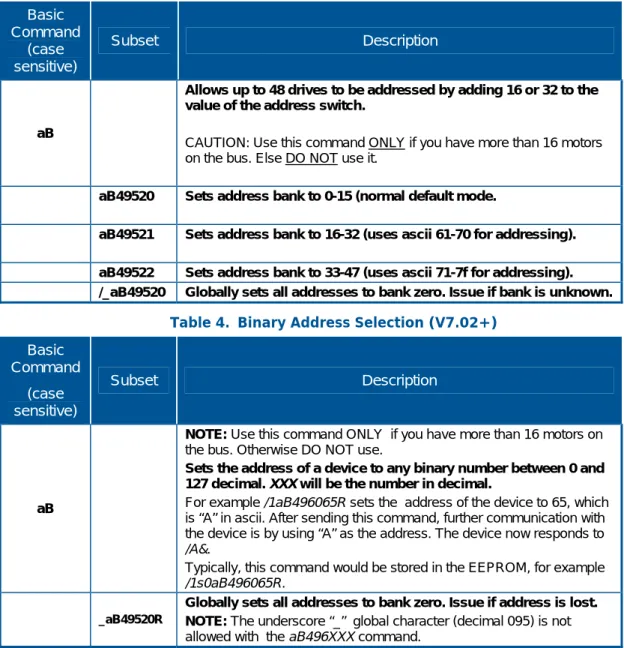
Appendix 13. Addressing More Than 16 Motors On Same Bus ... 53
Appendix 14. Encoders and Step/DIR Pulse Input ... 54
Table of Contents
Electrical ... 55
Appendix 15. Jog Modes and Limit Switches ... 56
Jog ... 56
Limit Modes ... 56
Noise Considerations ... 56
Appendix 16. S Curve ... 57
Appendix 17. Inputs and Outputs... 58
Appendix 18. EZ4AXIS Special Commands ... 59
To move one motor at a time... 59
To move all motors simultaneously ... 59
On-the-Fly parameter change ... 60
Home inputs status... 60
Coordinate mode and Semi-Independent mode ... 60
Exceptions to main command set ... 61
Halt and Skip on status of limit switches ... 61
Reading back encoder inputs as I/O ... 61
Home Flags ... 61
Programmable Threshold on Axis Inputs ... 62
1. Introduction
1.
Introduction
Overview
This document describes the operation and command set for the EZStepper® models EZHR17EN, EZHR23ENHC, and EZ4AXIS controllers/drivers.
Command Syntax
Commands for the EZStepper® are single alpha characters normally followed by a numeric value. The alpha character represents “what to do” and the numeric value represents “how much to do it”.
You can set values for desired velocities, accelerations, and positions. Commands can be issued one at a time or sent in a group. This allows the setting of all move parameters in one command. You can also create loops in the strings and cause the EZStepper® to become a stand-alone device that responds to switch inputs. Finally, storing such strings in the onboard EEPROM allows the EZStepper® to power up into a mode of your choice, so that it can act with no computer attached.
The commands are simply typed into a terminal program such as “Hyperterminal”; no special software is required. The EZStepper® can even be commanded from a serial enabled PDA (personal digital assistant).
2. Command Set
2.
Command Set
(Also see examples beginning on page 17.)
Table 1. Command Set
Command
(case sensitive) Operand Description
POSITIONING COMMANDS
NOTE: In firmware versions 6.7 and above, negative positions are allowed (e.g. /1A-1000R).
A 0-(2^31)
Move motor to absolute position .
(microsteps or quadrature encoder ticks - 32 Bit Positioning). E.g. /1A10000R
P 0-(2^31)
Move Motor relative in positive direction.
(microsteps or quadrature encoder ticks)
A value of zero will cause an endless forwards move at speed V. (i.e., enter into Velocity Mode) The velocity can then be changed on the fly by using the V command.
An endless move can be terminated by issuing a T command or by a falling edge on the Switch2 Input.
E.g. /1P10000R
D 0-(2^31)
Move Motor relative in negative direction.
( microsteps or quadrature encoder ticks)
(NOTE: for a finite move, the ending Absolute position must be greater than zero).
A value of zero for the operand will cause an endless backwards move at speed V. (i.e. enter into Velocity Mode). The velocity can then be changed on the fly by using the V
command.
An endless move can be terminated by issuing a T command or by a falling edge on the Switch2 Input.
E.g. /1D10000R NOTE: Ending position must be > 0 HOMING COMMANDS
Z 0-(2^31) (400)
Home/Initialize Motor.
Motor will turn toward 0 until the home opto sensor (opto #1) is interrupted. If already interrupted it will back out of the opto and come back in until re-interrupted. Current motor position is set to zero.
E.g. /1Z300000R
See Appendix 2 for further details.
z 0-(2^31)
Change current position without moving.
Sets current position to be position specified without moving motor. New microstep position (preferably) should have the same remainder as old position, when divided by 1024, else the motor may physically move/lose up to 2 steps when this command is issued.
E.g. /1z65536R
NOTE: This command must be issued after at least one A
2. Command Set
Command
(case sensitive) Operand Description
ap 0 to 15
Invert inputs. (requires firmware V7.05F+)
Inverts each of the 4 main inputs depending on whether the binary interpretation of the 4-bit number has the bit set or zero. This command is useful for toggling the polarity of the home flags and limits. E.g. /1ap7R will invert inputs 0,1 & 2 (binary of 7 is 0111)
F 0 or 1 (0)
Change direction of rotation considered positive.
This should only be done once on power up. Do not use if in Encoder Feedback mode. E.g. /1F1R
SET VELOCITY COMMANDS
V 1-2^24 (305064)
In Position Mode Set Max/Slew Speed of motor.
Sets microsteps per second. It is recommended that this drive be left in 256 micro-step mode, since very high microsteps/sec numbers can be issued.
E.g. /1V100000R
If the encoder ratio (aE command) is set, the units of velocity change to encoder counts/second.
SET ACCELERATION COMMANDS
L 0-65000 (1000)
In EZHR17EN, set acceleration factor.
Accel in microsteps / sec^2) = (L Value) x (400,000,000/65536) .
E.g.. using t=V/a /1L1R takes 16.384 seconds to get to a speed of V=100000 microsteps/second
NOTE: Acceleration does not scale with encoder ratio.
B 0-65000 Bump jog distance. See n1 command. LOOPING AND BRANCHING COMMANDS
g Beginning of a repeat loop marker. See examples below on
how to set up a loop. E.g. /1gP10000M1000G10R
G 0-30000
End of a repeat loop marker. Loops can be nested up to 4 levels. A value of 0 causes the loop to be infinite. (Requires T command to Terminate). If no value is specified 0 is assumed. E.g. /1gP10000M1000G10R
H 01-14
Halt current command string and wait until condition specified:
01 Wait for low on input 1 (Switch 1)
11 Wait for high on input 1 (Switch 1)
02 Wait for low on input 2 (Switch 2)
12 Wait for high on input 2 (Switch 2)
03 Wait for low on input 3 (Opto 1)
13 Wait for high on input 3 (Opto 1)
04 Wait for low on input 4 (Opto 2)
14 Wait for high on input 4 (Opto 2)
If Halted operation can also be resumed by typing /1R.
Also see S command for I/O dependant program execution. If an edge detect is desired, a look for Low and a look for High can be placed adjacent to each other E.g. H01H11 is a rising edge detect.
E.g. /1gH02P10000G20R - waits for switch 2
H command with no number after it waits for Switch 2 Closure (low).
2. Command Set
Command
(case sensitive) Operand Description
S 01-14
Skip next instruction depending on status of switch. 01 Skip next instruction if low on input 1 (Switch 1)
11 Skip next instruction if high on input 1 (Switch 1)
02 Skip next instruction if low on input 2 (Switch 2)
12 Skip next instruction if high on input 2 (Switch 2)
03 Skip next instruction if low on input 3 (Opto 1)
13 Skip next instruction if high on input 3 (Opto 1)
04 Skip next instruction if low on input 4 (Opto 2)
14 Skip next instruction if high on input 4 (Opto 2)
Program branching to a complex subroutine can be implemented by making the next instruction a stored string execution. (See examples). Loops can be escaped by branching to a stored string with no commands. E.g. /1gS02A10000A0G20R - skips on switch 2
Also see H command for I/O dependant program execution. PROGRAM STORAGE AND RECALL
s 0-15
Stores a program 0-3 or 0-15 depending on model,
Program 0 is executed on power up. (25 full commands max per string) E.g. /1s1A10000A0R
NOTE: This command takes approx 1 second to write to the EEPROM.
e 0-15 Executes stored program 0-15.
E.g. /1e1R
PROGRAM EXECUTION
R
Run the command string that is currently in the execution buffer.
E.g. /1R
X Repeat Run the current command string.
SET MAX MOVE CURRENT / HOLD CURRENT
m 0-100
(25)
For Steppers “ Move” Current on a scale of 0 to 100% of max current.
100% = 2A for EZHR17EN. E.g. /1m40R
h 0-50 (10)
Sets “Hold” current on a scale of 0 to 50% of max current.
100% = 2A for EZHR17EN E.g. /1h15R aw - Reserved ax - Reserved ay - Reserved MISC
Ping Command (lower case “p”)
This command will send a numeric message back to the host, when that point in the string is reached.
2. Command Set
Command
(case sensitive) Operand Description
SET MICROSTEP RESOLUTION / ENCODER
j
1, 2, 4, 8, 16, 32, 64, 128, 256 (256)
Adjusts the resolution in micro-steps per step.
It is recommended that step resolution be left at 256 microsteps (default).
(It is recommended that this drive be left in 256 micro-step mode. Only use reduced resolution if step and direction mode (n96) is selected and high frequency step pulses cannot be generated.)
For best microstep results, a motor must be selected that is capable of microstep operation.
N
1-5 (1)
Special Modes
1 = Encoder With No Index (Default). Homes to Opto.
2 = Encoder With Index. Homes to Index.
3 = Uses Potentiometer 1 as an encoder. See Appendix 9.
4 = First Home to Opto, then home to Index (future release)
5 = CANBUS slave mode. In this mode the unit is a slave to position messages received via the CANBUS EZLink Connector. (future release)
6 = Home to Index Exactly, even if the index is on a microstep (available with beta firmware V7.15).
2. Command Set
Command
(case sensitive) Operand Description
n 0-128000 (0)
Sets Modes – Interpret as combination of binary bits.
Bit0 (LSB) - /1n1R Enable Pulse Jog mode. Jog distance is given by “B” command. Velocity is given by V command . The Switch Inputs become the Jog Inputs.
Bit1 - /1n2R Enable Limits. (The two optos become limits switches). The polarity of the limits is set by the f command Bit2 - /1n4R Enable Continuous Jog mode. Continuous run of motor while switch is depressed. Velocity is given by V
command.
Bit3 - /1n8R Enables Position Correction mode. See Appendix 8.
Bit4 - /1n16R Enabled Overload Report Mode. See Appendix 8.
Bit5 - /1n32R Enable Step And Direction Mode if (1) or enable Dual Encoder Mode if (0) E.g. /1n96R<CR> (96=32+64) Enables step and dir mode and slaves the motor to it. (/1?10
reads the count ) See Appendix 14.
Bit6 - /1n64R Enable Motor slave to encoder/step-dir. Bit7 - /1n128R Used for Joystick mode. See Appendix 9. Bit8 - /1n256R When set, this bit will disable the response from the drive. (future release)
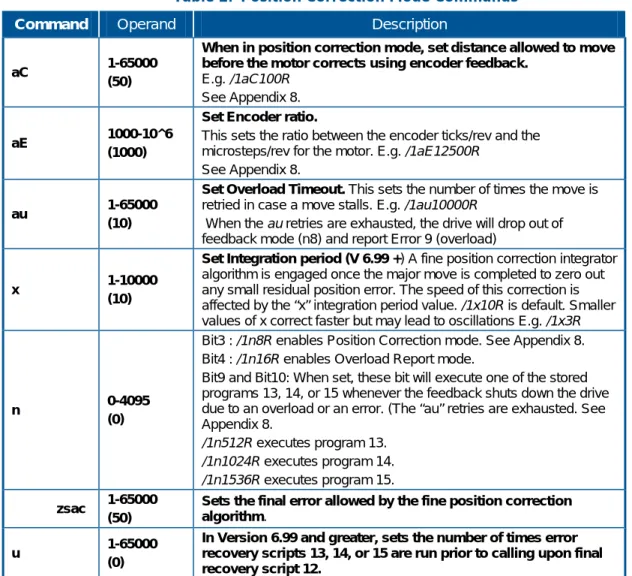
Bit9 and Bit10 - When set, these bits will execute one of the stored programs 13, 14 or 15 whenever the feedback shuts down the drive due to an overload or an error. (“au” retries are exhausted. See Appendix 8.
/1n512R will execute program 13.
/1n1024R will execute program 14.
/1n1536R will execute program 15. See Appendix 8 for an example.. Bit11 - /1n2048R Reserved. Bit12 - /1n4096R Reserved.
Bit13 - /1n8192R Uses potentiometer 2 to command the motion of the motor. See Appendix 9.
Bit14 - /1n16384R When Set, this bit will kill any move if switch 1 is pushed. See also “d” command.
Bit15 - /1n32768R When Set, this bit will kill any move if switch 2 is pushed. . See also “d” command.
Bit16 - /1n65536R When Set, potentiometer on Opto 2 input will set velocity. (Joystick Mode) See Appendix 9.
an 16384
/1an16384 switches the limits from the main axis from the two opto inputs (inputs 3,4) to the two switch inputs (inputs 1,2) .
Example /1an16384R . The second axis limits remain unchanged at 1,2. (Firmware version 6.998+) POSITION CORRECTION / FEEDBACK MODE
See Appendix 8 for position correction commands. See Appendix 16 for s curve modes.
2. Command Set
Command
(case sensitive) Operand Description
MISCELLANEOUS b 9600 19200 38400 to 230400 (9600)
Adjustable baud rate
E.g. /1b19200R
This command will usually be stored as program zero and execute on power up. Default baud rate is 9600.
NOTE: correct termination and strict daisy chaining required for reliable operation at higher baud rates.
o 0-3000 (1500)
Allows the user to correct any unevenness in microstep size.
It is best to adjust this with a current probe, but adjusting for lowest audible noise is a good approximation. This command can be executed while the motor is running. Try values very near 1500, such as 1470.
M 0-29999 Wait M number of milliseconds. B 0-65000 Set jog distance when in n1 mode
ar 5073
Processor reset (Available in V6.7+)
This command will initiate a Processor Reset the same as that which happens on power up. 5073 is chosen to avoid
inadvertent resets. E.g. /1ar5073R<CR>
aP 0-30000 (5)
Response delay (Available in V6.79+)
This command allows the delay from the controller receiving the command to the response being sent out to be
programmed. E.g. /aP1000R<CR> sets the delay to 1000mS (measured in milliseconds)
d 0-65000 (10)
Switch debounce value
Applies to kill move command only, The switch one or two must be depressed for a period of this number x 50µS prior to a Kill Move being called.
K 0-65000 (0)
Backlash compensation
When a non-zero value of K is specified, The drive will always approach the final position from a direction going more negative. If going more positive, the drive will overshoot by an amount K and then go back. By always approaching from the same direction, the positioning will be more repeatable. SINUSOIDAL SCAN (Available in V5.1 +)
aA 0-2^31 Sets amplitude of scan. See Appendix 10.
aW 0-2^31 Sets frequency of scan. See Appendix 10. ON/OFF POWER DRIVER
J 0-3
(0)
On/Off Driver – Interpret as 2 bit Binary Value.
3=11= Both Drivers On, 2=10=Driver2 on Driver 1 Off etc. NOTE: If total current input to the board exceeds 2A, it will be necessary to change the input fuse to up to 4A.
STEPPER DRIVE DAUGHTER CARD COMMANDS
aM 1 – 2
Selects drive.
/1aM1R selects first drive. From then on all commands are sent to drive 1.
/1aM2R selects drive 2. See Appendix 11. The second drive homes to opto #2 or switch #1.
2. Command Set
Command
(case sensitive) Operand Description
BIDIRECTIONAL DRIVE DAUGHTER CARD
NOTE: When using the Logic Output daughter card, all the daughter card control signals become available as TTL digital outputs, including PWM. See Appendix 11.
l 0-500 /1l400R (lower-case L) sets current to 80%. (NOTE: the range
was changed from 0-100 to 0-500 in firmware version V7.05A)
O 1 /1O1R sets the current flow one way.
I 1 /1I1R sets the current flow in the other direction. DEVICE RESPONSE PACKET
See Appendix 7 for detailed description of device response to commands.
Some commands are new and present only in later models. (AllMotion, Inc. reserves the right to enhance the specifications at any time)
ANALOG-TO-DIGITAL CONVERTER COMMANDS
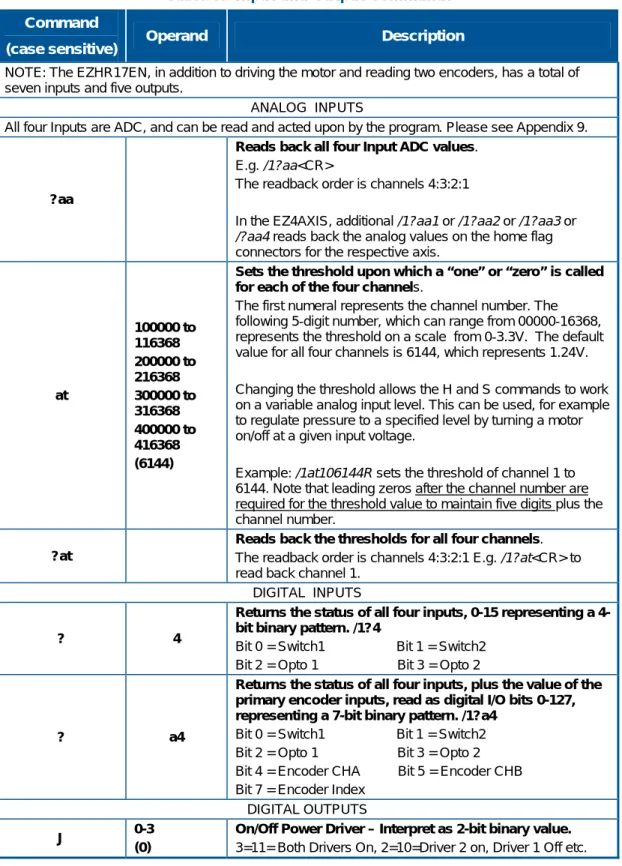
All four Inputs are ADC inputs, and can be read and acted upon by the program. Please see Appendix 9.
?aa
Reads back all 4 Input ADC values. E.g. /1?aa<CR>
The readback order is channels 4:3:2:1
at 100000 to 116368 200000 to 216368 300000 to 316368 400000 to 416368 (6144)
Sets the threshold, upon which a “one” or “zero” is called for each of the 4 channels.
The Number represents the channel number followed by a 5 digit number from 00000-16368 which represents the threshold on a scale from a 0-3.3V. The default values are 6144 for all 4 channels which represents 1.24V.
Changing the threshold allows the H and S commands to work on a variable analog input value which essentially allows the program to act upon an analog level. This can be used for example to regulate pressure to a given level, by turning a motor on/off at a given voltage.
E.g. /1at106144R sets the threshold of channel 1 to 6144. Note that leading zeros are required for the threshold value, which is always 5 digits plus the channel number.
?at Reads back the thresholds for all 4 channels.
The readback order is channels 4:3:2:1 E.g. /1?at<CR> POTENTIOMETER POSITION COMMAND
The motion of the Stepper can be slaved to value read from Potentiometer2. Please see Appendix 9.
ao 0-20000 (0)
After multiplication by the am value, this offset is added to obtain the position command. E.g. /1ao1000R<CR>
am 0-20000 (256)
The Potentiometer value is multiplied by this value and divided by 256 to get the position command. E.g.
/1am512R<CR>
ad 0-20000
Sets a deadband (in microsteps) around the potentiometer value used for the last move, which must be exceeded before a new move command is issued. The deadband is
2. Command Set
Command
(case sensitive) Operand Description
Hardware protocol:
The EZStepper® communicates over the RS485 bus at 9600 baud, 1 stop bit, no parity, no flow control.
IMMEDIATE QUERY COMMANDS
The following commands are “Immediate” commands, and cannot be cascaded in strings or stored. These commands execute while others commands are running.
These commands do not require an “R” at the end.
T
Terminate current command or loop. E.g. /1T
? 0 Returns the current commanded motor position.
E.g. /1?0
? 1 Reserved
? 2 Returns the current Slew/Max speed for Position mode.
? 3 Reserved
? 4
Returns the status of all four inputs, 0-15 representing a 4-bit binary pattern.
Bit 0 = Switch1 Bit 1 = Switch2 Bit 2 = Opto 1 Bit 3 = Opto 2
? a4
Returns the status of all four inputs, plus the value of the primary encoder inputs, read as digital I/O bits 0-127, representing a 7-bit binary pattern. /1?a4
Bit 0 = Switch1 Bit 1 = Switch2 Bit 2 = Opto 1 Bit 3 = Opto 2
Bit 4 = Encoder CHA Bit 5 = Encoder CHB Bit 7 = Encoder Index
? 5 Returns the current velocity mode Speed. (Stepper Only).
? 6
Returns the current step size microsteps /step (HR Version Only).
Selected using J command.
? 7 Returns the current ‘o’ value. (HR version only)
? 8 Returns Encoder Position. (can be zeroed by zi command)
? 9 Erases all stored commands in EEPROM.
? 10
Returns the second encoder (n=0) / or step and dir input (n=32) count.
NOTE: It is possible to just count pulses on switch inputs with this mode. (future release)
2. Command Set
Command
(case sensitive) Operand Description
Q
Query current status of EZStepper®/EZServo®.
Returns the Ready/Busy status as well as any error conditions in the “status” byte of the return string.
The return string consists of the start character (/), the master address (0) and the status byte. Bit 5 of the status byte is set when the EZStepper/EZServo is ready to accept commands. It is cleared when the EZStepper/EZServo is busy. The least significant four bits of the Status byte contain the completion code. The list of the codes is:
0 = No Error
1 = Initialization error 2 = Bad Command 3 = Operand out of range
Errors in OpCode will be returned immediately, while Errors in Operand range will be returned only when the next command is issued. See Appendix 7.
n The n mode works in both immediate mode and in strings. $ /1$<CR> Returns the currently executing command string.
Other Query
In firmware version 7.02 and above it is possible to query parameters by using the same letter that set the parameter. E.g. /?A returns current position, /1?V returns velocity, and
3. Single-Axis Programming Examples
3.
Single-Axis Programming Examples
The following examples are command strings in DT protocol.
Example #1 (A move to absolute position)
/1A12345R<CR>
Command breakdown:
/ Start character. It lets the EZSteppers® know that a command is coming in.
1 Device address, (set on address switch on device).
A12345 Turn to absolute position 12345
R Run the command.
<CR> Carriage return. Tells the EZStepper® that command string is complete and should be parsed.
NOTE: Hyperterminal issues each character as you type it in. Therefore it is not possible to cut and paste in Hyperterminal. Backspace is allowed only up to the address character. If backspace is used, all characters “backspaced” must be retyped in. If a typing error is made, typically hit enter and type it all in again – what was typed in will be overwritten as long as the R command at the end was not present.
Example #2 (Move loop with waits)
/1gA10000M500A0M500G10R<CR>
Command breakdown:
/ Start character. Tells the EZSteppers® that a command is coming in.
1 Device address, (set on address switch on device).
g Start a repeat loop.
A10000 Turn to absolute position 10000.
M500 Wait for 500 milliseconds.
A0 Turn to absolute position 0.
M500 Wait for 500 milliseconds.
G10 Repeat string 10 times beginning from the location of the small “g.”
R Run the command.
<CR> Carriage return. Tells EZStepper® that command string is complete and should be parsed.
3. Single-Axis Programming Examples
Example #3 (Program storage and recall)
This example stores a command string for later execution:
/1s2gA10000M500A0M500G10R<CR>
This stores the program in the preceding example as program 2.
/1e2R<CR>
Will execute the stored program #2.
NOTE: Program 0 is always executed on power-up. If we used 0 instead of 2 in the above example, this program would execute automatically on power-up.
To erase a program, store the program without any commands. e.g., /1s0R
NOTE: The first-ever A command will reset some motion parameters to default; hence it is recommended that programs stored in s0 have A0 as the first command.
Example #4 (Set current, wait for Switch 2 closure, home to opto)
/1s0m75h10gJ3M500J0M500G10H02A1000A0Z10000R<CR>
Command breakdown:
/1s0 Stores the program that follows in motor number 1 stored string 0 (string 0 is executed on power-up).
m75 Set move current to 75% of max .
h10 Set hold current to 10% of max.
g Start a loop.
J3 Turn on both on off drivers.
M500 Wait 500 mS.
J0 Turn off both on off drivers.
M500 Wait 500 mS.
G10 Repeat loop above 10 times.
H02 Wait for a switch2 input to go low.
A1000 Move to position 1000.
A0 Move to position 0.
Z10000 Home the stepper to opto #1. Max steps allowed to find opto = 10000.
3. Single-Axis Programming Examples
Example #5 (Nested loop example)
/1gA1000A10000gA1000A10000G10G100R<CR>
Command breakdown:
/1 Talk to drive number 1.
g Start outer loop.
A1000 Go to Absolute position 1000.
A10000 Go to Absolute position 10000.
g Start inner loop.
A1000 Go to Absolute position 1000.
A10000 Go to Absolute position 10000.
G10 Do inner loop 10 times. (end of Inner loop).
G100 Do outer loop 100 times. (end of outer loop).
R Run.
3. Single-Axis Programming Examples
Example #6 (Skip/Branch instruction)
Examples:
/1s0gA0A10000S13e1G0R<CR> (stored string 0)
/1s1gA0A1000S03e0G0R<CR> (stored string 1)
This stores two programs in string 0 and string 1, and the code switches from one program to the other depending on the state of input 3. In the example above, the code will cycle the motor between position A0 and A10000 if input 3 is high, and between A0 and A1000 if input 3 is low.
Stored string 0:
/1 Talk to motor 1.
s0 Store following in string0 (executed on power-up).
g Start loop.
A0 Go to absolute position 0.
A10000 Go to absolute position 10000.
S13 Skip next instruction if 1 (high) on input 3.
e1 Jump to string 1.
G0 End of loop (infinite loop).
R Run.
Stored string 1:
/1 Talk to motor 1.
s0 Store what follows in string0 (executed on power up).
g Start loop.
A0 Go to absolute position 0.
A1000 Go to absolute position 1000.
S03 Skip next instruction if 0 (low) on input 3.
e0 Jump to string0.
G0 End of loop (infinite loop).
3. Single-Axis Programming Examples
Example #7 (Monitor four switches and execute four different programs
depending on which switch input is pushed)
/1s0gS11e1S12e2S13e3S14e4G0R<CR> /1s1A1000e0R<CR>
/1s2A2000e0R<CR> /1s3A3000e0R<CR> /1s4A4000e0R<CR>
This stores five program strings for an endless loop.
At power-up String 0 automatically executes and loops around sampling the switches one by one, and skipping around the subsequent instruction if it is not depressed.
Then for example when Switch1 is depressed stored String 1 is executed, which moves the stepper to position 1000.
Execution then returns to Stored String 0, due to the e0 command at the end of the other stored strings.
If the switch is still depressed it will jump back to String 1 again, but since it is already at that position there will be no visible motion. To terminate the above endless loop, type /1T.
NOTE: Using an e command to go to another program is a more of a “GOTO” rather than a “GOSUB” since execution does not automatically return to the original departure point.
Example #8 (Move 1000 steps forward on rising edge of Switch2)
/1gH02H12P1000G0R
The endless loop first waits for a 0 level on switch1, then waits for a “1” level on Input2.
Then a relative move of 1000 steps is issued, and the program returns to the beginning to look for another rising edge.
4. Multiple-Axis Coordinated Motion Programming Examples
4.
Multiple-Axis Coordinated Motion
Programming Examples
Introduction
Up to 16 motors can be addressed individually or in banks of 2, 4 ,or “All”, increasing versatility and ease of programming. Synchronized motion is possible by issuing commands addressed to individual EZSteppers® without the “R” (Run) command, which sets up the command without executing it. At the proper time, the “R” command is sent to a bank of motors to start several actions in concert.
Addressing Individual Motors
Addressing motors 1-9: Use /1, /2, etc.Addressing motors 10-16:
Use the ASCII characters that are above 1 through 9: 10 /: (colon) 11 /; (semi colon) 12 /< (less than) 13 /= (equals) 14 /> (greater than) 15 /? (question mark)
16 /@ (“at” sign) – use setting zero on the address switch for this.) For example, /=A1000R moves stepper #13 to absolute position 1000.
Addressing Banks of Motors
Addressing banks of two motors:
Motors 1 and 2 /A Motors 3 and 4 /C Motors 5 and 6 /E Motors 7 and 8 /G Motors 9 and 10 /I Motors 11 and 12 /K Motors 13 and 14 /M Motors 15 and 16 /O
Addressing banks of four motors: Motors 1,2,3, and 4 : /Q
4. Multiple-Axis Coordinated Motion Programming Examples
Addressing All Motors At Once
Use the global address /_ (underscore).
Addressing More Than 16 Motors
It is possible to have add an offset of 16 or 32 to the number on the address switch. Please see the aB command in Appendix 13 for explanation.
Example #9 (Coordinated motion with axes performing same motion)
Command:
/_A10000R<CR>
Breakdown:
/_ (Slash then underscore) Address all 15 motors.
A1000 Go to absolute position 1000.
R Run. All motors go to absolute position 1000.
Example #10 (Coordinated motion with axes performing different motions)
Command:
/1A10000<CR> /2A200<CR> /AR<CR>
Breakdown:
/1A10000<CR> Set up motor 1 command buffer to go to absolute position 10000.
/2A2000<CR> Set up motor 2 command buffer to go to absolute position 2000.
/AR Execute current commands in buffer for bank address “A” which is motors 1 and 2. (The “A” here is an address of a bank of motors 1 and 2 because it comes after the slash, and should not be confused with the “A” that means absolute position.) Both moves will start at the same time, and complete at a time determined by the velocity set for each axis.
Appendix 1. Stepper Motor Electrical Specification
Appendix 1. Stepper Motor Electrical Specification
The EZStepper® will work with most stepper motors. However, the performance achieved will be a function of the motor used.A stepper motor moves by generating a rotating magnetic field, which is followed by a rotor. This magnetic field is produced by placing a sine wave and a cosine wave on two coils that are spaced 90 degrees apart. The torque is proportional to the magnetic field, and thus to the current in the windings.
As the motor spins faster, the current in the windings need to be changed faster in a sinusoidal fashion. However the inductance of the motor will begin to limit the ability to change the current. This is the main limitation in how fast a motor can spin.
Each winding of the motor can be modeled as an inductor in series with a resistor. If a step in voltage is applied, the current will rise with time constant L/R. If L is in Henrys and R is in ohms, then L/R is the time it takes in seconds for the current to reach 63% of its final value. (NOTE: there is also the back EMF of the motor, which essentially subtracts from the applied voltage.)
The current I for a step function of voltage V into a coil is given by: I = (V/R) (1-exp(tR/L))
This equation is a standard response of a first-order system to a step input. The final value of current is seen to be V/R. (This system is similar to a spring (L) in parallel with a damper (R) being acted upon by a step in force (V) giving a resulting velocity (I).)
Appendix 1. Stepper Motor Electrical Specification
There are two methods by which the current can be made to change faster:
1. Reduce the inductance of the motor. 2. Increase the forcing function voltage V.
For (1) it is seen that for high performance, a motor with low inductance is desired.
For (2) the trick is to use a motor which is rated at about ¼ of the supply voltage (V). This means that it takes less time to ramp the current to a given value. (Once the current reaches the desired value the “chopper” type drive used in the EZSteppers® will “chop” the input voltage in order to maintain the current—so the current never actually gets to the final value of V/R, but the advantage of “heading towards” a higher current with the same time constant is that the current gets to any given value faster.) The lower voltage motor also has less back EMF, and does not subtract as much from the applied voltage.
So, for example, for a 24V supply, use a motor rated at around 6V, and then use the “m”, and “h” commands to set the current regulation at or below the rating for the motor. The default values on power-up are
Appendix 2. Homing Algorithm Detail
Appendix 2. Homing Algorithm Detail
Overview
The Z command is used to initialize the motor to a known position. When issued, the motor will turn toward 0 until the home opto sensor is interrupted. If already interrupted, it will back out of the opto and come back in until re-interrupted. Current motor position is set to zero. The homing is done at the current speed V. The maximum number of steps allowed to go toward home is defined by the Z command operand + 400. The maximum number of steps away from home (while sensor is cut) is 10000.
To set up the home flags:
First ensure that a positive move, e.g. /1P100R, moves away from home and the home flag. If motor does not move away from home, flip the connections to only one of the windings of the stepper.
The default condition expects the output of the home flag to be low when away from home (as is the case in an opto). If home flag is high when away from home (as in the case of the “normally open” switch), issue the command /1f1R to reverse the polarity that is expected of the home flag. Issue the command /1Z100000R or /1f1Z100000R as necessary.
Homing should be done at a slow speed, especially if homing to a narrow index pulse on an encoder, which may be missed at high speeds.
Opto and flag should be set up to be unambiguous. For example, when the motor is at one end of travel, the flag should cut the opto; and when at other end of travel, the flag should not cut the opto. There should be only one black-to-white transition possible in the whole range of travel. Home can be done to an opto (N1 mode) or index pulse (N2 mode). The main axis homes to opto1 (input 3). This opto is also the lower limit. The main axis uses opto 2 (input 4) as its upper limit.
The second axis on the daughter card uses the two switch inputs as home and limits:
Switch 1 (input 1) is home and lower limit. Switch 2 (input 2) is the upper limit.
Note that limits are engaged by /1n2R. (lower case “n”). The default (n0) mode does not check the limits when moving.
Default “f” mode (f0) expects the inputs to be low when the axis is away from the limits/home. /1f1R reverses this, “f1” can be chosen per axis, e.g., /1aM1f1aM2f0R selects different polarities for the home flags of the
Appendix 2. Homing Algorithm Detail
reflective sensor, the intermediate level can be accommodated by the EZStepper® circuits without external signal conditioning.
NOTE: The optos and switches are interchangeable. If four optos are desired, power for the extra optos can be drawn from the 5V supply on the encoder connector. These extra optos may require an external resistor in series with the LED. When connecting switches, connect between any input and ground.
Main Axis Homing Details
There are four full steps in a single electrical cycle that moves the stepper motor (A+, B+, A-, B-). For repeatability in homing, the home position is set to first step in that cycle which occurs after the flag edge has been seen. (This means that the home position is defined some ways beyond the middle of the flag).
However, there is a small but definite chance that an ambiguity in home position may occur in the rare case that the exact point of switching into A+ occurs at the same point at which the flag gets cut. In this case, a four-step ambiguity in home position may exist, because sometimes the flag may cut just before and sometimes just after. The procedure below describes a method by which the ambiguity can be removed. However, this procedure need not be followed if a four-step inaccuracy in Home position is acceptable.
To eliminate the home position ambiguity:
Issue the Z command, and allow the motor to home. Move 2 full steps (in any direction),
Mechanically move the flag edge (or sensor) such that it trips in the middle of the sensor by adjusting it while watching the status LED on the board which shows the status of the home sensor. This will ensure that the flag trips at A- and thus the motor will home to a unique position of A+.
Another way to do this, if it is not hazardous:
Put the motor in an endless homing loop via /1gZ10000GR.
Move the flag/opto around while the motor is homing. It will be noticed that the motor will home to two distinct positions that are four steps apart. Make sure the high-to-low transition point of the opto is NOT near these positions (the exact position does not matter as long as it is not near the place where it homes to).
Second Axis Homing Details
The second axis will home to the exact transition of the home flag, and does not seek a Phase A zero. The second axis uses the switch inputs for homing and limits.
Appendix 2. Homing Algorithm Detail
Manual homing
Motors can be manually homed to any input by the use of a polling loop such as:
1. /1s1z0R (Store set current position to zero program 1.)
2. /1z100000gD1S04e1GR (Go backward in an endless loop until input 4 goes high.)
Homing to a hard stop
It is possible to send the motor against a hard stop and then force the position counter to zero or some other value as necessary. /1z0R (lower case “z”) zeros the position counter and encoder for the motor that is currently selected. /1z333R sets the position to 333 etc. So /1aM1z0R
zeros the counters for motor 1 and /1aM2z0R zeros the position counters for motor 2.
Homing to the index
N2 Mode: The main axis will home to the encoder index in /1N2R mode. The index must be at least 100µS in width. The axis will home to the next phase A zero after passing the Index. In this mode it is necessary to ensure that the Index is not on a Phase A zero, or else a four-step ambiguity in home position will exist. This is explained in Main Axis Homing Details, above. Note that the index is sampled at a 20kHz rate, and may be missed if the speed of motion is too high.
N6 Mode (available in beta firmware V7.15): In this mode, the motor will home to the index position exactly, even if the index is on a micro-step position. This mode employs a high-speed input capture to ensure that the index will be detected even at high speed. The motor will decelerate to rest slowly after the index has passed, and will have a negative position after homing. In order to view the exact home position, issue an A0 after the Z command.
Example:
/1n0m30h30P100V1000aE25600N5Z10000A0n8ac1R
Appendix 3. Microstepping Primer
Appendix 3. Microstepping Primer
First consider a full stepping driver.A stepper motor moves by having two windings that are orthogonal to each other and sequencing the current in these windings.
When full stepping, a typical sequence is:
A+ (Only winding A current applied in +ve Direction) B+ ( Only winding B current applied in +ve Direction) A- (Only winding A current applied in -ve Direction) B- ( Only winding B current applied in -ve Direction) (A full electrical cycle consists of four steps.)
It can be seen that if the windings are not physically placed orthogonally, the four steps may not be of equal size, and the difference in motion will be a constant only if the number of steps is divisible by four, even when in full step mode.
Now consider microstepping:
Microstepping is achieved by placing two sinusoidally varying currents that are 90 degrees apart in the windings of the stepper. This causes a torque vector of equal length to rotate, causing smooth inter-step motion of the rotor.
However, in order to get even motion in every step it is necessary: That the windings be mechanically orthogonal
That the windings produce equal torques for equal currents That there is no other “detent torque” acting upon the rotor in the
absence of current. (This detent torque is easily felt by rotating the stepper with windings disconnected and not shorted. A motor that is good for microstepping will feel smooth when rotated by hand— somewhat like a DC motor—with little tendency to detent.) That the current not be so small that the driver cannot regulate it to
the microstepping accuracy desired.
In general, most inexpensive stepper motors cannot microstep with accuracy. Typically, a special motor designed for microstepping must be run at a significant current in order to get even microsteps. When accuracy is required, the move current must generally be set equal to the hold current. This is because if the current is reduced at the end of the move, the motor will fall back into a detent position.
Appendix 4. Heat Dissipation
Appendix 4. Heat Dissipation
Most stepper applications require intermittent moving of the motor. In the EZStepper®, the current is increased to the move current, the move is performed, and the current is then reduced to the hold current
(automatically). The dissipation in the drive is proportional to the current flowing in the drive, and therefore the dissipation occurs primarily during the move.
When the drive generates heat, the heat first warms the circuit board and heat fin (if any).
Only then does the heat transfer to the surroundings. For intermittent moves that are less than one minute in duration, the drive primarily cools using this thermal inertia of the board and heat fin, and not by steady state dissipation to the surrounding ambient.
The electronics for EZSteppers® are fully capable of running at the rated voltage and current. However, due to the small size of the boards, which limits the steady state heat transfer to the ambient, care must be taken when the drive is used in high duty cycle and/or high current
applications. For conservative operation, it is recommended that the duty cycle be reduced linearly, from 100% duty at 50% of rated current, to 25% duty at 100% of rated current. (Duty cycle means the percentage of the time that the drive is moving the load – average over 5 minutes). Conservatively, the maximum continuous run at 100% current is about one minute. An on-board thermal cutout typically trips after about two minutes at 100% current. (This cutout is self-resetting when the drive cools). Of course, at 50% of current, the drive will run continuously with no time limit.
Most “intermittent move” applications will NOT require derating of the drive.
In case the EZStepper® is required to run 100% of the time at 100% current, forced air cooling or bolting against an aluminum heat fin with heat-conductive foam is recommended. Use a compliant foam pad such as Bergquist BER224, available from Digikey.
EZSteppers® are designed with parts rated at 85 C or better. This means the PCB copper temperature must remain below 85 C. The ambient air temperature allowed depends on the airflow conditions.
MTBF is 20,000 hr. at 85 C PCB copper temperature, and doubles for every 10 C under 85 C.
Appendix 5. Step Loss Detection Using Opto
Appendix 5. Step Loss Detection Using Opto
For some applications, which operate without encoder feedback, it may be necessary to detect loss of steps due to the mechanism stalling for any reason.Step loss is easily detected by following the algorithm below: 1. Home the stepper to the opto using the Z Command.
2. Move out of the flag a little by issuing, for example, an A100
command.
3. Figure out the exact step on which the flag gets cut by issuing D1
commands followed by /1?4 commands to read back the opto. Let’s call this value i. (This only needs to be done once during initial setup).1
4. Execute the move sequence for which step loss detection is needed. 5. Issue a command to go back to absolute position Y+1.
6. Check the opto; it should not be cut (read opto back with the /1?4
command).
7. Now issue a command to go to position Y-1.
8. Check the opto; it should be cut (read opto back with the /1?4
command).
If the opto was not at the state expected, steps may have been lost. NOTE: Step loss detection can also be done by looking for changes on the other inputs.
Appendix 6. OEM Protocol With Checksum
Appendix 6. OEM Protocol With Checksum
Introduction
The protocol described in the majority of this manual is DT (Data Terminal). There is, however, a more robust protocol known as OEM that includes checksums. AllMotion, Inc. drives work transparently under both protocols, and switch between the protocols depending on the start transmission character detected.
The OEM protocol uses 02 hex (Ctrl B) as the start character, and 03 Hex (Ctrl C) as the stop character. The 02 Hex start character is equivalent to the / character in DT protocol.
OEM Protocol Example 1
/1A12345R<CR> in DT protocol is equivalent to
(CtrlB)11A12345R(Ctrl C)# in OEM protocol.
Name Typed Hex
Start Character Ctrl B 02 Address 1 31 Sequence 1 31 Command A 41 Operand 1 31 Operand 2 32 Operand 3 33 Operand 4 34 Operand 5 35 Run R 52 End Character Ctrl C 03 Checksum # 23
The checksum is the binary 8-bit XOR of every character typed,
including the start and end characters. (The sequence character should be kept at 1 when experimenting for the first time.) Note that there is no need to issue a carriage return in OEM protocol.
Appendix 6. OEM Protocol With Checksum
OEM Protocol Example 2
/1gA1000M500A0M500G10R<CR> in DT protocol is equivalent to
(CtrlB)11gA1000M500A0M500G10R(CtrlC)C in OEM protocol. The C at the end is Hex 43, which is the checksum (binary XOR of all preceding bytes).
Sequence Character:
The Sequence Character comes into effect if a response to a command is not received from the drive. In this instance the same command can be resent with bit 3 (repeat bit) of the sequence byte set, and bits 0-2 representing the sequence number.
When the repeat bit is set consecutive commands received by the drive must have a different sequence number in order to get executed. (Only the sequence number is looked at—not the command itself )
This covers both possibilities that (a) the drive didn’t receive the
command, and (b) the drive received the command but the response was not received.
The sequence number can take the following values: 31-37 without the repeat bit set
39-3F with the repeat bit set
(The upper nibble of the sequence byte is always 3.)
Appendix 7. Device Response Packet
Appendix 7. Device Response Packet
Introduction
EZSteppers® and EZServos® respond to commands by sending
messages addressed to the “Master Device.” The master device (which is typically a PC) is always assumed to have address zero (0). The master device should parse the communications on the bus continuously for responses starting with /0. (It should NOT, for example, look for the next character coming back after issuing a command, because glitches on the bus when the bus reverses direction can sometimes be interpreted as characters.)
Response Packet Structure
After /0, next comes the “Status Character” which consists of 8 bits: Bit7 Reserved
Bit6 Always set
Bit5 Ready bit. Set when the EZStepper® or EZServo® is ready to accept a command.
Bit4 Reserved
Bits 3 thru 0. These form an error code N from 0-15: N Function
0 No Error
1 Init Error
2 Bad Command (illegal command was sent) 3 Bad Operand (Out of range operand value) 4 N/A
5 Communications Error (Internal communications error) 6 N/A
7 Not Initialized (Controller was not initialized before attempting a move)
8 N/A
9 Overload Error (Physical system could not keep up with commanded position)
10 N/A
11 Move Not Allowed 12 N/A
Appendix 7. Device Response Packet
Note that in the RS485 bus, devices must respond right away, after the master sends a command, before the success or failure of the execution of the command is known. For this reason, some error messages that come back are for the previous command. An example of this is “failure to find home.”
A program that receives these responses must continuously parse for /0
and take the response from the bytes that follow /0. The first character that comes back may be corrupted due to line turnaround transients, and should not be used as a “timing mark.”
Example Initialization Error Response
Note that the upper nibble typically only takes on values of 4 or 6 (Hex). An initialization error response has 1 in the lower Nibble. So the
response is 41 Hex or 61 Hex which corresponds to ASCII character upper case “A” or lower case “a”, depending on whether or not the device is busy.
Example Invalid Command Response
Note that the upper nibble typically only takes on values of 4 or 6 (Hex) An invalid command response has 2 in the lower nibble. So the response is 42 Hex or 62 Hex , which corresponds to ASCII character upper case “B” or lower case “b”, depending on whether or not the device is busy.
Example Operand Out Of Range Response
Note that the upper nibble typically only takes on values of 4 or 6 (Hex). An operand out of range response has 3 in the lower nibble. So the response is 43 Hex or 63 Hex, which corresponds to ASCII character upper case “C” or lower case “c”, depending on whether or not the device is busy.
Example Overload Error Response
Note that the upper nibble typically only takes on values of 4 or 6 (Hex). An overload error response has 7 in the lower nibble. So the response is 47 Hex or 67 Hex, which corresponds to ASCII character upper case “I” or lower case “i”, depending on whether or not the device is busy.
Appendix 7. Device Response Packet
Example Response To Command “/1?4”
FFh: RS485 line turn around character. It’s transmitted at the beginning of a message.
2Fh: ASCII “/”Start character. The DT protocol uses the ‘/’ for this. 30h: ASCII “0” This is the address of the recipient for the message.
In this case ASCII zero (30h) represents the master controller. 60h: This is the status character (as explained above).
31h: These two bytes are the actual answer in ASCII.
This is an eleven which represents the status of the four inputs. The inputs form a four-bit value. The weighting of the bits is: Bit 0 = Switch 1
Bit 1 = Switch 2 Bit 2 = Opto 1 Bit 3 = Opto 2
03h: This is the ETX, or end-of-text character. It is located at the end of the answer string.
0Dh: This is the carriage return. 0Ah: This is the line feed.
Appendix 8. Position Correction Mode and Overload Report Mode
Appendix 8. Position Correction Mode and
Overload Report Mode
Position Correction Mode (V6.7+)
Position correction mode, when enabled, will move until the encoder reads the correct number. Once enabled, positions are given in quadrature encoder counts of the encoder (not in microsteps). If the motor stalls during a move, the mode will re-attempt the move until the encoder reads the correct number. These algorithms run while the stepper is in motion and will detect a stalled motor during a move.
There are two main types of feedback arrangements: the first method is to place the encoder on the motor shaft. The second method is to place the encoder on the component that is finally positioned, and may be only be loosely coupled to the motor due to backlash etc. The EZStepper® will work with either type of feedback.
Setting Up Encoder Feedback
1. Set the encoder ratio.
NOTE: the encoder ratio should preferably be changed when at the zero position.
Encoder Ratio = (microsteps/rev divided by quadrature encoder ticks/rev) x 1000.
The encoder ratio must preferably be a whole number after the multiply by 1000. (If this is not a whole number, see discussion further down). The motor must be left in 256th microstep mode for correct operation of feedback mode.
For example, a 1.8-degree stepper (running in 1/256th step mode), which has 200x256 microsteps /rev, is hooked up to a 400-line encoder that has 1600 quadrature encoder counts.
aE= ((200x256)/(400x4)) x1000=32000
Issue the command /1aE32000R to set this encoder ratio. NOTE: If the encoder ratio is unknown, do the following: 1. Leave the encoder ratio at its power-up default of 1000.
2. Ensure that the encoder increases its count when the motor moves in the positive direction. If not, switch either the AB lines on the encoder, which will reverse the count direction; or switch the wires to one of the windings on the stepper motor, which will reverse the direction of rotation (do not use the F command).
Appendix 8. Position Correction Mode and Overload Report Mode
5. Issue /1A100000R and ensure that the move completes at a velocity that does not stall.
6. Issue /1?0, which reads back the current position. This should be 100000.
7. Issue /1?8, which reads back the encoder position. 8. Issue /1aE0R which auto divides these two numbers. 9. Issue /1?aE, which reads back the encoder ratio computed.
This value read-back is only a rough guide, and will be out by a few counts due to inaccuracies in the motor position and run-out in the encoder.
NOTE: The value read-back MUST be overwritten by the EXACT value that represents ratio.
10. Issue /1aE32000R, or whichever exact number represents the encoder ratio.
2. (Optional) Set the error in quadrature encoder ticks
allowed before a correction is issued.
E.g. /1aC50R (default is 50)
3. (Optional) Set the Overload Timeout Value.
This is the number of retries allowed under a stall condition. E.g. /1au10000R (default is 100)
4. Enable the feedback mode.
1. Zero positions just prior to enabling feedback mode by issuing
/1z0R. (Or issue /1z10000R etc. if you need to at this time.) 2. Enable position correction mode by issuing /1n8R.
Example (V6.7+):
/1z0aC50h40m40au100aE32000V1000n8R starts the position correction mode.
Fine position correction (V6.99+)
When in n8 mode, there are two position correction algorithms: The COARSE ALGHORITHM, as described above, operates to
bring the motors to within the value given by “aC” (upper case C). ). This algorithm runs all the time (while the stepper is in motion) and will detect a motor that is stalled or lagging by more than “aC” during a move. When a problem is detected the axis will stop and reissue a move starting from zero velocity so as to slowly spin up motor that may have stalled at high speed.
Appendix 8. Position Correction Mode and Overload Report Mode
oscillations, e.g., /1x3R. The fine position correction deadband is set by “ac” (lower case c) E.g.: /1ac10R, the default ac is 20 encoder counts. This can be adjusted down to zero, if desired but it may take time to settle depending on stiction and backlash, especially if the encoder is decoupled from the motor. The integration algorithm runs on hold current, and this may need to be adjusted to a reasonably high number, depending on the load. It is also best to run hold current equal to move current so that the motor does not relax and detent at the end of the move.
Move complete (non busy) will be asserted when the move
completes to within “ac” for the first time. Subsequent disturbances greater than “ac” but less than “aC” will be corrected by the fine correction algorithm and will not be reported as “busy”. Only disturbances greater than “aC” will result in the coarse correction algorithm being engaged and busy being asserted.
Example: (V6.99+)
/1aM1z0aC50ac10x10h40m40au100aE32000L100n8R
Notes On Feedback Mode
If motor consistently stops during a move:
If a very fine line count encoder is used such that for example the encoder ratio is around 2000, or if the encoder is decoupled from the motor shaft, or if the encoder ratio has some fractional component and is non integer, increase the error (aC) allowed for the coarse algorithm, for example set aC to 2000. This way a move that is in progress will not be halted and restarted, because the coarse algorithm detects that the following error is too large. Instead, the move will complete with some error, and the fine algorithm
integrator will null out the error to within the lower case “ac” value at the end of the move.
Busy/Non Busy Status:
The status will read busy until any move is reached to within the “ac” value; however, once a move is complete any subsequent disturbance is handled by the fine integrator as long as it is less than “aC” (upper-case C). These subsequent corrections by the fine algorithm will not read busy; however, if the error becomes greater than “aC” the dead reckoning algorithm is turned on, and a formal correction move is initiated. This move changes the drive status to busy, and no external commands will then be accepted. It is
important to set the coarse dead reckoning deadband (aC value) to a reasonable number (for example, 50) else the drive will always be attempting to correct.
Appendix 8. Position Correction Mode and Overload Report Mode
Other Notes
When position correction mode is enabled (/1n8R) the drive will keep retrying any stalled moves until “au” retries are exhausted, and will NOT halt any strings or loops upon detection of a stall.
During position correction mode, /1T will halt any move, but there is a possibility that the drive may instantly reissue itself a position correction command, especially if it is fighting a constant
disturbance. It may be necessary to issue a /1n0R to positively halt a move in progress.
If the encoder ratio is changed from its default of 1000, the allowed max position will be decreased from +2^31 by the same ratio. The count will rollover from positive to negative range when this limit is exceeded.
Do not use the upper case “F” (reverse direction) command when using encoder feedback mode. Instead, switch the encoder AB lines or the wires to one phase of the motor.
Jog mode will not work with encoder feedback on.
Dual Axis Position Correction Mode
In firmware V6.78 and later, it is possible to put both axes into correction mode.
Examples:
/1aM1z0aC50au5u3aE12800L100n8R sets up encoder feedback mode for axis 1.
/1aM2z0j16aC500ac10au10000aE1000n8R sets up encoder feedback mode for axis 2.
The second encoder is wired to the 8-pin I/O connector as shown in the wiring diagram.
Arbitrary Measurement Units
It is not necessary to use feedback mode or even have an encoder, in order to set the encoder ratio /1aE32000R etc. Setting the encoder ratio thus allows positioning in any units of the user’s choice.
Overload Report Mode
In n8 feedback mode, the drive will automatically correct any stalled moves up to the limit given by “au.” Only then will it report Error 9 of an overload.
Appendix 8. Position Correction Mode and Overload Report Mode
drive will exit from any loops or multiple command strings it may be executing.
Overload report mode is enabled by /1n16R, and requires the encoder ratio to be entered correctly via the “aE” command. Issue /1zR to zero both the encoder and position counter just prior to issuing /1n16R. When an overload occurs, the drive can be set to execute stored strings 13, 14, or 15. See auto recovery scripts below.
Auto Recovery in Feedback Mode
Auto Recovery is available in firmware V6.997+.
Auto Recovery Scripts (Available in V6.997+)
In n8 mode, the EZStepper® determines a stalled or overload condition by checking to see if the encoder is tracking the commanded trajectory. If the encoder is not following the commanded trajectory within the error specified by “ac”, a number of retries given by the “au” command are executed.
When an overload condition is detected (retry counter has exceeded the “au” value), it will be reported back as an upper or lower case “I” (Error 9) when the status is querried. This status can be used by an external computer to execute a recovery script.
However, it may be desired that the drive recover by itself in the case of a stand-alone application. For this purpose, we have the “n” mode bits n512 and n1024.
It is necessary to combine these bits with n8 so, for example, n512+n8 = n520.
Depending on which of these bits is set, the servo will execute stored program 13, 14 or 15 when an overload is detected. Program 12 is also executed as a last resort if programs 13,14, or 15 cannot auto recover after retrying the number of times given by the “au” command. NOTE: an overload error on any motor, if enabled, will execute error recovery. Example:
1. Enter /1s13p1202n520R. This sets error recovery script to send “1202” on every recovery.
/1s12p1201R sets final script to send “1201.”
2. /1aM1m5h5z0aC50au5u3aE12800L100n520R sets h= 5 and m=5 so that we can stall the motor easily.
3. Setup encoder ratio as appropriate: /1aE32000R etc. 4. Zero Encoder and Position Counter /1z0R
5. Set au = 5 so that 5 retries max are allowed
6. Set u = 5 so that program 13 is run a maximum of 3 times.
7. Set n =520 = n8 + n512 so that stored program 13 will be issued on error condition.