Available Online at www.ijpret.com 476
INTERNATIONAL JOURNAL OF PURE AND
APPLIED RESEARCH IN ENGINEERING AND
TECHNOLOGY
A PATH FOR HORIZING YOUR INNOVATIVE WORK
DEVELOPMENT OF ANDROID OPERATING SYSTEM
PANKAJ V. MANJARE1, PROF. NIKHIL S. BAND2, DR. H. R. DESHMUKH3
1. Student of Master of Engineering in (CSE), IBSS college of Engineering and Technology, Amravati, India. 2. Assistant professor Department of (CSE), IBSS College of Engineering and Technology, Amravati, India. 3. Head of the Department of (CSE), IBSS College of Engineering and Technology, Amravati, India
Accepted Date: 05/03/2015; Published Date: 01/05/2015
\
Abstract: Android is an open source and Linux based operating system for mobile devices such as smartphones and tablet computers which is increasingly used worldwide. Android was developed by the Open Handset Alliance, led by Google, and other companies. This paper gives you basic idea about Android programming for its development and will also take you through some advance concepts related to Android application development. We study about how Android Developer Challenge announcing that a new release of the SDK firstly. Applications are usually developed in Java programming language using the Android Software Development Kit (SDK), but other development environments are also available. Android software development is the process by which new applications are created for Android operating system. There are different tools used for the development of Android Operating system and their applications.
Keywords: Android, Software development kit (SDK), Emulator, Accessory Development Kit (ADK), Android Debug Bridge (ADB), Fastboot.
Corresponding Author: MR. PANKAJ V. MANJARE
Access Online On:
www.ijpret.com
How to Cite This Article:
Pankaj V. Manjare, IJPRET, 2015; Volume 3 (9): 476-485
Available Online at www.ijpret.com 477
INTRODUCTION
Android operating system is one of the most widely used mobile Operating System these days and also enhancing its use in different areas of life. Android mobile operating system is based on the Linux kernel and is developed by Google and primarily designed for smartphones and tablets [1]. Android was created by the Open Handset Alliance, led by Google. The early feedback on developing applications for the Android platform was mixed [2]. Issues cited include bugs, lack of documentation, inadequate Quality Assurance infrastructure, and no public issue-tracking system [3]. A preview release of the Android SDK was released on November 12, 2007, at that time MergeLab mobile startup founder Adam MacBeth stated, "Functionality is not there, is poorly documented or just doesn't work... It's clearly not ready for prime time [4]." Despite this, Android-targeted applications began to appear the week after the platform was announced. The first publicly available application was the Snake game [5]. The Android Dev Phone is a SIM-unlocked and hardware-unlocked device that is designed for advanced developers. While developers can use regular consumer devices purchased at retail to test and use their applications, some developers may choose not to use a retail device, preferring an unlocked or no-contract device.
On July 15, 2008, the Android Developer Challenge Team accidentally sent an email to all entrants in the Android Developer Challenge announcing that a new release of the SDK was available in a "private" download area. The email was intended for winners of the first round of the Android Developer Challenge. The revelation that Google was supplying new SDK releases to some developers and not others and keeping this arrangement private which led to widely reported frustration within the Android developer community at the time [6]. On August 18, 2008, the Android 0.9 SDK beta was released. This release provided an updated and extended API, improved development tools and an updated design for the home screen. Detailed instructions for upgrading are available to those already working with an earlier release [7]. Then on September 23, 2008, the Android 1.0 SDK was released [8]. According to the release notes, it included "mainly bug fixes, although some smaller features were added." It also included several API changes from the 0.9 version. Multiple versions have been released since it was developed. Android is under ongoing development by Google and the Open Handset Alliance (OHA), and has seen a number of updates to its base operating system since its initial release. The most recent major Android update is Android 5.0 "Lollipop", which was released on November 3, 2014.
Available Online at www.ijpret.com 478 Android is not a device or a product, it’s not even limited to phones - you could build a DVR, a handheld GPS, an MP3 player, etc. Android gives developers a way to develop unique, creative applications and get those applications in the hands of customers. Hundreds of thousands of Android mobile phone users are already there, looking for the next clever or useful application.
For the development of Android developer has some knowledge about [9]:
A working Android development environment, whether it is based on Eclipse, another IDE, or just the command-line tools that accompany the Android SDK.
A strong understanding of how to create activities and the various stock widgets available in Android
A working knowledge of the Intent system, how it serves as a message bus, and how to use it to launch other activities
Experience in creating, or at least using, content providers and services
II. Development Tools
A. Software development kit (SDK)
A software development kit (SDK or "devkit") is typically a set of software development tools [10] that allows the creation of applications for a certain software package, software framework, hardware platform, computer system, operating system, or similar development platform. It may be something as simple as the implementation of one or more application programming interfaces (APIs) in the form of some libraries for interfacing to a particular programming language or to include sophisticated hardware that can communicate with a particular embedded system. Common tools include debugging facilities and other utilities, often presented in an integrated development environment (IDE). SDKs also frequently include sample code, supporting technical notes or other supporting documentation to help clarify points made by the primary reference material.
Available Online at www.ijpret.com 479 developed product. Providers of SDKs for specific systems or subsystems may sometimes substitute a more specific term instead of software. For instance, both Microsoft and Apple provide driver development kits (DDK) for developing device drivers.
The Android software development kit (SDK) includes a comprehensive set of development tools [11]. These include a debugger, libraries, a handset emulator based on QEMU, documentation, sample code, and tutorials, some of these are briefly describe below. Until about the end of 2014, the officially supported integrated development environment (IDE) was Eclipse using the Android Development Tools (ADT) Plugin, though IntelliJ IDEAIDE (all editions) fully supports Android development out of the box, and NetBeans IDE also supports Android development via a plugin [12]. As of 2015, Android Studio, made by Google and powered by IntelliJ, is the official IDE; however, developers are free to use others. Android applications are packaged in .apk format and stored under /data/app folder on the Android OS. APK package contains compiled byte code files called .dex files [13] i.e. Dalvik executables, resource files, etc.
1. Debugger:
It is a computer program that is used to test and debug other programs mainly the "target" program. The code to be examined might alternatively be running on an instruction set
simulator (ISS). The debugger typically shows the location in the original code if it is a
source-level debugger or symbolic debugger, commonly now seen in integrated development environments.
2. Libraries:
In computer science, a library is a collection of non-volatile resources used by computer programs, often to develop software. It is also a collection of implementations of behavior, written in terms of a language, that has a well-defined interface by which the behavior is invoked. These may include configuration data, documentation, help data, message templates, pre-written code and subroutines, classes, values or type specifications. Most compiled languageshave a standard library although programmers can also create their own custom libraries. Most modern software systems such as Android provide libraries that implement the majority of system services. Such libraries have commoditized the services which a modern application requires.
3. Emulator:
Available Online at www.ijpret.com 480 enables the host system to run software or use peripheral devices designed for the guest system.
The features that are useful for a mobile operating system i.e. for Android provide by android are; Emulator provides potentially better graphics quality than original hardware, gives additional features than original hardware, it save states, allow users to play games for discontinued consoles. Many emulators have already been developed and released under GNU General Public License through the open source environment, allowing for wide scale collaboration [15]. Emulators maintain the original look, feel, and behavior of the digital object, which is just as important as the digital data itself [14]. It also allow software exclusive to one system to be used on another. For example, a PlayStation 2 exclusive video game could be played on a PC using an emulator.
4. QEMU (Quick Emulator):
QEMU called as Quick Emulator is a free and open-source hosted hypervisor that performs hardware virtualization. QEMU is a hosted virtual machine monitor: It emulates CPUs through dynamic binary translation and provides a set of device models, enabling it to run a variety of unmodified guest operating systems. It also can be used together with KVM (Kernel Virtual Machine) in order to run virtual machines at near-native speed. QEMU can also be used purely for CPU emulation for user-level processes, allowing applications compiled for one architecture to be run on another.
B. Accessory Development Kit (ADK)
a) The Accessory Development Kit (ADK) is a reference implementation for hardware
manufacturers and hobbyists to use as a starting point for building accessories for Android. Each ADK release is provided with source code and hardware specifications to make the process of developing your own accessories easier. It encourages creating new and alternative hardware based on the ADK [16]. Implement compelling accessories to extend the capabilities of your users' Android-powered devices. Android relies on a suite of standard protocols you can implement in your accessories to be compatible with a wide range of Android-powered devices.
Available Online at www.ijpret.com 481 existing equipment or your own unique hardware to Android using the Android Open Accessory Protocol. Android supports accessories like audio docking stations, exercise machines, personal medical testing devices, weather stations, or any other external hardware device that adds to the functionality of Android.
Accessories use the Android Open Accessory (AOA) protocol to communicate with Android devices, over a USB cable or through a Bluetooth connection. If you are building an accessory that uses USB, make sure you understand how to implement the AOA protocol to establish communication between your accessory hardware and Android. It is mainly support Android Open Accessory protocol. By learning how to use ADK, and implementation of AOA one can get started building their own accessories for Android.
Embedded Artists’ Android Open Accessory Application (AOAA) [17] Kit is a standalone platform for evaluation and prototyping electronic accessories for Google’s Android operating system. It lets you get up-and-running with AOA experiments immediately. The AOAA board is also suitable for experimenting with CAN, Ethernet and RF networks. The board has been developed by Embedded Artists which contains two microcontrollers that are connected via an on-board CAN network.
C. Android Debug Bridge (ADB)
ADB stands for Android Debug Bridge [18], and it comes with the Android Developer SDK, which is a set of tools developers use to tinker with Android. You can find the ADB tool in <sdk>/platform-tools/. ADB Manages the state of an emulator or device, Run shell commands on a device, Manage port forwarding on an emulator or device, Copy files to/from an emulator or device. It allows the user to send commands to their Android device from their PC.
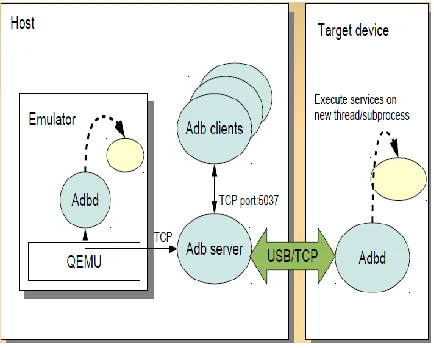
Android Debug Bridge (ADB) is a versatile tool lets you manage the state of an emulator instance or Android-powered device. It is a client-server program that includes three components [19]:
A client, which runs on your development machine. You can invoke a client from a shell by issuing an ADB command. Other Android tools such as the ADT plugin and DDMS also create ADB clients.
Available Online at www.ijpret.com 482
A daemon, which runs as a background process on each emulator or device instance.
Fig. 1: Overview of ADB working
ADB perform two main roles:
Providing “Transport”-communication path between host and target device, USB or TCP: but clients don't have to aware about it.
Providing “Services”-executing something on the target devices through the transport.
D. Native Development Kit (NDK)
The NDK is a toolset that allows you to implement parts of your app using native-code languages such as C and C++. For certain types of apps, this can be helpful so you can reuse existing code libraries written in these languages, but most apps do not need the Android NDK [20]. NDK is a toolkit for writing and integrating native code with Java application code. An Android Java application makes native calls through JNI. Thus the entire application running in the VM (Virtual Machine) is subject to the defined Android application lifecycle.
Native code has some characteristics for use in Android like it is graphically and computationally intensive, has few library dependencies that are restricted to stable Android libraries provided by NDK. It has little interaction between Java application code and native code.
Available Online at www.ijpret.com 483 on. When examining whether or not you should develop in native code, one has to think about his requirements and see if the Android framework APIs provide the functionality that you are needed.
E. Fastboot
In Android, fastboot is a special diagnostic and engineering protocol that you can boot your Android device [22]. While in fastboot, you can modify the file system images from a computer over a USB connection. Not that all phones have a fastboot mode that the user can access. It's turned on with Nexus devices by default and has been enabled by independent Android developers and enthusiasts on some other phones. It also requires more than what ships with the Android SDK, and different USB drivers for Windows computers. Fastboot runs on Windows, Mac, and Linux and all the information about setting it up can be found in the forums if you're interested.
Once set up, you boot your phone to fastboot and you can flash image files to your phone's internal memory. There are other commands you can use with fastboot, and they're a bit more advanced. Things like erasing partitions and overriding kernel command line options can be done, and this makes the tool very useful for developing hardware and software solutions that may need customized booting procedures. Fastboot is both a tool and a boot- loader protocol, required by Google for certified devices. With its characteristics would be really nice to adopt fastboot as an industry standard– e.g. maybe support fastboot in U-boot. It is very useful for test automation also.
III. CONCLUSION
Available Online at www.ijpret.com 484
REFERENCES
1. Android Operating System [Online] available: http://en.wikipedia.org/wiki/Android_%28 operating system%.
2. Paul, Ryan "Developing apps for Google Android: it's a mixed bag". Ars Technica. Archived from the original on December 20, 2007. Retrieved December 19, 2007.
3. Morrill, Dan "You can't rush perfection, but now you can file bugs against it". Android
Developers Blog. Retrieved September 3, 2009.
4. Morrison, Scott "Glitches Bug Google's Android Software", The Wall Street Journal. Retrieved December 19, 2007.
5. "First Android Application — Snake". Mobiles2day. January 7, 2008.
6. Metz, Cade, "Google plays Hide and Seek with Android SDK", The Register. Archived from the
original on October 6, 2008. Retrieved October 23, 2008.
7. "Android — An Open Handset Alliance Project: Upgrading the SDK". Archived from the
original on September 13, 2008. Retrieved October 24, 2008.
8. "Other SDK Releases". Android Developers. Retrieved September 2, 2009.
9. Mark L. Murphy, “The busy Coder’s Guide to Advanced Android Development,” [Online] available: http://commonsware.com/AdvAndroid/AdvAndroid-1_0-CC.pdf
10. “SDK Tools | Android Developers". Developer.android.com. Retrieved November 8, 2014.
11. "Tools Overview". Android Developers. July 21, 2009.
12. "Intelligent Android Development". Retrieved September 19, 2012, [Online] available: IntelliJ Android Development.
13. “Android SDK Glossary".
14. Muira, Gregory, " Pushing the Boundaries of Traditional Heritage Policy: maintaining long-term access to multimedia content." IFLA Journal 33 (2007): 323-326.
Available Online at www.ijpret.com 485 16. Accessory Development Kit (ADK), [Online] available: http://developer.android.com/tools/adk/ index.html.
17. Android Open Accessory, [Online] available:
http://www.embeddedartists.com/products/app/aoa_kit.php.
18. Justin Dennis , “New To Android Debug Bridge? How To Make The Process Simple And Easy,” On 12th January, 2015.
19. Android Debug Bridge [Online] available:
https://events.linuxfoundation.org/images/stories/pdf/lf_abs12_kobayashi.pdf.
20. Native Development Kit, [Online] available: http://developer.android.com/tools/sdk/ ndk/index.html
21. Android NDK [Online] available:
http://www.indigoo.com/dox/mobdev/01_Android/Android-NDK.pdf
22. Tim Bird,“ Android Systems Programming-Tips and Tricks” Sony Network Entertainment, Inc.