Using Every Part of the Buffalo in Windows Memory Analysis
∗
Jesse D. Kornblum
Principal Computer Forensics Engineer, ManTech SMA
[email protected]
Abstract
All Windows memory analysis techniques depend on the examiner’s ability to translate the virtual addresses used by programs and operating system components into the true locations of data in a memory image. In some mem-ory images up to 20% of all the virtual addresses in use point to so called “invalid” pages that cannot be found us-ing a naive method for address translation. This paper ex-plains virtual address translation, enumerates the different states of invalid memory pages, and presents a more ro-bust strategy for address translation. This new method in-corporates invalid pages and even the paging file to greatly increase the completeness of the analysis. By using ev-ery available page, evev-ery part of the buffalo as it were, the examiner can more accurately recreate the state of the machine as it existed at the time of imaging.
Keywords: Windows, memory analysis, forensics, in-valid pages, prototype, pagefile
1
Introduction
Memory analysis is a relatively new area of computer forensics in which an examiner attempts to gather infor-mation from the the contents of a computer’s memory as captured in a memory image. Information gleaned from memory images can include which processes were run-ning, when they were started and by whom, what specific
∗This is the author’s version of a work that was accepted for
publi-cation in Digital Investigation. Changes resulting from the publishing process, such as peer review, editing, corrections, structural formatting, and other quality control mechanisms may not be reflected in this docu-ment. Changes may have been made to this work since it was submitted for publication. A definitive version will be subsequently published in Digital Investigation at http://dx.doi.org/10.1016/j.diin.2006.12.002
activities those processes were doing and the state of ac-tive network connections.
An integral part of memory analysis is the examiner’s ability to translate the virtual addresses that programs and most operating system components use into the true loca-tions of data in a memory image. Virtual addresses are an abstraction mechanism used by many operating systems to simplify the memory management system.
Until now the virtual address translation process relied on addresses pointing to data that was in main memory, used by only one program, not in transition and unmodi-fied. Memory is divided into pages or frames of 0x1000 bytes each1. When a page did not meet the above condi-tions, it was said to be “invalid” as it could nofst be used immediately by a program. Despite the name, these pages were still accessible to the operating system and thus ig-noring them is a naive method for performing memory analysis. Incorporating these invalid pages creates a more complete picture and, to borrow a phrase, is like using ev-ery part of the buffalo [10]; taking full advantage of the available resources.
This paper demonstrates the methods for translating virtual addresses into physical locations even when they point to invalid pages. These pages can be located in a memory image and used during analysis. The paper starts with an introduction to virtual to physical address transla-tion and describes the results of the translatransla-tion process. Then the six kinds of invalid entries are described fol-lowed by a demonstration of how much more data can be retrieved from a memory image when the examiner con-siders both valid and invalid pages. Finally, some sugges-tions for future research are discussed.
2
Related Work
The modern era of Windows memory analysis began in 2005 with the DFRWS Memory Analysis Challenge [6]. The challenge presented two Windows 2000 memory im-ages and asked researchers to answer a set of specific questions regarding malicious software and illicit activity on the system. Chris Betz along with George Garner and Robert-Jan Mora published detailed responses [2, 7], but neither paper discussed their address translation method-ology.
Betz published his tool the following year [3] and was soon followed by Mariusz Burdach [4], Harlan Carvey [5], Andreas Schuster [14], Joe Stewart [15], and others [1, 16]. Unfortunately all of them used a naive method for address translation. Either an address was valid and the resulting data were used by the tool, or the address was invalid and ignored. In most cases, when data were unavailable the result was padded with zeros.
The FATKit framework [8] was the first to mention us-ing the pagefile as a further source of data for memory analysis. That paper did not, however, mention the other invalid memory states described in this paper. Nicholas Maclean’s thesis [9] discussed the invalid states and de-scribed a method to parse some of them correctly, but still ignored prototype entries.
3
Address Translation
Windows uses virtual addresses to abstract the memory storage system from the rest of the operating system and other programs. The operating system presents each pro-gram with a large private virtual address space. Each time a program references a virtual address, the operating sys-tem translates that virtual address into a physical loca-tion and accesses the requested data. The data could be in main memory or on the disk, but the operating sys-tem must find it and load it into memory before a pro-gram can use it. If necessary, the operating system loads data from the disk, resolves inconsistencies, and ensures the integrity of the system during these accesses. Dur-ing memory analysis the examiner must accomplish this same translation process, but without the operating sys-tem’s help.
The address translation process is slightly different
be-tween 32-bit and 64-bit operating systems and depending if Physical Address Extension (PAE) or Address Window-ing Extensions (AWE) are enabled. These processes are detailed in [11] and are not addressed in this paper. For simplicity, this paper focuses entirely on 32-bit, or x86, operating systems where PAE and AWE are not enabled.
Address translation is generally a three stage proce-dure. Every process on a Windows system maintains a
DirectoryTableBasevariable. On a x86 systems this
value is stored in theCR3register when the process is run-ning. This value contains the base address of the table of Page Directory Entries (PDE) for that process. For each virtual address being translated, a PDE is specified using a few bits from the original virtual address. The PDE is used to find the base address of a page of Page Table En-tries (PTE). The specific PTE is designated using this base address and some more bits from the original virtual ad-dress. The PTE in turn points to the base address of the page in physical memory where the data is stored. The final address in physical memory is the base address of this page plus the remaining bits from the original virtual address.
The least significant bit in a PDE or PTE entry is the
Valid or V bit. When this bit is one the entry is said
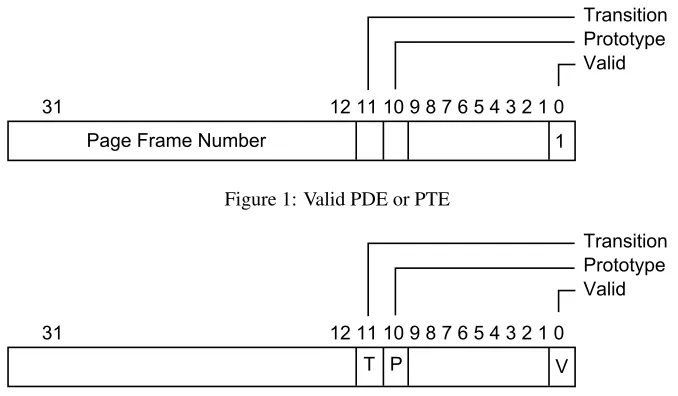
to be ‘valid’ and bits 12-31 of the entry contain the Page Frame Number (PFN) used in the next part of the address translation process. In a PDE, the PFN points to the page containing the PTE entry. In a PTE, the PFN points to the page containing the memory indicated in the original virtual address. See Figure 1 for an example.
On the other hand, when theVbit is zero the entry is said to be ‘invalid’ and a different set of rules must be used to find the data in question. In this paper we are concerned with bit 10, thePrototypeorPbit, and bit 11, theTransitionor T bit. These bits are shown in Figure 2. The other bits in these entries are documented in [11] but beyond the scope of this paper.
4
Invalid PDE and PTE Values
Figure 1: Valid PDE or PTE
Figure 2: PDE and PTE bits relevant to address translation
had never been loaded into memory and are thus inacces-sible to the examiner. That state, however, is provable and will be described in Sections 4.5. Regardless, each in-valid PDE or PTE fits into one of six categories: Pagefile, Demand Zero, Transition, Prototype, Zero, or Unknown.
4.1
Pagefile
When Windows runs out of physical memory it stores pages in a paging file on the disk. If both theP andT
bits in an invalid PTE or PDE entry are zero, the entry points to a frame in one of the paging files [9, 11]. The format for a Pagefile entry is shown in Figure 3. Windows can support up to 16 paging files, so the page file number,
PageFileNumber, is given in bits 1-4. Note that [11] and others sometimes refer to the PageFileNumberas the PFN, creating confusion with the Page Frame Number in valid PDEs and PTEs. In this paper the abbreviation PFN only refers to the Page Frame Number.
The offset of the desired frame in the pagefile,
PageFileOffset, is in bits 12-31 of the invalid entry.
The true offset in the paging file is the value of bits 12-31 from the entry plus some bits from the original vir-tual address. Note that both PDEs and PTEs can point into the paging file and that the methods for finding the frame in question is different. For a PDE Pagefile
en-try, PageFileOffset uses bits 12-21, shifted right 12
places, from the original virtual address being referenced. For a Pagefile PTE entry,PageFileOffsetuses bits 0-11 from the original virtual address. These equations are shown in Figure 4.
4.2
Demand Zero
Like a pagefile entry, Demand Zero entries have zeros in the T and P bits. But when the PageFileNumber
andPageFileOffsetare both zero, the operating
sys-tem has marked the requested page as Demand Zero and would return any request for it with a page of zeros [11]. It is thus safe for the examiner to treat the requested page as containing nothing but zeros.
4.3
Transition
Figure 3: Pagefile Page Table Entry
PTE PageFileOffset= (pde value & 0xfffff000)+
((virtual address & 0x3ff000) >> 12)
Frame PageFileOffset= (pte value & 0xfffff000)+
(virtual address & 0xfff)
Figure 4: Pagefile Offset Calculations
memory pages2 can be in transition too! Even though a
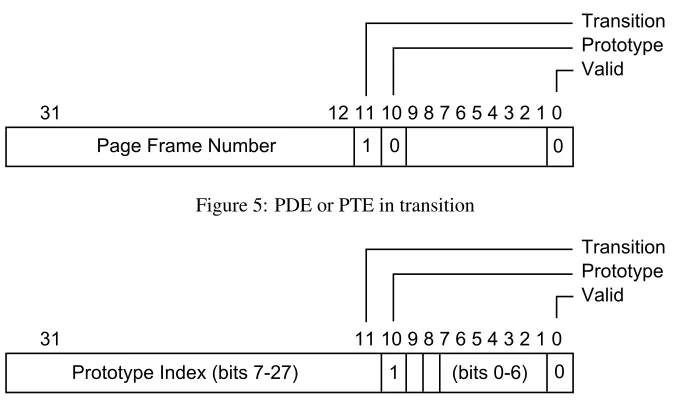
page was in transition, the page was still in active mem-ory and can therefore be retrieved by an examiner. Just like a valid entry, the page frame number is given in bits 12-31 and can be used to continue the address translation process.
4.4
Prototype
In a PTE, when thePbit is one the entry is a pointer to a prototype page table entry. Note that whenPis one the value of theTbit is part of the prototype’s index number and has no bearing on the PTE’s type. ThePbit has no bearing on a PDE’s type. The format for Prototype PTEs is shown Figure 6. The entry contains an index number that can be used to compute the virtual address of the pro-totype PTE.
Prototype PTEs are used when more than one process is using the same page in memory. Prototypes are created when the operating system needs to invalidate the page in question. The operating system authors wanted to avoid having to update all of the processes using the page each time the page is moved. Instead, they direct each process using the page to point to the same prototype. The pro-totype then points to the page’s true location. When the
2On non-PAE systems, a regular memory page is 4KB. A large mem-ory page is 4MB.
page in question is moved, the operating system only has to update the one prototype. The PTE stored by each pro-cess acts like a shortcut or symbolic link to the true PTE.
When a prototype PTE is encountered, the kernel calls the functionMiResolveProtoPteFaultto resolve the page fault. By reverse engineering that function, the author determined that Windows stores Prototype PTEs in the system’s paged area beginning at 0xe1000000. The reader can verify this by examining the relation of pointers as described on page 453 of [11]. The
SectionObjectstructure in theEPROCESSstructure (on
Windows XP and above) points to aSegment structure that contains the address of the prototype PTEs for that object, namely the executable itself. The reader will see that these values always begin above 0xe1000000.
To find the virtual address of a Prototype PTE, the ex-aminer should multiply the index number given in the in-valid PTE by the size of a PTE, four bytes on an x86 sys-tem without PAE. Then add the result to the start of the system’s paged area. This formula is shown in Figure 7. Note that the examiner may have to do another address translation to determine the true location of the prototype PTE itself! Care should be taken so that the analysis does not fall into an infinite loop of resolving prototype PTEs during this lookup process.
Figure 5: PDE or PTE in transition
Figure 6: Prototype PTE entry
be in one of the six states listed below. The flags in the Protoytpe PTE are generally the same as a regular PTE except for thePbit. Obviously a Prototype PTE shouldn’t refer to another Prototype PTE. Instead, thePbit is used to denote that the Prototype PTE points to a mapped file.
1. Active: TheVbit is one. The page was in memory and can accessed using the Page Frame Number in the prototype PTE entry.
2. Transition: TheV bit is zero and theTbit is one. The page was in Transition, but can be accessed in the memory image using the Page Frame Number in the prototype PTE entry.
3. Modified No-Write: Like a transition prototype PTE, but the Dirty bit, bit six, is also one. The page can be accessed in the memory image using the Page Frame Number in the prototype PTE entry.
4. Page File:TheV,T, andPbits are all zero. The data are stored in the page file. See Section 4.1.
5. Demand Zero: TheV,T, andPbits are zero along with thePageFileNumberandPageFileOffset. The page should be satisfied with all zeros.
6. Mapped File: ThePbit is one. The operating sys-tem would retrieve the requested data from the orig-inal file on the disk. The author does not know how to use the value from these prototype PTEs. See Sec-tion 6.
4.5
Zero
If the entry is zero, there is no information available for the page in question. Specifically, the page has been com-mitted, but has not yet been accessed [11]. That is, the operating system has allocated a page of physical mem-ory for this page but has not read from or written to it. When encountering this situation, it is safe for the exam-iner to assume that the entire page is zeros. If a process has allocated memory but never accessed it, it would only contain the zeros that the operating system provided.
4.6
Unknown
PrototypePteAddress = 0xe1000000 + (PrototypeIndex << 2)
Figure 7: Prototype PTE Address Calculation
5
Using Invalid Pages
For this paper the author created a tool that collected in-formation similar to the writeups for the DFRWS Mem-ory Analysis Challenge [2, 7]. The tool also recovered executables, DLLs, and drivers, using the method de-scribed in [13, 18]. The tool also allowed the author to use two different methods of address translation. The naive method of address translation identified valid PDE and PTE entries, zeroed entries, and classified all other entries as unknown. Although technically zeroed entries are in-valid, the naive method of address translation still supplies the examiner the same result as a more robust method: a page full of zeros. As such, the author included zeroed entries in the naive mode as they are technically handled correctly.
The tool had a second, more robust configuration that used the information in invalid PDE and PTE to locate data in the memory images. Prototype PTE entries were examined and, if valid, used. Prototypes that referred to mapped files were noted, but as described above, could not be parsed. Entries marked as in transition were as-sumed to still be in main memory and used. Entries that referred to the pagefile were noted, and if the page file was available, used.
The author ran the tool against the two memory im-ages distributed with the DFRWS Challenge and recorded the results of the address translation process. One value was recorded for resolving the PDE and one value was recorded for resolving the PTE. Note that it is possible to have an odd number of values if the PDE could be re-solved but the PTE could not (e.g. if the PDE referred to a frame in the paging file which was not available).
The data from the naive translation method are given in Table 1 and the data using the robust method are given in Table 2. Neither image had any Demand Zero entries, so they are not shown. In the second table, the Prototype col-umn refers to prototype PTEs that pointed to active pages in memory.
By summing the Valid, Prototype, and Transition columns in Table 2, we can compute the total number of
entries recoverable by the examiner for analysis. For the DFRWS-1 image, there were 75,267 recoverable entries, or 12,131 more entries than were found using the naive translation. For the DFRWS-2 image, the recovered total was 100,790 entries, or 14,034 entries more than using the naive translation. Using the robust method gave the exam-iner 19.21% and 16.18% more recoverable entries in the DFRWS-1 and DFRWS-2 images, respectively.
5.1
Analysis
The author was surprised by the increase in the number of Valid pages when using the robust address translation pro-cedure. This gain probably came from valid PTEs with PDEs that had been marked as being in transition. Al-though they could not be read using the naive method, they were able to be processed with the more robust rule set.
It should be noted that some of those entries are surely repeated. For example, most processes use a number of basic system libraries likentdll.dll. By including that same DLL in the recovery procedure for each process run-ning on the system, the same DLL will be recovered mul-tiple times. So the actual gain from using the robust trans-lation method may not be as much as 19%, but it is still considerable.
6
Future Work
This paper has attempted to expand the amount of in-formation available to an examiner conducting Windows memory analysis. Although demonstrating that more in-formation is available when using robust address trans-lation, there are still many opportunities to increase the amount of recoverable data in a memory image.
6.1
Using the Pagefile
Table 1: PTE and PDE entries using Naive Address Translation
Image Valid Zero Unknown Total DFRWS-1 63,136 34,431 8,799 106,366 DFRWS-2 86,756 47,547 6,739 141,042
Table 2: PTE and PDE entries using Invalid Values in Address Translation
Image Valid Zero Prototype Mapped File Pagefile Transition Unknown Total DFRWS-1 72,295 36,005 1,956 1,525 1,995 1,016 3,952 118,744 DFRWS-2 98,852 51,877 1,347 1,606 413 591 4,733 159,419
stored in the pagefile would immediately be accessible. In addition, using the pagefile might also allow the exam-iner to use more information already present in the mem-ory image. A virtual address may reference a PDE that points to a PTE in the paging file even though the physical page in question is in main memory. Such a page would be inaccessible under naive translation under any circum-stances and even when using robust translation unless the pagefile was also available.
Furthermore, some crucial information to module re-covery is located in the first page of the module. The number of sections, their locations and offsets are all in this first page. Without the first page, the examiner can recover a number of bytes equal to the total size of the module, but won’t recover the module correctly. If the module’s first page was in the paging file, which happened a few times in the DFRWS images, recovering the rest of the module properly was not possible.
In order to use the pagefile effectively, however, it must be acquired at the same time of memory acquisi-tion. By default, Windows uses only one paging file,
%SystemDrive%\pagefile.sys, but the true locations
and filenames for paging files should be found using the registry [12]. Capturing these pagefiles is difficult on a live system as traditional file copying utilities cannot open them. The files are in use by the operating system and may not be opened by another process. To copy a paging file the examiner can use a program to parse the raw file sys-tem. It would be beneficial for first responders to have a program to capture both physical memory and the paging
file in one step.
When working with a virtualized environment like VMWare [17], however, the examiner can suspend the guest operating system and capture both memory and the paging file at her leisure. The contents of physical mem-ory are usually written to a file (e.g. A.vmem file un-der VMWare). To acquire the pagefile, the examiner can mount the drive from the system in question in another guest operating system and copy the pagefile. The exam-iner must be careful to mount the drive in non-persistent mode so that no changes are made to the source drive. Making changes on the source drive makes it difficult to restart the suspended virtual machine.
At this time the author does not know if the amount of additional information gathered from the pagefile would be worth modifying incident response procedures to gather the required data. Further, the inevitable delay, no matter how slight, between capturing a memory image and the paging file may create inconsistencies between the two that frustrate an analysis. That is, data in main mem-ory might refer to items in the pagefile that were no longer in the pagefile when it was captured.
6.2
Other Issues
The author has not determined how the operating sys-tem retrieves data from prototype PTE entries that re-fer to mapped files. Reverse engineering the function
MiResolveMappedFileFault may yield some
an examiner can use this information, in conjunction with the appropriate filesystem, to recover the data in question. The thousands of still unknown PDE and PTE values found in the DFRWS memory images are troubling. The author did not determine if these values represent evi-dence of the malware present on the system or are a nor-mal part of the operating system. It is possible that these values contain some meaningful information, but the au-thor has not researched this question.
Finally, this paper has focused entirely on 32-bit oper-ating systems without PAE or AWE enabled. Although a similar technique for using invalid PDEs and PTEs can easily be applied to PAE systems, the performance gain for doing so is unknown. Similarly, the author does not know if the analysis of AWE or 64-bit systems would benefit from using invalid entries. Additional work will be required to apply this new technique to those operating systems.
7
Conclusion
This paper has demonstrated that the completeness of Windows memory analysis is significantly improved when using robust address translation. Naive address translation methods have worked to date, but are not ade-quate for a rigorous analysis. Furthermore, robust address translation allows examiners to make use of the paging file for the first time. Using the techniques described in this paper, examiners should be able to recover more data from each memory image and create a more complete pic-ture during their analyses.
8
Acknowledgments
The author will forever be indebted to Mark Russinovich and David Solomon for their excellent book Microsoft Windows Internals. Not only was the information invalu-able, but the figures in this paper were derived from those found in chapter seven. This paper would not have been possible without in-depth discussions with Harlan Carvey, Andreas Schuster, and Mariusz Burdach. Additional tech-nical information provided by Eugene Libster, E–, Nicole Donnely and Robert Hansen. Proofreading was assisted by Adrienne Hollister. Special thanks to S–. Thanks also
to H– and ManTech SMA for providing the time and re-sources to conduct this research.
9
About the Author
References
[1] Agile Risk Management. Nigilant32 for first responders: Active memory imaging, 2006. http://www.
agilerm.net/publications 4.html.
[2] Chris Betz. DFRWS 2005 challenge report. InDFRWS Memory Analysis Challenge. Digital Forensic Research Workshop, 2005. http://dfrws.org/2005/challenge/ChrisBetz-DFRWSChallengeOverview.html.
[3] Chris Betz. Memparser, 1.0 edition, July 2006.http://sourceforge.net/projects/memparser/.
[4] Mariusz Burdach. An introduction to the windows memory forensic, 2005. http://forensic.seccure.
net/pdf/introduction to windows memory forensic.pdf.
[5] Harlan Carvey. LiSt process image, July 2006. http://windowsir.blogspot.com/2006/07/
list-process-image-upload.html.
[6] Digital Forensic Research Workshop.DFRWS Memory Analysis Challenge, 2005.http://dfrws.org/2005/
challenge/index.html.
[7] George Garner jr and Robert-Jan Mora. Preliminary analysis of 2005 DFRWS forensic challenge. In
DFRWS Memory Analysis Challenge. Digital Forensic Research Workshop, 2005.http://dfrws.org/2005/
challenge/rossettoecioccolato-DFRWSChallengeOverview.pdf.
[8] Nick Petroni jr, AAron Walters, Timothy Fraser, and William Arbaugh. FATKit: A framework for the extrac-tion and analysis of digital forensic data from volatile system memory. Digital Investigation, 3(4):197–210, December 2006.
[9] Nicholas P. Maclean. Acquisition and analysis of windows memory. Master’s thesis, University of Strathclyde, 2006.http://www.cis.strath.ac.uk/∼nimaclea/fi/reports/windows memory.pdf.
[10] Thomas E. Mails. The Mystic Warriors of the Plains: The Culture, Arts, Crafts and Religion of the Plains Indians. Marlowe & Company, 1972.
[11] Mark Russinovich and David Solomon.Microsoft Windows Internals. Microsoft Press, Redmond, Washington, fourth edition, 2005.
[12] Paul Sanna.Windows 2000 Registry. Prentice Hall, 2001. online athttp://www.microsoft.com/technet/
prodtechnol/windows2000serv/maintain/featusability/systeman.mspx.
[13] Andreas Schuster. Reconstructing a binary, April 2006. http://computer.forensikblog.de/en/2006/
04/reconstructing a binary.html.
[14] Andreas Schuster. Searching for processes and threads in microsoft windows memory dumps. Digital Investi-gation, 3(S):10–16, August 2006.http://dfrws.org/2006/proceedings/2-Schuster.pdf.
[15] Joe Truman. Truman - the reusable unknown malware analysis net, 2006.http://www.lurhq.com/truman. [16] Tim Vidas. Forensic analysis of volatile memory stores. NEbraskaCERT Conference, August 2006. http:
//www.certconf.org/presentations/2006/files/RB3.pdf.
[17] VMWare. Vmware virtualization products. http://www.vmware.com/.
[18] AAron Walters. Fatkit: Detecting malicious library injection and upping the“anti”. Technical report, 4TΦ