Volume 5, No. 3, March-April 2014
International Journal of Advanced Research in Computer Science
RESEARCH PAPER
Available Online at www.ijarcs.info
An Emergency Alert SMS and GPS Tracking application for Android Smartphones
Zabiullah khan
Department of Computer Science and Engineering Medak College of Engineering and Technology Hyderabad, India
Abstract: The Delhi Gang rape and fatal assault of a 23-year old female that occurred on 16 December 2012 and additionally frequent other women and child molestations occurring around the globe are some of the controversial topics played on the news everyday. To understand and overcome this type of controversies at some extent we introduce an Emergency Alert sms and Gps tracking application. An Emergency Alerts sms and Global positioning system tracking application can be used in emergency purposes to message one of more person that the sender is in trouble. The application additionally sends the exact location via gps through its latitude and longitude directions along with the message. It also notifies the recipient in times slices if the sender sets the timer option to locate the current position prior to the previous location.
Keywords: Gps ; android smart phone’s; alert; Emergency sms; android platform; android applications;
I. INTRODUCTION
Android provides a rich application framework that allows us to build innovative apps and games for mobile devices in a Java language environment. Android apps are built as a combination of distinct components that can be invoked individually. For instance, an individual activity provides a single screen for a user interface, and a service independently performs work in the background. Android provides an adaptive app framework that allows you to provide unique resources for different device configurations. You can also declare features your app requires. So app markets such as Google Play Store do not allow installation on devices that do not support that feature [1].
II. ANDROIDARCHITECTURE
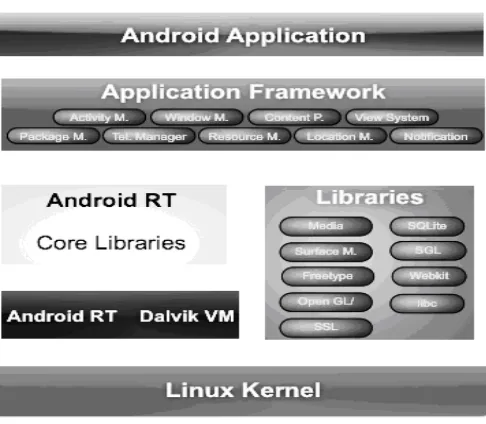
[image:1.595.322.565.285.497.2]Android apps are written in the Java programming language. The Android SDK tools compile your code along with any data and resource files into an APK .an Android package, which is an archive file with an “.apk” suffix. One APK file contains all the contents of an Android app and is the file that Android-powered devices use to install the app. Once installed on a device, each Android app lives in its own security sandbox. The Android operating system is a multi-user Linux system in which each app is a different multi-user. By default, the system assigns each app a unique Linux user ID (the ID is used only by the system and is unknown to the app). The system sets permissions for all the files in an app so that only the user ID assigned to that app can access them. Each process has its own virtual machine (VM), so an app's code runs in isolation from other apps, maintaining the Integrity of the Specifications [2].
Figure 1. Android Acthitecure.
By default, every app runs in its own Linux process. Android starts the process when any of the app's components need to be executed, then shuts down the process when it's no longer needed or when the system must recover memory for other apps [2].
In this way, the Android system implements theprinciple of least privilege. That is, each app, by default, has access only to the components that it requires to do its work and no more. This creates a very secure environment in which an app cannot access parts of the system for which it is not given permission. However, there are ways for an app to share data with other apps and for an app to access system services [2].
III. PROPOSEDSYSTEM
[image:2.595.320.556.80.340.2]We propose An Emergency Alert sms and Gps tracking application for android platform. Figure 2 describes about the overview of the application.
Figure 2. OverVeiw Of Application
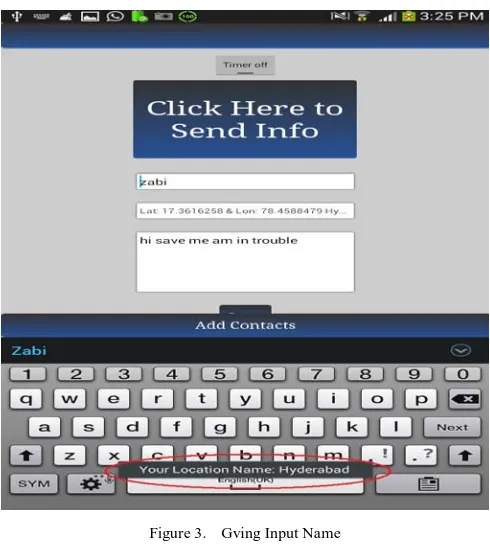
[image:2.595.38.277.113.344.2]Initially an input as a name should be given or entered in the first field as shown in Figure3. An input name should be given such that if the contact number of the sender is not saved by the recipient. The recipient of the message can easily remember the name and contact number of the sender
Figure 3. Gving Input Name
The location field then automatically verifies the location through global positioning system which is pre-installed in all the android based smart-phone’s, it retrieves the location address through its latitude and longitude directions and displays the address on the screen. If the gps option is off in the smart-phone the switch-on or activate the gps option in your handset. An input as a message should be
given or entered in the message field e.g.” Plz save me am in trouble” as shown in Figure 2 & 3
Figure 4. Giving Input Phone Number
[image:2.595.316.555.372.635.2]Providing a phone number through the user input, a Minimum of two contacts can be entered at a time.
Figure 5. Giving User Defined Timer Input
A User defined timer has to be selected if necessary, it can be setup as one, three, five, ten, fifteen, twenty, twenty-five minutes up-to two hours respectively as shown in the figure 5 .The advantage of setting the timer on is to know the current location of the mobile device prior to the previous location of the device from where the victim has sent the message. With the help of timer we can easily catch the current address of the mobile phone
[image:2.595.35.280.420.693.2]Figure 6. User Sending Message to Recipeint
IV. ENVIRONMENTALSETUP
The functionality of devices, are developed primarily in th set of development tools, including a documentation, sample code, and tutorials. The officially supported plugin. Other development tools are available, including a or C++, novice programmers, and vari
Figure 7. Creating a new Android project
As shown in the Figure 7 we can create a new project by selecting new file and then selecting as new android project. In the following figure 7 we select the project name as
“Emergency Alert” and application name as “Emergency Alert” and package name as “Emergency. Alert”.
[image:3.595.318.558.185.437.2]Android applications run in a of the system that does not have access to the rest of the system's resources, unless access permissions are explicitly granted by the user when the application is installed. Before installing an application, th permissions: a game may need to enable vibration or save data to an user can choose to accept or refuse them, installing the application only if they accept [4].
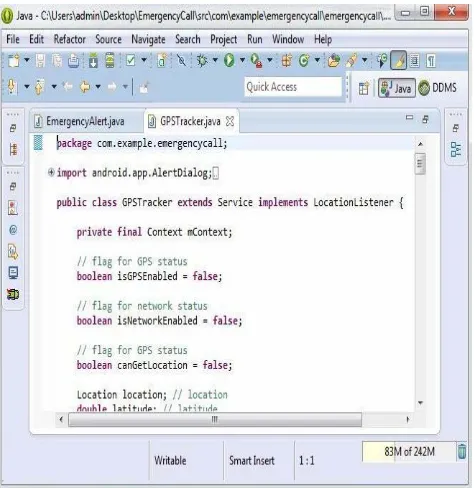
Figure 8. Source Code for Emergency Alert in Eclipse IDE Environment
The Following Figure 8 shows the Source Code of Emergency Alert written in the Eclipse IDE Environment
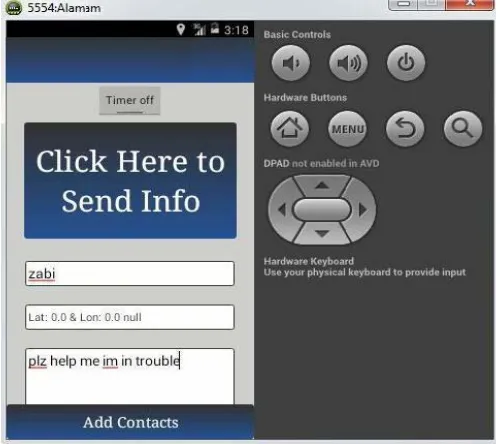
[image:3.595.39.278.479.737.2] [image:3.595.319.556.483.727.2]Figure 10. Emergency Alert Application in Android Emulator
Figure 11. Testing of Application by entering a Contact number in Emulator
Figure 10, Figure 11 shows the Running and Testing of Emergency Alert application in Android Emulator.
V. SYSTEMDESIGN
Systems design is the process of defining the architecture, components, modules, interfaces, and a could be seen as the application of
of
A. Use case diagram:
A use case diagram at its simplest is a representation of a user's interaction with the system and depicting the specifications of a the different types of users of a system and the various ways that they interact with the system [6].
Whil about every possibility, a use-case diagram can help provide
a higher-level view of the system. It has been said before that "Use case diagrams are the blueprints for your system". They provide the simplified and graphical representation of what the system must actually do [6].
Figure 12. Use Case Diagram
B. Collaboration Diagram:
The collaboration diagrams are also interaction diagrams. The diagram convey the same information as sequence diagrams, but focus on object roles instead of the times that messages are sent [7].
Figure 13. Collaboration Diagram
C. Class diagram:
Class diagram is a type of static structure diagram that describes the structure of a system by showing the system' the relationships among objects [8].
[image:4.595.35.285.55.277.2] [image:4.595.357.486.106.327.2] [image:4.595.37.286.297.518.2] [image:4.595.317.555.416.640.2]Figure 14. Cllass Diagram
D. Sequence diagram:
Sequence diagram: sequence diagram is an interaction diagram that shows how processes operate with one another and in what order. It is a construct of a Message Sequence Chart. A sequence diagrams shows object interactions arranged in time sequence. It depicts the objects and classes involved in the scenario and the sequence of messages exchanged between the objects needed to carry out the functionality of the scenario [9].
The following figure describes the sequence diagram of the given application
Figure 15. Sequence Diagram
VI. RESULT
The following results are observed with the experimentation.
The below Figure16 shows that the message has been sent to the recipient and delivered
Figure 16. Sending and Confirmation Delivery of the message
Figure 17. Message Received Notification at Recipient Side
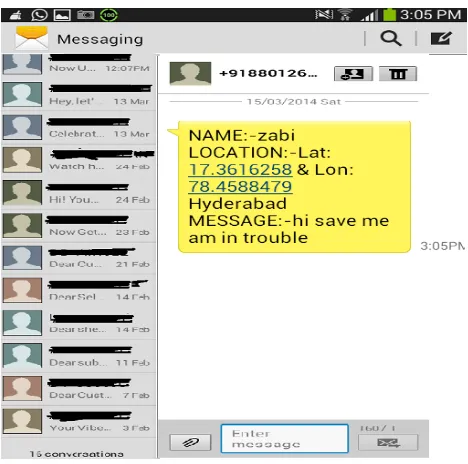
The previous Figure 17 shows the message has arrived with the name and current or present location and address of the sender.
Figure 18. Detail Message Recived at Recievers Side from the Sender
[image:5.595.322.555.53.307.2] [image:5.595.65.245.59.306.2] [image:5.595.320.554.443.675.2] [image:5.595.50.267.451.690.2]VII. CONCLUSION
This paper explains the absolute implementation of An Emergency Alert sms and Gps tracking application on android platforms. This application helps as an emergency tool for women around the globe. We shall additionally update and implement this application by connecting it with social networks like facebook, twitter and cross-platform mobile messaging apps like Whatsapp, We Chat and Telegram in the future work
VIII. REFERENCES
[1]
[3]
[5] http://en.wikipedia.org/wiki/Systems_design
[6]
[8]