ABSTRACT
GE, XI. Improving Tool Support for Software Developers through Refactoring Detection. (Under the direction of Emerson Murphy-Hill.)
With changing software requirements, developers need to maintain the source code of soft-ware systems to ensure their continuous usefulness. Maintaining softsoft-ware involves both the functional and nonfunctional improvements of the codebase. The functional improvements, such as adding new features and fixing defects, benefits external clients by enhancing or cor-recting the behavior of software systems. On the other hand, the nonfunctional improvements enhance the internal quality of the codebase, therefore increasing the longevity of the software under maintenance.
The nonfunctional improvements of codebase are also called refactoring. Existing studies show that refactoring improves the maintainability, testability and reusability of software sys-tems. Therefore, refactoring becomes an essential and frequent activity of software developers. Developers can refactor their codebase manually. However, refactoring manually is both error-prone and time-consuming. To improve the correctness and efficiency of manual refactoring, researchers and developers implemented multiple refactoring tools. In addition, almost every mainstream Integrated Development Environment (IDE) integrates refactoring tools, exposing these tools to a large population of developers working in various programming languages.
However, refactoring tools are underused. Existing studies suggest that about90%of refac-torings were performed manually even though refactoring tools are available. To investigate the reason for this underuse problem, I conducted a formative study on 12 developers and found out that a developer sometimes starts manual refactoring without realizing so, thus miss-ing the chance of invokmiss-ing refactormiss-ing tools. To solve this late awareness problem, I integrate refactoring detection algorithms into the conventional refactoring engines, proposing a novel refactoring tool called BeneFactor that detects the start of a manual refactoring, reminds the developer that automated refactoring is available and finally finishes the started refactoring automatically.
in the performed refactoring. A controlled study with eight developers shows that GhostFactor improves the correctness of manual refactorings significantly.
Beyond helping developers refactor correctly and efficiently, the refactoring detection tech-nique can also improve change comprehension. Code review is a commonly adopted activ-ity among developers working on the same project. By examining each others’ code changes, code review can detect defects, correct bad programming practices and transfer project-specific knowledge among team members. However, during code review, developers have the different concerns about the refactoring and nonrefactoring changes. To understand such a difference, I conducted a survey study among Gerrit developers, finding that refactoring changes slow down code review and make correct review harder. To solve this problem, I designed a refactoring-aware code review tool that allows developers to review the refactoring and non-refactoring part in a given change separately.
Improving Tool Support for Software Developers through Refactoring Detection by Xi Ge
Improving Tool Support for Software Developers through Refactoring Detection
by Xi Ge
A dissertation submitted to the Graduate Faculty of North Carolina State University
in partial fulfillment of the requirements for the Degree of
Doctor of Philosophy
Computer Science
Raleigh, North Carolina
2015
APPROVED BY:
Mladen Vouk Laurie Williams
William Enck Emerson Murphy-Hill
DEDICATION
BIOGRAPHY
ACKNOWLEDGEMENTS
Many people helped me through the journey of getting my research done.
Firstly, I would like to thank my adviser, Dr. Emerson Murphy-Hill, for his guidance and patience. He introduced me to the world of software refactoring, shared with me brilliant ideas, and helped me through the most difficult time during my studies. Also, I would like to thank my committee members, Dr. Mladen Vouk, Dr. Laurie Williams, and Dr. William Enck, for their kindly help and insightful comments on my research. I also would like to thank Dr. Tao Xie for his guidance during the initial stage of my PhD studies.
I also feel grateful to all my external collaborators. Dr. David Shepherd from ABB research provided me a great opportunity to push a fancy research idea into an actual product serv-ing developers in the wild. For their comments and help, I thank my ABB colleagues Mithun Acharya, Vinay Augustine, Andy Cordes, Kosta Damevski, Patrick Francis, Nick Kraft, Xiao Qu, and Will Snipes. During my internship at Google, Dr. Atul Adya and Dr. Gregory Cooper shared with me the state-of-the-practice programming techniques which benefit the implemen-tation of GhostFactor and ReivewFactor.
I am thankful to my colleagues at the Developer Liberation Front (DLF), NC State Uni-versity: Quinton DuBose helped conduct the formative study associated with the BeneFactor tool; Jim Witschey helped edit several paper submissions and the design of the code review study; Saurabh Sarkar helped the implementation of the ReviewFactor tool. For their insightful feedback and constant help, I also thank other DLF members including Titus Barik, Michael Bazik, Samuel Christie, Daniel Franks, Brittany Johnson, Kevin Lubick, John Majikes, Justin Smith, Feifei Wang, and Shundan Xiao.
Also, I would like to thank all my dear friends and colleagues at North Carolina State University. Special thanks to Anthony Elliott, Denae Ford, Jeehyun Hwang, KyungWha Hong, Ye Jin, Donghoon Kim, Da Young Lee, Madhuri Marri, Fei Meng, Patrick Morrison, Vivek Nair, Rahul Pandita, Kiran Shakya, John Slankas, Will Snipes, Gustavo Soares, Kunal Taneja, Chris Theisen, Suresh Thummalapenta, Ruowen Wang, Xusheng Xiao, Zhe Zhang, and many others. In addition, I would like to thank all participants in my user studies.
TABLE OF CONTENTS
LIST OF TABLES . . . viii
LIST OF FIGURES . . . ix
Chapter 1 Introduction . . . 1
1.1 Motivation . . . 1
1.2 Problems . . . 5
Chapter 2 BeneFactor . . . 8
2.1 Introduction . . . 8
2.2 Motivation . . . 10
2.3 Formative Study . . . 11
2.3.1 Participants and Refactorings . . . 12
2.3.2 Data Collected . . . 13
2.3.2.1 Pre-study Questionnaires . . . 14
2.3.2.2 Observing Manual Refactoring . . . 14
2.3.2.3 Post-study Questionnaire . . . 15
2.3.3 Results . . . 16
2.3.3.1 RQ1. Refactoring Correctness . . . 16
2.3.3.2 RQ2. Late Awareness . . . 18
2.3.3.3 RQ3. Refactoring Workflow Patterns . . . 19
2.3.4 Threats to Validity . . . 27
2.4 BeneFactor . . . 28
2.4.1 Refactoring detection . . . 28
2.4.2 Code modification . . . 30
2.4.2.1 Configuration Information Collection . . . 30
2.4.2.2 Code Recovery . . . 31
2.4.2.3 Change Creation . . . 33
2.4.3 Example . . . 33
2.4.4 Technique Challenges . . . 34
2.4.5 Future Work . . . 37
Chapter 3 GhostFactor . . . 38
3.1 Introduction . . . 38
3.2 Motivation . . . 39
3.3 Approach . . . 42
3.4 Implementation . . . 43
3.4.1 Supported refactoring types . . . 43
3.4.3 Condition Checkers . . . 47
3.4.3.1 Return Value Checker . . . 48
3.4.3.2 Parameter Checker . . . 50
3.4.3.3 Stale Invocation Checker . . . 51
3.4.3.4 Modified Variable Checker . . . 51
3.4.4 Limitations . . . 55
3.4.5 Example . . . 56
3.5 Evaluation . . . 57
3.5.1 Pre-study Questionnaire . . . 58
3.5.2 Refactoring Tasks . . . 60
3.5.3 Post-study Questionnaire . . . 64
3.5.4 Discussion . . . 65
3.5.5 Threats to Validity . . . 66
3.6 Future Work . . . 67
Chapter 4 ReviewFactor . . . 69
4.1 Introduction . . . 70
4.2 Motivation . . . 72
4.3 Formative Study . . . 73
4.3.1 Demographics . . . 74
4.3.2 Results . . . 74
4.3.3 Implications . . . 77
4.4 Approach . . . 78
4.4.1 Replaying Automatic Refactorings . . . 80
4.4.2 Detecting Manual Refactorings . . . 80
4.4.2.1 Mapping Software Entities . . . 82
4.4.2.2 Searching on Mapping Trees . . . 85
4.4.3 Validating Manual Refactorings . . . 85
4.4.4 User Interface . . . 87
4.4.5 Limitations . . . 89
4.5 Impact Study . . . 90
4.5.1 Study Setting . . . 91
4.5.2 Study Results . . . 92
4.6 Precision Study . . . 95
4.6.1 Study Setting . . . 96
4.6.2 Study Results . . . 97
4.6.3 Threats to Validity . . . 110
4.6.4 Discussion . . . 111
4.7 Future Work . . . 112
Chapter 5 Related Work . . . 115
5.2 Refactoring Opportunities . . . 117
5.3 Source Differencing Techniques . . . 122
5.4 Refactoring Detection . . . 124
5.5 Refactoring Studies . . . 126
5.6 Refactoring Tools . . . 128
5.7 Refactoring Conditions . . . 133
5.8 Code Review . . . 136
Chapter 6 Conclusion . . . 140
LIST OF TABLES
Table 2.1 Questionnaire results. . . 18
Table 3.1 Pre-study questionnaire results for both treatment (T) and control (C) group. 61 Table 4.1 Numbers of respondents who agree with each statement. . . 73
Table 4.2 Respondents’ frequency for activities. . . 74
Table 4.3 Similarity test examples. . . 86
Table 4.4 Hidden code change for different refactoring types. . . 90
LIST OF FIGURES
Figure 2.1 Rename local variable refactoring example. . . 11
Figure 2.2 Extract method refactoring example. . . 12
Figure 2.3 Code illustrating the complex refactoring 2. . . 15
Figure 2.4 Code illustrating the complex refactoring 3. . . 17
Figure 2.5 Refactoring patterns for rename field. . . 20
Figure 2.6 Refactoring patterns for extract method. . . 20
Figure 2.7 Workflow patterns for extract constant. . . 22
Figure 2.8 Workflow patterns for extract local variable. . . 24
Figure 2.9 Workflow patterns for inline local variable. . . 25
Figure 2.10 Workflow patterns for change method signature. . . 26
Figure 2.11 Workflow patterns for pull up field. . . 27
Figure 2.12 Code before extracting method. . . 34
Figure 2.13 Code after cutting the statements to extract. . . 34
Figure 2.14 Code after making a non-refactoring change. . . 34
Figure 2.15 Code after adding a new method declaration. . . 35
Figure 2.16 Code after invoking BeneFactor. . . 35
Figure 3.1 Refactoring with compiler warnings. . . 40
Figure 3.2 GhostFactor components. . . 41
Figure 3.3 Snapshots compared in a snapshot list. . . 41
Figure 3.4 Examples for the refactoring types supported by GhostFactor. . . 44
Figure 3.5 Code before extract method refactoring. . . 49
Figure 3.6 Missing return value error. . . 49
Figure 3.7 Extract method errors fixed. . . 50
Figure 3.8 Missing parameter error. . . 51
Figure 3.9 Code before inline method refactoring. . . 52
Figure 3.10 Inline method errors. . . 53
Figure 3.11 Inline method errors fixed. . . 53
Figure 3.12 Original code. . . 56
Figure 3.13 Code after manually extracting method. . . 57
Figure 3.14 GhostFactor error message. . . 58
Figure 3.15 GhostFactor quick fix. . . 59
Figure 3.16 Code after GhostFactor fixes. . . 60
Figure 3.17 Refactoring Correctness. . . 62
Figure 3.18 Refactoring Time. . . 63
Figure 4.1 Motivating example. . . 71
Figure 4.2 ReviewFactor components. . . 79
Figure 4.4 Mapping tree examples. . . 84
Figure 4.5 Beyond-file refactoring hiding. . . 87
Figure 4.6 In-file refactoring hiding. . . 88
Figure 4.7 Git diff example. . . 92
Figure 4.8 Open-source projects study results. . . 93
Chapter 1
Introduction
Thesis Statement: Refactoring detection techniques can improve developers’ pro-ductivity by prompting developers to use refactoring tools, checking the correctness of manual refactorings, and expediting code review by separating the refactoring and non-refactoring changes.
1.1
Motivation
development methodologies, which focus on embracing change, prevails over the conventional sequential development processes such as the waterfall model [SS08].
The disciplined modification of software after delivery is also known as software mainte-nance. Sustaining a software system through its life cycle, software maintenance can be either functional or nonfunctional. Functional maintenance modifies the behavior of the software sys-tem to satisfy functional requirements, including activities such as fixing defects, adding new features, and adapting the system to a modified environment. On the other hand, nonfunctional maintenance improves the health of software systems without altering their external behaviors, aiming at improving nonfunctional attributes of the software under maintenance such as reli-ability, testreli-ability, availreli-ability, cohesion, and portability. The nonfunctional maintenance also involves polishing software artifacts other than source code, such as design documentation and specification.
The nonfunctional maintenance is also known as refactoring. According to the book writ-ten by Martin Fowler that systematically introduces the refactoring technique to developers, refactoring is “the process of restructuring existing computer code, changing the factoring, without changing its external behavior” [Fow]. According to the first PhD dissertation on this topic written by William Opdyke, refactoring is defined as “reorganization plans that support change at an intermediate level” [Opd92]. Developers refactor their codebase typically in two circumstance: removing code smells or preparing for the emerging functional changes [Fow]. Code smells indicate design weakness of source code, whose continued existence may lead to real problems. For instance, multiple instances of cloned code snippets potentially increase the effort of fixing defects contained in the snippet [Kam02]. To remove code clones, developers can refactor code to facilitate reusability.
Another reason for refactoring is to prepare for the functional changes. No software design can successfully predict every functional requirement change in the future. Thus, when an ex-isting design does not accommodate an emerging new requirement, developers have to refactor the code to a new design. Compared to removing code smells, refactoring to the new design performs more radical changes in the codebase. For instance, Kim and colleagues studied the Microsoft Windows codebase; the surveyed developers reported that one of the refactoring outcomes is the ability to “release a new product at a much faster cadence” [Kim12].
exist-ing software and prepare for the additional features, certainly becomes an integral part of these developers’ daily tasks. As other evidence, Cherubini and colleagues conducted a structured survey among industrial developers; the surveyed developers rated the importance of refactor-ing as equal or greater than that of understandrefactor-ing code and producrefactor-ing documentation [Che07]. As further evidence, Murphy-Hill and colleagues studied the commits of both ordinary de-velopers and the toolsmiths who developed programming tools; they found that toolsmiths perform more than forty refactorings each week, while over forty percent of the programming sessions performed by other developers contain at least one refactoring [MH09b]. Xing and Stroulia studied the evolution history of Eclipse, concluding that about 70%of the structural changes are due to refactoring [XS06b]. Similarly, Dig and colleagues studied the API evo-lution of libraries and found that refactoring is attributable to80%of the client-breaking API changes [DJ05].
By definition, any code changes that preserve the external behavior are refactorings. The scale of refactoring can range from adding an extra layer of abstraction to the software sys-tem to removing a line of dead code. To facilitate communication, developers and researchers generalized a set of frequent and similar refactorings as refactoring types. For instance, updat-ing the identifier names of program elements, such as classes or methods, to more informative names is called the rename refactoring. As another example, reducing a long method body by extracting several statements into a new method and invoking the new method is called the extract method refactoring. These refactoring types are the building blocks for larger refactor-ing tasks. Also due to the clear definition of these types, automatic refactorrefactor-ing support can be configured by the refactoring type a developer intends to implement.
based on tree differencing [Jia07]; to better the toleration of syntactic difference, Gabel and colleagues proposed a semantic-based clone detector [Gab08].
After identifying a refactoring opportunity, tool support is also available to help the de-veloper execute the refactoring. These tools are more commonly known as refactoring tools. Since Roberts and colleagues proposed the first refactoring tool on smalltalk, mainstream IDEs including Eclipse, Visual Studio, XCode, and IntelliJ, have incorporated refactoring tools as an integral part of the programming environments [Rob97; Ecl; Xco; Int; Net; Vs]. In addition to these refactoring tools integrated to IDEs, standalone refactoring tools are both available as proprietary and open source software. For instance, ReSharper includes a commercial refac-toring tool for Visual Studio developers [Res]; building as an extension to LLVM, Clang also provides a refactoring tool library for the C++ developers [Llv; Cla]. Although refactorings can be manually performed, refactoring by tools is inherently less error-prone and more efficient than manual refactorings [MH09b].
In addition to implementing refactoring, automated support can extend further to the post-refactoring stages. Although post-refactorings potentially improve the software quality, some side effects may also be introduced by the code change. For instance, after renaming a program el-ement, other developers who are familiar with the original name may have difficulty in finding the element; the refactoring on the API level of libraries may break the client code [DJ05]. To solve these problems, developers implemented multiple techniques. For instance, the refac-toring tools in Eclipse provide a refacrefac-toring script generator allowing developers to replay the refactorings elsewhere [Ecl]. The Git version control system detects the renamed source files and tracks their content change with the files before the renaming [Git]. In the research com-munity, Dig and colleagues proposed a configuration management system that merges commit conflicts in a refactoring-aware fashion [Dig07]. Taneja and colleagues proposed the RefacLib tool that detects the client-breaking refactorings in the libraries’ codebase [Tan07].
89% of the committed refactorings are manually performed [MH09b]. In addition, they also
found that developers almost never mention refactorings in the commit messages [MH09b]. In another study conducted by Vakilian and colleagues, they confirmed that refactoring tools are underused, and further find the evidence showing that developers sometimes invoke refactoring tools in an undesirable way, that is, they use refactoring tools to implement behavior-altering code changes [Vak12].
The underuse of the refactoring support inadvertently effects software development. Firstly, the underuse unnecessarily wastes developers’ time. Refactoring is sometimes tedious to finish. For example, manually renaming a class that is referred in over one hundred source files would take the developer nontrivial amount of time to finish; in contrast, refactoring tools can rename the class almost instantly. Secondly, the underuse potentially introduces more defects into the software. Manual refactoring is as error-prone as adding new features or fixing defects in the codebase [WD06a]; in contrast, refactoring tools update codebase with careful static analysis to ensure behavior-preservation. Therefore, refactoring tools are more correct and reliable in implementing refactorings. Thirdly, the underuse leads to less informative activity logs in IDEs. Logging the refactoring activities can serve multiple purposes including: (1) it helps the ver-sion control systems and the developers keep track of the behavior-preserving commits [Ger; Dig07], (2) it helps replay the consistent refactorings across the different systems [Ecl], and (3) it enables researchers to investigate the developers’ workflow patterns [Vak11; MH09b]. Without invoking refactoring tools, these informative logs are missing as well.
This dissertation emphasizes the application of the refactoring detection techniques on im-proving the tool support for software developers. Because of the blurred boundary between refactoring and non-refactoring changes from the developers’ point of view, existing tools should not rely on developers to identify refactorings, rather, they should be able to detect refactorings and properly respond to them.
1.2
Problems
out that refactoring and non-refactoring changes are frequently interleaved, meaning a single commit may contain both types of changes [MHB08c]. They further categorized refactoring as the floss refactoring and the root-canal refactoring, where the former refers to refactoring happens when a developer dedicates her effort into improving the code quality while the lat-ter refers to refactoring happens as a side effect of other behavior-allat-tering changes, such as fixing defects and adding new features [MHB08a]. Floss refactoring is both more beneficial and frequent than root-canal refactoring. As another example, Kim and colleagues interviewed a number of software developers, concluding that developers’ definition of refactoring is not entirely identical to that of researchers [Kim12].
Based on this observation, I use refactoring detection algorithms to improve the usability of refactoring tools, IDE error messages and code review tools. The application of refactoring detection algorithms can help developers to use refactoring tools more often, fix refactoring-introduced defects earlier, and comprehend code changes better. More specifically, the prob-lems I try to solve are:
• Refactoring tools are underused because of the late awareness problem [GMH11; Ge12]. To investigate why developers avoid refactoring tools, I conducted a formative study with twelve developers. I found that developers sometimes unintentionally avoid refac-toring tools, meaning that they want to invoke tools but miss the chance because they start manual refactoring without knowing they are refactoring. After realizing they are refactoring, the developers have to choose either to manually finish the refactoring or roll back the partial manual refactoring and reinvoking tools. Both choices are labor-intensive and time-consuming. I refer to this problem as the late awareness problem. To solve the obstacles brought about by the late awareness problem, I implemented a novel refactoring tool called BeneFactor. BeneFactor detects the start of a manual refactoring, reminds developers to use tools to refactor, and finishes the started refactoring automati-cally. Chapter 2 details the formative study and the design of the BeneFactor tool.
tools are sometimes buggy, implying that their automatic code changes potentially in-troduce defects to the developer’s codebase [Dan07; Gli13; Soa13]. To allow developers benefit from refactoring tools without applying automatic code changes, I enhanced the error messages in the Visual Studio IDE with the capability of identifying refactoring-introduced defects. I developed a tool called GhostFactor that detects the manually fin-ished refactorings and checks the refactoring conditions retrospectively; after finding any violations, GhostFactor issues warning messages to help the developer correct her man-ual refactoring. Chapter 3 details the design of the GhostFactor tool and the human study evaluating the effectiveness of GhostFactor.
Chapter 2
BeneFactor
Although useful and widely available, refactoring tools are underused. One cause of this un-deruse is that a developer sometimes fails to recognize that she is going to refactor before she begins manually refactoring. To address this issue, I conducted a formative study of devel-opers manual refactoring process, suggesting that develdevel-opers reliance on “chasing error mes-sage” when manually refactoring is an error-prone manual refactoring strategy. Additionally, my study distilled a set of manual refactoring workflow patterns. Using these patterns, I de-signed a novel refactoring tool called BeneFactor. BeneFactor detects a developer’s manual refactoring, reminds her that automatic refactoring is available, and can complete her refac-toring automatically. By alleviating the burden of recognizing manual refacrefac-toring, BeneFactor is designed to help solve the refactoring tool underuse problem. In this chapter, I described both the formative study collecting developers’ refactoring tool usage patterns as well as the implementation of the BeneFactor tool.
2.1
Introduction
wide availability, developers still prefer to refactoring manually. According to Murphy-Hill and colleagues’ study, 89% of all committed refactorings cannot correlate with any refactor-ing tools’ logs, implyrefactor-ing that they are performed manually [MH09b]. More surprisrefactor-ingly, those developers who implemented refactoring tools use these tools no more frequent than ordinary developers do [MH09b].
Besides correlating committed changes with refactoring tools’ logs, other evidence also suggest the underuse problem of refactoring tools. For instance, in a survey of 16 students, only 2 reported having used refactoring tools, and even then only 20% and 60% of the time [MH09b]. In another survey of 112 agile enthusiasts, the developers reported refactor-ing with a tool a median of 68% of the time [MH09b]. These survey studies subjectively suggest the poor usability of refactoring tools. Recently, Vakilian and colleagues improved refactoring tools’ data collectors and analyzed the richer dataset of developers’ refactoring tool usage [Vak12]. They confirmed Murphy-Hill and colleagues’ finding and summarized multiple causes for the underuse problem.
To improve the usability of refactoring tools, researchers proposed multiple novel tools. For instance, Murphy-Hill and colleagues proposed three types of visual clues to help developers extract method correctly [MHB08b]; However, in spite of their better usability than conven-tional refactoring tools, these tools do not fundamentally alter the way of invoking refactoring tools, which requires a developer’s recognition of refactoring needs and configuring tools ex-plicitly. However, as I will show in my formative study, many developers cannot recognize they are about to refactor before they manually start doing so. For instance, in the response to the question “why not use refactoring tools” in Murphy-Hill and colleagues’ study, a participant said:
I already know exactly how I want the code to look like. Because of that, my hands start doing copy- paste and the simple editing without my active control. After a few seconds, I realize that this would have been easier to do with a refactoring [tool]. But since I already started performing it manually, I just finish it and con-tinue.
developer’s refactoring, rather than relying on the developer’s recognition of it. I first describe a formative study about developers’ manual refactoring. Building on the studys results, I de-signed a novel refactoring tool. I make the following major contributions in this chapter:
• A formative study of developers manual refactoring. To the best of my knowledge, I am the first to study developers manual refactoring process. My study suggests that reliance on compiler errors when manually refactoring is a common and error-prone technique.
• A proof-of-concept refactoring tool called BeneFactor. In addition to relieving the devel-oper from the burden of recognizing that she is going to refactor, BeneFactor also allows implicit refactoring configuration and the interleaving of refactoring and non-refactoring changes.
2.2
Motivation
To use a refactoring tool, a developer must recognize that she is refactoring and select the appropriate refactoring with a menu or a hotkey. If she is unaware that she is refactoring and begins to refactor manually, she may become aware that she is refactoring part way through the manual refactoring. In this case, the developer faces thelate awareness dilemma: She must either undo all the code changes that she has already made and then invoke the refactoring tool, or keep refactoring manually until the refactoring is complete.
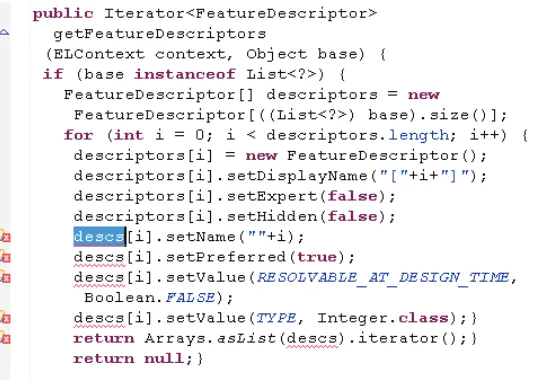
I next illustrate this dilemma using two examples. Suppose Grace is a developer who works on the Apache Tomcat open source project [Apa]. To improve understandability, she wants to change the name of a local variable descs to descriptors. She starts doing this task manually from the declaration ofdescstowards the tenth and last reference todescs. After changing six names (as shown in Figure 2.1) she realizes that she is performing a rename refactoring. Grace decides it would be easier to just finish the refactoring manually, even at the risk of introducing a bug.
Late awareness of refactoring occurs for other refactoring types as well. Suppose that Glen is a developer who works on the Vuze project [Vuz]. He notices that the
Figure 2.1 Rename local variable refactoring example.
what variables to pass in to the method. To do so, he undoes his changes and invokes the extract method tool, even though he has to configure the refactoring tool with the name of the helper method, which he already specified once while manually refactoring.
2.3
Formative Study
In order to resolve the late awareness dilemma, I intended to build a novel refactoring tool that can complete manual refactorings. However, three important research questions must be answered first:
• RQ1. How correctly do developers refactor manually? If developers mistakenly mod-ify program behavior when refactoring manually, then refactoring tools can potentially improve the refactoring process.
• RQ2.How significant is the late awareness problem? If many developers do not recog-nize that they are refactoring before they begin, then the late awareness is a contributor to refactoring tool underuse.
Figure 2.2 Extract method refactoring example.
a developer is refactoring. Models of manual refactoring workflows will help my tool recognize when a developer is refactoring.
I conducted a formative study to answer these questions1.
2.3.1
Participants and Refactorings
I recruited12developers to participate in my study. Six were graduate students and five were commercial software developers. I also recruited one refactoring researcher (not one of the
authors) who has current development experience of more than ten years. Although I did not collect all of the participants’ demographic information, at least 10of the12participants had professional programming experience of more than four years.
I asked participants to perform refactorings in the source code of the Vuze [Vuz] project. I chose this project is for its large size and maturity.
I manually inspected the source code of Vuze, then located fourteen locations where refac-toring could reasonably be performed. At each of the fourteen locations, I asked participants to perform one refactoring without the assistance of any refactoring tools. Among the fourteen refactorings, I chose three that were especially complex: A rename local variable refactoring, an extract method refactoring and a change method signature refactoring. When performing these complex refactorings, participants needed to carefully consider how to avoid changing program behavior. I describe the complex refactorings in detail in Section 2.3.3.1.
The fourteen refactorings spanned 8 refactoring types: Rename (2), extract constant (1), extract local variable (2), inline local variable (2), change method signature (2), extract method (2), introduce parameter (2), and pull up method (1). I chose these types from the types listed in Fowler’s catalog [Fow] according to three criteria. The first is their frequency in real world. According to Murphy-Hill and colleagues’ study, using automatic tools to perform rename, extract local variable, inline, extract method, and change method signature accounts for over
85%of all refactoring tool usage [MH09b]. This high tool usage suggests that these refactoring types occur frequently. Simplicity is the second criterion because simple refactorings would be easier for participants to complete in a short study session. The third criterion is wide coverage of a variety of software entities, such as constants, temporary variables, local variables, fields, and methods. We also chose pull up method because it involved class inheritance.
2.3.2
Data Collected
I collected data using a pre-study questionnaire, videos of participants’ manual refactorings, and a post-study questionnaire. To view the participants’ refactoring videos and their answers to the questionnaires, the reader can refer to my study material website.2
2
2.3.2.1 Pre-study Questionnaires
I recruited developers through email. If they were willing, I sent them a consent form and pre-study questionnaire. One subject consented, but did not fill out the remainder of the ques-tionnaire. I asked the following questions in the questionnaire:
• Coding experience: About what percentage of your job involves writing code?
• Java proficiency: How proficient are you with the Java programming language, rating from1 to5 (1for not at all and 5for expert)? Participants produced a slightly skewed distribution of Java experience (median=3.5), with all participants reporting at least some experience and two participants considering themselves experts.
• Refactoring familiarity: How familiar are you with the practice of refactoring, rating from1to5(1for “not at all” and5for “I refactor every time I program”)? Participants produced a fairly normal distribution of refactoring experience (median=3).
To perform the study, participants connected to a remote computer running the Eclipse IDE and containing the code to be refactored. Using the online screen sharing service join.me [Joi], participants could easily view and operate Eclipse. At the same time, I estab-lished a Skype [Sky] conversation with the participant to give them directions.
2.3.2.2 Observing Manual Refactoring
After setting up screen sharing, I opened the first code location where I wanted the participant to perform a refactoring. I told the participant which refactoring I wanted her to perform and that no automatic refactoring tools were allowed. If the participant was unfamiliar with the refactoring, I gave her an explanation of what the resulting code should look like. I were careful to avoid telling the participant how to perform each refactoring. Once I had answered all of the participants’ questions about the task, I asked her to start.
I repeated this process with all14refactorings. While the participant was performing these refactorings, I used screen capture software to record the entire process, which I analyzed after the study session ended.
Figure 2.3 Code illustrating the complex refactoring 2.
structure that met with Fowler’s definition. Refactorings tagged as “unknown” included those that the participant skipped; those that were finished only with my detailed guidance (I guided some participants to spare them the embarrassment of not being able to complete the task); those that were finished by invoking refactoring tools; and those that I were not able to tell whether the new code structure met with Fowler’s definition. Only refactorings tagged as “cor-rect” and “incor“cor-rect” were used in my analysis of refactoring workflows.
2.3.2.3 Post-study Questionnaire
After the study, I presented each participant with a questionnaire that asked the following ques-tions:
• Q1. How often does this situation occur: I get part way through a code change when I realize there is a refactoring tool that can help me do the job. Choose from one of the following words: Never, rarely, sometimes, often, and always.
2.3.3
Results
2.3.3.1 RQ1. Refactoring Correctness
Murphy-Hill and colleagues’ previous research suggests that developers may rely on compila-tion errors to locate the related code to update [MH09b]. For example, in Figure 2.1, Grace is using the compilation errors to determine what parts of the code needs to be updated. However, this strategy is sometimes error prone because compilation errors do not indicate every location that needs to be updated for certain complex refactorings. I had participants perform three of these complex refactorings to determine to what extent they used this strategy. Overall, par-ticipants inadvertently changed behavior in eleven of the fourteen refactorings, and very few finished participants completed complex refactorings them correctly.
2.3.3.1.1 Complex Refactoring 1
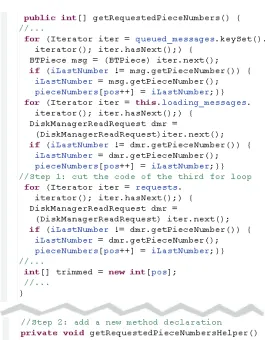
I asked participants to perform the complex extract method refactoring shown in Figure 2.2. If a developer extracts the last for loop into a new method, the new method should return the value of pos because the extractedfor loop modifies the value of pos and the code in the original method later reads the value. However, compilation errors do not result if posis not returned, so relying on error messages for this part of the refactoring is not sufficient for a correct refactoring.
Only one participant correctly performed the complex extract method refactoring, while seven performed it incorrectly because of failing to return the value.
2.3.3.1.2 Complex Refactoring 2
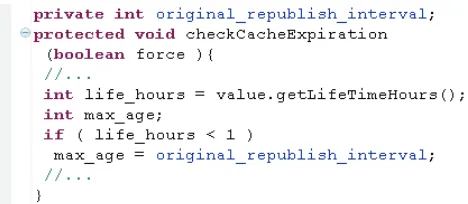
I asked participants to perform a rename local variable refactoring on code that is sum-marized in Figure 2.3. I asked the participants to rename life hours to original
-republish interval, which is also the name of a field of the containing class. If a de-veloper renames life hours to original republish interval in the declaration, names incheckCacheExpiration(...)that originally bound to the fieldoriginal
-republish interval now bind to the local variable. No compilation error is generated when the rebinding occurs.
Figure 2.4 Code illustrating the complex refactoring 3.
2.3.3.1.3 Complex Refactoring 3
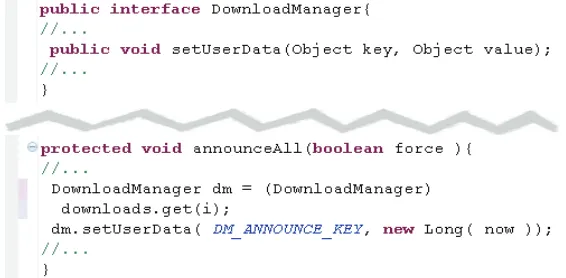
I asked participants to perform a change a method signature refactoring by swapping the or-der of two parameters. More specifically, I asked them to refactorsetUserData(Object key, Object value) to setUserData(Object value, Object key)), as il-lustrated in Figure 2.4. If a developer swaps these parameters in the method declaration, no compiler errors are shown because all invocations of this method still had arguments of correct types.
One participant performed this complex refactoring correctly, while two performed it in-correctly.
2.3.3.1.4 Summary
Across the three complex refactorings,90% were performed incorrectly. It appeared that de-velopers relied on compiler errors for refactoring, even in situations where that reliance was misplaced. Somewhat surprisingly, participants also made mistakes in the non-complex refac-torings. In total, participants completed96 non-complex refactorings, and 21(22%) of them were incorrect. Most of these incorrect refactorings resulted from participants’ failing to ad-dress all compiler errors.
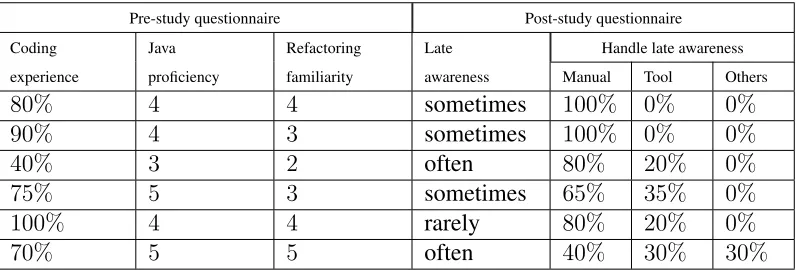
Table 2.1 Questionnaire results.
Pre-study questionnaire Post-study questionnaire Coding Java Refactoring Late Handle late awareness experience proficiency familiarity awareness Manual Tool Others
80% 4 4 sometimes 100% 0% 0%
90% 4 3 sometimes 100% 0% 0%
40% 3 2 often 80% 20% 0%
75% 5 3 sometimes 65% 35% 0%
100% 4 4 rarely 80% 20% 0%
70% 5 5 often 40% 30% 30%
the “find and replace all” tool, replacing all of the occurrences of the original field name in the file. Although this technique did not happen to modify behavior in the given code, this tech-nique is incorrect because the original name may also occur in other places not referring to the field, such as in a method name.
2.3.3.2 RQ2. Late Awareness
How significant is the late awareness problem? I answer this question by using participants’ post-study questionnaires.
Among the 12 participants recruited in my formative study, six returned their post-study questionnaires. Table 2.1 shows the answers of these participants to each question I asked.3 Five of the six participants indicated that late awareness of refactoring tools happens to them at least “sometimes.” Two of these five participants indicated that late awareness of refactoring happens to them “often”. This suggests that the late awareness problem may happen to a variety of programmers.
Participants reported that when late awareness occurs, a median of80%of the time they fin-ish the refactoring manually. One participant indicated that she handles late awareness through other means, but did not elaborate.
2.3.3.3 RQ3. Refactoring Workflow Patterns
What are the developers’ manual refactoring workflows? To investigate this question, I stud-ied the videos of participants performing the refactorings. We distilled a set of widely adopted refactoring workflows for each refactoring type, which I refer to as refactoring workflow pat-terns. I modeled these patterns using finite-state machines (FSMs) over a set of parameterized elementary operations to facilitate representation and interpretation.
I use operations on abstract syntax tree (AST) nodes to model refactoring workflow pat-terns. ASTs are tree representations of the syntactic structure of source code written in a pro-gramming language. Nodes inside an AST represent software entities at various levels, such as variables, fields, statements, methods, and classes. I use the following operations on the AST nodes to model my refactoring workflow patterns:
• COP(x); copy nodex’s source code to the clipboard.
• CU T(x); cut nodex’s source code and keep it in the clipboard.
• IN S(x); insert nodexinto the AST, possibly via a Paste command.
• U P D(x); update the value of nodex.
Inspired by regular expressions, I also define the following quantifiers:
• OP(x∗)indicates performing operationOP on zero or more nodesxsimultaneously.
• OP(x)∗indicates performingOP on zero or more nodesxsequentially.
• OP(x+)indicates performing operationOP on one or more nodesxsimultaneously.
• OP(x)+indicates performingOP on one or more nodesxsequentially.
2.3.3.3.1 Rename Field
init
7 UPD(Declaration)
final
4 UPD(Name+)
7 UPD(Reference)
7 [All updated]
Figure 2.5 Refactoring patterns for rename field.
init 2 COP
(St+)
2 CUT(St+)
2 INS(MI)
2 INS(MD)
2 INS(MD)
2 CUT(St+)
2 INS(St+)
2 INS(St+)
2 INS(MD)
2 INS(Pa)*
2 INS(Pa)*
2 INS(St+)
2 DEL(St+)
final 2 INS(MI)
2 INS(Pa)*
Figure 2.6 Refactoring patterns for extract method.
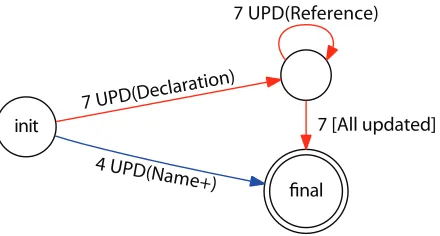
• Seven participants first updated the name of the field in its declaration, and then itera-tively updated the names of all the references to this field. I modeled this workflow by the upper transitions (red) in Figure 2.5. In the Figure, the number on a transition indicates the number of participants following that transition, while the square brackets indicate a conditional transition.
2.3.3.3.2 Extract Method
I collected ten usable extract method refactorings. Participants adopted several workflows when performing extract method. Three workflows were common to multiple participants:
• Two participants first copied the statements to extract, made a new method declaration, pasted the statements into the new method body, added parameters to the new method declaration, and finally replaced the statements to extract with the new method invoca-tion. I modeled this workflow by the upper transitions (red) in Figure 2.6.
• Two participants first cut the statements to extract, made a new method declaration, pasted the statements into the new method body, added parameters to the new method declaration, and finally inserted the new method invocation to the place where the ex-tracted statements were. I modeled this workflow by the middle transitions (blue) in Figure 2.6.
• Two participants first added a new method invocation near the statements to extract, cut the statements to extract, made the new method’s declaration, pasted the statement into the new method body, and finally added parameters to the new method declaration. I modeled this workflow by the lower transitions (green) in Figure 2.6.
I also observed the other four patterns (not shown in Figure 2.6) adopted by one participant each:
• One participant first added a new method declaration after the method of the statements to extract, copied the statements to extract, pasted these statements into the new method body, replaced these statements with the new method’s invocation, and finally added parameters to the new method declaration.
• One participant first cut the statements to extract, added a new method invocation at these statements’ original place, added a method declaration after the statements’ origi-nal method, pasted the statements to extract into the new method body, and fiorigi-nally add parameters to the new method declaration.
Figure 2.7 Workflow patterns for extract constant.
• One participant first copied the statements to extract, added a method declaration below these statements (inside their containing method), pasted the statements into the new method declaration, cut the new method declaration, pasted the new method declara-tion after the method containing the statements to extract, added parameters to the new method declaration, and finally replaced the statements to extract with the invocation of the new method.
These patterns suggest that developers manually refactor using only a few different basic ac-tions, but interleave those actions in a variety of ways.
2.3.3.3.3 Extract Constant
In total, I collected eleven extract constant refactoring. These refactorings fell into seven differ-ent refactoring workflow patterns. These following three patterns were adopted by more than one participant.
• Three refactorings (8,10and14) first copied the constant string to extract, created a new local variable declaration, pasted the string to the declaration (assigned it to the local variable) and finally replaced the constant string to extract with a reference to the local variable. This pattern is illustrated by the red transitions in the finite state machine in Figure 2.7.
• Two refactorings (7 and13) first cut the constant string to extract, created a new local variable declaration, pasted the string to the declaration (assigned it to the local variable) and finally added a reference to the local variable at the location where the constant string originally was. This patter is illustrated by the green transitions in the finite state machine in Figure 2.7.
In addition to above patterns, I collected the following four workflow patterns that were adopted by less participant:
• One refactoring (5) first copied the constant string to extract, replaced the string with a reference, created a local variable declaration of the reference, and finally pasted the string to the declaration (assigned to the variable).
• One refactoring (6) first created a local variable declaration, cut the constant string to extract, pasted the string to the declaration (assigned to the variable), and finally added a reference to the variable at the location where the string to extract originally was.
• One refactoring (11) first cut the constant string to extract, added a reference at the lo-cation where the string originally was, pasted the string nearby the reference, and finally added a local variable declaration before the pasted string (assigned the string to the variable).
• One refactoring (12) first cut the constant string to extract, pasted the string nearby, created a local variable declaration before the pasted string (assigned the string to the variable), and finally added a reference to the local variable at the location where the extracted string originally was.
2.3.3.3.4 Extract Local Variable
In total, I collected fourteen extract local variable refactoring. These refactorings fell into six different refactoring workflow patterns. These following two patterns were adopted by more than one participant.
Figure 2.8 Workflow patterns for extract local variable.
• Three refactorings (2, 14, and11) first cut the expression to extract, pasted the expres-sion nearby, created a new local variable declaration before the pasted expresexpres-sion, and finally added reference at the location where the expression originally was. This pattern is illustrated by the blue transitions in the finite state machine in Figure 2.8.
• Three refactorings (7,12and13) first cut the expression to extract, added reference at the the location where the expression originally was, created a new local variable declaration, and finally pasted the expression in the declaration. This pattern is illustrated by the green transitions in the finite state machine in Figure 2.8.
In addition to above patterns, I collected the following four workflow patterns that were adopted by less participant:
• Two refactorings first created a new local variable declaration, cut the expression to ex-tract, pasted the expression to the local variable declaration, and finally added reference at the location where the extracted expression originally was.
• One refactoring (7) first cut the expression to extract, created a new local variable decla-ration, pasted the expression to the local variable decladecla-ration, add finally added reference to the local variable at the location where the extracted expression originally was.
• One refactoring (11) first created a new local variable declaration, cut the expression to extract, added a reference to the local variable at the location where the cut expression originally was, and finally pasted the expression to the local variable declaration.
Figure 2.9 Workflow patterns for inline local variable.
• One refactoring (14) first cut the expression to extract, added a reference at the location where the extracted expression originally was, created a new local variable declaration, and finally pasted the expression to the local variable declaration.
2.3.3.3.5 Inline Local Variable
In total, I collected seventeen extract constant refactorings. These refactorings fell into seven different refactoring workflow patterns. These following pattern was adopted by more than one participant: Five refactorings (4, 6, 60, 10 and 15) first copied the constant string at the declaration of the local variable, replaced the references to the local variable with the string, and finally deleted the declaration of the local variable, illustrated by the finite state machine in Figure 2.9.
In addition to the above pattern, I collected the following five workflow patterns that were adopted by less participant:
• Two refactorings (7and70) first cut the declaration of the local variable (left the constant string), cut the constant string in the declaration, and finally replaced the references to the local variable with the constant string.
• Two refactorings (11and110) first copied the constant string, deleted the local variable declaration, and finally replaced the references to the local variable with the constant string.
• One refactoring (12) first cut the constant string, replaced the references to the local variable with the string, and finally deleted the declaration of the local variable.
Figure 2.10 Workflow patterns for change method signature.
• Two refactorings (14and140) first cut the constant string in the declaration of the local variable, deleted the declaration of the local variable, and finally replaced the references to the local variable with the constant string.
• One refactoring (40) first commented the declaration of the local variable, copied the constant string in the declaration, and finally replaced the references to the local variable with the constant string.
• Three refactorings (100,120 and130) first copied the constant string in the declaration of the local variable, and invoked the find and replace utility to replace all the references to the local variable with the constant string. (Problematic strategy)
2.3.3.3.6 Change Method Signature
I collected twelve change method signature refactorings falling into two workflow patterns. In this refactoring, I asked participants to switch the positions of two parameters. These two parameters did not share same type. Therefore after the modification of the method declaration, a set of compiler errors can guide participants to locate the method calls for update. These two workflow patterns are:
• Eleven refactorings (4, 5,6,60, 7,10,11,120, 14, 140, and 15) first cut one parameter in the signature of the method declaration, pasted it before/after the other parameter (added and deleted comma if needed), and finally updated the method calls to this method by performing the similar position switch. This workflow pattern is modeled by the finite state machine in Figure 2.10.
Figure 2.11 Workflow patterns for pull up field.
2.3.3.3.7 Pull Up Field
I collected nine pull up field refactorings falling into two workflow patterns. In this refactoring, I asked participants to move a field from a class to its super class. This refactoring was compar-atively straightforward since no name clash would happen after the moving. The two workflow patterns are:
• Eight refactorings (5, 6, 7,8,11,12,13, and14) first cut the field declaration to pull up, navigated to the declaration of the super class, and finally pasted the field declaration to the super class declaration. This pattern is modeled by the finite state machine in Figure 2.11.
• One refactoring (10) first commented the field declaration to pull up, copied the field declaration from the comment, navigated the declaration of the super class, and fianally pasted the field declaration to the super class declaration.
2.3.4
Threats to Validity
Although my formative study provides data on how developers manually refactor, there are several threats to validity that should be considered when interpreting my results.
The first threat is the criteria I used to choose refactoring types. I chose the refactoring types whose tools are used more frequently, yet these types of refactorings were not always the most
underused refactoring tools. In the future, I would like to perform the study with refactoring types for which the corresponding tool is the most underused.
Section 2.4. Similarly, the selected refactorings may not be representative of all refactorings performed in the wild.
Another significant threat is that participants’ attitude toward refactoring third-party soft-ware may be different than their attitude towards refactoring their own softsoft-ware. Specifically, because participants have no investment in the third-party code, they may be less concerned about introducing behavior-modifying changes, as compared to their own code. This would cause my study to overestimate how often refactoring errors are made. It is also possible that participants exercised more diligence in refactoring correctly in the study, since they were not distracted by other coding tasks. This would cause my study to underestimate how often refac-toring errors are made. In either case, a field study may be able to shed more light onto the frequency of errors made during manual refactoring.
2.4
BeneFactor
According to my formative study, manual refactoring can be an error-prone task (RQ1). Al-though conventional refactoring tools are available to assist the developers performing correct and efficient refactoring, they are significantly underused [MH09b]. This underuse problem partially results from the developers late awareness of refactoring (RQ2). In order to tackle this problem, I propose a novel refactoring tool called BeneFactor that is built on my dis-tilled refactoring workflow patterns (RQ3). Unlike conventional refactoring tools, BeneFactor automatically detects an on- going manual refactoring, reminds the developers that automatic refactoring is available, and can finish the manual refactoring after the developer’s explicit invo-cation without requiring her to undo any code changes. Implemented as a plugin for the Eclipse IDE, a prototype of BeneFactor is publicly available4. BeneFactor has two major components:
Refactoring detection and code modification.
2.4.1
Refactoring detection
To solve the late awareness problem, the BeneFactor tool needs to recognize manual refactor-ing first. I designed to refactorrefactor-ing detection component to achieve this. In contrast to existrefactor-ing refactoring detection tools, such as RefacLib [Tan07] and REF-FINDER [Pre10], my refactor-ing detection component detects refactorrefactor-ing while the developer is programmrefactor-ing, rather than in
the version control system. Moreover, BeneFactor detects ongoing and unfinished refactorings, rather than completed ones. The refactoring detection component runs in the background of the IDE and continuously captures the developer’s operations on the code base. It collects two kinds of operations:
• Code-change based operations are detected by comparing subsequent snapshots of code base. These snapshots are captured after certain developer events, such as adding a state-ment, deleting a field declaration, and updating a variable name.
• Action-based operations are detected by monitoring the commands a developer executes, such as copying a statement and cutting a method declaration.
The refactoring detection component detects an ongoing refactoring by matching the op-erations performed by a developer against the transitions in the manual refactoring workflow patterns from my formative study. If a developer’s operations match with a prefix of refactoring type R’s workflow pattern, she may be performing a refactoring of type R. If her operations continue to match the same pattern, my confidence that she is actually refactoring increases; otherwise the confidence decreases. When the confidence exceeds a predefined threshold T, the refactoring detection component concludes that the developer is manually performing a refactoring of type R and offers a quick-fix to help her finish it.
I next illustrate my refactoring detection algorithm through a pseudo code example shown in Code 1. This example outlines detecting the rename field refactoring by using the refactoring workflow pattern illustrated in the upper transitions (red) in Figure 4. The value of confidence indicates the numbers of consecutive matches between a developer’s operations and the states of the workflow pattern. The algorithm detects an ongoing rename refactoring when the value of confidence is above a predefined Threshold (line 22). I currently use a threshold value of 1, resulting in the highest sensitivity of the detection algorithm.
1 confidence = 0;
2 current_state = init;
3 while(true){
4 operation = WaitforOperation();
5 if(operation.isUpdate() && operation.Node.isName() 6 && operation.Node.Parent.isFieldDeclaration()){
7 confidence++;
8 current_state = two;
9 declaration = operation.Node;
10 }
11 else if (current_state == two && operation.isUpdate() 12 && operation.Node.isName() && !operation.Node.Parent.
13 isFieldDeclaration() && operation.bindsTo(declaration))
14 confidence++;
15 else if (confidence > 0) 16 confidence --;
17 if(confidence > Threshold)
18 DetectedRefactorings.add(new RenameRefactoring(binding)); 19 }
Code 1 Refactoring detection pseudo code example
2.4.2
Code modification
If the developer invokes BeneFactor to finish her manual refactoring, BeneFactor’s code mod-ification component makes the requested change. At a high level, the code modmod-ification com-ponent captures any information the developer supplied while manually refactoring, recovers the code to its original state by rolling back the manual refactoring, and then re-applies the refactoring automatically. We discuss each of these steps below.
2.4.2.1 Configuration Information Collection
While it is convenient to collect configuration information this way, it is not always possible to collect all information necessary to complete a refactoring. For example, if a developer invokes BeneFactor right after she cuts the statements to be extracted, the new method’s name is not yet known. In this situation, BeneFactor uses a default value to finish the refactoring first and then allows the developer to modify the default afterwards. However, sometimes even this is not enough. For example, when performing the move static field refactoring, the tool may not know the developer’s planned destination class. In those situations, BeneFactor does not offer to finish a refactoring until this critical information is supplied. An alternative approach would be to collect the missing information using a dialog box or wizard.
2.4.2.2 Code Recovery
The code recovery step recovers the code base to before the manual refactoring was applied. Undoing a manual refactoring is not a trivial task, because the developer’s manual refactoring effort may interleave with other kinds of code changes [MH09b]. For example, when a devel-oper is performing a rename field refactoring, after renaming the field’s declaration, she may add new statements to the code. In this situation, arbitrarily undoing all code changes until the beginning of the manual refactoring causes the developer’s non-refactoring work to be lost. To tackle this problem, I designed an algorithm called selective undo. This algorithm simulates a developer’ rolling back of manual refactoring changes when she tries to invoke refactoring tools after encountering the late awareness problem.
I illustrate selective undo by using the pseudo code snippet shown in Code 2. Our selective undo algorithm takes two parameters as input. The first is the stack of operations performed by the developer from the starting of the Eclipse IDE to the moment of the algorithm’s execution, with the latest code change at the top. The second input is the refactoring to be completed.
In Code 2, the algorithm first declares a local variableundo operation stackto store all the operations that have been undone. After the declaration,performedEnoughUndos
1 void selectiveUndo(Stack<Operation> operation_stack, Refactoring refactoring) {
2 Stack<Change> undo_operation_stack;
3 While(!refactoring.performedEnoughUndos()) {
4 Operation operation=operation_stack.pop();
5 operation.undo();
6 undo_operation_stack.push(operation);
7 }
8 while(!undo_operation_stack.isEmpty()) {
9 Operation operation = undo_operation_stack.pop();
10 if(refactoring.isRefactoringOperation()) 11 operation.skip();
12 else
13 operation.getPatch.applyPatch();
14 }
15 }
Code 2 selective undo algorithm pseudo code example
When performedEnoughUndos returns false, the selective undo algorithm enters a loop. From line6to line 7, the algorithm pops the code change at the top ofoperation
-stackand undoes it, regardless of whether or not the operation is a refactoring operation. For every operation that has been undone, the algorithm pushes it back to another stack undo
-operation stack at line8. The selective undo algorithm continuously executes the code from line6to line8untilperformedEnoughUndosreturns true.
After arbitrarily undoing all of these operations, the algorithm redoes only the non-refactoring operations among them. For each undone operation, the algorithm invokes refactoring.isRefactoringOperation() at line
13 to check whether or not it belongs to the manual refactoring workflow.
refactoring.isRefactoringOperation() performs this check by comparing the input operation with the operations in my collected refactoring workflow patterns.
patch allows one version to a file to be applied to the right location in the modified version of the same file [Dif]. The algorithm repeats this process from line11to16until no operation is left inundo operation stack.
2.4.2.3 Change Creation
After the code base has been recovered, I perform the last step: automatically finishing the refactoring. Eclipse ships with a set of automatic refactoring application programming inter-faces (APIs) called the language toolkit (LTK) [Ltk]. Feeding the collected configuration infor-mation and the recovered code base as input, LTK APIs are now able to automatically perform the intended refactoring.
2.4.3
Example
I next illustrate how BeneFactor works by using a real-world code example. Suppose Grace is using Eclipse with BeneFactor installed. To enhance maintainability, she intends to extract theforloop in the code snippet of Figure 2.12 into a new method. Grace first cuts the state-ment of the for loop. BeneFactor captures this operation and detects that the developer is possibly refactoring, and therefore adds a marker at the line of code where Grace cuts the state-ment, proposing to help her finish this refactoring, as illustrated in Figure 2.13. Grace next intends to print a blank line before the printed information in the for loop, so she inserts
System.out.println(), as illustrated by Figure 2.14.
CachePeer[] peers = new CLCacheDiscovery().lookup(torrent); System.out.println(“peers=” + peers.length);
for (int i = 0; i<peers.length; i++){ System.out.println(“cache:” +
peers[i].getAddress() + “:” + peers[i].getPort());}
Figure 2.12 Code before extracting method.
CachePeer[] peers = new CLCacheDiscovery().lookup(torrent); System.out.println(“peers=” + peers.length);
Figure 2.13 Code after cutting the statements to extract.
CachePeer[] peers = new CLCacheDiscovery().lookup(torrent); System.out.println(“peers=” + peers.length);
System.out.println();
Figure 2.14 Code after making a non-refactoring change.
2.4.4
Technique Challenges
While implementing BeneFactor, I faced several challenges. I believe that these challenges must be resolved before BeneFactor can be evaluated.
CachePeer[] peers =
new
CLCacheDiscovery().lookup(torrent);
System.
out
.println(
“peers=”
+ peers.
length
);
System.
out
.println();
private static void
printPeers
Finish extract method Rename in file (Ctrl+2, R)
Figure 2.15 Code after adding a new method declaration.
CachePeer[] peers = new CLCacheDiscovery().lookup(torrent); System.out.println(“peers=” + peers.length);
System.out.println();
printPeers(peers);
private static void printPeers(CachePeer[] peers){
for (int i = 0; i<peers.length; i++){ System.out.println(“cache:” +
peers[i].getAddress() + “:” + peers[i].getPort());}}
Figure 2.16 Code after invoking BeneFactor.
many false positives may annoy the developer with an overwhelming number of quick-fix items. The false positives may occur when (1) the developer is performing code changes that serve partially for restructuring purposes, but also are intended to modify the code behavior and (2) the default confidence value is too low, resulting in an overly sensitive refactoring detection algorithm.
not able to invoke BeneFactor to finish her ongoing refactoring. The false negatives in refac-toring detection may be caused by: (1) A manual refacrefac-toring workflow that greatly deviates from my collected manual refactoring workflow patterns; (2) A workflow that is dominated by non-refactoring code changes; (3) A default confidence value that is too high, resulting in an overly insensitive refactoring detection algorithm.
Unresolvable Non-Refactoring Operations. As I have mentioned, a developer’s manual refactoring operations may be interleaved with operations serving some other purpose, which I refer to as non-refactoring operations. These non-refactoring operations are preserved dur-ing the code recovery step. However, BeneFactor may have difficulty in resolvdur-ing these non-refactoring operations when they are dependent on the interleaved non-refactoring.
One example of the unresolvable non-refactoring operation is illustrated by Grace’s inser-tion of System.out.println(); in Figure 2.14. BeneFactor must figure out the order of the inserted statement and the invocation of the extracted method. Currently, BeneFactor assumes the invocation happens after all the inserted statements, resulting in the code snippet shown in Figure 2.16. The developer’s intention may have instead been to put the invocation
before the inserted statements, but BeneFactor currently has no way of determining the devel-opers’ intention.
Removing Quick-Fix Items. BeneFactor adds a quick-fix item after detecting a manual refactoring. However, it is not trivial to decide when to remove the item. If BeneFactor removes the item too early, the developer is not able to invoke automatic refactoring when she later wants to. If BeneFactor keeps the quick-fix item for too long, many quick fixes may be strewn around the developer’s IDE, long after code changes have been completed.
Scalability. I plan to enhance BeneFactor to support more types of refactorings, and as a developer uses BeneFactor, the developer’s operations may simultaneously match with work-flow patterns of several different refactoring types. In this case, the developer will face multiple quick fix options to choose from.
2.4.5
Future Work
Using the refactoring workflow patterns I collected in the formative study, I designed the Bene-Factor tool to solve the late awareness problem. The most promising future work is to evaluate BeneFactor with actual developers working on real-world software. To conduct this study, I plan to deploy BeneFactor to a team of more than three professional developers who work on the same open source project. I plan to log the tool usage data of BeneFactor during their using the tool for several weeks. The collected data is supposed to answer the following questions.
Do developers invoke refactoring tools more often? My formative study shows that devel-opers’ not using refactoring tools is sometimes due to the late awareness problem. With Bene-Factor installed, if a developer’s manual refactoring falls into the supported workflow patterns, the developer can be reminded of the availability of the automated tool support for refactorings. Therefore, the developer is more likely to use refactoring tools. Using the collected data, I can test this hypothesis.
Do developers refactor more often? If developers use refactoring tools more often, refac-torings in general are easier to implement than that when refactoring tools are underused. With the collected data, I plan to test the hypothesis that using BeneFactor allows developers to more often improve the internal quality of software.