A Novel Technique for Device Encryption on
Android Platform for Data Restoration
Bappa Mondal
1, Sundar Srinivasan
2, Rajesh Kumar Panda
3, Dr. K B ShivaKumar
4Delhi Technological University, Delhi, India
1Research Scholar [Wireless Cognitive Radio N/Ws], Mewar University, Rajasthan, India
2Lead Engineer, Mobile R&D, India
3Professor & HOD, Dept. of TCE, Sri Siddhartha Institute of Technology, Karnataka, India
4ABSTRACT: In modern communication system, communication through mobile phones plays a vital role where mobile phones have become part and parcel of common man’s daily life. At the same time there is every possibility of losing the phones either by misplacing the hand set or the same being theft. In such cases whatever the data stored by the owner of the mobile should be protected, This paper proposes a technique for data restoration by improvising the use of On Device Encryption, ODE which is a solution provided from Google and used for encrypting user data (/data), so that if phone is lost, user data is recoverable. By default, ODE encrypts whole partition for /data, but from Lollypop OS, Fast Encryption technique encrypts only valid data present on device, so encryption is much faster than earlier versions.
KEYWORDS: ODE, Fast Encryption, Android OS, Disk Encryption.
I. INTRODUCTION
Disk encryption uses an encryption algorithm to convert every bit of data that goes to disk to Cipher text, ensuring that data cannot be read from the disk without the decryption key. The disk decryption key is usually stored, encrypted and requires an additional key encryption key (KEK) in order to be decrypted. The KEK can either be stored in a hardware module, such as a smart card or a TPM, or derived from a passphrase obtained from the user on each boot. When stored in a hardware module, the KEK can also be protected by a user-supplied PIN or password. Android’s disk encryption uses dm-crypt, currently the standard disk encryption subsystem in the Linux kernel. Like dm-verity, dm-crypt is a device-mapper target that maps an encrypted physical block device to a virtual device-mapper device. All data access to the virtual device is decrypted (for reads) or encrypted (for writes) transparently.
The encryption mechanism employed in Android uses a randomly generated 128-bit key together with AES in CBC mode. CBC mode requires an initialization vector (IV) that needs to be both random and unpredictable in order for encryption to be secure. This presents a problem when encrypting block devices, because blocks are accessed non-sequentially and therefore each sector (or device block) requires a separate IV.
Android uses the encrypted salt-sector initialization vector (ESSIV) method with the SHA-256 hash algorithm (ESSIV: SHA256) in order to generate per-sector IVs. ESSIV employs a hash algorithm to derive a secondary key s from the disk encryption key K, called a salt. It then uses the salt as an encryption key and encrypts the sector number SN of each sector to produce as per sector IV. In other words, IV (SN) = AESs (SN), where s = SHA256 (K).
Because the IV of each sector depends on a secret piece of information (the disk encryption key), per-sector IVs cannot be deduced by an attacker. However, ESSIV does not change CBC’s malleability property and does not ensure the integrity of encrypted blocks. In fact, it’s been demonstrated that an attacker who knows the original plaintext stored on disk can manipulate stored data and even inject a backdoor on volumes that use CBC for disk encryption.
II.KEY DERIVATION
A. EXPERIMENTALKEY-DERIVATION
iterations and a 128-bit random salt value. The resulting encrypted master key and the salt are stored, along with other metadata like the number of failed decryption attempts, in a footer structure occupying the last 16 KB of the encrypted partition, called a crypto footer. Storing an encrypted key on disk instead of using a key derived from the user-supplied password directly allows for changing the decryption password quickly, because the only thing that needs to be re-encrypted with the key derived from the new password is the master key (16 bytes). While using a random salt makes it impossible to use precomputed tables to speed up key cracking, the number of iterations (2,000) used for PBKDF2 is not sufficiently large by today’s standards. (The Keystore key derivation process uses 8,192 iterations as discussed in Chapter 7. Backup encryption uses 10,000 iterations, as discussed later in “Android Backup”.) Additionally, PBKDF2 is an iterative algorithm, based on standard and relatively easy to implement hash functions, which makes it possible for PBKDF2 key derivation to be parallelized, taking full advantage of the processing power of multi-core devices such as GPUs. This allows even fairly complex alphanumeric passphrases to be brute-force in a matter of days, or even hours.
In order to make it harder to brute-force disk encryption passwords, Android 4.4 introduced support for a new key derivation function called Scrypt. Scrypt employs a key derivation algorithm specifically designed to require large amounts of memory, as well as multiple iterations (such an algorithm is called memory hard). This makes it harder to mount brute-force attacks on specialized hardware such as ASICs or GPUs, which typically operate with a limited amount of memory.
There are four constrains in ODE,
Battery Power should be 80% before starting Encryption. Even if user having very limited data e.g. 1 GB, which required lets a 20% of power; user has to charge 80% before starting encryption as shown in Figure 3.
Phone should be in charging mode, i.e. power cable should be connected. Again if user having sufficient power, power cable connection is burden for user.
After encryption started, if we removed power charger, no warning message shown. If battery power dissipation rate is too high and device having maximum data that need to encrypt, there is no guarantee 80% power will be enough to complete encryption.
Once encryption started, can’t be halted/paused. If we have large data and battery charge is available at starting, now after some time, user removed power charging cable and battery power dissipation rate is too high, ODE module should calculate dynamically remaining power required and if required, show user warning message to connect power charging and pause encryption process.
Now we are working further where if user can’t connect / ignore to power source after it shows warning message to connect power cable as shown in Figure 4, then encryption can be paused, save its current state like no of blocks encrypted, and unfinished blocks and rebooted and when power cable is connected, again we can resume encryption, from where we left.
B. BATTERYTYPESDISCHARGECURVES
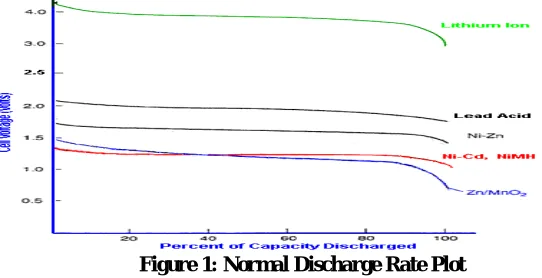
Below diagram shows the discharge curves of different types of battery. As plotted in Figure 1, Power dissipation rate if not linear in battery and varying on different types of cell.
With our proposed solution, we can not apply a linear algorithm to calculate power required for encryption of particulate amount of data. We need to preprocessed some data and make some graph to predict a power consumption for a random amount of power requirement. Also need to take care of small amount of offset power to add, required for safety, since power dissipation rate is increase with older battery.
The graph below shows typical discharge curves for cells using a range of cell chemistries. Note that each cell
chemistry has its own characteristic nominal voltage and discharge curve. Some chemistries such as Lithium Ion have
a fairly flat discharge curve while others such as Lead acid have a pronounced slope.
The power delivered by cells with a sloping discharge curve falls progressively throughout the discharge cycle. This
could give rise to problems for high power applications towards the end of the cycle. For low power applications,
which need a stable supply voltage, it may be necessary to incorporate a voltage regulator if the slope is too steep.
III.
PROPOSED MODEL
Few improvements have been done till now so that where user does not need to charge 80% of power before starting
encryption as shown in Figure 3 and the power cable need to be connected depending on required data present in /data
partition. During encryption if there is shortage of power for unavoidable cause, encryption will be paused and
warning message will be shown to connect power cable as shown in Figure 2.
The Figure 2 shows the difference in flow of Operation in current scenario and proposed solution. In Proposed
solution, it is dynamically checking for the power requirement with respect to the data need to be encrypted.
IV.
RESULTS
&
DISCUSSION
C.
A. PROPOSED MODEL RESULTS
Below are few output screenshots Figure 3 & 4 to explain our proposed model,
For normal case, even if power is 95%, power source need to connect, else “Encrypt Device” option will be
disabled. One improvement version will start encryption with 23% of power, i.e. depending of amount of
data required to encrypt.
Google support only full encryption until KitKat where all blocks in /data partition will be encrypted even if no
valid data is not present. From Android 5.0 (Lollipop) support Fast Encryption, where only valid memory
block will be encrypted. So our implementation will be for Fast encryption always, so removed “Fast
Encryption” option, as it’s not option for our experiments. For full encryption power requirement is constant
and our implementation is not required
Now during Encryption for some rare and unavoidable case, device is short of power and power source is
disconnected, for current implementation it will continue to encrypt and possibility of data corruption, where
new implementation will
pause encryption to save some power (CPU cycles) and warning message to user to connect power source to
continue, after user connect power cable, encryption will resume its operation.
In Fig 3: Shows behavior before encryption for power cable for existing and proposed method.
In Fig 4: Shows behavior during encryption for existing and proposed method. In case of proposed method, if
there is lack of power, encryption process stop and ask to connect power source to resume encryption.
D.
BATTERY TYPES DISCHARGE CURVES
The Power required is calculated as follows
Pr (mAh) = Amount of Data to encrypt (GB) * Power consumption (mAh) to encrypt single block (l GB)
for same amount of data to encrypt.To avoid such linear approach, here we used some pre-calculated data based on
our experiments.
Power Required Pr (mAh) = Power (P) for x GB data + Offset ---
(1)
Where P(x+1) < P(x) < P(x-1)
I.e. Power consumption P(x) for x GB of data encryption need to be pre-calculated value. Like 24.3 GB data, need
power consumption between 24.1 GB ~ 24.9 GB. E.g. 100 mAh.
Here "Offset" value has taken, based upon precaution. Because of old battery has larger battery discharge rate.
V.
EXPERIMENTS
&
OBSERVATIONS
E.
TEST SETUP
A test has been prepared with below parameters
Battery Capacity: 4600 mAh
Available Memory: 22GB
Total Space : 32 GB
F.
PLOT OF DATA ENCRYPTED VERSES POWER
‘Voltage’ column depicts power consumption before and after encryption in mAh unit.
‘Difference’ column depicts power consumption of data encryption of ‘Data Size’ column in Giga Byte units.
Table 1: Power Saved per Encryption Data Size
G.
COMPARATIVE STUDY OF VOLTAGE USAGE PER ENCRYPTING
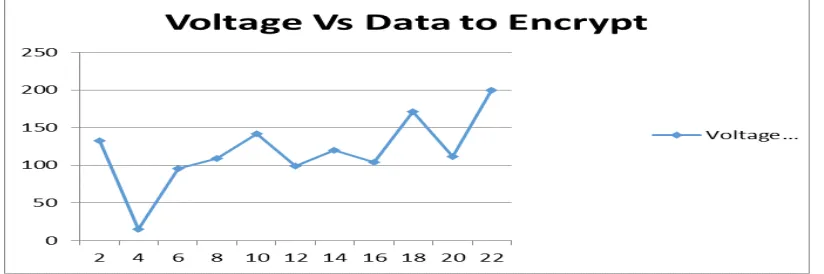
Above graph in figure 5 represents the power consumption can be saved per encrypting data size in GB. This graph
represents
the power consumption difference mentioned in Table 1. As stated in table 1, Approximately 133 voltage can be
saved while encrypting 2 GB of Data. On an average, we are saving 100 ~ 150 voltage with the proposed solution.
VI.
C
ONCLUSIONA conclusion section is not required. Although a conclusion may review the main points of the paper, do not replicate
the abstract as the conclusion. A conclusion might elaborate on the importance of the work or suggest applications
and extensions.
These experiments have been done based on Android lollipop 5.1 version. In case of Android Disk Encryption,
Google supports Fast Encryption which encrypts only the valid data present on device, so current encryption proposed
method is much faster than earlier version and overcome following four constraints:
Battery Power should be 80% before starting Encryption
Phone should be in charging mode
After encryption started, if we removed power charger, no warning message shown
Once encryption started, it can’t be halted/paused.
Here one can calculate power requirement based on user data to encrypt. Most of the time, if user data has limited
data, 80% charge is not required. So, with proposed method, one can calculate power requirement dynamically, based
on amount of data which can save the power and overcome current restriction to user.
REFERENCES
1. M.A. Alomari, K. Samsudin, A.R.Ramli, "A Parallel XTS Encryption Mode of Operation," IEEE Student Conference on Reseach and Development (SCOReD), UPM Serdang, Malaysia, November 2009, pp. 172-175
2. Mohammad Ahmed Alomari, Khairulmizam Samsudin and Abdul Rahman Ramli, "A Study on Encryption Algorithms and Modes for Disk Encryption", 2009 International Conference on Signal Processing Systems, IEEE
3. Zhaohui Wang, Rahul Murmuria, Angelos Stavrou "Implementing and Optimizing an Encryption Filesystem on Android", IEEE 13th conference on Mobile Data Management,2012
4. Razvi Doomun, Jayramsingh Doma, Sundeep Tengur "AES-CBC Software Execution Optimization”, IEEE ,2008
5. Fuxiang ZHAO, Shangping WANG "Implementation of a Full Disk Encryption Scheme Based on Double Sequence", IEEE 3rd International Conference on Multimedia Information networking and Security, 2011
6. Tilo Müller, Felix C. Freiling "A Systematic Assessment of the Security of Full Disk Encryption”, IEEE Transactions on Dependable and Secure Computing, Sept.-Oct. 1 2015
7. Akshay Desai, Krishna Ankalgi, Harish Yamanur, Siddalingesh S. Navalgund, "Parallelization of AES algorithm for disk encryption using CBC and ICBC modes", 2013 Fourth International Conference on Computing, Communications and Networking Technologies (ICCCNT)
8. Li Jun, Yu Huiping, "Trusted full disk encryption model based on TPM", The 2nd International Conference on Information Science and Engineering 9. Aaron Fujimoto, Peter Peterson,Peter Reiher, "Comparing the Power of Full Disk Encryption Alternatives", Green Computing Conference (IGCC),
2012 International
10. Zhaohui Wang, Rahul Murmuria, Angelos Stavrou,"Implementing and Optimizing an Encryption Filesystem on Android", 2012 IEEE 13th International Conference on Mobile Data Management
11. Drew Suarez, Daniel A. Mayer, "Faux Disk Encryption: Realities of Secure Storage on Mobile Devices", 2016 IEEE/ACM International Conference on Mobile Software Engineering and Systems (MOBILESoft)
12. Fuxiang Zhao, Shangping Wang, "Implementation of a Full Disk Encryption Scheme Based on Double Sequence", 2011 Third International Conference on Multimedia Information Networking and Security.
BIOGRAPHY
picture