NxT1 HSSI/V.35 Module
User Manual
Part Number 1200771L1
Safety Instructions
When using your telephone equipment, please follow these basic safety precautions to reduce the risk of fire, electrical shock, or personal injury:
1. Do not use this product near water, such as a bathtub, wash bowl, kitchen sink, laundry tub, in a wet basement, or near a swimming pool.
2. Avoid using a telephone (other than a cordless-type) during an electrical storm. There is a remote risk of shock from lightning.
3. Do not use the telephone to report a gas leak in the vicinity of the leak.
4. Use only the power cord, power supply, and/or batteries indicated in the manual. Do not dispose of batteries in a fire. They may explode. Check with local codes for special disposal instructions.
Save These Important Safety Instructions
Notes provide additional useful information.Cautions signify information that could prevent service interruption.
Affidavit Requirements for Connection to Digital Services
• An affidavit is required to be given to the telephone company whenever digital terminal equipment without encoded analog content and billing protection is used to transmit digital signals containing encoded analog content which are intended for eventual conversion into voiceband analog signals and transmitted on the network.
• The affidavit shall affirm that either no encoded analog content or billing information is being transmitted or that the output of the device meets Part 68 encoded analog content or billing protection specifications.
• End user/customer will be responsible for filing an affidavit with the local exchange carrier when connecting unprotected customer premise equipment (CPE) to 1.544 Mbps or subrate digital services.
Affidavit for Connection of Customer Premises Equipment
to 1.544 Mbps and/or Subrate Digital Services
For the work to be performed in the certified territory of ___________________ (telco name)
State of ________________
County of ________________
I, _______________________ (name), ____________________________________ (business address),
____________________ (telephone number) being duly sworn, state:
I have responsibility for the operation and maintenance of the terminal equipment to be
connected to 1.544 Mbps and/or ________ subrate digital services. The terminal equipment to be connected complies with Part 68 of the FCC rules except for the encoded analog content and billing protection specifications. With respect to encoded analog content and billing protection:
( ) I attest that all operations associated with the establishment, maintenance, and adjustment of the digital CPE with respect to analog content and encoded billing protection information
continuously complies with Part 68 of the FCC Rules and Regulations.
( ) The digital CPE does not transmit digital signals containing encoded analog content or billing information which is intended to be decoded within the telecommunications network.
( ) The encoded analog content and billing protection is factory set and is not under the control of the customer.
I attest that the operator(s)/maintainer(s) of the digital CPE responsible for the establishment, maintenance, and adjustment of the encoded analog content and billing information has (have) been trained to perform these functions by successfully having completed one of the following (check appropriate blocks):
( ) A. A training course provided by the manufacturer/grantee of the equipment used to encode analog signals; or
( ) B. A training course provided by the customer or authorized representative, using training materials and instructions provided by the manufacturer/grantee of the equipment used to encode analog signals; or
( ) C. An independent training course (e.g., trade school or technical institution) recognized by the manufacturer/grantee of the equipment used to encode analog signals; or
I agree to provide ______________________ (telco’s name) with proper documentation to demonstrate compliance with the information as provided in the preceding paragraph, if so requested.
_________________________________Signature
_________________________________Title
_________________________________ Date
Transcribed and sworn to before me
This ________ day of _______________, _______
_________________________________ Notary Public
My commission expires:
FCC regulations require that the following information be provided in this manual:
1. This equipment complies with Part 68 of FCC rules. On the back of the equipment housing is a label showing the FCC registration number and ringer equivalence number (REN). If requested, provide this information to the telephone company.
2. If this equipment causes harm to the telephone network, the telephone company may temporarily discontinue service. If possible, advance notification is given; otherwise, notification is given as soon as possible. The telephone company will advise the customer of the right to file a complaint with the FCC.
3. The telephone company may make changes in its facilities, equipment, operations, or
procedures that could affect the proper operation of this equipment. Advance notification and the opportunity to maintain uninterrupted service are given.
4. If experiencing difficulty with this equipment, please contact ADTRAN for repair and warranty information. The telephone company may require this equipment to be disconnected from the network until the problem is corrected or it is certain the equipment is not
malfunctioning.
5. This unit contains no user-serviceable parts.
6. An FCC compliant telephone cord with a modular plug is provided with this equipment. This equipment is designed to be connected to the telephone network or premises wiring using an FCC compatible modular jack, which is Part 68 compliant.
7. The following information may be required when applying to the local telephone company for leased line facilities:
8. The REN is useful in determining the quantity of devices you may connect to your telephone line and still have all of those devices ring when your number is called. In most areas, the sum of the RENs of all devices should not exceed five. To be certain of the number of devices you may connect to your line as determined by the REN, call your telephone company to
determine the maximum REN for your calling area.
9. This equipment may not be used on coin service provided by the telephone company. Connection to party lines is subject to state tariffs. Contact your state public utility commission or corporation commission for information.
Service Type SOC REN FIC USOC
1.544 Mbps–SF 04DU9.BN N/A 6.0N RJ-48C
SF and B8ZS 04DU9.DN
ESF 04DU9.1KN
Federal Communications Commission Radio Frequency Interference Statement
This equipment has been tested and found to comply with the limits for a Class A digital device, pursuant to Part 15 of the FCC Rules. These limits are designed to provide reasonable protection against harmful interference when the equipment is operated in a commercial environment. This equipment generates, uses, and can radiate radio frequency energy and, if not installed and used in accordance with the instruction manual, may cause harmful interference to radio frequencies.Operation of this equipment in a residential area is likely to cause harmful interference in which case the user will be required to correct the interference at his own expense.
Changes or modifications to this unit not expressly approved by the party
Industry Canada Compliance Information
Notice: The Industry Canada label applied to the product (identified by the Industry Canada logo or the “IC:” in front of the certification/registration number) signifies that the Industry Canada technical specifications were met.
Notice: The Ringer Equivalence Number (REN) for this terminal equipment is supplied in the documentation or on the product labeling/markings. The REN assigned to each terminal device indicates the maximum number of terminals that can be connected to a telephone interface. The termination on an interface may consist of any combination of devices subject only to the requirement that the sum of the RENs of all the devices should not exceed five (5).
Canadian Emissions Requirements
This digital apparatus does not exceed the Class A limits for radio noise emissions from digital apparatus as set out in the interference-causing equipment standard entitled “Digital Apparatus,” ICES-003 of the Department of Communications.
Warranty and Customer Service
ADTRAN will replace or repair this product within five years from the date of shipment if it does not meet its published specifications or fails while in service. For detailed warranty, repair, and return information refer to the ADTRAN Equipment Warranty and Repair and Return Policy Procedure.
Return Material Authorization (RMA) is required prior to returning equipment to ADTRAN.
For service, RMA requests, or further information, contact one of the numbers listed at the end of this section.
LIMITED PRODUCT WARRANTY
ADTRAN warrants that for five years from the date of shipment to Customer, all products
manufactured by ADTRAN will be free from defects in materials and workmanship. ADTRAN also warrants that products will conform to the applicable specifications and drawings for such products, as contained in the Product Manual or in ADTRAN's internal specifications and drawings for such products (which may or may not be reflected in the Product Manual). This warranty only applies if Customer gives ADTRAN written notice of defects during the warranty period. Upon such notice, ADTRAN will, at its option, either repair or replace the defective item. If ADTRAN is unable, in a reasonable time, to repair or replace any equipment to a condition as warranted, Customer is entitled to a full refund of the purchase price upon return of the equipment to ADTRAN. This warranty applies only to the original purchaser and is not transferable without ADTRAN's express written permission. This warranty becomes null and void if Customer modifies or alters the equipment in any way, other than as specifically authorized by ADTRAN.
EXCEPT FOR THE LIMITED WARRANTY DESCRIBED ABOVE, THE FOREGOING CONSTITUTES THE SOLE AND EXCLUSIVE REMEDY OF THE CUSTOMER AND THE EXCLUSIVE LIABILITY OF ADTRAN AND IS IN LIEU OF ANY AND ALL OTHER WARRANTIES (EXPRESSED OR IMPLIED). ADTRAN SPECIFICALLY DISCLAIMS ALL OTHER WARRANTIES, INCLUDING (WITHOUT LIMITATION), ALL WARRANTIES OF MERCHANTABILITY AND FITNESS FOR A PARTICULAR PURPOSE. SOME STATES DO NOT ALLOW THE EXCLUSION OF IMPLIED WARRANTIES, SO THIS EXCLUSION MAY NOT APPLY TO CUSTOMER.
Customer Service, Product Support Information, and Training
ADTRAN will repair and return this product if within five years from the date of shipment the product does not meet its published specification or the product fails while in service.
A return material authorization (RMA) is required prior to returning equipment to ADTRAN. For service, RMA requests, training, or more information, use the contact information given below.
Repair and Return
If you determine that a repair is needed, please contact our Customer and Product Service (CAPS) department to have an RMA number issued. CAPS should also be contacted to obtain information regarding equipment currently in house or possible fees associated with repair.
Identify the RMA number clearly on the package (below address), and return to the following address:
ADTRAN Customer and Product Service 901 Explorer Blvd. (East Tower)
Huntsville, Alabama 35806
RMA # _____________
Pre-Sales Inquiries and Applications Support
Your reseller should serve as the first point of contact for support. If additional pre-sales support is needed, the ADTRAN Support web site provides a variety of support services such as a searchable knowledge base, latest product documentation, application briefs, case studies, and a link to submit a question to an Applications Engineer. All of this, and more, is available at:
http://support.adtran.com
When needed, further pre-sales assistance is available by calling our Applications Engineering Department.
CAPS Department (256) 963-8722
Post-Sale Support
Your reseller should serve as the first point of contact for support. If additional support is needed, the ADTRAN Support web site provides a variety of support services such as a searchable knowledge base, updated firmware releases, latest product documentation, service request ticket generation and trouble-shooting tools. All of this, and more, is available at:
http://support.adtran.com
When needed, further pre-sales assistance is available by calling our Technical Support Center. Please have your unit serial number available when you call.
Installation and Maintenance Support
The ADTRAN Custom Extended Services (ACES) program offers multiple types and levels of installation and maintenance services which allow you to choose the kind of assistance you need. This support is available at:
http://www.adtran.com/aces
For questions, call the ACES Help Desk.
Training
The Enterprise Network (EN) Technical Training Department offers training on our most popular products. These courses include overviews on product features and functions while covering
applications of ADTRAN's product lines. ADTRAN provides a variety of training options, including customized training and courses taught at our facilities or at your site. For more information about training, please contact your Territory Manager or the Enterprise Training Coordinator.
Technical Support (888) 4ADTRAN
ACES Help Desk (888) 874-ACES (2237)
Training Phone (800) 615-1176, ext. 7500 Training Fax (256) 963-6700
Table of Contents
List of Tables...15
List of Figures ...17
Chapter 1 Introduction ...19
NxT1 HSSI/V.35 Module Overview ...19
Functional Description ...20
Features ...20
NxT1 HSSI/V.35 Module Specifications ...20
Physical Description ...22
Chapter 2 Installation ...23
Before Installing the NxT1 HSSI/V.35 Module ...23
Shipping Contents ...23
Installing the NxT1 HSSI/V.35 Module ...24
Wiring ...25
Power Up and Initialization ...26
Failed Self-Test ...26
Operation Alarms ...26
Chapter 3 Operation ...27
Overview ...27
Terminal Menu Structure...27
Modules ...28 Slt ...29 Type ...29 Menu ...30 Alarm ...30 Test ...30 State ...30 Status ...30 Online ...30
No Response ...30
Empty ...31
Offline ...31
Offline/No Response ...31
Rev ...31
Modules/Menu ...31
NxT1 HSSI Option Module ...32
Info ...32
Table of Contents
T1 Menus ... 33
IMUX Menus ... 35
HSSI Menus ... 36
ATLAS Features Used with NxT1 HSSI/V.35 Module Options ... 39
Factory Restore ... 39
Run Selftest... 39
Appendix A Dedicated Maps Configuration... 41
Auto ... 41
Maps 1 through 5 ... 41
# ... 42
Map Name ... 42
Sort To/From ... 42
Connects ... 42
Activate Time ... 43
Enbl Day ... 43
To/From Config ... 44
List of Tables
List of Figures
Figure 1-1. NxT1 HSSI/V.35 System ...19
Figure 1-2. NxT1 HSSI/V.35 Option Module ...22
Figure 2-1. Installing the NxT1 HSSI/V.35 Module...24
Figure 3-1. Modules Menu...28
Figure 3-2. NxT1 HSSI/V.35 Module Menu Options ...31
Figure 3-3. T1 Loopback Test Diagram ...35
Figure 3-4. HSSI Interface Loopback Test Diagram ...37
Chapter 1
Introduction
NXT1 HSSI/V.35 MODULE OVERVIEW
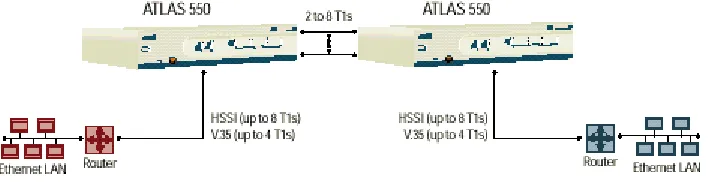
The NxT1 HSSI/V.35 Module is a member of the ATLAS 800 family of integrated access products that supports aggregating point-to-point T1 bandwidth (from 2 to 8 T1s) to a single logical datastream available on the high speed serial interface (HSSI) of the module. The HSSI interface is delivered using a standard 50-pin SCSI-II connector. Alternately, an optional adapter cable may be purchased (ADTRAN P/N 3125I081) to convert the HSSI interface to a single V.35 interface when needed. When using the NxT1 HSSI/V.35 Module in a V.35 configuration, up to 4 T1s of aggregated bandwidth is supported.
The inverse multiplexing capacity of the module accommodates eight T1s, and the module automatically adjusts the data rate to the HSSI/V.35 port upon loss of one or more T1 circuits. In addition to the HSSI port, four T1 ports are included on the module itself, while alternate T1 ports can be provided using other ATLAS 800 T1 or T3 modules. The NxT1 HSSI/V.35 Module combines with the ATLAS 800 Series base units (ATLAS 800PLUS and ATLAS 890 only) and other ATLAS modules to
support applications calling for increased point-to-point T1 bandwidth. Figure 1-1 shows a sample application of the NxT1 HSSI/V.35 Module.
Chapter 1. Introduction
When combined with the supported ATLAS 800 Series base units and, optionally, one or more Quad T1/PRI or T3 Modules, the NxT1 HSSI/V.35 Module can implement high-speed point-to-point connectivity), combining multiple T1 circuits into one logical channel on the HSSI/V.35 interface.
FUNCTIONAL DESCRIPTION
The NxT1 HSSI/V.35 Module installs in any available option slot in the supported ATLAS 800 Series units. You can view the status of the module itself, as well as the circuits to which it interfaces, from the front panel (ATLAS 800PLUS only). Additional status information is available via the
terminal menus, accessible through either a VT-100 terminal connected to the ATLAS 800 Series control port, or via a Telnet session established through the unit’s Ethernet port. Use the terminal menu to configure the NxT1 HSSI/V.35 Module and to download application software.
FEATURES
Features of the NxT1 HSSI/V.35 Module are listed here: • Standard SCSI-II 50-pin connector for HSSI interface
• Optional V.35 interface using adapter cable (ADTRAN P/N 3125I081) • Hot swappable
• Maximum distance 6,000 feet (DS-1), 655 feet (DSX-1) when using 24 gauge conductor
NXT1 HSSI/V.35 MODULE SPECIFICATIONS
Each T1 port of the NxT1 HSSI/V.35 Module conforms to the following specifications:
Line Rate
Chapter 1. Introduction
Tests
Line or payload loopback (Local and Remote)
Connectors
RJ-48C
The HSSI port of the NxT1 HSSI/V.35 Module conforms to the following specifications:
Line Rate
Up to 11.04 Mbps
T1 Links
1 to 8 Total T1 Links (in any combination of module T1 interfaces and other T1/T3 modules)
Connector
50 pin SCSI-II Female
The V.35 interface of the NxT1 HSSI/V.35 Module (using the optional adapter cable) conforms to the following specifications:
Line Rate
Up to 5.52 Mbps
T1 Links
1 to 4 Total T1 Links (in any combination of module T1 interfaces and other T1/T3 modules)
Connector
Chapter 1. Introduction
PHYSICAL DESCRIPTION
The NxT1 HSSI/V.35 Module (see Figure 1-2) plugs into any available option slot in the rear of the supported ATLAS 800 Series units.
Figure 1-2. NxT1 HSSI/V.35 Option Module
The label over each RJ-48C connector refers to the port on the NxT1 HSSI/V.35 Module.
T1-1 T1-2 T1-3 T1-4 HSSI/V.35
Chapter 2
Installation
BEFORE INSTALLING THE NXT1 HSSI/V.35 MODULE
Carefully unpack and inspect the NxT1 HSSI/V.35 Module for shipping damages. If you suspect damage occurred during shipping, file a claim immediately with the carrier and then contact ADTRAN Technical Support (see the front pages of this manual for pertinent information). If possible, keep the original shipping container for returning the
NxT1 HSSI/V.35 Module for repair or for verification of shipping damage.
Shipping Contents
The ADTRAN shipment includes the following items: • NxT1 HSSI/V.35 Module
• NxT1 HSSI/V.35 Module Quick Start Guide
• NxT1 HSSI/V.35 Module User Manual (insert into the ATLAS 800 Series User Manual)
• Four RJ-48 to RJ-48 cables (6 ft)
Chapter 2. Installation
INSTALLING THE NXT1 HSSI/V.35 MODULE
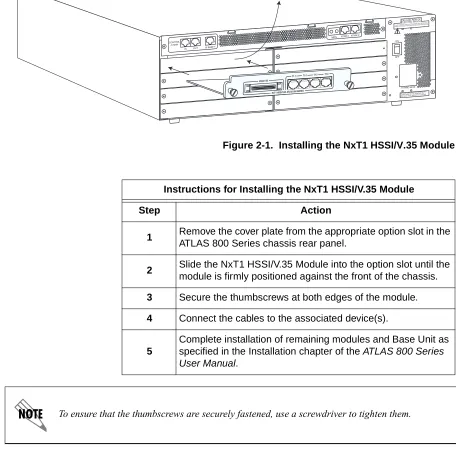
Figure 2-1 represents the actions required to properly install the NxT1 HSSI/V.35 Module, as described in the Step/Action table below.
Figure 2-1. Installing the NxT1 HSSI/V.35 Module T1-1 T1-2 T1-3 T1-4
HSSI/V.35
NxT1 HSSI/V.35 ATLAS 800 SERIES
Instructions for Installing the NxT1 HSSI/V.35 Module
Step Action
1 Remove the cover plate from the appropriate option slot in the
ATLAS 800 Series chassis rear panel.
2 Slide the NxT1 HSSI/V.35 Module into the option slot until the
module is firmly positioned against the front of the chassis.
3 Secure the thumbscrews at both edges of the module.
4 Connect the cables to the associated device(s).
5
Chapter 2. Installation
WIRING
Each module T1 port uses a single RJ-48C jack to connect to a T1 circuit. Table 2-1 shows the T1 pinout connection. The required wiring connection follows:
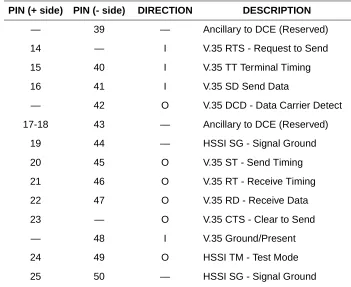
The HSSI/V.35 interface uses a single SCSI-II 50 pin connector with an op-tional V.35 adapter cable. Table 2-2 shows the SCSI-II connector pinout.
Connector Type (USOC) RJ-48C
Table 2-1. T1 Pinout Connection
PIN NAME DESCRIPTION
1 R1 RXDATA Receive data from the network ring
2 T1 RXDATA Receive data from the network tip
3, 6, 7, 8 Unused n/ a
4 R TXDATA Send data towards the network ring
5 T TXDATA Send data towards the network tip
Connector Type 50 pin SCSI-II Female
Table 2-2. HSSI/V.35 (SCSI-50) Pinout
PIN (+ side) PIN (- side) DIRECTION DESCRIPTION
1 26 — HSSI SG - Signal Ground
2 27 O HSSI RT - Receive Timing
3 28 O HSSI CA - DCE Available
4 29 O HSSI RD - Receive Data
5 30 O HSSI LC - Loopback Circuit C
6 31 O HSSI ST - Send Timing
7 32 — HSSI SG - Signal Ground
8 33 I HSSI TA - DTE Available
9 34 I HSSI TT - Terminal Timing
10 35 I HSSI LA - Loopback Circuit A
11 36 I HSSI SD - Send Data
12 37 I HSSI LB - Loopback Circuit B
Chapter 2. Installation
POWER UP AND INITIALIZATION
The NxT1 HSSI/V.35 Module requires no initialization input during the power-up sequence, as described in the ATLAS 800 Series User Manuals. Any previously configured setting for the NxT1 HSSI/V.35 Module is auto-matically restored upon power-up.
Failed Self-Test
If the NxT1 HSSI/V.35 Module fails self-test, a message will be displayed on the LCD and the terminal menu self-test log during power-up. See the PIN (+ side) PIN (- side) DIRECTION DESCRIPTION
— 39 — Ancillary to DCE (Reserved)
14 — I V.35 RTS - Request to Send
15 40 I V.35 TT Terminal Timing
16 41 I V.35 SD Send Data
— 42 O V.35 DCD - Data Carrier Detect
17-18 43 — Ancillary to DCE (Reserved)
19 44 — HSSI SG - Signal Ground
20 45 O V.35 ST - Send Timing
21 46 O V.35 RT - Receive Timing
22 47 O V.35 RD - Receive Data
23 — O V.35 CTS - Clear to Send
— 48 I V.35 Ground/Present
24 49 O HSSI TM - Test Mode
25 50 — HSSI SG - Signal Ground
Chapter 3
Operation
OVERVIEW
You can control and configure the NxT1 HSSI/V.35 Module from a variety of sources, including the following:
• The ATLAS 800 Series front panel, providing minimal configuration and status support
• The terminal menus, allowing detailed configuration, status, and diag-nostics
• SNMP, primarily for reporting alarm conditions and system status The remainder of this section describes the menu items presented when man-aging the NxT1 HSSI/V.35 Module via the terminal menu.
Access the terminal menu using either a VT-100 terminal attached to the ATLAS 800 Series Base Unit’s control port or a Telnet session established through the Base Unit’s Ethernet port. The ATLAS 800 Series User Manual provides detailed instructions on the operation of each of these management approaches.
TERMINAL MENU STRUCTURE
ATLAS 800 Series uses a hierarchical menu structure to provide access to all of its features. The top-most menu level leads to submenus which are grouped by functionality. All menu items display in the terminal window. To access the NxT1 HSSI/V.35 Module, activate the MODULES menu. The
fol-lowing sections describe the menu items for the MODULES menu.
To edit items in the terminal menu, you must have the appropriate password level. Each menu description in this section indicates the password level required for write and read access. See
“Access Passwords” in the appropriate ATLAS 800 Series User Manual for detailed
information on working with passwords. Security level 0users can view and edit every available
field. Security level 5 users can view any field but cannot edit.
Refer to the appropriate ATLAS 800 Series User Manual for detailed instructions on
Chapter 3. Operation
M
ODULES
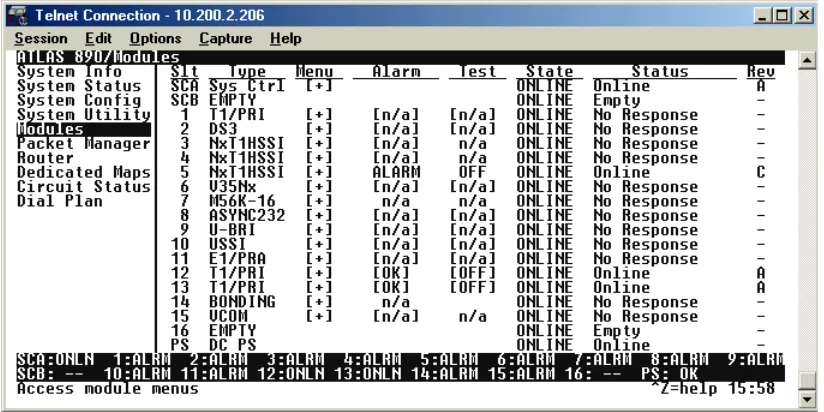
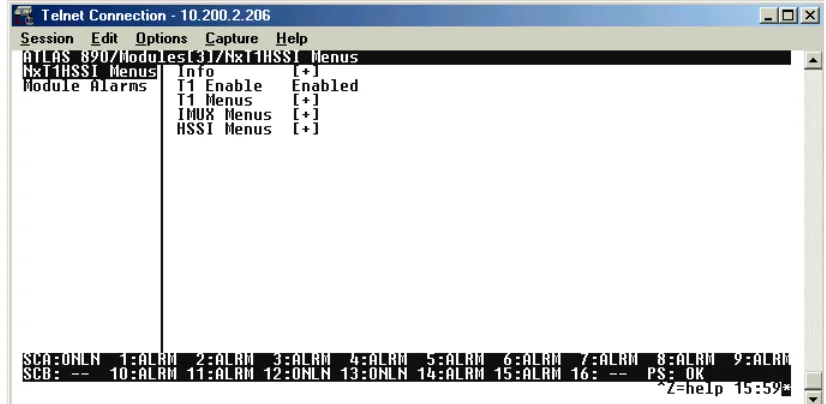
The ATLAS 800 Series system controller automatically detects the presence of the NxT1 HSSI/V.35 Module when it is installed in the system. To see the menus for the NxT1 HSSI/V.35 Module via the terminal menu, use the arrow keys to scroll to the Modules menu and press ENTER to access the modulechoices. Figure 3-1 shows the Modules menu (see also the menu tree in Table 3-1 on page 29). The following sections describe all the Modules’ menu options.
Chapter 3. Operation
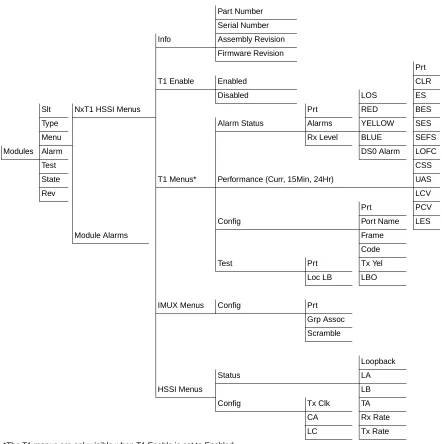
Table 3-1. Menu Tree for NxT1 HSSI/V.35 Modules Menu
S
LT Read security: 5Displays the number of the available slots in the ATLAS 800 Series chassis. Slot 0 refers to the ATLAS 800 Series unit. This field is read-only.
T
YPE Write security: 3; Read security: 5Displays the type of module actually installed in the slot or the type of mod-ule you plan to install in the slot. If an NxT1 HSSI/V.35 Modmod-ule is installed, the Type field automatically defaults to NXT1 HSSI (the NxT1 HSSI/V.35 Module). You can use this field to preconfigure a system before actually
Part Number
Serial Number
Info Assembly Revision
Firmware Revision
Prt
T1 Enable Enabled CLR
Disabled LOS ES
Slt NxT1 HSSI Menus Prt RED BES
Type Alarm Status Alarms YELLOW SES
Menu Rx Level BLUE SEFS
Modules Alarm DS0 Alarm LOFC
Test CSS
State T1 Menus* Performance (Curr, 15Min, 24Hr) UAS
Rev LCV
Prt PCV
Config Port Name LES
Module Alarms Frame
Code
Test Prt Tx Yel
Loc LB LBO
IMUX Menus Config Prt
Grp Assoc
Scramble
Loopback
Status LA
HSSI Menus LB
Config Tx Clk TA
CA Rx Rate
LC Tx Rate
Chapter 3. Operation
installing modules by simply specifying the module that you want to install in each slot.
M
ENU Displays additional status and configuration menus for the selected module. (To access the submenus for this item, use the arrow keys to scroll to the MENU column for the module you want to edit, and pressEnter.) For detailed information on each submenu item, see the section
Modules/Menu on page 31.
A
LARM Read security: 5Displays an alarm condition on the NxT1 HSSI/V.35 Module. Press Enter in
this field to activate the menu.
T
EST Read security: 5Displays test name if the NxT1 HSSI/V.35 Module is executing a test. Press
Enter in this field to activate the menu.
S
TATE Displays module status as either ONLINE of OFFLINE. Even though a moduleis physically installed, it must be marked as online for it to be considered an available resource. This field allows an installed module to be marked as of-fline, which may be useful in system troubleshooting. If you choose OFFLINE,
the module will not be in alarm condition, but will display OFFLINE.
S
TATUS This read-only field provides status information on the NxT1 HSSI/V.35TYPE automatically displays the name of an installed module. If you want to change this field to
a different type of module, you must set TYPE to EMPTY before selecting the other module.
Once a module is installed, STATE must be set to ONLINE in order for the ATLAS 800 Series unit
Chapter 3. Operation
EMPTY The system controller has not detected the presence of a module in the slot,
nor has a module been manually enabled for this option slot.
OFFLINE The module is installed, but has been taken offline by a user. The module is
still responding to controller polls.
OFFLINE/NO
RESPONSE
The module is installed, but has been taken offline by a user. The module is not responding to polls.
R
EV This read-only field displays the hardware revision of the NxT1 HSSI/V.35 Module.M
ODULES
/M
ENU
Figure 3-2 shows the menu options available for the NxT1 HSSI/V.35 Mod-ule (see also the menu tree in Table 3-1 on page 29). The following sections describe these options.Chapter 3. Operation
N
XT1 HSSI
O
PTIONM
ODULEThe NxT1 HSSI/V.35 Module system controller automatically detects the presence of the NxT1 HSSI Option Module when it is installed in the system (listed as NXT1 HSSI). To see the menus for the NxT1 HSSI Option Module via the terminal menu, use the arrow keys to scroll to the MODULES menu and press <Enter> to access the module choices. V.35 is available when us-ing the optional adapter cable (ADTRAN P/N 3125I081). Some of the fol-lowing menus do not apply when configured for V.35 mode.
INFO Read security: 5
Provides information about the module part number, serial number and as-sembly revision.
PART NUMBER
Read security: 5
Displays the part number of the module.
SERIAL NUMBER
Read security: 5
Displays the serial number of the module.
ASSEMBLY REVISION
Read security: 5
Displays the assembly revision.
FIRMWARE REVISION
Read security: 5
Displays the current firmware revision of the NxT1 HSSI Option Module.
T1 ENABLE Write Security: 3; Read Security: 5
Configures the NxT1 HSSI Option Module to activate the module’s four built-inT1 interfaces. When configuring the module to use more than four T1s from other installed T1/T3 modules, this field should be set to DISABLED.
The NxT1 HSSI/V.35 Module’s four built-in T1 interfaces are activated collectively as a bundle.
Chapter 3. Operation
T1 MENUS Read Security: 5
Provides information about the four T1 interfaces located on the NxT1 HSSI Option Module. This menu is only visible when T1 ENABLE is set to
ENABLED.
ALARMS
Read security: 5
Displays an alarm condition on the ATLAS 550 unit. Press <Enter> to access this menu item.
LOS
Indicates a loss of signal detected on port interface.
RED
Indicates inability to frame data received on the port. Alternately referred to as Out of Frame (OOF).
YELLOW
Receiving remote alarm (RAI) on port.
BLUE
Receiving unframed all ones from the port Alarm Indicator Signal (AIS).
DS0 ALARM
Displays per-DS0 alarm status; that is, at least one DS0 channel is in alarm if an asterisk (*) appears. These alarms usually indicate the failure to receive the protocol that has been configured for the DS0.
RX LEVEL
(Receive Level) Indicates the strength of the signal (in dB) received on the port.
PERFORMANCE
Write security: 3; Read security: 5
The performance fields (either current, 15-minute total, or 24-hour total) provide status on key performance measures as specified in ANSI T1.403 and AT&T TR54016 for the T1/PRI port. All fields except CLR are read-only. The monitored parameters include the following:
PRT
Displays the port number
CLR
Clears performance information for the selected port
ES
Errored Second (ES) is a second with one or more error events OR one or more Out Of Frame events OR one or more Controlled Slips
BES
Chapter 3. Operation
SES
Severely Errored Second (SES) is a second with 320 or more error events OR one or more Out Of Frame events
SEFS
Severely Errored Frame Second is a second that contains four con-secutive errored framing patterns.
LOFC
Loss of Frame Count is a count of seconds in which a valid framing pattern could not be obtained.
CSS
Controlled Slip Second
UAS
Unavailable Second
LCV
Line Code Violation
PCV
Path Code Violation
LES
Line Errored Second
CONFIGURATION
Write security: 3; Read security: 5
All of the following configurable parameters apply to whether the port is connected to a Primary Rate ISDN circuit or a channelized T1 circuit.
PRT
Displays the port number.
PORT NAME
Accepts any alpha-numeric name up to 16 characters long, to uniquely identify each port on the NxT1 HSSI/V.35 Module.
FRAME
Write security: 2; Read security: 5
Chapter 3. Operation
TX PRM
Controls the sending of performance report messaging (PRM) data on the facility data link (FDL). The PRM data continues to be col-lected even if XMIT PRM is turned off (possible only with ESF for-mat). Choose either ON or OFF.
LBO
Write security: 2; Read security: 5
Selects the Line Build Out (LBO) for the network interface. The LBO setting determines the amplitude of the transmitted signal. For short haul (intra-building) applications, choose from the ft options. For long haul (out of plant) applications, choose from the dB options. When you select this item, a list of choices displays. Select the appropriate option.
TEST
Write security: 3; Read security: 5
These options initiate different types of tests and display test results.
PRT
Displays the port number.
LOC LB
Write security: 4; Read security: 5
Causes loopback on near-end (local) port (see Figure 3-3). The fol-lowing options are available:
Figure 3-3. T1 Loopback Test Diagram
IMUX MENUS Read Security: 5
Contains the inverse muxing configuration parameters for the NxT1 HSSI Option Module.
LINE Metallic loopback
PAYLD Payload loopback - framing and
clocking are regenerated
T1 Port
DS1
NI CSU
Chapter 3. Operation
CONFIG
Read Security: 5; Write Security: 5
Contains parameters to include T1 data streams to the HSSI interface.
PRT
Displays the port number for the T1s mapped to the NxT1 HSSI interface. Ports 1 through 4 are the T1 interfaces located on the NxT1 HSSI Option Module. Ports 5 through 8 are T1s mapped to the NxT1 HSSI Option Module in the Dedicated Maps.
GROUP ASSOCIATION
Associates T1s (either mapped to this card and/or the on-board T1s) with the HSSI interface data stream. To add the T1 to the data stream, select the GROUP1 option.
SCRAMBLE
Enabling the SCRAMBLE option configures the NxT1 HSSI Module to prevent ones density violations when transmitting ADTRAN IMUX headers on a T1 circuit with AMI line coding.
HSSI MENUS Read Security: 5
Provides status, configuration, and testing parameters for the 50-pin SCSI-II HSSI interface.
STATUS
Read Security: 5
Displays the current loopback status of the HSSI interface
LOOPBACK
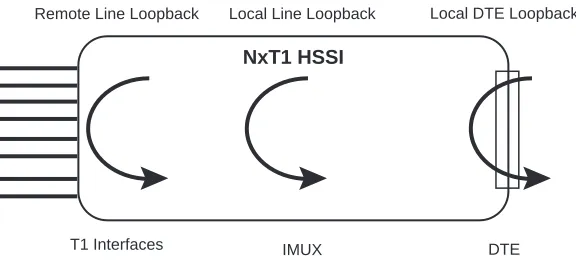
Displays the current loopback status of the HSSI interface. The fol-lowing loopback options are possible (see Figure 3-4 on page 37):
LOCAL DTE LOOPBACK
A local DTE loopback occurs at the DTE port of the DCE, and is used to test the link between the DTE and DCE (NxT1HSSI
mod-Use extreme caution when disabling the SCRAMBLE option. ADTRAN recommends
Chapter 3. Operation
Figure 3-4. HSSI Interface Loopback Test Diagram
LA AND LB
(Not applicable in V.35 mode.)
Displays the status of the loopback circuit A and B signals. LA and LB are asserted by the DTE to enable a loopback on the DCE and its associated data communications channel. Four possible loop-back options are available:
TA
Displays the status of the data Terminal equipment Available signal. TA will be asserted by the DTE (independently of CA) when the DTE is prepared to both send and receive data to and from the DCE. Valid data transmission should not commence until CA has also been asserted by the DCE. If the data communications channel requires a keep alive data pattern when the DTE is disconnected, then the DCE shall supply this pattern while TA is deasserted.
When using the NxT1 HSSI Module (1200346L2 only) in V.35 mode, TA displays the status of the Request to Send (RTS) signal. When RTS is active in a V.35 configuration, Clear to Send (CTS) is also active.
NxT1 HSSI
IMUX
T1 Interfaces DTE
Local Line Loopback
Remote Line Loopback Local DTE Loopback
LA LB Loopback
Off Off No Loopback Active
Chapter 3. Operation
RX RATE AND TX RATE
Displays the current average receive and transmit data rate on the HSSI interface.
CONFIG
Read Security: 5
Provides configuration parameters for the HSSI interface including data clocking.
TX CLOCK
Controls the clock used by the NxT1 HSSI/V.35 Module to accept the transmit (TX) data from the DTE. This is usually set to Normal. If the interface cable is long, causing a phase shift in the data, the clock can be set to Inverted. This switches the phase of the clock, which compensates for a long cable.
CA
(Not applicable in V.35 mode.)
Asserts the data Communications equipment Available signal from the DCE. CA will be asserted by the DCE, independently of TA, when the DCE is prepared to both send and receive data to and from the DTE. This indicates that the DCE has obtained a valid data communications channel. Data transmission should not commence until TA has also been asserted by the DTE.
LC
(Not applicable in V.35 mode.)
Enables the Loopback Circuit C signal from the DCE. LC is an optional loopback request signal from the DCE to the DTE, requesting the DTE provide a loopback path to the DCE.
Chapter 3. Operation
ATLAS FEATURES USED WITH NXT1 HSSI/V.35 MODULE OPTIONS
Two additional ATLAS 800 Series menu items can operate in conjunction with the NxT1 HSSI/V.35 Module: FACTORY RESTOREand RUN SELFTEST.
F
ACTORY
R
ESTORE
You can restore the factory default settings for an NxT1 HSSI/V.35 Module by pressing F either while the cursor is over the SLT number (this action
re-stores the factory settings for all of the module options) or while the cursor is over an individual field (this action restores factory settings only for the particular field).
R
UN
S
ELFTEST
RUN SELFTEST, a submenu of the ATLAS 800 Series main menu item TEST,executes both the NxT1 HSSI/V.35 Module internal test and the ATLAS 800 Series internal test. For additional information on RUN SELFTEST, see the
AT-LAS 800 Series User Manual.
When RUN SELFTESTdisplays, place the cursor on it and press Enter to
Appendix A
Dedicated Maps Configuration
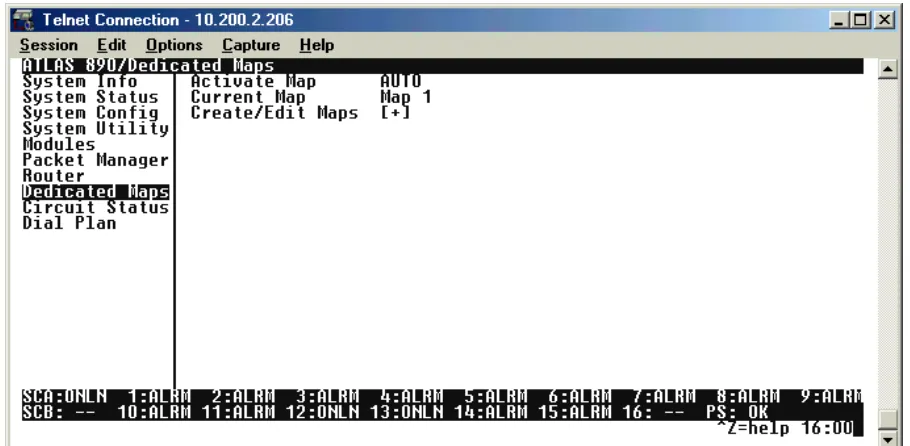
The DEDICATED MAPS menu assigns dedicated connections between any two ports in the ATLAS 800 Series Base Unit. This section describes the DEDICATED MAPS menu items (see Figure A-1). These options are module-dependent; that is, the menu items available depend on the module selected.
Figure A-1. Dedicated Maps Menu
A
CTIVATEM
AP Write security:3; Read security:5Activates a dedicated map—automatically or manually. You can have up to five different dedicated maps, each with an optionally specified name. The configuration choices are:
AUTO
Automatically activates a particular dedicated map at the time and day spec-ified in the ACTIVATE TIME field.
MAPS 1 THROUGH 5
Appendix A. Dedicated Maps Configuration
C
URRENTM
AP Read security:5Displays the name of the currently active dedicated map (read only).
C
REATE/E
DITM
APS Write security:3; Read security:5Creates new maps and defines settings, as well as edits existing maps. To add a new map, position the cursor in the index column and press <I>. NxT1 HSSI/V.35 Module automatically names the maps in the sequence in which they are created. You can change the names with MAP NAME.
#
Displays the index number of the available maps.
MAP NAME
Write security: 3; Read security: 5
Displays the name of the dedicated map. The name can contain up to 57 alpha-numeric characters, including spaces and special characters. To edit the name, press <Enter> and type in the new name.
SORT TO/FROM
Write security: 3; Read security: 5
Specifies sort order based on the end points set in CONNECTS/FROM CON -FIGandCONNECTS/TOCONFIG. You can also turn OFF this option. The sort feature is helpful when you are attempting to find a particular connec-tion in a large connecconnec-tion list.
CONNECTS
Enters the dedicated map connections. Press <Enter> to activate the sub-menus.
Some of the options available in this submenu change depending on the type of modules
selected in the FROM or TO fields. For more information on these submenus, refer to the
individual module discussions in this section.
Appendix A. Dedicated Maps Configuration
TO SLOT
Write security:3; Read security:5
Specifies the slot to use for the second end of a connection. Select this option, and a list of all of the slots and the modules installed in the slots displays. Pick the appropriate slot and press <Enter>.
PORT
Write security:3; Read security:5
Specifies the port to use for the second end of a connection. When you select this option, a list of ports and module types appears. Select the appropriate port and module type, and press <Enter>.
FROM CONFIG
Write security:3; Read security:5
Specifies the configuration for the FROM connection. The selec-tions displayed in this field are based on the type of module selected in the FROMSLT option. For detailed information on sub-menus for a particular module type, please refer to the dedicated maps menu discussion for the appropriate network, option, or resource module.
TO CONFIG
Write security:3; Read security:5
Specifies the configuration for the TOconnection. The selections displayed in this field are based on the type of module selected in the TOSLT option. For detailed information on submenus for a par-ticular module type, please refer to the dedicated maps menu dis-cussion for the appropriate network, option, or resource module.
SIG
Write security:3; Read security:5
Specifies whether the NxT1 HSSI/V.35 Module uses active Robbed-Bit Signaling (RBS) on the connection. Selecting ON allows the NxT1 HSSI/V.35 Module to preserve signaling bits between the two endpoints of the connection. Selecting OFF ignores the signaling bits of the connection. This selection is auto-matically set to OFF when RBS does not apply. For example, a T1-to-Nx connection is set to OFF.
ACTIVATE TIME
Write security:3; Read security: 5
Sets the time when the map becomes active if you have selected AUTO in the ACTIVATE MAP field. Enter this time in hh:mm:ss 24-hour format.
ENBL DAY
Security level: 3; Read security: 5
Appendix A. Dedicated Maps Configuration
N
X
T1 HSSI
O
PTION
M
ODULE
C
ONNECTS Write Security: 3; Read Security: 5Enters the dedicated map connections. Press <Enter> to activate the sub-menus.
TO/FROM CONFIG
Write Security: 3; Read Security: 5
Specifies the configuration for the To/From connection. The following selection applies to the NxT1 HSSI Option Module when connected to a port on a T1 Module. This is the only valid application for the NxT1 HSSI Option Module.
DS0 SELECTION
Defines DS0s for the T1 port. Use this field to define the DS0s for this connection.
DS0S AVAILABLE
Indicates which DS0s of the T1 are assigned. DS0 assignment is based on the following items:
DIGIT 0-9
This DS0 is available. The digit that displays in this field repre-sents the last digit of the DS0 number.
The NxT1 HSSI/V35 Module supports connects from the module’s four built-in T1 ports as well as
other installed T1/T3 modules. Enabling the built-in ports by setting the T1 ENABLE field to
ENABLED(see T1 ENABLE on page 32) allows only four T1s from other T1/T3 modules to be
mapped to the HSSI interface in addition to the module’s four in ports. When the module’s
built-in T1 ports are active, only ports 5-8 will be displayed built-in the available SLOT/PEP field.
Appendix A. Dedicated Maps Configuration
S
This DS0 is used in the switched DIAL PLAN and conflicts with this connection.
N
This DS0 is already used in this DEDICATED MAP.
N
This DS0 is already used in this DEDICATED MAP and conflicts with this connection.
T1 TROUBLE CODE SERVICE
Sets known values in the signaling bits and the data field for outgo-ing DS0s which are cross-connected to a T1 port experiencoutgo-ing alarms.
The trunk conditioning process consists of a 2.5 second transmis-sion (indicating call termination), followed by a continuous trans-mission signaling the final condition as chosen by the user. This selection is only valid for T1 ports having RBS set to ON.
This option defines to the NxT1 HSSI/V.35 Module the type of sig-naling being used on the trunk: E&M, LS/GS Network or User, SW56, or Custom.
T1 TROUBLE CODE VALUE
Index
A
Accessing the unit . . . 27
Alarms Operation . . . 26
Application . . . 19
D
Dedicated Maps NxT1 HSSI Module . . . 44Overview. . . 41
F
Factory Restore . . . 39Features . . . 20
Functional Description. . . 20
H
HSSI Interface Pinout . . . 25HSSI Port Connector . . . 21
Line Rate . . . 21
T1 Bandwidth. . . 21
I
Installation Diagram . . . 24Steps. . . 24
Installing the Module . . . 24
L
Loopback HSSI Interface Diagram . . . 37T1 Diagram . . . 35
M
Menu Modules . . . 28NxT1 HSSI Modules . . . 31
Menu Tree . . . 29
P
Physical Description . . . 22R
RJ-48C Pinout. . . 25S
SCSI-II Connector Pinout. . . 25Self-Test Failed . . . 26
Performing . . . 39
Shipping Contents. . . 23
T
T1 Interface Pinout. . . 25T1 Port Alarms . . . 20
Connectors . . . 21
Framing . . . 20
Line Coding . . . 20
Line Rate . . . 20
Tests . . . 21
Terminal Menu Structure . . . 27
V
V.35 Interface Pinout. . . 25V.35 Port Connector . . . 21
Line Rate . . . 21