Development and Validation of a Virtual Worklog as a Collaboration Tool for the
Kelluwen Learning Community
Katherine Inalef
Universidad Austral de Chile Valdivia, Chile [email protected]Julio Guerra
Universidad Austral de Chile Valdivia, Chile [email protected]Eliana Scheihing
Universidad Austral de Chile Valdivia, Chile [email protected]Abstract— Considering the requirements of the Kelluwen
learning community and the didactical designs that are being developed, shared and enforced, plus a review of collaborative learning platforms, implementing a Virtual Worklog module became a need for the Kelluwen community’s management platform. The purpose of this Virtual Worklog is to be a virtual space where teachers and students interact which each other. The Virtual Worklog also registers such interactions on a permanent basis to support feedback and student assessment. This work introduces the development and validation in a real education context of two interactions of the Virtual Worklog, a software tool based on microblogging that promotes and registers the interactions, both inside each class and between twin classes within the learning community.
Microblogging, Virtual Worklog, social network, collaborative learning, education
I. INTRODUCTION
Kelluwen is a community of students, teachers and researchers focused on building, using and sharing collaborative didactic designs, with activities based on Web 2.0 tools. The Kelluwen Project aims at improving socio-communication skills in young students between grades seven and ten (between 13 to 16 years old) in rural and urban public schools in southern Chile. The main opportunities harnessed by the project are, first, the enthusiasm of young people as Web tools users; and second, the growing infrastructure, connectivity and technology access available in schools [10]. The Kelluwen Project considers the creation of a virtual learning community that links teachers, students and researchers in the use, development, evaluation, execution and sharing of collaborative didactical designs. It also aims at facilitating the adoption by teachers of social Web technologies (tools and services) [10]. In this regard, the scope of the didactic design concept needs to be defined: didactic design is a plan that organizes the learning process in a global and comprehensive manner covering the four dimensions of a didactic model (teacher, student, content and context). Since a didactic design is a type of instructional design, it considers the following phases: analysis, design, development, implementation and evaluation. The collaborative didactic designs created by Kelluwen involve classrooms of different schools working together in selected
learning activities. Two classes that work in this manner are called "twin classes." This is a challenging working method because it requires communication tools to keep the classes in contact. Furthermore, the activities included in the didactic design are defined to be implemented face to face in the classroom and, therefore, unlike the activities performed in the virtual environment, much of the interaction and work is not registered in any way. The information concerning classroom interactions is valuable for analysis and evaluation purposes.
In a previous work [7], a systematic review of articles related to collaborative learning platforms was conducted. One of the relevant findings of this review was that tools for collaborative learning should provide support for registering and reporting group work. This finding was taken as a requirement for the development of the Virtual Worklog module. A further survey about interaction registration tools allowed the identification of microblogging as a promising approach for this purpose. Microblogging is a Web2.0 service defined as a new form of blogging that allows users to publish online short text messages and sometimes images [2]. In the past few years, microblogging has been widely used in education [2, 6, 11], in didactical activities such as collaborative writing, opinion expression, asynchronous communication within a class, etc. Examples of microblogging services are Twitter, Tumblr, Yammer, Identi.ca, Edmodo and Cirip.ro. The last two were specifically developed for education purposes. The asynchronous communication, collaboration and discussion channels provided by microblogging were the main advantages mentioned in experiences using microblogging in different educational settings [1,2,3,4,6,8,9,11].
The aim of this paper is to describe the development of the Virtual Worklog software module and its validation in real school contexts. We included two interactions of the software process, each one including results of actual applications. Section 2 describes the characteristics of the learning experiences’ management system, known as the Kelluwen Platform. This platform includes the Virtual Worklog tool, the first version of which is described in detail in Section 3. Section 4 presents the second version of the Virtual Worklog module, including the outcomes of its application. Finally, Section 5 presents conclusions and future improvement challenges.
II. THE KELLUWEN PLATFORM FOR THE MANAGEMENT OF LEARNING EXPERIENCES
A. Didactic Experiences
When a didactic design, as described in the introduction, is applied in a specific class of an educational institution, we say that a didactic experience has taken place. Each didactic experience has associated data corresponding to the class itself: teacher, students, student groups, interactions, learning evidences, etc. The relationship of twin classes is established between didactic experiences from the same didactic design.
B. General Features
The Kelluwen platform is structured in several modules allowing the learning community members to manage the didactic experiences. Each module has evolved in time following the requirements of the collaborative learning community. The main module, called the Advance Management Module, provides the features for the management of the learning experiences, enabling teachers and students to visualize in detail the stages and activities contained in the didactic design. The teacher is allowed to change the state of the activities setting them as started and ended. Also within this module, the teacher can make comments concerning the experiences in the development of each activity and look at the comments of other teachers who are performing the same activity (see Figure 1). The platform was coded in PHP and JavaScript. We used the jQuery framework to improve the deployment of Web pages and user interactions. The latest version of the platform is available in http://www.kelluwen.cl/app.
Figure 1. Figure1. Kelluwen Platform. The Advance Management (Gestión de Avance) tab is shown.
III. WORKLOG MODULE, AN EARLY VERSION
The platform described above addresses the need to manage the implementation of didactic experiences. As mentioned above, a tool is required to register the interactions within the classroom and to facilitate communications between twin classes. The interactions – recorded on a permanent basis– are very useful for subsequent reviews and will thus be a great input for the
assessment process undertaken by students in the development of educational activities. Hence the need to develop a tool that is easy to use and which provides message filtering and grouping features by users, groups and classes. Group support must also be provided, i.e., to identify to which group the students belong and to serve as a means of communication among groups.
When it comes to developing a tool that meets the demands of the community, an incremental and continuous development process is required where the user can have a quick access to the tools. This generates feedback that allows for valuable functional improvements. A spiral development methodology was used, which provides feedback for defining requirements or improvements in each interaction.
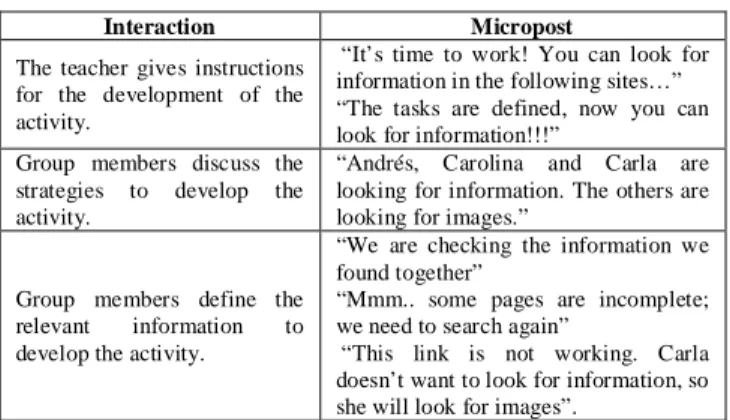
Considering the microblogging features summarized in the Introduction, we decided to develop the Virtual Worklog module based on a microblogging service. Its main functionality was to promote the explicit recording, by students and teachers, of how the classroom works by means of short messages or microposts (see Table 1).
TABLE I. INTERACTION EXAMPLES WITHIN A CLASSROOM.
Interaction Micropost
The teacher gives instructions for the development of the activity.
“It’s time to work! You can look for information in the following sites…” “The tasks are defined, now you can look for information!!!”
Group members discuss the strategies to develop the activity.
“Andrés, Carolina and Carla are looking for information. The others are looking for images.”
Group members define the relevant information to develop the activity.
“We are checking the information we found together”
“Mmm.. some pages are incomplete; we need to search again”
“This link is not working. Carla doesn’t want to look for information, so she will look for images”.
In the development of the activity, students also work with other software tools including desktop tools (text or image editors) and on-line tools (YouTube, Google, Blogger, etc.) Considering that recording interactions automatically is not easy, particularly in the case of desktop tools, each student needs to describe his or her activity by publishing a micropost. This way, the teacher can see the student’s process in more detail (see Table 2).
TABLE II. INTERACTION EXAMPLES CONCERNING OTHER SOFTWARE _TOOLS
Interaction Micropost
Opening the browser
“I am looking for information on the Internet ”
Searching for information in Google
Image selection “The images are ready, but it was a bit hard…”
Opening the text editor. “Andrea is writing; I’m looking for images because it’s fun”
A. Requirements, Analysis and Design
The main requirements (user role in parentheses) for the Virtual Worklog were:
• Publishing microposts (teachers and students.) • Reading the microposts published by those who took
part in the experience (teachers and students.) • Publishing microposts that contain links to tasks
completed by students within a learning activity (students.)
• Filtering the messages allowing users to review them by group, individual, class and twin classes (teachers and students.)
Given these requirements, the idea to develop a Virtual Worklog emerged, where participants of a Didactic Experience (teachers, students and project staff) could record short messages (microposts) of what goes on in the classroom. The Virtual Worklog must be shared and visible to every twin class working in the same didactic design, promoting communication among all participants.
After analyzing all the requirements, the conclusion was reached that this type of functionality is offered by Twitter (www.twitter.com), based on the fact that it motivates users to write about what they are doing. Twitter hashtags could be used to mark messages with a particular didactic experience, group and twin classes.
B. Twitter and its API
Twitter is a Web application that works as a network of real-time information. Such information is provided by millions of users around the world. Twitter users post information through microblogging entries of no more than 140 characters. By definition, an API (Application Programming Interface) is a set of functions and procedures provided through a library to be used by other software applications. The Twitter API allows access to the data and functionalities offered by Twitter. This means that from our own Website, we can create new applications based on the features and information offered by Twitter.
A hashtag is a word (character sequence) used to label a message and it is prefixed with a hash symbol (#). Hashtags in Twitter are used to group tweets (messages) that belong to the same subject, thus facilitating the search process. If we write a message that is related to Chile, we use the hashtag #chile. So if we want to find messages regarding Chile, we can do a search through the hashtag #chile. Different hashtags (codes) were defined for the Virtual Worklog in order to group messages from a didactic experience, a twin experience, group, products, etc. These hashtags should be added automatically to the messages posted by users. C. Implementation
To use the Virtual Worklog the user should have a Twitter user account. Users login to Twitter from the Kelluwen platform (see Figure 2). Because Twitter's
SEARCH API only provides search results of messages less than one week old, a module was created for users to visualize all the Worklog activity. All the messages posted on Twitter were stored in our own database.
Figure 2. Worklog (Bitácora) login.
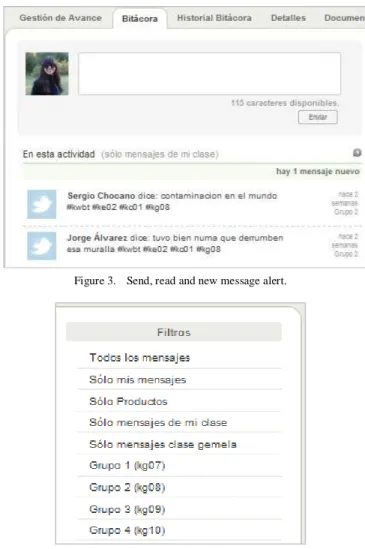
The Worklog has four main functions: posting messages, listing messages, notifying new messages (see Figure 3) and filtering available messages (see Figure 4).
Figure 3. Send, read and new message alert.
Messages posted are shown with the date and the name of the publisher. Additionally, a list with all the participants is shown, including those in twin classes (see Figure 5).
Figure 5. Complete Worklog Module
D. Validation of the First Version
The Virtual Worklog was used by Kelluwen community members in the development of learning experiences during an initial pilot conducted in May and June 2010. The pilot involved 253 students in nine classrooms and the implementation of two didactic designs in the subsectors of Spanish Language and Social Sciences and History in grade nine (see Figure 5). In this application, 3019 microposts were recorded, with a mean of 53 short messages by group.
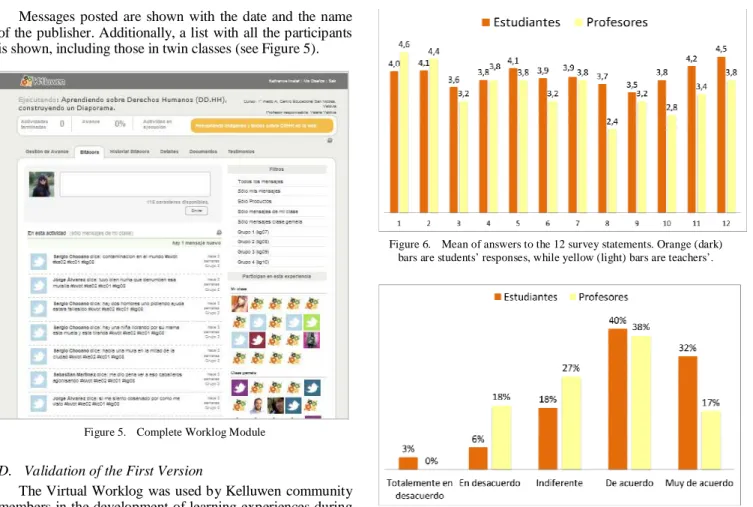
The findings reveal that the Worklog was widely accepted by students and teachers, even by those who were not initially Twitter users. According to reports from teachers, using the Virtual Worklog as a tool for the registration process required additional guidance in some cases. Validation was done through a satisfaction survey of usability, which included 12 statements of satisfaction written as positive statements. The degree of satisfaction was measured with a scale of 1 to 5, with 1 being the lowest satisfaction and 5 the highest satisfaction. The survey was applied to 82 students and five teachers. As evidenced by the outcomes, students and teachers rated the Virtual Worklog tool with a 3.9 mean degree of satisfaction (of a maximum of 5). The best evaluated aspect was the identification of messages in my class –with an average of 4.47– and the worst was the use of filters, with an average of 3.4. The analysis of the responses reveals no particularly critical aspect (see Figure 6), based on which a summary of responses to the survey was made (see Figure 7).
Figure 6. Mean of answers to the 12 survey statements. Orange (dark) bars are students’ responses, while yellow (light) bars are teachers’.
Figure 7. Summary of positive answers to statements relative to the usability of the Worklog
Note that the first pilot took place in a controlled environment, where teachers were supported by the research team in the creation of groups, the allocation of students to groups and the development of the activities in the classroom. Particularly at this stage and due to connectivity issues, the messages were posted by only some group members, since there were not enough computers for all the students.
IV. WORKLOGMODULE,ASECONDVERSION
A. Requirements and Analysis
During the implementation of the Virtual Worklog, the initially proposed model evidenced certain problems. The worst issue was an unstable Twitter service, with occasional downtimes (offline) which prevented some messages from being included in the search databases (some messages were never shown in the search results, although they had the appropriate hashtags). For the particular purpose of the tool developed this is a serious problem since all messages must appear and the Virtual Worklog should always be available to send messages. Also worth of mention is the fact that Twitter appears to be subject to frequent changes due to ongoing improvements. Hence, its availability cannot be
trusted. Due to this issue, the main requirement for the second interaction was a total decoupling from Twitter, keeping only its proposed model, i.e., the tag criteria to group messages with features being replicated locally. An additional requirement derived from the first pilot was the need to improve the interaction possibilities offered by the Virtual Worklog, particularly the chance to answer to and rate messages. The main requirements for the second interaction were:
• Decoupling from Twitter.
• Option to answer to a posted message • Option to rate ("like") a posted message • Improved display and filters.
B. Design and Implementation
To decouple from Twitter, their model was replicated locally. Changes were made to the database, keeping the labelling mechanism of posts to search.
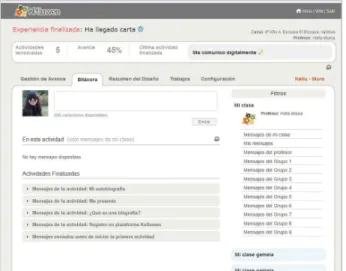
An answer button was implemented to comment on or respond to a posted message. The answer post was listed under the main message ordered by posting date, so that the conversation thread could be followed. The rating of messages was implemented through a "like" button and a display of users who liked the message. Display improvements included totally separating the deployment of messages from the experience to which the user belongs and the messages from his or her twin classes. Twin classes’ messages were also separated between them; now, the messages from each twin class can be seen separately. Another important display improvement was the deployment of history messages in the same Virtual Worklog tab. History messages are displayed below the messages of the current activity and are grouped according to the activity in which they were published. Unlike the first version of the Virtual Worklog, history publications can also be filtered (see Figure 8).
Figure 8. History messages inside the Virtual Worklog
Figure 9 shows the Virtual Worklog with the new functionalities. The next figures show every functionality in detail.
Figure 9. New functionalities of the Virtual Worklog
Figure 10 shows the “answer” and “like” functionalities. These features are available only for messages of the activity in progress. Message history only shows the answers or likes.
Figure 10. Functionality to answer and "like"
The number of users who marked "like" appears in the same message. Clicking on the number opens a popup window with details about who selected the option, (see Figure 11).
C. Results of the Second Version
The second version of the Virtual Worklog was launched in the third pilot of the Kelluwen project. This pilot involved 33 teachers and 1115 students in 37 different didactic experiences. Not all the experiences in this group reached a 100% progress in the development of didactic design (see Figure 12), but they were still included in the results.
Figure 12. Number of experiences grouped by level of progress achieved
Unlike the first pilot, the classrooms that participated in the third pilot had less supervision and were not in a controlled environment. In some cases, the groups were not created in the platform or students were not assigned to them. During the experiences, the Worklog recorded a total of 5563 posts, 3203 responses and 2152 "likes". The class with the highest participation rate in the Worklog posted 405 messages, while the class with less activity sent 28 posts. Figure 13 shows a graph of experiences grouped according to the number of messages posted in the Worklog.
Figure 13. Number of experiences grouped by total messages published in the Worklog
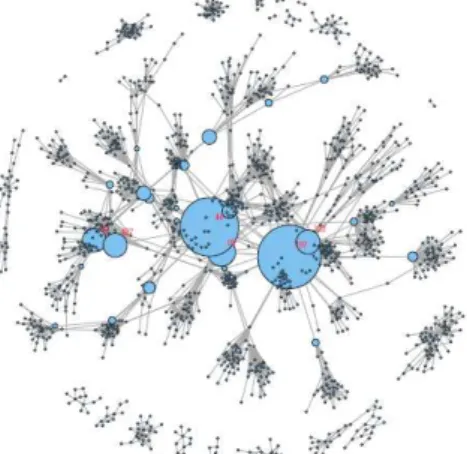
A Social Network Analysis was also conducted based on the interactions (answers or ratings) in the Worklog. A total of 5355 interactions were registered in the network, originated from 1400 users. For the resulting graph we calculated two classical centrality measures (for more details, see [5]): eigenvector centrality, which measures the importance of a vertex in the graph, and betweenness which measures the extent to which a vertex lies between others. We selected the users with the six highest scores of each measure to be identified. For the eigenvector centrality
measure, the main actors were five students with their teacher corresponding to the class with the highest participation in the Worklog. Figure 14 shows the graph where the size of vertex is indexed by the betweenness centrality measure and the layout is calculated with the algorithm proposed by [12]. Here, the six main actors were three teachers and three researchers, who worked promoting the Kelluwen network. The figure also shows that the graph structure is characterized by local interactions which represent the activity of each class during didactic experiences, and less frequent interactions between classes, where teachers and researchers appear as key actors.
Figure 14. Worklog Interactions with nodes indexed by betweenness measure.
V. CONCLUSIONSANDWORKINPROGRESS
The issues raised at the beginning for the Worklog were to provide support in interactions and to record group work, in addition to acting as a feedback mechanism for students and teachers involved in the didactical designs, and for the research team. Using the Worklog in an actual learning experience has proven to be a useful tool in recording interactions and as feedback. Its use also revealed likely improvements, mainly linked to facilitating interactions. A challenge for the second version of the Worklog was to improve interactions within and between twin classes. This was successfully achieved through the implementation of the answers and "like" options. By analyzing the interactions performed in the Virtual Worklog, we highlight that interactions occur more frequently within a class than between classes. This problem is due to the fact that only messages posted in the ongoing activity can be answered in the Worklog. Once the activity is finalized, messages and responses can only be displayed in the message history without the ability to provide answers. This way, the interaction between two classes only occurs when both are running the same activity at the same time, which rarely happens. The implementation of a third version of the Worklog module is in progress, which seeks to solve the
interaction issues between “twin classes,” providing a common venue (independent of the ongoing activity) for classrooms to share messages and interact.
ACKNOWLEDGMENTS
This work was partially funded under FONDEF D08i-1074 code for the “Kelluwen: Investigación, desarrollo y validación de diseños didácticos colaborativos apoyados en servicios de la Web 2.0. Estrategias para el desarrollo de competencias socio-comunicativas en estudiantes de colegios vulnerables de la zona sur de Chile” Project.
The following people contributed to this article:
- Carolina Aros, [email protected], Universidad Austral de Chile
- Luis Cárcamo Ulloa, [email protected], Universidad Austral de Chile.
- Marcelo Arancibia, [email protected], Universidad Austral de Chile.
- Paulo Contreras, [email protected], Universidad Austral de Chile
REFERENCES
[1] Carmen Holotescu, Gabriela Grosseck. 2010. Learning to microblog and microblogging to learn. A case study on learning scenarios in a microblogging context. The 6th international scientific conference eLearning and software for education. http://adlunap.ro/else2009/journal/papers/2010/1290.1.pdf
[2] Carmen Holotescu, Gabriela Grosseck. 2009. Using microblogging in education. Case Study: Cirip.ro. http://www.cblt.soton.ac.uk/multimedia/PDFs%20Twitter/8551345-Using-microblogging-in-education-Case-Study-Ciripro.pdf
[3] Daniela Retelny, Jeremy Birnholtz, and Jeffrey Hancock. 2012. Tweeting for class: using social media to enable student co-construction of lectures. In Proceedings of the ACM 2012 conference
on Computer Supported Cooperative Work Companion (CSCW '12). ACM, New York, NY, USA, 203-206. DOI=10.1145/2141512.2141578
http://doi.acm.org/10.1145/2141512.2141578
[4] Gabriela Grosseck, Carmen Holotescu. 2008. Can we use Twitter for educational activities? The 4th international scientific conference eLearning and software for education http://www.cblt.soton.ac.uk/multimedia/PDFsMM09/Can%20we%20 use%20twitter%20for%20educational%20activities.pdf
[5] R. Hanneman and M. Riddle, «Introduction to Social Network
Methods». [Online]. Available:
http://faculty.ucr.edu/~hanneman/nettext/.
[6] Hend Suliman Al-Khalifa. 2010. Finding a Place for Twitter in Higher Education. eLearn 2010, 5, pages. DOI=10.1145/1795374.1821980
http://doi.acm.org/10.1145/1795374.1821980
[7] Katherine Inalef, Daniel Guerra, Carolina Aros, Eliana Scheihing. 2010. Desarrollo de una Bitácora Virtual para el Registro de Interacciones en Clases Presenciales. Congreso Iberoamericano de Informática Educativa 2010.
[8] Kerstin Borau, Carsten Ullrich, Jinjin Feng, and Ruimin Shen. 2009. Microblogging for Language Learning: Using Twitter to Train Communicative and Cultural Competence
[9] Martin Ebner, Conrad Lienhardt, Matthias Rohs, Iris Meyer. 2010. Microblogs in Higher Education – A chance to facilitate informal and process-oriented learning?
[10] Scheihing, E., Arancibia, M., Cárcamo, L., Contreras, P., Guerra, J. 2009. Kelluwen, estrategias para desarrollar competencias socio comunicativas usando servicios de la web 2.0, Virtual Educa 2009. [11] Stefanie A. Markham and Saeid Belkasim. 2011. Collaborating across
international boundaries: using twitter as a tool in the classroom. In Proceedings of the 16th annual joint conference on Innovation and technology in computer science education (ITiCSE '11). ACM, New York, NY, USA, 382-382. DOI=10.1145/1999747.1999895 http://doi.acm.org/10.1145/1999747.1999895
T.M. J. Fruchterman and E. M. Reingold, «Graph drawing by force-directed placement», Softw. Pract. Exper., vol. 21, no. 11, pp. 1129– 1164, nov. 1991.