Guide to the Superbase
ODBC Driver
This manual was produced using Doc-To-Help®, by WexTech Systems, Inc.
WexTech Systems, Inc. 310 Madison Avenue, Suite 905 New York, NY 10017 +1 (212) 949-9595
© Copyright 1997 by Superbase Developers plc, all rights reserved.
Program Manager and Windows are registered trademarks of Microsoft. Superbase is a registered trademark of Superbase Developers plc. All other trademarks and tradenames are the property of their respective owners. Use of any such trademarks or tradenames in this publication does not imply ownership nor does it transfer the right of such use to any recipient of this document.
Guide to the Superbase ODBC Driver Contents ·· i
Contents
Installation
1
What You Received...1Before Installing the Driver...1
Installing the Driver...1
Using the ODBC Driver
3
The Difference Between ODBC and Superbase...3Using the Superbase ODBC Driver...3
Creating a Data Source...4
Modifying a Data Source...5
ODBC Limitations
7
Why Limitations? ...7Field-level Formulae ...7
Total Number of Files in One Data Source — 16-Bit ODBC Driver...7
What Is Not Supported? ...8
Field-Level Calculations, Constants, and Validations...8
ODBC Limitations ...8
Forward-Referencing Calculations...8
SQL Key Word Conflicts...9
What Is Supported? ... 9
Supported SBL Keywords...9
Appendix A — Error Codes
11
16-Bit ODBC Driver Error Codes...1132-Bit ODBC Driver Error Codes...11
Superbase Errors — Full Explanation ...12
Appendix B — SQL Key Words
15
List of SQL Key Words...15Guide to the Superbase ODBC Driver Installation ·· 1
Installation
What You Received
The package you received should have contained:
· This document,
· The installation disk,
· and a registration card.
If any of the items are missing, please contact the place where you made the purchase.
Before Installing the Driver
If you have Superbase installed on your system, you should make sure that you know where it is installed. It may be useful to note the directory that it is installed into. It is also essential to know which type of Superbase installation that you have. There are three basic types:
· Single-user,
· LAN, and
· Distributed LAN
It is extremely important that the ODBC driver is installed using the same style of installation that was used originally. If you don’t know for sure, don’t worry too much, since the installation program will try and find out for you. It will require that you know where it is installed, however, to be able to do the evaluation.
Installing the Driver
Place the installation floppy disk into floppy drive a or b.
Windows 3.x, Windows NT 3.x: In Program Manager, select the Run menu option from the File menu. Type into the resulting dialog in the box provided: a:\setup or b:\setup depending on the drive you placed the disk in. Click on OK. Windows 95, Windows NT 4.0: From the Start menu, select the Run item. Type into the box provided: a:\setup or b:\setup depending on the drive you placed the disk in. Click on OK.
Guide to the Superbase ODBC Driver Using the ODBC Driver ·· 3
Using the ODBC Driver
The Difference Between ODBC and Superbase
ODBC is based on the SQL standard. In an typical SQL database all of the data files, known as tables, and all of the index files, as well as the data description or metadata information, is often contained inside of one file. The users of such a database do not normally have the ability to simply move it wherever they might want, and it is often an extremely large database (millions or even billions of records — or rows, in SQL-speak). All of the relationships between the various tables will be encoded in some set of rules in the metadata portion of the database.
Most of these elements can also be found in Superbase. The tables are Superbase SBF files. The indexes are Superbase index files (.1 to .999). The metadata, in a considerably abbreviated form, is stored in the SBD file and it describes the structure and some of the rules of the database file. The container is the directory where the files are located.
Upon considering how many Superbase customers design their database systems, with files located in one directory, or often also in subdirectories below the main directory, we enhanced the Superbase ODBC driver to support files in
subdirectories within a single ODBC data source. The exact capabilities and restrictions are described elsewhere.
If it was not present at the time the driver was installed, then the administrator was also installed.
In order to access the Superbase files in a given directory, an ODBC data source must be created using the ODBC Administrator tool. This tool is normally located in the Control Panel. It is not possible to simply open the files directly.
Using the Superbase ODBC Driver
The following steps must be taken to use Superbase files via ODBC in an ODBC-client application:
1. Create an ODBC data source for the directory where the files reside 2. Connect to the data source via ODBC from the client
3. Open the table(s) (files) within the data source 4. If more than one table was opened, join the tables 5. Select the columns (fields) that are to be queried 6. Perform the query using the conditions desired (filter)
4 ·· Using the ODBC Driver Guide to the Superbase ODBC Driver
Examples are given below for each of the steps above.
Creating a Data Source
Open the Control Panel. Open the ODBC administrator tool. Once it is open a window similar to the one below will appear, although the contents may differ:
The ODBC Administrator Window
In the Data Sources window, click on Add... to add a new data source. That will display the ODBC Add Data Source window shown below:
The ODBC Add Data Source Window
Select the entry Superbase Driver (*.sbf) from the list and click on OK. At this point, the Superbase ODBC Setup window is presented:
Superbase ODBC Setup Window
All that is required to create an ODBC data source is to supply it with a name in the Data Source Name box, which must be different from any existing data
Guide to the Superbase ODBC Driver Using the ODBC Driver ·· 5
source name, and then enter the into the Data Directory box where the data source is located. This will create a read-only data source for the Superbase files that are located in that directory. If the data source should include the files located in subdirectories or if it should be an updatable data source, then it is necessary to click on the Options>> button to display the rest of the dialog, as shown below:
Complete Superbase ODBC Setup Window
Selecting the Allow Updates? box will enable writing to the Superbase files and selecting the Recurse Subdirectories? box will cause the data source to include the files located in subdirectories. For information on limitations on the number of files per data source see "Total Number of Files in One Data Source — 16-Bit ODBC Driver" on page 7.
Modifying a Data Source
The process of modifying a data source is quite similar to that of creating one. The only difference is that some of the items in the windows are already filled out. Below is the initial dialog:
Superbase ODBC Setup Window
Modify the fields as required. If necessary, click on the Options>> button to open the remaining portion of the dialog as shown below:
6 ·· Using the ODBC Driver Guide to the Superbase ODBC Driver
Complete Superbase ODBC Setup Window
Check the Allow Updates? box to enable read/write access to the data source. By checking the Recurse Subdirectories? box it is possible to access all of the files in all of the directories below the location of the data source in one data source rather than needing to create multiple data sources. For information on limitations on the number of files per data source see "Total Number of Files in One Data Source — 16-Bit ODBC Driver" on page 7.
Guide to the Superbase ODBC Driver ODBC Limitations ·· 7
ODBC Limitations
Why Limitations?
The Superbase database product is extremely flexible and powerful. With that flexibility, however, comes a price.
Superbase Capabilities
Field-level Formulae
Unlike many database products on the market, Superbase allows the database developer to attach calculations, constants, and validations to the field description in the file. This means that Superbase will then carry out those calculations, constants and validations at the appropriate time.
Validation, constant, and calculation formulae can also reference other files. If necessary, Superbase automatically opens the other files as required. This is very high-level functionality and is not built-in as part of the ODBC driver. It is not automatically guaranteed that every file will be opened that is required by another file.
User-defined Functions
Few limitations are placed on the database developer with respect to what can be placed in those formulae. They can even include user-defined functions. The only limitation then being that the function must be present in a Superbase program buffer when it is required (such as when displaying a record which contains a virtual, calculated field which in turn references a user-defined function).
Total Number of Files in One Data Source —
16-Bit ODBC Driver
The total number of tables supported by a data source in the 16-bit ODBC driver is 357. Any files beyond the first 357 will be ignored. Users may circumvent this limitation by building multiple data sources which do not recurse directories and by making sure that no more than 357 Superbase files are present in the same directory.
8 ·· ODBC Limitations Guide to the Superbase ODBC Driver
What Is Not Supported?
Field-Level Calculations, Constants, and
Validations
User-defined functions at the field level are the ultimate in flexibility and power for a database, but this degree of flexibility is not possible in the ODBC driver. To provide this level of functionality, the file format would have to be changed to tell the ODBC driver where to find the necessary code fragment being used for the calculation and the entire Superbase language parser would have to be added to the driver. Also, the user-defined function may depend on other functions being present, or on global variables having been defined and initialised by the user’s program. At some point it would cease to be an engine and merely be most of Superbase. As such, some limitations had to be placed on what the Superbase ODBC driver could reasonably support at the field level.
Validations are also supported, but only those which are of the simplest variety. Something like:
MyField.MYFILE > 255
will also work in the driver, but crossfile lookup validations which include the REQUEST keyword are not supported and if present will result in the file being opened read-only. If you need to write to the file, do not put validations which use the REQUEST keyword in the field description, put them into your code. Then put the same (modified as necessary for language, etc.) validations into the non-Superbase program which will also be writing to the file. If a file has validation, calculation, or constant formulae which use user-defined functions or unsupported SBL key words, or references files in those validations, calculations, or constants which are not already open, then the file will be opened in read-only mode, regardless of the mode requested.
ODBC Driver Limitations
ODBC is based on SQL and as such, even if an operation is supported by Superbase, that does not mean that it is supported by SQL. One major difference between Superbase and the ODBC driver is that Superbase allows updating of files which do not possess a unique key. ODBC does not support this and as such will return an error 901 if an attempt is made to update a record in a file that does not have at least one unique index.
Forward-Referencing Calculations
In Superbase it is possible to define calculations at the field-level which reference fields which follow them. By setting the CalculationCount property of the Superbase object, it is possible to force Superbase to go through the calculation of field values the number of times referenced by this value so as to guarantee that all of the calculations are based on the proper values. Depending on how many forward referencing calculations there are, this could be as many as 5 or 6 passes through the calculations. This is a high-level function in Superbase and is not supported in the Superbase ODBC drivers. Before using your files with the ODBC driver, make sure to convert your files to not have forward-referencing calculations in them.
Guide to the Superbase ODBC Driver ODBC Limitations ·· 9
SQL Key Word Conflicts
It is possible that your Superbase database files contain SQL key words as field names. If that is the case, then you will get errors when attempting to access these files via ODBC. This is a limitation of the ODBC access and cannot be resolved by Superbase. For a list of SQL key words, see Appendix B.
What Is Supported?
Supported SBL Keywords
The Superbase ODBC driver was designed to be able to support a subset of the key words and operators from the Superbase Basic Language (SBL) when used in field-level constants, calculations, and validations.
The following key words are supported (and cannot be used as field names):
AND ASC CHR$ DATE$ DAY DAY$ DAYS FCASE$ FN FN alpha FN ansi FN ext FN ibm FN name FN oem FN path FN root HRS IF LCASE$ LEFT$ LEN LIKE LOOKUP LTRIM$ MID$ MINS MOD MONTH MONTH$ NOT NOW OR PAD$ PI REM REPLICATE RIGHT$ SECS SER SPACE$ STR$ THOUSECS TIME$ TIMEVAL TODAY TRIM$ UCASE$ USERNAME VAL YEAR
Also the following binary operators are supported: +, -, *, /, ^, MOD,=, <>, >, <, >= , <=, LIKE.
Guide to the Superbase ODBC Driver Appendix A — Error Codes ·· 11
Appendix A — Error Codes
16-Bit ODBC Driver Error Codes
The following is a list of error codes that could be returned by the 16-bit ODBC driver:
SQL Errors
901 Attempt to update a table with no unique key 902 Attempt to bookmark a table with no unique key 903 Attempt to read a row in a table with no index 904 Superbase error inserting a column
905 Superbase error updating a column
906 Superbase network administration file (superbas.net) not found
Superbase Errors
6 Access to file not allowed
8 Exact match not found. Next in sequence selected 16 Can't find this field
33 String too long
40 Attempt to open a table with unresolvable formulae 50 This field must have some data
52 Can't open this file
57 Attempt to create a duplicate index entry 174 Can't lock database file
32-Bit ODBC Driver Error Codes
12 ·· Appendix A — Error Codes Guide to the Superbase ODBC Driver
Superbase Errors — Full Explanation
Error 6 — Access to file not allowed
· You tried a task for which you need read/write access but you have read-only access. Check that:
· You used the correct password
· You have been granted access to this file by your network administrator
· The file you're using isn't protected with a password
· The task you're trying to complete is allowed on the type of file you're using. For example, you can't make an index on a dBASE file or export data to a .SBF file
· A file exists before you try to open it using SBL
Error 8 — Exact match not found. Next in sequence
selected
Superbase can't find a match for the key value you specified. The closest matching record is selected. This error should only occur when writing or deleting records.
Error 16 — Can't find this field
Superbase displays this message if you mistype a field name. Superbase treats a text item that's not a string variable or a reserved word as a field name. Superbase displays this message if the field referred to doesn't exist.
Error 33 — String too long
The maximum length of a text string stored in a field or a variable is 4000 characters. Some strings are limited to 255 characters. The size of the string being assigned to a field may exceed the maximum length allowed by the field definition.
Reduce the number of characters in the string to less than 4000 or, if you're assigning a string to a field in a Superbase database file, modify the Superbase definition to increase the length of the field.
In some SQL implementations, you may be limited to 255 characters per string.
Error 40 — Attempt to open a file with unresolvable
formulae
As stated earlier in the documentation, not every Superbase file that can be defined in Superbase is able to be opened outside of Superbase. The file that you are attempting to open may reference other Superbase files which are not yet open, or may reference unsupported Superbase Basic Language commands, or user-defined functions. Make sure that you are opening any referenced files
before opening a file which needs them. In most cases, this error will result in the
file being opened in Read-Only mode, regardless of the mode requested.
Error 50 — This field must have some data
This field is a required field. If a file contains required fields, you must enter data in these fields when you create, or edit a new record.
Guide to the Superbase ODBC Driver Appendix A — Error Codes ·· 13
Error 52 — Can't open this file
A system error occurred when Superbase tried to open a .SBF or index file. Check that:
· The file exists
· It's in the directory you specified
· You typed the filename correctly
Error 57 — Attempt to create a duplicate index entry
You tried to store a record with an index value that is identical to an index value in an existing record. This error can also occur when you're importing data where more than one record has a blank value in the same field which is indexed as unique.Error 174 — Can't lock database file
The Superbase File Engine can't lock a database file. Either there are not enough file handles or not enough locks (as set with the SHARE command). Retry, and if this doesn't succeed, check with your network administrator.
Other Superbase Errors
For the specific error information regarding any other Superbase errors check the Superbase online help or in your Superbase handbook.
Guide to the Superbase ODBC Driver Appendix B — SQL Key Words ·· 15
Appendix B — SQL Key Words
List of SQL Key Words
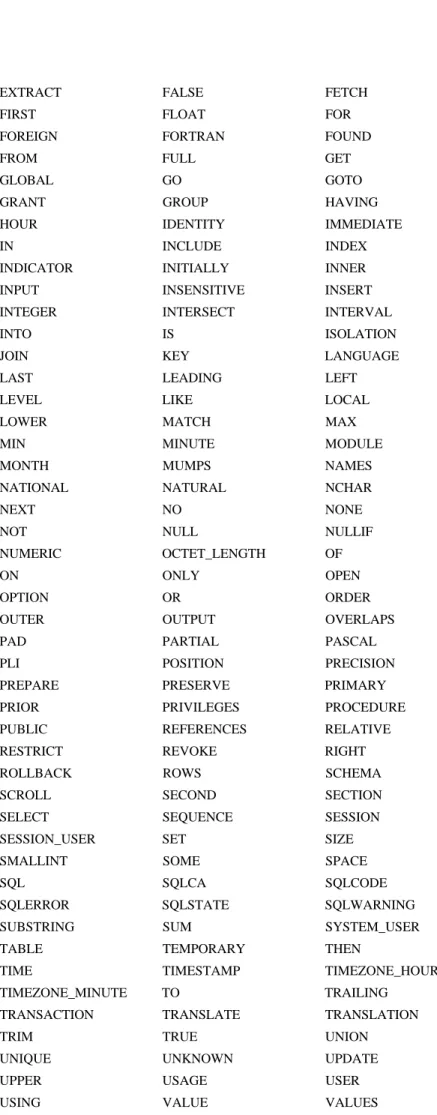
The following list of SQL key words should be checked to make sure that none of the fields in your files have the same name as a SQL key word. If so, then the field name must be changed before you can successfully access that file via the ODBC drivers.
ABSOLUTE ACTION ADA ADD ALL ALLOCATE ALTER AND ANY ARE AS ASC
ASSERTION AT AUTHORIZATION AVG BEGIN BETWEEN BIT BIT_LENGTH BOTH BY CASCADE CASCADED CASE CAST CATALOG CHAR CHAR_LENGTH CHARACTER CHARACTER_LENGTH CHECK CLOSE COALESCE COBOL COLLATE COLLATION COLUMN COMMIT CONNECT CONNECTION CONSTRAINT CONSTRAINTS CONTINUE CONVERT CORRESPONDING COUNT CREATE
CROSS CURRENT CURRENT_DATE CURRENT_TIME CURRENT_TIMESTAMP CURRENT_USER CURSOR DATE DAY
DEALLOCATE DEC DECIMAL DECLARE DEFAULT DEFERRABLE DEFERRED DELETE DESC
DESCRIBE DESCRIPTOR DIAGNOSTICS DISCONNECT DISTINCT DOMAIN DOUBLE DROP ELSE END END-EXEC ESCAPE EXCEPT EXCEPTION EXEC EXECUTE EXISTS EXTERNAL
16 ·· Appendix B — SQL Key Words Guide to the Superbase ODBC Driver
EXTRACT FALSE FETCH FIRST FLOAT FOR FOREIGN FORTRAN FOUND FROM FULL GET GLOBAL GO GOTO GRANT GROUP HAVING HOUR IDENTITY IMMEDIATE IN INCLUDE INDEX INDICATOR INITIALLY INNER INPUT INSENSITIVE INSERT INTEGER INTERSECT INTERVAL INTO IS ISOLATION JOIN KEY LANGUAGE LAST LEADING LEFT LEVEL LIKE LOCAL LOWER MATCH MAX MIN MINUTE MODULE MONTH MUMPS NAMES NATIONAL NATURAL NCHAR NEXT NO NONE NOT NULL NULLIF NUMERIC OCTET_LENGTH OF ON ONLY OPEN OPTION OR ORDER OUTER OUTPUT OVERLAPS PAD PARTIAL PASCAL PLI POSITION PRECISION PREPARE PRESERVE PRIMARY PRIOR PRIVILEGES PROCEDURE PUBLIC REFERENCES RELATIVE RESTRICT REVOKE RIGHT ROLLBACK ROWS SCHEMA SCROLL SECOND SECTION SELECT SEQUENCE SESSION SESSION_USER SET SIZE SMALLINT SOME SPACE SQL SQLCA SQLCODE SQLERROR SQLSTATE SQLWARNING SUBSTRING SUM SYSTEM_USER TABLE TEMPORARY THEN
TIME TIMESTAMP TIMEZONE_HOUR TIMEZONE_MINUTE TO TRAILING
TRANSACTION TRANSLATE TRANSLATION TRIM TRUE UNION
UNIQUE UNKNOWN UPDATE UPPER USAGE USER USING VALUE VALUES
Guide to the Superbase ODBC Driver Appendix B — SQL Key Words ·· 17
VARCHAR VARYING VIEW WHEN WHENEVER WHERE WITH WORK YEAR