Proceedings of the
Third International Workshop on Graph Based Tools
(GraBaTs 2006)
eDOBS - Graphical Debugging for Eclipse
Leif Geiger and Albert Z¨undorf
4 pages
Guest Editors: Albert Z ¨undorf, Daniel Varr ´o
Managing Editors: Tiziana Margaria, Julia Padberg, Gabriele Taentzer
eDOBS - Graphical Debugging for Eclipse
Leif Geiger1and Albert Z ¨undorf1
1University of Kassel,
Software Engineering Research Group, Wilhelmsh¨oher Allee 73, 34121 Kassel, Germany
[email protected] [email protected] http://www.se.eecs.uni-kassel.de/se/
Abstract: This paper presents the eDOBS tool. eDOBS is the little brother of the
Fujaba environment. While Fujaba is used to create graph grammar based specifica-tions and programs, eDOBS is used to browse graphs, to edit graphs, and to execute graph transformations.
Keywords: graph browser, graph editor, graph grammar execution
1
Introduction
A graph based environment usually provides a component to visualize the current host graph and to allow the application of rewrite rules. In the Fujaba Tool Suite this functionality is provided by the Dynamic Object Browser, Dobs. Fujaba is a CASE tool which uses UML class diagrams for the specification of graph schemata and so called story diagrams to model graph transformations. Note that Fujaba generates conventional Java source code from those graph rewrite rules and we employ a usual Java compiler and runtime environment to execute this code. Accordingly the code for graph rewrite rules works on usual Java heap objects and Java references between such objects. So, the object browser Dobs also works on usual Java heap objects. Since Fujaba is currently being ported to Eclipse [FE04], we also ported Dobs. The new tool is called eDOBS1. The tight integration into Eclipse makes eDOBS even more helpful for the developer. This will be shown in the following chapters.
2
eDOBS - The graph Browser
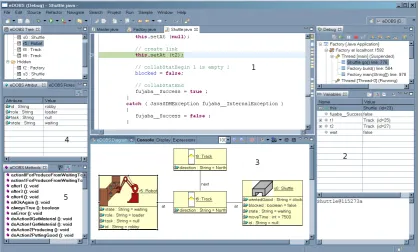
eDOBS is an Eclipse plugin, which visualizes the current heap of a Java program at runtime as a UML object diagram. eDOBS may typically be used within a debugging session. Instead of the variable view, the eDOBS panel may show the content of variables and how the referenced objects are related to each other. If e.g. the developer is just debugging his application and has hit a breakpoint in classShuttleas shown in the editor (1) in figure1, he is now able to call the ”Browse in eDOBS” command on all variables known by the debugging environment. This can be done directly in the source code, in the Variables view (2) or in one of the other views provided by the Eclipse debug plugin. After triggering this command, the content of the selected variable will be displayed as object in the eDOBS diagram view (3). In the example the developer has
choosen the local variablethisto be displayed in eDOBS from the Variables view. The local variable is then shown as the object labeleds0in the eDOBS diagram. Note that to facilitate recognition, eDOBS may be configured to use certain icons for certain kinds of objects, as was done in figure1. If the developer selects the so displayed object, all attributes of this object will be displayed in the eDOBS attribute view (4) and all methods in the method view (5). In figure
1the objectr5has been selected and its attributes and methods are shown.
At any time, the depicted object structure may be extended by including neighbors of already shown objects. This allows to explore complex object structures step by step. Here, one would call the ”Expand object” action on the objects0. This will then display the objectt8and the link between those two objects. Note that eDOBS, like Dobs, hides the internal structures of usual container classes and eDOBS does not show array objects. Thus, to-many relationships are just shown as many links but not e.g. as a complex binary tree structure. This raises the level of abstraction from plain programming structures to the level of UML object diagrams. This higher level of abstraction considerably facilitates the exploration of complex object structures.
Figure 1: eDOBS
After exploration of the current situation in eDOBS, the developer may decide to continue his debugging session. He may resume the debuggee VM and stop at another breakpoint or step through the code. During such step-wise execution, eDOBS immediately reflects changes to the object structure.
3
eDOBS - The graph editor
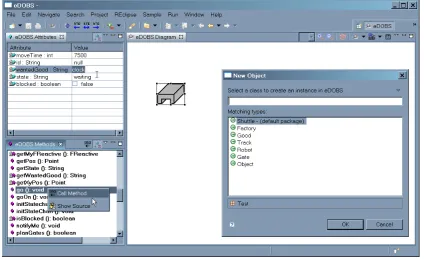
Furthermore, eDOBS enables the developer to make instant changes to the object structure. If the developer recognizes a misconfiguration in the object structure while debugging, he can instantly change that. eDOBS enables the user to create or remove objects and links and to change attribute values. Furthermore, methods can be called in eDOBS. Here again, changes done to the object structure while these method calls are instantly displayed. Figure2shows the editing operations ”Create new object”, ”Edit Attribute” and ”Call method”.
Figure 2: Editing operation in eDOBS
Note that one does not necessarily need to start working with eDOBS while debugging. The developer can also create an empty diagram, where he can start from scratch setting up an object structure using eDOBS editing functionality. And on this structure one can then again call meth-ods and explore the results, etc. This is especially useful in freshmen courses for Java, because one does not need one ”public static void main (String[] args)” but can start right in eDOBS creating Java objects. If the Java code is generated by Fujaba and marked as persistent there, one may easily save the so created object structure and load it in eDOBS afterwards.
4
Conclusion
eDOBS is a browser, editor and transformation rule application tool for object structures / typed instance graphs. It uses an abstraction layer to get access to the graph. Currently, there exists access layers for objects in Java debuggers, Java objects in the same VM as eDOBS (using reflec-tion), and for objects in JMI repositories, like NetBeans MDR [MM03]. eDOBS is an Eclipse plugin and integrates well with the Eclipse JDT and also with the Fujaba4Eclipse plugin. In ad-dition, there exists a standalone version of eDOBS (a so called Rich Client Platform application) which is e.g. integrated into the latest non-eclipse version of Fujaba, Fujaba 5. This RCP appli-cation can be easily integrated into every Java tool, to allow quick access to the internal object structure for visualization or debugging purposes.
Bibliography
[Fu02] Fujaba Homepage, University of Paderborn, http://www.fujaba.de/.
[FE04] Fujaba4Eclipse Homepage, University of Paderborn, http://wwwcs.upb.de/cs/fujaba/projects/eclipse/.
[ddd95] Andreas Zeller: DataDisplayDebugger Homepage, 1995, http://www.gnu.org/software/ddd/
[G02] L. Geiger: Design Level Debugging mit Fujaba; Informatiktage 2002 der Gesellschaft fr Informatik (GI), Bad Schussenried, Germany, November 8 - 9 (2002).
[GZ02] L. Geiger, A. Zndorf: Graph Based Debugging with Fujaba; Workshop on Graph Based Tools, International Conference on Graph Transformations, Barcelona, Spain, October 6 -12 (2002) .
[Blu98] Michael Klling: BlueJ − The Interactive Java Environment, Homepage, 1998, http://www.bluej.org/
[G04] Leif Geiger: The eDOBS Project, 2004, http://www.se.eecs.uni-kassel.de/se/index.php?edobs